FC150R - Oven BLACK & DECKER - Free user manual and instructions
Find the device manual for free FC150R BLACK & DECKER in PDF.


User questions about FC150R BLACK & DECKER
0 question about this device. Answer the ones you know or ask your own.
Ask a new question about this device
Download the instructions for your Oven in PDF format for free! Find your manual FC150R - BLACK & DECKER and take your electronic device back in hand. On this page are published all the documents necessary for the use of your device. FC150R by BLACK & DECKER.
USER MANUAL FC150R BLACK & DECKER
PLEASE READ AND SAVE THIS USE AND CARE BOOK.
VEUILLEZ LIRE ET CONSERVER CE GUIDE D'ENTRETIEN ET D'UTILISATION.

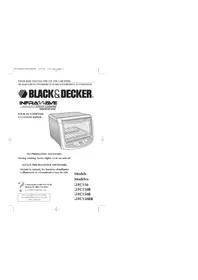
BLACK&DECKER
INFRAWAVE
SPEED COOKING
COUNTERTOP OVEN
FOUR DE COMPTOIR A CUISSON RAPIDE
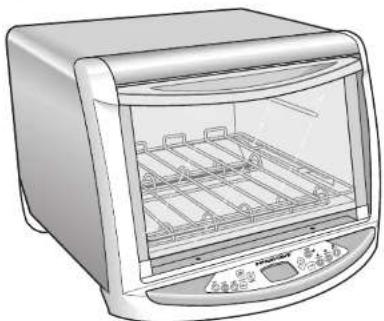
NO PREHEATING NECESSARY.
During cooking, heater lights cycle on and off.
AUCUN PRECHAUFFAGE NÉCESSAIRE.
www.blackandclecker.com
Accessories/Parts (USA/Canada)
Accessoires/Pièces (L.-U./Canada)
1-800-738-0245
Models
Modèles
FC150
FC150R
□FC150B
FC150BR
IMPORTANT SAFEGUARDS
When using electrical appliances, basic safety precautions should always be followed, including the following:
Read all instructions.
Do not touch hot surfaces. Use handles or knobs.
To protect against risk of electrical shock, do not immerse cord, plug, or any non-removable parts of this oven in water or other liquid.
- Close supervision is necessary when any appliance is used by or near children.
Unplug from outlet when not in use and before cleaning. Allow to cool before putting on or taking off parts.
Do not operate any appliance with a damaged cord or plug or after the appliance malfunctions or is dropped or damaged in any manner. Return the appliance to the nearest authorized service facility for examination, repair, or electrical or mechanical adjustment. Or, call the appropriate toll-free number listed on the cover of this manual.
The use of accessory attachments not recommended by the appliance manufacturer may cause injuries.
Do not use outdoors.
Do not let cord hang over edge of table or counter, or touch hot surfaces.
Do not place on or near a hot gas or electrical burner, or in a heated oven.
Extreme caution must be used when moving an appliance containing hot oil or other hot liquid.
To disconnect any control to "OFF", then remove plug from wall outlet.
Do not use appliance for other than intended use.
- Oversize foods or metal utensils must not be inserted in this appliance, as they may create a fire or risk of electric shock.
A fire may occur if the appliance is covered or touching flammable material including curtains, draperies, walls and the like, when in operation. Do not store any item on top of unit when in operation.
Do not place any of the following materials in the oven: paper, cardboard, plastic wrap, and the like.
Do not clean with metal scouring pads. Pieces can break off the pad and touch electrical parts resulting in a risk of electric shock.
Extreme caution should be used when using containers constructed of other than metal or glass.
Do not store any material, other than manufacturer's recommended accessories, in this oven when not in use.
Do not cover crumb tray or any parts of the oven with metal foil. This will cause overheating of the oven.
To turn off toasting, baking or broiling function, press the START/STOP button.
SAVE THESE INSTRUCTIONS.
As a safety measure, adjustable cooking times are set to not exceed 2 times the default time displayed for each function. For example, if the function you choose displays a default time of 7, you will be able to choose up to a maximum cooking time of 14.
ELECTRICAL CORD
a) A short power-supply cord (or detachable power-supply cord) is to be provided to reduce the risk resulting from becoming entangled in or tripping over a longer cord.
b) Longer detachable power-supply cords or extension cords are available and may be used if care is exercised in their use.
c) If a long detachable power-supply cord or extension cord is used,
1) The marked electrical rating of the detachable power-supply cord or extension cord should be at least as great as the electrical rating of the appliance,
2) If the appliance is of the grounded type, the extension cord should be a grounding-type 3-wire cord, and
3) The longer cord should be arranged so that it will not drape over the countertop or tabletop where it can be pulled on by children or tripped over.
Congratulations on your purchase of the Infrawave™ Speed Cooking Countertop Oven – the latest in cooking technology! The Infrawave™ Speed Cooking Countertop Oven uses specific wavelengths in the electromagnetic spectrum. This allows it to deliver the benefit of speed and the ability to cook a broad range of foods to perfection.
There's no wasted energy as with conventional ovens and none of the uneven cooking you get with microwaves. Superior browning and crisping capabilities seal in flavor - cooking meat, poultry and fish dishes to perfection. You'll also get the perfect toast every time.
With your Infrared Speed Cooking Countertop Oven you'll enjoy:
- FASTER COOKING TIMES WITH NO PREHEATING
- Superior browning and crisping
Even cooking on all types of food
Energy saving
Easy-to-use control options
HOW IS THE INFRAWAVEOVEN DIFFERENT?
During cooking, the interior lights will cycle on and off. This is because the InfraredCam™ Oven doesn't cook by a specific temperature. It cooks by cycling its heater lights on and off according to the type of food you wish to prepare. This "intelligent profiling" provides advanced cooking performance over conventional ovens.
For example, when baking packaged refrigerated cookies, here is the difference between a conventional oven and the Infrared Oven.
Conventional Oven: InfrawaveTM Oven:
Preheat oven to 350^ Place cookies in oven.
Wait approximately 10 minutes Press for oven to preheat.


Bake at 350^ for approximately Press again to accept default 13 minutes. time of 7 minutes (for most cookies).
The Infrared Oven heater lights will cycle on and off appropriately for baking cookies. It's that simple!
Should you have any questions or concerns, our dedicated Customer Service team is ready to assist you.
Applica Customer Service
Call us at 1-800-231-9786, 24 hours a day, 7 days a week.
-Visit us online at www.blackanddecker.com
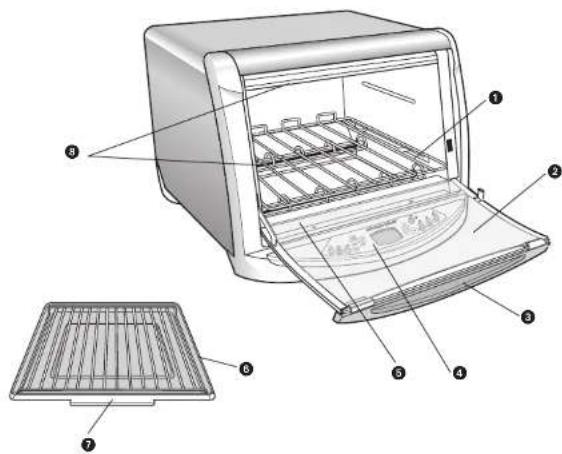
Product may vary slightly from what is illustrated.
+1. Slide rack (Part # FC150B-01)
- Curved glass door
- Door handle
- Digital control panel
+5. Slide-out, removable crumb tray (Part # FC150B-02)
+6, Broil rack (Part # FC150B-03)
+7. Bake pan (Part # FC150B-04) - Heater lights
+Consumer replaceable/removable parts
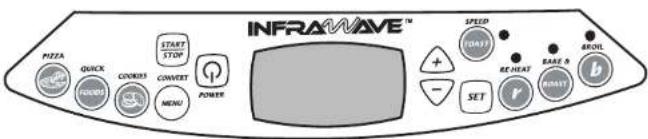
Digital Control Panel
FUNCTIONS

POWER
Turn the unit on and off. When you are finished cooking, remember to turn off and unplug unit.

START/STOP
Press once to begin any cooking cycle. During cooking, press once to Stop any cooking cycle. Press twice to exit programming.

UP/DOWN ARROWS
Press to scroll through food selections and to adjust cooking time. (Selections "wrap around" allowing you to scroll through all choices)
OPTIONS
With most cooking functions, the Infrared oven gives you the option of increasing or decreasing the cooking time even while it is cooking.
QUICK PICKS (PIZZA, COOKIES & QUICK FOOD buttons)

PIZZA
Lets you choose the type of pizza to cook and provides default cooking times.

COOKIES
Bakes most cookies in 7 minutes. Adjust the cooking time, if necessary, for your doneness preference.

QUICKFOODS
You choose the food type and the Infrared oven defaults to the correct cooking cycle and time. Includes chicken nuggets, pizza rolls, potato skins, poppers, chicken wings, bagel bites, potato crisps and frics.
CONVERT
CONVERT MENU
The ConvertMenuTM function translates pre-packaged food or recipe cooking instructions into InfrawaveTM cooking times. Just enter the type of food, time and temperature.

SET
Selects temperature or cooking time in a food choice. It then brings up the next menu options.
HEAT
RE-HEAT

Reheat frozen entrees or leftovers. Unlike microwave technology, the Infrared Oven allows natural flavors and juices to be retained. You can accept the suggested default time or, adjust it to your preference for doneness.

SPEED TOAST
The convenient Speed Toasting function cooks up to four slices of bread in about 2 minutes.

BAKE & ROAST
Choose from several pre-programmed selections. You can accept the suggested default time or, adjust it to your preference for doneness.

BROIL
Use the BROIL function to broil pork, chicken, hamburgers, hot dogs, steak and all your favorite meals. LOW BROIL cooks chicken, HIGH BROIL is for all other meats. You can accept the suggested default time or, adjust it to your preference for doneness.
This product is for household use only.
Before first use, remove the slide rack, broil rack and bake pan from oven. Wash in warm, sudsy water, rinse and dry with cloth or paper toweling. Replace slide rack in oven.
IMPORTANT: Before cleaning any part, be sure the oven is off, unplugged, and cool.
- Clean the glass door with a nylon pad and sudsy water. Do not use a spray glass cleaner.
- To remove the slide rack, open the door, pull the rack forward and out. Wash the slide rack in warm, sudsy water or in a dishwasher. To remove stubborn spots, use a polycter or nylon pad. To replace the slide rack, open the door completely and slide the rack into the rack support grooves of the interior of the oven and close the door.
- Wash the bake pan and broil rack in warm, sudsy water or in a dishwasher. To minimize scratching, use a polyester or nylon pad.
- After cleaning, always dry parts thoroughly.
Crumb Tray
Grasp the handle at the front of the oven and pull out the crumb tray. Dispose of crumbs and wash the tray in warm, sudsy water. Remove stubborn spots with a polyester or nylon pad. Be sure to dry thoroughly before slipping the Tray back into the oven.
Cooking Containers
- The inside dimensions of this Oven are 10 × 5 × 16^ × 11^ × 6^ . This size allows for many different types of baking containers. Keep interior dimensions in mind when purchasing cooking containers.
- Metal, ovenproof glass or ceramic bakeware without glass lids can be used in your oven. Follow manufacturer's instructions. Be sure the edge of the container and the food being cooked is at least 1^ (2.54 cm) away from upper heating elements.
- Some frozen foods are packaged in paper or plastic containers suitable for microwave or regular ovens; these should not be used in the InfrawaveTM Oven. If there are any questions regarding the use of a specific container, contact the food manufacturer.
-
Some items which should never be used in your Oven:
-
If a cover is needed, use aluminum foil and be careful that it does not touch the heating elements.
Air-tight packages such as scaled pouches or cans. - Plastic wrapping such as oven roasting bags or paperboard covers.
- Containers larger than those recommended.
- Containers with warnings against use in range-type or toaster ovens.
A few notes on your InfrawaveTM Speed Cooking Countertop Oven:
- During cooking, the interior lights will cycle on and off. This is because the Infrared oven doesn't cook by a specific temperature. It cooks by cycling its heater lights on and off.
- A beep will sound when pressing most control panel buttons.
- Since infrared waves can go through glass, cooking can be improved with an oven-safe, glass dish.
TROUBLESHOOTING
Cooking Problem Solution
Food is cooking too quickly. Because the Infrared Oven cook food quickly, you may want to use default cooking times the first time you cook a dish.
When I open the oven door if the oven door is opened during the to check on food, the heating cooking cycle, heaters will pause.
cycle seems to stop. To resume cooking, close oven door and PRESS the Start/Stop button.
Sometimes when I'm cooking, When using non-stick sprays, butter I notice smoke from the surface or margarine for cooking, you may of the pan, notice a small amount of smoke and
browning. This occurs because these coatings will cook first.
NOTE: Always start with a clean tray, pan or aluminium foil since any baked on food residue will also cause smoke.
When I make a casserole, it tends With deep-dish casseroles (including to brown too quickly on the top. lasagne), the top may brown more quickly than with conventional ovens. Place a piece of aluminum foil over your casserole dish during the cooking process and remove it at the end of the cooking cycle.
I want to adjust the number During cooking, you can adjust the of minutes my food has left to cooking time with the Up and Down cook, but I've already arrows. started the cooking process.
I can't find the exact food I want to cook in the selection menu.
Choose the food that is closest to the one you want to cook.
To Stop any process before cooking cycle is complete, PRESS. START STOP When you are finished cooking, PRESS and unplug the unit.

Bake Cookies
1

to turn ON the unit.PRESS
2
PRESS

3
To accept default time,
PPG

01

to start baking.
To adjust cooking time, PRESS

4
PRESS

or PRESS

to initiate cycle.
7
quickort tips

twice to start cooking with default time.

Quick Foods
1

to turn ON the unit.PRESS
2
PRESS

3
To find the type of food you want to cook, PRESS

until your selection appears.
4
To accept default time,

FOODS or
To adjust cooking time, PRESS

5
PRESS

or PRESS

to initiate cycle.
SELECTIONS INCLUDE:
Frozen chicken nuggets
Frozen pizza rolls
Frozen potato skins
Frozen poppers
Frozen wings (chicken)
Frozen bagel bites
Frozen potato crispers
Frozen oven fries
FC150BPub100002885R1 5/9/06 3:22 PM Page 12

Pizza
1

to turn ON the unit.PRESS
2
PRESS

3
To find the type of Pizza you want to cook, PRFSS

until your selection appears.
4
To select the type of Pizza, PRESS and accept default time,

START STOP
to start cooking.
To adjust cooking time, PRESS

5
PRESS

or PRESS

to initiate cycle.
SELECTIONS INCLUDE:
Regular (Frozen)
Rising crust (Frozen)
French bread pizza (Frozen)
Fresh/Deli
7
Press
times.

twice to start cooking to cook regular pizza at default

Toast
1
PRESS

to turn ON the unit.
2
PREFSS

You see default setting 4.
3
To choose another setting (1-7), PRESS

To accept default setting 4, PRESS

or
to start tasting.
4
PRESS

or PRESS

to initiate cycle.
TOAST SETTING GUIDE
1-2 Very light
3 Medium
4-5 Medium Dark
6-7 Dark

ickort tips
Press

Twice to startasting with default setting.
Can't find the exact food type in the pre-programmed options? Select the food type that is closest to the one you are cooking. Or you may prefer to use the CONVERT function (page 17).
1
PRESS

to turn ON the unit.
2
P256C

3
PRESS
to find the food category you would like to cook.
4
To accept default cooking time, PRESS

OR START STOP
to start baking.
To adjust cooking time, PRESS

5
PRESS

or PRESS

to initiate cycle.
SELECTIONS INCLUDE:
Yellow cake
Chocolate cake
Cupcakes, yellow
Cupcakes, chocolate
Muffins
Coffee cake
Brownies
Bar cookies
Potatoes
Pie crust
2-crust pastry
Fridge biscuits
Homemade biscuits
Crescent rolls
Frozen biscuit
Casscrole
Lasagne
Vegetables
Fish Fillet
Chicken (whole chicken, chicken parts,
chicken breast)
Turkey (1/2 turkey breast, frozen breast
roll)
Meat loaf
Beel
Rib roast

Reheat (For large portions of refrigerated foods. "Reduce cooking time if reheating single serving or small portions.)
1

to turn ON the unit.PRESS
2
PRESS

3
To find the food you would like to reheat, PRESS

(See chart below for options.)
4
To accept default cooking time, PRESS

or

to start broiling.
To adjust cooking time, PRESS

5
PRESS

or PRESS

to initiate cycle.
If you don't find the exact food you are cooking, select the food type that is closest.
SELECTIONS INCLUDE:
1 Pizza slice
Pizza slices
Ribs
Chicken pieces
Casserole
FC150BPub100002885R1 5/9/06 3:22 PM Page 16

Broil
HIGH (During HIGH BROIL, only heater lights remain ON.)
HIGH BROIL SELECTIONS INCLUDE:
Pork loin/rib/chops
Burgers
Hot dogs
Beef steaks
1

to turn ON the unit.PRESS
2
PRESS

3
To select HIGH broil (See food choices above) PRESS SET
4
To find the type of meat you would like to broil, PRESS
5
To accept default cooking time, PRESS oTART to start broiling.


to start broiling.
To adjust cooking time, PRESS
6
PRESS

or PRESS

to initiate cycle.

Broil
LOW (During LOW BROll, top and bottom heater lights cycle ON
and OFF.)
LOW BROIL SELECTION:
Chicken parts (or similar - duck, turkey and other poultry)
1

to turn ON the unit.PRESS
2
PRESS

3
To select LOW broil for chicken and other poultry PRESS
4
thenPRESS SET
5
To accept default cooking time, PRESS

or to start broiling.
To adjust cooking time, PRESS

6
PRESS

or PRESS

to initiate cycle.

Convert
Use the ConvertMenuTM to cook recipes that include cooking directions or to cook pre-packaged foods. Infrared oven cooking time will appear after you enter recipe or package cooking instructions.
| 1 | to turn ON the unit.PRESS |
| 2 | PRESSCONVERT |
| 3 | To select food type to cook, PRESS+ |
| 4 | To make your selection, PRESSSET |
| 5 | To input the recipe temperature, PRESS+then PRESSSET |
| To accept default time, PRESSCONVERT | |
| to adjust cooking time, PRESS+ | |
| 7 | PRESSSTARTor PRESSto initiate cycle. |
SELECTIONS INCLUDE: EXAMPLE
Meat
Fish
Poultry
Dessert
Baked
Cassero
To cook pre-packaged frozen lasagne:
- Choose cassette from ConvertMenuTM selections. Press SET.
-Using the UP and DOWN arrows, enter pre-packaged
cooking temperature of 375^ Press SET.
-Using the UP and DOWN arrows, enter pre-packaged
cooking time of 40 minutes. Press START/STOP
orCONVERTMENU.
Cooking time is converted to Infrared oven cooking
time of only 25 minutes! And there's no need to pre-heat!
IMPORTANT MISES EN GARDE
FC150BPub100002885R1 5/9/06 3:22 PM Page 36
NOTES:
NOTES:
NEED HELP?
For service, repair or any questions regarding your appliance, call the appropriate "800" number on the cover of this book. Do not return the product to the place of purchase. Do not mail the product back to the manufacturer nor bring it to a service center. You may also want to consult the website listed on the cover of this manual.
One-Year Limited Warranty
(Appplies only in the United States and Canada)
What does it cover?
- Any defect in material or workmanship; provided; however, Applica's liability will not exceed the purchase price of the product.
For how long?
One year after the date of original purchase.
What will we do to help you?
- Provide you with a reasonably similar replacement product that is either new or factory refurbished.
How do you get service?
-
Save your receipt as proof of the date of sale.
-
Check our on-line service site at www.prodprotect.com/applica, or call our toll-free number, 1-800-231-9786, for general warranty service.
If you need parts or accessories, please call 1-800-738-0245.
What does your warranty not cover?
- Damage from commercial use
- Damage from misuse, abuse or neglect
- Products that have been modified in any way
- Products used or serviced outside the country of purchase
Glass parts and other accessory items that are packed with the unit - Shipping and handling costs associated with the replacement of the unit
- Consequential or incidental damages (Please note, however, that some states do not allow the exclusion or limitation of consequential or incidental damages, so this limitation may not apply to you.)
How does state law relate to this warranty?
- This warranty gives you specific legal rights, and you may also have other rights that vary from state to state or province to province.
BESOIN D'AIDE?
Copyright © 2006 Applica Consumer Products, Inc.
Pub.No.1000002885-00-RV01
Made in People's Republic of China
Printed in People's Republic of China