TO1021BC - Oven BLACK & DECKER - Free user manual and instructions
Find the device manual for free TO1021BC BLACK & DECKER in PDF.


| Product Type | Toaster Oven |
| Brand | Black & Decker |
| Model | TO1021BC |
| Capacity | Up to 2.3 kg (chicken) or 6 slices of bread |
| Power | Approximately 1500 W |
| Voltage | 120 V |
| Frequency | 60 Hz |
| Temperature Range | 90 °C to 230 °C (200 °F to 450 °F) |
| Cooking Functions | 8 modes: Warm, Pizza, Frozen Meals, Grill, Bake, Roast, Rotisserie, Reheat |
| Display | Digital with blue backlight |
| Timer | Adjustable in 1-minute increments |
| Toast | 7 levels (preset to 4) |
| Dimensions (approx.) | 45 x 35 x 30 cm |
| Weight (approx.) | 8 kg |
| Exterior Material | Stainless steel and paint |
| Door | Curved glass |
| Included Accessories | Sliding rack, baking pan/drip tray, drip tray rack, rotisserie spit and forks, handy tool, crumb tray |
| Care | Accessories dishwasher safe; exterior surfaces with damp sponge |
| Safety | Automatic shut-off when door opens; grounded plug |
| Warranty | 2-year limited |
| Country of Origin | China |
Frequently Asked Questions - TO1021BC BLACK & DECKER
User questions about TO1021BC BLACK & DECKER
0 question about this device. Answer the ones you know or ask your own.
Ask a new question about this device
Download the instructions for your Oven in PDF format for free! Find your manual TO1021BC - BLACK & DECKER and take your electronic device back in hand. On this page are published all the documents necessary for the use of your device. TO1021BC by BLACK & DECKER.
USER MANUAL TO1021BC BLACK & DECKER
Better for you...by design
2-IN-1 ROTISSERIE & COUNTERTOP OVEN RÔTISSOIRE ET FOUR POUR LE COMPTOIR 2-EN-1
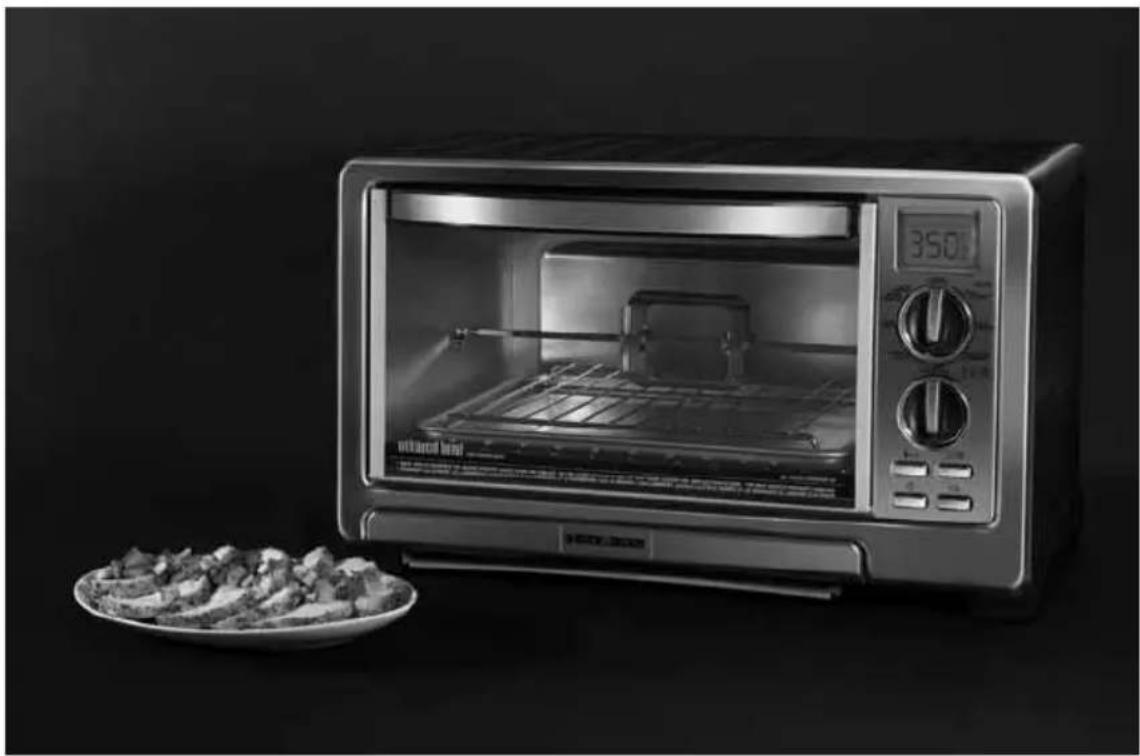
natural_image
Black-and-white photo of a modern microwave oven with a plate of food on the right side (no visible text or symbols)Customer Care Line:
USA 1-800-231-9786
Accessories/Parts (USA)
1-800-738-0245
For online customer service
and to register your product, go to
www.prodprotect.com/applica
Please Read and Save this Use and Care Book.
IMPORTANT SAFEGUARDS
When using electrical appliances, basic safety precautions should always be followed, including the following:
Read all instructions.
☐ Do not touch hot surfaces. Use handles or knobs.
☐ To protect against electrical shock do not immerse cord, plugs or appliance in water or other liquid.
☐ Close supervision is necessary when any appliance is used by or near children.
☐ Unplug from outlet when not in use and before cleaning. Allow to cool before putting on or taking off parts.
☐ Do not operate any appliance with a damaged cord or plug, or after the appliance malfunctions or has been damaged in any manner. Return appliance to the nearest authorized service facility for examination, repair or adjustment. Or, call the appropriate toll-free number on the cover of this manual.
☐ The use of accessory attachments not recommended by the appliance manufacturer may cause injuries.
Do not use outdoors.
☐ Do not let cord hang over edge of table or counter, or touch hot surfaces.
☐ Do not place on or near a hot gas or electric burner, or in a heated oven.
Extreme caution must be used when moving an appliance containing hot oil or other hot liquids.
☐ To disconnect the appliance, press power button then remove plug from wall outlet.
☐ Do not use appliance for other than intended use.
☐ Use extreme caution when removing tray or disposing of hot grease.
☐ Oversized foods or metal utensils must not be inserted in a toaster oven, as they may create a fire or risk of electric shock. A fire may occur if the toaster oven is covered or touching flammable material including curtains, draperies, walls and the like, when in operation.
☐ Do not clean with metal scouring pads. Pieces can break off the pad and touch electrical parts resulting in a risk of electric shock.
☐ Extreme caution should be exercised when using containers constructed of other than metal or glass.
Do not store any material, other than manufacturer's recommended accessories, in this oven when not in use.
☐ Do not place any of the following materials in the oven: paper, cardboard, plastic and the like.
☐ Do not cover crumb tray or any part of this oven with metal foil. This will cause overheating of the oven.
☐ This appliance is not intended for use by persons (including children) with reduced physical, sensory or mental capabilities, or lack of experience and knowledge, unless they have been given supervision or instruction concerning use of the appliance by a person responsible for their safety.
Children should be supervised to ensure that they do not play with the appliance.
SAVE THESE INSTRUCTIONS.
This product is for household use only.
GROUNDED PLUG
As a safety feature, this product is equipped with a grounded plug, which will only fit into a three-prong outlet. Do not attempt to defeat this safety feature. Improper connection of the grounding conductor may result in the risk of electric shock. Consult a qualified electrician if you are in doubt as to whether the outlet is properly grounded.
TAMPER-RESISTANT SCREW
Warning: This appliance is equipped with a tamper-resistant screw to prevent removal of the outer cover. To reduce the risk of fire or electric shock, do not attempt to remove the outer cover. There are no user-serviceable parts inside. Repair should be done only by authorized service personnel.
ELECTRICAL CORD
a) A short power-supply cord (or detachable power-supply cord) is to be provided to reduce the risk resulting from becoming entangled in or tripping over a longer cord.
b) Longer detachable power-supply cords or extension cords are available and may be used if care is exercised in their use.
c) If a long detachable power-supply cord or extension cord is used,
1) The marked electrical rating of the cord set or extension cord should be at least as great as the electrical rating of the appliance, and
2) If the appliance is of the grounded type, the extension cord should be a grounding-type 3-wire cord.
3) The cord should be arranged so that it will not drape over the countertop or tabletop where it can be pulled on by children or tripped over unintentionally.
Note: If the power supply cord is damaged, it should be replaced by qualified personnel or in Latin America by an authorized service center.
Product may vary slightly from what is illustrated.
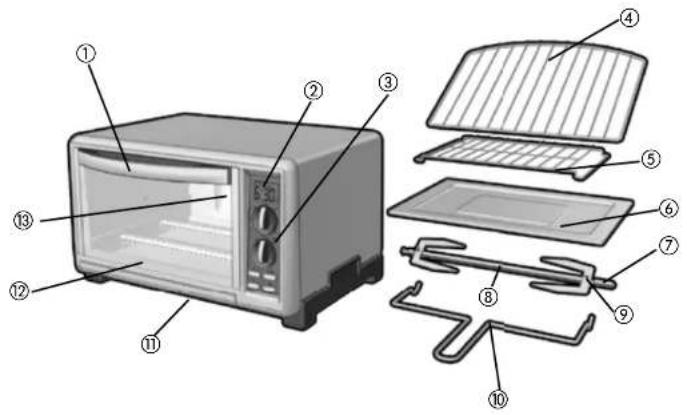
- Door handle
- Digital display
- Control panel
-
- Slide rack (Part# 31K23-16-D-N)
-
- Broil rack (Part# 31K23-26-D-N)
-
- Bake/broil pan (Part# 32K23-03-N)
† 7. Rotisserie prongs (Part# 38K23-44-N)
† 8. Rotisserie rod (Part# 31K23-42-N)
† 9. Rotisserie wing nuts (Part# 33K23-01-N)
† 10. EZ fit rotisserie tool (Part# 31K23-56-D-N)
† 11. Slide-out crumb tray (Part# 31K23-11-N)
- Bake/broil pan (Part# 32K23-03-N)
- Curved glass door
- Extra-deep curved interior
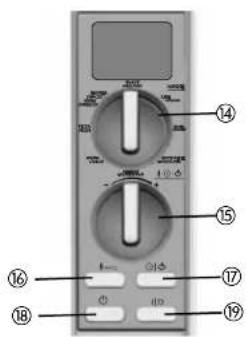
- Cooking MODE control knob
- TEMP/TIME/TOAST ( ⚠️ ⏱️ ⚡️) control knob
- TEMP ( 8^ F/ ^ C) button
- TIME/TOAST ( ⚙️_) button
- POWER ( ⏻ ) button
- START/STOP (I/O) button
Note: indicates consumer replaceable/removable parts
How to Use
This product is for household use only.
CAUTION: Do not leave oven unattended when in operation. Food ignition may occur. If this happens, unplug unit but DO NOT open door. To reduce the risk of fire, keep oven interior completely clean and free of food residues, oil, grease and any other combustible materials.
CAUTION: A fire may occur if the toaster oven is covered or touching flammable materials including curtains, draperies, walls and the like when in operation or after, when still hot. Do not place any of the following materials in the oven, on top of the oven, or in contact with the oven sides or bottom surfaces: paper, cardboard, plastic or the like.
CAUTION: THIS OVEN GETS HOT. WHEN IN USE, ALWAYS USE OVEN MITTS OR POT HOLDERS WHEN TOUCHING ANY OUTER OR INNER SURFACE OF THE OVEN.
GETTING STARTED
- Remove all packing material and any stickers; peel off clear protective film from control panel.
- Please go to www.prodprotect.com/applica.com to register your warranty.
- Wash all removable parts as instructed in CARE AND CLEANING section of this manual.
- Select a location where this unit is to be used allowing enough space for back of the unit and the wall to allow heat to flow without damage to cabinets and walls.
- Insert crumb tray below lower heating elements.
- Insert slide rack, making sure to insert curved end toward the back of the oven as it is designed to fit the curved interior of the oven for cooking pizza.
- Remove tie from cord and unwind.
- Plug unit into electrical outlet. The digital display shows default temperature.
Caution: Unit gets hot. NEVER touch outer surfaces. Always use oven mitt or pot holders.
Note: Before first use, run this oven empty for 15 minutes to remove/burn off any possible residues from manufacturing. You may notice some slight smoke and odor escaping from the oven. This is normal and will disappear with use of oven.
HELPFUL INFORMATION ABOUT YOUR OVEN
This oven uses infrared energy to enhance the cooking process for better browning and, in some cases, shorter cooking time.
Note: When the oven is in use, the interior lights will cycle on and off. This is normal.
Caution: Unit gets hot. NEVER touch outer surfaces. Always use oven mitt or pot holders.
- The oven is preset for temperature and time. These preprogrammed temperatures and times are to be used as a suggestion. When cooking any food for the first time, begin checking the doneness several minutes before the expected finish time.
Important: The time counts down once the Start/Stop (I/O) button is pressed and the oven is fully preheated.
Note: Until the preheat is completed the digital display will flash and the time will not change until the cooking begins.
Important: When the words "REDUCED COOKING TIME" are visible on the digital display, the oven is functioning.
COOKING CYCLES
| SETTING TEMPERATURE TIME | ||
| KEEP WARM 200°F / 90°C 30 min | ||
| PIZZA 400°F / 200°C 20 min | ||
| FROZEN SNACKS 400°F / 200°C 15 min | ||
| TOAST Settings 1 - 7 -- | ||
| BAKE 350°F / 175°C 30 min | ||
| BROIL 450°F / 230°C 20 min | ||
| ROTISSERIE 350°F / 175°C 60 min | ||
| REHEAT 250°F / 120°C 30 min |
- You can change the temperature and time anytime.
To change the preset temperature, press the TEMP ( 8^ F/ ^ C) button, then turn and release the TIME/TEMP/TOAST ( 8^ control knob as follows:
- to the left (-) to decrease the temperature in 5-degree increments.
• to the right (+) to increase the temperature in 5-degree increments.
To change the preset time, press the TIME/TOAST button, then turn and release the TIME/TEMP/TOAST control knob - to the left (-) to decrease the time in 1-minute increments.
• to the right (+) to increase the time in 1-minute increments.
Note: To change the temperature or time quickly, after pressing the TEMP ( 8^/^ ) or TIME/TOAST [按钮 hold the TIME/TEMP/TOAST ( ) control knob in the desired position (left to decrease; right to increase).
- The oven is preset for temperature and time for medium toast (setting 4). Use this for your first cycle then adjust lighter or darker to suit your taste.
- Once a toast setting is selected and the START/STOP [I/O] button is pressed, the digital display will change to show the estimated number of minutes the toast will take to cook. The timer does not count down.
- If food is browning too quickly, use a loose covering of aluminum foil. Make sure the foil does not touch the heating elements.
- When the oven door is opened during use, cooking is paused; the heater lights turn off and the blue backlight on the digital display flashes. Once the oven door is closed, the lights come on; the backlight on the digital display becomes constant and the oven resumes cooking. The timer will continue to count down.
- When using the rotisserie, foods should be placed into a cold oven.
- At the end of any cooking cycle there will be an audible signal.
FUNCTIONS
Power button | Turns the appliance on and off. This is the first button to be pressed to bring power to the appliance. When cooking is complete, press this button to turn appliance off, then, unplug the appliance. |
Start/Stop button | This is the last button to be pressed to begin and end cooking. Every time the door is opened during cooking, the heater light turns off, cooking pauses and the blue backlight on the digital display flashes. Once you close the door, cooking and the countdown resume. |
Temp button | Once a cooking cycle is selected, press this button to display the preset temperature. To change the preset temperature turn the TIME/TEMP/TOAST (8·7·9) control knob as directed below. |
Timer/Toast button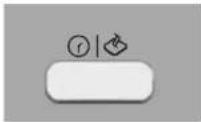 | Once a cooking cycle and desired cooking temperature are selected, press this button to display the preset time. To change the preset time turn the TIME/TEMP/TOAST (8·7·9) control knob as directed below. |
| Temp/Time/Toast control knob | Turn this knob to change the displayed temperature or time for food to be cooked. to the left (-) to decrease the temperature in 5-degree increments or time in 1-minute increments. to the right (+) to increase the temperature in 5-degree increments or time in 1-minute increments.This knob is also used to select the toast shade from 1 to 7. The oven is preset at 4. Use this for the first toasting you do in the oven.To change the toast shade, turn this knob: to the left (-) to select a lighter toast shade. to the right (+) to select a darker toast shade.Note: To change the temperature or time quickly, after pressing the TEMP [8°F/°C] or TIME/TOAST (10°) button hold the TIME/TEMP/TOAST (10°) control knob in the desired position (left to decrease; right to increase). |
| MODE control knob | Once the POWER (1) button is pressed, turn this knob to select the food to be cooked or the function to be performed. The preset temperature will appear in the display. It will flash until the oven is preheated. Press the START/STOP (I/O) button; the digital display will show the preset time for the function selected (for example, if snack foods is selected the oven will preheat to 400°F and will stay on for 15 minutes unless changes are made). |
| Important: When the words "REDUCED COOKING TIME" are visible on the digital display, the oven is functioning. | |
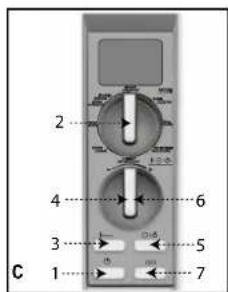
BUTTON SELECTION ORDER (refer to illustration C)
Note: When the START/STOP (I/O) button is pressed, the oven will begin to preheat. The selected baking time will not begin to count down until preheat is complete. There will be an audible signal. Open the door and insert the food to be cooked. Close the door. The oven will begin to cook and the count down will begin. The display will become constant.
Note: The countdown will begin whether food has been inserted into the oven or not.
Note: To cook at the preset temperature and time for any function. Simply select the desired function and press the START/STOP (I/O) button; the oven will automatically begin to preheat and will count down from the preset time once preheating is complete.
- Press the POWER [⏻] button.
- Turn the MODE control knob to desired food to be cooked or function to be performed. The preset temperature will be displayed.
- To check the preset temperature, press the TEMP(8°F/°C) button; the preset temperature will be displayed.
- To change the temperature, turn TIME/TEMP/TOAST(8·f) control knob to the right to increase the temperature or to the left to decrease the temperature.
- To check the preset time, press the TIME/TOAST(8·①·②) button; the preset time will be displayed.
- To change the time, turn TIME/TEMP/TOAST (☐) control knob to the right to increase the time or to the left to decrease the time.
- Press START/STOP (I/O) button to begin preheating the oven or cooking (toast and rotisserie do not require preheating). The display will flash.
- Once the oven is preheated to the selected temperature, there will be an audible signal. Open the oven door and insert the food to be cooked. Close the oven door and the oven begins cooking.
Note: The countdown will begin whether food has been inserted into the oven or not.
-
If door is opened anytime during cooking cycle, cooking will pause. To resume cooking, close the door.
-
When cooking is complete, remove the food, close the door and press the POWER (⏻) button to turn off the appliance and unplug.
EXAMPLE FOR COOKING A FROZEN PIZZA
Note: Refer to the package directions for time and temperature.
- Press the POWER (⏻) button.
- Turn the MODE control knob to PIZZA. The preset temperature of 400^ F will be displayed. If this is the temperature suggested in the packaging, skip step 3.
- If the temperature suggested is different, press the TEMP(8°F/°C) button and turn the TIME/TEMP/TOAST(8·1·2) control knob to change preset temperature to the desired temperature. (See directions on pages 8 and 9.)
- Press TIME/TOAST [8·1] button. The preset time will be displayed. Press the START/STOP [I/O] button and the oven will begin to preheat.
- If the time suggested is different, press the TIME/TOAST [☐·☐·☐] button and turn the TIME/TEMP/TOAST [☐·☐·☐] control knob to change preset time to the desired time. (See directions on pages 8 and 9.)
- Once the oven is preheated to the selected temperature, there will be an audible signal. Open the oven door and insert the food to be cooked. Close the oven door.
Note: The countdown will begin whether food has been inserted into the oven or not.
Caution: When in use, this appliance gets hot. NEVER touch outer surfaces. Always use oven mitt or pot holders.
-
If door is opened anytime during cooking cycle, the cooking cycle pauses and the display will flash. Close the door to resume cooking. The display will become constant.
-
When cooking is complete, using oven mitts or pot holders, remove the food, close the door and press the POWER (☐) button to turn off the appliance and unplug.
Note: To cook at the preset temperature and time for any function. Simply select the desired function and press the START/STOP (I/O) button; the oven will automatically
begin to preheat and will count down from the preset time once preheating is complete.
KEEP WARM FUNCTION
This function is useful to keep cooked foods warm for later service. Follow directions on pages 8 and 9 to set the oven for this function.
Tips for using this function
- Hold cooked foods for about 10 minutes in a preheated oven set to 200^ .
- Cooked foods should be kept at an internal temperature of 150^ or above. Use a meat thermometer to check the temperature.
• Always use a meat thermometer to check internal temperature of food.
• Cover cooked foods with foil to keep moist. - You can stop this function at any time by pressing the START/STOP [I/O] button.
Important: When you open the door, the cooking function pauses and the blue backlight on the digital display begins to flash. Close the door to resume cooking.
- At the end of the cooking cycle, open oven door using oven mitt or pot holder and carefully remove food.
- Close the door and press the POWER (⏻) button to turn off the appliance and unplug.
PIZZA FUNCTION
Caution: When in use, this appliance gets hot. NEVER touch outer surfaces. Always use oven mitt or pot holders.
Note: Since not all pizzas bake at the same temperature or time, refer to the directions for changing the temperature and time on page 8 and 9 when using this function.
- For a crisp crust bake the pizza directly on the oven rack.
- For a softer crust, place the pizza on the baking pan.
- Pizza should always be baked to an internal temperature of no less than 140^ .
- Do not allow frozen pizzas to thaw before baking.
- Pizzas are fully baked when the crust is golden and the cheese is completely melted.
- The package directions for frozen pizzas vary widely; follow the directions for temperature as the package directs.
- The baking time may vary when using a toaster oven, check baking results before baking time listed on the package.
REHEAT FUNCTION
- Reheat will be used to warm a previously cooked food that may be at room temperature or from the refrigerator.
- Watch food closely to avoid overcooking.
TOAST FUNCTION
Caution: When in use, this appliance gets hot. NEVER touch outer surfaces. Always use oven mitt or pot holders.
Note: It is not necessary to preheat the oven for toasting.
- Press the POWER (⏻) button and open oven door.
- Place the desired number of slices of bread or bagel halves (cut side up) (up to 6) on the oven rack.
- Close oven door.
-
Turn the MODE control knob to TOAST.
-
Press TIME/TOAST (Q·①) button. When the oven is used for the first time the preset shade is 4 (medium toast). Use this for your first cycle then adjust lighter or darker to suite your taste.
- To change shade level (1-7) turn the TIME/TEMP/TOAST (☐·☐·☐) control knob:
• to the left [-] to decrease the shade selection.
• to the right (+) to increase the shade selection. - Press the START/STOP (I/O) button to begin the toast cycle.
- The digital display will change to the approximate expected time the toasting will take.
Important: When the words "REDUCED COOKING TIME" are visible on the digital display, the oven is functioning.
- Once toast cycle is completed, open oven door using oven mitt or pot holder and slide out the oven rack to remove bread or bagels.
Note: Once the oven door is opened in the toast cycle the toasting ends. To continue toasting follow steps 3 through 8.
Tip for multiple toasting cycles
For best results when making consecutive batches of toast, allow a short cool down period between toasting cycles or select a lighter setting.
- When cooking is complete, using oven mitts or potholders, remove the food, close the door and press the POWER(⏻) button to turn off the appliance and unplug.
BAKE FUNCTION
This cycle should be used for roasting meats, baking chicken parts and fish, baking biscuits, muffins, brownies, breakfast breads, coffeecakes, vegetables and casseroles.
Caution: When in use, this appliance gets hot. NEVER touch outer surfaces. Always use oven mitt or pot holders.
- Turn the MODE control knob to BAKE. The digital display shows the default temperature of 350^ F.
- To change the temperature, press the TEMP(8°F/°C) button and follow the directions on pages 8 and 9.
Note: You can change the time and temperature anytime during the cooking cycle. (See directions on pages 8 and 9.) - Press the TIME/TOAST (Q·☐) button. The digital display shows the default time of 30 minutes. To change the cooking time, press the TIME/TOAST (Q·☐) button and follow the directions on pages 8 and 9.
- Press START/STOP (I/O) button to begin preheating the oven. The display will flash.
- Once the oven is preheated to the selected temperature, there will be an audible signal. Open the oven door. Make sure oven rack is in place and insert the food to be cooked.
Note: Use the bake pan that comes with the oven or a glass oven-proof baking dish or metal baking pan.
Note: The countdown will begin whether food has been inserted into the oven or not. Important: When the words "REDUCED COOKING TIME" are visible on the digital display, the oven is functioning.
-
Close oven door.
-
You can stop the cooking at any time by pressing the START/STOP (I/O) button. Important: When you open the door, the cooking function pauses and the blue backlight on the digital display begins to flash. Close the door to resume cooking.
-
At the end of the cooking cycle, open oven door using oven mitt or pot holder and carefully remove food.
- Close the door and press the POWER (⏻) button to turn off the appliance and unplug.
BROIL FUNCTION
Important: This oven uses closed door broiling. Do not attempt to keep door ajar while broiling.
Note: This oven allows you to select a temperature at which to broil. For foods such as white fish fillets, you may wish to use a lower temperature.
Caution: When in use, this appliance gets hot. NEVER touch outer surfaces. Always use oven mitt or pot holder.
- Turn the MODE control knob to BROIL.
- Select the temperature and time (see directions on pages 8 and 9). Allow oven to preheat. The display will stop flashing once the preset temperature has been reached. There will be an audible signal.
Note: The countdown will begin whether food has been inserted into the oven or not.
Important: When the words "REDUCED COOKING TIME" are visible on the digital display, the oven is functioning.
-
Place the broil rack in the bake pan.
-
Place food to be cooked on broil rack.
-
Open oven door.
-
Using oven mitts or pot holders, insert rack into oven.
-
Close oven door.
-
You can stop the cooking at any time by pressing the START/STOP (I/O) button.
Important: When you open the door, the cooking function pauses and the blue backlight on the digital display begins to flash. Close the door to resume cooking.
- Turn food over about halfway through cooking time. Return food to oven and close oven door.
- At the end of the cooking cycle, open oven door using oven mitt or pot holder and carefully remove food.
-
Close the door and press the POWER( ⏻ ) button to turn off the appliance and unplug. BROILING TIPS
-
Placing food on rack reduces calories, allows the drippings to flow into the bake/broil pan and helps to eliminate or prevent smoking from the broiler.
- For best results, thaw frozen meat, poultry and fish before broiling.
- If frozen steaks and chops are broiled allow 1 12 to 2 times the broiling time as required for fresh.
- Trim excess fat from meat and score edges to prevent curling.
- Brush foods to be broiled with oil and season as desired before broiling.
- Fish fillets and steaks are delicate and should be broiled directly on bake/broil pan placed on the rack.
- There is no need to turn fish fillets during broiling. Carefully turn thick fish steaks midway through broiling cycle.
- If broiler "pops" during broiling, reduce the temperature in the oven and add some water to the bake/broil pan.
- Wash broiler pan and clean inside of oven after each use with non-abrasive cleaner and
hot soapy water. Too much grease accumulation will cause smoking.
ROTISSERIE FUNCTION
Important: When using this function, do not preheat the oven; remove the baking rack and bake/broil pan.
Caution: When in use, this appliance gets hot. NEVER touch outer surfaces. Always use oven mitt or pot holders.
- Make sure wing nut is inserted into openings at end of the prong. Do not tighten.
- Insert pointed end of rod through one of the rotisserie prongs with pointed ends of prong facing toward the pointed end of the rod. Slide prong close to square end of rod and tighten the wing nut.
- Insert rotisserie rod through center of food to be cooked pushing the food into the sharp ends of the prong until the food is securely imbedded in the food. Tighten the wing nut.
Note: The oven accommodates up to a 5-pound chicken.
4. Slide second prong onto pointed end of rod with pointed ends facing the food. Continue until forks are securely imbedded into the food. Tighten the wing nut.
5. Season food as desired.
6. Make sure oven is off and the slide rack and bake pan are removed from the oven.
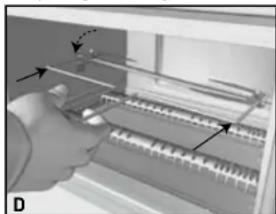
7. Using the EZ fit rotisserie tool, insert the pointed end of the rotisserie rod into the opening on the right center wall of the oven.
natural_image
Diagram of a mechanical assembly with gears and shafts, no visible text or symbols- Next, insert the square end of the rod into the "U" slot on the left side of the oven [D].
- To begin cooking, press the POWER (☐) button, then turn the MODE control knob to ROTISSERIE. Follow directions on pages 8 and 9 to set temperature and time.
Important: When you open the door, the cooking function pauses and the blue backlight on the digital display begins to flash. Close the door to resume cooking.
- You can stop the cooking at any time by pressing the START/STOP (I/O) button.
- To remove cooked food, use the EZ fit rotisserie tool. Transfer the food to a serving platter or cutting board. Allow food to cool several minutes before removing the prongs and rod.
- Close the door and press the POWER(○) button to turn off the appliance and unplug.
TIPS WHEN USING THE ROTISSERIE
- When cooking foods, such as chicken, use butchers' twine to tie the wings and legs close to the body of the bird.
• The oven accommodates up to a 5-pound chicken. - When cooking foods with high fat content, pour about 14 cup water into crumb tray before beginning to cook.
- Allow drippings on crumb tray to cool completely before removing from oven.
- To test for doneness of the meat, a meat thermometer is the most accurate test. This is an easy test that works well:
- Press into the center of the meat with your finger.
- Rare feels soft and yields easily to pressure.
• Medium springs back easily when pressed.
• Well done feels firm and does not yield when pressed.
• Always allow meat to stand for 10 minutes before serving to allow the juices to redistribute in the meat, so every slice will be moist and tender.
FROZEN SNACKS FUNCTION
- This is a good use for this oven. Snack foods can be baked without heating up a large oven.
Important: When you open the door, the cooking function pauses and the blue backlight on the digital display begins to flash. Close the door to resume cooking.
- Watch food closely to avoid overcooking.
Care and Cleaning
This appliance contains no user-serviceable parts. Refer service to qualified service personnel.
CLEANING
- Turn off unit, unplug from wall outlet and let it cool before cleaning.
- Clean the glass door with a nylon pad and sudsy water. Do not use a spray glass cleaner.
- To remove slide rack, open the door, pull the rack forward and out. Wash in warm, sudsy water or in a dishwasher. To remove stubborn spots, use a polyester or nylon pad. To replace the slide rack, open the door completely and slide into the rail, curved end first, and close the door.
- Wash the bake pan, broil rack, rotisserie rod and prongs in hot, sudsy water or in the dishwasher. To minimize scratching, use a polyester or nylon pad.
- To wash the covers on the heating elements, wipe with disinfectant wipes and dry with a soft cloth.
- To remove the crumb tray, grasp the handle at the front of the oven and slide it out. Dispose of crumbs and wash the tray in warm, soapy water. Remove stubborn spots with a nylon mesh pad. Be sure to dry thoroughly before inserting the tray back into the oven.
EXTERIOR SURFACES
Caution: The oven surface gets hot; be sure the oven has cooled completely before cleaning.
Let the oven cool completely before cleaning any outer surface. Wipe with a damp cloth or sponge and dry with paper towel or soft cloth.
COOKING CONTAINERS
- Metal, ovenproof glass or ceramic bake ware without glass lids can be used in your oven. Follow manufacturer's instructions.
NEED HELP?
For service, repair or any questions regarding your appliance, call the appropriate 800 number on cover of this book. Please DO NOT return the product to the place of purchase. Also, please DO NOT mail product back to manufacturer, nor bring it to a service center.
You may also want to consult the website listed on the cover of this manual.
Three-Year Limited Warranty
(Applies only in the United States and Canada)
What does it cover?
- Any defect in material or workmanship provided; however, Applica's liability will not exceed the purchase price of product.
For how long?
- Three years from the date of original purchase with proof of such purchase.
What will we do to help you?
- Provide you with a reasonably similar replacement product that is either new or factory refurbished.
How do you get service?
- Save your receipt as proof of date of sale.
- Check our on-line service site at www.prodprotect.com/applica, or call our toll-free number, 1-800-231-9786, for general warranty service.
- If you need parts or accessories, please call 1-800-738-0245.
What does your warranty not cover?
• Damage from commercial use
• Damage from misuse, abuse or neglect
- Products that have been modified in any way
- Products used or serviced outside the country of purchase
- Glass parts and other accessory items that are packed with the unit
• Shipping and handling costs associated with the replacement of the unit
- Consequential or incidental damages (Please note, however, that some states do not allow the exclusion or limitation of consequential or incidental damages, so this limitation may not apply to you.)
How does state law relate to this warranty?
- This warranty gives you specific legal rights, and you may also have other rights that vary from state to state or province to province.
BLACK&DECKER. is a trademark of The Black & Decker Corporation, Towson, Maryland, USA
Made and Printed in People's Republic of China
natural_image
Diagram of a piano keyboard with directional arrows indicating movement (no text or symbols)Applica Consumer Products, Inc.
© 2011 Applica Consumer Products, Inc.

- 2-IN-1 ROTISSERIE & COUNTERTOP OVEN RÔTISSOIRE ET FOUR POUR LE COMPTOIR 2-EN-1
- Customer Care Line:
- Please Read and Save this Use and Care Book.
- IMPORTANT SAFEGUARDS
- SAVE THESE INSTRUCTIONS.
- GROUNDED PLUG
- TAMPER-RESISTANT SCREW
- ELECTRICAL CORD
- How to Use
- GETTING STARTED
- HELPFUL INFORMATION ABOUT YOUR OVEN
- BUTTON SELECTION ORDER (refer to illustration C)
- EXAMPLE FOR COOKING A FROZEN PIZZA
- Caution: When in use, this appliance gets hot. NEVER touch outer surfaces. Always use oven mitt or pot holders.
- KEEP WARM FUNCTION
- Tips for using this function
- Important: When you open the door, the cooking function pauses and the blue backlight on the digital display begins to flash. Close the door to resume cooking.
- PIZZA FUNCTION
- REHEAT FUNCTION
- TOAST FUNCTION
- Important: When the words "REDUCED COOKING TIME" are visible on the digital display, the oven is functioning.
- Tip for multiple toasting cycles
- BAKE FUNCTION
- BROIL FUNCTION
- ROTISSERIE FUNCTION
- TIPS WHEN USING THE ROTISSERIE
- FROZEN SNACKS FUNCTION
- Care and Cleaning
- CLEANING
- EXTERIOR SURFACES
- COOKING CONTAINERS
- NEED HELP?
- Three-Year Limited Warranty
- (Applies only in the United States and Canada)
- What does it cover?
- For how long?
- What will we do to help you?
- How do you get service?
- What does your warranty not cover?
- How does state law relate to this warranty?
Brand : BLACK & DECKER
Model : TO1021BC
Category : Oven