Planetarium CKPT3344 - Watch Christiaan van der Klaauw - Free user manual and instructions
Find the device manual for free Planetarium CKPT3344 Christiaan van der Klaauw in PDF.



User questions about Planetarium CKPT3344 Christiaan van der Klaauw
0 question about this device. Answer the ones you know or ask your own.
Ask a new question about this device
Download the instructions for your Watch in PDF format for free! Find your manual Planetarium CKPT3344 - Christiaan van der Klaauw and take your electronic device back in hand. On this page are published all the documents necessary for the use of your device. Planetarium CKPT3344 by Christiaan van der Klaauw.
USER MANUAL Planetarium CKPT3344 Christiaan van der Klaauw
ASTRONOMICAL WATCHES
text_image
A P E C D I II III IV V B O 1PLANETARIUM
INSTRUCTION MANUAL PLANETARIUM
ENGLISH
ENGLISH
WELCOME TO THE WORLD OF
CHRISTIAAN VAN DER KLAAUW ASTRONOMICAL WATCHES
Congratulations with your purchase of a Christiaan van der Klaauw Astronomical Watch. Christiaan van der Klaauw has been making superb watches - unique, exclusive and innovative - for more than 40 years. All these watches are made by hand by passionate watchmakers, with a central theme that appeals strongly to the imagination: astronomy. This is a logical relationship for Christiaan van der Klaauw - after all, time has always been determined on the basis of astronomical values. So we can justifiably state in connection with our watches: Astronomy, time in its purest form.
Your wristwatch is fitted with an automatic movement. When you wear your watch, the movements of your wrist are automatically converted into the energy required to operate your watch. You can also wind the watch by hand. If you do not wear the watch, we advise you to place it in a watch winder.
Turn clockwise.
Exposing our watches to water is not recommended. Your watch may be damaged if you wear it while swimming or in the shower.
Christiaan van der Klaauw Astronomical Watches are fitted with a strap made of alligator leather. This strap can be replaced. Contact an official dealer of Christiaan van der Klaauw Astronomical Watches if a replacement is required.
Specifications
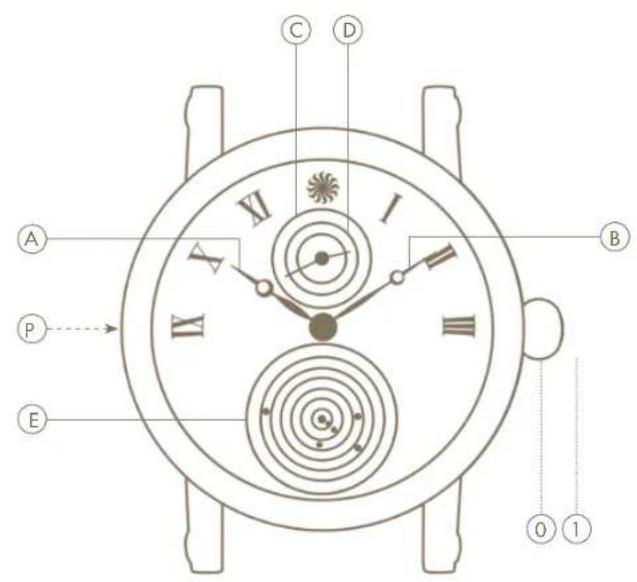
The following information is displayed on the Planetarium:
Ⓐ hours;
B minutes;
© calendar day;
(D) month;
© position in relation to the Sun of: Mercury, Venus, Earth, Mars, Jupiter and Saturn.
Adjustment
The settings of your watch can be adjusted by using the different positions of the crown and the push button Ⓓ.
The crown has two positions:
① this is the position of the crown when you are wearing the watch. In this position, you can wind the watch by hand.
① setting the time.
Before adjusting the settings of the Planetarium, the time displayed on the watch must be between 04:00 and 08:00 or 16:00 and 20:00.
Once this is the case, use the enclosed accessory to push in the
ENGLISHENGLI
push button ⑤ located at the 9 o'clock position on the left-hand side of the watchcase. Repeat this until the correct day and month are shown. The planets are moved automatically as you do this. Then pull out the crown as far as possible (position ①). Now move the hands forward until the correct time is reached. When the hands show the right time, then push the crown in again completely.
Important
If you do not wear the watch, we advise you to place it in a watch winder. Turn clockwise.
Functionalities
© The day of the month is shown at the 12 o'clock position.
⑭ The month is shown at the 12 o'clock position.
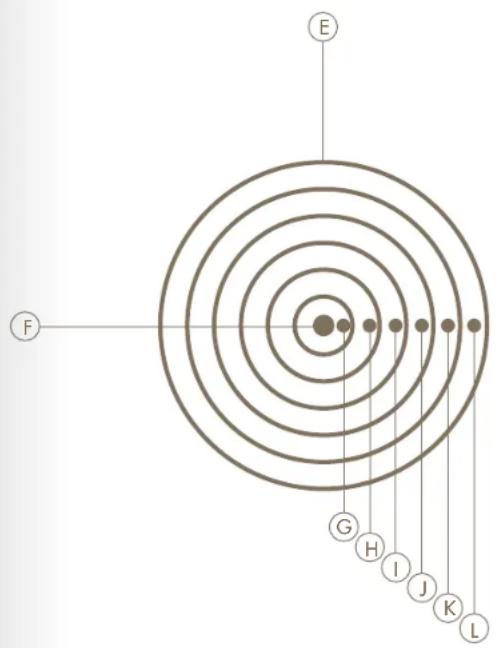
The smallest planetarium in the world is located at the 6 o'clock position. The Sun is positioned exactly in the middle of the planetarium. The planet closest to the Sun is Mercury. Mercury is followed by Venus, Earth, Mars, Jupiter and Saturn. The planets rotate around the Sun as follows:
© Mercury 87.97 days
⑧ Venus 224.70 days
① Earth 365.24 days
① Mars 686.98 days
© Jupiter 11.86 years
Saturn 29.46 years
text_image
E F G H I J K LENGLISHENGLI
NEDERLANDS
NEDERLANDS
WELKOM IN DE WERELD VAN
CHRISTIAAN VAN DER KLAAUW ASTRONOMICAL WATCHES
text_image
E F G H I J K LNEDERLANDS NEDER
FRANÇAIS
FRANÇAIS
BIENVENUE DANS LE MONDE DES MONTRES ASTRONOMIQUES CHRISTIAAN VAN DER KLAAUW
text_image
E F G H I J K LFRANÇAIS
DEUTSCH
WILLKOMMEN IN DER WELT VON CHRISTIAAN VAN DER KLAAUW ASTRONOMICAL WATCHES
text_image
E F G H I J K LDEUTSCHDEUTS
ESPAÑOL
ESPAÑOL
CHRISTIAAN VAN DER KLAAUW ASTRONOMICAL WATCHES
text_image
E F G H I J K LESPAÑOL
香港中文
香港中文
歡迎來到
text_image
E F G H I J K L香港中文
简体中文
text_image
E F G H I J K L简体中文
РУССКИЙ
РУССКИЙ
text_image
E F G H I J K LРУССКИЙ
عربي
text_image
E F G H I J K Lعربي
ASTRONOMICAL WATCHES

CHRISTIAAN VAN DER KLAAUW HORLOGE ATELIER B.V.
BUSINESSPARK FRIESLAND-WEST 47, 8447 SL HEERENVEEN, THE NETHERLANDS
T: +31 (0)513 62 49 06, INFO@KLAAUW.COM, WWW.KLAAUW.COM