
J659 - Wristwatch JAGUAR - Free user manual and instructions
Find the device manual for free J659 JAGUAR in PDF.


| Product type | Wristwatch |
| Brand | Jaguar |
| Model | J659 |
| Movement | Quartz |
| Display | Analog with retrograde hands |
| Functions | Local time, Chronograph, AM/PM indication |
| Power source | Battery (type SR626SW or equivalent) |
| Estimated battery life | 2 to 3 years |
| Case material | Stainless steel |
| Glass material | Mineral |
| Water resistance | Not water resistant |
| Strap | Leather |
| Clasp | Pin buckle |
| Case dimensions | Approximately 42 mm |
| Thickness | Approximately 12 mm |
| Approximate weight | 100 g |
| Care | Avoid shocks, clean with a soft cloth, have battery replaced by a watchmaker |
| Repairability | Battery replacement possible by a professional, parts available through after-sales service |
Frequently Asked Questions - J659 JAGUAR
User questions about J659 JAGUAR
0 question about this device. Answer the ones you know or ask your own.
Ask a new question about this device
Download the instructions for your Wristwatch in PDF format for free! Find your manual J659 - JAGUAR and take your electronic device back in hand. On this page are published all the documents necessary for the use of your device. J659 by JAGUAR.
USER MANUAL J659 JAGUAR
natural_image
Silhouette of a roaring animal head (no text or symbols)JAGUAR SWISS MADE
USER GUIDE SOP TM16S PRG H
INDEX
Español > p.01
English > p.11
Français > p.21
Deutsch >p.31
Italiano > p.41
Manual del usuario
- Description....12
- Functions....13
- Setting the time 17
-Adjusting the hands 18

Under the regulations on waste electrical and electronic equipment, quartz watches that have reached the end of their life must undergo selective collection
in order to be treated. You may thus dispose of our quartz watches in one of our approved outlets, and at any authorised collection point. Selective collection, treatment, recovery and recycling help to save our environment and protect our health.
1. Description 2. Functions
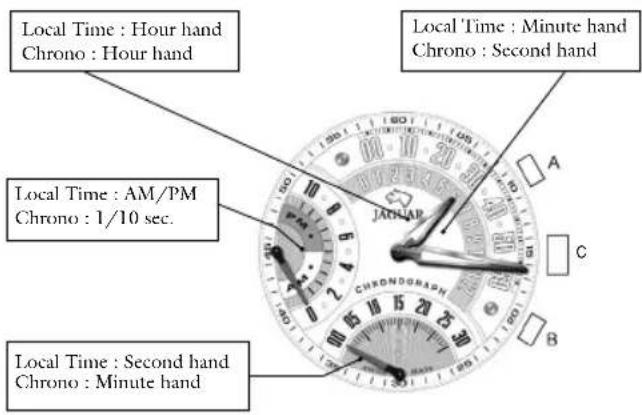
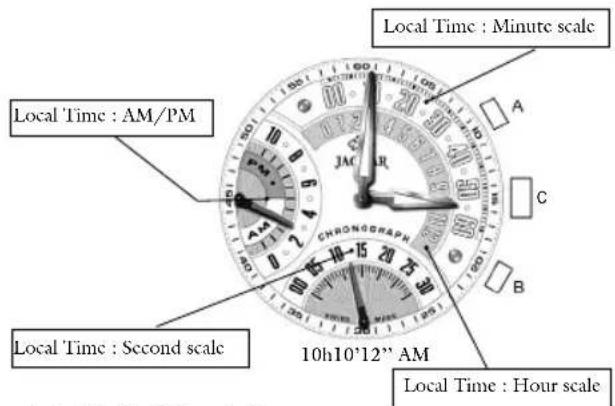
2.1. Mode I: Local time
- Hours and minutes are shown on a retrograde display, and seconds on a retrograde counter at 6 o'clock. - The "AM/PM" indicator is shown at 9 o'clock.
2.2 Selection mode 2.3 Mode II: Chronograph
To change from Local time to Chrono mode, press crown C.
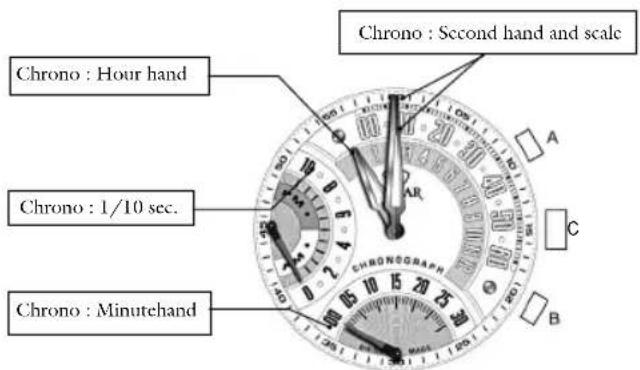
2.3.1. Start/Stop/Cumulative time
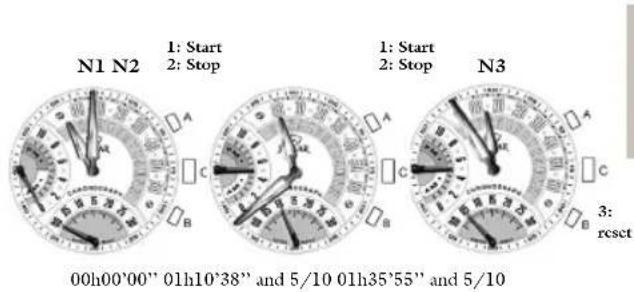
- To start the chronograph, press button A (1).
- To stop the chronograph, press button A (2).
These operations can be repeated as often as necessary.
The various times are cumulative.
- To reset the chronograph to zero, press button B (3).
- Every thirty minutes, the hour hand moves up a half-hour notch, as shown in illustration No. 3.
2.3.2 Intermediate time
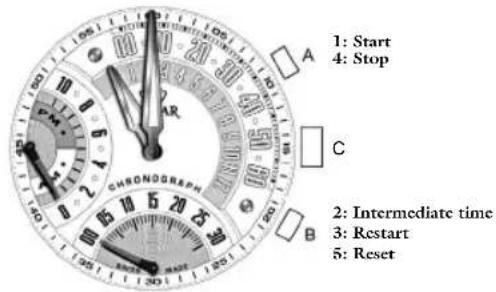
- To start the chronograph, press button A (1).
- To indicate the intermediate time, press button B (2).
- To restart, press button B (3).
The chronograph hands show the time elapsed.
These operations can be repeated as often as necessary.
To stop the chronograph, press button A (4).
- To reset the chronograph to zero, press button B (5).
– Every thirty minutes, the hour hand moves up a half-hour notch, as shown in illustration No. 3.
N.B.: press the crown at any time to display the local time without stopping the chronograph.
3. Setting the time
To set the time, please make sure the watch is in local time position.
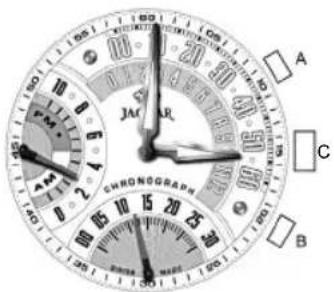
– Pull out crown C and press button A to set the minutes.
The second hand is automatically reset to zero
- Press button B to set the hour.
The AM/PM is automatically reset every 12 hours.
- To exit setting mode and return to local time, push crown C back into its original position.
4. Adjusting the hands
After an impact or a battery change, you may have to adjust the hands.
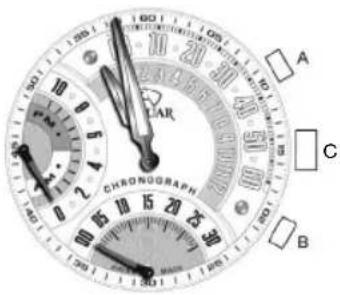
- Simultaneously press buttons A and B for 2 seconds
- If the hands return to the zero position as illustrated press crown C to return to local time.
- If one or more hands need to be adjusted, press button B to select the hand in question.
- The setting sequence is: minute (default), hour, 9 o'clock counter, 6 o'clock counter.
- Press button A to move the position of the hand up a notch. Press and hold down button A to fast forward.
- Press crown C to exit the hand adjustment mode
- To set local time, follow the instructions for setting the time (Chapter 3).

Mode d'emploi
natural_image
Empty white rectangle with black border (no text or symbols)FESTINA GROUP
Via Layetana, 20
08003 BARCELONA
A COMPANY OF THE FESTINA GROUP


Brand : JAGUAR
Model : J659
Category : Wristwatch