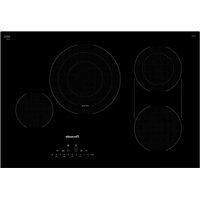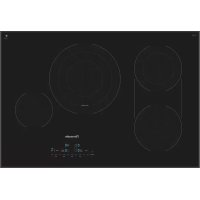
CET305TB - Cooker THERMADOR - Free user manual and instructions
Find the device manual for free CET305TB THERMADOR in PDF.



User questions about CET305TB THERMADOR
0 question about this device. Answer the ones you know or ask your own.
Ask a new question about this device
Download the instructions for your Cooker in PDF format for free! Find your manual CET305TB - THERMADOR and take your electronic device back in hand. On this page are published all the documents necessary for the use of your device. CET305TB by THERMADOR.
USER MANUAL CET305TB THERMADOR
Masterpiece® Series Electric Cooktop
CET305TB

THERMADOR.COM
CET305TB
Table of
CONTENTS
Safety Definitions 4
IMPORTANT SAFETY INSTRUCTIONS 5
Fire Safety 5
Cooking Safety 5
Burn Prevention 6
Child Safety 6
Cleaning Safety 6
Cookware Safety 6
Proper Installation and Maintenance 6
Proposition 65 Warning 7
Causes of damage 8
Protecting the Environment 8
Energy-saving advice 8
Getting familiar with the appliance 9
Control Panel 9
Heating elements 10
Residual heat indicator 10
Operation 11
Main power switch 11
Setting the cooktop 11
CookSmart 13
Cook timer 15
Kitchen timer 16
Panel lock 16
Wipe Protection 16
Automatic time limitation 16
Basic Settings 17
Cleaning and Maintenance 18
Daily Cleaning 18
Cleaning guidelines 18
Cleaning chart 18
Maintenance 19
Service 19
Before Calling for Service 19
How to Obtain Warranty Service 20
STATEMENT OF LIMITED PRODUCT WARRANTY .... 21
What this Warranty Covers & Who it Applies to 21
How Long the Warranty Lasts 21
Repair/Replace as Your Exclusive Remedy 21
Out of Warranty Product 21
Warranty Exclusions 21
THERMADOR® Support 22
Service 22
Parts and Accessories 22
This THERMADOR Appliance is made by
BSH Home Appliances Corporation
1901 Main Street, Suite 600
Irvine, CA 92614
Questions?
1-800-735-4328
www.thermador.com
We look forward to hearing from you!

Safety Definitions

WARNING
This indicates that death or serious injuries may occur as a result of non-observation of this warning.

CAUTION
This indicates that minor or moderate injuries may occur as a result of non-observation of this warning.
NOTICE: This indicates that damage to the appliance or property may occur as a result of non-compliance with this advisory.
Note: This alerts you to important information and/or tips.

IMPORTANT SAFETY INSTRUCTIONS
READ AND SAVE THESE INSTRUCTIONS
WARNING
When properly cared for, your new appliance has been designed to be safe and reliable. Read all instructions carefully before use. These precautions will reduce the risk of burns, electric shock, fire, and injury to persons. When using kitchen appliances, basic safety precautions must be followed, including those in the following pages.
Examine the appliance after unpacking it. In the event of transport damage, do not plug it in.
This appliance is not intended for operation with an external clock timer or a remote control.
This appliance is not intended for use by persons (including children) with reduced physical, sensory or mental capabilities, or lack of experience and knowledge, unless they have been given supervision or instruction concerning use of the appliance by a person responsible for their safety.
Fire Safety
Do not allow aluminum foil, plastic, paper or cloth to come in contact with a hot surface element, burner or grate. Do not allow pans to boil dry.
If the cooktop is near a window, forced air vent or fan, be certain that flammable materials such as window coverings do not blow over or near the burners or elements. They could catch on fire.
Always have a working smoke detector near the kitchen. Never leave the cooktop unattended when in use. Boilovers cause smoking and greasy spillovers may ignite.
WARNING
TO REDUCE THE RISK OF A GREASE FIRE:
a. Never leave surface units unattended at high settings. Boilovers cause smoking and greasy spillovers that may ignite. Heat oils slowly on low or medium settings.
b. Always turn hood ON when cooking at high heat.
c. Clean ventilating fans frequently. Grease should not be allowed to accumulate on fan or filter.
d. Use proper pan size. Always use cookware appropriate for the size of the surface element.
Do not flambé under the extractor hood or work with a naked flame. When switched on, the extractor hood draws flames into the filter. There is a risk of fire due to deposits on the grease filter!
In the event that personal clothing or hair catches fire, drop and roll immediately to extinguish flames.
Have an appropriate fire extinguisher available, nearby, highly visible and easily accessible near the appliance. Smother flames from food fires other than grease fires with baking soda. Never use water on cooking fires.
WARNING
TO REDUCE THE RISK OF INJURY TO PERSONS IN THE EVENT OF A GREASE FIRE, OBSERVE THE FOLLOWING:
a. SMOTHER FLAMES with a close-fitting lid, cookie sheet, or metal tray, then turn off the burner. BE CAREFUL TO PREVENT BURNS. If the flames do not go out immediately, EVACUATE AND CALL THE FIRE DEPARTMENT.
b. NEVER PICK UP A FLAMING PAN - You may be burned.
c. DO NOT USE WATER, including wet dishcloths or towels - a violent steam explosion will result.
d. Use an extinguisher ONLY if:
- You know you have a Class ABC extinguisher, and you already know how to operate it.
- The fire is small and contained in the area where it started.
- The fire department is being called.
- You can fight the fire with your back to an exit.
Whenever possible, do not operate the ventilation system during a cooktop fire. However, do not reach through fire to turn it off.
Cooking Safety
WARNING
Use this appliance only for its intended use as described in this manual. NEVER use this appliance as a space heater to heat or warm the room. Doing so may result in overheating the appliance. Never use the appliance for storage.
When using the timer, always supervise the cooktop and do not allow anything to boil over or burn. Boilovers can cause smoke and some foods and oils may catch fire if left on high temperature settings.
WARNING
If the frying sensor is not working properly, overheating may result causing smoke and damage to the pan or fire. WHEN COOKING WITH THE FRYING SENSOR OBSERVE THE FOLLOWING:
- Use a system pan only
Always put the pan in the center of the heating element - Do not place a lid on the pan
- Never leave frying fat unattended
Never use the appliance if liquids or foods have spilled around the control panel. Always turn off the cooktop and dry the control panel.
Injury and damage to the appliance may occur if control elements are not used properly.
IMPORTANT SAFETY INSTRUCTIONS
READ AND SAVE THESE INSTRUCTIONS
If the cooktop turns off automatically and can no longer be operated, it may turn itself on unintentionally at a later point. Switch off the circuit breaker in the fuse box. Contact Customer Support for service.
WARNING
If the surface is cracked, switch off the appliance to avoid the possibility of electric shock.
Burn Prevention
DO NOT TOUCH SURFACE UNITS OR AREAS NEAR UNITS - Surface units may be hot even though they are dark in color. Areas near surface units may become hot enough to cause burns. During and after use, do not touch, or let clothing, potholders, or other flammable materials contact surface units or areas near units until they have had sufficient time to cool. Among these areas are the cooktop and areas facing the cooktop.
Do not heat or warm unopened food containers. Build-up of pressure may cause the container to burst and cause injury.
Always use dry potholders. Moist or damp potholders on hot surfaces may result in burns from steam. Do not let potholder touch hot heating elements. Do not use a towel or other bulky cloth.
Use high heat settings on the cooktop only when necessary. To avoid bubbling and splattering, heat oil slowly, on no more than a low-medium setting. Hot oil is capable of causing extreme burns and injury.
Never move a pan of hot oil, especially a deep fat fryer. Wait until it is cool.
Secure all loose garments, etc., before beginning. Tie long hair so that it does not hang loose, and do not wear loose-fitting clothing or hanging garments, such as ties, scarves, jewelry, or dangling sleeves.
If the display does not work when a cooking area is heating up, disconnect the circuit breaker or fuse in the electrical panel. Contact an authorized servicer.
Child Safety
When children become old enough to use the appliance, it is the responsibility of the parents or legal guardians to ensure that they are instructed in safe practices by qualified persons.
Do not allow anyone to climb, stand, lean, sit, or hang on any part of an appliance, especially a door, warming drawer, or storage drawer. This can damage the appliance, and the unit may tip over, potentially causing severe injury.
Do not allow children to use this appliance unless closely supervised by an adult. Children and pets should not be left alone or unattended in the area where the appliance is in use. They should never be allowed to play in its vicinity, whether or not the appliance is in use.
CAUTION
Items of interest to children should not be stored in an appliance, in cabinets above an appliance or on the backsplash. Children climbing on an appliance to reach items could be seriously injured.
Cleaning Safety
Do not clean the appliance while it is still hot. Some cleaners produce noxious fumes when applied to a hot surface. Wet clothes and sponges can cause burns from steam.
Do not use steam cleaners to clean the appliance.
Cookware Safety
Hold the handle of the pan when stirring or turning food. This helps prevent spills and movement of the pan. Use Proper Pan Size.
The use of undersized cookware will expose a portion of the heating element or burner to direct contact and may result in ignition of clothing. Select cookware having flat bottoms large enough to cover the surface heating unit. This appliance is equipped with one or more surface units of different sizes. Proper relationship of cookware to heating element or burner will also improve efficiency.
Cookware not approved for use with ceramic cooktops may break with sudden temperature changes. Use only pans that are appropriate for ceramic cooktops (only certain types of glass, heatproof glass, ceramic, earthenware, or other glazed utensils are suitable).
Always position handles of utensils inward so they do not extend over adjacent work areas, burners, or the edge of the cooktop. This reduces the risk of fires, spills and burns.
Always keep the cooktop and bases of pots dry. Liquid between the potbase and the cooktop may build up steam pressure, causing the pot to jump suddenly and causing injury.
Proper Installation and Maintenance
Have the installer show you the location of the circuit breaker or fuse. Mark it for easy reference.
This appliance must be properly installed and grounded by a qualified technician. Connect only to properly grounded outlet. Refer to Installation Instructions for details.
This appliance is intended for normal family household use only. It is not approved for outdoor use. See the Statement of Limited Product Warranty. If you have any questions, contact the manufacturer.
Do not store or use corrosive chemicals, vapors, flammables or nonfood products on or near this appliance. It is specifically designed for use when heating or cooking food. The use of corrosive chemicals in heating or cleaning will damage the appliance and could result in injury.

IMPORTANT SAFETY INSTRUCTIONS
READ AND SAVE THESE INSTRUCTIONS
Do not operate this appliance if it is not working properly, or if it has been damaged. Contact an authorized servicer.
Do not cook on a broken cooktop. Cleaning solutions and spillovers may create a risk of electric shock.
Do not repair or replace any part of the appliance unless specifically recommended in this manual. Refer all servicing to a factory authorized service center.
To avoid electrical shock hazard, before servicing the appliance, switch power off at the service panel and lock the panel to prevent the power from being switched on accidentally.
Proposition 65 Warning:
This product may contain a chemical known to the State of California, which can cause cancer or reproductive harm. Therefore, the packaging of your product may bear the following label as required by California:
STATE OF CALIFORNIA PROPOSITION 65 WARNING:

WARNING
Cancer and Reproductive Harm - www.P65Warnings.ca.gov
Causes of damage
NOTICES
- Scratches on glass ceramic surface: Cookware with rough bottoms will scratch the glass ceramic surface.
- Salt, sugar and sand: Salt, sugar or grains of sand will scratch the glass ceramic surface. Never use the cooktop as a working surface or for setting things down.
Overheated cookware: Avoid heating pots or pans that are empty. -
Hot cookware: Never set down hot pans and pots on the control panel or frame. This may cause damage.
-
Hard and sharp objects: Hard or sharp objects falling on the cooktop may damage it.
- Boiled-over food: Sugar and products containing sugar may damage the cooktop. Immediately eliminate spills of these products with a glass scraper.
- Foils and plastics: Aluminum foil and plastic will melt on the hot cooking zones. Stove protective film isn't suitable for your cooktop.
- Unsuitable cleaning agent: Shimmering metallic discolorations on the glass ceramic surface result from the use of inappropriate cleaning agents and abrasion from cookware.
Protecting the Environment
Energy-saving advice
Always place a fitting lid on cookware. Cooking with an uncovered pan will increase energy consumption considerably. Use a glass lid to provide visibility and avoid having to lift the lid.
- Use cookware equipped with a solid, flat bottom. Curved pan bases increase energy consumption.
- The diameter of the pan base must match the size of the element. If not, energy may be wasted.
- Choose cookware of a size suited to the amount of food you are going to cook. A large pan that is only half full will use a lot of energy.
- Use a small amount of water when cooking. This saves energy, and vegetables retain a larger percentage of their vitamins and minerals.
- Switch to a lower heat setting in time.
- Select a suitable setting for ongoing cooking. You will waste energy by using an ongoing cooking setting which is too high.
- Use the residual heat of the cooktop. For longer cooking times, you can switch the element off 5-10 minutes before the end of the cooking time.
Getting familiar with the appliance
In this section we describe the control panel, elements and displays.
These instructions apply to more than one cooktop, your appliance might vary slightly.
Page 2 contains a list of models and dimensions.
Control Panel
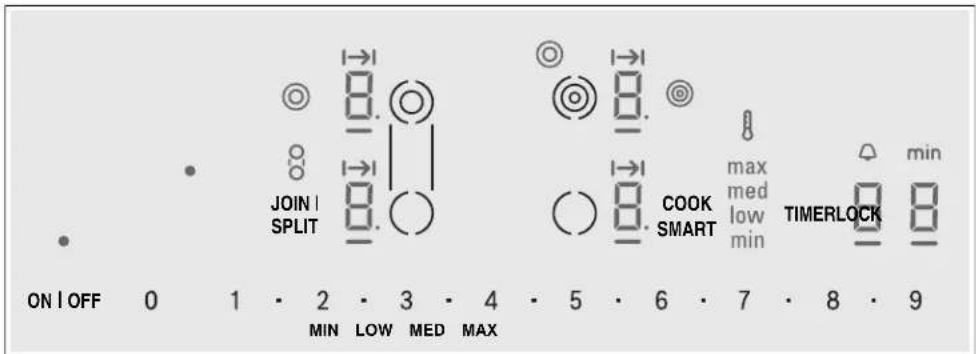
Touch keys
ON OFF Main switch

Select heating element
01·2..9
Settings area
JOIN I SPLIT Bridge element
LOCK Child safety lock / Wipe protection
COOK
CookSmart™ frying function
SMART
TIMER Timer functions
MIN/LOW/
Frying levels for CookSmart
MED/MAX
Display icons
Cooktop ready
Indicated function active
- Indicates selected element
1-5 Power level
H/h Residual heat
CookSmart
Dual element active
Triple element active
Bridge element active
CookSmart® frying level max / med / low / min
Cook time set
Kitchen timer function
Timer value
Touch control zone
When you touch a symbol, the corresponding function will be activated.
Notes
- When you touch several symbols at once, for example when food spills over, the settings will not change.
Always keep the touch control zones clean and dry. Moisture and dirt can affect proper functioning.
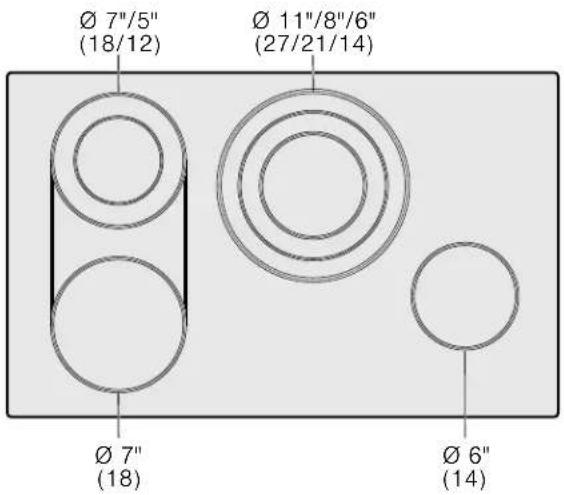
Heating elements
| Elements Turning on and off | |
| ○ Single element Single elements have only one size cooking surface Activate: Touch the ○ key. | |
| The sizes of these elements can be matched to your pan size: | |
| ○ Dual element | Use outer heating ring: Select the element. The ⑥ indicator turns on. The inner and outer heating rings are active. Use inner heating ring: Touch the ⑤ touch key. The ⑧ indicator turns off. The inner heating ring remains on. |
| ○ Triple element | Use outer heating ring: Select the element. The ⑨ indicator turns on. All three heating rings are active. Use middle heating ring: Touch the ⑩ touch key once. The ⑭ indicator turns off and the ⑨ indicator turns on. The inner and middle heating rings are active. Use inner heating ring: Touch the ⑩ touch key again. The ⑨ indicator turns off. The inner heating ring remains on. |
| ○ Bridge element | Bridge element The bridge element combines two individual heating elements into one long griddle zone. This configuration is ideal for griddles and large pans. Note: Do not use cookware larger than 17" x 10" (432 x 254 mm). One of the two elements that belong to the Bridge element has to be selected. Activate: Touch the JOIN I SPLIT key. The ⑧ indicator appears; ① appears in both heating element displays. Set the desired heat setting. If a heat level was set on one of the elements before, this heat level will be used for the bridge element. If two different heat levels were set on the two elements before, the bridge element will use heat level ③. Change heat level: Select one of the two elements that belong to the bridge element and set the new heat level. Deactivate: Touch the JOIN I SPLIT key. ① appears in both displays. The front heating element remains selected. Setting the heat level to ② does not split the bridge element. |
Always use cookware of a suitable size.
Residual heat indicator
The cooktop is equipped with a residual heat indicator for each element. It shows you which elements are still hot. Avoid touching the indicated elements.
If an H is shown on the display, the element is still hot. You could use it, for example, to keep a small quantity of food warm or to melt a chocolate coating. As the element continues to cool, the display changes to h . The display goes out once the element has cooled sufficiently.
The residual heat indicator will automatically come on after a power failure. The display lights up for approximately 30 minutes.
Operation
Main power switch
Use the main switch to turn on the electronic circuitry for the control panel. The cooktop is now ready to use.
Turning the cooktop on
Touch the ON/OFF touch key until the indicator above the main switch and the temperature level indicators 0 next to the heating elements turn on.
Turning the cooktop off
Touch the ON/OFF touch key. The indicator above the ON/OFF key goes out. The cooktop is switched off. The residual heat indicators will remain on until the elements have cooled off sufficiently.
Notes
- The cooktop switches off automatically when all the elements have been switched off for more than 20 seconds.
- The residual heat indicator remains lit until the elements have cooled down sufficiently. / is displayed next to the corresponding element symbol.
Setting the cooktop
This section will show you how to set the elements. The table contains details on the heat settings for a variety of dishes.
Setting the element
Select the desired heat level using the number keys 1 to 9.
Heat level 1 = minimum power
Heat level 9 = maximum power
Each heat setting has an intermediate level. This level is indicated by . in the element display and is set by touching the symbols between the number keys.
- Touch the key for the desired element. The and indicators light up.
- Within the following 10 seconds set the desired heat setting using the number keys. To set an intermediate level touch the symbols between the number keys.
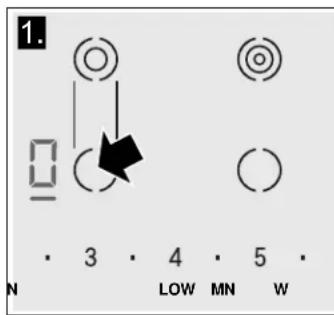
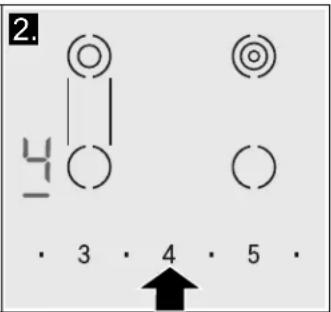
Changing the heat level
Select the element and set the desired heat level using the number keys.
Turning off the element
Select the element and set the heat level to 0. The element is turned off and the residual heat indicator is displayed.
Note: The heat is turned on and off to regulate the temperature of the element; this means that the red glow below the element is not always visible. When you select a low heat setting, the element turns off for longer intervals, while at a higher setting these intervals are very short. Even at the highest level, the element turns on and off.
Settings table
The following table provides some examples. Cooking times may vary depending on the type of food, its weight and quality. Deviations are therefore possible.
Set the element to heat setting 9 for bringing to the boil or initial frying, then switch back to appropriate setting (not for melting).
Stir thick liquids occasionally. Food that needs to be seared quickly or food which loses a lot of liquid during initial frying is best seared in several small portions. Tips
for energy-saving cooking can be found in section "Protecting the Environment".
CAUTION
During cooking, stews or liquid meals such as soups, sauces or drinks can heat up too quickly unnoticed and overflow or spatter. For this reason we recommend that you stir continuously, gradually heating the food at a suitable power level.
| Power levels | |
| Melting | |
| chocolate 1 - 2 | |
| butter 1 - 2 | |
| Heating | |
| frozen vegetables (e.g. spinach) 2. - 3. | |
| broth 7 - 8 | |
| thick soup 1. - 2. | |
| milk** 1 - 2 | |
| Simmering | |
| delicate sauce e.g. Béchamel sauce 4 - 5 | |
| spaghetti sauce 2 - 3 | |
| pot roast 4 - 5 | |
| fish* 4 - 5 | |
| Cooking | |
| rice (with double amount of water) 2 - 3 | |
| potatoes boiled in their skins with 1-2 cups of water 4 - 5 | |
| boiled potatoes with 1-2 cups of water 4 - 5 | |
| fresh vegetables with 1-2 cups of water 2. - 3. | |
| frozen vegetables with 1-2 cups of water | 3. - 4. |
| pasta (2-4 qt. water)* | 6 - 7 |
| pudding** | 1 - 2 |
| cereals | 2 - 3 |
| Frying | |
| pork chop*** | 5. - 6. |
| chicken breast*** | 5 - 6 |
| bacon | 6 - 7 |
| eggs | 5 - 6 |
| fish | 5 - 6 |
| pancakes 5. - 6. | |
| Deep fat frying** (in 1-2 qt. oil) | |
| deepfrozen foods, e.g. chicken nuggets (0.5 lb per serving) | 8 - 9 |
| other e.g. doughnuts (0.5 lb per serving) | 4. - 5. |
| * ongoing cooking without lid | |
| ** without lid | |
| *** turn several times |
CookSmart®
When you are using CookSmart to operate the heating element, a sensor controls the temperature of the pan. The center element of your cooktop model is equipped with this feature.
Advantages when frying
- The cooking element only heats when it is necessary. This saves energy.
- Oil and grease do not overheat.
CAUTION
- Never leave oil or fat cooking unattended.
- Place the pan in the center of the element. Make sure that the base of the pan has the proper diameter.
- Do not cover the pan with a lid. The automatic regulation will not work. A mash splatter guard can be used without affecting the automatic programming.
- Only use fat or oil that is suitable for frying. When you are using butter, margarine, native olive oil or pork lard, select frying level min.
- CookSmart is not suitable for boiling.
Suitable pans for CookSmart®
A suitable frying pan for use with CookSmart is available as an optional accessory. You can buy our system pans in specialized stores, or through Customer Service. Always indicate the related reference code.
CHEFSPAN08 ( 10^ / 22 cm ) for 8^ and 9^ elements
The frying pan has a non-stick coating, which means that very little oil is needed for frying.
CAUTION
- The CookSmart® function was set especially for this type of frying pans.
- Other frying pans may overheat. The temperature can be set higher or lower. Try the low heat setting first and then change it according to your requirements.
- Make sure that the diameter of the base of the frying pan corresponds to the size of the element. Place the pan in the center of the element.
- If a different type of pan is used, try it first at the lowest frying level, adjusting it as required. The pans may overheat.
Frying levels
Power level Temperature Suitable for
max high Steaks medium rare, fried boiled potatoes
med medium - high Veal cutlet, ground meat, thin slices of meat, vegetables
low low - medium Thick pan-fried foods such as pork chop, hamburger, pancakes
min low Chicken breast, omelettes, french toast, hash browns, fried food in butter or olive oil
Setting the CookSmart® feature
Select the appropriate frying level from the chart. Place the system pan in the center of the element. The cooktop must be on.
Notes
- CookSmart® is positioned on the three circle cooking zone of your cooktop, the outer heating ring is not available while using this feature.
-
If only the inner section of the cooking zone is activated, the additional ring will automatically be turned on once you select the CookSmart feature.
-
Touch COOK SMART. R lights up on the element display. The frying level options appear on the display menu.
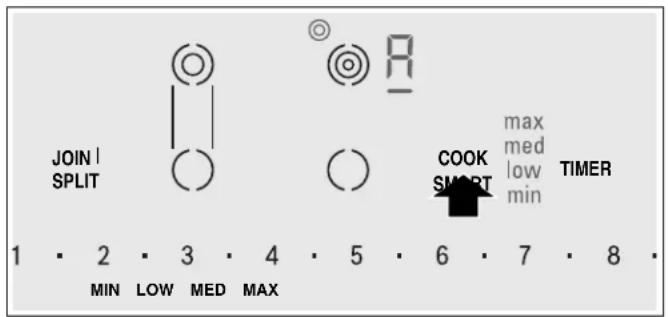
- Select the desired frying level using the number keys on the display menu.
| min number key 2 |
| low number key 4 |
| med number key 6 |
| max number key 8 |
CookSmart® is enabled.
The middle heating ring of cooking zone turns on automatically.
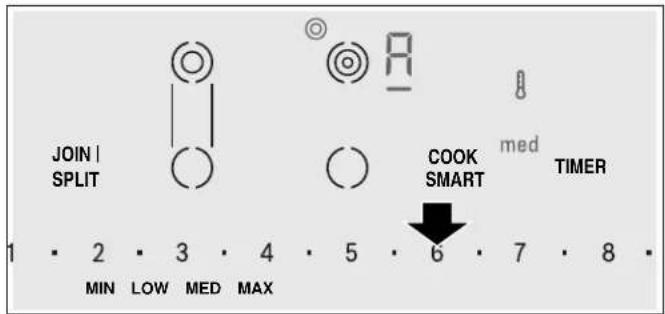
The temperature symbol lights up until the frying temperature is reached. Then a beep sounds. The temperature symbol disappears.
- Add the frying oil to the pan, then add the ingredients. Turn the food over as usual to avoid burning.
Turning off CookSmart®
Select the heating element and touch COOK SMART.
CookSmart frying chart
The following chart lists which frying level is ideal for particular foods. Frying time may depend on the type, weight and quality of the food product.
The frying levels provided are designed for the system pan. Frying levels may vary when using other frying pans.
| Frying level | Total frying time from signal | |
| Meat Pork chop, boneless or bone-in (1" thick) | low | 10-17 min |
| Veal cutlet in breadcrumb (5/8" thick) | med | 6-10 min |
| Fillet (1" thick) | med | 6-10 min |
| Cordon bleu | low | 15-20 min |
| Beef steaks medium rare (3¼" thick) | max | 8-10 min |
| Beef steaks medium or well done (3¼" thick) | med | 8-12 min |
| Chicken breast (1" thick) | min | 20-30 min |
| Skillet-fried chicken | min | 25-35 min |
| Sausages e.g. hot dogs (Ø 1½ - 1½") | low | 8-20 min |
| Hamburger | low | 6-12 min |
| Thin slices of meat | med | 7-12 min |
| Ground meat | med | 6-10 min |
| Bacon | min | 5-8 min |
| Fish Fish, fried (whole) | low | 15-25 min |
| Fish fillet with or without breadcrumbs | low/med | 10-20 min |
| Shrimps | med | 4-8 min |
| Egg dishes Pancakes | low | cf |
| Omelettes | min | cf |
| Fried eggs | min | 2-6 min |
| Scrambled eggs | min | 2-4 min |
| French toast | min | cf |
| Potatoes Fried boiled potatoes | max | 6-12 min |
| Fried raw potatoes | low | 15-25 min |
| Hash browns | min | 20-30 min |
- Place in cold pan cf continuous frying
| Frying level | Total frying time from signal | ||
| Vegetables | Garlic/Onions | min | 2-10 min |
| Squash, Egg plant | low | 4-12 min | |
| Mushrooms | med | 10-15 min | |
| Stir-fried vegetables | med | 10-12 min | |
| Frozen products | Chicken nuggets, Chicken patties | med | 8-15 min |
| Cordon bleu | min | 10-30 min | |
| Chicken breast | low | 10-30 min | |
| Fish fillet in breadcrumbs | low | 10-20 min | |
| Fish sticks | med | 8-12 min | |
| Oven French fries | max | 4-6 min | |
| Stir-fried vegetables | min | 8-15 min | |
| Spring rolls/Eggrolls (3/4-1 1/4" thick) | low | 10-30 min | |
| Ready-made meals | Potato products e.g. fried potatoes | low | 10-15 min |
| Potato products e.g. hash browns | min | 10-20 min | |
| Pasta (with added water) | min | 4-6 min | |
| Misc. Baked camembert/Baked cheese | low | 7-10 min | |
| min | 3-7 min | ||
- Place in cold pan cf continuous frying
Cook timer
You can use this timer function to set a cook time for any element. The element will turn off automatically once the set time has elapsed.
CAUTION
- When using the timer, always keep an eye on the cooktop and do not allow anything to boil over or burn. Boilovers can cause smoke and foods and oils may catch on fire if left on high temperature settings.
- This function should not be used for long periods of time, especially at high heat settings.
- Make sure the cooktop is turned off with the main power switch after each use.
Setting the cook time
The cooktop must be turned on.
- Select the desired element and heat level.
- Touch the TIMER key. The indicators and min light up and timer value is indicated in the timer display.
- Within the next 10 seconds set the desired cook time using the number keys.
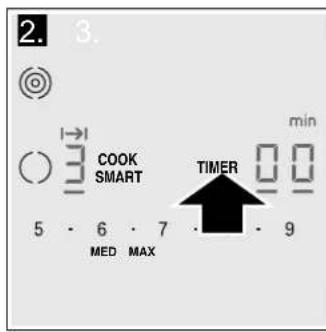
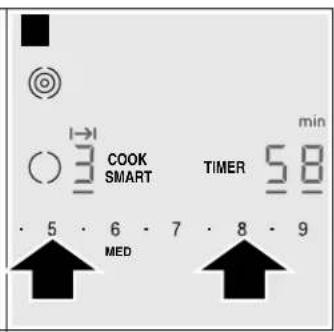
The timer starts to count down.
Using Cook timer with CookSmart®
When you are cooking with CookSmart® the programmed cooking time will begin to count down once the temperature for the selected frying level has been reached.
Changing or cancelling cook time
- Select the desired element and touch the TIMER key.
- Adjust the cook time using the number keys. To cancel cook time set the timer to 00.
Once the cook time has elapsed
The element turns off once the set cook time has elapsed. You will hear a beep. The indicator appears in the element display and the timer display shows 出出 for 10 seconds. The I I indicator in the element display stays on.
Touch any key to turn off the indicators and the beep
Notes
- If a cooking time was set for several elements, the time information for the selected element is shown in the timer display.
- Select the relevant element to call up the remaining cooking time.
- You can set a cooking time of up to 99 minutes.
Automatic timer
With this function you may select a cook time for all elements. Once an element is turned on, the selected time will begin to count down. The element will automatically turn off when the cook time has elapsed. Instructions on activating the automatic timer are found in the chapter "Basic settings".
Note: The cook time can be changed or cancelled for any element:
Select the desired element. Touch the TIMER key. Adjust the cook time using the number keys, or deactivate it by setting the timer value to 0.
Kitchen timer
The timer can be set for periods of up to 99 minutes. It is independent of the other settings. You can also use the kitchen timer when the cooktop is turned off or locked. This function does not automatically switch off an element.
Setting the kitchen timer
- Touch the TIMER key until the indicator lights up. 00 appears on the timer display.
- Set the desired time using the number keys. min appears on the timer display. The timer start to count down after a few seconds.
Changing or deleting the time
Touch the TIMER key repeatedly until the indicator lights up.
Change the time using number keys, or set 0 in order to delete the programmed time.
When the time has elapsed
A beep sounds. 0 appears on the timer display and the indicator lights up. The displays go out after 10 seconds.
Touch any key to turn off the indicators and the beep.
Panel lock
You can use the panel lock to prevent children from accidentally turning the cooktop on.
Turning the panel lock on
The cooktop must be turned off.
Touch LOCK for 4 seconds. The indicator lights up for several seconds. The cooktop is now locked.
Turning the panel lock off
Touch LOCK for 4 seconds. The cooktop is now unlocked.
CAUTION
The panel lock may be accidentally turned on and off due to:
water spilled during cleaning
food that has overflowed
- objects being placed on the LOCK touch key.
Automatic panel lock
With this function, the panel lock is automatically activated whenever you switch off the cooktop.
Turning on and off
See "Basic settings" section.
Wipe Protection
Cleaning the control panel while the cooktop is on may change the settings. In order to avoid this the cooktop has a wipe protection function.
To activate:
Touch the LOCK key. The indicator above the key lights up. The control panel is locked for 35 seconds. You can now clean the surface of the control panel without risk of changing the settings.
To deactivate:
To deactivate the function before the time has elapsed, touch the LOCK key. The indicator above the key turns off, the function is deactivated.
Notes
- An acoustic signal sounds 30 seconds after activation. This indicates that the function is about to finish.
- The wipe protection lock does not lock the main switch. The cooktop can be switched off at any time.
Automatic time limitation
If the element is used for prolonged periods of time without changes in the settings being made, the automatic time limitation function is triggered.
The element stops heating. F_B and the residual heat indicator / flash alternately in the display.
The indicator goes out when any symbol is pressed. The element can now be reset.
When the automatic time limitation is activated depends on the selected heat level (from 1 to 10 hours).
Basic Settings
The appliance has various basic settings. You can adjust these settings to the way you usually cook.
| Display Function | |
| c1 | Automatic child lock Off* On Manual and automatic child lock Off |
| c2 | Sound signals Confirmation beep and error signal off Only error signal on Only confirmation beep on All signals on* |
| c5 | Automatic timer Off* 1-99 Automatic shut-off time |
| c6 | Duration of timer end signal 10 seconds* 30 seconds 3 1 minute |
| c7 | Turning on additional heating elements Off On* Last setting before turning off the heating element |
| c8 | Selection time for heating element Unlimited*: You can adjust the settings of the last heating element used at any time without having to select it again. Restricted: You can adjust the settings for the last heating element used within 10 seconds after selecting it. After that you will have to reselect the heating element before setting it. |
| c9 | Reset to basic settings Off* Reset the appliance to basic settings |
| *factory settings | |
Changing the basic settings
The cooktop must be turned off.
- Turn on the cooktop with the main switch.
- Within the next 10 seconds, touch the TIMER key for 4 seconds.
In the left display the symbols c and alternate. 0 lights up on the timer display.
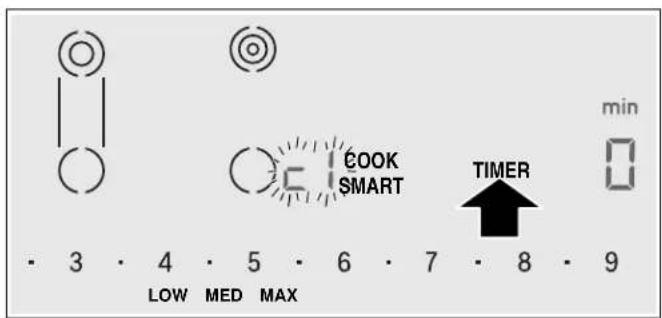
- Touch the TIMER key until the desired indicator appears on the left display.
- Select the required setting using the number keys.
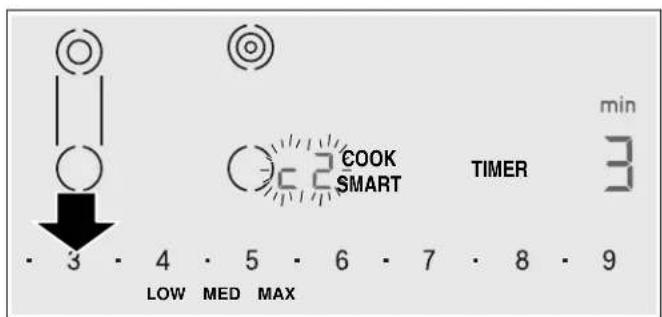
- Touch the TIMER key again for 4 seconds. The setting is activated.
Cleaning and Maintenance
Daily Cleaning
Note: Recommended cleaners indicate a type of cleaner and do not constitute an endorsement of a specific brand.
Glass ceramic cooktop
CAUTION
Do not use any kind of cleaner on the glass while the surface is hot; use only the razor blade scraper. The resulting fumes can be hazardous to your health. Heating the cleaner can chemically attack and damage the surface.
Clean the surface when it is completely cool, with the following exception: remove dry sugar, sugar syrup, tomato products and milk immediately with the razor blade scraper (see cleaning chart).
Wipe off spatters with a clean, damp sponge or a paper towel. Rinse and dry. Use white vinegar if smudge remains; rinse.
Apply a small amount of the glass ceramic cooktop cleaner. When dry, buff surface with a clean paper towel or cloth.
Stainless steel side trim
Wipe with the grain when cleaning. For moderate/heavy soil, use BonAmi® or Soft Scrub® (no bleach).
Wipe using a damp sponge or cloth, rinse and dry.
Cleaning guidelines
When using a cleaner, use only a small amount; apply to a clean paper towel or cloth. Wipe on the surface and buff with a clean dry towel.
For best results, use cleaners such as glass ceramic cooktop cleaner, BonAmi®, Soft Scrub® (without bleach), and white vinegar.
Avoid these cleaners
Glass cleaners which contain ammonia or chlorine bleach. These ingredients may damage or permanently stain the cooktop.
- Caustic cleaners - cleaners such as Easy Off® may stain the cooktop surface.
- Abrasive cleaners.
- Metal scouring pads and scrub sponges such as Scotch Brite® can scratch and/or leave metal marks.
- Soap-filled scouring pads such as SOS® can scratch the surface.
- Powdery cleaners containing chlorine bleach can permanently stain the cooktop.
- Flammable cleaners such as lighter fluid or WD-40.
Cleaning chart
Type of Soil Possible Solution
Dry sugar, sugar syrup, milk or tomato spills. Melted plastic film or foil. All these items REQUIRE IMMEDIATE REMOVAL. Failure to remove these immediately can permanently damage the surface.
Remove these types of spills while the surface is hot using the razor blade scraper. Use a new, sharp razor in the scraper. Remove pan and turn off the element. Wearing an oven mitt, hold scraper at 30^ angle, using care not to gouge or scratch the glass. Push soil off the heated area. After the surface has cooled, remove the residue and apply the glass ceramic cooktop cleaner.
WARNING
RISK OF INJURY
The blade is extremely sharp. Risk of cuts. Protect the blade when not in use. Replace the blade immediately when any imperfections are found. Follow manufacturer's instructions.
Burned-on food soil, dark streaks, and specks
Soften by laying a damp paper towel or sponge on top of soil for 30 minutes. Use a plastic scrubber and glass ceramic cooktop cleaner or use the razor blade scraper. Rinse and dry.
| Type of Soil Possible Solution | |
| Greasy spatters Use a soapy sponge or cloth to remove grease; rinse thoroughly and dry. Apply glass ceramic cooktop cleaner. | |
| Metal marks: Iridescent stain Pans with aluminum, copper or stainless steel bases may leave marks. Treat immediately after surface has cooled with glass ceramic cooktop cleaner. If this does not remove the marks, try a mild abrasive (Bon Ami®, Soft Scrub® without bleach) with a damp paper towel. Rinse and reapply glass ceramic cooktop cleaner. Failure to remove metal marks before the next heating makes removal very difficult. | |
| Hard water spots: Hot cooking liquids dripped on surface | Minerals in some water can be transferred onto the surface and cause stains. Use undiluted white vinegar, rinse and dry. Recondition with glass ceramic cooktop cleaner. Remove boilovers and stains before using the cooktop again. |
| Surface scratches: Small scratches are common and do not affect cooking. They become smoother and less noticeable with daily use of the glass ceramic cooktop cleaner. | Apply glass ceramic cooktop cleaner before using to remove sand-like grains and grit such as salt and seasoning. Scratches can be reduced by using pans with bases that are smooth, clean, and dry before use. Use recommended glass ceramic cooktop cleaner daily. NOTICE: Diamond rings may scratch the surface. |
Maintenance
This appliance requires no maintenance other than daily cleaning. For best results, apply cooktop cleaning cream daily.
Service
Before Calling for Service
Before calling Customer Service, consider the suggestions and instructions below:
CAUTION
Repairs should only be done by an authorized servicer.
Improper repair of your appliance may result in risk of severe physical injury or death.
The electronics of your cooktop are underneath the control panel. For various reasons, the temperature in this area may rise sharply.
In order that the electronics do not overheat, the cooking zones are switched off as and when necessary. The F_2 , F_4 or F_5 indicator appears alternately with the H or h residual heat indicator.
Indicator Error Task
| None There is no power supply. Check the household fuse for the appliance. Check whether there is a power outage by trying other electronic appliances. | ||
| All indicators flash The touch controls are wet or an object is resting on them. | Dry the controls or remove the object. | |
| F2 | Several cooking zones have been used over a prolonged period at high power settings. To protect the electronics, the cooking zone has been switched off. | Wait a while. Touch any control. When F2 goes out, the electronics have cooled down sufficiently. You can continue cooking. |
Indicator Error Task
| F4 | Despite the switch-off by F2, the electronics have become hot again. All cooking zones have therefore been switched off. | Wait a while. Touch any control. When F4 goes out, you can continue cooking. |
| F5 and the heat setting flash alter-nately. An audible signal can be heard | Warning: There is a hot pot in the area of the control panel. There is a risk that the electronics will overheat. | Remove the pot. The fault display goes out shortly after- wards. You can continue cooking. |
| F5 and audible signal | There is a hot pot in the area of the control panel. To protect the elec-tronics, the cooking zone has been switched off. | Remove the pot. Wait a while. Touch any control. When F5 goes out, you can continue cooking. |
| F8 | The cooking zone was in operation for too long and has switched itself off. | You can switch the cooking zone back on again immedi- ately. |
Notes
- The cooktop regulates the heating element temperature by turning the heat source on and off; this means that the reddish glow of the heat source beneath the heating element may not always be visible. If you select a low heat setting, the heat source is frequently off; at higher settings it is seldom off. The source turns on and off even at the highest settings.
- You may hear a quiet hum when the heating elements are in the heating phase. The heating elements may glow with different levels of brightness. Depending on the angle from which you are looking at the heating element, this glow may be visible over the marked edge of the heating element. These are technical characteristics. They have no effect on quality and function.
Glass ceramic may have uneven areas on the surface due to the nature of the material itself. Because of the mirror-like finish on the cooking surface, even extremely small bubbles less than 1mm in diameter may be visible. These bubbles will not have any adverse effect on the operation of the cooktop nor on the durability of the glass ceramic cooking surface. - Depending on the countertop that is present in the kitchen, an uneven gap between the cooktop unit and the countertop can occur. For this reason, a flexible seal is provided around the entire cooktop unit.
E-report in the displays
When an error message with "E" appears in the display, e.g. E0111, switch the appliance off and on again. If it was a one-off error, the display goes out. If the error message appears again, call the Customer Service and quote the exact error message.
How to Obtain Warranty Service
To obtain warranty service for your Product, you should contact the nearest THERMADOR® authorized servicer.
E number and FD number:
When you contact Service, please have the Model (E) number and the FD number for your appliance available. You can find the identification plate with these numbers on the underside of the appliance and in the appliance pass. To avoid having to search for this information when you need it, you can enter your appliance data and the customer support telephone number here.
E-Nr. FD-Nr.
Customer Service
Questions? Please contact us. We look forward to hearing from you!
1-800-735-4328
www.thermador.com
1901 Main Street, Suite 600 Irvine, CA 92614
STATEMENT OF LIMITED PRODUCT WARRANTY
What this Warranty Covers & Who it Applies to
The limited warranty provided by BSH Home Appliances Corporation ("BSH") in this Statement of Limited Product Warranty applies only to the THERMADOR® appliance ("Product") sold to you, the first using purchaser, provided that the Product was purchased:
- For your normal, household (non-commercial) use, and has in fact at all times only been used for normal household purposes.
- New at retail (not a display, "as is", or previously returned model), and not for resale, or commercial use.
- Within the United States or Canada, and has at all times remained within the country of original purchase.
The warranties stated herein apply to the original purchaser of the product warranted herein and to each succeeding owner of the product purchased for ordinary home use during the term of the warranty.
Please make sure to return your registration card; while not necessary to effectuate warranty coverage, it is the best way for BSH to notify you in the unlikely event of a safety notice or product recall.
How Long the Warranty Lasts
BSH warrants that the Product is free from defects in materials and workmanship for a period of seven hundred and thirty (730) days from the date of purchase. The foregoing timeline begins to run upon the date of purchase, and shall not be stalled, tolled, extended, or suspended, for any reason whatsoever.
This Product is also warranted to be free from cosmetic defects in material and workmanship (such as scratches of stainless steel, paint/porcelain blemishes, chip, dents, or other damage to the finish of the Product), for a period of sixty (60) days from the date of purchase or closing date for new construction. This cosmetic warranty excludes slight color variations due to inherent differences in painted and porcelain parts, as well as differences caused by kitchen lighting, product location, or other similar factors. This cosmetic warranty specifically excludes any display, floor, "As Is", or "B" stock appliances.
Repair/Replace as Your Exclusive Remedy
During this warranty period, BSH or one of its authorized service providers will repair your Product without charge to you (subject to certain limitations stated herein) if your Product proves to have been manufactured with a defect in materials or workmanship. If reasonable attempts to repair the Product have been made without success, then BSH will replace your Product (upgraded models may be available to you, in BSH's sole discretion, for an additional charge). All removed parts and components shall become the property of BSH at its sole option. All replaced and/or repaired parts shall assume the identity of the original part for purposes of this warranty and this warranty shall not be extended with respect to such
parts. BSH's sole liability and responsibility hereunder is to repair manufacturer-defective Product only, using a BSH-authorized service provider during normal business hours. For safety and property damage concerns, BSH highly recommends that you do not attempt to repair the Product yourself, or use an un-authorized servicer; BSH will have no responsibility or liability for repairs or work performed by a non-authorized servicer. If you choose to have someone other than an authorized service provider work on your Product, THIS WARRANTY WILL AUTOMATICALLY BECOME NULL AND Void. Authorized service providers are those persons or companies that have been specially trained on BSH products, and who possess, in BSH's opinion, a superior reputation for customer service and technical ability (note that they are independent entities and are not agents, partners, affiliates or representatives of BSH). Notwithstanding the foregoing, BSH will not incur any liability, or have responsibility, for the Product if it is located in a remote area (more than 100 miles from an authorized service provider) or is reasonably inaccessible, hazardous, threatening, or treacherous locale, surroundings, or environment; in any such event, if you request, BSH would still pay for labor and parts and ship the parts to the nearest authorized service provider, but you would still be fully liable and responsible for any travel time or other special charges by the service company, assuming they agree to make the service call.
Out of Warranty Product
BSH is under no obligation, at law or otherwise, to provide you with any concessions, including repairs, pro-rates, or Product replacement, once this warranty has expired.
Warranty Exclusions
The warranty coverage described herein excludes all defects or damage that are not the direct fault of BSH, including without limitation, one or more of the following:
- Use of the Product in anything other than its normal, customary and intended manner (including without limitation, any form of commercial use, use or storage of an indoor product outdoors, use of the Product in conjunction with air or water-going vessels).
- Any party's willful misconduct, negligence, misuse, abuse, accidents, neglect, improper operation, failure to maintain, improper or negligent installation, tampering, failure to follow operating instructions, mishandling, unauthorized service (including self-performed "fixing" or exploration of the appliance's internal workings).
- Adjustment, alteration or modification of any kind.
-
A failure to comply with any applicable state, local, city, or county electrical, plumbing and/or building codes, regulations, or laws, including failure to install the product in strict conformity with local fire and building codes and regulations.
-
Ordinary wear and tear, spills of food, liquid, grease accumulations, or other substances that accumulate on, in, or around the Product.
- Any external, elemental and/or environmental forces and factors, including without limitation, rain, wind, sand, floods, fires, mud slides, freezing temperatures, excessive moisture or extended exposure to humidity, lightning, power surges, structural failures surrounding the appliance, and acts of God.
In no event shall BSH have any liability or responsibility whatsoever for damage to surrounding property, including cabinetry, floors, ceilings, and other structures or objects around the Product. Also excluded from this warranty are Products on which the serial numbers have been altered, defaced, or removed; service visits to teach you how to use the Product, or visits where there is nothing wrong with the Product; correction of installation problems (you are solely responsible for any structure and setting for the Product, including all electrical, plumbing or other connecting facilities, for proper foundation/flooding, and for any alterations including without limitation cabinetry, walls, floors, shelving, etc.); and resetting of breakers or fuses.
TO THE EXTENT ALLOWED BY LAW, THIS WARRANTY SETS OUT YOUR EXCLUSIVE REMEDIES WITH RESPECT TO PRODUCT, WHETHER THE CLAIM ARISES IN CONTRACT OR TORT (INCLUDING STRICT LIABILITY,
OR NEGLIGENCE) OR OTHERWISE. THIS WARRANTY IS IN LIEU OF ALL OTHER WARRANTYES, WHETHER EXPRESS OR IMPLIED. ANY WARRANTY IMPLIED BY LAW, WHETHER FOR MERCHANTABILITY OR FITNESS FOR A PARTICULAR PURPOSE, OR OTHERWISE, SHALL BE EFFECTIVE ONLY FOR THE PERIOD THAT THIS EXPRESS LIMITED WARRANTY IS EFFECTIVE. IN NO EVENT WILL THE MANUFACTURER BE LIABLE FOR CONSEQUENTIAL, SPECIAL, INCIDENTAL, INDIRECT, "BUSINESS LOSS", AND/OR PUNITIVE DAMAGES, LOSSES, OR EXPENSES, INCLUDING WITHOUT LIMITATION TIME AWAY FROM WORK, HOTELS AND/OR RESTAURANT MEALS, REMODELLING EXPENSES IN EXCESS OF DIRECT DAMAGES WHICH ARE DEFINITIVELY CAUSED EXCLUSIVELY BY BSH, OR OTHERWISE. SOME STATES DO NOT ALLOW THE EXCLUSION OR LIMITATION OF INCIDENTAL OR CONSEQUENTIAL DAMAGES, AND SOME STATES DO NOT ALLOW LIMITATIONS ON HOW LONG AN IMPLIED WARRANTY LASTS, SO THE ABOVE LIMITATIONS MAY NOT APPLY TO YOU. THIS WARRANTY GIVES YOU SPECIFIC LEGAL RIGHTS, AND YOU MAY ALSO HAVE OTHER RIGHTS WHICH VARY FROM STATE TO STATE. No attempt to alter, modify or amend this warranty shall be effective unless authorized in writing by an officer of BSH.
THERMADOR® Support
Service
We realize that you have made a considerable investment in your kitchen. We are dedicated to supporting you and your appliance so that you have many years of creative cooking.
Please do not hesitate to contact our STAR® Customer Support Department if you have any questions or in the unlikely event that your THERMADOR® appliance needs service. Our service team is ready to assist you.
USA
800-735-4328
www.thermador.com/support
Canada
800-735-4328
www.thermador.ca
Parts and Accessories
Parts, filters, descalers, stainless steel cleaners and more can be purchased in the THERMADOR® eShop or by phone.
USA
http://store.thermador.com/us
Canada
- If you live in any of the Atlantic provinces, Ontario, or Quebec contact:
Marcone
1.800.287.1627
- If you live in any of the Territories, Manitoba, Saskatchewan, Alberta, or British Columbia contact:
Reliable Parts
1.800.663.6060
Table de
MATIÈRES
1901 Main Street, Suite 600
Irvine, CA 92614
?Preguntas?
1-800-735-4328
www.thermador.com
1901 Main Street, Suite 600 Irvine, CA 92614