PO302W - Oven THERMADOR - Free user manual and instructions
Find the device manual for free PO302W THERMADOR in PDF.


User questions about PO302W THERMADOR
0 question about this device. Answer the ones you know or ask your own.
Ask a new question about this device
Download the instructions for your Oven in PDF format for free! Find your manual PO302W - THERMADOR and take your electronic device back in hand. On this page are published all the documents necessary for the use of your device. PO302W by THERMADOR.
USER MANUAL PO302W THERMADOR
Masterpiece® Series Built-in Single, Double and Combination Ovens
ME301WS MED301WS MED301LWS
MED301RWS ME302WS
MED302WS MED302LWS
MED302RWS MEM301WS
MEDMC301WS MEDMCW31WS

THERMADOR.COM
Table of contents
1 IMPORTANT SAFETY INSTRUCTIONS 4
1.1 Safety definitions 4
1.2 General information 4
1.3 Safe use 4
1.4 Child safety 6
1.5 Cleaning function 6
1.6 Proper installation and maintenance 7
1.7 Remote operation 8
1.8 State of California Proposition 65Warnings 8
2 Preventing material damage 9
2.1 General 9
3 Environmental protection and energy-saving 9
3.1 Disposal of packaging 9
3.2 Saving energy 9
4Familiarizing yourself with your appliance 10
4.1 Appliance 10
4.2 Oven cavities 10
4.3 Control panel 12
4.4 Basic features 12
4.5 Main menu 13
4.6 Heating modes and functions 13
5 Software update 14
6 Accessories. 15
6.1 Other accessories 15
6.2 Safe use of oven racks.. 16
6.3 Inserting the wire rack.. 16
6.4 Inserting the telescopic rack. 16
7 Before using for the first time 17
7.1 Initial adjustment of basic settings 17
7.2 Pairing your oven with Home Connect 18
7.3 Cleaning the appliance before using it for the first time 18
8 Basic Operation 18
8.1 Turning the appliance on. 18
8.2 Turning the appliance off. 18
8.3 Operating the full-touch display 18
8.4 Setting the heating mode and temperature 19
8.5 Changing the heating mode or temperature 19
8.6 Canceling a heating mode 19
8.7 Heating time limitation 19
8.8 Preheating 20
8.9 Fast preheat 20
8.10 Turning the panel lock on or off.. 20
8.11 Meat probe. 20
8.12 Rotisserie 21
9 Timer functions 24
9.1 Setting the oven timer 24
9.2 Setting the kitchen timer 24
9.3 Setting delayed operation with End Time 25
9.4 Sabbath mode 25
9.5 Yom Tov mode 25
10 Basic settings. 26
10.1 Overview of the basic settings 26
10.2 Changing the basic settings 26
10.3 Oven temperature offset 26
10.4 Auto convection conversion 27
11 Warming drawer operation 27
11.1 Turning the warming drawer on 27
11.2 Turning the warming drawer off 27
11.3 Getting the most out of your warming drawer 27
11.4 Warming drawer recommendations.. 28
11.5 Removing the warming drawer insert 28
12 Home Connect® 28
12.1 Setting up Home Connect 29
12.2 Home Connect® settings 29
12.3 Changing the settings via the Home Connect® app.... 29
12.4 Remote start 29
12.5 Setting remote control 29
12.6 Remote diagnostics.. 30
12.7 Software update 30
12.8 Data Protection 30
13 Getting the most out of your appliance. 30
13.1 Rack positions 30
13.2 Getting the best results 31
13.3 General tips for heating modes 31
14 Cleaning and maintenance. 33
14.1 Cleaning agents 33
14.2 Cleaning the conventional oven 34
14.3 Cleaning the warming drawer 36
14.4 Maintenance 36
15 Troubleshooting 39
16 Disposal 40
16.1 Disposal of your old appliance 40
17 Customer Service 40
17.1 Model number (E-Nr.) and production number (FD) 40
17.2 Rating plate location 41
17.3 Product registration 41
18 STATEMENT OF LIMITED PRODUCT WARRANTY
18.1 What this warranty covers & Who it applies to.... 41
18.2 How long the warranty lasts 41
18.3 Repair/replace as your exclusive remedy 41
18.4 Out of warranty product 42
18.5 Warranty exclusions 42
18.6 Obtaining warranty service 43
18.7 Product information 43

IMPORTANT SAFETY INSTRUCTIONS READ AND SAVE THESE INSTRUCTIONS
Read all instructions carefully before use. These precautions will reduce the risk of electrical shock, fire and injury to persons. When using kitchen appliances, basic safety precautions must be followed including those in the following pages.
1.1 Safety definitions
Here you can find explanations of the safety signal words used in this manual.
WARNING
This indicates that death or serious injuries may occur as a result of non-observance of this warning.
CAUTION
This indicates that minor or moderate injuries may occur as a result of non-observation of this warning.
NOTICE:
This indicates that damage to the appliance or property may occur as a result of non-compliance with this advisory.
Note: This alerts you to important information and/or tips.
1.2 General information
Here you can find general information about this manual.
Please read this manual carefully.
- Observe the safety instructions and warnings.
- Keep the manual and the product information in a safe place for future reference or for the next owner.
- Check the appliance for damage after unpacking it. Do not connect the appliance if it has been damaged in transit.
All product manuals may be downloaded online at www.thermador.com/us/support/owner-manuals.
1.3 Safe use
WARNING
When properly cared for, your new appliance has been designed to be safe and reliable.
Read all instructions carefully before use. These precautions will reduce the risk of burns, electric shock, fire, and injury to persons.
- When using kitchen appliances, basic safety precautions must be followed, including those in the following pages.
WARNING
If materials inside an oven or warming drawer should ignite, keep door closed.
- Turn off the appliance and disconnect the circuit at the circuit breaker box.
A fire could occur during cooking.
Always have a working smoke detector near the kitchen.
Have an appropriate fire extinguisher available, nearby, highly visible and easily accessible near the appliance. NEVER cover any slots, holes or passages in the oven bottom or cover an entire rack with materials such as aluminum foil.
- Doing so blocks air flow through the oven.
Aluminum foil linings may also trap heat, causing a fire hazard.
Cooking fires can spread if extinguished incorrectly.
- Never use water on cooking fires.
Wear Proper Apparel. Loose-fitting or hanging garments, such as ties, scarves, jewelry, or dangling sleeves, should never be worn while using the appliance. - Tie long hair so that it does not hang loose.
- Secure all loose garments, etc. before beginning.
- In the event that personal clothing or hair catches fire, drop and roll immediately to extinguish flames.
Do Not Use Water on Grease Fires.
Smother fire or flame or use dry chemical or foam-type extinguisher.
CAUTION
The oven vents are important for air circulation. Covering the oven vents will cause the oven to overheat. Refer to the appliance overview for the location of the oven vents.
"Oven cavity components", Page 11
Do not obstruct oven vents.
WARNING
Use Only Dry Potholders - Moist or damp potholders on hot surfaces may result in burns from steam.
Do not let potholders touch hot heating elements.
- Do not use a towel or other bulky cloth.
DO NOT TOUCH HEATING ELEMENTS OR INTERIOR SURFACES OF OVEN - Heating elements may be hot even though they are dark in color. Interior surfaces of an oven become hot enough to cause burns.
During and after use, do not touch, or let clothing, potholders, or other flammable materials contact heating elements or interior surfaces of oven until they have had sufficient time to cool. Other surfaces of the

IMPORTANT SAFETY INSTRUCTIONS READ AND SAVE THESE INSTRUCTIONS
appliance may become hot enough to cause burns.
Among these surfaces are oven vent openings, surfaces near these openings and oven doors.
Use Care When Opening Door - Let hot air or steam escape before removing or replacing food.
- Standing to the side, open the door (or drawer) slowly and slightly to let hot air and/or steam escape.
- Keep your face clear of the opening and make sure there are no children or pets near the appliance.
After the release of hot air and/or steam, proceed with your cooking. - Keep doors shut unless necessary for cooking or cleaning purposes.
Do not leave open doors unattended.
Do not clean the appliance while it is still hot. Some cleaners produce noxious fumes when applied to a hot surface. Wet clothes and sponges can cause burns from steam.
CAUTION
Use caution when cooking foods with high alcohol content (e.g. rum, brandy, bourbon) in the oven. Alcohol evaporates at high temperatures. There is a risk of burning as the alcohol vapors may catch fire in the oven.
- Use only small quantities of alcohol in foods, and open the oven door carefully.
Placement of Oven Racks - Always place oven racks in desired location while oven is cool. If the rack must be moved while the oven is hot, do not let potholders contact the hot heating elements in the oven. Use caution when removing oven racks from the lowest rack position to avoid contact with the hot oven door.
WARNING
Do not touch the interior surfaces of the drawer while it is in use. The interior of the drawer could become hot enough to cause burns.
- Allow drawer and rack (if equipped) to cool before handling.
The oven interior and the meat probe become very hot. - Use oven mitts to plug and unplug the meat probe.
WARNING
Storage in or on Appliance - The use of corrosive chemicals in heating or cleaning will damage the appliance and could result in injury.
- Flammable materials, corrosive chemicals, vapors or non-food products should not be stored or used in an oven or on or near surface units.
The appliance is specifically designed for use when heating or cooking food.
This appliance is intended for normal family household use only. It is not approved for outdoor use. See the Statement of Limited Product Warranty. If you have any questions, contact the manufacturer.
WARNING
Using this appliance other than for its intended use can cause fire or injury to persons.
- Use this appliance only for its intended use as described in this manual.
NEVER use your appliances as a space heater for warming or heating the room. Doing so may result in overheating the appliance. - Never use the appliance for storage.
WARNING - TO REDUCE THE RISK OF INJURY TO PERSONS IN THE EVENT OF A GREASE FIRE, OBSERVE THE FOLLOWING.
SMOTHER FLAMES with a close-fitting lid, cookie sheet, or metal tray, then turn off the burner. BE CAREFUL TO PREVENT BURNS. If the flames do not go out immediately, EVACUATE AND CALL THE FIRE DEPARTMENT.
NEVER PICK UP A FLAMING PAN - You may be burned.
DO NOT USE WATER, including wet dishcloths or towels - a violent steam explosion will result.
Use an extinguisher ONLY if:
- You know you have a Class ABC extinguisher, and you already know how to operate it.
- The fire is small and contained in the area where it was started.
- The fire department is being called.
- You can fight the fire with your back to an exit.
Do not heat or warm unopened food containers. Build-up of pressure may cause the container to burst and cause injury.
Cooking or roasting bags might explode.
- Follow the manufacturer's directions when using cooking or roasting bags.
CAUTION
To avoid possible injury or damage to the appliance, ensure oven rack is installed exactly per installation instructions and not backwards or upside down. Do not place anything on the oven cavity bottom. Do not cover it with aluminum foil. A build-up of heat could damage the appliance or cause injury.

IMPORTANT SAFETY INSTRUCTIONS READ AND SAVE THESE INSTRUCTIONS
WARNING
Moisture intrusion may cause an electric shock.
- Do not use any steam cleaners or high-pressure cleaners to clean the appliance.
If the appliance or the power cord is damaged, this is dangerous.
- Do not turn the power on if the appliance or the power cord is damaged. Doing so may cause injury.
- Never operate a damaged appliance.
If the appliance or the power cord is damaged, immediately switch off the breaker in the circuit breaker box. - Call Customer Service. Page 40
Repairs to the appliance must only be performed by an authorized service provider.
WARNING
Scratched glass in the appliance door may develop into a crack.
Do not use any harsh or abrasive cleaners or sharp metal scrapers to clean the glass on the oven door, as they may scratch the surface.
Use of a wrong meat probe can damage the insulation.
Use only the meat probe intended for this appliance.
1.4 Child safety
This appliance is not intended for use by persons (including children) with reduced physical, sensory or mental capabilities, or lack of experience and knowledge, unless they have been given supervision or instruction concerning use of the appliance by a person responsible for their safety.
When children become old enough to use the appliance, it is the responsibility of the parents or legal guardians to ensure that they are instructed in safe practices by qualified persons.
WARNING
Do not allow children to use this appliance unless closely supervised by an adult.
Children and pets should not be left alone or unattended in the area where the appliance is in use. They should never be allowed to play in its vicinity, whether or not the appliance is in use.
Do not allow anyone to climb, stand, lean, sit, or hang on any part of an appliance, especially a door, warming drawer, or storage drawer.
- This can damage the appliance, and the unit may tip over, potentially causing severe injury.
CAUTION
Do not store items of interest to children in an appliance, in cabinets above an appliance or on the backguard of an appliance. Children climbing on the appliance to reach items could be seriously injured.
Do Not Leave Children Alone.
Children should not be left alone or unattended in the area where the appliance is in use.
- They should never be allowed to sit or stand on any part of the appliance.
Always check inside the oven before turning it on.
WARNING
To avoid the risk of suffocation:
Do not allow children to play with packaging material.
- Store small parts safely as they can be a choke hazard.
1.5 Cleaning function
Follow these safety instructions when using the cleaning function.
WARNING
Do not block the oven vent(s) during the self-cleaning cycle. Doing so may cause injury or damage to the appliance.
WARNING
During the elimination of soil during self-cleaning, small amounts of carbon monoxide can be created and the fiberglass insulation could give off very small amounts of formaldehyde during the first several cleaning cycles.
To minimize exposure to these substances, provide good ventilation with an open window, or use a ventilation fan or hood.
The oven heats up to a very high temperature during self cleaning. Opening the door can result in injury.
- When self-cleaning, confirm that the door locks and will not open.
If the door does not lock, do not run Self Clean. Contact Customer Service.

IMPORTANT SAFETY INSTRUCTIONS READ AND SAVE THESE INSTRUCTIONS
WARNING
The outside of the appliance gets very hot when the cleaning function is in progress.
- Never touch the appliance door.
- Allow the appliance to cool down.
- Keep children at a safe distance.
WARNING
Do not leave food or cooking utensils, etc., in an oven during the pyrolytic self-cleaning mode of operation.
CAUTION
Remove broiler pans, pots, and other utensils and excess spillage before self-cleaning.
CAUTION
Birds have very sensitive respiratory systems.
- Keep pet birds out of the kitchen or other rooms where kitchen fumes could reach them.
During self clean, fumes are released that may be harmful to birds.
WARNING
Do not clean the door gasket - The door gasket is essential for a good seal. Care should be taken not to rub, damage, or move the gasket.
WARNING
Do not use a protective coating to line the oven and do not use commercial oven cleaner.
Clean only parts listed in this manual.
Please note that some pets or humans can be sensitive to the odors created during the self-cleaning process whether it is a manufacturing residue burn off or food. It is recommended that those potentially affected be removed from the kitchen area during the self-clean process.
1.6 Proper installation and maintenance
See the Installation Guide for electrical requirements, grounding instructions and clearance to combustible material requirements.
WARNING
In the event of a malfunction, it might become necessary to turn off the power supply.
- Have the installer show you the circuit breaker or fuse. Mark it for easy reference.
To avoid electrical shock hazard, before servicing the appliance, turn power off at the service panel and lock the panel to prevent the power from being switched on accidentally.
Proper Installation - Improper installation or grounding can cause electric shock.
This appliance must be properly installed and grounded by a qualified technician.
Connect only to properly grounded outlet.
Refer to installation instructions for details.
User Servicing - Do not repair or replace any part of the appliance unless specifically recommended in this manual.
All other servicing should be referred to an authorized service provider.
Light socket is live when door is open if main power supply is not turned off.
- Turn off main power supply at the service panel before changing the light bulbs.
WARNING
Make sure the appliance and lights are cool and power to the appliance has been turned off before replacing the light bulb(s). Failure to do so could result in electrical shock or burns.
The lenses must be in place when using the appliance.
The lenses serve to protect the light bulb from breaking.
- The lenses are made of glass. Handle carefully to avoid breaking. Broken glass can cause an injury.
Failure to follow these instructions when removing the oven door may lead to personal injury or product damage.
- Make sure oven is cool and power to the oven has been turned off before removing the door. Failure to do so could result in electrical shock or burns.
The oven door is heavy and parts of it are fragile. Use both hands to remove the oven door.
The door front is glass. Handle it carefully to avoid breakage. - Grasp only the side of the oven door. Do not grasp the handle. It may swing in your hand and cause damage or injury. Failure to grasp the oven door firmly and properly could result in personal injury or product damage.
- To avoid injury from hinge bracket snapping closed, be sure both levers are securely in place before removing the door.
- Do not force the door open or closed. The hinge could be damaged and cause damage or injury.
- Do not lay the removed door on sharp or pointed objects as this could break the glass. Lay it on a flat, smooth surface, positioned so that the door cannot fall over.

IMPORTANT SAFETY INSTRUCTIONS READ AND SAVE THESE INSTRUCTIONS
WARNING
Grease and fat can ignite when heated.
- Keep the oven free from grease build up.
CAUTION
In the event of an error the display flashes and beeps continuously.
- Disconnect appliance from the power supply and call an authorized service provider.
WARNING
Malfunctions can cause injuries.
- Do not operate this appliance if it is not working properly, or if it has been damaged. Contact an authorized service provider.
1.7 Remote operation
CAUTION
This appliance may be configurable to allow remote operation at any time.
- Do not store any flammable materials or temperature sensitive items inside, on top or near surface units of the appliance.
1.8 State of California Proposition 65Warnings
This product may contain a chemical known to the State of California, which can cause cancer or reproductive harm. Therefore, the packaging of your product may bear the following label as required by California:
STATE OF CALIFORNIA PROPOSITION 65 WARNING:
WARNING
Cancer and Reproductive Harm - www.P65Warnings.ca.gov
IMPORTANT SAFETY NOTICE: The California Safe Drinking and Toxic Enforcement Act requires the Governor of California to publish a list of substance known to the state to cause cancer, birth defect or other reproductive harm, and requires businesses to warn customers of potential exposure to such substances. The burning of gas cooking fuel and the elimination of soil during self-cleaning can generate small amounts of carbon monoxide. The fiberglass insulation in self clean ovens gives off very small amounts of formaldehyde
during the first several cleaning cycles. California lists formaldehyde as a potential cause of cancer. Carbon monoxide is a potential cause of reproductive toxicity. Exposure to these substances can be minimized by:
- Providing good ventilation when cooking with gas.
- Providing good ventilation during and immediately after self-cleaning the oven.
- Operating the unit according to the instructions in this manual.
2 Preventing material damage
2.1 General
NOTICE:
The presence of objects on the oven cavity bottom will cause heat to build up. The baking and roasting times will no longer be correct and the enamel will be damaged.
-
Do not cover the oven cavity bottom with any sort of foil or greaseproof paper.
-
Do not place accessories on the oven cavity bottom.
Do not allow aluminum foil in the oven cavity to come into contact with the door glass, it could cause permanent discoloration.
Never pour water into the oven cavity when it is still hot. Never place cookware containing water on the oven cavity bottom.
The prolonged presence of moisture in the oven cavity leads to corrosion.
- Allow the oven cavity to dry after use.
Do not keep moist food in the oven cavity for a long time with the door closed. - Do not store food in the oven cavity.
Leaving the appliance to cool down with the door open will damage the front of neighboring kitchen units over time.
Always allow the oven cavity to cool down with the door closed after cooking at high temperatures. Only leave the oven cavity to dry with the door open if a lot of moisture was produced during operation.
Fruit juice dripping from the baking tray leaves stains that cannot be removed.
- When baking very juicy fruit pies, do not pack too much on the baking tray.
If the seal is very dirty, the appliance door will not close properly when the appliance is in operation. This may damage the front of adjacent kitchen units.
- Never operate the appliance if the seal is damaged or missing.
Sitting or placing objects on the appliance door may damage it.
- Do not place or hang objects on the appliance door.
- Do not place cookware or accessories on the appliance door.
With certain models, accessories may scratch the door glass when closing the appliance door.
- Always push accessories fully into the oven cavity. Carrying the appliance by the door handle could break it. The door handle cannot support the weight of the appliance.
- Do not carry or hold the appliance by the door handle.
3 Environmental protection and energy-saving
3.1 Disposal of packaging
The packaging materials are environmentally compatible and can be recycled.
- Sort the individual components by type and dispose of them separately.
3.2 Saving energy
If you follow these recommendations, your appliance will use less energy.
Only preheat the appliance if the recipe or the recommended settings tell you to do so.
- Not preheating the appliance can reduce the energy used.
Use dark-colored, black-coated or enameled baking pans.
- These types of baking pans absorb the heat particularly well.
Open the appliance door as little as possible during operation.
- This will maintain the temperature in the oven cavity and eliminate the need for the appliance to reheat.
When baking multiple dishes, do so in succession or at the same time.
- The oven cavity is heated after baking the first dish. This reduces the baking time for the second dish.
If the cooking time is relatively long, you can switch the appliance off 10 minutes before the cooking time ends.
- There will be enough residual heat to finish cooking the dish.
Remove any accessories that are not being used from the oven cavity.
An extra pan without food affects the browning and cooking.
Allow frozen food to defrost before cooking.
- This will save the energy that would otherwise be required to defrost it.
4 Familiarizing yourself with your appliance
This Use and Care Guide covers several models. Your model may have some but not all of the features listed.
4.1 Appliance
Here you can find an overview of the parts of your appliance.
Note: This Use and Care Guide covers several models. Your model may have some but not all of the features or displays listed.
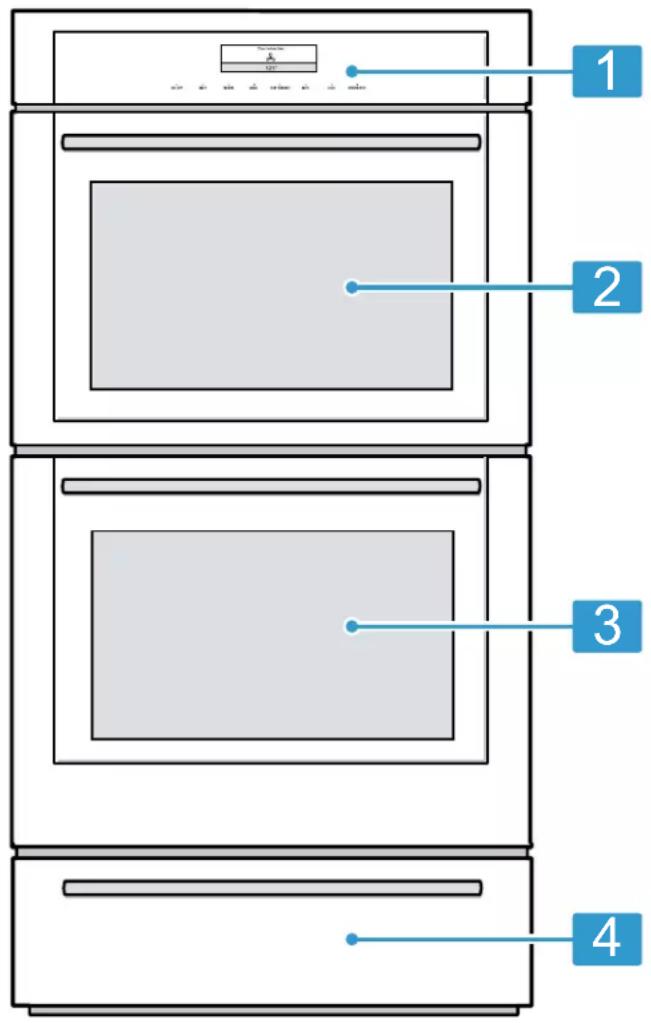
1 Control panel
2 Upper oven
3 Lower oven
4 Warming drawer
4.2 Oven cavities
Here you can find information about the features of the oven cavities.
The bottom of the oven cavity conceals the lower heating element.

WARNING
Trapped heat and the use of metallic liners may result in a risk of electric shock or fire.
- Do not use aluminum foil or protective liners on any part of the appliance, especially the oven bottom.
- NEVER cover any slots, holes or passages in the oven bottom or cover an entire rack with materials such as aluminum foil. Doing so blocks air flow through the oven. Aluminum foil linings may also trap heat, causing a fire hazard.

CAUTION
A build-up of heat can damage the appliance or cause injury.
Do not place anything on the bottom of the oven cavity.
Always place cookware on a rack.
- Do not cover the bottom of the oven cavity with aluminum foil.
- Do not place the broiler pan on the bottom of the oven cavity to catch spills. It will damage the surface of the oven cavity bottom.
Oven cavity components
Here you can find the components of the conventional oven cavity.
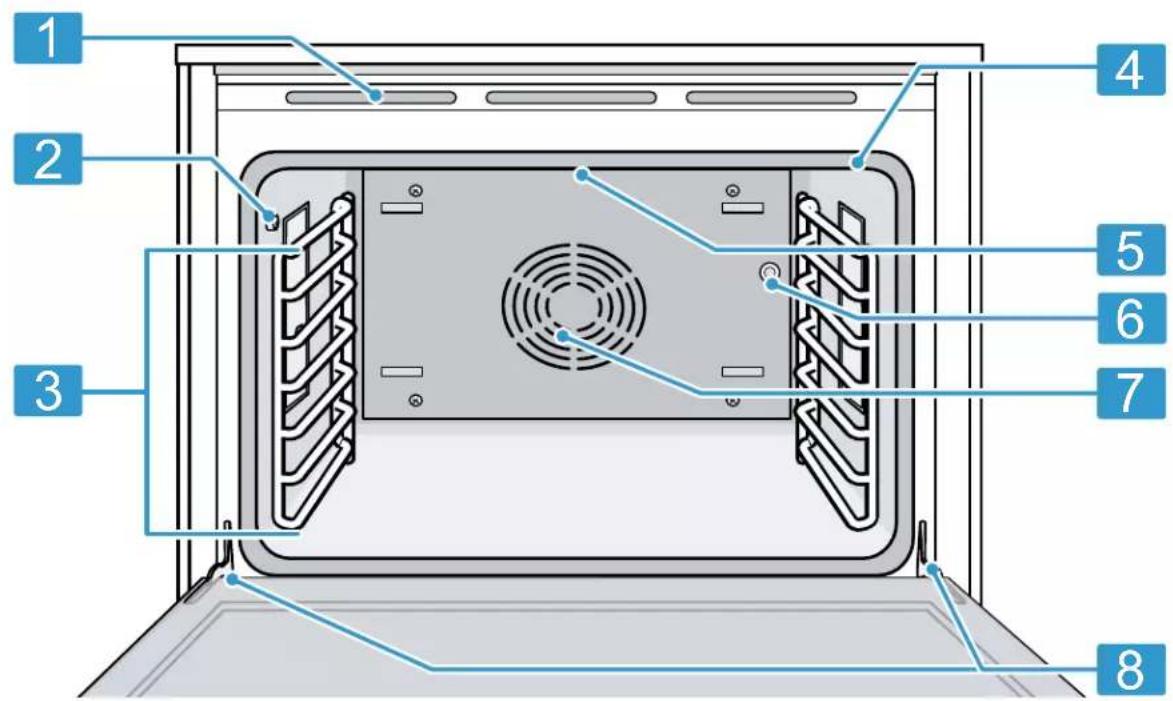
| 1 | Oven vent |
| 2 | Socket for meat probe |
| 3 | Oven rails |
| 4 | Door gasket |
| 5 | Broil element |
| 6 | Socket for rotisserie spit |
| 7 | Convection fan |
| 8 | Door hinges |
Oven light
Your appliance is equipped with an oven light.
When you open the appliance door, the oven light turns on. If the door remains open for longer than 20 minutes, the oven light turns off again.
To turn the light back on, touch LIGHT.
Convection fan
Convection baking uses a fan to circulate the oven's heat evenly and continuously within the oven.
This improved heat distribution allows for even cooking and excellent results using multiple racks at the same time.
Cooling fan
The cooling fan runs during all cooking modes.
The fan can be heard when it is running, and warm air may be felt as it is released from the oven vent. The fan may also run after the oven is off.
Oven vents
Warm air may be released from the oven vents before, during and after cooking. It is normal to see steam escaping from the vents, and condensation may collect in this area. This area may be warm when the oven is in use.

CAUTION
The oven vents are important for air circulation. Covering the oven vents will cause the oven to overheat. Refer to the appliance overview for the location of the oven vents.
"Oven cavity components", Page 11
- Do not obstruct oven vents.
Rack positions
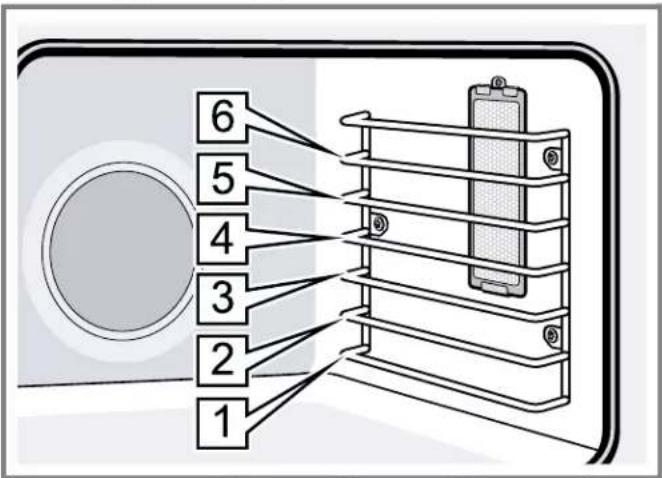
Your oven has six rack positions. The rack positions are counted from bottom to top.
Use rack positions 1 through 6 only. DO NOT attempt to use the top guide to support an oven rack.

CAUTION
Use caution when removing oven racks from the lowest rack position to avoid contact with the hot oven door.
4.3 Control panel
You can use the control panel to configure all functions of your appliance and to obtain information about the operating status.
Note: The control panel graphics are representative. Your oven may have different graphic appearances.
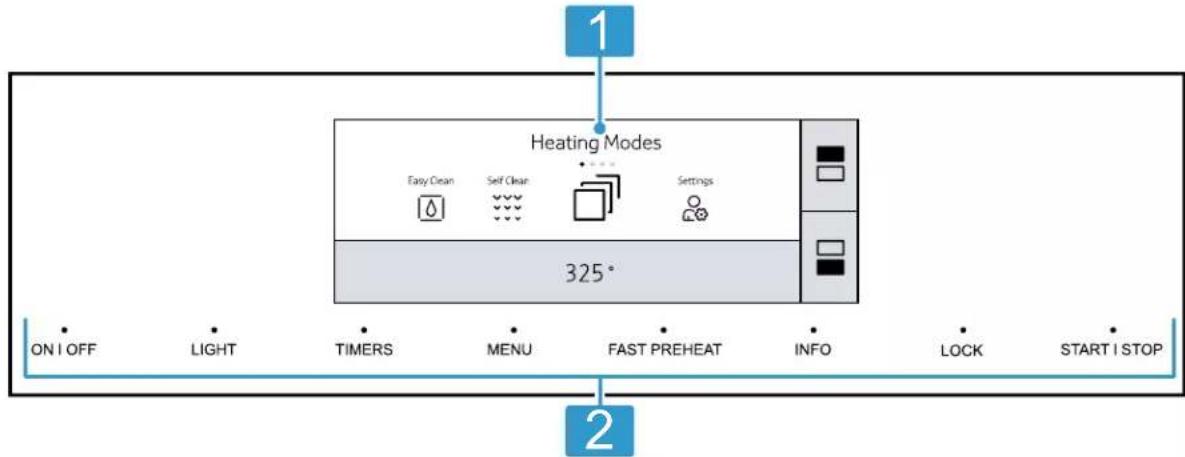

Full touch display The full touch display is a touch sensitive area. Use it to navigate through the menus and select settings.
The feature that is active will be illuminated in blue.

Touch keys Touch keys are touch sensitive areas. Press on the words of the touch buttons to select a function.
The available functions are indicated by a light above the respective touch button. Depending on the operation you are running, the number of available functions can change.
4.4 Basic features
Here you can find information on the basic operating features of your oven.
This Use and Care Guide covers several models. Your model may have some but not all of the touch keys listed.
Touch key Function
ON I OFF Main switch. Turns the oven on or off.
Touch key Function
LIGHT While the oven door is closed, press this key to turn the oven light on and off. When the oven door is opened, the oven light will automatically turn on. During self clean the oven light cannot be turned on.
STARTI Starts or pauses the operation. STOP
| Touch key Function | |
| TIMERS Enters the kitchen timer or oven timer function. | |
| MENU Enters the menu for operating modes and settings. | |
| INFO Displays additional information on current modes. | |
| LOCK Activates/deactivates panel lock | |
| DRAWER Activates the warming drawer | |
| FAST PREHEAT | Activates or deactivates the fast preheat function. The display shows Ⓞ. |
| ■ | Select upper oven cavity to change settings. |
| ■ | Select lower oven cavity to change settings. |
| √ | Confirm settings on the full touch display |
| ← | Return to prior screen on the full touch display |
INFO touch key
If the INFO touch key lights up, important information regarding the mode you are using is available, for example recommendations on suitable cookware or how to prepare food for a safe cooking result. How to use this feature:
- When you press INFO, the information is displayed for a few seconds.
4.6 Heating modes and functions
Here you can find a list of heating modes and other features of your appliance.
This Use and Care Guide covers several models. Your model may have some but not all of the features or displays listed.
- To exit the information mode immediately, press INFO or touch the display.
Sounds
The appliance uses various sound signals during operation.
Sounds may indicate the following:
A touch key or touch field has been pressed.
An operation has started or finished.
You can adjust the volume of the sounds in the basic settings.
4.5 Main menu
Press MENU to access the main menu.
| Menu Function | |
| Heating modes Access the heating modes menu. | |
| Easy clean Uses steam to help lift food soils for cleaning. | |
| Self clean Uses high temperatures to burn off food soil. | |
| Settings Adjusting the basic settings of your appliance. | |
| Remote start This symbol appears when the Home Connect® setup is complete and Remote Start has been activated. | |
Note: Additional functions may be available as a result of software updates. If a software update is available, you can find further information in the Home Connect® app.
| Symbol Function/Mode Temperature range °C (°C) | How it works and what it is used for | |
| True Convection 150 - 525 (65 - 275) | For baking and cooking small food items on one or more racks. | |
| Convection Bake 150 - 525 (65 - 275) | Use for large baked items and breads on 1 or 2 racks. Also suitable for side dishes and casseroles. | |
| Bake 150 - 525 (65 - 275) | Cooks with dry, heated air. Use for traditional baking and roasting on one level. | |
| Convection Roast 150 - 525 (65 - 275) | Uses intense heat and air circulated by a fan. Use for roasting of poultry, larger pieces of meat and vegetables. | |
| Roast 150 - 525 (65 - 275) | Use for roasting poultry or meats. | |
| Broil 450 - 550 (230 - 290) | Use for broiling flat items such as steaks or hamburgers, for making toast and for cooking au gratin. | |
| Max Broil (230 - 290) | Use for cooking thin, tender cuts of meat, poultry and fish. | |
| Symbol Function/Mode Temperature range °F (°C) | How it works and what it is used for | |
| Convection Broil 450 - 525(230 - 275) | Combines intense heat from upper element with fan circulation.Use for roasting poultry, whole fish and larger pieces of meat. | |
| Max Convection Broil 450 - 550(230 - 290) | Use for thick tender cuts of meat, poultry and fish. | |
| Speed Convection 150 - 525(65 - 275) | Use for frozen convenience foods.Preheating is not required. | |
| Pizza 150 - 525(65 - 275) | For preparing fresh or frozen pizza. | |
| Slow Roast 150 - 250(65 - 120) | Use for gentle slow cooking of seared, tender pieces of meat in ovenware without a lid. | |
| Rotisserie 175 - 550(80 - 290) | Use for roasting poultry and large pieces of meat. The food is slowly turned on a skewer. | |
| Dehydrate 100 - 160(40 - 70) | Use for drying herbs, fruits and vegetables. | |
| Proof 85 - 110(30 - 45) | Maintains the warm, non-drafty environment needed for proofing yeast leavened product.Use for yeast doughs and sourdough. | |
| Warm 150 - 225(65 - 110) | Use for keeping cooked food warm. | |
| Sabbath 100 - 450(40 - 230) | The Sabbath mode enables those of particular faiths to use their ovens on the Sabbath. | |
| Yom Tov 100 - 450(40 - 230) | The Yom Tov mode enables those of particular faiths to use their ovens during Yom Tov. | |
| Easy Clean n/a Alternative cleaning method using steam to loosen food soils for easier cleaning. | ||
| Self Clean n/a This cleaning program uses high temperatures to burn off food soil. | ||
| Remote Start n/a Allows you to start, pause, and abort oven programsremotely via the Home Connect® app on a mobile device. | ||
5 Software update
If the appliance is connected to Home Connect®, some functions may be available with a software update. More information on the availability of additional functions can be found on the website www.thermador.com/us/ home-connect.
6 Accessories
Only use original accessories. These are designed especially for your appliance.
Note: Accessories may become deformed if they get hot. Deformation has no effect on function. As the accessory cools down, it will regain its original shape.
The accessories supplied may differ depending on the appliance model.
| Accessories Use | |
| Wire rack • These racks can be used for most | cooking. • You can use multiple racks at the same time. Note: Do not clean using the SELF CLEAN function. |
| Telescopic rack Use with heavier dishes to make | placement into the oven easier. Note: Do not clean using the SELF CLEAN function. |
| Broiler pan and grid Use for broiling and roasting | Notes • Do not clean using the SELF CLEAN function. • You can clean this accessory in the dishwasher. |
| Meat probe Depending on your oven model, the | oven comes with a single-point or multi-point meat probe. • Single-point meat probe: One measurement point determines the internal doneness or the end temperature of many foods, especially meats and poultry. • Multi-point meat probe: Three measurement points enable precision roasting to your exact requirements. Notes • Do not clean using the SELF CLEAN function. • Do not clean in the dishwasher. |
| Rotisserie Use this accessory when using the | rotisserie mode. Note: Do not clean using the SELF CLEAN function. |
6.1 Other accessories
You can purchase other accessories from our Customer Service, specialist retailers or online.
You will find a comprehensive range of products for your appliance in our brochures and online:
www.thermador.com
Accessories are appliance-specific. When purchasing, always check for compatibility with your appliance model number (E-Nr).
You can find out which accessories are available for your appliance in our online shop or from our Customer Service.
Other accessories Use
Self cleaning rack for conventional oven (3 pack)
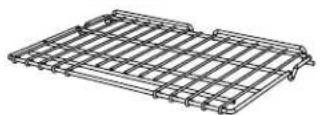
For ovenware, cake pans and ovenproof dishes. These racks do not need to be removed during SELF CLEAN.
6.2 Safe use of oven racks
For your safety, follow these recommendations on how to use the oven racks correctly.
CAUTION
Placement of Oven Racks - Always place oven racks in desired location while oven is cool. If the rack must be moved while the oven is hot, do not let potholders contact the hot heating elements in the oven. Use caution when removing oven racks from the lowest rack position to avoid contact with the hot oven door.
CAUTION
To avoid possible injury or damage to the appliance, ensure oven rack is installed exactly per installation instructions and not backwards or upside down. Do not slide any accessories between the rack positions, or they may tip.
6.3 Inserting the wire rack
The wire rack can be used in the conventional oven on level 1 to 6.
Requirement: You have read the recommendation on "Safe use of oven racks", Page 16.
- Grasp the rack firmly on both sides.
- Tilt the rack up to allow the stop into rack guide.
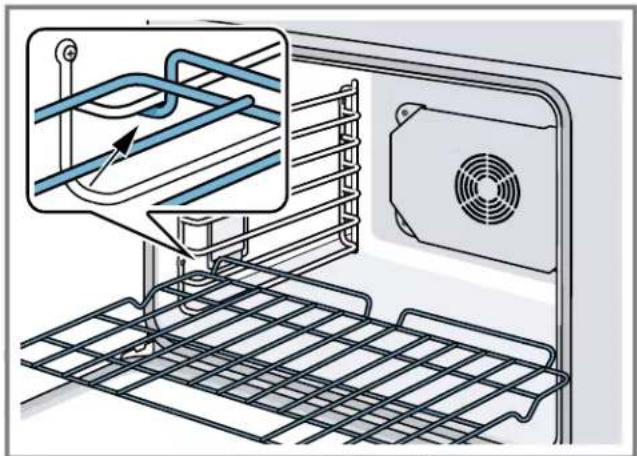
- Bring the rack to a horizontal position and push it in the rest of the way.
The rack should be straight and flat, not crooked.
6.4 Inserting the telescopic rack
Requirement: You have read the recommendation on "Safe use of oven racks", Page 16.
- Hold the telescopic rack at a slight angle and engage the rear hooks in the oven rails on both sides of the oven cavity.
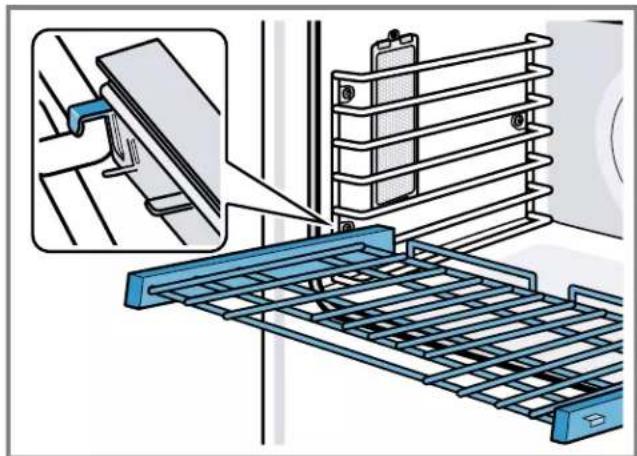
- Hold the rack straight to allow the second tab to rest over the oven rail.
- Push the rack in until it is even with the front hooks.
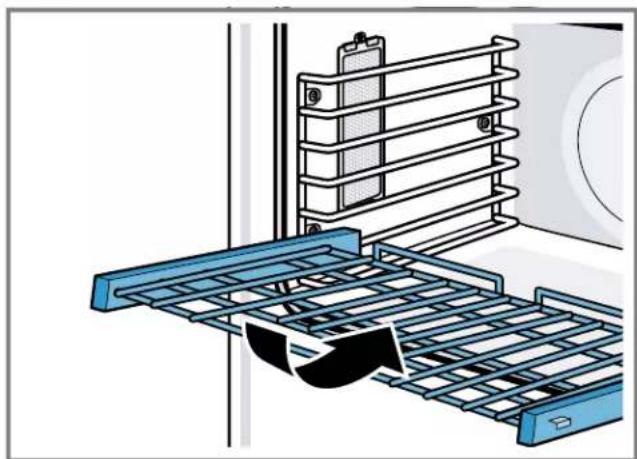
- Lift the rack up to lock the last hook into place.
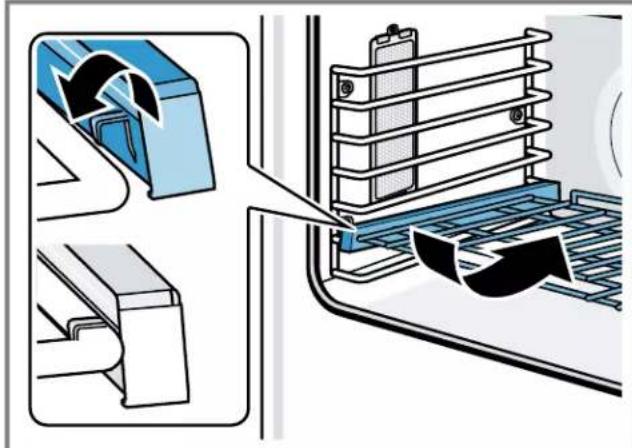
- Push the rack in completely.
- Make sure that the front hooks of the telescopic rack engage in the oven rails.
7 Before using for the first time
Carry out these steps before using your appliance.
The appliance must be properly installed by a qualified service provider before use.
- Read and understand all safety precautions Page 4 and information in the Use and Care Guide prior to operating.
- Download the Home Connect® (America) app to remotely control your appliance, get cooking inspiration, and access service tips and support.
"Home Connect@", Page 28
This Use and Care Guide covers several models. Not all features are available on all models.
7.1 Initial adjustment of basic settings
After the appliance has been connected to the power supply, you are prompted to set some basic settings to ensure you can use your appliance conveniently and safely.
-
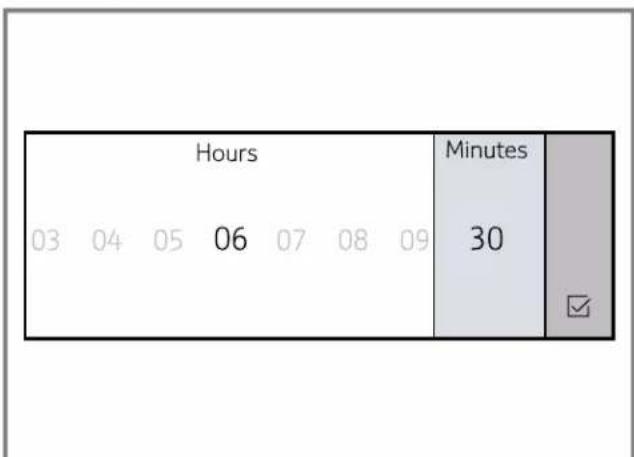
Setting the clock:
-
Touch the bottom line on the full-touch display. The time setting options are displayed.
- Touch "Hours" and swipe to the left or right until the desired number is in focus.
- Touch "Minutes" and swipe to the left or right until the correct number is in focus.
- Touch to confirm.
-
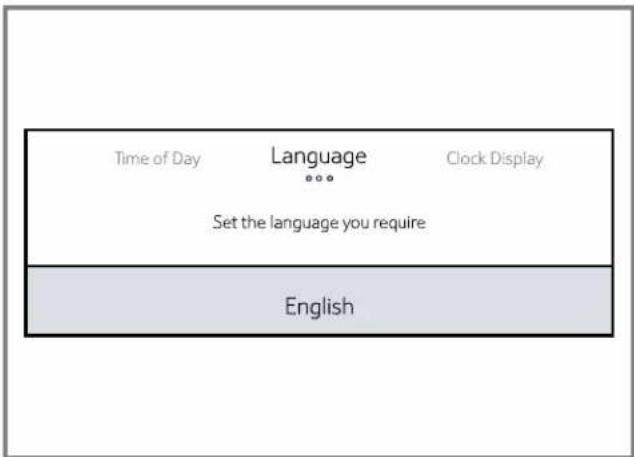
Setting the language:
-
Touch the bottom line on the full-touch display.
- Swipe to the left or right in the bottom line until the desired language is in focus.
- Touch the bottom line and swipe to the left or right until the correct language is in focus.
- Touch the top line.
-
Setting the clock display:
-
Touch "Clock Display".
- Touch the bottom line.
- Swipe to the left or right to select "digital" or "analogue".
- Touch the top line.
7.2 Pairing your oven with Home Connect®
In order to utilize the full feature potential of the appliance, download the Home Connect® (America) app on a smart device and pair the appliance to the home's Wi-Fi device.
For step-by-step instructions, see
"Home Connect®", Page 28.
7.3 Cleaning the appliance before using it for the first time
Clean the oven cavity and accessories before using the appliance to prepare food for the first time.
NOTICE:
ENAMEL DAMAGE!
- Do not start an operation if water is on the bottom of the oven cavity.
- Let the appliance cool down and wipe the water from the oven cavity bottom before starting an operation.
Note: There may be a slight odor during first uses. This is normal and will disappear.
- Remove all packaging materials from inside and outside the oven.
- Before heating the appliance, wipe the smooth surfaces in the oven cavity with a soft, damp cloth and dry.
- Keep the room ventilated while the appliance is heating.
- Close both oven doors.
- Press ON I OFF.
- Select the heating mode and temperature.
Heating mode Bake
Temperature 475^ (245^)
Duration 30 minutes
- Switch off the appliance after the specified cooking time by pressing ON I OFF.
- Wait until the oven cavities have cooled off.
- Clean the smooth surfaces with soapy water and a dish cloth.
- Wash the accessories thoroughly with soapy water and a cloth and rinse well.
8 Basic Operation
8.1 Turning the appliance on
Press ON I OFF.
8.2 Turning the appliance off
Switch off your appliance when you do not need to use it.
Press ON I OFF.
If no settings are applied for a long time, the appliance switches itself off automatically.
The cooling fan may continue to run.
- Certain indicators remain visible on the display after the appliance has been switched off, for example the residual heat notification.
8.3 Operating the full-touch display
- Touch the desired area on the display to select an option.
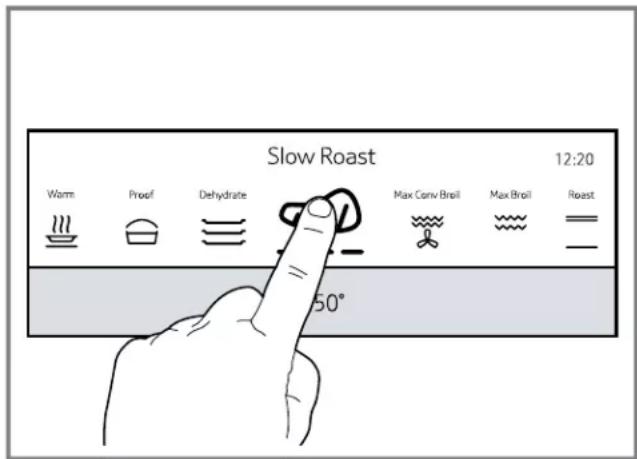
- Swipe to the left or right to move through the various settings.
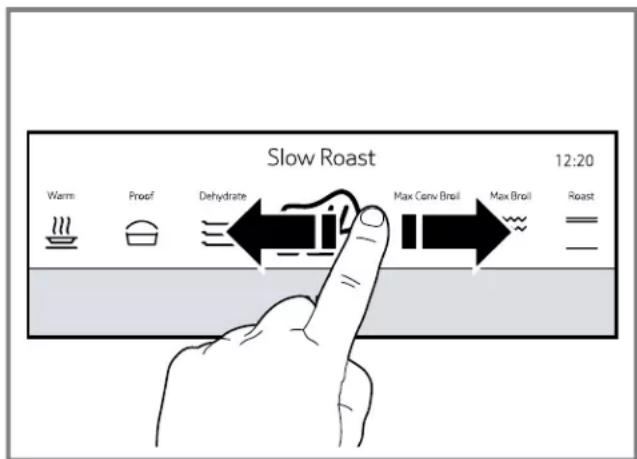
The setting that is in focus appears larger and blue.
- In some instances settings need to be confirmed by touching ×
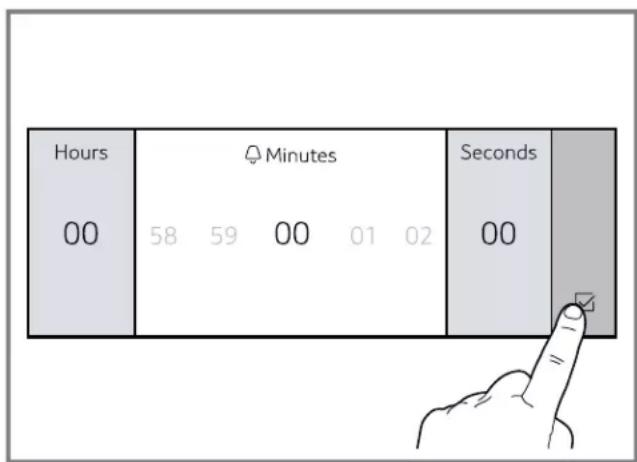
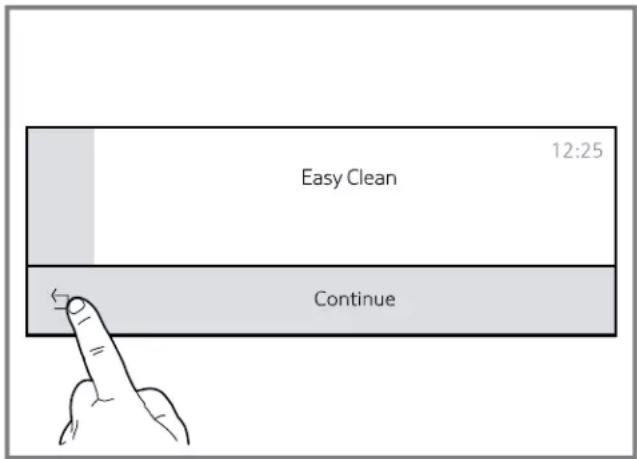
- Some operations allow you to return to the previous screen by touching
- For double ovens, you have to select the desired oven cavity first. Touch to select the upper oven, touch to select the lower oven.
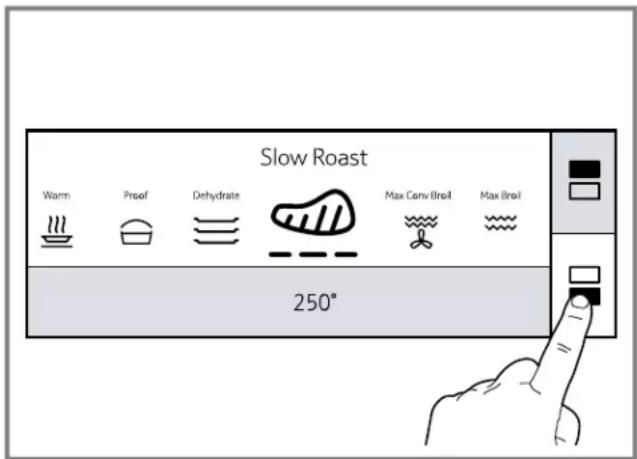
The oven cavity icons light up in different colors:
| Color of Meaning cavity icon |
| Blue The oven cavity is selected, proceed to make settings. |
| White The oven cavity is operating. |
| Gray The oven cavity is inactive. |
8.4 Setting the heating mode and temperature
- Select the desired oven cavity.
- Press ON I OFF.
The heating modes menu appears on the display. - Swipe to the left or right in the top line of the display until the desired heating mode is in focus.
- The default temperature is displayed in the bottom line of the display.
-
Swipe to the left or right in the bottom line of the display until the desired temperature is in focus.
-
Press START I STOP.
-
The oven begins to preheat. The preheat bar begins to fill in.
- Select the other oven cavity and make the desired settings.
You can only make settings for one oven cavity at a time.
- The settings for both oven cavities are shown side by side on the display. The upper oven settings are shown in the left half, the lower oven settings are shown in the right half of the display. Select an oven cavity by touching the display half of the desired oven cavity.
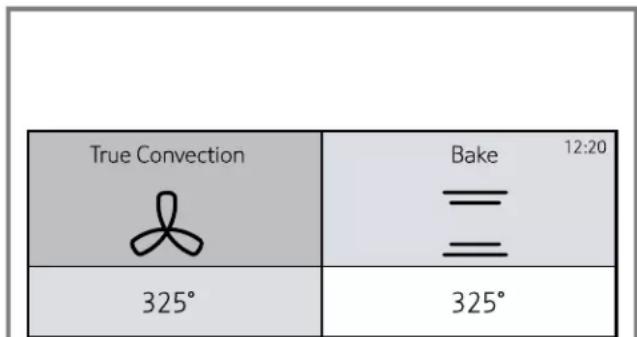
- If you want to adjust settings, touch the display half of the desired oven cavity and adjust the desired setting.
8.5 Changing the heating mode or temperature
- For double ovens: Select the desired oven cavity.
- Touch the area of the setting you want to change.
-
Swipe to change the setting.
-
The appliance continues operation with the changed settings.
8.6 Canceling a heating mode
- Select the desired oven cavity.
- Press START STOP.
8.7 Heating time limitation
The maximum heating time is limited. If you forget to turn off the oven, it turns off automatically after a set period of time.
The maximum time for Sabbath mode is 74 hours. For all other heating modes the maximum allowed time is 24 hours.
| Temperature °F (°C) Max. time allowed without activity | |
| 100 - 200 | 24 hours |
| (30 - 120) | |
| 201 - 550 | 12 hours |
| (121 - 300) | |
8.8 Preheating
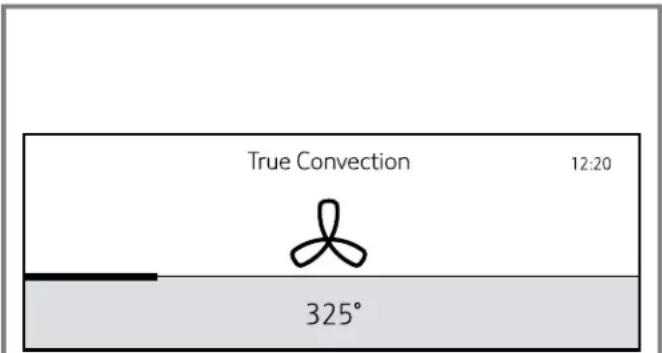
Place the food into the oven after preheating is complete. As soon as a new heating mode is started, the preheating bar appears on the display. The preheating bar indicates the temperature increase in the oven cavity. When the oven is fully preheated, a signal tone sounds.
8.9 Fast preheat
With this function you can shorten the time the oven needs to reach the set temperature.
Fast preheat is available for the following heating modes:
"True Convection"
"Convection Bake"
"Bake"
"Roast"
"Convection Roast"
Note: If the FAST PREHEAT touch key lights up, the function can be activated.
Setting fast preheat
To achieve an even cooking result, wait until fast preheat is complete before placing your food or accessories into the oven cavity.
- Set the desired heating mode and temperature.
-
Press START I STOP.
-
Press FAST PREHEAT.
lights up on the display.
- When the set temperature is reached, the function turns off automatically. The \& \& indicator turns off.
- Place the food into the oven cavity.
Note: You can turn off fast preheat manually by pressing FAST PREHEAT.
8.10 Turning the panel lock on or off
With the panel lock you can disable all touch keys on the control panel.
Note: Depending on your model your appliance may not have a LOCK touch key. For these models the TIMERS touch key activates the panel lock.
Requirement: The oven is in standby mode.
- Press and hold LOCK for 4 seconds.
The panel lock is activated. - Press and hold LOCK again for 4 seconds to turn off the panel lock.
The display returns to standby mode.
8.11 Meat probe
The meat probe measures the internal temperature of the food. You can set a core temperature and the heating mode turns off automatically as soon as the set temperature is reached.
The multi-point meat probe measures the temperature in three different areas of your food ensuring the most accurate cooking results.
WARNING
Use of a wrong meat probe can damage the insulation.
- Use only the meat probe intended for this appliance.
Suitable heating modes:
"True Convection"
"Convection Bake"
"Bake"
"Convection Roast"
"Roast"
"Slow Roast"
The meat probe measures the temperature on the inside of the food between 85^ (30^) and 210^ (99^) .
- To prevent the meat probe from being damaged, do not set an oven temperature above 480^ (250^) .
- Use only the meat probe supplied with your appliance. Additional or replacement meat probes can be ordered from Customer Service.
- Do not store the probe in the oven cavity. Always remove the meat probe from the oven cavity after use.
Inserting the meat probe
Requirements
- Food must be completely thawed before inserting the probe into the meat.
- The probe ships with a black plastic safety cap over the pointed metal end of the probe. The cap must be removed prior to use.
- Insert the tip of the probe in the middle and thickest part of the meat or the breast for poultry. Make sure the probe is not touching fat, bone or parts of the oven or the pan.
Always use the handle of the probe for inserting and removing.
Note: The handle of the probe becomes hot during cooking. Always use oven mitts when touching the probe handle.
- Insert the plug of the probe into the socket at the side of the oven cavity.
Push the probe in all the way and pull back until it catches in the socket.
Setting the meat probe
WARNING
The oven interior and the meat probe become very hot.
-
Use oven mitts to plug and unplug the meat probe.
-
Insert the meat probe into the food.
"Inserting the meat probe", Page 20
-
Insert the plug of the probe into the socket at the side of the oven cavity.
-
lights up on the display.
- Close the appliance door.
- Set the desired heating mode and temperature.
- Touch
- Touch and swipe to the left or right to select the required core temperature.
The set oven cavity temperature must be at least 50^ (10^) higher than the meat probe temperature.
-
Press START I STOP.
-
The current and the target temperature of the probe are displayed.
- When the set probe temperature is reached, the heating mode turns off.
- Unplug the meat probe from the socket.
8.12 Rotisserie
The rotisserie uses heat radiated from the broil element. The food is slowly turned on a skewer in the center of the oven. This mode helps seal in flavor and juices while allowing the meat to be cooked without the addition of fats or liquids.
The rotisserie mode is best suited for cooking large pieces of meat, such as a whole chicken, turkey or a large roast. General notes:
The maximum weight allowed for the rotisserie is 12 lb (6 kg).
Use a meat thermometer to check the internal temperature of the meat.
The allowed temperature range is 175 - 550^ (80 - 290°C).
Assembling the rotisserie
- Insert the rotisserie rack half way into the oven on rack position 5.
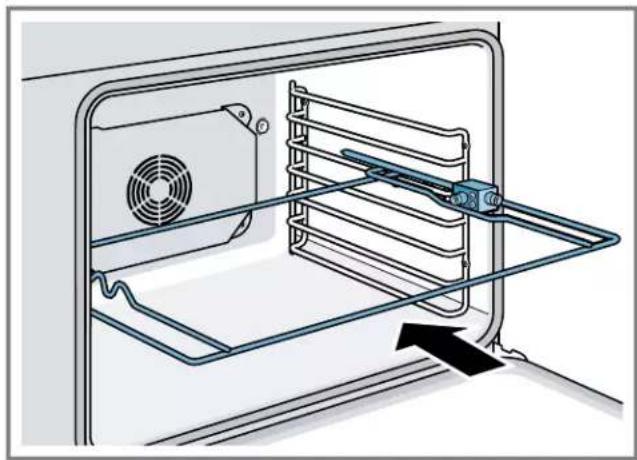
- Slide the left fork into the skewer and tighten the screw.
- Slide meat or poultry for roasting onto the skewer.
- Slide the right fork onto the skewer and tighten the screw.
- Check the balance of the food on the skewer by rolling the skewer in the palms of your hands. Food that is not evenly balanced on the skewer will not cook evenly.
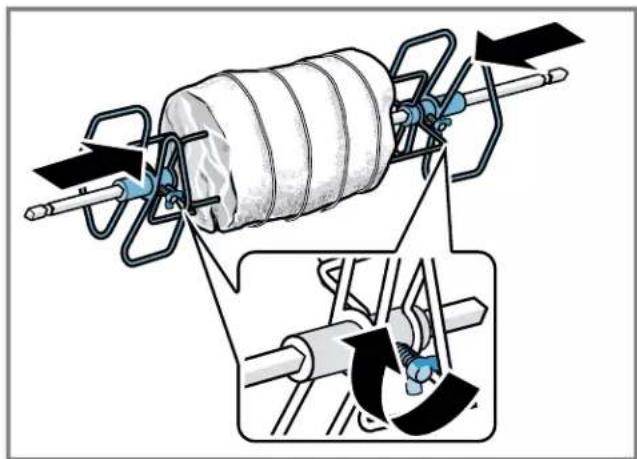
-
Place the rotisserie skewer onto the rack.
-
Place the skewer rack into the oven and insert the drive shaft into the opening on the back oven wall.
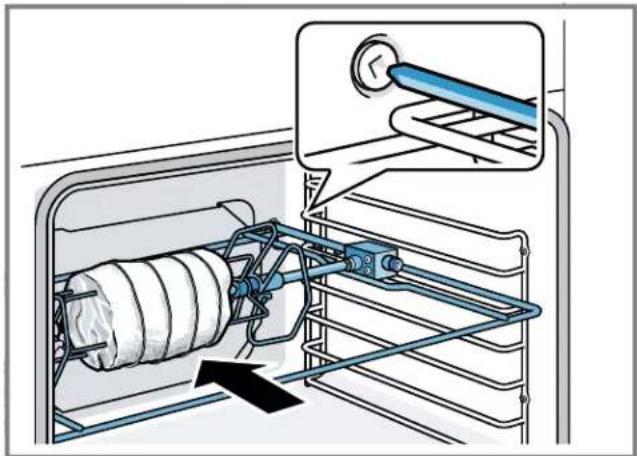
If necessary, turn the rotisserie skewer slightly so that the drive shaft fits properly into the opening.
- Insert the rack on position 1 and use the broiler pan to catch drippings.
Trussing poultry for the rotisserie
- Slip one of the forks onto the skewer with the tines pointing to the tip of the skewer. Loosely tighten the screw to keep it from slipping.
- Insert the skewer through the poultry securing the poultry with the fork.
- Cut 24" (61 cm) of kitchen string and lay it under the poultry, breast side up, with equal lengths of string on each side.
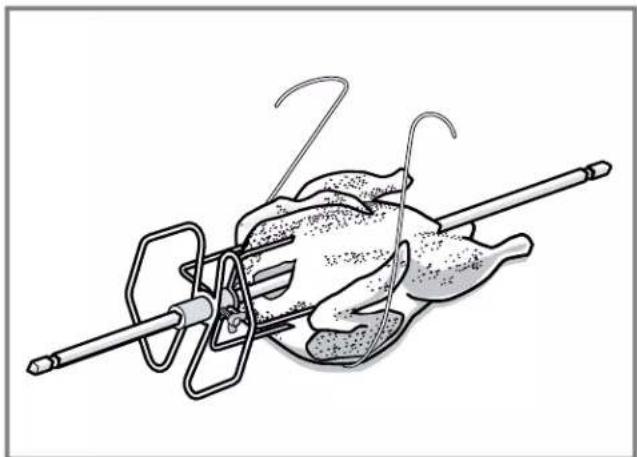
- Wrap each end of the string around each of the wings. Catch each wing tip as you bring the string tightly together at the top and knot it. Do not cut off the extra string.
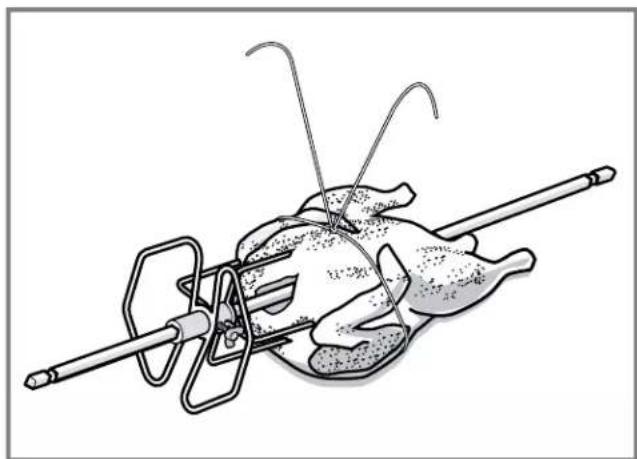
- Cut another 24" (61 cm) of string and lay it under the back. Wrap it around the tail and then around the skewer. Cinch tightly.
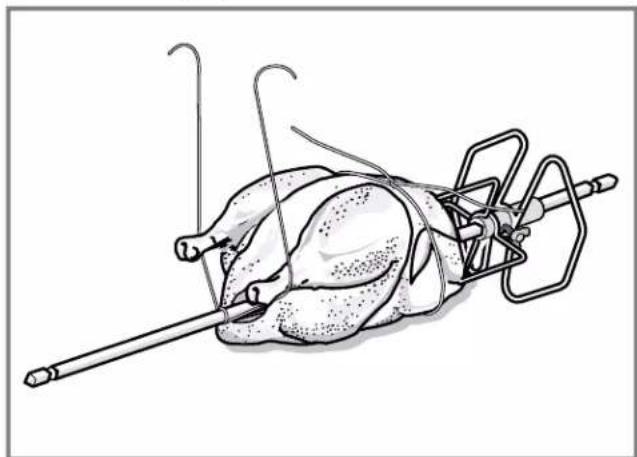
- Pull the legs forward, cross them on top of the skewer. Bring the string around and tie a knot.
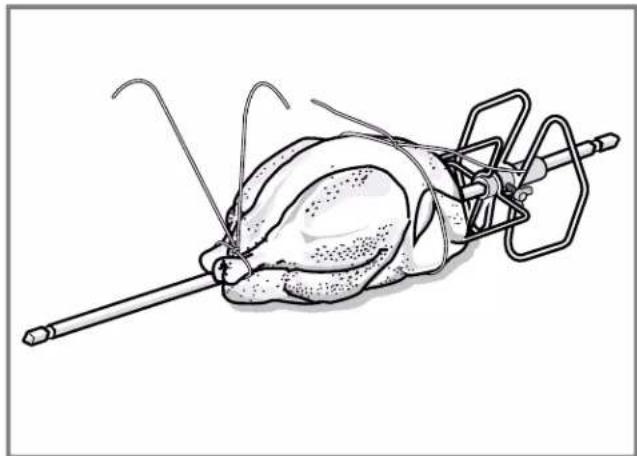
- Connect the string holding the legs to the string holding the wings and knot them together. Add the other fork and push the tines into the drumsticks to secure.
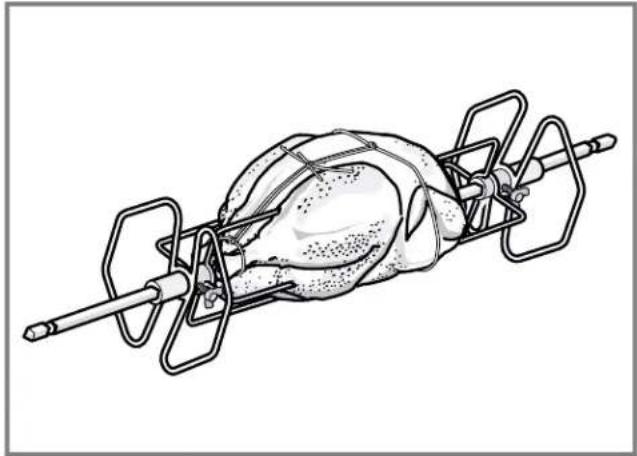
- Check the balance by rolling the skewer in your palms. The poultry should not rotate or be loose in any way. If it does, redo the trussing.
The poultry will not cook evenly if it is not balanced on the skewer.
Starting the rotisserie mode
- Select the rotisserie mode.
The default temperature is 400^ (200^) is displayed. - Swipe to adjust temperature and press START I STOP.
Cooking recommendations for rotisserie
Here you can find recommendations for cooking different foods with the rotisserie mode.
Beef
| Food item Weight in Ib Oven | temperature in °F (°C) | Time in min./lb Internal food temperature in °F (°C) | |
| Rib eye roast, medium rare 3 - 5.5 400 (200) 17 - 23 145 (65) | |||
| Rib eye roast, medium 3 - 5.5 400 (200) 18 - 27 160 (70) | |||
| Pork | |||
| Food item Weight in Ib Oven | temperature in °F (°C) | Time in min./lb Internal food temperature in °F (°C) | |
| Loin roast, boneless 1.5 - 4 400 (200) 16 - 24 145 (65) | |||
| Loin roast, boneless 1.5 - 4 400 (200) 20 - 26 160 (70) | |||
| Poultry | |||
| Food item Weight in Ib Oven | temperature in °F (°C) | Time in min./lb Internal food temperature in °F (°C) | |
| Chicken, whole 4 - 8 450 (230) 12 - 17 165 (75) | |||
| Turkey, whole 10 - 12 400 (200) 10 - 12 165 (75) | |||
| Turkey breast 4 - 7 400 (200) 16 - 19 165 (75) | |||
| 4 Cornish hens 1.5 each | 450 (230) 60 - 70 total | 165 (75) | |
| Lamb | |||
| Food item Weight in Ib Oven | temperature in °F (°C) | Time in min./lb Internal food temperature in °F (°C) | |
| Leg, boneless, medium | 4 - 6 400 (200) 20 - 23 160 (70) | ||
| Leg, boneless, well | 4 - 6 400 (200) 27 - 29 170 (75) | ||
9 Timer functions
Your appliance has various time setting functions.
9.1 Setting the oven timer
If you set an oven timer, operation of the oven stops automatically once this time has elapsed.
- Set a heating mode and temperature.
- Press TIMERS.
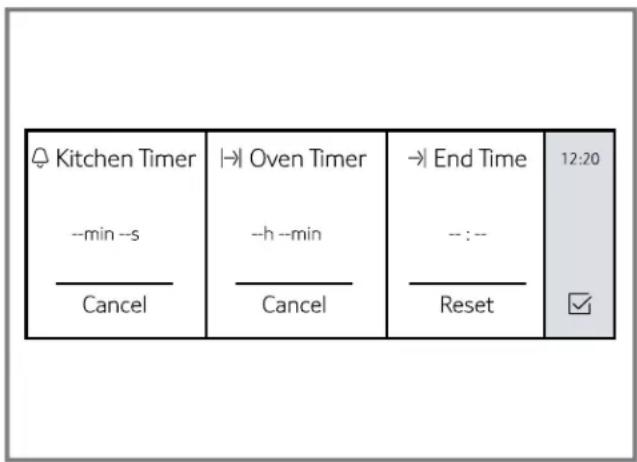
- Touch Dven Timer".
- Swipe to the left or right to select the desired value. You can set hours and minutes.
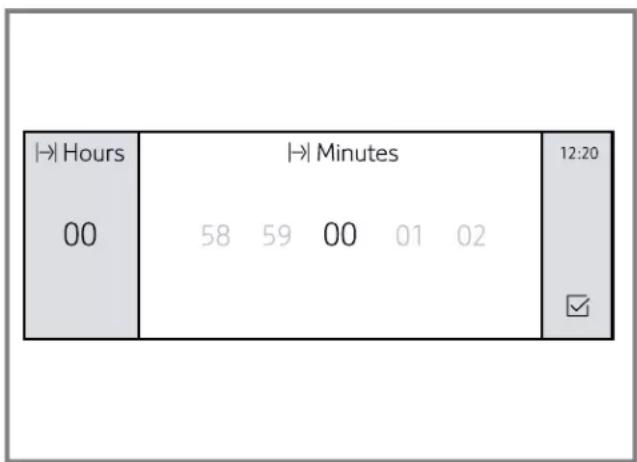
- Touch
- Press START I STOP.
The oven timer begins to count down.
- The timer value and are displayed in the bottom line of the display.
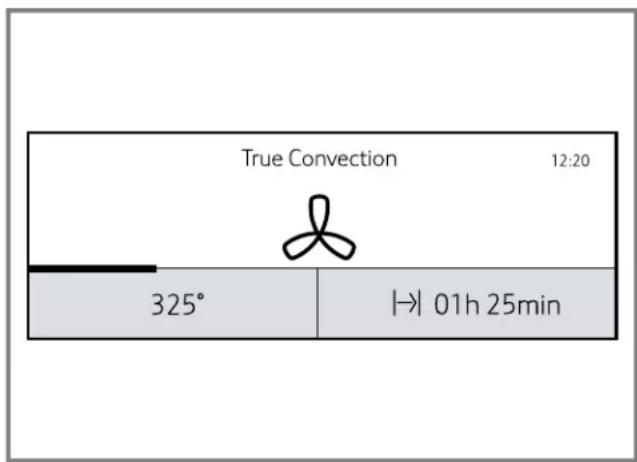
- When the time has elapsed, signal sounds. A notification is shown on the display.
Editing or canceling the oven timer
- Press TIMERS.
- Select Oven Timer".
- Set a new value and touch To cancel the oven timer select 0 or touch "Cancel".
9.2 Setting the kitchen timer
The kitchen timer is a countdown timer that has no affect on oven heating.
Note: You can set the kitchen timer when the appliance is turned on or off.
- Press TIMERS.
- If the appliance is switched on, touch "Kitchen Timer".
- Swipe to the left or right to select the desired value. You can set hours, minutes and seconds.
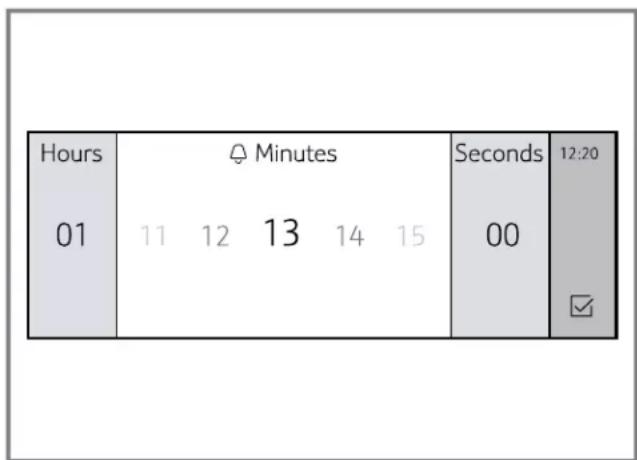
- Touch
The kitchen timer begins to count down.
- The timer value and are displayed in the top left corner of the display.
- When the time has elapsed, a signal sounds. A notification is shown on the display.
Editing or canceling the kitchen timer
- Press TIMERS.
- Select "Kitchen Timer".
- Set a new value and touch To cancel the kitchen timer select 0 or touch "clear".
9.3 Setting delayed operation with End Time
With this feature you can program your oven to finish a heating mode at a predetermined time.
CAUTION
Food might spoil when left standing for too long.
- To maintain food safety, do not leave food in the oven for more than one hour before or after cooking.
- Place the food onto the appropriate accessory in the oven cavity and close the appliance door.
- Select the desired oven cavity.
- Set a heating mode and temperature.
- Press TIMERS.
- Set an oven timer and touch
- Press TIMERS.
- Set an end time for delayed cooking.
- Touch
-
Press START I STOP.
-
The appliance waits until the appropriate time to start the operation.
- When the time has elapsed, signal sounds. A notification is shown on the display.
Editing or canceling delay time
- Press TIMERS.
- Select "End Time".
- Set a new value and touch To cancel the end time select 0 or touch "Cancel".
9.4 Sabbath mode
The Sabbath mode enables those of particular faiths to use their ovens on the Sabbath.
- Sabbath mode has to be enabled in the basic settings menu.
Sabbath mode automatically uses the heating mode "Bake". The heating mode cannot be changed.
The temperature range may be set between 100^ (38^) and 450^ (230^) . - You can set a duration of up to 74 hours.
Kitchen timer, oven timer and meat probe function are not available in Sabbath mode. -
Pressing any of the touch keys while the oven is in Sabbath mode will have no effect.
If the oven light is on when you set Sabbath mode, the light remains on. If it is off when you set Sabbath mode, the light remains off. -
You can run Sabbath mode on one oven cavity or on both oven cavities at the same time. The two oven cavities share one Sabbath mode timer but you can set different temperatures for each oven cavity.
Setting the Sabbath mode
- Press ON I OFF.
- Select the desired oven cavity.
- Scroll to the left or right to select "Sabbath".
"Bake" is set as the default heating mode and cannot be changed.
4. Set a temperature within the allowed temperature range in the bottom line of the display.
5. Touch
6. Touch Doven Timer" and set the desired time.
7. Touch
8. Press START I STOP.
Sabbath mode starts after 5 minutes. During this time you can still make changes.
Once Sabbath mode has started, all controls apart from ON I OFF are disabled.
- The operation is not interrupted if you open the appliance door.
- Once the Sabbath mode duration has elapsed, a signal sounds. The appliance stops heating.
9. Press ON I OFF.
Canceling Sabbath mode
You can cancel the function at any time.
Press ON I OFF.
9.5 Yom Tov mode
With Yom Tov mode, you can set a cooking time of up to 74 hours, during which you can select from six cooking temperatures.
Setting the Yom Tov mode
- Press ON I OFF.
- Select the desired oven cavity.
- Scroll to the left or right to select "Yom Tov".
"Bake" is set as the default heating mode and cannot be changed.
- Set a temperature within the allowed temperature range in the bottom line of the display.
- Touch
- Touch Doven Timer" and set the desired time.
-
Touch
-
Press START I STOP.
-
Yom Tov mode starts after 5 minutes. During this time you can still make changes.
-
Once Yom Tov mode has started, all controls apart from ON/OFF are disabled.
Six temperatures are displayed on the display. -
You can change the temperature by touching the desired field.
-
The temperature is changed without response of the display.
- Once the Yom Tov mode duration has elapsed, a signal sounds. The appliance stops heating.
10. Press ON I OFF.
Canceling Yom Tov mode
You can cancel the function at any time.
Press ON I OFF.
10 Basic settings
You can configure the basic settings for your appliance to meet your needs.
10.1 Overview of the basic settings
Here you can find an overview of the basic settings and factory settings. The basic settings depend on the features of your appliance.
Setting Option
| Time of day Time in hours and minutes | |
| Language■ English 1 | |
| ■ Français | |
| ■ Española | |
| Clock format■ 12 hr 1 | |
| ■ 24 hr | |
| Clock display■ digital | |
| ■ analogue | |
| Temperature | ■ °F1 |
| format | ■ °C |
| Weight format■ lb 1 | |
| ■ kg | |
| Signal volume■ 1 | |
| ■ 2 | |
| ■ 3 | |
| ■ 4 | |
| ■ 5 | |
| Key press | ■ On |
| sound | ■ Off |
| Display | ■ 1 |
| brightness | ■ 2 |
| ■ 3 | |
| ■ 4 | |
| ■ 5 | |
| Dark mode Turn on dark mode for improved contrast. | |
| ■ On | |
| ■ Off | |
| Standby mode■ On | |
| ■ Off | |
| Start-up | ■ On |
| animation | ■ Off |
| 1Factory setting (may vary according to model) | |
| Setting Option | |
| Convection conversion | ■ On ■ Off1 |
| Temperature offset | ■ Temp offset: Upper -35°F to +35°F) (-20°C to +20°C) ■ Temp offset: Lower -35°F to +35°F) (-20°C to +20°C) |
| Sabbath mode | ■ On ■ Off |
| Home Connect | ■ Wi-Fi: On Off ■ Remote control On Off ■ Disconnect from network ■ Connect to app ■ Show network status ■ Customer Service access: Allow ▽ Deny |
| Demo mode | Only available in the settings menu within 5 minutes after the appliance is connected to the power supply. ■ On ■ Off |
| Factory settings | Restore |
| Customer Service | Customer Service contact information |
| 1 Factory setting (may vary according to model) | |
10.2 Changing the basic settings
- Press ON I OFF.
- Press MENU.
- Swipe to the left or right on the top line to select Settings".
- Touch "Continue".
- Swipe to the left or right on the top line to select the desired setting.
- Swipe to the left or right in the bottom line to select the desired value.
- Touch (for some settings).
- Press MENU.
- Touch "Save".
10.3 Oven temperature offset
The oven is calibrated to provide accurate results. This feature is useful if you prefer your foods lighter or darker.
-
When an offset temperature is selected, the actual oven temperature is raised or lowered by this value.
-
Do not use residential oven thermometers to evaluate oven temperatures as they will fluctuate throughout cooking.
- You can set a temperature offset from the factory baseline. Each time you call up the temperature offset option in the basic settings menu, the factory baseline temperature is restored so you can set a new offset value.
10.4 Auto convection conversion
Convection bake and convection multi-rack modes require a 25^ reduction in temperature. Auto convection conversion reduces the temperature you enter automatically.
- Simply enter the package or recipe temperature when setting the mode. The control calculates the correct temperature and it is shown in the display.
11 Warming drawer operation
Here you will find out everything you need to know about operating your warming drawer.
WARNING
Do not use aluminum foil or protective liners to line any part of the appliance, especially the oven bottom. Installing these liners may result in risk of electric shock or fire.
WARNING
Risk of fire
DO NOT store flammable materials in the warming drawer. This includes paper, plastic or cloth items, such as cookbooks and towels, as well as flammable liquids.
DO NOT use the warming drawer to heat towels.
DO NOT store explosives, such as aerosol cans, in or near the drawer. Flammable materials may explode and result in fire or property damage.
CAUTION
Food might spoil when left standing for too long.
- To maintain food safety, do not leave food in the oven for more than one hour before or after cooking.
NOTICE:
Plastic containers or plastic wrap can melt if they come in direct contact with the drawer or a hot utensil. If it melts onto the drawer, it may not be removable.
IMPORTANT:
Use ONLY heat-safe dishes in the warming drawer.
- The warming drawer will keep hot, cooked foods at serving temperature. Always start with hot food. DO NOT use the warming drawer to heat cold food other than crisping crackers, chips, and dry cereal or warming dishes or plates.
The warming drawer will automatically shut off after 12 hours.
11.1 Turning the warming drawer on
Triple ovens include a warming drawer that is operated using the oven operating panel. These appliances will have a DRAWER touch button instead of the LOCK touch button.
Requirement: You can also use the warming drawer when the oven is turned off.
- Press DRAWER.
- Touch the bottom line and swipe to the left or right to select the desired intensity.
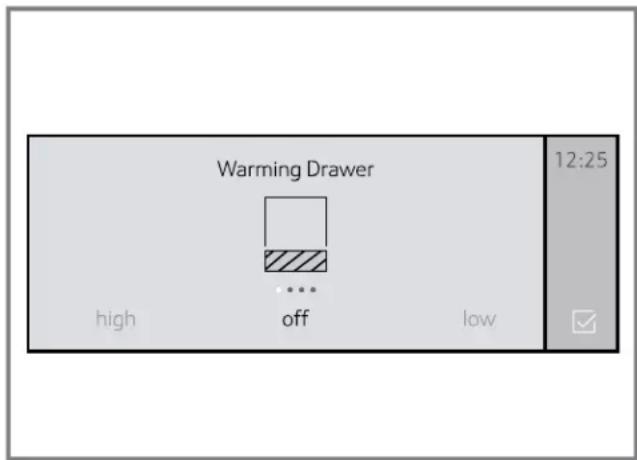
Available settings:
- High
Medium -
Low
-Off -
Touch
-
The warming drawer starts heating. If you do not touch the warming drawer starts heating automatically after some time.
- The warming drawer icon is displayed on the top left corner of the display as long as the warming drawer is running.
11.2 Turning the warming drawer off
Requirement: You can also use the warming drawer when the oven is turned off.
- Press DRAWER.
- Touch the bottom line, swipe to the left or right and select "Off".
- Touch
11.3 Getting the most out of your warming drawer
Keeping food warm
- You can leave food in the cookware it was prepared in. You can also transfer food to a heat-safe serving dish before placing it in the warming drawer. Aluminum foil may be used to cover food.
Warming plates and bowls
- Place plates and bowls in the warming drawer.
- Set the heat level to HIGH.
- Allow the cookware to heat up slowly as the warming drawer preheats.
Note: DO NOT place cold plates in an already heated warming drawer. Placing a cold dish into a hot environment can cause the glass to expand rapidly, which may cause the cookware to break.
- Use pot holders to remove hot plates after heating.
Crisping stale items
- Use pot holders to remove hot plates after heating.
- Set the heat level to LOW.
- Preheat for 5 minutes, then place the dish in the warming drawer.
- Check crispness after 45 minutes. Continue crisping if needed.
11.4 Warming drawer recommendations
| Food/cookware Level | |
| Bacon1 | high |
| Beef1 | low |
| Medium rare | |
| Beef1 | medium |
| Medium - well done | |
| Bread, quick1,2 | medium |
| Hard rolls, soft rolls, coffee cakes, biscuits, toast | |
| Casseroles1,2 | medium |
| Cereal, cooked1,2 | medium |
| Crisping stale items1 | medium |
| Dough (to proof)2 | low |
| Eggs1,2 | high |
| Fried foods1 | high |
| Gravy, cream sauces1,2 | medium |
| Ham, lamb, pork1,2 | medium |
| Pies1 | medium |
| Pizza1 | high |
| Potatoes, baked1,2 | high |
| Potatoes, mashed1,2 | medium |
| Poultry, roasted1,2 | medium |
| Seafood1,2 | medium |
| Vegetables1,2 | medium |
| Waffles, pancakes1 | high |
| Plates low | |
| Plate of food1,2 | medium |
| 1 Preheat cookware | |
| 2 Cover food | |
11.5 Removing the warming drawer insert
WARNING
Do not operate the warming drawer without the insert. The heating elements will become very hot and might cause injury.
Note: The picture show a warming drawer model with handle. Depending on the appliance model, individual details may differ.
- Open the drawer fully.
- Grasp the flange of the insert about midway on each side of the drawer and lift it for approximately 2^ (3 cm).
- While holding the insert up rotate the front of the insert upward to clear the front inside of the drawer.
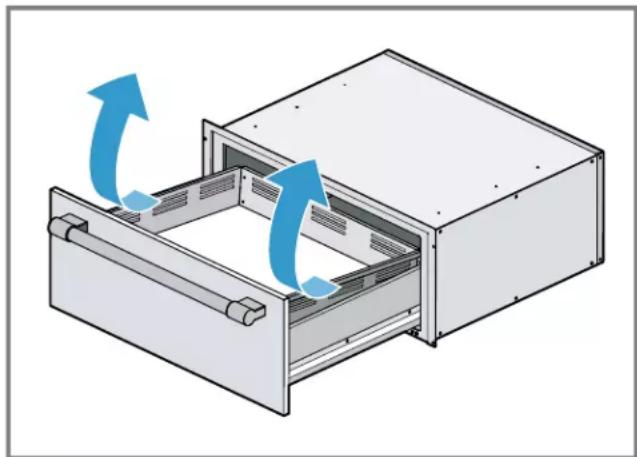
4. With the insert removed, the drawer base can be cleaned if necessary. Special care must be taken to prevent any damage to the now exposed heating element below the drawer insert.
12 Home Connect®
This appliance may be network-capable. Connecting your appliance to a mobile device lets you control its functions via the Home Connect® app, adjust its basic settings and monitor its operating status.
The Home Connect® services are not available in every country. The availability of the Home Connect® function depends on the availability of Home Connect® services in your country. You can find information on this at: www.home-connect.com.
The Home Connect® app guides you through the entire registration process. Follow the instructions in the Home Connect® app to implement the settings.
Tips
- Consult the Home Connect® documents supplied.
- Follow the instructions in the Home Connect® app as well.
Notes
-
Also note the safety information in this instruction manual and ensure that it is also observed when operating the appliance using the Home Connect® app.
-
Operating the appliance on the appliance itself always takes priority. It is not possible to operate the appliance using the Home Connect® app during this time.
In networked standby mode, the appliance requires a maximum of 2 watts.
12.1 Setting up Home Connect®
Requirements
The appliance is connected to the power supply and is switched on.
- You have a mobile device with a current version of the iOS or Android operating system, e.g. a smartphone.
- The mobile device and the appliance are within range of your home network's WLAN signal.
- Download the Home Connect® app.


- Open the Home Connect® app and scan the following QR code.

- Follow the instructions in the Home Connect® app.
12.2 Home Connect® settings
Adapt Home Connect® to your needs.
You can find the Home Connect® settings in the basic settings for your appliance. Which settings the display shows will depend on whether Home Connect® has been set up and whether the appliance is connected to your home network.
12.3 Changing the settings via the Home Connect® app
You can use the Home Connect® app to change the appliance settings and send them to the appliance. Prerequisites for using the Home Connect®:
- The appliance is connected to the home network and to the Home Connect® app.
In order to set the appliance via the app, Home Connect® must be activated in the basic settings. Activate Home Connect ON in the oven basic settings.
The oven must be turned on.
12.4 Remote start
If you want to start an oven operation using your mobile device, you must activate Remote Start.
WARNING
REMOTE OPERATION This appliance is configurable to allow remote operation at any time.
- Do not store any flammable materials or temperature sensitive items inside, on top or near surface units of the appliance.
Notes
- For some models a permanent Remote start can be activated via the Home Connect® app. This function allows a remote start of the available operating modes without automatically deactivating Remote start.
Remote start can only be activated if the Home Connect® set-up has been successfully completed. - Some operating modes can only be started on the oven itself.
Setting remote start
1. Press MENU.
- Swipe to select "Remote Start".
appears in the display.
- When you start the oven operation on the appliance, remote start is automatically activated. You can make changes from your mobile device or start a new operation.
Note: If set to manual for remote control level, REMOTE START must be enabled the day you intend to use it. Opening the oven door after enabling REMOTE START will deactivate it in certain circumstances. If so, pressing REMOTE START will enable it again.
12.5 Setting remote control
You can use the Home Connect® app to easily access the functions of your oven.
Notes
- You can select from three different remote control preferences.
- Operating the appliance directly from the oven always has priority. During this time, it is not possible to operate the oven using the Home Connect® app.
- The remote control is already activated when you connect your oven.
If the remote control has been deactivated, only the oven's operating statuses will be displayed in the Home Connect® app.
The remote control is automatically activated when remote start is activated.
1. Press MENU.
- Swipe to the left or right on the top line to select Settings".
-
Touch "Continue".
-
Swipe to select "Home Connect".
- Press "Open settings".
- Swipe to select "Remote control".
- Touch the bottom line and swipe to select the desired setting.
Setting Function
| Monitoring You can view your appliance status remotely, but you cannot start or operate your appliance remotely. | |
| Manual Remote Start | You can start and operate your device remotely, but you must press the Remote Start button on the appliance before you start the first remote operation and again after any instance where the door is opened. This is the default setting. |
| Permanent Remote Start | You can start and operate your appliance at any time without pressing any touch key on your appliance. |
| Off No remote control possible. | |
- Touch to return to the "Home Connect" menu.
12.6 Remote diagnostics
The Customer Service can access your appliance via Remote Diagnostics if you ask them to do so, if your appliance is connected to the Home Connect® server and if Remote Diagnostics is available in the country where you are using the appliance.
Tip: Further information and details about the availability of Remote Diagnostics in your country can be found in the Service/Support section of your local website: www.homeconnect.com.
12.7 Software update
The oven checks at regular intervals whether updates are available for the Home Connect® software.
To do this, you need to be a registered Home Connect® user, have installed the app on your mobile device and be connected to the Home Connect® server.
As soon as a software update is available, you will be informed by the Home Connect® app, from which you will also be able to download the update. Once the update has been successfully downloaded, you can start installing it via the basic settings of your oven, or the Home Connect® app if you are on your local area network. The Home Connect® app will notify you once installation is complete.
Notes
- You can continue to use your oven as usual while updates are downloading.
Depending on your personal settings in the app, software updates can also be set to download automatically.
We recommend that you install security updates as soon as possible.
12.8 Data Protection
Please see the information on data protection.
The first time your appliance is registered on a home network connected to the Internet, your appliance will transmit the following types of data to the Home Connect® server (initial registration):
- Unique appliance identification (consisting of appliance codes as well as the MAC address of the installed Wi-Fi communication module).
- Security certificate of the Wi-Fi communication module (to ensure a secure data connection).
- The current software and hardware version of your appliance.
Status of any previous reset to factory settings.
This initial registration prepares the Home Connect® functions for use and is only required when you want to use the Home Connect® functions for the first time.
Note: Please note that the Home Connect® functions can be utilized only with the Home Connect® app. Information on data protection can be called up in the Home Connect® app.
13 Getting the most out of your appliance
Here, you can find tips on how best to use the heating modes and accessories of your oven. You can also find recommended settings for various dishes as well as the best accessories and cookware.
Download the Home Connect® (America) app to access cooking tips and tricks, as well as get cooking inspiration.
13.1 Rack positions
Your oven has six rack positions. The rack positions are counted from bottom to top.
Use rack positions 1 through 6 only. DO NOT attempt to use the top guide to support an oven rack.
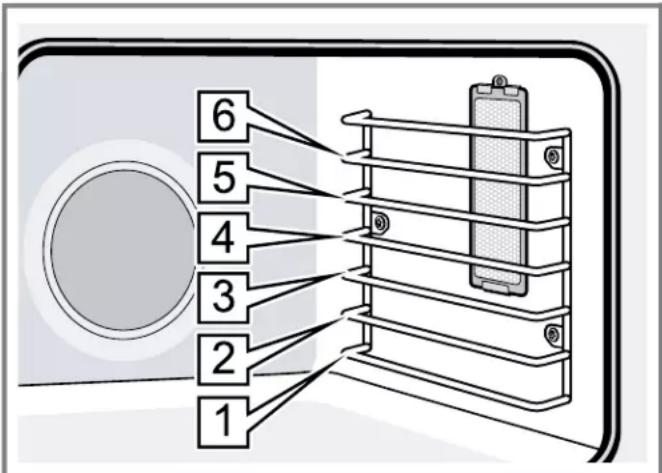
| Rack | Best for |
| position | |
| 6 Broiling hamburgers and 1" (2.5 cm) steaks | |
| 5 Broiling 1½" (4 cm) steaks, broiling most meats, melting cheese | |
| 4 Thicker meats | |
| 3 Broiling poultry, most baked goods on a cookie sheet or baking pan using a single rack, includes frozen convenience foods, cakes, casseroles, frozen pizza, Bundt®1 cakes | |
| 2 Small roasts or poultry, pies, breads | |
| 1 Large roasts, turkey, angel food cake | |
| 1 These marks are registered trademarks of their respective owners. All other trademarks are trademarks of BSH Home Appliances Corporation or its affiliated companies. | |
Rack placement
| One rack baking | Position the rack in the middle of the oven. |
| Two rack baking | Position the racks in the top and bottom of the oven. |
| Three rack baking | Space rack positions evenly apart. |
13.2 Getting the best results
- Minimize opening the oven door.
Use the rack position recommended by the recipe.
Use the bakeware recommended in the recipe. -
Store pans outside the oven. An extra pan without food affects the browning and cooking.
The type of pan used affects the browning. -
For tender, golden brown crusts, use light non-stick/ anodized or shiny metal pans.
- For brown crisp crusts, use dark non-stick, anodized or dark, dull metal pans or glass bakeware. These may require lowering the bake temperature 25^ .
Preheating the oven
- Most cooking times in recipes are designed for a preheated oven and require that the oven already be at a certain temperature before cooking starts. Refer to your recipe for preheating recommendations.
Preheating time depends on the temperature setting and the number of racks in the oven. Remove unused oven racks to shorten the preheat time.
Preheating is not necessary for ROAST and CONV ROAST.
Bakeware type
Metal bakeware with or without a non-stick finish, heatproof glass, glass-ceramic, pottery, or other utensils are suitable for the oven.
- Suitable cookie sheets have a small lip on one side. Heavy sheets or those with more than one side may affect the baking time.
Pan placement
- Allow at least 1^ (2.5 cm) of space between the pans and the oven walls so heat can circulate around each pan.
Staggerbakeware so that one is not directly above another. Allow 112'' 4cm) above and below each pan.
High altitude baking
When cooking at high altitudes, recipes and cooking times will vary. For accurate information, go to www.csuextstore.com, or write to the Extension Service, Colorado State University, Fort Collins, Colorado 80521. There may be a cost for the guides. Specify which high altitude food preparation guide you prefer: general information, cakes, cookies, breads, etc.
Condensation
It is normal for a certain amount of moisture to evaporate from the food during any cooking process. The amount depends on the moisture content of the food. The moisture will condense on any surface cooler than the inside of the oven, such as the control panel.
13.3 General tips for heating modes
How to use BAKE mode
Use the BAKE mode to prepare a variety of food items, from pastries to casseroles.
Refer to recipe or package directions for oven temperature and baking time.
Note
- Fully preheat the oven before baking items like cakes, biscuits and breads.
BAKE is the best function to use for baking cakes on two racks. - Allow at least 2^ (5 cm) of space between bakeware for proper air circulation.
- Dark or dull bakeware absorbs more heat than shiny bakeware, resulting in dark or over browned foods. It may be necessary to reduce oven temperature or cook time to prevent overbrowning of some foods.
- Shiny pans are recommended for cakes, cookies, and muffins.
- Do not open oven door often. Opening the door will reduce the temperature in the oven and may increase cook time.
For cakes stagger pans so that one is not directly above the other.
How to use CONV BAKE mode
Use the CONV BAKE mode for bar cookies and breads. This mode takes advantage of the bottom heat, yielding a better crust on baked items.
The benefits of convection bake include a slight decrease in cook time and a higher dough volume, for example yeast items rise higher with this mode.
Note
Reduce recipe temperature by 25^
- Place food in shallow, uncovered pans, such as cookies sheets without sides.
If baking more than one pan on a rack, allow at least 1" to 112 (2.5 to 4 cm) of air space around the pan.
- Allow at least 2^ (5 cm) of space between bakeware for proper air circulation.
For cakes stagger pans so that one is not directly above the other.
How to use TRUE CONV mode
Use true convection for cooking individual serving-sized foods such as cookies and biscuits. It is also good for cooking on multiple racks (2 or 3) at the same time. The benefits of TRUE CONV include even browning and time savings as a result of using multiple racks at one time.
Note
- Baking cookies is possible on 6 racks simultaneously. In this case, the baking time increases slightly.
- Reduce recipe temperature by 25^ if auto convection conversion is not activated.
- Place food in low-sided, uncovered pans such as cookies sheets without sides.
If baking more than one pan on a rack, allow at least 1" to 112 (2.5 to 4 cm) of air space around the pan.
Stagger pans so that one is not directly above the other.
How to use PIZZA mode
Note
Follow these recommendations:
- There might be a slight decrease in baking time. Check before minimum package time.
- When baking a frozen pizza: For a crispy crust, place directly on the rack. For a softer crust, use a pizza pan.
- When proofing pizza dough, coat dough with olive oil and cover it in a bowl tightly with plastic wrap to prevent crust formation.
If par baking handmade pizza dough, prick the dough with a fork before baking.
If using a pizza pan, choose a dark, perforated pan for a more crisp crust and a non-perforated pan for a softer crust.
Preheat baking stones following manufacturer's recommendations while the oven is preheating. - Bake homemade pizzas on rack position 2 in the center of the rack.
- Follow manufacturer's directions for frozen pizza.
- The convection fan cycles on and off when using pizza mode.
How to use ROAST mode
Use ROAST mode for large cuts of meat and poultry.
Note
Preheating the oven is not necessary.
Use a high-sided broil pan or roasting pan. Cover dish with a lid or foil for less tender cuts of meat.
- For less tender cuts of meat, add liquids, such as water, juice, wine, bouillon or stock for flavor and moisture.
Roasting bags and using a liquid are suitable for use in this mode.
- When roasting whole chicken or turkey, tuck wings behind back and loosely tie legs with kitchen string.
- When cooking large meats (e.g. turkey over 10 lbs) do not use the lowest rack position.
How to use CONV ROAST mode
Use the CONV ROAST mode for preparing tender cuts of meat and poultry. It is also suitable for roasting vegetables.
The benefits of CONV ROAST mode include as much as 25% faster cooking than non-convection modes and rich, golden browning.
Note
Preheating the oven is not necessary.
Use the same temperature as indicated in the recipe.
- Check doneness early, since roasting time may decrease.
- Do not cover meat or use cooking bags.
- Use a broil pan with a rack and grid or a shallow, uncovered pan with a rack for roasting.
Use a meat thermometer to determine the internal temperature of the meat.
If the meat is browned to your liking, but is not yet done, foil can be placed over the meat to prevent overbrowning.
- Let meat stand covered with foil 10-15 minutes after removing it from the oven.
- When cooking large meats (e.g. turkey over 10 lbs) do not use the lowest rack position.
How to use BROIL mode
The BROIL mode uses intense heat radiated from the upper element. Use this mode for cooking thin, tender cuts of meat, 1'' (2.5 cm) or less, poultry and fish. It can also be used to brown breads and casseroles.
Note
Always broil with the oven door closed.
Preheat the oven for 3 to 4 minutes. Do not preheat for more than 5 minutes.
- Steaks and chops should be at least 34 " (2 cm) thick.
- Use the broil pan and grid or a deep pan with a metal rack, for broiling.
- Do not cover the broil grid with foil. It is designed to drain fats and oils away from the cooking surface to prevent smoking and spattering.
- Turn meats once during the recommended cook time. Fish does not need to be turned.
- When top browning cassetoles, use only metal or glass ceramic dishes such as Corningware®.
- Never use heat-proof glass, such as Pyrex®; it cannot tolerate the high temperature.
How to use CONV BROIL mode
Use the CONV BROIL mode for cooking thick, tender cuts of meat, poultry and fish. This mode is not recommended for browning breads, casseroles and other foods. In addition to the benefits of standard broiling, convection broiling is faster.
Note
Always use convection broil with the oven door closed.
Preheat the oven for 3 to 4 minutes. Do not preheat for more than 5 minutes.
- Steaks and chops should be at least 1 12 (4 cm) thick.
- Use the broil pan and grid or a deep pan with a metal rack, for broiling.
- Do not cover the broil grid with foil. It is designed to drain fats and oils away from the cooking surface to prevent smoking and spattering.
- Turn meats once during the recommended cook time. Fish does not need to be turned.
- Never use heat-proof glass, such as Pyrex®; it cannot tolerate the high temperature.
How to use PROOF mode
Use the PROOF mode to raise yeast dough.
Note
Start with a cool oven when using this mode.
- Allow frozen dough to thaw first.
- The ideal temperature for proofing will be maintained until the mode is turned off. Dough has proofed when it has doubled in size.
- Loosely cover the bowl or pan and use any rack that accommodates the size of the container.
- Keep the door closed and use the oven light to check the rising of the dough.
Size Time in min.
Loaf, 1 lb (4.5 kg) 60 - 75
Rolls, 0.1 lb (50 g) 30 - 45
How to use WARM mode
Use the WARM mode to keep hot, cooked foods at serving temperature.
CAUTION
Food may spoil when kept warm for too long.
- Do not use the warm mode to heat cold food.
- Be sure to maintain proper food temperature. The USDA recommends holding hot food at 140^ (60^) or warmer.
DO NOT warm food longer than one hour.
Note
-
ALWAYS start with hot food. DO NOT use this mode to heat cold food other than for crisping crackers, chips, and dry cereal.
-
Serving dishes, plates, and cups may be kept warm with this mode.
- Foods that must be kept moist should be covered with a lid or aluminum foil.
- Aluminum foil may be used to cover food. Use only heat-safe dishes.
DO NOT open the oven door unnecessarily. Opening the door will reduce the temperature of the oven. - When keeping cooked food warm, allow time for the oven to preheat before placing the item in the oven.
14 Cleaning and maintenance
To keep your appliance working efficiently for a long time, it is important to clean and maintain it carefully.
For more cleaning recommendations and tips to get the most out of your appliance, refer to the website:
USA: www.thermador.com/us/support/customer-care
Canada: www.thermador.ca/en/support/customer-care
WARNING
Do not clean the appliance while it is still hot. Some cleaners produce noxious fumes when applied to a hot surface. Wet clothes and sponges can cause burns from steam.
For customers in the USA:
You can purchase suitable cleaners from Customer Support or in our online shop www.thermador.com/us/ accessories.
For customers in Canada:
Visit this web page to learn how to purchase cleaners for your appliance, www.thermador.ca/en/support/filterscleaners-accessories.
14.1 Cleaning agents
Only use suitable cleaning agents to avoid damage to the appliance surfaces.
Brand names
The use of brand names is intended only to indicate a type of cleaner. This does not constitute an endorsement.
The omission of any brand name cleaner does not imply its adequacy or inadequacy.
Many products are regional in distribution and can be found in local markets.
It is imperative that all cleaning products be used in strict accordance with the instructions on its package.
Avoid these cleaners
Do not use commercial oven cleaners such as Easy Off®.
They may damage the oven finish or parts. Chlorine or chlorine compounds in some cleansers are corrosive to stainless steel. Check ingredients on label. Never use scouring pads or abrasive cleaners.
WARNING
Be sure the entire appliance (including the light bulb) has cooled and grease has solidified before attempting to clean any part of the appliance.
WARNING
To avoid risk of electrical shock, DO NOT use a steam cleaner or high pressure cleaners to clean the appliance. Penetrating moisture may cause electrical shock.
14.2 Cleaning the conventional oven
Here you can find information on cleaning the conventional oven cavity.
Self clean function
With pyrolytic self cleaning the oven is heated to a very high temperature. Stubborn soil is burnt off and can be wiped out after self clean is finished and the oven has cooled.
After the completion of a self-clean cycle, the oven will not allow you to start another self-clean cycle for 24 hours. For a double oven, if one cavity runs self clean, neither cavity may operate a self clean cycle for 24 hours.
Preparing self clean
WARNING
During the elimination of soil during self-cleaning, small amounts of carbon monoxide can be created and the fiberglass insulation could give off very small amounts of formaldehyde during the first several cleaning cycles.
To minimize exposure to these substances, provide good ventilation with an open window, or use a ventilation fan or hood.
During the self clean cycle, parts of the appliance may become potentially harmful to persons who lack adult knowledge of appliances and adult reactions to potentially harmful conditions.
Children should not be left alone or unattended in an area where appliances are in use.
The oven heats up to a very high temperature during self cleaning. Opening the door can result in injury.
- When self-cleaning, confirm that the door locks and will not open.
- If the door does not lock, do not run Self Clean. Contact Customer Service.
CAUTION
Remove broiler pans, pots, and other utensils and excess spillage before self-cleaning.
Do not leave food or cooking utensils, etc., in the oven during the pyrolytic self-cleaning mode of operation.
CAUTION
The oven vents are important for air circulation. Covering the oven vents will cause the oven to overheat. Refer to the appliance overview for the location of the oven vents.
"Oven cavity components", Page 11
Do not obstruct oven vents.
NOTICE:
Do not clean parts or accessories with the self clean function.
- Remove all accessories, racks and rack guides from the oven.
- Wipe out excessive spillage from the oven cavity.
Starting self clean
Requirement: You have carried out the steps for preparing the oven for self clean Page 34.
- Select the lower oven cavity
- Press MENU.
- Swipe to select "Self Clean"
- Select a cleaning intensity according to the amount of soiling.
Intensity level Duration (excluding cool off)
| high 3 hours |
| medium 2½ hours |
| low 2 hours |
- Touch "Continue".
- Press START STOP.
The oven door locks automatically.
- When self clean is finished, a signal sounds and the appliance is turned off.
- The door remains locked until the appliance has cooled off.
7. Wipe the remaining ash from the oven with a moist cloth.
Note: After the self clean cycle is completed, the appliance will not allow you to start another self clean cycle for 24 hours.
Easy clean
This function makes it easier to clean the bottom of the oven cavity. Food and food spills are soaked and can then be removed more easily.
Setting easy clean for the conventional oven
CAUTION
Hot steam can arise due to water in the hot oven cavity.
- Never pour water into the hot oven cavity.
Note: Do not open the appliance door during operation, or the function will be interrupted.
Requirement: The oven cavity has cooled off.
- Place the wire rack on level 3. Remove all other racks and accessories from the oven cavity.
- Mix 2 cups of water and 12 cup of vinegar into the broiler pan and place it on the wire rack.
- Press ON I OFF.
- Select the lower oven cavity.
- Press MENU.
-
Swipe to select "Easy Clean"
-
Touch the bottom line of the display.
- Press START I STOP.
The cleaning time counts down on the display.
9. Carry out the steps for subsequent cleaning.
Subsequently cleaning the oven cavity after the cleaning function
Clean the oven cavity manually as soon as it has cooled off after the cleaning function.
NOTICE:
Moisture in the oven cavity can cause damage to the surfaces.
- Remove remaining water from the oven cavity promptly.
-
Do not leave the remaining water in the oven cavity for a long time, for example overnight.
-
Do not operate the appliance when the oven cavity is still wet or damp.
- Open the appliance door and remove the remaining water with an absorbent sponge cloth.
- Clean the smooth surfaces in the oven cavity with a dish cloth or a soft brush. Stubborn residues can be removed using a soft scouring pad.
- Remove limescale with a cloth soaked in vinegar and wipe it with clean water. Rub the oven cavity dry with a soft cloth; also dry under the door seal.
- Turn the appliance off.
- Leave the appliance door ajar in the stop position (approx. 30^ ) for about one hour to allow the enamel surfaces in the oven cavity to dry thoroughly.
Cleaning recommendations
Clean only those parts of you oven that are listed in this cleaning chart.
| Part Suitable cleaning method Recommendations | ||
| Flat rack■ Wash with soapy water.■ Rinse thoroughly and dry, or gently rub with cleansing powder or soap-filled pads as directed. | ■ DO NOT CLEAN USING THE SELF CLEAN FUNCTION.■ If the flat racks remain in the oven during the self clean mode, they will loose their shiny finish and may not glide smoothly. If this happens, wipe the rack edges with a small amount of vegetable oil. Then wipe off excess oil. | |
| Telescopic rack■ Wash with soapy water.■ Rinse thoroughly and dry, or gently rub with cleansing powder or soap-filled pads as directed. | ■ DO NOT CLEAN USING THE SELF CLEAN FUNCTION.■ Avoid getting cleansing powder in the telescopic slides. Re-lubrication may become necessary. Use only high-temperature food-grade lubricants to re-lubricate the slides. | |
| Door gasket■ None■ DO NOT CLEAN THE DOOR GASKET. | ||
| ■ The door gasket is essential for a good seal. Care should be taken not to rub, damage, or move the gasket. | ||
| Glass■ Wash with soap and water or glass cleaner.■ Use Fantastik®1 on a clean sponge or paper towel and wipe clean. | ■ Avoid using powder cleaning agents, steel wool pads and oven cleaners. | |
| Painted surfaces■ Clean with hot soapy water or apply Fantastik®1 to a clean sponge or paper towel and wipe clean. | ■ Avoid using powder cleaning agents, steel wool pads and oven cleaners. | |
| Porcelain surfaces■ Immediately wipe up acid spills like fruit juice, milk, and tomatoes with a dry cloth.■ When cool, clean with hot soapy water or apply Bon-Ami®1 or Soft Scrub®1 to a damp sponge. Rinse and dry.■ For stubborn stains, use soap-filled pads. | ■ Do not use a moistened sponge/cloth on hot porcelain. It is normal for porcelain to show fine lines with age due to exposure to heat and food soil. | |
| 1 These marks are registered trademarks of their respective owners. All other trademarks are trademarks of BSH Home Appliances Corporation or its affiliated companies. | ||
| Part Suitable cleaning method Recommendations | ||
| Heat resistant enamel and polished components in the oven cavity | Use the self clean function for heavy soiling. | These surfaces can become discolored over time. This is normal and does not affect operation. Do not use scouring pads or abrasive cleaners to treat discolorations. |
| Stainless steel surfaces | Clean with soapy water and soft cloth, then rinse and dry with a soft cloth. Condition steel with the Thermador Stainless Steel Conditioner (part # 00576697). Remove water spots with a cloth dampened with white vinegar. Remove heat discoloration with Bar Keeper's Friend®1. | Never allow food stains or salt to remain on stainless steel for any length of time. Always wipe or rub in the direction of the grain. Chlorine or chlorine compounds in some cleansers are corrosive to stainless steel. Check the ingredients on the label of the cleanser. |
| Plastic and controls■ When cool, clean with soapy water, rinse and dry. | ||
| Probe■ Wipe with soapy water.■ Do not submerge in water. | ||
| Rotisserie spit■ Clean with soapy water and a dish cloth or brush. | ||
| Printed areas (words and numbers) | ||
| These marks are registered trademarks of their respective owners. All other trademarks are trademarks of BSH Home Appliances Corporation or its affiliated companies. | ||
14.3 Cleaning the warming drawer
| Part Suitabel cleaning method Recommendations | ||
| Warming drawer interior | ■ Wash with soapy water.■ Rinse thoroughly and dry.■ For hard water spots or scale, use white vinegar. Apply with a sponge or cloth, rinse, and dry. | ■ Chlorine or chlorine compounds in some cleansers are corrosive to stainless steel. Check ingredients on label.■ You can remove the warming drawer insert for easier cleaning.→ "Removing the warming drawer insert", Page 28 |
14.4 Maintenance
Replacing a conventional oven light bulb
When the conventional oven light fails you can exchange the light bulb.

WARNING
Light socket is live when door is open if main power supply is not turned off.
- Turn off main power supply at the service panel before changing the light bulbs.

WARNING
Make sure the appliance and lights are cool and power to the appliance has been turned off before replacing the light bulb(s). Failure to do so could result in electrical shock or burns.
The lenses must be in place when using the appliance.
The lenses serve to protect the light bulb from breaking.
- The lenses are made of glass. Handle carefully to avoid breaking. Broken glass can cause an injury.
- Turn off the power to the oven at the main power supply in the fuse or breaker box.
- Remove the 3 screws that hold the oven rails in place.
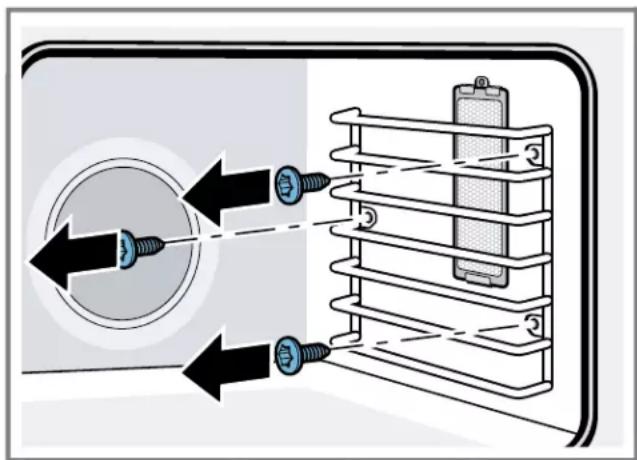
- Detatch the oven rails to access the bulb housing.
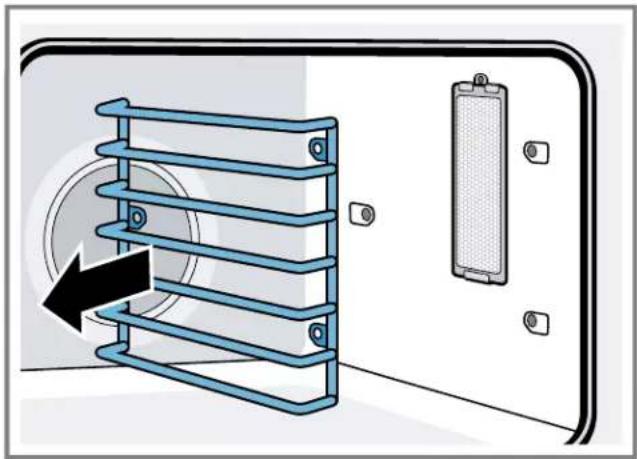
- Remove the screw from the top of the bulb housing.
- Insert the tip of a narrow flat-blade screwdriver between the metal clips at about a 40^ angle.
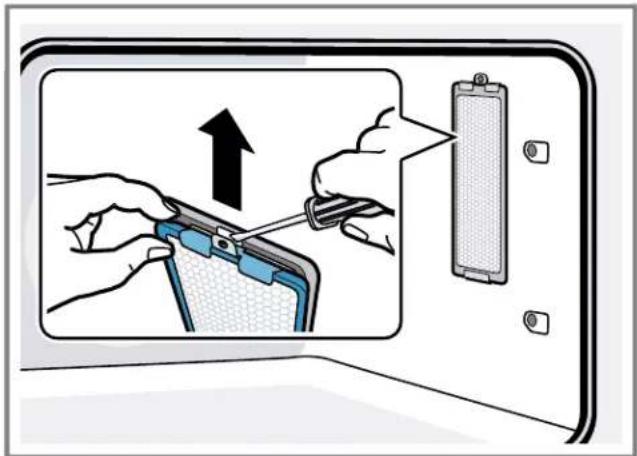
The screwdriver blade must be able to pass between the metal clips to reach the inner catch.
- Push the screwdriver blade inward to disengage the catch from the slot in the bulb housing. Gently pry the lens off by moving the screwdriver handle away from the oven wall.
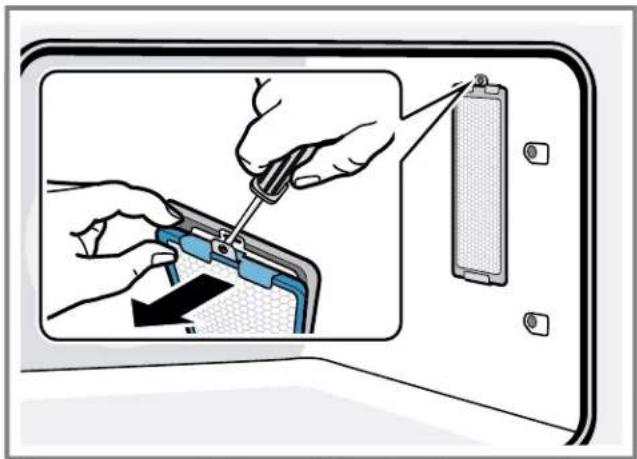
- Support the glass lens cover with both hands to prevent the cover from falling to the bottom of the oven. The lens should detach easily. Do not attempt to force it.
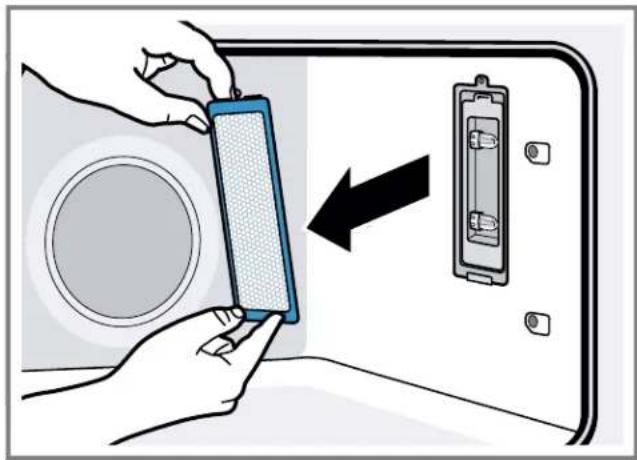
- Remove the bulb by grasping and sliding the bulb straight back until the two prongs have cleared the ceramic holder.
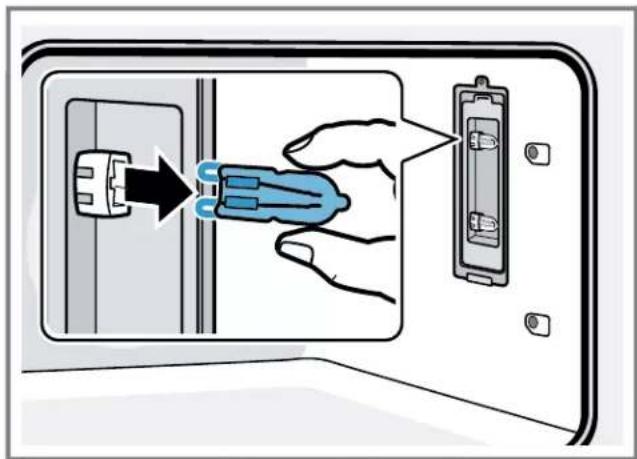
- DO NOT touch the glass of the new replacement bulb with your fingers. It may cause the bulb to fail when it first lights. Grasp the replacement bulb with a clean dry cloth. Locate the two prongs in the ceramic holder, gently poking until the two prongs locate in the ceramic socket.
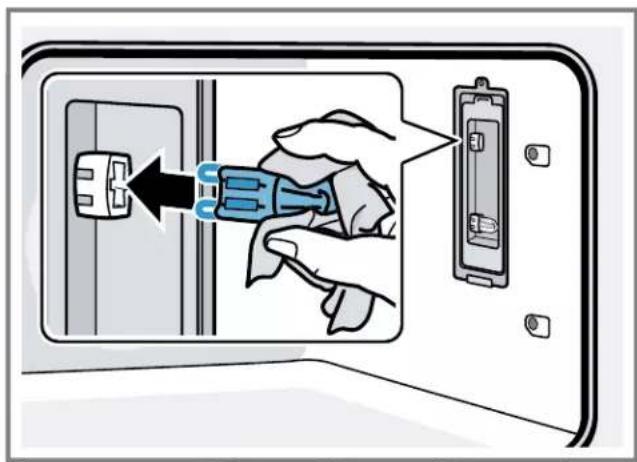
- Press down to seat the bulb.
- Put the glass lensse cover back on by inserting it into the mounting clip and pressing the end nearest you into the housing until it locks into place. Insert the screw through the glass lensse cover and tighten.
- Reinstall the oven rails.
- Turn on the circuit breaker.
15 Troubleshooting
You can eliminate minor issues on your appliance yourself. Please read the information on eliminating issues before contacting Customer Service. This may avoid unnecessary repair visits.

WARNING
Improper repairs are dangerous.
- Only authorized service providers should repair the appliance.
If the power cord of this appliance becomes damaged, it must be replaced by the manufacturer, the manufacturer's Customer Service, or an authorized service provider in order to prevent injury.
- Only original spare parts may be used to repair the appliance.
If the appliance has an issue, call Customer Service.
Issue Cause and troubleshooting
| Oven door is locked and will not open, even after cooling. The door lock symbol lights up. | The door lock is engaged 1. Turn the oven off at the circuit breaker and wait five minutes. 2. Turn breaker back on. ✔ The oven should reset itself and will be operable. |
Oven is not heating There is no power supply to the appliance
- Check circuit breaker or fuse box to your house.
- Make sure there is proper electrical power to the oven.
There is no cooking temperature set
- Set a heating mode temperature.
Baking results are not as expected The rack position is not ideal
Refer to the tips and suggestions for using the appliance.
Food takes longer to cook than expected
The oven temperature needs to be recalibrated
Note: The oven is carefully calibrated to provide accurate results.
If food is consistently too brown or too light the temperature can be offset. "Oven temperature offset", Page 26
Food is overcooked The oven temperature needs to be recalibrated
Note: The oven is carefully calibrated to provide accurate results.
If food is consistently too brown or too light the temperature can be offset. "Oven temperature offset", Page 26
Oven light is not working properly The oven light bulb is loose or burnt out
Replace or reinsert the light bulb.
Tip: Touching the bulb with fingers may cause the bulb to burn out.
Oven light does not turn off The oven door does not close properly
- Check the oven door for obstructions.
- Check to see if the hinge is bent.
The oven light is turned on
Press the oven light button to turn the oven light off.
Cannot remove lens cover on cavity light
There is soil build-up around the lens cover
- Let the oven cavity cool off.
- Wipe the lens cover area with a clean, dry towel, then try to remove the lens cover.
Oven is not self-cleaning properly The oven is too hot to start self clean
- Allow the oven to cool before running self clean.
- Always wipe out loose soils or heavy spillovers before running self clean.
- If the oven is heavily soiled, set the maximum self clean time.
Clock and timer are not working properly
There is no power supply to the appliance
- Check circuit breaker or fuse box to your house.
- Make sure there is proper electrical power to the oven.
| Issue Cause and troubleshooting | |
| "E" and a number appears in display and control beeps | An electronics fault has occurred 1. Press TIMERS to stop the beeping. 2. Reset the oven if necessary. 3. Call an authorized service provider. |
| With a new oven there is a strong odor when oven is turned on | This is normal with a new oven and will disappear after a few uses ► Operate the self clean mode to burn-off the smell more quickly. |
| Control does not react when a key is touched | The control is wet or soiled ► Clean the control panel an wipe it dry. |
| The touch keys are not pressed correctly 1. Press the center of the button. 2. Use the flat part of your finger. | |
| Warm air or steam escapes from oven vent | It is normal to see or feel steam or warm air escaping from the oven vent ▲ CAUTION The oven vents are important for air circulation. Covering the oven vents will cause the oven to overheat. Refer to the appliance overview for the location of the oven vents. → "Oven cavity components", Page 11 ► Do not obstruct oven vents. |
| Cooling fan runs even when the oven is turned off | The cooling fan will continue to run, even after the oven has been turned off, until the oven has cooled sufficiently ► This is normal. There is no action required. |
16 Disposal
16.1 Disposal of your old appliance
Environmentally compatible disposal allows valuable raw materials to be recycled.
- Dispose of the appliance in an environmentally responsible manner.
Information about current disposal methods can be obtained from your specialist dealer or local authority.
17 Customer Service
With any warranty repair, we will make sure your appliance is repaired by an authorized service provider using genuine replacement parts. We use only genuine replacement parts for all repairs.
Detailed information on the warranty period and terms of warranty can be found in the Statement of Limited Product Warranty, from your retailer, or on our website.
If you contact Customer Service, you will need the model number (E-Nr.) and the production number (FD) of your appliance.
USA:
1-800-735-4328
www.thermador.com/support
www.thermador.com/us/accessories
CA:
1-800-735-4328
www.thermador.ca
www.thermador.ca/en/support/filters-cleaners-accessories
For assistance with connecting to Home Connect®, you can also view instructions here: www.home-connect.com/us/en/help-support/set-up
17.1 Model number (E-Nr.) and production number (FD)
You can find the model number (E-Nr.) and the production number (FD) on the appliance's rating plate.

Making a note of your appliance's details and the Customer Service telephone number will enable you to find them again quickly.
17.2 Rating plate location
The rating plate is located at the left hand side of the door trim.
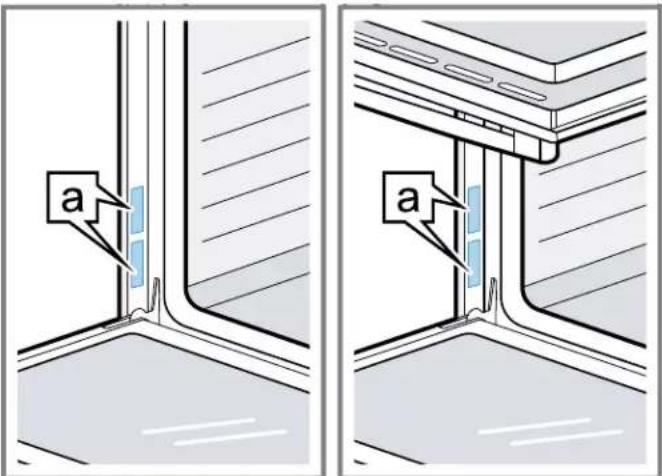
Rating plate
17.3 Product registration
Register your Thermador product to access information related to your product.
You may register your product through one of the following ways:
Register with your phone (USA only):
Take a photo of the camera icon on the registration card, including the points (O).
- Text the photo to 21432. (USA only, text and data rates may apply.)
- Mail in the completed product registration card to the address printed on the card.
Register your product online at
US: www.thermador.com
- Canada: www.thermador.ca
Call Thermador Customer Service at 1-800-735-4328.
18 STATEMENT OF LIMITED PRODUCT WARRANTY
18.1 What this warranty covers & Who it applies to
The limited warranty provided by BSH Home Appliances ("Thermador") in this Statement of Limited Product Warranty applies only to the Thermador appliance sold to you ("Product"), provided that the Product was purchased:
- For your normal, household (non-commercial) use, and has in fact at all times only been used for normal household purposes.
- New at retail from a BSH authorized dealer or directly from BSH (not a display, "as is", or previously returned model), and not for resale, or commercial use.
Within the United States or Canada, and has at all times remained within the country of original purchase.
The warranties stated herein apply to the original purchaser of the product warranted herein and to each succeeding owner of the product purchased for ordinary home use during the term of the warranty.
Please make sure to register your Product; while not necessary to effectuate warranty coverage, it is the best way for Thermador to notify you in the unlikely event of a safety notice or product recall.
18.2 How long the warranty lasts
Thermador warrants that the Product is free from defects in materials and workmanship for a period of seven hundred and thirty (730) days from the date of the original delivery. The foregoing timeline begins to run upon the date of original delivery, and shall not be stalled, tolled, extended, or suspended, for any reason whatsoever. This Product is also warranted to be free from cosmetic defects in material and workmanship (such as scratches of stainless steel, paint/porcelain blemishes, chips, dents, or other damage to the finish) of the Product, for a period of sixty (60) days from the date of delivery or closing date for new construction. This cosmetic warranty excludes slight color variations due to inherent differences in painted and porcelain parts, as well as differences caused by kitchen lighting, product location, or other similar factors. This cosmetic warranty specifically excludes any display, floor, "As Is", or "B" stock appliances.
18.3 Repair/replace as your exclusive remedy
During this warranty period, Thermador or one of its authorized service providers will repair your Product without charge to you (subject to certain limitations stated herein) if your Product proves to have been manufactured with a defect in materials or workmanship. If reasonable attempts to repair the Product have been made without success, then Thermador will replace your Product (upgraded models may be available to you, in Thermador's sole discretion, for an additional charge).
Nothing in this warranty requires damaged or defective parts to be replaced with parts of a different type or design than the original part. All removed parts and components shall become the property of Thermador at its sole option. All replaced and/or repaired parts shall assume the identity of the original part for purposes of this warranty and this warranty shall not be extended with respect to such parts. Thermador's sole liability and responsibility hereunder is to repair manufacturer-defective Product only, using a Thermador authorized service provider during normal business hours. For safety and property damage concerns, Thermador highly recommends that you do not attempt to repair the Product yourself, or use a non-authorized service provider; Thermador will have no responsibility or liability for damage resulting from repairs or work performed by a non-authorized service provider. Authorized service providers are those persons or companies that have been specially trained on Thermador products, and who possess, in Thermador's opinion, a superior reputation for customer service and technical ability (note that they are independent entities and are not agents, partners, affiliates or representatives of Thermador). Nevertheless, taking your product to be serviced by a repair shop that is not affiliated with or an authorized dealer of Thermador will not void this warranty. Also, using third-party parts will not void this warranty. Notwithstanding the foregoing, Thermador will not incur any liability, or have responsibility, for the Product if it is located in a remote area (more than 100 miles from an authorized service provider) or is reasonably inaccessible, hazardous, threatening, or treacherous locale, surroundings, or environment; in any such event, if you request, Thermador would still pay for labor and parts and ship the parts to the nearest authorized service provider, but you would still be fully liable and responsible for any travel time or other special charges by the service company, assuming they agree to make the service call. Further, to the extent you have installed the Product in a difficult-to-access location or have otherwise installed temporary or permanent fixtures that create barriers to accessing or removing the Product, Thermador will not incur any liability for, or have responsibility, for work or
costs associated with moving the Product or otherwise creating access to the Product in order to repair or replace it. All such costs shall be your sole responsibility.
18.4 Out of warranty product
Thermador is under no obligation, at law or otherwise, to provide you with any concessions, including repairs, prorates, or Product replacement, once this warranty has expired.
18.5 Warranty exclusions
The warranty coverage described herein excludes all defects or damage that are not the direct fault of Thermador, including without limitation, one or more of the following:
- Use of the Product in anything other than its normal, customary and intended manner (including without limitation, any form of commercial use, use or storage of an indoor product outdoors, use of the Product in conjunction with air or water-going vessels).
- Any party's willful misconduct, negligence, misuse, abuse, accidents, neglect, improper operation, failure to maintain, improper or negligent installation, tampering, failure to follow operating instructions, mishandling, unauthorized service (including selfperformed "fixing" or exploration of the appliance's internal workings).
- Adjustment, alteration or modification of any kind.
- A failure to comply with any applicable state, local, city, or county electrical, plumbing and/or building codes, regulations, or laws, including failure to install the product in strict conformity with local fire and building codes and regulations.
- Ordinary wear and tear, spills of food, liquid, grease accumulations, or other substances that accumulate on, in, or around the Product.
- Any external, elemental and/or environmental forces and factors, including without limitation, rain, wind, sand, floods, fires, mud slides, freezing temperatures, excessive moisture or extended exposure to humidity, lightning, power surges, structural failures surrounding the appliance, and acts of God.
Service calls to correct the installation of your Product, to instruct you how to use your Product, to replace house fuses or correct house wiring or plumbing. - Removal and replacement of trim or decorative panels that interfere with servicing the Product.
- Damage or defects caused by labor or parts installed by any non-authorized service provider, unless approved by Thermador before service is performed.
In no event shall Thermador have any liability or responsibility whatsoever for damage to surrounding property, including cabinetry, floors, ceilings, and other structures or objects around the Product. Also excluded from this warranty are Products, on which the serial numbers have been altered, defaced, or removed; service visits to teach you how to use the Product, or visits where there is nothing wrong with the Product; correction of installation problems (you are solely responsible for any
structure and setting for the Product, including all electrical, plumbing or other connecting facilities, for proper foundation/flooding, and for any alterations including without limitation cabinetry, walls, floors, shelving, etc.); and resetting of breakers or fuses TO THE EXTENT ALLOWED BY LAW, THIS WARRANTY SETS OUT YOUR EXCLUSIVE REMEDIES WITH RESPECT TO PRODUCT, WHETHER THE CLAIM ARISES IN CONTRACT OR TORT (INCLUDING STRICT LIABILITY, OR NEGLIGENCE) OR OTHERWISE. THIS WARRANTY IS IN LIEU OF ALL OTHER WARRANTYES, WHETHER EXPRESS OR IMPLIED. ANY WARRANTY IMPLIED BY LAW, WHETHER FOR MERCHANTABILITY OR FITNESS FOR A PARTICULAR PURPOSE, OR OTHERWISE, SHALL BE EFFECTIVE ONLY FOR THE PERIOD THAT THIS EXPRESS LIMITED WARRANTY IS EFFECTIVE. IN NO EVENT WILL THE MANUFACTURER BE LIABLE FOR CONSEQUENTIAL, SPECIAL, INCIDENTAL, INDIRECT, "BUSINESS LOSS", AND/OR PUNITIVE DAMAGES, LOSSES, OR EXPENSES, INCLUDING WITHOUT LIMITATION TIME AWAY FROM WORK, HOTELS AND/OR RESTAURANT MEALS, REMODELLING EXPENSES IN EXCESS OF DIRECT DAMAGES WHICH ARE DEFINITIVELY CAUSED EXCLUSIVELY BY THERMADOR, OR OTHERWISE. SOME STATES DO NOT ALLOW THE EXCLUSION OR LIMITATION OF INCIDENTAL OR CONSEQUENTIAL DAMAGES, AND SOME STATES DO NOT ALLOW LIMITATIONS ON HOW LONG AN IMPLIED WARRANTY LASTS, SO THE ABOVE EXCLUSIONS OR LIMITATIONS MAY NOT APPLY TO YOU. THIS WARRANTY GIVES YOU SPECIFIC LEGAL RIGHTS, AND YOU MAY ALSO HAVE OTHER RIGHTS WHICH VARY FROM STATE TO STATE. No attempt to alter, modify or amend this warranty shall be effective unless authorized in writing by an officer of BSH.
18.6 Obtaining warranty service
To obtain warranty service for your product, you should contact Thermador Customer Support at 1-800-735-4328 to schedule a repair.
18.7 Product information
For handy reference, copy the information below from the rating plate. Keep your invoice and/or delivery documents for warranty validation.
www.thermador.com/us/accessories
CA:
1-800-735-4328
www.thermador.ca
www.home-connect.com/us/en/help-support/set-up