NR1011 - Alarm clock radio AXIL - Free user manual and instructions
Find the device manual for free NR1011 AXIL in PDF.

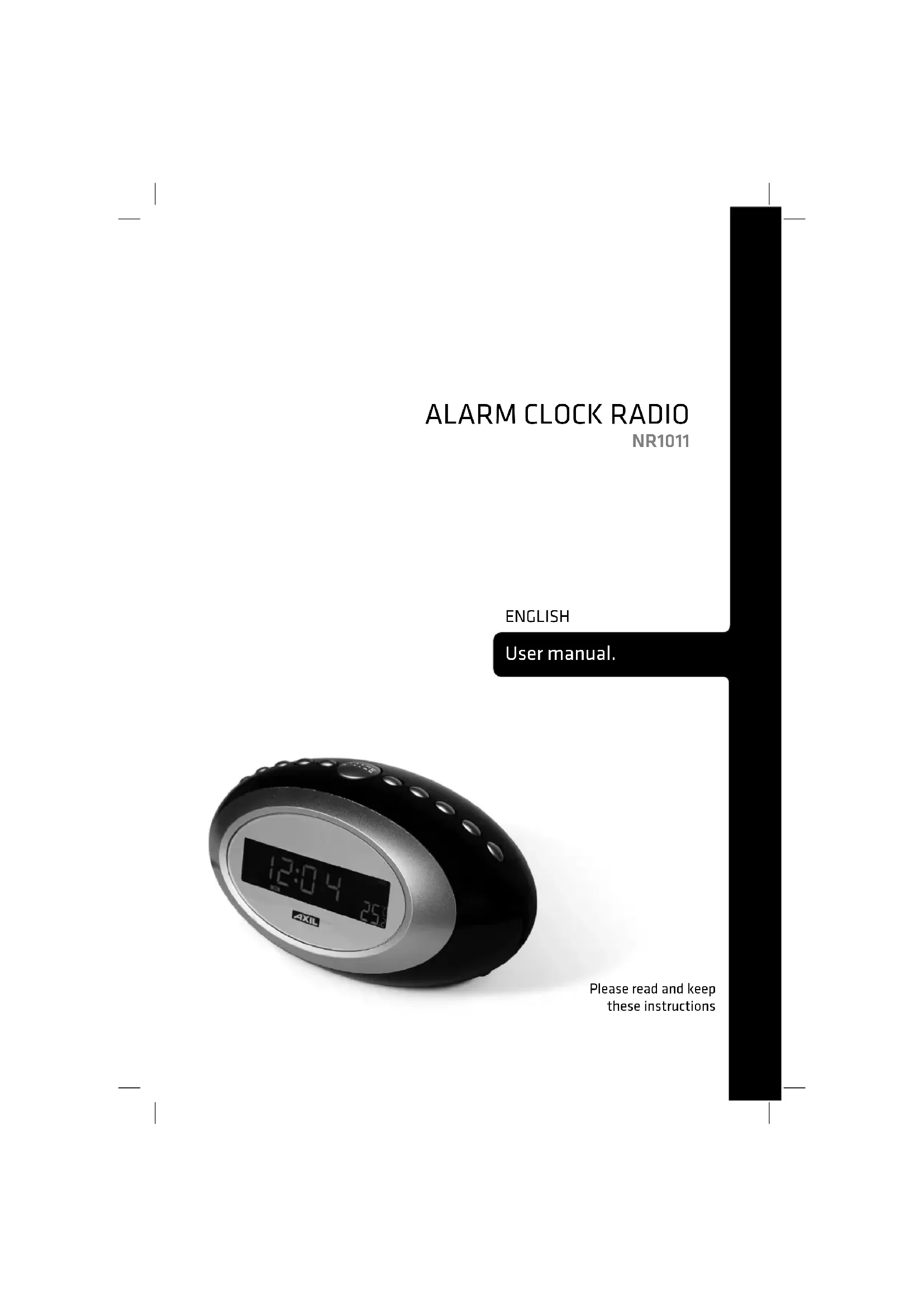


| Product type | Clock radio |
| Brand | AXIL |
| Model | NR1011 |
| Main power supply | AC mains (adapter included) |
| Backup power | 2 AA 1.5V batteries (not included) |
| Radio bands | FM and AM |
| Alarm functions | Dual alarm with wake-up choice by radio or buzzer |
| Snooze | 8-minute snooze |
| Sleep timer | 10 to 90 minutes (in 10-minute increments) |
| Countdown timer | 10 to 90 minutes (in 10-minute increments) with end beep |
| Display | LCD with 7-color backlight + cycle mode |
| Temperature display | Yes (accuracy ±2°C) |
| Auxiliary input | 3.5mm jack for external audio source |
| Antenna | FM wire |
| Dimensions (approx.) | 200 × 120 × 60 mm |
| Weight (approx.) | 500 g |
| Cleaning and maintenance | Soft dry cloth; do not use liquids |
| Safety | Do not block ventilation openings; avoid heat sources and water |
| Repairability and spare parts | Contact customer service; no spare parts specified |
| Environmental information | Complies with WEEE directive; recyclable |
Frequently Asked Questions - NR1011 AXIL
User questions about NR1011 AXIL
0 question about this device. Answer the ones you know or ask your own.
Ask a new question about this device
Download the instructions for your Alarm clock radio in PDF format for free! Find your manual NR1011 - AXIL and take your electronic device back in hand. On this page are published all the documents necessary for the use of your device. NR1011 by AXIL.
USER MANUAL NR1011 AXIL
natural_image
Black and silver AXIL digital alarm clock with dual dials (no visible text or symbols on face)Manual del usuario
natural_image
Black and silver AXIL digital alarm clock with display showing 12:04 (no text or symbols on face)natural_image
Black and silver AXIL digital alarm clock with display showing 12:04 (no text or symbols beyond clock face)- SOURCE D'ALIMENTATION:
AC:230V/50Hz
DC: 3.0V (2 PILES AA 1.5V)
- BANDE DE FRÉQUENCE:
AM: 540KHz\~1600KHz
FM: 88-108MHz
- BANDE DE TEMPÉRATURE:
0^ C 50^ C
NOTICE:
natural_image
Black and silver AXIL digital alarm clock with dual dials (no visible text or symbols on face)natural_image
Black and silver AXIL digital alarm clock with display showing 12:04 (no text or symbols beyond clock face)Please read and keep these instructions
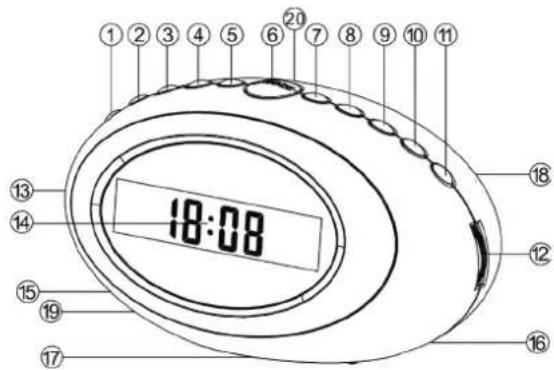
LOCATION OF CONTROLS (AUX)
- DISPLAY BUTTON
- TIME ADJUST
- ALARM 1/HOUR BUTTON
- ALARM 2/MINUTE BUTTON
- SLEEP BUTTON
- SNOOZE BUTTON
- BAND/WEEK SWITCH
- °C/°F TEMPERATURE DISPLAY
- LIGHT ON/OFF
- TIMER
- RADIO ON/OFF
- TUNING CONTROL
- VOLUME CONTROL
- LCD DISPLAY
- AC POWER CORD & PLUG
- FM CABLE ANTENNA
- BATTERY COMPARTMENT
- SPEAKER
- TEMPERATURE INDUCTION ANTENNA
- AUX IN JACK
text_image
1 2 3 4 5 6 7 8 9 10 11 13 14 15 19 17 18 12 16 18:08POWER SUPPLY
Check the AC current is same as the instruction show on rating label of your unit and plugs the power cord into the AC outlet. A blinking signal will appear indicating the time.
RADIO OPERATIONS
- Press Radio ON/OFF button once to turn on the radio. LCD displays the present radio frequency. Press Band/Week button to select AM or FM band. Rotate the Volume control to get desired sound level and rotate the Tuning control to get the favorite radio station. The corresponding radio frequency will be displayed on the LCD panel.
- About 5 seconds after the radio station is steady, LCD will change to display the time automatically. Press Display button once to show radio frequency again.
- Under radio working condition, the AUX IN jack can access external audio signal (eg.: MP3 headset signal) to play the audio signal.
- Loose the cable antenna and adjust the direction to get the best reception if the radio could not get a clear station.
- When radio is on, press Radio ON/OFF button once to turn off the radio.
SLEEP TO RADIO
When radio is on, press Sleep button to set your desired listening time before sleeping from 90 minutes to 10 minutes under the digression 90-80-70-60-50-40-30-20-10-00. Radio will turn off automatically when the listening time is finished.
TIME/ALARM CLOCK SETTING (WHEN RADIO IS OFF.)
- Press TIME/ADJ button once to enter time set mode, press twice to enter Alarm 1 set mode, press three times to enter Alarm 2 set mode. Under each set mode, press Hour and Minute button to adjust the time.
- ALARM 1: SELECT "WAKE TO RADIO" OR "WAKE TO ALARM" Press Alarm 1 button: 1) Once: to turn on the alarm clock function and enter "WAKE TO ALARM" mode. 2) Twice: to enter "WAKE TO RADIO". 3) Three times: to exit the Alarm 1 function.
- ALARM 2: SELECT "WAKE TO RADIO" OR "WAKE TO ALARM" Press Alarm 1 button: 1) Once: to turn on the alarm clock function and enter "WAKE TO ALARM" mode. 2) Twice: to enter "WAKE TO RADIO". 3) Three times: to exit the Alarm 1 function.
- Press AL1/HOUR or AL2/MIN to stop the alarm when the alarm is on.
- Only when the set time and clock time is in-phase to the setting point, can "WAKE TO ALARM" or "WAKE TO RADIO" function be on.
- SNOOZE FUNCTION
1) When the alarm is on, press SNOOZE button to enter SNOOZE mode, then it will wake you up again after 8 minutes
2) When the radio is on, press SNOOZE button to enter SNOOZE mode, then it will be on again automatically after 8 minutes.
TIMER FUNCTION
- The time setting of counting down is from 90 to 10 minutes under the digression 90-80-70-60-50-40-30-20-10-00. At 00 minute to exit the timer function.
- When the count down time finishes, the unit will make beep sound for remind. Press TIMER button to exit the timer function
WEEK SETTING
When the radio is off, press Band/Week button to set the weekday.
LCD BACKLIGHT
When the power is supplied by AC current, press Light ON/OFF button to turn on/turn off the backlight and choose the backlight color; Seven colors for choosing, when you press the eighth times, the color will show seven colors recycle automatically.
BATTERY BACKUP FOR TIME RUNNING
Insert 2pcs AA Size 1.5V batteries in the battery compartment in correct polarity. When AC power fails, the batteries will supply the backup power to keep time running.
SPECIFICATIONS
- POWER SOURCE:
AC:230V/50Hz
DC: 3.0V (2PCS AA 1.5V BATTERIES)
- FREQUENCY RANGE:
AM: 540KHz\~1600KHz
FM: 88-108MHz
- TEMPERATURE INDUCTION RANGE:
0^ C 50^ C
NOTICE:
- When the product is working, then it will bring quantity of heat and cause to show higher temperature degree than actual temperature. (error±2°C)
- If the battery sign flashes on the display when it is connected with AC power, please replace all the batteries with new ones asap.
- Remove the batteries if your unit is not going to be used for prolong period. Old batteries can leak and cause corrosion, damaging your unit.
- Turn off the radio and backlight before you cut off the AC power to save the battery life.
WARNINGS:
- The ventilation should not be impeded by covering the ventilation openings with items, such as newspapers, table-cloths, curtains, etc;
- No naked flame sources, such as lighted candles, should be placed on the apparatus;
- It shall not be exposed to dripping or splashing and that no objects filled with liquids, such as vases, shall be placed on the apparatus;
- Do not place the product in closed bookcases or racks without proper ventilation.
- Where the mains plug is used as the disconnect device, the disconnect device shall remain readily operable.
RÁDIO RELÓGIO
NR1011
PORTUGUÊS
natural_image
Black and silver AXIL digital alarm clock with display showing 12:04 (no text or symbols beyond clock face)Note on environmental protection:

After the implementation of the European Directive 2002/96/EU in the national legal system, the following applies: Electrical and electronic devices may not be disposed of with domestic waste. Consumers are obliged by law to return electrical and electronic devices at the end of their service lives to the public collecting points set up for this purpose or point of sale. Details to this are defined by the national law of the respective country. This symbol on the product, the instruction manual or the package indicates that a product is subject to these regulations. By recycling, reusing the materials or other forms of utilising old devices, you are making an important contribution to protecting our environment.