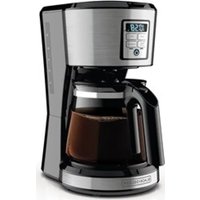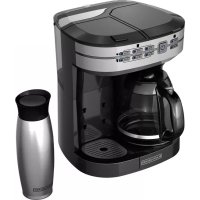
Café Select CM6000 - Coffee machine BLACK & DECKER - Free user manual and instructions
Find the device manual for free Café Select CM6000 BLACK & DECKER in PDF.



| Product Type | Multi-function coffee maker |
| Brand | Black & Decker |
| Model | Café Select CM6000 |
| Carafe capacity | 12 cups (approx. 1.8 L) |
| Water reservoir capacity | 1.8 L (60 oz) removable |
| Brewing options | Full carafe, single serving (pods or ground coffee) |
| Single serving sizes | 180 ml, 240 ml, 300 ml, 360 ml, 480 ml, 600 ml |
| Brew strength | Regular or Bold (Robusto) for carafe |
| Carafe filter | Cone filter #4 (paper), reusable basket included |
| Single serving filter | Reusable filter for ground coffee |
| Included adapters | Pod adapter, ground coffee adapter |
| Sneak-A-Cup function | Cycle interruption to serve a cup without mess (20 sec max) |
| Auto shut-off | 2 hours after end of cycle |
| Cleaning system | Auto Clean with automatic descaling (vinegar) |
| Drip tray | Adjustable to 3 heights, removable for tall cups |
| Indicators | LED for on/off, selections, and descaling reminder |
| Exterior materials | Plastic and stainless steel (tray) |
| Removable parts cleaning | Dishwasher safe (top rack) or hand wash |
| Safety | Grounded plug, protected piercing needles, lid lock during brewing |
| Warranty | 2-year limited (USA and Canada) |
| Customer service | 1-800-231-9786 |
| Optional accessories | Insulated travel mug (with select models) |
| Power supply | 120 V ~ 60 Hz, grounded |
| Dimensions (approx.) | Height with tray: 24 cm without tray; width: ~30 cm; depth: ~25 cm |
| Weight (approx.) | Approximately 3.5 kg |
Frequently Asked Questions - Café Select CM6000 BLACK & DECKER
User questions about Café Select CM6000 BLACK & DECKER
0 question about this device. Answer the ones you know or ask your own.
Ask a new question about this device
Download the instructions for your Coffee machine in PDF format for free! Find your manual Café Select CM6000 - BLACK & DECKER and take your electronic device back in hand. On this page are published all the documents necessary for the use of your device. Café Select CM6000 by BLACK & DECKER.
USER MANUAL Café Select CM6000 BLACK & DECKER
natural_image
Black and white photo of a modern coffee maker with a glass lid (no visible text or symbols)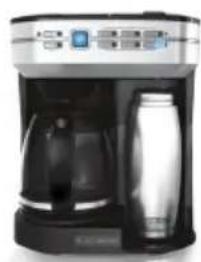
natural_image
Exterior view of a modern coffee maker with digital display and glass control (no visible text or symbols)CM6000

natural_image
Top-down view of a white coffee cup filled with dark liquid, surrounded by coffee beans and a blue coffee cup with a white logo (no text or symbols visible)Thank you for your purchase!
Rate and review your products at
Share your pictures & stories with us online
Should you have any questions or concerns with your new product, please call our Customer Service Line at 1-800-231-9786 (US and Canada). Please do not return to the store.
Please Read and Save this Use and Care Book.
IMPORTANT SAFEGUARDS.
When using electrical appliances, basic safety precautions should always be followed to reduce the risk of fire, electric shock, and/or injury, including the following:
- Read all instructions prior to use.
- Do not touch hot surfaces. Use handles or knobs.
- To protect against fire, electrical shock and injury to persons, do not immerse cord, plugs or appliance in any liquids.
- Close supervision is necessary when any appliance is used by or near children.
- Turn off and unplug appliance from outlet when not in use and before cleaning.
- Allow appliance to cool before cleaning and adding or removing parts.
- Do not operate any appliance with a damaged cord or plug, or after the appliance malfunctions or has been damaged in any manner. Contact consumer support at the number listed in this manual.
- The use of accessory attachments that have not been recommended by the appliance manufacturer may result in fire, electric shock or injury to persons.
- Do not use outdoors.
- Do not let cord hang over edge of table or counter, or touch hot surfaces.
- Do not place appliance on or near a hot gas or electric burner, or in a heated oven.
- To disconnect, turn the unit OFF, then remove plug from wall outlet.
- Do not use this appliance for anything other than its intended use.
- Keep lid on the carafe when in use.
- Scalding and/or burns may occur if either the carafe or single-serve filter basket lid is removed or unit cover is opened during the brewing cycle.
- The unit's carafe is designed for use only with this appliance. It must never be used on a range top.
-
Do not set a hot carafe on a wet or cold surface.
-
Do not use a cracked carafe or a carafe having a loose or weakened handle.
- Do not clean carafe with harsh cleansers, steel wool or other abrasive material.
- This appliance is not intended for use by persons (including children) with reduced physical, sensory or mental capabilities, or lack of experience and knowledge, unless they have been given supervision or instruction concerning use of the appliance by a person responsible for their safety.
- Children should be supervised to ensure that they do not play with the appliance.
CAUTION: Four piercing nozzles puncture the Pod, three in the housing lid and the other in the base of the Pod Adapter. To avoid risk of injury, do not place your fingers in the single serve housing.
CAUTION: There is extremely hot water in the single serve Pod adapter during brew process. To avoid risk of injury, do not lift the single serve lid during the brewing process.
CAUTION: Please always keep the brewer in its upright position to avoid potential injury and/or damage to your brewer.
SAVE THESE INSTRUCTIONS.
This product is for household use only.
POLARIZED PLUG (120V models only)
This appliance has a polarized plug (one blade is wider than the other). To reduce the risk of electric shock, this plug is intended to fit into a polarized outlet only one way. If the plug does not fit fully into the outlet, reverse the plug. If it still does not fit, contact a qualified electrician. Do not attempt to modify the plug in any way.
TAMPER-RESISTANT SCREW
Warning: This appliance is equipped with a tamper-resistant screw to prevent removal of the outer cover. To reduce the risk of fire or electric shock, do not attempt to remove the outer cover. There are no user-serviceable parts inside. Repair should be done only by authorized service personnel.
ELECTRICAL CORD
- A short power-supply cord is provided to reduce the risk resulting from becoming entangled in or tripping over a longer cord.
- Extension cords may be used if care is exercised in their use.
- If a long detachable extension cord is used:
a) The marked electrical rating of the power cord or extension cord should be at least as great as the electrical rating of the appliance.
b) If the appliance is of the grounded type, the extension cord should be a grounding-type 3-wire cord.
c) The cord should be arranged so that it will not drape over the countertop or tabletop where it can be pulled on by children or tripped over.
Note: If the power cord is damaged, please contact the warranty department listed in these instructions.
WELCOME!
Congratulations on your purchase of the Black+Decker™ Café Select™! We have developed this guide to ensure optimal product performance for your complete satisfaction. Save this use and care manual and be sure to register your appliance online at www.prodprotect.com/applica.
CONTENTS
Important Safeguards....3
Table of Contents 5
Getting to know your Café Select™ 6
Features and Benefits....7
Café Select™ - Quick Tips 8
Before Brewing 8
Brewing a Carafe....9
Brewing Single Serve - Pods 10
Brewing Single Serve - Ground Coffee 11
Care and Cleaning....12
Troubleshooting....14
Warranty and Customer Service Information ....17
WARNING
RISK OF FIRE OR ELECTRIC SHOCK. DO NOT OPEN.
The lightning symbol refers to "dangerous voltage"; the exclamation symbol refers to maintenance instructions. See below.
Warning: To reduce the risk of fire or electric shock, do not remove the cover of the coffeemaker. There are no user-serviceable parts inside. Repair should be done by authorized service personnel only.
SAVE THESE INSTRUCTIONS.
This product is for household use only.
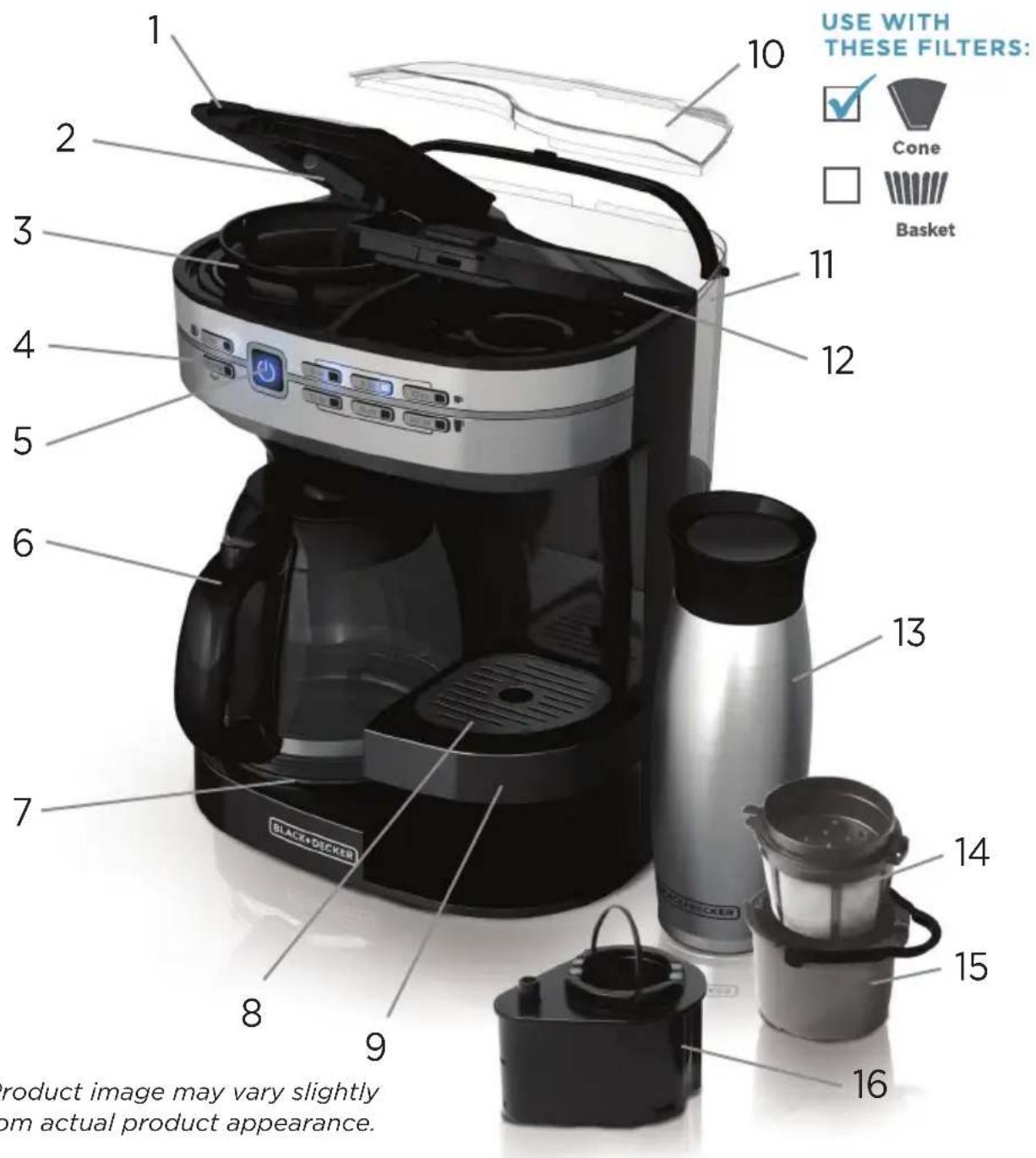
GETTING TO KNOW YOUR CAFÉ SELECT™\*
text_image
USE WITH THESE FILTERS: ✓ Cone Basket 1 2 3 4 5 6 7 8 9 10 11 12 13 14 15 16 BLACK-DECKER PRODUCT IMAGE MAY VARY SLIGHTLY ON ACTUAL PRODUCT APPEARANCE.*Product image may vary slightly from actual product appearance.
- Carafe filter basket lid
- Evenstream™ showerhead
- Washable brew basket (Part #CM6000-01)
- LED lit control panel
- Power button
- Perfect Pour™ 12-cup glass carafe (Part #CM6000-02)
- Nonstick keep hot carafe plate
- Removable stainless steel drip tray cover (Part #CM6000-03)
-
Adjustable drip tray (Part #CM6000-04)
-
Water reservoir lid (Part #CM6000-05)
- 60 oz. Removable water reservoir (Part #CM6000-06)
- Single serve filter basket lid
- Travel mug (select models) (Part #CM6000-07)
- Reusable single serve ground coffee filter (Part #CM6000-08)
- Single serve ground coffee adapter (Part #CM6000-09)
- Single serve Pod adapter (Part #CM6000-10)
FEATURES AND BENEFITS
Always On Ready Mode
To ensure a quick cup, press the power button ⏻ once and your Café Select™ will remain in ready mode, waiting for you to brew.
60 oz. Removable Water Reservoir
It's easy fill and easy clean. The removable reservoir holds 60 oz. of water and is used to brew from both sides of the Café Select™.
Auto Clean™ System
To ensure a quality brew and long lifespan of your Café Select™, the Auto Clean™ system will alert you when it's time to descale. Follow a few simple steps (see Care and Cleaning section), and your Café Select™ will take care of the rest.
Simple 1-Touch Operation
From ready mode, press the button that corresponds to your favorite brew size. ENJOY!
FULL CARAFE
Evenstream™ Showerhead
This custom engineered technology provides even saturation across all coffee grounds for an optimally flavored cup.
Perfect Pour™ Spout
Specially designed to eliminate dripping, the Perfect Pour ^™ spout keeps your counters clean.
Cone Style Filter Basket
This filter's funnel shape ensures all coffee grounds are evenly saturated, leaving you one step closer to the perfect cup.
Brew Strength Selector
Customize your carafe's brew strength by choosing Regular or Robusto.
Sneak-A-Cup™ Feature
Stop the flow of coffee into your carafe for a no-mess fill-up at any time. Replace the carafe within 20 seconds to prevent brew basket overflow.
Auto-Shutoff
For your peace of mind, the full carafe keep hot plate will automatically shut off 2 hours after the brew cycle is complete.
SINGLE SERVE
Customize Your Size
Choose your favorite brew size: 6, 8, 10, 12, 16 or 20 ounces.
Adjustable Drip Tray
Select from three tray heights or simply remove the drip tray altogether for an impressive 9 ½ inch clearance, perfect for large capacity travel mugs.
Single Serve Pod Adapter
Insert this adapter to brew your favorite single serve Pod coffee with ease
Single Serve Ground Coffee Adapter
Use this adapter to brew up to 20 ounces of your favorite ground coffee.
Reusable Single Serve Ground Coffee Filter
To brew your favorite ground coffee, scoop coffee grounds directly into this washable filter, no paper filter needed.
Café Select™—QUICK TIPS
- Press the power button at any time to turn the unit on or off.
- A self-check will run each time the unit is restarted from off mode. During this self-check the power button will blink. After the self-check is complete, the power button will remain lit and the Café Select™ will remain in ready mode unless it is manually turned off or unplugged.
- The Café Select™ will only brew from either the full carafe or single serve side at any given time.
- To brew extra tall mugs, remove the adjustable height drip tray altogether.
- When brewing single serve, ensure that the water reservoir is filled with a minimum of 20 ounces of water. If you attempt to brew a single serve selection with less than 20 ounces of water in the reservoir, the six single serve selection buttons will flash to alert you to add more water. The unit will not allow you to brew a single serve selection with less than 20 ounces of water in the reservoir.
- Because a great deal of pressure is required for pressurized Pod brewing, the amount of force needed to close the filter basket lid with a Pod enclosed will be greater than that of the other brewing options. This is for your safety.
- If the robusto and 20oz. selection buttons flash several times before each brew, it's time to Auto Clean™ your brewer. This critical step is needed to maintain both the quality of your coffee and lifespan of your Café Select™ (see De-scaling With Auto Clean™ section for details). After you run the Auto Clean™ system, the blinking will stop, until it is time to clean the unit again.
TWO WAYS TO BREW
CARAFE
Brew up to 12 Cups

Cone filter
Select strength: reg (regular) or robusto

SINGLE SERVE
Brew Directly Into Mug

OR

+ Select mug size

6

8

10

12

16

20oz.
BEFORE BREWING
- Register your product at www.prodprotect.com/applica.
- Carefully unpack your coffeemaker, removing all packaging materials, labels, stickers and the plastic band around the power plug.
- Thoroughly clean your coffeemaker according to the basic cleaning instructions found in the Care and Cleaning section of this manual.
- Plug in your Café Select™ and press the power button. A self-check will run each time the unit is restarted from off mode. During this self-check the power button will blink. After the self-check is complete, the power button will remain lit and the Café Select™ will remain in ready mode unless it is manually turned off or unplugged.
BREWING A CARAFE
-
Make sure your Café Select™ is in ready mode and the power button LED (is lit. (See the Before Brewing section for assistance.)
-
Fill water reservoir with desired amount of water. The MAX line represents a full carafe of coffee. Do not fill reservoir past this MAX line.
-
Place a #4 paper cone filter into the brew basket above the full carafe.
-
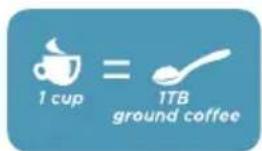
Add one tablespoon of ground coffee per cup, or to taste.
-
Ensure brew basket is secured in place and close filter basket lid.
-
Place carafe on carafe plate with lid closed. Coffee may run over if carafe lid is not correctly in place.
-
Press your brew strength preference, Reg or Robusto, to start the brew cycle.
-
While brewing, the Sneak-A-Cup™ feature stops coffee flow out of the unit, allowing you to pour a cup of coffee before the brew cycle finishes. Always return the carafe on to the carafe plate within 20 seconds to prevent coffee overflow.
-
The keep hot carafe plate will remain on for two hours before automatically shutting off.
-
To turn off the coffeemaker at any time, press the power button ⏻
-
When coffee grounds are cool, carefully remove and dispose of the used grounds and paper filter.
text_image
1 cup = 1TB ground coffeeBREWING SINGLE SERVE—PODS
- One coffee Pod generally brews 6 to 12 ounces. For stronger coffee or when filling higher capacity mugs, select the 6, 8, or 10 ounce setting and brew twice using two separate Pods.
To customize strength, see Brewing Single Serve-Ground Coffee.
-
Make sure your Café Select™ is in ready mode and the power button LED 🎨 is lit. (See Before Brewing.)
-
Ensure the water reservoir is filled with a minimum of 20 ounces of water. Do not fill reservoir past the MAX fill line.
IMPORTANT: If you attempt to brew any single serve selection with less than 20 ounces of water in the reservoir, the six brew selection buttons will flash several times to alert you to add more water.
-
To open, press the button on the filter basket lid above the single serve spout.
-
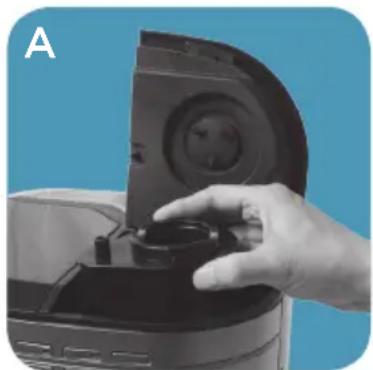
Place the single serve Pod adapter into the cavity inside the unit. (A)
-
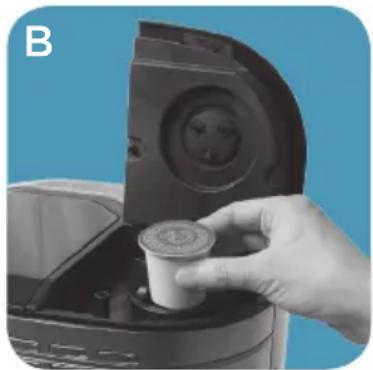
Insert a coffee Pod of your choice into the Pod adapter. (B)
NOTE: Do not remove the foil lid or puncture the coffee Pod before inserting.
CAUTION: There are four sharp needles that puncture the coffee Pod, three above the Pod adapter on the filter basket lid and one in the bottom of the Pod adapter. To avoid risk of injury, do not put your fingers in the single serve Pod adapter.
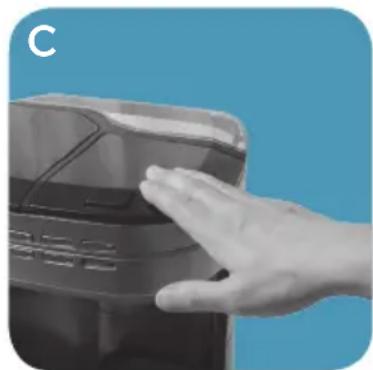
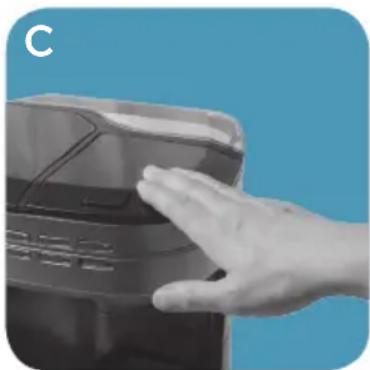
- Push the single serve filter basket lid down firmly until it locks into place. (C) This will puncture the coffee Pod and keep the filter basket lid from opening during brewing.
NOTE: A great deal of pressure is required for pressurized Pod brewing. For your safety, the amount of force needed to close the filter basket lid with a Pod in place is greater than that of the other brewing options.
-
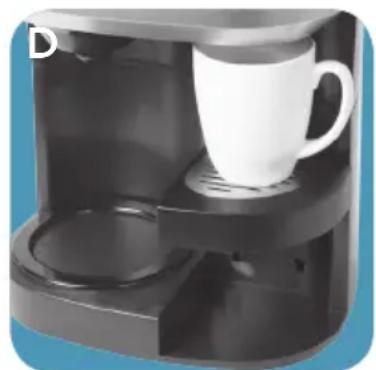
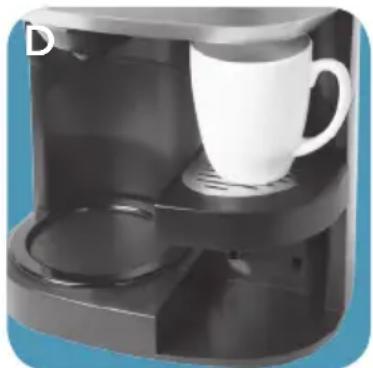
Adjust the drip tray so that it holds your coffee or travel mug close to the single serve spout. Place your mug on the drip tray. (D)
-
To start the brew cycle, press your choice of brew size.
NOTE: The brew cycle for 12, 16, or 20 ounces pauses mid-cycle and restarts. The brew selection light turns off when brewing is complete.
CAUTION: There is extremely hot water in the coffee Pod during the brew process. To avoid risk of injury do not open the filter basket lid during brewing process.

natural_image
Hand placing a small object into a kitchen appliance against a blue background (no text or symbols visible)Place single serve Pod adapter.
natural_image
Hand placing a small cup into a kitchen appliance against a blue background (no text or symbols visible)Insert Pod.
natural_image
Hand pressing a component on a device (no visible text or symbols)Press lid firmly.
natural_image
Interior view of a modern coffee maker with a white mug and side shelves (no visible text or symbols)Adjust drip tray to mug.
- To turn off the coffeemaker at any time, press the power button ⏻ CAUTION: The coffee Pod will be hot.
- When cooled, carefully remove and dispose of the used Pod.
BREWING SINGLE SERVE—GROUND COFFEE
- Make sure your Café Select™ is in ready mode and the power button LED (is lit. (See Before Brewing.)
- Ensure the water reservoir is filled with a minimum of 20 ounces of water. Do not fill reservoir past the MAX fill line.
IMPORTANT: If you attempt to brew a single serve selection with less than 20 ounces of water in the reservoir, the six brew selection buttons will flash several times to alert you to add more water. - Open the filter basket lid above the single serve spout.
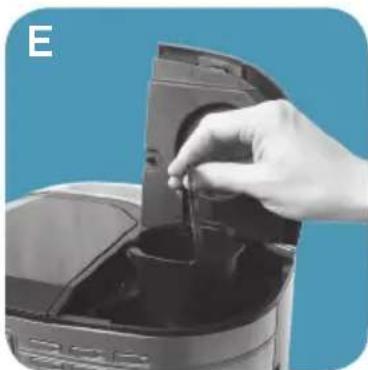
- Place the grey, single serve ground coffee adapter into the cavity inside the unit. (E)
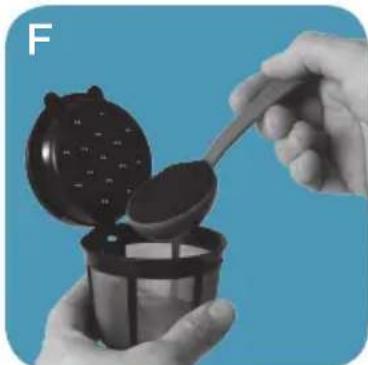
- Fill the grey, reusable single serve filter with your desired amount of coffee grounds, one tablespoon per brewed cup or to taste. (F)
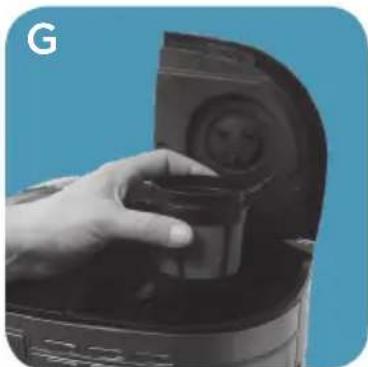
- Close reusable filter lid and place it into the ground coffee adapter. (G)
- Push the single serve filter basket lid down until it locks in place. (C) This will ensure the filter basket lid does not lift open during brewing.
- Adjust the drip tray so that it holds your coffee mug close to the single serve spout. Place your mug on the drip tray. (D)
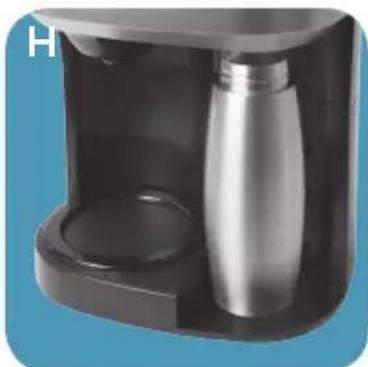
- If your coffee mug is too tall to fit on the drip tray, remove the drip tray and place your mug on the unit's base. (H)
- To start the brew cycle, press your choice of brew size: 6, 8, 10, 12, 16, or 20 ounces.
NOTE: The brew cycle for 12, 16, or 20 ounces pauses mid-cycle and restarts. The brew selection light turns off when brewing is complete. - To turn off the coffeemaker at any time, press the power button ⏻
- When cooled, carefully dispose of the used grounds and wash the reusable filter for future use.
natural_image
Hand pouring liquid into a digital kitchen appliance (no visible text or symbols)Place ground coffee adapter.
natural_image
Close-up of hands pouring liquid from a dark container onto a blue background (no text or symbols visible)Add grounds to filter.
natural_image
Hand placing a small container into a microwave oven (no visible text or symbols)Place filter into adapter.
natural_image
Close-up of a modern kitchen blender with a cylindrical water bottle inside, placed on a dark tray (no visible text or symbols)Place tall mug without tray.
CARE AND CLEANING
Basic Cleaning
Follow the directions below to clean your Café Select™ after each use.
- Ensure your coffeemaker is unplugged and cool.
- Open carafe filter basket lid. If remaining, throw away the used paper filter and coffee grounds. Remove the cone shaped carafe brew basket.
- Open single serve filter basket lid. If remaining, discard used Pod or coffee grounds. Remove any adapters from inside the filter basket.
- Wipe the outside of the coffeemaker, power cord, carafe plate and inside of the filter basket lid with a soft, damp cloth.
- Wash each removable piece of your Café Select™ according to the chart below. Rinse and dry all removable components before replacing into the unit.
Note: Do not use abrasive cleansers or scouring pads on this product. Never immerse the coffeemaker in water.
| COFFEEMAKER PART CLEANING | INSTRUCTIONS |
| HousingCarafe PlatePower CordSingle serve Pod coffee adapterStainless steel drip tray insert | Wipe with a soft, damp cloth. |
| Brew BasketGlass Carafe LidGlass CarafeReusable single serve filterSingle serve ground coffee adapterPlastic adjustable drip tray baseThermal Travel Mug*Thermal Travel Mug Lid* | Wash by hand in warm soapy water, or in the dishwasher (top rack only). |
*Select models
De-scaling With Auto Clean™
Over time, calcium deposits or “scale” may build up in your brewer. Scale is non-toxic but if left unattended can hinder brewer performance. Regularly de-scaling your brewer helps to maintain quality coffee as well as the lifespan of the heating element, and other internal parts that come in contact with water throughout the brew process.
To make the de-scaling process as effortless as possible, an Auto Clean ^™ system has been programmed into your Café Select ^™ .
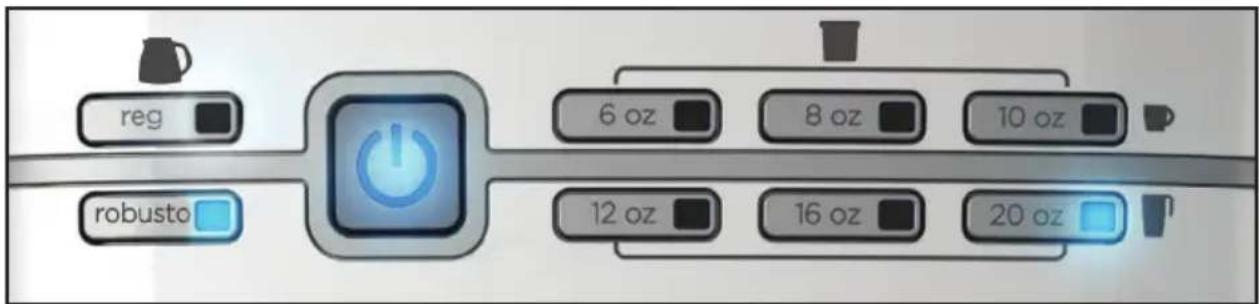
Lights are blinking! What's going on?
Your Café Select™ is reminding you that it's time to de-scale. If you can't do the de-scaling right then, just go ahead and brew your coffee. The blinking will stop after a few seconds and then you can proceed. We recommend de-scaling as soon as possible.
text_image
reg robusto 6 oz 8 oz 10 oz 12 oz 16 oz 20 ozAfter every 120 brews, full carafe and single serve combined, the lower far-left button (Robusto) and the lower far-right button (20 oz.) will begin to blink prior to brewing your coffee selection. After you run the Auto Clean™ system, the blinking will stop, until it is time to clean the unit again.
How do I use Auto Clean™?
Follow the simple steps below. Your Café Select™ will take care of the rest.
- Fill the water reservoir approximately half-way with white vinegar.
- Fill the remaining half of the water reservoir with cool water.
- Place a #4 paper cone filter into the carafe side brew basket, close the lid and place the empty carafe onto the carafe plate.
- Place the single serve Pod adapter into the single serve brew basket cavity and lock the lid closed.
- Place a mug or other receptacle that holds a minimum of 20 ounces of liquid onto the single serve mug base.
- Press and hold both the robusto and 20 oz. buttons together for five seconds to start the Auto Clean™ system.
Note: The LED lights forrobusto and 20 oz. will remain lit to indicate that the Auto Clean™ system is activated.
-
Leave unit to Auto Clean™ for approximately 80 minutes.
-
When Auto Clean™ has finished, the LED lights for robusto and 20 oz. will turn off.
-
Discard the liquid in both the carafe and single serve mug or receptacle.
-
Using water only, run a minimum of two full brew cycles through the full carafe.
-
Using water only, run a minimum of two 20 ounce brews through the single serve unit.
-
Wash, rinse and dry each removable piece of your Café Select™ (see the Basic Cleaning section of this guide for specific instructions).
TROUBLESHOOTING—GENERAL
| PROBLEM POSSIBLE CAUSE SOLUTION | ||
| Coffeemaker will not turn on. | Unit is unplugged Make sure appliance is plugged into a working outlet. | |
| Unit is plugged in but not turned on. | Press the power button to turn the unit on. | |
| Coffeemaker is leaking. | Water reservoir may be overfilled. | Ensure water reservoir is not filled beyond the MAX line. |
| Coffeemaker brews more slowly than usual. | The coffeemaker needs cleaning. | Follow the instructions in the De-scaling With Auto CleanTM section. |
| The brew basket overflows. | Excessive amount of ground coffee used. | Reduce the amount of coffee used to eliminate brew basket overflows. |
| Coffeemaker needs cleaning. | Follow the instructions in the De-scaling With Auto CleanTM section. | |
text_image
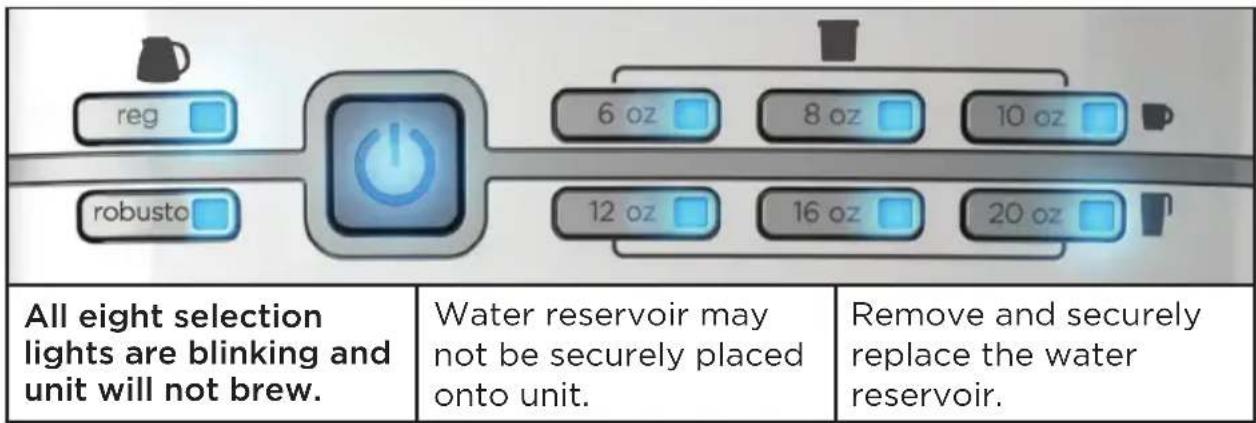
All eight selection lights are blinking and unit will not brew. Water reservoir may not be securely placed onto unit. Remove and securely replace the water reservoir.|   | ||
| Robusto and 20oz. selection lights blink before starting to brew. | It is time to Auto Clean™ your Café Select™. | Follow the instructions in the De-scaling with the Auto Clean™ System section. |
TROUBLESHOOTING—CARAFE
| PROBLEM POSSIBLE CAUSE SOLUTION | ||
| Coffeemaker is leaking. | Carafe lid may not be correctly placed on carafe. | Make sure carafe lid is placed straight onto the carafe. |
| Carafe may not be correctly placed on the carafe plate | Place carafe securely and squarely onto the carafe plate. | |
| Coffee sediment in brewed cup of coffee. | Paper filter not opened or properly placed in brew basket. | Rinse brew basket and re-insert paper filter into brew basket so edges remain pressed against the sides of the basket. |
| Coffee leaks onto base. | The carafe has been removed for longer than 20 seconds during a brew cycle. | Make sure to replace the carafe within 20 seconds during the brewing cycle. |
| A partial carafe of coffee brews. | Water reservoir was not filled to the MAX line when the brew cycle started. | Ensure the water reservoir is filled to the MAX line prior to brewing a full carafe. |
| reg robusto | 6 oz 8 oz 10 oz 12 oz 16 oz 20 oz | |
| The six single-serve selection lights blink before brewing begins. | There is less than 20 oz. of water in the water reservoir. | Add additional water, or ensure that the volume of ground coffee has been adjusted. |
TROUBLESHOOTING—SINGLE SERVE
| PROBLEM POSSIBLE CAUSE SOLUTION | ||
| Coffeemaker is leaking. | Travel mug lid may still be on travel mug. | Ensure lid is removed from travel mug before brewing. |
| Coffee tastes weaker than preferred. | Too much water used for a single Pod coffee brew. | Brew 2 coffee Pods into your mug. Choose a small brew volume. |
| Not enough ground coffee used. | Increase the volume of coffee grounds in permanent filter. | |
| Coffee leaks onto base. | The coffee cup or mug was removed before brewing was complete. | Wait until brew is complete and dripping stops before removing your mug. |
| The six single serve selection lights are blinking and unit will not brew. | Less than 20 oz. of water in reservoir. | Check water levels.Add additional water to reservoir if needed. |
| Brew basket lid may not be latched properly. | Reopen brew basket lid and push to close unit lid clicks into place. | |
| The 6 oz. and 12 oz. selection lights are blinking. | The single serve filter basket lid is not tightly closed. | Open and securely reclose the single serve filter basket lid. |
If additional assistance is needed, please contact our consumer service team at 1-800-231-9786.
WARRANTY AND CUSTOMER SERVICE INFORMATION
For service, repair or any questions regarding your appliance, call the appropriate 800 number listed within this section. Please DO NOT return the product to the place of purchase. Also, please DO NOT mail product back to manufacturer, nor bring it to a service center. You may also want to consult the website listed on the cover of this manual.
Two-Year Limited Warranty (Applies only in the United States and Canada)
What does it cover?
- Any defect in material or workmanship provided; however, Spectrum Brands, Inc.'s liability will not exceed the purchase price of product.
For how long?
- Two years from the date of original purchase with proof of purchase.
What will we do to help you?
- Provide you with a reasonably similar replacement product that is either new or factory refurbished.
How do you get service?
- Save your receipt as proof of date of sale.
- Visit the online service website at www.prodprotect.com/applica, or call toll-free 1-800-231-9786, for general warranty service.
- If you need parts or accessories, please call 1-800-738-0245.
What does your warranty not cover?
• Damage from commercial use
- Damage from misuse, abuse or neglect
- Products that have been modified in any way
- Products used or serviced outside the country of purchase
- Glass parts and other accessory items that are packed with the unit
- Shipping and handling costs associated with the replacement of the unit
- Consequential or incidental damages (Please note, however, that some states do not allow the exclusion or limitation of consequential or incidental damages, so this limitation may not apply to you.)
How does state law relate to this warranty?
- This warranty gives you specific legal rights. You may also have other rights that vary from state to state or province to province.
natural_image
Hand operating a kitchen appliance with a lid, against a blue background (no text or symbols visible)natural_image
Hand placing a small container into a kitchen electric oven (no visible text or symbols)natural_image
Hand placing a component into a device against a blue background (no visible text or symbols)Presione la tapa firmemente.
natural_image
Black and white photo of a coffee machine with a white mug on top, no visible text or symbolsnatural_image
Hand pouring liquid into a small kitchen appliance (no visible text or symbols)natural_image
Close-up of hands pouring liquid from a container into a container with a spoon (no text or symbols visible)natural_image
Hand placing a small container into a device with a circular inset showing a smiley face (no text or symbols visible)natural_image
Close-up of a modern kitchen blender with a cylindrical bottle inside, no visible text or symbolsDouchette Evenstream™
natural_image
Hand placing a small object into a kitchen appliance against a blue background (no text or symbols visible)natural_image
Hand placing a small container into a device with a lid, against a blue background (no text or symbols visible)Insérer la capsule
natural_image
Hand placing a black plastic container onto a white surface against a blue background (no text or symbols visible)natural_image
Interior view of a modern coffee maker with a white mug on top, no visible text or symbolsnatural_image
Hand pouring liquid into a small appliance on a blue background (no text or symbols visible)natural_image
Close-up of hands pouring dark granular substance from a container into a container (no text or symbols visible)natural_image
Hand inserting a small container into a device casing (no visible text or symbols)natural_image
Close-up of a modern hand mixer device with a metallic cylindrical body and black casing (no visible text or symbols)Col. Centro, Cuauhtemoc,
México, D.F.
Tel. 01 800 714 2503
Nicaragua
LRM ELECTRONICA
Managua - Sinsa Altamira 1.5
kilómetros al norte
Nicaragua
Tel. (505) 2270-2684
Panamá
Supermarcas
City Market Nivel Plaza Local 153
Diagonal Hotel Melia,
Caracas
Tel. (582) 324-0969
www.applicaservice.com
servicio@applicamail.com
En Chile, Household Products Chile Ltda
natural_image
Glass mug filled with dark coffee, showing a gentle smile and foam covering (no text or symbols visible)© 2016 The Black + Decker Corporation and Spectrum Brands, Inc. Middleton, WI 53562
Made in People's Republic of China
CAFÉ SELECT, PERFECT POUR, AUTO CLEAN, SNEAK-A-CUP and EVENSTREAM are trademarks of Spectrum Brands, Inc.
CAFÉ SELECT, PERFECT POUR, AUTO CLEAN, SNEAK-A-CUP and EVENSTREAM son marcas registradas de Spectrum Brands, Inc.