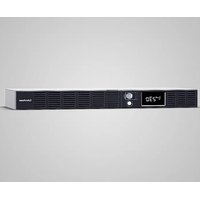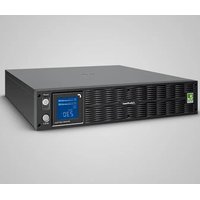
OR1500ERM1U - Uninterruptible power supply CyberPower - Free user manual and instructions
Find the device manual for free OR1500ERM1U CyberPower in PDF.


| Product Type | Uninterruptible Power Supply (UPS) in 1U rack format |
| Brand | CyberPower |
| Model | OR1500ERM1U |
| Capacity | 1500 VA / 900 W |
| Dimensions (W x D x H) | 43.3 x 38.9 x 4.4 cm |
| Weight | 14.9 kg |
| Input Voltage | 165 VAC to 271 VAC |
| Battery Output Voltage | 230 VAC ± 10% (simulated sine wave) |
| Frequency | 50/60 Hz (auto-sensing) |
| Transfer Time | 4 ms (typical) |
| Surge Protection | 1030 Joules |
| Communication Protection | RJ11/RJ45 (1 input / 1 output) |
| Battery Type | Sealed lead-acid, maintenance-free, 6V / 9Ah x 4 |
| Typical Charge Time | 8 hours |
| User-Replaceable Battery | Yes |
| Output Outlets | 6 IEC320 C13 outlets (4 battery & surge protected + 2 surge only) |
| Display | High-resolution digital LCD screen |
| Management Software | PowerPanel® Business (free for Windows, Mac, Linux) |
| Communication | USB, serial DB-9, optional SNMP slot |
| Automatic Voltage Regulation (AVR) | Yes, with sensitivity settings |
| GreenPower Technology | Yes, energy-saving in bypass mode |
| Operating Temperature | 0°C to 40°C |
| Relative Humidity | 0% to 90% (non-condensing) |
| Maintenance | Replaceable battery; recharge every 3 months when stored |
| Safety | Circuit breaker, overload and short circuit protection |
Frequently Asked Questions - OR1500ERM1U CyberPower
User questions about OR1500ERM1U CyberPower
0 question about this device. Answer the ones you know or ask your own.
Ask a new question about this device
Download the instructions for your Uninterruptible power supply in PDF format for free! Find your manual OR1500ERM1U - CyberPower and take your electronic device back in hand. On this page are published all the documents necessary for the use of your device. OR1500ERM1U by CyberPower.
USER MANUAL OR1500ERM1U CyberPower
IMPORTANT SAFETY INSTRUCTIONS
This manual contains important instructions that should be followed during installation and maintenance of the UPS and batteries. Please read and follow all instructions carefully during installation and operation of the unit. Read this manual thoroughly before attempting to unpack, install, or operate.
CAUTION! The UPS must be connected to a grounded AC power outlet with fuse or circuit breaker protection. DO NOT plug the UPS into an outlet that is not grounded. If you need to de-energize this equipment, turn off and unplug the UPS.
CAUTION! DO NOT USE FOR MEDICAL OR LIFE SUPPORT EQUIPMENT! CyberPower Systems does not sell products for life support or medical applications. DO NOT use in any circumstance that would affect the operation or safety of any life support equipment, with any medical applications, or patient care.
CAUTION! The battery can energize hazardous live parts inside even when the AC input power is disconnected.
CAUTION! To prevent the risk of fire or electric shock, install in a temperature and humidity controlled indoor area, free of conductive contaminants. (Please see specifications for acceptable temperature and humidity range).
CAUTION! To reduce the risk of electric shock, do not remove the cover, except to service the battery. There are no user serviceable parts inside, except for the battery.
CAUTION! To avoid electrical shock, turn off the unit and unplug it from the AC power source before servicing the battery or installing a computer component.
CAUTION! DO NOT USE WITH OR NEAR AQUARIUMS! To reduce the risk of fire, do not use with or near aquariums. Condensation from the aquarium can come in contact with metal electrical contacts and cause the machine to short out.
CAUTION! DO NOT USE WITH LASER PRINTERS! The power demands of laser printers are too large for a UPS.
INSTALLING YOUR UPS SYSTEM
UNPACKING
The box should contain the following:
(1) USB cable (A+B type) (2) User manual (3) UPS unit (4) power cord x 4
*PowerPanel® Business software is available on our website.
Please visit www.cyberpower.com and go to the Software Section for free download.
OVERVIEW
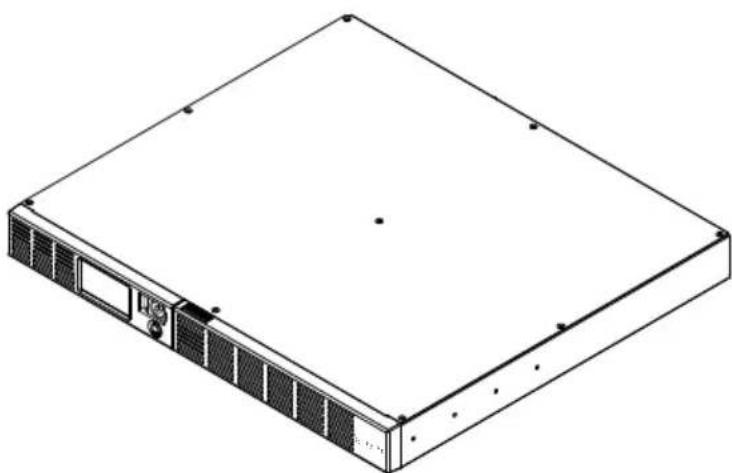
The OR1000ERM1U/OR1500ERM1U provides automatic voltage regulation for inconsistent utility power. The OR1000ERM1U/OR1500ERM1U features 1030 Joules of surge protection, and provides battery backup during power outages. The OR1000ERM1U/OR1500ERM1U ensures consistent power to your computer system and its included software will automatically save your open files and shutdown your computer system during a utility power loss.
HOW TO DETERMINE THE POWER REQUIREMENTS OF
YOUR EQUIPMENT
-
Make sure that the total Volt-Amp (VA) requirements of your computer, monitor, and peripheral equipment does not exceed 1000VA/1500VA.
-
Ensure that the equipment plugged into the four battery power-supplied/surge outlets does not exceed the UPS unit's rated capacity (1000VA/600W for OR1000ERM1U, 1500VA
/900W for OR1500ERM1U). If the rated unit capacities are exceeded, an overload condition may occur and cause the UPS unit to shut down and the circuit breaker to trip.
- If the power requirements of your equipment are listed in units other than Volt-Amps (VA), convert Watts (W) or Amps (A) into VA by performing the calculations below.
Note: The equation listed below only calculates the maximum amount of VA that the equipment can use, not what is typically used by the equipment at given time. Users should expect usage requirements to be approximately 60% of the maximum power requirements:
Watts (W) × 1.67 = VA or Amps (A) × 230 = VA
Add the totals up for all pieces of equipment and multiply this total by 0.6 to calculate the approximate requirements.
There are many factors that can affect the amount of power that your computer system will require. The total load that you will be placing on the battery-powered outlets should not exceed 80% of the unit's capacity.
BASIC OPERATION


DESCRIPTION
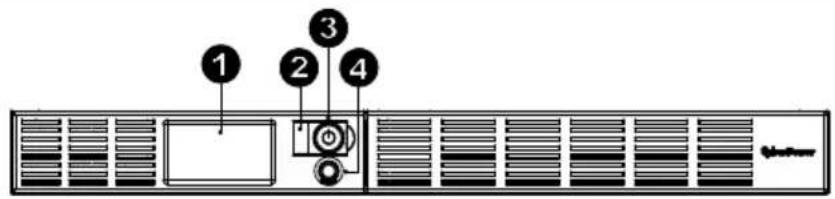
1. LCD module display
LCD shows all the UPS information with icons and messages.
2. Power on LED
This LED is illuminated when the utility condition is normal and the UPS outlets are providing power, free of surges and spikes.
3. Power Switch
Master on/off switch for equipment connected to the battery power supplied outlets.
4. LCD function selected switch
The switch can be used to select the LCD display contents Including input/output voltage and estimated run time, etc.
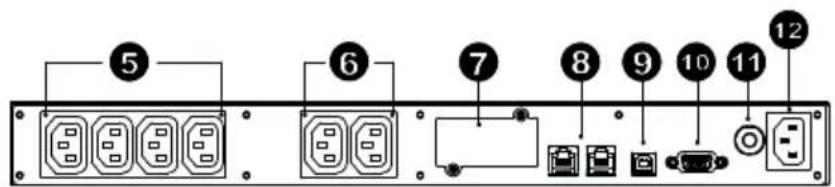
5. Battery, Surge and AVR Outlets
Provides four battery power, surge protected and AVR outlets for connected equipment and ensures temporary uninterrupted operation of your equipment during a power failure.
6. Surge Outlets
Provides two surge protected outlets for connected equipment.
7. Expansion Port
Allows users to add the optional SNMP card.
8. Communication Protection Ports
Communication protection ports will protect any standard modem, fax, telephone line, broadband network or Ethernet connection.
9. USB Port to PC
The USB port allows communication from the UPS to the computer. The UPS communicates its status to the PowerPanel® Business software when connected with a USB port.
10. Serial Port to PC
The port allows connection and communications from the DB-9 serial on the computer to the UPS unit.
11. Circuit Breaker
Located on the side of the UPS, the circuit breaker serves to provide overload and fault protection.
12. AC Input
Connect the AC Power cord to a properly wired and grounded outlet.
Hardware Installation Guide
- Your new UPS may be used immediately upon receipt. However, recharging the battery for at least 8 hours is recommended to ensure that the battery's maximum charge capacity is achieved. Charge loss may occur during shipping and storage. To recharge the battery, simply leave the unit plugged into an AC outlet. The unit will charge in both the on and off position.
- If you will use the software, connect the USB cable to the USB port on the UPS.
- With the UPS unit off and unplugged, connect the computer, monitor, and any externally powered data storage device (Zip drive, Jazz drive, Tape drive, etc. into the battery power supplied outlets. DO NOT plug a laser printer, copier, space heater, vacuum, paper shredder or other large electrical device into the UPS. The power demands of these devices will overload and possibly damage the unit.
- To protect a fax, telephone, modem line or network cable, connect a telephone cable or network cable from the wall jack outlet to the IN jack of the UPS. Then connect a telephone cable or network cable from the OUT jack on the UPS to the modem, computer, telephone, fax machine, or network device.
- Plug the UPS into a 2 pole, 3 wire grounded receptacle (wall outlet). Make sure the wall branch outlet is protected by a fuse or circuit breaker and does not service equipment with large electrical demands (e.g. air conditioner, refrigerator, copier, etc. Avoid using extension cords. If used, the extension cord must be grounded and rated for 15 amps.
- Depress the power switch to turn the unit on. The power on indicator light will illuminate and the unit will "beep" once.
- If an overload is detected, an audible alarm will sound and the unit will emit one long beep. To correct this, turn the UPS off and unplug at least one piece of equipment from the battery power supplied outlets. Wait 10 seconds. Make sure the circuit breaker is depressed and then turn the UPS on.
- Your UPS is equipped with an auto-charge feature. When the UPS is plugged into an AC outlet, the battery will automatically recharge.
- To maintain optimal battery charge, leave the UPS plugged into an AC outlet at all times. 10. To store your UPS for an extended period, cover it and store with the battery fully charged. Recharge the battery every three months to ensure battery life.
BATTERY REPLACEMENT
CAUTION! Read and follow the IMPORTANT SAFETY INSTRUCTIONS before servicing the battery. Service the battery under the supervision of personnel knowledgeable of batteries and their precautions.
CAUTION! Use only the specified type of battery. See your dealer for replacement batteries. CAUTION! The battery may present the risk of electrical shock. Do not dispose of batteries in a fire, as they may explode. Follow all local ordinances regarding proper disposal of batteries. CAUTION! Do not open or mutilate the batteries. Released electrolyte is harmful to the skin and eyes and may be toxic.
CAUTION! A battery can present a high risk of short circuit current and electrical shock. Take the following precautions before replacing the battery:
- Remove all watches, rings or other metal objects.
- Only use tools with insulated handles.
- DO NOT lay tools or other metal parts on top of battery or any battery terminals.
- Wear rubber gloves and boots.
- Determine if the battery is inadvertently grounded. If inadvertently grounded, remove source of ground. CONTACT WITH A GROUNDED BATTERY CAN RESULT IN
ELECTRICAL SHOCK! The likelihood of such shock will be reduced if such grounds are removed during installation and maintenance (applicable to a UPS and a remote battery supply not having a grounded circuit)
BATTERY REPLACEMENT PROCEDURE:
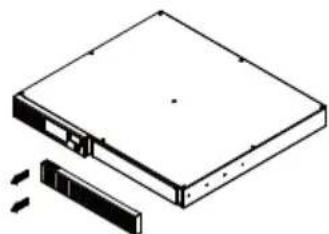
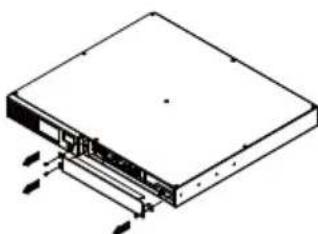
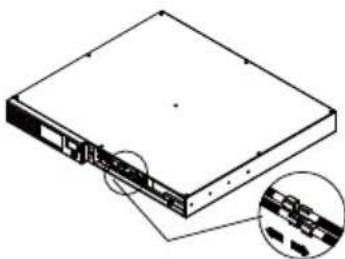
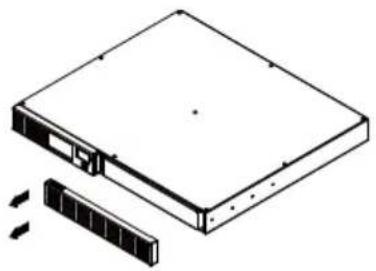
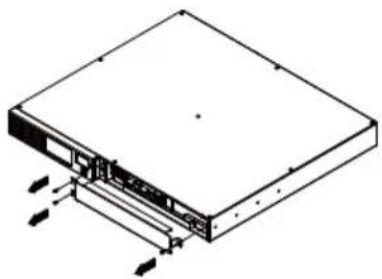
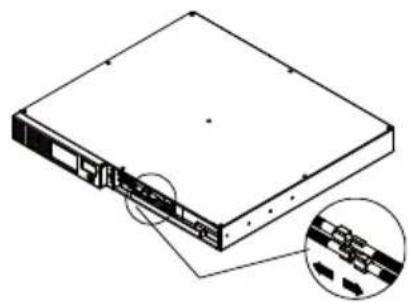
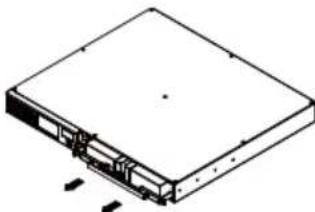
1.Remove the right-side of the faceplate.
2.Remove the three retaining screws on the cable protection cover then remove the cover faceplate.
3.Disconnect the black and red cables.
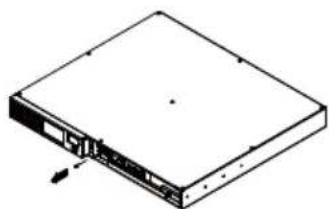
- Remove the retaining screw cover of the cable connectors.
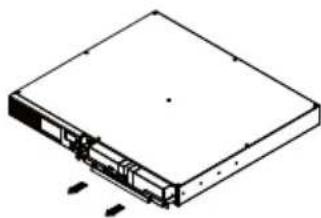
- Replace the new battery pack. Assemble the screws, cable and front panel in the reserve sequence of above steps. Recharge the unit for 4-8 hours to ensure the UPS performs expected runtime.
TROUBLE SHOOTING
| Problem Possible Cause Solution | ||
| Full-time surge protection outlets stop providing power to equipment. | Circuit breaker has tripped due to an overload. | Turn the UPS off and unplug at least one piece of equipment. Wait 10 seconds, reset the circuit breaker by depressing the button, and then turn the UPS on. |
| The UPS does not perform expected runtime. | Battery not fully charged. Recharge the battery by leaving the UPS plugged in. | |
| Battery is slightly worn out. | Contact CyberPower Systems about replacement batteries at service@cyberpower-eu.com | |
| The UPS will not turn on. | The on/off switch is designed to prevent damage by rapidly turning it off and on. | Turn the UPS off. Wait 10 seconds and then turn the UPS on. |
| The battery is worn out. | Contact CyberPower Systems about replacement batteries at service@cyberpower-eu.com | |
| Mechanical problem. Contact CyberPower Systems at service@cyberpower-eu.com | ||
| PowerPanel®Business is inactive. | The serial/USB cable is not connected. | Connect the serial/USB cable to the UPS unit and an open serial port on the back of the computer. You must use the cable that came with the unit. |
| The unit is not providing battery power. | Shutdown your computer and turn the UPS off. Wait 10 seconds and turn the UPS back on. This should reset the unit. | |
Additional troubleshooting information can be found at eu.cyberpowersystems.com
CYBERPOWER GREENPOWER UPS™ TECHNOLOGY
Advanced Energy-Saving Patented Bypass Technology
CyberPower's patented GreenPower UPS^TM with Bypass Technology reduces UPS energy costs by up to 75% compared to conventional UPS models. Even when utility power is normal, conventional UPS models constantly pass power through a transformer. By contrast, under normal conditions the advanced circuitry of a GreenPower UPS^TM bypasses the transformer. As a result, the power efficiency is significantly increased while decreasing waste heat, using less energy, and reducing energy costs.

When an abnormal power condition occurs, the GreenPower UPS^TM automatically runs power through its transformer to regulate voltage and provide "safe" power. Since utility power is normal over 88% of the time, the GreenPower UPS^TM operates primarily in its efficient bypass mode. The GreenPower UPS^TM is also manufactured in accordance with the Restriction on Hazardous Substances (RoHS) directive making it one of the most environmentally-friendly on the market today.
TECHNICAL SPECIFICATIONS
| Model OR1000ERM1U OR1500ERM1U | ||
| Capacity (VA) | 1000VA | 1500VA |
| Capacity (Watts) | 600W | 900W |
| Input | ||
| Input Voltage Range 165VAC~271VAC | ||
| Frequency Range | 50/60Hz +/-3Hz(Auto Sensing) | |
| Output | ||
| On Battery Output Voltage | Simulated Sine Wave at 230Vac +/-10% | |
| On Battery Output Frequency | 50/60 Hz | |
| Transfer Time | 4ms Typical | |
| Overload Protection | On Utility: Circuit Breaker, On Battery: Internal Current Limiting | |
| Surge Protection | ||
| Lightning / Surge Protection | Yes | |
| Network/ Phone/ Fax/ Modem Protection | RJ11/RJ45 ( One In/ One Out ) | |
| Operating Temperature | +32°F to 104°F ( 0°C to 40°C ) | |
| Physical | ||
| Total # of UPS Receptacles | IEC320 C 13 x 6 ( Backup x 4 ) | |
| Maximum Dimensions(cm) | 1U Rack 43.3 x 38.9 x 4.4 | 1U Rack 43.3 x 38.9 x 4.4 |
| Weight (kg) | 13.7 kg | 14.9 kg |
| Battery | ||
| Sealed Maintenance Free Lead Acid Battery | 6V / 7Ah x4 6V / 9Ah x4 | |
| Typical Recharge Time 8 Hours | ||
| Charging Current(Max.) | 1A | |
| User Replaceable Yes | ||
| Status Indicators | ||
| Indicators Power On, Wiring | Fault, LCD Display | |
| Audible Alarms | On Battery, Low Battery, Overload | |
| Communication | ||
| PowerPanel® Business Software | Windows 2000/NT/XP/Vista,Mac OSX,Linux | |
| Management | ||
| Self -Test Yes | ||
| Auto-Charger | Yes | |
| Auto-Restart Yes | ||
| USB interface | Yes | |
| Dry contact Closure Yes | ||
| SNMP/HTTP Networking | Optional | |
FUNCTION SETUP GUIDE
| Power On: Press and hold the POWER button. You will hear a constant tone for 1 second, followed by a short beep. Release the button after the short beep. Power Off: Press and hold the POWER button. You will hear a constant tone for 1 second, followed by two short-beeps. Release the button after the two short beeps. | |
| LCD Display Toggle/Selected Switch | Enter Setup Mode: Press the select button for approximately 3 seconds to access the 11 functions of the setup mode: Local Power Quality, High Transfer Voltage, Low Transfer Voltage, Sensitivity, Low Battery Warning, Self Test, Buzzer Setting, LCD Sleep, Last Fault Reason, Back to default, Escape item. Select Function: Short press the toggle to switch from the current item to the next item. Confirm Option: When an option is selected, press the toggle for 3 seconds. The icons will stop flashing after the setting has been confirmed |
| Function | LCD Display | Options | Default | Description |
| Local Power Quality | Low | Normal High Customer (CUS) *Only when high/ low transfer voltage is configured | Normal (195V-257V) | This function determines how the UPS switch to Battery Mode. 3 different output voltage ranges can be chosen according to the quality of the AC utility service in your location. If your utility service is not stable, you can select Low (189V~271V). The UPS will go to Battery Mode less often to tolerate the utility power fluctuations. If your utility service is stable, you can select High (207V~253V). The unit will go to Battery Mode more often. |
| High Transfer Voltage | 253V-271V 257V In Local Power Quality | settings, 10 fixed voltage ranges can be chosen. However, you can fine tune the High Transfer Voltage in this function. | ||
| If the utility voltage is usually high, and the connected equipment can work in this condition, you can set the output voltage range higher to reduce the UPS from going to Battery Mode as often. | ||||
| Low Transfer Voltage | 189V-207V 195V In Local Power Quality | settings, 10 fixed voltage ranges can be chosen. However, you can fine tune the Low Transfer Voltage in this function. If the utility voltage is usually low, and the connected equipment can work in this condition, you can set the output voltage range lower to reduce the UPS from going to AVR Mode or Battery Mode as often. | ||
| Sensitivity | Low SE | Normal High | Normal If the connected equipment can tolerate more power events (Example: unstable power often associated with stormy weather), select Low Sensitivity. The UPS will go to Battery Mode less often. If the connected equipment is more sensitive to power events, select High Sensitivity. The UPS will go to Battery Mode more often. | |
| Low Battery Warning | 5/6/7/8 mins 5 mins The audible alarm will | continuously beep when the remaining runtime is less than the selected value. | ||
| Self Test | Yes | YES Escape to function menu ESC | No Action In Line Mode, select YES to perform a Self Test on the battery. | |
| Buzzer Setting | Buzzer on | bON Buzzer off bOF | Buzzer on "b.on" is buzzer enabled; "b.of" is buzzer disabled. If b.of is selected, the unit will mute all alarms except for fault or overload condition. | |
| LCD Sleep | Auto off LON | Always on Lof | L.on | "L.on" (Auto Off is on): In Line Mode, LCD screen will off automatically after 1 min of inactivity; in Battery Mode, LCD screen is always on. "L.of" (Auto Off is off): LCD screen is always on. |
| Last Fault Reason | E- | There is no confirm | page for this item. It will only show the error code for last fault reason. E01: Charger fault (Over Charge). E02: Charger fault (No Charge) E11: Battery Fault E21: Output short. E22: Over load. | |
| Back to Default | BEF | No Action | Select Yes to restore the UPS factory default settings. | |
| Escape Item | ESC | Return to the previous | page. | |
For more information, visit eu.cyberpowersystems.com or contact
CyberPower Systems B.V.
Flight Forum 3545 5657DW Eindhoven The Netherlands
Tel: +31 40 2348170, E-MAIL: sales@cyberpower
eu.com CyberPower Systems Inc. (USA)
4241 12th Avenue East, Suite 400, Shakopee, MN 55379, U.S.A.
Tel: +1 952 4039500, Fax: +1 952 4030009, E-MAIL: sales@cyberpowersystems.com
Entire contents copyright ©2004 CyberPower Systems B.V., All rights reserved.
Reproduction in whole or in part without permission is prohibited. PowerPanel and
PowerPanel Plus are trademarks of CyberPower Systems (USA) Inc.



FR
OR1000ERM1U/OR1500ERM1U Manuel d'utilisation
K01-0000841-00
INSTRUCTIONS IMPORTANTES RELATIVES À LA SECURITE
(CONSERVEZ CES INSTRUCTIONS)
Flight Forum 3545, 5657DW Eindhoven, The Netherlands
TEL: +31 (0)40 2348170, FAX: +31 (0)40 2340314, E-MAIL: sales@cyberpower-eu.com CyberPower Systems Inc. (USA) 4241 12th Avenue East Suite 400 Shakopee, MN 55379, U.S.A.
Tel: +1 952 4039500, Fax: +1 952 4030009, E-MAIL: sales@cyberpowersystems.com
ACHTUNG! The UPS must be connected to a grounded AC power outlet with fuse or circuit breaker protection. DO NOT plug the UPS into an outlet that is not grounded. If you need to de-energize this equipment, turn off and unplug the UPS.
INSTALLATION IHRER USV
AUSPACKEN
Watts (W) x 1.67 = VA or Amps (A) x 230 = VA
BATTERY REPLACEMENT PROCEDURE:
Netherlands Tel: +31 40 2348170, E-MAIL:
sales@cyberpower-eu.com
CyberPower Systems Inc. (USA) 4241 12th Avenue East, Suite 400, Shakopee, MN 55379, U.S.A.
Tel: +1 952 4039500, Fax: +1 952 4030009, E-MAIL: sales@cyberpowersystems.com
LCD FUNCTION SETUP GUIDE
Watts (W) x 1.67 = VA or Amps (A) x 230 = VA
- LED-ul de pornography
Netherlands Tel: +31 40 2348170, E-MAIL:
sales@cyberpower-eu.com
CyberPower Systems Inc. (USA) 4241 12th Avenue East Suite 400 Shakopee, MN 55379, U.S.A.
Tel: +1 952 4039500, Fax: +1 952 4030009, E-MAIL: sales@cyberpowersystems.com
TEXHnKA BE3ONACHOCTN
(COXPAHNTE 3TN INHCTPYKUNI)
B 3TOM pykoBOcTBe COePxatCBAxHbIe INHCTpyKuIN NO TexHnke 6e3ONaCHOCTN. BHHMaTeJIbHO npoHTnte 3TN INHCTpyKuIN n CJeDyIne IM B pnocece yCTaHOBN I Kcnnyatau nn np6opa.
BHHMaTeJIbHO npOHTte 3To pyKOBoCTBO nepe TeM, KaK paCnAKOBiBaTb, yCTaHaBJIINBaTb nIIN 3KcNJIyATnpoBaTb nCTOuHnK 6ecnepeboHOro nITaHnR (IVB).
BHUMAHNE! N6P cneNyET BKNIOUaTb B PO3eTKy CeTN nepeMeHHORo TOKa C 3aUNTHO 6nOKnpOBKo. 3anpeuaeTcra OcyueCTBnAryb BKNIOUeHHe B He3a3EmnEHHy o3eTKy.
EcnHyXHO o6eToHTb 6OpUoBaHne, BbIKNoHTe n OTcoeDInHTe np6op.
BHIMAHHE! 3APPEUAAETCRA NCIOJIb3OBATb BMECTEC MEINHCKM OBOPYOBOAHNEM XN3HEOBCNEUEHENIA!
3AIPUEUJAETCINOJIb3OBATB ycnoBnax, KOToPbIe cNoocHbI NOBJIaTb Ha pa60Tu nn 6e3oNaChocTb KaKOro-Im6o obOpyOBoAHn Xn3HeoBeceNeueHn, MeuHckoro obOpyOBoAHn nn ObOpyOBoAHn KOHTpOn 3a naueHtOM.
BHUMAHNE! AkmyJTop MoKeT BbI3BaTb yap TOKOM DaXe npBbIKIOueHHOM nITaHn. BHUMAHNE! Bo n36exKaHne Bo3ropaHn IIN npopaxeHn 3NeKTPnueckm TOKOM pON3BOJNTe MOHTaK O6OpyIDoBaHn B NOMEuEHN C perynpEmoN
TemnepaTpyo IN BnaXHOCTbIO, CBO6OHNOM OT npOBOJauNX npIMeCeI. (CM. dOnyctmbl IInana3OH TemnepaTypbI IN BnaXHOCTN B TexHnuecknx XapakTepeNTkax).
BHIMAHHE! He BcKpbIbAaTe I6P, KpOme cIyuaeB 06cIyXbAHn aKKMyJrTopa.
BHIMAHNE!ДпяпсдтбрашениэлкгчecкогуydapaВыкнчite np6opиOTcoeHHTe erO OTИСТОЧИКАПNTAHNYпермEHOROTOKaпepeTEM,КAKБыINJOHLЯbобслжИВане IVBП,ЗаменуakKуМЛТOPAИЛMOHTAXobopydOBAHNA.
BHIMAHNE! HE YCTAHABINBAITE INI PRAOM C AKBAPNYMOM! Bo n36eXaHne noxapa, He nCnoJIb3yIte INI PRAOM c aKBAPNYMOM, KOHNecAT OT aKBAPNMa MoKeT nonactb Ha INI BvI3BaTb KOpOTKoe 3AmBiKaHne.
BHIMAHHE! HE INCNOJIb3yIte N6P C JIA3EPHbIMN PPNHTEPAMN!
3HeprnoTope6JeHne Ja3epHbIX npnHTepOB cnWkoM BicOko IyIbI.
YCTAHOBKA CNTEMbl NbI
PACIIAKOBKA
PpOBepbTe IVbI nocJIe noJyueHnB KOMIIeKTI NOCTaBKn DOJXHO BXOINb CNeDyUoUee:
(1) USB ka6eNb (A+B type); (2) pykoBoDcTBo noIb3ObaTeIa; (3) IVBII (4) ka6eIb nITaHnIa
Поррамнhoe обесnéчения *PowerPanel® Businessdoes not have any connection to the company. Any use of this material may cause serious harm to the user.
ONCAHME
IbI cepu OR1000ERM1U/OR1500ERM1U oecneuBaet aTOHOMhie nHTaHne u peTyInpOBky hapx HnTAHnO T cTe. IBI OR1000ERM1U/OR1500ERM1U oecneHT BaWe o6OpyOBAHnE Ct6nBnIM nTaHnEM n 3aunToN OT cKaKOB hApxHn, nporpaMMHoe oecneHn EocTabnE Moe B KOMnKeTe oecneHT aBTOMaTueckoe coXpAHHe N OTKpbITbIX faiNoB IN KoppeKTHO 3aBepuNT pa6Oty BaWero KOMnbOTepa.
KAK ONPENEINTH TPE6OBAHNA K MOIHHOCTN. NOTPE6JEMO BAIIM O6OPYIOBAHNEM
-
Y6eIntecb, yTo cymMapHoe 3HeprOIOptpe6JIeHne IoKJIIOueHHOrO o6OpyIOBaHnI He npeBbIaeaT 1000 BA/ 1500BA.
-
Y6eHNTecb, yTO o6OpyIDOBaHHe, NOkIIOUeHHOe K 4 PO3eTKam IbI, He npeBbIuaet MouHocTb IbI (1000BA/600BT dJa OR1000ERM1U, 1500BA/900BT dJa OR1500ERM1U). B cnyae npeBbIeHnMa MOuHocTn NOkJIIOUaEMOrO o6OpyDoBaHn, MoKET BO3HKnHyTB neperpy3ka, KOtOpA npBBeTeK OTKnIOUeHnIO IbI nn Cpa6aTbIBaHnIO ppeOxpanTeJI.
OCHOBHBIEФYHKUIN
ONUCAHNE
1.KK-ducnjei
KK-dncnne oTo6paXaET pa3HnHbIe daHHbIe TaKHe, KaX XapaKTepnCTnKn BXoHoro/BbIXoHoro HapJxHnI, opNeHTnpOBOuHoe BpeM aBTOHOHoi pa6Otbl N T.D.
2.Индикаторпитань
INnKaTOp ropnt npn pa6oTe N6I.
3. BkI/BbIKI nTaHn
PacnoIooKeHHbI c60ky OT IV5N, aBtOMaTnueckn BbIKHouaTeNb CnyKNT Dnra 3auuTbI OT neperpy30k n OTka3OB.
12.Bxod nepemehnHoro Toka
IopKJIIOHTe IHHyp NITAHNIE PEPMeHHO TOKa K 3a3eMJIeHHo pO3eTKe.
PYKOBODCTBO NO YCTAHOBKE OБОДBAHЯ
- Baш Новий ИБП ГOTOВ К ИСПОЛБ3OBAHИ NOСпЕ ПОЛУЧЕНЯ. OДHAКО, BO3MOЖHO Снжehné уровя зараздкн AkKуМЛЯТOPA BO В佩м пеpeBOЗКИ XpaHENH. ПОТOMY Heo6xOДМо 3apJXaTb AkKуМЛЯТOP B TeueHne 8 YacOB MInHMyM ДЯ obecпeчEHN. pa6OTbl B TeueHne ПОJOKEHHorO cPOKA. (ДЯ 3apJxKn AkKуМЛЯТOPa PpOCTO BKJIQUHITe ИБПВpo3ETky.)
- YctahOBInTe BaWe IIO n akceccyapbl.ДЯ nCNoIb3OBAHnI IO, npocTo nCnoIb3yIe USB ka6eIb, dIra coeDInHeHnI PK n N5P.
3.ПодсоeннTe OБоруване K ИБП.Пи ПОдсоeннeни OБоруваня NБПdoлжeh 6ыт bВьКЛIOчЕH. HE ПОДКЛIOчАITE JA3EPHBIE PPNHTEPbl, KONINPbl,OBORPEBATEJI WPEDEPBi IJN DPyTNE YCTPOICTBA C BbICOKIM3HEPRONOTPEBJIENHEM.
4.ДяЗauntbTeNeФoHHbIX NInH,Фakca,MODema INN CetN NOCoEINHHTe Ka6eB B pa3bEm IN IV5П.Дanee BCtABbTe Ka6eB B pa3bEm OUT IV5П. - Поdkлочаite ИБП к 3a3eMнгног розткс 3aunTo. Y6eHITecb,чTO nCNoIb3yemra po3eTka 3aunuheHa n He nCnoIb3yeTcJЯ nHTaHnO obOpydoBaHn c 6oJIbUIM 3HepronOTpe6IeHnEM (Kak KOHNuOHeP, XOnODINbHnK, KOnIp n T.D.). I36eraite nCnoIb3OBaHnY yDInHtTeJe. B cnyae nCnoIb3OBaHnY yDInHtTeJe, npIMITE BO BVHMaHne, YTO yDInHtTeJb DoJxKeH ImTe b 3a3eMnEHe n UpoBeHb 15 amnep.
6.BkIouHTe IbI. INdkaTOp nITaHn 3aOpntcN cpa6oTaET 3BykoBOn CnHaHn3aTOp. - B cnyae neperpuy3kn, cpa6oTaET 3BykoBaa CnHaJIn3aunia. IJa nCnpabHeHna BbIKIIOUHTe IVbI, oTKIOUHTe Yactb NODKIOUeHHoro obOpyOBAHn, NOdoXdnte 10 ceKyHd. Y6eINTEcb, YTO He cpa6oTaN ABOMaTHueckn BBIKIOUaTeJIb, BKIOUHTe IVbI.
- Bau IVbI OobpydOBaH 3apAaHbIM yCTpoiCTBOM. Korda IVbI BKIOUeH BCtB, aKKyMylTOpbl ABTomaTHueCKN 3apXkaIOTCJ.
- Дя ONТIMаЛьного зарда akКуМуЛЯTOPOВ, BCeДа OCTabЛЯnte IVБП BKЛЮЧЕНьIM B ceTb. 10.Дя ДолroВрemeHloro xpaHENHa IVБП, HabpoIte ycTpoIcTBOи NOДЗAPЯЖaTe aKKyMuJIYTOpbl KaKdIbe Tpr Mecaua.
3aMeHa aKKymyJrTOPOB
BHIMAHHE! IpoHTaIte n cIeMyTe HNCTpyKUmaM nepeH naJOM 6cnyxuBaHnA kkyMylrTopOB. IpoBOdIte o6cnyxuBaHnE aKkymyIaTOpOB noD Ha6JIIODeHHeM IpOpeccnoHaNoB.
BHIMAHNE! NcnoJb3yIe TOnbKO CneuΦnIupOBaHHbIe aKKymJrTOpbI. BHIMAHNE! AKKymJrTOpbI MOrY T yApITb TOKOM. NcnoJb3yIe aKKymJrTOpbI noaJIbWe OT ORH, OHN MoRy TB3OpBaTbcR.
BHIMAHNE! He BCKpbIbAaTe aKKMyJrTopbI, OHN MOryT NOBpeDnTb KOKe n rna3am. BHIMAHNE! AKKMyJrTopbI MOrY Bbl3BaTb KOpOTKoe 3aMbIkaHne NJIy dAp TokOM. Poxayncta, cJeDyIe CNeDyUOuM peKOMeHdaunm nepeD 3aMeHoi aKKMyJrTopoB: 1.CHMnte Yacbl, KoIbca n IIObIe dpyrne MeTaIINuYeckne npedMeTbl.
2.ИспόЛьзуйTe TOЛьКО ИСТpyмЕТСИЗОЛЯцЕ.N
3. He KnaIte HNCTpyMeHT Ha aKKyMylrTopbl.
4. OndeHbTe pe3nHOBble nepaTkn n 6yBb.
5. Y6eIntecb, yTo aKkymyIaTOp He 3a3emJIeH. KOHTaKT C 3a3emJIeHHoN 6aTaapee MoKeT Bbl3BaTb yDap 3JIeKTPnueCKm TOKOM.
3aMeHa aKKyMnyTOpOB:
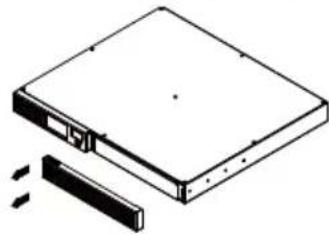
1. CHIMITE npaByIO naHeJIb IVbI.
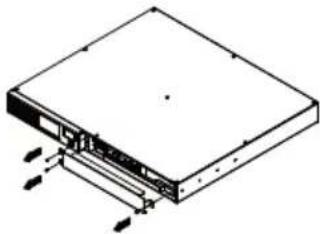
2. OTKpyTNTe TPN BnHTa Ha KpbIuKe 3aUntb Ka6en, NOTOM CHIMNTE KpbIuKy.
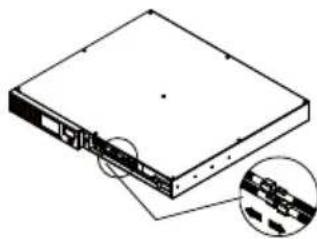
3. OTKJIIOUHTe YepHbI IN KpachbI UBet.
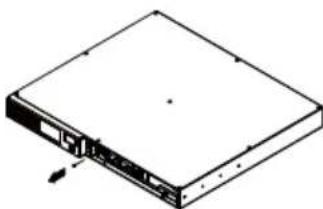
4. CHIMITE BNTbl coeHHntela Ka6eJra.
5.YCTAHOBNTE HOBBIE aKKyMylTOpbl. Co6epnte BnHTbI, KpbIuKy, Ka6eIb I nepeHIO nAHeB B COOTBeTCTByUoSei noCneDoBaTeIbHoCTN. 3apJxaiTe N6P 4-8 yacob.
YCTPAHEHNE HENCINPABHOCTEIN
| ПюбLEMа Бергеля pruchина Peшениe | |
| Розеткнисторпсим He обсячевait Ot nitане оборUDовеня. | СравOTAN ВИКЛЮЧATEЛВ СLEДСТВЕ ПЕPERΥЗК. |
| ИБП He pa6OtaET B Teчесп 3aЯВленьогorВремен. | АKKуMUЯТОн He зapяжEN ПОЛHOCТБЮ. |
| АKKуMUЯТОн ВИРABAOTAH.ОбразИТЕСБΚ VAШЕМУ NOCTABUДК. | |
| ИБП He bKЛQUаETСЯ. | ВИКЛЮЧATERpa6OtaH TAKIMOBlaZOM,чTOБы NCKЛЮЧITSCNшКOM YacstBIE BKNIOчЕпЯ/ВИКЛЮЧЕпЯ, KOTOPbI MOrγT nobpeДNTB ИБП. |
| АKKуMUЯТОн ВИРABAOTAH. | |
| МexahИчecSанecspaВHOCТБ. | |
| PowerPanel®Business HeakTNIBPOBaHo. | ПосLEДОВATEЛьнI/USB ka6eBJHe NOДКЛЮЧЕ. |
| ИБП He daet пitaMuЯ OTаKKуMUЯТОрa. |
DOnonHnteBna HOpMaunno ycTpaHnIO HeucnpaBHoTe NocTyHa Ha www.cyberpower.com
Texhooln GREENPOWER
TexHOrn3HeproSc6epeXeHnGreenPower.
3anaTeHToBaHHa KOMnHaHney CyberPower TexHOJorN 3Heproc6epeKeHHa GreenPower no3BOJNT Ha 75% cokpaTb 3HepronoTpe6JIeHne BaJero I6Pi CyberPower.

CtaHapThbI N6PcABTOMaTnueckm peryrAToPOM hAnpRKeHna ObecneuBaet BixOHOe HAnpRKeHne uepe3 peNe i noHkaUoU/NoBbUaUoUu TpaHcΦopMaTOp AVR. Tok npoxoHT uepe3 TpaHcΦopMaTOp, Hakannibra 3HeprnIO u BBipa6aTbIBaTenNO, 3TO TENNO aKKymynpye MOnHocTB, KOTOPa paCCenBAeTcA.
Pn cta6bHOM pexmecetn, n5p c texHoIornee GreenPower hakanJnBaet 3heprIO toIbKO uepe3 pe ne npoDOnkaeT oecneuNbAte bcta6nbHoe BbIXoHDoe HapjKeHne. KOrda npocxOHT OTKIOHeHne ot HopMbI (noHHKeHne nn NOBbIeHne HapjKeHn, cKaKn HapjKeHn, OTCyTCTBne HanpJKeHnB cTeN) nCTouHnK pa60TaET B pexmEOT aKKymIaTopOB nn B peXmE AVR.
B cpeHem, no BpeMeHHbIM npaMeTpam, HopMaJIbHoe 3Hepeoo6ecneueHne cTe n pncyTCTByeT B 88% cnuyax, COOTBeTCTBeHNO I5I pa6oTaet 88% B peXnme OxuHaHn, YTO C npImeHEm TexHOJorHn GreenPower no3BOJareT 3NaHTeJIbHo Chn3ntb 3aTpaTbI Ha 3HeprOOnTpe6JIeHne.
TEXHnueCKNE XAPAKTEPNCNU
CtpaHa n3roTOBJIeHnA: KntaI
Pon3BoOnTeJb: DoHryaHCaB6ep3Hepdxn ITD.
BINKA, B PpomblneHHb npk DaHcHr, dpeBHa XaHrMei, ropo DoHKeHr, ropo DoHryan, npOBnHua