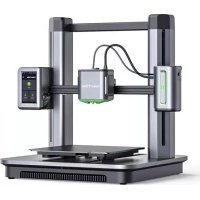
Make M5 - 3D Printer Anker - Free user manual and instructions
Find the device manual for free Make M5 Anker in PDF.



| Product Type | FDM 3D Printer |
| Brand | Anker |
| Model | Make M5 |
| Dimensions (approx.) | 400 x 400 x 500 mm |
| Weight (approx.) | 12 kg |
| Print Volume (approx.) | 235 x 235 x 250 mm |
| Filament Diameter | 1.75 mm |
| Nozzle Diameter | 0.4 mm |
| Power Supply | 100-240 V AC, 50/60 Hz |
| Connectivity | Wi-Fi 2.4 GHz, Bluetooth 2.4 GHz, USB-C |
| Touchscreen | Yes |
| Auto Bed Leveling | Yes |
| Slicing Software | AnkerMake Slicer (compatible with Cura, Simplify3D) |
| AI Recognition | Yes (with AnkerMake Slicer) |
| Recommended Ambient Temperature | 15 to 35 °C |
| Cleaning | Use a soft, dry cloth; avoid liquids |
| Safety | Hot and moving parts, do not touch; keep out of reach of children |
| Spare Parts | Nozzle, bed, filament spool holder available |
| Warranty | See Anker website |
| Certifications | CE, UKCA, IC, FCC |
Frequently Asked Questions - Make M5 Anker
User questions about Make M5 Anker
0 question about this device. Answer the ones you know or ask your own.
Ask a new question about this device
Download the instructions for your 3D Printer in PDF format for free! Find your manual Make M5 - Anker and take your electronic device back in hand. On this page are published all the documents necessary for the use of your device. Make M5 by Anker.
USER MANUAL Make M5 Anker
Ante Inventions Unlimited: All rights reserved, Ante-Made and Ante-Mate Logo are protected by copyright. The use of this term in any form without the prior written permission is prohibited. All other trademarks are the property of their respective owners.
51005003445V01
AnkerMake M5
QUICK START GUIDE
English 001
Deutsch 028
Espanol 048
Francais 072
Italiano 095
Nederland 118
Portugues 141
日本語 164
中国国
207
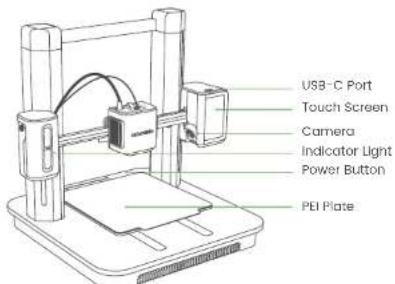
AT A GLANCE
| Indicator Light* Description | |
| Flashing Orange Slowly Heating up | |
| Fading Green Repeatedly Printing | |
| Flashing Red An alarm is going off |
For more indicator light status, visit https://www.ankermake.com. Product Name: AnkerMke 56 Model: V811

ASSEMBLING THE PRINTER
What You Need
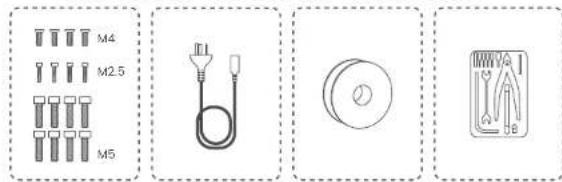
EN 002001
Step 1. Installing Gantry Frame
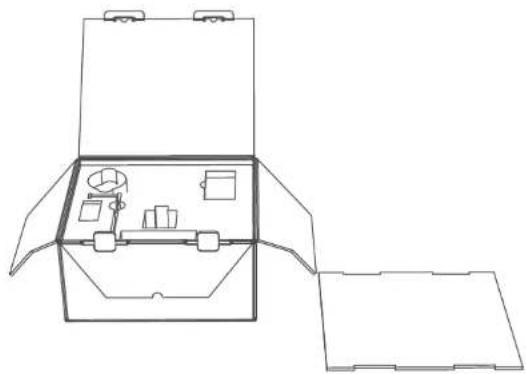
- Open the box, then place the foam cover on the ground.
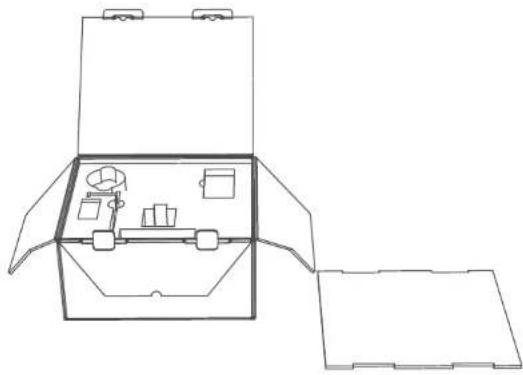
EN
- Take out all the accessories in the foam, then place the protection foam on the ground as support.
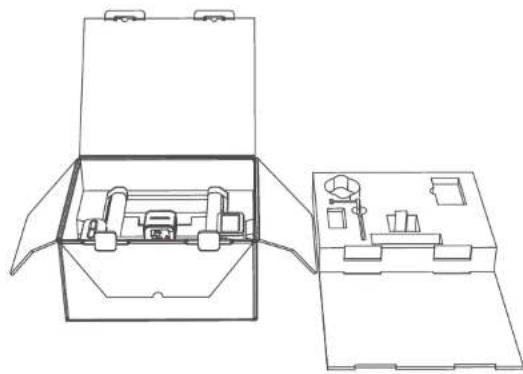
EN 004003
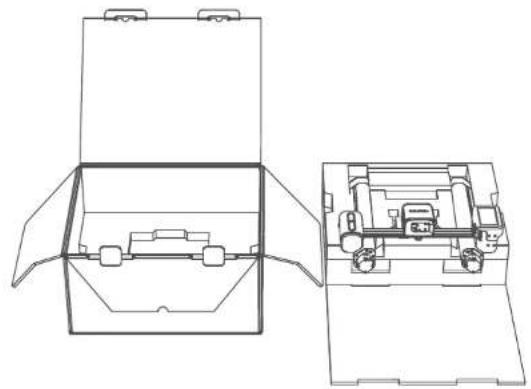
- Take out the gantry frame with its protection foam and place it on the support foam.
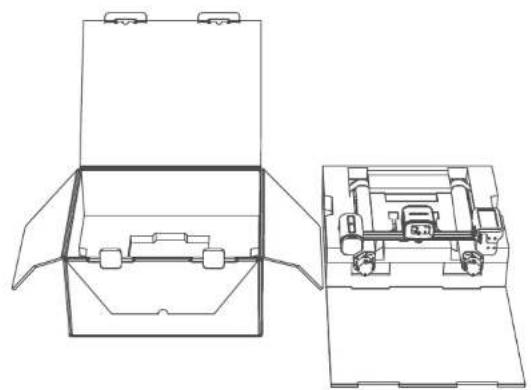
EN
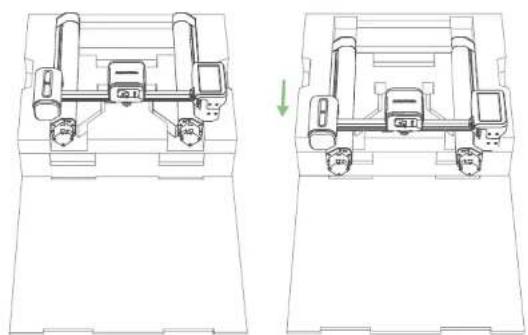
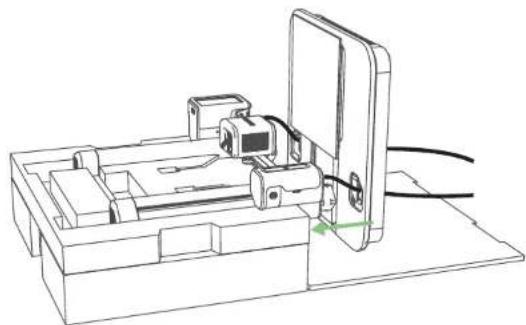
- Take the gantry frame out of the packaging foam, then put it back as shown below.
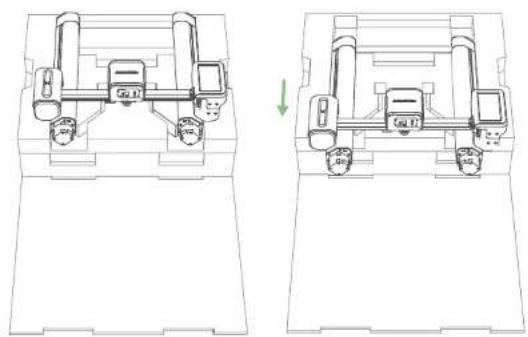
EN 006005
EN
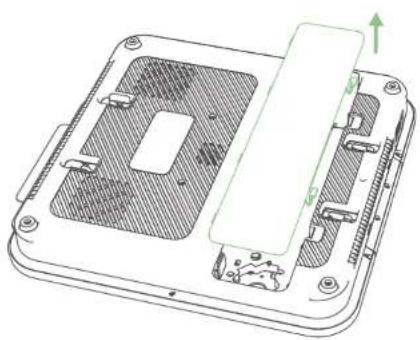
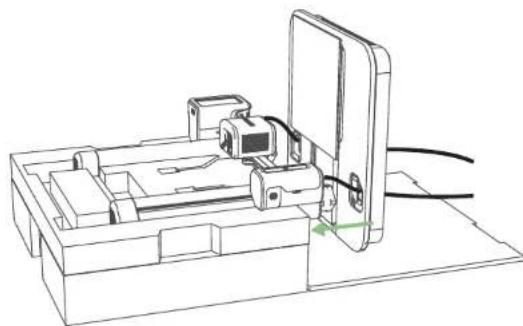
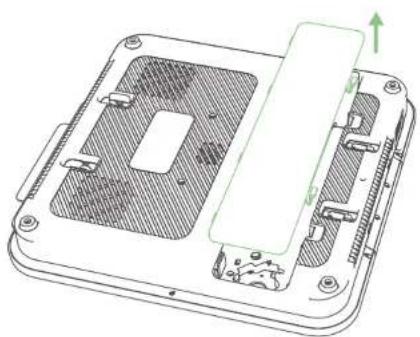
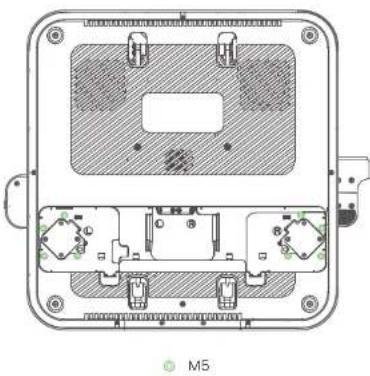
- Mount the platform through the holes. 5. Detach the bottom cover from the p
EN 008007
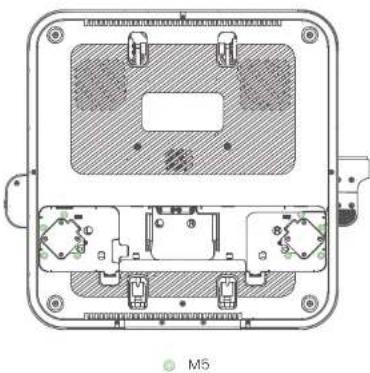
- Fasten screws into the platform.
EN
Step 2. Wiring
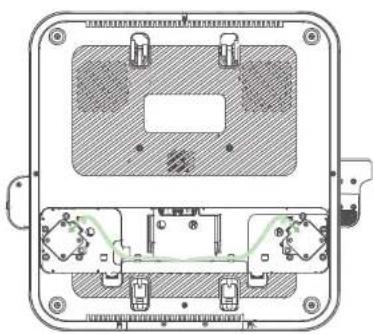
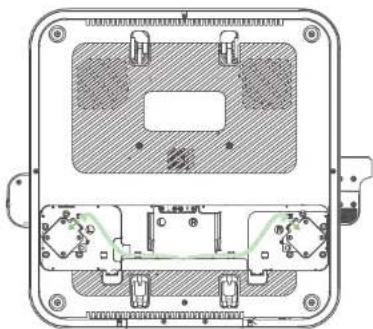
- Connect the motor wires.
EN 010009
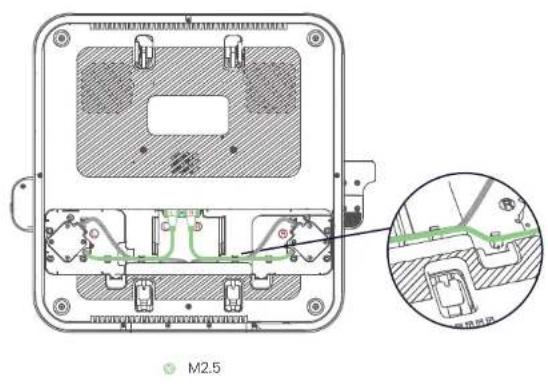
EN
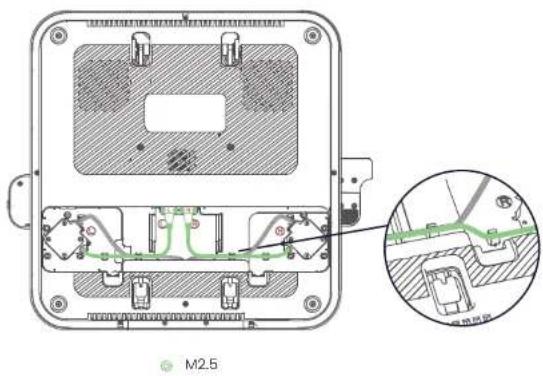
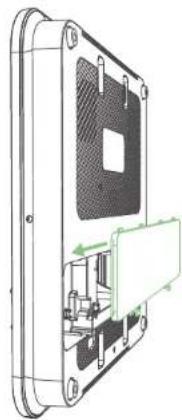
- Put the bottom cover back onto the platform.2. Connect and fix the USB-C ca
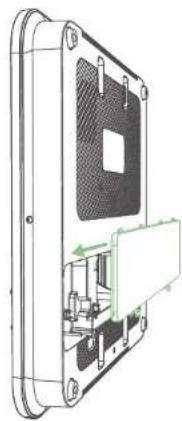
EN 012011
Step 3. Installing Filament Holder
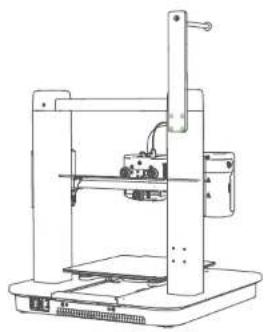
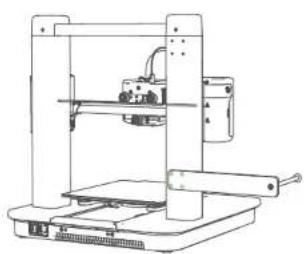
Secure the filament holder with screws.
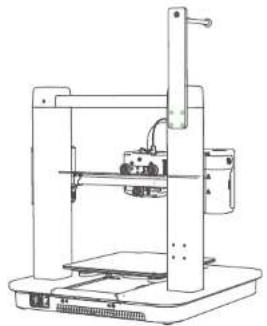
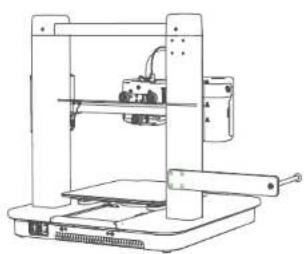
M4
Option 1 Option 2
EN
Step 4. Connecting to Power
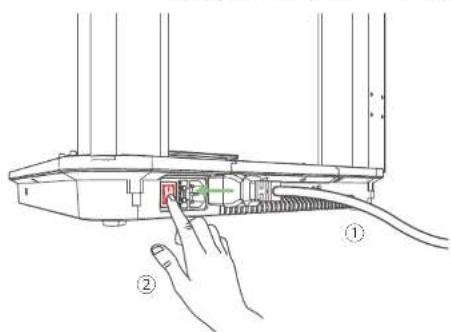
- Connect the printer to a power outlet with the power cable, then power on the printer.
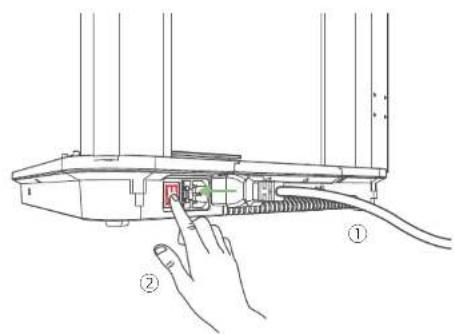
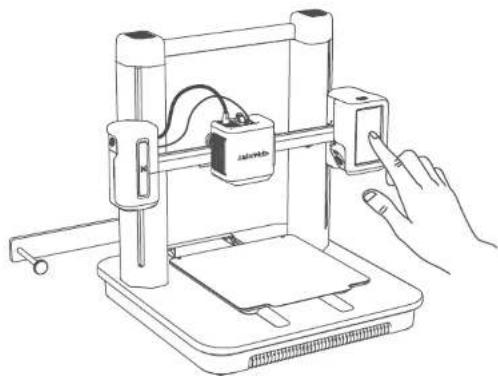
- Follow instructions on the touch screen to complete the initial setup.
EN 014013
SETTING UP THE SYSTEM
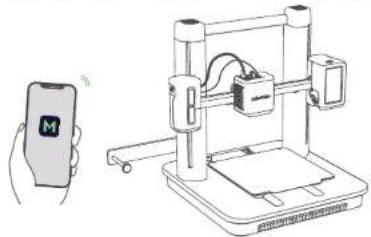
- Download and install the AnkerMake app, then sign up for an account.

Download on the AppStore
Google Play
- Follow on-screen instructions to add the printer to your device list and connect it to Wi-Fi.
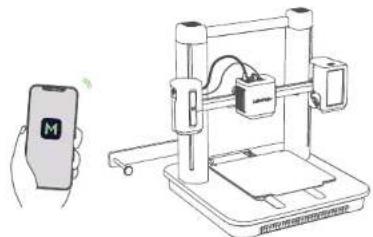
EN
LEVELING HEAT BED
On the touch screen, go to Control > Auto-Level to level the heat bed.
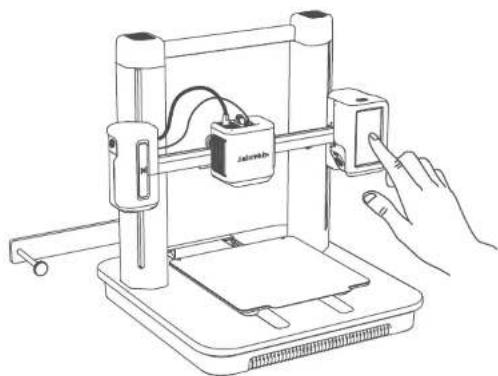
EN 016015
LOADING FILAMENT
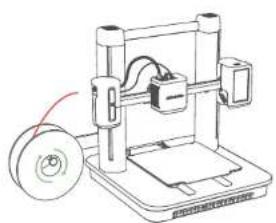
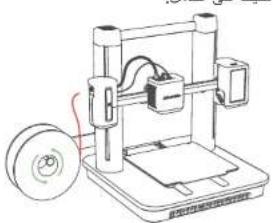
- Place the filament onto the holder.
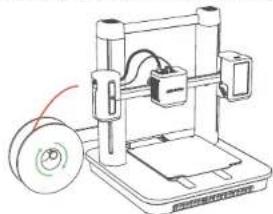


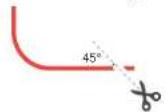
- Cut the tip of the filament at a 45^ angle.
EN
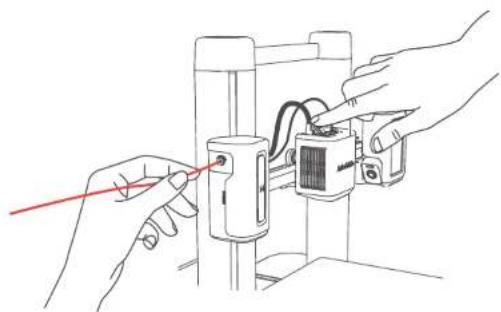
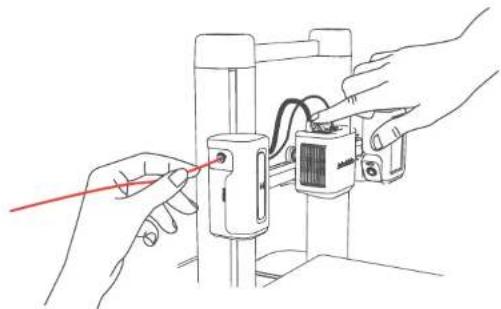
- Insert the filament until it reaches the extruder. Then press and hold the button on top of the extruder while continuing to insert the filament. Stop when you feel some resistance.
EN 018017
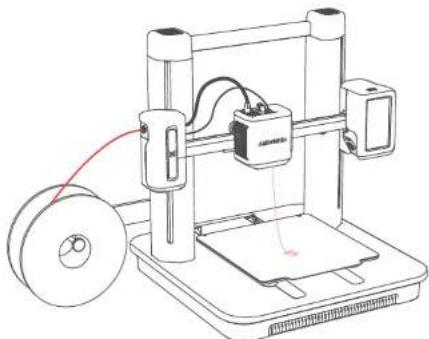
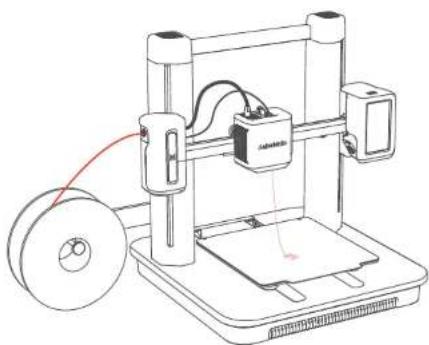
- On the touch screen, tap Load on Control > Extrude. Wait until filament flows out of the nozzle, then tap Stop.
EN
INSTALLING ANKERMAKE SLICER
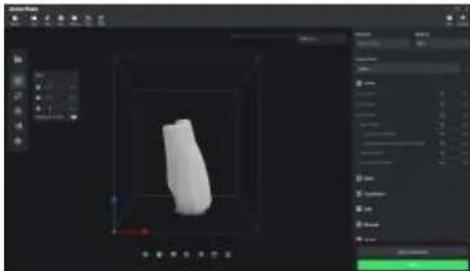
For the best printing experience, download and install AnkerMake Slicer to your computer from ankermake.com/software.
The AI recognition capabilities will be not available when the printer works with other 3D slicer software, such as Cura and Simplify3D.
EN 020019
SAFETY
The power cord shall be connected to socket-outlet with earthing connection.
The power supply should be installed near the equipment and the socket-outlet must be easily accessible.
Only use the power cord provided by the manufacturer. Using unauthorized power cords may cause danger and violate the authorization of the product as well as the guarantee.
-
Plug of the power cord is considered as the disconnect device. Once unplugged, the product is considered to be disconnected from the power source.
-
Do not use the device in an environment where the temperature is too high or too low. Never expose the device to strong sunshine or wet environments.
The suitable temperature range for the product and its accessories is 15 - 35^
-
It is recommended to supply the device in an environment with a temperature that ranges from 15^ 25^ .
-
When supplying, place the device in an environment that has a normal room temperature and good ventilation.
-
This equipment is not suitable for use in locations where children are likely to be present. This equipment is not intended for use by c
-
Moving parts. Keep body parts away from moving parts.
CAUTION Hot parts. Do not touch.
Do not use the product in any way other than described herein in order to avoid personal injury or property damage.
- User should comply with the laws and regulations of the corresponding countries and regions where the equipment is located (used), abide by professional ethics, pay attention to safety obligations, and strictly prohibit the use of our products or equipment for any illegal purposes. Our company will not be responsible for any violators' legal liability under any circumstances.
EN
NOTICE
Notice (United States Of America)
FCC Statement
This device complies with Part 15 of the FCC Rules. Operation is subject to the following two conditions: (1) this device may not cause harmful Interference, and (2) this device must accept any Interference received, including interference that may cause undesired operation.
Warning: Changes or modifications not expressly approved by the party responsible for compliance could void the user's authority to operate the equipment.
Note: This equipment has been tested and found to comply with the limits for a Class B digital device, pursuant to Part 15 of the FCC Rules. These limits are designed to provide reasonable protection against harmful interference in a residential installation.
This equipment generates uses and can radiate radio frequency energy and, if not installed and used in accordance with the instructions, may cause harmful interference to radio communications. However, there is no guarantee that interference will not occur in a particular installation. If this equipment does cause harmful interference to radio or television reception, which can be determined by turning the equipment off and on, the user is encouraged to try to correct the interference by one or more of the following measures: (1) Reorient or relocate the receiving antenna. (2) Increase the separation between the equipment and receiver. (3) Connect the equipment into an outlet on a circuit different from that to which the receiver is connected. (4) Consult the dealer or an experienced radio/TV technician for help.
FCC Radio Frequency Exposure Statement
The device has been evaluated to meet general RF exposure requirements. The device can be used in fixed/mobile exposure condition. The min separation distance is 20cm.
Notice:Shielded cables
All connections to other computing devices must be made using shielded cables to maintain compliance with FCC regulations.
EN 022021
Notice (Canada)
This device complies with Industry Canada licence-exempt RSS standard(s). Operation is subject to the following two conditions:
(1) this device may not cause interference, and
(2) this device must accept any interference, including interference that may cause undesired operation of the device.
This Class B digital apparatus complies with Canadian ICES-003.
When using the product, maintain a distance of 20cm from the body to ensure compliance with RF exposure requirements.
The following importer is the responsible party
Company Name: Fantasia Trading LLC
Address: 5350 Ontario Mills Pkwy, Suite 100, Ontario, CA 91764
Telephone:1-800-988-7973
Notice (Europe and United Kingdom)
This product complies with the radio interference requirements of the European Community.
Declaration of Conformity
Hereby, Anker Innovations Limited declares that this device is in compliance with the essential requirements and other relevant provisions of Directive 2014/53/EU. For the declaration of conformity, visit the Web site: https://fankermoke.com.
This product complies with the radio Interference requirements of the United Kingdom.
Declaration of Conformity
Herby, Anker Innovations Limited declares that this device is in compliance with Radio Equipment Regulations 2017(SI 2017/1206). The full text of the UK declaration of conformity is available at the following internet address: https://ankermake.com.
RF exposure information:
The Maximum Permissible Exposure (MPE) level has been calculated based on a distance of d = 20cm between the device and the human body. To maintain compliance with RF exposure requirement, use product that maintain a 20cm distance between the device and human body.
EN 024023
Frequency bands and power are as below.
| Function Bands Operation Frequency Max Power | ||
| Wi-Fi 2.4GHz 2412-2472MHz EIRP 19.10 dBm | ||
| Bluetooth 2.4GHz 2402-2480 MHz EIRP 8.0 dBm | ||
The following importer is the responsible party (contract for EU matters): Anker innovations Deutschland GmbH | Georg-Muche-Straße 3, 80807 Munich, Germany
The following Importer is the responsible party (contract for UK matters). Anker Technology UK) Limited 1 GNR8,49 Clarendon Road, Watford, Hertfordshire, WD17 IHP, United Kingdom

Your product is designed and manufactured with high quality materials and components, which can be recycled and reused.

This symbol means the product must not be discarded as household waste, and should be delivered to an appropriate collection facility for recycling. Proper disposal and recycling helps protect natural resources, human health and the environment. For more information on disposal and recycling of this product, contact your local municipality, disposal service, or the shop where you bought this product.
Trademarks
Bluetooth
The Bluetooth® word mark and logos are registered trademarks owned by the Bluetooth SIG, Inc. and any use of such marks by Anker Innovations Limited is under license. Other trademarks and trade names are those of their respective owners.
EN
AUF EINEN BLICK
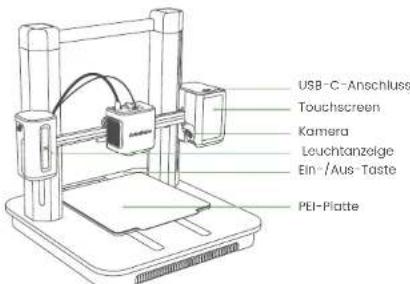
Anker Technology UK) Limited 1GNR8,49 Clarendon Road, Watford, Hertfordshire, WD17 1HP, United Kingdom
#
Ankor Technology (UK) Limited 1 GNR8, 49 Clarendon Road, Watford, Hertfordshire. WD17 1HP, United Kingdom

Anker Technology (UK) Limited I GNR8, 49 Clarendon Road, Walford, Hertfordshire, WD7 1HP, United Kingdom

Anker Technology UK) Limited GNR8,49 Clorendon Road, Watford, Hertfordshire, W017 IHP, United Kingdom

DE WARMTEPLAAT RECHTZETTEN
Anker Technology (UK) Limited 1GNR8, 49 Clarendon Road, Walford, Hertfordshire, WD17 1P, United Kingdom

jz jz jz jz jz jz jz jz jz jz jz jz jz jz jz jz jz jz jz jz jz jz jz jz jz jz jz jz jz jz
AR 210209
aiee aie eae aee ae aee aee aee aee
aaiy gao yu lai aaiy jia yu waiy jiu jiu jiu jiu 4
AR
AR 21221
AR 214213
aaiai 1
a4 = 12,a5 = 13,a_6 = 14
duduul 1
USB-C 2
AR
aaiil g s jia 3
AR 218217
3.5
y
aBbIyJySgill.4s
1
M4
1j2
2
AR 220219
pIiI 15c
Jn Jnall Jaa,AnkerMake 1j.1


Wi-Fi 45,46,47,48,49,50,51,52,53,54,55,56,57,58,59,60,61,62,63,64,65,66,67,68,69,70,71,72,73,74,75,76,77,78,79,80
AR
cbwllgss
AR 222221
J 3
X
45 1
AR
AR 224223
Control>Extrude 4
AR
ANKERMAKE SLICER
a a a a a a a a a a a a a a a a a a a a a a a a a a a a a a a a a a a a a a a a a a a
ssl sicer y e aal laoe gilauo 5i jy jd j
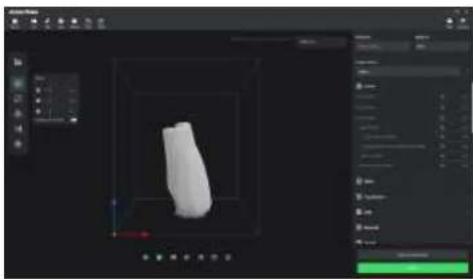
AR 226225

- jaii dai jia jia i jia jia jia jia jia jia jia jia jia jia jia jia jia jia jia jia jia jia jia jia jia jia jia jia jia jia jia jia jia jia jia jia jia jia jia jia jia jia jia
3515 2
2515 1

()
y
1


y
y 1
()
.
AR
AR 228227

12-month limited warranty | 12 Monate
eingeschänkte Garantie | Garantia limitada de
12 meses | Garantie limitée de 12 mois | 12 mesi
di garanzia limitata | 12 meses de garantia
limitada | 通常保証 12 |段の状態を確認 |
12
Lifetime technical support | Technischer Support für die Produktlebensdauer | Asistencia Tecnica de por vida | Assistance technique à vie | Supporto的技术ico per l'intero ciclo di vita | Suporte Tecnico ao longo da vida util do produits | ナールサト一丨 | ملايرفَبُسِيَلْ وَعَنَمِي | مessorسَبُسِيَلْ

www.ankermake.com

support@ankermake.com
support.mea@anker.com (Middle East & Africa)
CED-CN@anker.com(中国)
support@anker.com(日本)


(US) + 1 (800)221-0126 Mon-Fri 6:15AM-5:00PM(PT) (UK) + 44(0)1604936200 Mon-Sat 6:00-19:00 Sun 6:00-14:00 (DE) + 49(0)6995797960 Mo-Fr 8:00-16:00 (Middle East \& Africa) + 97142428633 Mon-Thu 9:00-17:30 Fri 8:00-12:00 (UAE) + 9718000320817 Mon-Thu 9:00-17:30 Fri 8:00-12:00 (kSA) + 9668008500030 Mon-Thu 8:00-16:30 Fri 7:00-11:00 (Kuwait) + 96522069086 Mon-Thu 8:00-16:30 Fri 7:00-11:00 (Egypt) + 208000000826 Mon-Thu 7:00-15:30 Fri 6:00-10:00 (AU) + 61383314800 Mon-Fri 8:30-17:00(AEST) (TR) + 90(850)4601414 Mon-Fri 9:00-18:00 (RU) + 8(800)511 - 86 - 23 Mon-Fri 9:00-18:00(MSK)
(中国) +86400 0550036周一至周五9:00-18:00
(日本) ^*O344557823 平日9:00-17:00/年末年始左除<
(韩国) +82.02 - 1670 - 7098 - - - 10:00 - 17:00 Anker Innovations Limited Room 1318-19, Hollywood Plaza, 61O Nathan
Road,Mongkok,Kowloon,Hong Kong