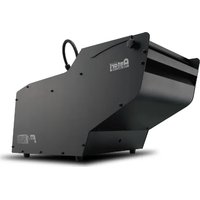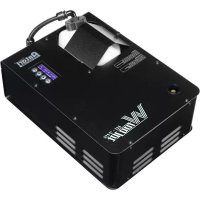
W715 - Effect machine Antari - Free user manual and instructions
Find the device manual for free W715 Antari in PDF.


User questions about W715 Antari
0 question about this device. Answer the ones you know or ask your own.
Ask a new question about this device
Download the instructions for your Effect machine in PDF format for free! Find your manual W715 - Antari and take your electronic device back in hand. On this page are published all the documents necessary for the use of your device. W715 by Antari.
USER MANUAL W715 Antari
natural_image
Black Antari W-715 Rogger industrial device with control panel and display (no readable text or symbols beyond branding)



English Français Deutsch
中文
Safety Information

Please read the following safety information carefully before operating the machine. Information includes important safety information about installation, usage, and maintenance. Pay attention to all warning labels and instructions in this manual and printed on the machine.
If you have questions about how to operate the machine safely, please contact your local Antari dealer for help.
- Keep this device dry.
● Always connect to a grounded circuit to avoid risk of electrocution. - Before connecting the machine to power, always check the voltage indicated on the machine matches to your local AC voltage. Do not use the machine if the AC power voltage does not match.
- Disconnect the machine from AC power before servicing and when not in use.
- This product is for indoor use only! Do not expose to rain or moisture. If fluid is spilled, disconnect AC power and clean with a damp cloth. If fluid is spilled onto electronic parts, immediately unplug the machine and contact your local Antari dealer for advice.
- No user serviceable and modifiable parts inside. Never try to repair this product, an unauthorized technician may cause damage or malfunction.
- For adult use only. Never leave the machine running unattended.
- Position the machine in a well-ventilated area. Please leave about 50 cm of space around the machine.
● Never add flammable liquid of any kind to the machine.
● Make sure there are no flammable materials close to the machine while operating.
- Only use Antari fluid. Other fluid may lead to a heater clog and malfunction.
- If the machine fails to work, unplug the machine and stop operation immediately. Contact your local Antari dealer for assistance.
● Before transporting the machine, make sure the fluid tank is completely drained.
- Fog fluid may present health risks if swallowed. Do not drink fog fluid. Store it securely. In case of eye contact or if fluid is swallowed immediately look for medical advice.
Unpacking and Inspection
Immediately upon receiving the machine, carefully unpack the carton, check all content to ensure that all parts are present and have been received in good condition. If any parts appear damaged or mishandled from shipping, notify the shipper immediately and retain the packing material for inspection.
What is included: 1 x W-715 Fogger
1 x Power Cord
1 x User Manual
1 x W-1 Wireless Transmitter (excluded in W-715X)
Product Overview
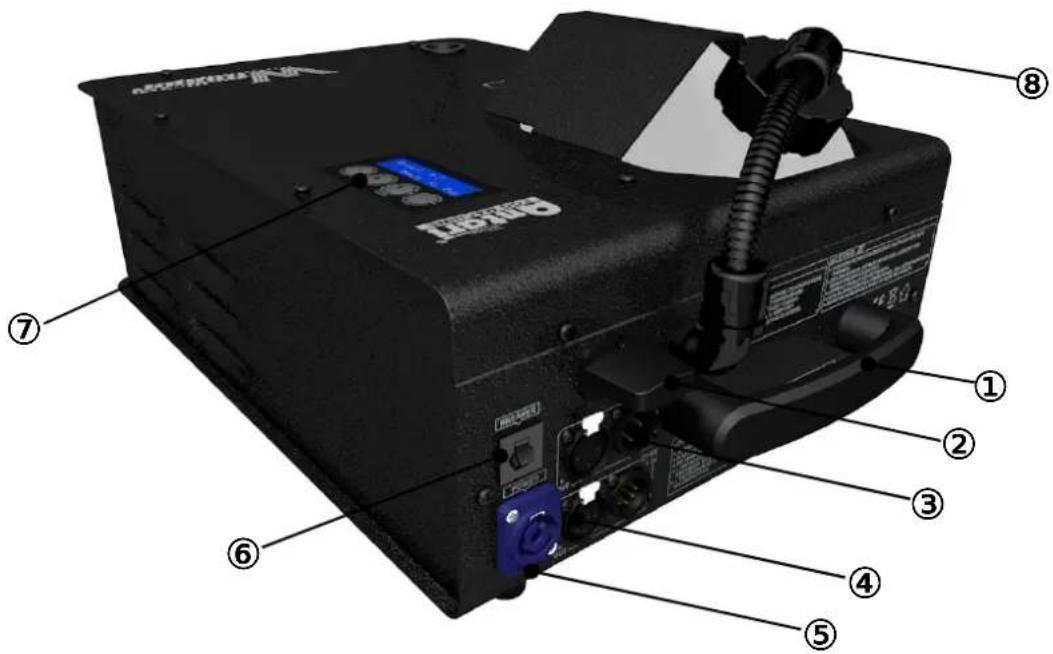
(1) Handle (5) Power Input
(2) Wireless Receiver (6) Breaker
(3) DMX 3-Pin (7) LCD Control Panel
(4) DMX 5-Pin (8) Tank Cap (Group)
Setting Up
Step 1: Place the machine on a flat surface and in a suitably large area with at least 50 cm of open space at each side of the machine and 5 meters for the output direction of the machine.
Step 2: Fill the fluid tank with Antari FLC fog fluid.
Step 3: Connect the machine to suitably rated power supply. To determine the power requirement for the machine refer to the label on the back of the machine.

Always connect the machine to a protected circuit and ensure it is properly grounded to avoid risk of electrocution.
Step 4: Turn on the machine by connecting the power cord and turning the Neutrik Powercon. Heat-up takes approximately 9 minutes. Once the machine has reached operating temperature, the LCD screen will display “Ready To Fog”. Now the machine is ready for operation.
Step 5: To turn off the machine, turn the Neutrik Powercon again.
Language Setting
To switch the language used for the control interface, press the [Menu] button BEFORE turning on the machine and HOLD it until the LCD screen flashes twice. After the two flashes, press [Menu] to choose the language: English and 中文 (Chinese).
Operation
Control Panel
The machine can be operated with the LCD control panel located on top of the fogger.
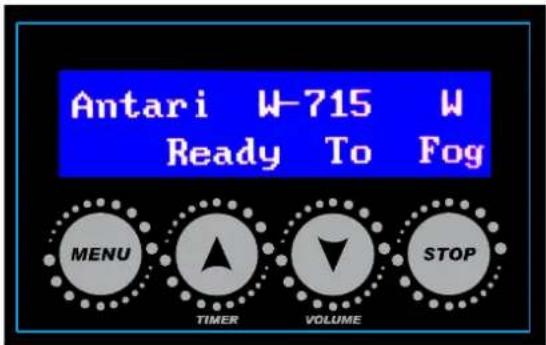
Button Function
| [Menu] Select from functions | |
| [▲/Timer] | To increase value or choose from options |
| To activate Timer Mode | |
| [▼/Volume] | To decrease value or choose from options |
| To active Volume Mode | |
| To emit fog under 2-Second Jet Mode | |
[Stop] To stop output or go back to main screen
| Functions Value Description | ||
| Interval Set 10-300 Seconds | Interval time under Timer Mode | |
| Duration Set 2-15 Seconds | Duration time under Timer Mode | |
| Timer Output 50-100% | Output volume under Timer Mode | |
| Volume Output 50-100% | Output volume under Volume Mode | |
| 2-Second Jet Mode On/Off | Activate or deactivate 2-Second Jet Mode | |
| DMX512 Address 1-512 Setting the DMX address | ||
| Wireless Control Mode On/Off Activate or deactivate Wireless Control Mode | ||
| Quick Start Mode On/Off Activate or deactivate Quick Start Mode | ||
Timer Operation
To operate the machine in Timer Mode, interval, duration time and output volume under Timer Mode must be set first:
Interval Time Setup - Press the [Menu] button until the LCD screen displays “Interval Set” and then press the ▲ or ▼ button to set the interval time from 10-300 seconds.
Duration Time Setup - Press the [Menu] button until the LCD screen displays “Duration Set” and press the ▲ or ▼ button to set the duration time from 2-15 seconds.
Output Volume Setup - Press [Menu] until the LCD screen displays “Timer Output” and press the ▲ or ▼ button to set the output percentage from 50-100%.
After finishing the above setting, go back to the main screen by pressing the [Stop] button.
To activate Timer Mode, press the [Timer] button below the display. To deactivate Timer Mode, press [Stop] button.
Volume Operation
To operate the machine in Volume Mode, the output volume under Volume Mode must be set first:
Output Volume Setup - Press the [Menu] button until the LCD screen displays “Volume Output” and then press the ▲ or ▼ button to set the output percentage from 50-100%.
After finishing the above setting, go back to the main screen by pressing the [Stop] button.
To activate Volume Mode, press the [Volume] below the display. To deactivate Volume Mode, press the [Stop] button.
Note: In Volume Mode, the machine emits fog continuously until a re-heat is needed.
2-Second Jet Operation
To activate 2-Second Jet Mode, press the [Menu] button until the LCD screen displays "2-Second Jet Output" and then press the ▲ or ▼ button to activate or deactivate
2-Second Jet Mode. Once the 2-Second Jet Mode is activated, the main screen will keep showing “2-Sec Jet Mode”. Press the [Volume] button and the fog will be emitted for 2 seconds with maximum output (100%).
DMX Operation
Making the DMX Connection – Connect machine to a DMX controller or to one of the machines in the DMX chain. The machine uses an 3-pin and 5-pin XLR connector for DMX
connection, the connector is located on the rear of the machine.
Address Setup – Press [Menu] until the LCD screen displays “DMX512 Add:” and then press the ▲ or ▼ button to set the DMX address from 1-512. The machine occupies 1 control channel. The starting address is defined as the first channel from which the machine will respond to the controller. Always double check to make sure there are no overlapping channels in order to control the machine correctly.
DMX Channel Function
| Channel | DMX Value Range Function | |
| 1 | 0 – 5 Fog Off | |
| 6 – 255 | Fog Output 50 – 100% | |
| Fog Output 100% for 2 seconds(under 2-Second Jet Mode) | ||
DMX Connector Pin Assignment
The machine provides 3- and 5-pin XLR connector for DMX connection. The diagram below indicates pin assignment information.
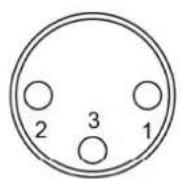
3 Pin XLR
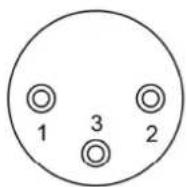
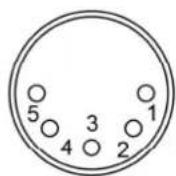
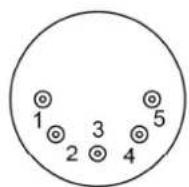
5 Pin XLR
| Pin Function | |
| 1 Ground | |
| 2 Data- | |
| 3 Data+ | |
| 4 N/A | |
| 5 N/A | |
Wireless Remote Control Operation (Not applicable for W-715X)
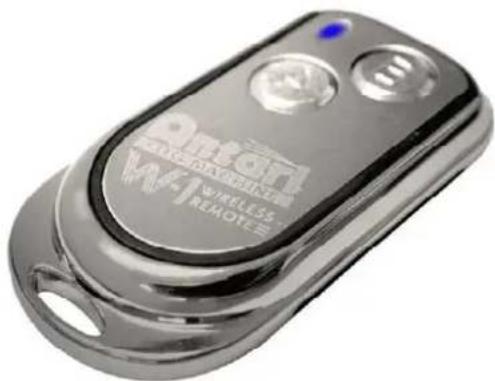
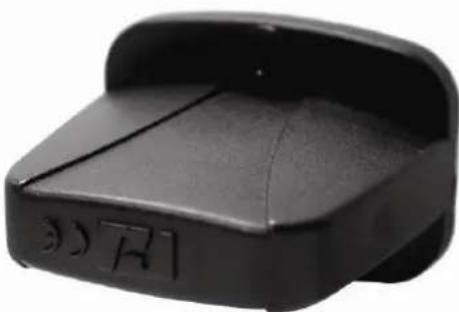
The wireless remote control system consists of a transmitter equipped with two buttons for on and off functions and a receiver pre-attached to the rear of the machine.
\*Transmitter
natural_image
Close-up of a metallic wireless remote control device with no visible text or symbols on the body.With the transmitter it is possible to emit fog via radio signal at maximum distance of 50 meters. Press the button “A” or “B”, to emit fog.
\*Receiver
natural_image
Black plastic object with a curved top and rectangular base, no visible text or symbols.The receiver is tested and pre-attached to the rear of the machine. The included transmitter has been registered to the machine before shipping.
To activate or deactivate the wireless remote control function, press [Menu] until the LCD displays “Wireless”. Then press the ▲ or ▼ button to activate or deactivate the wireless remote control function. When the wireless remote control function is activated, the LCD screen will display “Wireless Detect …” for 15 seconds. During this time, wireless transmitter(s) must be registered by pressing either button A or B on the transmitter(s). The button used (A or B) for registration will be the button for fog emission in wireless remote
control mode.
Notes:
- Once the wireless remote control function is activated, the letter “W” will be displayed on the LCD screen.
- Once the wireless remote control function is activated, the LCD screen will display "Wireless Detect …" each time the machine is turned on; this allows new registration. Every new registration overwrites the previous memory.
- One machine can be controlled by up to 5 transmitters while one transmitter can be registered to an unlimited number of machines.
- Battery used in transmitter: type A27S 12V.
- In 2-Second Jet Mode, pressing the button (A or B) on the transmitter will emit fog for 2 seconds with maximum output (100%).
Power Saving
- Keep pressing the [Stop] button for 3 seconds; the LCD screen will display a countdown of 60 seconds. After the countdown, the machine will go into sleep mode. To wake up the machine again, press any button.
- When the machine is idle for 15 seconds, the backlight of the LCD screen becomes dim. To light up again the LCD screen, press any button.
- When DMX connector is disconnected from the machine, the machine will go into sleep mode, and when the DMX connector is re-connected to the machine again, the machine will be woken up.
Fluid
Only use Antari FLC water-based fluid for the W-715 Fogger. The machine is tested and calibrated with this fluid to achieve the best output performance. Warranty will be voided if any other type of liquid is used, improper use of liquid may lead to machine failure and malfunction.
Service and Maintenance
- Do not allow the machine to become contaminated.
-
Remove dust from air vents with air compressor, vacuum or a soft brush.
-
Only use a damp cloth to clean the casing.
- Before storing run distilled water through the system to help avoid condensing the pump or heater.
- It is recommended to run the machine on a monthly basis in order to achieve best performance and output condition.
- Excessive dust, liquid and dirt built up will degrade performance and cause overheating.
Technical Specifications
| - Input voltage | US model : AC 100-120V, 50 / 60Hz 13.6A |
| EU model : AC 220-240V, 50 / 60Hz 6.8A | |
| - Rated power | 1600W |
| - Warm-up time | 7.5 minutes (approx.) |
| - Fluid consumption | 300 ml/min |
| - Fluid tank capacity | 2.4l (0.63gal) |
| - Compatible fluid | Antari FLC Super Light Fog Fluid |
| - Ambient temp. range | 0 °C - 40 °C (32 °F-104 °F) |
| - Output | 8 meters height |
| - Control | DMX512, Timer, Manual, Wireless |
| - DMX channels | 1 channel |
| - Connection | Neutrik Powercon (Power) |
| - Optional accessories | XLR 3-pin and 5-pin (DMX) |
| FX-4 Flightcase | |
| - Dimension | L448 W295 H210 mm |
| (L17.64 W11.61 H8.27 inch) | |
| - Weight | 15.5 kg (34.17 lbs) |
Notices de Sécurité

natural_image
Close-up of a metallic W4-1 Wireless Remote remote control device (no visible text or symbols on body)natural_image
Black plastic object with a curved top and side slot, no visible text or symbols( 1 ) Griff
(5) Netzanschluss
(2) Funkempfänger
(6) Sicherung
(3) DMX 3-polig
(7) Bedienfeld
(4) DMX 5-polig
natural_image
Close-up of a metallic remote control device with visible branding and ports (no readable text or symbols beyond branding)natural_image
Black plastic object with a curved top and rectangular base, no visible text or symbols(1) 把手
(5) 電源插座
(2) 無線接收器
(6) 複歸式電源斷路器
(3) 3-Pin DMX連接座
(7) LCD控制面板
(4) 5-Pin DMX連接座
(8) 油桶蓋 (一組)
設定安裝
natural_image
Close-up of a metallic remote control device with visible branding and buttons (no readable text or symbols beyond branding)*接收器