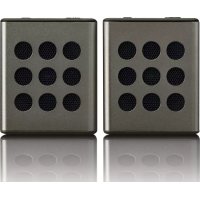
BTP200 - Speaker LENCO - Free user manual and instructions
Find the device manual for free BTP200 LENCO in PDF.



| Product type | Bluetooth stereo speaker |
| Brand | Lenco |
| Model | BTP200 |
| Dimensions (W x H x D) | 58.3 mm x 71 mm x 34.3 mm |
| Weight per unit | 112.5 g approx. |
| Built-in battery | Lithium 3.7 V, 600 mAh |
| Playback battery life | 5 to 6 hours (volume at 75-80%) |
| Power supply | Micro USB port (5 V DC, 500 mA) |
| Bluetooth version | V2.1 + EDR |
| Supported Bluetooth profiles | A2DP, AVRCP, HSP |
| Bluetooth range | 10 meters (open area) |
| Output power | 2.5 W (RMS) x 2 (under 3 Ω) |
| Frequency response | 80 Hz to 20,000 Hz |
| Auxiliary input | 3.5 mm stereo jack (600-800 mV RMS, 10 kΩ) |
| Hands-free function | Yes (built-in microphone) |
| Stereo mode (two speakers) | Yes (wireless stereo pairing) |
| Operating temperature | 0 °C to 40 °C |
| Care and cleaning | Clean with a dry, soft cloth. Do not use liquids. |
| Safety | Do not open, do not expose to heat, moisture or open flames. |
| Spare parts and repairability | Internal battery is not user-replaceable. Contact a professional. |
| General information | Warranty in accordance with European legislation. After-sales service: www.lenco.com |
Frequently Asked Questions - BTP200 LENCO
User questions about BTP200 LENCO
0 question about this device. Answer the ones you know or ask your own.
Ask a new question about this device
Download the instructions for your Speaker in PDF format for free! Find your manual BTP200 - LENCO and take your electronic device back in hand. On this page are published all the documents necessary for the use of your device. BTP200 by LENCO.
USER MANUAL BTP200 LENCO
natural_image
Close-up of a metallic square electronic component with nine circular indentations arranged in a 3x3 grid (no text or symbols visible)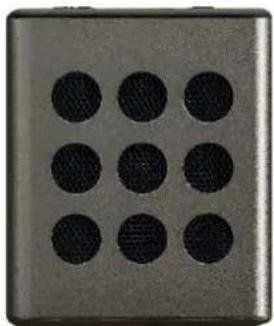
natural_image
Close-up of a metallic square button with nine circular indentations arranged in a 3x3 grid (no text or symbols visible)
natural_image
Close-up of a metallic tray with six circular indentations arranged in rows (no text or symbols visible)
natural_image
Close-up of a metallic tray with six circular indentations arranged in rows (no text or symbols visible)USER MANUAL Pair of Bluetooth stereo speakers
HANDLEIDING Bluetooth stereo luidsprekerset
BENUTZERHANDBUCH Bluetooth-Stereolautsprecher-Set
- Do not place naked ames, such as lighted candles on or near the product.
- Do not place objects lled with liquids, such as vases on or near the product.
- Do not use or store this product in a place where it is subject to direct sunlight, heat, excessive dust or vibraon.
- Do not keep or store this product in wet conditions for long period.
- Do not clean this product with water or other liquids.
- Do not block or cover the slots and holes in the product.
- Do not push foreign objects into the slots or holes in the product.
- Do not attempt to open this product yourself. There are no user serviceable parts inside.
- Do not allow children access to plasc bags.
Safety Instrucons
Before using this product, read and follow all warnings and instrucons.
- This product is not intended for use by young children. Young children should be properly supervised.
- This product is intended for household use only and not for commercial or industrial use.
- Do not expose to dripping or splashing.
- No naked ame sources, such as lighted candles, should be placed on the product.
- Venlaon should not be impeded by covering venlaon openings with items such as newspapers, table cloths, curtains and the like.
- Make sure the unit is adjusted to a stable posion. Damage caused by using this product in an unstable posion or by failure to follow any other warning or precauon contained within this user manual will not be covered by warranty.

Warning
- Never remove the casing of this apparatus.
- Never place this apparatus on the other electrical equipment.
Noce
- If at any me in the future you should need to dispose of this product please note that: All batteries and accumulators need to be removed from this product (Removal of Waste Baeries and Accumulators).
- Always bring your product to a professional to remove the built-in baery.
B. Outlook and Controls
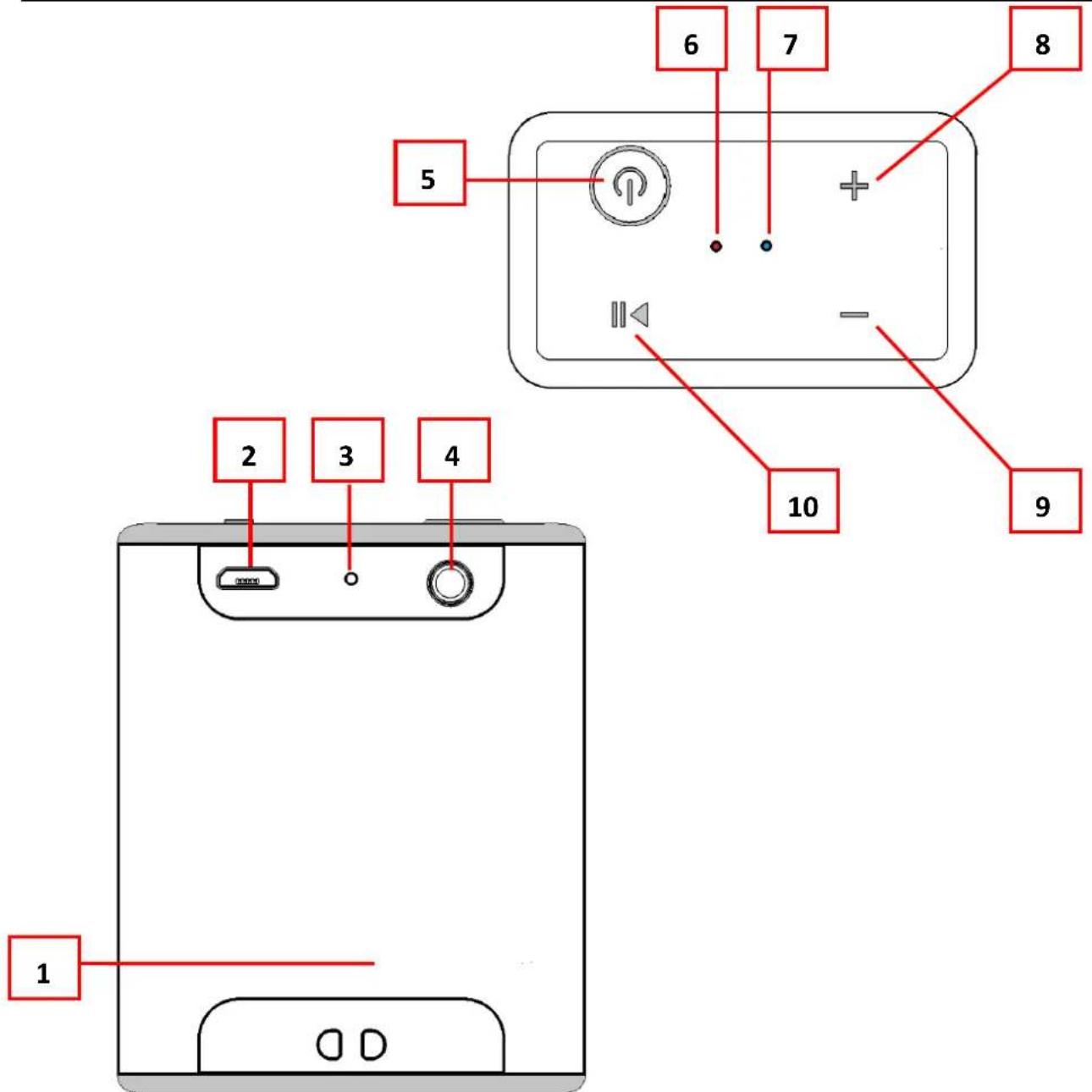
| No. | Control |
| 1 | Lanyard Hole |
| 2 | Micro USB socket (DC Input) |
| 3 | MIC Hole (For Hand-Free) |
| 4 | AUX IN Jack (3.5mm Stereo) |
| 5 | ○ Buon (power ON/OFF) |
| 6 | Charge LED Indicator (Red) |
| 7 | Bluetooth LED Indicator (Blue, for Bluetooth/AUX) |
| 8 | + Buon |
| 9 | - Buon |
| 10 | ▶ Buon |
C. About the rechargeable Battery & Charging
This Bluetooth Speaker has an internal, non-user-replaceable baery. For best results, the rst me you use this Bluetooth Speaker, let it charge for about 2 \~ 3 hours or unl the “Charge LED (6)” light to o from On which show you the baery is fully charged.
For maintain the baery life and performance, if speaker isn't used for a while, the baery might need to be recharged. Charge the baery at least once every month.
To recharge the built-in baery:
- Connect the Bluetooth Speaker's “Micro USB socket (2)” with the Computer’s USB port through USB cable.
● The “Charge LED (6)” light will turn On in red, the battery is in charging. - The “Charge LED (6)” light will turn Off when the rechargeable battery is fully charged.
- Disconnect the USB cable when it is done.
D. Power ON and Pairing
- Press and hold “(2)” button to turn On the device, a series of tones will sound and the “Bluetooth LED (7)” will light and then fast blinking blue in seconds.
- Then acvate the Bluetooth funcon in your mobile device (such as Mobile Phone or Personal Computer), the device will enter to Bluetooth searching mode automacally, if not, tap the relate selecon to manually enter to searching mode. (refer to your device's manual when necessary)
- Your mobile device should show "Lenco BTP200" in list, and then select it for pairing. Waing for some seconds and you will see connected message as shown on your mobile device. (For some Bluetooth devices, you may need to input "0000" as pairing password)
- If pairing is successful, a series of tones will sound and the “Bluetooth LED (7)” light will switch to slow blinking from fast.
- Now, you can start to music play from the mobile device by it music player program.
- Press and hold “(2)” button to turn O the device when it is not in use.
Note: for saving baery energy, the Bluetooth Speaker will turn to o mode automacally when no device is in paired in 8 minutes. Turn On the device by press and hold “(2)” buon to turn On the device if you want.
E. Disconnect from paired device
-
To disconnect with paired device, for beer result turn Off the Bluetooth Speaker directly.
-
Or, you can choose "Disconnect" from Bluetooth paired device list on your mobile device.
- In this case; the Bluetooth Speaker will turn back into "Searching/Pairing" mode in seconds, a series of tones will sound and the "Bluetooth LED (7)" light will turn back to fast blinking from slow in blue.
- Now, you can process for new mobile device pair or power O the Bluetooth Speaker as you wanted.
F. Auto re-connect with paired device and New pairing
- Every me you turn On the Bluetooth speaker power; it will rstly searching for the mobile device, which has been paired previously and sll in record. The Bluetooth Speaker will re-connect this mobile device as priority if it is in Bluetooth searching device mode.
- If not found in some seconds, the Bluetooth Speaker then is turn into new pairing mode internally.
- Now you can process for new mobile device pair. (refer to item D.2\~D.5 methods)
G. Switch to new pairing from connected mode
- In Bluetooth connected mode, you can switch the Bluetooth Speaker into Bluetooth searching mode for paring with the new device at any me you desired;
- Press and hold the “▶” (10)” buon unl a series of tones sound and the “Bluetooth LED (7)” will turn back to fast blinking light.
- Now you can process for new mobile device pair. (refer to item D.2\~D.5 methods)
H. Bluetooth Music Playing Control Funcon
- In playing music, press “▶” (10)” buon to pause the playing music. To resume press it again.
- Press and hold the “+ (9)” buon to increase the volume level.
- Press and hold the “— (8)” button to decreases the volume level.
- When maximum or minimum volume is reached, a series of tones will sound.
- Press once the “+ (9)” buon to go to next music.
- Press once the “— (8)” button to go to previous music.
I. Hand Free Funcon
- When there is an incoming call during Bluetooth music playing mode;
- The ringing sound will up and the playing music will pause automacally.
-
Press "▶" (10)" buon to pick up the call if you want.
-
Now you have hand free funcon with the Bluetooth speaker.
- Press “▶” (10)” buon again to hang up the call when nished. And,
- The paused music will start to play automacally.
- Press and hold “▶” (10)” buon for 3 seconds to ignore the incoming call.
Tip: speak to the "MIC (3)" hole direct with distance in 30 \~ 60cm to get the best speakerphone performance when necessary.
Noce: The calling funcon is on main unit only when two speakers are connected together.
J. Redial For Last Call Funcon
- To redial for last called number by the Bluetooth Speaker, even it is in music playing mode.
- Press twice the “▶” (10)” buon to enter into redial funcon, the playing will pause and switch to hand free funcon for redial.
- Press the "▶" (10)" buon again to hang up the redial call.
- Make sure that your mobile phone has last dial call used, if not, the redial for last call funcon cannot be acvated.
K. AUX IN Funcon
- In power ON mode, connect the Bluetooth Speaker's "AUX IN Jack (4)" with an external device's "Earphone/AUX/LINE" Output through the Audio cable (Supplied).
- In Bluetooth connecng two speakers with music playing mode, when you insert AUX in into the main unit, both units will be disconnected from Bluetooth. When you insert AUX in into the slave unit, the main unit is sll working. When you disconnect the Aux in, you need to reconnect these two units again.
- The Bluetooth Speaker will switch to "AUX In" mode automacally from Bluetooth mode, and the "Bluetooth LED (7)" indicator will switch to long light from blinking.
- Now the “AUX In” Funcon is ready, start to music play from your external device by it control and or program, for example, Play, Stop, volume control...etc.
- You also can use Bluetooth Speaker control;
- Press and hold the “+ (9)”buon to increases the volume level.
- Press and hold the “— (8)” button to decreases the volume level.
- When maximum or minimum volume is reached, a series of tones will sound.
- Disconnect the Audio cable when it is done.
L. Low Power Reminder And Auto Sleep
- The Bluetooth Speaker will send tones sound from speaker by every some minute. When you heard this reminder, please connect the device to the USB power for charging, if you sell want to use the device.
- If not, the Bluetooth Speaker will power Off automacally when the baery is keeping low energy level in some minutes.
- In this case, the device cannot be turned On, until you recharging the baery at least 10 \~ 15 minutes, because the rechargeable baery has not enough energy.
- Press and hold “(2)” buon to turn On the device aer charged with enough energy if you want.
M. Connecng two speakers and a BLUETOOTH device for the Stereo pairing funcon
Acvate the stereo pairing funcon:
- Bring two speakers within 1 m of each other, and then turn on each unit.
- Press and hold the “▶” and +” buons at the same me unl tones are heard on one unit, the “Bluetooth LED (7)” will fast blinking and waiing for stereo pair conncon. (This unit will default as host and le channel device)
- And press and hold the “▶” and —” buons at the same unl tones are heard on the other unit, the “Bluetooth LED (7)” will fast blinking and searching for stereo pair host unit. (This unit will default as slave and right channel device)
- Two devices are under stereo pairing, a series of tones should sound from both devices in seconds;
- And, the right device's “Bluetooth LED (7)” should switch to slow blinking and this device could not found by the mobile device since it already paired with slave device of Bluetooth speaker.
- And, the Le device's "Bluetooth LED (7)" should switch to fast blinking for waing Bluetooth pairing with mobile device.
- Then acvate the Bluetooth funcon in your mobile device, open and enter to Bluetooth searching mode, the mobile device should show one of "Lenco BTP200" instead of two in list, choose it for start the stereo pairing funcon.
- This stereo pairing procedure is not required once stereo pairing funcon is acvated with both speakers; two speakers will stereo pairing automacally when each me you turn on them together. Besides, you can disable the stereo pairing funcon by using the following methods.
Disable the stereo paring funcon on two speakers:
- In speakers power on mode, short press the “◀” and ▶” buttons at
the same me one unit, tones are heard and stereo pair data are erased on this unit.
- And then, short press the “◀” and ▶” buttons at the same me on the other unit, tones are heard and stereo pair data are erased on this unit too.
- And now, two speakers can be found and pairing by the mobile device at the same me.
- Does the above menoned methods of stereo pairing funcon on two speakers if you want to acvate this funcon again.
- Acve again the stereo pairing funcons on two speakers at any me you want them to.
N. Reset the device
- In some circumstances the device's funcon may hanging and need to reset. To reset the Bluetooth speaker;
- To power reset the device, press the “+ (9) and — (8)” buon at the same me, the device is reset and turn to OFF, and then press and hold “(2)” buon to turn On and restart the device aer reset is done.
| O. Trouble Shoong | |
| No power | Check battery is it charged with enough energy.Check whether the device is in power OFF mode. |
| No sound | Check whether volume level is in lower posion on your speaker and mobile phone or PC/Mac.Make sure that your Bluetooth device is within the eecve operaon range.Check whether the Bluetooth device is paired.Check whether the Bluetooth device show connected.Check if you have selected the correct audio source. |
| No response from speaker | Restart the speaker by reset funcon. |
| P. Specicaon | ||
| Unit Dimension | 58.3 mm (L) x 71 mm (H) x 34.3 mm (D) | |
| Unit Weight | 112.5g (Approximate) per unit | |
| Bluetooth | Specicaon | V2.1 + EDR |
| Supported Prole | A2DP, AVRCP, HSP | |
| Connecon Distance | In 10 meters (open area) | |
| Built-In Baery | Lithium 3.7V, 600mAh | |
| Playing Time: 5 ~ 6 Hours (at 75 ~ 80% of volume seng) | ||
| Power Source Input | Micro USB Port | |
| PC's USB port Power or DC 5V, 500mA | ||
| Audio | Output Power | 2.5W (RMS) x 2 units (at 3 Ohm) |
| Frequency Responses | 80Hz to 20,000Hz | |
| I/O | Audio in link | 600~800mV RMS, 10K Ohm |
| Operang Temperature | 0 to 40°C | |
This product operates at 2400 - 2483.5 MHz and is designated only to be used inside a normal household environment. This product is suited for this purpose within all EU countries.
Q. Guarantee
Lenco oers service and warranty in accordance with the European law, which means that in case of repairs (both during and aer the warranty period) you should contact your local dealer.
Important note: It is not possible to send products that need repairs to Lenco directly.
Important note: If this unit is opened or accessed by a non-social service center in any way, the warranty expires.
This device is not suitable for professional use. In case of professional use, all warranty obligaons of the manufacturer will be voided.
R. Disclaimer
Updates to Firmware and/or hardware components are made regularly. Therefore some of the instrucon, specicaons and pictures in this documentaon may dier slightly from your parcular situaon. All items described in this guide for illustraon purposes only and may not apply to parcular situaon. No legal right or entlements may be obtained from the descripon made in this manual.
S. Disposal of the Old Device
natural_image
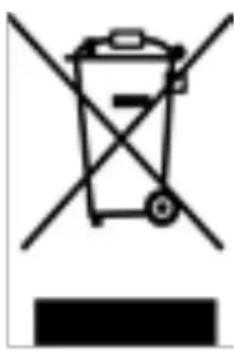
Symbol of a trash bin crossed with no visible text or labelsThis symbol indicates that the relevant electrical product or baery should not be disposed of as general household waste in Europe. To ensure the correct waste treatment of the product and baery, please dispose them in accordance to any applicable local laws of requirement for disposal of electrical equipment or baeries. In so doing, you will help to conserve natural resources and improve standards of environmental protecon in treatment and disposal of electrical waste (Waste Electrical and Electronic Equipment Directive).
T. CE Marking
CE
Products with the CE marking comply with the EMC Directive (2014/30/EU) and the Low Voltage Directive (2014/35/EU) issued by the Commission of the European Community.
Hereby, Lenco Benelux BV, Thermiekstraat 1a, 6361 HB Nuth, The Netherlands, declares that this product is in compliance with the essenal requirements and other relevant provisions of Direcve 1999/5/EC. The declaraon of conformity may be consulted via techdoc@lenco.com
U. Service
For more informaon and helpdesk support, please visit www.lenco.com Lenco Benelux BV, Thermiekstraat 1a, 6361 HB, The Netherlands.
A. Waarschuwing
Doe dit nooit
natural_image
Simple line drawing of a trash bin with crossed lines indicating no waste or discharge (no text or symbols)natural_image
Simple line drawing of a trash bin with crossed lines indicating no waste or discharge (no text or symbols)natural_image
Symbol of a trash bin crossed with no visible text or labelsnatural_image
Symbol of a trash bin crossed with no text or numbers, representing waste sorting or disposal (no text present)
- Safety Instrucons
- Warning
- Noce
- About the rechargeable Battery & Charging
- To recharge the built-in baery:
- Power ON and Pairing
- Disconnect from paired device
- Auto re-connect with paired device and New pairing
- Switch to new pairing from connected mode
- Bluetooth Music Playing Control Funcon
- Hand Free Funcon
- Redial For Last Call Funcon
- AUX IN Funcon
- Low Power Reminder And Auto Sleep
- Connecng two speakers and a BLUETOOTH device for the Stereo pairing funcon
- Acvate the stereo pairing funcon:
- Disable the stereo paring funcon on two speakers:
- Reset the device
- Guarantee
- Disclaimer
- Disposal of the Old Device
- CE Marking
- CE
- Service
- Waarschuwing
- Doe dit nooit
Brand : LENCO
Model : BTP200
Category : Speaker