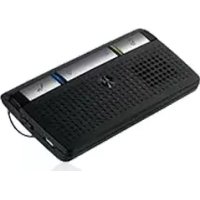
T215 - Built-in kit MOTOROLA - Free user manual and instructions
Find the device manual for free T215 MOTOROLA in PDF.



| Product Type | Bluetooth Car Kit |
| Brand | Motorola |
| Model | T215 |
| Bluetooth Version | 2.0 + EDR |
| Talk Time | Up to 36 hours |
| Standby Time | Up to 300 hours |
| Charging Time | Approximately 2 hours |
| Battery Type | Rechargeable internal lithium-ion |
| Weight | Approximately 30 g |
| Dimensions (L x W x H) | 100 x 40 x 20 mm |
| Color | Black |
| Mounting | Sun visor clip |
| Microphone | Built-in microphone |
| Speaker | Built-in speaker |
| Noise Reduction | Yes, echo and noise reduction technology |
| Voice Dialing | Yes, via dedicated key |
| Bluetooth Range | Up to 10 meters |
| LED Indicators | Battery and Bluetooth |
| Operating Temperature | -10 °C to 60 °C |
| Warranty | 1 year |
| Included Accessories | Charger, quick start guide |
| Maintenance | Clean with a soft, dry cloth. Do not use chemicals. |
| Safety | Do not expose to moisture, extreme temperatures, or shocks. |
Frequently Asked Questions - T215 MOTOROLA
User questions about T215 MOTOROLA
0 question about this device. Answer the ones you know or ask your own.
Ask a new question about this device
Download the instructions for your Built-in kit in PDF format for free! Find your manual T215 - MOTOROLA and take your electronic device back in hand. On this page are published all the documents necessary for the use of your device. T215 by MOTOROLA.
USER MANUAL T215 MOTOROLA
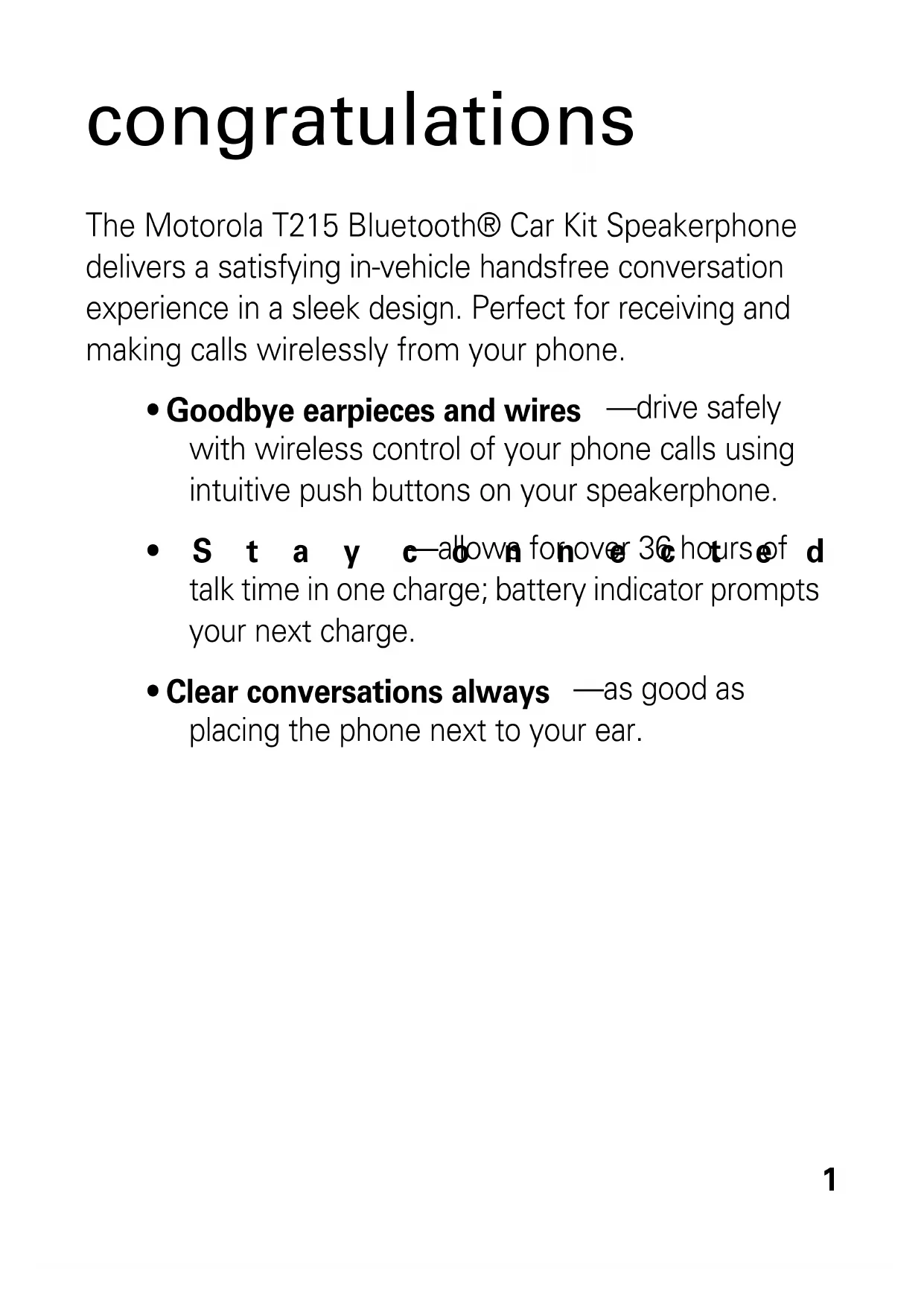
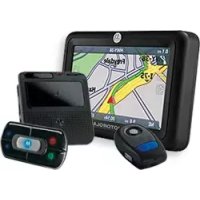
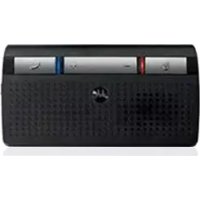
The Motorola T215 Bluetooth® Car Kit Speakerphone delivers a satisfying in-vehicle handsfree conversation experience in a sleek design. Perfect for receiving and making calls wirelessly from your phone.
- Goodbye earpieces and wires —drive safely with wireless control of your phone calls using intuitive push buttons on your speakerphone.
- S t a y c—abown fonover 36 hours of d talk time in one charge; battery indicator prompts your next charge.
- Clear conversations always —as good as placing the phone next to your ear.
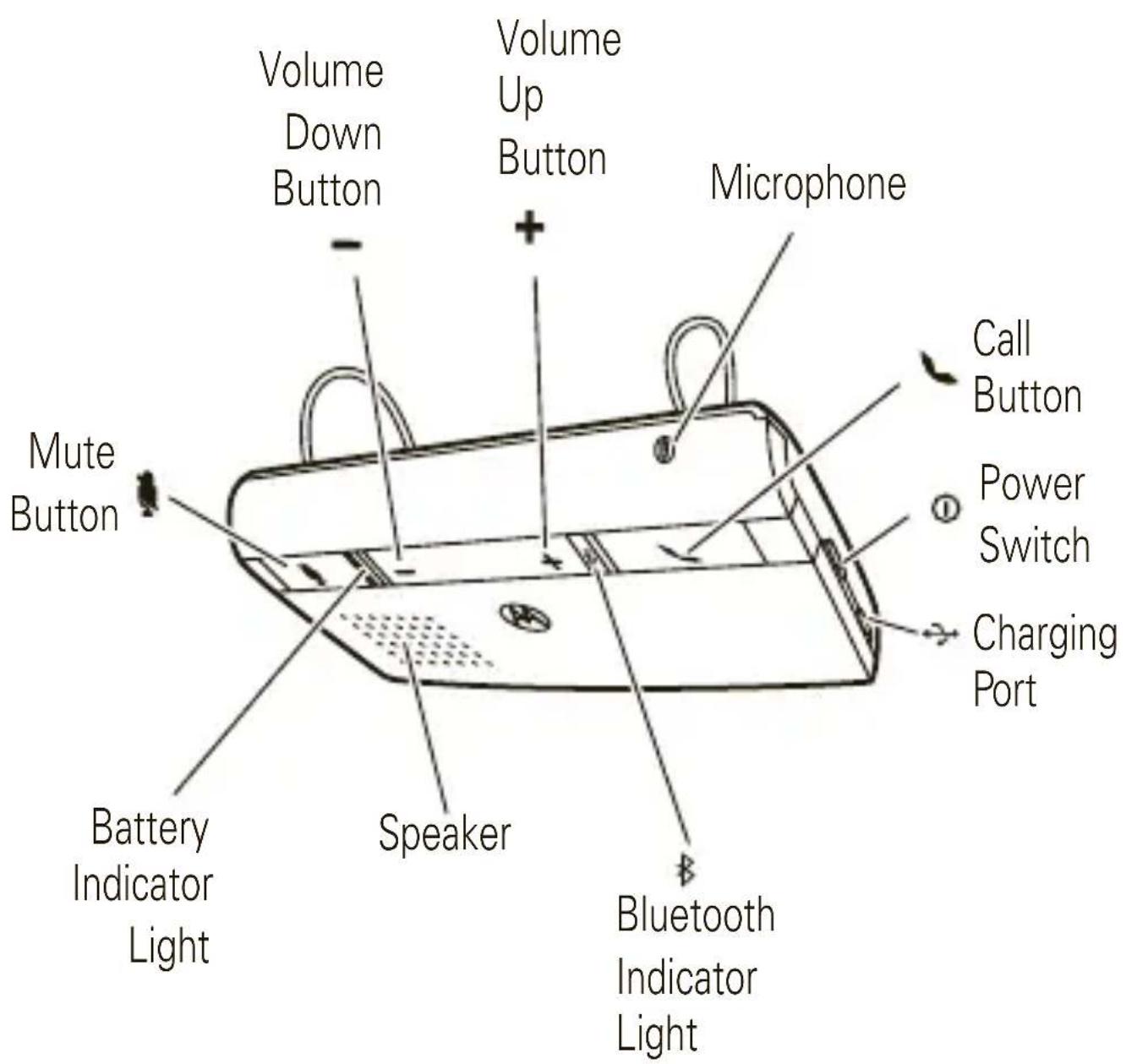
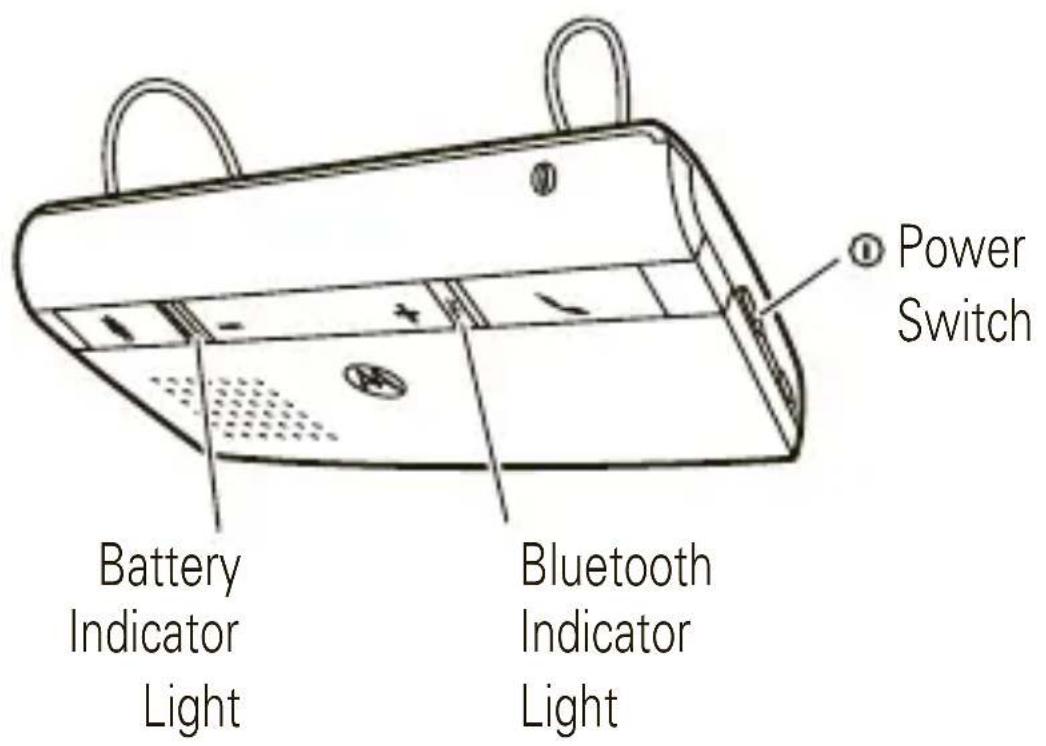
your speakerphone
Take a moment to familiarize yourself with your new T215 speakerphone.
charge it
You'll need to charge your speakerphone before you can use it. While charging, the battery indicator light is red. It turns green when the battery is fully charged.
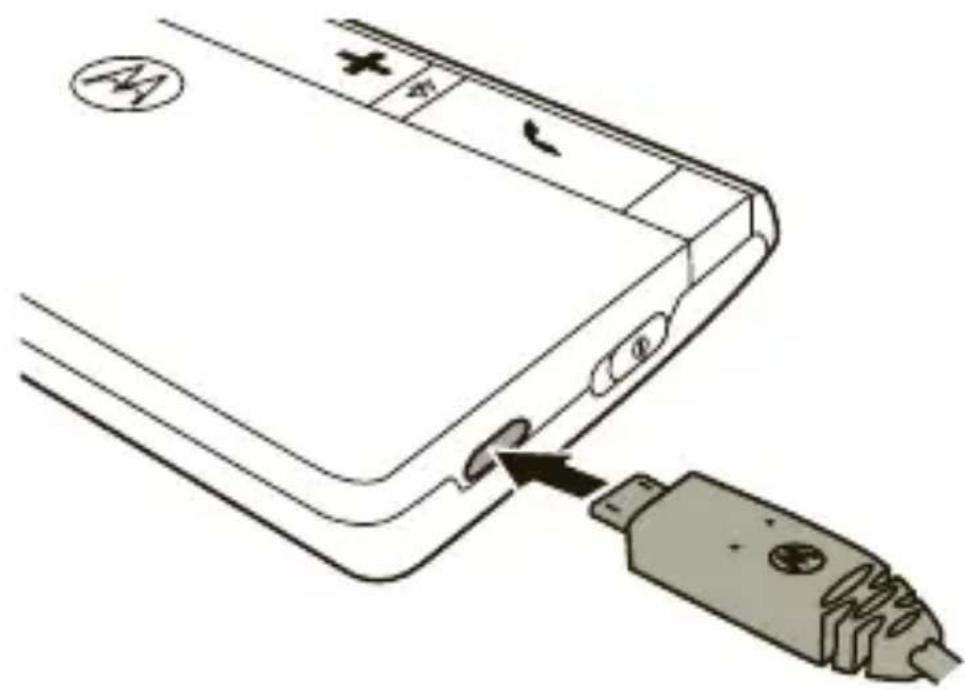
Note: Speakerphone is functional while charging.
Note: Your battery is designed to last the life of your product. It should only be removed by a recycling facility. Any attempt to remove or replace your battery will damage your speakerphone.
pair & connect
Let's get your speakerphone paired and connected to your Bluetooth phone.
initial pair & connect
1 Turn off any Bluetooth devices previously paired with your speakerphone.
Turn on the Bluetooth feature on your phone.
3 Turn on your speakerphone (see page 7 for help).
The Bluetooth and Battery indicator lights alternately flash to indicate the speakerphone is in discoverable mode.
4 Set your phone to search for Bluetooth devices.
Select Motorola T215 from the search results on your phone.
Select Ok or Yes to pair your speakerphone with your phone.
Note: When prompted for the passkey, enter0000.
The Bluetooth indicator light changes to solid blue for 1 minute to indicate successful pairing and connection.
pair & connect
test your connection
To test connection to your phone:
1 Slide the speakerphone onto your visor (see "install in car" on page 6 for help).
On your phone, dial the number you want to call and press the Call/Send key.
If your phone and speakerphone are successfully connected, you hear ringing on the speakerphone.
For daily use, make sure your speakerphone is turned on, and your phone's Bluetooth feature is on. Your speakerphone and phone will connect automatically.
Note: For additional help with pairing and connecting your speakerphone with specific phones, see www.motorola.pairxusa.com .
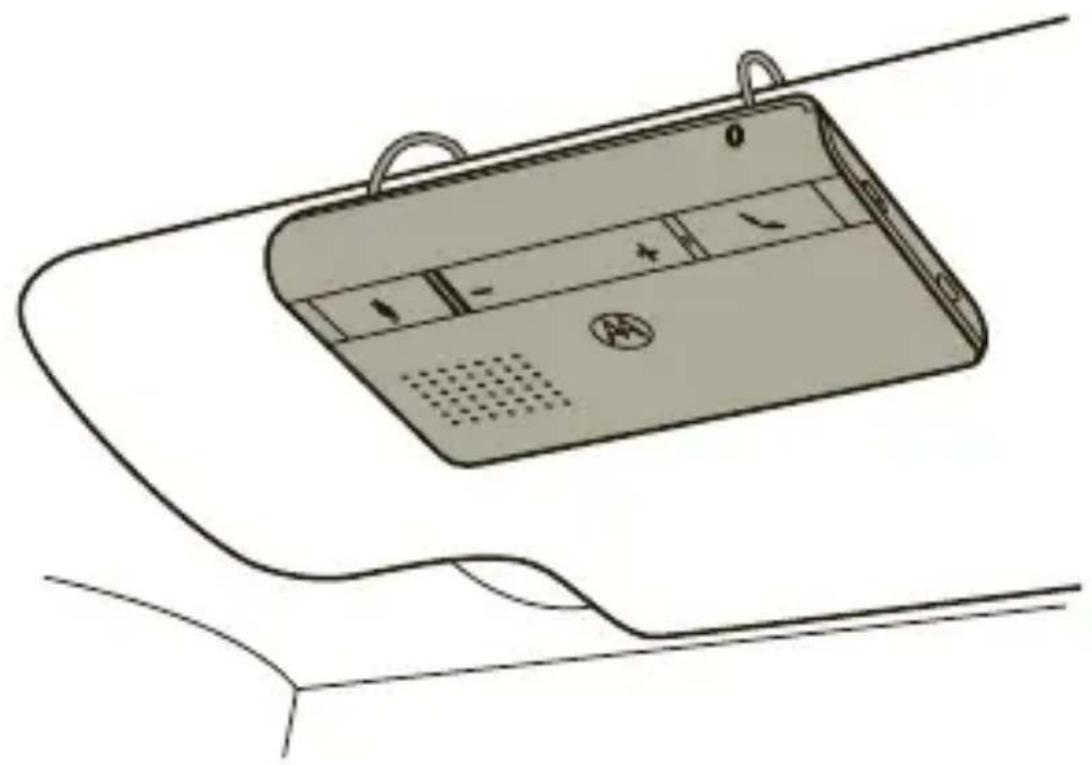
install in car
Slide the speakerphone onto your sun visor, as shown.
turn on & off
turn on
Slide ① switch to ON position. The Bluetooth indicator light is pulsing (if connected with a device) or flashing along with the Battery indicator light (if ready to be paired).
turn off
Slide ① switch to OFF position. The indicator lights turn off to indicate the speakerphone is off.
volume
Tap the + or - buttons to adjust the volume on your speakerphone.
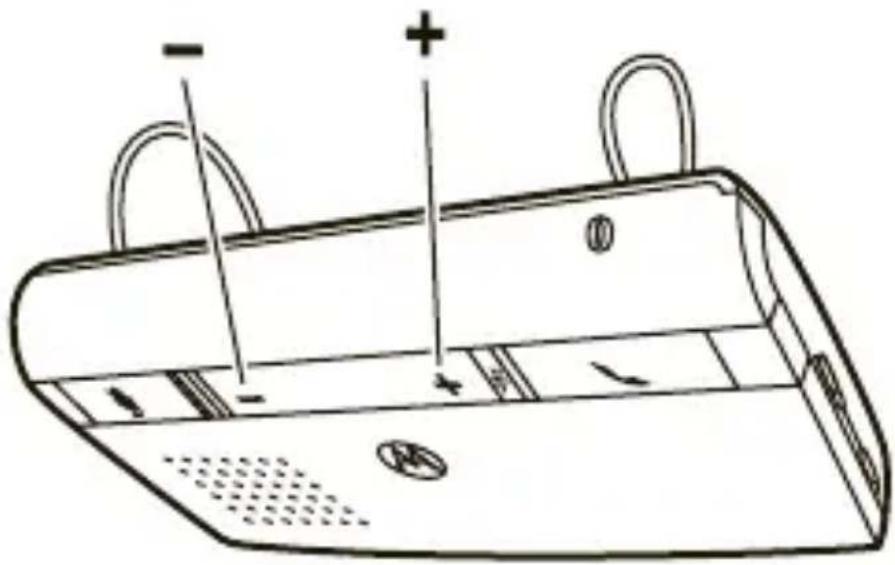
You'll hear a tone as you increase or decrease volume. When you reach maximum or minimum volume, you hear two tones.
calls
| To... |
| answer a call press button |
| mute or unmute a call press button |
| reject a call press button |
| end a call press button |
| redial last call press and hold button until you hear a dial tone |
| make a voice dial call press button and wait for voice prompt |
| transfer call to/from press button twice speakerphone and phone |
Note: Your T215 supports both Handsfree and Headset Profiles. Accessing call functions depends upon which profile your phone supports. See your phone's user's guide for more information.
Note: Some features are phone/network dependent.
status indicators
indicator lights (with charger plugged in)
| Battery indicator light status |
| red battery charging |
| green charging complete |
indicator lights (with charger not plugged in)
| Bluetooth indicator light | Battery indicator light | status |
| off off power off | ||
| off | green | powering |
| quick blue flash (alternating) | quick green flash (alternating) | pairing mode |
status indicators
| Bluetooth indicator light | Battery indicator light | status |
| solid blue n/a pairing successful | ||
| quick blue flash | n/a incoming/outgoing call | |
| blue flash n/a standby (connected to phone)/ connected (on a call) | ||
| off red or green pulse | idle (not connected to phone) | |
| n/a orange pulse | connected call muted | |
| n/a red pulse battery level low | ||
| n/a green pulse battery level OK | ||
tips & tricks
restore to factory settings
Caution: This action erases all pairing information stored in your speakerphone.
1 With your speakerphone turned on, press and hold both and buttons until the Battery and Bluetooth indicator lights begin flashing.
Press and hold × + , and buttons until the indicator lights turn off.
Slide ① switch to OFF then ON position to restart your speakerphone.
Safety & General Information IMPORTANT INFORMATION ON SAFE AND EFFICIENT OPERATION. READ THIS INFORMATION BEFORE USING YOUR DEVICE.
Approved Accessories
Use of accessories not approved by Motorola, including but not limited to batteries, antennas, and convertible covers, may cause your mobile device to exceed RF energy exposure guidelines and may void your mobile device's warranty. For a list of approved Motorola accessories, visit our Web site at: www.motorola.com
Batteries & Chargers
Your battery, charger, or mobile device may contain symbols, defined as follows:
| Symbol Definition | |
| Important safety information follows. | |
| Do not let your battery, charger, or mobile device get wet. | |
Use & Safety for Battery-Powered Accessories
- Do not store or use your battery-powered accessory (such as a Bluetooth® headset or other device) in temperatures below -10°C (14°F) or above 60°C (140°F).
- Do not recharge your accessory in temperatures below 0^ ( 32^ ) or above 45^ ( 113^ ).
- Conditions inside a parked car can exceed this range. Do not store your accessory in a parked car.
- Do not store your accessory in direct sunlight.
- Storing your fully charged accessory in high-temperature conditions may permanently reduce the life of the internal battery.
- Battery life may temporarily shorten in low-temperature conditions.
Caution About High Volume Usage
Warning: Exposure to loud noise from any source for extended periods of time may temporarily or permanently affect your hearing. The louder the volume sound level, the less time is required before your hearing could be affected. Hearing damage from loud noise is sometimes undetectable at first and can have a cumulative effect. To protect your hearing:
- Start your volume control at a low setting and use as low a volume as possible.
- Limit the amount of time you use headsets or headphones at high volume.
- Where possible, use your headset in a quiet environment with low background noise.
- Avoid turning up the volume to block out noisy surroundings.
- Turn the volume down if you can't hear people speaking near you.
If you experience hearing discomfort, including the sensation of pressure or fullness in your ears, ringing in your ears, or muffled speech, you should stop listening to the device through your headset or headphones and have your hearing checked by your doctor.
Smart Practices While Driving
Using a mobile device while driving may cause distraction. End a call if you can't concentrate on driving. Also, using a mobile device or accessory may be prohibited or restricted in certain areas. Always obey the laws and regulations on the use of these products.
Responsible driving practices can be found at www.motorola.com/callsmart (in English only).
Industry Canada Notice to Users
Operation is subject to the following two conditions: (1) This device may not cause interference and (2) This device must accept any interference, including interference that may cause undesired operation of the device. See RSS-GEN 7.1.5.
FCC Notice to Users
The following statement applies to all products that have received FCC approval. Applicable products bear the FCC logo, and/or an FCC ID in the format FCC-ID:xxxxxx on the product label.
Motorola has not approved any changes or modifications to this device by the user. Any changes or modifications could void the user's authority to operate the equipment. See 47 CFR Sec. 15.21.
This device complies with part 15 of the FCC Rules. Operation is subject to the following two conditions: (1) This device may not cause harmful interference, and (2) this device must accept any interference received, including interference that may cause undesired operation. See 47 CFR Sec. 15.19(3).
This equipment has been tested and found to comply with the limits for a Class B digital device, pursuant to part 15 of the FCC Rules. These limits are designed to provide reasonable protection against harmful interference in a residential installation. This equipment generates, uses and can radiate radio frequency energy and, if not installed and used in accordance with the instructions, may cause harmful interference to radio communications. However, there is no guarantee that interference will not occur in a particular installation. If this equipment does cause harmful interference to radio or television reception, which can be determined by turning the equipment off and on, the user is encouraged to try to correct the interference by one or more of the following measures:
- Reorient or relocate the receiving antenna.
- Increase the separation between the equipment and the receiver.
- Connect the equipment to an outlet on a circuit different from that to which the receiver is connected.
- Consult the dealer or an experienced radio/TV technician for help.
Motorola Limited Warranty for the United States and Canada
What Does This Warranty Cover?
Subject to the exclusions contained below, Motorola, Inc. warrants its telephones, pagers, messaging devices, and consumer and professional two-way radios (excluding commercial, government or industrial radios) that operate via Family Radio Service or General Mobile Radio Service, Motorola-branded or certified accessories sold for use with these Products ("Accessories") and Motorola software contained on CD-ROMs or other tangible media and sold for use with these Products ("Software") to be free from defects in materials and workmanship under normal consumer usage for the period(s) outlined below. This limited warranty is a consumer's exclusive remedy, and applies as follows to new Motorola Products, Accessories and Software purchased by consumers in the United States or Canada, which are accompanied by this written warranty:
Products and Accessories
| Products Covered Length of Coverage | |
| Products and Accessories as defined above, unless otherwise provided for below. | One (1) year from the date of purchase by the first consumer purchaser of the product unless otherwise provided for below. |
| Decorative Accessories and Cases. Decorative covers, bezels, PhoneWrap™ covers and cases. | Limited lifetime warranty for the lifetime of ownership by the first consumer purchaser of the product. |
| Monaural Headsets. Ear buds and boom headsets that transmit mono sound through a wired connection. | Limited lifetime warranty for the lifetime of ownership by the first consumer purchaser of the product. |
| Consumer and Professional Two-way Radio Accessories. | Ninety (90) days from the date of purchase by the first consumer purchaser of the product. |
| Products and Accessories that are Repaired or Replaced. | The balance of the original warranty or for ninety (90) days from the date returned to the consumer, whichever is longer. |
Exclusions
Normal wear and tear. Periodic maintenance, repair and replacement of parts due to normal wear and tear are excluded from coverage.
Batteries. Only batteries whose fully charged capacity falls below 80% of their rated capacity and batteries that leak are covered by this limited warranty.
Abuse & misuse. Defects or damage that result from: (a) improper operation, storage, misuse or abuse, accident or neglect, such as physical damage (cracks, scratches, etc.) to the surface of the product resulting from misuse; (b) contact with liquid, water, rain, extreme humidity or heavy perspiration, sand, dirt or the like, extreme heat, or food; (c) use of the Products or Accessories for commercial purposes or subjecting the Product or Accessory to abnormal usage or conditions; or (d) other acts which are not the fault of Motorola, are excluded from coverage.
Use of non-Motorola Products and Accessories. Defects or damage that result from the use of Non-Motorola branded or certified Products, Accessories, Software or other peripheral equipment are excluded from coverage.
Unauthorized service or modification. Defects or damages resulting from service, testing, adjustment, installation, maintenance, alteration, or modification in any way by someone other than Motorola, or its authorized service centers, are excluded from coverage.
Altered products. Products or Accessories with (a) serial numbers or date tags that have been removed, altered or obliterated; (b) broken seals or that show evidence of
tampering; (c) mismatched board serial numbers; or (d) nonconforming or non-Motorola housings, or parts, are excluded from coverage.
Communication services. Defects, damages, or the failure of Products, Accessories or Software due to any communication service or signal you may subscribe to or use with the Products Accessories or Software is excluded from coverage.
Software
| Products Covered Length of Coverage | |
| Software. Applies only to physical defects in the media that embodies the copy of the software (e.g. CD-ROM, or floppy disk). | Ninety (90) days from the date of purchase. |
Exclusions
Software embodied in physical media. No warranty is made that the software will meet your requirements or will work in combination with any hardware or software applications provided by third parties, that the operation of the software products will be uninterrupted or error free, or that all defects in the software products will be corrected.
Software NOT embodied in physical media. Software that is not embodied in physical media (e.g. software that is downloaded from the Internet), is provided "as is" and without warranty.
Who is Covered?
This warranty extends only to the first consumer purchaser, and is not transferable.
What Will Motorola Do?
Motorola, at its option, will at no charge repair, replace or refund the purchase price of any Products, Accessories or Software that does not conform to this warranty. We may use functionally equivalent reconditioned/refurbished/pre-owned or new Products, Accessories or parts. No data, software or applications added to your Product, Accessory or Software, including but not limited to personal contacts,
games and ringer tones, will be reinstalled. To avoid losing such data, software and applications please create a back up prior to requesting service.
How to Obtain Warranty Service or Other Information
| USA Phones: | 1-800-331-6456 Pagers: 1-800-548-9954 Two-Way Radios and Messaging Devices: 1-800-353-2729 |
| Canada All Products | 1-800-461-4575 |
| TTY | 1-888-390-6456 |
| For Accessories and Software, please call the telephone number designated above for the product with which they are used. | |
You will receive instructions on how to ship the Products, Accessories or Software, at your expense, to a Motorola Authorized Repair Center. To obtain service, you must include: (a) a copy of your receipt, bill of sale or other comparable proof of purchase; (b) a written description of the problem; (c) the name of your service provider, if applicable; (d) the name and location of the installation facility (if applicable) and, most importantly; (e) your address and telephone number.
What Other Limitations Are There?
ANY IMPLIED WARRANTY, INCLUDING WITHOUT LIMITATION THE IMPLIED WARRANTY OF MERCHANTABILITY AND FITNESS FOR A PARTICULAR PURPOSE, SHALL BE LIMITED TO THE DURATION OF THIS LIMITED WARRANTY, OTHERWISE THE REPAIR, REPLACEMENT, OR REFUND AS PROVIDED UNDER THIS EXPRESS LIMITED WARRANTY IS THE EXCLUSIVE REMEDY OF THE CONSUMER, AND IS PROVIDED IN LIEU OF ALL OTHER WARRANTYES, EXPRESS OR IMPLIED. IN NO EVENT SHALL MOTOROLA BE LIABLE, WHETHER IN CONTRACT OR TORT (INCLUDING NEGLIGENCE) FOR DAMAGES IN EXCESS OF THE PURCHASE PRICE OF THE PRODUCT, ACCESSORY OR SOFTWARE, OR FOR ANY INDIRECT, INCIDENTAL,
SPECIAL OR CONSEQUENTIAL DAMAGES OF ANY KIND, OR LOSS OF REVENUE OR PROFITS, LOSS OF BUSINESS, LOSS OF INFORMATION OR DATA, SOFTWARE OR APPLICATIONS OR OTHER FINANCIAL LOSS ARISING OUT OF OR IN CONNECTION WITH THE ABILITY OR INABILITY TO USE THE PRODUCTS, ACCESSORIES OR SOFTWARE TO THE FULL EXTENT THESE DAMAGES MAY BE DISCLAIMED BY LAW.
Some states and jurisdictions do not allow the limitation or exclusion of incidental or consequential damages, or limitation on the length of an implied warranty, so the above limitations or exclusions may not apply to you. This warranty gives you specific legal rights, and you may also have other rights that vary from state to state or from one jurisdiction to another.
Product Registration
Online Product Registration:
www.motorola.com/us/productregistration
Product registration is an important step toward enjoying your new Motorola product. Registering permits us to contact you for product or software updates and allows you to subscribe to updates on new products or special promotions.
Registration is not required for warranty coverage.
Please retain your original dated sales receipt for your records. For warranty service of your Motorola Personal Communications Product you will need to provide a copy of your dated sales receipt to confirm warranty status.
Thank you for choosing a Motorola product.
Export Law Assurances
This product is controlled under the export regulations of the United States of America and Canada. The Governments of the United States of America and Canada may restrict the exportation or re-exportation of this product to certain destinations. For further information contact the U.S. Department of Commerce or the Canadian Department of Foreign Affairs and International Trade.
Caring for the Environment by Recycling
This symbol on a Motorola product means the product should not be disposed of with household waste.
Disposal of your Mobile Device & Accessories
Please do not dispose of mobile devices or electrical accessories (such as chargers, headsets, or batteries) with your household waste. Do not dispose of your battery or mobile device in a fire. These items should be disposed of in accordance with the national collection and recycling
schemes operated by your local or regional authority. Alternatively, you may return unwanted mobile devices and electrical accessories to any Motorola Approved Service Center in your region. Details of Motorola approved national recycling schemes, and further information on Motorola recycling activities can be found at: www.motorola.com/recycling
Disposal of your Mobile Device Packaging & User's Guide
Product packaging and user's guides should only be disposed of in accordance with national collection and recycling requirements. Please contact your regional authorities for more details.
European Union Directives Conformance Statement

Hereby, Motorola declares that this product is in compliance with:
- The essential requirements and other relevant provisions of Directive 1999/5/EC
All other relevant EU Directives
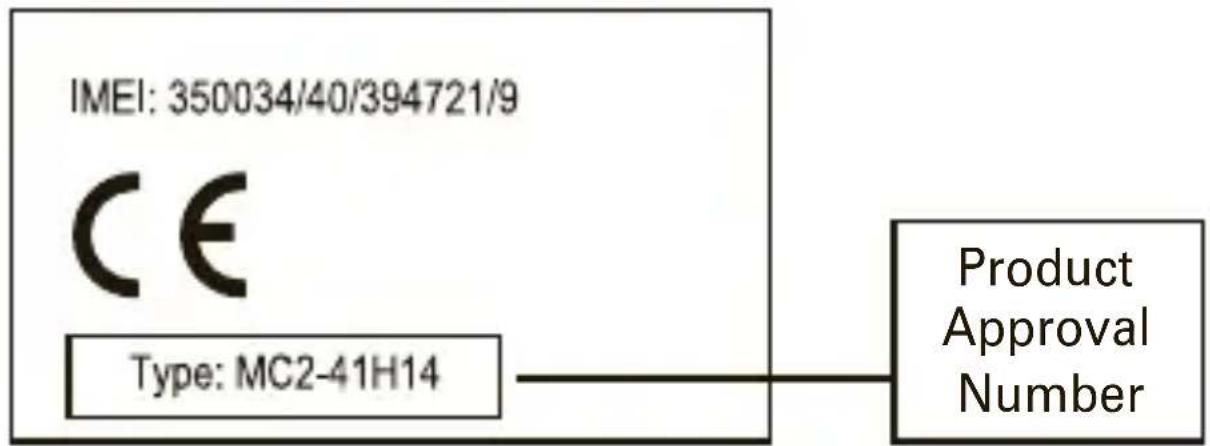
The above gives an example of a typical Product Approval Number.
You can view your product's Declaration of Conformity (DoC) to Directive 1999/5/EC (to R&TTE Directive) at www.motorola.com/rtte. To find your DoC, enter the Product Approval Number from your product's label in the "Search" bar on the Web site.
Motorola, Inc.
Consumer Advocacy Office
600 N.US Hwy 45
Libertyville, IL 60048
www.motorola.com
Note: Do not ship your accessory product to the above address. If you need to return your product for repairs, replacement, or warranty service, please contact the Motorola Customer Support Center at:
1-877-MOTOBLU (Motorola Bluetooth Support)
1-800-331-6456 (United States)
1-888-390-6456 (TTY/TDD United States for hearing impaired)
1-800-461-4575 (Canada)
MOTOROLA and the Stylized M Logo are registered in the US Patent & Trademark Office. The Bluetooth trademarks are owned by their proprietor and used by
Motorola, Inc. under license. All other product and service names are the property of their respective owners.
© 2009 Motorola, Inc. All rights reserved.
Software Copyright Notice
The Motorola products described in this manual may include copyrighted Motorola and third-party software stored in semiconductor memories or other media. Laws in the United States and other countries preserve for Motorola and third-party software providers certain exclusive rights for copyrighted software, such as the exclusive rights to distribute or reproduce the copyrighted software. Accordingly, any copyrighted software contained in the Motorola products may not be modified, reverse-engineered, distributed, or reproduced in any manner to the extent allowed by law. Furthermore, the purchase of the Motorola products shall not be deemed to grant either directly or by implication, estoppel, or otherwise, any license under the copyrights, patents, or patent applications of Motorola or any third-party software provider, except for the normal, non-exclusive, royalty-free license to use that arises by operation of law in the sale of a product.
Bluetooth QD ID: B015037
Manual Number: 68000202254-A

motorolaT215
Guía de inizio=rápido
felicidades
Diagonal 127A N. 17-64
Bogota, Colombia
Teléfono: 615-5759
Teléfono: 216-1743
- Motorola Inc. a工程技术 center, where the company is working on developing a new technology center for motorized vehicles. The center will be located in Los Angeles, California, USA, and will be used to produce motorized vehicles. The center will be located in Los Angeles, California, USA, and will be used to produce motorized vehicles.
Consumer Advocacy Office
600 N US Hwy 45
Libertyville, IL 60048
www.hellomoto.com
www.hellomoto.com/bluetooth (haga cli en soporte)
Motorola Argentina S.A.
Suipacha 1111 - Piso 18
C1008AAW Buenos Aires
ARGENTINA
0800 666 8676 (Argentina)
800-201-442 (Chile)
01-800-700-1504 (Columbia)
Consumer Advocacy Office
600 N.US Hwy 45
Libertyville, IL 60048
www.motorola.com

- your speakerphone
- charge it
- pair & connect
- initial pair & connect
- test your connection
- install in car
- turn on & off
- turn on
- turn off
- volume
- calls
- status indicators
- indicator lights (with charger plugged in)
- indicator lights (with charger not plugged in)
- tips & tricks
- restore to factory settings
- Safety & General Information IMPORTANT INFORMATION ON SAFE AND EFFICIENT OPERATION. READ THIS INFORMATION BEFORE USING YOUR DEVICE.
- Approved Accessories
- Batteries & Chargers
- Use & Safety for Battery-Powered Accessories
- Caution About High Volume Usage
- Smart Practices While Driving
- Industry Canada Notice to Users
- FCC Notice to Users
- Motorola Limited Warranty for the United States and Canada
- What Does This Warranty Cover?
- Exclusions
- Software
- Who is Covered?
- What Will Motorola Do?
- How to Obtain Warranty Service or Other Information
- What Other Limitations Are There?
- Product Registration
- www.motorola.com/us/productregistration
- Export Law Assurances
- Caring for the Environment by Recycling
- Disposal of your Mobile Device & Accessories
- Disposal of your Mobile Device Packaging & User's Guide
- European Union Directives Conformance Statement
- Software Copyright Notice
- motorolaT215
- felicidades
Brand : MOTOROLA
Model : T215
Category : Built-in kit