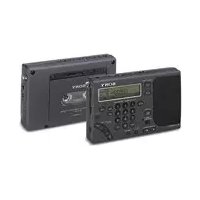
ICFSW1000T - Alarm clock radio SONY - Free user manual and instructions
Find the device manual for free ICFSW1000T SONY in PDF.


User questions about ICFSW1000T SONY
0 question about this device. Answer the ones you know or ask your own.
Ask a new question about this device
Download the instructions for your Alarm clock radio in PDF format for free! Find your manual ICFSW1000T - SONY and take your electronic device back in hand. On this page are published all the documents necessary for the use of your device. ICFSW1000T by SONY.
USER MANUAL ICFSW1000T SONY
FM Stereo/SW/MW/LW PLL Synthesized Receiver Stereo Cassette-Corder
Operating Instructions
Mode d'emploi
1995 by Sony Corporation
Owner's Record
The model and serial numbers are located at the bottom. Record the model number and the serial number in the space provided below. Refer to these numbers whenever you call upon your Sony dealer regarding this product.
Model No. Serial No.
For customers in the USA
Please register this product on line at http://www.sony.com/productregistration.
Proper registration will enable us to send you periodic mailings about new products, services, and other important announcements. Registering your product will also allow us to contact you in the unlikely event that the product needs adjustment or modification. Thank you.
Warning
To prevent fire or shock hazard, do not expose the unit to rain or moisture.
To avoid electrical shock, do not open the cabinet.
Refer servicing to qualified personnel only.
For the Customers in USA
You are cautioned that any changes or modifications not expressly approved in this manual could void your authority to operate this equipment.
INFORMATION
This equipment has been tested and found to comply with the limits for a Class B digital device, pursuant to Part 15 of the FCC Rules. These limits are designed to provide reasonable protection against harmful interference in a residential installation. This equipment generates, uses, and can radiate radio frequency energy and, if not installed and used in accordance with the instructions, may cause harmful interference to radio communications. However, there is no guarantee that interference will not occur in a particular installation. If this equipment does cause harmful interference to radio or television reception, which can be determined by turning the equipment off and on, the user is encouraged to try to correct the interference by one or more of the following measures: Introduction
- Reorient or relocate the receiving antenna.
– Increase the separation between the equipment and receiver. - Connect the equipment into an outlet on a circuit different from that to which the receiver is connected.
- Consult the dealer or an experienced radio/TV technician for help.
Notes on recording
- Check and make sure that the recording operation is not malfunctioning prior to recording important materials.
• IN NO EVENT SHALL SELLER BE LIABLE FOR ANY DIRECT, INCIDENTAL OR CONSEQUENTIAL DAMAGES OF ANY NATURE, OR LOSSES OR EXPENSES RESULTING FROM ANY DEFECTIVE PRODUCT OR THE USE OF ANY PRODUCT. - Observe the relevant regulations on copyright relating to your collection of recordings from the radio. Unauthorized public performance, broadcasting and duplication of a recorded broadcast for commercial purposes are a violation of applicable laws.
Before operating the unit, please read this manual thoroughly and retain it for future reference.
Features
Radio
• FM stereo/SW/MW/LW reception for worldwide band coverage
Quartz controlled PLL (Phase Locked Loop) synthesizer system enables simple and precise tuning
FM: 76–108 MHz
SW: 1621–29999 kHz
MW: 530–1620 kHz
LW: 150–529 kHz
Refer to the supplied "Wave Handbook" for more information on worldwide band coverage.
- Four flexible tuning methods to obtain optimum reception under any condition
- Manual tuning for precise control and hand-operated tuning of the desired broadcast station.
- Scan tuning for rapid automatic search of the desired broadcast station through scanning.
- Direct tuning for immediate selection of the desired broadcast station when the frequency is known.
- Preset tuning for instant recall of a preset broadcast station with a single press of the button.
- Built-in timer operation with the timer standby function which turns on the radio automatically at a preset time, plus the sleep timer function which turns off the radio automatically after a specified number of minutes
- Stereo playback and FM reception with the supplied stereo headphones
Cassette-Corder
- Auto-reverse recording and playback cassette-corder
- Instant recording operation of the desired broadcast station with a single press of the button, or simply enjoy recording with the external microphone.
– Record radio broadcasts at the desired preset time with the convenient built-in timer.
- Monitor the sound while forwarding or rewinding with the cue and review functions
MW channel step
The channel step differs depending on the area.
Change the step as necessary (see page 21). North and South American countries: 10 kHz
Japan, Europe, and other countries: 9 kHz
Table of contents
Basic Operations
6 Inserting the batteries
7 Setting the clock
8 Listening to the radio—Scan tuning
10 Playing a cassette
12 Recording radio broadcasts
Radio
14 Various tuning methods for optimum reception
14 Manual tuning
16 Direct tuning
17 Preset tuning
19 Receiving SSB and CW transmissions
20 Receiving optimum AM broadcast—Synchronous detection
21 Changing the MW channel step for use in foreign countries
22 Connecting an external antenna for optimum reception
Cassette
25 Recording with a microphone
Timer
27 To wake up to the desired broadcast—Standby function
29 To fall asleep while listening to the desired broadcast—Sleep timer
30 To record the desired broadcast with the timer—Timer recording
Other Operations
32 Using the hold function to prevent accidental operation
33 Attaching the strap
Power Sources
34 Replacing the batteries
35 Operating with house current
Additional Information
36 Location and function of controls
41 Precautions and Maintenance
43 Troubleshooting
46 Specifications
47 Tips on radio waves
Inserting the batteries
Insert the batteries to operate the unit with batteries.
Insert the batteries into both battery holders when using the cassette.
To operate the unit with house current, refer to "Operating with house current" on page 35.
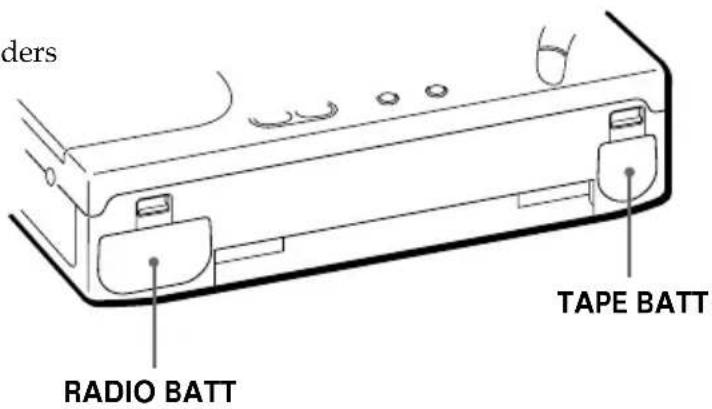
1 Push the OPEN tabs and remove
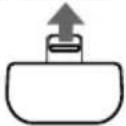
the RADIO BATT and TAPE BATT battery holders.
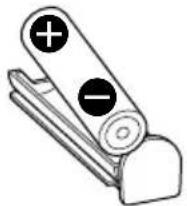
2 Insert two R6 (size AA) batteries
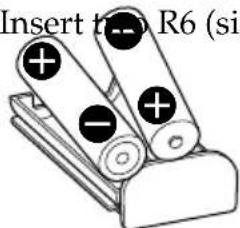
into the RADIO BATT battery holder and insert one R6 (size AA) battery into the TAPE BATT battery holder.
Insert with the correct polarity as indicated.
Note
It is not necessary to insert a battery into the TAPE BATT battery holder if you wish to operate the radio only. However, to use the cassette, insert the batteries into both the RADIO BATT and TAPE BATT battery holders. Otherwise, the unit may not operate properly.
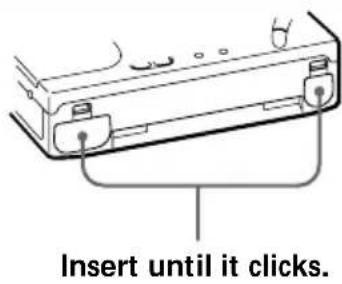
3 Insert both battery holders back into the unit.
Setting the clock
Set the clock when you initially insert the batteries or when the clock is reset at which time "0:00" flashes.
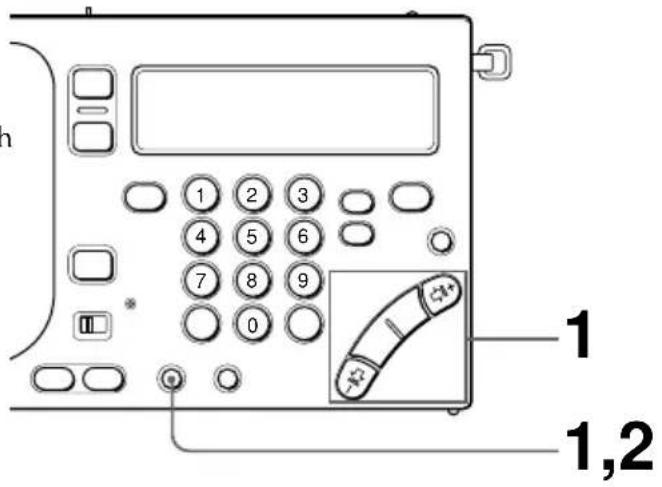
1 Press and hold TIME SET •
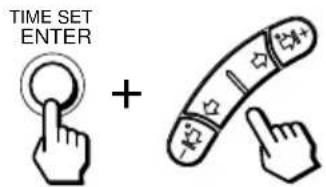
ENTER while pressing HOUR or MIN repeatedly until the correct time is displayed.
Each time MIN ( or ) is pressed, the minute will decrease ( ) or increase ( ) by one minute. Each time HOUR ( I or I^+ ) is pressed, the hour will decrease ( I ) or increase ( I^+ ) by one hour. Press and hold the button to decrease or increase rapidly.
2 Release TIME SET • ENTER.
The ":" starts flashing and the clock operates.
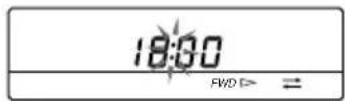
Tips
• The clock is displayed in 24-hour indication.
- Press TIME SET
ENTER to stop the flashing of "0:00".
• To set the clock accurately, release TIME SET • ENTER at the time of the tone.
To display the clock
Press EXE to display the clock while operating the radio or the cassette. The current time appears for about 10 seconds and then the previous display returns. However, the clock cannot be displayed while scan tuning.
While the clock is displayed, press EXE again to return to the previous display.
Note
You cannot set the clock while operating the radio or the cassette.
Press RADIO POWER ON/OFF to turn off the radio, or press ■ to stop the tape.
Listening to the radio—Scan tuning
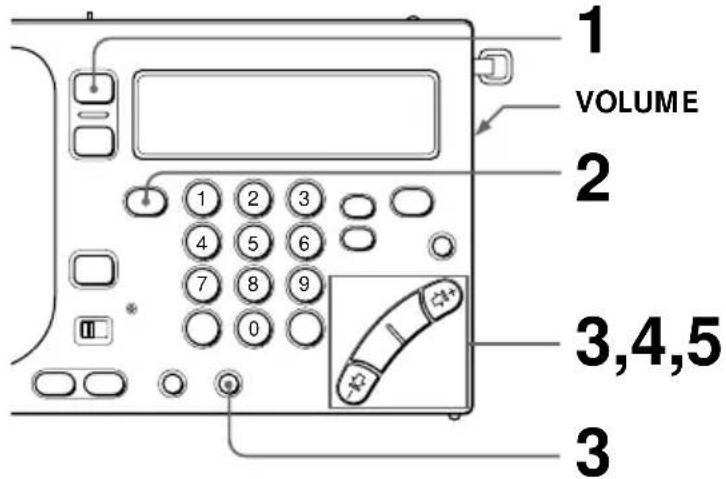
To manually tune in to the desired broadcast station, refer to
"Manual tuning" on page 14.
To immediately tune in to the desired broadcast station, refer to
"Direct tuning" on page 16.
To preset a broadcast station for instant recall, refer to "Preset tuning" on page 17.
1 Press RANO POWER ON/OFF.
The radio turns on.
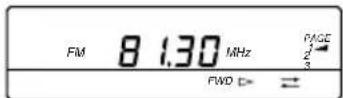
2 Press FM/AM to select either FM
or AM.
Select AM to listen to SW, MW or LW.
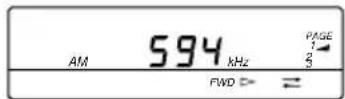
3 When you select AM, press

AM BAND
or ⇌ I+ while pressing AM BAND to select MW, LW, or meter band (SW)*.
Skip this step and proceed to step 4 if you wish to listen to FM.
* For details on the meter band, refer to "Meter bands and SW" on page 15.
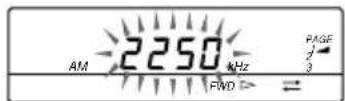
The minimum frequency allocation for each band is displayed.
4 Press and hold
$$ \neg \Leftrightarrow \text { or } \Rightarrow \mathsf {I} + \text { and } $$
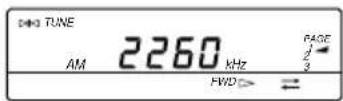
release when scanning of the frequency begins.
When a broadcast station is received automatically, scanning pauses for about 2 seconds. Then, scanning resumes to tune in to the next broadcast station.
Scanning repeats in a cycle within the meter band frequency range (see page 15). Scanning during SSB reception repeats in a cycle within the 150-29999 kHz frequency range.
5
Press
- I ⇔ or I+ to stop scanning and to listen to the currently tuned broadcast station.
Tips
• To enjoy FM stereo reception, plug the stereo headphones. Set ST • MONO to ST or MONO to select stereo or monaural reception as necessary.
- When listening to news, set TONE to NEWS for optimum results. Vocal output will be sharper and clearer. When listening to music, set to MUSIC for optimum results.
- During MW reception at nighttime when radio wave intensity is dramatically stronger, or when interference is prevalent, scanning may tend to tune in to almost every null broadcast. Set SENS to LOCAL so that the null broadcast of weaker radio wave intensity is skipped. Under normal conditions, set to DX.
Note
When reception does not improve, connect an external antenna (see page 22).
Other operations
To Press or turn
| Fine tune the reception | -|←, ⇔, ⇒, ⇒|+ |
| Adjust the volume VOLUME | |
| Turn off the radio RADIO POWER ON/OFF | |
To improve reception
For FM reception
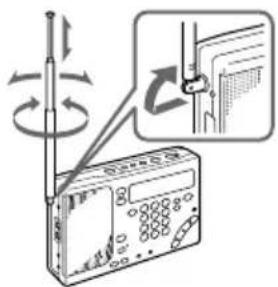
Gently pull out the telescopic antenna and adjust the length, angle and direction to obtain optimum reception.
For MW/LW reception
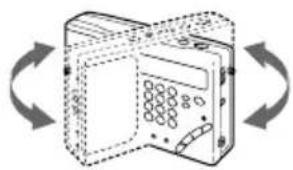
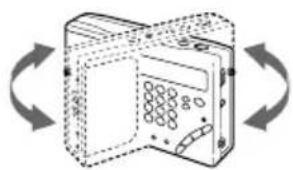
Retract the telescopic antenna and rotate the unit to reorient the built-in ferrite bar antenna to obtain optimum reception.
For SW reception
Gently pull out the telescopic antenna to its full length and set vertically to obtain optimum reception.
natural_image
Diagram of a device with open lid and circular ports, shown in clockwise rotation (no text or symbols)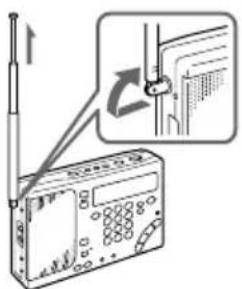
Playing a cassette
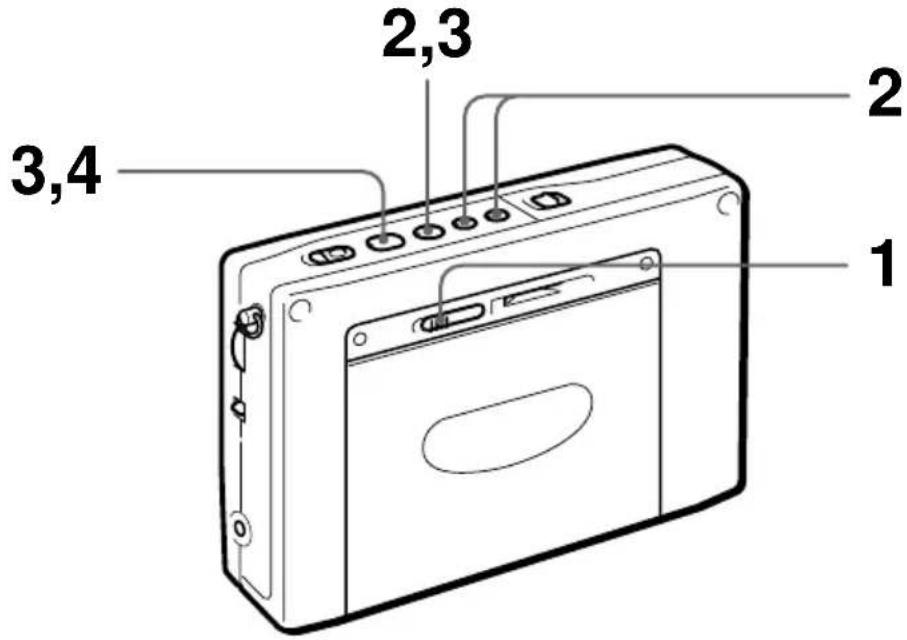
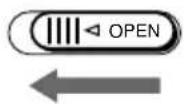
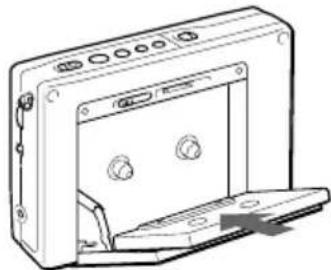
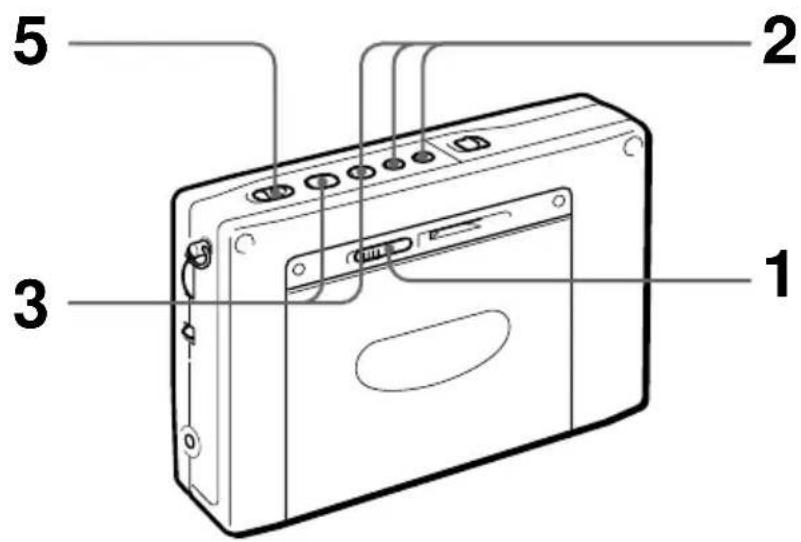
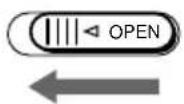
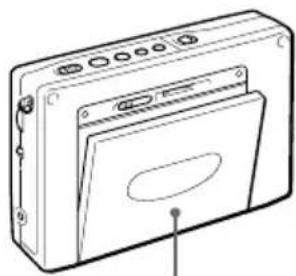
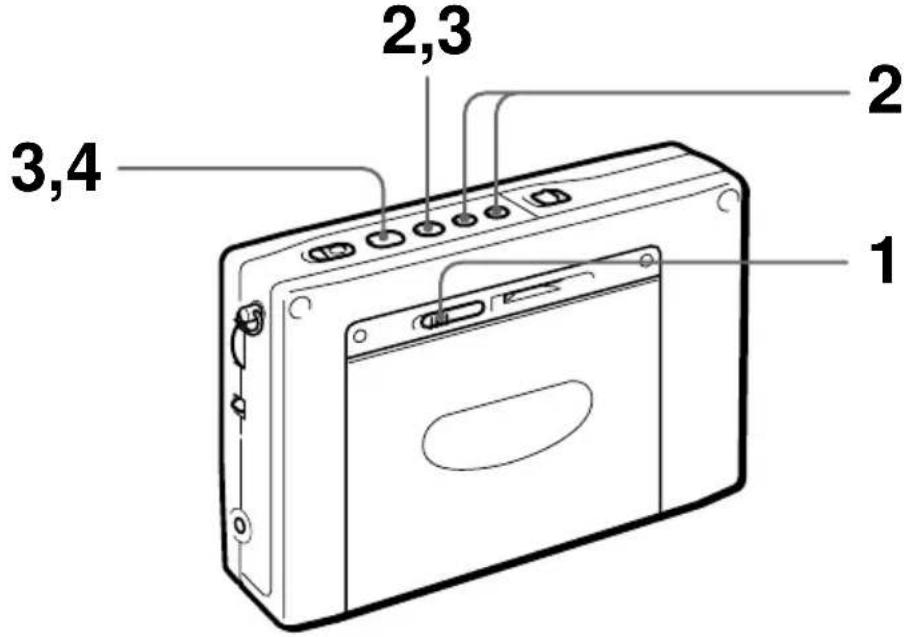
1 Slide OPEN and insert a cassette.
Remove the slack of the tape and insert the cassette with the exposed side facing down.
natural_image
Line drawing of a computer monitor with ports and a partially open base (no text or symbols)2 Select whether you wish to play
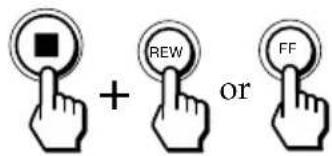
one side or both sides of the cassette.
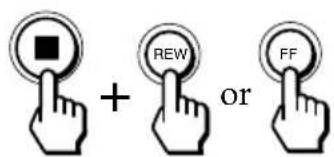
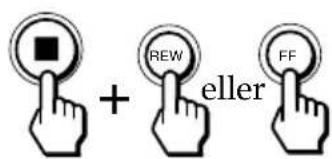
To play one side: Press FF while pressing ■.
To play both sides: Press REW while pressing ■.
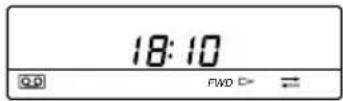
←: one side
both sides
3
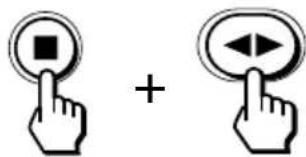
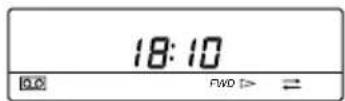
Press ◀▶ while pressing ■ to select the side you wish to play.
To play the side facing the cassette holder (forward side): Display "FWD ▷".
To play the side facing the unit (reverse side): Display “◀ REV”.
4
Press

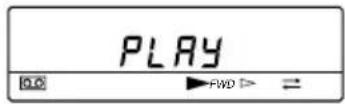
Other operations
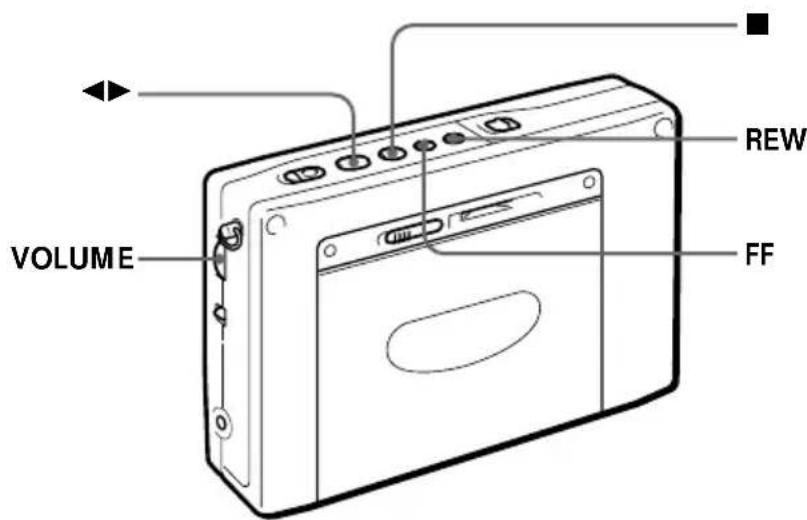
Tips
• To enjoy stereo-recorded cassettes, plug the stereo headphones.
Set ST • MONO to ST or MONO to select stereo or monaural as necessary.
• The ATS (Auto Tape Selector) function automatically determines and selects the type of cassette you wish to use for playback only: Normal or CrO_2/Metal cassette.
Note
The reverse side only is played when playback begins from the reverse side of the cassette.
To Press or turn
| Adjust the volume VOLUME |
| Switch the playback side ◀▶ during playback |
| Stop playback, FF, REW, and REC ■ |
| Fast forward FF during stop |
| Rewind REW during stop |
| Fast forward while monitoring FF during playback the sound (cue) |
| Rewind while monitoring REW during playback the sound (review) |
Recording radio broadcasts
To record with a microphone, refer to "Recording with a microphone" on page 25.
1 Slide OPEN and insert a cassette.
Note
Before inserting a cassette, make sure that the cassette tab is not broken off. A cassette with a broken tab cannot be recorded.
natural_image
Line drawing of a rectangular electronic device with ports and a panel, no text or symbols presentInsert the cassette with the side you wish to record facing the cassette holder.
2 Select whether you wish to record
one side or both sides of the cassette.
To record one side: Press FF while pressing ■.
To record both sides: Press REW while pressing ■.
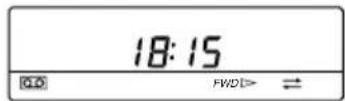
→: Records one side. →: Records both sides.
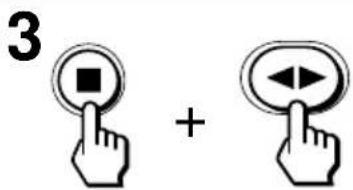
Press ◀▶ while pressing ■ to display "FWD ▷".
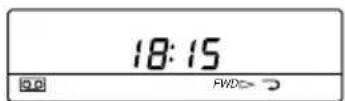
4 Tune in to the desired broadcast station you wish to record. Refer to pages 8 and 14-18.
5
Press the red button in the center and slide REC.
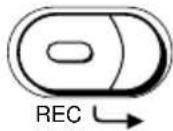
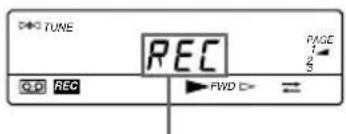
After a few seconds, the frequency is displayed.
Tips
- Adjusting VOLUME and TONE does not affect the sound to be recorded.
- Speaker output is monaural when recording. To enjoy FM stereo reception, plug the stereo headphones.
• Recording stops automatically when RADIO POWER ON/OFF is pressed to turn off the radio.
Notes
- Use Type I (normal) cassettes only for recording. Playback may be distorted or a previously recorded segment may not be erased completely when a CrO_2 or metal cassette is used.
- Recording with weak batteries generates unnecessary noise and produces unsatisfactory recordings. In this case, replace the batteries with new ones.
• Operate REC approximately 2 seconds prior to the point you wish to begin recording. If not, the leading segment may not be recorded. - Switching the recording side is not possible when ◀▶ is pressed during recording.
- The buttons for the radio are operational while recording. To prevent accidental operations, use the hold function (see page 32).
To stop recording
Press ■.
To record the side facing the unit (reverse side)
Insert the cassette with the side you wish to record facing the unit (reverse side). Press ◀▶ while pressing ■ to display “◀ REV”.
Recording stops on the side facing the unit regardless of whether one side or both sides is selected.
To record an FM stereo broadcast
Set ST • MONO to ST or MONO to select stereo or monaural recording as necessary.
To improve AM reception for recording
When recording an AM broadcast, the reception may contain noise interferences that were not present prior to recording. In this case, set ISS on the bottom of the unit to the position (1, 2 or 3) in which noise interferences are minimal to obtain optimum reception for recording.
To protect your important recorded cassettes
Break off the cassette tab of side A or B to prevent accidental recording of your important cassettes. If you wish to use the cassette for recording again, cover the opening of the broken tab with adhesive tape.
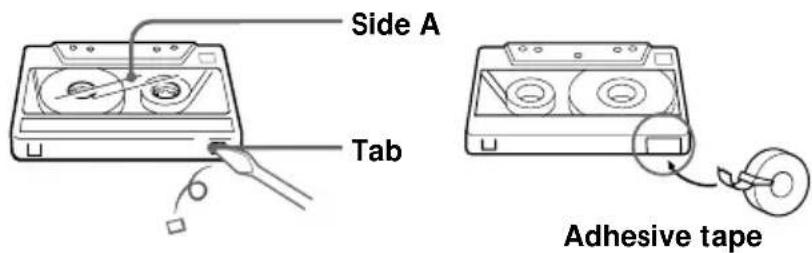
“☐☐” flashes when recording is attempted on a cassette with a broken tab. A cassette with a broken tab cannot be recorded.
Various tuning methods for optimum reception RADIO POWER ON/OFF
Manual tuning
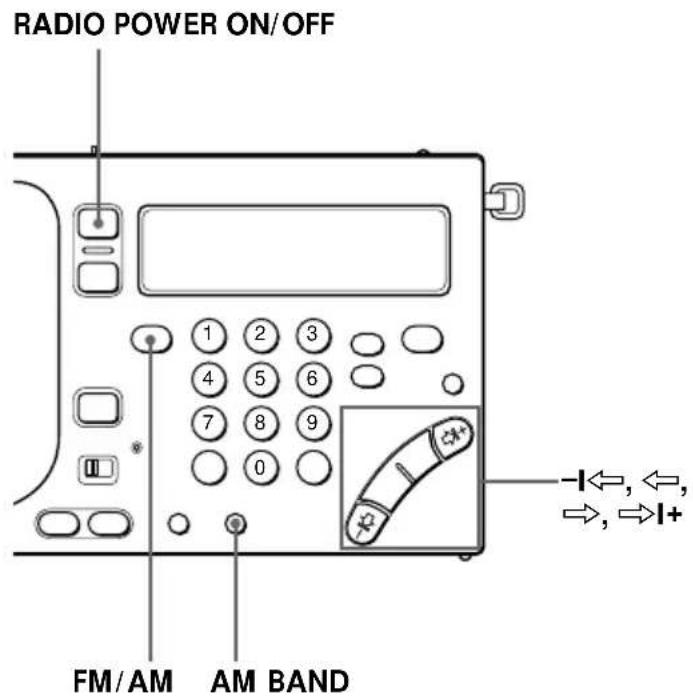
Use I , , , and I+ search for the desired broadcast station. Use the outer buttons to search rapidly in large frequency increments. Use the inner buttons to search precisely in small frequency increments.
Tips
• The previously tuned broadcast station is received when you turn on the radio.
- When or is pressed repeatedly in the AM band (MW, SW, and LW), the frequency repeats through the range of 150–29,999 kHz to enable search of all available broadcast stations.
1 Turn on the radio.
2 Select either FM or AM.
Select AM to listen to SW, MW or LW.
3 When you select AM, press -I ⇔ or I+ while pressing AM BAND to select MW, LW or meter band (SW).
Skip this step and proceed to step 4 if you wish to listen to FM.
4 Press ,, , and + repeatedly to search for the desired broadcast station.
Each time the buttons are pressed, the channel step changes as shown below.
| Band | or I+ | or |
| FM 0.05 MHz 0.05 MHz | ||
| SW 5 kHz 1 kHz | ||
| MW 9/10 kHz 1 kHz | ||
| LW 9 kHz 1 kHz | ||
| SSB (AM) 1 kHz 0.1 kHz * | ||
* Units of 0.1 kHz is not indicated in the display.
Note
The SW frequency range and meter band may differ from the actual value. Refer to the supplied "Wave Handbook" for more information on worldwide band coverage.
Meter bands and SW
SW is divided into 14 bands that are generally referred to as meter bands. The frequency range that is applicable for automatic scanning is shown below.
(kHz for AM, MHz for FM)
| Band | Frequency Range | Scan Frequency Range | Meter band | |
| AM | LW | 150–529 153–522 — | ||
| MW | 530–1620 | 530–1620 * ^1 | — | |
| 531–1620 * ^2 | — | |||
| SW | 1621–29999 | 2250–2550 120 meter band | ||
| 3150–3450 90 meter band | ||||
| 3850–4050 75 meter band | ||||
| 4700–5100 60 meter band | ||||
| 5900–6250 49 meter band | ||||
| 7100–7400 41 meter band | ||||
| 9400–10000 31 meter band | ||||
| 11500–12150 25 meter band | ||||
| 13500–13900 22 meter band | ||||
| 15000–15700 19 meter band | ||||
| 17450–18000 16 meter band | ||||
| 18850–19100 15 meter band | ||||
| 21450–21950 13 meter band | ||||
| 25600–26100 11 meter band | ||||
| FM 76.00–1 | 108.00 76.00–108.00 | — | ||
*1 When the channel step is 10 kHz (see page 21).
*2 When the channel step is 9 kHz (see page 21).
Various tuning methods for optimum reception (continued)
Direct tuning
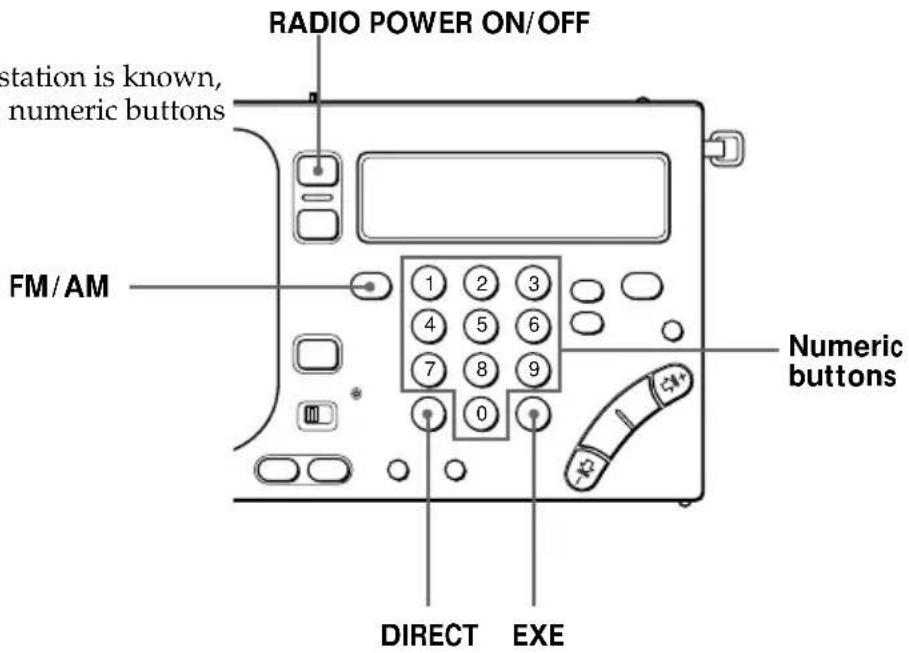
When the desired broadcast station is known, enter the frequency with the numeric buttons for immediate selection.
Tips
- When you have entered the wrong frequency in step 4, press DIRECT to cancel the current entry and enter the correct frequency.
- "TRY AGAIN!" flashes when the frequency entered is invalid and beyond the allocated frequency range for reception. Check and make sure that the frequency is valid and repeat from step 3 again.
• The minimum digit entry is 0.05 MHz (50 kHz) for the FM band, and 1 kHz for the AM band.
Note
Complete each button operation in steps 3 to 5 within 10 seconds. If the previously tuned frequency appears in the display, repeat from step 3 again.
1 Turn on the radio.
2 Select either FM or AM.
Select AM to listen to SW, MW or LW.
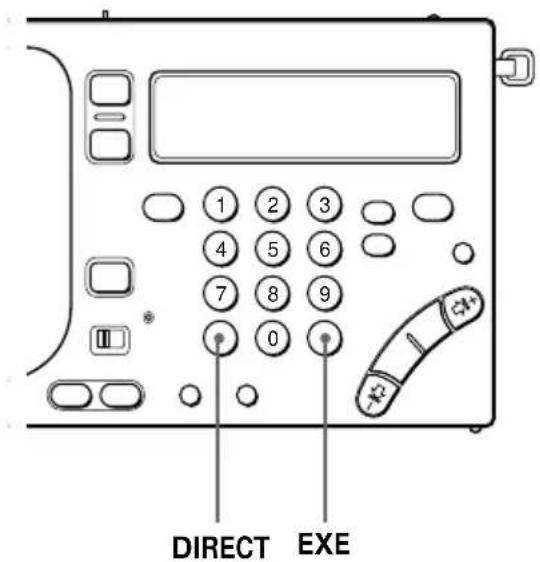
3 Press DIRECT.
The frequency in the display disappears.
4 Enter the frequency of the desired broadcast station by pressing the numeric buttons.
FM band: A decimal point is not required for entry.
For example, to enter 84.7 MHz, press 8, 4 and 7.
AM band: The lower triple zero digits are omitted for entry.
For example, to enter 10,000 kHz, press 1 and 0.
5 Press EXE.
When the desired broadcast station is received,
"▷◀ TUNE " appears in the display.
Preset tuning
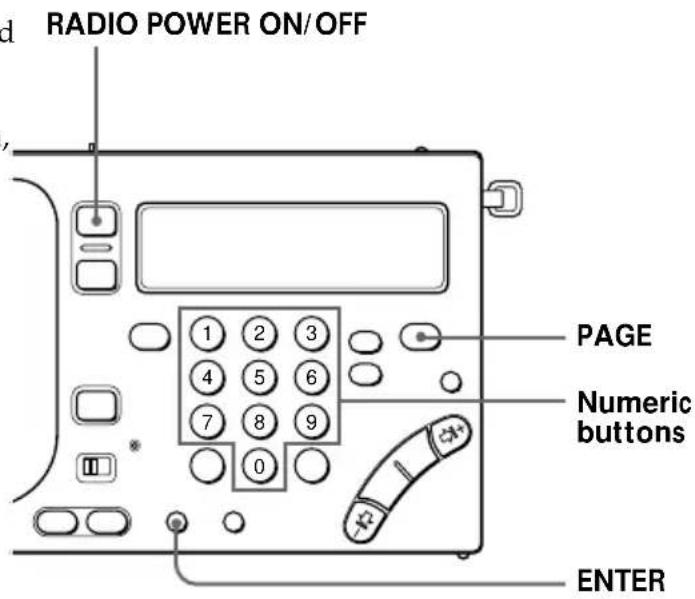
Your favorite broadcast stations can be stored on a total of 3 pages. Each page can store up to 10 broadcast stations.
Before tuning in to a preset broadcast station, you must complete the procedure below to preset your favorite broadcast stations.
Tip
To change and modify the preset broadcast station, store the new broadcast station to the selected preset number. The previous preset broadcast station is overwritten by the new preset broadcast station.
1 Turn on the radio.
2 Tune in to the desired broadcast station you wish to preset.
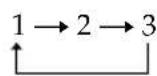
3 Press PAGE repeatedly to select the page you wish to store your favorite broadcast station on.
Each time you press PAGE, the display changes in the following order:
4 Press a numeric button (0–9) while pressing ENTER.
When FM 81.9 MHz is assigned to preset number 1 of page 1.
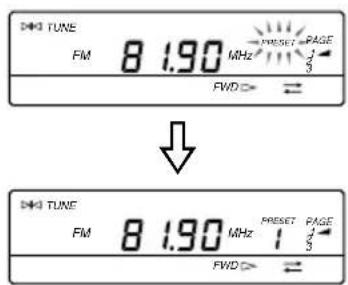
The broadcast station is assigned to the selected number.
Various tuning methods for optimum reception (continued)
Tuning in to a preset broadcast station
1 Turn on the radio.
2 Press PAGE repeatedly to select the page which contains the desired preset broadcast station you wish to tune in to.
3 Press the numeric button (0–9) to which the desired broadcast station you wish to tune in to is assigned.
The desired preset broadcast station is received.
Receiving SSB and CW Transmissions
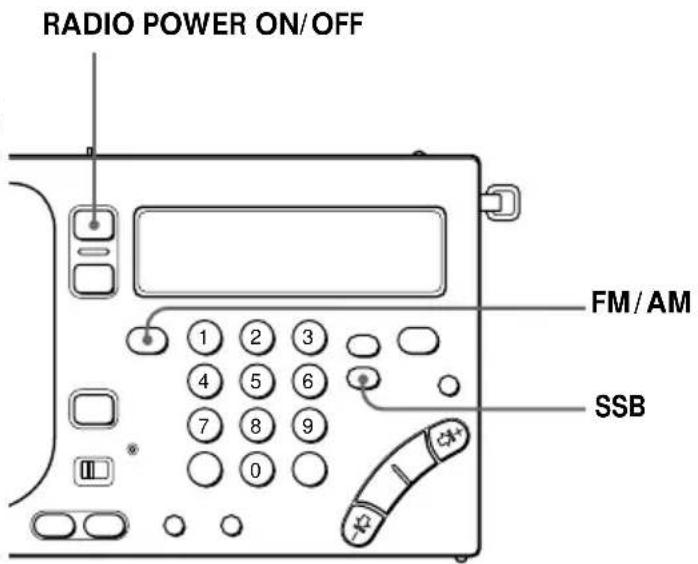
You can receive SSB (Single Side Band) and CW (Continuous Wave) transmissions with the built-in BFO circuit.
Tip
For more details on SSB and CW, refer to "Tips on radio waves" on page 47.
1 Turn on the radio.
2 Press FM/AM to select AM.
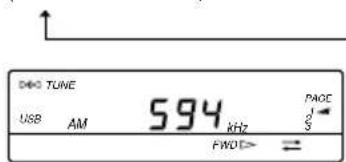
3 Press SSB to select USB or LSB/CW.
Each time SSB is pressed, the display changes in the following order:
(Normal mode) USB LSB/CW.
4 Tune in to the desired broadcast station.
Refer to pages 8 and 14–18.
Receiving optimum AM broadcast
—Synchronous detection
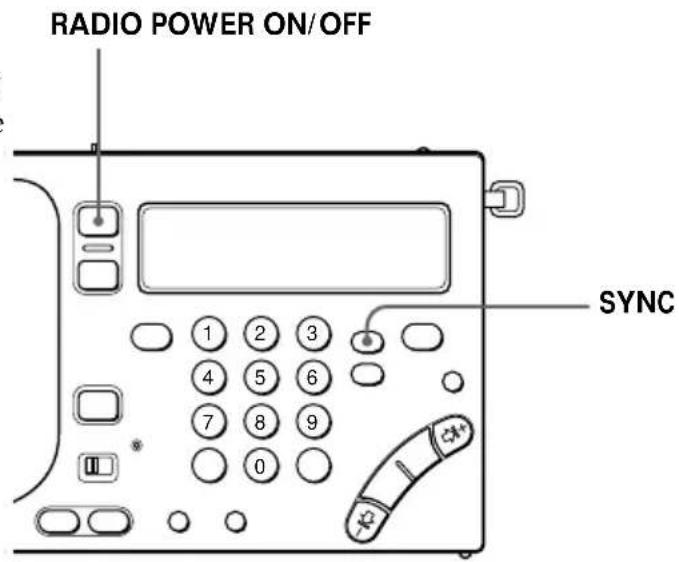
You can receive AM broadcast (especially SW broadcast) under optimum condition with the synchronous detection circuit.
Tip
For more details on synchronous detection, refer to "Tips on radio waves" on page 47.
Notes
- If neither SYNC U nor SYNC L improves AM reception, or if the reception deteriorates even further, press SYNC again to cancel the synchronous detection mode. "LOCK" in the display disappears.
• The synchronous detection may be cancelled when the Main/radio batteries become weak.
1 Turn on the radio.
2 Tune in to the desired broadcast station.
Refer to pages 8 and 14–18.
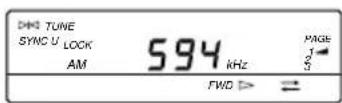
3 Press SYNC to select SYNC U or SYNC L to obtain optimum AM reception.
Each time SYNC is pressed, the display changes in the following order:

flowchart
graph TD
    A["(Normal mode)"] --> B["SYNC U"]
    B --> C["SYNC L"]
"LOCK" appears in the display when the synchronous detection mode is operating.
Changing the MW channel step for use in foreign countries
The channel step differs depending on the area to match the frequency allocation system of the country. Change the MW channel step as necessary.
North and South American countries:
10 kHz
Japan, Europe, and other countries:
9 kHz
Notes
- When you have entered the wrong MW channel step in step 3, press DIRECT to cancel the current entry and enter the correct value.
- "TRY AGAIN!" flashes when the MW channel step entered is invalid (i.e., not 9 or 1 and 0). Repeat from step 2 again.
- Complete each button operation in steps 2 to 4 within 10 seconds. If the clock display returns, repeat from step 2 again.
1 Turn off the radio.
2 Press DIRECT.
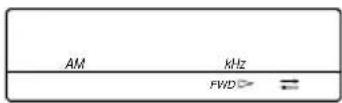
3 Press the numeric buttons (1, 9 and 0) to enter the desired MW channel step (9 or 1 and 0).
4 Press EXE.
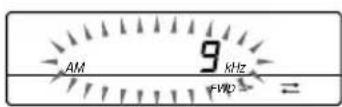
The MW channel step flashes for about 3 seconds and then the clock display returns.
Connecting an external antenna for optimum reception
Tips
- When extending the cord and case of the supplied SW compact antenna outside the window, make sure that doing so will not pose any threat or danger to you and others. In addition, make sure to secure firmly so as not to drop the SW compact antenna.
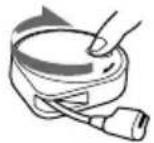
• After using the SW compact antenna, turn the reel in the direction of the arrow to wind up the cord.
Using the supplied SW antenna
Under normal conditions, the telescopic antenna is sufficient for optimal SW reception. However, the use of the supplied SW antenna is recommended if the reception is poor when listening to the radio inside a building due to concrete and metal obstructions.
For the compact antenna (AN-71) supplied with ICF-SW1000T
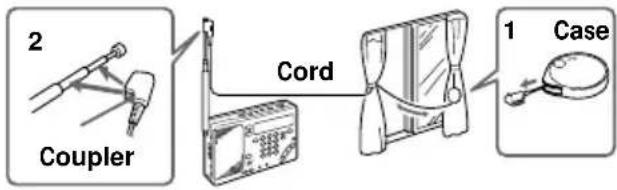
flowchart
graph LR
    A["1 Case"] --> B["Cord"]
    B --> C["Coupler"]
    C --> D["2 Coupler"]
1 Fully pull out the cord from the case.
2 Attach the coupler to the telescopic antenna.
3 If the window can be opened, gently extend the cord with the case outside the window after making sure that doing so will not pose any danger.
If the window cannot be opened, fully extend the cord along the frame of the window.
For the active antenna (AN-LP1) supplied with ICF-SW1000TS
Before operating the unit, please read the instructions manual for AN-LP1.
Notes
- Connect the recommended antennas only to the AM EXT ANT jack of the unit. The AM EXT ANT jack supplies a 3 V DC power output to the recommended antennas. Failure to use the recommended antennas where applicable may lead to the malfunction of the unit.
- Keep the unit and antenna away from fluorescent lights, televisions, and computers which may generate noise.
- When receiving MW or LW broadcasts without using the external MW/LW antenna, make sure to disconnect the SW external antenna where applicable. If not, the built-in ferrite bar antenna will not operate and MW/LW broadcast will not be received successfully.
- Retract the telescopic antenna when using an external antenna.
- Set up the external antenna as far away from the street as possible.
- For more details on the external antenna, refer to its Operating Instructions manual.
Using the wide range antenna (not supplied)
Use the wide range antenna AN-1 or AN-102 (not supplied) to improve SW, MW and LW receptions as necessary. Wide range antenna usage will differ for SW and MW/LW receptions as described below.
For SW reception
Use the connection cord supplied with the AN-1 or AN-102 to connect between the OUTPUT jack of the antenna controller and the AM EXT ANT jack of this unit.
For MW/LW reception
1 Use the connection cord and antenna coupler supplied with the AN-1 or AN-102 to connect between the OUTPUT jack of the antenna controller and the INPUT jack of the antenna coupler.
2 Position the antenna coupler near the unit where MW/LW reception is optimal.
Retract the telescopic antenna.
When AN-1 is used.
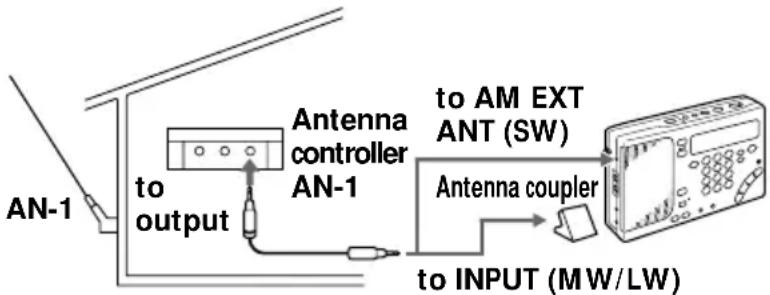
Notes
- Connect the recommended active antenna only to the AM EXT ANT jack of the unit. The AM EXT ANT jack supplies a 3 V DC power output to the recommended active antenna. Failure to use the recommended active antenna where applicable may lead to the malfunction of the unit.
- Keep the unit and active antenna away from fluorescent lights, televisions, and computers which may generate noise.
Using the active antenna AN-100A (not supplied) (not available in the U.S. and Canada)
When using the active antenna, retract the telescopic antenna.
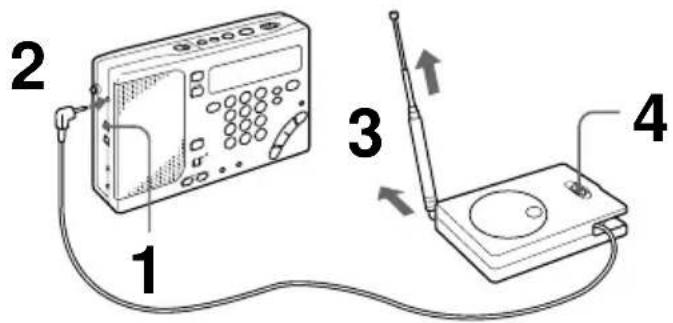
1 Set SENS to DX.
2 Pull out the output cable from the active antenna and plug it into the AM EXT ANT jack of this unit.
3 Gently pull out the telescopic antenna of the active antenna to its full length.
When listening to a radio indoors, place the unit and the active antenna near a window for optimum reception.
4 Set AM BPF FREQ of the active antenna to WIDE. When the reception is distorted and unsatisfactory, set it to a suitable frequency range for optimum reception.
5 Press RADIO POWER ON/OFF to turn on the radio and tune in to the desired broadcast station.
For optimum reception place the unit and active antenna near a window. However, it is also possible to place the unit and active antenna on the floor.
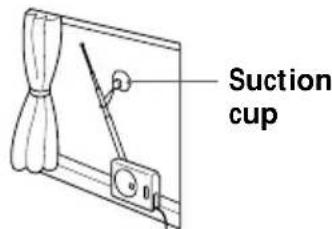
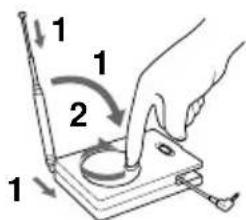
Fix the telescopic antenna with the supplied suction cup.
After using the active antenna AN-100A
1 Retract and collapse the telescopic antenna of the active antenna.
2 Turn the reel in the direction of the arrow to wind up the output cable.
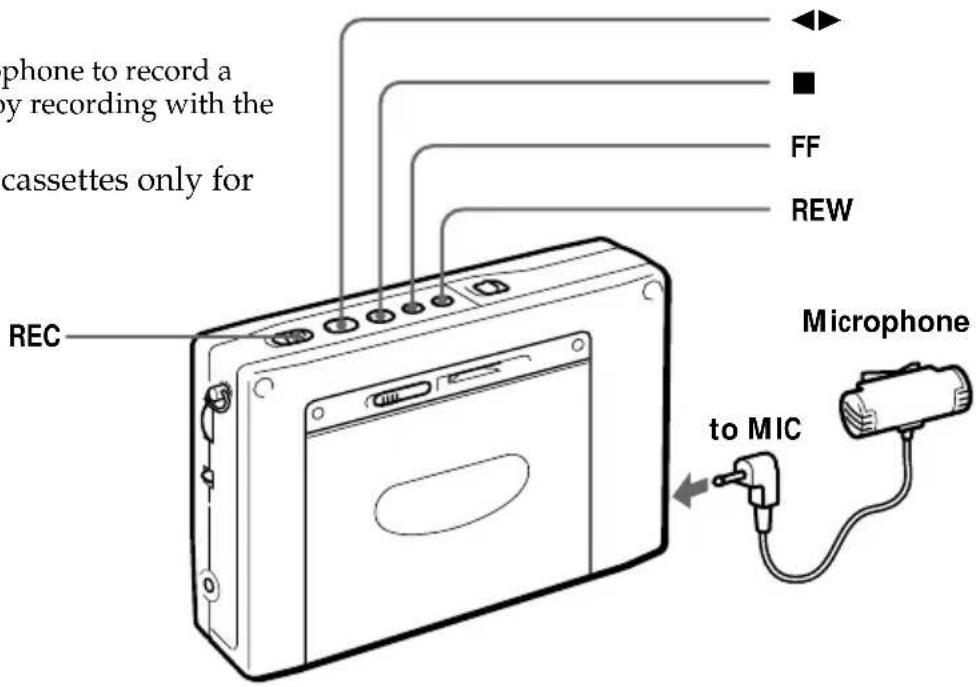
Recording with a microphone
Use the supplied microphone to record a meeting, or simply enjoy recording with the microphone.
Use Type I (normal) cassettes only for recording.
Notes
- If acoustic feedback (howling) occurs, turn down the volume or move the microphone away from the headphones.
- Keep the microphone away from fluorescent lights and electrical cords which may generate noise while recording.
Tip
There is no speaker output when recording with the microphone. To monitor the sound being recorded, plug the stereo headphones.
1 Insert a cassette.
Insert the cassette with the side you wish to record facing the cassette holder.
Before inserting a cassette, make sure that the cassette tab is not broken off.
A cassette with a broken tab cannot be recorded.
2 Select whether you wish to record one side or both sides of the cassette.
To record one side ⇌: Press FF while pressing ■.
To record both sides →: Press REW while pressing ■.
3 Make sure that the cassette is inserted with the side you wish to record facing the cassette holder.
Press ◀▶ while pressing ■ to display "FWD ▷".
4 Connect the supplied microphone to the MIC jack of the unit.
5 Start recording.
To stop recording
Press ■.
To record the side facing the unit (reverse side)
Insert the cassette with the side you wish to record facing the unit (reverse side). Press ◀▶ while pressing ■ to display “◀ REV”.
Recording stops on the side facing the unit regardless of whether one side or both sides is selected.
Tips
- When the supplied microphone is connected, power is supplied from the unit.
The supplied microphone is a plug-in-power type and should be connected to MIC jacks of cassette recorders that are compatible with the plug-in-power type only.
• To prevent accidental operations of the buttons, use the hold function (see page 32).
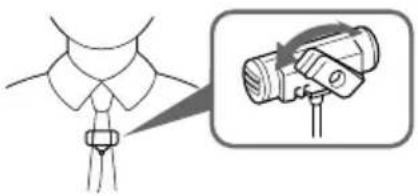
Using the supplied microphone
The clip of the supplied microphone can be swiveled in the desired direction and fastened for your convenience.
natural_image
Illustration of a person's collar with a belt buckle and a close-up of a flashlight mounted on a stand (no text or symbols)Notes on recording
Recording level
The recording level is fixed. Adjusting VOLUME and TONE does not affect the sound to be recorded.
Recording with the supplied microphone
- Before inserting a cassette, make sure that the cassette tab is not broken off. A cassette with a broken tab cannot be recorded to prevent accidental recording of your important cassette. If you wish to use the cassette for recording again, cover the opening of the broken tab with adhesive tape.
- Operate REC approximately 2 seconds prior to the point you wish to begin recording. If not, the leading segment may not be recorded.
- Switching the recording side is not possible when ◀▶ is pressed during recording.
To wake up to the desired broadcast
—Standby function
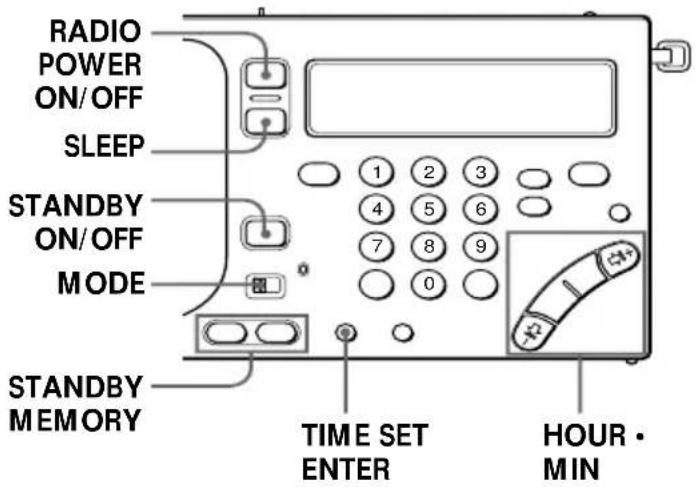
The standby function enables you to turn on the radio and tune in to your favorite broadcast station at the desired time. The standby function features a dual alarm so that you can enter two different preset times. Before using the standby function, make sure that the clock is set correctly (see page 7).
Note
Make sure that the radio is turned off before setting the desired standby time. You cannot set the standby time when the radio or cassette is operating.
1 Tune in to the desired broadcast station you wish to preset.
2 Adjust VOLUME as necessary.
3 Press a or b of STANDBY MEMORY while pressing ENTER.
The broadcast station is assigned to the selected button.
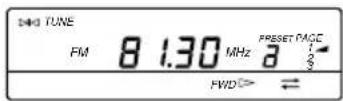
4 Turn off the radio.
5 Press HOUR or MIN repeatedly while pressing either a or b of STANDBY MEMORY (which you pressed in step 3) to set the desired standby time for the radio to turn on.
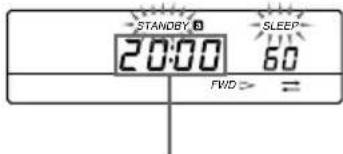
Display the desired standby time for the radio to turn on.
Tip
To temporarily cancel the standby function, slide HOLD in the direction of the arrow to display "○—" while the radio is turned off. When "○—" in the display disappears, the standby function is operational (see page 32).
Notes
- When you set STANDBY a and STANDBY b, and the preset standby time arrives while the other standby function is operating, the most recent standby function will have priority over the other and receive the appropriate broadcast.
- Once you preset the desired standby time, the radio turns on at the preset time everyday.
- When the preset standby time arrives while the radio or cassette is operated, the standby function will have priority over the current operation and receive the appropriate broadcast automatically. If you set STANDBY
a and STANDBY b to an identical preset time, only STANDBY a operates.
6 Press SLEEP repeatedly while pressing either a or b of STANDBY MEMORY (which you pressed in step 3) to set the desired duration for the operation of the radio.
Each time SLEEP is pressed, the display changes in the following order: 60 (minutes) → 50 → 40 → 30 → 20 → 10 → 90 → 80 → 70
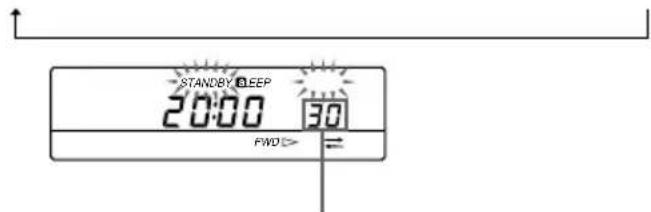
Display the desired duration for the operation of the radio.
The clock display returns when a or b is released.
7 Press STANDBY ON/OFF repeatedly to display "STANDBY a" or "STANDBY b" (which you selected in step 3).
Each time STANDBY ON/OFF is pressed, the display changes in the following order:
STANDBY a → STANDBY b → STANDBY a b → (None)
8 Set MODE to RADIO.
When the preset standby time arrives, the preset broadcast station is received. After the preset duration for the operation of the radio has elapsed, the radio turns off.
To check the preset standby time
Press a or b of STANDBY MEMORY. The preset standby time and preset duration for the operation of the radio are displayed while the button is pressed.
To change the preset standby time
Repeat steps 5 through 7 to change the existing preset standby time.
To cancel the standby function
Press STANDBY ON/OFF repeatedly so that "STANDBY" in the display disappears.
To fall asleep while listening to the desired broadcast—Sleep timer
You can turn off the radio automatically after a specified number of minutes (10–90 minutes) with the sleep timer function.
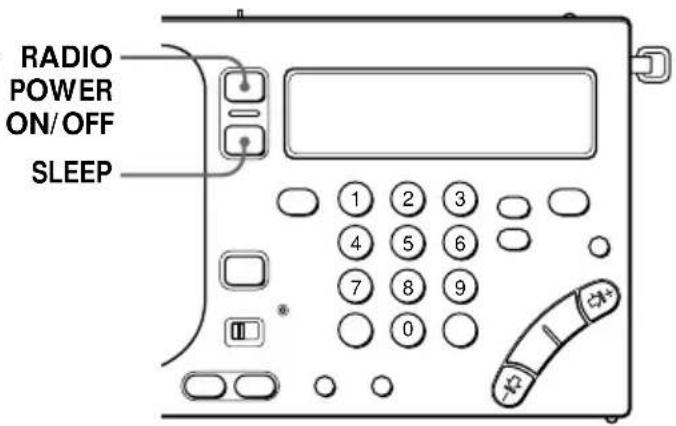
Tip
The previously tuned broadcast station is received when SLEEP is pressed to turn on the radio.
Note
Repeat from step 1 again if the sleep timer begins before you have set the desired duration. The sleep timer begins automatically after about 5 seconds when SLEEP is released.
Note
When the sleep timer is activated while recording the radio, the recording will stop and the power will turn off.
1 Press SLEEP.
The radio turns on. "SLEEP" flashes and the duration for the operation of the sleep timer (60 minutes) appears in the display.
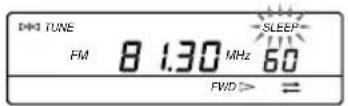
2 Press SLEEP repeatedly to display the desired duration for the operation of the sleep timer.
Each time SLEEP is pressed, the display changes in the following order: 60 (minutes) → 50 → 40 → 30 → 20 → 10 → 90 → 80 → 70
Sleep timer begins after "SLEEP" stops flashing and remains in the display, and the duration for the operation of the sleep timer disappears.
3 Tune in to the desired broadcast station.
The radio turns off automatically after the selected duration for the operation of the sleep timer elapses.
To change the preset duration for the operation of the sleep timer
Press SLEEP repeatedly to display the desired duration for the operation of the sleep timer.
To turn off the radio before the preset duration has elapsed
Press RADIO POWER ON/OFF.
To record the desired broadcast with the timer—Timer recording
The timer recording function enables you to turn on the radio and tune in to your favorite broadcast station at the desired time for recording. Use the timer recording function when you wish to record a broadcast while away or unattended. Before using the timer recording function, make sure that the clock is set correctly (see page 7).
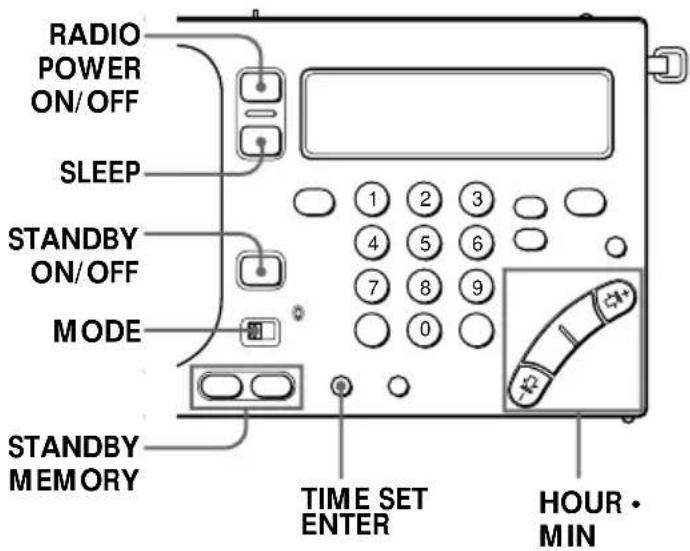
Note
Make sure that the radio is turned off before setting the desired standby time. You cannot set the standby time when the radio or cassette is operating.
1 Insert a cassette.
Insert the cassette with the side you wish to record facing the cassette holder.
2 Tune in to the desired broadcast station you wish to record.
Adjusting VOLUME and TONE does not affect the sound to be recorded.
3 Press a or b of STANDBY MEMORY while pressing ENTER.
The broadcast station is assigned to the selected button.
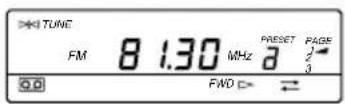
4 Turn off the radio.
5 Press HOUR or MIN repeatedly while pressing either a or b of STANDBY MEMORY (which you pressed in step 3) to set the desired standby time for the radio to turn on for recording.
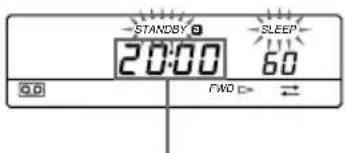
Display the desired standby time for the radio to turn on for recording.
Tip
To temporarily cancel the standby function, slide HOLD in the direction of the arrow to display “○—” while the radio is turned off. When “○—” in the display disappears, the standby function is operational (see page 32).
Notes
- When you set STANDBY a and STANDBY b, and the preset standby time arrives while the other standby function (timer recording) is operating, the most recent standby function will have priority over the other and record the appropriate broadcast.
- Once you preset the desired standby time, the radio operates at the preset time everyday.
- When the preset standby time arrives while the radio or cassette is operated, the standby function will have priority over the current operation and record the appropriate broadcast automatically.
- If you set STANDBY a and STANDBY b to an identical preset time, only STANDBY a operates.
- When a cassette is not inserted, or the tab of the cassette is broken, recording is not possible. Instead, the radio will receive the appropriate broadcast.
6 Press SLEEP repeatedly while pressing either a or b of STANDBY MEMORY (which you pressed in step 3) to set the desired duration for the operation of the radio.
Each time SLEEP is pressed, the display changes in the following order: 60 (minutes) → 50 → 40 → 30 → 20 → 10 → 90 → 80 → 70
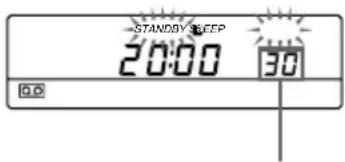
Display the desired duration for the operation of the radio.
The clock display returns when a or b is released.
7 Press STANDBY ON/OFF repeatedly to display "STANDBY a" or "STANDBY b" (which you selected in step 3).
Each time STANDBY ON/OFF is pressed, the display changes in the following order:
STANDBY a → STANDBY b → STANDBY a b → (None)
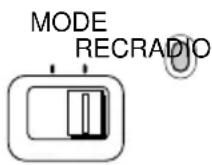
8 Set MODE to REC.
The indicator beside the switch turns red.
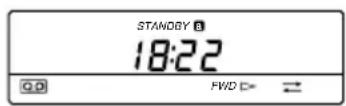
When the preset standby time arrives, the preset broadcast station is received and recorded. After the preset duration for the operation of the radio has elapsed, the radio and recording operation will turn off.
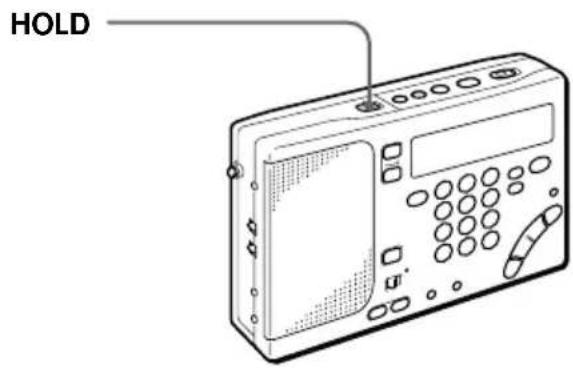
Using the hold function to prevent accidental operations HOLD
When the hold function is used, all buttons are locked and are not operational.
When carrying the unit or operating the radio or cassette, use the hold function to prevent accidental operations.
In addition, use the hold function to temporarily cancel the standby function (see pages 28 and 31).
Tip
When the hold function is used, the illumination of the display is turned off.
Note
The hold function cannot be used to hold cue and review operations.
Slide HOLD in the direction of the arrow to display "○—". All buttons are locked and are not operational when "○—" is displayed.
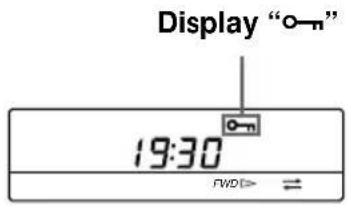
To cancel the hold function
Slide HOLD in the opposite direction of the arrow so that “○—” disappears in the display.
To temporarily cancel the standby and timer recording functions
When the hold functions is used, the standby and timer recording functions are temporarily canceled. This is applicable when the radio is not operating only.
Attaching the strap
Attach the supplied strap to facilitate handling of the unit. In addition, you can use the strap as a stand.
To attach
Attach the strap to the fixture on the side of the unit as shown.
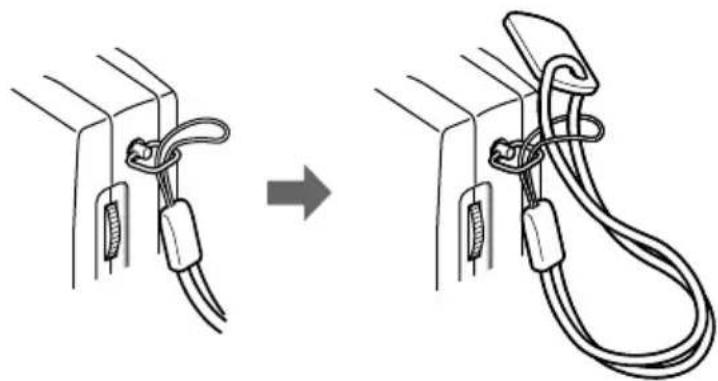
natural_image
Diagram showing two cable assemblies with coiled wires, one being lifted and the other attached (no text or symbols)Using the stand
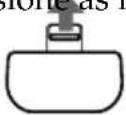
Insert the tab of the strap into the slot on the rear side of the unit as shown.
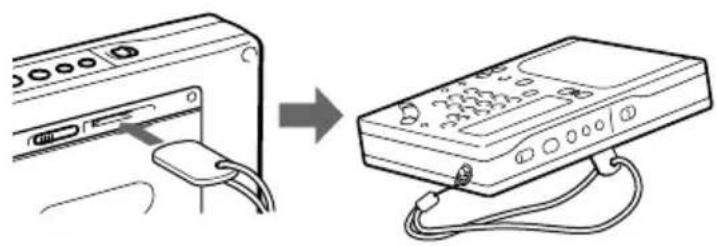
natural_image
Diagram showing a device connected to an open box via cable, with no visible text or symbols.Replacing the batteries
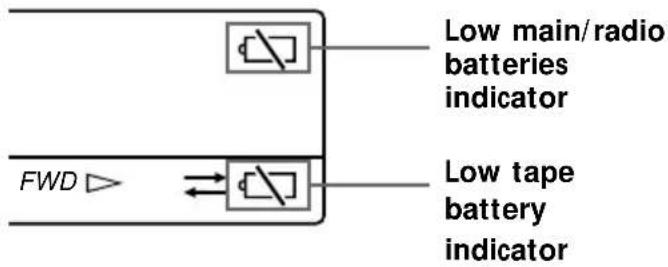
Notes
- Replace the batteries within 3 minutes after the batteries are removed from the holders.
Otherwise, the preset broadcast stations and clock settings will be erased. In this case, preset the broadcast stations and set the time again.
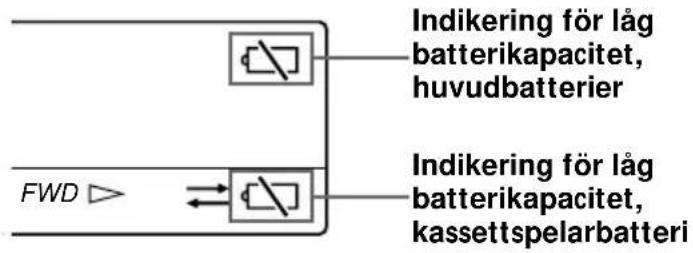
- “☐” will disappear in the display when the radio or tape is operated after the batteries are replace.
Main/radio batteries
Radio or tape stops operating, and “☐” will flash in the display when the main/radio batteries require replacement. Replace with two new R6 (size AA) batteries.
When the batteries are completely exhausted, "☐" stops flashing and remains in the display. All operations will not be possible.
Tape battery
The tape battery supplies the necessary power to drive the motor for tape operation. Sound quality will deteriorate, tape operation will become unstable, and “☐” will flash in the display when the tape battery requires replacement. Replace with a new R6 (size AA) battery.
When the battery is completely exhausted, "☐" stops flashing and remains in the display. All operations will not be possible.
Battery Life (Approx. hours)
(JEITA*)
| Sony R6 alkaline Sony R6 (size AA) (size AA)Main batteries Tape battery Main batteries Tape battery | |
| Tape Playback | approx. 37 approx. 11 approx. 14 approx. 3.5 |
| Radio FM approx. | 27 — approx. 9 — |
| Play AM approx. | 21 — approx. 7 — |
| MIC recording | approx. 36 approx. 11 approx. 13 approx. 3.5 |
| Radio FM approx. | 18 approx. 11 approx. 6.5 approx. 3.5 |
| Recording AM approx. | 15 approx. 11 approx. 5 approx. 3.5 |
* Measured by JEITA (Japan Electronics and Information Technology Industries Association) standards. The actual battery life may vary depending on the circumstance of the unit.
Operating with house current
Notes
- When the AC power adaptor is connected to the DC IN 3V jack of the unit, the internal batteries are automatically disconnected. Power is automatically supplied from the external power source.
- While using the wall outlet, the display is lit constantly. However, the display disappears when the Hold function is used.
House current
To operate the unit with house current, connect the optional AC power adaptor AC-E30HG (supplied only to models of ICF-SW1000TS for areas except Central and South America and Australia) to the DC IN 3V jack of the unit.
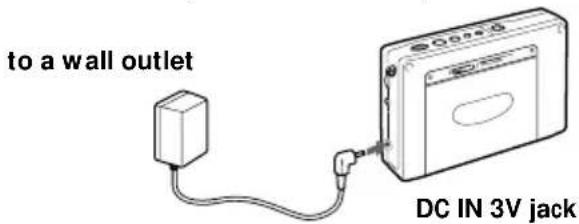
Notes on the AC power adaptor
- Do not bend or twist the power cord unnecessarily and do not place heavy objects on the power cord.
- When disconnecting the AC power adaptor from the wall outlet, pull out by the plug. Do not pull the power cord.
- Disconnect the AC power adaptor from the wall outlet when the unit is not to be used for a long period of time. Make sure to pull out by the plug.
Notes on external power sources
- When operating the unit with an external power source, do not remove the batteries in the RADIO BATT battery holder which serve as a backup of the memory. Replace the batteries regularly once a year.
- When operating the unit with the internal batteries, remove the AC power adaptor in the following order: ① disconnect from the wall outlet, and ② disconnect from the DC IN 3V jack of the unit. Make sure that the plug of the external power source is disconnected before operating the unit.
- When connecting and disconnecting the external power source plug, be sure to turn off the unit. Otherwise, the power will go off and "☐" may be displayed. If this occurs, turn the unit on again and "☐" will disappear.
- Use the recommended Sony AC power adaptor only. The polarity of the plugs of other manufacturers may be different. Failure to use the recommended AC power adaptor may lead to the malfunction of the unit.
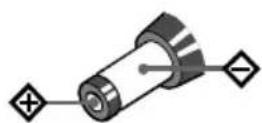
Polarity of the plug
Location of controls
Refer to the pages indicated in () for details.
Front
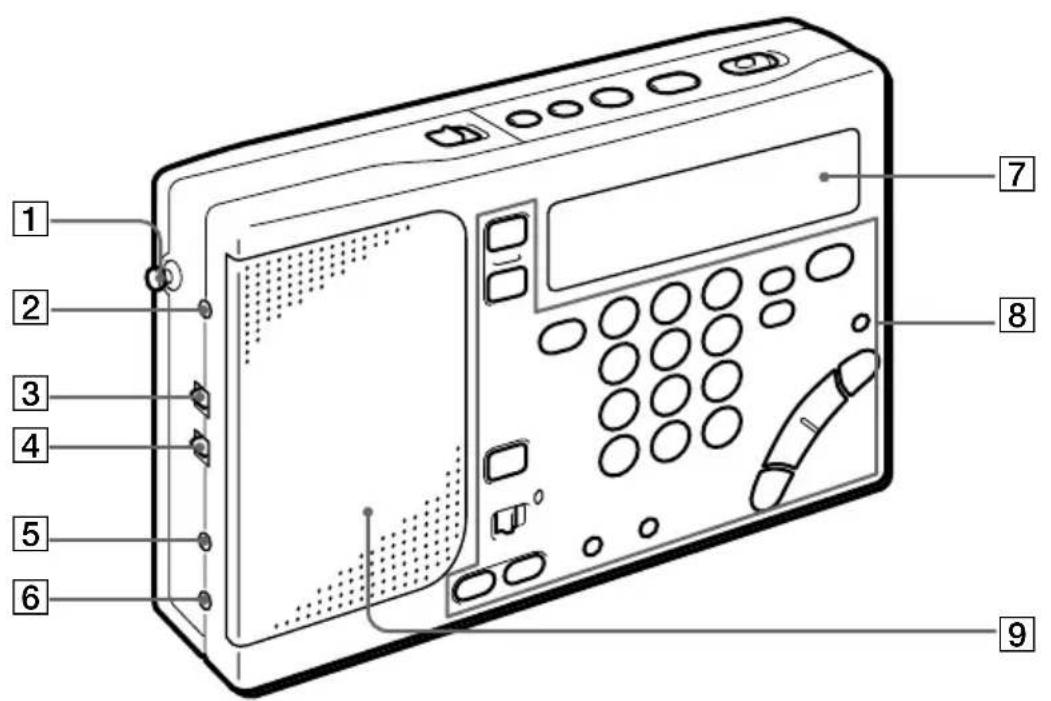
1Telescopic antenna (9)
2 AM EXT ANT jack (22)
③SENS DX•LOCAL (FM/AM sensitivity) selector (9)
4ST•MONO (stereo/monaural) selector (9)
5MIC jack (25)
6 (headphones) jack
7Display
8Control panel
9Speaker
Rear
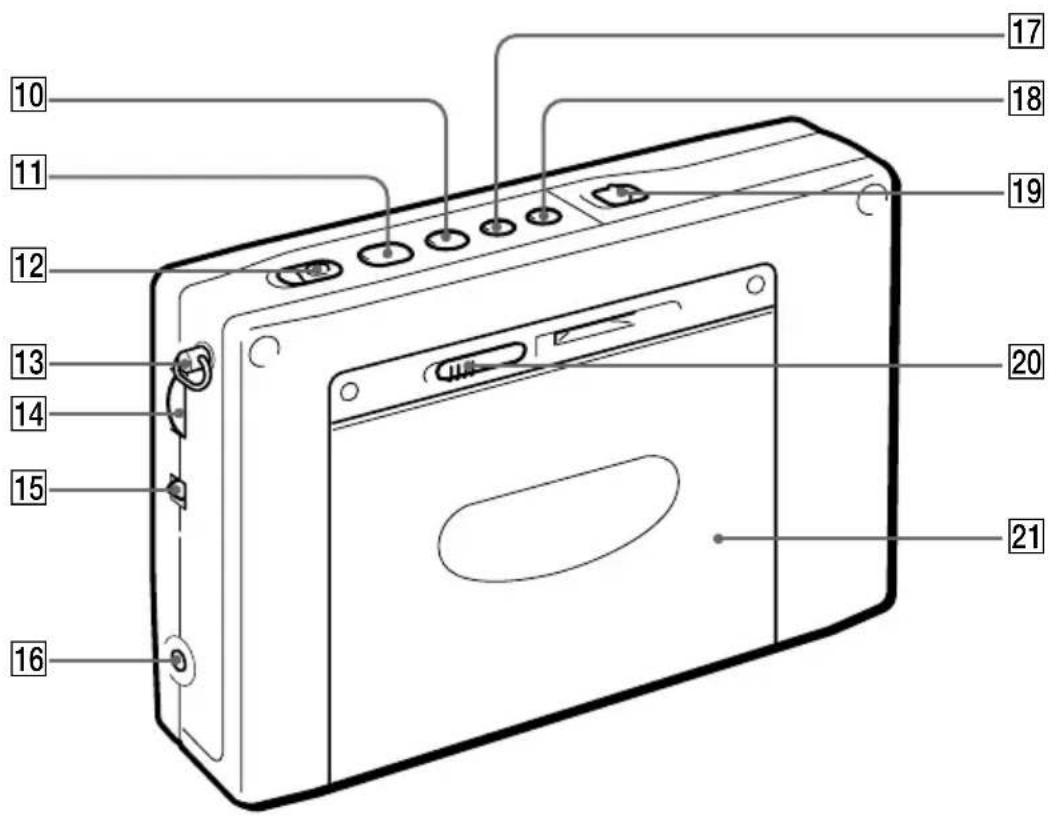
10 ■ (stop) button (10, 11)
11 ◀▶ (play) button (10, 11)
12REC (record) switch (13)
13 Hand strap retainer (33)
14VOLUME control (9)
15 TONE selector (9)
16DC IN 3V ◇◆◆ (external power input) jack (35)
17FF (fast forward) button (11)
18REW (rewind) button (11)
19HOLD switch (32)
20 ◀ OPEN (cassette compartment opener) control (10)
21 Cassette compartment
Control panel
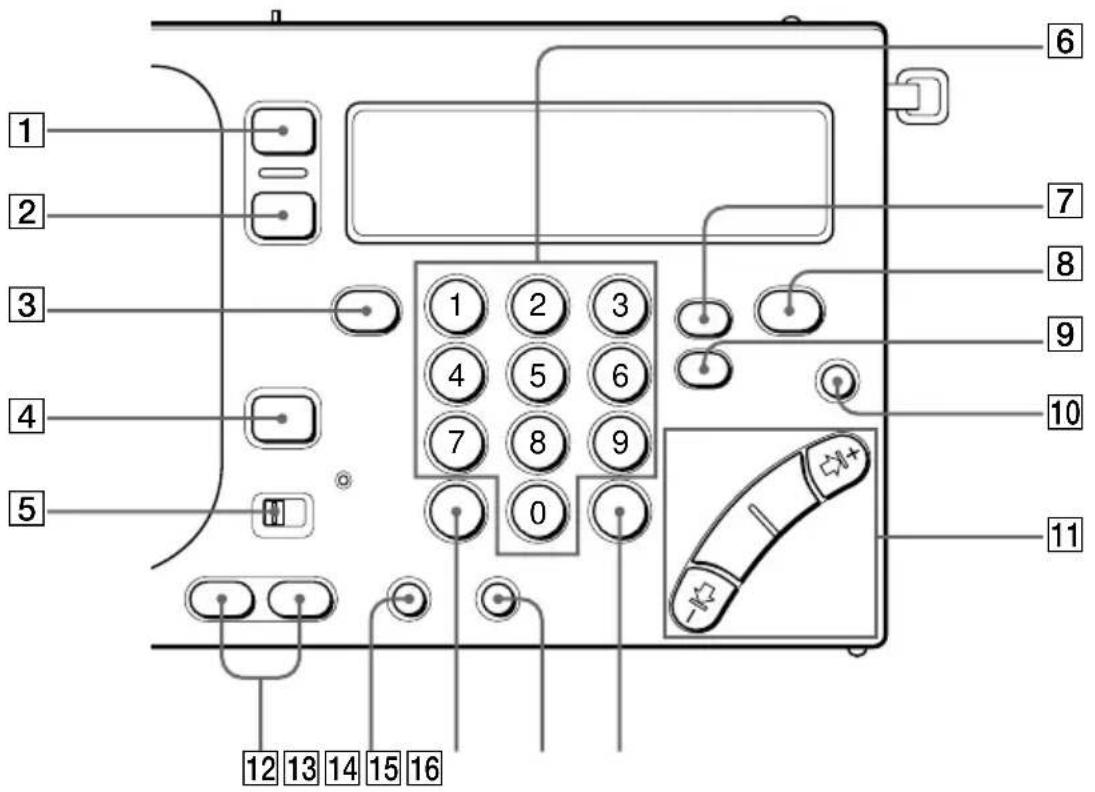
1 RADIO POWER ON/OFF button (8)
2SLEEP button (29)
3FM/AM button (8)
4STANDBY ON/OFF button (27)
5MODE selector (28)
6 MEMORY PRESET/DIRECT TUNE numeric buttons (16, 17)
7SYNC (Synchronous detection) button (20)
⑧PAGE button (17, 18)
9SSB (Single Side Band) button (19)
10 LIGHT button
Press this button to turn on the light for about 20 seconds for display viewing in the dark.
11 MANUAL TUNE/
SCAN•STANDBY TIME SET/
TIME SET buttons (8)
12 STANDBY MEMORY • STANDBY TIME SET buttons (27, 30)
13 ENTER•TIME SET button (7, 17)
14 DIRECT button (16)
15 AM BAND button (8)
16 EXE • DISPLAY button (7, 16)
Press this button to display the clock while operating the radio or cassette.
Press again to return to the previous display.
Base
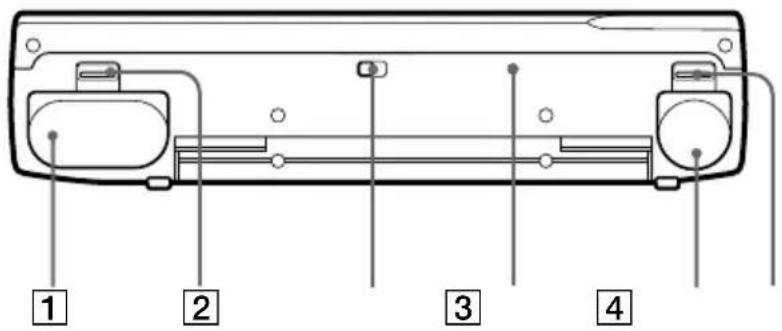
5 6
1 RADIO BATT battery holder (6)
② OPEN (RADIO BATT opener) control (6)
③ISS (AM interference suppression) selector (13)
4 RESET button
Press this button with a pointed object when the unit fails to function properly. When this button is pressed, the preset broadcast stations and the clock settings are erased.
5 TAPE BATT battery holder (6)
⑥ OPEN (TAPE BATT opener) control (6)
Display
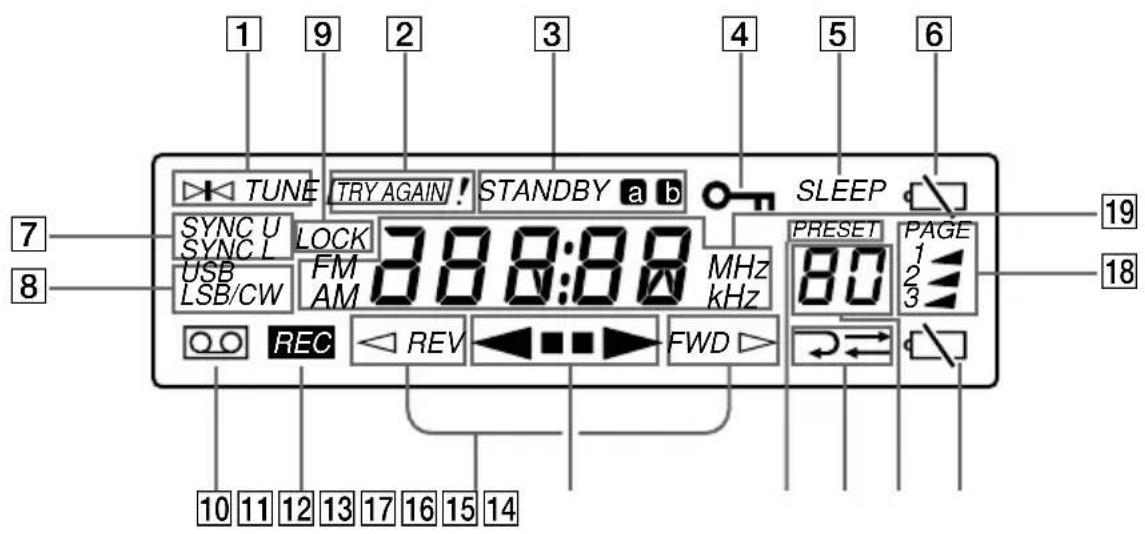
1 TUNE indicator (16)
Appears when a broadcast station is tuned.
②TRY AGAIN! indicator (16, 21)
Flashes when an invalid MW tune interval or an invalid frequency (direct tuning) is entered.
3 STANDBY a / b indicators (27, 30)
Appear when the standby function is operational.
4HOLD indicator (32)
Appears when the HOLD function is operational. All buttons will be locked and will not be operational.
5SLEEP indicator (29)
Appears when the sleep timer is operational.
6 (low radio batteries) indicator (34)
7SYNC U/SYNC L (synchronous detection) indicators (20)
⑧USB/LSB/CW (single side band/continuous wave) indicators (19)
9 LOCK (synchronous detection) indicator (20)
Appears when synchronous detection mode is operational.
10 (cassette) indicator Appears when a cassette is inserted.
11REC (record) indicator
12 REV/FWD (tape direction) indicators (10)
◀ REV appears when the current tape direction is the side facing the unit (reverse side). FWD ▷ appears when the current tape direction is the side facing the cassette compartment cover.
13◀ ▪▶ (tape operation) indicators
14PRESET indicator
15 ⇌/⇌ ( playback/recording mode) indicators (10)
16 Preset number/sleep duration display (17, 18, 29)
17 (low tape battery) indicator (34)
18PAGE (page number) indicators (17)
19 Frequency/time/tape operation display
Precautions and Maintenance
On battery
- Insert the batteries with the correct polarity.
- Do not mix new and used batteries.
• The batteries cannot be charged. - Remove the batteries when the unit will not be used for a long time.
- Should any battery leakage occur, wipe the battery case well and install new batteries.
On placement
- Do not leave the unit in a location near heat sources, or in a place subject to direct sunlight, excessive dust or mechanical shock.
- If the unit is left in a car parked in the sun, be sure to choose a location in the car where the unit will not be subjected to the direct rays of the sun.
- Use the unit within a temperature range of 0^ to 40^ (32°F to 104°F). If it is used in temperatures outside this range, an irregular display (i.e., 88.88...) may appear. If it is used in temperatures lower than this range, the display may change very slowly. These irregularities will disappear and there will be no damage to the unit when the unit is used in its recommended temperature range.
- In vehicles or buildings, radio-reception may be difficult or noisy. Try listening near a window.
- Reception of around 3.64 MHz may be difficult because of internal spurious signals generated by the built-in oscillators.
On safety
- The unit is not disconnected from the AC power source (mains) as long as it is connected to the wall outlet, even if the unit itself has been turned off.
- Disconnect the AC power adaptor from the wall outlet when the unit is not to be used for a long period of time.
- The name plate indicating operating voltage, etc., is located at the rear of the unit.
- Should any solid object or liquid fall into the unit, unplug the unit, and have it checked by qualified personnel before operating it any further. Make sure that no liquid or foreign material enters the DC IN 3V jack of the unit. This may lead to the malfunction of the unit.
- When the casing becomes soiled, clean it with a soft dry cloth dampened with mild detergent solution. Never use abrasive cleansers or chemical solvents, as they may mar the casing.
- Since a strong magnet is used for the speaker, keep personal credit cards using magnetic coding or spring-wound watches away from the unit to prevent them from possible damage caused by the magnet.
- When there is lightning and you are using an external antenna, immediately disconnect the AC power adaptor (if connected) from the wall outlet. Never touch the antenna wire when there is a lightning storm.
- Never connect a ground wire to a gas pipe
On cassette-corder Cleaning the tape head and tape path
Use the optional cleaning tape Sony KK-WM1 to clean the heads, pinch rollers and capstans regularly after 10 hours of operation for optimum playback and recording quality.
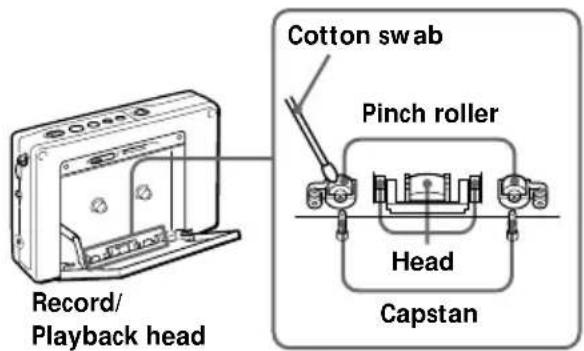
When the unit is not used for an extended period of time
The first few minutes of the operation may be unstable following an extended period of non-usage.
Use of a cassette with more than 90 minutes of play time
The use of a cassette with more than 90 minutes of play time is not recommended except for long, continuous recording or playback.
Service and repair
When bringing your unit for service and repair, take note of your important settings in the memory. The settings may be deleted depending on the type of repair necessary.
If you have any questions or problems concerning your unit, please consult your nearest Sony dealer.
Make a note of your important preset broadcast stations prior to servicing by qualified personnel.
Troubleshooting
Troubleshooting describes possible causes and remedies for common problems you may have with your unit.
| Symptom | Cause | Remedy | |
| General | The buttons are not operating. | · The HOLD function is operating. | · Slide HOLD in the opposite direction of the arrow so that “○—” in the display disappears. |
| The power is not turned on when RADIO POWER ON/OFF is pressed. | · Incorrect polarity of batteries.· The batteries are weak (“▽” flashes in the display).· The AC power adaptor is disconnected. | · Insert the batteries with the correct ⊕● polarity.· Replace with new batteries.· Check and make sure that the AC power adaptor is connected properly. | |
| The display is not operating. | · Incorrect polarity of batteries.· The batteries are weak (“▽” flashes in the display). | · Insert the batteries with the correct ⊕● polarity.· Replace with new batteries. | |
| The display is dim. | · The unit is being used in extremely low temperatures or in a place with excessive moisture. | · Avoid subjecting the unit to extremely high temperatures or excessive moisture. | |
| The display appears slowly. | · The unit is being used in extremely low temperatures. | · Avoid subjecting the unit to extremely low temperatures. | |
| There is no sound output. | · VOLUME is turned down completely.· The stereo headphones are plugged in.· Incorrect polarity of batteries. | · Adjust VOLUME to the desired setting.· Unplug the stereo head-phones as necessary.· Insert the batteries with the correct ⊕● polarity. | |
| Radio | Poor reception or unsatisfactory sound quality. | The batteries are weak ("▽" flashes in the display).Tuning and antenna orientation requires further adjustment.The radio signal is weak.SENS is set to LOCAL. | Replace with new batteries.Adjust tuning and the orientation of the antenna for optimum reception.Listen to the radio near a window when in a vehicle or building.Set SENS to DX. |
| Direct tuning is not operating. | Each button operation was not completed within 10 seconds. | Press the next button within 10 seconds. | |
| Presetting your favorite broadcast station is not possible. | An incorrect procedure is completed. | Press a numeric button (0-9) while pressing ENTER (see page 17). | |
| Instant recall of a preset broadcast station is not possible. | The number entered for the preset broadcast station is incorrect.The preset broadcast stations are erased because the batteries were not replaced within 3 minutes after their removal from the holders. | Enter the correct button assigned to the desired preset broadcast station.Preset the broadcast stations again (see page 17). | |
| The radio is not turned on when the preset standby time arrives. | STANDBY ON/OFF is not pressed.The HOLD function is operating.The preset standby time is erased because the batteries were not replaced within 3 minutes after their removal from the holders.VOLUME is turned down completely. | Press STANDBY ON/OFF to successfully preset the standby time (see page 27).Slide HOLD in the opposite direction of the arrow so that "○¬" in the display disappears.Preset the standby time again.Adjust VOLUME to the desired setting. | |
| Cassette-Corder | The cassette recorder is not operating. | · The HOLD function is operating.· The batteries are not inserted into the RADIO BATT battery holder.· The battery in the TAPE BATT battery holder is weak ("▽" flashes in the display). | · Slide HOLD in the opposite direction of the arrow so that "○-n" in the display disappears.· Insert two R6 (size AA) batteries into the RADIO BATT battery holder.· Replace with a new battery. |
| Playback and recording of both sides of the cassette is not possible. | · ◀▶ is pressed while pressing ■ to display "◀ REV". | · Press ◀▶ while pressing ■ to display "FWD ▷". | |
| Recording is not possible. | · The cassette tab of the tape is broken off to prevent accidental recording of your important tape. | · If you wish to use the tape for recording again, cover the opening of the broken tab with adhesive tape. | |
| The timer recording function is not operating when the preset standby time arrives. | · MODE is set to RADIO. | · Set MODE to REC. | |
| A stereo-recordable source is recorded as monaural recording. | · ST·MONO is set to MONO. | · Set ST·MONO to ST. | |
| The sound output is poor and drops out. | · The tape head is dirty and requires cleaning. | · Clean the tape head and tape path (see page 42). |
Specifications
Radio section
Circuit system
FM: Super heterodyne
AM: Dual conversion super heterodyne
Frequency range
FM: 76–108 MHz
SW: 1,621–29,999 kHz
MW: 530–1,620 kHz
LW: 150–529 kHz
Intermediate frequency
FM: 10.7 MHz
SW/MW/LW: 55.845 MHz (1st)
455 kHz (2nd)
Cassette-Corder
Track system
Compact cassette stereo
Frequency response
Playback: 20-18,000 Hz
Recording/Playback: 70-8,000 Hz
General
Speaker
Approx. 45 mm ( 1^13/_16 inches) diameter, 8 ohms, one speaker system
Maximum output
250 mW (at 10 % harmonic distortion)
Power requirements
RADIO BATT: DC 3 V, two R6 (size AA)
batteries
TAPE BATT: DC 1.5 V, one R6 (size AA) battery
External power source
DC 3 V
Output
One Ⓝ (headphones) jack (stereo minijack)
16 ohms
Input
One mixing microphone input jack (stereo minijack)
Dimensions
Approx. 176 x 105 x 40 mm (w/h/d)
(7× 4^1 / 4× 1^5 / 8 inches incl. projecting parts)
Mass
Unit approx. 464 g (1 lb 0.4 oz)
Approx. 593 g (1 lb 4.9 oz) incl.
alkaline batteries, C-60HF tape,
headphones, and strap
Supplied accessories
Stereo headphones (1)
Ear pads (2)
Stereo microphone (1)
Compact antenna AN-71 (1)*1
Active antenna AN-LP1 (1) ^4
Carrying case (1)
Hand strap (1)
Wave Handbook (1)
AC power adaptor (1) ^*3
Optional accessories
AC power adaptor AC-E30HG *
LW/MW/SW wide range antenna AN-1,
AN-102, AN-100A *5
Your dealer may not handle some of the above listed optional accessories. Please ask your dealer for detailed information on the optional accessories available in your country.
Design and specifications are subject to change without notice.
*1 ICF-SW1000T only
*2 ICF-SW1000TS only
*3 ICF-SW1000TS only (models for areas except Central and South America and Australia)
*4 The operative voltage for the AC power adaptor is varied depending upon the country in which it is sold. Therefore, purchase the AC power adaptor in the country you intend to use it.
*5 Not available in the United States or Canada.
Tips on radio waves
What is SSB (Single Side Band)?
SSB is very popular among ham and business radio transmissions, and is commonly used in many amateur bands because of its superiority in signal intelligibility. Its impressive signal intelligibility is achieved with minimum interferences when compared to DSB (Double Side Band) owing to its half bandwidth structure.
In general, SSB transmissions employ the USB (Upper Side Band) modulation, while amateur band transmissions below 10 MHz employ the LSB (Lower Side Band) modulation.
Conventional radios without a BFO (Beat Frequency Oscillator) circuit cannot receive SSB transmissions successfully. This unit can receive SSB transmissions successfully with the built-in BFO (Beat Frequency Oscillator) circuit.
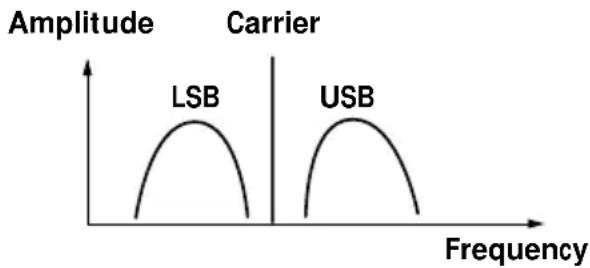
line
| Carrier | Frequency | Amplitude | |---------|-----------|-----------| | LSB | Low | High | | USB | High | Medium |What is CW (Continuous Wave)?
CW is also popular among ham and business radio transmissions. Unlike other signals, the amplitude of a carrier is not modulated for CW transmissions. CW transmissions convey information by interrupting the carrier and use Morse code as a means of communication.
This unit can receive CW transmissions successfully with the built-in BFO (Beat Frequency Oscillator) circuit as beat sound only. To fully comprehend the information transmitted by CW transmissions, an understanding of the Morse code is prerequisite.
What is synchronous detection?
There are two underlying obstacles in optimum AM reception: distortions due to fading and interferences from adjacent broadcast stations.
The synchronous detection is effective in solving these obstacles.
Distortions due to fading are generally caused by over-modulation which occurs when a carrier component of the received signal is attenuated along the way. The synchronous detection circuit of this unit generates a pure carrier frequency with no level variation which is ideally synchronized with the original carrier to compensate for the attenuated carrier component, thus dramatically reducing distortion.
Likewise, AM (LW, MW, and SW) broadcast generally employs DSB (Double Side Band) signals for transmissions in which the modulated signals are transmitted using both the upper and lower side bands (USB and LSB). In most cases, one of the side bands is affected by interferences from adjacent broadcast stations (i.e., beats). The synchronous detection circuit of this unit extracts one of the two sides (USB or LSB) of the DSB (Double Side Band) signal which is free from interferences. This allows clear reception without the interferences from adjacent broadcast stations.
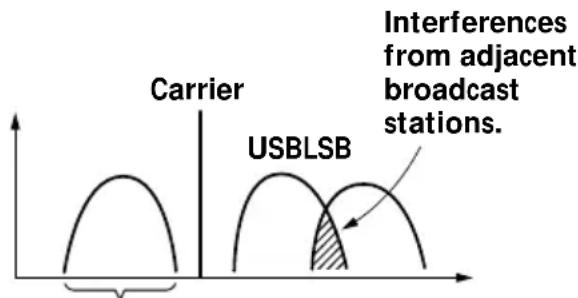
This side is received only.
natural_image
Diagram of two batteries with positive and negative charge indicators (no text or symbols)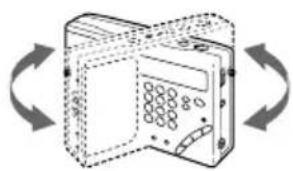
natural_image
Diagram of a device with open lid and circular ports, shown in clockwise rotation (no text or symbols)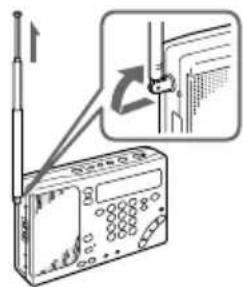
natural_image
Line drawing of a computer monitor with ports and a close-up of the front panel (no text or symbols)Conseils
natural_image
Line drawing of a rectangular electronic device with ports and a screen (no text or symbols)natural_image
Illustration of a person's collar with a belt buckle and a close-up of a flashlight mounted on a stand (no text or symbols)natural_image
Diagram showing two cable assemblies with coiled wires, one being lifted and the other attached (no text or symbols)Utilisation du pied
natural_image
Diagram showing a device with cable and port, connected to an electronic device via a cable (no text or symbols present)natural_image
Technical line drawing of a device rear panel with labeled ports and connectors (no text or symbols)1
2
3
4
5
6
SW: 1.621–29.999 kHz
MW: 530–1.620 kHz
LW: 150–529 kHz
natural_image
Simple line drawing of two batteries with positive and negative charges, no text or symbols presentnatural_image
Line drawing of a mechanical component with mounting holes and a connecting rod (no text or symbols)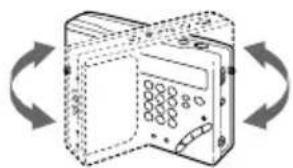
natural_image
Diagram of a device with open lid and circular ports, shown in 3D rotation arrows (no text or symbols)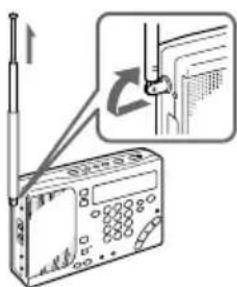
natural_image
Line drawing of a device with buttons and a front panel, no text or symbols presentSugerencias
natural_image
Line drawing of a portable electronic device with buttons and a screen (no text or symbols)cara o ambas del cassette.
natural_image
Illustration of a person adjusting a collar belt with a magnified inset showing the device (no text or symbols present)natural_image
Line drawing of a portable electronic device with control panel and buttons (no text or symbols)Sugerencia
natural_image
Diagram showing cable installation process: one wire being held, the other being tied with a rope (no text or symbols)natural_image
Diagram showing a device with cable and a separate electronic device connected by wires (no text or symbols visible)natural_image
Technical line drawing of a rear panel with labeled ports and connectors (no text or symbols)1
2
3
4
5
6
SW: 1.621–29.999 kHz
MW: 530-1.620
LW: 150–529 kHz
SW/MW/LW: 55,845 MHz (primera)
455 kHz (segunda)
Grabadora de cassettes
Sistema de pistas
line
| Frequency | Amplitude (LSB) | Amplitude (USB) | | --------- | --------------- | --------------- | | Low | Low | Low | | High | High | High |Pressione as linguetas OPEN e
natural_image
Line drawing of a mechanical device with ports and connectors (no text or symbols)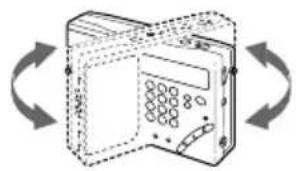
natural_image
Illustration of a device with circular buttons and a door, surrounded by bidirectional arrows (no text or symbols)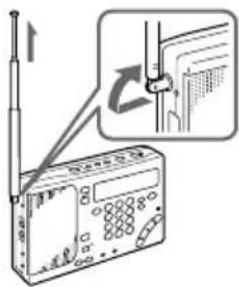
natural_image
Line drawing of a device with buttons and a panel, no text or symbols presentConselhos
natural_image
Line drawing of a portable electronic device with ports and a screen (no text or symbols)Conselho
natural_image
Illustration of a person's collar with a belt buckle and a close-up of a flashlight mounted on a stand (no text or symbols)natural_image
Line drawing of a portable electronic device with control panel and buttons (no text or symbols)Conselho
natural_image
Diagram showing cable installation process: wire being attached to a connector, then being wrapped in a coiled cable (no text or symbols present)natural_image
Diagram showing connection between a computer interface and a device with cables (no text or symbols present)natural_image
Technical line drawing of a rear panel with labeled ports and connectors (no text or symbols)1
2
3
4
5
6
SW: 1.621 - 29.999 kHz
MW: 530 - 1.620 kHz
LW: 150 - 529 kHz
line
| Frequency | Amplitude | | --------- | --------- | | Left | Low | | Left | High | | Right | Low | | Right | High |O que é a CW
natural_image
Illustration of two batteries with positive and negative charge indicators (no text or symbols)OBS!
natural_image
Line drawing of a mechanical device with mounting holes and a connecting rod (no text or symbols)Skjut in tills det klickar till.
Tidsinställning
natural_image
Diagram of a device with circular ports and directional arrows indicating rotation (no text or symbols)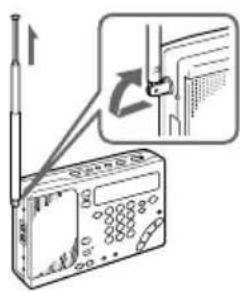
Bandavspelning
natural_image
Line drawing of a vintage-style open door with control panel and buttons (no text or symbols)2
natural_image
Line drawing of a rectangular electronic device with a screen and buttons, no text or symbols present(normal mottagning) → SYNC U → SYNC L

natural_image
Illustration of a collar belt connector to a device with a magnified view (no text or symbols)Hur reglagelåset kopplas ur
natural_image
Diagram showing cable termination and hanging rope knot (no text or symbols)natural_image
Diagram showing a device with cable and port connection, transforming into an electronic device (no text or symbols present)Batteribyte
natural_image
Technical line drawing of a device rear panel with labeled ports and connectors (no text or symbols)1
2
3
4
5
6
KV: 1.621–29.999 kHz
MV: 530–1.620 kHz
LV: 150–529 kHz
Mellanfrekvens
FM: 10,7 MHz
KV/MV/LV: 55,845 MHz (1:a)
455 kHz (2:a)