
Bravia KD55X7053 - Projector SONY - Free user manual and instructions
Find the device manual for free Bravia KD55X7053 SONY in PDF.
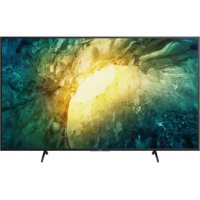



| Product Type | 4K LED TV |
| Brand | Sony |
| Model | Bravia KD55X7053 |
| Screen Size | 138.8 cm (55 inches) |
| Display Resolution | 3840 x 2160 pixels (4K) |
| Display Type | LCD with LED backlight |
| TV Standards | Analog: B/G, D/K; Digital: DVB-T/C, DVB-T2*, DVB-S/S2* (*depending on country/region) |
| Sound Output | 10 W + 10 W |
| HDMI Inputs | 3 (HDMI IN 1/2/3, including HDMI IN 3 with ARC) |
| USB Ports | 3 (USB 1/2/3, USB 3 compatible with hard drive) |
| Network Connectivity | LAN 10BASE-T/100BASE-TX, Wi-Fi 802.11b/g/n |
| Power Supply | 220-240 V AC, 50 Hz |
| Power Consumption (Standard mode) | 110 W |
| Power Consumption (Standby) | 0.50 W |
| Annual Energy Consumption | 161 kWh/year |
| Dimensions (without stand) | 124.1 x 72.1 x 7.9 cm |
| Weight (with stand) | 16.3 kg |
| Weight (without stand) | 15.4 kg |
| Optional Accessories | Wall-Mount Bracket SU-WL450 |
| Operating Temperature | 0 °C - 40 °C |
| Operating Humidity | 10% - 80% RH (no condensation) |
| Care and Cleaning | Clean the screen with a soft, dry cloth. Do not use chemical products. |
| Safety Instructions | Install on a stable and level surface. Disconnect before transporting. Use Sony recommended accessories for wall mounting. |
Frequently Asked Questions - Bravia KD55X7053 SONY
User questions about Bravia KD55X7053 SONY
0 question about this device. Answer the ones you know or ask your own.
Ask a new question about this device
Download the instructions for your Projector in PDF format for free! Find your manual Bravia KD55X7053 - SONY and take your electronic device back in hand. On this page are published all the documents necessary for the use of your device. Bravia KD55X7053 by SONY.
USER MANUAL Bravia KD55X7053 SONY
For useful information about Sony products
https://www.sony.eu/support
BRAVIA
| Reference Guide | GB |
| Guide de référence | FR |
| Guía de referencia | ES |
| Referentiegids | NL |
| Referenzanleitung | DE |
| Guía de referencia | PT |
| Guida di riferimento | IT |
| Referensmaterial | SE |
| Referencevejledning | DK |
| Viiteopas | FI |
| Referanseveiledning | NO |
| Przewodnik | PL |
| Referenční príručka | CZ |
| Referenčná príručka | SK |
| Felhasználói útmutató | HU |
| Ghid de referinţă | RO |
| Информация за позукту | BG |
| Öðnyóç øναφοράς | GR |
| Başvuru Kılıavuzu | TR |
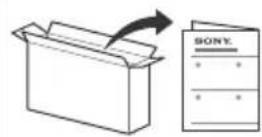
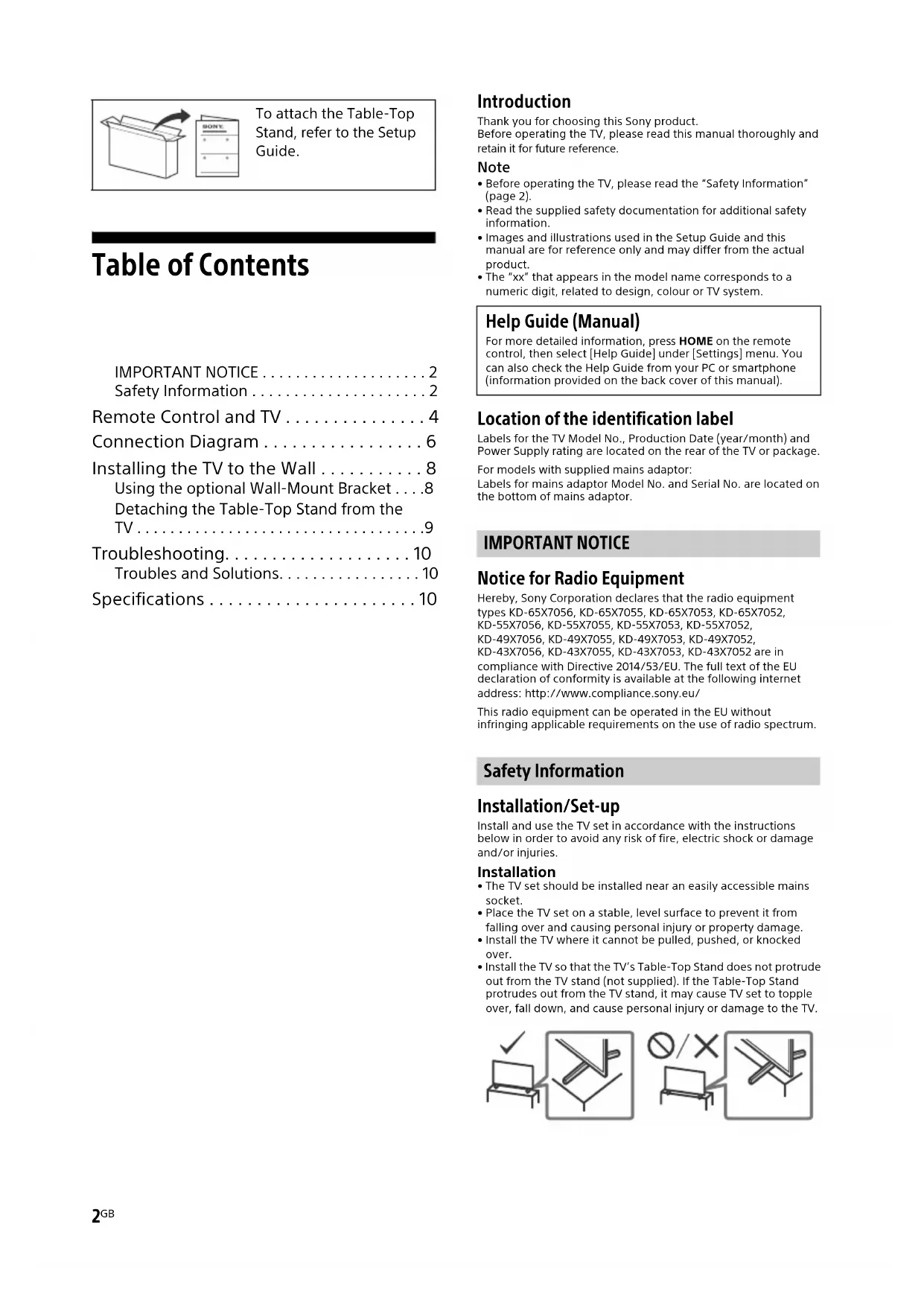
To attach the Table-Top Stand, refer to the Setup Guide.
Table of Contents
IMPORTANT NOTICE 2
Safety Information 2
Remote Control and TV. 4
Connection Diagram 6
Installing the TV to the Wall 8
Using the optional Wall-Mount Bracket . . .8
Detaching the Table-Top Stand from the TV. 9
Troubleshooting. 10
Troubles and Solutions. 10
Specifications 10
Introduction
Thank you for choosing this Sony product.
Before operating the TV, please read this manual thoroughly and retain it for future reference.
Note
Before operating the TV, please read the "Safety Information" (page 2). - Read the supplied safety documentation for additional safety information. - Images and illustrations used in the Setup Guide and this manual are for reference only and may differ from the actual product. The "xx" that appears in the model name corresponds to a numeric digit, related to design, colour or TV system.
Help Guide (Manual)
For more detailed information, press HOME on the remote control, then select [Help Guide] under [Settings] menu. You can also check the Help Guide from your PC or smartphone (information provided on the back cover of this manual).
Location of the identification label
Labels for the TV Model No., Production Date (year/month) and Power Supply rating are located on the rear of the TV or package.
For models with supplied mains adaptor:
Labels for mains adaptor Model No. and Serial No. are located on the bottom of mains adaptor.
IMPORTANT NOTICE
Notice for Radio Equipment
Hereby, Sony Corporation declares that the radio equipment types KD-65X7056, KD-65X7055, KD-65X7053, KD-65X7052, KD-55X7056, KD-55X7055, KD-55X7053, KD-55X7052, KD-49X7056, KD-49X7055, KD-49X7053, KD-49X7052, KD-43X7056, KD-43X7055, KD-43X7053, KD-43X7052 are in compliance with Directive 2014/53/EU. The full text of the EU declaration of conformity is available at the following internet address: http://www.compliance.sony.eu/
This radio equipment can be operated in the EU without infringing applicable requirements on the use of radio spectrum.
Safety Information
Installation/Set-up
Install and use the TV set in accordance with the instructions below in order to avoid any risk of fire, electric shock, or damage and/or injuries.
Installation
- The TV set should be installed near an easily accessible mains socket.
- Place the TV set on a stable, level surface to prevent it from falling over and causing personal injury or property damage. Install the TV where it cannot be pulled, pushed, or knocked over.
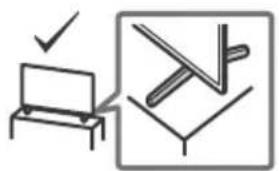
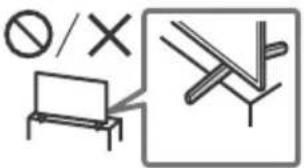
- Install the TV so that the TV's Table-Top Stand does not protrude out from the TV stand (not supplied). If the Table-Top Stand protrudes out from the TV stand, it may cause the TV set to topple over, fall down, and cause personal injury or damage to the TV.
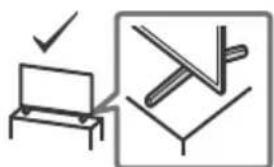
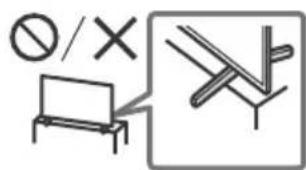
- Only qualified service personnel should carry out wall-mount installations. For safety reasons, it is strongly recommended that you use Sony accessories, including: Wall-Mount Bracket: SU-WL450
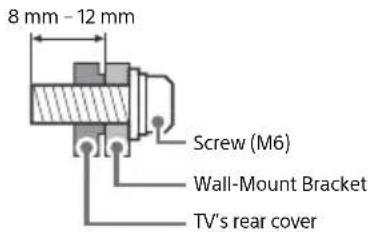
- Be sure to use the screws supplied with the Wall-Mount Bracket when attaching the Wall-Mount Bracket to the TV set. The supplied screws are designed as indicated by illustration when measured from the attaching surface of the Wall-Mount Bracket. The diameter and length of the screws differ depending on the Wall-Mount Bracket model.
Use of screws other than those supplied may result in internal damage to the TV set or cause it to fall, etc.
Transporting
- Before transporting the TV set, disconnect all cables.
- Two or more people are needed to transport a large TV set.
- When transporting the TV set by hand, hold it as shown below. Do not put stress on the LCD panel and the frame around the screen.
- When lifting or moving the TV set, hold it firmly from the bottom.

- When transporting the TV set, do not subject it to jolts or excessive vibration.
- When transporting the TV set for repairs or when moving, pack it using the original carton and packing material.
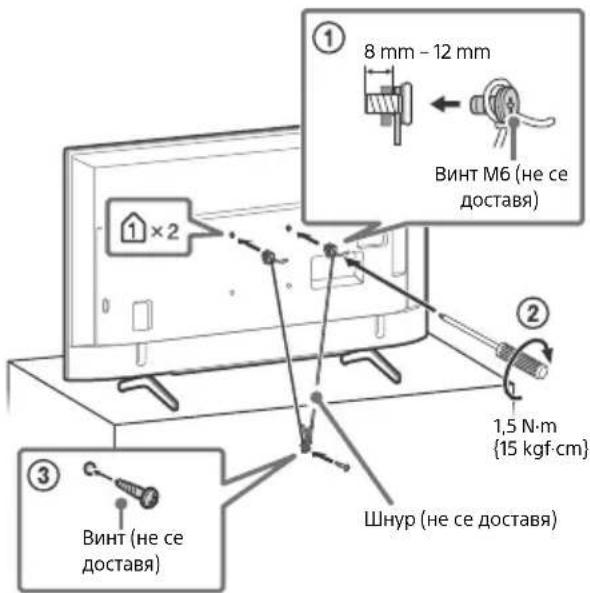
Topple prevention KD-65X70xx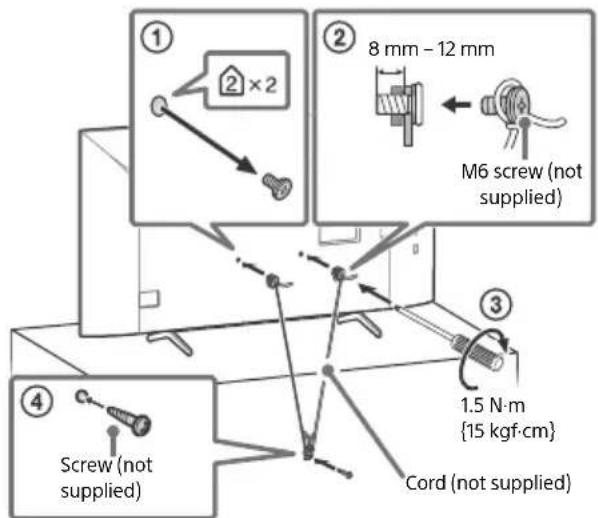
KD-55X70xx / 49X70xx / 43X70xx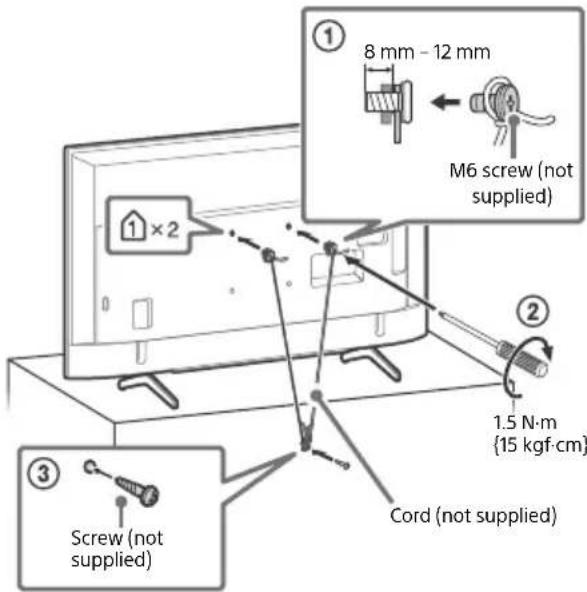
Remote Control and TV
The remote control shape, location, availability and function of remote control buttons may vary depending on your region/country/TV model.
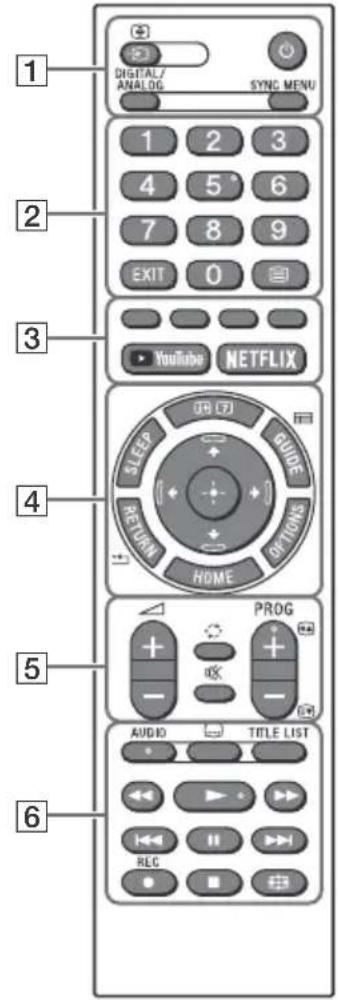
1 (Input select/Text hold)
In TV mode: Display and select the input source.
In Text mode: Hold the current page.
(TV standby)
DIGITAL/ANALOG
Switch between digital and analogue input.
SYNC MENU
Display the BRAVIA Sync Menu.
For more detailed information, press HOME on the remote control, then select [Help Guide] under [Settings] menu.
Number buttons
EXIT
(Text)
Display text information.
3 Colour buttons
YouTube (Only on limited region/ country/TV model)
NETFLIX (Only on limited region/ country/TV model)
Info/Text rev
Display information.
SLEEP
Press repeatedly until the TV displays the time in minutes ([Off]/[15 min]/[30 min]/[45 min]/[60 min]/[90 min]/[120 min]) that you want the TV to remain on before shutting off. To cancel the sleep timer, press SLEEP repeatedly until [Off] appears.
GUIDE/
Display the Digital EPG (Electronic Programme Guide).
RETURN/
OPTIONS
Display a list that contains shortcuts to some setting menus.
The listed options vary depending on the current input and content.
HOME

On screen menu navigation and selection.
5 +/-(Volume)
O (Jump)
(Mute)
PROG+/-/E/A/E
In TV mode: Select the channel.
In Text mode: Select the next (E) or previous (E) page.
6 AUDIO
Select the sound of multilingual source or dual sound (depend on programme source).
(Subtitle setting)
TITLE LIST (Not available for Italy)
Display the Title list.

Operate media contents on the TV and connected BRAVIA Sync-compatible device. This key can also be used to operate VOD (Video on Demand) service playback. Availability depends on the VOD service.
REC (Not available for Italy)
Record the currently viewed programme on the USB HDD.
(Wide Mode)
Adjust the screen display. Press repeatedly to select the desired wide mode.
KD-65X70xx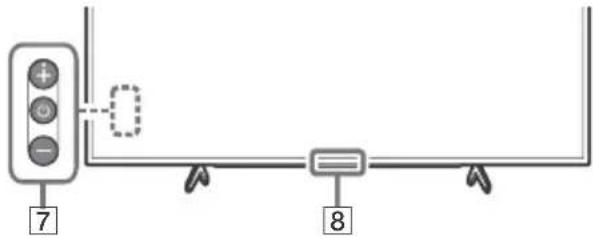
KD-55X70xx / 49X70xx / 43X70xx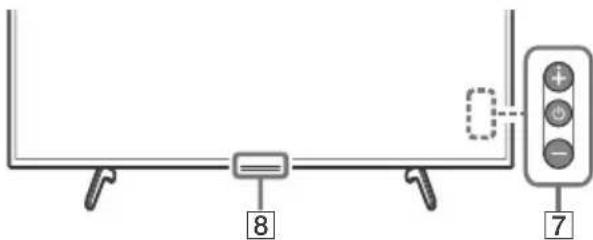
(Power)
Remote Control sensor / LED indicator
Note
- If subtitles are selected and the user launches a digital text application via the 'text' key, subtitles may, under certain circumstances, stop being displayed. When the user exits the digital text application, subtitle decoding will resume automatically.
- Make sure that the TV is completely turned off before unplugging the mains lead.
- To disconnect the TV from the mains completely, pull the plug from the mains socket.
- Please wait for a while when performing input selection to change to another input.
C
CAM (Conditional Access Module)
- Provides access to pay TV services. For details, refer to the instruction manual supplied with your CAM.
- Do not insert the smart card directly into the TV CAM slot. It must be fitted into the Conditional Access Module provided by your authorised dealer.
- CAM is not supported in some countries/areas. Check with your authorised dealer.
- A CAM message may appear when you switch to a digital programme after using the Internet video.
2 USB1/2, USB3 (HD)
- Connecting a large USB device may interfere with other connected devices beside it.
- When connecting a large USB device, connect to the USB 1 port.
- Connect a USB HDD device to the USB 3 port.
3 HDMI IN 1/2/3
- HDMI interface can transfer the digital video and audio on a single cable.
<12mm
<21mm
HDMI IN 2/3
To enjoy high quality 4K 50p/60p contents, connect a Premium High Speed HDMI cable to the HDMI IN 2/3 and set the [HDMI signal format] to [Enhanced format].
For details of supported formats, refer to the "Specifications" in this manual (page 10-11).
HDMI IN 3 ARC (Audio Return Channel)
Connect your audio system to the HDMI IN 3 to route TV audio to your audio system. An audio system that supports HDMI ARC can send video to the TV, and receive audio from the TV via the same HDMI cable. If your audio system does not support HDMI ARC, an additional connection with DIGITAL AUDIO OUT (OPTICAL) is necessary.
REC)
4 (RF input), (Satellite input)* 2
- Connections for terrestrial/cable and satellite.
5 AUDIO OUT/
Supports 3-pole stereo mini jack only. - To listen to the TV's sound through the connected equipment, press HOME, then select [System Settings] → [Setup] → [AV Setup] → [Headphone/Audio Out] and then select the desired item.
Note
1 For an external device which has only SCART AV OUT, use a SCART-RCA adaptor. 2 Only on limited region/country/TV model.
Installing the TV to the Wall
Using the optional Wall-Mount Bracket
This TV's instruction manual only provides the steps to prepare the TV for Wall-Mount installation before it is installed on the wall.
To Customers:
For product protection and safety reasons, Sony strongly recommends that installation of your TV be performed by Sony dealers or licensed contractors. Do not attempt to install it yourself.
To Sony Dealers and Contractors:
Provide full attention to safety during the installation, periodic maintenance and examination of this product.
Sufficient expertise is required for installing this product, especially to determine the strength of the wall for withstanding the TV's weight. Be sure to entrust the attachment of this product to the wall to Sony dealers or licensed contractors and pay adequate attention to safety during the installation. Sony is not liable for any damage or injury caused by mishandling or improper installation.
Use the Wall-Mount Bracket SU-WL450 (not supplied) to install the TV to the wall.
When installing the Wall-Mount Bracket, also refer to the Operating Instructions and Installation Guide supplied with the Wall-Mount Bracket.
Note
- Be sure to store the removed screws in a safe place, keeping them away from children.
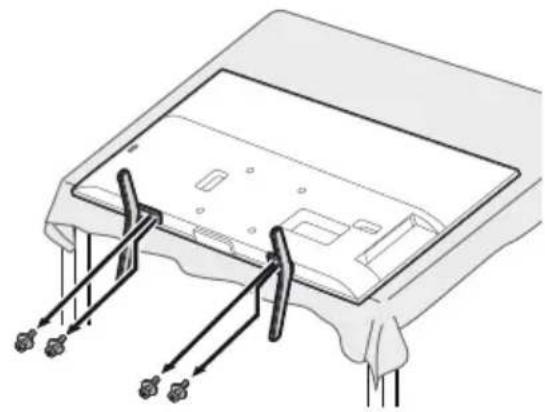
- If the Table-Top Stand is attached to the TV, detach the Table-Top Stand beforehand. See the Setup Guide and follow in reverse order the steps to detach the Table-Top Stand.
- Place the TV with its screen facing down on a level and stable surface covered with a thick and soft cloth when removing the Table-Top Stand from the TV to prevent damaging the surface of the LCD display. (KD-49/43X70xx only)

For instructions on Wall-Mount Bracket installation, see the Installation Information (Wall-Mount Bracket) on the product page for your TV model.
https://www.sony.eu/support
KD-65X70xx
Remove the screws from the rear of the TV.
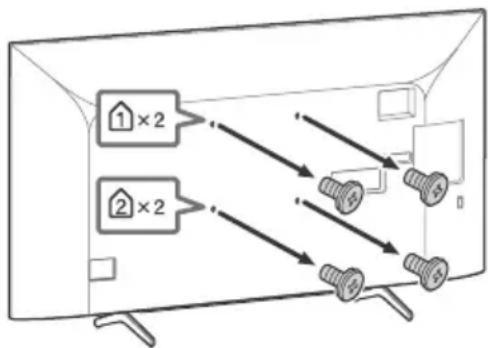
KD-65X70xx
1 Remove one side of the Table-Top Stand at a time. Firmly hold the Table-Top Stand securely with both hands while the other people lift up the TV.
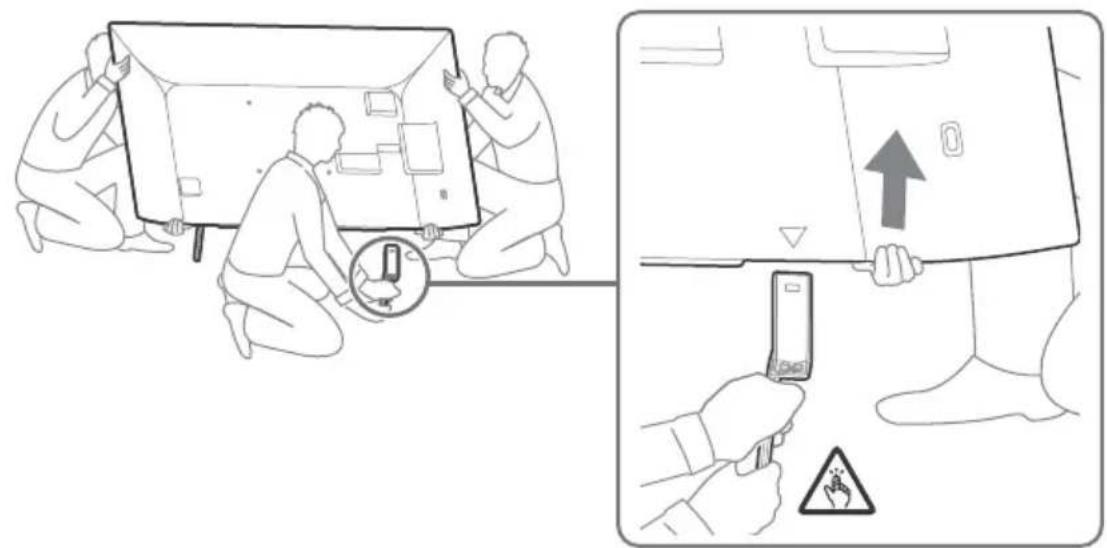
2 Repeat the previous step and remove the other side of the Table-Top Stand.
Note
- Three or more people are required to detach the Table-Top Stand.
- Be careful not to use excessive force while detaching the Table-Top Stand from the TV as it may cause the TV set to fall resulting in personal injury or physical damage to the TV.
- Take care when handling the Table-Top Stand to prevent damage to the TV.
- Be careful when lifting the TV as the Table-Top Stand is detached, the Table-Top Stand may topple over and cause personal injury. Take care when removing the Table-Top Stand from the TV to prevent it from falling over and damaging the surface that the TV is sitting on.
KD-55X70xx KD-49X70xx / 43X70xx
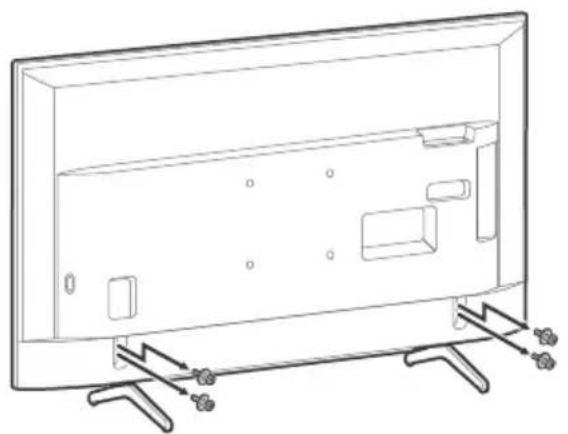
Troubleshooting
When the LED indicator is flashing red, count how many times it flashes (interval time is three seconds).
If the LED indicator flashes red, reset the TV by disconnecting the mains lead from the TV for two minutes, then turn on the TV.
If the problem persists, contact your dealer or Sony service centre with the number of times the LED indicator flashes red (interval time is three seconds). Press on the TV to turn it off, disconnect the mains lead, and inform your dealer or Sony service centre.
Troubles and Solutions
No picture (screen is dark) and no sound
- Check the antenna (aerial)/cable connection.
- Connect the TV to the mains socket, and press on the TV or the remote control.
Picture contours are distorted
- Change the current setting of [Film Mode]* to other settings.
The TV turns off automatically (the TV enters standby mode)
- Check if the [Sleep Timer]* is activated.
- Check if the [Duration] is activated by [On Timer] or [Photo Frame Settings]*.
- Check if the [Idle TV Standby]* is activated.
Some input sources cannot be selected
- Select [AV Preset] and select [Always] of the input source.
Some programmes cannot be tuned
- Check the antenna (aerial)/cable connection.
The remote control does not function
- Replace the batteries.
The TV surrounds become warm
- When the TV is used for an extended period, the TV surrounds become warm. You may feel hot when touching there by the hand.
- For more detailed information, press HOME on the remote control, then select [Help Guide] under [Settings] menu.
Specifications
System
Panel system: LCD (Liquid Crystal Display) Panel, LED Backlight
TV system: Depending on your country/area selection/TV model. Analogue: B/G, D/K, I. Digital: DVB-T/DVB-C, DVB-T2*1. Satellite*1: DVB-S/DVB-S2
Colour/video system: Analogue: PAL/SECAM/NTSC3.58 (Video only)/NTSC4.43 (Video only). Digital: MPEG-2 MP@ML/HL, H.264/MPEG-4 AVC MP/HP@L5.0, H.265/HEVC MP/Main10@L5.1 (4K 60fps)
Channel coverage: Depending on your country/area selection/TV model. Analogue: UHF/VHF/Cable. Digital: UHF/VHF/Cable. Satellite1: IF Frequency 950-2,150 MHz
Sound output: 10W + 10W. Wireless technology: Protocol IEEE 802.11b/g/n
Frequency band(s)
| Wireless LAN (IEEE 802.11b/g/n) | |
| Frequency range Output | Power |
| 2400-2483.5 MHz < 20.0 dBm | |
Input/Output jacks
Antenna (aerial)/cable: 75 ohm external terminal for VHF/UHF. Satellite antenna*: Female F Type Connector, 75 ohm. DiSEqC 1.0, LNB 13 V/18 V & 22 kHz tone, Single Cable Distribution EN50494.
AV IN: Video/Audio input (phono jacks)
HDMI IN 1/2/3 (support 4K resolution, HDCP
2.3-compatible) Video: 4096×2160p (24,50,60 Hz), 3840×2160p (24,25,30,50,60 Hz), 1080p (30,50,60 Hz), 1080/24p, 1080i (50,60 Hz), 720p (30,50,60 Hz), 720/24p, 576p, 576i, 480p, 480i. Audio: Two channel linear PCM: 32/44.1/48 kHz 16/20/24 bits, Dolby Audio, DTS
ARC (Audio Return Channel) (HDMI IN 3 only): Two channel linear PCM: 48 kHz 16 bits, Dolby Audio, DTS. DIGITAL AUDIO OUT (OPTICAL): Digital optical jack (Two channel linear PCM: 48 kHz 16 bits, Dolby Audio, DTS)
AUDIO OUT (Stereo mini jack): Headphone, Audio output, Subwoofer 1,2-3 (HDD-REC) (Function not available in Italy)
USB port 1, 2 and 3 support High Speed USB (USB 2.0)
CAM (Conditional Access Module) slot
DC IN 19.5 V (models with supplied mains adaptor only)
Mains adaptor input LAN
10BASE-T/100BASE-TX connector (Depending on the operating environment of the network, connection speed may differ. The communication rate and quality are not guaranteed.)
Power, Product Fiche and others
Power requirements
except models with supplied mains adaptor
220V-240VAC,50Hz
models with supplied mains adaptor only
19.5 V DC with mains adaptor
Rating: Input 220 V - 240 V AC, 50 Hz
Energy Efficiency Class
KD-65X70xx: A
KD-55X70xx:A
KD-49X70xx:A
KD-43X70xx: A
Screen size (measured diagonally) (Approx.)
KD-65X70xx: 163.9 cm / 65 inches
KD-55X70xx: 138.8 cm / 55 inches
KD-49X70xx: 123.2 cm / 49 inches
KD-43X70xx: 108.0 cm / 43 inches
Power consumption
In [Standard] mode
KD-65X70xx: 151 W
KD-55X70xx: 110 W
KD-49X70xx: 75 W
KD-43X70xx: 66 W
In [Vivid] mode
KD-65X7056/65X7055: 256 W
KD-65X7053/65X7052: 245W
KD-55X7056/55X7055: 184W
KD-55X7053 / 55X7052: 173W
KD-49X7056 / 49X7055: 115W
KD-49X7053 / 49X7052 / 43X7056 / 43X7055: 100W
KD-43X7053/43X7052: 97W
Annual energy consumption 8
KD-65X70xx: 220 kWh per year
KD-55X70xx: 161 kWh per year
KD-49X70xx: 110 kWh per year
KD-43X70xx: 96 kWh per year
Standby power consumption*4*5
0.50W
Display resolution
3,840 dots (horizontal) × 2,160 lines (vertical)
Output Rating
USB 1/2/3
5V=, 500mA MAX
Dimensions (Approx.) (w × h × d)
with Table-Top Stand
KD-65X70xx: 146.3 × 90.4 × 34.0 cm
KD-55X70xx: 124.1 × 78.1 × 34.0 cm
KD-49X70xx: 110.1 × 70.2 × 28.6 cm
KD-43X70xx: 97.0 × 62.8 × 28.6 cm
without Table-Top Stand
KD-65X70xx: 146.3 × 84.5 × 8.0 cm
KD-55X70xx: 124.1 × 72.1 × 7.9 cm
KD-49X70xx: 110.1 × 64.5 × 5.7 cm
KD-43X70xx: 97.0 × 57.0 × 5.7 cm
Mass (Approx.)
with Table-Top Stand
KD-65X70xx: 21.4 kg
KD-55X70xx: 16.3 kg
KD-49X70xx: 12.4 kg
KD-43X70xx: 10.2 kg
without Table-Top Stand
KD-65X70xx: 20.5 kg
KD-55X70xx: 15.4 kg
KD-49X70xx: 11.9 kg
KD-43X70xx: 9.7 kg
Others
Optional accessories
Wall-Mount Bracket: SU-WL450
Operating temperature: 0°C - 40°C
Operating humidity: 10% - 80% RH (non-condensing)
1. Not all TV sets have DVB-T2 or DVB-S/S2 technology or a satellite antenna terminal. 2. HDMI IN 2 and HDMI IN 3 support high-quality HDMI formats such as 4K 60p/50p 4:2:0 10 bit, 4:4:4, 4:2:2. 3. Energy consumption in kWh per year, based on the power consumption of the television operating 4 hours per day for 365 days. The actual energy consumption will depend on how the television is used. 4. Specified standby power is reached after the TV finishes necessary internal processes. *5. Standby power consumption will increase when your TV is connected to the network.
Note
- Do not remove the dummy card or cover (availability depends on TV model) from the TV CAM (Conditional Access Module) slot other than to insert a smart card fitted in the CAM.
- Optional accessories availability depends on country/region/TV model/stock.
- Design and specifications are subject to change without notice.
Notes on Digital TV function
- Digital TV (DVB terrestrial, satellite, and cable), interactive services, and network functions may not be available in all countries or areas. Some functions might not be enabled or might not operate correctly with some providers and network environments. Some TV service providers may charge a fee for their services. This TV supports digital broadcasting using MPEG-2, H.264/MPEG-4 AVC, and H.265/HEVC codecs, but compatibility with all operator/service signals, which may change over time, cannot be guaranteed.
Notes on HDR (High Dynamic Range) (Only on limited region/country/TV model)
- Compatible with all HDR PS4 Game titles via HDMI and HDR videos of built-in Netflix and YouTube App only. (See Sony support website for more information).
- HDR image signal specifically means HDR10 Media Profile format (commonly referred to as HDR10).
- Compatibility with all HDR content is not guaranteed.
Trademark Information
- The terms HDMI, HDMI High-Definition Multimedia Interface, and the HDMI Logo are trademarks or registered trademarks of HDMI Licensing Administrator, Inc.
- Manufactured under license from Dolby Laboratories. Dolby, Dolby Audio, and the double-D symbol are trademarks of Dolby Laboratories. Vewd Core. Copyright 1995-2020 Vewd Software AS. All rights reserved.
- Wi-Fi®, Wi-Fi Alliance®, Wi-Fi Direct®, and Miracast® are registered trademarks of Wi-Fi Alliance.
- Wi-Fi Protected Setup™ is a trademark of Wi-Fi Alliance. The Wi-Fi CERTIFIED™ Logo is a certification mark of Wi-Fi Alliance.
- Netflix is a registered trademark of Netflix, Inc.
- "YouTube" and the "YouTube logo" are registered trademarks of Google LLC. "BRAVIA", and BRAVIA Sync are trademarks or registered marks of Sony Corporation.
- "Blu-ray Disc", "Blu-ray" and "Blu-ray Disc" logo are trademarks of Blu-ray Disc Association.
- "PlayStation" is a registered trademark and "PS4" is a trademark of Sony Interactive Entertainment Inc.
- For DTS patents, see http://patents.dts.com. Manufactured under license from DTS, Inc. DTS, the Symbol, DTS and the Symbol together, and Digital Surround are registered trademarks or trademarks of DTS, Inc. in the United States and/or other countries. © DTS, Inc. All Rights Reserved.
- TUXERA is a registered trademark of Tuxera Inc. in the US and other countries.
For satellite models only:
- DiSEq™ is a trademark of EUTELSAT. This TV supports DiSEqC 1.0. This TV is not intended for controlling motorized antennas.
- All other trademarks are the property of their respective owners.
https://www.sony.eu/support
KD-65X70xx
Analogue: UHF/VHF/Cable
ARC (Audio Return Channel) (HDMI IN 3 unquipment)
KD-55X70xx:124,1×78,1×34,0 cm
KD-49X70xx: 110.1 × 70.2 × 28.6 cm
KD-43X70xx: 97.0 × 62.8 × 28.6 cm
Without table stand
KD-65X7052, KD-55X7056, KD-55X7055, KD-55X7053, KD-55X7052, KD-49X7056, KD-49X7055, KD-49X7053, KD-49X7052
TV system
Digital: UHF/VHF/Cable
DIGITAL AUDIO OUT (OPTICAL)
Digital optical socket (two-channel linear PCM: 48 kHz 16 bits,
Dolby Audio, DTS)
AUDIO OUT (stereo minijack)
Headphones, audio output, subwoofer
1,2-3(HDD-REC)(estamericano esta
KD-65X70xx: 146.3 × 90.4 × 34.0 cm
KD-55X70xx: 124.1 × 78.1 × 34.0 cm
KD-49X70xx: 110.1 × 70.2 × 28.6 cm
KD-43X70xx: 97.0 × 62.8 × 28.6 cm
4096×2160p (24, 50, 60 Hz), 3840×2160p (24, 25, 30, 50, 60 Hz), 1080p (30, 50, 60 Hz), 1080/24p, 1080i (50, 60 Hz), 720p (30, 50, 60 Hz), 720/24p, 576p, 576i, 480p, 480i
Audio:
Two-channel linear PCM: 32/44.1/48 kHz 16/20/24 bits, Dolby Audio, DTS
ARC (Audio Return Channel) (only HDMI IN 3)
Two-channel linear PCM: 48 kHz 16 bits, Dolby Audio, DTS
DIGITAL AUDIO OUT (OPTICAL)
KD-65X70xx: 146.3 × 90.4 × 34.0 cm
KD-55X70xx: 124.1 × 78.1 × 34.0 cm
KD-49X70xx: 110.1 × 70.2 × 28.6 cm
KD-43X70xx: 97.0 × 62.8 × 28.6 cm
https://www.sony.eu/support
KD-65X70xx
DIGITAL AUDIO OUT (OPTICAL)
KD-55X70xx: 124.1 × 78.1 × 34.0 cm
KD-49X70xx: 110.1 x 70.2 x 28.6 cm
KD-43X70xx: 97.0 x 62.8 x 28.6 cm
without table stand
KD-65X70xx: 146.3 x 84.5 x 8.0 cm
KD-55X70xx: 124.1 x 72.1 x 7.9 cm
KD-49X70xx: 110.1 x 64.5 x 5.7 cm
KD-43X70xx: 97.0 x 57.0 x 5.7 cm
Weight (approx.)
with table stand
KD-65X70xx: 21.4 kg
KD-55X70xx: 16.3 kg
KD-49X70xx: 12.4 kg
KD-43X70xx: 10.2 kg
without table stand
KD-65X70xx: 20.5 kg
KD-55X70xx: 15.4 kg
KD-49X70xx: 11.9 kg
KD-43X70xx: 9.7 kg
Miscellaneous
Optional accessories
KD-55X7056, KD-55X7055, KD-55X7053, KD-55X7052
KD-49X7056, KD-49X7055, KD-49X7053, KD-49X7052
720p (30, 50, 60 Hz), 720/24p, 576p, 576i, 480p, 480i
Audio:
PCM linear 2 channels: 32/44.1/48 kHz 16/20/24 bits
Dolby Audio, DTS
ARC (Audio Return Channel) (only on models
HDMI IN 3)
PCM linear 2 channels: 48 kHz 16 bits, Dolby Audio, DTS
DIGITAL AUDIO OUT (OPTICAL)
Digital optical input (linear PCM, 2 channels: 48 kHz 16 bits,
Dolby Audio, DTS)
AUDIO OUT (stereo mini-jack)
Headphones, audio output, subwoofer
KD-65X70xx: 146.3 × 90.4 × 34.0 cm
KD-55X70xx: 124.1 × 78.1 × 34.0 cm
KD-49X70xx: 110.1 × 70.2 × 28.6 cm
KD-43X70xx: 97.0 × 62.8 × 28.6 cm
Without table-top stand
KD-65X70xx: 146.3 × 84.5 × 8.0 cm
KD-55X70xx: 124.1 × 72.1 × 7.9 cm
KD-49X70xx: 110.1 × 64.5 × 5.7 cm
KD-43X70xx: 97.0 × 57.0 × 5.7 cm
Weight (Approx.)
ARC (Audio Return Channel) (only HDMI IN 3)
DIGITAL AUDIO OUT (OPTICAL)
KD-65X70xx: 146.3 × 90.4 × 34.0 cm
KD-55X70xx: 124.1 × 78.1 × 34.0 cm
KD-49X70xx: 110.1 × 70.2 × 28.6 cm
KD-43X70xx: 97.0 × 62.8 × 28.6 cm
https://www.sony.eu/support
KD-65X70xx
Digital audio output: PCM: 48 kHz 16-bit, Dolby Audio, DTS
KD-65X70xx: 146.3 × 90.4 × 34.0 cm
KD-55X70xx: 124.1 × 78.1 × 34.0 cm
KD-49X70xx: 110.1 × 70.2 × 28.6 cm
KD-43X70xx: 97.0 × 62.8 × 28.6 cm
without tabletop stand
KD-65X70xx: 146.3 × 84.5 × 8.0 cm
KD-55X70xx: 124.1 x 72.1 x 7.9 cm
KD-49X70xx: 110.1 x 64.5 x 5.7 cm
KD-43X70xx: 97.0 x 57.0 x 5.7 cm
Weight (approx.)
with table stand
KD-65X70xx: 21.4 kg
KD-55X70xx: 16.3 kg
KD-49X70xx: 12.4 kg
KD-43X70xx: 10.2 kg
without table stand
KD-65X70xx: 20.5 kg
KD-55X70xx: 15.4 kg
KD-49X70xx: 11.9 kg
KD-43X70xx: 9.7 kg
Other
Optional accessory
Wall-mount bracket: SU-WL450
Operating temperature: 0°C - 40°C
https://www.sony.eu/support
KD-65X70xx
720p(30,50,60Hz),720/24p,576p,576i,480p,480i
Audio:
2-channel linear PCM: 32/44.1/48 kHz 16/20/24 bit, Dolby
Audio
ARC (Audio Return Channel) (only on HDMI IN 3)
2-channel linear PCM: 48 kHz 16 bit, Dolby Audio, DTS
DIGITAL AUDIO OUT (OPTICAL)
Digital optical connector (2-channel linear PCM: 48 kHz 16 bit, Dolby Audio, DTS)
AUDIO OUT (Stereo minijack)
Headphones, audio output, subwoofer
In [Standard] mode
KD-65X70xx:151W
KD-55X70xx:110W
KD-49X70xx: 75 W
KD-43X70xx:66W
In [Vivid] mode
KD-65X7056/65X7055:256W
KD-65X7053/65X7052:245W
KD-55X7056/55X7055:184W
KD-55X7053 / 55X7052:173W
KD-49X7056 / 49X7055:115W
KD-49X7053 / 49X7052 / 43X7056 / 43X7055:100W
KD-43X7053/43X7052:97W
KD-65X70xx:146.3 x 90.4 x 34.0 cm
KD-55X70xx:124.1 x 78.1 x 34.0 cm
KD-49X70xx: 110.1 × 70.2 × 28.6 cm
KD-43X70xx: 97.0 × 62.8 × 28.6 cm
Without TV stand
KD-65X70xx: 146.3 × 84.5 × 8.0 cm
KD-55X70xx: 124.1 × 72.1 × 7.9 cm
KD-49X70xx: 110.1 × 64.5 × 5.7 cm
KD-43X70xx: 97.0 × 57.0 × 5.7 cm
Weight (approx.)
Incl. TV stand
KD-65X70xx: 21.4 kg
KD-55X70xx: 16.3 kg
KD-49X70xx: 12.4 kg
KD-43X70xx: 10.2 kg
Without TV stand
KD-65X70xx: 20.5 kg
KD-55X70xx: 15.4 kg
KD-49X70xx: 11.9 kg
KD-43X70xx: 9.7 kg
Other
Accessories
720p (30, 50, 60 Hz), 720/24p, 576p, 576i, 480p, 480i
Audio:
Two-channel linear PCM: 32/44.1/48 kHz 16/20/24 bit, Dolby Audio, DTS
ARC (Audio Return Channel) (Only HDMI IN 3)
DIGITAL AUDIO OUT (OPTICAL)
KD-65X70xx: 146.3 × 90.4 × 34.0 cm
KD-55X70xx: 124.1 × 78.1 × 34.0 cm
KD-49X70xx: 110.1 × 70.2 × 28.6 cm
KD-43X70xx: 97.0 × 62.8 × 28.6 cm
Without tabletop stand
KD-65X70xx: 146.3 x 84.5 x 8.0 cm
KD-55X70xx: 124.1 x 72.1 x 7.9 cm
KD-49X70xx: 110.1 x 64.5 x 5.7 cm
KD-43X70xx: 97.0 x 57.0 x 5.7 cm
Weight (Approx.)
https://www.sony.eu/support
KD-65X70xx
720p (30, 50, 60 Hz), 720/24p, 576p, 576i, 480p, 480i
Audio:
Tokenals linear PCM: 32/44.1/48 kHz 16/20/24 bits, Dolby Audio, DTS
ARC (Audio Return Channel) (when HDMI IN 3)
Tokenals linear PCM: 48 kHz 16 bits, Dolby Audio, DTS
→ DIGITAL AUDIO OUT (OPTICAL)
Digital optical connector (Tokenals linear PCM: 48 kHz 16 bits, Dolby Audio, DTS)
AUDIO OUT (minijack, stereo)
Headphone, audio output, subwoofer
1,2-3 (HDD-REC) (Function/DD-REC)
Italy)
KD-65X70xx:146.3×90.4×34.0 cm
KD-55X70xx:124.1×78.1×34.0 cm
KD-49X70xx:110.1×70.2×28.6 cm
KD-43X70xx:97.0×62.8×28.6 cm
without table stand
KD-65X70xx:146.3×84.5×8.0 cm
KD-55X70xx:124.1×72.1×7.9 cm
KD-49X70xx:110.1×64.5×5.7 cm
KD-43X70xx:97.0×57.0×5.7 cm
Weight (approx.)
with table stand
KD-65X70xx:21.4 kg
KD-55X70xx: 16.3 kg
KD-49X70xx: 12.4 kg
KD-43X70xx: 10.2 kg
without tabletop stand
KD-65X70xx: 20.5 kg
KD-55X70xx: 15.4 kg
KD-49X70xx: 11.9 kg
KD-43X70xx: 9.7 kg
Other
Accessories
KD-55X70xx: 124.1 × 78.1 × 34.0 cm
KD-49X70xx: 110.1 × 70.2 × 28.6 cm
KD-43X70xx: 97.0 × 62.8 × 28.6 cm
without stand
KD-65X70xx: 146.3 × 84.5 × 8.0 cm
KD-55X70xx: 124.1 × 72.1 × 7.9 cm
KD-49X70xx: 110.1 × 64.5 × 5.7 cm
KD-43X70xx: 97.0 × 57.0 × 5.7 cm
Weight (approximate)
with stand
KD-65X70xx: 21.4 kg
KD-55X70xx: 16.3 kg
KD-49X70xx: 12.4 kg
KD-43X70xx: 10.2 kg
without stand
KD-65X70xx: 20.5 kg
KD-55X70xx: 15.4 kg
KD-49X70xx: 11.9 kg
KD-43X70xx: 9.7 kg
Other
KD-65X7056, KD-65X7055, KD-65X7053, KD-65X7052,
KD-55X7056, KD-55X7055, KD-55X7053, KD-55X7052
KD-49X7056, KD-49X7055, KD-49X7053, KD-49X7052
KD-43X7056, KD-43X7055, KD-43X7053, KD-43X7052 are in
720p(30,50,60Hz),720/24p,576p,576i,480p,480i
Audio:
Two-channel linear PCM: 32/44.1/48 kHz 16/20/24 bits, Dolby Audio, DTS
ARC (Audio Return Channel) (only HDMI IN 3 models)
Two-channel linear PCM: 48 kHz 16 bits, Dolby Audio, DTS
DIGITAL AUDIO OUT (OPTICAL)
KD-65X70xx:146.3×90.4×34.0 cm
KD-55X70xx:124.1×78.1×34.0 cm
KD-49X70xx:110.1×70.2×28.6 cm
KD-43X70xx:97.0×62.8×28.6 cm
without table stand
KD-65X70xx: 146.3 × 84.5 × 8.0 cm
KD-55X70xx: 124.1 × 72.1 × 7.9 cm
KD-49X70xx: 110.1 × 64.5 × 5.7 cm
KD-43X70xx: 97.0 × 57.0 × 5.7 cm
Weight (approx.)
with table stand
KD-65X70xx: 21.4 kg
KD-55X70xx: 16.3 kg
KD-49X70xx: 12.4 kg
KD-43X70xx: 10.2 kg
without table stand
KD-65X70xx: 20.5 kg
KD-55X70xx: 15.4 kg
KD-49X70xx: 11.9 kg
KD-43X70xx: 9.7 kg
Last
720p (30, 50, 60 Hz), 720/24p, 576p, 576i, 480p, 480i
Audio:
Two-channel linear PCM: 32/44.1/48 kHz 16/20/24 bit, Dolby Audio, DTS
ARC (Audio Return Channel) (Only HDMI IN 3)
Two-channel linear PCM: 48 kHz 16 bit, Dolby Audio, DTS
DIGITAL AUDIO OUT (OPTICAL)
4096×2160p (24, 50, 60 Hz), 3840×2160p (24, 25, 30, 50, 60 Hz), 1080p (30, 50, 60 Hz), 1080/24p, 1080i (50, 60 Hz), 720p (30, 50, 60 Hz), 720/24p, 576p, 576i, 480p, 480i
Audio:
Two-channel linear PCM: 32/44.1/48 kHz 16/20/24 bit, Dolby Audio, DTS
ARC (Audio Return Channel) (Only HDMI IN 3)
DIGITAL AUDIO OUT (OPTICAL)
KD-65X70xx: 220 kWh per year
KD-55X70xx: 161 kWh per year
KD-49X70xx: 110 kWh per year
KD-65X70xx: 146.3 x 90.4 x 34.0 cm
KD-55X70xx: 124.1 x 78.1 x 34.0 cm
KD-49X70xx: 110.1 x 70.2 x 28.6 cm
KD-43X70xx: 97.0 x 62.8 x 28.6 cm
KD-55X7056, KD-55X7055, KD-55X7053, KD-55X7052
KD-49X7056, KD-49X7055, KD-49X7053, KD-49X7052
KD-43X7056, KD-43X7055, KD-43X7053, KD-43X7052 are in conformity with Directive 2014/53/EU. The full text of the EU declaration of conformity is available at the following internet address: http://www.compliance.sony.eu/
Analog: UHF/VHF/Cable
Digital: UHF/VHF/Cable
Satellite*1: IF frequency 950-2.150 MHz
Audio output
10W+10W
Wireless technology
Protocol IEEE 802.11b/g/n
Frequency band(s)
| LAN wireless (IEEE 802.11b/g/n) | |
| Gama de freventa Putere | de ieşire |
| 2.400-2.483,5 MHz < 20,0 | dBm |
Input/Output jack
Antenna (external)/cable
DIGITAL AUDIO OUT (OPTICAL)
Digital optical jack (linear PCM on two channels: 48 kHz 16 bits, Dolby Audio, DTS)
AUDIO OUT (Mini stereo jack)
Headphones, audio output, subwoofer
KD-55X70xx: 138.8 cm / 55 inches
KD-49X70xx: 123.2 cm / 49 inches
KD-43X70xx: 108.0 cm / 43 inches
Power consumption
In [Standard] mode
KD-65X70xx: 151 W
KD-55X70xx: 110 W
KD-49X70xx: 75 W
KD-43X70xx: 66 W
In module [Stralucitor]
KD-65X7056/65X7055:256W
KD-65X7053/65X7052:245W
KD-55X7056 / 55X7055:184W
KD-55X7053/55X7052:173W
KD-49X7056 / 49X7055:115W
KD-49X7053 / 49X7052 / 43X7056 / 43X7055:100W
KD-43X7053 / 43X7052:97W
Annual energy consumption*3
KD-65X70xx:146.3×90.4×34.0 cm
KD-55X70xx:124.1×78.1×34.0 cm
KD-49X70xx: 110.1×70.2×28.6 cm
KD-43X70xx:97.0×62.8×28.6 cm
without table stand
KD-65X70xx: 146.3×84.5×8.0 cm
KD-55X70xx: 124.1 × 72.1 × 7.9 cm
KD-49X70xx: 110.1 × 64.5 × 5.7 cm
KD-43X70xx: 97.0 × 57.0 × 5.7 cm
Weight (approx.)
with table stand
KD-65X70xx: 21.4 kg
KD-55X70xx: 16.3 kg
KD-49X70xx: 12.4 kg
KD-43X70xx: 10.2 kg
without table stand
KD-65X70xx: 20.5 kg
KD-55X70xx: 15.4 kg
KD-49X70xx: 11.9 kg
KD-43X70xx: 9.7 kg
Others
Optional accessories
Wall-mount bracket: SU-WL450
Operating temperature: 0°C - 40°C
Connections 6
Mounting the TV on a wall .8 Using the optional wall-mount bracket .8 Removing the TV from the stand .9
Troubleshooting 10 Problems and solutions 10
Specifications 11
Introduction
Thank you for purchasing this Sony product. Before operating the TV, please read this manual thoroughly and retain it for future reference.
Note
For customers: Read the safety documentation for additional safety information. The illustrations and screenshots used in this manual and this manual may differ from the actual product. The "XX" symbol appears in the model name and corresponds to the model, color, and TV system.
Help Guide (Online)
For more detailed information, press the HOME button on the remote control, then select [Help Guide] from [Settings]. You can also check the Help Guide on your computer or smartphone (information is provided on the cover of this manual).
Identification label
The label for the model number, date of manufacture (year/month), and power rating is located on the rear of the TV or on the packaging.
The wall-mount adapter model and serial number are located on the wall-mount adapter.
IMPORTANT SAFETY INSTRUCTIONS
Safety for radio equipment
Sony Corporation hereby declares that this radio equipment model KD-65X7056, KD-65X7055, KD-65X7053, KD-65X7052, KD-55X7056, KD-55X7055, KD-55X7053, KD-55X7052, KD-49X7056, KD-49X7055, KD-49X7053, KD-49X7052, KD-43X7056, KD-43X7055, KD-43X7053, KD-43X7052 is in compliance with Directive 2014/53/EU. The full text of the EU declaration of conformity is available at the following internet address: http://www.compliance.sony.eu/
This radio equipment can be used in the EU without restriction regarding the use of the radio spectrum.
Safety information
Installation
Install and use the TV in accordance with the instructions described below to avoid the risk of fire, electric shock, or damage and/or injury.
Installation
The TV must be installed near an easily accessible power outlet. - Place the TV on a stable, level surface to prevent it from falling, which could cause injury to people or damage to property. - Install the TV in a place where it cannot be pulled, pushed, or knocked over.
- Place the TV so that the TV's tabletop stand is not protruding from the surface on which the TV is placed (not supplied). If the tabletop stand protrudes beyond the surface on which the TV is placed, this may cause the TV to tip over or fall, leading to injury to people or damage to the TV.
- The installation of the device to the wall must be performed only by qualified personnel. For greater safety, we recommend using genuine Sony accessories, including: - Wall-mount bracket: SU-WL450. Be sure to use the screws supplied with the wall-mount bracket when attaching the wall-mount bracket to the TV. The supplied screws are designed as shown in the illustration; the length is specified for the mounting surface of the wall-mount bracket.
The length of the screws differs depending on the model of the wall-mount bracket.
Using screws other than those supplied with the wall-mount bracket may cause internal damage to the TV or cause it to fall, etc.
8mm-12mm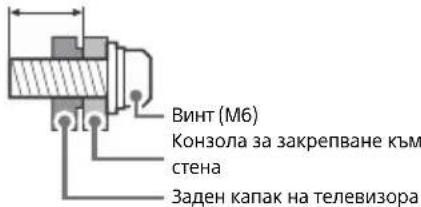
Precautions
- When installing the TV, disconnect all cables from it. - Place the TV on a stable surface to avoid damage. When moving the TV, hold it as shown. Do not press on the LCD panel or the frame around the screen. When lifting or moving the TV, hold it firmly.
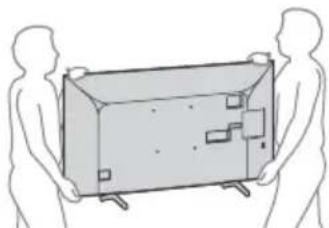
Do not expose the TV to dripping or splashing water. When moving the TV, or when changing the stand, pack it using the original packaging and packing materials.
Preventing the TV from falling over KD-65X70xx KD-55X70xx / 49X70xx / 43X70xx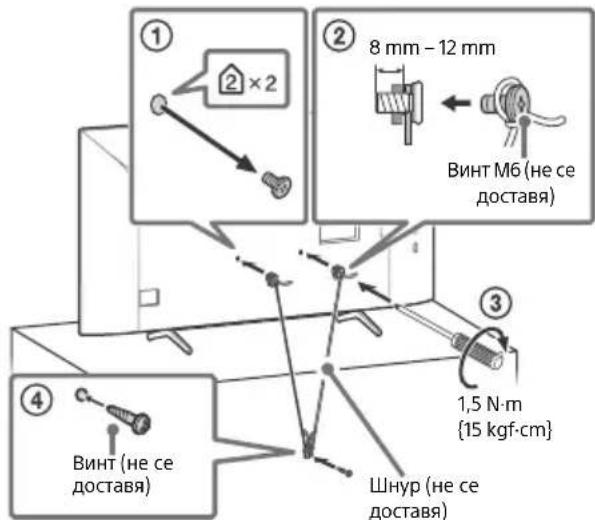
ANT* (RF input), (Satellite input)* 2
Connector for terrestrial/cable and satellite TV.
5 AUDIO OUT
Supports only the stereo mini-jack. To listen to the TV sound through the connected audio system, press HOME, select [System Settings] → [Settings] → [AV Settings] → [Audio Output], then select the desired item.
Note
For an external device that has only SCART AV OUT, use a SCART-to-RCA adapter. 2 Only for certain regions/countries/TV models.
The TV will turn off automatically (the TV enters standby mode)
- If [Sleep Timer] is activated.
- If [Auto Shutoff] or [Auto Sleep] is set.
- If [Power Off when TV not in use] is activated.
Some input sources may not be selectable.
- Select [AV] and select [HDMI] on the input source.
Programs cannot be tuned.
-Check the antenna/cable connection.
Remote control does not work.
- Replace the batteries.
The TV frame is hot.
When the TV is used for a long time, the frame may become hot. You can feel the heat when you touch the frame. *For more information, refer to the manual, then select [Help Guide] in [Settings] menu.
Specifications
System
Panel system
LCD (Thin Film Transistor) panel, LED backlight
TV system
Depending on the country/area selection, the TV model may vary.
Analog: B/G, D/K, I
Digital: DVB-T/DVB-C DVB-T2*1
ARC (Audio Return Channel) (camo HDMI IN 3)
Digital audio: PCM: 48 kHz 16 bit, Dolby Audio, DTS
DIGITAL AUDIO OUT (OPTICAL)
Optical digital audio jack (digital audio PCM: 48 kHz
16 bit, Dolby Audio, DTS)
AUDIO OUT (stereo mini jack)
Headphones, audio output, subwoofer
1,2-3 (HDD-REC) (function not available in
some regions)
USB ports 1, 2 and 3 support High Speed USB (USB 2.0)
0
AM (loop antenna) terminal
DC IN 19.5 V (for the AC adapter supplied)
KD-65X70xx: 220 kWh per year
KD-55X70xx: 161 kWh per year
KD-49X70xx: 110 kWh
KD-43X70xx: 96 kWh
Power consumption in standby mode*4*5
0.50 W
Resolution
3840 dots (horizontal) × 2160 lines (vertical)
Input/Output terminals
USB 1/2/3
5V = 500mA (max.)
Dimensions (approx.) (W × H × D)
With stand mass
KD-65X70xx: 146.3 × 90.4 × 34.0 cm
KD-55X70xx: 124.1 × 78.1 × 34.0 cm
KD-49X70xx: 110.1 × 70.2 × 28.6 cm
KD-43X70xx: 97.0 × 62.8 × 28.6 cm
Without stand
KD-65X70xx: 146.3 × 84.5 × 8.0 cm
KD-55X70xx: 124.1 × 72.1 × 7.9 cm
KD-49X70xx: 110.1 × 64.5 × 5.7 cm
KD-43X70xx: 97.0 × 57.0 × 5.7 cm
With stand
With stand
KD-65X70xx: 21.4 kg
KD-55X70xx: 16.3 kg
KD-49X70xx: 12.4 kg
KD-43X70xx: 10.2 kg
Without stand
KD-65X70xx: 20.5 kg
KD-55X70xx: 15.4 kg
KD-49X70xx: 11.9 kg
KD-43X70xx: 9.7 kg
Supplied accessories
Wall-mount bracket: SU-WL450
Operating temperature: 0°C - 40°C
Operating humidity: 10% - 80% relative humidity
(without condensation)
1 Not all TV models have DVB-T2 or DVB-S/S2 tuners and a satellite antenna connector. 2 HDMI IN 2 and HDMI IN 3 support high-quality HDMI formats: 4K 60p/50p 4:2:0 10 bit, 4:4:4, 4:2:2. 3 Energy consumption in kWh is based on the TV operating 4 hours per day, 365 days. Actual energy consumption depends on how the TV is used. *4 The indicated energy consumption in standby mode is achieved after the TV is connected to the necessary external devices. 5 Energy consumption in standby mode will increase when your TV is connected to a network.
Note
Do not remove the CAM card (availability depends on the TV model) from the TV slot (CI+ module) unless you need to insert a CAM card. The availability of optional accessories depends on the country/region/model. Design and specifications are subject to change without notice.
- Note on the digital function of the TV
Digital TV (DVB terrestrial, satellite and cable), interactive services and network functions may not be available in all countries or regions. Some functions may not be activated or may not work correctly with some broadcasters and network environments. Some broadcasters may charge for services. This TV supports digital broadcasting and MPEG-2, H.264/MPEG-4 AVC and H.265/HEVC codecs, but compatibility with all broadcast signals/services cannot be guaranteed, as they may change over time.
Note on HDR (High Dynamic Range) (Only for certain models/countries/regions)
Compatible only with HDR10 format via HDMI and HDR content in the built-in Netflix and YouTube apps. (For more information, see the Sony support page.) HDR signal format is specifically HDR10 Media Profile (widely known as HDR10). Compatibility with other HDR formats is not guaranteed.
Trademark information
Trademark
- The HDMI interface is divided according to the HDMI (High-Definition Multimedia Interface) specification, as well as the HDMI trademark of HDMI Licensing Administrator, Inc. in the United States and other countries.
- Manufactured under license from Dolby Laboratories. Dolby, Dolby Audio, and the double-D symbol are trademarks of Dolby Laboratories.
- Vewd® Core. Copyright 1995-2020 Vewd Software AS. All rights reserved. Wi-Fi, Wi-Fi Alliance, Wi-Fi Direct and Miracast are registered trademarks of Wi-Fi Alliance.
- Wi-Fi Protected Setup™ is a trademark of Wi-Fi Alliance.
- The Wi-Fi CERTIFIED™ logo is a certification mark of Wi-Fi Alliance.
- Netflix is a registered trademark of Netflix, Inc.
- "YouTube" and "YouTube nonzero" are registered trademarks of Google LLC. "BRAVIA", "BRAVIA Sync" are trademarks or registered trademarks of Sony Corporation. "Blu-ray Disc", "Blu-ray", and "Blu-ray Disc" logo are trademarks of Blu-ray Disc Association. "PlayStation" is a registered trademark and "PS4" is a trademark of Sony Interactive Entertainment Inc.
- For DTS patents, see http://patents.dts.com. Manufactured under license from DTS, Inc. DTS, the Symbol, DTS and the Symbol together, and Digital Surround are registered trademarks or trademarks of DTS, Inc., in the United States and/or other countries. © DTS, Inc. All rights reserved. TUXERA is a registered trademark of Tuxera Inc. in the United States and other countries.
Only for satellite models:
DiSEqC is a trademark of EUTELSAT. This television supports DiSEqC 1.0. This television is not intended for controlling antennas with a motor. All other trademarks are the property of their respective owners.
For the best picture and sound quality, refer to the following instructions.
Contents
IMPORTANT SAFETY INSTRUCTIONS
DIGITAL AUDIO OUT (OPTICAL)
Optical digital output (PCM compatible)
48 kHz 16 bit, Dolby Audio, DTS
AUDIO OUT (Mini stereo phone jack)
Audio output, Subwoofer
1, 2, 3 (HDD REC) (function not available in Italy)
The USB ports 1, 2 and 3 support High Speed USB
(USB 2.0)

KD-65X70xx: 163.9 cm / 65 inches
KD-55X70xx: 138.8 cm / 55 inches
KD-49X70xx: 123.2 cm / 49 inches
KD-43X70xx: 108.0 cm / 43 inches
Power consumption
KD-55X70xx: 124.1 × 78.1 × 34.0 cm
KD-49X70xx: 110.1 × 70.2 × 28.6 cm
KD-43X70xx: 97.0 × 62.8 × 28.6 cm
KD-65X70xx: 146.3 × 84.5 × 8.0 cm
KD-55X70xx: 124.1 × 72.1 × 7.9 cm
KD-49X70xx: 110.1 × 64.5 × 5.7 cm
KD-43X70xx: 97.0 × 57.0 × 5.7 cm
Bapoc (Nepinou)
https://www.sony.eu/support
KD-65X70xx
720p (30, 50, 60 Hz), 720/24p, 576p, 576i, 480p, 480i
Ses:
Two-channel linear PCM: 32/44.1/48 kHz 16/20/24 bit, Dolby Audio, DTS
ARC (Audio Return Channel) (only HDMI IN 3)
Two-channel linear PCM: 48 kHz 16 bit, Dolby Audio, DTS
DIGITAL AUDIO OUT (OPTICAL)
Digital optical jack (two-channel linear PCM: 48 kHz 16 bit, Dolby Audio, DTS)
AUDIO OUT (Stereo Mini Jack)
Headphones, Audio output, Subwoofer
KD-65X70xx: 146.3 × 90.4 × 34.0 cm
KD-55X70xx: 124.1 × 78.1 × 34.0 cm
KD-49X70xx: 110.1 × 70.2 × 28.6 cm
KD-43X70xx: 97.0 × 62.8 × 28.6 cm


- BRAVIA
- TABLE OF CONTENTS
- INTRODUCTION
- NOTE
- HELP GUIDE (MANUAL)
- LOCATION OF THE IDENTIFICATION LABEL
- IMPORTANT NOTICE
- NOTICE FOR RADIO EQUIPMENT
- SAFETY INFORMATION
- INSTALLATION/SET-UP
- INSTALLATION
- TRANSPORTING
- REMOTE CONTROL AND TV
- (INPUT SELECT/TEXT HOLD)
- DIGITAL/ANALOG
- SYNC MENU
- NUMBER BUTTONS
- COLOUR BUTTONS
- SLEEP
- GUIDE
- RETURN
- OPTIONS
- HOME
- (VOLUME)
- AUDIO
- (SUBTITLE SETTING)
- TITLE LIST (NOT AVAILABLE FOR ITALY)
- REC (NOT AVAILABLE FOR ITALY)
- (WIDE MODE)
- (POWER)
- REMOTE CONTROL SENSOR / LED INDICATOR
- CAM (CONDITIONAL ACCESS MODULE)
- USB1/2, USB3 (HD)
- HDMI IN
- HDMI IN 3 ARC (AUDIO RETURN CHANNEL)
- REC)
- AUDIO OUT
- INSTALLING THE TV TO THE WALL
- USING THE OPTIONAL WALL-MOUNT BRACKET
- TO CUSTOMERS
- TO SONY DEALERS AND CONTRACTORS
- KD-65X70XX
- KD-55X70XX KD-49X70XX / 43X70XX
- TROUBLESHOOTING
- WHEN THE LED INDICATOR IS FLASHING RED, COUNT HOW MANY TIMES IT FLASHES (INTERVAL TIME IS THREE SECONDS)
- TROUBLES AND SOLUTIONS
- NO PICTURE (SCREEN IS DARK) AND NO SOUND
- PICTURE CONTOURS ARE DISTORTED
- THE TV TURNS OFF AUTOMATICALLY (THE TV ENTERS STANDBY MODE)
- SOME INPUT SOURCES CANNOT BE SELECTED
- SOME PROGRAMMES CANNOT BE TUNED
- THE REMOTE CONTROL DOES NOT FUNCTION
- THE TV SURROUNDS BECOME WARM
- SPECIFICATIONS
- SYSTEM
- INPUT/OUTPUT JACKS
- POWER, PRODUCT FICHE AND OTHERS
- DIMENSIONS (APPROX.) (W × H × D)
- MASS (APPROX.)
- OTHERS
- NOTES ON DIGITAL TV FUNCTION
- NOTES ON HDR (HIGH DYNAMIC RANGE) (ONLY ON LIMITED REGION/COUNTRY/TV MODEL)
- TRADEMARK INFORMATION
- WEIGHT (APPROX.)
- MISCELLANEOUS
- OTHER
- WEIGHT (APPROXIMATE)
- LAST
- INPUT/OUTPUT JACK
- HELP GUIDE (ONLINE)
- IDENTIFICATION LABEL
- IMPORTANT SAFETY INSTRUCTIONS
- SAFETY FOR RADIO EQUIPMENT
- PRECAUTIONS
- ANT* (RF INPUT), (SATELLITE INPUT)
- THE TV WILL TURN OFF AUTOMATICALLY (THE TV ENTERS STANDBY MODE)
- SOME INPUT SOURCES MAY NOT BE SELECTABLE
- PROGRAMS CANNOT BE TUNED
- REMOTE CONTROL DOES NOT WORK
- THE TV FRAME IS HOT
- WITH STAND
- SUPPLIED ACCESSORIES
- DO NOT REMOVE THE CAM CARD (AVAILABILITY DEPENDS ON THE TV MODEL) FROM THE TV SLOT (CI+ MODULE) UNLESS YOU NEED TO INSERT A CAM CARD. THE AVAILABILITY OF OPTIONAL ACCESSORIES DEPENDS ON THE COUNTRY/REGION/MODEL. DESIGN AND SPECIFICATIONS ARE SUBJECT TO CHANGE WITHOUT NOTICE
- DIGITAL TV (DVB TERRESTRIAL, SATELLITE AND CABLE), INTERACTIVE SERVICES AND NETWORK FUNCTIONS MAY NOT BE AVAILABLE IN ALL COUNTRIES OR REGIONS. SOME FUNCTIONS MAY NOT BE ACTIVATED OR MAY NOT WORK CORRECTLY WITH SOME BROADCASTERS AND NETWORK ENVIRONMENTS. SOME BROADCASTERS MAY CHARGE FOR SERVICES. THIS TV SUPPORTS DIGITAL BROADCASTING AND MPEG-2, H.264/MPEG-4 AVC AND H.265/HEVC CODECS, BUT COMPATIBILITY WITH ALL BROADCAST SIGNALS/SERVICES CANNOT BE GUARANTEED, AS THEY MAY CHANGE OVER TIME
- COMPATIBLE ONLY WITH HDR10 FORMAT VIA HDMI AND HDR CONTENT IN THE BUILT-IN NETFLIX AND YOUTUBE APPS. (FOR MORE INFORMATION, SEE THE SONY SUPPORT PAGE.) HDR SIGNAL FORMAT IS SPECIFICALLY HDR10 MEDIA PROFILE (WIDELY KNOWN AS HDR10). COMPATIBILITY WITH OTHER HDR FORMATS IS NOT GUARANTEED
- TRADEMARK
- CONTENTS
- BAPOC (NEPINOU)
Brand : SONY
Model : Bravia KD55X7053
Category : Projector