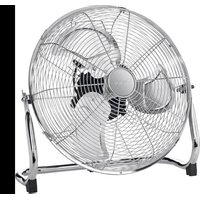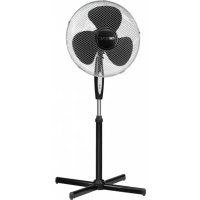
VL 3741 S - Fan CLATRONIC - Free user manual and instructions
Find the device manual for free VL 3741 S CLATRONIC in PDF.


| Brand | Clatronic |
| Model | VL 3741 S |
| Product type | Pedestal fan with remote control |
| Color | Silver / Black |
| Power supply | 220-240 V ~ 50/60 Hz |
| Power consumption | 45 Watts |
| Protection class | Class II |
| Net weight | Approx. 2.55 kg |
| Number of speeds | 3 (Low, Mid, High) |
| Oscillation function | Yes, 80° angle |
| Timer | Yes, up to 7.5 hours in 30-minute increments |
| Wind modes | Manual, Natural, Sleep |
| Remote control | Yes, with 2x AAA batteries (not included) |
| Adjustable height | Yes, via adjustment nut |
| Tilt | Yes, approx. 15° angle |
| Protective grille | Front and rear, secured by hooks and screws |
| Cleaning | Dry or slightly damp cloth, without abrasive detergents |
| Cross base | Assemble with screws |
| Cable length | Approx. 1.5 m (estimated) |
| Fan blade diameter | Approx. 40 cm (estimated) |
| Recommended use | Indoors, flat and stable surface |
Frequently Asked Questions - VL 3741 S CLATRONIC
User questions about VL 3741 S CLATRONIC
0 question about this device. Answer the ones you know or ask your own.
Ask a new question about this device
Download the instructions for your Fan in PDF format for free! Find your manual VL 3741 S - CLATRONIC and take your electronic device back in hand. On this page are published all the documents necessary for the use of your device. VL 3741 S by CLATRONIC.
USER MANUAL VL 3741 S CLATRONIC
natural_image
Exterior view of a standing electric fan with a three-blade fan and control panel (no text or symbols visible)2 Inhalt
Deutsch
Inhalt
Overview of the Components......Page 3
Instruction Manual...... Page 30
Technical Data......Page 34
Disposal Page 34
Język polski
Spis treści
Overview of the Components
4 Deutsch
Bedienungsanleitung
(piles non fournies)
Thank you for choosing our product. We hope you enjoy using the appliance.
Symbols in these Instructions for Use
Important information for your safety is specially marked. It is essential to comply with these instructions in order to avoid accidents and prevent damage to the machine:

WARNING:
This warns you of dangers to your health and indicates possible injury risks.

CAUTION:
This refers to possible hazards to the machine or other objects.

NOTE:
This highlights tips and information.
General Notes
Read the operating instructions carefully before putting the appliance into operation and keep the instructions including the warranty, the receipt and, if possible, the box with the internal packing. If you give this device to other people, please also pass on the operating instructions.
- The appliance is designed exclusively for private use and for the envisaged purpose. This appliance is not fit for commercial use.
- Do not use it outdoors. Keep it away from sources of heat, direct sunlight, humidity (never dip it into any liquid) and sharp edges. Do not use the appliance with wet hands. If the appliance is humid or wet, unplug it immediately.
- When cleaning or putting it away, switch off the appliance and always pull out the plug from the socket (pull the plug itself, not the lead) if the appliance is not being used and remove the attached accessories.
- Do not operate the machine without supervision. If you leave the room you should always turn the device off. Remove the plug from the socket.
- The device and the mains lead have to be checked regularly for signs of damage. If damage is found the device must not be used.
- Use only original spare parts.
- In order to ensure your children's safety, please keep all packaging (plastic bags, boxes, polystyrene etc.) out of their reach.

WARNING:
Do not allow small children to play with the foil.
There is a danger of suffocation!
Special Safety Instructions for this Appliance
- Never stick fingers or other objects through the protection grid.
- Watch out for long hair! It can be caught in the fan owing to the air turbulence!
- Use the appliance only with the protection grids on!
- If you need to remove the fan guard, first switch off the appliance and disconnect the mains plug.
- Select a stable base to avoid the tipping of the fan during use!
- Do not place the device immediately next to stoves or other sources of heat.
- Do not repair the appliance by yourself. Always contact an authorized technician. If the supply cord is damaged, it must be replaced by the manufacturer, its service agent or similarly qualified persons in order to avoid a hazard.
English
- This appliance can be used by children aged from 8 years and above and persons with reduced physical, sensory or mental capabilities or lack of experience and knowledge if they have been given supervision or instruction concerning use of the appliance in a safe way and understand the hazards involved.
• Children shall not play with the appliance. - Cleaning and user maintenance shall not be made by children without supervision.
- Do not immerse the device into water for cleaning. Please follow the instructions as stipulated in the chapter "Cleaning".
Overview of the Components
1 Hook
2 Propeller
3 Motor shaft
4 Motor
5 Adjustment knob for oscillation
6 Switch housing
7 Stand / gear casing connection screw
8 Nut for height adjustment
9 Cover cap
10 Stand tube
11 Screws for assembling the pedestal
12 Mounting plate
13 Pedestal
14 Operating mode switch
15 Rear protection grid
16 Fastening nut
17 Attachment ring for rear protection grid
18 Fastening screw
19 Fastening screw
20 Front protection grid
Not shown: Remote control
Unpacking the Device
- Remove the device from its packaging.
- Remove all of the packaging material such as foils, filling material, cable holders and cardboard packaging.
- Check the scope of delivery.
- Check the appliance for any transport damage to prevent a hazard.
i NOTE:
There may still be dust or production residues on the surface of the device. We recommend that you quickly wipe off the housing with a damp cloth.
Assembly Instructions
The device must be completely assembled before initial operation!
i NOTE:
- You will need a Phillips screwdriver of medium size for the assembly.
- Screws not included as accessory are already pre-installed at the respective parts.
-
Also observe the "Overview of the Components" on page 3.
-
Place the parts of the pedestal together in the shape of a cross.
- Screw the mounting plate (12) tightly to the pedestal. To do so, use the four Phillips-head screws.
- Remove the nut for the height adjustment (8). Push the covering cap (9) on to the lowest position of the upright tube (10). Screw the height adjustment nut back on to the upright tube (10).
- Loosen the connection screw (7) and insert the gear casing (6) and the motor casing (4) on the stand tube. Then tighten the connecting bolt by hand.
- Unscrew the mounting ring (17) in an anticlockwise direction. Keep it ready to hand.
- Position the rear protection grid (15) in place in accordance with the recesses.
i NOTE:
Please ensure that the carrying handle is facing upwards.
32 English
- Turn the attachment ring (17) for the rear protection grid (15) slightly in a clockwise direction.
- Attach the propeller (2) to the motor shaft (3).
- Tighten the attachment screw (18) for the propeller in an anticlockwise direction.
- Remove the preassembled fastening screw (19) and nut (16) from the wire mesh guard. Keep it ready to hand.
- Attach the protective front guard (20) with the hook (1) to the protective rear guard.
i NOTE:
Ensure that the holes for the attachment screw in the front and rear protective grille are aligned one above the other.
-
Secure the wire mesh guard with the fastening screw (19) and nut (16).
-
Close the attachment hooks.
Position
The ideal position is a non-slip, flat surface.
Putting into Service
Electrical Connection
- Before inserting the plug into the socket. Make sure that the mains voltage to be used matches that of the device. You can find this information on the nameplate.
- Connect the device to a duly installed protective contact socket. The POWER indicator lamp indicates that the fan is ready for operation.
Fitting Batteries into the Remote Control
(Batteries not supplied)
- Open the lid of the battery compartment on the rear of the remote control.
- Insert 2 MICRO batteries of type R03 "AAA" 1.5 V.
- Please ensure the correct polarity. Details can be found in the battery compartment.
- Close the battery compartment.
i NOTE:
If you are not going to use the remote control for a prolonged period, remove the batteries in order to prevent them from leaking.
CAUTION:
• Used batteries should not be disposed of in the domestic waste. Please return all batteries to a special collection point. Your local authority will provide you with information on this.
- Different types of battery or new and used batteries must not be used together.
Remote Control Range
The remote control has a range of approx. 8 meters. If this range becomes shorter, the batteries must be changed.
• To use the remote control, point it at the sensor on the front of the switch housing.
- Make sure there are no obstacles between the remote control and the sensor.
Use
Basic Settings
Set the blower inclination angle before starting the device.
- Hold the motor housing with both hands and tilt it carefully to the desired position. It clicks audibly into place.
CAUTION:
The tilt angle is approx. 15 degrees.
Fan Setting
You have two options:
- Stationary
- Shut off the device.
- Pull the control knob upwards.
- Use the carrying handle to place the device into the desired position.
- Oscillating
- Shut off the device.
- Press the control knob.
i NOTE:
The device rotates automatically in the range of about 80 degrees.
- To turn off the function, shut off the device and pull the control knob upwards.
Operation
For some functions, you can operate the appliance with the remote control as well as with the buttons on the switch housing. The buttons marked * can be found on the appliance and on the remote control.
NOTE:
The indicator lamps on the switch housing indicate the settings.
ON / SPEED\* Switching on and selecting the speed
i NOTE:
- When switching on for the first time, after you have connected the mains plug to the socket, the fan works in manual mode at low speed (LOW). The indicator lamps MODE and LOW light up red.
English
i NOTE:
- After switching off with the OFF button and switching on again with the ON/SPEED button, the appliance continues to work in the last set mode.
Press the ON/SPEED button repeatedly to select one of three speeds:
- LOW slow
- MID medium
- HIGH high
TIMER Timer switch
If you want the appliance to switch off after a set period, press the TIMER button.
i NOTE:
The operating time is extended by a half hour each time the TIMER button is pressed.
Maximum shut-off time: 7.5 hours (H).
MODE Wind change functions
The appliance has two different wind change functions: Natural and Sleep. The speed of the fan is varied differently in the two functions.
Press the MODE button repeatedly to switch on one of these functions.
- Manual Mode (MODE indicator lamp lights up red) You can adjust the speed settings yourself at any time.
• Natural Mode (MODE indicator lamp lights up green)
- If the HIGH speed setting (high speed) is selected, the speed switches between high – medium – slow – off.
- If you have selected MID (medium setting), the speed switches between medium – slow – off.
- In the LOW speed setting (slow speed) the switch is between slow-off.
- Sleep Mode (MODE indicator lamp goes out)
- If the HIGH speed setting is selected: The fan operates as in "natural mode" for the first 30 minutes on the HIGH speed setting. It then operates for 30 minutes as in "natural mode" on the MID speed setting. For the remaining time, the fan works as in "natural mode" on the LOW speed setting.
- On the MID speed setting: The fan works as in "natural mode" for the first 30 minutes on the MID speed setting. For the remaining time, the fan works as in "natural mode" on the LOW speed setting.
- If the LOW speed setting is selected: Switch between slow speed and shutdown of the fan as in "natural mode".
OFF\* Switch off
Press the OFF button to switch the appliance off.
Cleaning

WARNING:
• Always remove the mains plug before cleaning the device.
- If you need to remove the safety guard: Always switch the device off and remove the mains plug.
- Under no circumstances should you immerse the device in water for cleaning purposes. Otherwise this might result in an electric shock or fire.
CAUTION:
- Do not use a wire brush or any abrasive items.
- Do not use any acidic or abrasive detergents.
- Clean the outside of the device with a dry cloth without any additives.
- If the device is very dirty wet a cloth with water and then wipe the device dry once you have finished.
Storage
- Clean the appliance as described.
• We recommend that the appliance is kept in its original packaging if you do not intend to use it for long periods. - Always store the appliance out of the reach of children, in a well-ventilated and dry place.
34 English
Technical Data
Model: VL 3741 S
Power supply: 220-240 V\~, 50/60 Hz
Power consumption: 45 W
Protection class:......II
Net weight:....approx. 2.55 kg
The right to make technical and design modifications in the course of continuous product development remains reserved.
This device has been tested according to all relevant current CE guidelines, such as electromagnetic compatibility and low voltage directives, and has been constructed in accordance with the latest safety regulations.
Disposal
Meaning of the "Dustbin" Symbol
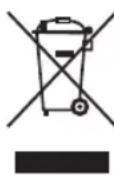
Protect our environment: do not dispose of electrical equipment in the domestic waste.
Please return any electrical equipment that you will no longer use to the collection points provided for their disposal.
This helps avoid the potential effects of incorrect disposal on the environment and human health.
This will contribute to the recycling and other forms of re-utilisation of electrical and electronic equipment.
Information concerning where the equipment can be disposed of can be obtained from your local authority.