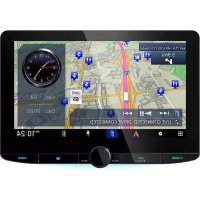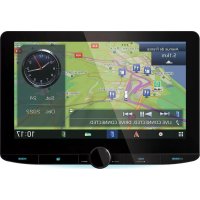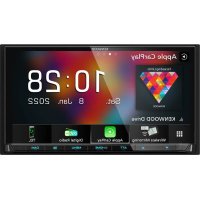
DNR876S - GPS Navigation System KENWOOD - Free user manual and instructions
Find the device manual for free DNR876S KENWOOD in PDF.


| Product Type | GPS navigation system |
| Brand | Kenwood |
| Model | DNR876S |
| Display size | 6.95 inches (diagonal) |
| Display resolution | 1 152 000 pixels (800 H x 480 V x RGB) |
| Display type | Active matrix TFT screen with LED backlight |
| GNSS receiver | High-sensitivity GPS + GLONASS |
| Position accuracy | < 2.0 meters CEP (at -130 dBm) |
| Maximum power output | 50 W × 4 |
| Supported audio formats | MP3, WMA, AAC, WAV, FLAC, Ogg Vorbis |
| Supported video formats | MPEG-1, MPEG-2, H.264, MPEG-4, WMV, MKV |
| Wireless connectivity | Bluetooth (HFP, A2DP, AVRCP, PBAP, SPP), Wi-Fi 802.11 a/b/g/n/ac |
| Smartphone compatibility | Apple CarPlay (wired and wireless), Android Auto (wired and wireless) |
| Online services | Spotify, Pandora, SiriusXM, INRIX traffic and weather |
| Power supply | 12 V DC car battery |
| Installation dimensions (L × H × P) | 178 × 100 × 160 mm |
| Care and cleaning | Wipe with a soft, dry cloth; do not use solvents |
| Safety | Do not look at the screen while driving; do not enter destination while driving |
| Spare parts and repairability | Consult an authorized KENWOOD dealer |
| General information | Manufactured under license from Dolby Audio; Bluetooth compatible |
Frequently Asked Questions - DNR876S KENWOOD
User questions about DNR876S KENWOOD
0 question about this device. Answer the ones you know or ask your own.
Ask a new question about this device
Download the instructions for your GPS Navigation System in PDF format for free! Find your manual DNR876S - KENWOOD and take your electronic device back in hand. On this page are published all the documents necessary for the use of your device. DNR876S by KENWOOD.
USER MANUAL DNR876S KENWOOD
DNX996XR DNR876S DNX696S DNX576S DNR46EX DNR476S
SYSTEME DE NAVIGATION GPS MODE D'EMPLOI
JVCKENWOOD Corporation
Traffic & Weather NowTM 65
Configuration Bluetooth. 74
DX696S/DNX576S/DNR46EX/DNR476S
DNX696S / DNX576S / DNR46EX / DNR476S
Pour support disque/USB/SD/iPod :
DNX696S / DNX576S / DNR46EX / DNR476S
[NAV Interrupt Speaker]
KENWOOD Traffic Powered By INRIX
DX996XR/DNR876S
DNX696S / DNX576S / DNR46EX /
La lecture commence.
Disque
[Dynamic Range Control]
Apple CarPlay is connected
REMARQUE
Lance I'application.

DME]
DNX696S / DNX576S / DNR46EX / DNR476S
REMARQUE
DNX696S / DNX576S / DNR46EX / DNR476S
Pour annuler
DNX696S / DNX576S / DNR46EX / DNR476S
REMARQUE
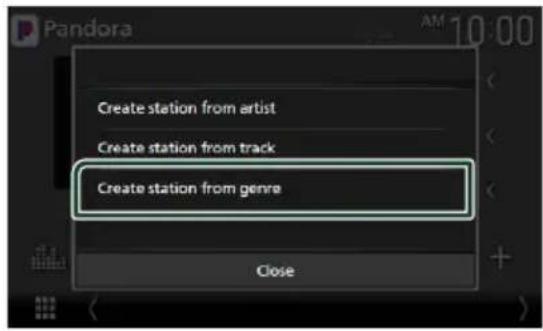
1 Touchez [Create station from genre].
DNX696S/DNX576S/DNR46EX/DNR476S
DNX696S/DNX576S/DNR46EX/DNR476S
DNX696S/DNX576S/DNR46EX/DNR476S
1 Debranchez I'iPod/I'iPhone.
Connexion Bluetooth
·[Traffic & Weather]
HFP [Hands Free1] / [Hands Free2] / [No Connection.]
La lecture commence.
REMARQUE
DNX696S / DNX576S / DNR46EX / DNR476S

DNX696S/DNX576S/DNR46EX/DNR476S
■ [Rear Camera Interruption]
■[Rear Camera Settings 1\*]
[Front Camera Interruption]
Picture from view camera
3 [ Dashboard Camera]
4 [Right]
[Left]
[None]
3 Touchez [Enter].
Picture from view camera
[Front]
3 [ Dashboard Camera]
4 [Right]
[Left]
[None]
3 Touchez [Enter].
REMARQUE
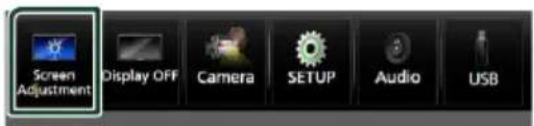
2 Touchez [Screen Adjustment].
[Beep Volume] (DNX996XR)
■[Parking Assist Display]
[Parking Assist Position]
[Touch Panel Adjust] (saufDNX996XR)
[Wallpaper Customize]
[Screen transition effect]
■[Speech Quality Adjust]
[Wi-Fi SETUP] (DNX996XR / DNR876S)
[Front Source], [Rear Source]
"OFF", "Low" (Bas), "High" (Haut)
[Drive Equalizer+]
Sound Image LR (Front)
Sound Image LR (Rear)
[Size of the Virtual Sound Field]
Mode NAV (navigation)
DNX696S/DNX576S/DNR46EX/DNR476S
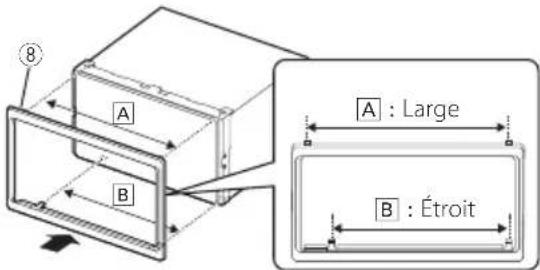
Voitures General Motors (DNX996XR)
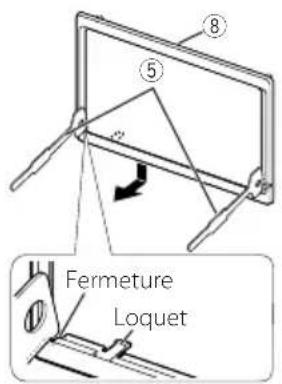
DNX696S/DNX576S/DNR46EX/DNR476S
REMARQUE
[DNX996XR / DNX696S :]
[DNR876S/DNX576S/DNR46EX/DNR476S:]
CA-C3AV (accessoire en option)
7
Acessoire ④ : Microphone Bluetooth
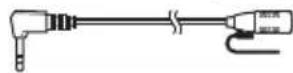
10
- DNX996XR / DNR876S / DNX696S
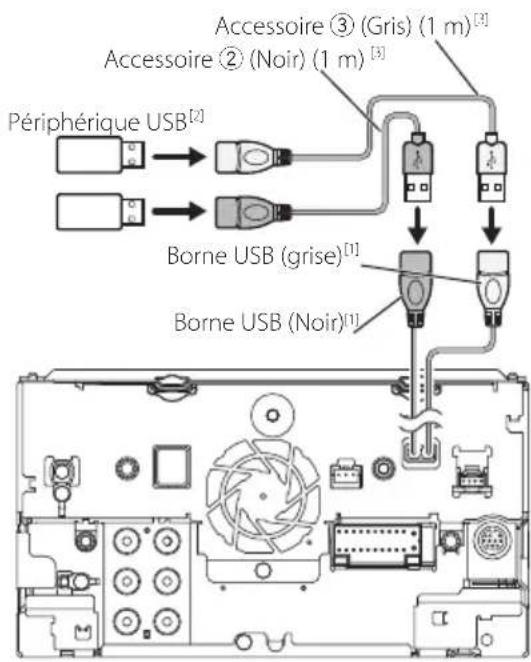
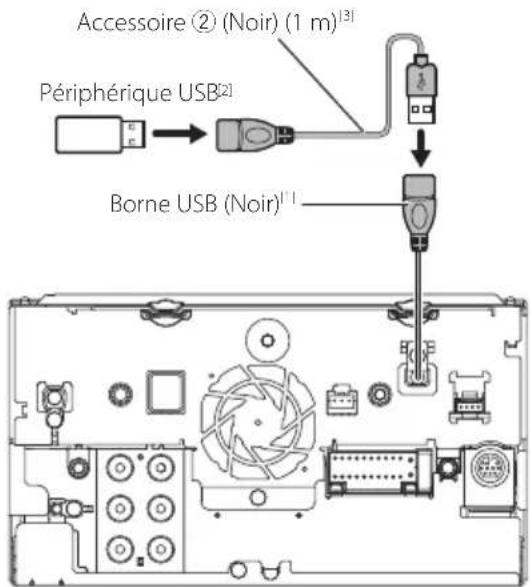
- DNX576S / DNR46EX / DNR476S
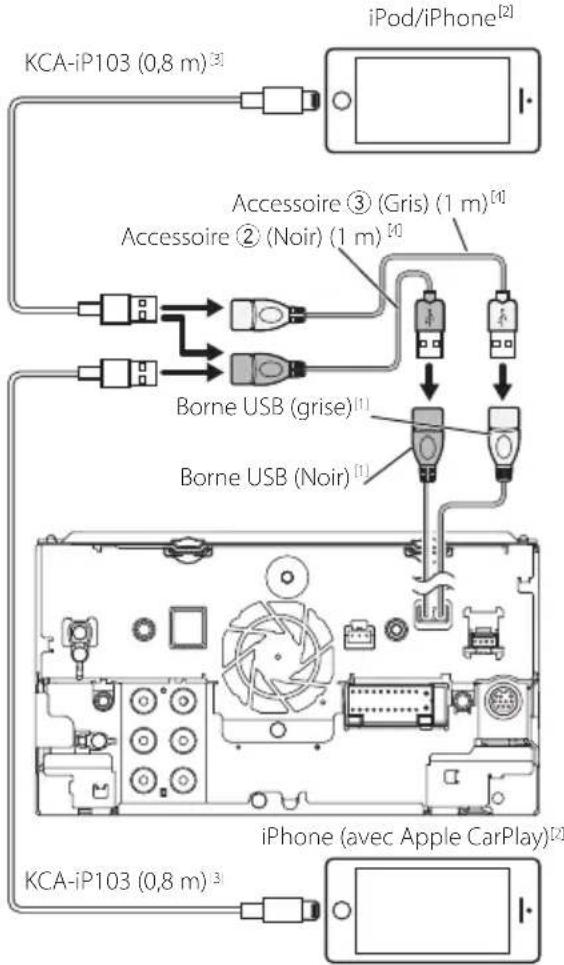
DNX996XR/DNR876S/DNX696S
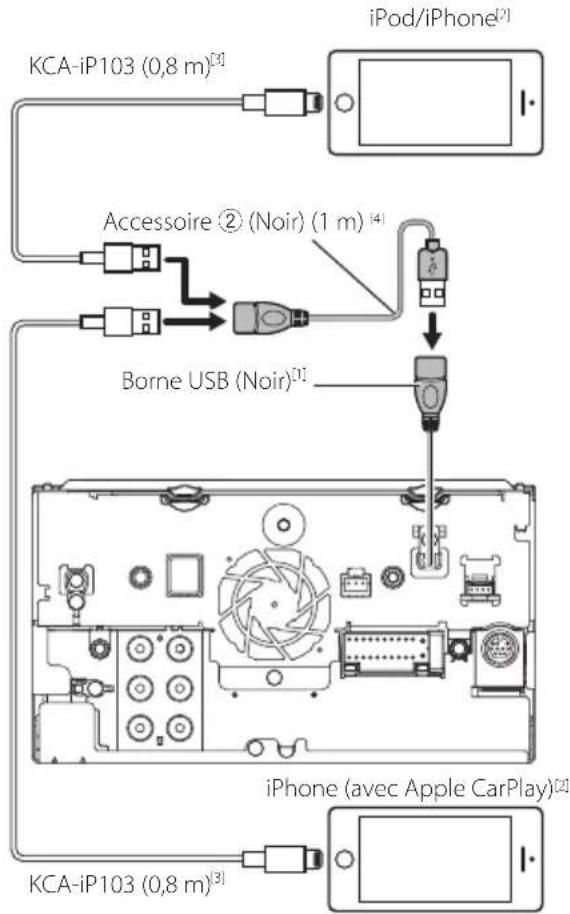
- DNX576S / DNR46EX / DNR476S
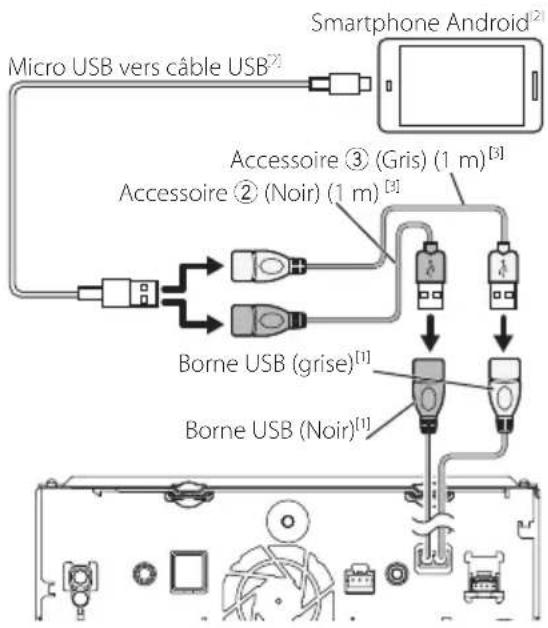
DNX996XR/DNR876S/DNX696S
There is an error in the speaker wiring.
Navigation Error. Please turn on power again later.
Subscription Updated - Press Return To Continue
Incorrect Pass Code entered
The speed sensor must be connected to use Apple CarPlay wirelessly. Please verify the proper connections or plug in by USB to use Apple CarPlay.
The GPS antenna must be connected to use Apple CarPlay wirelessly. Please verify the proper connections or plug in by USB to use Apple CarPlay.
The speed sensor and the GPS antenna must be connected to use Apple CarPlay wirelessly. Please verify the proper connections or plug in by USB to use Apple CarPlay.
6-3/16 × 3-3/16 pouces
DX696S / DX576S / DNR46EX / DNR476S
: 6,75 pouces de large (diagonale)
: 151,8 mm (L) × 79,68 mm (H)
5-31/32 x 3-1/8 pouces
Système d'affichage
DNX996XR: Panneau LCD AAS
Sauf DNX996XR : Panneau LCD TN
Système de lecture
:16 bits/20 bits/24 bits
Section interface USB
Norme USB
:FAT 16,FAT 32,exFAT,NTFS
DX576S/DNR46EX/DNR476S
:CC5V-1,5A×1
Convertisseur N/A
:24bits/32bits
Décodeur audio
:FAT 16,FAT 32,exFAT,NTFS
Tension nominale
Maximum 2T Byte
11ac (80 MHz): 8 dBm ± 2 dB
5 GHz/MIMO
11n (20 MHz)/11ac (20 MHz): 11 dBm ± 2dB/
11n (40 MHz)/11ac (40 MHz): 11 dBm ± 2 dB /
DNR876S/DNX576S/DNR46EX/DNR476S
: 4 V/10k
DNX696S/DNX576S/DNR46EX/DNR476S
Froid: 29 secondes (typ)
Vitesse:0,05 metre/sec
DNX696S/DNX576S/DNR46EX/DNR476S
Vitesse:0,1 metre/sec
DNX696S / DNX576S / DNR46EX / DNR476S
DX696S/DNX576S/DNR46EX/DNR476S
DX696S/DNX576S/DNR46EX/DNR476S
: 182× 112× 153mm
7-3/16 × 4-7/16 × 6 pouces
Poids
DNX996XR
:2,5kg(5,5lb)
DNR8765
:1,9kg(4,2lb)
DX696S / DX576S
:2,1kg(4,6lb)
DNR46EX/DNR476S
:1,7kg (3,8lb)
REMARQUE
DVD is a trademark of DVD Format/Logo Licensing Corporation registered in the U.S., Japan and other countries.
- This item incorporates copy protection technology that is protected by U.S. patents and other intellectual property rights of Rovi Corporation. Reverse engineering and disassembly are prohibited.
- Microsoft and Windows Media are either registered trademarks or trademarks of Microsoft Corporation in the United States and/or other countries.
- This software is based in part on the work of the independent JPEG Group.
- The "AAC" logo is a trademark of Dolby Laboratories.
- Use of the Made for Apple badge means that an accessory has been designed to connect specifically to the Apple product(s) identified in the badge, and has been certified by the developer to meet Apple performance standards. Apple is not responsible for the operation of this device or its compliance with safety and regulatory standards. Please note that the use of this accessory with an Apple product may affect wireless performance.
- Apple, iPhone, iPod, iPod touch, and Lightning are trademarks of Apple Inc., registered in the U.S. and other countries.
- Apple, Siri, Apple CarPlay and Apple CarPlay logo are trademarks of Apple Inc., registered in the U.S. and other countries.
Sirius, XM and all related marks and logos are trademarks of Sirius XM Radio Inc. All rights reserved.
- HD Radio Technology manufactured under license from iBiquity Digital Corporation. U.S. and Foreign Patents. For patents see http://dts.com/patents. HD Radio and the HD, HD Radio, and "ARC" logos are registered trademarks or trademarks of iBiquity Digital Corporation in the United States and/or other countries.
- INRIX is a registered trademark of INRIX, Inc.
- Pandora, the Pandora logo, and the Pandora trade dress are trademarks or registered trademarks of Pandora Media, Inc., used with permission.
- SPOTIFY and the Spotify logo are among the registered trademarks of Spotify AB.
Android, Android Auto, Google Play and other marks are trademarks of Google LLC.
- BlackBerry®, RIM®, Research In Motion® and related trademarks, names and logos are the property of Research In Motion Limited and are registered and/or used in the U.S. and countries around the world. Used under license from Research In Motion Limited.
- SDXC and microSDXC Logos are trademarks of SD-3C LLC.
- Wi-Fi® is a registered trademark of Wi-Fi Alliance®.
- The Wi-Fi CERTIFIED™ Logo is a certification mark of Wi-Fi Alliance®.
- This product includes FontAvenue® fonts licenced by NEC Corporation. FontAvenue is a registered trademark of NEC Corporation.
FontAvenue
This product includes "Ubiquitous QuickBoot TM" technology developed by Ubiquitous Corp. Ubiquitous QuickBoot TM is a trademark of Ubiquitous Corp. Copyright © 2017 Ubiquitous Corp. All rights reserved.
Ubiquitous
THIS PRODUCT IS LICENSED UNDER THE AVC PATENT PORTFOLIO LICENSE FOR THE PERSONAL USE OF A CONSUMER OR OTHER USES IN WHICH IT DOES NOT RECEIVE REMUNERATION TO (j)ENCODE VIDEO IN COMPLIANCE WITH THE AVC STANDARD ("AVCVIDEO") AND/OR (jj)DECODE AVC VIDEO THAT WAS ENCODED BY A CONSUMER ENGAGED IN A PERSONAL ACTIVITY AND/OR WAS OBTAINED FROM A VIDEO PROVIDER LICENSED TO PROVIDE AVCVIDEO. NO LICENSE IS GRANTED OR SHALL BE IMplied FOR ANY OTHER USE. ADDITIONAL INFORMATION MAY BE OBTAINED FROM MPEG LA, L.L.C. SEE HTTP://WWW.MPEGLA.COM
THIS PRODUCT IS LICENSED UNDER THE MPEG4 VISUAL PATENT PORTFOLIO LICENSE FOR THE PERSONAL AND NON-COMMERCIAL USE OF A CONSUMER FOR (i) ENCODING VIDEO IN COMPLIANCE WITH THE MPEG-4 VISUAL STANDARD ("MPEG-4VIDEO") AND/OR (ii) DECODING MPEG4VIDEO THAT WAS ENCODED BY A CONSUMER ENGAGED IN A PERSONAL AND NON-COMMERCIAL ACTIVITY AND/OR WAS OBTAINED FROM A VIDEO PROVIDER LICENSED BY MPEG LA TO PROVIDE MPEG-4VIDEO. NO LICENSE IS GRANTED OR SHALL BE IMplied FOR ANY OTHER USE. ADDITIONAL INFORMATION INCLUDING THAT RELATING TO PROMOTIONAL, INTERNAL AND COMMERCIAL USES AND LICENSING MAY BE OBTAINED FROM MPEG LA, LLC. SEE HTTP://WWW.MPEGLA.COM.
- THIS PRODUCT IS LICENSED UNDER THE VC-1 PATENT PORTFOLIO LICENSE FOR THE PERSONAL AND NON-COMMERCIAL USE OF A CONSUMER TO (i) ENCODE VIDEO IN COMPLIANCE WITH THE VC-1 STANDARD ("VC-1VIDEO") AND/OR (ii) DECODE VC-1VIDEO THAT WAS ENCODED BY A CONSUMER ENGAGED IN A PERSONAL AND NON-COMMERCIAL ACTIVITY AND/OR WAS OBTAINED FROM A VIDEO PROVIDER LICENSED TO PROVIDE VC-1VIDEO. NO LICENSE IS GRANTED OR SHALL BE IMplied FOR ANY OTHER USE. ADDITIONAL INFORMATION MAY BE OBTAINED FROM MPEG LA, L.L.C. SEE HTTP://WWW.MPEGLA.COM
- libFLAC
Copyright (C) 2000-2009 Josh Coalson
Copyright (C) 2011-2013 Xiph.Org Foundation Redistribution and use in source and binary forms, with or without modification, are permitted provided that the following conditions are met:
- Redistributions of source code must retain the above copyright notice, this list of conditions and the following disclaimer.
- Redistributions in binary form must reproduce the above copyright notice, this list of conditions and the following disclaimer in the documentation and/or other materials provided with the distribution.
-
Neither the name of the Xiph.org Foundation nor the names of its contributors may be used to endorse or promote products derived from this software without specific prior written permission. HIS SOFTWARE IS PROVIDED BY THE COPYRIGHT OLLERS AND CONTRIBUTORS AS IS' AND ANY EXPRESS OR IMPLIED WARRANTY, INCLUDING, BUT NOT LIMITED TO, THE IMPLIED WARRANTY OF EXCHANTABILITY AND FITNESS FOR A PARTICULAR PURPOSE ARE DISCLAIMED. IN NO EVENT SHALL THE DUNDATION OR CONTRIBUTORS BE LIABLE FOR ANY DIRECT, INDIRECT, INCIDENTAL, SPECIAL, EXEMPLARY, OR CONSEQUENTIAL DAMAGES (INCLUDING, BUT NOT LIMITED TO, PROCEDURE OF SUBSTITUTE OODS OR SERVICES; LOSS OF USE, DATA, OR PROFITS; OR BUSINESS INTERRUsION) HOWEVER AUSED AND ON ANY THEORY OF LIABILITY, WHETHER IN CONTRACT, STRICT LIABILITY, OR TORT INCLUDING NEGLIGENCE OR OTHERWISE) ARISING ANY WAY OUT OF THE USE OF THIS SOFTWARE, EVEN IF ADVISED OF THE POSSIBILITY OF SUCH DAMAGE.
-
libvorbis
Copyright (c) 2002-2008 Xiph.org Foundation Redistribution and use in source and binary forms, with or without modification, are permitted provided that the following conditions are met:
- Redistributions of source code must retain the above copyright notice, this list of conditions and the following disclaimer.
-
Redistributions in binary form must reproduce the above copyright notice, this list of conditions and the following disclaimer in the documentation and/or other materials provided with the distribution.
-
Neither the name of the Xiph.org Foundation nor the names of its contributors may be used to endorse or promote products derived from this software without specific prior written permission. THIS SOFTWARE IS PROVIDED BY THE COPYRIGHT HOLDERS AND CONTRIBUTORS "AS IS" AND ANY EXPRESS OR IMPLIED WARRANTY, INCLUDING, BUT NOT LIMITED TO, THE IMPLIED WARRANTY OF MERCHANTABILITY AND FITNESS FOR A PARTICULAR PURPOSE ARE DISCLAIMED. IN NO EVENT SHALL THE FOUNDATION OR CONTRIBUTORS BE LIABLE FOR ANY DIRECT, INDIRECT, INCIDENTAL, SPECIAL, EXEMPLARY, OR CONSEQUENTIAL DAMAGES (INCLUDING, BUT NOT LIMITED TO, PROCEDURE OF SUBSTITUTE GOODS OR SERVICES; LOSS OF USE, DATA, OR PROFITS; OR BUSINESS INTERRUPTION) HOWEVER CAUSED AND ON ANY THEORY OF LIABILITY, WHETHER IN CONTRACT, STRICT LIABILITY, OR TORT (INCLUDING NEGLIGENCE OR OTHERWISE) ASING IN ANY WAY OUT OF THE USE OF THIS SOFTWARE, EVEN IF ADVISED OF THE POSSIBILITY OF SUCH DAMAGE.
-
libogg
Copyright (c) 2002, Xiph.org Foundation Redistribution and use in source and binary forms, with or without modification, are permitted provided that the following conditions are met:
- Redistributions of source code must retain the above copyright notice, this list of conditions and the following disclaimer.
- Redistributions in binary form must reproduce the above copyright notice, this list of conditions and the following disclaimer in the documentation and/or other materials provided with the distribution.
- Neither the name of the Xiph.org Foundation nor the names of its contributors may be used to endorse or promote products derived from this software without specific prior written permission.
THIS SOFTWARE IS PROVIDED BY THE COPYRIGHT HOLDERS AND COLNTRIBUTORS AS ISAND ANY EXPRESS OR IMPLIED WARRANTY, INCLUDING, BUT NOT LIMITED TO, THE IMPLIED WARRANTY OF MERCHANTABILITY AND FITNESS FOR A PARTICULAR PURPOSE ARE DISCLAIMED. IN NO EVENT SHALL THE FOUNDATION OR COLNTRIBUTORS BE LIABLE FOR ANY DIRECT, INDIRECT, INCIDENTAL, SPECIAL, EXEMPLARY, OR CONSEQUENTIAL DAMAGES (INCLUDING, BUT NOT LIMITED TO, PROCEDURE OF SUBSTITUTE GOODS OR SERVICES; LOSS OF USE, DATA, OR PROFITS; OR BUSINESS INTERRUPTION) HOWEVER CAUSED AND ON ANY THEORY OF LIABILITY, WHETHER IN CONTRACT, STRICT LIABILITY, OR TORT (INCLUDING NEGLIGENCE OR OTHERWISE) ARISING IN ANY WAY OUT OF THE USE OF THIS SOFTWARE, EVEN IF ADVISED OF THE POSSIBILITY OF SUCH DAMAGE.
Annexes
■Note de 'IC (Industrie Canada)
This HCD radio receiver enables
HD2/HD3
Bookmark
Digital Sound
Program Info
Artist Experience
Emergency Alerts