mSeven True Wireless - Headphones JAYS - Free user manual and instructions
Find the device manual for free mSeven True Wireless JAYS in PDF.



User questions about mSeven True Wireless JAYS
0 question about this device. Answer the ones you know or ask your own.
Ask a new question about this device
Download the instructions for your Headphones in PDF format for free! Find your manual mSeven True Wireless - JAYS and take your electronic device back in hand. On this page are published all the documents necessary for the use of your device. mSeven True Wireless by JAYS.
USER MANUAL mSeven True Wireless JAYS
Getting started, safety and warranty
Product and controls overview
EN Product and controls overview
- Forward / Backward
- Volume up / Volume down
- Answer call / End call
- Reject call
- Voice control
- Play / Pause
text_image
JAYS JAYS L R 1 2 3 4 5 6Product and controls overview
EN Product and controls overview
- Battery level button
- Charging slot for left earpiece
- Battery level LED indicators
- Charging slot for right earpiece
text_image
Designed in Sweden Back Front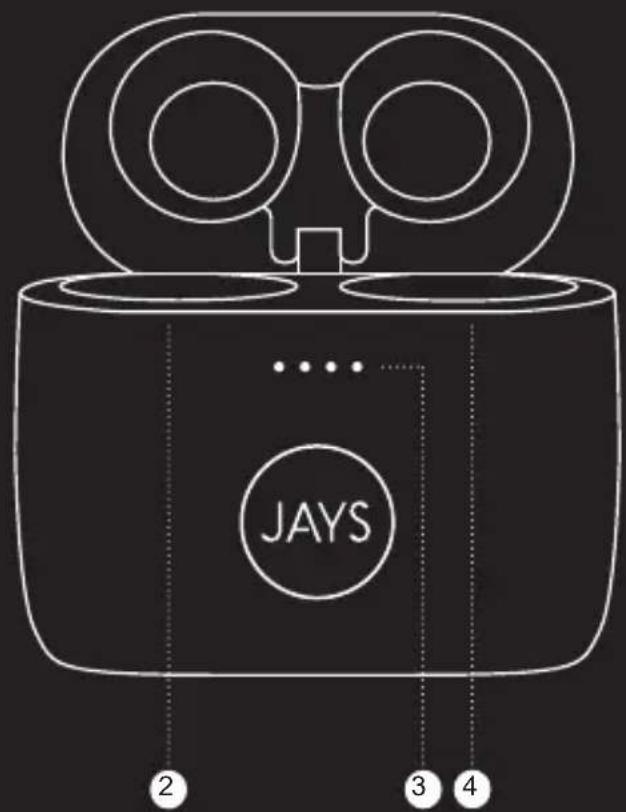
text_image
JAYS 2 3 4Important safety instructions
- Read, follow and keep these instructions.
- For the best possible experience, always use the product as described by the manufacturer.
- Always handle your earphones with care and protect them from external damage.
- Clean your earphones using a soft dry cloth. Never use water, cleaning detergent, leather polish or other substances as they may damage your earphones permanently.
- Avoid exposure to extreme conditions such as very cold or hot temperatures, magnetic fields or damp environments.
- Listening to music at high volume for prolonged periods of time can cause permanent damage to your hearing.
-
Contains small parts and are not suitable for children age three (3) and below.
-
The earphones contain magnetic material.
-
The earphones contain a Lithium battery. If misused or damaged it can become a hazard and is at risk of explosion.
-
Should a battery cell leak, do not allow the liquid to come in contact with skin or eyes.
-
The earphones must be switched off before boarding an aircraft.
-
The earphones must not be disposed of with regular household waste. Please dispose of in accordance with local regulations.
-
Do not use your earphones in the immediate proximity (10 cm) of a pacemaker.
-
Do not subject the earphones and included accessories to abnormal wear and tear.
-
Do not expose the earphones to temperatures below -20°C or above +45°C.
-
Do not charge the earphones in temperatures below 0°C or above +45°C.
-
Do not attempt to burn the earphones. The battery could explode causing injury and death.
-
Do not attempt to open, modify, disassemble, repair or in other way access the internal structure of the earphones. They are not user serviceable.
-
Do not use or store the earphones near to a vehicle airbag due to risk of injury.
-
Do not use earphones while driving, jogging or walking through traffic areas. Earphones effectively isolate external sound and noise, which means that when in use, you might not be able to hear your surroundings.
-
Do not drop, sit on or cause other unusual impact to the earphones.
-
Do not expose to fire, water or high voltage equipment.
-
Do not expose the earphones to rain or moisture.
-
Do not use the earphones near water, bathtubs, sinks, saunas, pools, other liquids or moist areas.
Statements
US FCC interference statement
This equipment has been tested and found to comply with the limits for a Class B digital device, pursuant to part 15 of the FCC Rules. These limits are designed to provide reasonable protection against harmful interference in a residential installation. This equipment generates, uses and can radiate radio frequency energy and, if not installed and used in accordance with the instructions, may cause harmful interference to radio communications. However, there is no guarantee that interference will not occur in a particular installation. If this equipment does cause harmful interference to radio or television reception, which can be determined by turning the equipment off and on, the user is encouraged to try to correct the interference by one or more of the following measures:
• Reorient or relocate the receiving antenna.
- Increase the separation between the equipment and receiver.
- Connect the equipment into an outlet on a circuit different from that to which the receiver is connected.
- Consult the dealer or an experienced radio/TV technician for help.
MODIFICATION: Any changes or modifications not expressly approved by the grantee of this device could void the user's authority to operate the device. This device complies with part 15 of the FCC Rules. Operation is subject to the following two conditions: (1) This device may not cause harmful interference, and (2) this device must accept any interference received, including interference that may cause undesired operation.
US FCC radiation exposure statement
FCC ID: 2AJOO-M7TW01. The product comply with the US portable RF exposure limit set forth for an uncontrolled environment and are safe for intended operation as described in this manual. The further RF exposure reduction can be achieved if the product can be kept as far as possible from the user body or set the device to lower output power if such function is available. This transmitter must not be co-located or operating in conjunction with any other antenna or transmitter.
EU Declaration of conformity
Hereby Northbaze Group AB declares that this product is in compliance with the essential requirements and other relevant provisions of Directive 2014/53/EU and all other EU directive requirements. The complete declaration of conformity can be found at www.jaysheadphones.com.
Caution
Risk of explosions if battery case is damaged or opened. Dispose of used battery according to your local waste disposal authority.
Model name: M7TW01
CE
EAC
K
Complies with
IMDA Standards DA106614
Getting started
Power on/off and pairing
To power on, place the earpieces in the charging case then take them out of the charging case, both earpieces at the same time. The LED on bothearpieces will flash in white. Once the two earpieces have connected to each other, the LED on the left earpiece will turn off and the LED on the right earpiece will flash in red and white as the earphones enter pairing mode automatically. To pair, go to Bluetooth® settings on your device and select "JAYS m-Seven True Wireless". The LED on the right earpiece will turn off upon a successful connection.
To power off, place the earpieces in the charging case and they will turn off automatically. If the Bluetooth ☉ on the paired device turns off, the earphones will turn off automatically after 3-5 minutes.
Reconnecting and additional pairing
The earphones will automatically try to reconnect to the most recently used device when both earpieces is taken out of the charging case.
Using the charging case
To charge, place both the earpieces in the charging case, the charging will begin automatically. The charging is indicated by the LED flashing in red on both earpieces. When the LED turns off, the earphones are fully charged.
The battery level of the charging case is indicated by the four white LEDs on the front of the charging case. Press the button on the back of the charging case to check the battery level. One light, 25% battery. Two lights, 50% battery. Three lights, 75% battery. Four lights 100% battery. Charge the charging case by connecting the included cable to the bottom of the charging case and any certified USB power output. A full 100% charge will take around 2.5 hours (depending on temperature and charger).
Battery status
When the LED on the earpieces flash in red, the battery level is running low.
Resetting the earphones
To reset the earphones, place both earpieces in the charging case and ensure them to fully touch with the pogopins. Place a finger on the center of top of both left and right earpiece and keep them there until the LED on both earpieces flashes twice in purple as the earphones reset. Please note there are about 2-3 seconds between the first and second flash. Lift both earphones out of the box simultaneously. The earphones will now enter interconnection mode and try pairing to each other. When the left earphone indicator turns off and the right earphone indicator flashes in white and red light, switch off and on your Bluetooth on your device then connect it with your m-Sevens.
Troubleshooting
Problem pairing and connecting
• Make sure the earphones are not connected to another device.
- Disable and enable Bluetooth on your device.
- Move the earphones closer to the device or alter their positions to avoid Bluetooth interference.
- Verify no other wireless equipment interfere with your earphones Bluetooth signal.
- If the earpieces does not pair with each other, reset the earphones. Follow instructions above.
Problem with sound transmission
Move the streaming device to another position. Your body, distance, different materials and other wireless equipment can interfere with the wireless signal between your device and earphone.
FAQ and quickstart guide
Visit jaysheadphones.com for more instructions and help on this product.
Legal & Warranty
Environmental information
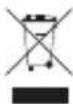
This product complies with international directives, including but not limited to WEEE Directive (2012/19/EU). Do not dispose with normal household waste. Please consult your local waste disposal authority for guidance on how to properly recycle or dispose of this product.
Manufacturer's limited warranty
Your original Northbaze Group AB product is covered by a warranty of twelve (12) months from the date of purchase of a brand new, unused Northbaze Group AB product by the original purchaser. Northbaze Group AB guarantees that the product is free from faults in the materials, design and workmanship when it was sold to the purchaser. If you are not able to submit the receipt when making a warranty claim you may be obliged to pay for any repairs carried out. Proof of purchase must clearly state the date of purchase, name of the product and authorized resellers' details
The Warranty Period cannot be extended or renewed due to subsequent resale or replacement of the product. This Limited Warranty does not affect your legal rights under your applicable national laws relating to the sale of consumer electronic products. Defective parts replaced within the Limited Warranty Claim shall become the property of Northbaze Group AB.
What is not covered by the limited warranty?
- Faults caused by wear and tear, age-related battery capacity loss, accidents, dropping, mechanical damage, moisture, chemical products, abnormal impact damage or force majeure.
- Modifications or repairs performed by yourself or third party without Northbaze Group AB approval.
How to get warranty service
If you wish to make a Warranty Claim within the Limited Warranty Period, please contact the reseller of your product for further help. You will need to provide the proof of purchase and the affected part. Any defective parts covered by the Limited Warranty will be repaired or replaced free of charge. Replaced or repaired parts provided during the Warranty Period will be warranted for the remainder of the original Warranty Period or for sixty (60) days from the date of repair or replacement, whichever is longer. For FAQ please visit www.jaysheadphones.com.

svenska
Komma igång
(12) Northbaze Group AB
Northbaze Group AB
Northbaze Group AB.
.הכלההוּרָה,הכלההוּרָה,הכלההוּרָה,הכלההוּרָה,הכלההוּרָה,הכchia
www.jaysheadphones.com

jaysheadphones facebook.com/jays
Version 1.0 | Please visit www.jaysheadphones.com for latest manual version.