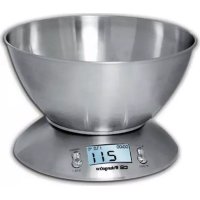
PC 2011 - Kitchen scales Orbegozo - Free user manual and instructions
Find the device manual for free PC 2011 Orbegozo in PDF.


| Product Type | Kitchen Scale |
| Brand | Orbegozo |
| Model | PC 2011 |
| Power Supply | 1 lithium battery CR2032 3V (included) |
| Maximum Capacity | 2 kg (estimated) |
| Precision | 1 g (estimated) |
| Display | LCD screen with backlight (not specified) |
| Functions | Weighing, tare, timer, ambient temperature sensor |
| Temperature Range | 0 °C to 40 °C |
| Automatic Shut-off | Yes, after 2 minutes of inactivity |
| Weight | Approximately 200 g (estimated) |
| Dimensions | Approximately 22 x 15 x 2 cm (estimated) |
| Material | Plastic |
| Cleaning | Damp cloth, no abrasive products, do not immerse |
| Safety | Do not use near microwaves or mobile phones (distance: 1.5 m and 2 m respectively) |
| Battery included | Yes, remove the insulating tab before use |
Frequently Asked Questions - PC 2011 Orbegozo
User questions about PC 2011 Orbegozo
0 question about this device. Answer the ones you know or ask your own.
Ask a new question about this device
Download the instructions for your Kitchen scales in PDF format for free! Find your manual PC 2011 - Orbegozo and take your electronic device back in hand. On this page are published all the documents necessary for the use of your device. PC 2011 by Orbegozo.
USER MANUAL PC 2011 Orbegozo
natural_image
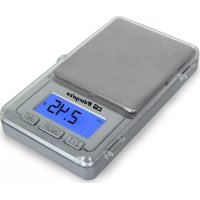
Close-up of a stainless steel kitchen scale with digital display showing temperature and volume (no text or symbols on the bowl itself)PC 2011
Sonifer, S.A.
Read this manual carefully before running this appliance and save it for reference in order to obtain the best results and ensure safe use.
Read the operating instructions carefully before putting the appliance into operation and keep the instructions including the warranty, the receipt and, if possible, the box with the internal packing.
- This appliance can be used by children aged from 8 years and above and persons with reduced physical, sensory or mental capabilities or lack of experience and knowledge if they have been given supervision or instruction concerning use of the appliance in a safe way and understand the hazards involved. Children must never play with the appliance. Cleaning and user maintenance must never be carried out by children without supervision.
- Children should be supervised to ensure that they do not play with the appliance.
- Keep the appliance out of the reach of children less than 8 years old.
- WARNING: In order to ensure your children's safety, please keep all packaging (plastic bags, boxes, polystyrene etc.) out of their reach.
-
Do not use the unit if it is not working properly.
-
Do not handle the appliance with wet hands.
- Never immerse the appliance in water or any other liquid.
- This appliance is for household use only.
- In case that you need a copy of the instruction manual, you can ask for it writing an email to sonifer@sonifer.es
- WARNING: In case of misuse, there is a risk of possible injury.
Caution
- Always place the appliance on a stable, level and horizontal surface when you use it.
- Make sure your hands and the appliance are dry when you insert the batteries.
- A microwave oven or a mobile phone may cause interference, which can lead to unreliable weighing results.
- Use the kitchen scales at a safe distance of at least 1.5 metres from a working microwave oven, or switch off the microwave oven.
- Keep a mobile phone that is switched on at a safe distance of at least 2 metres from the scales, or switch off the mobile phone.
Electromagnetic fields (EMF)
This appliance complies with all standards regarding electromagnetic fields (EMF). If handled properly and according to the instructions in this user manual, the appliance is safe to use based on scientific evidence available today.
Use
- The kitchen balance was developed to display the weight of food and ingredients.
- Place the balance on a hard and level base.
- Lay the object to be weighed in the scale pan. When the arrow stops moving, the weight can be read on the dia.
- Do not dip the balance in water.
- Handle the balance with care. It is a precision measuring instrument. Do not make it fall and do not load it beyond the maximum weight.
Batteries
1x3V CR 2032 lithium battery (included)
Please ensure the correct polarity.
Inserting the batteries
- Open the battery compartment on the bottom.
- Connect the compound battery to the supply connection. Please ensure the correct polarity.
- Close the battery compartment again
Weigh-in Function (TARE)
If you would like to weigh further ingredients for example, use the weigh-in
function.
- Press the „EIN/TARA" button again. The display returns to "0".
- Now place the ingredient in the pan of the scales. Only the actual weight of
the added ingredient is shown in the display. Repeat the above procedure if
necessary.
When the scales are not being used they turn off automatically after approximately
2 minutes. This prolongs the battery life. Alternatively you can press the "AUS"
button to switch the device off.
Handle the balance with care. It is a precision measuring instrument. Do not
make it fall and do not load it beyond the maximum weight.
Auto shut off
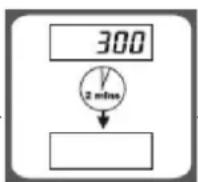
Auto shut -off occurs if display shows'0' or shows the same weight reading for 2 minutes.
Manual shut off
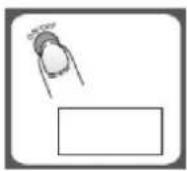
To maximize battery life, always press ON/OFF to turn off the scale after using.
Warning indicators
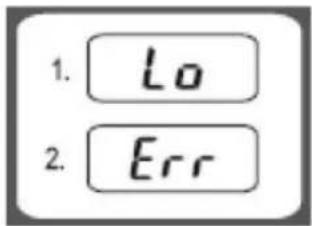
- Replace new battery
- Scale overload. Remove item to avoid damage. Max. Weight capacity is indicated on the scale.
TARE: Tare Weight -: Negative value
0 : Zero weight
G :
Kg :
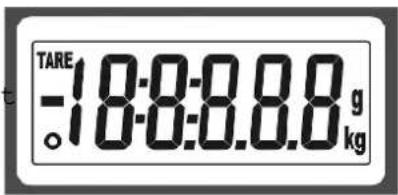
Grams
Kilograms
To set alarm timer

- Press T-SET to confirm and go to next digit.
- After setting time span, press T-SET to start counting down.
- Press any key to stop counting down.
- Press T-SET to clear time span.
- When timer counts down to "00:00", alarm will start "beeping" for 60 times and the scale
will automatically shut off. Max. Time span: 99:59
Temperature sensor
- Current temperature is shown at the higher right corner of LCD.
- Temperature range: 0\~+40oC
- Division: 0.5oC
Cleaning
Do not use abrasive cleaning agents, scourers, alcohol etc. to clean the scales.
Never immerse the appliance in water or rinse it under the tap.
Clean the appliance with a damp cloth and, if necessary, some mild cleaning agent.
Disposal of old electrical appliances.

natural_image
Symbol of a waste bin with crossed lines indicating no waste, and a solid black rectangle below (no text or labels)The European directive 2002/96/EC on Waste Electrical and Electronic Equipment (WEEE), requires that old household electrical appliances must not be disposed of in the normal unsorted municipal waste stream. Old appliances must be collected separately in order to optimize the recovery and recycling of the materials they contain, and reduce the impact on human health and the environment. The crossed out "wheeled bin" symbol on the product reminds you of your obligation, that when you dispose of the appliance, it must be separately collected.
Consumers should contact their local authority or retailer for information concerning the correct disposal of their old appliance.
DECLARATION OF CONFORMITY: This device complies with the requirements of the EMC directive 2004/108/EC.
MESURES DE SÉCURITÉ IMPORTANTES
natural_image
Simple line drawing of a hand holding a small object above a blank rectangular area (no text or symbols)ARRÊT MANUEL
natural_image
Symbol of a waste bin with crossed lines indicating no waste, and a solid black rectangle below (no text or labels)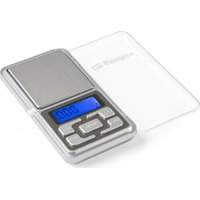
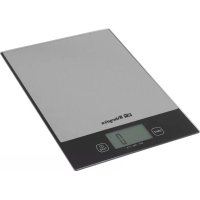
Brand : Orbegozo
Model : PC 2011
Category : Kitchen scales