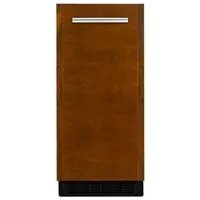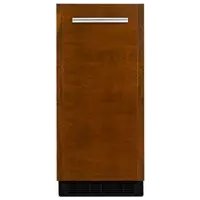
JUIFN15HX - Ice machine JENN-AIR - Free user manual and instructions
Find the device manual for free JUIFN15HX JENN-AIR in PDF.


| Product type | Ice maker |
| Brand | JENN-AIR |
| Model | JUIFN15HX |
| Power supply | 120 V, 60 Hz, 15 A (3-prong grounded outlet) |
| Product dimensions (H × W × D) | Approximately 36 × 15 × 24 in (914 × 381 × 610 mm) |
| Net weight | Approximately 77 kg (170 lb) |
| Ice production | Up to 12 kg (26 lb) per 24 h |
| Storage bin capacity | Approximately 10 kg (22 lb) |
| MAX ICE mode | Yes, for maximum production over 24 h |
| Water filtration system | Optional, disposable filter (model F2WC91 or ICE2) |
| Automatic cleaning cycle | Yes, approximately 70 minutes |
| Water connection | Potable water supply, recommended pressure 50 psi (344.7 kPa) |
| Minimum ambient temperature | 13 °C (55 °F) |
| Safety | Grounding required, disconnect before servicing, do not use extension cord |
| Interior maintenance | Regular cleaning with warm water and mild soap, then bleach solution |
| Exterior maintenance | Stainless steel: mild detergent, no abrasive cleaners or bleach |
| Replacement parts | Water filter (F2WC91/ICE2), drain pump (1901A), cleaner (4396808) |
| Warranty | Limited 10 years (parts and labor per conditions) |
| Use | Domestic and similar (offices, hotels, etc.) |
| Normal sounds | Humming, clicking, gurgling, thud during harvest |
Frequently Asked Questions - JUIFN15HX JENN-AIR
User questions about JUIFN15HX JENN-AIR
0 question about this device. Answer the ones you know or ask your own.
Ask a new question about this device
Download the instructions for your Ice machine in PDF format for free! Find your manual JUIFN15HX - JENN-AIR and take your electronic device back in hand. On this page are published all the documents necessary for the use of your device. JUIFN15HX by JENN-AIR.
USER MANUAL JUIFN15HX JENN-AIR
Your safety and the safety of others are very important.
We have provided many important safety messages in this manual and on your appliance. Always read and obey all safety messages.

This is the safety alert symbol.
This symbol alerts you to potential hazards that can kill or hurt you and others.
All safety messages will follow the safety alert symbol and either the word "DANGER" or "WARNING."
These words mean:
DANGER
You can be killed or seriously injured if you don't immediately follow instructions.
WARNING
You can be killed or seriously injured if you don't follow instructions.
All safety messages will tell you what the potential hazard is, tell you how to reduce the chance of injury, and tell you what can happen if the instructions are not followed.
IMPORTANT SAFETY INSTRUCTIONS
WARNING: To reduce the risk of fire, electric shock, or injury when using your refrigerator, follow these basic precautions:
Plug into a grounded 3 prong outlet.
Do not remove ground prong.
- Do not use an adapter.
Do not use an extension cord.
- Do not store explosive substances such as aerosol cans with a flammable propellant in this appliance.
- Disconnect power before cleaning.
- Disconnect power before servicing.
Replace all parts and panels before operating.
Connect to potable water supply only.
If the supply cord is damaged, it must be replaced by the manufacturer, its service agent, or similarly qualified person in order to avoid a hazard.
This appliance is not intended for use by persons (including children) with reduced physical, sensory, or mental capabilities, or lack of experience and knowledge, unless they have been given supervision or instruction concerning use of the appliance by a person responsible for their safety.
Use two or more people to move and install ice maker.
Children should be supervised to ensure that they do not play with the appliance.
This appliance is intended to be used in household and similar applications such as:
- staff kitchen areas in shops, offices, and other working environments;
- farmhouses and by clients in hotels, motels, and other residential-type environments;
bed and breakfast-type environments; - catering and similar non-retail applications.
SAVE THESE INSTRUCTIONS
INTRODUCTION
REGISTERING YOUR APPLIANCE
Gain access to our concierge-level Customer Support by registering your appliance. We make product registration simple and straightforward so you can start using your exclusive JennAir benefits today.
Registering your appliance allows you to:
Streamline your warranty service
If we have your appliance information, we can help you faster.
Protect your purchase
In case of an insurance loss—such as fire, flood, or theft—your product registration could serve as a proof of purchase.
Keep your family safe
We'll notify you in the rare case of a safety notification.
Start taking advantage of these benefits today by going online to register your appliance at jennair.com/customer-care.
PRODUCT IDENTIFICATION
Your product identification, which includes the model and serial numbers, is listed on the product rating plate.
Recording this information below allows us to assist you more easily if your appliance should ever require service from one of our JennAir® Authorized Service Providers.
Model Number:
Serial Number:
Date of Installation:
Authorized Dealer:
Authorized Dealer Phone #:
TABLE OF CONTENTS
INTRODUCTION
Safety 3
Registering Your Appliance 4
Product Identification. 4
Product Features. 5
Product Controls. 6
GETTING STARTED
How Your Ice Maker Works. 7
Installing the water filter.. 8
Replacing the Water Filter. 8
Water Filter Status Lights. 9
Normal Sounds. 9
CARE AND CLEANING
Cleaning the Interior. 10
Cleaning the Ice Maker System. 11
Cleaning the Exterior 11
TROUBLESHOOTING
Ice Maker Operation. 12
Ice Production. 12
Ice Quality. 13
Plumbing Problems. 13
ASSISTANCE
To Order Accessories.. 14
Performance Data Sheet. 15
Warranty. 16
TABLE DES MATIÈRES. 22
INTRODUCTION
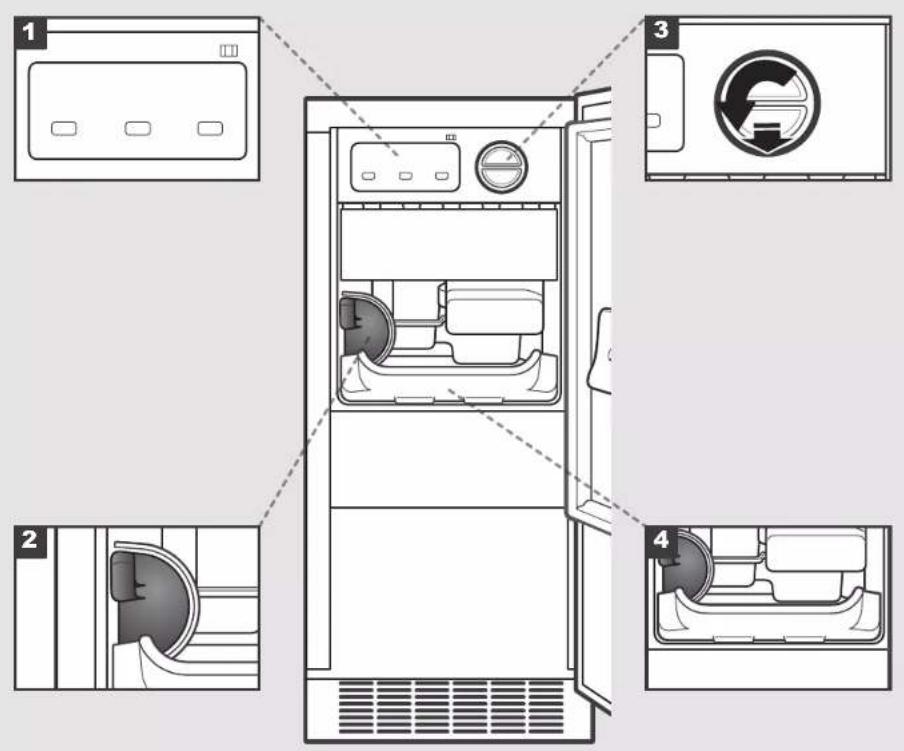
PRODUCT FEATURES
1.CONTROLPANEL
Offers different abilities such as selfcleaning and ice production modes.
2. ICE SCOOP WITH HOLDER
Ice scoop is located in its designated holder inside the ice maker.
3.WATERFILTER
Helps filter your water and ice for a cleaner taste.
4.DROP-DOWNTRAY
Catches any loose ice that may fall from the ice maker.
INTRODUCTION
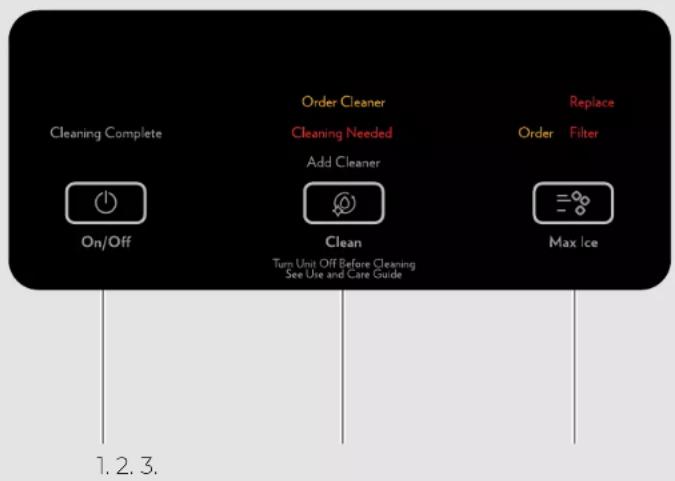
PRODUCT CONTROLS
1. ON/OFF
Press the ON/OFF button to Start/Stop ice production.
Pressing the On/Off button does not shut off power to the ice maker.
- Allow 24 hours to produce the first batch of ice. Discard the first two batches produced.
2. CLEAN
It is recommended that you clean the ice maker when the "Cleaning Needed" light is illuminated, 9 months has passed, or ice production has decreased significantly. To clean your ice maker, see "Cleaning the Ice Maker System" in the "Care and Cleaning" section, found on page 10.
3.MAX ICE
Max ice mode will produce a greater quantity of ice in a 24-hour period.
Press MAX ICE while the ice maker is on. The indicator light will illuminate.
Press MAX ICE again to turn off Max Ice mode. The indicator light will turn off.
Max Ice mode will be on when you first turn on the product. It will turn off after 24 hours. To turn Max Ice mode back on, press MAX ICE.
GETTING STARTED
When you first start your ice maker, the water pan will fill and the system will rinse itself before starting to make ice. This rinsing process takes about 5 minutes.
Under normal operating conditions, the ice maker will cycle at preset temperatures. The ice level sensor located in the ice storage bin will monitor the ice levels.
- Water is constantly circulated over a freezing plate. As the water freezes into ice, the minerals in the water are expelled. This produces a sheet of ice with low mineral content.
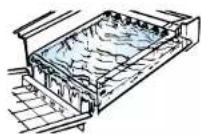
- When the desired thickness is reached, the ice sheet is released and slides onto a cutter grid. The grid divides the sheet into individual cubes.
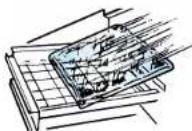
-
The water containing the eliminated minerals is drained after each freezing cycle.
-
Fresh water enters the machine for the next ice-making cycle.
- Cubes fall into the storage bin. When the bin is full, the ice maker shuts off automatically and restarts when more ice is needed. The ice bin is not refrigerated, so some melting will occur. The amount of melting varies with the room temperature.
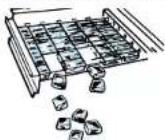
NOTE: As the room and water temperatures vary, so will the amount of ice produced and stored. This means that higher operating temperatures will result in reduced ice production.
GETTING STARTED
INSTALLING THE WATER FILTER
A water filter is provided but not required for this unit. Minerals are expelled during the ice production process, making a water filter unnecessary. For information on where to purchase replacement filters, see "To Order Accessories" in the "Assistance" section on page 14.
Do not use with water that is microbiologically unsafe or of unknown quality without adequate disinfection before or after the system. Systems certified for cyst reduction may be used on disinfected waters that may contain filterable cysts.
REPLACING THE WATER FILTER
Replace the disposable water filter when indicated on the water filter status display, 9 months has passed, or ice production has decreased significantly.
- Take the water filter out of its packaging and remove the cover from the O-rings. Be sure the O-rings are still in place after the cover is removed.
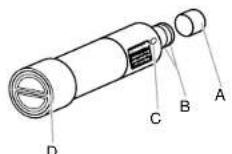
A. Cover
B.O-rings
C. Alignment pin
D. Alignment arrows
- The water filter compartment is located to the right of the ice maker controls behind the control door housing. Push in on the control door housing to release the latch, and then lower the door.
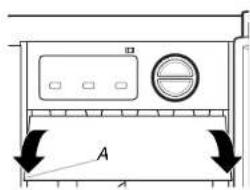
A. Door
- Turn the water filter counterclockwise, and pull it straight out of the compartment.
NOTE: There may be some water in the filter. Some spilling may occur.
- Using the arrow pointing to the alignment pin (A) on the side of the filter and the arrow inside the control housing (E), match the alignment pin with the cutout notch and insert the filter into the housing.
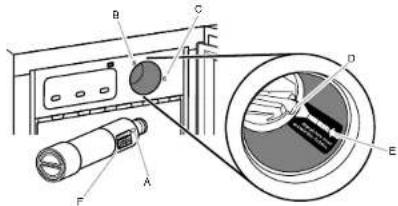
A. Alignment pin
B. "Unlocked" symbol
C. "Locked" symbol
D. Cutout notch inside control housing
E. Arrow pointing
to cutout notch
F. Arrow pointing
to alignment pin
- Turn the filter clockwise until it locks into the housing. Ensure that the alignment arrow on the filter head aligns with the locked symbol on the control housing.
NOTE: If the filter is not correctly locked into the housing, the ice maker will not produce ice.
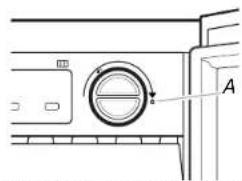
A. Alignment arrow lined up with "Locked" symbol
- Push the control door until the latch snaps closed.
GETTING STARTED
WATER FILTER STATUS LIGHTS
The water filter status lights will let you know when to change your water filter.
The "Order Filter" status light will be illuminated when it is time to order a replacement filter.
The "Replace Filter" status light will be illuminated when it is time to replace the filter.
Replacing the disposable water filter with a new filter will automatically reset the filter status tracking feature. See the "Product Controls" section on page 6.
NORMAL SOUNDS
Your new ice maker may make sounds that are not familiar to you. However, most of these new sounds are normal. The following describes the kinds of sounds that might be new to you and what may be making them:
You will hear a buzzing sound when the water valve opens to fill the water pan for each cycle.
Rattling noises may come from the flow of the refrigerant or the water line. Items stored on top of the ice maker can also make noises.
The high-efficiency compressor may make a pulsating or high-pitched sound.
Water running from the evaporator plate to the water pan may make a splashing sound.
As each cycle ends, you may hear a gurgling sound due to the refrigerant flowing in your ice maker.
■ You may hear air being forced over the condenser by the condenser fan.
During the harvest cycle, you may hear a thud when the ice sheet slides from the evaporator onto the cutter grid.
When you first start the ice maker, you may hear water running continuously. The ice maker is programmed to run a rinse cycle before it begins to make ice.
If the ice maker is connected to a water supply with pressure in excess of 60 psi (413.7 kPa), you may hear a loud sound as water fills that is associated with the water flow through the inlet valve. Call a licensed, qualified plumber to determine the best method to reduce the supply of water pressure (50 psi [344.7 kPa] is recommended).
CARE AND CLEANING
CLEANING THE INTERIOR
Your ice-making appliance needs to be cleaned regularly for the ice maker to operate at peak efficiency and to avoid premature failure of system components. See the "Ice Production" section on page 12.
WARNING

Electrical Shock Hazard
Disconnect power before cleaning.
Replace all parts and panels before operating.
Failure to do so can result in death or electrical shock.
- Unplug ice maker or disconnect power.
- Open the storage bin door and remove any ice that is in the bin.
- Remove the drain cap from the water pan and drain thoroughly. Replace the drain cap securely.
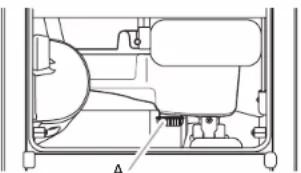
A. Drain Cap
- To remove, pull out on the bottom of the cutter grid cover until the snaps release.
10 | CARE AND CLEANING
- Unplug the wiring harness from the left side of the cutter grid.
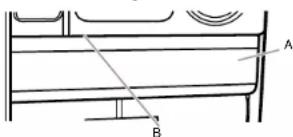
A. Cutter grid cover B.Screw (on some models)
-
Unplug the ice level sensor from the right side of the cutter grid. Pull the ice level sensor down and forward away from the cutter grid.
-
Remove the right-hand and left-hand screws from the cutter grid. Lift the cutter grid up and out.
NOTE: Make sure the plastic spacer from the right-hand side of the cutter grid bracket remains attached to the cutter grid.
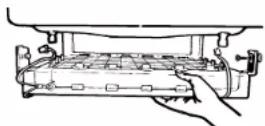
- Remove the mounting screw that holds the water pan in place. Pull out on the front of the water pan.
- Disconnect the pump bracket from the water pan and unplug the water pan drain pump.
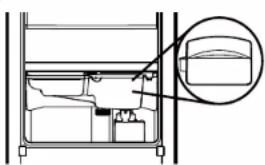
- Wash the interior components, storage bin, door gasket, ice scoop, and ice scoop holder with mild soap or detergent and warm water. Rinse in clean water. Clean the same parts with a solution of 1 Tbsp. (14.8 mL) of household bleach in 1 gal. (3.8 L) warm water. Thoroughly rinse again, using clean water.
- To replace the water pan, set the water pan inside the ice bin and hook up the water pan pump. Snap the pump bracket back onto the water pan and place back into position. Secure the water pan by replacing the mounting screw.
- Slide the cutter grid back into place and secure it by replacing the right-hand screw and plastic spacer. Then tighten the left-hand screw. Reconnect the cutter grid harness and the ice level sensor harness.
- Replace the cutter grid cover.
- Gently wipe the control panel with a soft, clean dishcloth using warm water and a mild liquid dish detergent.
- Plug in ice maker or reconnect power. Check the following:
Drain cap from the water pan is securely in place. If the drain cap is loose, water will empty from the water pan, and you will have either thin ice or no ice.
Hose from water pan is inserted into the storage bin drain opening.
After cleaning, make sure that all controls are set properly and that no control indicators are flashing.
CARE AND CLEANING
CLEANING THE ICE MAKER SYSTEM
Minerals that are removed from water during the freezing cycle will eventually form a hard, scaly deposit in the water system. Cleaning the system regularly helps remove the mineral scale buildup.
How often you need to clean the system depends upon how hard your water is. If you have hard water of 15-20 grains/gal. (4-5 grains/L), you may need to clean the system as often as every 9 months.
NOTE: Use one 16 oz (473 mL) bottle of approved ice maker cleaner. To order, see "To Order Accessories" on page 14.
- Press ON/OFF.
- Wait 5 to 10 minutes for the ice to fall into the storage bin. Remove all ice from the storage bin.
- Unscrew the drain cap from the bottom of the water pan located inside the storage bin. Allow the water to drain completely.
- Replace the drain cap securely on the water pan. If the drain cap is loose, water and the solution will empty from the water pan.
- Read and follow all handling information on the cleaner bottle before completing the steps below.
- Pour one bottle of solution into the water pan. Fill the bottle twice with tap water and pour that water into the water pan.
-
Press CLEAN. The light will blink, indicating that the cleaning cycle is in process. When the "Cleaning Complete" indicator is illuminated (approximately 70 minutes), the cleaning cycle is complete. The system will both clean and rinse itself during the cleaning cycle.
-
Remove the drain cap from the water pan after the cleaning cycle is complete. Look for any cleaning solution left in the water pan. If cleaning solution drains from the water pan, you should run the clean cycle again. Repeat steps 5-7 if needed. Recheck the water pan for any cleaning solution. If there is none, securely replace the drain cap on the water pan. If the drain cap is loose, water will empty from the water pan and you will have either thin ice or no ice.
NOTE: Severe scale buildup may require repeated cleaning with a fresh quantity of cleaning solution. - Press ON/OFF to resume ice production.
CLEANING THE EXTERIOR
Wash the exterior surfaces and gaskets with warm water and mild soap or detergent. Wipe and dry. Regular use of a good household appliance cleaner and wax will help maintain the finish. Do not use abrasive cleaners on surfaces as they may scratch the finish.
For products with a stainless steel exterior, use a clean sponge or soft cloth and a mild detergent mixed with warm water. Do not use abrasive or harsh cleaners. Do not use chlorine bleach on the stainless steel surfaces.
TROUBLESHOOTING
ICE MAKER OPERATION
ICE MAKER WILL NOT OPERATE
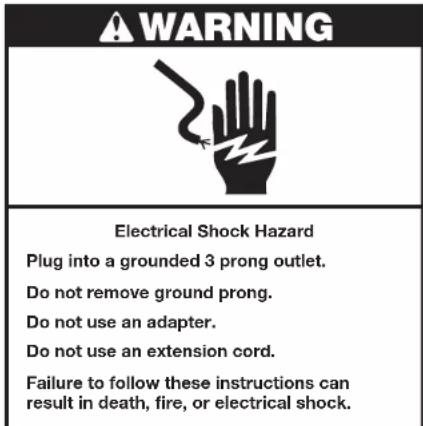
Check that it is plugged into a grounded 3 prong outlet.
Check that the control is turned on. Replace the fuse or reset the circuit breaker. NOTE: If problems continue, contact a qualified electrician.
Room temperature must be above 55^ (13^) . Otherwise, the bin thermostat may sense a cold room temperature and shut off even though the bin is not full of ice. The ice maker may not restart once it does shut off.
If there was a large amount of water added to the ice maker, wait a few minutes for the drain pump to clear. If there is still water in the bin, check to see whether the drain hose is kinked.
For models with drain pumps, check that the drain hose is not damaged, kinked, or pinched between the cabinet and the ice maker. Use only the Whirlpool-approved drain pump kit, Part Number 1901A.
ICE MAKER SEEMS NOISY
Water overflowing the reservoir is normal. This overflow helps to purge minerals that were removed from the water during the ice-making process.
If there is a "whooshing" sound, check the following:
Make sure that the water supply is hooked up and turned on.
Make sure that the drain cap is tight and the water drain pan pump is securely attached to the water pan.
If there is ice between the evaporator plate and the cutting grid, check that the ice maker is level. If the ice maker is level and the problem persists, run a cleaning cycle.
If the ice maker is connected to a water supply pressure in excess of 60 psi (413.7 kPa), you may hear a loud sound during water filling associated with the flow of water through the inlet valve. Call a licensed, qualified plumber to determine the best method to reduce the supply of water pressure (50 psi [344.7 kPa] is recommended).
ICE PRODUCTION
ICE MAKER RUNS BUT PRODUCE NO ICE
WARNING

Electrical Shock Hazard
Disconnect power before servicing.
Replace all parts and panels before operating.
Failure to do so can result in death or
electrical shock.
Check that the control is turned on.
Check that the water supply is properly connected and turned on.
If the drain cap is loose, water will empty from the water pan and you will have either thin ice or no ice. Tighten the drain cap.
Clean the drain tube.
Check that there are no kinks in the drain line.
TROUBLESHOOTING
ICE PRODUCTION (CONT.)
ICE MAKER RUNS BUT PRODUCES VERY LITTLE ICE
If the accelerated ice production feature is turned on, this feature will increase the ice production rate to provide you with more ice in the same amount of time.
Room temperatures of more than 90^ (32^) will normally reduce ice production.
Dirt or lint may be blocking the airflow through the condenser.
If there is white scale buildup in the ice maker's water or freezing system, you should clean the ice maker.
If the drain cap is loose, water will empty from the water pan and you will have either thin ice or no ice. Tighten the drain cap.
Ensure that the cutter grid is securely in place and that its harness plug is connected.
Check that the water filter is properly installed.
ICE QUALITY
OFF-TASTE,ODOR,OR GRAY COLOR IN THE ICE
If there is unusually high mineral content in the water supply, the water may need to be treated.
If there is mineral scale buildup, you should clean the ice maker.
■Do not store any food in the ice bin.
Make sure that all packaging materials were removed at the time of installation.
THIN, SOFT, OR CLUMPS OF ICE
If there is an unusually high mineral content in the water supply, the water may need to be treated.
If there is mineral scale buildup, you should clean the ice maker.
If there is ice in the bin but it is not used regularly, it will melt and form clumps. Break up the clumps with the ice scoop provided.
PLUMBING PROBLEMS
WATER NOT ENTERING DRAIN PROPERLY
WARNING
Excessive Weight Hazard
Use two or more people to move and install ice maker.
Failure to do so can result in back or other injury.
If the drain hose is not aligned over the drain, move the ice maker to align with the drain.
NOTE: Service technicians cannot repair plumbing problems outside of the ice maker. Call a licensed, qualified plumber if needed.
ASSISTANCE
TO ORDER ACCESSORIES
To order accessories in the U.S.A., visit our website www.jennair.com/accessories or call 1-800-JennAir (536-6247).
In Canada, visit our website www.Jennair.ca or call 1-800-JennAir (536-6247).
Water Filter
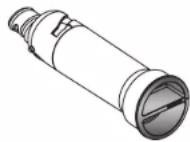
Order Part Number F2WC91I or ICE2
Drain Pump
Order Part Number 1901A.
Cleaner
Order Part Number 4396808
Affresh* Stainless Steel Cleaner
In U.S.A., order Part Number W10355016
In Canada, order Part Number W10355016B
Affresh® Stainless Steel Wipes
In U.S.A., order Part Number W10355049
In Canada, order Part Number W10355049B
Affresh Kitchen & Appliance Cleaner
In U.S.A., order Part Number W10355010
In Canada, order Part Number W1035501OB
ASSISTANCE
PERFORMANCE DATA SHEET
ICE MAKER WATER FILTRATION SYSTEM
MODEL P6GEC2KL, P6KG2KL, P6WG2KL CAPACITY 2000 GALLONS (7571 LITERS)

System tested and certified by NSF International against NSF/ANSI Standard 42 for the reduction of Chlorine Taste and Odor.
This system has been tested according to NSF/ANSI Standards 42 for the reduction of the substances listed below. The concentration of the indicated substances in water entering the system was reduced to a concentration less than or equal to the permissible limit for water leaving the system, as specified in NSF/ANSI Standards 42.
| Substance ReductionAesthetic Effects | NSF ReductionRequirements | AverageInfluent | Influent ChallengeConcentration | MaximumEffluent | AverageEffluent | Minimum %Reduction | Average % Reduction |
| Chlorine Taste/Odor | 50% reduction | 1.9727 mg/L | 2.0 mg/L ± 10% | 0.71 mg/L | 0.7788 mg/L | 70.2 | 72.81 |
Test Parameters: pH = 7.5 ± 0.5 unless otherwise noted. Flow = 0.50 gpm (1.89 Lpm). Pressure = 60 psig (413.7 kPa).
Temp. = 68°F to 71.6°F (20°C to 22°C). Rated service capacity = 2000 gallons (757 liters).
It is essential that operational, maintenance, and filter replacement requirements be carried out for the product to perform as advertised.
Use replacement filter P6RFWG2K, P6RFGEG2K, P6RFKG2K, Part Number ICE2.
Style 1- When the water filter status display changes from "GOOD" to "ORDER," order a new filter. When the filter indicator reads "REPLACE," it is recommended that you replace the filter.
Style 2- Press FILTER to check the status of your water filter. If the filter indicator light is yellow and the words "ORDER FILTER" appear on the display screen, order a new filter. If the filter indicator light is red, it is recommended that you replace the filter.
These contaminants are not necessarily in your water supply. While testing was performed under standard laboratory conditions, actual performance may vary.
The product is for cold water use only.
- Do not use with water that is microbiologically unsafe or of unknown quality without adequate disinfection before or after the system.
Refer to the "Warranty" section for the Manufacturer's name, address and telephone number.
NSF is a registered trademark of NSF International.
Refer to the "Warranty" section for the Manufacturer's limited warranty.
Application Guidelines/Water Supply Parameters
| Water Supply Potable City or Well |
| Water Pressure 30-120 psi (207-827 kPa) |
| Water Temperature 33°-100°F (0.6°-37.8°C) |
| Service Flow Rate 0.50 gpm (1.89 Lpm) @ 60 psi |
ASSISTANCE|15
JENNAIR® REFRIGERATION LIMITED WARRANTY
ATTACH YOUR RECEIPT HERE. PROOF OF PURCHASE IS REQUIRED TO OBTAIN WARRANTY SERVICE.
Please have the following information available when you call the Customer eXperience Center:
品 Name, address, and telephone number
Model number and serial number
nA clear, detailed description of the problem
Proof of purchase including dealer or retailer name and address
IF YOU NEED SERVICE:
- Before contacting us to arrange service, please determine whether your product requires repair. Some questions can be addressed without service. Please take a few minutes to review the Troubleshooting section of the Use and Care Guide or visit producthelp.jennair.com.
- All warranty service is provided exclusively by our authorized JennAir Service Providers, in the U.S. and Canada, direct all requests for warranty service to:
JennAir Customer eXperience Center
1-800-JENNAIR (1-800-536-6247).
If outside the 50 United States or Canada, contact your authorized JennAir dealer to determine whether another warranty applies.
TEN YEAR LIMITED WARRANTY
WHAT IS COVERED WHAT IS NOT COVERED
TWO YEAR LIMITED WARRANTY (PARTS AND LABOR)
For two years from the date of delivery of the original purchase, when this major appliance is installed, operated and maintained according to instructions attached to or furnished with the product, JennAir brand of Whirlpool Corporation or Whirlpool Canada LP (hereafter "JennAir") will pay for Factory Specified Replacement Parts and repair labor to correct defects in materials or workmanship that existed when this major appliance was purchased, or at its sole discretion replace the product. In the event of product replacement, your appliance will be warranted for the remaining term of the original unit's warranty period.
THIRD THROUGH FIFTH YEAR LIMITED WARRANTY
(SEALED REFRIGERATION SYSTEM PARTS ONLY - LABOR NOT INCLUDED)
In the third through fifth years from the date of delivery of the original purchase, when this major appliance is installed, operated and maintained according to the instructions attached to or furnished with the product, JennAir brand will pay for factory specified replacement parts and repair labor for the following components to correct non-cosmetic defects in materials and workmanship. In this part that prevent function of the refrigerator and that existed when this major appliance was purchased:
Refrigerator/freezer cavity liner if the part cracks due to defective materials or workmanship.
Sealed Refrigeration system (includes compressor, evaporator, condenser, dryer and connecting tubing).
SIXTH THROUGH TENTH YEAR LIMITED WARRANTY
(SEALED REFRIGERATION SYSTEM ONLY - LABOR NOT INCLUDED)
In the sixth through tenth year from the date of delivery of the original purchase, when this major appliance is installed, operated and maintained according to instructions attached to or furnished with the product, JennAir brand will pay for factory specified replacement parts for the following components to correct defects in materials or workmanship in the sealed refrigeration system (includes compressor, evaporator, condenser, dryer and connecting tubing) that existed when this major appliance was purchased.
- Commercial, non-residential or multiple-family use, or use inconsistent with published user, operator or installation instructions.
- In-home Instruction on how to use your product.
- Service to correct improper product maintenance or installation, installation not in accordance with electrical or plumbing codes or correction of household electrical or plumbing (i.e. house wiring, fuses or water inlet hoses).
- Consumable parts (i.e. light bulbs, batteries, air or water filters, preservation solutions, etc.).
- Defects or damage resulting from accident, misuse, abuse, alteration, fire, floods, acts of God, or improper installation.
- Damages, defects, or repairs caused by unauthorized servicers or use of non-genuine or third-party parts; however, use of unauthorized service providers or non-genuine or third-party parts will not void this warranty.
- Cosmetic damage including scratches, dents, chips, and other damage to appliance finishes unless such damage results from defects in materials and workmanship and is reported to JennAir within 30 days from the date of delivery.
- Discoloration, rust or oxidation of surfaces resulting from caustic or corrosive environments including but not limited to high salt concentrations, high moisture or humidity or exposure to chemicals.
- Food or medicine loss due to product failure.
- Pick-up or delivery. This product is intended for in-home repair.
- Travel or transportation expenses for service in remote locations where an authorized JennAir servicer is not available.
- Removal or reinstallation of inaccessible appliances or built-in fixtures (i.e. trim, decorative panels, flooring, cabinetry, islands, countertops, drywall, etc.) that interfere with servicing, removal or replacement of the product.
- Service or parts for appliances with original model/serial numbers removed, altered or not easily determined.
The cost of repair or replacement under these excluded circumstances shall be borne by the customer.
TEN YEAR LIMITED WARRANTY
WHAT IS COVERED WHAT IS NOT COVERED
YOUR SOLE AND EXCLUSIVE REMEDY UNDER THIS LIMITED WARRANTY SHALL BE PRODUCT REPAIR AS PROVIDED HEREIN. Service must be provided by a JennAir designated service company. This limited warranty is valid only in the United States or Canada and applies only when the major appliance is used in the country in which it was purchased. This limited warranty is effective from the date of original consumer purchase. Proof of original purchase date is required to obtain service under this limited warranty.
DISCLAIMER OF IMPLIED WARRANTYES
IMPLIED WARRANTYES, INCLUDING ANY IMPLIED WARRANTY OF MERCHANTABILITY OR IMPLIED WARRANTY OF FITNESS FOR A PARTICULAR PURPOSE, ARE LIMITED TO ONE YEAR OR THE SHORTEST PERIOD ALLOWED BY LAW. Some states and provinces do not allow limitations on the duration of implied warranties of merchantability or fitness, so this limitation may not apply to you. This warranty gives you specific legal rights, and you also may have other rights that vary from state to state or province to province.
DISCLAIMER OF REPRESENTATIONS OUTSIDE OF WARRANTY
JennAir makes no representations about the quality, durability, or need for service or repair of this major appliance other than the representations contained in this warranty. If you want a longer or more comprehensive warranty than the limited warranty that comes with this major appliance, you should ask JennAir or your retailer about buying an extended warranty.
LIMITATION OF REMEDIES: EXCLUSION OF INCIDENTAL AND CONSEQUENTIAL DAMAGES
Yr t i t t t t t t t t t t t t t t t t t t t t t t t t t t t t t t t t t t t t t t t t t t t t t t t t t t 0
12/14
WARRANTY | 17
INTRODUCTION
SECURITAIRE
GarderVotefamille ensecurite.
CHARACTERISTIQUES DU PRODUIT
COMMANDES DU PRODUIT
2. CLEAN (nettoyage)
LA MACHINE A GLAÇONS FONCTIONNE, MAIS NE PRODUIT PAS DE GLAÇONS
AVERAGEMENT

NSF is a registered trademark of NSF International.
ASSISTANCE|33
GARANTIE LIMITÉE DES APPAREILS DE RÉFRIGÉRATION JENNAIR®
ATTACHEZ ICI VOTRE RECU DE VENTE. UNE PREUVE D'ACHAT EST OBLIGATOIRE POUR OBTENIR L'APPLICATION DE LA GARANTIE.
TM ©2023. All rights reserved. Used under license in Canada.