HS MR 4A Z O - Vacuum Cleaner HOTPOINT-ARISTON - Free user manual and instructions
Find the device manual for free HS MR 4A Z O HOTPOINT-ARISTON in PDF.



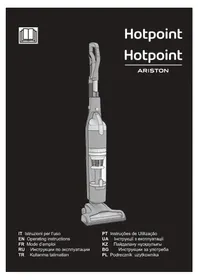
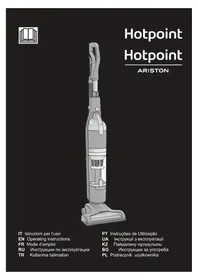
| Product type | Multicyclonic stick vacuum |
| Brand | HOTPOINT-ARISTON |
| Model | HS MR 4A Z O |
| Battery | 6 lithium-ion cells, 21.6 V, 2000 mAh, 43.2 Wh |
| Charger type | HD2-2 (detachable) |
| Charging time | Approximately 4 hours |
| Filtration | Washable HEPA filter + multicyclonic system |
| Dustbin capacity | Not specified (estimated 0.5 L) |
| Main functions | Motorized brush, UV lamp (sterilization), remote control, electronic power adjustment, filter cleaning indicator |
| Included accessories | Motorized brush, plastic flexible hose, two-in-one accessory (precision nozzle/delicate surfaces), stand |
| Cleaning and maintenance | Washable dustbin, washable filters, removable and cleanable motorized brush |
| Safety | Child lock (3-8 years under supervision), automatic shut-off in vertical position (brush + UV), liquid protection |
| LED indicators | 4 LEDs: standby, battery, power, filter cleaning |
| Suction power | 3 levels (low, medium, high) |
| Weight | Not specified (estimated 3.5 kg) |
| Dimensions (L x D x H) | Not specified (estimated 25 x 20 x 110 cm) |
| Power supply | Detachable mains charger, 100-240 V |
| Repairability | Spare parts available through authorized after-sales service |
Frequently Asked Questions - HS MR 4A Z O HOTPOINT-ARISTON
User questions about HS MR 4A Z O HOTPOINT-ARISTON
0 question about this device. Answer the ones you know or ask your own.
Ask a new question about this device
Download the instructions for your Vacuum Cleaner in PDF format for free! Find your manual HS MR 4A Z O - HOTPOINT-ARISTON and take your electronic device back in hand. On this page are published all the documents necessary for the use of your device. HS MR 4A Z O by HOTPOINT-ARISTON.
USER MANUAL HS MR 4A Z O HOTPOINT-ARISTON
EN Operating instructions
FR Mode d'emploi
B
C
D

E
F
G

ISTRUZIONI PER LA SICUREZZA
LEGGERE E RISPETTARE LE SEGUENTI INFORMAZIONI IMPORTANTI
Remote Power Control
- Before using the appliance, read these safety instructions. Keep them nearby for future reference. These instructions are also available on www.hotpoint.eu
- These instructions and the appliance itself provide important safety instruction, to be observed at all times. The manufacturer declines any liability for failure to observe these safety instructions, for inappropriate use of the appliance or incorrect setting of controls.
SAFETY WARNINGS
- Very young children (0-3 years) should be kept away from the appliance. Young children (3-8 years) should be kept away from the appliance unless continuously supervised.
- Children from 8 years old and above and persons with reduced physical, sensory or mental capabilities or lack of experience and knowledge can use this appliance only if they are supervised or have been given instructions on safe use and understand the hazards involved. Children must not play with the appliance. Cleaning and user maintenance must not be carried out by children without supervision.
- WARNING: This appliance/ accessory uses an UV-C light. Do not look directly the light while operating, this can cause possible eye damage.
PERMITTED USE
- CAUTION: the appliance is not intended to be operated by means of an external timer or separate remote controlled system.
- This appliance is intended to be used in household and similar applications such as: staff kitchen areas in shops, offices and other working environments; farm houses; by clients in hotels, motels, bed & breakfast and other residential environments.
• This appliance is not for professional use. Do not use the appliance outdoors. - Do not use the appliance to vacuum ash or hot coals or any other hot substance - risk of fire. Do not use the appliance to vacuum liquid or damp substances - risk of electrical shock.
- Do not use the appliance on persons or animals - risk of injury.
- The appliance can only be used with the power supply unit provided.
INSTALLATION
- Do not repair or replace any part of the appliance unless specifically stated in the user manual. After unpacking the appliance, make sure that it has not been damaged during transport. In the event of problems, contact the dealer or your nearest After-sales Service. Once assembled, packaging waste (plastic, styrofoam parts etc.) must be stored out of reach of children - risk of suffocation.
- Remove all packaging materials, including any adhesive label, before operating the appliance.
ELECTRICAL WARNINGS
- Before connecting the appliance, verify that electrical ratings cor-responds to your supply system ratings. The rating plate is on the battery charger.
- It must be possible to disconnect the appliance from the power supply by unplugging it if plug is accessible, or by a multi-pole switch installed upstream of the socket and the appliance must be earthed, in conformity with national electrical safety standards.
- Do not use extension leads, multiple sockets or adapters. Do not use the appliance when you are wet or barefoot. Do not operate this appliance if it has a damaged power cable or plug, if it is not working properly, or if it has been damaged or dropped. If the power cable is damaged, it must be replaced with an identical one - risk of electrical shock.
CLEANING AND MAINTENANCE
- WARNING: Ensure that the appliance is switched off and disconnected from the power supply before performing any cleaning or maintenance operation - risk of electrical shock. Never use steam cleaning equipment.
- Do not spray cleaners directly on the appliance – risk of electrical shock.
- After washing the dust container and filters allow them to dry out. Do not use the appliance with wet dust container or filters – Risk of electrical shock or fire.
BATTERY SAFETY INFORMATION
- ⚠️ WARNING: For the purpose of recharging the battery, only use the detachable supply unit provided with this appliance.
- The symbol means that the appliance is provided with a detachable supply unit.
- The symbol refers to read the user manual.
- The battery must be removed from the appliance before it is scrapped.
- The appliance must be disconnected from the power supply mains when removing battery
- The battery is to be disposed safety.
- Under abusive conditions, liquid may be ejected from the battery; avoid contact. If contact accidentally occurs, flush with water. If liquid contacts eyes, additionally seek medically help. Liquid ejected from the battery may cause the irritation or burns.
BATTERY TECHNICAL DATA:
Mod. LG18650HD2 (HSMR2AZUB) 8 battery cells, 28,8 V = 2000mAh/57, 6Wh. Type/ model of the detachable battery charger: HD2-1.
Mod. LG18650HD2(HSMR4AZO)6 battery cells, 21, 6V:2000mAh/43, 2Wh. Type/ model of the detachable battery charger: HD2-2.
DESCRIPTION OF THE VACUUM CLEANER
- Motorized brush*
- Motorized brush connector*
- Brush roll cover*
- Ultraviolet light*
- Main body
- Dustbin release button
- Dustbin assembly
- Dustbin handle
- Filter cover
- Hepa filter
- Motor cover
- Upper multicyclone
- Multicyclonic filter
- Lower multicyclone
- Dustbin container
- Dustbin lid
- Clamp
- Handle slide clamp
- Hose handle
- Handle grip
- Remote Power control*
- Standby button*
INTRODUCTION
Thank you for purchasing our Multicyclonic vacuum cleaner handstick. In doing so you have opted for an effective, high performance appliance. We advise you to register this product on www.hotpoint.co.uk to make sure you are entitled to all the benefits made available by Hotpoint Customer Service.
Multicyclonic vacuum is designed combining efficiency and ergonomy. They new high efficiency motors ensure optimal performances with low consumption.
BEFORE FIRST USE
Assembling (A, B)
-
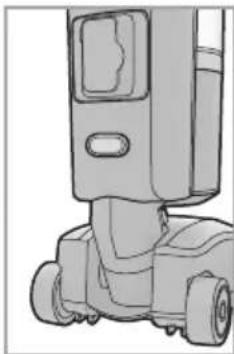
Place the motorized brush (1) on the ground according to the direction in the figure (A), and fit it by clipping it on the lower part of the main body (5). Note the voltage indicated on the back of the brush connector (2) is the same voltage indicated on the back of the main body. Note to remove the motorized brush, press the brush release button (35) on the back and remove the main body vertically according to the figure A.
-
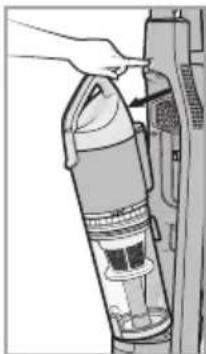
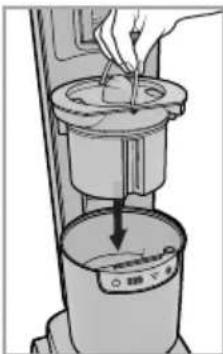
To remove the dustbin assembly (7), press the dustbin release button (6) and pull out it.
-
Holding the metal handle in the battery pack (31), fit the battery pack vertically into the battery pack
-
Button - for electronic power adjustment*
- Button + for electronic power adjustment*
- Two-in-one accessory * (Precision nozzle/Nozzle for delicate surfaces)
- Plastic flexible hose
- Plastic flexible hose release
- Battery compartment*
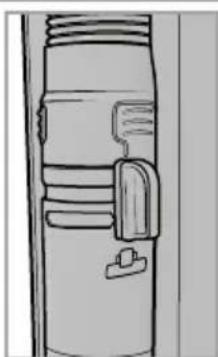
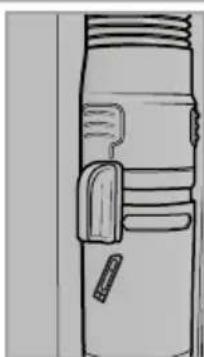
- Suction selector on the accessory position*
- Suction selector on the brush position*
- Battery pack*
- Battery pack housing*
- Suction inlet
- Lid for charging*
- Brush release button
- Handle release button
- Start/Stop button
- Electronic power regulator*
- 4LEDs*
- Standby indicator*
- Battery indicator*
- Control power indicator*
- Filter cleaning indicator*
- Charger
* on some models only
housing (32). Note the battery voltage indicated on the label should be the same as indicated on the back of the main body. Disassembly in the reverse order.
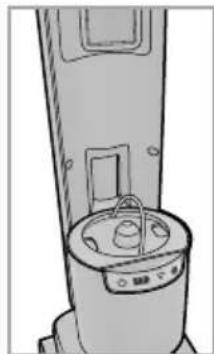
- Keeping the dustbin handle (8), fit the dustbin assembly in position until it clicks according to the figure (A).
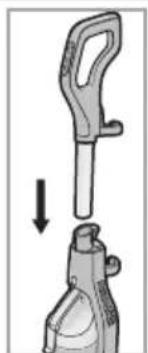
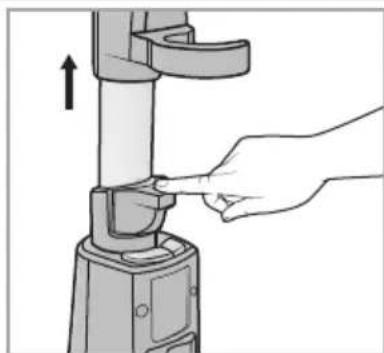
- Fit the hose handle (19) into the main body until it clicks into place (B). To remove the handle, press the handle release button (36) and pull it out.
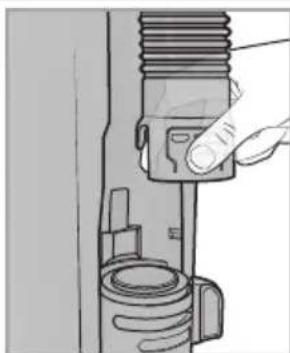
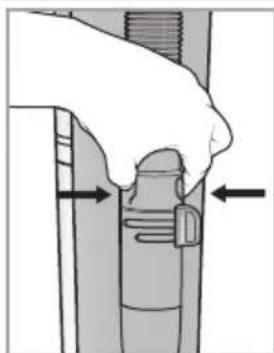
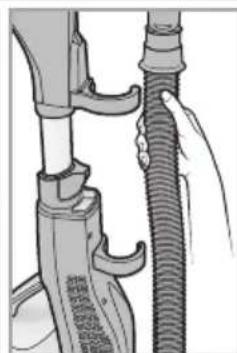
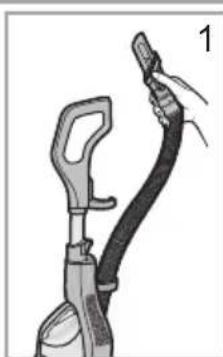
- Fasten the plastic flexible hose (26) to the suction inlet (33) until it clicks into place, same as the picture. To remove it, press the plastic flexible hose release (27) and pull it out. Place the plastic flexible hose on the clamp (17).
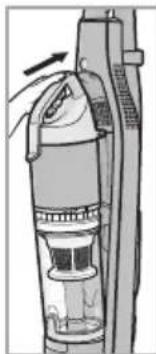
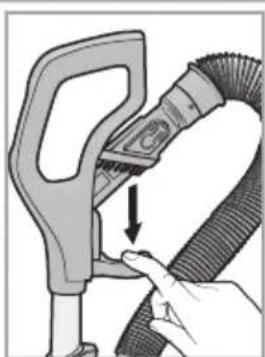
- Place the two-in-one accessory (25) in the handle slide clamp (18), same as in the picture (B).
If your appliance is equipped with a Remote Power Control, you will need to insert the batteries (see paragraph "Remote Power Control" under chapter "Features").
CHARGING THE BATTERY (C)
The charging time is 2 or 4 hours, depending on the model. Please ensure the battery pack is installed in the Vacuum cleaner before charging. Use only the original charger supplied with the appliance.
-
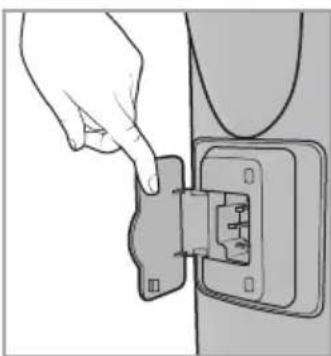
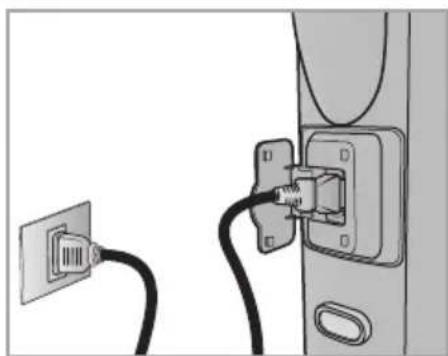
Connect the charger in the back of the main body, opening the lid for charging (34) and plug the charger into the mains.
-
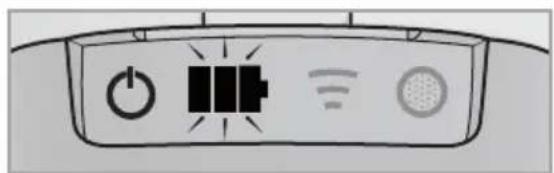
The battery indicator (41) on the 4LEDs (39) flashes during the charging time.
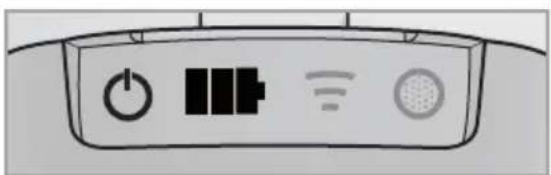
- When the battery indicator (41) is not flashing, the vacuum cleaner battery has been charged, pull out the plug from mains and disconnect the charger in the back of the main body and close the opening lid for charging. Note the charging time should not be more than 12 hours to avoid any damage to batteries.
USING THE VACUUM CLEANER
Do not use the vacuum cleaner without filters or dust container, as the appliance could get damaged.
- Place the suction selector on the brush position (30) in the back main body (D).
- Press start/stop button (37), the standby indicator (40) and the battery indicator on the 4LEDs (41) are on, and to start the appliance press the electronic power regulator (38).
- The suction power is set on medium intensity by default, to select the desired suction intensity (based on the model) use the +/- button and electronically adjust the power (23, 24) of the Remote Power Control on the handle or manually push the electronic power regulator (38) on the main body.
We suggest to use a low suction power on delicate surfaces such as curtains, fabrics, cushions etc to avoid any damage.
- To pause the vacuum cleaner, if this feature is available, you can use the standby button (22) on the Remote Power Control (based on the model).
- To switch off the appliance press the start/stop button (37) again.
Using the motorized brush
When the product is not in the upright position, the power suction and the rotating brush with the UV light (if available) are working. To pause the vacuum cleaner use the standby button (22) on the Remote Power Control (21) and to restart the suction power press the standby button or the electronic power regulator.
When the product is in the park position, the Start&Pause function switches off the operation of the UV light (if available) and the rotating brush, while the suction power in on. In this position it is possible to use the other accessories in the clamp (17). To pause the vacuum cleaner use the standby button (22) on the Remote Power Control (21), and to restart the suction power press the standby button or the electronic power regulator.
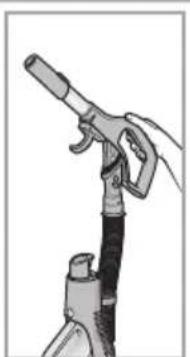
In cases of using of vacuum cleaner by the handle (E)
This allows you to clean surfaces not accessible with the motorized brush.
- Place the suction selector on the accessory position (29) in the back main body.
- Fit the two-in-one accessory (25) into the handle frame, pushing down the handle slide clamp (18).
- To remove the handle, press the handle release button (36) and pull it out.
- Press start/stop button (37), the standby indicator (40) and the battery indicator on the 4LEDs (41) are on, and to start the appliance press the electronic power regulator (38).
FEATURES
Led indicators and Electronic power regulator (38,39) (if available)
Standby indicator (40): when you use the standby button (22) on the Remote Power Control, the suction power stops and the power indicator (42) blinks one time. To restart the suction power press the standby button (22). The standby indicator is always on.
Battery indicator (41): When the product works the battery indicator (41) is switch on and the light is fixed, while during charging time it flashes.
Power indicator (42): it blinks when you press a button on the Remote Power Control.
Filter Cleaning Indicator (43): after several hours of use, the led switch on. After cleaning the HEPA filter (see chapter “Cleaning and maintenance”), to reset the indicator press the symbol “+” (24) of Remote Power Control some seconds.
Electronic power regulator (38): when press this button on the main body the suction power works cyclically (med -> max -> min -> med). It allows to set the suction power required.
Remote Power Control
The Remote power control (21) (if available) enables you to adjust the suction power directly and effortlessly from the hand grip. When using the vacuum cleaner, you can keep it on standby by pressing the Standby button (22).
To insert or change the batteries of your Remote Power Control:
- Open the battery compartment (28).
- Insert two AAA batteries, making sure of the positive and negative poles.
- Close the battery compartment until it clicks into place and screw the cover.
Ultraviolet light
The UV light (if available) (4) is an ultraviolet sterilization function, when the brush is collecting dust on the ground normally, the UV lamp is lighting, antiseptic function is working. When the brush is not in contact with an horizontal surface, the UV light is switched off. To replace the UV light, please contact the nearest Authorised Service Centre.
Hepa filter
This model comprises the Hepa filter. The Hepa filter ensures maximum protection against allergens and high air quality, because the air given back by the appliance is entirely free from dust/powder residues.
CLEANING AND MAINTENANCE
Before cleaning or maintaining the vacuum cleaner, make sure it has been unplugged from the electrical outlet. Do not use aggressive substances or abrasive materials to clean the appliance, its internal parts and attachments. Use a dry or slightly damp soft cloth for cleaning. Make sure the appliance and all its parts are thoroughly dry before restarting the appliance. We suggest to clean the filter at least every 6 months to restore its filtering power. In any case we recommend replacing the filter at least every year to ensure maximum performance. Always operate the vacuum cleaner with the filter installed.
Cleaning the dustbin

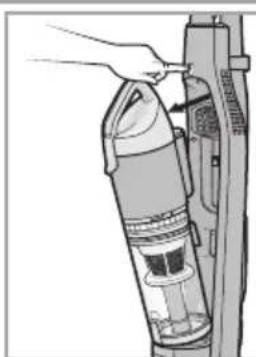
For the routine cleaning of the dustbin (G):
- Press the dustbin release button (6) and take out the dustbin assembly (7).
- Keep the dustbin assembly in vertical position with the lid facing down.
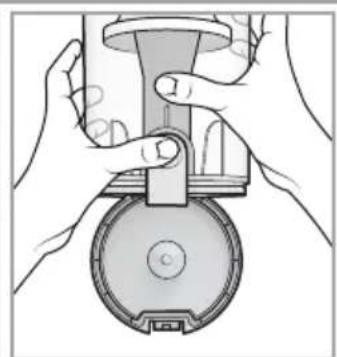
- Press the lock on the dustbin lid (16) to open the dustbin container (15).
- Empty the dustbin.
- Close the dustbin lid until it clicks into place and replace it into the main body.
For the washing of dustbin container to remove any residual dirt (G,H):
- Before washing the dustbin container, make sure it has been emptied.
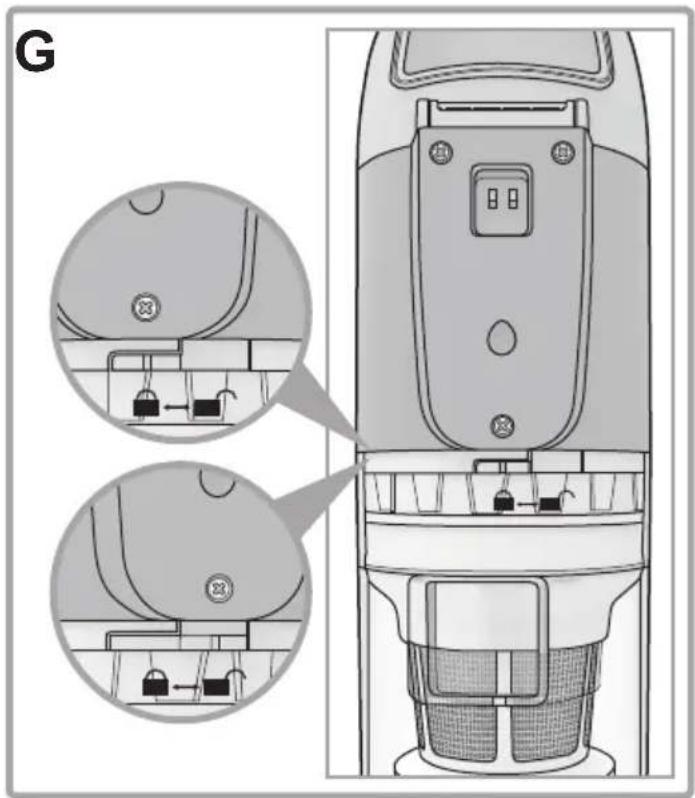
- Align the screw on the back of the motor cover (11) with the unblock mark on the dustbin (15) to open the dustbin, turn the upper dustbin same as the picture (G).
- Take out the multicyclonic filter (13).
- Take out the lower multicyclone (14) from dustbin container, holding the metal handle same as the picture (H2).
- Remove any residual dirt by washing the dustbin container under running water.
- Let it dry at room temperature until its parts are thoroughly dry.
- Assembly in the reverse order the lower multicyclone and the filter.
- Align the screw on the back of the motor cover (11) with the blocked mark on the dustbin to clo-
se the dustbin, turning the upper dustbin same as the picture (G).
- When the screw on the back of the motor cover (11) and the blocked mark on the dustbin are lined up completely, the dustbin is correctly fitted.
- Replace the dustbin assembly into the main body.
Cleaning the filters (H)

To clean the Hepa filter (10):
- Open the filter cover (9) using the lever of the handle on the dustbin as the picture (H3).
- Remove the Hepa filter turning it in the direction indicated on the filter (H4).
- Wash the filter under running water, taking care that the jet of water is not too strong.
- Hold it so that the water flows parallel to its folds.
- Let it dry at room temperature until all of its parts are thoroughly dry.
- Re-place the Hepa filter and assembly in the reverse order.
To clean the Multicyclonic filter (13):
- Align the screw on the back of the motor cover (11) with the unblock mark on the dustbin (15) to open the dustbin, turning the upper dustbin same as the picture (G).
- Take out the Multicyclonic filter (13).
- Clean the filter by washing it under running water, taking care that the jet of water is not too strong.
- Let it dry at room temperature until its parts are thoroughly dry.
- Fit the filter into the special housing inside the dustbin container.
- Close the dustbin container in the reverse order.
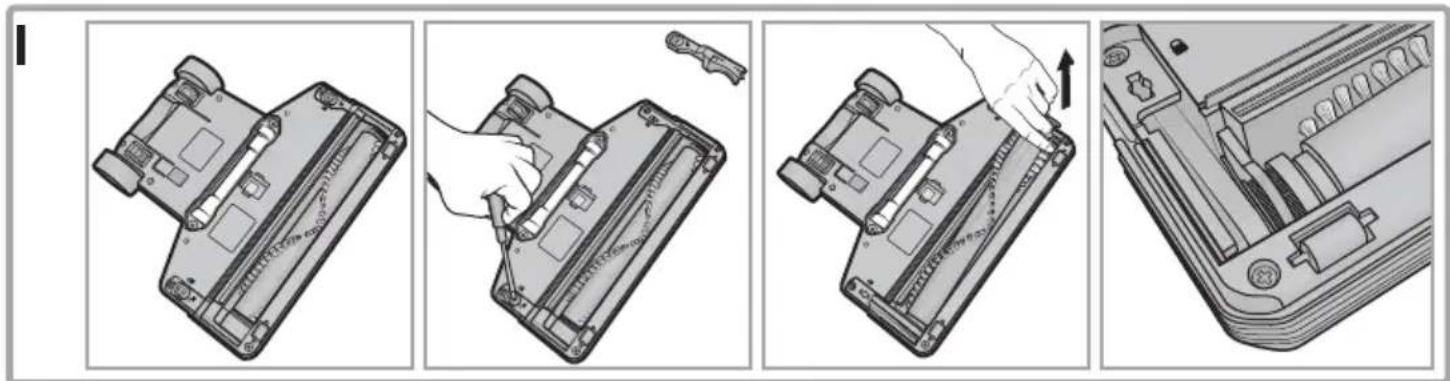
Cleaning the motorized brush (I)
Before cleaning or maintaining the Motorized brush of the vacuum cleaner, make sure it has been unplugged from electrical outlet. Always disconnect the Motorized brush before cleaning it.
- Open the brush roll cover locking (3) by un-screwing the two screws.
- Remove the roll cover accordingly the direction in the figure (I).
- Remove the roll out of the notch for cleaning. Avoid cleaning with water.
- Reassembly in the reverse order.
ATTACHMENTS (F)
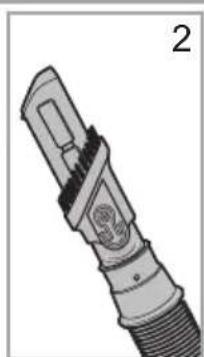
Two-in-one accessory: Precision Nozzle
Placing the two-in-one accessory in the position same as the figure (F2), until it clicks, you can use the precision nozzle. It helps you vacuum corners, crevices and other difficult-to-reach areas.
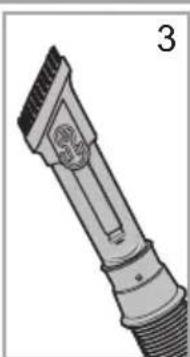
Two-in-one accessory: Nozzle for delicate surfaces
Placing the two-in-one accessory in the position same as the figure (F3), until it clicks, you can use the nozzle for delicate surfaces. It is suitable for vacuuming surfaces requiring special care such as radiators, furniture etc. Its special natural bristles enable you to use it on very delicate surfaces without any harm.
SAFEGUARDING THE ENVIRONMENT
DISPOSAL OF PACKAGING MATERIALS

The packaging material is 100% recyclable and is marked with the recycle symbol (*). The various parts of the packaging must therefore be disposed of responsibility and in full compliance with local au-
thority regulations governing waste disposal.
SCRAPPING OF HOUSEHOLD APPLIANCES
Dispose of packaging in an environmentally-friendly manner. This appliance is labelled in accordance with European Directive 2012/19/EU concerning used electrical and electronic appliances (waste electrical and electronic equipment – WEEE). The guideline determines the framework for the return and recycling of used appliances as applicable throughout the EU. Please ask your specialist retailer about current disposal facilities.
Batteries contain substances harmful to the natural environment. Do not throw them away with other household waste. Return used batteries to recycling points. Before disposing of or returning the appliance to a recycling point make sure to remove the batteries from the battery compartment.
TROUBLESHOOTING
| Problem Possible causes / Solutions | |
| The vacuum cleaner cannot be switched on. | Check if the Start/ Stop button and the electronic power regulator were pressed.The appliance is not charged up, put it back on charge.Check if the battery pack is installed correctly.After pressing the start/stop button, make sure that the electronic power regulator on the product is pressed within roughly 1 minute, or the product will not start and the stand-by and battery indicators will switch off. |
| The charging time is not enough after charging of the battery pack. | The charging time is not sufficient. Fully charge the battery according to the indication method in charging chapter.When the battery pack is not longer able to maintain the charge, the battery pack is aging. Contact an Authorised Service Center since battery belongs to consumables. |
| Low suction power. | Clean the filters and, if needed, replace them.Make sure the hose handle, flexible hose and brush are not blocked.Clean the dustbin container and its filters.Check if the level of the dust is on the max level, in just case empty the dustbin container.Make sure the suction selector is in the right position.The battery pack is discharging. Charge the battery pack. |
| Remote Power not working. | Battery not charged on the handle.The batteries were positioned incorrectly inside the battery compartment. Position the two AAA batteries making sure of the positive and negative poles.Remove batteries; then position them again, making sure of the positive and negative poles.Electronic appliances or obstacles may be interfering.Check if the Start/ Stop button and the electronic power regulator were pressed.. |
| Small electrostatic discharges occur while sucking up. | If very fine dust or powders are sucked up such as flour, etc. small electrostatic discharges could occur.When sucking up materials previously mentioned, we advise not to use the hose handle, but only the plastic flexible hose and to set a low suction power level. |
| The vacuum cleaner whistles or vibrates when in use. | One or more attachments were assembled incorrectly. Make sure the filters and brushes were assembled according to these instructions.Clean the filters and, if needed, replace them.Clean the brush.Make sure the suction selector is in the right position. |
| The brush moves with difficulty. | Reduce suction power, especially on carpets and fabrics in general.The charging time is not sufficient. Fully charge the battery according to the indication method in charging chapter.Check and clean the brush. |
| The vacuum cleaner switched off while using. | Make sure the hose handle, flexible hose and brush are not blocked.The battery pack is discharged. Charge the battery pack. |
| The UV light does not work. | Check if the product is placed in the upright position.If the UV light cover is too dirty, clean with dry cotton cloth.If the UV light is damaged, contact an Authorised Service Center.If the small wheels are blocked, clean and remove the dirt from the wheels, considering the product unplugged. |
CONSIGNES DE SÉCURITÉ
- ISTRUZIONI PER LA SICUREZZA
- LEGGERE E RISPETTARE LE SEGUENTI INFORMAZIONI IMPORTANTI
- REMOTE POWER CONTROL
- SAFETY WARNINGS
- PERMITTED USE
- INSTALLATION
- ELECTRICAL WARNINGS
- CLEANING AND MAINTENANCE
- BATTERY SAFETY INFORMATION
- BATTERY TECHNICAL DATA
- DESCRIPTION OF THE VACUUM CLEANER
- INTRODUCTION
- BEFORE FIRST USE
- ASSEMBLING (A, B)
- CHARGING THE BATTERY (C)
- USING THE VACUUM CLEANER
- USING THE MOTORIZED BRUSH
- IN CASES OF USING OF VACUUM CLEANER BY THE HANDLE (E)
- FEATURES
- LED INDICATORS AND ELECTRONIC POWER REGULATOR (38,39) (IF AVAILABLE)
- ULTRAVIOLET LIGHT
- HEPA FILTER
- CLEANING THE DUSTBIN
- CLEANING THE FILTERS (H)
- CLEANING THE MOTORIZED BRUSH (I)
- ATTACHMENTS (F)
- TWO-IN-ONE ACCESSORY: PRECISION NOZZLE
- TWO-IN-ONE ACCESSORY: NOZZLE FOR DELICATE SURFACES
- SAFEGUARDING THE ENVIRONMENT
- DISPOSAL OF PACKAGING MATERIALS
- SCRAPPING OF HOUSEHOLD APPLIANCES
- CONSIGNES DE SÉCURITÉ
Brand : HOTPOINT-ARISTON
Model : HS MR 4A Z O
Category : Vacuum Cleaner