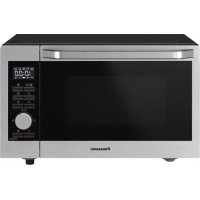
NNC69KSM - Microwave Oven PANASONIC - Free user manual and instructions
Find the device manual for free NNC69KSM PANASONIC in PDF.



| Product type | Combination microwave oven (microwave, grill, hot air) |
| Brand | Panasonic |
| Model | NN-C69KSM |
| External dimensions (W x D x H) | 327 mm x 520 mm x 520 mm |
| Net weight | 19.5 kg |
| Cavity volume | 30 L |
| Turntable diameter | 315 mm |
| Power supply | 230 V, 50 Hz |
| Maximum power consumption | 2,400 W |
| Microwave power | 1,000 W (IEC-60705) |
| Grill power | 2,400 W |
| Hot air power | 2,400 W |
| Operating frequency | 2,450 MHz |
| Noise level | LWA 60 dB |
| Cooking functions | Microwave (5 levels), Grill (2 levels), Hot air (40-220 °C), Combi (4 modes), Auto programs (30 programs), Auto defrost, Junior menu, Slow cooking, Yogurt, Drying, Keep warm |
| Included accessories | Glass turntable, roller ring, high rack, low rack, roasting pan |
| Safety | Child lock, auto shut-off, thermal protection, door detection |
| Maintenance and cleaning | Manual cleaning with damp cloth; auto cleaning program (No.30) with steam; do not use steam cleaner or abrasive products |
| Spare parts and repairability | Washable removable accessories (turntable, ring, racks, roasting pan); lamp replaceable only by approved technician; repairs by qualified technician |
| General information | Domestic use on worktop; minimum clearance: 15 cm above, 10 cm behind, 5 cm on one side; non-removable power cord |
Frequently Asked Questions - NNC69KSM PANASONIC
User questions about NNC69KSM PANASONIC
0 question about this device. Answer the ones you know or ask your own.
Ask a new question about this device
Download the instructions for your Microwave Oven in PDF format for free! Find your manual NNC69KSM - PANASONIC and take your electronic device back in hand. On this page are published all the documents necessary for the use of your device. NNC69KSM by PANASONIC.
USER MANUAL NNC69KSM PANASONIC
Operating Instructions (Original instructions)
Convection / Grill / Microwave Oven
natural_image
Exterior view of a Panasonic microwave oven (no visible text or symbols on the device body)
Panasonic Testing Centre,
natural_image
Black-and-white photo of a rectangular food item wrapped in foil, placed on a white tray (no text or symbols visible)natural_image
White rectangular dish containing several cut meat pieces, possibly pork ribs or deli meats (no text or symbols visible)natural_image
Hand holding a knife to cut raw meat in a clear glass container (no text or symbols visible)flowchart
graph TD
    A["+"] --> B["/{}}"]
    B --> C["User Icon"]
    C --> D["->"]
7 Quick 30 (Snel 30)-knop
8 Draaiknop
natural_image
Grayscale photo of a baked meat item wrapped in foil, placed on a rectangular tray (no text or symbols visible)natural_image
White rectangular dish containing several raw meat cuts, likely pork ribs or cutlery, with no visible text or symbols.natural_image
Hand holding a spoon next to a glass container filled with irregular dark food items (no text or symbols visible)flowchart
graph LR
    A["Chef +"] --> B["Meal with +/↓ icon"]
    B --> C["Meal with +/↓ icon"]
    C --> D["Meal with +/↓ icon"]
    D --> E["Meal with +/↓ icon"]
Druk op Combinatie.

flowchart
graph LR
    A["Input"] --> B["Processing Unit"]
    B --> C["Output"]
    style B fill:#ccc,stroke:#333
    note right of B: + / ↓
    note right of B: ♦
flowchart
graph LR
    A["Circle with +/↓"] --> B["Circle with +/↓"]
    B --> C["Circle with +/↓"]
    C --> D["Product"]
flowchart
graph LR
    A["Device Icon"] --> B["Circle with +/↓ symbols"]
    B --> C["Circle with +/↓ symbols"]
    C --> D["Circle with +/↓ symbols"]
    D --> E["Circle with +/↓ symbols"]
Druk op Automatisch Programma.
Panasonic Testing Centre,
Winsbergring 15, 22525 Amburgo, Germania
Premere la manopola.
natural_image
Grilled chicken wrapped in foil on a rectangular tray (no text or symbols visible)natural_image
Black-and-white photo of raw meat cuts in a rectangular white bowl (no text or symbols visible)natural_image
Hand holding a small object in a clear glass container (no visible text or symbols)flowchart
graph LR
    A["Start"] --> B((+))
    B --> C["Circle with +/↓"]
    C --> D["Right"]
    D --> E["Final Rectangle with diamond"]
flowchart
graph TD
    A["+"] --> B["/{}}"]
    B --> C["User Icon"]
    C --> D["->"]
Ruotare la manopola per impostare la temperatura. (40 °C, 100-220 °C)
flowchart
graph LR
    A["Input"] --> B["Processing Unit"]
    B --> C["Output"]
    style B fill:#ccc,stroke:#333
    note right of B: + / ↓
    note right of B: ♦
Pulse la rueda.
natural_image
Grilled chicken wrapped in foil on a white tray (no text or symbols visible)natural_image
Box of raw meat pieces in a white ceramic dish (no text or symbols visible)natural_image
Hand holding a spoon next to a glass container filled with irregular dark food items (no text or symbols visible)flowchart
graph LR
    A["Input"] --> B["Processing"]
    B --> C["Output"]
    style B fill:#ccc,stroke:#333
    note right of B: + / ↓
    note right of B: ♦
natural_image
Black-and-white photo of a wrapped food item on a rectangular tray (no text or symbols visible)natural_image
Black-and-white photo of raw meat pieces in a rectangular dish (no text or symbols visible)natural_image
Hand holding a spoon next to a glass container filled with irregular dark food items (no text or symbols visible)
flowchart
graph LR
    A["Input"] --> B["Processing"]
    B --> C["Output"]
    style B fill:#ccc,stroke:#333
    note right of B: + / ↓
    note right of B: ♦
Volume Interior Total: 30 L
■ Important safety instructions. Before operating this oven, please read these instructions and precautions carefully and keep for future reference.
■ Warning! The appliance should be inspected for damage to the door seals and door seal areas and if these areas are damaged the appliance should not be operated until it has been repaired by a service technician trained by the manufacturer.
■ Warning! Do not attempt to tamper with or make any adjustments or repairs to the door, control panel housing, safety interlock switches or any other part of the oven. Do not remove the outer panel from the oven which gives protection against exposure to microwave energy. Repairs should only be carried by a qualified service person.
■ Warning! Liquids and other foods must not be heated in sealed containers since they are liable to explode.
■ Warning! When heating liquids, e.g. soup, sauces and beverages in your oven, overheating the liquid beyond boiling point can occur without evidence of bubbling. This could result in a sudden boil over of the hot liquid.
■ Warning! The contents of feeding bottles and baby food jars are to be stirred or shaken. The temperature has to be checked before consumption to avoid burns.
■ Warning! The appliance and its accessible parts become hot during use. Care should be taken to avoid touching heating elements inside the oven. Children less than 8 years of age shall be kept away unless continuously supervised.
■ Warning! The appliance shall be disconnected from its power source during service and when replacing parts. Following the removal of the supply plug, the plug should remain visible to the service operator to ensure that inadvertent reconnection is avoided.
■ Warning! Ensure that the appliance is switched off before replacing the lamp to avoid the possibility of electric shock.
■ This appliance can be used by children aged from 8 years and above and persons with reduced physical, sensory and mental capabilities or lack of experience and knowledge if they have been given supervision or instruction by a person responsible for their safety concerning the use of the appliance in a safe way and understand the hazards involved. Children shall not play with the appliance. Cleaning and user maintenance shall not be made by children without supervision. Keep the appliance and its cord out of reach of children less than 8 years.
■ When this oven is installed, it should be easy to isolate the appliance from the electricity supply by pulling out the plug or operating a circuit breaker.
■ If the supply cord is damaged, it must be replaced by the manufacturer or its service agent or a similarly qualified person in order to avoid a hazard.
■ Do not place this oven near an electric or gas cooker range.
■ This oven is intended for counter-top use only. It is not intended for Built-in use or for use inside a cupboard.
■ Oven must be placed on a flat, stable surface 85 cm above the floor, with rear of oven placed against a back wall. If one side of the oven is placed flush to a wall, the other side or top must not be blocked. Allow 15 cm of space on the top of the oven.
■ When heating food in plastic or paper containers, keep an eye on the oven as these types of containers ignite if overheated.
■ If smoke is emitted or a fire occurs in the oven, press Stop/Reset and keep the door closed in order to stifle any flames. Disconnect the power cord, or shut off power at fuse or circuit breaker panel.
■ This appliance is intended to be used in household and similar applications such as: - staff kitchen areas in shops, offices and other working environments; - farm houses; - by clients in hotels, motels and other residential environments; - bed and breakfast type environments.
■ Do not cook eggs in their shells and whole hard-boiled eggs by MICROWAVE. Pressure may build up and the eggs may explode, even after the microwave heating has ended.
■ Clean the inside of the oven, door seals and door seal areas regularly. When food splatters or spilled liquids adhere to the oven walls, door seals and door seal areas wipe off with a damp cloth. Mild detergent may be used if they get very dirty. The use of harsh detergent or abrasive is not recommended.
■ DO NOT USE COMMERCIAL OVEN CLEANERS.
- When using the GRILL, CONVECTION or COMBINATION mode, some foods may inevitably splatter grease on to the oven walls. If the oven is not cleaned occasionally, it may start to “smoke” during use.
Failure to maintain the oven in a clean condition could lead to deterioration of surfaces that could affect the life of the appliance and possibly result in a hazardous situation.
A steam cleaner is not to be used for cleaning.
■ Do not use harsh, abrasive cleaners or sharp metal scrapers to clean the oven door glass since they can scratch the surface, which may result in shattering of the glass.
■Exterior oven surfaces, including air vents on the cabinet and the oven door will get hot during GRILL, CONVECTION or COMBINATION functions, take care when opening or closing the door and when inserting or removing food and accessories.
■ This appliance is not intended to be operated by means of an external timer or separate remote-control system.
■ Only use utensils that are suitable for use in microwave ovens.
■ The microwave oven is intended for heating food and beverages only. Take care when heating foods low in moisture, e.g. bread items, chocolate, biscuits and pastries. These can easily burn, dry out or catch on fire if cooked too long. We do not recommend heating foods low in moisture such as popcorn or poppodums. Drying of food, newspapers or clothing and heating of warming pads, slippers, sponges, damp cloth, wheat bags, hot water bottles and similar may lead to risk of injury, ignition or fire.
■ The oven lamp must be replaced by a service technician trained by the manufacturer. DO NOT attempt to remove the outer casing from the oven.
■ Metal containers or dishes with metallic trim should not be used during microwave cooking. Sparking will occur.
Contents
Installation and connection....8
Placement of your oven....8
Important safety instructions....9
Parts of your oven 14
Control panel 15
Accessories 17
Cooking mode 18
Setting the clock....20
Child safety lock ....20
Microwave cooking and defrosting 21
Grilling 23
Convection cooking....25
Combination cooking....27
Multi-stage cooking....30
Quick 30 feature ....32
Add time feature 32
Using the timer 33
Kitchen timer....33
Standing time....33
Delaystart 34
Auto programmes....35
Auto Reheat....38
AutoDefrost....38
Re-bakeBread 39
Auto Cook....40
Junior Menu....41
Auto Combi....44
Auto Bake/Roast....45
Others....46
Cleaning 47
Questions and answers....48
Care of your oven 49
Aqua Clean (Auto programme No. 30)....50
Specifications 51
Thank you for purchasing a Panasonic appliance.
Panasonic Corporation Osaka, Japan
Imported by: Panasonic Marketing Europe GmbH
Panasonic Testing Centre,
Winsbergring 15, 22525 Hamburg, Germany
Installation and connection
Examine your microwave oven Unpack the oven, remove all packing material, and examine the oven for any damage such as dents, broken door latches or cracks in the door. If you find any damage, notify your dealer immediately. Do not install a damaged microwave oven.
Earthing instructions
■ Important! THIS UNIT HAS TO BE PROPERLY EARTHED FOR PERSONAL SAFETY.
If your AC outlet is not earthed, it is the personal responsibility of the customer to have it replaced with a properly earthed wall socket.
Operation voltage
The voltage has to be the same as specified on the label on the oven. If a higher voltage than specified is used, it may cause a fire or other damages.
Placement of your oven
This oven is intended for counter-top use only. It is not intended for built-in use or for use inside a cupboard.
- Place the oven on a flat and stable surface more than 85 cm above the floor.
- When this oven is installed, it should be easy to isolate the appliance from the electricity supply by pulling out the plug or operating a circuit breaker.
- For proper operation, ensure a sufficient air circulation for the oven.
Counter-top use:
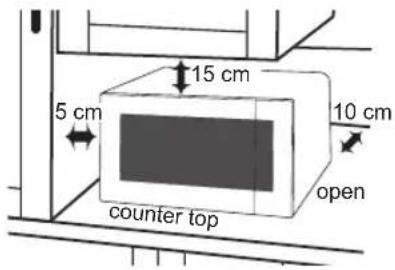
Allow 15 cm of space on the top of the oven, 10 cm at the back, 5 cm on one side, and the other side must be opened more than 40 cm.
- Do not place this oven near an electric or gas cooker range.
- The power cord should not touch the outside of the oven. Keep the cord away from hot surfaces. Do not let the cord hang over the edge of a table or work top. Do not immerse the cord, plug or oven in water.
-
The feet should not be removed.
-
This appliance is intended to be used in household and similar applications such as:
-
staff kitchen areas in shops, offices and other working environments;
- farm houses;
- by clients in hotels, motels and other residential environments;
-
bed and breakfast type environments.
Do not use outdoors. -
Avoid using the oven in high humidity.
-
Do not block the air vents on left side and back of the oven. If these openings are blocked during operation the oven may overheat. In this case the oven is protected by a thermal safety device and resumes operation only after cooling down.
-
This appliance is not intended to be operated by means of an external timer or separate remote-control system.
Important safety instructions
-
The door seals and seal areas should be cleaned with a damp cloth. The appliance should be inspected for damage to the door seals and door seal areas and if these areas are damaged the appliance should not be operated until it has been repaired by a service technician trained by the manufacturer.
-
Do not attempt to tamper with or make any adjustments or repairs to the door, control panel housing, safety interlock switches or any other part of the oven. Do not remove the outer panel from the oven which gives protection against exposure to microwave energy. Repairs should only be carried out by a qualified service person.
-
Do not operate this appliance if it has a damaged CORD OR PLUG, if it is not working properly, or if it has been damaged or dropped. It is dangerous for anyone other than a service technician trained by the manufacturer to perform repair service.
-
If the supply cord is damaged, it must be replaced by the manufacturer, its service agent or a similarly qualified person in order to avoid a hazard.
-
Liquids and other foods must not be heated in sealed containers since they are liable to explode.
-
This appliance can be used by children aged from 8 years and above and persons with reduced physical, sensory and mental capabilities or lack of experience and knowledge if they have been given supervision or instruction by a person responsible for their safety concerning the use of the appliance in a safe way and understand the hazards involved. Children shall not play with the appliance. Cleaning and user maintenance shall not be made by children without supervision. Keep the appliance and its cord out of reach of children less than 8 years.
Important safety instructions
Before use
■ Before using COMBINATION, GRILL or CONVECTION for the first time, operate the oven without food and accessories (including glass tray and roller ring) on G-1 for 5 minutes. This will allow the oil that is used for rust protection to be burned off. This is the only time that the oven is operated empty (except when preheating).
Use of your oven
■ Do not use the oven for any reason other than the preparation of food. This oven is specifically designed to heat or cook food. Do not use this oven to heat chemicals or other non-food products.
■ Before use, check that utensils/containers are suitable for use in microwave oven.
■ When the oven is not being used, do not store any objects inside the oven in case it is accidentally turned on.
■ DO NOT RUN the oven empty (except when preheating and burning off the oil, see Before use above). The appliance must not be operated by MICROWAVE or COMBINATION without food in the oven.
Operation when empty will damage the appliance.
■ If smoke is emitted or a fire occurs in the oven, press Stop/Reset and keep the door closed in order to stifle any flames. Disconnect the power cord, or shut off power at fuse or circuit breaker panel.
Heater operation
■ Caution! Hot surfaces Exterior oven surfaces, including air vents on the cabinet and the oven door will get hot during COMBINATION, GRILLING and CONVECTION, take care when opening or closing the door and when inserting or removing food and accessories.
■ The oven has two heaters situated in the top of the oven cavity. After using the COMBINATION, GRILL and CONVECTION function, these surfaces will be very hot. Care should be taken to avoid touching the heating elements inside the oven.
N.B.: During and after cooking by COMBINATION, GRILL or CONVECTION function, the oven accessories will be very hot.
Fan motor operation
■ After using the oven the fan motor may rotate for a few minutes to cool the electric components. This is normal and you can take out food even though the fan motor operates. You can continue using the oven during this time.
Oven light
■ When it becomes necessary to replace the oven light, please consult your dealer.
Accessories
■ The oven comes equipped with a variety of accessories. Always follow the directions given for use of the accessories.
Glass tray
■ Do not operate the oven without the roller ring and the glass tray in place.
■ Never use another type of glass tray than the one specially designed for this oven.
■ If the glass tray is hot, let it cool before cleaning or placing in water.
■ The glass tray can turn in either direction.
■ If the food or cooking vessel on the glass tray touches the oven walls and stops the tray rotating, the tray will automatically rotate in the opposite direction. This is normal.
■ Do not cook foods directly on the glass tray unless indicated in recipes. Always place food in a microwave safe dish.
Roller ring
■ The roller ring and the oven floor should be cleaned frequently to prevent noise and build-up of remaining food.
■ The roller ring must always be used for cooking together with the glass tray.
Wire rack
■ Do not use any metal container directly on the wire rack in COMBINATION.
■ Do not use the wire rack in MICROWAVE mode only.
Grill pan
■ Always place the pan in the centre of the glass tray and ensure it does not touch the wall of the oven cavity. Failure to do so, may cause sparking which would damage the cavity.
■ Always use the grill pan on the glass tray. Do not use with the wire rack.
■ Always use oven gloves when handling the hot pan.
■ Do not place any heat-sensitive materials on the hot pan as this may cause burning.
Cooking time
■ The cooking time depends on the condition, temperature, amount of food and on the type of cookware.
■ Begin with the minimum cooking time to help prevent overcooking. If the food is not sufficiently cooked you can always cook it for a little longer.
■ Important!
If the recommended cooking time is exceeded, the food will be spoiled and in extreme circumstances could catch fire and possibly damage the interior of the oven.
Small quantities of foods
■ Small quantities of food or foods with low moisture content can burn, dry out or catch on fire if cooked too long. If materials inside the oven should ignite, keep the oven door closed, turn the oven off and remove the plug from the socket.
Important safety instructions
Foods low in moisture
■ The microwave oven is intended for heating food and beverages only. Take care when heating foods low in moisture, e.g. bread items, chocolate, biscuits and pastries. These can easily burn, dry out or catch on fire if cooked too long. We do not recommend heating foods low in moisture such as popcorn or poppodums. Drying of food, newspapers or clothing and heating of warming pads, slippers, sponges, damp cloth, wheat bags, hot water bottles and similar may lead to risk of injury, ignition or fire.
Eggs
■ Do not cook eggs in their shells and whole hard-boiled eggs by MICROWAVE. Pressure may build up and the eggs may explode, even after the microwave heating has ended.
Piercing skin
■ Food with non porous skins, such as potatoes, egg yolks and sausages must be pierced before cooking by MICROWAVE to prevent bursting.
Meat thermometer
■ Use a meat thermometer to check the degree of cooking of roasts and poultry only when the meat has been removed from the oven. Do not use a conventional meat thermometer in the microwave oven because it may cause sparking.
Liquids
■ When heating liquids, e.g. soup, sauces and beverages in your microwave oven, overheating the liquid beyond boiling point can occur without evidence of bubbling. This could result in a sudden boil over of the hot liquid. To prevent this possibility the following steps should be taken: a Avoid using straight-sided containers with narrow necks. b Do not overheat. c Stir the liquid before placing the container in the oven and again halfway through the cooking time. d After heating, allow it to stand in the oven for a short time, stir again before carefully removing the container.
Paper/plastic
■ When heating food in plastic or paper containers, keep an eye on the oven as these types of containers ignite if overheated.
■ Do not use recycled paper products (e.g. kitchen roll) unless the paper product is labelled as safe for microwave oven use. Recycled paper products may contain impurities which may cause sparks and/or fires during use.
■ Remove wire twist-ties from roasting bags before placing the bags in the oven.
Utensils/foil
■ Do not heat any closed cans or bottles because they might explode.
■ Metal containers or dishes with metallic trim should not be used during microwave cooking. Sparking will occur.
■ If you use any aluminium foil, meat spikes or metalware the distance between them and the oven walls and door should be at least 2 cm to prevent sparking.
Feeding bottles/baby food jars
■ The top and teat or lid must be removed from feeding bottles or baby food jars before placing in the oven.
■ The contents of feeding bottles and baby food jars are to be stirred or shaken.
■ The temperature has to be checked before consumption to avoid burns.
Parts of your oven
1. Door handle
Pull to open the door. Opening the door during cooking will stop the cooking process without cancelling the programme. Cooking resumes after the door is closed and Start is pressed. It is quite safe to open the door at any time during a cooking programme and there is no risk of microwave exposure.
2. Oven window
3. Air vents
-
Microwave feed guide (Do not remove.)
-
External air vents
-
Control panel
-
Power supply cord
-
Plug
-
Glass tray
-
Roller ring
-
Grill elements
-
Convection heater
-
Position your supplied auto programme menu label.
-
High wire rack
-
Low wire rack
-
Grill pan
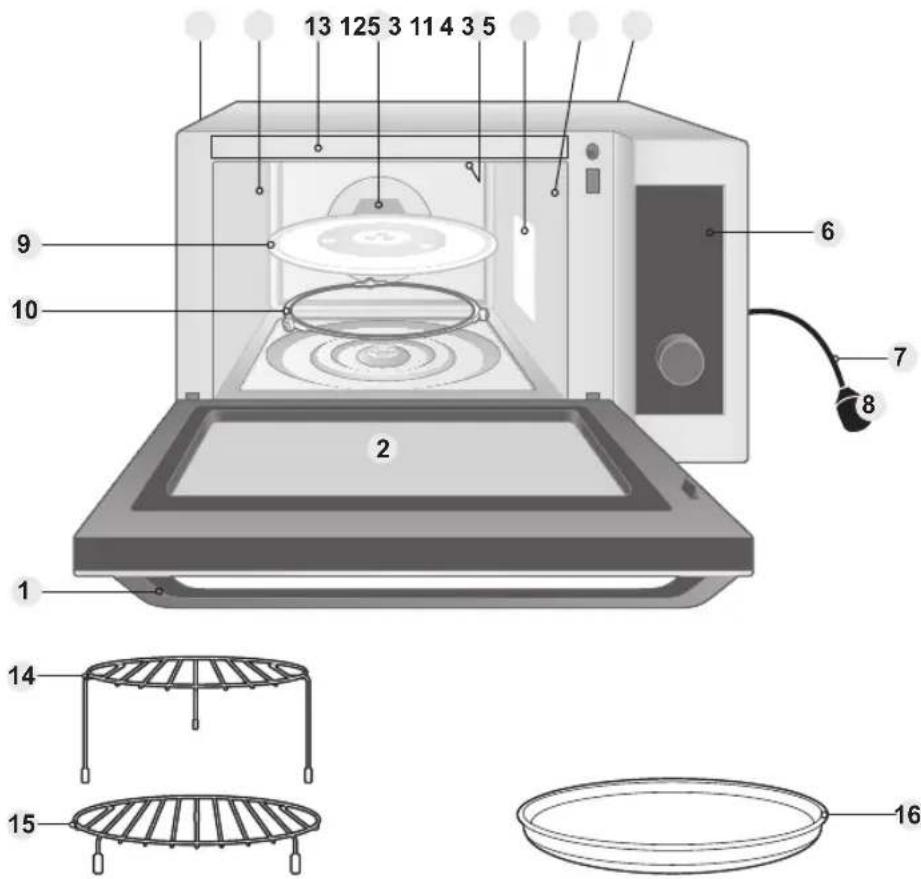
Identification and caution labels are attached on the oven.
Note
This illustration is for reference only.
Control panel
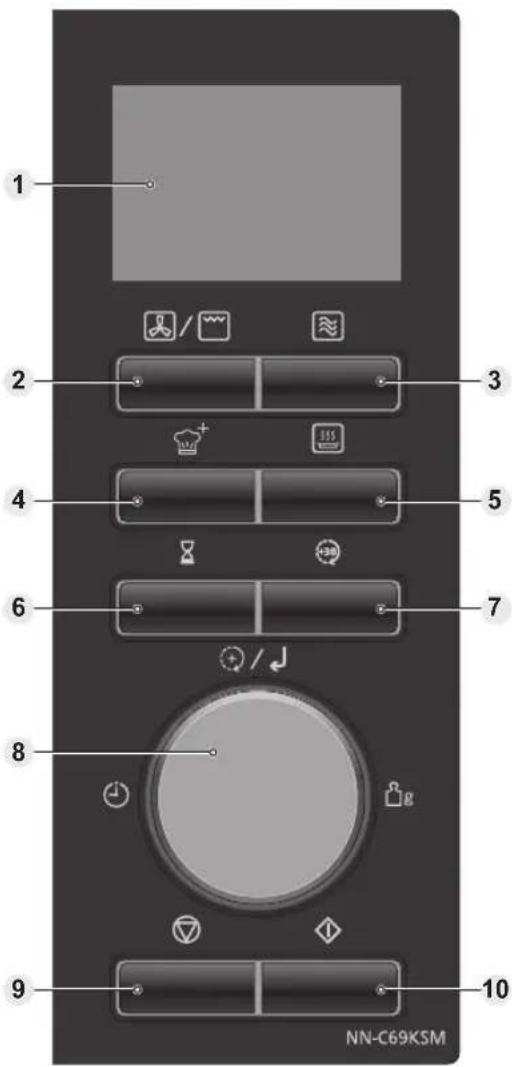
- Your control panel may have differences in appearance, but the words and functionality will be the same.
1 Display window (page 16)
When the oven is first plugged in,
"88.88" appears in display window.
2 Convection/Grill button
3 Microwave button
4 Combination button
5 Auto Programme button
6 Timer / Clock button
7 Quick 30 button
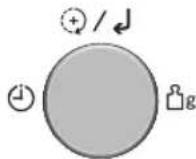
8 Dial
The dial has the following functions:
Selecting values
Select the setting value of each manual cooking mode and each AUTO PROGRAMME.
Cooking time
After selecting a manual cooking mode, enter time by turning the dial. Use the dial for the ADD TIME feature (page 32).
Auto Programmes
After pressing Auto Programme, turn the dial to select AUTO PROGRAMMES.
Confirmation
Press the dial to confirm the setting. CONFIRM indicator ↓ flashes when the setting needs to be confirmed.
9 Stop / Reset button
Before Cooking:
One press clears your instructions.
During Cooking:
One press temporarily stops the cooking programme. Another press cancels all your instructions and the time of day will appear in the display.
10 Start button
One press allows oven to begin functioning. If door is opened or Stop/Reset is pressed once during oven operation, Start must be pressed again to restart oven.
Continued on the next page
Control panel
Beep sound
When a button is pressed correctly a beep will be heard. If a button is pressed and no beep is heard, the unit has not or cannot accept the instruction. The oven will beep twice between programmed stages and at the point to stirring or turning the food in the AUTO PROGRAMME. After the completion of the preheating on CONVECTION or COMBINATION mode, three beeps sound. At the end of any complete programme, the oven will beep 5 times and "End" will be displayed.
Note
If Start is not pressed for 6 minutes after cooking programme setting, the oven will automatically cancel the cooking programme. The display will revert back to clock or colon.
Display window
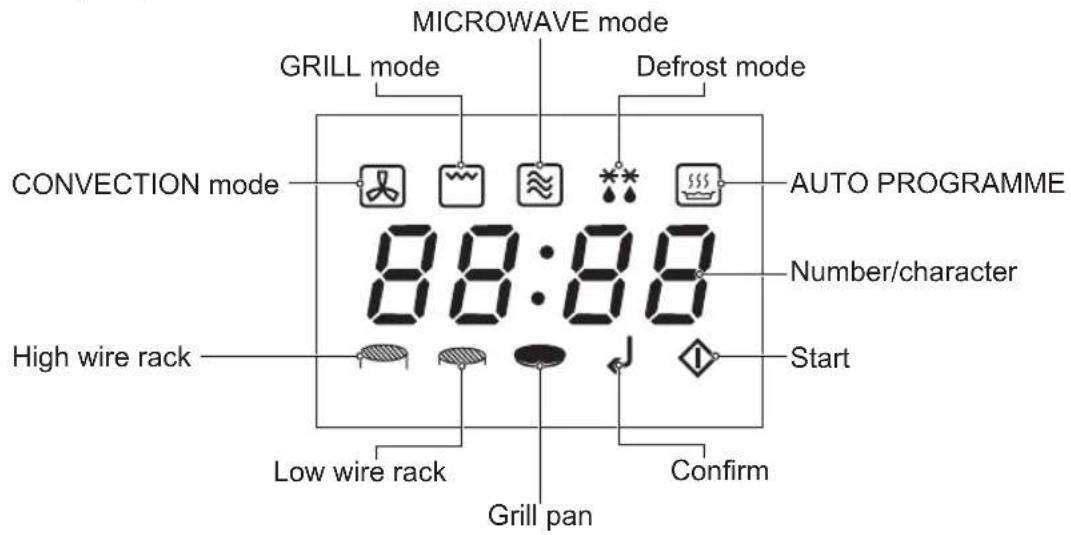
- Start indicator flashes when the setting is completed and preheating or cooking is ready to start. Press Start to start preheating or cooking.
- Confirm indicator flashes when a setting needs to be confirmed. Press dial to confirm the setting and proceed to next setting.
- High wire rack, Low wire rack, and Grill pan indicator indicates which accessory to use for each AUTO PROGRAMME.
Accessories
Grill pan
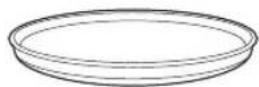
Grill pan works in three ways: heating the pan by absorbing microwaves, heating the food directly by microwaves and heating the food by the grill. The base of the pan absorbs the microwaves and transfers them into heat.
For the best results:
- Use the pan in COMBINATION. Refer to page 27.
- It is important that the food is placed on the pan immediately after preheating. Performance cannot be guaranteed with a time delay.
High wire rack
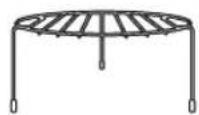
The High wire rack is used to facilitate browning of small dishes and help with the good circulation of the heat.
e.g. gratin, toasted bread For the best results, use in GRILL or COMBINATION 2 (C-2). Refer to page 27.
Low wire rack
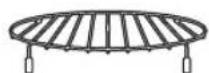
The Low wire rack is used to facilitate browning of thick piece and help with the good circulation of the heat. e.g. roast chicken, cake
For the best results, use in CONVECTION.
Cooking mode
| Cooking mode | Use of accessories | Uses Containers | |
MICROWAVE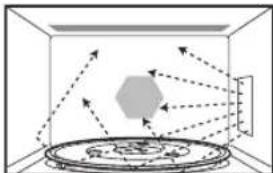 | None(Glass tray only) | DefrostingReheatingMelting: butter, chocolate, cheese.Cooking fish, vegetables, fruits, eggs.Preparing: stewed fruits, jam, sauces, custards, choux, pastry, caramel, meat, fish.Baking cakes without colour.No Preheating | Use microwaveable, plates or bowls e.g. Pyrex®, directly on the glass tray.No metal. |
GRILL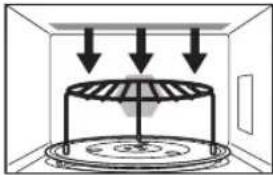 | High wire rack orLow wire rack orGrill pan | Grilling of thin meat or fish fillet.Toast grilling.Colouring of gratin dishes or meringue pies.No Preheating | Use heatproof dishes, plates or bowls e.g. Pyrex®directly on the wire rack or on glass tray. |
CONVECTION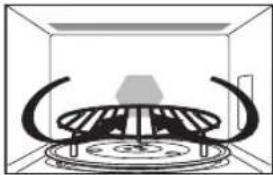 | Low wire rack orGrill pan | Baking of small items with short cooking times: puff pastry, cookies, roll cakes.Special baking: bread rolls or brioches, sponge cakes.Baking of pizzas and tarts.Preheating advised | Heatproof, metal tin can be used on the wire rack.Do not place dishes directly on glass tray. |
GRILL + CONVECTION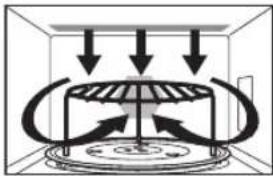 | High wire rack orLow wire rack orGrill pan | Roasting red meats, thick steak (rib or beef, T bone steaks).Cooking of fish.Preheating advised | Heatproof, metal tin can be used on the wire rack.Do not place dishes directly on glass tray. |
GRILL + MICROWAVE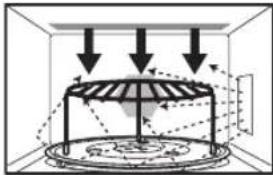 | High wire rack orLow wire rack orGrill pan | • Cooking lasagne, meat, potatoes or vegetable gratins.No Preheating | Microwaveable and heatproof dishes placed directly on the wire rack or the grill pan on glass tray.No metal. |
CONVECTION + MICROWAVE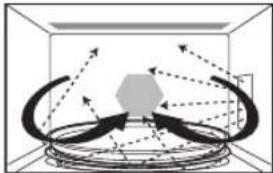 | High wire rack orLow wire rack orGrill pan | • Baking cakes and puddings with browning, baking of quiches, pies and tarts.(Do not use metal tray/tin with wire rack)Preheating if necessary | Microwaveable and heatproof dishes placed directly on the wire rack or the grill pan on glass tray.No metal. |
GRILL + CONVECTION + MICROWAVE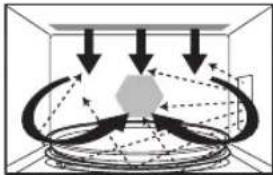 | High wire rack orLow wire rack orGrill pan | • Roasting meat and poultry• Reheating and crisping (quiche, pizza, bread, lasagne, gratin).Preheating if necessary | Microwaveable and heatproof dishes placed directly on the wire rack or the grill pan on glass tray.No metal. |
■ Note Do not use the grill pan with the wire rack.
Setting the clock
When the oven is first plugged in, "88.88" appears in display.
Press Timer/ Clock twice.
Hour and colon start to blink.


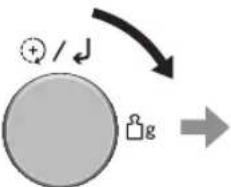
flowchart
graph TD
    A["+"] / ♩] --> B(( ))
Turn the dial to set hours.

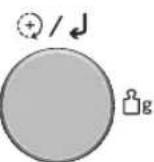

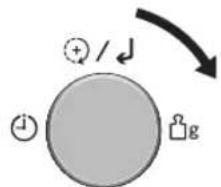
Press the dial. Minute and colon start to blink.
Turn the dial to set minutes.
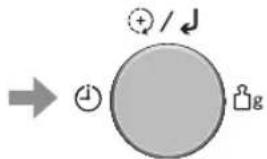
Press the dial.
Blinking stops and time of day is now locked into the display.
Notes
- To reset time of day, repeat the whole step above.
- The clock will keep the time of day as long as the oven is plugged in and electricity is supplied.
- This is a 24 hour clock, ie 2 pm = 14:00 not 2:00.
Child safety lock
This feature will make the oven controls inoperable; however, the door can be opened. Child safety lock can be set when the display shows a dot or the time.
To Set: To Cancel:
Press Start 3 times within 10 seconds.
The time of day will disappear. Actual time will not be lost. 'L--' is indicated in the display.
Press Stop/Reset 3 times within 10 seconds.
The time of day will reappear in the display.
Microwave cooking and defrosting
The glass tray must always be in position when using the oven. There are 5 different microwave power levels available (see the chart below).
Press
Microwave.
lights up and flashes in the display.
flowchart
graph LR
    A["Start"] --> B["Node 1"]
    B --> C["Node 2"]
    C --> D["Node 3"]
    D --> E["End"]
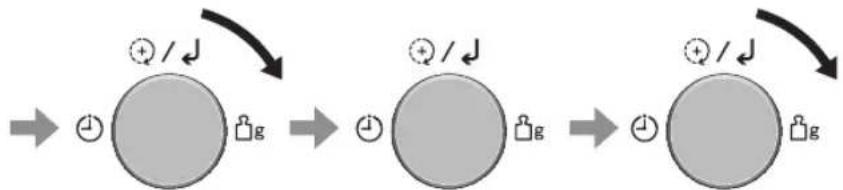
Press Start.
The time counts down in the display.
Turn the dial to set the power level.
Press the dial to confirm the setting.
Turn the dial to set the cooking time.
Power Level Max. time available
| 1000 W High 30 minutes |
| 270 W Defrost 90 minutes |
| 750 W Medium 90 minutes |
| 470 W Low 90 minutes |
| 100 W Warm 90 minutes |
Notes
- After the operation is finished, "Add" is displayed for about 1 minute on the display. While displaying, you can use ADD TIME feature, refer to page 32.
- If you turn the dial before pressing Microwave, you can set the cooking time, and the oven will automatically work on 1000 W (High) microwave power if you press Start after that.
- While cooking, the glass tray may vibrate. This will not affect cooking performance.
- For MULTI-STAGE COOKING, refer to page 30.
- STANDING TIME can be programmed after microwave power and time setting. Refer to page 33.
- DO NOT use MICROWAVE only with any metal accessory in the oven.
- Always check the food during defrosting by opening the door then restarting. It is not necessary to cover food during defrosting. To ensure an even result, stir, turn or separate several times during defrosting. For large joints and poultry, turn halfway through defrosting and protect ends and tips with foil.
Microwave cooking and defrosting
Defrosting Guidelines
Tips for Defrosting
Check the defrosting several times, even if you use the auto programmes. Observe the standing times.
Standing Times
Individual portions of food may be cooked almost immediately after defrosting. It is normal for large portions of food to be frozen in the centre. After defrosting, allow to stand for a minimum of one hour. During this standing time, the temperature becomes evenly distributed and the food is defrosted by conduction.
N.B. If the food is not going to be cooked immediately, store it in the refrigerator.
Never refreeze defrosted food without first cooking it.
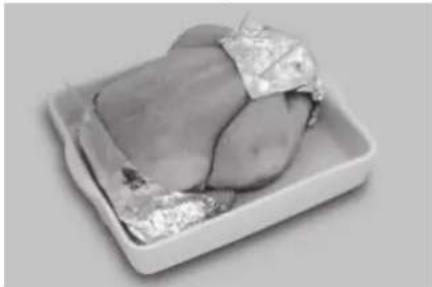
Joints and Poultry
natural_image
Grilled food item on a white tray, possibly a liver or meat, with no visible text or symbols.It is preferable to place the joints on an upturned plate or plastic rack so that they are not resting in the juices. It is essential to protect delicate or projecting parts of this food with small pieces of foil to prevent these parts from cooking. It is not dangerous to use small pieces of foil in your oven, provided they do not come into contact with the oven walls.
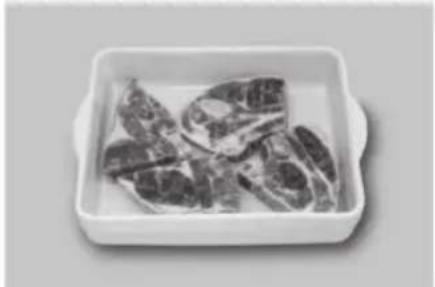
Minced Meat or Cubes of Meat and Seafood
natural_image
Box of raw meat pieces in a white ceramic dish (no text or symbols visible)Since the outside of these foods quickly defrosts, it is necessary to separate them, break the blocks into pieces frequently while defrosting and remove them when they have defrosted.
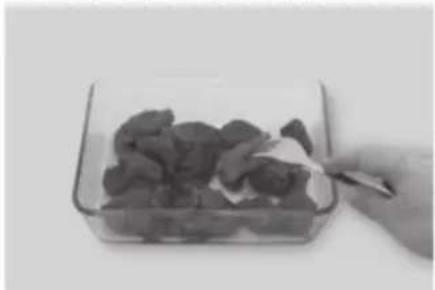
Small Portions of Food
natural_image
Hand holding a knife to cut dark food items into a clear glass container (no text or symbols visible)Chops and chicken pieces must be separated as soon as possible so that they defrost evenly throughout.
Fatty parts and the ends defrost more quickly. Place them near the centre of the glass tray or protect them with small pieces of foil.
Bread
Loaves will require a standing time of 5-30 minutes to allow the centre to thaw. Standing time can be shortened if slices are separated and rolls and loaves cut in half.
Grilling
GRILL is particularly useful for thin slices of meat, steaks chops, kebabs, sausages or pieces of chicken. It is also suitable for hot sandwiches and all gratin dishes.
Use of accessories


High wire rack Low wire rack Grill pan
- Do not use the grill pan with the wire rack.
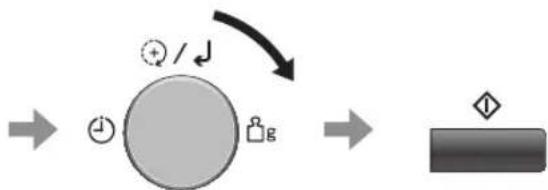
Press Convection/Grill twice to select GRILL mode.
and flash in the display.

Press the dial to confirm the setting.

Turn the dial to set the power level.

Press the dial to confirm the setting.
Level
G-1 1000 W
G-2 700 W
flowchart
graph LR
    A["Input"] --> B["Processing Step"]
    B --> C["Output"]
    B -->|+/-/↓| D["Feedback Loop"]
Turn the dial to set the cooking time.
(up to 9 hours)
Press Start.
The time counts down in the display.
Continued on the next page
Grilling
Notes
- After the operation is finished, "Add" is displayed for about 1 minute on the display. While displaying, you can use ADD TIME feature, refer to page 32.
- Place food on wire rack on glass tray. Place a heatproof plate underneath to catch fat and drips.
- Never cover foods when grilling.
- DO NOT preheat the oven.
- There is no microwave power used in GRILL cooking.
- Most foods require turning halfway during cooking. When turning food, open oven door and CAREFULLY remove wire rack using oven gloves.
- After turning, return food to the oven and close door, and then press Start. The oven display will continue to count down the remaining grilling time.
- The grill elements will glow on and off during cooking - this is normal.
- DO NOT touch heating device on top of inside cavity while cavity is hot. Heating device may be still hot.
- After GRILL use, the product may not operate for some time to prevent overheating.
CAUTION!
The wire rack must always be used with the glass tray in position. Remove wire rack from oven by holding the rack and heatproof dish firmly. Use oven gloves when removing accessories. Never touch the outside window or inside metal parts of the door or oven when taking food in or out due to the high temperatures involved.
Convection cooking
The convection oven has a heating element with fan to give the dry heating needed to produce crisp, browned exteriors. Most conventional recipes will be suitable for use. (e.g. cookies, cakes, meat items and baked items) Most baked items require preheating the oven.
Use of accessories

Low wire rack Grill pan

- Do not use the grill pan with the wire rack.
With preheating

flowchart
graph LR
    A["Input Image"] --> B["Process Step 1"]
    B --> C["Process Step 2"]
    C --> D["Output Step 3"]
    D --> E["Final Output"]
Press Convection/Grill once to select CONVECTION mode.
Press the dial to confirm the setting.
Turn the dial to set the temperature. (100-220 °C)
Press the dial to confirm the setting.
and flash in the display.

flowchart
graph LR
    A["Preheating Device"] --> B["After the preheating (beep 3 times),"]
    B --> C["Control Unit with +/↓ icon, g symbol"]
    C --> D["Final Control Unit with diamond marker"]
Press Start to start preheating.
The "P" and temperature lights up in the display while preheating.
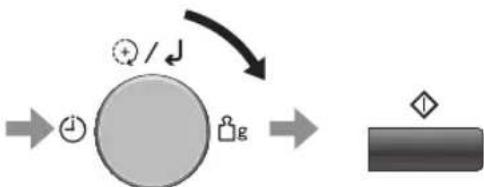
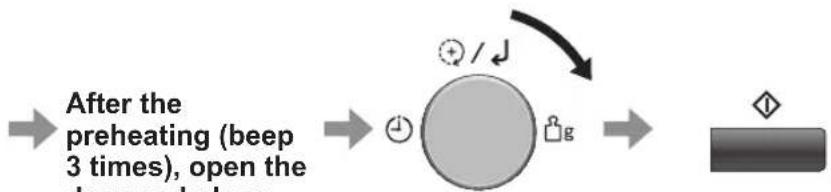
After the preheating (beep 3 times), open the door and place the food in the oven.
flowchart
graph LR
    A["Input"] --> B["Process Step"]
    B --> C["Output"]
    D["Feedback Loop"] --> B
    E["Input"] --> F["Process Step"]
    F --> C
Turn the dial to set the cooking time. (up to 9 hours)
Press Start.
The cooking programme will start and the time in the display will count down.
Temperature Pre-prepared dishes
| 40 °C Proving bread and pizza dough | |
| 100-110 °C Meringues | |
| 120-140 °C Meat and fish pate, potted meat | |
| 150-160 °C Baked eggs, fruit cake, macaroons | |
| 170-180 °C | Quiche, cookies, strudel, sponge cake, biscuits, slow-cooked or braised meat |
| 190-210 °C Kugelhupf, gratins, choux pastry, soufflés | |
| 220 °C Bread, pizza, tarts | |
Convection cooking
Without preheating
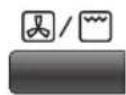
Press Convection/Grill once to select CONVECTION mode.

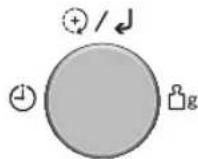
Press the dial to confirm the setting.

flowchart
graph TD
    A["User Icon"] -->|Feedback Loop| B((Circular Node))
    B --> C["User Icon"]
    C --> D["→"]
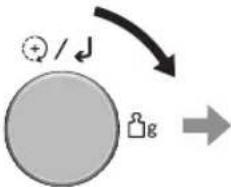
Turn the dial to set the temperature. (40 °C, 100-220 °C)

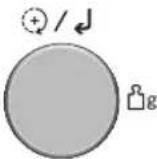
Press the dial to confirm the setting.
and flash in the display.
flowchart
graph TD
    A["Start"] --> B((Node))
    B --> C["Loop"]
    C --> D["End"]
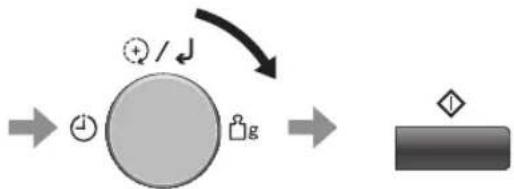
Turn the dial to set the cooking time. (up to 9 hours)
Press Start. The time counts down in the display.
Notes
- After the operation is finished, "Add" is displayed for about 1 minute on the display. While displaying, you can use ADD TIME feature, refer to page 32.
- When the oven reaches the preheating temperature, the temperature will be displayed and flash, and the beep will sound 3 times to remind you to put the food into the oven. Open the oven door, put the food into the oven, and close the door.
- Cooking time can be input after the oven reaches the preheating temperature. To input the cooking time, the door must be opened. If the time is not input within 30 minutes, the oven will stop preheating, beep 5 times and return to standby mode.
- The oven cannot preheat to 40^ C.
CAUTION!
The wire rack must always be used with the glass tray in position. Remove wire rack from oven by holding the rack and heatproof dish firmly. Use oven gloves when removing accessories. Never touch the outside window or inside metal parts of the door or oven when taking food in or out due to the high temperatures involved.
Combination cooking
COMBINATION means that it is possible to combine the MICROWAVE, GRILL and CONVECTION function for thawing, cooking, and heating foods. The MICROWAVE power cooks food quickly while the GRILL and CONVECTION gives traditional browning and crisping.

- Do not use the grill pan with the wire rack.
| Display (Level) | Combination Uses | |
| C-1 (COMBINATION 1) | MICROWAVE: 470 W | Whole chicken, quicheGRILL: — |
| CONVECTION: 200 °C* | ||
| C-2 (COMBINATION 2) | MICROWAVE: 470 W | Gratin, pasta bake, chicken pieces, sandwiches |
| GRILL: 500 W | ||
| CONVECTION: — | ||
| C-3 (COMBINATION 3) | MICROWAVE: — | Roasting meat, chilled pizza, whole fish, sausage |
| GRILL: 1000 W | ||
| CONVECTION: 200 °C* | ||
| C-4 (COMBINATION 4) | MICROWAVE: 270 W | Frozen potato products, frozen pizza, small pastry items |
| GRILL: 700 W | ||
| CONVECTION: 200 °C* |
* The temperature may not reach 200 °C depending on the food and cooking time.
With preheating
• Preheating is not available for COMBINATION 2 (C-2).
flowchart
graph LR
    A["Chef Icon"] --> B((Circular Component))
    B --> C((Circular Component))
    C --> D["Product Box"]
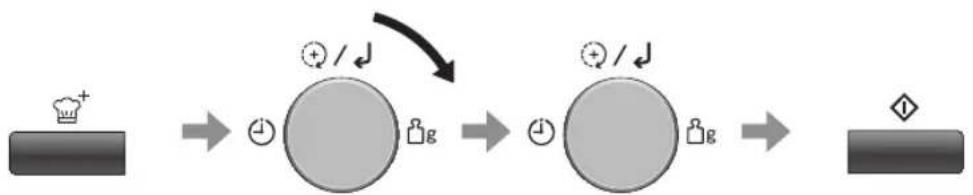
Press Combination.
Turn the dial to select the suitable level in the chart above.
The indicators corresponding to the COMBINATION level flash.
Press the dial to confirm the setting.
Press Start to start preheating. The "P" lights up in the display while preheating.
Continued on the next page
Combination cooking
flowchart
graph LR
    A["After the preheating (beep 3 times), open the bed and place"] --> B["→"]
    B --> C["→"]
    C --> D["→"]
    D --> E["Output: ◇/↓"]
Turn the dial to set the cooking time. (up to 9 hours)
Press Start.
The cooking programme will start and the time in the display will count down.
Without preheating

flowchart
graph LR
    A["Chef +"] --> B["Meal with +/- charge"]
    B --> C["Meal with +/- charge"]
    C --> D["Meal with +/- charge"]
    D --> E["Meal with +/- charge"]
Press Combination.
Turn the dial to select the suitable level in the chart on page 27. The indicators corresponding to the COMBINATION level flash.
Press the dial to confirm the setting.
Turn the dial to set the cooking time. (up to 9 hours)
Press Start.
The time counts down in the display.
Notes
-
After the operation is finished, "Add" is displayed for about 1 minute on the display. While displaying, you can use ADD TIME feature, refer to page 32.
-
The wire racks are designed to be used for COMBINATION, GRILL and CONVECTION. Never attempt to use any other metal accessory except the accessories provided with the oven. Place a heatproof dish underneath to catch any fat or drips.
-
Use the wire racks only as described. DO NOT use if operating the oven with less than 200 g of food on a manual programme. For small quantities, do not cook by COMBINATION, but cook by GRILL, CONVECTION or MICROWAVE ONLY for best results.
-
Never cover foods when cooking on COMBINATION.
-
Arcing may occur accidentally if the incorrect weight of food is used, the wire rack has been damaged, or a metal container has been used. Arcing is flashes of blue light seen in the microwave oven. If this occurs, stop the oven immediately.
-
DO NOT use plastic microwave containers on COMBINATION programmes (unless suitable for COMBINATION cooking.) Dishes must be able to withstand the heat of the top grill - heatproof glass or ceramic is ideal.
-
DO NOT use your own metal dishes or tins on COMBINATION 1, 2 and 4 (C-1, C-2, C-4), as the microwaves will not penetrate the food evenly.
-
Cooking time can be input after the oven reaches the preheating temperature. To input the cooking time, the door must be opened. If the time is not input within 30 minutes, the oven will stop preheating, beep 5 times and return to standby mode.
CAUTION!
The wire rack must always be used with the glass tray in position. Remove wire rack from oven by holding the rack and heatproof dish firmly. Use oven gloves when removing accessories. Never touch the outside window or inside metal parts of the door or oven when taking food in or out due to the high temperatures involved.
Multi-stage cooking
This feature allows you to programme up to 3 stages of cooking continuously.
Example: To continually set 750 W (Medium) MICROWAVE power for 2 minutes, COMBINATION 2 power for 3 minutes and GRILL 1 power for 2 minutes.
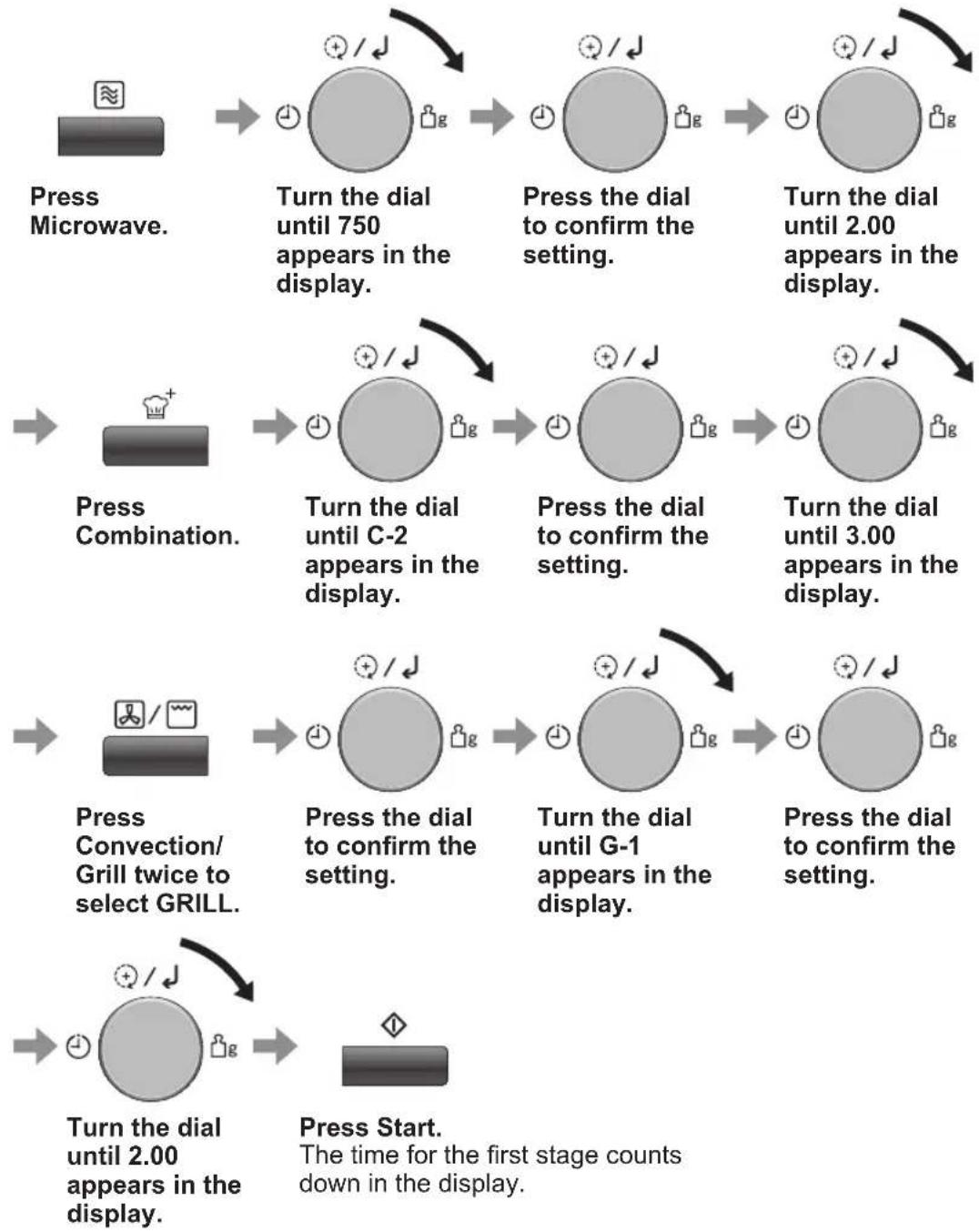
flowchart
graph TD
    A["Press Microwave"] --> B["Turn the dial until 750 appears in the display."]
    B --> C["Press the dial to confirm the setting."]
    C --> D["Turn the dial until 2.00 appears in the display."]
    D --> E["Press Combination"]
    E --> F["Turn the dial until C-2 appears in the display."]
    F --> G["Press the dial to confirm the setting."]
    G --> H["Turn the dial until 3.00 appears in the display."]
    H --> I["Press Convection/Grill twice to select GRILL."]
    I --> J["Press the dial to confirm the setting."]
    J --> K["Turn the dial until G-1 appears in the display."]
    K --> L["Press the dial to confirm the setting."]
    L --> M["Turn the dial until 2.00 appears in the display."]
    M --> N["Press Start"]
Notes
- After the operation is finished, "Add" is displayed for about 1 minute on the display. While displaying, you can use ADD TIME feature, refer to page 32.
- PREHEATING, AUTO PROGRAMME cannot be used with MULTI-STAGE COOKING.
- When operating, 2 beeps will sound between each stage, and 5 beeps will sound after all stages have finished.
- 1000 W (High) MICROWAVE power can be set only once in MULTI-STAGE COOKING.
Quick 30 feature
This feature allows you to set cooking time in 30 seconds increments up to 5 minutes at 1000 W (High) MICROWAVE power. It is only available for MICROWAVE.

Press Quick 30 to set the desired cooking time.
Time appears in the display.
Press Start.
The time counts down in the display.
Notes
- After the operation is finished, "Add" is displayed for about 1 minute on the display. While displaying, you can use ADD TIME feature, refer to below.
- If desired, you can use other power levels. Select the desired power level before pressing Quick 30.
- After setting the time by Quick 30, you cannot use dial.
Add time feature
This feature allows you to add cooking time at the end of previous cooking. It is available for MICROWAVE, GRILL, CONVECTION and COMBINATION cooking.

Turn the dial to set the additional time.
Up to 30 minutes for 1000 W (High) MICROWAVE power, 90 minutes for other MICROWAVE powers, and 9 hours for GRILL, CONVECTION and COMBINATION cooking.
Press Start.
The time counts down in the display.
Notes
- After the operation is finished, "Add" is displayed for about 1 minute on the display. While displaying, you can use ADD TIME feature again.
- During cooking, turn the dial to set the additional cooking time (10 seconds to 10 minutes).
- ADD TIME feature will be cancelled, if you do not perform any operation for 1 minute after cooking, or if you open the door or press any button when "Add" is displayed.
- ADD TIME feature can be used after MULTI-STAGE COOKING. The power level is the same as the last stage. This function will not operate if the last stage was standing time.
- ADD TIME feature is not available for AUTO PROGRAMMES.
Using the timer
This feature operates as a KITCHEN TIMER or allows you to programme the STANDING TIME/DELAY START.
Kitchen timer
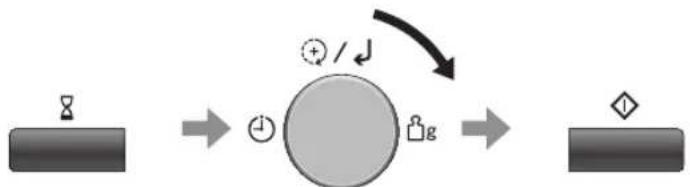
Example: To count 5 minutes.
flowchart
graph LR
    A["Contact"] --> B((+/-))
    B --> C["Output"]
    style A fill:#333,stroke:#fff,color:#fff
    style C fill:#333,stroke:#fff,color:#fff
    note1["+"] / ↓] --> B
Press Timer/ Clock.
Turn the dial until 5.00 appears in the display.
(up to 90 minutes)
Press Start.
The time counts down without
the oven operating.
Standing time
Example: To stand for 5 minutes after cooking at 750 W (Medium) MICROWAVE power for 3 minutes.
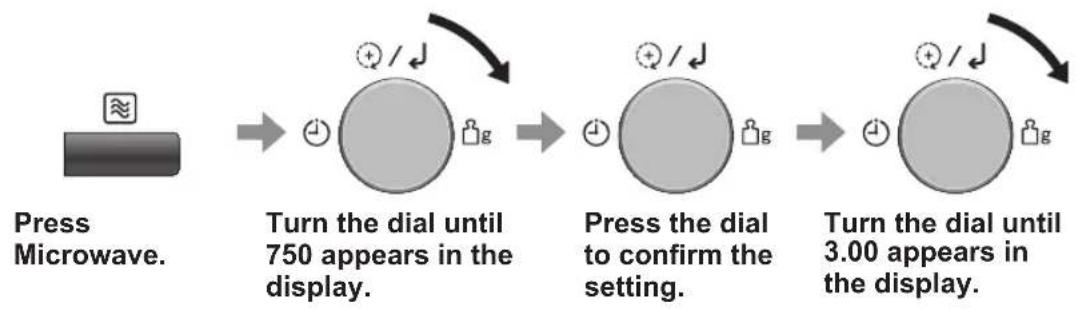
flowchart
graph LR
    A["Press Microwave"] --> B["Turn the dial until 750 appears in the display."]
    B --> C["Press the dial to confirm the setting."]
    C --> D["Turn the dial until 3.00 appears in the display."]
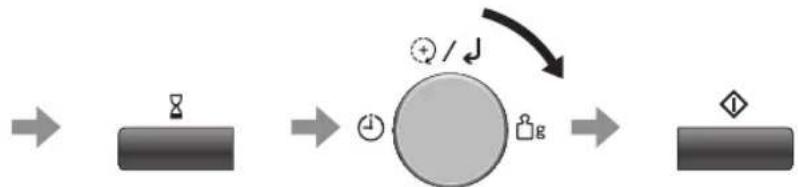
flowchart
graph LR
    A["Input"] --> B["Process Node"]
    B --> C["Output"]
    style B fill:#ccc,stroke:#333
    note right of B: + / ↓
    note right of B: ♦
Press Timer/
Clock.
Turn the dial until 5.00 appears in the display.
(up to 90 minutes)
Press Start.
Cooking starts.
After cooking, standing time will count down without the oven operating.
Continued on the next page
Using the timer
Delay start
Example: To start cooking at 750 W (Medium) MICROWAVE power for 3 minutes after 5 minutes of standing time.
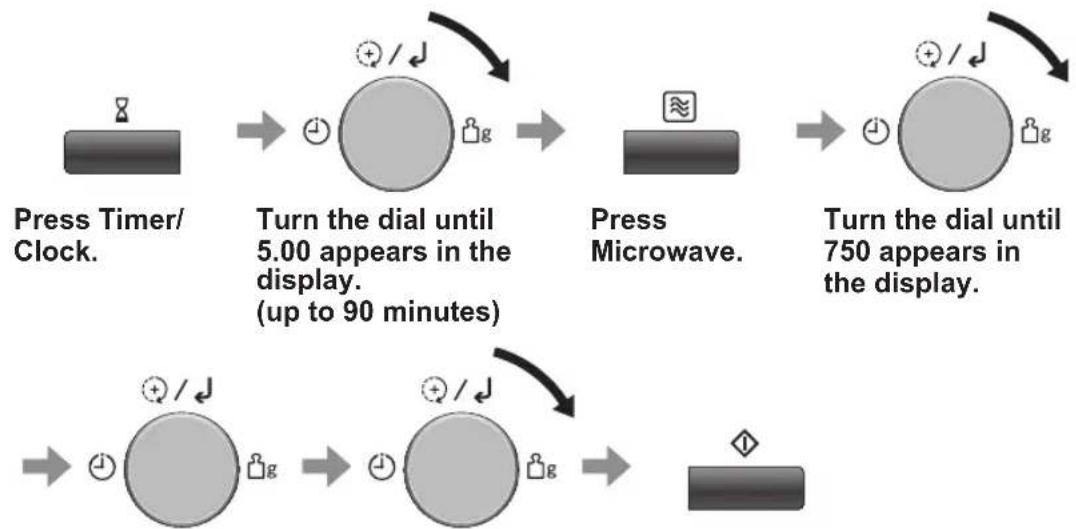
flowchart
graph TD
    A["Press Timer/ Clock."] --> B["Turn the dial until 5.00 appears in the display. (up to 90 minutes)"]
    B --> C["Press Microwave."]
    C --> D["Turn the dial until 750 appears in the display."]
    D --> E["End"]
Press the dial to confirm the setting.
Turn the dial until 3.00 appears in the display.
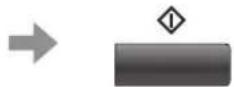
Press Start.
The time counts down without the oven operating.
Notes
- After DELAY START is finished, "Add" is displayed for about 1 minute on the display. While displaying, you can use ADD TIME feature, refer to page 32.
- MULTI-STAGE COOKING can be programmed including STANDING TIME or DELAY START.
- Even if the oven door is opened during KITCHEN TIMER, STANDING TIME or DELAY START, the time in the display window will continue to count down.
- STANDING TIME/DELAY START cannot be programmed before/after any AUTO PROGRAMME.
Auto programmes
With this feature you can defrost/cook food according to the weight. Select the category and set the weight of the food. The weight is programmed in grams. The oven determines MICROWAVE power level and/or, GRILL, CONVECTION and/or COMBINATION setting, and cooking time automatically. For quick selection, the weight starts from the most commonly used weight for each category. Do not include the weight of any added water or the container weight.
List of the AUTO PROGRAMMES
Auto Reheat
| Display Menu Page | |
| 1 Auto Reheat 38 | |
| 2 Soup 38 |
Auto Defrost
| Display Menu Page | |
| 3 Small Pieces 38 | |
| 4 Big Piece 38 | |
| 5 Bread/Cake 39 |
Re-bake Bread
| Display Menu Page | |
| 6 Baguette/Crusty Rolls | 39 |
| 7 Croissants 39 |
Auto Cook
| Display Menu Page | |
| 8 Fresh Vegetables 40 | |
| 9 Potatoes 40 | |
| 10 Fresh Fish 40 | |
| 11 Pasta 40 |
Junior Menu
| Display | Menu Page | |
| 12 | Purée Vegetables | 41 |
| 13 | Purée Fruits | 41 |
| 14 | Mug Cake | 42 |
| 15 | Junior Pasta Bake | 43 |
| 16 | Frozen Breaded Products | 43 |
| 17 | Fresh Vegetable Fries | 43 |
Auto Combi
| Display | Menu Page | |
| 18 | Chilled Pizza 44 | |
| 19 | Frozen Pizza | 44 |
| 20 | Frozen Potato Products | 44 |
| 21 | Spring Rolls | 44 |
| 22 | Escalope | 44 |
| 23 | Chicken | 45 |
Auto Bake/Roast
| Display | Menu Page | |
| 24 | Beef/Lamb | 45 |
| 25 | Cake 45 |
Others
| Display | Menu Page | |
| 26 | Yogurt | 46 |
| 27 | Food Dry | 46 |
| 28 | Slow Cook | 47 |
| 29 | Keep Warm | 47 |
Cleaning
| Display | Menu Page | |
| 30 Aqua Clean | 47 | |
Continued on the next page
Auto programmes
For AUTO PROGRAMME 1-5, 8-15, 23, 24

flowchart
graph LR
    A["User"] --> B["Token 1"]
    B --> C["Token 2"]
    C --> D["Token 3"]
    D --> E["Token 4"]
Press Auto Programme
AUTO
PROGRAMME
number appears,
and
corresponding
cooking mode light up, and ⏻ flashes in the display.
Turn the dial to select the desired AUTO
PROGRAMME.
As AUTO
PROGRAMME
number changes,
corresponding
cooking mode and accessory light up.
Press the dial to confirm the setting.
Turn the dial to set the weight or amount of the food.
Press Start.
The time counts down in the display.
For AUTO PROGRAMME 6, 7, 16-22

flowchart
graph LR
    A["Device"] --> B((+/-))
    B --> C((+/-))
    C --> D((+/-))
    D --> E((+/-))
Press Auto Programme
AUTO
PROGRAMME
number appears,
and
corresponding
cooking mode light up, and ↓ flashes in the display.
Turn the dial to select the desired AUTO
PROGRAMME.
As AUTO
PROGRAMME
number changes,
corresponding
cooking mode and accessory light up.
Press the dial to confirm the setting.
Turn the dial to set the weight or amount of the food.
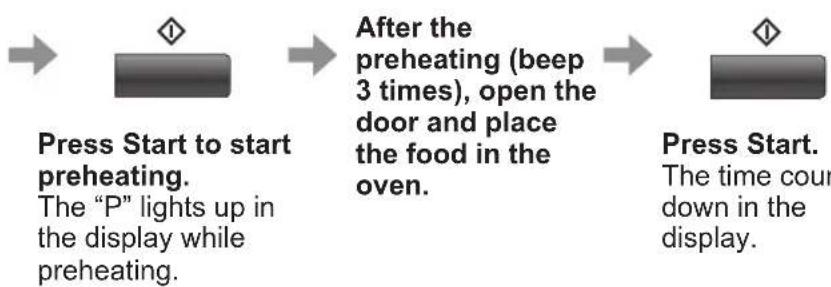
flowchart
graph LR
A["Press Start to start preheating.<br>The "P" lights up in the display while preheating."] --> B["After the preheating (beep 3 times), open the door and place the food in the oven."]
B --> C["Press Start.<br>The time count down in the display."]
For AUTO PROGRAMME 25-30
Refer to pages 45-47.
Notes
- The AUTO PROGRAMMES must ONLY be used for foods described.
- Only defrost/cook foods within the weight ranges described.
- Always weigh the food rather than relying on the package information.
- Most foods benefit from a standing time. After cooking with an AUTO PROGRAMME, allow heat to continue conducting to the centre.
- Only use the accessories as indicated in the instructions on page 39-46 or indicated in the display window.
Continued on the next page
Auto programmes
Auto Reheat
This feature allows you to reheat foods by setting the weight. The oven determines the MICROWAVE power level, then the cooking time automatically. Select the category of food and then just set the weight.
| Programme Instructions | |
| 1. Auto Reheat | Weight: 150 g / 250 g / 350 g / 450 g / 600 gFor reheating a fresh pre-cooked meal. All foods must be pre-cooked. Foods should be at refrigerator temperature approx. +5 °C. Reheat in container as purchased. Pierce covering film with a sharp knife once in the centre and 4 times around the edge. If transferring food to a dish, cover with pierced cling film. Place container on glass tray. Stir at end of programme and allow a few minutes standing time. Large pieces of meat/fish in a thin sauce may require longer cooking. This programme is not suitable for starchy foods such as rice, noodles or potatoes. Meals in irregular bowl shaped containers may need longer cooking. Do not reheat bread or pastry products, law or uncooked foods, beverages, and frozen foods. |
| 2. Soup | Weight: 200 g / 400 g / 600 gFor reheating a soup. Soup should be at refrigerator temperature approx. +5 °C. Pour soup into a microwave safe bowl. Cover with lid or cling film. Stir before serving |
Auto Defrost
With this feature you can defrost frozen food according to the weight.
| Programme Instructions | |
| 3. Small Pieces | Weight: 200 g - 1000 gFor defrosting small pieces of meat, escallop, sausages, minced meat, steak, chops, fish fillets (each 100 g to 400 g).Turn and shield at beeps. Allow to stand for 15 to 30 minutes. |
| 4. Big Piece | Weight: 600 g - 1600 gFor defrosting big pieces of meat, whole chicken, meat joints. Whole chicken and meat joints will require shielding during defrosting. Protect wings, breast and fat with smooth pieces of aluminium foil secured with cocktail sticks. Do not allow the foil to touch the walls of the oven. Standing time of 1 to 2 hours should be allowed after defrosting. Turn and shield at beeps. |
| 5. Bread/Cake | Weight: 100 g - 600 gFor defrosting bread (loaf, slices, rolls) and cakes. Cream cakes, desserts and iced cakes are unsuitable for this programme. Turn at beeps. Allow bread to stand for 10 (white light bread) to 30 minutes (dense rye bread). Cut large loaves in half during standing time. |
Re-bake Bread
| Programme Instructions | |
| 6.Baguette/Crusty Rolls | Weight: 100 g / 150 g / 200 g / 250 g Accessories:For re-baking baguettes and crusty rolls.This programme is suitable for reheating, browning and crisping pre-purchased baguettes and rolls from room temperature. Ensure height of baguette/rolls is no more than 5 cm. Before you press Start, place the grill pan in the oven. After you press Start, preheat will start. After the preheat, place baguette/crusty rolls on the grill pan. After cooking, place the baguette/crusty rolls on a wire rack for a few minutes. |
| 7. Croissants | Quantity: 1-2 Pieces / 3 Pieces / 4 Pieces / 5 Pieces Accessories:For re-baking croissants.This programme is suitable for reheating, browning and crisping pre-purchased croissants from room temperature. Before you press Start, place the grill pan in the oven. Turn the dial to select the number of the croissants. After you press Start, preheat will start. After the preheat, place croissants on grill pan. After cooking, place on a wire rack for a few minutes. |
Continued on the next page
Auto programmes
Auto Cook
With this feature you can cook food according to the weight. Select the category and set the weight or amount of the food. The weight is programmed in grams. The oven determines MICROWAVE power level and cooking time automatically. For quick selection, the weight starts from the most commonly used weight for each category. Do not include the weight of any added water or the container weight.
| Programme Instructions | |
| 8.Fresh Vegetables | Weight: 150 g / 350 g / 500 gFor cooking fresh vegetables like carrots, broccoli, cauliflower and green beans.Wash vegetables thoroughly. Place prepared vegetables in a suitable sized container. Sprinkle with 1 tbsp water per 100 g vegetables. Cover with cling film. Pierce cling film with a knife once in the centre and 4 times around the edge.Note: All pieces should be about same size. Do not salt or butter until cooking is finished. |
| 9. Potatoes | Quantity: 1 Piece / 2 Pieces / 3 PiecesFor cooking potatoes.Wash and dry potatoes and prick with a fork several times. Place near the edge of the glass tray. Turn the dial to set the numbers of the potato. (1 piece stands for 200 g - 250 g of potato) Allow to stand for 5 minutes after cooking. |
| 10. Fresh Fish | Weight: 150 g / 250 g / 350 g / 450 g / 650 gFor cooking fresh fillets or steaks of fish.Place the fish on a suitable sized microwave safe dish.Cover with cling film. Allow to stand for a few minutes after cooking. |
| 11. Pasta | Weight: 50 g / 100 g / 150 gFor cooking dried pasta.Put pasta, water, and oil in a microwave safe deep casserole dish according to the table below.Pasta Water Oil50 g 450 g 1 tsp100 g 800 g 2 tsp150 g 1200 g 1 tbspDrain after cooking.Note: Do not cover the casserole dish. |
Junior Menu
The Junior menu offers a range of programmes catering for babies, toddlers and older children. The fruit and vegetable purées are ideal first foods for weaning babies. Healthy vegetable fries and pasta bakes are perfect for smaller tummies. Mug cakes offer a quick and easy dessert. Simple tablespoon measurements that can be mixed in the mug for ease of preparation. Ready to eat in no time at all when using the Mug Cake programme.
| Programme Instructions | |
| 12.Purée Vegetables | Weight: 100 g / 200 g / 300 g / 400 gThis programme is suitable for cooking parsnips, potatoes, butternut squash, carrots, sweet potato and swede. The cooked vegetables are then puréed and suitable when weaning babies. Peel and chop the vegetables into even sized pieces. Place in a Pyrex® dish.Add the following quantities of water:100 g - 150 g vegetables 75 ml water.155 g - 300 g vegetables 100 ml water.305 g - 400 g vegetables 150 ml water.Cover with lid or cling film. Stir halfway during cooking at beeps. After cooking allow to stand for 10 minutes. Purée the vegetables with the cooking liquid using a blender. If necessary adjust the consistency with a little water to thin or baby rice to thicken. Check the temperature before feeding. |
| 13. Purée Fruits | Weight: 100 g / 200 g / 300 g / 400 gThis programme is suitable for cooking apples, pears, peaches, papaya and mango. The cooked fruit is then puréed and suitable when weaning babies. Peel and chop the fruit into even sized pieces. Place in a Pyrex® dish.Add the following quantities of water:100 g - 150 g fruit 75 ml water.155 g - 300 g fruit 100 ml water.305 g - 400 g fruit 150 ml water.Cover with lid or cling film. Stir halfway during cooking at beeps. After cooking allow to stand for 10 minutes. Purée the fruit with the cooking liquid using a blender. If necessary adjust the consistency with a little water to thin or baby rice to thicken. Check the temperature before feeding. |
Continued on the next page
Auto programmes
| Programme Instructions | |
| 14. Mug Cake | Quantity: 1 cup, 2 cupsFor cooking one mug cake, either Chocolate Brownie or lemon.Prepare the mug cake as in the following recipes.Size of mug should be no smaller than 300 ml.Place the mug on the centre of the glass tray. Turn the dial to select the quantity – 1 cup, or 2 cups. After cooking allow to stand for a few minutes and serve warm in the mug with icecream, custard or cream.Chocolate Brownie Mug CakeIngredientsFor 1 serving 412 tbsp flour 2 tbsp melted butter3 tbsp sugar 2 tbsp milk 212 tbsp cocoa powder4 squares dark or milk chocolate, choppedDecoration: sprinkles or mini marshmallowsMix flour, sugar and cocoa powder together in mug.Add melted butter and milk and mix.Add chopped chocolate. Mix thoroughly.After cooking decorate with sprinkles or mini marshmallows.Lemon Mug CakeIngredientsFor 1 serving3 tbsp flour 2 tbsp vegetable oil3 tbsp sugar2 tbsp lemon juice, plus zest 12 lemon 14 tsp baking powder 1 egg, beatenA dash of saltDecoration: strawberries, blueberries, sprinklesMix flour, sugar, baking powder and salt together in mug.Add vegetable oil, lemon juice, lemon zest and beaten egg. Mix thoroughly.After cooking, decorate with strawberries, blueberries or sprinkles. |
| 15. Junior Pasta Bake | Weight: 250 g / 500 g / 800 g Accessories:  For cooking fresh pasta bake using fresh pasta (penne, spaghetti, fusilli), cheese or tomato based sauce and grated mild cheddar cheese.Use a suitable square, shallow Pyrex® container. Use the following quantities: For cooking fresh pasta bake using fresh pasta (penne, spaghetti, fusilli), cheese or tomato based sauce and grated mild cheddar cheese.Use a suitable square, shallow Pyrex® container. Use the following quantities: |
| Weight setting Pasta Sauce Cheese | |
| 250 g 70 g 140 g 40 g | |
| 500 g 150 g 300 g 50 g | |
| 800 g 250 g 500 g 50 g | |
| Other ingredients may be added such as ham, tuna and sweetcorn. In this case substitute some of the sauce for the chosen added ingredients. Place the pasta on the high wire rack. | |
| 16.Frozen Breaded Products | Weight: 100 g / 200 g / 300 g / 400 g Accessories:  For preparing frozen breaded products such as frozen popcorn chicken, frozen chicken nuggets, frozen turkey drummers, frozen fish fingers, frozen scampi.Before you press Start, place the grill pan in the oven.After you press Start, preheat will start. Remove all packaging and place the frozen breaded products on the grill pan.Turn it over during cooking at beeps. For preparing frozen breaded products such as frozen popcorn chicken, frozen chicken nuggets, frozen turkey drummers, frozen fish fingers, frozen scampi.Before you press Start, place the grill pan in the oven.After you press Start, preheat will start. Remove all packaging and place the frozen breaded products on the grill pan.Turn it over during cooking at beeps. |
| 17.Fresh Vegetable Fries | Weight: 100 g / 200 g / 300 g / 400 g Accessories:  For preparing fresh vegetable fries such as potato, sweet potato, carrots, parsnips and courgettes.Peel and cut the vegetables into baton shapes (1 cm thickness). Toss in a tablespoon of vegetable oil. Before you press Start, place the grill pan in the oven. After you press Start, preheat will start. After the preheat, place vegetable on grill pan. For the best results cook in a single layer. For preparing fresh vegetable fries such as potato, sweet potato, carrots, parsnips and courgettes.Peel and cut the vegetables into baton shapes (1 cm thickness). Toss in a tablespoon of vegetable oil. Before you press Start, place the grill pan in the oven. After you press Start, preheat will start. After the preheat, place vegetable on grill pan. For the best results cook in a single layer. |
Continued on the next page
Auto programmes
Auto Combi
This feature allows you to cook or reheat foods by setting the weight. The oven determines the COMBINATION setting, then the cooking time automatically. Select the category of food and then just set the weight.
| Programme Instructions | |
| 18. Chilled Pizza | Weight: 200 g / 300 g / 400 g Accessories:For reheating purchased chilled pizza.Before you press Start, place the grill pan in the oven.After you press Start, preheat will start. After the preheat, remove all packaging and place the pizza on the grill pan. |
| 19. Frozen Pizza | Weight: 200 g / 300 g / 400 g Accessories:For reheating and browning purchased frozen pizza.Before you press Start, place the grill pan in the oven.After you press Start, preheat will start. After the preheat, remove all packaging and place the pizza on the grill pan.This programme is not suitable for deep pan pizzas. |
| 20. Frozen Potato Products | Weight: 200 g / 300 g / 400 g Accessories:For cooking pre-purchased frozen potato products that are suitable for grilling, e.g. french fries, home fries, croquettes, hash browns, potato waffles.Before you press Start, place the grill pan in the oven. After you press Start, preheat will start. After the preheat, spread the potato products out on the grill pan. Turn/stir during cooking at beeps. For best results, cook in a single layer.Note: Potato products vary considerably. We suggest checking a few minutes before the end of cooking to assess levels of browning. |
| 21. Spring Rolls | Weight: 200 g / 300 g / 400 g Accessories:For cooking pre-purchased chilled spring rolls.Brush spring rolls lightly with oil. Before you press Start, place the grill pan in the oven. After you press Start, preheat will start. After the preheat, place the spring rolls on the grill pan. |
| 22. Escalope | Weight: 200 g / 300 g / 400 g Accessories:For cooking pre-purchased or homemade chilled escalope.Brush escalopes lightly with oil. Before you press Start, place the grill pan in the oven. After you press Start, preheat will start. After the preheat, place the escalope on the grill pan. Turn the escalope over during cooking at beeps. |
| 23. Chicken | Weight: 500 g / 750 g / 1000 g / 1200 gAccessories: To cook whole fresh unstuffed chicken.Cook stuffing separately. Place a chicken on the low wire rack with a shallow dish underneath to collect drips. Start cooking breast side down and turn at beeps, taking care with hot juices. Stand for 5 minutes. To cook whole fresh unstuffed chicken.Cook stuffing separately. Place a chicken on the low wire rack with a shallow dish underneath to collect drips. Start cooking breast side down and turn at beeps, taking care with hot juices. Stand for 5 minutes. |
Auto Bake/Roast
This feature offers the traditional ways of convection cooking. The oven determines the temperature setting, then the cooking time automatically.
| Programme Instructions | |
| 24.Beef/Lamb | Weight: 500 g / 1000 g / 1500 g Accessories:  For cooking fresh roast beef or lamb.Place joints of meat on grill pan. After cooking stand for 10 to 20 minutes. For cooking fresh roast beef or lamb.Place joints of meat on grill pan. After cooking stand for 10 to 20 minutes. |
| 25. Cake | This function is for baking a cake. Accessories:  IngredientsButter Cake75 g plain flour 2 eggs75 g self-raising flour 2 tbsp milk100 g butter 2.5 ml ( 12 tsp) vanilla essence100 g castor sugar1. Sift the flours.2. Cream butter, sugar and essence until pale and fluffy.3. Beat in the eggs a little at a time.4. Fold in the flour, adding a little milk if necessary to give a dropping consistency.5. Pour into the greased cake tin (18 cm-7").6. Press Auto Programme once.7. Turn the dial to select programme 25.8. Press Start to preheat the oven. After preheating, beeps sound and ‘P’ will flash in the display.9. Place the tin on the low wire rack and press Start. IngredientsButter Cake75 g plain flour 2 eggs75 g self-raising flour 2 tbsp milk100 g butter 2.5 ml ( 12 tsp) vanilla essence100 g castor sugar1. Sift the flours.2. Cream butter, sugar and essence until pale and fluffy.3. Beat in the eggs a little at a time.4. Fold in the flour, adding a little milk if necessary to give a dropping consistency.5. Pour into the greased cake tin (18 cm-7").6. Press Auto Programme once.7. Turn the dial to select programme 25.8. Press Start to preheat the oven. After preheating, beeps sound and ‘P’ will flash in the display.9. Place the tin on the low wire rack and press Start. |
Continued on the next page
Auto programmes
Others
| Programme Instructions | |
| 26. Yogurt | Setting values: 10 minutes - 12 hoursThis function is for making a homemade yogurt.Pour 1 L (3.5 % fat) milk into 3 L casserole.Add 150 g natural yogurt and mix well.Cover with cling film and place on grass tray.Press Auto Programme once.Turn the dial to select programme 26 and press the dial.Turn the dial to set the cooking time to 4-6 hours.Press Start.After cooking, keep the yogurt in a refrigerator for over 6 hours.Note: Disinfect casserole and tool in boiling water before cooking. |
| 27. Food Dry | Setting values: 40 °C - 90 °C, 10 minutes - 12 hoursThis function is for making dry fruit, veggies into healthy and nutritional snacks without chemicals and preservatives.Accessories:Place a baking paper on tray and spread food into a single layer.Press Auto Programme once.Turn the dial to select programme 27 and press the dial.Turn the dial to set the cooking temperature for the fruit and press the dial.Turn the dial to set the cooking time for the fruit.Press Start.Banana/figs/kiwi/mango/pineapple: slice into 5-8 mm thick, set 80 °C for 3-5 hours.Tomatoes: slice into 5 mm thick, set 80 °C for 5-7 hours. |
| 28. Slow Cook | Setting values: 90 °C - 110 °C, 10 minutes - 12 hoursThis feature cooks in relatively low temperature for many hours compared to other cooking methods (such as baking, boiling and frying) allowing unattended cooking of pot roast, stew and other suitable dishes. This setting gently simmers food for an extended period of time without overcooking or burning. No stirring is required when using this setting.Hungarian goulash 4 serves.Ingredients700 g (1 lb 8 oz) braising steak, cubed600 ml (1 pt) hot beef stock50 g (2 oz) seasoned flour 3 tbsp (45 ml) tomato puree1 large onion 2 tbsp (30 ml) paprika1 red pepper, deseded and chopped5 ml (1 tsp) sugar400 g (14 oz) canned chopped tomatoes4 tbsp (60 ml) soured cream175 g (5 oz) mushroomsDish: large casserole Pyrex® dish with lidToss meat in the flour.Combine all ingredients except the soured cream in casserole dish.Cover, place on the glass tray.Press Auto Programme once.Turn the dial to select programme 28 and press the dial.Turn the dial to set the cooking temperature to 110 °C and press the dial.Turn the dial to set the cooking time to 3-4 hour.Press Start.After cooking, immediately stir in the soured cream. |
| 29. Keep Warm | Setting values: 60 °C - 80 °C, 5 minutes - 90 minutesThis feature is for keeping the foods warm until ready to serve.Press Auto Programme once.Turn the dial to select programme 29 and press the dial.Turn the dial to set the temperature and press the dial.Turn the dial to set the time.Press Start.Note: Use heatproof dish, and cover with lid or baking paper. |
Cleaning
| Programme Instructions | |
| 30. Aqua Clean Cleaning programme. Refer to page 50. |
Questions and answers
Q: Why won't my oven turn on?
A: When the oven does not turn on, check the following:
-
Is the oven plugged in securely? Remove the plug from the outlet, wait 10 seconds and reinsert.
-
Check the circuit breaker and the fuse. Reset the circuit breaker or replace the fuse if it is tripped or blown.
-
If the circuit breaker or fuse is all right, plug another appliance into the outlet. If the other appliance works, there probably is a problem with the oven. If the other appliance does not work, there probably is a problem with the outlet. If it seems that there is a problem with the oven, contact an authorised Service Centre.
Q: My oven causes interference with my TV. Is this normal?
A: Some radio and TV interference might occur when you cook with the oven. This interference is similar to the interference caused by small appliances such as mixers, vacuums, blow dryers, etc. It does not indicate a problem with your oven.
Q: The oven won't accept my programme. Why?
A: The oven is designed not to accept an incorrect programme. For example, the oven will not accept a 4th stage.
Q: Sometimes warm air comes from the oven vents. Why?
A: The heat given off from the cooking food warms the air in the oven cavity. This warmed air is carried out of the oven by the air flow pattern in the oven. There are no microwaves in the air. The oven vents should never be blocked during cooking.
Q: Can I use a conventional oven thermometer in the oven?
A: Only when you are using GRILL and CONVECTION cooking modes. The metal in some thermometers may cause arcing in your oven and should not be used on MICROWAVE and COMBINATION cooking modes.
Q: There are humming and clicking noises from my oven when I cook by COMBINATION. What is causing these noises?
A: The noises occur as the oven automatically switches from MICROWAVE power to GRILL/CONVECTION to create the COMBINATION setting. This is normal.
Q: My oven has an odour and generates smoke when using the COMBINATION, GRILL and CONVECTION function. Why?
A: After repeated use, it is recommended to clean the oven and then run the oven without food, glass tray, and roller ring on GRILL for 5 minutes. This will burn off any food, residue or oil which may cause an odour and/or smoking.
Care of your oven
-
The oven should be unplugged before cleaning.
-
Clean the inside of the oven, door seals and door seal areas regularly. When food splatters or spilled liquids adhere to the oven walls, door seals and door seal areas wipe off with a damp cloth. Mild detergent may be used if they get very dirty. The use of harsh detergent or abrasive is not recommended. Avoid cleaning the microwave feed guide area situated on the right hand side of the cavity wall.
DO NOT USE COMMERCIAL OVEN CLEANERS.
-
Do not use harsh, abrasive cleaners or sharp metal scrapers to clean the oven door glass since they can scratch the surface, which may result in shattering the glass.
-
The outside oven surface should be cleaned with a damp cloth. To prevent damage to the operating parts inside the oven, water should not be allowed to seep into the ventilation openings.
-
If the Control Panel becomes dirty, clean it with a soft cloth. Do not use harsh detergents or abrasives on the Control Panel. When cleaning the Control Panel leave the oven door open to prevent the oven from accidentally turning on. After cleaning press Stop/Reset to clear display window.
-
If steam accumulates inside or around the outside of the oven door, wipe with a soft cloth. This may occur when the oven is operated under high humidity conditions and in no way indicates a malfunction of the unit.
-
It is occasionally necessary to remove the glass tray for cleaning. Wash the tray in warm soapy water or in a dishwasher.
- The roller ring and oven cavity floor should be cleaned regularly to avoid excessive noise. Simply wipe the bottom surface of the oven with mild detergent and hot water then dry with a clean cloth. The roller ring may be washed in mild soapy water. Cooking vapours collect during repeated use but in no way affect the bottom surface or roller ring wheels. After removing the roller ring from the cavity floor for cleaning, be sure to replace it in the proper position.
- When using the GRILL, CONVECTION or COMBINATION mode, some foods may inevitably splatter grease on to the oven walls. If the oven is not cleaned occasionally, it may start to "smoke" during use.
- A steam cleaner is not to be used for cleaning.
- This oven should only be serviced by qualified personnel. For maintenance and repair of the oven contact the nearest authorised dealer.
- Failure to maintain the oven in a clean condition could lead to deterioration of surfaces that could affect the life of the appliance and possibly result in a hazardous situation.
Continued on the next page
Care of your oven
-
Keep air vents clean at all times. Check that no dust or other material is blocking any of the air vents on the top, bottom or rear of the oven. If air vents become blocked this could cause overheating which would affect the operation of the oven and possibly result in a hazardous situation.
-
Never use any sharp utensils on the pan as this will damage the non-stick surface.
-
After use, wash the pan in hot soapy water and rinse in hot water. Do not use any abrasive cleaning substances or scouring pads as this will damage the surface of the pan.
Aqua Clean (Auto programme No. 30)
Aqua Clean makes it easier to clean the cavity. Aqua Clean creates vapour inside the cavity to make the dirt easy to come off.
- Put 300 ml (1½ cup) water, a slice of lemon and some lime juice (approx. 1 tsp) in a microwave safe glass bowl. Height of the water should not be more than half of the bowl.
- Press Auto Programme, and turn the dial to select programme 30, then press Start.
- The oven will heat the water, and it will create vapour inside the cavity. Let it stand.
- Do not open the oven door until beeps will be heard.
- At beeps, disconnect the power plug and remove the bowl. Now wipe off all the vapour from the cavity with a soft cloth.
- Repeat the whole procedure, if required.
Specifications
Power Source: 230 V, 50 Hz
Power Consumption:
Maximum; 2400 W
Microwave; 1500 W
Grill; 2400 W
Convection; 2400 W
Output: Microwave; 1000 W (IEC-60705)
Grill Heater; 2400 W
Convection Heater; 2400 W
Outside Dimensions:
327 mm (W) x 520 mm (D) x 520 mm (H)
Oven Cavity Dimensions:
240.5 mm (W) x 351 mm (D) x 351 mm (H)
Overall Cavity Volume: 30 L
Glass Tray Diameter: 315 mm
Operating Frequency: 2450 MHz
Net Weight: 19.5 kg
Noise:
LWA 60 dB
Weight and Dimensions shown are approximate.
Specifications subject to change without notice.
This product is an equipment that fulfils the European standard for EMC disturbances (EMC = Electromagnetic Compatibility) EN 55011. According to this standard this product is an equipment of group 2, class B and is within required limits. Group 2 means that radio-frequency energy is intentionally generated in the form of electromagnetic radiation for purpose of warming or cooking food. Class B means that this product may be used in normal household areas.
Information on Disposal for Users of Waste Electrical & Electronic Equipment (private households)
This symbol on the products
and/or accompanying documents means that used electrical and electronic products should not be mixed with general household waste.
For proper treatment, recovery and recycling, please take these products to designated collection points, where they will be accepted on a free of charge basis.
Alternatively, in some countries you may be able to return your products to your local retailer upon the purchase of an equivalent new product.
Disposing of this product correctly will help to save valuable resources and prevent any potential negative effects on human health and the environment which could otherwise arise from inappropriate waste handling. Please contact your local authority for further details of your nearest designated collection point.
Penalties may be applicable for incorrect disposal of this waste, in accordance with national legislation.
For business users in the European Union
If you wish to discard electrical and electronic equipment, please contact your dealer or supplier for further information.
Information on Disposal in other Countries outside the European Union
This symbol is only valid in the European Union.
If you wish to discard this product, please contact your local authorities or dealer and ask for the correct method of disposal.
Panasonic Corporation
Website: http://www.panasonic.com
© Panasonic Corporation 2019
PN:
F0619-10719
Printed in P.R.C.