Bravia KD55X8505A - Projector SONY - Free user manual and instructions
Find the device manual for free Bravia KD55X8505A SONY in PDF.



| Product Type | 4K LCD TV |
| Brand | Sony |
| Model | Bravia KD55X8505A |
| Screen Size | 138.8 cm (55 inches) |
| Display Resolution | 3840 x 2160 pixels (4K) |
| Backlight Type | LED |
| TV Standards | Analog PAL/SECAM/NTSC, Digital DVB-T/T2/C, Satellite DVB-S/S2 |
| Sound Power | 10 W + 10 W + 10 W (3 channels) |
| Main Connectors | 4x HDMI (1 with ARC), 1x SCART, 1x Component, 2x USB, 1x Optical output, 1x Headphone, 1x LAN, 1x MHL |
| Wireless Functions | Wi-Fi, Bluetooth, Miracast, NFC, DLNA |
| Dimensions with Stand | 125.9 x 77.0 x 40.5 cm (W x H x D) |
| Weight with Stand | 28.2 kg |
| Power Supply | 220-240 V AC, 50 Hz |
| Power Consumption (Standard) | 163 W |
| Standby Power Consumption | 0.40 W |
| Energy Class | B |
| Operating Temperature | 0 °C to 40 °C |
| Operating Humidity | 10% to 80% RH (non-condensing) |
| Security | Parental lock with PIN code (default 9999) |
| Maintenance | Clean with a soft, dry cloth. Do not use solvents. |
Frequently Asked Questions - Bravia KD55X8505A SONY
User questions about Bravia KD55X8505A SONY
0 question about this device. Answer the ones you know or ask your own.
Ask a new question about this device
Download the instructions for your Projector in PDF format for free! Find your manual Bravia KD55X8505A - SONY and take your electronic device back in hand. On this page are published all the documents necessary for the use of your device. Bravia KD55X8505A by SONY.
USER MANUAL Bravia KD55X8505A SONY
The terms HDMI and HDMI High-Definition Multimedia Interface, and the HDMI Logo are trademarks or registered trademarks of HDMI Licensing LLC in the United States and other countries.
DLNA®, the DLNA Logo and DLNA CERTIFIED® are trademarks, service marks, or certification marks of the Digital Living Network Alliance.
Manufactured under license from Dolby Laboratories.
"BRAVIA" and BareTrademarks of Sony Corporation.
TrackID is a trademark or registered trademark of Sony Mobile Communications AB.
Music and video recognition technology and related data are provided by Gracenote. Gracenote is the industry standard in music recognition technology and related content delivery. For more information, please visit www.gracenote.com.
CD, DVD, Blu-ray Disc, and music and video-related data from Gracenote, Inc., copyright ©
2000-present Gracenote. Gracenote Software, copyright © 2000-present Gracenote. One or more patents owned by Gracenote apply to this product and service. See the Gracenote website for a non-exhaustive list of applicable Gracenote patents.
Gracenote, MusicID, VideoID, Video Explore, the Gracenote logo and logotype, and the "Powered by Gracenote" logo are either registered trademarks or trademarks of Gracenote in the United States and/or other countries.
Opera Devices SDK from Opera Software ASA. Copyright 1995-2013 Opera Software ASA. All rights reserved.
Wi-Fi, Wi-Fi Direct and Miracast are marks or registered marks of the Wi-Fi Alliance.
"Blu-ray Disc", "Blu-ray" and "Blu-ray Disc" logo are trademarks of Blu-ray Disc Association.
"Sony Entertainment Network logo" and "Sony Entertainment Network" are trademarks of Sony Corporation.
MHL, Mobile High-Definition Link and the MHL Logo are trademarks or registered trademarks of MHL Licensing, LLC.
Manufactured under license from DTS Licensing Limited. For U.S. and worldwide patent and trademark information, see www.dts.com/patents/legacy.aspx.
(c) DTS Licensing Limited and DTS, Inc. 2012.
The Bluetooth® word mark and logos are owned by the Bluetooth SIG, Inc. and any use of such marks by Sony Corporation is under license. Other trademarks and trade names are those of their respective owners.
The N Mark is a trademark or registered trademark of NFC Forum, Inc. in the United States and in other countries.
DiSEqCTM is a trademark of EUTELSAT. This TV supports DiSEqC 1.0. This TV is not intended for controlling motorized antennas.
Notes on Digital TV function
- Any functions related to Digital TV will only work in countries or areas where DVB-T/DVB-T2 (MPEG-2 and H.264/MPEG-4 AVC) digital terrestrial signals are broadcast or where you have access to a compatible DVB-C (MPEG-2 and H.264/MPEG-4 AVC) cable service. Please confirm with your local dealer if you can receive a DVB-T/DVB-T2 signal where you live or ask your cable provider if their DVB-C cable service is suitable for integrated operation with this TV.
- Your cable provider may charge a fee for their services, or require you to agree to its terms and conditions of business.
- This TV set complies with DVB-T/DVB-T2 and DVB-C specifications, but compatibility with future DVB-T/DVB-T2 digital terrestrial and DVB-C digital cable broadcasts are not guaranteed.
- Some Digital TV functions may not be available in some countries/areas and DVB-C cable may not operate correctly with some providers.
Troubleshooting
When the illumination LED is flashing in red, count how many times it flashes (interval time is three seconds).
Press / on the TV to turn it off, disconnect the AC power cord (mains lead), and inform your dealer or Sony service centre of how the indicator flashes (number of flashes).
When the illumination LED is not flashing, check the items in the tables as follows.
Also refer to "Troubleshooting" in the i-Manual. If the problem persists, have your TV serviced by qualified service personnel.
There is no picture (screen is dark) and no sound.
- Check the antenna (aerial)/cable connection.
- Connect the TV to the AC power (mains), and press I/O on the TV or remote.
Some programmes cannot be tuned.
- Check the antenna (aerial) or dish.
- The satellite cable might be short-circuited or there might be connection problems of the cable. Check the cable connection and then turn the TV off with the Mains power On/Off switch, and turn it on again.
The frequency that you entered is out of range. Consult the received satellite broadcasting company.
There is no Cable TV services (programmes) found.
- Check the cable connection or tuning configuration.
- Attempt the "Digital Auto Tuning" by selecting "Antenna" instead of "Cable".
The remote does not function.
- Replace the batteries.
- Your TV may be in SYNC mode. Press SYNC MENU, select "TV Control" and then select "Home (Menu)" or "Options" to control the TV.
The "Parental Lock" password has been forgotten.
- Enter 9999 for the PIN code. (PIN code 9999 is always accepted.)
The TV surrounds become warm.
- When the TV is used for an extended period, the TV surrounds become warm.
You may feel hot when touching there by the hand.
Frozen audio or video, a blank screen, or the TV does not respond to TV or remote buttons.
- Perform a simple reset of the TV by unplugging the AC power cord for two minutes, then plug it in again.
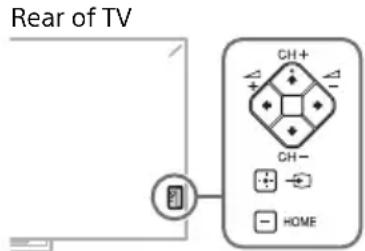
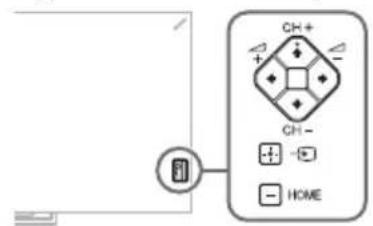
The CH + / - , + / - , / / / ,→ , and HOME buttons cannot be located on the TV.
See below illustration for location of the buttons on the TV.
The illumination LED is turned on.
If you do not wish to light up the illumination LED, you can turn it off.
Press HOME, then select "Settings" → "System Settings" → "General Set-up" → "Illumination LED" → "Off". You can also press OPTIONS, then select "Illumination LED" → "Off".


When viewing photo files in 4K resolution:
- The menu screen, operation guide or messages may not appear when displaying photos.
- To finish playback of photos, press RETURN, or switch the input by pressing
Specifications
System
Panel system
LCD (Liquid Crystal Display) Panel
TV system
Analogue: Depending on your country/area selection: B/G/H, D/K, L, I, M
Digital: DVB-T/DVB-T2/DVB-C
Satellite: DVB-S/DVB-S2
Colour/video system
Analogue: PAL, SECAM, NTSC3.58, NTSC4.43
Digital: Refer to the i-Manual.
Channel coverage
Analogue: UHF/VHF/Cable, Depending on your country/area selection.
Digital: UHF/VHF/Cable, Depending on your country/area selection.
Satellite: IF Frequency 950-2150 MHz
Sound output
10W+10W+10W
Input/Output jacks
Antenna (aerial) cable
75 ohm external terminal for VHF/UHF
Satellite antenna
Female F-Type Connector IEC169-24, 75 ohm.
DiSEqC 1.0, LNB 13 V/18 V & 22 kHz tone,
Single Cable Distribution EN50494.

/AV1
21-pin scart connector (CENELEC standard) including audio/video input, RGB input and TV audio/video output.

/COMPONENT IN
YP BPR (Component Video): 1080p (50, 60 Hz), 1080i (50, 60 Hz), 720p (50, 60 Hz), 576p, 576i, 480p, 480i
Audio input (phono jacks)
AV2
Video input (common phono pin with Y input)
HDMI IN 1, 2, 3, 4 (support 4k resolution)
Video (2D): 4096 × 2160p (24 Hz), 3840 × 2160p (24, 25, 30 Hz), 1080p (30, 50, 60 Hz), 1080/24p , 1080i (50, 60 Hz), 720p (30, 50, 60 Hz), 720/24p , 576p , 576i , 480p , 480i , PC Formats
Video (3D):
Frame Packing 1080p (30 Hz), 1080/24p, 1080i (50, 60 Hz), 720p (30, 50, 60 Hz), 720/24p
Side-by-Side 1080p (50, 60 Hz), 1080/24p, 1080i (50, 60 Hz), 720p (50, 60 Hz)
Over-Under 1080p (30, 50, 60 Hz), 1080/24p, 1080i (50, 60 Hz), 720p (50, 60 Hz)
Audio: Two channel linear PCM: 32, 44.1 and 48kHz 16, 20 and 24 bits, Dolby Digital
ARC (Audio Return Channel) (HDMI IN 1 only)
MHL (Common with HDMI 2)
Video (2D): 1080p (30 Hz), 1080/24p, 1080i (50, 60 Hz), 720p (30, 50, 60 Hz), 720/24p, 576p, 576i, 480p, 480i
Video (3D):
Side-by-Side 1080/24p, 1080i (50, 60 Hz), 720p (50, 60 Hz)
Over-Under 1080p (30 Hz), 1080/24p, 1080i (50, 60 Hz), 720p (50, 60 Hz)
Audio: Two channel linear PCM: 32, 44.1 and 48 kHz, 16, 20 and 24 bits, Dolby Digital

DIGITAL AUDIO OUT (OPTICAL)
Digital optical jack (Two channel linear PCM, Dolby Digital)

AUDIO OUT/Ω
Audio output (stereo minijack)
Headphones jack

HDD Rec), 2,
USB HDD device port (1 only), USB port

M (Conditional Access Module) slot

AN
10BASE-T/100BASE-TX connector (Depending on the operating environment of the network, connection speed may differ. 10BASE-T/ 100BASE-TX communication rate and communication quality are not guaranteed for this TV.)
Others
Supplied accessories
Refer to "What's in the box" in Quick Start Guide.
Optional accessories
Camera and Microphone Unit: CMU-BR200/ CMU-BR100
USB Wireless LAN Adapter: UWA-BR100
Active 3D Glasses: TDG-BT500A

Operating temperature
0ircC - 40ircC
Operating humidity
10% - 80% RH (non-condensing)
Power and others
Power requirements
220V-240VAC,50Hz
Energy Efficiency Class
KD-65X8505A:B
KD-55X8505A:B
Screen size (measured diagonally) (Approx.)
KD-65X8505A: 163.9 cm / 65 inches
KD-55X8505A:138.8 cm/55 inches
Power consumption
in "Home"/"Standard" mode
KD-65X8505A:198W
KD-55X8505A:163W
in "Shop"/"Vivid" mode
KD-65X8505A:349W
KD-55X8505A:275W
Average annual energy consumption*1
KD-65X8505A: 275 kWh
KD-55X8505A:226 kWh
Standby power consumption*2
0.40 W (16 W in software/EPG update mode)
Display resolution
3,840 dots (horizontal) × 2,160 lines (vertical)
Dimensions (Approx.) (w× h× d)
with Table-Top Stand
KD-65X8505A: 147.8 × 89.4 × 40.5 cm
KD-55X8505A: 125.9 × 77.0 × 40.5 cm
without Table-Top Stand
KD-65X8505A: 147.8× 86.3× 6.4cm
KD-55X8505A: 125.9 × 74.0 × 5.9 cm
Mass (Approx.)
with Table-Top Stand
KD-65X8505A: 38.9 kg
KD-55X8505A:28.2kg
without Table-Top Stand
KD-65X8505A: 37.5kg
KD-55X8505A:26.8kg
*1 Energy consumption per year, based on the power consumption of the television operating
4 hours per day for 365 days. The actual energy consumption will depend on how the television is used.
*2 Specified standby power is reached after the TV finishes necessary internal processes.

- Do not remove the dummy card from TV CAM (Conditional Access Module) slot other than to insert a smart card fitted in CAM.
- Optional accessories availability depends on countries/region/TV model/stock.
- Design and specifications are subject to change without notice.
Opera Devices SDK from Opera Software ASA. Copyright 1995-2013 Opera Software ASA. All rights reserved.
Opera Devices SDK from Opera Software ASA. Copyright 1995-2013 Opera Software ASA. All rights reserved.
Wi-Fi, Wi-Fi Direct y Miracast son marcas o marcas commerciales registradas de Wi-Fi Alliance.
"Blu-ray Disc", "Blu-ray" y el logotipo de "Blu-ray Disc" son MARCAS commerciales de Blu-ray Disc Association.
El logotipo de "Sony Entertainment Network" y "Sony Entertainment Network" son MARCAS commerciales de Sony Corporation.
MHL, Mobile High-Definition Link y el logotipo de MHL son MARCAS comerciales o MARCAS comerciales registradas de MHL Licensing, LLC.
Sistema de television
Analogico: PAL, SECAM, NTSC3.58, NTSC4.43
DIGITAL AUDIO OUT (OPTICAL)
Toma digital optica (PCM lineal de dos canales, Dolby Digital)
G AUDIO OUT/
Salida de audio (miniconector estereo)
Toma de auriculares
1(HDD Rec), 2,
10% - 80% RH (sin condensacion)
Opera Devices SDK from Opera Software ASA. Copyright 1995-2013 Opera Software ASA. All rights reserved.
Wi-Fi, Wi-Fi Direct en Miracastzem merken of gedeponeerde merken van Wi-Fi Alliance.
DIGITAL AUDIO OUT (OPTICAL)
Opera Devices SDK from Opera Software ASA. Copyright 1995-2013 Opera Software ASA. All rights reserved.
Analog: PAL, SECAM, NTSC3.58, NTSC4.43
DIGITAL AUDIO OUT (OPTICAL)
Opera Devices SDK from Opera Software ASA. Copyright 1995-2013 Opera Software ASA. All rights reserved.
(c) DTS Licensing Limited e DTS, Inc. 2012.
Analógico: PAL, SECAM, NTSC3.58, NTSC4.43
Digital: Consulte o i-Manual.
Cobertura de canais
Lado-a-Iado 1080p (50, 60 Hz), 1080/24p, 1080i (50, 60 Hz), 720p (50, 60 Hz)
Uma sobre a outra 1080p (30, 50, 60 Hz), 1080/24p, 1080i (50, 60 Hz), 720p (50, 60 Hz)
Audio: PCM linear deinous canais: 32,44,1 e 48 kHz, 16, 20 e 24 bits, Dolby Digital
ARC (Audio Return Channel) (apenas HDMI IN 1)
MHL (normal com HDMI 2)
Video (2D): 1080p (30 Hz), 1080/24p, 1080i (50, 60 Hz), 720p (30, 50, 60 Hz), 720/24p, 576p, 576i, 480p, 480i
Video (3D):
Lado-a-lado 1080/24p, 1080i (50, 60 Hz), 720p (50, 60 Hz)
Uma sobre a outra 1080p (30 Hz), 1080/24p, 1080i (50, 60 Hz), 720p (50, 60 Hz)
Audio: PCM linear deinous canais: 32, 44,1 e 48 kHz, 16, 20 e 24 bits, Dolby Digital
DIGITAL AUDIO OUT (OPTICAL)
Tomada digital otica (PCM linear deinous canais, Dolby Digital)
G AUDIO OUT/
Opera Devices SDK from Opera Software ASA. Copyright 1995-2013 Opera Software ASA. All rights reserved.
Analogico: PAL, SECAM, NTSC3.58, NTSC4.43
Fianco a bianco 1080p (50, 60 Hz), 1080/24p, 1080i (50, 60 Hz), 720p (50, 60 Hz)
Sotto-sopra 1080p (30, 50, 60 Hz), 1080/24p, 1080i (50, 60 Hz), 720p (50, 60 Hz)
Audio: PCM line are due canali: 32, 44,1 e 48 kHz, 16, 20 e 24 bits, Dolby Digital
ARC (Audio Return Channel) (solo HDMI IN 1)
MHL (Comune con HDMI 2)
Video (2D): 1080p (30 Hz), 1080/24p, 1080i (50, 60 Hz), 720p (30, 50, 60 Hz), 720/24p, 576p, 576i, 480p, 480i
Video (3D):
Fianco a bianco 1080/24p, 1080i (50, 60 Hz), 720p (50, 60 Hz)
Sotto-sopra 1080p (30 Hz), 1080/24p, 1080i (50, 60 Hz), 720p (50, 60 Hz)
Audio: PCM lineare due canali: 32, 44,1 e 48 kHz, 16, 20 e 24 bits, Dolby Digital

DIGITAL AUDIO OUT (OPTICAL)
Dimensioni (approssimative) (1× a× p)
Opera Devices SDK from Opera Software ASA. Copyright 1995-2013 Opera Software ASA. All rights reserved.
Over-under 1080p (30, 50, 60 Hz), 1080/24p, 1080i (50, 60 Hz), 720p (50, 60 Hz)
Over-under 1080p (30 Hz), 1080/24p, 1080i (50, 60 Hz), 720p (50, 60 Hz)
DIGITAL AUDIO OUT (OPTICAL)
Opera Devices SDK from Opera Software ASA. Copyright 1995-2013 Opera Software ASA. All rights reserved.
Analog: PAL, SECAM, NTSC3.58, NTSC4.43
Digital: Sei-Manualen.
Kanaldaekning
Over-under 1080p (30, 50, 60 Hz), 1080/24p, 1080i (50, 60 Hz), 720p (50, 60 Hz)
Lyd: To-kanals linear PCM: 32, 44,1 og 48 kHz, 16, 20 og 24 bit, Dolby Digital
ARC (Audio Return Channel) (kun HDMI IN 1)
Over-under 1080p (30 Hz), 1080/24p, 1080i (50, 60 Hz), 720p (50, 60 Hz)
Lyd: To-kanals lineær PCM: 32, 44,1 og 48 kHz, 16, 20 og 24 bit, Dolby Digital

DIGITAL AUDIO OUT (OPTICAL)
Digitalt optisk stik (to-kanals lineaer PCM, Dolby Digital)

AUDIO OUT/Ω
Lydudgang (stereo-minijack-stik)
Stik til horetelefoner

HDD Rec). 2.
Port til USB HDD-enedh (kun), USB-port

AM-stik (Conditional Access Module)

BASE-T/100BASE-TX-stik
Opera Devices SDK from Opera Software ASA. Copyright 1995-2013 Opera Software ASA. All rights reserved.
television audio-/videolahdon.

/COMPONENT IN
YP BPR (komponenttivideo): 1080p (50, 60 Hz),
1080i (50, 60 Hz), 720p (50, 60 Hz), 576p, 576i, 480p, 480i
(24, 25, 30 Hz), 1080p (30, 50, 60 Hz), 1080/24p,
1080i (50, 60 Hz), 720p (30, 50, 60 Hz), 720/24p,
576p, 576i, 480p, 480i, PC-muodot
Video (3D):
Frame Packing -tila 1080p (30 Hz), 1080/24p,
1080i (50, 60 Hz), 720p (30, 50, 60 Hz),
720/24p
Side-by-Side -tila 1080p (50, 60 Hz), 1080/24p,
1080i (50, 60 Hz), 720p (50, 60 Hz)
Over-Under -tila 1080p (30, 50, 60 Hz), 1080/24p, 1080i (50, 60 Hz), 720p (50, 60 Hz)
Video (2D): 1080p (30 Hz), 1080/24p, 1080i (50,
60 Hz), 720p (30, 50, 60 Hz), 720/24p, 576p, 576i, 480p, 480i
Video (3D):
Side-by-Side -tila 1080/24p, 1080i (50, 60 Hz),
720p (50, 60 Hz)
Over-Under -tila 1080p (30 Hz), 1080/24p, 1080i
(50, 60 Hz), 720p (50, 60 Hz)
DIGITAL AUDIO OUT (OPTICAL)
Opera Devices SDK from Opera Software ASA. Copyright 1995-2013 Opera Software ASA. All rights reserved.
Analog: PAL, SECAM, NTSC3.58, NTSC4.43
Lydinngang (phonoplugger)
AV2
Videoinggang (felles phonopinne med Y-inngang)
HDMI IN 1,2,3,4 (stotter 4k-opplsning)
Video (2D): 4096 × 2160p (24 Hz), 3840 × 2160p (24, 25, 30 Hz), 1080p (30, 50, 60 Hz), 1080/24p, 1080i (50, 60 Hz), 720p (30, 50, 60 Hz), 720/24p, 576p, 576i, 480p, 480i, PC-formater
Video (3D):
Dobbeltramme 1080p (30 Hz), 1080/24p, 1080i (50, 60 Hz), 720p (30, 50, 60 Hz), 720/24p
Side ved side 1080p (50, 60 Hz), 1080/24p, 1080i (50, 60 Hz), 720p (50, 60 Hz)
Over-under 1080p (30, 50, 60 Hz), 1080/24p, 1080i (50, 60 Hz), 720p (50, 60 Hz)
Lyd: Tokanals lineaer PCM: 32, 44,1 og 48 kHz, 16, 20 og 24 bits, Dolby Digital
ARC (Audio Return Channel) (kun HDMI IN 1)
Over-under 1080p (30 Hz), 1080/24p, 1080i (50, 60 Hz), 720p (50, 60 Hz)
Lyd:Tokenals lineer PCM:32,44,1 og 48 kHz 16,20 og 24 bits,Dolby Digital

DIGITAL AUDIO OUT (OPTICAL)
Digital optisk kontakt (tokenals lineær PCM, Dolby Digital)

AUDIO OUT/Ω
Lydutgang (stereo miniplugg)
Hodetelefoner-kontakt

HDD Rec), 2,
"BRAVIA" i BsaZamaki towarwymi Sony Corporation.
Opera Devices SDK from Opera Software ASA. Copyright 1995-2013 Opera Software ASA. All rights reserved.
Wi-Fi, Wi-Fi Direct i Miracast to znaki towardwe lub zarejestrowane znaki towardwe Wi-Fi Alliance.
Logo "Blu-ray Disc", "Blu-ray" i "Blu-ray Disc" są znakami towarwymi stowarzyszenia Blu-ray Disc Association.
Logo "Sony Entertainment Network" oraz nazwa "Sony Entertainment Network" to znaki towarde firmy Sony Corporation.
(c) DTS Licensing Limited i DTS, Inc. 2012.
Opera Devices SDK from Opera Software ASA. Copyright 1995-2013 Opera Software ASA. All rights reserved.
(c) DTS Licensing Limited a DTS, Inc. 2012.
Nad/pod 1080p (30, 50, 60 Hz), 1080/24p, 1080i (50, 60 Hz), 720p (50, 60 Hz)
Audio: dvoukanálove lineární PCM: 32, 44,1 a 48 kHz, 16, 20 a 24 bitú, Dolby Digital
ARC (Audio Return Channel) (pouze model HDMI IN 1)
MHL (spolecny's HDMI 2)
Video (2D): 1080p (30 Hz), 1080/24p, 1080i (50, 60 Hz), 720p (30, 50, 60 Hz), 720/24p, 576p, 576i, 480p, 480i
Video (3D):
Vedle sebe 1080/24p, 1080i (50, 60 Hz), 720p (50, 60 Hz)
Nad/pod 1080p (30 Hz), 1080/24p, 1080i (50, 60 Hz), 720p (50, 60 Hz)
Audio: dvoukanálove lineární PCM: 32, 44,1 a 48 kHz, 16, 20 a 24 bitú, Dolby Digital

DIGITAL AUDIO OUT (OPTICAL)
Opera Devices SDK from Opera Software ASA. Copyright 1995-2013 Opera Software ASA. All rights reserved.
Wi-Fi, Wi-Fi Direct a Miracast su ochranno známky alebo registrované ochranno známky združenia Wi-Fi Alliance.
"Blu-ray Disc", "Blu-ray" a logo "Blu-ray Disc" su ochranne známky asociété Blu-ray Disc Association.
"Logo Sony Entertainment Network" a "Sony Entertainment Network" su ochrannesznámky spolocnosti Sony Corporation.
MHL, Mobile High-Definition Link a logo MHL su ochranné známky alebo registrované ochranné známky spolocnosti MHL Licensing, LLC.
Vyrábané na zákblade licencié spolocnosti DTS Licensing Limited. Informácie o patentoch ochrannych známkach v USA a d'alsích krajináché najdete na adrese www.dts.com/patents/legacy.aspx. (c) DTS Licensing Limited a DTS, Inc. 2012.
DIGITAL AUDIO OUT (OPTICAL)
Opera Devices SDK from Opera Software ASA. Copyright 1995-2013 Opera Software ASA. All rights reserved.
Analog: PAL, SECAM, NTSC3.58, NTSC4.43
(24, 25, 30 Hz), 1080p (30, 50, 60 Hz), 1080/24p,
1080i (50, 60 Hz), 720p (30, 50, 60 Hz), 720/24p,
576p, 576i, 480p, 480i, PC formátumok
Video (3D):
Video (2D): 1080p (30 Hz), 1080/24p, 1080i (50,
60 Hz), 720p (30, 50, 60 Hz), 720/24p, 576p,
576i,480p,480i
Video (3D):
Egymás mellett 1080/24p, 1080i (50, 60 Hz),
720p (50, 60 Hz)
Egymás föllett 1080p (30 Hz), 1080/24p, 1080i (50,
60 Hz), 720p (50, 60 Hz)
Hang: Ketcsatornas linearis PCM: 32, 44,1 es
48 kHz, 16, 20és 24 bit, Dolby Digital
DIGITAL AUDIO OUT (OPTICAL)
Opera Devices SDK from Opera Software ASA. Copyright 1995-2013 Opera Software ASA. All rights reserved.
Wi-Fi, Wi-Fi Direct 山 Miracast sunt marmi sau marmi inregister ale Wi-Fi Alliance.
"Blu-ray Disc", "Blu-ray" si sigla "Blu-ray Disc" sunt marsi commerciale ale Blu-ray Disc Association.
Sigla „Sony Entertainment Network logo".si „Sony Entertainment Network" sunt mariči commerciale ale Sony Corporation.
MHL, Mobile High-Definition Link si sigla MHL reprezinta mardi commerciale sau mardi commerciale inregistrate ale MHL Licensing, LLC.
Analogic: PAL, SECAM, NTSC3.58, NTSC4.43
Digital: Consultati documentul i-Manual.
Acoperire canale
Analogic: UHF/VHF/Cablu, in functie de tara/ regiunea aleasa.
Digital: UHF/VHF/Cablu, in functie de tara/ regiunea aleasa.
Satelit: Frecventa IF 950 - 2150 MHz
lesire audio
10W+10W+10W
Mufe intrare/iesire
Cablu antenna (exteroiara)
Alaturate 1080p (50, 60 Hz), 1080/24p, 1080i (50, 60 Hz), 720p (50, 60 Hz)
Suprapuse 1080p (30, 50, 60 Hz), 1080/24p, 1080i (50, 60 Hz), 720p (50, 60 Hz)
Audio: PCM liniar pe două canale: 32, 44,1 s i 48 kHz, 16, 20 s i 24 biti, Dolby Digital
Alaturate 1080/24p, 1080i (50, 60 Hz), 720p (50, 60 Hz)
Suprapuse 1080p (30 Hz), 1080/24p, 1080i (50, 60 Hz), 720p (50, 60 Hz)
Audio: PCM liniar pe doua canale: 32, 44,1 s i 48 kHz, 16, 20 s i 24 biti, Dolby Digital

DIGITAL AUDIO OUT (OPTICAL)
Mufa optica digitala (PCM liniar pe doua canale, Dolby Digital)

AUDIO OUT / Ω
lesire audio (mini mufa stereo)
Mufacsti

HDD Rec), 2,
Pon3BeNo no NiuEnHa Dolby Laboratories.
"BRAVIA" n Bda A b pro B cka Mapka Ha Sony Corporation.
TrackID e TbproBcKa Mapka nIu pernctpupaHa TbproBcKa Mapka Ha Sony Mobile Communications AB.
Gracenote, Ioroto n IorotnubT Ha Gracenote, KaKTo n Ioroto "Powered by Gracenote", ca nn pernctpapHn TbprOBckn MapKn, nn TbprOBckn MapKn Ha Gracenote Inc. B CAU, n/nn npyrt CTpaHn.
CDи cBbpr3aHn C My3nka daHHn OT Gracenote, Inc., ABTOpcko npabo © 2000-noHaCToRJaem Gracenote. Gracenote coftyep, ABTOpcko npabo © 2000-noHaCToRJaem Gracenote. To3n npOdyKT nIu ycLyra n3NoJ3Ba eDIN Hnn NOBeYe naTeHTn, pNtExKaBaHN ot Gracenote. Bye6caYta Ha Gracenote moKTe da BvIDNe He NbIeH cnncbk Ha npNJIOxMmte naTeHTn Ha Gracenote.
Gracenote, MusicID, VideolD, Video Explore, noroto n Iorotn Gracenote, kakto n Iloroto "Powered by Gracenote" ca nn pernctpupaHn TbproBckn MapKn nn TbproBckn MapKn Ha Gracenote B CAU, n/nn dpyr nn DbpXkAbN.
Opera Devices SDK from Opera Software ASA. Copyright 1995-2013 Opera Software ASA. All rights reserved.
Wi-Fi, Wi-Fi Direct u Miracast ca mapkn u npertnctpupaHn mapkn Ha Wi-Fi Alliance.
Jlorata "Blu-ray Disc", "Blu-ray" n "Blu-ray Disc" ca TbproBcN Mapkn Ha Blu-ray Disc Association.
Лorото "Sony Entertainment Network" и "Sony Entertainment Network" са Тьравски Маркни Sony Corporation.
MHL, Mobile High-Definition Link and Loroto MHL ca TbproBckn Mapkn nn pernctpupaHn TbproBckn Mapkn Ha MHL Licensing, LLC.
Ipon3BeJeHO no IuueH3 Ha DTS Licensing Limited. 3a HOpMaZnO tHOcHo NaTeHTa N TbproBckata Mapka B CAU, n B ueJna CByT Bx. www.dts.com.patents/legacy.aspx. (c) DTS Licensing Limited u DTS, Inc. 2012 r.
3HaKbT Bluetooth® n Iorata ca co6CTBeHocT Ha Bluetooth SIG, Inc. n 3nON3BaHeTo Ha Te3n 3Haun ot Sony Corporation e no JnIeH3. OcTaHaJInte TbproBCKn MapKn n TbproBCKn IMeHa npHaJdIeXkAT Ha CbOTBeTHnte NM CO6CTBeHnIu.
N Mark e TbproBcKa Mapka nIu pernctpnpaHa TbproBcKa Mapka Ha NFC Forum, Inc. B CAU n npyru NbpxabN.
DiSEqCTeTbproBcKa Mapka Ha EUTELSAT. To3n TeJIeBn3Op noIbPka DiSEqC1.0.To3n TeJIeBn3Op He e npedHa3HaueH 3a ynpabJeHne Ha aHTEH C MOTOp.
3a6eIexka 3a cIΦpObata ΦyHKZna Ha TeJIeBn3Opa
- BcraKaФyHKuHa, CbBp3aHa C uΦpoBaTa TeIeBn3n (D. e pa6oTu cAmO B dBpKabTe n oblaCTnTe, B KOnTo ce npednaT DVB-T/ DVB-T2 (MPEG-2 n H.264/MPEG-4 AVC) uΦpoBu Ha3emHn CnHn, nIi TaM, KbJeTO mA DoCTbN Do CbBMecTmCa DVB-C (MPEG-2 n H.264/ MPEG-4 AVC) Ka6eHa ycLyra. PpOBepTe npu BaIIN MaTeH DocTabuK DaII TaM, KbJeTo XnBeEte, MoKeTe Da npEmate DVB-T/DVB-T2 CnHa II nn NOnNTaYte BaIIN DoCTaBvK Ha Ka6eHa TeIeBn3n DaII TqXHaTa DVB-C Ka6eHa ycLyra e noDxOJaMa 3a CbBMecTha pa6oTa c To3n TeJIeBn3Op.
Bb3MOxHO e BaunrKabeJeH IOCTaBUnk Da Bn NONCK TaKCa 3a CBOunte YCJyRn NIN Da NONCK Da Ce CbIacuTe C npabUJaTa U yCIOBnra, KOITOn ToHAnara.
Bbnpeku ye To3n TeJebn3Op oTROBaPa Ha DVB-T/DVB-T2 n DVB-C cneunKauNTe, CbbMeCTUMOCCTa My C 6bJeu n DVB-T/DVB-T2 uΦpOuHa3emHn n DVB-C uΦpOu Ka6JIHn n3JIbUbaHna He e rapaHTnpaHa.
Bb3MOxH0 e onpeJeHEn cHΦpOu fHyKcHn Ha TeIeBn3Opa da He pa6oTt B HAKOn IbpxkAbu/ pernoHn DVB-C Ka6eHaTa ycLyra MoKe da He pa6oTu npabUNHO C HAKOn DoCTaBuNt.
AnaloROBa: PAL, SECAM, NTSC3.58, NTSC4.43
LunpoBa:BuxTe i-Manual.
YPBPR(KOMHOENTHO BnJeO):1080p(50,60Hz), 1080i(50,60Hz),720p(50,60Hz),576p,576i, 480p,480i
Ayno BxoD (foHO xakOBe)
AV2
Enda do npya 1080p (50, 60 Hz), 1080/24p, 1080i (50, 60 Hz), 720p (50, 60 Hz)
EHaHaIpyra 1080p (30,50,60 Hz), 1080/24p, 1080i (50,60 Hz), 720p (50,60 Hz)
Aydno:ДывkaнелипeeнPCM:32,44,1n 48kHz,16,20n24bits,Dolby Digital
ARC (Audio Return Channel) (camo HDMI IN 1)
MHL (o6u c HDMI 2)
Bndeo (2D): 1080p (30 Hz), 1080/24p, 1080i (50, 60 Hz), 720p (30, 50, 60 Hz), 720/24p, 576p, 576i, 480p, 480i
BnIeO (3D):
Eинадодруга 1080/24p,1080i(50,60Hz), 720p(50,60Hz)
Eинаддуга 1080p (30 Hz), 1080/24p, 1080i (50, 60 Hz), 720p (50, 60 Hz)
Aynio:ДывkaHaJIeHЛиHeeH PCM:32,44,1 n 48 kHz,16,20n24 bits,Dolby Digital

DIGITAL AUDIO OUT (OPTICAL)
UΦOB ONTUNeH XaK (ДByKaHaJIeH JInHeeH PCM, Dolby Digital)

AUDIO OUT/Ω
Aydno n3xOД (ctepeo MmHnJkaK)
XaK cnIywaJkn

HDD Rec), 2, 3
IopT 3a USB HDD yctpoiCTBO (cAmO),USB npT

CAM (Conditional Access Module). Геобул за усанов дocтBN.

LAN
10BASE-T/100BASE-TX KOHeKTop (B 3aBnCmOcT OT yCIOBnTa Ha pa6oTa Ha MPexKaTa, CKOpocTtHa npeHoc Ha daHHnTe MoKe Da ce pa3nUaBa. 10BASE-T/100BASE-TX 3a To3n TeJeBn3Op He rapaHTnpa ckOpocT n KaueCTBO Ha KOMyHNKaunTa.)
Друн
PpInIOxKeHn akcecoapn
BuxTe "KaKBO mMa B KytNaTb KaPaTKOTpboKOBoCTBO 3a Ntpe6nteJI.
Akecoapn no n36op
1 Kamepa c Mnkpooh: CMU-BR200/CMU-BR100 USB aanTep 3a 6e3xueh LAN: UWA-BR100
AKTINBHN 3D ounila: TDG-BT500A
Pa60Tha Temnepatypa
0ircC - 40ircC
Pa60Tha BnaXHOCT
OTHOCNTeJIHa BnJxKHOCT 10%-80% (6e3 o6pa3yBaHe Ha KOHN3)
3axpaHbaHe n dpyru
ИЗИСКВАн住房а зaxpaHbaHe 220V-240VAC,50Hz
EheprnneKnac KD-65X8505A:B KD-55X8505A:B
Pa3mep Ha ekpaHa (n3mepen no dnafoHaJa) (np6n.) KD-65X8505A:163,9 cm/65 nHua KD-55X8505A:138,8 cm/55 nHua
KoHcymaunHa eHepnB "Y doma"/"CtaHndapTeH"pexmKD-65X8505A:198W KD-55X8505A:163W B"B MaarAnH"/"Rpbk"pexmKD-65X8505A:349W KD-55X8505A:275W
CpeiNo roaunho noTpe6JIeHne Ha eheprna*1 KD-65X8505A:275 kWh KD-55X8505A:226 kWh
KoHcymaunHa eHepnBpeXmIOTOBHOCT*2 0,40 W (16 W B peXm Ha aKtyaJIn3aunHa coΦTyep / EPG)
Pe30JIIOUHnHaIncnIeJ 3840ToKn (noXOpu3oHTa) × 2160 peJa (no BepTuKaJa)
a6apuTn (npu6n.) (× × )
C NocTaBka 3a Maca KD-65X8505A:147,8×89,4×40,5cm KD-55X8505A:125,9×77,0×40,5 cm
6e3 nocTabka 3a Maca
KD-65X8505A: 147,8 × 86,3 × 6,4 cm
KD-55X8505A: 125,9 × 74,0 × 5,9 cm
Tero (npu6n.)
C NOCTaBka 3a Maca
KD-65X8505A: 38,9 kg
KD-55X8505A: 28,2 kg
6e3 NOCTaBka 3a Maca KD-65X8505A:37,5kg KD-55X8505A:26,8kg
*1 KOHCymaunHa eHepnHa roDnHa,6a3npaHO Ha KOHCymaunTa Ha TeJeBn3Op, KOTo pa60Tn 4 Yaca Ha DeH, 365 dHn. DeuCTbUteJHata KOHCymaunHa eHepnHa 3abnc OT TOBa KaK Ce n3noJI3Ba TEJeBn3Opa.
*2 Yka3aHaT a KOHCyMaIaN Ha eHeprna B peXkIM TOTOBHOCT ce DOCTnra CJIeN KaTo TEJIeBUN3OpbT npKIOUH Heo6xoDUMNTe BbTpEwHn IpOecn.

He n3BaKdAaTe nceBdo-KapTaTa ot TV CAM (Conditional Access Module) cNoTa, oCBeH 3a da noCTaBnTe MaJkata KapTa, KOrTo e 3a CAM.
- HaJIuCyHeTo Ha onUHOnHaJIHn akCeCoApn 3aBNCn OT DbPjKaBaTa/perNoHa/MoDena Ha TeJeBuN3Opa n HaJIuYHOCTTa.
-Ди3aHbT n CneuФиkaunTe NOJIeKaT Ha npomraHa 6e3 npeDynpexkdeHne.
IIaepoipcys ta to eunopiko 0nua
Ol opoi HDMI kaHDMI High-Definition Multimedia Interface kaTo loyotuHDMI eivai eunopika anata n anata kataeovta tnC HDMI Licensing LLC otic Hvomegaevc Nolteiec ka 0e aAee cWpEc.
Opera Devices SDK from Opera Software ASA. Copyright 1995-2013 Opera Software ASA. All rights reserved.
DIGITAL AUDIO OUT (OPTICAL)
Opera Devices SDK from Opera Software ASA. Copyright 1995-2013 Opera Software ASA. All rights reserved.
Analog: PAL, SECAM, NTSC3.58, NTSC4.43
Dijital: i-Manual'e basvurun.
Kanal kapsami
Kare Paketleme 1080p (30 Hz), 1080/24p, 1080i (50, 60 Hz), 720p (30, 50, 60 Hz), 720/24p
Yan Yana 1080p (50, 60 Hz), 1080/24p, 1080i (50, 60 Hz), 720p (50, 60 Hz)
Alt Alta 1080p (30, 50, 60 Hz), 1080/24p, 1080i (50, 60 Hz), 720p (50, 60 Hz)
Ses: iki kanalli dokrusal PCM: 32, 44,1 ve 48 kHz, 16, 20 ve 24 bit, Dolby Digital
ARC (Audio Return Channel) (sadece HDMI IN 1)
Yan Yana 1080/24p, 1080i (50, 60 Hz), 720p (50, 60 Hz)
Alt Alta 1080p (30 Hz), 1080/24p, 1080i (50, 60 Hz), 720p (50, 60 Hz)
Ses: lki kanalli dokrusal PCM: 32, 44,1 ve 48 kHz, 16, 20 ve 24 bit, Dolby Digital

DIGITAL AUDIO OUT (OPTICAL)
Dijital optik jak (iki kanalogrusal PCM, Dolby Digital)

AUDIO OUT/Ω
Ses cikisi (stereo minijak)
Kulaklik jaki

HDD Rec), 2,
USB HDD cihazi portu (sadece 1), USB portu

M (modul) yuvasi

LAN
Opera® Devices SDK from Opera Software ASA. Copyright 1995-2013 Opera Software ASA. All rights reserved.
Wi-Fi, Wi-Fi Direct and Miracast ABJIAOTCA3HaKaMaN nn 3apernctpnpoBaHHbIMn 3HaKaMaN Wi-Fi Alliance.
"Blu-ray Disc", "Blu-ray" и логотин "Blu-ray Disc" влготся товарныздаMu Blu-ray Disc Association.
"Jorotin Sony Entertainment Network" n "Sony Entertainment Network" JBnIOTc TOBapHbIMn 3NaKamn Kopnpaunn Sony Corporation.
MHL, Mobile High-Definition Link and Lorotun MHL
YBJIOTCA TOBAPHbIMN 3HaKaAMN UIN
3aperNCtpuPObaHHbIMN TOBAPHbIMN 3HaKaAMN MHL
Licensing, LLC.
N3roTOBHeNo no IuueH3n ot DTS Licensing Limited. INΦopMaIIO npo nateHTbI n TOBaPbIe 3NaKn dIy CIIA u Bcero Mnpa MoXHO haTn Ha Be6-CTpaHnCe www.dts.com.patents/legacy.aspx. (c) DTS Licensing Limited n DTS, Inc. 2012.
CNoBecHb3HaKnILOrOtnbblueth®AIBJIAOTcra co6CTBeHHocTbIO Bluetooth SIG,Inc.n nCNOb3yOTcKopnpaueNe Sony no IInueH3nn. Dpyrne TOBapHbIe 3HaKn n ToproBbIe MapKn AIBJIOTcra CO6CTBeHHocTbIO COOTBeTCTBYIOUX BnaJeNbUeB.
3HaK N YBJIeTcT TOBapHbIM 3HaKOM INIIN 3aperncTpnpoBaHHbIM TOBapHbIM 3HaKOM NFC Forum, Inc. B CUSA IN dpyrnx ctpaHax.
DiSEqCTMЯBJIeTcT OBaHbIM 3HaKOM EUTELSAT.ДaHHbI TeLEBn3Op NOdEprXnBaet npotoKoI cB3N DiSEqC1.0.DaHHbI TeLEBn3Op He npedHa3NaYeH dIy ynpaBHeH NMOtOpN3OBaHHbIM aHTeHHaMn.
EcIn CBeToNDnOHyI INHdNkATOp Mnraet KpaChbIM, NOdCunTaIte, CKoJIbKO pa3 OH MmHET (INHTepBaJ MeKdy MmraHnA Mn CoCTaBJaET Tpr NceKyHDbI).
HaKMMTe KhoNkY I/Ha TeJeBn3Ope, YTo6bl BBKJIIOuHTb eRO, OTKJIIOUHTe Ka6eJIb NITaHnI nepeMeHHoro TOKa n COo6uHTe CBOEmy dInJepy nn CneuJaNCTam CepBuCHoro ueHtpa Sony, KaK Mmraet INHdNKaTOP (yKaXnTe YncNo MmraHn).
Ecni CBeToDnOHyI INHdNkATOp He MuraT, npOBepbTe 3JeMeHTbl B CneDuOuX Ta6nuaX.
Cm. TaKxe pa3JeI "Ponck n yctpaHene Hencnp." B pyKOboDCTbe i-Manual. EcIn npObleMa He ycTpaHareTc, o6paTntecb K KBaJIuΦnUpOBaHHbIM CneUnaJIncTaM NO 06cLyXnBaHHIO TeJIeBn3OpOB.
HET HN n3o6paXeHnA (TeMHbI NkpaH), HN 3ByKa.
- PpOBepe Te nOdkJIIOueHne aHTeHHbI nnKa6eJr.
- IopKlIOUHTe TeJIeBUN3Op K 3JIeKtPoCeTn HaxMNTe KHOJky /Ha TeJIeBUN3Op NnN NyIbTe DuctaHcNOHHOrO ynpabJeHna.
He ydaetca hactpontbca Ha HeKOtOpblnporpaMMbl.
- PpOBeBpTe NODKJIIOUeHHe aHTeHHbI NnCnyTHNKOBoTapeJKN.
Bo3MOxH0 KOpOTKoe 3aMbIkaHne CnyTHNKOBOKa6eJIuHHeNoJaDC NODKlnOyeHnEm 3TOK Ka6eJI. PpOBepbTe Ka6eJIb u CoedInHeHne, a 3aTeM BblIOUHTe TeJIeBn3Op C NOMoUHO rIaBHOrO BblIOUHaTeJI nITaHnBkJ./BblI. IN BkIIOHTe erO ChOBA. - Yka3aHHa Yactota HaxoNTcB He dnaana30Ha. O6paTntecb B KOMnHaHIO, ObecneuBaIOUyIO npnem CnyTHNKOBTO BeuaHn.
He 6nHApXKeHbI CnyX6bl (nporpaMMbl) Ka6eJbHoro TeJeBnDeHn.
- PpOBeBpTe Ka6eIbHoe coeIeHHeNne Inn KOHcHpypaunIO HacTPOKn.
- Nonpo6yIte BbIIOJHHTb npOeIpy "ABTONOINCK UINp. CTaHcN", BbI6paB 3HaueHne "3Φnp" BmecTo "Ka6eJIb".
He pa6oTaET npJbT DY.
3aMeHnte 6aTapeuKn.
- Bo3MoJxHo, TeJIeBn3Op HaxOДNTcB peXmme SYNC.
HaxmTe KhoNky SYNC MENU, BbIbepuTe "YnpabLeHne TB", a 3aTeM BbIbepuTe "Dom (MeHIO)" nIN "OnuIN" dJa YnpabLeHnra TeJIeBuN3OpOM.
3a6bIT napoIb dIyHKcIIN "3amOK ot deteI".
BBeUNTe 9999 B KaueCTBe PIN-KoJa. (PIN-KoJ 9999 BCerIa npHnMaetcra.)
Поверхност Teleевзopa HarpeBaIOTc.
- Pπι ΜιπιTeJBHOM NcNoJb3ObaHn TeJIeBu3Opaero NOBepxHocTn HarpeBaIOTc.3TO MOxHO NoUyBCTBOBaTb B ClyuaePpIKoCHOBeHn K Hm.
Пюпал 3ByK, 3aCTbIIO BndeOn3o6paXeHne, OTo6paXaetcnyctOиКран nII NTeLeBn3Op He pearnpuyET Ha HaxKaTne KHOJOK Ha KOpnyce nII NpJIbTe dNCTaHcNoHOrO ynpabLeHn. - BbinoJIHnTe npocTyIO nepe3arpy3ky TeIeBn3Opa,OTKJIIOuYNB WHyp NITaHnHa DBe MHHyTbi, a 3aTEM CHOBA BKJIIOUHB erO.
He ydaetcnaHauTN KhoNKn CH+/-, +/ -, // / / / , HOME Ha TeJeBn3ope.
PacnoJIOXeHne KHOJOK Ha TeJeBu3ope noka3aHO Ha pncyHke BHN3Y.
3aDnnaHpaHeJIbTeJeBn3opa
LED-noDCBETKa BKNIOUeHa.
- ECnH He HxHo, yTo6bI LED-noDCBETKa CBEtNJacb, MOXHO ee BbIKJIOUHTb.
HaKmTe HOMe, a nOTom BbIbepuTe
"YCTaHOBKn" → "CnCTeMHbIe HAcTpOuKn"
"O6uHnHaCtpoyn" → "LED-noDcBETKa" →
"BbIKn." TaKke MoXHO HaXaTb OPTIONS, a NOTOM Bbl6paTb "LED-noCBeTa" → "BbIK."

#
PpocmToP pOToRpaΦn B pa3peHn 4K:
3KpaH MeHIO,pyKOBOdCTBO NO 3KcNpyTaunnnn coo6ueHn, BO3MOxHo, He NpOBBtCn np OTo6paKeHNn fOToPpaoHn.
- Yo6b3aBepuNTb BocnpOn3BeDeHne oToIpaΦn, HaxMnte KhoNkY RETURN, nIn nepeKIOUHTe BXoD C NOMOuBIO KHOINK
TexHnueckneXapakTepnCTnKn
CnCTema
CnCTema nHaEni
Ipeed. no oDHomy kaBEnIO EN50494.
AV1
21-штблрьковы Scart-pa3bem (ctahdapT
CENELEC),BKNIOyAayNO-/BUNDeOBXoD,BXoD
RGB n TeIeBn3nOHnHb ayuNO-/BnDeOBbIXoD.
C O M P O N E N T
YPPR (KOMnOHeHTHoe BnIeO): 1080p (50, 60 T),
1080i (50, 60 Γι), 720p (50, 60 Γι), 576p, 576i,
480p, 480i
AynOBXoI(rHe3daTnna“TIOJIbNaH"
AV2
Bndeobxod (o6u npa3bem Tuna "TIOJbnaH" C
Y-06pa3HbIM BxoIOM)
HDMI IN 1,2,3,4 (noДержka paЗршени 4k)
Bndeo (2D): 4096 × 2160p (24 Φ), 3840 × 2160p
(24, 25, 30 Γι), 1080p (30, 50, 60 Γι), 1080/24p,
1080i (50, 60 Γu), 720p (30, 50, 60 Γu), 720/24p,
576p, 576i, 480p, 480i, ΦopMaTbI NK
BnIeO (3D):
Ynakobka kaipob 1080p (30 T), 1080/24p,
1080i (50, 60 Γι), 720p (30, 50, 60 Γι),
720/24p
Praom 1080p (50, 60 Γu), 1080/24p,
1080i(50,60Γu),720p(50,60Γu)
OndaHaIdpuroi 1080p (30,50,60T),
1080/24p, 1080i (50, 60 Γu), 720p (50, 60 Γu)
Aydno: DByxKaHaJIbHbI JInHeHbI PCM: 32, 44,1
n 48 kT, 16, 20 n 24 6nT, Dolby Digital
Texhonoria ARC (Audio Return Channel) (Tojko
HDMI IN 1)
MHL (o6uui cHDMI 2)
Bündoe (2D): 1080p (30 Σ), 1080/24p, 1080i (50,
60Γu), 720p (30, 50, 60 Γu), 720/24p, 576p,
576i,480p,480i
BnEo (3D):
PraDom 1080/24p, 1080i (50, 60 Γι), 720p (50,
60Γu)
OndaHaIaIpyroI 1080p (30 T), 1080/24p,
1080i (50, 60 Γu), 720p (50, 60 Γu)
Aydno: DByxKaHaJIbHbI JInHeHbI PCM: 32, 44,1
n 48 kT, 16, 20 n 24 6nt, Dolby Digital
DIGITAL AUDIO OUT (OPTICAL)
UΦpOBoO onTnueckn pa3bEm (DByXkHaJIbHbI
Линейнь PMC, Dolby Digital)
AUDIO OUT/
AydnoOBbIXoD (ctepeo-pa3bem Tnna minijack)
THe3D0 DnIPOKJIIOUOeHnHaYShHnKOB
1(HDD Rec), 2, 3
THe3doIaJKeCTKOrO DnCKa USB (ToIbKO 1),
USB-nopT

Pa3bem noi CAM (Moynb orpaHneHHoro
docTyna)
LAN
Pa3beM 10BASE-T/100BASE-TX (CKOPOCTb
CoeHHeHn3aBnCtOT OpeauNoHHo CpeB
ceTn. Ckopoocb n KauecTBO nepeDaun daHHbIX
1
HTepceca 10BASE-T/100BASE-TX dny
dAnHHOro TeIeBn3Opa He rapaHTnpyHOTc.)
PpOuee
KOMJIeKT NOCTABKN
Cm. B pa3dene "CoepKmOe ynaKOBKn" KpaTKoro pyKOBoCTBa.
DOnOJIHnTeJIbHbIe npHaJdJeXHOCTN
KamepacMnKpOoHOMcNoJepKkO
Skype™: CMU-BR200/CMU-BR100
USB-aanTep nla 6ecnpoBoHn LAN ctn: UWA-BR100
AKTUBHbIe 3D-ouKn:TDG-BT500A
Pa6oayTemnepaTypa
0ircC - 40ircC
Pa60aYBlaXHOCtB
10% - 80% (6e3 o6pa3OBAHnKoHneHcata)
3neKtponntaHne npoee
3neKtponntaHne
220B-240B nep. Toka, 50 T
Knaacc 3hepronoTope6JeHnA
KD-65X8505A:B
KD-55X8505A:B
Pa3mep 3kpaHa (no daHoaHn) (np6J.)
KD-65X8505A:163,9cm/65HIOHMOB
KD-55X8505A:138,8cm/55HIOHMOB
Iotppe6JraemMOuHocTb
BpeKmE“DOM”/“CTaHdapTHbI"
KD-65X8505A:198BT
KD-55X8505A: 163 Bt
В рекиme "Maraazn"/"Яркн"
KD-65X8505A:349BT
KD-55X8505A:275BT
CpeHHee exeroDHOe 3HeprOnoTpe6JIeHne*1
KD-65X8505A: 275 kBt-4
KD-55X8505A: 226 kBt-4
MoHoctb, noTpe6IeMaB B dExkpHom peKImE*2
0,40BT(16BTBpeximeo6HOBJIeHnA
nporpaMmHoro oecneueHn n daHHbIX EPG)
Pa3peSeHne 3KpaHa
3840 toeK (no ropuizhtoa) × 2160 ctpok (no
BepTuKaJIn)
Pa3Mepbl (npn6).) (u npHa × BbICota × rny6nHa)
C HAcTOJIbHOI NOCTaBKOJ
KD-65X8505A:147,8×89,4×40,5cm
KD-55X8505A:125,9×77,0×40,5cm
6e3 HacToBHO NoCTaBKN
KD-65X8505A:147,8×86,3×6,4cm
KD-55X8505A: 125,9 × 74,0 × 5,9 cm
Macca (npu6JI.)
C HAcTOnbHOI NOCTABKOI
KD-65X8505A:38,9K
KD-55X8505A:28,2K
6e3 HacToBHO NOCTaBKN
KD-65X8505A:37,5K
KD-55X8505A:26,8K
1 3a NOTpe6JIeHHe NJIeKTPo3HeprNn B roD
PpINrTa NOTpe6JIeMaj MOUHOCTb
TeJIeBn3Opa, pa6OtaUcIero 4 Uaca B DeHb B
TeUeHne 365 dHei. ΦaKTNUeCKoe NOTpe6JIeHne
JIeKTPo3HeprNn 6yDeT HApRMyIO 3aBUCetb OT
CNoCo6a NcNoJb3OBAHnN TeJIeBn3Opa.
2 HOMHaJIbHЯ BeJIuHnHa MOUHOCTn IOTpe6JIeHnB pexmE OxuaHn IocTnraeTcI NOcIe TOrO, KAK TeJeBu3Op BblONHt Heo6XODIMbIe BHyTpEHnI npoueccbl.
#
- MaKeT KapTbI CneDyeT n3BNeKaTb n3 rHe3da TV CAM (Moynb orpaHnueHHoro docTyna) TOnbKO B TOM clyuae, ecn yCTaHaBnBaETcRc CmapT-KapTa, NoXoJaAa Dn pa3bema CAM.
- Haneluye do noJIHnTeIbHbIX npHaJnxKHOCTe 3aBncIT OT cTpaH/perNoHOB/MoJeIN TeIeBu3Opa/3anacOB.
- KoHCTpyKUma n TexHuueckne XapaKTePncTnKn MOryt 6bItb N3MeHeHbI 6e3 IpeBapuTeJbHoro yBeDoMJIeHn.
IhopmaizipoTOBapHi 3HaKn
TepmiHn HDMI, HDMI High-Definition Multimedia Interface iIorotinHDMI eTObapHm3HaKaMn a6o 3apecTpoBaHmN TObapHm3HaKaMn HDMI Licensing LLC y CLJAta iHux KpaiaHax.
DLNA®, norotun DLNA i DLNA CERTIFIED® € TopriBeIbHnMn Mapkamu, 3HaKaAMn o6cnyroByBaHHa 60 cepTnΦiKauiHnMn 3HaKaAMn Digital Living Network Alliance.
BuroToBneHo 3a LiueH3iEIO KOMnaii Dolby Laboratories.
«BRAVIA» i BERTaHnMn 3HaKaMn komnaHII Sony Corporation.
TrackID ∈ TOBAPHUM 3HaKOM a6o 3apeecTpOBAHUM TOBAPHUM 3HaKOM Sony Mobile Communications AB.
TexHonoria po3ni3HaBAnHMy3nKi BiJeO, a TakoX nob'ra3aHi daHi HadaIoTbcr Gracenote. Gracenote ce rany3eBn CTaHdApT, 0o 3actocobyEbCdo TexHonorii po3ni3HaBAnHMy3nKi 3a6e3neuHnro Nob'raHO Bmicty. Uo6 OTPmuTu DOKlaHiw y iHOpMauiio, BiDbidaTe cToPiHKy www.gracenote.com.
CD, DVD, Blu-ray Disc, a taKoX My3nHi Ta BiJeOaHi Gracenote, Inc., abTopcbke npabo © 2000-tenepiHni yac Gracenote. IporpaMHe 3a6e3neuHn Gracenote, abTopcbke npabo © 2000-tenepiHni yac Gracenote. Do zuBoro npodykTy i nocIyRn 3aCtOCOByIOTBcR oDIn A6o KINbKa nateHTIB, kI nepe6yBaOTb y BLaChOCTi Gracenote. BiDbiaTe Be6-caIT Gracenote, u6o otPmAtn npeJIik nateHTIB Gracenote, kKn IOCTIHO OHOBIIOETBCr.
Gracenote, MusicID, VideolD, Video Explore, em6nema i Iorotn Gracenote, a TakoX Iorotn «Powered by Gracenote» E TOBAPHIMM 3HaKAMN YI 3apeecTPOBaHIMN TOBAPHIMN 3HaKAMN Gracenote B CUSA Ta iHwix KpaiaHax.
Opera Devices SDK from Opera Software ASA. Copyright 1995-2013 Opera Software ASA. All rights reserved.
Wi-Fi, Wi-Fi Direct i Miracast € 3hakamn a6o 3apecctpoBaHmN 3hakamn Wi-Fi Alliance.
«Blu-ray Disc», «Blu-ray» i norotun «Blu-ray Disc» e ToBapHmN 3HaKaMn Blu-ray Disc Association.
Лorotи«Sony Entertainment Network» i «Sony Entertainment Network» e ТоварниMu 3нakамu Sony Corporation.
MHL, Mobile High-Definition Link Ta Jorotun MHL toBapHmN 3HaKaAMn a6o 3apeecTpObaHmN TOBapHmN 3HaKaAMn KOMnaiH MHL Licensing, LLC.
Bnpo6JIeNo 3a liueH3ieIO BiD DTS Licensing Limited. InΦopMaIciO ΜoI O NaTeHTiB i TOBapHnx 3HaKIB dIy CIIA Ta BCbOrO CbiTy, IINB. Ha Be6-CTOpIHci www.dts.com.patents/legacy.aspx.
(c) DTS Licensing Limited i DTS, Inc. 2012.
TekctoBA ToproBa Mapka i Ilorotunn Bluetooth® € BnachicTIO Bluetooth SIG, Inc. Kopnpauiy Sony BnKOpNCTOBye ix 3a liueH3ieIo. IHsi ToproBi mapkn I ToproBI 3HaKn HaIexKaTb BiIDNOBiDHM BnAChNkAm.
No3HaKa «N» ∈ TOBapHm 3HaKOM a6o
3apeeCTPOBaHm TOBapHm 3HaKOM NFC Forum, Inc. y CUSA Ta iHux KpaIHax.
DiSEqCTMTOBAPHM3HaKOM EUTELSAT. LcienTeJIeBI3Op nIITpIMyE DiSEqC1.0.Lcien TeJIeBI3Op He npn3HaueHn dJa KepyBaHHa MOTOpn3OBAHNx aHTeH.
Ppimitkn 0do yHKcii cnfoBoro Tele6aueHnra
- YciФункц, NOB'3aHi 3 uΦpOBIM Tele6aueHHm (D3), npaIbBaTmMyTb TlBKN B Tnx KpaIIhax abo perioHax, De TpaHCJIHOeTBcR CnΦpOBu eipHn CnHaN DVB-T/DVB-T2 (MPEG-2 Ta H.264/MPEG-4 AVC) a60 de e DocTyn Do Cymichoro a6OHeHTcbKOrO Ka6eNbHoro BBOy DVB-C (MPEG-2 Ta H.264/MPEG-4 AVC). Di3NaTeec y CBORO npOdaBzra, qn E MoXKnBiCTb npinMaTN CnHaN DVB-T/DVB-T2 y Miczi BaWoRo npoxNBaHH, abo 3aNTaTe CBORO npObaJepa Ka6eNbHO rTele6aueHHra, qn Cymichn Ka6eNbHn cepBic DVB-C, 1o HmN HaDaetbcr, i3 cIM TeLeBi3Opom.
Baw npobaiep kabeIbHoro Tele6aehnMoKe CTgATN INaTHIO 3a CBOI NOCLyRn a60 NOTpe6yBaTu BAsoI 3roDn 3 NonoJKeHHaMn Ta yMOBaMn CBOE iJIbHOCTi. - Lcien Telebi3op BiDnOBiDaTexHCHNBMUMoram DVB-T/DVB-T2 i DVB-C, aJe Noro cymicHCTb i3 MaayThIMn UINΦpOBuMn eΦipHNm Nepeaamn DVB-T/DVB-T2 i UINΦpOBuMn KaebhMn Nepeaamn DVB-C He rapaHToBaHa.
- DeaKi yHKuii uΦpOBOrTele6aueHnMaOxyTb 6yTu HeIOCTuHNmU y NeBHX KpaIHax a6o periohax, a Ka6eIb DVB-C Moxe He npaIOBaTu HaJeKHM YHOM i3 DeaKmnpoBaIepamn.
YcyHeHH HeCnpaBHOCTeH
Kkuo iHdkaTop niDCBiyBaHH 6JImaE ueBOHM, nopaxyTe KJIbKicTb 6JImaHb (iHTepBaI cKlaJaAe Tpr cekyHdn).
HaTnchItb KhoNky I/Ha TeIeBi3opi, 0o6 BmKHytn noTo, BiD'EdHaIte Ka6eIb XnBLeHnra Ta npoiHΦOpMyTe TOpriBeIbHn 3aKnla a6o npedCTabHnKIB cepBicHOr OeHTpy Sony npo KInbKicTB 6JImaHb IHnKaTopa.
IHKUO iHdNkaTOP niDCBiyBaHHHe 6JIIMa€, nepeBiPe T HAcTynHi MOKINBOCTi.
Takox DNb. po3diI «UcyHeHHn HeCnpaBHOCTeN» y noci6Hnky i-Manual. Raio npo6lema He 3nkae, BiJaTe TeJIeBI3Op Ha o6cIyROByBaHHK BalaioKOBaHOMy cneiaJIiCTy.
He Bdaetbca Hacptpoitn OkpeMi KaHaJI.
- IpepeBipTe aHTeHy a6o cynyTHnKOBy TapiNkY.
CynyTHNKOBn Ka6eNb MoKe 6yTu 3aKOpOeHn a6o Ha HbOMy MoKyTb 6yTu np6bIeMn 3i 3'EDHaHHaM. IpeBipTe 3'EDHaHHa Ka6eIIO, a NOTIM BUMKHITb TEJIeBI3Op KHONKOI nepemKahHra XNBJIeHHra i 3HOBy BBIMKHITb NOrO.
3aHaHa yactota BnXoIntb 3a Mexi diana3OHy. 3BepHItbcra IO KOMNaHI CyNYTHNKOBORo Tele6aueHH.
He BdaNoC3HaIaTn JoDHOi NocLyr (KaHany) Ka6eJbHoro Tele6aueHn.
- IpepebiTe NiikJIOueHHe Ka6eJIIO i napametpn HAcTpoiKN.
CnpobyTe cKOpNCtataNcA yHKnciEIO UeLnfoBe aBTOHaCTpoOBaHHa》,BbpaBwn «Anteha 3amictb «Ka6eJb
AhaIorOba: PAL, SECAM, NTSC3.58, NTSC4.43
UΦoBa:ДИВ.Вi-Manual.
PokpTTKaHaJIb
Analoroba: UHF/VHF/kaebb, 3aIeXHo BiD Bn6paHoi KpaIHn a6o perioHy.
UHF/VHF/kaeb,3aJekHo BiD Bn6paHoi KpaIHn a6o perioHy.
CynyTHNK: Ppomixkha yactota 950-2150 M
BvBeDEnH3ByKy
10BT+10BT+10BT
BezdpoToBaTexHoiTria
IpoToKoJI IEEE802.11 b/g/n
TexHonoria Bluetooth
Bluetooth 3.0
BxidiTa BnXidiHrHi3da
AHTeHHn Ka6eJIb
3OBhiHni po3'em i3 onopom 75 Om dny VHF/UHF
CynyTHNKOba aHTeHa
THi3IOBn po3'EM Ttyny F (IEC169-24), 75 OM.
DiSEqC 1.0, LNB 13 B/18 B, 3Byk 22 kT,
IpepaOdHmKa6eJem EN50494
AV1
21-шт neuropи роз'сm Scart (ctahdpt CENELEC),
y TOMy unciayio/Bideobxid, BxID RGB ta
YPPR(KOMNoHHTNBIeOcnHa):1080p(50, 60Γι),1080i(50,60Γι),720p(50,60Γι),576p, 576i,480p,480i
AynioBxid (po3'Emn RCA)
AV2
BiDeOBxid (3BnuaHn HtKepe RCA i3 BxoJOM Y)
HDMI IN 1,2,3,4 (niTpumka po3diIbHOI 3daTHOCTi 4K)
Bideo (2D): 4096 × 2160p (24 Φ), 3840 × 2160p
(24, 25, 30 Φι), 1080p (30, 50, 60 Φι), 1080/24p, 1080i (50, 60 Φι), 720p (30, 50, 60 Φι), 720/24p, 576p, 576i, 480p, 480i, Komπ'IoTeρHi φορMaTn
Biéo (3D):
YnakobvBaHHKaapB:1080p(30T),1080/24p, 1080i(50,60T),720p(30,50,60T), 720/24p
Nopyu: 1080p (50, 60 Γι), 1080/24p, 1080i (50, 60 Γι), 720p (50, 60 Γι)
OdHn HauoHm: 1080p (30, 50, 60 Γu), 1080/24p, 1080i (50, 60 Γu), 720p (50, 60 Γu)
3Byk:ДвokedaHJIbHaJIiHIO-IMnyIbCha moDyIaIzIa:32,44,1Ta48KΓu,16,20Ta246itn, Dolby Digital
ARC (Audio Return Channel) (Tinbkn HDMI IN 1)
MHL (3BnuaHNO 3 HDMI2)
Bideo (2D): 1080p (30 Γι), 1080/24p, 1080i (50, 60 Γι), 720p (30, 50, 60 Γι), 720/24p, 576p, 576i, 480p, 480i
Bideo (3D):
Nopyu: 1080/24p, 1080i (50, 60 Γι), 720p (50, 60 Γι)
OdHnHaD oHm:1080p(30Γu),1080/24p,1080i (50,60Γu),720p(50,60Γu)
3Byk:ДвokedahlhaJIHHIO-IMnylbchAmOуляця:32,44,1Ta 48KtU,16,20Ta 246itN,Dolby Digital
DIGITAL AUDIO OUT (OPTICAL)
IodatKOBn cHpOBn po3'EM (DBOKaHaJIbHa IiHiHa imNylbCHO-KoOBA MoUylaqia (Linear PCM), Dolby Digital)
AUDIO OUT/
KD-55X8505A:226 KBT-r
CnoxnbHn eJeKtpoeHepriBpeXnmi OiyKaBaHH*2
0,40 Bt (16 Bt y pexnmi OHOBneHH nporpamHoro 3a6e3neueHH/ eJIekTPOHHOI nporpaMn TeJenepeda)
PozinbHa 3daTHicTb DnCnIeA
3840 took (no ropuoHTani) × 2160 pRkiv (no BepTuKani)
T6apHTi po3mipn (npn6n3Ho) (× × )
3 HactinbHOIO niDnpoio
KD-65X8505A:147,8×89,4×40,5cm
KD-55X8505A:125,9×77,0×40,5cm
6e3 HactilbHoi nIiOpn
KD-65X8505A:147,8×86,3×6,4cm
KD-55X8505A:125,9×74,0×5,9cm
Bara (npu6n.)
3 HactinbHOIO niInpopoIO
KD-65X8505A:38,9K
KD-55X8505A:28,2K
6e3 nactiIbHOI niIDnpn
KD-65X8505A:37,5Kr
KD-55X8505A:26,8K
*1 Piyhe cnoxnbAHn eneKtpoeHeprii 3a yMOBu ekCnpyataui TeIeBi3opa 4 roDHN Ha deHb, 365 DNIB H pIK. PaKTNUHn PiBeHb cNoXNBaHH eNeKtpoeHeprii 3aJeKHTb BiD peKIMy BUKOPNCaHHa TeteBi3opa.
2 Bka3aHe cnoXnBaHHeIekTpoeHepriBpeXnMI ouikyBaHHdocraTaBCnIcIraTOrO,AK TeLeBi3Op 3aBepuHTb yci BHyTpuiHIpouecn.
#
BnMaTe KapKy-MyJxK i3 rHi3da CAM (Moynb o6ymoBHeHoro DoCTny) Ha TeNeBi3opi TilbKn DnToro, 06 BCTaBNTu B ce rHi3do cMapT-KapTy.
- DocTyHicThb akceCyapib 3aJIeKuMb BiJ KpaIHn, perioHy, moIeI Ta HaBHOcti Ha CKJaI.
3OBHIiH BvIgI iTexHiXapaKTePcNTKMOxKyTb 6yTu 3MiHeHi 6e3 nonepeJKeHHa.









For useful information about Sony products
Pour obtenir les informations utiles concernant les produits Sony
Informacao de uso para produits Sony
Voor nuttige informatie over Sony producten
Für hilfreiche Informationen zu Sony Produktien
Para informacaoutil sobre os produits Sony
Per informazioniutil sui prodotti Sony
For nyttig information om Sony-produkter
For mere information om Sony-produkter
Hyddyllista tietao Sony tuotteista
For nyttig informasjon om Sonyprodukter
Szczegolowe informaceoproductach Sony
Uzitecné informace o vrobcich Sony
Pre viac informaci o produktoch Sony
Sony termekerol hasznos informaciokat talalhat az alabbi webboldalon
Pentru informatii utile despite produsele Sony
3a noJe3Ha nHphiopmaun OTHOCHO npOyKTITE Ha Sony
Tia xnouec PAnpofoepiec oxetik a T a
Tpoovt a SONY
Sony urunleri icin faydali bilgiler
Ira noyuHnnoJe3HOHnHphiopmaun O npOyKuun CoHn
Ira otpMaHH KOpCHOi Hphiopmaui 0do Bupobib KomnaHl Sony
http://support.sony-europe.com/
http://www.sony.net/
4-477-751-11(1) © 2013 Sony Corporation


- Notes on Digital TV function
- Troubleshooting
- There is no picture (screen is dark) and no sound.
- Some programmes cannot be tuned.
- There is no Cable TV services (programmes) found.
- The remote does not function.
- The "Parental Lock" password has been forgotten.
- The TV surrounds become warm.
- Frozen audio or video, a blank screen, or the TV does not respond to TV or remote buttons.
- The CH + / - , + / - , / / / ,→ , and HOME buttons cannot be located on the TV.
- The illumination LED is turned on.
- Specifications
- System
- Input/Output jacks
- Others
- Power and others
- Dimensions (Approx.) (w× h× d)
- Mass (Approx.)
- Dimensioni (approssimative) (1× a× p)
- Mufe intrare/iesire
- 3a6eIexka 3a cIΦpObata ΦyHKZna Ha TeJIeBn3Opa
- Друн
- 3axpaHbaHe n dpyru
- a6apuTn (npu6n.) (× × )
- Tero (npu6n.)
- IIaepoipcys ta to eunopiko 0nua
- He ydaetcnaHauTN KhoNKn CH+/-, +/ -, // / / / , HOME Ha TeJeBn3ope.
- LED-noDCBETKa BKNIOUeHa.
- #
- TexHnueckneXapakTepnCTnKn
- CnCTema
- PpOuee
- 3neKtponntaHne npoee
- Pa3Mepbl (npn6).) (u npHa × BbICota × rny6nHa)
- Macca (npu6JI.)
- IhopmaizipoTOBapHi 3HaKn
- Ppimitkn 0do yHKcii cnfoBoro Tele6aueHnra
- YcyHeHH HeCnpaBHOCTeH
- BxidiTa BnXidiHrHi3da
- T6apHTi po3mipn (npn6n3Ho) (× × )
- Bara (npu6n.)
Brand : SONY
Model : Bravia KD55X8505A
Category : Projector