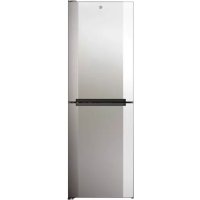
HMNB 6182 X5KN - Fridge HOOVER - Free user manual and instructions
Find the device manual for free HMNB 6182 X5KN HOOVER in PDF.



| Features | Details |
|---|---|
| Device type | Refrigerator |
| Total capacity | 318 liters |
| Cooling type | Static cooling |
| Energy class | A+ |
| Dimensions (HxWxD) | 185 x 60 x 65 cm |
| Weight | 70 kg |
| Number of drawers | 3 vegetable drawers |
| Interior lighting | LED |
| Additional features | Fresh zone, glass shelves |
| Maintenance | Manual defrost |
| Safety | Door lock |
| Warranty | 2 years |
| General information | Ideal for families, modern design |
Frequently Asked Questions - HMNB 6182 X5KN HOOVER
User questions about HMNB 6182 X5KN HOOVER
0 question about this device. Answer the ones you know or ask your own.
Ask a new question about this device
Download the instructions for your Fridge in PDF format for free! Find your manual HMNB 6182 X5KN - HOOVER and take your electronic device back in hand. On this page are published all the documents necessary for the use of your device. HMNB 6182 X5KN by HOOVER.
USER MANUAL HMNB 6182 X5KN HOOVER
DISPLAY TOP FEATURED
INTERFACCIA UTENTE INTERNA
CARATTERISTICHE TECNICHE
HUMIDITY EQUALISER
Tips for keeping food perfect in the Fridge
Where to store your foods in the fridge
Storing Frozen Food
ENERGYSAVING
TAKE CARE
Defrosting
Cleaning and Care
CHANGING THE INTERNAL LIGHT
REVERSING THE DOOR SWING
TROUBLE SHOOTING
Thank you for purchasing this product.
Before using your refrigerator, please carefully read this instruction manual in order to maximize its performance. Store all documentation for subsequent use or for other owners. This product is intended solely for household use or similar applications such as:
- the kitchen area for personnel in shops, offices and other working environments
- on farms, by clientele of hotels, motels and other environments of a residential type
- atbed and breakfasts (B&B)
- for catering services and similar applications not for retail sale.
This appliance must be used only for purposes of storage of food, any other use is considered dangerous and the manufacturer will not be
responsible for any omissions. Also, it is
recommended that you take note of the warranty conditions. Please, to obtain the best possible performance and trouble free operation from your appliance it is very important to carefully read these instructions. Failure to observe these instructions may invalidate your right to free service during the guarantee period.
SAFETY INFORMATION
This guide contains many important safety information. Please, we suggest you keep these instructions in a safe place for easy reference and a good experience with the appliance.
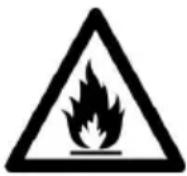
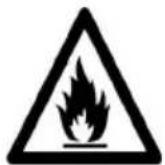
The refrigerator contains a refrigerant gas (R600a: isobutane) and insulating gas (cyclopentane), with high compatibility with the environment, that are, however, inflammable.

Caution: risk of fire
If the refrigerant circuit should be damaged:
- Avoid opening flames and sources of ignition.
Thoroughly ventilate the room in which the appliance is situated
WARNING!
- Care must be taken
while cleaning/carrying the appliance to avoid touching the condenser metal wires at the back of the appliance, as you might injure your fingers and hands or damage your product.
- This appliance is not designed for stacking with any other appliance. Do not attempt to sit or stand on top of your appliance as it is not designed for such use. You could injure yourself or damage the appliance.
- Make sure that mains cable is not caught under the appliance during and after carrying/moving the appliance, to avoid the mains cable becoming cut or damaged.
- When positioning your appliance take care not to damage
your flooring, pipes, wall coverings etc. Do not move the appliance by pulling by the lid or handle. Do not allow children to play with the appliance or tamper with the controls. Our company declines to accept any liability should the instructions not be followed.
- Do not install the appliance in humid, oily or dusty places, nor expose it to direct sunlight and to water.
- Do not install the appliance near heaters or inflammable materials.
- If there is a power failure do not open the lid. Frozen food should not be affected if the failure lasts for less than 20 hours. If the failure is longer, then the food
should be checked and eaten immediately or cooked and then refrozen.
- If you find that the lid of the chest freezer is difficult to open just after you have closed it, don't worry. This is due to the pressure difference which will equalize and allow the lid to be opened normally after a few minutes.
- Do not connect the appliance to the electricity supply until all packing and transit protectors have been removed.
- Leave to stand for at least 4 hours before switching on to allow compressor oil to settle if transported horizontally.
- This freezer must only be used for its intended purpose (i.e. storing and freezing of edible
foodstuff).
- Do not store medicine or research materials in the Wine Coolers. When the material that requires a strict control of storage temperatures is to be stored, it is possible that it will deteriorate or an uncontrolled reaction may occur that can cause risks.
- Before performing any operation, unplug the power cord from the power socket.
- On delivery, check to make sure that the product is not damaged and that all the parts and accessories are in perfect condition.
- If in the refrigeration system a leak is noted, do not touch the wall outlet and do not use open flames. Open the window and let air
into the room. Then call a service center to ask for repair.
- Do not use extension cords or adapters.
- Do not excessively pull or fold the power cord or touch the plug with wet hands.
- Do not damage the plug and/or the power cord; this could cause electrical shocks or fires.
- If the supply cord is damaged, it must be replaced by the manufacturer, its service agent or similarly qualified person in order to avoid a hazard.
-
Do not place or store inflammable and highly volatile materials such as ether, petrol, LPG, propane gas, aerosol spray cans, adhesives, pure alcohol, etc. These materials may cause an explosion.
-
Do not use or store inflammable sprays, such as spray paint, near the Wine Coolers. It could cause an explosion or fire.
- Do not place objects and/or containers filled with water on the top of the appliance.
- We do not recommend the use of extension leads and multi-way adapters.
- Do not dispose of the appliance on a fire. Take care not to damage, the cooling circuit/pipes of the appliance in transportation and in use. In case of damage do not expose the appliance to fire, potential ignition source and immediately ventilate the room where the appliance is situated.
The refrigeration
system positioned behind and inside the Wine Coolers contains refrigerant. Therefore, avoid damaging the tubes.
- Do not use electrical appliances inside the food storage compartments of the appliance, unless they are of the type recommended by the manufacturer.
- Do not damage the refrigerant circuit.
- Do not use mechanical devices or other means to accelerate the defrosting process, other than those recommended by the manufacturer.
- Do not use electrical appliances inside the food storage compartments, unless they are of the type recommended by the manufacturer.
- Do not touch internal cooling elements,
especially with wet hands, to avoid cracks or injuries.
- Maintain the ventilation openings in the appliance enclosure or in the built-in structure, free of obstruction.
- Do not use pointed or sharp-edged objects such as knives or forks to remove the frost.
- Never use hairdryers, electrical heaters or other such electrical appliances for defrosting.
- Do not scrape with a knife or sharp object to remove frost or ice that occurs. With these, the refrigerant circuit can be damaged, the spill from which can cause a fire or damage your eyes.
- Do not use mechanical devices or other equipment to hasten the defrosting
process.
- Absolutely avoid the use of open flame or electrical equipment, such as heaters, steam cleaners, candles, oil lamps and the like in order to speed up the defrosting phase.
- Never use water wash the compressor position, wipe it with a dry cloth thoroughly after cleaning to prevent rust.
It is recommended to keep the plug clean, any excessive dust residues on the plug can be the cause fire.
The product is designed and built for domestic household use only. - The guarantee will be void if the product is installed or used in commercial or non-residential domestic household premises.
The product must be
correctly installed, located and operated in accordance with the instructions contained in the User Instructions Booklet provided.
- The guarantee is applicable only to new products and is not transferable if the product is resold.
- Our company disclaims any liability for incidental or consequential damages.
- The guarantee does not in any way diminish your statutory or legal rights.
- Do not perform repairs on this Wine Coolers. All interventions must be performed solely by qualified personnel.
If you are discarding an old product with a lock or latch fitted to the door, ensure that
it is left in a safe condition to prevent the entrapment of children.
- This appliance can be used by children aged from 8 years and above and by persons with reduced physical, sensory or mental capabilities or with a lack of experience and knowledge; provided that they have been given adequate supervision or instruction concerning how to use the appliance in a safe way and understand the hazards involved.
- Children should not play with the appliance. Cleaning and user maintenance should not be made by children without supervision.
- Locks:If your Fridge/Freezer is
fitted with a lock, to prevent children being entrapped keep the key out of reach and not in the vicinity of the appliance. If disposing of an old Fridge/Freezer break off any old locks or latches as a safeguard.
FOR appliances without a 4-star compartment: this refrigerating appliance is not suitable for freezing foodstuffs
FOR a free standing appliance: this refrigerating appliance is not intended to be used as a built-in appliance
FOR Wine Coolers: this appliance is intended to be used exclusively for the storage of wine
COMBI REFRIGERATOR HOOVER Climate Class
The appliance is designed to operate at the limited range of ambient temperature, depending on climate zones. Do not use the appliance at the temperature out of the limit. Climate class of your appliance is indicated on the label with technical description inside the fridge compartment.
| Climate Class | Amb. T. (℃) | Amb. T. (℉) |
| SN | From 10 to 32 | From 50 to 90 |
| N | From 16 to 32 | From 61 to 90 |
| ST | From 16 to 38 | From 61 to 100 |
| T | From 16 to 43 | From 61 to 110 |
- extended temperate (SN): 'this refrigerating appliance is intended to be used at ambient temperatures ranging from 10^ to 32^ ;
- temperate (N): 'this refrigerating appliance is intended to be used at ambient temperatures ranging from 16^ to 32^ ;
- subtropical (ST): 'this refrigerating appliance is intended to be used at ambient temperatures ranging from 16^ to 38^'
- tropical (T): 'this refrigerating appliance is intended to be used at ambient temperatures ranging from 16^ to 43^ ;
TRANSPORTATION INSTRUCTIONS
The appliance should be transported only in a vertical upright position. The packing as supplied must be intact during transportation. If during the course of transport the product has been transported horizontally, it must only be laid on its left hand side (when facing the door front) and it must not be operated for at least 4 hours to allow the system to settle after the appliance is brought back to upright position.
- Failure to comply with the above instructions could result in damage occurring to the appliance. The manufacturer will not be held responsible if these instructions are disregarded.
- The appliance must be protected against rain, moisture and other atmospheric influences.
INSTALLATION INSTRUCTIONS
- If possible avoid placing the appliance near cookers, radiators or in direct sunlight as this will cause the compressor to run for long periods. If installed next to a source of heat or refrigerator, maintain the following minimum side clearances:
| From Cookers | 4" (100 mm) |
| From Radiators | 12" (300 mm) |
| From Fridges | 4" (100 mm) |
- Make sure that sufficient room, with an average temperature of between 16^ and 32^ , is provided around the appliance to ensure free air circulation. Ideally, a space of no less than 9cm on the back and 2cm on the sides.
- The appliance should be located on a smooth surface.
- It is forbidden to use the refrigerator outdoors.
- Protection from moisture. Do not locate the freezer in moist space to avoid the metal parts rusty. And do not spray water to the freezer, otherwise it will weaken the insulation and causes current leakage.
- Refer to "Cleaning and Care" section to prepare your appliance for use.
- If the freezer is installed in unheated areas, garages etc., in cold weather condensation may form on the outer surfaces. This is quite normal and is not a fault. Remove the condensation by wiping with a dry cloth.
- Never place Refrigerator in a wall recessed or into fitted cabinets or furniture when it is working, the grille at the back may become hot and the sides warm. Do not drape the Refrigerator with any covering.
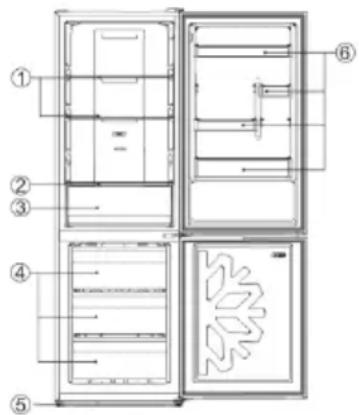
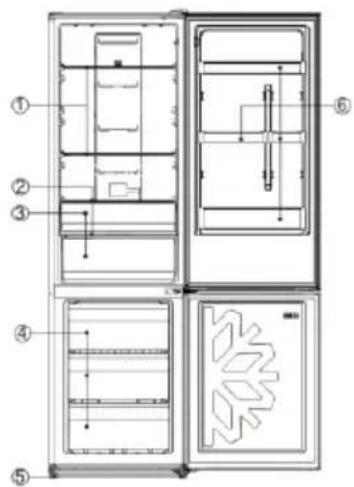
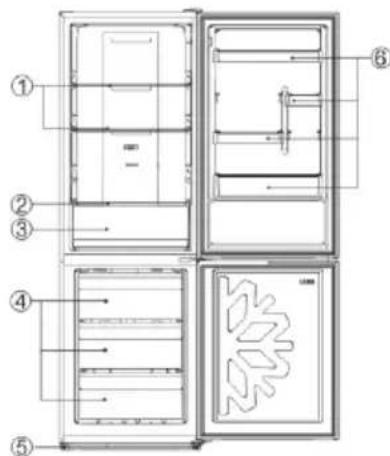
| No | Description |
| 1 | Fridge shelves |
| 2 | Crisper Cover |
| 3 | Crisper |
| 4 | Freezer drawers |
| 5 | Adjustable Feet |
| 6 | Refrigerator door racks |
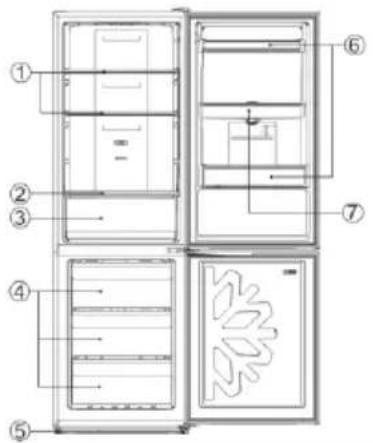
| No | Description |
| 1 | Fridge shelves |
| 2 | Crisper Cover |
| 3 | Crisper |
| 4 | Freezer drawers |
| 5 | Adjustable Feet |
| 6 | Refrigerator door racks |
| 7 | Water tank assembly |
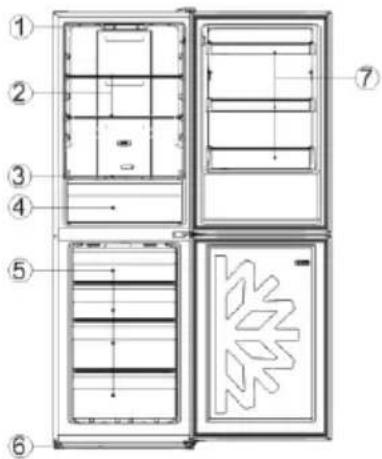
| No | Description |
| 1 | Fridge shelves |
| 2 | Crispercover |
| 3 | Vegetable and fruit crisperr |
| 4 | Freezing drawers |
| 5 | Leveling feet |
| 6 | Door balcony |
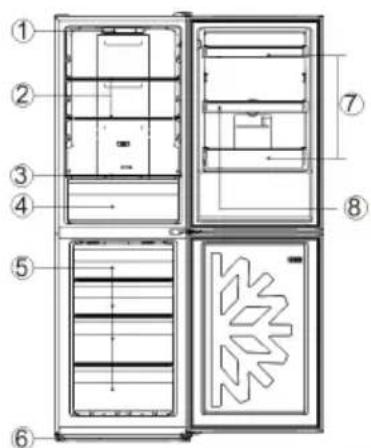
| No | Description |
| 1 | Control panel |
| 2 | Fridge shelves |
| 3 | Crisper Cover |
| 4 | Crisper |
| 5 | Freezer drawers |
| 6 | Adjustable Feet |
| 7 | Refrigerator door racks |
| No | Description |
| 1 | Control panel |
| 2 | Fridge shelves |
| 3 | Crisper Cover |
| 4 | Crisper |
| 5 | Freezer drawers |
| 6 | Adjustable Feet |
| 7 | Refrigerator door racks |
| 8 | Water tank assembly |
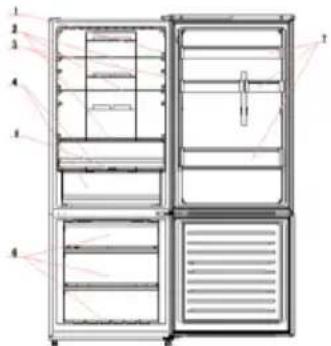
| No | Description |
| 1 | Light switch |
| 2 | Fridge shelves |
| 3 | Light |
| 4 | Crisper box |
| 5 | Crisper box cover |
| 6 | Freezer drawers |
| 7 | Door balcony |
The most energy-saving configuration requires drawers, food box and shelves to be positioned in the product, please refer to the above pictures.
STARTING TO USE
Before you starting to use the freezer, please check that:
- The interior is dry and air can circulate freely at the rear.
- Clean the interior as recommended under "TAKE CARE" section (electric parts of the refrigerator can only be wiped by dry cloth).
- Do not switch on until 4 hours after moving the fridge/freezer. The coolant fluid needs time to settle. If the appliance is switched off at any time, wait 30 minutes before switching back on to allow the coolant fluid to settle.
- Before connecting the Refrigerator to the mains supply position. The thermostat control diais is located inside the Fridge compartment.
- Turn the thermostat knob to the "3" position and turn on the electricity. The compressor and the light inside the refrigerator will begin to work.
- Before storing foods in your refrigerator, turn the refrigerator on and wait for 24 hours, to make sure it is working properly and to allow the Fridge/Freezer to fail to the correct temperature.
- Open the door 30 minutes later, if the temperature in the refrigerator decreased obviously, it shows that the refrigerator system works well. When the refrigerator operates for a period of time, the temperature controller will automatically set the temperature within limits it opens.
COMBI OPERATION
Appliance connected to power at the first time:
When the appliance is connected to power at the first time, the display will be lit for 2 seconds before going normal and the appliance runs with intelligence function.
Display Control: When the refrigerator door is closed and there is no button operation in 3 minutes, the display light goes off.
When the display light is off, open the refrigerator door or click any button to light it up.
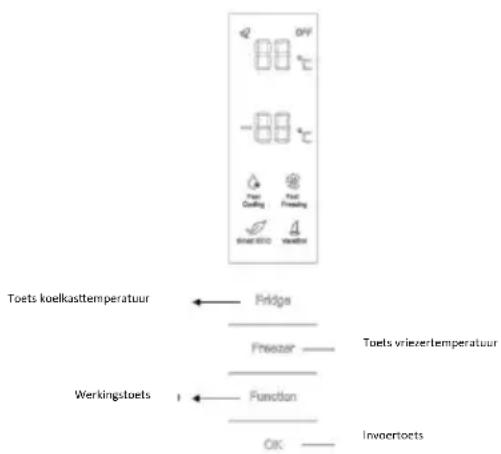
VERTICAL DISPLAY (Only on some models)
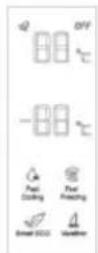
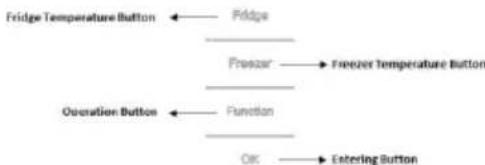
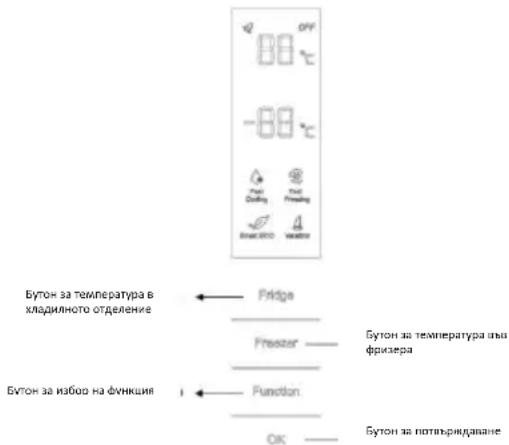
TEMPERATURE SETTING: Click the "Fridge" or
"Freezer" button and when it flickers in the symbol, temperatures can be set. Each time when the button is clicked, the temperature changes accordingly.
Temperatures cannot be set under functions of fast cooling, fast freezing, Smart ECO and vacation. Under temperature setting, if there is no button operation in 5 seconds, the button stops flickering and the set temperature comes into effect.
SMART ECO: Activate the Smart Eco button to set the temperatures of the fridge in max. energy efficiency conditions (+4^ for fridge temperature, - 18^ for freezer temperature).
To enter Smart Eco: Click "option" until it flickers and then click "OK" to enter this function.
To deactivate Smart Eco: Click "option" until it goes to Smart ECO, click "OK" to quit this function and the light goes off.
FAST COOLING: Activate Fast Cooling mode to start an additional pulse for a fast freezing of the fridge compartment. The function is activated and confirmed by the switching on of the dedicated LED icon.
To enter Fast Cooling: Click "option" until it flickers in "Fast Cooling" and then click "OK" to enter this function.
To deactivate Fast Cooling: Click "option" until it goes to "fast cooling" and then click "OK" to deactivate this function.
FAST FREEZING: Activate Fast Freezing to rapidly freeze big quantities of food keeping intact nutritional food properties. When the light in Fast Freezing goes off and the freezer temperature goes
back to the value before fast freezing. When Fast Freezing time is up (26 hours), it deactivates automatically. When it goes to Vacation, Fast Freezing stops.
To enter Fast Freezing: Click "option" until it flickers in "Fast Freezing" and then click "OK" to enter this function.
To deactivate Fast Freezing: Click "option" until it goes to "fast freezing" and then click "OK" to quit this function.
VACATION: In case of long stops, the Vacation function can be used. This function deactivates the fridge compartment, while leaving the freezer on. Ensure that there is no food inside the fridge compartment before using this function. The function is activated and confirmed by the switching on of the dedicated LED icon. The light in Vacation goes off and the refrigerator temperature goes back to the value before Vacation.
Vacation quits under functions of Smart ECO and Fast Cooling.
To enter Vacation: Click "option" until it flickers in "Fast Freezing" and then click "OK" to enter this function.
To deactivate Vacation: Click "option" until it goes to "Vacation" and then click "OK" to quit this function.
POWER OFF MEMORY: Refrigerator can automatically keep all the setting in case of power off. When the unit is plugged in again, the refrigerator will run with the setting before power off.
POWER-ON DELAY: To prevent harm to the refrigerator in case of sudden power cut and power on, the unit does not start immediately if the power off time is less than 5 minutes.
FREEZER OVER-TEMPERATURE ALARM (only in case of power on): When the freezer temperature is higher than 10^ Cat the first time connected to power, the symbol light of the freezer chamber goes on and the number representing temperature flickers.
Press any button or wait for 5 seconds, flickering stops and it goes back to the temperature that was set.
REFRIGERATOR DOOR OPENING ALARM: When the refrigerator is open over 3 minutes, the buzzer will buzz. Close the door or press any button to stop the alarm, but for the latter, the alarm will go off again after 3 minutes.
SENSOR FAULT ALARM: When it shows "E0", "E1", "E2" or other abnormal symbols, it means sensor faults and the refrigerator needs repair.
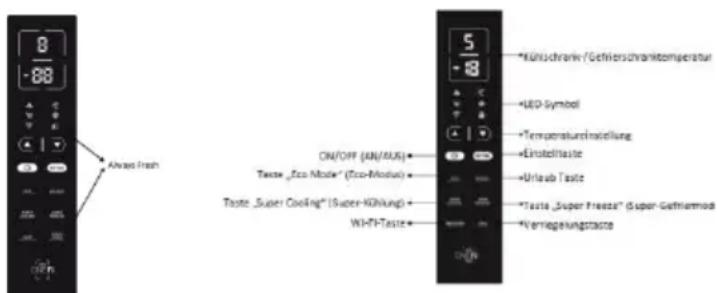
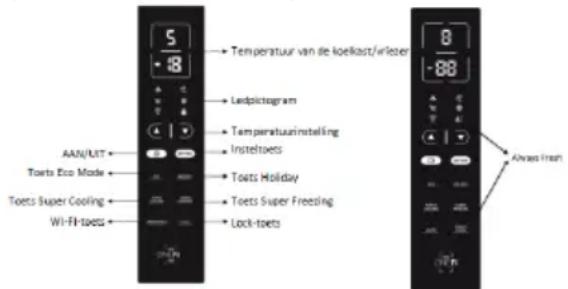
TOP FEAUTRED VERTICAL DISPLAY (Only on some models)
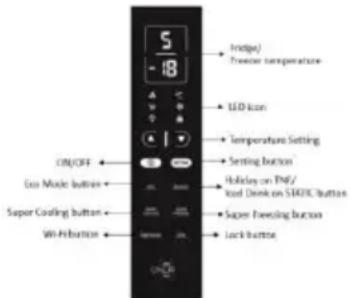
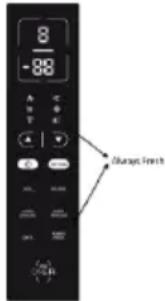
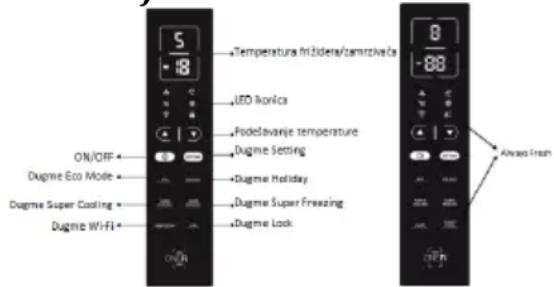
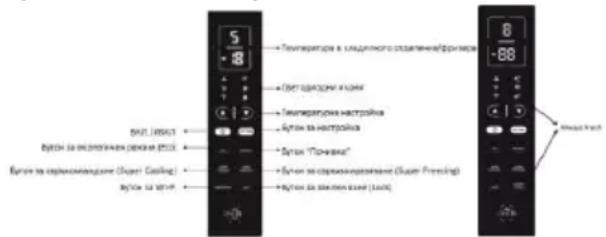
ALWAYS FRESH Button: On models with Always Fresh Technology press the "Always Fresh" button to activate the function.
SETTING Button: Press "SETTING" to change the temperature.
When button is pressed for the first time: You can change refrigerator temperature with PLUS Button and MINUS Button.
When button is pressed for the second time: You can change refrigerator temperature with PLUS Button and MINUS Button.
On models with Always Fresh Technology press the "Setting" button for 3 seconds to lock and unlock the display.
ON/OFF Button: To turn on Refrigerator Press ON/OFF button for 3 seconds. To turn off Refrigerator: Press ON/Off button for 3 seconds.
Stand-by Mode: To save energy is possible to activate Stanby Mode. The refrigerator will work in normal state and all leds will turn OFF
To enter Stan-by Mode: Press ON/OFF button for 1 second.
To deactivate Stan-by Mode: Press ON/OFF button for 1 second. Fridge back to normal operation.
ECO MODE Button: Press Eco Mode button to set temperatures of the fridge in max. energy efficiency conditions (+5^ for fridge temperature, -18^ for freezer temperature). If you want to exit the ECO mode function, you need to press the Eco Mode button again and the refrigerator temperature turns back to normal operation.
HOLIDAY Button: In case of long stops, the Holiday function can be used. This function deactivates the fridge compartment, while leaving the freezer on. Ensure that there is no food inside the fridge compartment before using this function. The function is activated and confirmed by the switching on of the dedicated LED icon. If you want to exit the Holiday function, you will need to press the "Holiday" button again, the light in Holiday goes off and the refrigerator temperature goes back to the value before Holiday.
SUPER COOLING Button: Press Super Cooling button to start an additional pulse for a fast freezing of the fridge compartment. The function is activated and confirmed by the switching on of the dedicated LED icon.
If you want to exit the Super Cooling function, you need to press the Super Cooling button again and the refrigerator temperature turns back to normal operation.
SUPER FREEZING Button: Press Super Freezing
button to rapidly freeze big quantities of food keeping intact nutritional food properties. If you want to exit the Super Freezing function, you need to press the Super Freezing button again and the freezer temperature turns back to normal operation.
WI-Fi Button: This appliance is equipped with OneFi+ technology that allows you to control it remotely via App. Press OneFi+ button to activate Wi-Fi function. Machine Enrollment (on App): Download the Hoover Wizard App on your device. The Hoover Wizard App is available for devices running both Android and iOS, both for tablets and for smartphones. Get all the details of the One Fi+ functions by browsing the App in DEMO mode.
Open the App, create the user profile and enroll the appliance following the instructions on the device display or the "Quick Guide" attached on the machine. This operation is necessary just for the first installation. To finalize the enrollment following the instruction on the smartphone's screen.
Refrigerator usage from remote by App: When the enrollment is completed, there will be Wi-Fi LED switched on. From now on it will be possible to manage the product by using the buttons on the display or using the App: both of them will be aligned according to the last command given.
LOCK Button: Press Lock button to block display user interface (Lock icon enlights, "LO" appears on display and, after 2 seconds, the refrigerator and freezer temperature shows recovery). If you want to exit Lock function, press the "Lock" button again for 3 seconds, and the refrigerator will exit the Lock function.
INTERNAL USER INTERFACE (Only on some models)
SET Button: Press SET button for setting the temperature until you reach the level you want where level 1 is the warmest and level 4 is the

coldest. Under normal operating conditions, we recommend using an intermediate setting (level 2). Once the setting takes effect, it immediately enters the corresponding stall for operation control, and the stall indicator lights up 3s3min and then goes out. Factory default temperature is set to 2.
Long press "SET" key to exceed 3s and enter the hardware self-check program. The hardware self-check operation is effective within 10min, and the long button operation after 10min is invalid.
WI-Fi Button: This appliance is equipped with OneFi+ technology that allows you to control it remotely via App. Press Wi-Fi icon for 3 seconds to activate Wi-Fi function and the icon light changes from white to blue.
Machine Enrollment (on App): Download the Wizard App on your device. The Hoover Wizard App is available for devices running both Android and iOS, both for tablets and for smartphones. Get all the details of the OneFi+ functions by browsing the App
in DEMO mode.
Open the App, create the user profile and enroll the appliance following the instructions on the device display or the "Quick Guide" attached on the machine. This operation is necessary just for the first installation. To finalize the enrollment following the instruction on the smartphone's screen.
Refrigerator usage from remote by App: When the enrollment is completed, there will be Wi-Fi LED switched on. From now on it will be possible to manage the product by using the buttons on the display or using the App: both of them will be aligned according to the last command given.
FAST COOL Button: when "FAST COOL" button is pressed, rapid cooling function is activated, according to the 21^ to refrigeration control gear.
Maximum running time is 3h, after this time temperature will be set to 1.
If the "SET" button is pressed in the process of speed cooling, the instant cooling function is immediately withdrawn and the default is entered into the next gear.
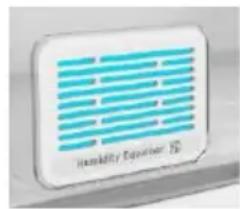
TECHNICAL FEATURES HUMIDITY EQUALISER (Only on some models)
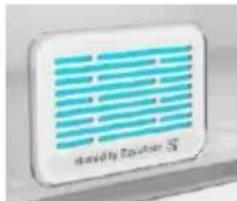
The exclusive Hoover Humidity Equaliser uses this humidity naturally generated by fruits and vegetables to keep always a level between 85% and 95% .
ALWAYS FRESH TECHNOLOGY (Only on some models)
Is the innovative Hoover technology that allows you to preserve food better
and longer, both in the refrigerator and in the freezer. Always Fresh promotes the maintenance and preservation of foods by interacting with their enzymatic activity through the activation of water molecules, naturally present in them.
Preservation technology is activated by a suitable button on the display.
Always Fresh must be switched off during the energy consumption test.
WATER DISPENSER (Only on some models)
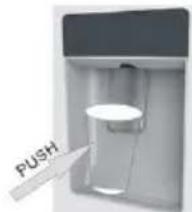
The water dispenser allows you to get chilled water without opening the fridge compartment door.
Before first use
Before using the water dispenser for the first time, remove and clean
the water tank located inside the fridge
compartment.
- Lift the water tank out of the fridge compartment.
- Open the water tank cover and then clean the water tank and cover
in warm soapy water. Rinse thoroughly.
- After cleaning, attach the cover to the water tank and then replace
the water tank back on the fridge door. - Clean the dispenser pad outside the fridge door.
Filling the water tank with water
- Open the small cover.
- Fill the water tank with drinkable water up to the Max line.
- Close the small cover.
Dispensing
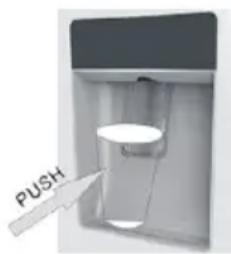
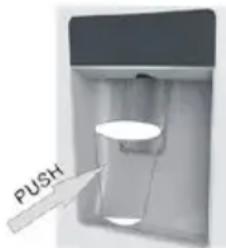
To dispense water, push the dispenser pad gently, using
a glass or container. To stop the flow of water, pull your glass away from the
dispenser pad.
Tips for keeping food perfect in the Fridge
Take extra care with meat and fish: cooked meats should always be stored on a shelf above raw meats to avoid bacterial transfer. Keep raw meats on a plate which is large enough to collect juices and cover it with cling film or foil.
Leave space around food: this allows cold air to circulate around the Fridge, ensuring all parts of the Fridge are kept cool.
Wrap up food! to prevent transfer of flavors and drying out, food should be separately packed or covered. Fruit and vegetables need not be wrapped.
Pre-cooked food should be cooled properly: allow pre-cooked food to cool down before placing in the Fridge. This will help to stop the internal temperature of the Fridge from rising.
Shut the door! to prevent cold air escaping, try to limit the number of times you open the door. When retuning from shopping, sort foods to be kept in your Fridge before opening the door. Only open the door to put food in or take it out.
Where to store your foods in the fridge
Position different food in different compartments according to be below table
| Refrigerator compartment | Type of food |
| Door or balconies of fridge compartment | ·Foods with natural preservatives, such as jams, juices, drinks, condiments. ·Do not store perishable foods |
| Crisper drawers (salad drawer) | ·Fruits, herbs and vegetables should be placed separately in the crispper bin |
| • Do not store bananas, onions, potatoes, garlic in the refrigerator | |
| Fridge shelf – middle | • Dairy products, eggs |
| Fridge shelf – top | • Foods that do no need coocking, such as ready-to-eat foods, deli meats, leftovers. |
| Freezer drawer(s)/tray | • Foods for long-term storage • Bottom drawer for raw meet, poultry, fish • Middle drawer for frozen vegetables, chips. • Top tray for ice cream, frozen fruit, frozen baked goods. |
Cool area: this is where to store foods which will keep longer if they are kept cool. Milk, eggs, yogurt, fruit juices, hard cheeses eg. Cheddar. Opened jars and bottles of salad dressings, sauces and jams. Fats, eg. Butter, margarine, low-fat speads, cooking fats and lard.
Coldest area (0^ to 5^) : this is where foods which must be cold to keep them safe should be kept:
- Raw and uncooked foods should always be wrapped.
-Pre-cooked chilled foods, eg. Ready meals, meat pies, soft cheeses.
-Pre-cooked meats eg. Ham,
-
Prepared salads(including pre-packed mixed green salads, rice, potato salad etc).
-
Desserts, eg. Fromage frais, home-prepared food and leftovers or cream cakes.
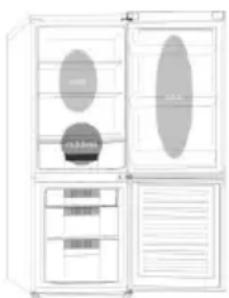
Crisper: this is the most humid part of the Fridge. Vegetables, fruit, fresh salad items eg. Unwashed whole lettuce, whole tomatoes, radishes etc can be stored here.
WE RECOMMEND THAT ALL PRODUCE KEPT IN THE SALAD BIN IS WRAPPED.
NOTE: Always wrap and store raw meat, poultry and fish on the lowest shelf at the bottom of the fridge. This will stop them dripping onto, or touching other foods. Do not store inflammable gasses or liquids in the fridge.
Electrical operation after 3h on the freezer, the temperature in the cabinet above -12^ , the alarm
light is it and buzzer sounds.
Storing Frozen Food
Prepackaged commerically frozen food should be stored in accordance with the frozen food manufacturer's instructions for a 30 min free as compartment.
To ensure that the high quality achieved by the frozen food manufacturer and the food retailer is maintained the following should be remembered:
-
Put packets in the freezer as quickly as possible after purchase.
-
Do not exceed "Use By", "Best Before" dates on the packaging.
| DO | DON'T |
| Defrost food from the freezer thoroughly in a fridge or in a microwave oven following defrosting and cooking instructions. | Use pointed sharp edged objects such as knives, forks to remove the ice. |
| Defrost frozen meat completely before cooking. | Put hot food in the freezer. Let it cool down first. |
| Store commercially frozen food in accordance with the instructions given on the packets that you buy. | Put liquid-filled bottles or sealed cans containing carbonated liquids into the freezer as they may burst. |
| Check contents of the refrigerator at regular intervals. | Remove items from the freezer with wet hands. |
| Clean and defrost your refrigerator regularly. | Freeze fizzy drinks. |
| Prepare fresh food for freezing in small portions to ensure rapid freezing. | Consume ice-cream and water ice-dried from freezer. It may cause "frezer burns" on lips. |
storage time in the fridge compartment is achieved with colder temperatures. Since some particular products (as fresh fruits and vegetables) may be damaged with colder temperatures, it is suggested to keep them in the crispier drawers, whenever present. If not present, maintain an average setting of the thermostat.
For frozen food, refer to the storage time written on the food packaging. This storage time is achieved whenever the setting respects the reference temperatures of the compartment (one-star-6°C, two stars -12°C, three stars -18°C).
ENERGYSAVING
For better energy saving we suggest:
- Installing the appliance away from heat sources and not exposed to direct sunlight and in a well-ventilated room.
Avoid putting hot food into the refrigerator to avoid increasing the internal temperature and therefore causing continuous functionalizing of the compressor. - Do not excessively stuff foods so as to ensure proper air circulation.
- Defrost the appliance in case there is ice to facilitate the transfer of cold.
In case of absence of electrical energy, it is advisable to keep the refrigerator door closed. - Open or keep the doors of the appliance open as little as possible.
- Avoid adjusting the setting to temperatures too cold.
- Remove dust present on the rear of the appliance.
TAKE CARE
Defrosting
vacuumed using a soft brush attachment.
Do not use harsh cleaners, scouring pads or solvents to clean any part of the Fridge/Freezeer.
CHANGING THE INTERNAL LIGHT
- Before carrying out the LED replacement always disconnect the mains supply.
- Hold and lift up the LED light cover.
- Remove the old LED by unscrewing it in an anti-clockwise direction.
- Replace with a new LED light by screwing it in a clockwise direction marking sure that it is secure in the light holder.
- Refit the light cover and re-connect your Fridge to the mains supply and switch on.
REVERSING THE DOOR SWING Dissemble the Refrigerator Door
- a. Use a tool to remove the screw off the hinge cover, and then remove the latter. Insert the communication line to the hole on the cabinet top.
b. Use a tool to remove the 4 screws off the upper hinge cover and then remove the latter. Pry up the door bush and small end cap cover on the door.
c. Insert the door bush and door communication line into the hole on the door and then put on the small end cap cover.
d. Use a tool to remove the 2 screws as shows in the below figure to remove the hole cover on the cabinet top and get the cabinet communication line out of the hole.
Pry up the small end cap cover on the door and get out the door bush and door communication line.
e. Insert the door bush into the round hole on the door and then put on the small end cap cover.
f. Move the refrigerator door upward over 500mm to remove the door.
- a. Use a tool to remove the 3 screws off the middle hinge cover and then remove the middle hinge.
b. move the freezer door upward over 500mm to remove the door.
c. Remove the adjustable front feet under the lower hinge; use a tool to remove the 4 screws from the lower hinge and then disassemble the lower hinge. Door disassembly is finished.
Assemble door, lower hinge accessories to the corresponding positions
- a. Use a tool to get the door bush out as shown in the below figure and assemble it to the corresponding position of the other side.
b. Use a tool to remove the screws off the stopper ass as shown in the below figure and
then assemble them to the other side of the door.
c. Use a tool to remove the axle and two stoppers on the lower hinge and then assemble them to the position as shown in the below figure.
Assemble the refrigerator door and freezer door to the opposite side
- a. Remove the adjustable front foot as shown below by hand and then assemble the lower hinge to the other side of the cabinet and fix the screws by using a tool.
b. Assemble the shorter adjustable front foot to the lower hinge side and adjust the height of the foot to make the refrigerator stay in level. - Put on the freezer door and turn the middle hinge by 180^ and then assemble it to the other side of the cabinet; use a tool to screw up the 3 screws to fix the middle hinge.
- Put on the refrigerator door and assemble the upper hinge to the other side of the cabinet; use a tool to screw up the 4 screws to fix the upper hinge.
- After that, connect the door communication line and the cabinet communication line and then put on the upper hinge cover and fix it using a screw.
Assemble the hole cover to the other side of the cabinet and use a tool to screw up the hole cover.
Door disassembly is finished here.
Double check that the door is aligned correctly and all the seals are closed on all sides. If necessary, re-adjust the levelling feet.
NOTE: If you want to have the door swing reversed, we recommend that your contact a qualified technician. You should only try to reverse the door yourself if you believe that you are qualified to do so.
All parts removed must be saved to do the reinstallation of the door. You should rest the fridge freezer on something solid so that it will not slip during the door change process. Do not lay the fridge freezer flat as this may damage the coolant system. Ensure the fridge freezer is unplugged and empty.
We recommend that 2 people handle the fridge freezer during assembly.
TROUBLE SHOOTING
- If the appliance does not operate when switched on, check.
- Power cut: If the internal temperature of the Fridge/Freezer compartment is -18^ or less when the power returns, your food is safe. The food in your Fridge/Freezer will remain frozen for approx 16 hours with the door closed. Do not open the Fridge/Freezer door more than necessary.
-
The product is designed and built for domestic household use only.
-
The plug is inserted properly in the socket and that the power supply is on. (To check the power supply to the socket, plug in another appliance).
- The fuse has blown/circuit breaker has tripped/main distribution switch has been turned off.
- The temperature control has been set correctly.
If the refrigerator is exceptionally cold, you may have accidentally adjusted the thermostat control dial to a higher position.
If the refrigerator is exceptionally warm, the compressor may not be working. Turn the thermostat control dial to the maximum setting and wait a few minutes. If there is no humming noise, it is not working. Contact the local store where your purchase was made. - If condensation appears outside of the Refrigerator, this may be due to a change in the room temperature. Wipe off any residue of moisture. If the problem continues contact the local store where your purchase was made.
- If the provided plug has been replaced make sure the new plug is properly connected. If the appliance is still not operating after the above checks, please contact Customers Service.
- To contact the technical assistance, visit our website: https://corporate.haier-europe.com/en/ Under the section "website", choose the brand of your product and your country. You will be redirected to the specific website where you can find the telephone number and form to contact the technical assistance
SCRAPPING OLD APPLIANCES
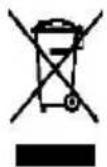
This appliance is marked according to the European directive 2012/19/EU on Waste Electrical and Electronic Equipment (WEEE).
WEEE contains both polluting substances (which can cause negative consequences for the environment) and basic components (which can be re-used). It is important to have WEEE subjected to specific treatments, in order to remove and dispose properly all pollutants, and recover and recycle all materials. Individuals can play an important role in ensuring that WEEE does not become an environmental issue; it is essential to follow some basic rules: WEEE should not be treated as household waste.
WEEE should be handed over to the relevant collection points managed by the municipality or by registered companies. In many countries, for large WEEE, home collection could be present.
In many countries, when you buy a new appliance, the old one may be returned to the retailer who has
to collect it free of charge on a one-to-one basis, as long as the equipment is of equivalent type and has the same functions as the supplied equipment.
Conformity
By placing the mark on this product, we are confirming compliance to all relevant European safety, health and environmental requirements which are applicable in legislation for this product.
GUARANTEE
Minimum guarantee is: 2 years for EU Countries, 3 years for Turkey, 1 year for UK, 1 year for Russia, 3 years for Sweden, 2 years for Serbia, 5 years for Norway, 1 year for Morocco, 6 months for Algeria, Tunisia no legal warranty required.
AVAILABILITY OF SPARE PARTS
"Thermostats, temperature sensors, printed circuit boards and light sources are available for a minimum period of seven years after placing the last unit of the model on the market. Door handles, door hinges, trays and baskets for a minimum period of seven years and door gaskets for a minimum period of 10 year, after placing the last unit of the model on the market".
For further information about the product, please consult https://eprel.ec.europa.eu/ or scan the QR on the energy label supplied with the appliance
TABLE DES MATIÈRES
INFORMATIONS SUR LA SECURITE
COMBI HOOVER
Classe climatique
INSTRUCTIONS DE TRANSPORT
INSTRUCTIONS D'INSTALLATION
DÉMARRAGE
FONCTIONNEMENT COMBINED
UNITE D'AFFICHAGE VERTICALE
UNITE D'AFFICHAGE VERTICALE AVANCE
INTERFACE UTILISATEUR INTERNE
CHARACTERISTIQUES TECHNIQUES
HUMIDITY EQUALISER
TECOLOGÍA ALWAYS FRESH(SI ESTÁ PRESENTE)
OBERES VERTIKALES DISPLAY (FALLS VORHANDEN
VERTICAL DISPLAY MET FUNCTIONS
INTERNE GEBRUIKERSINTERFACE
VERTICAAL DISPLAY (INDIEN AANWEZIG)
VERTICAAL DISPLAY MET FUNCTIONS (INDIEN AANWEZIG)
ALWAYS FRESH TECHNOLOGY (INDIEN AANWEZIG)
WATERDISPENSER (INDIEN AANWEZIG)
DET VERTIKALE DISPLAY
MEST ANVENDTE PÄ DET VERTIKALE DISPLAY
INTERN BRUGERGRAENSEFLADE
TEKNISKE EGENSKABER
HUMIDITY EQUALISER
ANTIBAKTERIELT SYSTEM (hvis til stede)
VANDDISPENSER
pá bed and breakfasts (B & B)
SKROTNING AV GAMLA APPARATER
TEKNISET OMINAISUDET
HUMIDITY EQUALISER
ANTIBAKTEERINEN JARJESTELMA (jos varusteena)
VEDENANNOSTELIJA
SIGURNOSNE INFORMACije
COMBI HOOVER
Klimatski razred
UPUTE ZAPRENOSENJE
UPUTE ZA POSTAVLJANJE
POCTAKUPORABE
KOMBINIRANI RAD
VERTIKALNI ZASLON
VERTIKALNI ZASLON VRHUNSKIH
KARAKTERISTIKA
INTERNO KORISNIKKO SUCELJE
TEHNICKE KARAKTERISTIKE
HUMIDITY EQUALISER
ANTIBAKTERIJSKI SUSTAV (ako postoji)
DISPENZER ZA VODU3
SIGURNOSNE INFORMACije
Ovaj prisučnik sadržava važne sigurnosne
Gumb ALWAYS FRESH:Na modelima Always Fresh
Technology pritisnite gumb „Always Fresh“ kakobiste aktivirali funkciju.
Gumb SETTING: Pritisnite, SETTING" da biste promijenili temperaturu.
Kada se gumb pritisne prvi put, mozete promijeniti temperaturu hladnjaka uz pomoc gumba PLUS i gumba MINUS .
Kada se gumb pritisne drugi put, mozete promijeniti temperaturu hladnjaka uz pomoć gumba PLUS i gumba MINUS .
Na modelima s tehnologijom Always Fresh pritišcite gumb „Setting" (Postavke) 3 sekunde za zakljucavanje i otključavanje załona.
Gumb ON/OFF: Kako biste uključili hladnjak, pritisnite gumb ON/OFF i držite tri sekunde. Kako biste isključili hladnjak, pritisnite gumb „ON/OFF“ i držite tri sekunde.
Način rada pripravnosti Kako biste uštedeli energiju, moguce je aktivirati način rada pripravnosti. Hladnjak ce normalno raditi, a sva LED svjetla ce se iskljuciti. Pokretanje načina rada pripravnosti: Pritisnite gumb „ON/OFF“ i držite Jednu sekundu.
Prekid načina rada pripravnosti Pritisnite gumb „ON/OFF“ i držite jegn sekundu. Hladnjak ponovno normalno radi.
Gumb ECO MODE: Pritisnite gumb Eco Mode da biste namjestili temperature uredaja u uvjetima maksimalne energetske učinkovitosti (+5 °C za temperatur hladnjaka, -18 °C za temperaturu zamrzivača). Ako Želite prekinuti funkcjiju ECO mode, ponovno pritsinite gumb Eco Mode; temperatura hladnjaka vraća se u normalno stanje.
Gumb HOLIDAY: U slučaju dulje obustave rada, možete koristiti funkcjju Holiday. S pomocu ove funkcjije isključuje se hladnjak, dok zamrzivač ostaje ukljucen. Prijce korištenja ove funkcjije provjerite nje li u hladnjaku ostalo hrane. Funkcjja se aktivira i potvrduje uključivanjem odgovarajuće LED ikonice. Ako Želite prekinuti funkcjju godišnjeg odmora, ponovno pritisnite gumb „Holiday"; svjetlo funkcjije odmora se gasi, a temperatura hladnjaka vracá se na vrijednost prije funkcjije godišnjeg odmora.
Gumb SUPER COOLING: Pritisnite gumb Super Cooling da biste aktivirali dodatni puls za brzo zamrzavanje hladnjaka. Funkcija se aktivira i potvrduje uključivanjem odgovarajuće LED ikonice. Ako Želite prekinuti funkcjiju super hladenja, ponovno pritisnite gumb Super Cooling; temperatura
hladnjaka vraca se u normalno stanje.
SUPER FREEZING: Pritisnite gumb Super Freezing da biste brzo zamrznuli velike koliçine hrane zadržavajući njezina prehrambena svojstva. Ako Želite prekinuti funkciju super zamrzavanja, ponovno pritisnite gumb Super Freezing; temperatura hladnjaka vraća se u normalno stanje.
Gumb WI-FI: Ovaj uredaj opremljen je tehnologijom OneFi+ koja vam omogucava upravljati njime daljinski preko aplikacije. Pritisnite gumb za OneFi+ da bistePokrenuli funkciju Wi-Fi.
Povezivanje uredaja (s pomocu aplicacije): Preuzmite aplicaciju Hoover Wizard na svoj uredaj. Aplikacija Hoover Wizard dostupna je za uredaje koji koriste Android i iOS operativne sustave, za tablei pametne telephone. Saznajte sve o One Fi+ funkcjija pretražujuci aplikaciju u načinu rada DEMO. Otvorite aplikaciju, kreirajte korisnički profil i povežite uredaj prateci upute na zaslonu ili „Brzi vodič" koji ste dobili uz uredaj. Ova radnja nužna je samo prilikom prve instalacije. Da biste završili povezivanje, pratite upute prikazane na zaslonu pametnog Telefona.
Dalginska upotreba hladnjaka s pomocu aplikacije: Kada se povezivanje zavrski, uključit ce se LED zarulja za Wi-Fi. Od sada možete upravljati proizvodom s pomocu gumbi na zaslonu ili s pomocu aplikacije: i jakno i drugo bit ce usklaženo prema posljednjoj zadanoj naredbi.
Gumb LOCK: Pritisnite gumb „Lock“ da biste blokirali korisnicko sučelje zašlona (ikona Lock ce zasvijetliti, na zašlonu je prikazano „LO“ i nakon dvije sekunde temperatura hladnjaka i zamrzivača ce se stabilizirati). Ako Želite prekinuti funkcjiju zakljucavanja, ponovno pritsnite gumb „Lock“ i držite tri sekunde i hladnjakce prekinuti funkcjiju zakljucavanja.
INTERNO KORISNICKO SUČELJE (Samo na nekim modelima)

Gumb SET: Pritisnite gumb „SET“ da biste postavili temperaturu dok ne dodete doŽeljene razine, pričemu razine 1 predstavlja najvisu, a razina 4 majnizu temperaturu. U normalnim radnim uvjetima preporucujemo upotrebu srednje razine (razina 2). Kada postavka stipi na snagu, ona odmahPokreće odgovarajuće zaustavljanje za operativnu kontrolu, aPokazatelj zaustavljanja osvijetljen je 3 minuta i nakon toga se gasi. Standardna tvornicka temperatura postavljena je na 2.
Pritisnite gumb, SET i drzite dulje od tri sekunde da biste ušli u program samostalne provjere računalne opreme. Operacija samostalne provjere računalne opremePokrće se u roku od 10 minuta,a dugo držanje gumba nods važće nakon 10 minuta.
Gumb WI-Fi: Uredaj je opremljen tehnologijom
OneFi+ koja omogucava daljinsko upravljanje
uredajem s pomoću aplikacije. Pritisnite i držite ikonu
Wi-Fi tri sekunde da bisté aktivirali funkcjiu Wi-Fi,
enzymatickou cinnosti
POKNY TYKAJUCE SA INSTALÁCIE
- Ak je to mozné, spotrebic neumiestnujte do blizkosti sporakov, radiatorov alebo na priame slnecné svetlo, inak bude kompresor v prevadzke poças dlhych casovych usekov. V pripe instalacie v blizkosti zdroja tepla alebo chladnicky zachovajte nasledujuce minimalne odstupy po stranach:
| Od sporákov | 100 mm (4 palce) |
| Od radiátorov | 300 mm (12 palcov) |
| Od chladniciek | 100 mm (4 palce) |
- Zabezpecte, aby bol okolo spotrebica dostatok miesta s priemernou teplotou od 16^ do 32^ ,aby bolo zabezpecené vo'né prudenie vzduchu. Idealny volny priestor je minimálne 9 cm za a 2 cm na bokoch.
- Spotrebičtreba umiestnit na hladký povrch.
- Použivanie chladnicky v exteríroch je zakázané.
- Ochrana pred vlhkestou. Aby sa predi slo hrdzaveniu kovovych casti, mraznicku neumiestnujte do vlhkych priestorov. Mraznicku neostrekujte vodou, v opacnom priade dojde k oslabeni i zolacia nasledne k prudovemu zvodu.
- Informaci tykajuce sa pripravy spotrebica na pouzitie najdete v casti, Cistenie a starostlivost".
- V pripe instalovania mraznichy
v nevyhrievan'ych priestoroch, garazach a pod. moze v chladnom pocasif dochodzaf k tvorbe kondenzatu na jej vonkajsich povrchoch. Nejde o poruchu, je to prirodzeny jav. Kondenzat utrite suchou handrou.
- Chladnicku nikdy nezasuvaje do vyklenkov ani do vstavanych skrinci nabytku, Pokial je v prevadzke; zadna mriezka a boky by sa mohli zahriat. Chladnicku nezakryvajte ziadnouPokryvkou
NHΦOPMAU3A B3E0ΠACHOCT
KOMBUNHUPAH HOOVER
Klumamuueh Knae
MHCTPYKUIN 3A TPAHCNOPTYPAHE
HCTPYKUN 3A MOHTAK
HAAYAO HA EKCIIOATAUJRA
KOMENHHPAHA PABOTA
BEPTUKAIEH DUCIJIEN
JIABEH BEPTUKAJIEN DUCJIEN
BbTPeLWeH NtPbSbTeJIckN HHTEPΦEIC
TEXHUYECKN XAPAKTEPUCTUKN
HUMIDITY EQUALISER
AHTNIBAKTEPNAJIHA CNTEMA (ako e haIuHa)
DNCHECEP3ABODA
Cbeemu 3a 3ana38aHe Ha XpaHama nepfekmha E XnaudunHuka
Kbde da cbxpaHbame bawume xpanu 6 XnaudunHuka
CbxpaheHue Ha 3ampa3eHa XpaHa
NECTEHE HA EHEPIN
IIOIINPbJXKA
Pa3mpa3Hahe
NoucmbaHe u noodpbckka
CMRAHA HA KPYUKATA
OBpBuaHE HA BPATNTE
OTCTPAHBAHE HA IPOBIIEMN
Blaorapm Bn,ye 3akynxTe Tozni npOdyKT.
PpeHn Da n3no3BaTe BaWnXnaDInHe ype, MoJ BHNMaTeHNO IpOoTeTe TOBa pBkoBOdCTBO C HnCTpyKcHn, 3a Da NoCtHHe Tn-Do6pa eΦeKTHBHOCT. CbXpaHaBaIte cIaNaTa
DOKyMeHTaun 3a nocLeBaUo noJI3BaHe nn 3a Dpyn co6cTBHeu. To3n npOdykt e npEJa3HaueH eINHCTBeHO 3a DomaHa yNoTpe6a nn 3a NoDo6Hn npInloKeHHa KaTo:
KyxHeHckn 6okc 3a nepcoHaIb MaRa3HH, Ofncn I npyra pa6oTHa cpea
BbBΦepMn,OTKIneHTNaXoTeJI,MoTeJIIN BdpYra CpeJa OTKInuIeH TnI
- B cemeiHxoteiTn "bed and breakfast" (B & B)
3a KeTbpnH yCnyu n noDobH npniloKeHn, Ho He n KaTo o6OpyDbAHe Ha o6eKn 3a npOdaKbHa dpe6Ho.
To3n ypei, Tpr6Ba Da 6bIe n3no3BaH cMo 3a cbxpaHenHe Ha xpaHa, BcraKa dpyra ynotpe6a ce CHTa 3a onacHa n pOn3BODInTeJrT HMa Da bDe OTROBOpEH 3a KaKBIno N Da e npOnyckn. IpenopbTuTEH O cBtO Da 3ano3Haete C ycNoBnTa Ha rapaHnPaTa. 3a Da NoCTnHete B3MOxHO HAI-Do6pa eEKeKTHBOHcT IN 6e3npo6LemHo fYHKUohnHa Ha ypeDa BV, e MHOrO BaXHO DA IpOuyTeTe BHIMATEHIO Te3N INCTpyKuH. Hecna3BaHeTo Ha Te3N INCTpyKuH. MoKe Da BV LIshnOT npabOTO Ha 6e3PnAthO 06CnykBaHe NO BpeMe Ha rapaHcuOHHHn nepNOiD.
HHΦOPMAIJIa 3A Be3OIIACHOCT ToBa pBkoBOIDCTBO cBdbpJka MHOrOBaxHa INΦOpMaIa 3a 6e3OIIACHOCT.
IpenopbUbme Bn da
cxbxpanBaTe Te3n HNCTpyKuH Na 6e3oNaCHO MЯCTO 3a JecHa cnpaBka N Do6pa pa6ota cypeda.
XlaIaIIHnIypeIcbIbPka XlaIaIIeH ra3 (R600a:
n306yTaH) n n3OlaZnOHeH ra3 (zuklopeHTaH), C BncoKa CbBMeCTnMOcT cOKoJHaTa cpeDa, KOnTo, o6aYe, ca 3aPAnMn.

Вниманne: onachoct
OT noXap
Ako oxlaaniTeHaTa Bepnra ce noBpei:
- ИЗбаян Te OTКрпТ Oгьни ИЗTOUHи Na 3aПаLBaHe. ГпжлвО пpoВeTppeTe
CTaTa, B KOrTo Ce HAmnpa ypeDbT.
PPEyPExKDEHNE!
-БыдeteВнIMaTeHnnpinocHTBaHeto/npehacnHetoHa ypeDa n36raBaiTe DaDOKOCBaTe MeTaJIHnTeJxuHa KOMPecOpa B3aHNJaKpaHa ypeDa,TbKaTo MoKe DaHapAHnTe npbCTnTe nPbUeTe cn nIi DaNOBpeDiTe BaShnIpOdyKT.
To3n ypei He e npedHa3NaueH 3a cbxpaHHeHTo Ha KaKBInTO n Da e dpYrN ypei. He ce onNTBaIte Da cAaTe nn Da ce H3npaBATE Bbpxy Ba7naypei, Tb' KaTO He e npedHa3NaueH 3a TaKaBa ynoTpe6a. Moxe da ce HapAHTE nn Da IOBpeiTe ypeia.
- YBepTe ce, Ye 3axpaHbAsnT Ka6eI He e 3aKLeUeH PoD ypeDa IIO BpeMe Ha N CLeI npEnacJHeTo/npemecTBA
HeTo My, 3a Da ce
PpeDoTbpaTu
PpeKbCbaHe Nn
NoBpeJdaHe Ha
3axpaHbAsnKa6eJ.
Korato no3nOHHpate ypeDa cn, BnImaBaIte da He nobpeDInTe IODOBITE HactnIKN, Tpb6nte, cTeHInTe NOKPITnI nT.H. He MeCTeTe ypeDa qpe3 DbprNaHe Ha KaPaKa nn DpbXkata. He N03BOJRAIte Ha Deca Da cn ngpaT C ypeDa nn Da nnPaT KOHTPOJIHNn PaHeI. Haata OTRBbPra BCaKBA OTROBOPHOCT, B CnyaJYe He ce cIeDbat HHCTpyKcInTe.
He montpaTe ypeHa BlaJHH, Ma3Hn IIn npaHn MeCTa, HHTO rO n3JaarTe Ha dIpeKTHa CJIbHcEBA CBETlnHa N BOda.
He mOnTnpaIte ypeDa 6n3o do OTOpJIteHn TeLa nn 3aPalmu MaTepaI.
Ako ToKbT cnpe, He
OTBapYTe KaNaKa. 3aMpa3eHaTa XpaHa He 6n Tp8BaNo Da 6bJe 3aceHata, aKO Lnncata Ha 3axpaHbAHe e 3a NOMalko ot 20 yaca.Ako Lnncata Ha 3axpaHbAHe e NO-PrOdbJxKHTeJIHa, XpaHaTa Tp8Ba Da 6bJe npOBepHa n N3aJeHa BeDHa rIi CrotBeHa n 3aMpa3eHa OTHOBO.
He ce npntecnBaIte, aKO yCTaHOBInTe, ye KaNaKbT Ha xOpN3OHTaJIHnA φpN3ep Ce OTBapr TpydNo BeDHaRa cIeI KaTO CTe r0 3aTBOPnI. ToBa e TaKa IopaIpa3JIkKaTa BvB Bb3dUshOTo HaNraHe, KoEtO IZe Ce n3paBHi I Ze IIO3BOJn KaPaKbT Da 6bJe OTBOpEn cIeI HЯKOLKO MNHyTI.
He cBbP3BaIe ypeDa KbM eIekTpIueCKOTO 3axpaHbAHe,doKaTo BCnUKNpEa3HNe eIemHTN OT ONaKOBkata N 3a TpaHCnOpTa He 6bDaT npemaxHaTn.
OcTaBete ro B nOKoN
nohe 4 yaca npedn da ro BkIouHTe, 3a da MoJKe KOMnpecOporTo MaCIO da ce pa3npedeH, aKO e npehacn XOpN30HTaJIHo.
To3nФриЗерТрЯБВаДa ceИЗПОЛЗВаcamO3a npeДВИДeнATERyIpOTpe6a (T.e. cIxpaHHeN e 3aMpa3ЯВaH e Ha xpaHNTeJIHn pOdYkTn).
He cxbxpanyaIte lekapctBa nIh HayuHOn3CleDoBaTeJcKn MaTePnAIn B OXlaInteJInte 3a BVnHO. Korato Tp86Ba da ce CbXpaHЯBa MaTePnAIn, KOHTO I3NcKBa CTpIKTeH KOHTPOJHa TeMnepaTypaTa Ha CbXpaHEnHe, e Bb3MOxHo ToJ da ce pa3BaJIи nLI da NaCTbПn HeKOHTpoJInpaHa peakzna, KoTTo da npedIN3BnKa pNcKObe.
HaH - HHOHNNHATA KOHNHPyPAHAR NAKKAA KAH MNDHTATA, KYTHTA 3AXPAAH pAPTOBETpe 6 TAT NAOUHNOHPAAH INPOQYTA, MON, BNTER. OPNHTE CHAMNA.
HA HA/IO HA EKCII/OATAIHTA
Ppaa aauoHHTT aua uauoLakhty fpsnepa, Aaoi npao paa Taa aae:
- BytpeokocTMyu cyxu nuiudpaOma kaeJ da uynyHnpaCa oaoDy a iuaDnKkai.
- Noctembe inbptnooccty, hanto e npentopnnoa o paedin "TPNRA" (eepnnnncnne nctnna Xaaepnna aonr AONAT dae mabnncnncnncnncnncnncnncnncnncnncnncnncnncnncnncnncnncnncnncnncnncnncnncnncnncnncnncnncnncnncnncnncnncnncnncnncnncnncnncncc
3 He ro auonnae a 4 hca chag
npemcnae Hxuaaehnna/epoepa.
Ouauauata TnHCT CuyHaepe o apema a
daey ta Aao ypaet e naohoe no acco
apeen, xan aee 30 mnytnpapra da ro
aukoente OTHoo, la da noaoyne Hx
ouauauata TnHOO cdo yy - Pppe cpaaa hna Xaepnna hna nnnn eepnncnncnncnne aenane ane aeaepepepepepepepepepepepepepepepepepepepepepepepepepepepepepepepepepepepepepepepepepepepepepepepepepepepepepepepepepepepepepepepepepepepepepepepepepe pe
- 3aepntte NHTHtO HA TpAocTata ha RnBauu 3" in aouone B aeeetzHcctaoTO.
Ranrpecap1 t caiatamata aia
8-10nHcctTAHa XaApaAeHnna Ta aae Hae pa
paGoh. - Nppnckxpananana hnxpanane x ana ptnenaa, anonene xuaanptnenaa enanane 24 aca, aa pa cyaepnerhe he npaotnpapnepeo naa paoacaae Xnaepnemaa paocntne pp
- Oraoperte aparata 30 mmeryrno-mo, and
BEPTKAKAEH INCJIJEI (aKe e HaJIuHa)
HACTPOIKA HA TEMNEPATPATA:HaTncheTe 6byToHa "Fridge" nIi "Freezer" n Korato YnCNoTO 3aNoUHe dMa MIta, Ie MoKeTe Da 3aJaTe TeMnepatya. YnCNoTo ce npomeHa npi BCaKO HaTnCKaHe Ha 6byToHa. KOrato Ce n3bJIHbAt 6yHKuInTe "6bp3o OxJaXdaHe", "6bp3o 3aMPa3BaHa", Smart Eco n "NouBka", HacTroPkata Ha Tempepatypata He MoKe Da 6bDe npomeHa. Po BpeMe Ha IpomHa Ha HAcTroPkata Ha Tempepatypata, aKo BnpOdbJIkeHne Ha 5 cekHyd N He 6bDe n3BbPseHo DeJCTBVE, 6yTOhT CnIPA da npemRBA n 3aJaDeHaTa Tempepatypa ce 3anaMetBa.
SMART ECO ("MHTEINIIEHTEH EKO
PEKIM")HaTnCHte 6yToHa Smart Eco,3a da 3aJaTe ONTMaJIHa 3a eHeprInHa eEeKTHBHOCT TempeTaPa (+4^ B xJaIINHka,-18°C BBb φpɪəpe).
3a da bKIOUcme peKum Smart Eco:HaTnCKaJIte 6bToHa Function,doKaTO NKoHATA Smart Eco He 3aNoUHe Da Mura;CleD ToBa HaTnChTe OK,3a Da BKIOUHTe To3npeKIM.
3a da u3knIOUme peKum Smart Eco:HaTnCKaJIte 6yToHa Function,doKaTO He CTnHHeTe Do IKoHaTa Smart Eco; cIeT ToBa HAtncHeTe OK, 3a Da n3KnIOUHTe To3n peKm;OCBETJeHHeTO Ha IKoHaTa ue ce n3KnIOUH.
FAST COOLING (Ббр30 OXЛАЖДАНЕ):Вьлоче peжим "Бьр30 oxлajданe", за дсторate 6ьр30 Замразявах На xладиноTOТдени. To3n peжим се Вьлоча И NOTьрждава с haTиСКанe Ha сьOTBEТHaТИКОнa.
3a da bKnIOumpeKumFastCooling:HaTnckaHTe 6bToHa Function,doKaTO NKoHATA Fast Cooling He 3aNoUHe Da Mra; cIeD TOBa HaTNCHe OK, 3a Da 3aDeiCTBaTe To3n peKIm.
3a da u3knIOUme peKum Fast Cooling:HaTnCKaHTe 6yToHa Function,doKaTO He cTnHHeTe Do IKoHaTa Fast Cooling; cIeT TOBa HaTnCHete OK, 3a da n3KnIOuHTe To3n peKm.
FAST FREEZING (ББР30 3AMPA3RABAHE):ВКЛЮЧЕТе реким "ББр30 3ampa3raBaHe", 3a Да 3ampa3nte 6Бр30 roJIemN KOJIuYeCTBa XpaHa, KaTo 3an3nTe xpaHHTenHte n CBOIcTb HENOKbTHaTn. KOrATo ce nKIIQUO nOCBtJeHneTO Ha NkoHata Fast Freezing,
TeMnepaTpaTa BbB φpnt3epa Ce Bpb7a KbM CTOnHocTt, 3a DaJeHa NpeDn BKNIOUbaHeTo Ha To3n peKIM. PekimbT 3a 6bp3o 3aMpa3raBaHe e npOrpaMnpaH da Ce n3KJIIOuN ABTomAtuHo cIeD 26 Yaca. PekimbT 3a 6bp3o 3aMpa3raBaHe ce n3KJIIOUba, KOrato 6bDe BkIOueH peKIMbT Vacation ("POnVBKa").
3a da bknoume pekum Fast Freezing: HatnckaTe 6byToHa Function,doKaTo NKoHaTa Fast Freezing He 3anOuHe da Mura; cJeT TOBa HAtncHeTe OK, 3a da BKNIOHTe To3n peKIM.
3a da u3KIOUme peKum Fast Freezing: HATNCKaHTe 6byToHa Function,doKaTO He cTnHHeTe Do NkoHaTa Fast Freezing; cIeT TOBa HAtncHeTe OK, 3a da n3KIOUHTe To3n peKIM.
VACATION ("ПОЧИВКА"):В слун ha
npoDbIJIHKeTIJIHn nepIOuHa HEn3NoI3BaHe Ha XlaIINHka MoKeTe Da n3NoI3BaTe peKIMa "TOnBbKa".B To3n peKIM XLaIINHOTo OTDeJeHne Cnnpa Da pa6OTo, Ho np3epbT OCTaBA BKIOUeH. YBepeTe ce, ye B XlaIINHOTo OTDeJeHne Hma XpaHa, Ppei Da n3NoI3BaTe To3n peKIM. To3n peKIM CE BKLIOUbA u N0TBpJkDaBA c HATNCKaHe Ha cbOTBeTHaTa IKOHa. KOrATo ce n3KIOUc OCBETLeHNeTo HA NKOHATA Vacation, TempePaTypata B XlaIINHOTo OTDeJeHne ce BpbUca KbM CTOnHOCTTa, 3aJaDeHa Ppei BKLIOUbAHeto Ha To3n peKIM. Ipn BKLIOUbAHTo Ha peKIMtSe Smart Eco i Fast Cooling, peKIMbT Vacation ce n3KIOUbA.
3a da bKlIoUme peKum Vacation:HaTnckaIte 6bToHa Function,doKaTo NkOHata Vacation He 3aNoUHe da Mira; cNeI ToBa HaTnCHete OK, 3a da BKJIIOUHTe TOni peKIM.
3a da u3knlohume pekum Vacation:HaTnCKaIte 6yToHa Function,doKaTO He CTnHHeTe Do NkoHata Vacation; cIeT TOBa HATNCHEt OK, 3a Da n3KnIOHTe To3n peKIM.
NAMET NPN CNPNAHE HA 3AXPAHBAHETO:
XlaDlnHKnBt 3aONMH BCnKn HAcTpoKn, B CnyaHa npeKbcBaHe Ha eJeKtpo3axpaHbaHeTo. Korato 6bDe BkIoohe OTHOBO, XlaDlnHKnBt 3e npoDbJnx paBoTa pni CbIHTe HAcTpoKn, KOnTO e mMaI npeDi npeKcbAHeTo.
OTLOXEOB KIOUOBAHE: 3a da ce n36erHe NOBpeHa Ha XlaDNHnKa B Cnyau Ha BHe3aHHO npEkbCbaHe Ha eIeKtpo3axpaHbAHeTo I NocJeBaIoTO My NcKaHe, XlaDNHKnBT HMa Da ce BKNIOuN BeDHa, aKO eIeKtpo3axpaHbAHeTo e 6nlo npEkbChaTO 3a No-MaIKo OT 5 MNHTN.
AJIAPMA 3A I PPEKAJEHO BNCOKA TEMNEPATYPA BbB ΦPNI3EPA (cAmO npn BkIIOUbaHe):Korato npn IIbpBOHaJHNO BkIIOUBAHe KbM 3axpaHBAHeTO TeMnepatypaTb BbB φpN3epa e no-Bncoka OT 10^, INdIkATOpBT Ha φpN3epa CBeTb, a YncIoTO Ha TeMnepatypaTb BbB φpN3epa 3aNoTHBa Da Mira. HaTnCHete npOn3BOJeH 6yToH nIn n3uKaaiTe 5 cekynd. YncIoTO ue cnpe da Mira n Jece bbpHe Ha 3aJaDeHaTa TEMpePaTypa.
AIAAPMA 3A OTBOPEHA BPATA HA XIAIDINHINKA: Ako BpataHa Ha XIAIDINHINKa 6bJe ocTabeHa OTBPOEHa NOBee O T MInHyT, Ie Ce BKIOUH 3ByKOBa aIapMa. 3aTBopeTe BpaTaHa Hn HaTNCHeTe npOn3BOJen 6yToH, 3a Da cnpeTe aIapMaTa, Ho
IMaITe IpeDvIe He aIapMaTa Ue Ce BKnIOUO OTHOBo CneI 3 MNHyTN.
AIAJAPMA 3A IOBpeH CEH3OP: Ako Ha dnCnIe ce n3Piue "E0", "E1", "E2" nn npyr Heo6nuae HcMbOJ, TOBa O3NaUaBa, Ye hKoN OT cEH3Opnte e NOBpeH xJaDnHKnbT Tp8Ba Da 6bDe peMOHTnpaH.
ΓJIABEH BEPTHKAJIENДИСПЛЕN (aKo e HaJIuHa)
Bytoh ALWAYS FRESH Ha MoJeIne Tc TexHoJIoTnA Always Fresh HataChHeTe 6yToHa "Always Fresh", 3a Da aKTHBnPaTe yHKUJraTa.
Bytoh SETTING:HaTnCHeTe SETTING,3a da npomeHnte TemnepaTypaTa.
HaTnCHte 6yToHa BeDhbX, 3a da npomeHnte TemnepaTypata B XlaAnHOTO OTdeneHne C 6yToHnte ▲nV.
HaTnCHete 6yToHa DBA nTn, 3a da npomehnte TemnepaTypata BbB φpnsepa c 6yToHnte ▲n▼. HaMoJeNte C TexHoIOnrA Always Fresh haTnCHete 6yToHa "Settings" (HactpoKa) 3a 3cekyHn, 3a da 3akIIOuHTe NOTKIOUHTe DCnJIeJ.
Bk#.3a da BkIOUHTe XlaDNHnKa, HATNCHETe 6yToHa n ro 3aIpXte 3cekyHn. 3a da N3KIOHTe XlaDNHnKa, HATNCHETe 6yToHa n ro 3aIpXte 3cekyHn.
Pexum Ha zomobHocm: MoKTe Da BkIIOUHTe PeknMa Ha rotOBHocT, 3a Da neCTNeEheprn. XlaDnIHKnBt ige paOTo KaKTo oBnKHObeHo, Hc BCnKN CBEToNDnOgN 6bDaT n3KIOUeHn.
3a Da BKNIOUHTe peKIMHa rOToBHOCT, HATNCHETe 6yToHa BKL./N3KJI. n ro 3aDpXkTe 1 cekYHda.
3a Da n3KIIouHtepeKIMHa HrTOBHOCT,HaTNCHeTe 6yToHa BKI./N3KJI. nro3aApbXkTe1cekyHda.
XlaqunHKnBcT ce BpBua KbM peKnM Ha HopMaHa pa6ota.
Bytoh ECO MODE: HATNCHEte 6yToHa 3a eKOJOrnueh peKIM, 3a da 3aJaTe ONTMajHa 3a eHepnHa eEeKTHBHOCT TeMnepaTpya (+5°C B XlaDnHnka, -18°C BB φpns3epa). Ako NcKaTe Da n3Je3eTe ot ekOJOrnHnRApeKIM, Tpr6Ba Da HATNCHeTe 6yToHa Eco OTHOBO I TeMnepaTpya 7e ce BbpHe KbM npExoHaTa HAcTroNka.
Byton HOLIDAY: B cnuya Ha npodbljKHTeHn nepnoHa Heu3no3BaHe Ha XlaadinHnka MoKeTe Da n3no3BaTe pexima Holiday ("PouHBka").B To3n pexmm XlaadinHTo OTdeJeHne cnpa da pa6oTn, Ho np3epbT OCTaba BKIOueH. Ybepe Tce, ye B XlaadinHOTo OTdeJeHne Hma XpaHa, npdi Da n3no3BaTe To3n pexmm. To3n pexmm Ce BKIOUcb N NOTBbpXdAba C HATNcKaHe Ha cbOTBeTHata NKoHa. Ako NCKate Da cnpete pexima Holiday, Tp8Ba da HATNCHEte NKoHaTa Holiday OTHOB. CBeTOINOdBt ce N3KIOUcBA H TempepaTypaTa Ha XlaadinHOTO OTdeJeHne ce Bpb7a KbM HAcTpoKata npedi BKIOUbaHoTo Ha pexima Holiday.
Бутон SUPER COOLING: HATиСнeTe 6уToHa Super Cooling, 3a Да CTapТиРаTe 6bP3O 3aМpa3ЯВаHe Ha XlaДИНоTO OТДeЛeHne. ToЗп peЖIM ce BKПIOUЧBa NOTВьрЖДаВс HATиСнеHа HcBtВeTHaTа ИКОHa. Ako NcKaTe Дa ИЗлeЗTe OT peЖIM Super Cooling, TpЯБВа Дa HATиСнeTe 6уToHa Super Cooling OTHOBI n TemпepaТуРаТа Уе ce BbPHe KbM ppeДхОДнaТа HabТpoИka.
6ytoh SUPER FREEZING:HaTncHe 6yToHa Super Freezing,3a Da 3ampa3nTe 6bp3o rolemn KOJIueCTBa XpaHa, KaTO 3aNa3nTe XpaHnteHNHTe n CBOIcTBa HEnOKbTHaTHa. Ako NcKaTe Da I3Je3eTe OT peKIMa Super Freezing, Tp8Ba Da HaTncHe 6yToHa Super Freezing OTHOBIO N Tempepatypata ue ce BbPhe KbM ppeXOHaTa HacTpoKa.
BytoH WI-FI: YpeBt e o6OpyBaH c TexHoIornaTa OneFi+, KoTo no3BoJaBa ynpaBHeHne Ha ypeDa NuctaHIOHO nOcpeDCTBOM npNIOKeHne. Hatnche ToHa OneFi+, 3a Da BKnIOHTe fYHKUraTa 3a Wi-Fi.
PezucmpupaHa ypeDa ( npuloxKeHuemo):
I3TeTlTe npNoJKeHHeTo Hoover Wizard Ha cBoeTo yCTpoiCTBO. PpNoJKeHHeTo Hoover Wizard ce npEJaRa 3a yCTpoiCTBa c Android n c iOS, KaKTo 3a TabLeTn, Taka n 3a CMapTfoH. MoKeTe da HayuNte KaKBn FyHKcMn Mma npNoJKeHHeTo OneFi+, KaTo ro cTapTpNaTe B DEMO peKm.
OTBOpTe npIIOXKeHHeTo, c63aJte cn
noTpe6nTeNcKn IpOoHn IpErnCTpnpaTe ypeDa,
KaTO cIeBaTe IHCTpyKuNTe Ha dncJIeR Ha
yCTpoiCTBOTo cN nn CbKpaTeHOTo pBkoBOdCTBO,
npINOxHo KbM yPeDa. ToBa DeIcTBne e
Heo6xoJMo cAmO no BpeMe Ha nbpBoHaayHa
HHCTaJaUria. 3a Da 3aBbPunTe pernCTpaunraTa,
cIeBaIte IHCTpyKuNTe Ha ekpaHa Ha BaUnr
cmApTfoH/ta6JeT.
DucmaHcuoHNo ynpaBneHue Ha xlaadunHkaype3 npunoKeHuemo: Korato npnkIounTe c perncTpaunraHa ypeDa, INndkaTOpbT 3a Wi-Fi ue cbTe. Cnei ToBa ige MoKeTe Da ynpabIbAte ypeDa KaKTo KAto N3N0J3BaTe 6yToHnTe Ha DnCnJe HnIype3 npinoKeHneTo: Te igeOTnTa TocLeDnata 3aJaDeHa KOMaHda eHOBpeMeHo.
BytohLOCK ("3aKIOUbae"):HaTnCHete 6yToHa Lock,3a Da 3aKIOUHTe NOTpe6nteNcHn HHTepFeic Ha DnCnJIe (IKoHATA c KaTHnAPYe CBeTbA,Ha DnCnJIe ce NOKa3Ba "LO", a cIeD 2 cekyHdN Ha DnCnJIe OTHOBO CE NOKA3BA TEMnPepaTypaTb XlaAnlHOTO OTDeJeHne N BbB φpN3epa).Ako nckate Da npEkpATte 3aKIOUbaHeTo,HaTnCHete 6yToHa 3a
3aKIOUbaHe OTHOBI rO 3aDpbkTe 3cekyHn.
BbTPEIeH IOTPBEHTEJICKN INHTEPFENC (aKe eHaJIuHa)

6ytoh SET:HaTnCKaIte 6yToHa SET 3a HAcTpoNka Ha TemnepaTpata,doKaTO He DocTHHeTe JKeNaHOTnBO-“1"e Hau-TOnlOTo,a“4"e Hau-CTyDeHOTo. PnHOPMaJIHn YcNoBna Ha pa60Ta npenOpbVam Da n3noJ3BaTe CpeDHa CToHocT (HnBO“2"). Uom HAcTPOKaTA 6bJe 3aNaMeTeHa, Ta BeHara BIn3a B cIIa 3a CbOTBeTHO OTdEJIeHne, KaTO nHNikAToPbT CBETBa 3a 3ceKyni.Φa6pHuNAta HAcTPOKa Ha TemnepaTpata e Ha HnBO“2". Hatnche To 6yToHa SET n ro 3aDpbXtete 3ceKyni, 3a Da cTApTnpaTe IporpaMaTa 3a camOpOBepKa Ha XlaIINHnKa. IporpaMaTa 3a camOpOBepKa OThema 10 Mm., Kato p9e Toba BpeMe fYHKnIraTa 3a npOdbIaJIHTeHnHO HATnCKaHe Ha 6yToHa SET Hma da pa60Tu.
BytoH Wi-Fi: YpeBt e o6OpyBaH cTexHoIorna OneFi+, KoTo No3BOJRA DaCTaHcUHOHOT My ynpabLeHne c nOmoTHa npIoKHeH. HaTCHete NkOHata Wi-Fi n 3aDpBXTe 3 cekHydn, 3a da AKTNBnPate YHKuRrTa Wi-Fi. LBeTbT Ha NKOHATA ue ce npomEn O6JI Ha cIN.
PezucmpupaHa ypeda (3 npunoKeHuemo):
I3terne npinojKeHneto Wizard ha cboeTo yctpoiCTBO. PnpnojKeHneto Hoover Wizard ce npedra 3a ycTpoiCTBa c Android n c iOS, kaKTo 3a Ta6JIeTI, taKa n 3a cMaprfoHN. MoKeTe da HayuNte KaKBn fYHKcUN mMa npinojKeHneto OneFi+, kaTo ro cTaptnpate B DEMO peKIM.
OTBOpTe npIIOKeHHeTo, c63daTte cn
noTpe6nteKn npoФnI n pernctpnpaTe ypeDa,
kato CneBaTe HNCTpyKuNTe Ha dncnner Ha
yCTpoiCTBOTo CN Nn CBkPaTeHOTo pBkoBOdCTBO,
npIIOKeHO KbM ypeDa. ToBa DeIcTBne e
heOxOIMo camo no Bpeme Ha nbpBOHaayHa
HHCTaIIaIaI. 3a Da 3abbpWte perncTaPauIraT,
cLaeBaIte HNCTpyKUInTe Ha ekpaHa Ha BaWna
cmapTfoH/ta6JeT.
DucmaHcuOHNo ynpaBneHue Ha xnaudunHka qpe3 npunoKeHuemo: Korato npNKIOHTe c
perntpaunraHa ypea, HndkaTOpBt 3a Wi-Fi cBeTHe. Cne TOBa ige MoKeTe Da YnpabnBaTe yepa KaTo KATo N3No13BaTe 6yToHnte Ha DnCnJe nn Upe3 npNIOxEHNTo: Te ige OTHTat nocJeHaTa 3aDaHeHa KOMaHa eDHOBpemHo.
BytoH FAST COOL: Korato HataChete 6yToHa FAST COOL, ce BkIouBa peKIM 3a 6bp3o OxJaDaHe, Bb3 OCHOBATA Ha 21^ , 06O3NaYeHn Ha KOHTPOHN naHe. MakcmaHOTo Bpeme 3a pa6ota nOd To3n peKIM e 3u., cIeD KoETo TempepaTpyTa ce Bpbua o6paTHo Ha HnBO "1".
Ako No BpeMe Ha 6bp30To OxlaJdaHe HATnCHte 6yToHa SET, pexmblc ce npekpTaRa BeDnara n XlaIINHKnBcT Ce Bpbua o6paTHO KbM npedxoHaTa NaCTpoKa.
TEXHNUECKHXAPAKTEPNCHKU HUMIDITY EQUALISER (ako e HaJIuHa)
CneunnHaTaФyHKUa 3a noDlbpxKaHe Ha
NOCOTHnBaBnAHOCT
N3NOJ3Ba eCTeCTBeHaTa
BnAaXHOCT Ha NIOoOBTe n
3eJeHcyuIte, 3a Da
NoDbPka HnBO Ha
BnAaXHOCT MeKdy 85% n 95%
TEHNOLOGIA ALWAYS FRESH (ako e haJIuHa)
HOBaTHBATA TexHOJrna Ha Hoover, KOrTO Bn no3BOJIbRA Da cbXpaHbAte No-dO6pe XpaHaTa cn n no-DbIro, KaKTo B XlaDINHnKa, Taka N BB φpN3epa. Always Fresh noIbnomara noIdbpKaHeto n cbXpaHeHneTo Ha xpaHnte qpe3 B3aIMoJeCTBne C TxAHATA eH3ImHa aKTbHocT qpe3 aKTbHpaHe Ha BOHHTe MOJIeKUIn, eCTeCTBeHO npCbCTBaUu B TEx. TexHOJrnaTa 3a cbXpaHHeNe ce aKTbHnpa qpe3 noxD0raS bYtoH Ha dncnner. "Always Fresh" Tp6Ba Da ce n3KnOuyn NO BpeMe Ha TeCTa 3a notpe6JeHne Ha eHepnra.
ДИСПЕHCEP 3A BOДA (ako e haJIuHa)
InceneHcepbT 3a Boda IO3BOJRA Da cn HAIINBATE OXlaJeHa BOda,6e3 da ce HaIra Da OTBapTe BpataTa Ha XnaDnHOTO OTdeJIeHne.
Ipedu npba ynompe6a
Ipei Da n3noJI3BaTe Dncenencepa 3a BOda 3a
PpBbT, N3BaTeI NoUcTeTe pe3epBoapa 3a BOda, KOITc Ce HAMIPA BbTpE B XlaDINHOTO OTDeHeNe.
-ИЗБаДeTe pe3epBoapa 3a BOda OT XlaДиHOTO OTДeJIeHne.
-OTbopete Kanaka Ha pe3epBoapa n cneToba
n3MnTe Hero N Kanaka My C TOnla canyHeHa Boda.
N3nJaKHeTe CTapaTeNo.
- Cnei nouictBaHe noctabeTe kanaka Bbpxy pe3epBoapa, a nocIe Tn noctabeTe o6paTHo Ha BpataTa Ha XlaDINHnKa.
-ПоунсТБаNTe loCTHTO HaДиСпЕнсера OТ bHuHHaTa CtpaHa Ha BpaTaTa.
IbHeHa pe3ep6oapa c bOda
-OTbOpTeMaJknKaNaK.
- HanbHepeepBoapacnTeHaBdaDo ueptataMax.
-3aTbOpTeMaIknKaIaNk.
Hauehahe Ha boda
3a da cn Haneete BOda,HaTnCHete Jeko loctyeTo Ha
dncneHcepa, KaTo n3non3BaTe YaSha nnpyr cbD.
3a da npekpatnte nbHeHeto,dpbHete YawataOT
loctheTo Ha dncnEhcepa.
CbBeTH 3a 3aHa3BaHe Ha XpaHaTa IepkeKTHa B XJaIINHnKa
B3eMeTe DOnbLnHtEnH rpnKc Meo np6a:
rotbeHte Meca Tp6Ba BnHaN da ce cbxpaHbAt Ha paΦTa HAd CypOBTe Meca, 3a Da ce n36berHe npexBbPJIe He ha 6aKtepn. CbxpaHbAite CypOBTe MecAbPx yEJHa TaBla, KOTo e DoCTaTbUHO rOJaMa, 3a Da cb6npa cokobete n I NOKpnIe C npo3paueh ΦnIM nn ΦoJNo.
Octabete MRCTO OKOLO xpaHATA: TOBA no3B0JIbRa CtydHnT Bb3DyX Da cIpyKUInpa BbTpE B XlaIINHnKa, KaTo rapaHTnpa, Ye BCNUqN qactn Ha XlaIINHnCa ce NoDdbpKsAT CTydeHn.
Onakobaha xpana!: 3a da ce npedotbpatn npexbprnaHTo Ha BkycoBe n 3cyuBaHe, xpaHaTa Tp6Ba da 6bDe otdeJHo naKeTnpaHa nn NOKpnta. IIOdoBete n 3eJeHcyuTe He Tp6Ba da 6bDaT onakobahn.
Pnyrotobte xpaHn Tp6Ba da 6bDat oxlaKaDaH npabHIO: OCTaBeTe NOy-rotobte XpaHn Da n3CTnHaT PpeN da rnoocTaBte B XlaDnHnka.
Toba nOmorHe da ce npedotbpaTH NOKaUbaHTo Ha BbTpewHaTa TemnepaTypa Ha XlaadinHnka.
3aTbopete Bpaata!: 3a Da npeDoTbpaTnTe CTyDeHnAT Bb3dYx Da n3Je3e, ONnTaIte ce da ORpaHnUHe 6po rNbTH, KOnto OTbapAte BpaTata. Korato Ce BpBuaTe ot na3ap, coptnaTe xpaHnTe, KOnto Tp8Ba Da ce cbXpaHBAt B XlaDnIHnKa npedi OTbapAne Ha BpaTata. OTbopete BpaTata caMo 3a Da CLOKHTe Nn N3BaDnTE xpaHata.
KbIeJa cBxaHЯBaTe BaIHTe XpaHH B XJaIINHnKa
IocTaBnIe pa3nHnTe xpaHn B pa3nHnTe OTdeJeHn, KaKTo e nocOeHO B Ta6nCaTa no-DoIy.
MoHTHpaHe Ha BpaTHTe N DoJIHaTa NaHTa Ha CbOTBeTHHTe HM MecTa
- a).C nomoTa Ha OTBepTKa n3BaTe BTVkata, KaKTo e NOKa3aHO Ha NIOCTpaunrTa NO-DONY, N CLeT OBA J MOHTnpaIe Ha MCTOTO H AOTcpeuHaTa CTpHa.
6).C nOmoUta Ha OTBepTk aP3BnIte BnHTOBeTe Ha CTonepa, KaKTo e NOKa3aHO Ha NIIOCTaPauNra Tn-DoJy, N CLeT ToBa Tn 3aBnIte Ha OTcpeuHaTa CTpHa.
B). C nomoTHa OTBepTKa CBaleTe OCTa N DbaTa CTonepa Ha DoJIHATA NaHTa, KaTO cIeD TOBa rN 3aBnEte Ha MCTOTO IM Ha OTCpeuHaTa CTpaHa, KAKTO e NOKa3aHO Ha
IIOCTpaunraTnO-dony.
MoHTnpaHe Ha BpaTaTa Ha XlaIaIIJIHHka HΦpH3epa Ha OTCpeUHaTa CtpaHa
- a). Cpbka cbaIe TpeDnna peryInpyem KpaK, KaKTo e NOKa3aHO NO-DOJy, IN CLeD TOBa MOHTnpaiTe DOJHaTa NaHtA Ha OTCpeuHaTa CTpaHa H 3aBnTe BnHTOBeTe C NOMOuTa Ha OTBeptKa.
6).MOnThpaIte no-KbcnpeRyInpyeM npdeH KpaK Ha cTpaHaTa Ha DoHaTa naHTa HacTpoTe BnCOuHnHaTa Ha Kpaka, 3a Da ocTaHe XlaDnHKnBbB BoOpabHO NOLOKeHne.
2.ПoctabeBpataHaФpnaepaHa3aBbptTe cpeHATA NaHTa Ha 180 rpaDyca, cIeTToBaЯ MOHTnpaIte Ha OTCpeuHATA CtpaHa Ha KOpnyCa.N3noJ3BaIte OTBepTKa,3aJa 3aBnHTHe 3-Te BnHTa,C KOInTO Da 3akpenTe cpeHATA NaHTa.
3.ПocTaBeTe BpataHa XlaДИHnIka N MOHTnpaIte rOpHaTaNaHTa Ha OTCpeUHaT a CtpaHa Ha Kopnyca.N3NoI3BaIte OTBepTKa,3a Da 3aBnHTnte 4-Te BVHTa,C KOINTo Da 3aKpeNITe rOpHaTaNaHTa. - CneToba cBbpxTe KOMyHnKaUHOHHa Ka6eHa BpataTa C KOMyHnKaUHOHHa Ka6eHa KopnyCa, a NocIe NocTaBeTe KaNaka Ha TropHata NaHTa I TO 3aBnHTeC NOMOuTa Ha OTBepTKa.
- MoHTnpaIte KaNaka Ha OTbopa Ha OTCpeuHaTa CtpaHa Ha KOpNyca N3NoJ3BaIte OTBepTKa, 3a Da ro 3aBVHTnTe. Do6pe NoDpaBHeHa N DaJIb BCNUKyIbTHeHn Ca NOCTaBeHn Ha MeCTaTt MM.AKe e Heo6xOdmo, peYlnpaIte HNBeJIpaUaNTe KpaYeTa.
3A6EJIEXKKA:AKO NCKaTe Da ObBpHeTe BpaTte Ha XlaDnHnKa, npenopbUBaMe Bn da ce obpHeTe KbM KbaNΦuPAn TexnK. He ce ONNTBaIte camn Da o6pbSate BpaTte, ako He npitExBaTe DoCTaBcHn No3HaHn I yMeHn. BcUnKn OTcTaPHeHn Yactn Tpr6Ba Da ce 3aNa3r DO NOBtOpHTo MOHTnpaHe Ha BpaTata. Tpr6Ba Da NOdPpeXlaDnHnKa Ha Heo cStbNo, TaKa Ye Da He Ce npInb3He, DOKato O6pbSate BpaTata. He NoJaraTe XlaDnHnKa B IerHaNo NIOJKeHne, Tb KaTO ToBA MoKe Da NobpeDi OxLaJdaUaTa CnCTema. YBepeTe ce, ye XlaDnHnKbT e N3KlHOeH OT KOHTa T n epa3e. IpenopbUBaMe demOHTaKa I MOHTaKa Ha BpaTata Ha XlaDnHnKa Da ce N3BbPwBa OT DbMa dYsN.
OTCTPAHRAHE HA IIPOBJEMN
Ako ypeDbHe pa60Tu, KOraTo e BkIoueH, npoBepete.
- П配电ьсвае на[elektpruyeCTBO:АковБТршнаТ TemпepаТураНа OTДeеленetoXладиннк/Фрзер e -18°C Или no-Hncka,Когато ce Bb3ctahOBи eLEktpruyeCKOTO3axpaHbAne,ХpaHaTа�e 6Бд eЗаэета.ХpaHATAВ Xладиннka/Фрзер�е octahe3ampa3ehn 3a OKOLO 16 yaca cbc 3aTbOpeha
Bpata. He O'TbapnTe BpataHa XlaDnHnka/Φpnsepa nobce oT Heo6xOdmoTo.
- PpOdyKtBt e npoeKtnpaH n npoN3BeDen cAmO 3a DomaHa yNoTpe6a.
- Μεπεζηβε Κοσαθεν έραυληθουκόν ΚΚΟΤΑΚΤΑ έλαι 3αχρανΗΒαήΕτο ε ΒΚΙΝΥΕύη. (3a Αι προΒερητε 3αχρανΗΒαήΕτο ΕΚΟΤΑΚΤΑ, ΒΚΙΝΥΕθε Αργίγις).
- PpeNa3nteJIe n3roepa/npekbCbaTe e N3KIOUHn/rrAhnT npkecbay e N3KIOueH.
- TemnepaTyprHnT KOHTpoJ e HacTpOeH npaBnHO.
- Ako XlaДиИнкБт e npeKaIeHo C TydeH, MoKe CJUaHNO Da cTe HaIaCIN KOJIeIOTo Ha KOHTpOJIHHa TepMOCTaT Ha NO-BuCOKa I03nIa.
Ako xlaadinHnKbTe npkeKaIeHO TOnbl, KOMnpecopbt MoKe Da He pa6oTn.3aBpTepepylaTopa Ha TepMoCTata Ha MaKcImaHa cToiHoCT N 3uKaaiTe HApKIoKo MmHTn. Ako He 6bDe yT Wym, Toh He pa6oTn. CbPxeTe ce c MeCTHMaarzH, KbDeTo e HanpaBeHa nOKyPkata.
Ako ce noBn KOHDeH3 N3BbH XnaDnIHnKa, TOBa MoKe Da Ce DbJxN Ha npOMHa B cTaNHaTa TempeaTypa. N36bpWeTe BCuKn OCTaTbUc NT BlaRa. Ako npo6IeMbT npOdbJIkaba, CBpKHeTe ce C MeCTHn MaRa3NuHa, KbDeTo e HAnpaBeHa NOKyPkata.
Ako npedocabehnT e6nCmHeH, npobepTe daHOBnT e Cbbp3an npabuHNO. Ako cIeN 3BbPwBaHe Ha npobepKnte no-rope ypeBbT BCE oUe He paBoTn, MoJr CbbpKeTe ce c OTdeN ObcnykBaHe Ha KIneHTn.
3a da ce cBbpxKeTe C TexHnueckKaTa NOMOu, nocTeTe Haun yebcaT: https://corperate.haier-europe.com/en/. B pa3dela,"websites" n36epeTe MapkaTa Ha Baun npodykT n Bawata Dbpjaba. Ue 6bDeTe npehacoeyn KbM KOHKpeTHna Ye6caT, KbDeTo MOKeTe Da HamePnte TelefoHHn Homep n fOpMyIpa 3a Bpb3Ka C TexHnueckKaTa NOMOu
H3XBbPJIaHE HAcTAPn yPeDn
To3n ypeI e MapKnpaH B cBoTBeCTBne C Ebponeckata dIpuKeTnBa 2012/19/EC OTHOCHO tnaDbuTe OT eJeKtpueecko n eJeKtpoHHO o6OpyDbaHe (OEO).
OEOcBbPkaKaKTO 3aMbpcBaun BWeEcTba (KOHTOMORAT Da npuHrT OTpuaTeHNn NocJeNt 3a OKHaTa CpeDa), Taka N OCHOBHN KOMNOHEHTN (KOHTOMORAT Da 6bDat NOBTOPO H3N0L3BaHn).
BaxHo e OEo Da 6bJe noIIOxHe Ho Ha cneuΦnHOr TpeTnpaHe, 3a Da ce OCTpaHr N yHnOxKaT npAunHO BCnKn 3AmbpcnteJn N da ce Cb6epaT n peunKnipat BCnKm MaTePnaHn.
OTdJIHNTe rpaKaDaHn MoRaT da n3nRpaT BaXHa pOJIa KaTo rapaHTnpaT, ye OEo Hma Da ce npBbPHT B npo6Iem 3a OkOnHaTa CpeDa; BaXHo e Da Ce CNeDBaT HkON OCHOBHn npaBnla:
OEO He Tp6Ba da ce TpeTnpaT KaTo 6nTOBn OTnabu.
OEO Tp6Ba Da ce npdaBt Ha CbOTBeHTHe
NYHKTOBE 3a Cb6HpaHe, ynpabJbBAHN OT O6uHaTa
HIN OT pernctpupaH npyKcTBa. 3a roJeMn OEEO B
MHORO DbPbKaBN MOKe Da NMa Bb3MOXHOCT 3a
B3MaHE OT DoMa.
B M Horo Dbprkabn, Korato 3akynnte HoB ypei, CTapnrt MoKe Da 6bJe BbpHAT Ha TbproBeua, KOITOrp6Ba Da r0 B3eMe 6e3PiAtHO Ha OCHOB eHNO 3a eHNO, CTHa 63aBeKdAHeTO Da e OT EKBNAleHTeTNI N Da NMa CbUnTe FyHKcN KATO npedocTabeHOTaKOBa.
CbotBeTcTBHe
C noctabaryHTo Ha MapKnupOBKa Bbpxy To3n npOyKT NOTBbPdAbaMe CbOTBeTCTBneTO Ha BCNUKn ebponeNcKn 3NCKBaHn 3a 6e3oNaChocT,3paBe n ona3BaHe Ha OKoJHaTa cpeDa, npInIOxIMN OT 3aKOHOaTeJICTBOTo 3a To3n npOyKT.
TAPAHUN
MnHmHaHaTa rapaHua e: 2 roDInH 3a cTpaHnte ot EC, 3 roDInH 3a TypuN, 1 roDInH 3a O6eDInHeHTo KpaIcTbO, 1 roDInH 3a PyCn, 3 roDInH 3a UBeuN, 2 roDInH 3a CbP6n, 5 roDInH 3a HopBern, 1 roDInH 3a MapoKo, 6 Mececa 3a AAnKnp; 3a TyHnc He ce n3nckBa 3akOHOBa rapaHua.
HAJIINUHOCT HA PE3EPBHN
ACTN
TePMoCTaTn, TempepaTyPhN DaTuNc, NeaTHN
IIaTKn H3TOUHcN Ha CBETnHa Ha-NMaIKO B
IPOdblXeHHe Ha CeDem rOdiHn CneI PyckaHeTo Ha
Na3apa Ha NocJeHaTa 6pOka OT MoEJa.
pbkoXBaTK 3a BpaTn, NaHTn 3a BpaTn, pafoBe n
YeKeMeJxKeTa Ha-MaIko B npOdbJIxHeHne Ha ceJeM roDInHn, H yIpbTHeHna 3a BpaTHaH-maIKoB npOdbJIxKeHne Ha 10 roDInHn cIeN pyckaHeTo Ha na3apa Ha noCleHaHa 6pOka OT MoDeJa;
3a DonbHnTeHa HhOpMaun OTHoCHO npOyKta, MoJ, KOHCyItnpaIte ce c https://eprel.ec.europa.eu/ nnn cKaHpuIte QR ha eHeprnHn erIKeT,doCTaBeH cypeJa
ÖSSZEGZÉS
BIZTONSÁGI INFORMÁCIÖK
HOOVER COMBI
Klimaosztaly
SZÁLLITÁSRA VONATKOZÓ INFORMÁCIÖK
TELEPITÉSRE VONATKOZÓ ELOÍRÁSKO
A FAGYASZTOLASA HASZNÁLATA
A COMBI HUTÖSZEKRÉNY UZEMELTETÉSE
FUGGOLEGES KIJELZÖ
FELSO FUGGOLEGES KJELZÖ
BELSO FELHASZNÁLÓI INTERFÉSZ
MUSZAKI JELLEMMZOK
HUMIIDITY EQUALISER
ANTIBAKTERIÁLIS RENDSZER (ha van)
VIZADAGOLO
ALWAYS FRESH TECHNOLOGY (ha van)
AurabadStot, houttcdelmmraak, pt. kessutakeke, hisocpak, lagaoyak.
自站站huiokpi.sonka
Ehaji aitub satiba (be lebreve au ofre csmagotd vegyn adiakaiata, rist, burgoroyasalata stb.).
- Dusana kek, pl. 10, huzi kalasubu G utefek, ma raki k vayg yatayim sute mal myak.
Jiglckoa tukirad. e a hul dlegnadevabb nssr.itt taurihak a zidalgek, gymdlicsok fris salatik, mosiatan salatik, panadiscim, retek.
A SALATA REKESZBEIN TAHOLT VALAMENNYI YTRIMEK TE CSOMAGOLIA JBE
MEMQ JEGY ZYES: Anyans hoist, barcomfit, halat mindig a fofo fai actionabub reke salben tandoia
He ytni3npyTe əIektpopnp6op
cKnraHnem. StapaTecb
He NOBpeIITb
KOHTyp/TPy6OnpoBOdbIOxJaXDeHnA
3JIeKTPopnp6opa npi TpaHCnOpTnPOBKe N BO BpeMg 3KcPnyatauN.B Clyuae IOBpeJdeHnA,
He IODBepraTe
3JIeKTPopnp6Op
BO3dEiCTBnIO OrH,
NOTEHnAaIbHbIX
NCTOCHNKOB
BOcPnaMeHEnn HEmeJeHNO
IpOBeTpIte
PomeSeHne,B KOTOPOM UCTaHOBLeH
3JIeKTPopnp6Op.
CnCTema OxJaXeHn c XlaaIareHTom pacnoJoxKeHa c3aI IN BHyTpN XoIoJNbHnKOB dIy BnHa. PoTOMy He donyckaIte IOBpeJxDeHn Tpy6OpPbODoB.
He noIb3yITeCb 3JIeKTpNueCKnMn np6opamn BHyTpN OTdJeHn dJa xpaHEnn PnUeBbIX npOdyKTOB, eCIn OHN He
OTHOCYTCK yCTpOyCTBaM, peKOMeHNIOBaaHHbIM npOn3BOIDTeJIeM.
He noBpeIte KOHTyp oxlaJdEHHa.
Для ускорения
prouceca
разморожи Bavни He
и спльизу te
mexаниеске пл
друге усточтва
крOME tex, кOTOPbie
pekomeндовahlí
пponзвODиелем.
He noIb3yI TeCb 3JIeKTpOpnp6Opamn B OTdJeHnJx dJa XpaHEnn IpoDyKTOB, KpOMe np6OpOB TnPa, peKOMeHDoBaHNo rIpOn3BOdnteMe.
He donycka TepekepbITnI NOMexAMNBeHTnlaUHOHbIXOTBepCTnHa KOpnyce3LeKtpoPnp6Opa NHaBCTpoEHbIXKOHCTpyKcJx.
Для удаленя льда He
пльзуйтесь
празmetамс OCTрим
илл 3aOCTpeHHbIMN
KpaAMn, TaKIMN KaK HOxN N BnIKN.
He npikacaiTecb K BHyTpEnHIM TeIIOO6MeHHbIM NOBepxHOCTaM, OcO6eHNO MOKpbIMn pykam. B npOTNBHom Clyuae BO3MOJHo 06mopaxIBaHne n TpaBMnpOBaHne KOxHbIX NOKPOBOB.
HnkOrda He nCnoB3yIte
dЯ pa3MopaxKINBaHnA
fehbl,
3JIeKTPOHaIgPeBaTeIi
npOue aHaIognHbIe
3JIeKTpOpi6Opbl.
He cunuTe
6pa3OBaBnncsHnei
IJIleD HOKOM IINI
OCTpbIM npedMeTaMNI.
OTIM MOJHO IOBpeINTb
KOHTyp OXJaJdeHnY,
IpOTEKAHne KOtOpORo
MOxET Bbl3BaTb
BO3rOpAHne IINI
IOBpeNTb Bam rla3a.
Для ускорения
птося са
разморожи Bavни He
и сюль зутЕ
менистесne илс
dpyrne yctpoiCTBa.
- Hn B Koem clyuae He
HcNoIb3yIte OTKpbIToe
PImaMn IIn
3JIeKTpOo6OpUdoBaHne,
HaNpIMep,
O6OrpeBaTei,
napooHCTnteH, CBeH,
MacJHbIe lamNbI n T.I.,
4TO6bl yCKOpNTb pOucec
pa3MopaxnBaHna.
HnkOrda He MoTe KOMPecccop BODoT, TzATEbHO BbITpnte erO cyXoTpaNKoNocLe YnCTKN, YTO6bl PpeDOTBpaTNTb NOBHeNe pKaBcHbI. - PeKOMeHdyeTcya codepkatab STeNceIbHyIO BnIKy BVNCtOte, TaK KaK OTLOXKeHnI PbIIN Ha KOHTaKTax MOrYT PpNBecTN K BO3rOpaHnIO.
- I3delle npeHa3NayeHo n I3rTOBHeHO TolbKO dIy 6bITOBOrO npImeHnra.
- Гараня сннларуетс, ecn эл ektrponpn6op yctaHOBLENI INCNoIb3yeTcB
TOPROBOMIJIHHeJINOM 6bITOBOM NOMEeHNI.
PacnoIooKeHne, UCTaHOBky N 3KcIIyaTaUIO n3JeLna CLeyET npOn3BOuNTb B COOTBETCTBnC INHCTpyKzmaN, COepeJkaUIMncB IprilaRaemom6yKlTe c pyKOBoDCTBOM Pobl3OBaTeJI.
- Гараня
pacnpoctpaHЯETc
TOlbko Ha HObbie
n3deIIn He
pepaetcB Clyuae
pepenpoJxN3deJIy.
HaSha KOMpaHnHe HecET OTBeTCTBeHHOCTn 3a no6OuHbIe nI IN KOcBeHHbIe y6bITKn.
-「apaHTnHa HnKOm 6pa3oM He yMeHbShaet BaInx 3aKoHHbIX nI INOpNAnuecknX npaB.
He 3aHmMaTecb peMOHTOM XOIOIbHnKOB IJI BnHa.Bce pa6oTbI DOJIxHbIBbIIOJIHrTbcra TOLbKO KBaIINuIropOBaHHbIMN
cneuaJIncTaMn.
- EcIn Bbl Bbl6paCbIBaete cTapbI 3JIeKTpOpnp6Op C 3aMKOM nIN 3aUeJkoH Na DBepue, y6eDITecb, UTO OHN HAXODaTcB 6e3OpanChOM COCToHnN, UTO6bl DeTN He CMOrIi 3aKpbITbcra BHyTpN.
- Даньий за剂量довор может И спосьогаься DeТьМВВОЗразе8летистаршe,aТakже Лцами С оралчehныIMN Физунческим, ceHCOPHBIMN yMCTBEBIMN cnOCO6HocTAMN, HeDOSTaTOUHbIM OПБITOM N 3HaHЯМN, пи уСLOВИ,ЧTO OНи HaxODYTCЯ ПОД COOTBETCTBYUQUIMн HabLOДeHNeM, Или проннструКтювahlбо поядke 6e3Opanachoro ПOLьЗOBAHЯ ЗaleKTPponpOBom, n OCO3HaOT CBЯЗанные с ATIM ONaCHOCTN.
He pa3pewaTe DeTm nIgpaTb C
эл ektrponpnbopom. DeTЯm 3aPpeuaetcBbINOJIHrTB YNCTKU INoIb3OBaTeIbckOe o6cLyJxNbAHne 6e3 npncMOtpa.
3aMKn:ecnBaXoIOnJIbHnK/MOpO3nJIb NaKaMepa OcHaUeHbI 3aMKOM,TOДЯ npedOTBpaUeHnBA03MOxHOTo 3aKpbIBaHnpe6eHka BHyTpN XoIoJNbHnKa XpaHnTe KIOUy B HeOCTynHom MeCTe IODaJIbSe OT npi6opa. Pn yTnIIN3aCmN CTaporo XoIoJNbHnKa/MOpO3nJI bHOJ KaMepbl B KaueCTBe MEPbl IpeDocTopoJXHOCTn CLOMaITe Bce CTapbl E 3aMKn 3aUeJIKN.
KOMBUNHPOBAHHbI HOOVER KJIIMaTHueckn KJIacc
3NeKtpnp6op npedHa3NaueH dIra pa6oTbIB
OrpaHnueHHOM dnaNaeOHe TemnepaTyp
OKpykaIOSeCpeDbI, B 3aBNCmMocTN OT
KImMaTHuecknx 30H. He nCnoJIb3yIe
3NeKtpnp6op npi TemnepaTypax, BbIXOJaux 3a
ycTaHOBLeHHbIe npedeJIbI. KImMaTHueckn KLnacc
3NeKtpnp6op yKa3aH Ha Ta6bnUcE c Texnueckm
ONuCAHNem BHyTpN XoIoNDInbHoro OTDeJIeHHa.
| КлиматOMICКлASS | Окруж.Т.(°C) | Окруж.Т.(°F) |
| SN | От 10 до 32 | От 50 до 90 |
| N | ОТ 16does 32 | ОТ 61does 90 |
| ST | ОТ 16does 38 | ОТ 61does 100 |
| T | ОТ 16does 43 | ОТ 61does 110 |
HNCTPYKUNIOTPAHCIOPTNPOBKE
3JIeKTpOpiN6Op cIeNyET TpaHcnpTIpObaTb ToIbKO B BepTnKaIbHOM NOLOXKeHN.
YnakOBka, B KOTOpO NoCTaBJIeTcN 3dEJIne, BO Bpem TpaHCnOpTnpOBKn DOLJHbOCTaBaTbcr HEnOBpeKdEHHo. ECLN BO Bpem TpaHCnOpTnpOBKn 3JeKTPopPn6Op HaxODHTcB RROP3OHTaIbHOM NIOJKeHN, OH DOLJHcN JExKaTb TOJIbKO Ha JLeBOI CTOpOHe (ecn CToAry MioCm K NepeDne DBepue), Iero He CNeDyET 3KcNPyATnpOBaTb Ha IpOTJKeHN MNHMym 4 YacOB, YTO6bl DaTb CNCTeMe OTCTOarTbcr NocIe npNBedeHn N3dEJIy O6paTHo B ROP3OHTaIbHoe NOLOKeHne.
- Heco6IIODeHne BblIeepnBBeDeHHbIX INCTpyKcM MoKeT npNBecT N NOBpeJDeHHO np6opa. PpOn3BOAnTeJIb He HeCet OTBeCTBHeHOCTN B Clyuae Heco6IIODeHn 3TNX yKa3aHn.
- ΘeKpnp6opdoJxH 6bIb3aunueH OT BO3dEInCTBnD0XJa, BlaHn Ipynx aTMocΦepHbIX ABLneHn.
HNCTPYKIIINIPOYCTAHOBKE
- ПО BO3MOJHOCn He yCTaHaBJIbAaiTe 3JIeKTPoPn6Op BO3Je Ra3OBbIX PIIIT, paImaTOpOB nII B MeCtAx, Ie OH MoXeT NOdBepraTcB O3JeCTBIVIO pIpaMbIX COJIHeuHbIX Lyuei. 3TO npIBeDeT K pa6Ote KOMnPecccopa B TeueHne npOdoJIkHTeJIbHOrO BpeMeHN. PnYCTaHOBKe prdOM C NCTOCHNKOM Tepla nII XOJOIDJIbHKOM CO6JIIOJaTe CJIeDyIOUne MInHMaJIbHbIe pacCToRHaN:
OTIIT " (100 MM)
OTpaHaTOpOB 12" (300 MM)
OTXOJIOHJIbHNIKOB 4" (100MM)
- Y6eIntecb, yTO BOKpyr 3JIeKTPponpnpoBa DOCTaTOUHO pOcTpaHCTBa IJRA CBO6OdHOI UINPKyIaIIN BO3dyxa co cpeIHeI TeMnpePaTyPoI OT +16^ Do +32^ .B INDeaIbHOM cLyuae 3a 3aDHeI CTeHKoI np6oBa DOJXHo 6bITb He MeHee 9 cm, a no 6Okam - He MeHee 2 cm CBO6OdHoro MecTa.
- ΘleKtpponp6op cIeNyet yCTaHabnBaTb Ha poBHOI NOBepxHocTN.
- 3anpeaaetcncnoB3OBaTbXoIoIbHnKHa OTKpbITOM BO3dyXe.
- 3aunTa ot Blanr. He yctanabnBaIte MOpOzINbHnK BO BlanxHOM MeCTe, YTO6bl MeTaNueckne DeTaN He pKaBeJI. He
paCnblIaIe TaKHe BOy Ha MOpO3NlBHNK,3TO MoKeT NOBpeDNTb H3OJIaUIO N Bbl3BaTb yTeky Toka.
- Pn noJroTOBKe 3JeKToPOnpNo6pa K 3KcJIyatauM CM.paTeJ «UcTka uYxoD
- Ecnn MOpO3nIbHnK yCTaHOBJIeH B HeOTaIIIBaEMOM NOMEueHHN, rapaKe nT.I., BXoIOdHyIO NOrOdy Ha HApyKhbIX NOBepxHOCTX MOKeT KOHeCnPOBaTbcra Blara. 3To BNOJHe HopMaIbHo I He JaJIeTcra Prn3HaKOM HeNCnPabHocTn. YdaJIte KOHeHCAT CyXoI TkaHbIO.
- 3anpeuaeTcyaHaabnBaTb pa6oTuOuHxOIOINbHbK B yTOIeHHbIe B CTHe IIn6oNoIHocTBIO 3aKpbITbIE WkaQUnN Hn Me6JIb, NoCKOBky peWetKa Ha 3aDHe NOBepXHocTm MoKeT cTaB rOpAye, a 6OKOBHbI - TeNbIMn. He 3aKpbIBaTe XoIoDuNbHbNK KaKIMN-JIn6o NOKpbITnMn.
KOMnEHCaTOp BnaJXHOCTN TByepa NcNoJIb3yET BnaIg, BblJeJIeMyIO
ecTeCTBeHHbIM o6pa3OM
fpykTaMn n OBOUaMn, IJI
noIepKaHn yPOBn
MeKdy 85% n 95%
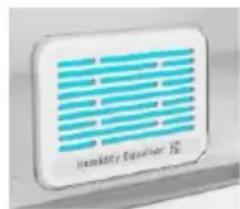
TEXHOJIOHNA ALWAYS FRESH (ecn HMeetc)HHHOBaIuHOHnaTexHOJIOH Hoover,IO3BOJIaHuaJIyUHe ndoJIbIe coXpaHrTb npOdyKTbI, KaK B XOJOIDJIbHKe, TaK N B MOpO3HJbHOJ KaMepe.
Always Fresh cnocobCTByeT coxpaHeHHIO pOdyKTOB 3a CyeT B3aHMOdeIcTBnC HX fepeMeHTHOA KTHBHOCTbIO NytEm AKTNBipOBAHN MoLekyI BOdI, BXoJxH BHX COCTAB. TexHoIorna CoXpHaHnA kTbpyTeCA COOTBeTCTBYIOUe KNHKnOH Ha DnCnJIee.
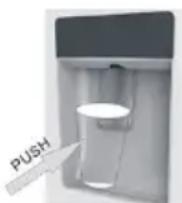
Bo BpeMa npOBepKn 3Hepronotpe6leHnncTeMy Always Fresh cneDyET OTKlnOuTaB.
WATER DISPENSER (eclin NMeetc)
IinneHce np Ia BObI NO3BOJIaET
IOLyatab OXlaJeHHyIO BODy, He OTKpbIBaR DBepb XOIOJbHO KaMepbl.
Ipepe npeb6bIm ucnonb308aHueM
PpeKJe cem nCnoJIb3ObaTb DnCneHceP dIa BObl B nepBbI pa3, n3BNeKeNTe N OuycHTte pe3epByap dIa BObl, paCNOLOKeHHbI BHYTpN XoIoDnIbHOH
KaMepbl.
-ИЗВЕКТЕ ВБЕХ реЗервap ДЯ ВОДblИЗ XOЛODиьно KaMepbl.
-OTKpoIte KpbIshky pe3epByapa IaBbI, 3aTeM OocHNTe pe3epByap IaBbI n 3aJeTne erO TeNIOMbIbHO BDOJ. TuaTeJIbHO onoIOCHnTE.
-Послочнstkn ппкpennte крblшky к pe3epByapyДЯВОдиИВОвь yctaHOBNTe pe3epByapДЯВОдиHa DBePуXOJOIDINbHnka.
- Ounchte onopy dncnepcepa 3a DbepbxOJIOJIbHnka.
3anolhenue pe3ep8yapa bodo
-OTKpoTeMaIeHbKyIO KpbIwky.
-3aONHnTe pe3epByap nla BOdbI nHTbeBOB BODoJ DoJIHHMakc.
-3aKpoTe MaIeHbKyIO KpbIuKy.
Ponb30aHue duCneHcepom
IJIINyHINXOIOHOBBObIOCTOPOXHO HAdaBnBaHTeHaONOpYDnCneHcepacNOMOuBcTaKaHaNNKoHTeHepa.YTo6blOCTaHOBtBBOdy, N3BLeKeNTeCTaKaHn3DnCneHcepa.
CoBeTbI No xpaHeHHIO npOdyKTOB B XoJIoHNJIbHHKe
YdJIaIte ocO6oe BHMaHHe Mcy npbIe:
npnroTOBHeHbIe MChbIe 6IIOda CneJeYETo8aTeNbHO xpaHHTb Ha NOnKe BblIe CbIpOTo Mrca, T06bI NCKJIQUHTb 6aKTePnaIbHoE 3aarp3HeHne.
XpaHNTe cblpIe McONpoDyKbI Ha TapeJIke DOCTaTOUHO 60nbUoro pa3Mepa, YTO6bl n3 Hee HbBbTEkALN MChBle COK; TaKHe ee CneJyET 3aKpbBaTb NnueBOI PnEHKO nn FOBro.
OcTbAJIte BOKpyr npOdyKTOB DOCTaTOUHO MeCTa:
TakIM o6pa3OM XOLOndbI B03dYx 6yTeT UINPKUInpoBaTb B XOLOdNtBHNKe, NOIDepKJBBAH Hn3KoTempeaTypy Bcex KOMNoHErTOB BHyTpH Hero.
3aBopauBaIte npOyKt!: yTo6bI n36eJxatb nepeaun 3aPaxOB u BblcIxahnra PpOdyKTOB, IX cJeNyET pa3dEJIbHO yNakOBbIbTaB nIN pNkPbIBaTb. K tBI N OBOUH He HUXHO 3aBopauBaTb B yNaKOBky.
TOTOBbIe 6JIoDa cIeNyET npaBnIbHO OxJaKaTaB: npEKeJe Yem NOMEuAaTb npNroTOBLeHHe 6JIIO Bo XOJIoNbHnK, NOIOXdIte, NOKa OHO OCTbIeT.3To NO3BOJNT I36ExaTb NOBbIeHnY TempePaTypbI BHyTpN XOJIoNbHnKa.
3aKpbBaIte DBepy!: yTo6bI n36eKaTb yTeuKN XoIoHOrO BO3dYxa, noCTapaNTEcb pexe OTkpBaTb DBepy xoIoDnBnHa. IpexJe cem nomeuaTb KynIeHHbIe npOyKTb I B XoIoDnBnHk, paccOpTnpyIte Hx. OTkpBaIte DBepy TOnbKO dJa TORO, yTo6bI BBHyTb NII NOLOKHTb npOyKTbl.
3oHbI xpaHeHHI IpoOyKTOB B XoJIoDnJIbHHKe
PpOxHaJH3oHa:MeCTo,Ie npOdyKtbl 6yDyT xpaHnTBc4doJIbIe,ecnOn OHn 6yDyT npOxHaJHbIMN. MoIokO,Anu,Inyptbl,ΦpyKTobIe cOK,TBePdbIe cbIpbl,Takne KaK yeIep.OTKpbITble 6aHN N 6yTbIKn 3aIpaBOK dIra caIaTOB,coycOB I BapeHH.
Knpobbl npOyKtbl, Hapmep, cInBouHoe MacNo, MaprapnH, MaIOxupHbIe cPpebl, KUnHapHbIe Knpbl n CmaJeU.
XoJOnHnA 30Ha (ot 0^ +0+5°C): MeTo, rIe cIeNyET xpaHnTb npOdyKtbl, TempepaTypa KOToPbIX DoJIKHs 6bITb Hn3Ko:
Cbipie HnepnroTOBHeHHbe npOyKtbl Heo6xOIMo 063aTeIbHO xpaHnTb BynaKOBke.
-ToTobblc oxlanKeHHbIe npOyKtbl, TaKne KaK roTobblc 6liOda, MChbIe nIpOrn, Mrgkne cbipbl.
-ToTobIe caIaTbI (B TOM YnCle yNaKOBaHHbIe 3eJIeHbIe caIaTbI-CMecn, PncOBtIe I KapToΦeJIbHbIe caIaTbI n T.D).
DecepTbI, HapnpMep, HexnHbIM MaRKn cbIp, DomawHne 6JIOda N OCTaTK N60 TopTbIC KpeOM.
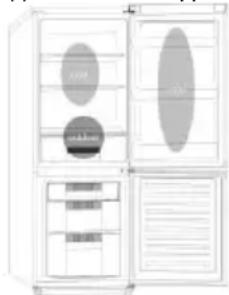
KoHTeHep dIy OBOUeH n OpyKToB:3TO CaMaB BIAJXHAR 3OHA XOJOIDINbHnKa. OBOUH, OpyKtbl, CBExKe IPOdyKTbl dIy cAlaT aN T.D. 3deCb MOxHO XpaHNTb HeMbITbI cAlaT-JaTyK, ZeJIbHbIE TOMaTbl, peDInC N T.D.
PEKOMEHyETCXPAHHTB BCE IPOyKTbI DJIAR CALATOB BYNAKOBE.
PIMMEAHNE. Cbipoe mco, nTuCy u pbl6y cIeNyTe 083aTeNbHO 3aBopauNBAt b O6epTkU xpaHnTb Ha camo HnKHe NOnKe B HnKHe YacTn
XOLOdHbHKa.3To npdeoTbpaTHT KOHTI
nonadaHne cokOB Ha dpyrHe npodKytbI. He cTabbTe B
XOLOdHbHK BocPnAmHeJIOUncEra3bl NIN
HNDKoCTN.
EcnI TemnepaTpa B Mopo3nJbHoi KaMepe nocle 3
yacob pa60tbl bIe -12°C, 3aropaeTc cnHaJIbHbI
HNdkaTOP I 3ByuHT 3ymMep.
XpaHeHne 3amOpOKeHHbIX IpoDyKToB
YnaKOBaHHbIe npOdyKbI, npEiBapntelbHO 3aMopOxHeHbIe B npOMblJeHHbIX ycNoBHX, CLeyET XpaHnTB B COOTBeTcTBn C HCTpyKzmaN Ix npOn3BOdNTeJIe DJIa PpO3IbHbIX OTdeHEn.
YTo6bI Do6ntbcra HaHnyuWero KaueCTBa npOdyKTOB, DOCTnHyTOro npOn3BOaNTeJeM 3aMOpOKeHHbIX npOdyKTOB, INoDpeRKnBaBwEroCRA peAIn3aTopOM npOdyKTOB nITaHna, CNeDyET NOMHTcLeDyUoJee
- NomeuTe nakeTb B MOp03nIbHnK KaK MoXHo 6bICTpee noCte nx npno6peTeHna.
2.He npebbwaIte cpoKxpaHEnn («IcnoJb3ObaTbdo...》,《Cpok roJHOCTN》), yka3aHHbe Ha ynaKOBke.
O6paTnTecbBcepbHcHyoClyK6y.
YTNJIIN3AUNCTAPOIbITOBOI TEXHNIKNI
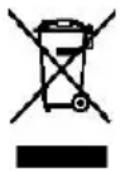
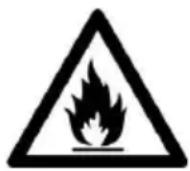
AnHHbI 3JIeKTPponpnpOp MapKnpoBaH B COOTBETCTBnC INpeKTHBOE C 2012/19/EU o6 OTXoJax 3JIeKTPnuueckoro n 3JIeKTPoHnHO O6OpydoBaHnA (WEEE).
WEEE (OTXOdbI 3JIeKTPnueckoro 6bIITOBORO
obOpyIOBaHn) COePkaT 3aRpa3HIOUne BeuecTBa (KOToPbIe MOrYt OKa3bIBaTb OTpnuCaTeNbHOe
BO3DeiCTBnE Ha OKpyKaIOUy OpeDu) N 6a3oBBle
KOMNoHEhTbI (KOToPbIe MOrYt NCNoJb3OBAbTaCn
NobTOpHo). Heo6xOdmo o6ecneuHTb CneuaNaIbHyIO
6bpa60TKy WEEE, 4TO6bI NaIeKgAunM Obpa3OM
ydaIInb N yTuIN3nPoBaTb BCE 3aRpa3HIOUne
BeueCTBa, a TaKHe I3BLeuB IN NobTOpho
NCIOlb3OBAbT Bce MaTePnaJIbl.
ФИЗЧЕСКЕ ЛИЦА мOrут ИграТВ ВАЖHyО рОЛВ TOM, YTO6bl WEEE He CTaHOBuINcB npO6JIeMoI dIЯ OKрУжAoUSeI cpeIbI; Heo6xOДиMо CLEДОВaTb HECKOLbKIM 6a3OBbIM npaBnlaM:
c WEEE He cIeIyET oBpaAaTbCra, KaK C 6bITOBbIMN OTXoJAMN.
WEEE cneyuET cdaabaT ha COOTBeCTBvUOuIe nyHKtblc6opa OTxODOB, ynpabJIeMbIe MyHUNpIaNITetAmnNII 3aperncTpnpoBaHHbIMN KOMpaHnAMy.BoMHORHX CTpaHAX BO3MOKeH pIeM KpyhBIX WEEE HaDomy y NOb3OBAteNei.
Bo MHornx CTpaHax npn npno6peTeHHN HOBo 6bIToBOy TEXHNKMOxHcDaTb CTapUO npOdaBcy, KOtOpbI O6a3An 6ecnlaTHO pInHrTb ee B NopraKe «OHa 3a ONDY), ecn o6OpuyoBaHne aHaIOnuHoro Tnna nMeeT Te Ke yHKun, YTO n NoCTabJIeMeoe o6OpuyoBaHne.
COOTBeTCTBHe
HaheHenm MapKnpoBk Hn DaHnoe n3dneMbI NOTBePckDaemero COOTBeTCTBHe BcEMpeBaHTbIM EBponeckm Tpe6oBaHnM No6eOncocTh, 3paBOoxpaHeHIO OxpaHeOKpykaOuSe Cpebl, DeNCTBYIOUMB3aKHOdaTeNbCTBe OTHCNTelbHO DaHHoro n3dJIIna.
HOOVER HOOVER GROUP S.R.L.
Via Privata Eden Fumagalli
20861 Brugherio Milan Italy
