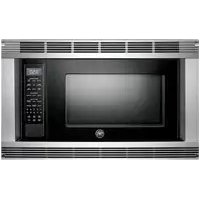
MO30STANE - Microwave Oven BERTAZZONI - Free user manual and instructions
Find the device manual for free MO30STANE BERTAZZONI in PDF.


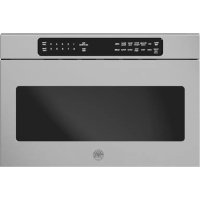
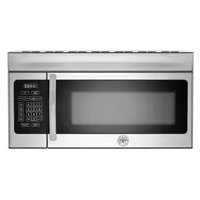
| Product type | Microwave oven |
| Brand | Bertazzoni |
| Model | MO30STANE |
| External dimensions | 61 x 34 x 49 cm (24 x 13 3/8 x 19 1/4 in) |
| Cavity dimensions | 44 x 26.7 x 47.3 cm (17 3/8 x 10 1/2 x 18 5/8 in) |
| Capacity | 56.6 L (2.0 ft³) |
| Net weight | 20.9 kg (46 lb) |
| Microwave power | 1100 W (output) |
| Power supply | 120 V ~ 60 Hz, 15 A, single phase |
| Operating frequency | 2450 MHz |
| Turntable | Diameter 40.6 cm (16 in), removable and dishwasher safe |
| Power levels | 11 levels (0% to 100%) |
| Timer | Up to 99 min 99 sec |
| Clock | 12-hour cycle |
| Automatic functions | Cooking sensor (popcorn, reheating, potatoes, vegetables, rice, ground meat, poultry, fish, frozen dishes), breakfast, lunch, 15 minute recipes, pantry, beverages, super and automatic defrost, keep warm |
| Additional functions | Add minute, quick start, multi-sequence cooking (up to 4), child lock, demo mode, language selection (French, English, Spanish) and weight units (lb/kg) |
| Safety | Door lock (two-step), grounding required, automatic stop when door opened, interference protection |
| Cavity material | Paint, easy to clean |
| Waveguide | Mica cover, do not remove, clean with damp cloth |
| Warranty | 1 year limited (parts and labor) |
| Customer service (France) | 800 561 7265 |
Frequently Asked Questions - MO30STANE BERTAZZONI
User questions about MO30STANE BERTAZZONI
0 question about this device. Answer the ones you know or ask your own.
Ask a new question about this device
Download the instructions for your Microwave Oven in PDF format for free! Find your manual MO30STANE - BERTAZZONI and take your electronic device back in hand. On this page are published all the documents necessary for the use of your device. MO30STANE by BERTAZZONI.
USER MANUAL MO30STANE BERTAZZONI
FOR CUSTOMER ASSISTANCE
ASSISTANCE A LA CLIENTÉLE
CUSTOMER SERVICE
SERVICEÀLACLIENTÉLE
English Anglais / Spanish Espagnol (866) 905-0010
French Frangois (800) 561-7625
1503 South Coast Drive
Suite 320
Costa Mesa CA 92626
PRECAUTIONS TO AVOID POSSIBLE EXPOSURE TO EXCESSIVE MICROWAVE ENERGY
MESURES POUR ÉVITER UNE EXPOSITION POSSIBLE À UNE ÉNERGIE MICRO-ONDE EXCESSIVE
- Do not attempt to operate this oven with the door open since open-door operation can result in harmful exposure to microwave energy. It is important not to defeat or tamper with the safety interlocks.
- Do not place any object between the oven front face and the door or allow soil or cleaner residue to accumulate on sealing surfaces.
- Do not operate the oven if it is damaged. It is particularly important that the oven door close properly and that there is no damage to the: (1) door (bent), (2) hinges and latches (broken or loosened), (3) door seals and sealing surfaces.
The oven should not be adjusted or repaired by anyone except properly qualified service personnel.
IMPORTANT SAFETY INSTRUCTIONS 3
INSTALLATION INSTRUCTIONS 4-5
INFORMATION YOU NEED TO KNOW 6-7
About Your Oven 6
About Utensils and Coverings 6
About Microwave Cooking. 6
About Food 7
About Safety 7
PART NAMES. 8
CONTROL PANEL 8
BEFORE OPERATING. 9
Before Operating 9
To Set The Clock 9
Stop/Clear 9
MANUAL OPERATION 9
SENSOR COOKING 10
Sensor Cooking Chart 10-11
MENU OPTIONS 12-17
Breakfast and Lunch. 12
Breakfast Chart 12
Lunch Chart 13
15 Minute Recipes 13-14
From The Pantry Recipes. 15
Defrost 16
Super Defrost Chart. 16
Auto Defrost Chart 17
Beverage 17
Beverage Chart. 17
OTHER CONVENIENT FEATURES 18-20
KeepWarm 18
Multiple Sequence Cooking 18
More or Less Time Adjustment 18
HELP 18
Start 19
Timer/Clock. 19
Help (on the display) 19
Demonstration Mode 20
Add A Minute. 20
CLEANING AND CARE 20
Exterior 20
Door. 20
Touch Control Panel 20
Interior. 20
Waveguide Cover 20
Odor Removal. 20
Turntable/Turntable Support 20
SPECIFICATIONS 21
SERVICECALLCHECK 21
ASSISTANCE A LA CLIENTÉLE...INTÉRIEUR DE LA COUVERTURE
MESURES POUR ÉVITER UNE EXPOSITION POSSIBLE À UNE ÉNERGIE MICRO-ONDE EXCESSIVE...INTÉRIEUR DE LA COUVERTURE
TABLE DES MATIÈRES 1
GARANTIE LIMITEE D'UN AN 24
IMPORTANT CONSIGES DE SECURITÉ 25
DIRECTIVES D'INSTALLATION 26-27
CE QUE VOUS DEVEZ SAVOIR 27-29
Stop/Clear (Arret/Annulation) 31
FONCTIONNEMENT MANUEL 31-32
SENSOR COOKING (CAPTEUR CUISSON) 32-34
MENU OPTIONS (OPTIONS DU REPAS) 34-41
From The Pantry (De I'Cellier) 38-39
Beverage (Boissons) 41
For any warranty information and service request, contact us:
In USA: https://us.bertazzoni.com/more/support
In Canada: https://ca.bertazzoni.com/more/support
IMPORTANT SAFETY INSTRUCTIONS
When using electrical appliances basic safety precautions should be followed, including the following:
WARNING - To reduce the risk of burns, electric shock, fire, injury to persons or exposure to excessive microwave energy:
- READ ALL INSTRUCTIONS BEFORE USING THE APPLIANCE.
- Read and follow the specific "PRECAUTIONS TO AVOID POSSIBLE EXPOSURE TO EXCESSIVE MICROWAVE ENERGY" on inside front cover.
- This appliance must be grounded. Connect only to properly grounded outlet. See "GROUNDING INSTRUCTIONS" on page 5.
- Install or locate this appliance only in accordance with the provided installation instructions.
- Some products such as whole eggs and sealed containers—for example, closed glass jars—are able to explode and should not be heated in this oven.
- Use this appliance only for its intended use as described in this manual. Do not use corrosive chemicals or vapors in this appliance. This type of oven is specifically designed to heat, cook or dry food. It is not designed for industrial or laboratory use.
- HOT CONTENTS CAN CAUSE SEVERE BURNS. DO NOT ALLOW CHILDREN TO USE THE MICROWAVE OVEN. Use caution when removing hot items.
- Do not operate this appliance if it has a damaged cord or plug, if it is not working properly or if it has been damaged or dropped.
- This appliance should be serviced only by qualified service personnel. Contact nearest Bertazzoni Authorized Servicer for examination, repair or adjustment.
- Do not cover or block any openings on the appliance.
- Do not store or use this appliance outdoors. Do not use this product near water—for example, near a kitchen sink, in a wet basement, near a swimming pool, or similar locations.
- Do not immerse cord or plug in water.
- Keep cord away from heated surfaces.
- Do not let cord hang over edge of table or counter.
-
See door surface cleaning instructions on page 20.
-
To reduce the risk of fire in the oven cavity:
-
Do not overcook food. Carefully attend to appliance when paper, plastic or other combustible materials are placed inside the oven to facilitate cooking.
- Remove wire twist-ties from paper or plastic bags before placing bag in oven.
- If materials inside the oven ignite, keep oven door closed, turn oven off and disconnect the power cord or shut off power at the fuse or circuit breaker panel.
-
Do not use the cavity for storage purposes. Do not leave paper products, cooking utensils or food in the cavity when not in use.
-
Liquids, such as water, coffee or tea are able to be overheated beyond the boiling point without appearing to be boiling. Visible bubbling or boiling when the container is removed from the microwave oven is not always present. THIS COULD RESULT IN VERY HOT LIQUIDS SUDDENLY BOILING OVER WHEN A SPOON OR OTHER UTENSIL IS INSERTED INTO THE LIQUID. To reduce the risk of injury to persons:
-
Do not overheat the liquid.
- Stir the liquid both before and halfway through heating it.
- Do not use straight-sided containers with narrow necks. Use a wide-mouthed container.
After heating, allow the container to stand in the microwave oven at least for 20 seconds before removing the container. -
Use extreme care when inserting a spoon or other utensil into the container.
-
If the oven is installed as a built-in, observe the following instructions:
-
Do not mount over a sink.
-
Do not store anything directly on top of the appliance surface when the appliance is in operation.
-
If the oven light fails, consult a Bertazzoni Authorized Servicer.
SAVE THESE INSTRUCTIONS
INSTALLATION INSTRUCTIONS
UNPACKING AND EXAMINING YOUR OVEN
Remove all packing materials from inside the oven cavity; however, DO NOT REMOVE THE WAVEGUIDE COVER, which is located on the right cavity wall. Read enclosures and SAVE the Operation Manual.
Remove the feature sticker, if there is one, from the outside of the door.

Check the oven for any damage, such as misaligned or bent door, damaged door seals and sealing surfaces, broken or loose door hinges and latches and dents inside the cavity or on the door. If there is any damage, do not operate the oven and contact your dealer or Bertazzoni Authorized Servicer.
CHOOSING A LOCATION FOR YOUR OVEN ON THE COUNTER
You will use the oven frequently so plan its location for ease of use. It's wise, if possible, to have counter space on at least one side of the oven. Allow at least 2 inches on the sides, top and at the rear of the oven for air circulation.
CHOOSING A LOCATION FOR YOUR OVEN IF BUILT-IN
Your microwave oven can be built into a cabinet or wall using a Bertazzoni built-in kit.
Your microwave oven can be built into a cabinet or wall by itself or above any electric wall oven or warming drawer using Bertazzoni's built-in kit FR30 PRO B.
Your microwave oven cannot be built-in above any gas wall oven.

See Figure 1 for proper location when building in above an electric wall oven. Carefully follow both the wall oven installation instructions and Bertazzoni's Built-in Kit instructions. Be sure that the clearance of the floor between the wall oven and the microwave oven is minimum of 2 inches.

Figure 1
The opening in the wall or cabinet must be within the following dimensions:

AHEIGHT:16
3 / 4 to 17^
BWIDTH:24
3/8" to 24 11/16"
C DEPTH : minimum 20"
Outlet should NOT be in the shaded area as indicated on Figure 2. If the dimension of DEPTH (C) is more than 21^ ,the outlet location may be any area on the rear wall.
The floor of the opening should be constructed of plywood strong enough to support the weight of the oven and floor load (about 100 pounds). The floor should be level for proper operation of the oven. Be sure to check the local building code as it may require that the opening be enclosed with sides, ceiling and rear partition. The proper functioning of the oven does not require the enclosure.
The kit includes all the necessary parts and easy-to-follow instructions for installation as well as location of the power supply.
The ease of assembly for these kits will allow installation into an existing wall opening in less than an hour if power outlet is already properly located. All it takes are four steps and a Phillips screw driver.
INSTALLATION INSTRUCTIONS
GROUNDING INSTRUCTIONS
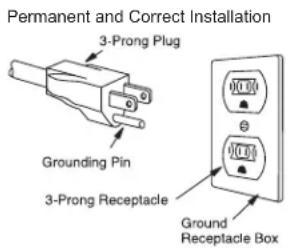
This appliance must be grounded. This oven is equipped with a cord having a grounding wire with a grounding plug. It must be plugged into a wall receptacle that is properly installed and grounded in accordance with the National Electrical Code and local codes and ordinances. In the event of an electrical short circuit, grounding reduces risk of electric shock by providing an escape wire for the electric current.
WARNING - Improper use of the grounding plug can result in a risk of electric shock.
ELECTRICAL REQUIREMENTS
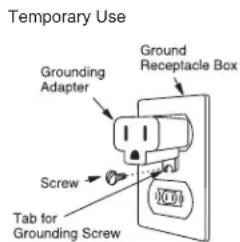
The electrical requirements are a 120 volt 60Hz AC only, 15 amp. or more protected electrical supply. It is recommended that a separate circuit serving only this appliance be provided.
The oven is equipped with a 3-prong grounding plug. It must be plugged into a wall receptacle that is properly installed and grounded. Should you only have a 2-prong outlet, have a qualified electrician install a correct wall receptacle.
A 3-prong adapter may be purchased and used temporarily if local codes allow. Follow package directions.
A short power-supply cord is provided to reduce risk of becoming entangled in or tripping over a longer cord.
EXTENSION CORD
If it is necessary to use an extension cord, use only a 3-wire extension cord that has a 3-blade grounding plug and a 3-slot receptacle that will accept the plug on the microwave oven. The marked rating of the extension cord should be AC 115-120 volt, 15 amp. or more.
Be careful not to drape the cord over the countertop or table where it can be pulled on by children or tripped over accidentally.
NOTES:
- If you have any questions about the grounding or electrical instructions, consult a qualified electrician or service person.
- Neither Bertazzoni nor the dealer can accept any liability for damage to the oven or personal injury resulting from failure to observe the correct electrical connection procedures.
RADIO OR TV INTERFERENCE
Should there be any interference caused by the microwave oven to your radio or TV, check that the microwave oven is on a different electrical circuit, relocate the radio or TV as far away from the oven as feasible or check position and signal of receiving antenna.
INFORMATION YOU NEED TO KNOW
ABOUT YOUR OVEN
This Operation Manual is valuable. Read it carefully and always save it for reference.
NEVER use the oven without the turntable and support nor turn the turntable over so that a large dish could be placed in the oven. The turntable will turn both clockwise and counterclockwise.
ALWAYS have food in the oven when it is on to absorb the microwave energy.
When using the oven at power levels below 100% , you may hear the magnetron cycling on and off. It is normal for the exterior of the oven to be warm to the touch when cooking or reheating.
Condensation is a normal part of microwave cooking. Room humidity and the moisture in food will influence the amount of moisture that condenses in the oven. Generally, covered foods will not cause as much condensation as uncovered ones. Vents on the oven back must not be blocked.
The oven is for food preparation only. It should not be used to dry clothes or newspapers.
- Your oven is rated 1100 watts by using the IEC Test Procedure.
- In using recipes or package directions, check food a minute or two before the minimum time and add time accordingly.
ABOUT UTENSILS AND COVERINGS
It is not necessary to buy all new cookware. Many pieces already in your kitchen can be used successfully in your new microwave oven. Make sure the utensil does not touch the interior walls during cooking.
Use these utensils for safe microwave cooking and reheating:
- glass ceramic (Pyroceram ®), such as Corningware®.
- heat-resistant glass (Pyrex ®)
- microwave-safe plastics
- paper plates
- microwave-safe pottery, stoneware and porcelain
- browning dish (Do not exceed recommended preheating time. Follow manufacturer's directions.)
These items can be used for short time reheating of foods that have little fat or sugar in them:
- wood, straw, wicker
DO NOT USE
- metal pans and bakeware
- dishes with metallic trim
- non-heat-resistant glass
- non-microwave-safe plastics (margarine tubs)
recycled paper products - brown paper bags
food storage bags
metal twist-ties
Should you wish to check if a dish is safe for microwaving, place the empty dish in the oven and microwave on HIGH for
30 seconds. A dish which becomes very hot should not be used.
The following coverings are ideal:
- Paper towels are good for covering foods for reheating and absorbing fat while cooking bacon.
- Wax paper can be used for cooking and reheating.
- Plastic wrap that is specially marked for microwave use can be used for cooking and reheating. DO NOT allow plastic wrap to touch food. Vent so steam can escape.
- Lids that are microwave-safe are a good choice because heat is kept near the food to hasten cooking.
- Oven cooking bags are good for large meats or foods that need tenderizing. DO NOT use metal twist ties. Remember to slit bag so steam can escape.
How to use aluminum foil in your microwave oven:
- Small flat pieces of aluminum foil placed smoothly on the food can be used to shield areas that are either defrosting or cooking too quickly.
- Foil should not come closer than one inch to any surface of the oven.
Should you have questions about utensils or coverings, check a good microwave cookbook or follow recipe suggestions.
ACCESSORIES There are many microwave accessories available for purchase. Evaluate carefully before you purchase so that they meet your needs. A microwave-safe thermometer will assist you in determining correct doneness and assure you that foods have been cooked to safe temperatures. Bertazzoni is not responsible for any damage to the oven when accessories are used.
ABOUT MICROWAVE COOKING
- Arrange food carefully. Place thickest areas towards outside of dish.
- Watch cooking time. Cook for the shortest amount of time indicated and add more as needed. Food severely overcooked can smoke or ignite.
- Cover foods while cooking. Check recipe or cookbook for suggestions: paper towels, wax paper, microwave plastic wrap or a lid. Covers prevent spattering and help foods to cook evenly.
- Shield with small flat pieces of aluminum foil any thin areas of meat or poultry to prevent overcooking before dense, thick areas are cooked thoroughly.
- Stir foods from outside to center of dish once or twice during cooking, if possible.
- Turn foods over once during microwaving to speed cooking of such foods as chicken and hamburgers. Large items like roasts must be turned over at least once.
- Rearrange foods such as meatballs halfway through cooking both from top to bottom and from the center of the dish to the outside.
- Add standing time. Remove food from oven and stir, if possible. Cover for standing time which allows the food to finish cooking without overcooking.
INFORMATION YOU NEED TO KNOW
- Check for doneness. Look for signs indicating that cooking temperatures have been reached.
DONENESS SIGNS INCLUDE:
- Food steams throughout, not just at edge.
- Center bottom of dish is very hot to the touch.
- Poultry thigh joints move easily.
- Meat and poultry show no pinkness.
- Fish is opaque and flakes easily with a fork.
ABOUT FOOD
| FOOD DO DON'T | ||
| EGGS, SAUSAG-ES, NUTS, SEEDS, FRUITS & VEGETA-BLES | ·Puncture egg yolks before cooking to prevent "explosion". ·Pierce skins of potatoes, apples, squash, hot dogs and sausages so that steam escapes. | ·Cook eggs in shells. ·Reheat whole eggs. ·Dry nuts or seeds in shells. |
| POPCORN | ·Use specially bagged popcorn for the microwave oven. ·Listen while popping corn for the popping to slow to 1 or 2 seconds or use special POPCORN pad. | ·Pop popcorn in regular brown bags or glass bowls. ·Exceed maximum time on popcorn package. |
| BABY FOOD | ·Transfer baby food to small dish and heat carefully, stirring often. Check temperature before serving. ·Put nipples on bottles after heating and shake thoroughly. "Wrist" test before feeding. | ·Heat disposable bottles. ·Heat bottles with nipples on. ·Heat baby food in original jars. |
| GENERAL | ·Cut baked goods with filling after heating to release steam and avoid burns. ·Stir liquids briskly before and after heating to avoid "eruption". ·Use deep bowl, when cooking liquids or cereals, to prevent boilovers. | ·Heat or cook in closed glass jars or air tight containers. ·Can in the microwave as harmful bacteria may not be destroyed. ·Deep fat fry. ·Dry wood, gourds, herbs or wet papers. |
ABOUT SAFETY
- Check foods to see that they are cooked to the United States Department of Agriculture's recommended temperatures.
| TEMP FOOD | |
| 160° | for fresh pork, ground meat, boneless white poultry, fish, seafood, egg dishes and frozen prepared food. |
| 165° | for leftover, ready-to-reheat refrigerated, and deli and carry-out “fresh” food. |
| 170°F white meat of poultry. | |
| 180°F dark meat of poultry. | |
- To test for doneness, insert a meat thermometer in a thick or dense area away from fat or bone. NEVER leave the thermometer in the food during cooking, unless it is approved for microwave oven use.
- ALWAYS use potholders to prevent burns when handling utensils that are in contact with hot food. Enough heat from the food can transfer through utensils to cause skin burns.
- Avoid steam burns by directing steam away from the face and hands. Slowly lift the farthest edge of a dish's covering and carefully open popcorn and oven cooking bags away from the face.
- Stay near the oven while it's in use and check cooking progress frequently so that there is no chance of overcooking food.
- NEVER use the cavity for storing cookbooks or other items.
- Select, store and handle food carefully to preserve its high quality and minimize the spread of foodborne bacteria.
- Keep waveguide cover clean. Food residue can cause arcing and/or fires.
- Use care when removing items from the oven so that the utensil, your clothes or accessories do not touch the safety door latches.
PART NAMES
- One touch door open button. Push to open door.
- Oven door with see-through window
- Safety door latches. The oven will not operate unless the door is securely closed.
- Door hinges
- Door seals and sealing surfaces
- Turntable motor shaft
- Removable turntable support. Carefully place the turntable support in the center of the oven floor.
- Removable turntable. Place the turntable on the turntable support securely. The turntable will rotate clockwise or counterclockwise. Only remove for cleaning.
- Ventilation openings (Rear)
- Oven light. It will light when oven is operating or door is open.
- Waveguide cover: DO NOT REMOVE.
- Auto-Touch control panel
- Interactive display: 99 minutes, 99 seconds
- Menu Options menu label
- Name plate
CONTROL PANEL
Number next to the control panel illustration indicates pages on which there are feature descriptions and usage information.

The two-line, Interactive Display spells out operating steps and shows cooking hints. When HELP is lighted in the display, touch the HELP pad to read a specific hint which may assist you.
BEFORE OPERATING
BEFORE OPERATING
- Before operating your new microwave oven make sure you read and understand this operation manual completely. Before the oven can be used, follow these procedures:
- Plug in the oven. Close the door. The oven display will show welcome PRESS CLEAR AND PRESS CLOCK.
- Touch the STOP/CLEAR pad. will appear.
- Set clock.
TO SET THE CLOCK
This is a 12 hour clock. If you attempt to enter an incorrect clock time, ERROR will appear in the display. Touch the STOP/CLEAR pad and re-enter the time.
Suppose you want to enter the correct time of day 12:30 (A.M. or P.M.).
PROCEDURE
- Touch TIMER/CLOCK pad and number 2.
- Enter the correct time of day touching the numbers in sequence
- Touch TIMER/CLOCK pad again.
- If the electrical power supply to your microwave oven should be interrupted, the display will intermittently show WELCOME PRESS CLEAR AND PRESS CLOCK after the power is reinstated. If this occurs during cooking, the program will be erased. The time of day will also be erased. Simply touch STOP/CLEAR pad and reset the clock for the correct time of day.
STOP/CLEAR
Touch the STOP/CLEAR pad to:
- Erase if you make a mistake during programming.
- Cancel timer.
- Stop the oven temporarily during cooking.
- Return the time of day to the display.
- Cancel a program during cooking, touch twice.
UNLOCKDOOR
The microwave oven is equipped with a safety feature requiring a two-step procedure to open the door once a cooking sequence is initiated. To open the door after a cooking sequence has been initiated, please follow this two-step procedure:
- On the keypad, touch Unlock DOOR.
- Press the push button to open the door.
NOTE: If the push button is not pressed to open the door within approximately 10 seconds of touching the UNLOCK DOOR pad, the door will re-lock and the two-step procedure must be restarted.
See the 'Help' section on page 18 for information on how to override the Unlock Door Function.
MANUAL OPERATION
TIME COOKING
Your oven can be programmed for 99 minutes and 99 seconds (99.99). Always enter the seconds after the minutes, even if they are both zeros.
- Suppose you want to cook for 5 minutes at 100% .
PROCEDURE
- Enter cooking time.
- Touch START.
TO SET POWER LEVEL
There are eleven preset power levels.
Using lower power levels increases the cooking time which is recommended for foods such as cheese, milk and long slow cooking of meats. Consult cookbook or recipes for specific recommendations.
Touch Power Level pad number of time for desired power
Approx. % of Power
Common words for Power Levels
Power Level x 1 100% High
Power Level x 2 90%
Power Level x 3 80%
Power Level x 4 70% Medium High
Power Level x 5 60%
Power Level x 6 50% Medium
Power Level x 7 40%
Power Level x 8 30% Med Low/Defrost
Power Level × 920%
Power Level x 10 10% Low
Power Level x 11 0%
Suppose you want to defrost for 5 minutes at 30% .
PROCEDURE
- Enter defrosting time.
- Touch POWER LEVEL pad eight times or hold down until the desired power appears. Touch START.
- When the defrost time is complete, a long tone will sound and END will appear in the display.
MANUAL DEFROST
If the food that you wish to defrost is not listed on the SUPER DEFROST or AUTO DEFROST Chart or is above or below the limits in the "Amount" column on the SUPER DEFROST or AUTO DEFROST Charts (page 16), you need to defrost manually.
You can defrost any frozen food, either raw or previously cooked, by using Power Level 3. Follow the exact 4-step procedure found under TO SET POWER LEVEL. Estimate defrosting time and press POWER LEVEL eight times for 30% power.
SENSOR COOKING
Bertazzoni's Sensor is a semi-conductor device that detects the vapor (moisture and humidity) emitted from the food as it heats. The sensor adjusts the cooking times and power level for various foods and quantities.
USING SENSOR SETTINGS:
- After oven is plugged in, wait 2 minutes before using Sensor Cooking.
- Be sure the exterior of the cooking container and the interior of the oven are dry. Wipe off any moisture with a dry cloth or paper towel.
- The oven works with foods at normal storage temperature. For example, popcorn would be at room temperature.
- Any Sensor Cooking selection can be programmed with MORE or LESS TIME ADJUSTMENT. See page 18.
- More or less food than the quantity listed in the chart should be cooked following the guidelines in any microwave cookbook.
- During the first part of Sensor Cooking, the food name will appear on the display. Do not open the oven door or touch STOP/CLEAR during this part of the cooking cycle. The measurement of vapor will be interrupted. If this occurs, an error message will appear. To continue cooking, touch the STOP/CLEAR pad and cook manually.
- When the sensor detects the vapor emitted from the food, remainder of cooking time will appear. The door may be opened when remaining cooking time appears on the display. At this time, you may stir or season food, as desired.
- If the sensor does not detect vapor properly when popping popcorn, the oven will turn off, and the correct time of day will be displayed. If the sensor does not detect vapor properly when cooking other foods, ERROR will be displayed, and the oven will turn off.
- Check food for temperature or doneness after cooking. If food is not completely cooked, enter additional cooking time manually. Do not press SENSOR COOK again as food may overcook.
- Each food has a cooking hint. Touch HELP pad when the HELP indicator is lighted in the display.
COVERING FOODS:
Some foods work best when covered. Use the cover recommended in the Sensor Cooking chart for these foods.
- Casserole lid.
- Plastic wrap: Use plastic wrap recommended for microwave cooking. Cover dish loosely; allow approximately 1/2 inch to remain uncovered to allow steam to escape. Plastic wrap should not touch food.
- Wax paper: Cover dish completely; fold excess wrap under dish to secure. If dish is wider than paper, overlap two pieces at least one inch to cover.
Be careful when removing any covering to allow steam to escape away from you.
EXAMPLE:
You can cook many foods by simply selecting the food and touching START. You don't need to calculate cooking time or power level.
- Suppose you want to reheat canned chili.
PROCEDURE
- Touch REHEAT pad.
- Touch START.
- When the sensor detects the vapor emitted from the food, the remainder of cooking time will appear.
NOTE:
The FRESH VEGETABLES and POULTRY settings have 2 choices. Follow directions in the Interactive Display to choose desired option.
SENSOR COOKING CHART
| FOOD AMOUNT PROCEDURE | ||
| POPCORN | 1 package | Use only popcorn packaged for microwave oven use. Try several brands to decide which you like the best. Do not try to pop unpopped kernels. |
| 1.5 - 3.5 oz bag | Touch POPCORN pad and then START. | |
| SENSOR REHEAT | 4 - 36 oz | Place in dish or casserole slightly larger than amount to be reheated. Flatten, if possible. Cover with lid, plastic wrap or wax paper. Use covers such as plastic wrap or lids with larger quantities of more dense foods such as stews. After reheating, stir well, if possible. Foods should be very hot. If not, continue to heat with variable power and time. After stirring, re-cover and allow to stand 2 to 3 minutes. |
| BAKED POTATOES | 1 - 8 med. | Pierce. Place on paper-towel-lined turntable. After cooking, remove from oven, wrap in aluminum foil and let stand 5 to 10 minutes. |
SENSOR COOKING
SENSOR COOKING CHART
| FOOD AMOUNT PROCEDURE | |||
| FRESH VEGETABLES: SOFT Broccoli .25 - 2.0 lb Brussels sprouts .25 - 2.0 lb Cabbage .25 - 2.0 lb Cauliflower (flowerets) .25 - 2.0 lb Cauliflower (whole) 1 med. Spinach .25 - 1.0 lb Zucchini .25 - 2.0 lb Baked apples 2 - 4 med. | Wash and place in casserole. Add no water if vegetables have just been washed. Cover with lid for tender vegetables. Use plastic wrap for tender-crisp vegetables. Touch FRESH VEGETABLES, number 1 and START pads. After cooking, stir, if possible. Let stand, covered, for 2 to 5 minutes. | ||
| FRESH VEGETABLES: HARD Carrots, sliced | .25 - 1.5 lb | Place in casserole. Add 1-4 tbsp water. Cover with lid for tender vegetables. Use plastic wrap cover for tender-crisp vegetables. Touch FRESH VEGETABLES, number 2 and START pads. After cooking, stir, if possible. Let stand, covered, for 2 to 5 minutes. | |
| Corn on the cob | 2 - 4 | ||
| Green beans .25 - 1.5 lb | |||
| Winter squash: diced halves | .25 - 1.5 lb | ||
| 1 - 2 | |||
| RICE | .5 - 2.0 cups | Place rice into a deep casserole dish and add double quantity of water. Cover with lid or plastic wrap. After cooking, stir, cover and let stand 3 to 5 minutes or until all liquid has been absorbed. | |
| Rice | Water Size of Casserole dish | ||
| .5 cups | 1 cup | ||
| 1 cup | 2 cups | ||
| 1.5 cups | 3 cups | ||
| 2 cups | 4 cups | ||
| GROUND MEAT | .25 - 2.0 lb | Use this setting to cook ground beef or turkey as patties or in a casserole to be added to other ingredients. Place patties on a microwave-safe rack and cover with wax paper. Place ground meat in a casserole and cover with wax paper or plastic wrap. When oven stops, turn patties over or stir meat in casserole to break up large pieces. Re-cover and touch START. After cooking, let stand, covered, for 2 to 3 minutes. | |
| POULTRY: BONELESS | .5 - 2.0 lb | Use boneless breast of chicken or turkey. Cover with vented plastic wrap. Touch POULTRY, number 1 and START pads. When oven stops, rearrange. Re-cover and touch START pad. After cooking, let stand, covered, 3 to 5 minutes. Poultry should be 160°F. | |
| POULTRY: BONE-IN | .5 - 3.0 lb | Arrange pieces with meatiest portions toward outside of glass dish or microwave safe rack. Cover with vented plastic wrap. Touch POULTRY, number 2 and START pads. After cooking, let stand, covered, 3 to 5 minutes. Dark meat should be 180°F and white meat should be 170°F. | |
| FISH/SEAFOOD | .25 - 2.0 lb | Arrange in ring around shallow glass dish (roll fillet with edges underneath). Cover with vented plastic wrap. After cooking, let stand, covered for 3 minutes. | |
| FROZEN ENTRIES | 6 - 17 oz | Use this pad for frozen convenience foods. It will give satisfactory results for most brands. You may wish to try several and choose your favorite. Remove package from outer wrapping and follow package directions for covering. After cooking, let stand, covered, for 1 to 3 minutes. | |
| FROZEN SNACKS | 3 - 8 oz | Use for frozen French fries, cheese sticks, appetizers etc. Remove from outer package. Follow package directions for how to wrap or cover. Be careful when removing from the oven as snack may be very hot. | |
| FROZEN VEGETABLES | .25 - 1.5 lb | Add no water. Cover with lid or plastic wrap. After cooking, stir and let stand, covered, for 3 minutes. | |
MENU OPTIONS
Your oven has 6 convenience pads to assist with meal preparation. There are some foods in the BREAKFAST, LUNCH and 15 MINUTE RECIPES that use the sensor. See the SENSOR COOKING information on page 10. For foods not using the sensor, follow the directions in the Interactive Display to enter quantity.
BREAKFAST AND LUNCH
BREAKFAST and LUNCH are for cooking and heating popular foods that take a short amount of time.
- Suppose you want to use BREAKFAST to cook 2 servings of hot cereal.
PROCEDURE
- Touch BREAKFAST pad.
- Select desired BREAKFAST setting by touching desired number pad. (Ex: Touch number 3 pad to select hot cereal.)
- Enter quantity. (Ex: Touch number 2 pad for servings.)
- Touch START. After cooking, follow the directions in the display.
NOTE:
- Heat rolls/muffins setting has 2 choices. Follow directions in the Interactive Display to choose desired option.
- BREAKFAST can be programmed with MORE or LESS TIME ADJUSTMENT. Touch the POWER LEVEL pad once or twice before touching START pad. See page 18.
Each food has a cooking hint. Touch HELP pad when the HELP indicator is lighted in the display. - Should you attempt to enter more or less than the allowed amount, an error message will appear in the display.
- More or less than the quantity listed in the chart should be cooked following the guidelines in any microwave book.
- The final cooking result will vary according to the food condition (e.g. initial temperature, shape, quality, covering). Check food for temperature after cooking. If additional time is needed, continue to cook manually.
BREAKFAST CHART
- It is not necessary to enter amount or number.
| FOOD AMOUNT PROCEDURE | ||
| 1. Scrambled Eggs | 1-9 eggs | For each egg, use 1 teaspoon of butter or margarine and 1 tablespoon of milk. Place butter or margarine in dish, measuring cup or casserole large enough for the egg to expand. Mix egg and milk together. Pour on to butter or margarine in dish. Place in oven and program. When audible signals are heard, stir egg mixture moving the cooked portion to the center of the dish and uncooked portion to the outside. After cooking, stir and let stand, covered, until set. Note that eggs will be slightly undercooked when removed from the oven. |
| 2. Bacon | 2-6 slices | Place bacon on paper plate, lined with paper towel. Bacon should not extend over the rim of plate. Cover with another paper towel. Allow bacon to stand a few minutes after removing from the oven to complete the cooking. |
| 3. Hot Cereal 1-6 servings | servings | Use individual packets or bulk cereal in your favorite variety: oatmeal, oat bran, cream of wheat, farina or wheatena. Follow package directions for the correct amount of water or milk. To prevent boilovers, it is very important to choose a large container because microwave cooking of cereal causes high boiling. When oven stops, stir and touch START. After cooking, stir and let stand, covered, for 2 minutes. |
| 4. Heat Rolls/ muffins | 1-10 pcs | Use this pad to warm rolls, muffins, biscuits, bagels etc. Large items should be considered as 2 or 3 regular size. Arrange on plate: cover with paper towel. |
| Fresh | To warm fresh rolls and muffins, touch BREAKFAST, number 4 pad, and touch number 1 pad. Then enter desired quantity and touch START pad. For refrigerated rolls or muffins, it may be necessary to double the entered amount to ensure the proper serving temperature. For example, enter quantity of 2 for 1 refrigerated muffin. | |
| Frozen | For frozen rolls and muffins, touch BREAKFAST pad and touch number 4 pad, then number 2 pad. Then enter desired quantity and touch START pad. | |
| 5. Frozen Breakfast* | 1 (3-6 oz) | This setting works well for frozen breakfast entrees, pancakes, waffles, burritos etc. Follow manufacturer's directions for how to prepare for microwaving. Allow to stand 1 or 2 minutes after cooking. |
MENU OPTIONS
LUNCH CHART
- It is not necessary to enter amount or number.
FOOD AMOUNT PROCEDURE
| 1. Meal in a cup* | 1 cup | This setting is ideal for individual portions of canned food packed in a small microwaveable container, usually 6 to 8 ounces. Remove inner metal lid and replace outer microwaveable lid. After cooking, stir food and allow to stand 1 or 2 minutes. |
| 2. Hot Dog in Buns* | 1 - 4 pieces Place hot dog in bun. Wrap each with paper towel or napkin. | |
| 3. Soup | 1 - 8 cups | Place in bowl or casserole. Cover with lid or plastic wrap. At end, stir, re-cover and let stand 1 to 3 minutes. |
| 4. Microwave Pizza | 1 (6 -8 oz) | Use for frozen microwave pizza. Remove from package and unwrap. Follow package directions for use of package and/or silver crisping disk. |
| 5. Frozen Sandwich* | 1 (3 - 6 oz) | Use for frozen microwaveable sandwiches. Remove from package and follow directions for placing in the oven. |
15 MINUTE RECIPES and FROM THE PANTRY 15 MINUTE RECIPES
(Recipes serve 6)
15 MINUTE RECIPES and FROM THE PANTRY each offer five simple-to-prepare but great tasting meals. Follow the specific directions on the Recipe Card and in the Interactive Display.
- Suppose you want to use 15 MINUTE RECIPES to cook Saucy Chicken.
PROCEDURE
- Touch 15 MINUTE RECIPES pad.
- Select desired setting by touching desired number pad. (Ex: Touch number 1 pad to select Saucy Chicken.)
- Follow the Recipe Card for ingredients and instructions. SEE RECIPE CARD PRESS START. Touch START.
- When the oven stops, the display will show the instruction number on the Recipe Card. Follow the instructions on the Recipe Card. CHECK RECIPE INSTRUCTION 2. Touch START.
- At end, the display will show the instruction number on the Recipe Card. Follow the instructions on the Recipe Card. CHECK REICPE INSTRUCTIONS 3
1. SAUCY CHICKEN
- Place in a 3 quart casserole:
1 tablespoon oil
12 pound mushrooms, sliced
1 onion, chopped
1 tablespoon minced garlic
Stir well and cover. Touch 15 MINUTE RECIPES, number
1 to select SAUCY CHICKEN and then touch START.
- Blend together:
8 ounces reduced fat cream cheese, softened
14 cup milk
Stir into the cream cheese mixture:
1 10-ounce package of frozen peas
2 cups cooked thinly sliced chicken breast
Salt and pepper to taste
At pause, drain liquid from mushrooms, etc. Add cream cheese/peas/chicken mixture and stir together.
Re-cover. Touch START.
- At end, stir in 1 cup shredded Monterey Jack cheese.
Serve on top of baked potatoes or cooked pasta.
MENU OPTIONS
15 MINUTE RECIPES (Recipes serve 6)
Serve over cooked rice or nacho chips. Top with 2 cups shredded Monterey Jack or Cheddar cheese.
2. HAWAIIAN PORK
- Place in a 3 quart casserole:
1 tablespoon oil
1 pound boneless pork loin, cut into 1-inch strips, seasoned with salt and pepper
Stir well and cover. Touch 15 MINUTE RECIPES, number
2 to select HAWAIIAN PORK and then touch START.
- Combine well in a large bowl:
1 cup peach or apricot preserves
14 cup barbecue sauce
2 tablespoons soy sauce
2 tablespoons cornstarch
1 cup coarsely chopped onions
At pause, add preserves/barbecue mixture and stir together well.
Re-cover. Touch START.
- At pause, add:
1 8-ounce can sliced water chestnuts, drained
1 green pepper, seeded and cut into 2-inch thin strips
1 red pepper, seeded and cut into 2-inch thin strips
1 20-ounce can pineapple chunks, drained
Stir to combine. Re-cover. Touch START.
- At end, stir again.
Serve on cooked rice.
3. FIESTA CHILI
- Place in a 3 quart casserole:
114 pounds ground turkey
12 cup diced onions
12 cup diced red pepper
Break up turkey and stir in onions and red pepper. Cover.
Touch 15 MINUTE RECIPES, number 3 to select FIESTA
CHILI and then touch START.
- At pause, drain and add to the casserole:
8 ounces chunky salsa
1 11-ounce can of Mexican corn, drained
1 15-ounce can chili with beans
1-3 teaspoons chili powder
Stir together well. Re-cover. Touch START.
- At end, stir well.
4. GLAZED SALMON
- Combine:
14 cup orange juice concentrate
2 tablespoons honey mustard
1 tablespoon grated fresh ginger or 2 teaspoons ground ginger
Place in 7'' x 11" glass casserole:
112 pounds salmon fillet
Drizzle 12 of the orange mixture over top of salmon.
Cover with plastic wrap. Touch 15 MINUTE RECIPES, number 4 to select GLAZED SALMON and then touch START.
- At pause, place around edge of salmon:
3 cups broccoli florets
1 red pepper, cut into thin strips
Drizzle remaining orange mixture over vegetables. Top all with 2 tablespoons toasted sesame seeds. Touch START.
- At end, allow to stand, covered, for 3 to 5 minutes.
Serve with buttered rice, pasta or potatoes garnished with parsley.
5. HEALTHY FRITTATA
- Grease 9" pie plate. Place in it:
12 pound mushrooms, sliced
34 cup chopped onion
1 tablespoon minced garlic
14 pound chopped low-fat smoked sausage
Cover with plastic wrap. Touch 15 MINUTE RECIPES, number 5 to select HEALTHY FRITTATA and then touch START.
- At pause, drain and set aside.
In a medium bowl, combine and stir together well:
3 large eggs
1 / 2 cup nonfat sour cream
1 tablespoon Dijon mustard
1 / 2 teaspoon salt
1% teaspoon pepper
Add and stir together:
1/2 10-ounce package frozen chopped spinach, thawed and squeezed dry
1 cup shredded Swiss cheese
Pour mixture in bowl over top of mushroom/onion/sausage mixture. Mix together carefully.
Do not cover. Touch START.
- At end, remove from oven and allow to stand for 3 to 5 minutes.
Serve with tossed salad and sliced tomatoes for brunch.
MENU OPTIONS
FROM THE PANTRY RECIPES (Recipes serve 6)
1. BEEF WRAPS
- Place in a 2-quart casserole:
1 pound ground beef
Break apart and cover. Touch FROM THE PANTRY, number 1 to select BEEF WRAPS and then touch START.
- At pause, drain fat and break ground beef into small pieces. Add to casserole:
1 10-ounce package frozen chopped spinach, thawed and drained
112 cups salsa
1-3 teaspoons chili powder
Stir together well. Re-cover. Touch START.
- At end, stir well and place in 8 warmed corn tortillas. Top with 1 cup shredded Cheddar cheese.
2. MEXICAN CHICKEN
- Place in layers in a 3-quart casserole:
2 cups instant rice
1 cup prepared fajita sauce mixed with 12 cup chicken broth or bouillon
2 10-ounce packages frozen seasoning mix (onion, pep - pers, parsley and celery)
1 pound boneless chicken breast, cut into 1-inch thin strips
Cover. Touch FROM THE PANTRY, number 2 to select MEXICAN CHICKEN and then touch START.
-
At pause, stir together being sure that chicken strips are separated and mixed into the rice/sauce. Re-cover. Touch START.
-
At end, stir.
Serve with buttered green beans and toasted tortillas.
3. ITALIAN SALAD
- To cook pasta:
Place in 3-quart casserole:
6 cups very hot tap water
Cover. Touch FROM THE PANTRY, number 3 to select ITALIAN SALAD and then touch START.
- At pause, add:
8 ounces tricolored rotini or fusilli pasta
1 teaspoon salad oil
Do not cover. Touch START.
- At end, drain pasta and set aside.
To cook chicken:
Place in greased 9" pie plate:
1 pound boneless chicken breast, cut into 1-inch thin strips
Cover. Touch START.
- At pause, rearrange, moving less done pieces to the outside of the pie plate.
Re-cover. Touch START.
- Drain and set aside.
- To make salad:
Place in large salad bowl:
Cooked rotini or fusilli
Cooked chicken breast
2 tomatoes, cut into eighths
1 / 2 cup sliced black olives
1 cup mozzarella cheese, shredded
14 cup red onion, chopped
3 / 4 - 1 cup oil-vinegar type dressing with pesto
Toss together to coat all pieces.
Serve immediately or chill to serve later. Ideal when served with warm crusty rolls.
4. TUNA MACARONI
- To cook macaroni:
Place in 3-quart casserole:
6 cups very hot tap water
Cover. Touch FROM THE PANTRY, number 4 to select TUNA MACARONI and then touch START.
- At pause, add:
2 cups elbow macaroni
1 teaspoon salad oil
Do not cover. Touch START.
- At end, drain macaroni and set aside in the casserole.
Combine in bowl:
1 can cream of celery soup
1 / 2 cup milk
1 / 2 cup nonfat sour cream
Add to macaroni in casserole:
Soup/milk/sour cream mixture
1 612 -ounce can solid white water packed tuna fish, drained and flaked
1 cup frozen peas
1 cup shredded Cheddar cheese
Salt and pepper to taste
Stir together until well mixed. Cover. Touch START.
- At end, stir again.
Serve with fresh carrot sticks, tossed salad and dinner rolls.
5. GARDEN MEDLEY
- Place in a 2% -quart casserole:
1 pound peeled baking potatoes, cut into eighths and thin - ly sliced
1 1412 -ounce can diced tomatoes
2 teaspoons minced garlic
1 teaspoon thyme leaves
Cover with a lid. Touch FROM THE PANTRY, number 5 to select GARDEN MEDLEY and then touch START.
- At pause, stir well and add:
1 16-ounce package frozen stir fry mixed vegetables
2 cups thinly sliced summer squash
Re-cover. Touch START.
- At end, sprinkle top with 4 ounces shredded Cheddar cheese.
Serve with spinach salad and chilled melon.
MENU OPTIONS
DEFROST
DEFROST automatically defrosts all the foods found in the SUPER DEFROST and AUTO DEFROST CHARTS. Numbers 1-3 are for SUPER DEFROST that defrosts specific foods and weights very rapidly. For these choices, it is not necessary to enter weight.
SUPER DEFROST
SUPER DEFROST rapidly defrosts specific foods and weights found in the SUPER DEFROST Chart below.
- Suppose you want to defrost 1.0 pound boneless poultry.
PROCEDURE
- Touch DEFROST pad.
- Touch the number 2 to select boneless poultry. Touch START.
- The oven will stop so the food can be checked. The display will show: TURNOVER SEPARATE INTO PIECES. Close the door. Touch START.
- After defrost cycle ends, follow the directions: LET STAND 3-5 MINUTES
NOTE:
- To defrost other foods above or below the weights allowed on the SUPER DEFROST and AUTO DEFROST CHARTS, use time and 30% power. See MANUAL DEFROST on page 9.
- Any setting in the DEFROST can be programmed with MORE or LESS TIME ADJUSTMENT. Touch the POWER LEVEL pad once or twice before touching START pad.
- Touch HELP pad when the HELP indicator is lighted in the display for a helpful hint.
- If you attempt to enter more or less than the amount as indicated in the AUTO DEFROST chart, an error message will appear in the display.
SUPER DEFROST CHART *It is not necessary to enter amount.
| FOOD AMOUNT PROCEDURE | ||
| 1. Ground Meat* | 1.0 lb | At pause, turn over, removed any thawed pieces and break remainder apart. At end, let stand, covered, for 3 to 5 minutes. |
| 2. Boneless Poultry* | 1.0 lb | At pause, turn over and separate into pieces. At end, let stand, covered, for 3 to 5 minutes. |
| 3. Bone-in Chicken Pieces* | 2.0 lb At pause, turn over and separate into pieces. At end, let stand, covered, for 3 to 5 minutes. | |
NOTE FOR SUPER DEFROST: SUPER DEFROST provides just enough defrosting that the foods can be used in recipes or for cooking. There will be some ice crystals remaining.
AUTO DEFROST
- Suppose you want to defrost a 2.0 pound steak, using AUTO DEFROST.
PROCEDURE
- Touch DEFROST pad.
- Select desired DEFROST setting by touching the desired number pad. (Ex: Touch the number 5 to select steak.)
-
Enter weight. (Ex: Touch number pads 2 and 0 for 2.0 lb.) Touch START.
-
The oven will stop so the food can be checked. The display will show: TURNOO OVER COVER EDGES
- After the 1st stage, open the door. Turn steak over and shield any warm portions. Close the door. Touch START.
- After the 2nd stage, open the door. Shield any warm portions. Close the door. Touch START.
- After defrost cycle ends, follow the directions.
MENU OPTIONS
AUTO DEFROST CHART
FOOD AMOUNT PROCEDURE
| 4. Ground Meat | .5 - 3.0 lb Remove any thawed pieces after each stage. Let stand, covered, for 5 to 10 minutes. | |
| 5. Steaks, Chops or Fish | .5 - 4.0 lb After each stage, rearrange and if there are warm or thawed portions, shield with small flat pieces of aluminum foil. Remove any meat or fish that is almost defrosted. Let stand, covered, for 10 to 20 minutes. | |
| 6. Chicken Pieces | .5 - 3.0 lb After each stage, rearrange pieces or remove portions should they become warm or thawed. Let stand, covered, for 10 to 20 minutes. | |
| 7. Roast | 2.0 - 4.0 lb Start defrosting with fat side down. After each stage, turn roast over and shield the warm portions with aluminum foil. Let stand, covered, for 30 to 60 minutes. | |
| 8. Casserole Soup | 1 - 8 cups After audible signal, stir if possible. At end, stir well and let stand, covered, for 5 to 10 minutes. | |
NOTE FOR AUTO DEFROST: Check foods when oven signals. After final stage, small sections may still be icy. Let stand to continue thawing. Do not defrost until all ice crystals are thawed.
Shielding prevents cooking from occurring before the center of the food is defrosted. Use small smooth strips of aluminum foil to cover edges and thinner sections of the food.
BEVERAGE
BEVERAGE enables you to reheat coffee or tea to a more suitable drinking temperature or to make instant coffee or tea.
- Suppose you want to reheat 2 cups of coffee.
PROCEDURE
- Touch BEVERAGE pad.
- Select desired Beverage setting by touching desired number pad. (Ex: Touch number 2 pad to reheat coffee.)
- Enter quantity by touching same number pad 2 repeatedly. (Ex: Touch number 2 pad 4 times.)
- Touch START pad.
NOTE:
BEVERAGE can be programmed with MORE or LESS TIME ADJUSTMENT. Touch the POWER LEVEL pad once or twice after selecting the amount. See page 18.
- Touch HELP pad when the HELP indicator is lighted in the display, for a helpful hint.
- More or less than the quantity listed in the chart should be made following the guidelines in any microwave book.
BEVERAGE CHART
FOOD AMOUNT PROCEDURE
| 1. To make coffee or tea | 1 - 4 cups | Use this setting for heating COLD TAP WATER to a temperature somewhat below the boiling point to make instant coffee or tea. Touch number 1 pad for 1 cup increase per touch. Stir liquid briskly before and after heating to avoid "eruption". |
| 2. To reheat beverage | .5 - 2.0 cups | This setting is good for restoring cooled beverage to a better drinking temperature. Touch number 2 pad for a 0.5 cup increase per touch. Stir after heating. |
OTHER CONVENIENT FEATURES
KEEP WARM
KEEP WARM allows you to keep food warm up to 30 minutes. Touch the KEEP WARM pad and enter the appropriate time (up to 30 minutes). You can also program KEEP WARM with manual cooking to keep food warm continuously after cooking.
DIRECT USE
- Suppose you want to keep a cup of soup warm for 15 minutes.
PROCEDURE
- Touch KEEP WARM pad. Enter desired time.
- Touch START pad.
The oven will start automatically. The display will show 15.00 and count down. KEEP WARM will appear in the display every 10 seconds.
WITH MANUAL COOKING
- Suppose you want to cook a cup of soup for 2 minutes at 70% and keep the soup warm for 15 minutes.
PROCEDURE
- Enter cooking time.
- Touch POWER LEVEL pad 4 times for 70% power.
- Touch KEEP WARM pad. Enter desired time.
- Touch START pad.
The operation will start. When the cooking time is complete, a long tone will sound and KEEP WARM will start. KEEP WARM will appear in the display every 10 seconds and count down for 15 minutes.
NOTE:
- To use KEEP WARM after previous cooking has ended, touch KEEP WARM pad within 3 minutes after cooking, closing the door or touching the STOP/CLEAR pad.
- KEEP WARM cannot be programmed with SPECIAL FEATURES.
MULTIPLE SEQUENCE COOKING
Your oven can be programmed for up to 4 automatic cooking sequences, switching from one power level setting to another automatically.
Sometimes cooking directions tell you to start on one power level and then change to a different power level. Your oven can do this automatically.
- Suppose you want to cook roast beef for 5 minutes at 100% and then continue to cook for 30 minutes at 50% .
PROCEDURE
- First enter cooking time. Then touch POWER LEVEL pad for 100% power.
-
Then enter second cooking time. Touch POWER LEVEL pad 6 times for 50% power.
-
Touch START pad.
NOTE:
- If 100% is selected as the final sequence, it is not necessary to touch the POWER LEVEL pad.
- If you wish to know power level, simply touch the POWER LEVEL pad. As long as your finger is touching the POWER LEVEL pad, the power level will be displayed.
- KEEP WARM can be programmed continuously even if 4 cooking sequences have been set.
MORE OR LESS TIME ADJUSTMENT
Should you discover that you like any of the SENSOR COOKING or MENU OPTIONS (except for 15 Minute Recipes and From The Pantry) settings slightly more done, touch the POWER LEVEL pad twice before touching the START pad.
The display will show MORE.
Should you discover that you like any of the SENSOR COOKING or MENU OPTIONS (except for 15 Minute Recipes and From The Pantry) settings slightly less done, touch the POWER LEVEL pad twice before touching the START pad.
The display will show LESS.
HELP
HELP provides 5 features which make using your oven easy because specific instructions are provided in the interactive display.
1. CHILD LOCK
The CHILD LOCK prevents unwanted oven operation such as by small children. The oven can be set so that the control panel is deactivated or locked. To set, touch HELP, the number 1 and START pads. Should a pad be touched, CHILD LOCK will appear in the display.
To cancel, touch HELP and STOP/CLEAR pads.
2. UNLOCK DOOR OVERRIDE
To disable this safety feature, access the Settings menu by touching the HELP keypad. Select UNLOCK DOOR (option 6) and follow the instructions on the display.
3. AUDIBLE SIGNAL ELIMINATION
If you wish to have the oven operate with no audible signals, touch HELP, the number 2 and STOP/CLEAR pads.
To cancel and restore the audible signal, touch HELP, the number 2 and START pads.
OTHER CONVENIENT FEATURES
4. AUTO START
If you wish to program your oven to begin cooking automatically at a designated time of day, follow this procedure:
- Suppose you want to start cooking a stew for 20 minutes on 50% at 4:30. Before setting, check to make sure the clock is showing the correct time of day.
PROCEDURE
- Touch HELP pad.
- Touch number 3 pad.
- Enter the start time.
- Touch TIMER / CLOCK pad.
- Enter cooking program.
- Touch START pad.
NOTE:
- AUTO START can be used for manual cooking if clock is set.
- If the oven door is opened after programming AUTO START, it is necessary to touch the START pad for AUTO START time to appear in the readout so that the oven will automatically begin programmed cooking at the chosen AUTO START time.
- Be sure to choose foods that can be left in the oven safely until the AUTO START time. Acorn or butternut squash are often a good choice.
- If you wish to know the time of day, simply touch the CLOCK pad. As long as your finger is touching the CLOCK pad, the time of day will be displayed.
5. LANGUAGE / WEIGHT SELECTION
The oven comes set for English and U.S. Customary Unitpounds. To change, touch HELP and the number 4 pads. Continue to touch the number 4 pad until your choice is selected from the table below. Then, touch START pad.
Touch number 4 pad for language and standard of weight.
| Number Language | Standard of Weight | Display | |||
| Once English LBS ENGLISH | LB | ||||
| Twice | English | KG | ENGLISH | KG | |
| 3 times Spanish | LBS ESPANOL | LB | |||
| 4 times Spanish | KG | ESPANOL | KG | ||
| 5 times French | LBS FRANCAIS | LB | |||
| 6 times French | KG | FRANCAIS | KG | ||
6. CLOCK ON / OFF
To turn the clock display off, touch HELP, the number 5 and STOP/CLEAR.
To cancel and restore the clock, touch HELP, the number 5 and START.
START
START allows you to cook at 100% power by touching the START pad continuously. START is ideal for melting cheese, bringing milk to just below boiling etc. The maximum cooking time is 3 minutes.
- Suppose you want to melt cheese on a piece of toast.
PROCEDURE
- Continuously touch START pad. The cooking time will begin counting up.
- When the cheese is melted to desired degree, remove finger from START pad. Oven stops immediately.
NOTE:
- Note time it takes for frequently used foods and program that time in the future.
- Touch START pad within 3 minutes after cooking, opening and closing the door or touching the STOP/CLEAR pad.
- TOUCH ON can only be used 3 times in a row. If more times are needed, open and close door or touch STOP/CLEAR pad.
TIMER/CLOCK
- Suppose you want to time a 3-minute long distance phone call.
PROCEDURE
- Touch TIMER/CLOCK.
- Touch number 1 pad.
- Enter time.
- Touch TIMER/CLOCK pad. The Timer will count down.
- After the timer cycle ends, the display will indicate the following message: TIPER IS FINISHED
NOTE:
To cancel the Timer during programming, touch the STOP/ CLEAR pad.
HELP
Each setting of SENSOR COOKING provides a cooking hint. If you wish to check, touch HELP pad whenever HELP is lighted in the Interactive Display for these hints.
DEMONSTRATION MODE
OTHER CONVENIENT FEATURES
To demonstrate, touch TIMER/CLOCK, the number 0 and then touch START pad and hold for 3 seconds. DEMO ON DURING DEMO NO OVEN POWER will appear in the display. Cooking operations and specific special features can now be demonstrated with no power in the oven. For example, touch ADD A MINUTE pad and the display will show LDD and count down quickly to END.
To cancel, touch TIMER/CLOCK, then the number 0 and STOP/CLEAR pads. If easier, unplug the oven from the electrical outlet and replug.
ADDAMINUTE
Add A Minute allows you to cook for a minute at 100% by simply touching the ADD A MINUTE pad. You can also extend cooking time in multiples of 1 minute by repeatedly touching the ADD A MINUTE pad during manual cooking.
- Suppose you want to heat a cup of soup for one minute.
PROCEDURE
- Touch ADD A MINUTE pad.
NOTE:
- To use ADD A MINUTE, touch pad within 1 minute after cooking, closing the door, touching the STOP/CLEAR pad or during cooking.
- ADD A MINUTE cannot be used with SENSOR COOKING, Menu Options or Keep Warm.
CLEANING AND CARE
Disconnect the power cord before cleaning or leave the door open to inactivate the oven during cleaning.
EXTERIOR
The outside surface is painted. Clean the outside with mild soap and water; rinse and dry with a soft cloth. Do not use any type of household or abrasive cleaner.
DOOR
Wipe the window on both sides with a damp cloth to remove any spills or spatters. Metal parts will be easier to maintain if wiped frequently with a damp cloth.
Cleaners which are marked specifically for use with stainless steel may be used for stainless steel model. Follow package directions exactly. Avoid the use of any harsh cleaners or one not marked for stainless steel use as they may stain, streak or dull the door surface.
TOUCH CONTROL PANEL
Care should be taken in cleaning the touch control panel. If the control panel becomes soiled, open the oven door before cleaning. Wipe the panel with a cloth dampened slightly with water only. Dry with a soft cloth. Do not scrub or use any sort of chemical cleaners. Close door and touch STOP/CLEAR pad.
INTERIOR
Cleaning is easy because little heat is generated to the interior surfaces; therefore, there is no baking and setting of spills or spattering. To clean the interior surfaces, wipe with a soft cloth and warm water. DO NOT USE ABRASIVE OR HARSH CLEANERS OR SCOURING PADS. For heavier soil, use baking soda or a mild soap; rinse thoroughly with hot water. NEVER SPRAY OVEN CLEANERS DIRECTLY ONTO ANY PART OF THE OVEN.
WAVEGUIDE COVER
The waveguide cover is made from mica so requires special care. Keep the waveguide cover clean to assure good oven performance. Carefully wipe with a damp cloth any food spatters from the surface of the cover immediately after they occur. Built-up splashes may overheat and cause smoke or possibly catch fire. Do not remove the waveguide cover.
ODOR REMOVAL
Occasionally, a cooking odor may remain in the oven. To remove, combine 1 cup water, grated peel and juice of 1 lemon and several whole cloves in a 2-cup glass measuring cup. Boil for several minutes using 100% power. Allow to set in oven until cool. Wipe interior with a soft cloth.
TURNTABLE/TURNTABLE SUPPORT
The turntable and turntable support can be removed for easy cleaning. Wash them in mild, sudsy water; for stubborn stains use a mild cleanser and non abrasive scouring sponge. They are also dishwasher-proof. Use upper rack of dishwasher. The turntable motor shaft is not sealed, so excess water or spills should be wiped up immediately.
SPECIFICATIONS
MO30STANE/24
AC Line Voltage: Single phase 120V, 60Hz, AC only
The International Electrotechnical Commission's standardized method for measuring output wattage. This test method is widely recognized.
AC Power Required: 1500 watts, 13.0 amps.
Internal capacity is calculated by measuring maximum width, depth and height. Actual capacity for holding food is less.
Output Power:* 1100 watts
In compliance with standards set by:
Frequency: 2450 MHz
FCC - Federal Communications Commission Authorized.
Outside Dimensions: 24^ (W)× 13^3 / 8^ (H)× 19^1 / 4^ (D)
DHHS - Complies with Department of Health and Human Services (DHHS) rule, CFR, Title 21, Chapter I, Subchapter J.
Cavity Dimensions: 17^3 / 8''(W) × 10^1 / 2''(H) × 18^5 / 8''(D)
Oven Capacity:** 2.0 Cu.Ft.

This symbol on the nameplate means the product is listed by Underwriters Laboratories, Inc. for use in USA or Canada.
Cooking Uniformity: Turntable system, diameter 16"
Weight: Approx. 46 lb
SERVICE CALL CHECK
Please check the following before calling for service:
Place one cup of water in a glass measuring cup in the oven and close the door securely.
Operate the oven for one minute at HIGH 100% .
- Does the oven light come on? YES NO
- Does the cooling fan work? YES _ NO _ (Put your hand over the rear ventilating openings.)
- Does the turntable rotate? YES NO (It is normal for the turntable to turn in either direction.)
- Is the water in the oven warm? YES NO
If "NO" is the answer to any of the above questions, please check electrical outlet, fuse and/or circuit breaker. If they are functioning properly, CONTACT YOUR NEAREST BERTAZZONI AUTHORIZED SERVICER.
A microwave oven should never be serviced by a "do-it-yourself" repair person.
NOTE: If time appearing in the display is counting down very rapidly, check Demonstration Mode on page 20 and cancel.

FOUR À MICRO-ONDES ENCASTRÉ
MANUEL D'UTILISATION ET D'ENTRETIEN
Modèle MO30STANE/24
GARANTIE LIMITEE D'UN AN
FONCTIONNEMENT MANUEL
TEMPS DE CUISSON
FONCTIONNEMENT MANUEL
DECONGÉLATION MANUELLE
MENU OPTIONS (OPTIONS DU REPAS)
MENU OPTIONS (OPTIONS DU REPAS)
TABLEEAU DE PETIT-DEJEUNER
MENU OPTIONS (OPTIONS DU REPAS)
15 MINUTE RECIPES et FROM THE PANTRY
MENU OPTIONS (OPTIONS DU REPAS)
15 RECETTES MINUTE (La recette donne 6 portions) continué
3. CHILI FIESTA
MENU OPTIONS (OPTIONS DU REPAS)
DE L'CELLIER La recette donne 6 portions.
1. TORTILLA AU BOEUF
MENU OPTIONS (OPTIONS DU REPAS)
DE L'CELLIER La recette donne 6 portions.
4. TUNA MACARONI
- Pour cuire les macaronis:
MENU OPTIONS (OPTIONS DU REPAS)
DECONGELATION
MENU OPTIONS (OPTIONS DU REPAS)
TABLEAU DE DÉCONGELATION AUTOMATIQUE
AVEC CUISSON EN MODE MANUEL
Alimentation requise : 1 500 W 13,0 A
FCC - Federal Communications Commission authorized.
- FOR CUSTOMER ASSISTANCE
- ASSISTANCE A LA CLIENTÉLE
- CUSTOMER SERVICE
- PRECAUTIONS TO AVOID POSSIBLE EXPOSURE TO EXCESSIVE MICROWAVE ENERGY
- MESURES POUR ÉVITER UNE EXPOSITION POSSIBLE À UNE ÉNERGIE MICRO-ONDE EXCESSIVE
- IMPORTANT SAFETY INSTRUCTIONS
- SAVE THESE INSTRUCTIONS
- INSTALLATION INSTRUCTIONS
- UNPACKING AND EXAMINING YOUR OVEN
- CHOOSING A LOCATION FOR YOUR OVEN ON THE COUNTER
- CHOOSING A LOCATION FOR YOUR OVEN IF BUILT-IN
- GROUNDING INSTRUCTIONS
- EXTENSION CORD
- NOTES:
- RADIO OR TV INTERFERENCE
- INFORMATION YOU NEED TO KNOW
- ABOUT YOUR OVEN
- ABOUT UTENSILS AND COVERINGS
- ABOUT MICROWAVE COOKING
- DONENESS SIGNS INCLUDE:
- ABOUT FOOD
- ABOUT SAFETY
- PART NAMES
- CONTROL PANEL
- BEFORE OPERATING
- TO SET THE CLOCK
- PROCEDURE
- STOP/CLEAR
- UNLOCKDOOR
- MANUAL OPERATION
- TIME COOKING
- TO SET POWER LEVEL
- MANUAL DEFROST
- SENSOR COOKING
- USING SENSOR SETTINGS:
- COVERING FOODS:
- EXAMPLE:
- NOTE:
- SENSOR COOKING CHART
- MENU OPTIONS
- BREAKFAST AND LUNCH
- BREAKFAST CHART
- LUNCH CHART
- MINUTE RECIPES and FROM THE PANTRY 15 MINUTE RECIPES
- SAUCY CHICKEN
- MINUTE RECIPES (Recipes serve 6)
- HAWAIIAN PORK
- FIESTA CHILI
- GLAZED SALMON
- HEALTHY FRITTATA
- FROM THE PANTRY RECIPES (Recipes serve 6)
- BEEF WRAPS
- MEXICAN CHICKEN
- ITALIAN SALAD
- TUNA MACARONI
- GARDEN MEDLEY
- DEFROST
- SUPER DEFROST
- AUTO DEFROST
- AUTO DEFROST CHART
- BEVERAGE
- BEVERAGE CHART
- OTHER CONVENIENT FEATURES
- KEEP WARM
- DIRECT USE
- WITH MANUAL COOKING
- MULTIPLE SEQUENCE COOKING
- MORE OR LESS TIME ADJUSTMENT
- HELP
- CHILD LOCK
- UNLOCK DOOR OVERRIDE
- AUDIBLE SIGNAL ELIMINATION
- AUTO START
- LANGUAGE / WEIGHT SELECTION
- CLOCK ON / OFF
- START
- TIMER/CLOCK
- DEMONSTRATION MODE
- ADDAMINUTE
- CLEANING AND CARE
- EXTERIOR
- DOOR
- TOUCH CONTROL PANEL
- INTERIOR
- WAVEGUIDE COVER
- ODOR REMOVAL
- TURNTABLE/TURNTABLE SUPPORT
- SPECIFICATIONS
- MO30STANE/24
- SERVICE CALL CHECK
- MANUEL D'UTILISATION ET D'ENTRETIEN
- GARANTIE LIMITEE D'UN AN
- FONCTIONNEMENT MANUEL
- TEMPS DE CUISSON
- DECONGÉLATION MANUELLE
- MENU OPTIONS (OPTIONS DU REPAS)
- TABLEEAU DE PETIT-DEJEUNER
- MINUTE RECIPES et FROM THE PANTRY
- CHILI FIESTA
- TORTILLA AU BOEUF
- DECONGELATION
- TABLEAU DE DÉCONGELATION AUTOMATIQUE
- AVEC CUISSON EN MODE MANUEL
Brand : BERTAZZONI
Model : MO30STANE
Category : Microwave Oven