Scorpion II - Radio ETON - Free user manual and instructions
Find the device manual for free Scorpion II ETON in PDF.



| Product type | Portable radio with solar panel and crank |
| Brand | Eton |
| Model | Scorpion II |
| Power | Rechargeable lithium battery; charges via micro-USB, solar panel, or crank |
| Estimated battery life | Approximately 15-20 hours of radio listening (depending on volume) |
| Dimensions (approx.) | 15 x 8 x 5 cm |
| Weight (approx.) | 350 g |
| Radio bands | AM, FM, Weather (WB) |
| Speaker | Built-in speaker (mono) |
| Headphone jack | 3.5 mm jack |
| Charging ports | Micro-USB (input); USB-A (output for smartphone) |
| Additional features | LED flashlight, bottle opener, carabiner, adjustable clock (12/24h) |
| Protection rating | IPX4 (splash resistant) |
| Care and cleaning | Clean with a dry cloth; do not use detergents or solvents |
| Safety | Do not expose to rain or prolonged humidity; do not immerse; use between 0°C and 40°C |
| Warranty | Limited warranty: registration required at etoncorp.com |
| Customer service | 1-800-872-2228 (USA); +1-650-903-3866 (international) |
| Box contents | Scorpion II radio, micro-USB cable, user manual |
Frequently Asked Questions - Scorpion II ETON
User questions about Scorpion II ETON
0 question about this device. Answer the ones you know or ask your own.
Ask a new question about this device
Download the instructions for your Radio in PDF format for free! Find your manual Scorpion II - ETON and take your electronic device back in hand. On this page are published all the documents necessary for the use of your device. Scorpion II by ETON.
USER MANUAL Scorpion II ETON
natural_image
Line drawing of a mechanical component with no text or symbolsMEET THE SCORPION II
Thank you for purchasing the Etón Scorpion II. We want you to thoroughly enjoy the use of this product. To take advantage of its many excellent and unique features, we urge you to carefully read the user's manual.
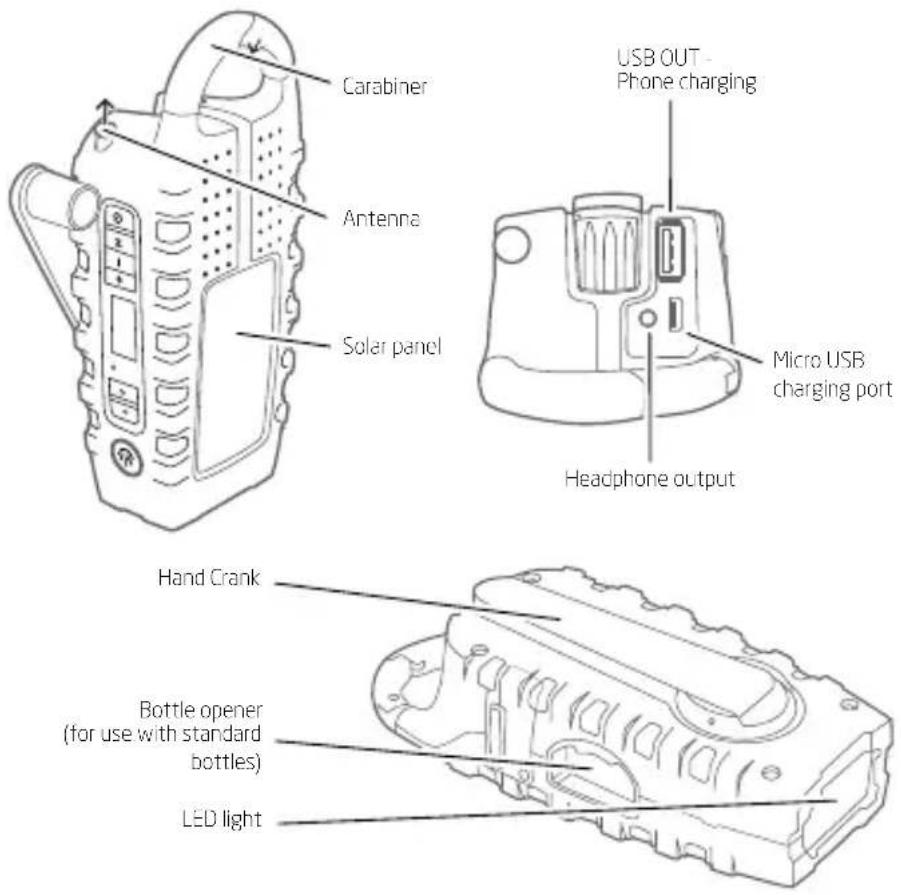
FEATURES:
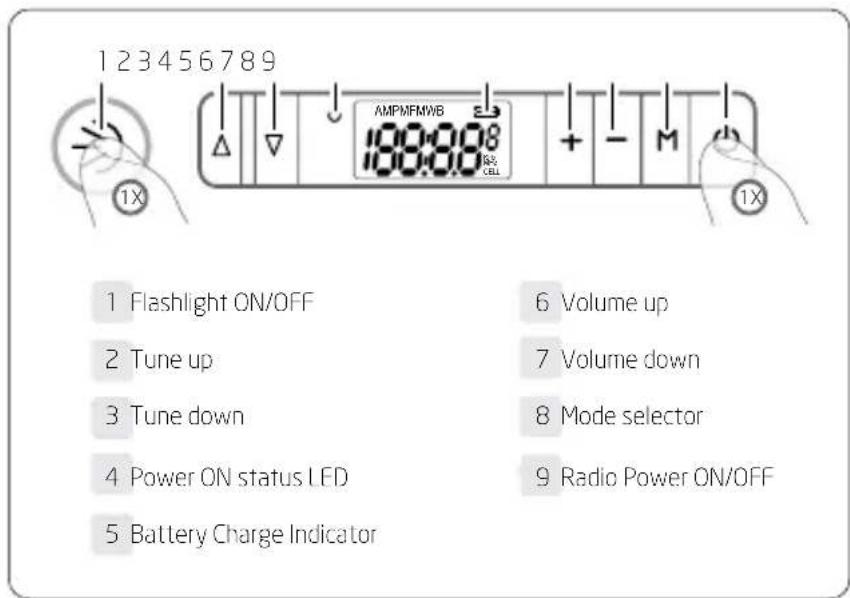
KEY OPERATIONS
POWER
Press POWER button to turn on the unit press again to turn off.
Selecting Mode
Press M button to choose WB, FM or AM listening or cell phone charging mode. Scroll up/down on tuning buttons to tune into your radio station. To select WB station for your area. Scroll up/down tuning buttons until you hear weather information for your area.
VOL ▲/ VOL ▼
Press VOL +/- to increase/decrease volume level, press and hold to speed up adjustment.
TUNING ▲ / TUNING ▼
In [Radio mode], press TUNING ▲/▼ to adjust frequency, press and hold it to auto tune into the next available station.
LIGHT Operation
Press LIGHT button once to turn on the flashlight, press it again to turn off.
CELL Phone Charging
Plug your phone's USB charging cable into the USB out port on the Scorpion II and plug the other end into your phone. Press
and release M button until 'CELL' appears on the screen to start charging. Press M button again to stop charging and re-enter radio mode.
Note: The radio will turn off while you are charging your phone.
EARPHONE JACK
Plug in earphones (not included). A mono signal is sent to both the left and right channels of the headphones.
SETTING THE CLOCK
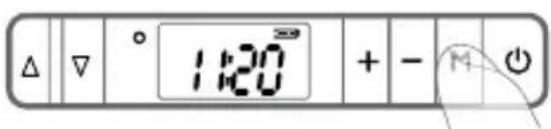
- Press and hold "M" button
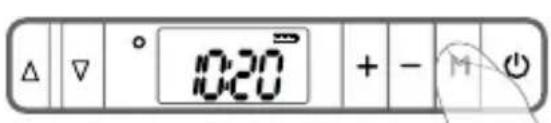
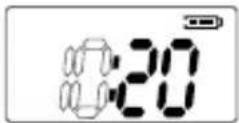
Hours will flash
- Press ▲ to change hour
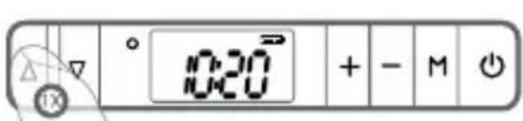
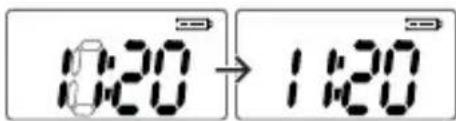
- Toggle to minutes by pressing "M" button
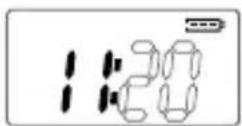
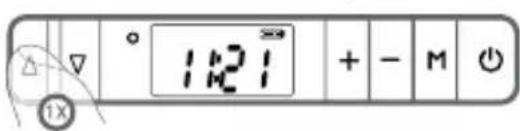
Minutes will flash
- Press ▲ to change minutes
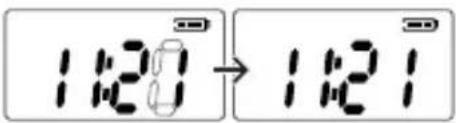
12 HOUR TO 24 HOUR
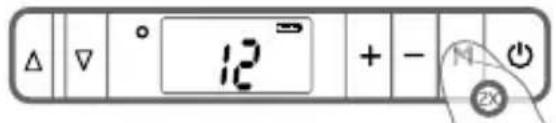
- Press and hold "M" button until the hours digits begin to flash.
- Press and release the "M" button two times, the number "12" will be displayed.
- Press ▲ button to toggle between "12" and "24" hour time mode
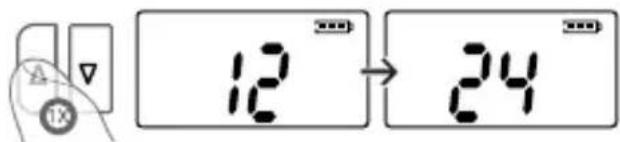
- After 5 seconds, clock will be set.
SCORPION II POWER OPTIONS
800 mAh Lithium Battery
Charge the lithium battery via the included micro-USB cable. Both the solar panel and the crank will automatically charge to the lithium battery.
Solar Charging
When placed in sunlight, it will automatically start charging the lithium battery. Battery indicator on screen will show unit is charging.
Crank Charging
Crank for 4 minutes to get 1 minute of talk time on most smart phones or 10-15 minutes of radio time.
NEED HELP?
Check our website for FAQ's for the SCORPION II.
www.etoncorp.com
OR CONTACT US
Etón Corporation
1015 Corporation Way, Palo Alto, CA 94303, USA
1-800-872-2228 (U.S.)
650-903-3866 (worldwide)
M-F, 8:00AM-4:30PM, Pacific Standard Time
www.etoncorp.com.
WARNING
- Do not expose this appliance to rain or moisture.
- Do not submerge or expose for extended period to water.
- Only operate within specified temperature range (0 °C to 40 °C).
- Unplug immediately if liquid has been spilled or any object has fallen into the apparatus.
- Clean only with a dry cloth. Do not use detergents or chemical solvents as this might damage the finish.
- Unplug and disconnect external antennas during lightning storms.
- Do not remove cover [or back].
• Refer servicing to qualified service personnel.
ENVIRONMENT

Disposal
According to the European Directive 2002/96/EC all electrical and electronic products must be collected separately by a local collection system.
Please act according to your local rules and do not dispose of your old products with your normal household waste.
Please dispose of all types of batteries per your Government, State or Local rules and/or regulations. If you are unsure, please call the appropriate local authority to find out how to dispose of them safely and help protect the environment.
WARRANTY REGISTRATION
To ensure full warranty coverage or product updates, registration of your product should be completed as soon as possible after purchase or receipt.
PLEASE GO TO
http://www.etoncorp.com/productregistration to register your product.
LIMITED WARRANTY
Retain your proof of purchase or the receipt. Limited Warranty information can be viewed at www.etoncorp.com in the Support section.
SERVICE FOR YOUR PRODUCT
To obtain service for your product, we recommend first contacting an Etón service representative at 800-872-2228 US or (650) 903-3866 for problem determination and trouble-shooting. If further service is required, the technical staff will instruct how to proceed based on whether the radio is still under warranty or needs non-warranty service.
WARRANTY
If your product is still in warranty and the Etón service representative determines that warranty service is needed, a return authorization will be issued and instructions for shipment to an authorized warranty repair facility. Do not ship your radio back without obtaining the return authorization number.
NON-WARRANTY
If your product is no longer under warranty and requires service our technical staff will refer you to the nearest repair facility that will be able to best handle the repair.
For service outside of North America, please refer to the distributor information included at time of purchase/receipt.
DÉCOUVREZ LE SCORPION II
OPTIONS D'ALIMENTATION DU SCORPION II
Pile au Lithium 800 mAh
Corporate Headquarters
1015 Corporation Way
Palo Alto, California 94303 USA
tel +1 650-903-3866
tel +1 800-872-2228
fax +1 650-903-3867
www.etoncorp.com


- MEET THE SCORPION II
- KEY OPERATIONS
- POWER
- Selecting Mode
- VOL ▲/ VOL ▼
- TUNING ▲ / TUNING ▼
- LIGHT Operation
- CELL Phone Charging
- EARPHONE JACK
- SETTING THE CLOCK
- Hours will flash
- Minutes will flash
- HOUR TO 24 HOUR
- SCORPION II POWER OPTIONS
- mAh Lithium Battery
- Solar Charging
- Crank Charging
- NEED HELP?
- OR CONTACT US
- WARNING
- ENVIRONMENT
- Disposal
- WARRANTY REGISTRATION
- PLEASE GO TO
- LIMITED WARRANTY
- SERVICE FOR YOUR PRODUCT
- WARRANTY
- NON-WARRANTY
- DÉCOUVREZ LE SCORPION II
- OPTIONS D'ALIMENTATION DU SCORPION II
- Pile au Lithium 800 mAh
Brand : ETON
Model : Scorpion II
Category : Radio