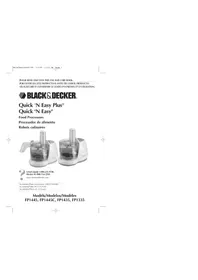
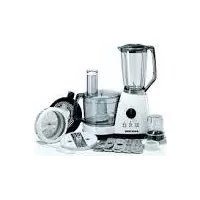
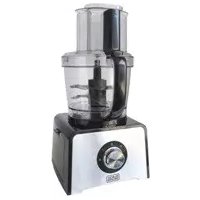
FP1335 - Food Processor BLACK & DECKER - Free user manual and instructions
Find the device manual for free FP1335 BLACK & DECKER in PDF.



| Product type | Food processor |
| Brand | Black & Decker |
| Model | FP1335 |
| Bowl capacity | 1.92 L (8 cups) |
| Maximum power | 350 W (120 V) / 450 W (120 V) depending on version |
| Power supply voltage | 120 V~60 Hz or 220-240 V~50/60 Hz |
| Speeds | 2 speeds (High, Low) + pulse (PULSE) |
| Main functions | Chop, mix, slice, shred |
| Bowl material | Plastic |
| Stainless steel blade | Yes (very sharp) |
| Slicing/shredding disc | Included, reversible (2 sides) |
| Disc stem | Included |
| Pusher | Included |
| Lid type | Lid without feed chute (model FP1335) |
| Safety – Lid lock | Yes (LOCK position) |
| Polarized plug | Yes |
| Maintenance of removable parts | Dishwasher (top rack) |
| Base cleaning | Damp cloth, do not immerse |
| Warranty | 1 year |
| Repairability | Contact an authorized service center |
| Origin | Made in People's Republic of China |
| Dimensions | Not specified in the manual |
| Weight | Not specified in the manual |
Frequently Asked Questions - FP1335 BLACK & DECKER
User questions about FP1335 BLACK & DECKER
0 question about this device. Answer the ones you know or ask your own.
Ask a new question about this device
Download the instructions for your Food Processor in PDF format for free! Find your manual FP1335 - BLACK & DECKER and take your electronic device back in hand. On this page are published all the documents necessary for the use of your device. FP1335 by BLACK & DECKER.
USER MANUAL FP1335 BLACK & DECKER
FP1445Pub1000001798 3/3/05 11:53 AM Page 1
PLEASE READ AND SAVE THIS USE AND CARE BOOK.
POR FAVOR LEA ESTE INSTRUCTIVO ANTES DE USAR EL PRODUCTO.
VEUILLEZ LIRE ET CONSERVER CE GUIDE D'ENTRETIEN ET D'UTILISATION.

BLACK&DECKER
Quick 'N Easy Plus®
Quick 'N Easy®
Food Processors
Accessories/Parts (USA/Canada) 1-800-738-0245
When using electrical appliances, basic safety precautions should always be followed, including the following.
Read all instructions.
Toprotect against risk of electrical shock, do not put base, cord, or plug in water or other liquid.
- Close supervision is necessary when any appliance is used by or near children.
Unplug from outlet when not in use, before putting on or taking off parts, and before cleaning.
- Avoid contacting moving parts.
- Do not operate any appliance with a damaged cord or plug or after the appliance malfunctions or is dropped or damaged in any manner. Return the appliance to the nearest authorized service facility for examination, repair, or electrical or mechanical adjustment. Or, call the appropriate toll-free number listed on the cover of this manual.
The use of attachments not recommended or sold by the appliance manufacturer may cause fire, electric shock, or injury.
Do not use outdoors.
Do not let cord hang over edge of table or counter.
- Keep hands and utensils away from moving blades or discs while processing food to prevent the possibility of severe personal injury or damage to the food processor. A scraper may be used, but it must be used only when the food processor is not running.
Blades are sharp. Handle carefully.
Toreduce the risk of injury, never place cutting blade or discs on base without first putting bowl properly in place.
Be certain cover is securely locked in place before operating appliance.
Never feed food into chute by hand. Always use food pusher.
Do not attempt to defeat the cover interlock mechanism.
Do not use appliance for other than intended use.
POLARIZED PLUG
This appliance has a polarized plug (one blade is wider than the other). To reduce the risk of electric shock, this plug is intended to fit into a polarized outlet only one way. If the plug does not fit fully into the outlet, reverse the plug. If it still does not fit, contact a qualified electrician. Do not attempt to modify the plug in any way
TAMPER-RESISTANT SCREW
Warning : This appliance is equipped with a tamper-resistant screw to prevent removal of the outer cover. To reduce the risk of fire or electric shock, do not attempt to remove the outer cover. There are no user-serviceable parts inside. Repair should be done only by authorized service personnel.
ELECTRICAL CORD
The cord of this appliance was selected to reduce the possibility of tangling in or tripping over a longer cord. If more length is needed, use an extension cord rated no less than 15 amperes. (For 220 volts rated products, use an extension cord rated no less than 6 amperes.) When using an extension cord, do not let it drape over the working area or dangle where someone could accidentally trip over it. Handle cord carefully for longer life; avoid jerking or straining it at outlet and appliance connections.
NOTE: If the power supply cord is damaged, it must be replaced by the manufacturer or its service agent or a similarly qualified person in order to avoid a hazard.
SAVE THESE INSTRUCTIONS.
FP1445Pub1000001798 3/3/05 11:53 AM Page 4
Product may vary slightly from what is illustrated.
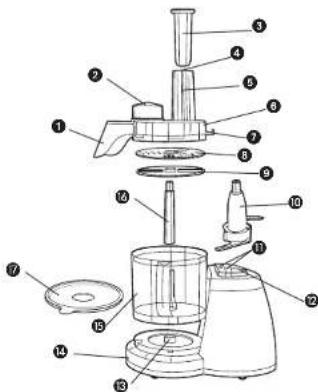
- Continuous flow side chute
Models FP1445, FP1445C, FP1435 (Part# FP1445-01)
+2. Continuous flow stopper,
Models FP1445, FP1445C, FP1435 (Part# FP1445-02)
†3. Food pusher (Part# FP1445-03)
† 4. Food fingers (Part# FP1445-04)
- Food chute
† 6 . Cover with continuous food
Models FP1445, FP1445C, FP1435 (Part# FP1445-05)
Cover without continuous food chute Model FP1335 (Part# FP1335-05)
- Tab
+8.Slice/shred disc (Part#FP1445-10)
+9. Continuous flow discharge disc
Models FP1445, FP1445C, FP1435 (Part# FP1445-06)
†10. Chopping blade (Part# FP1445-07)
-
Hi and Lo speed control
-
Off/Pulse control
-
Center post
-
Base
+15. 8-Cup (1920 ml) container (Part# FP1445-08)
Model's FP1445, 1445C (Part# FP1445-11)
+Consumer replaceable
How to Use
This product is for household use only.
- Before first use, unpack the product and remove packing material. Handle sharp chopping blade and slice/shredd carefully.
W ash all parts except base.
Note: Do not attempt to chop ice in this food processor; it will damage container and dull chopping blade. This unit will not whip cream, beat egg whites to a desirable volume, grind coffee beans or spices with a high oil content, or slice or shred hard-cooked eggs, marshmallows, or soft cheeses.
CONTROLS
HI or LO — When these buttons are pressed, unit runs continuously until OFF button is pressed.
OFF - Processor should always be left in OFF position when unit is not in use. PULSE - PULSE position must be pressed and held for unit to operate. When released, unit will stop. Use PULSE for short processing tasks, such as chopping nuts, raw meats, or vegetables. This lets you check processed results and control the fineness.
Important: For your protection, this unit has an Interlock system. The processor won't operate unless container is properly locked onto base (see illustration on the base). The tab on cover must be correctly locked into the slot on base. Be sure cover is turned fully into slot toward LOCK until you hear it click into place. Do not attempt to operate unit without container and cover correctly locked in place. Be sure base is on a flat, dry, clean surface before you begin processing.
TO SLICE OR SHRED
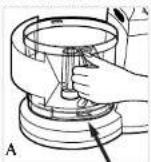
Place container over center post in base with handle at left. Turn container towards base until it drops down into place. Snap container in towards base and be sure the locking tab locks into place (A).
- To process into a serving/mixing bowl using continuous flow food chute (Models FP1445, FP1445C, FP1435), place disc stem onto center post in container (B) and slip the continuous flow discharge disc onto the stem.
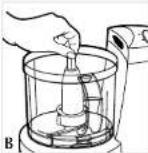
Note: Be sure you have the appropriate side of discharge disc up for leafy or other vegetables. The tabs on the disc should be up for leafy vegetables.
Toprocess directly into included container, place the disc stem onto the center post in the container, then grasp the slice/shredd disc by its hub with the (slice or shredd) up and push it down onto the disc stem.
- Place food chute/cover onto container so that its tab is facing down towards base. Twist food chute/cover in toward base to LOCK until you hear it click into place.
- For models FP1445, FP1445C and FP1435 make sure food stopper is in place. 5. Plug cord into an electrical outlet.
- Fill food chute with food and position the pusher over food.
- Select HI or LO speed, then press down lightly but firmly on food pusher. For pulse control push the PULSE button.
Note: Let processor do the work. Heavy pressure will not speed up operation
8. After processing food, press the control to OFF or release pulse control. Allow disc to stop rotating. Twist food chute/cover toward UNLOCK to remove.
9. Carefully pull slice/shred disc and discharge disc if used, off the stem, remove stem, unlock container by turning it away from its base, and lift container off.
TO USE THE CHOPPING BLADE
- Place container over center post in base with handle at the left. Turn container towards base until it drops down into place. Snap bowl in towards base and be sure locking tab locks into place (A).
- Grasp chopping blade by its center shaft and slide it down onto center post (B).
- Place food chute/cover onto container so that its tab is facing base. Twist food chute/cover in toward base to LOCK until you hear it click into place.
- Plug cord into an electrical outlet.
- Place food into container.
- Press HI, LO or PULSE. When pulsing, hold pulse position for about 2-3 seconds. Check results and repeat for desired consistency. It is better to use several short operations rather than a single long one unless mixing ingredients that require longer processing times.
- After processing food, press control to OFF or release PULSE button. Allow chopping blade to stop rotating. Twist food chute/cover toward UNLOCK to remove cover.
- Grasp blade by its shaft and remove. Unlock container by turning it away from its base, and lift it off. Empty the processed food.
FOOD PROCESSING TIPS
Liquids
- Hot liquids (not boiling) and hot foods can be processed in container.
- Be sure to process small amounts of liquids — 3 cups or less at a time. Larger amounts may leak from container.
Meat
- When using the chopping blade for processing meat, cut the meat into 1 (25.4mm) cubes. Do not put more than 10.5 ounces (300g) of meat into the container at a time.
Food Size, Preparation and Loading
- When using different foods in a recipe, process dry ingredients first and moist ingredients later. This reduces the number of times container must be washed and dried.
- Y ou can use the disc in combination with the chopping blade. Just position chopping blade in bowl and press slice/shredd disc with desired side (slice or shred) down onto hub of chopping blade. Using the 2 parts together can eliminate having to pre-cut foods into cubes — perfect when shredding and chopping cheese such as parmesan to get a finer grated result.
Clogging in the continuous flow side chute (Models FP1445, FP1445C, FP1435)
Occasionally sliced or shredded food may clog in the side chute. Follow these tips to avoid clogging:
- Be sure the stopper is removed entirely when using continuous flow side chute. It is normal for some pieces to fall into processor container.
- Use a large serving bowl to help catch spatter from side chute and turn bowl as it fills to prevent food buildup in the exit chute.
- Be sure to use correct side of discharge disc — for leafy vegetables (lettuce, cabbage, etc.) use tall tab side up; For slicing and shredding other foods, use short tab side up.
- Clip the food fingers inside the food chute to keep food from tilting and help achieve even slices.
- If clogging does occur, never stick anything up chute to try to dislodge food. Shut off and unplug unit. Then unscrew cover/food chute to clear a blockage.
Care and Cleaning
This product contains no user serviceable parts. Refer service to qualified service personnel.
Note: Do not attempt to sharpen the cutting edges of the blades or discs. They are permanently sharpened at the factory and will be ruined by attempted sharpening.
CLEANING
- Before cleaning, be sure unit is off and cord is unplugged.
- Whenever possible, rinse parts immediately after processing for easy cleanup.
- Wipe base and feet with a damp cloth and dry thoroughly. Stubborn spots can be removed by rubbing with a damp cloth and a mild, non-abrasive cleaner. Do not immerse base in liquid.
- All removable parts can be washed by hand or in a dishwasher. To remove food fingers, pull up on clip portion.
- If washing by hand, wash in sudsy water, rinse, and dry thoroughly. If necessary, use a small nylon bristle brush to thoroughly clean container and food chute, continuous flow side chute /cover.
- If washing in a dishwasher, place removable parts on top rack only — not in or near utensil basket.
- Some staining of parts may occur. Use a paste of 2 tablespoons baking soda/1 tablespoon water. Then apply to stains and let stand overnight. Rinse and dry.
-
Do not use rough scouring pads or cleansers on any plastic or metal parts.
-
Do not allow blades, or discs to soak in water for long periods of time.
Storage
For keeping just processed foods fresh use the included storage lid (models FP1445 and FP1445C).
IMPORTANT MISES EN GARDE
For service, repair or any questions regarding your appliance, call the appropriate "800" number on the cover of this book. Do not return the product to the place of purchase. Do not mail the product back to the manufacturer nor bring it to a service center. You may also want to consult the website listed on the cover of this manual.
One-Year Limited Warranty
(Appplies only in the United States and Canada)
What does it cover?
- Any defect in material or workmanship; provided; however, Applica's liability will not exceed the purchase price of the product.
For how long?
One year after the date of original purchase.
What will we do to help you?
- Provide you with a reasonably similar replacement product that is either new or factory refurbished.
How do you get service?
- Save your receipt as proof of the date of sale.
- Check our on-line service site at www.prodprotect.com/applica, or call our toll-free number, 1-800-231-9786, for general warranty service.
If you need parts or accessories, please call 1-800-738-0245.
What does your warranty not cover?
- Damage from commercial use
- Damage from misuse, abuse or neglect
- Products that have been modified in any way
- Products used or serviced outside the country of purchase
Glass parts and other accessory items that are packed with the unit - Shipping and handling costs associated with the replacement of the unit
- Consequential or incidental damages (Please note, however, that some states do not allow the exclusion or limitation of consequential or incidental damages, so this limitation may not apply to you.)
How does state law relate to this warranty?
- This warranty gives you specific legal rights, and you may also have other rights that vary from state to state or province to province.
;NECESITA AYUDA?
San Jose, Costa Rica
Tel.: (506) 237-3716/223-0136
Ecuador
Castelcorp
Guatemala City, Guatemala
Tel.: (502) 331-5020 / 360
0521
Honduras
Lady Lee
Centro Comercial Mega Plaza
Carretera a la Lima
San Pedro Sula, Honduras
Tel.: (504) 553-1612
Mexico
Authorized Service Center
Electrodomesticos, S.A.
33 Independence Square.
Port of Spain
Trinidad,W.l.
Tel.: (868) 623-4696
Venezuela
Venezuela
Togo Servizio 152002
Av. Casanova
Centro Comercial del Este Local
27
Caracas, Venezuela
Tel.: (58-212) 324-0969
R.F.C.AMF-001026-PF3.
BLACKS DECKER is a trademark of The Black & Decker Corporation.
Towson, Maryland, USA
Marca registrada de The Black & Decker Corporation,
Towson, Maryland, E.U.
Copyright © 2005 Applica Consumer Products, Inc.
Pub.No.1000001798-00-RV00
Made in People's Republic of China
Printed in People's Republic of China
Importado por:
Applica de Mexico S. de R.L. de C.V.
Blvd. Manuel Avila Camacho 2900 Int. 902
Los Pirules, Tlalnepantla,
C.P.54040
Mexico
Telfono:551106-1400
Del interior marque sin costo

2004/12-16-31F/S/F
- BLACK&DECKER
- QUICK 'N EASY PLUS®
- QUICK 'N EASY®
- POLARIZED PLUG
- TAMPER-RESISTANT SCREW
- ELECTRICAL CORD
- SAVE THESE INSTRUCTIONS
- HOW TO USE
- CONTROLS
- TO SLICE OR SHRED
- TO USE THE CHOPPING BLADE
- FOOD PROCESSING TIPS
- LIQUIDS
- MEAT
- FOOD SIZE, PREPARATION AND LOADING
- CLOGGING IN THE CONTINUOUS FLOW SIDE CHUTE (MODELS FP1445, FP1445C, FP1435)
- CARE AND CLEANING
- CLEANING
- STORAGE
- IMPORTANT MISES EN GARDE
- ONE-YEAR LIMITED WARRANTY
- (APPPLIES ONLY IN THE UNITED STATES AND CANADA)
- WHAT DOES IT COVER
- FOR HOW LONG
- WHAT WILL WE DO TO HELP YOU
- HOW DO YOU GET SERVICE
- WHAT DOES YOUR WARRANTY NOT COVER
- HOW DOES STATE LAW RELATE TO THIS WARRANTY
- NECESITA AYUDA
- ECUADOR
- HONDURAS
- MEXICO
Brand : BLACK & DECKER
Model : FP1335
Category : Food Processor