10032335 - Fan Klarstein - Free user manual and instructions
Find the device manual for free 10032335 Klarstein in PDF.


| Product type | Pedestal fan |
| Brand | Klarstein |
| Model | 10032335 |
| Article numbers | 10032334, 10032335 |
| Power supply | 220-240 V ~ 50-60 Hz |
| Power | 25 W |
| Number of speeds | 8 (levels 1 to 8) |
| Operating modes | Normal, Natural, Sleep |
| Turbo function | Yes (temporary maximum speed) |
| Oscillation | Left/right and up/down (automatic) |
| Timer | Up to 7 hours (in 1-hour increments) |
| Remote control | Yes, with full functions |
| Control panel | Integrated on the device |
| Intended use | Indoor only |
| Minimum distance from objects | 30 cm |
| Cleaning | Damp cloth, no solvents |
| Recommended cleaning frequency | Once a month |
| Remote control batteries | Remove if not used for extended period |
| Recycling | Compliant with WEEE (2012/19/EU) |
| Certifications | CE, EMC, LVD, RoHS, ErP |
Frequently Asked Questions - 10032335 Klarstein
User questions about 10032335 Klarstein
0 question about this device. Answer the ones you know or ask your own.
Ask a new question about this device
Download the instructions for your Fan in PDF format for free! Find your manual 10032335 - Klarstein and take your electronic device back in hand. On this page are published all the documents necessary for the use of your device. 10032335 by Klarstein.
USER MANUAL 10032335 Klarstein
Congratulations on purchasing this equipment. Please read this manual carefully and take care of the following hints to avoid damages. Any failure caused by ignoring the mentioned items and cautions mentioned in the instruction manual are not covered by our warranty and any liability.
CONTENT
Technical Data 9
Declaration of Conformity 9
Safety Instructions 10
Product Description 11
Use and Operation 13
Care and Cleaning 13
Hints on Disposal 14
TECHNICAL DATA
| Item number 10032334, 10032335 | |
| Power supply 220-240 V ~ 50-60 Hz | |
| Power consumption 25 W |
DECLARATION OF CONFORMITY

Producer:
Chal-Tec GmbH, Wallstraße 16, 10179 Berlin, Germany.
This product is conform to the following European Directives:
2014/30/EU (EMC)
2014/35/EU (LVD)
2011/65/EU (RoHS)
206/2012/EU (ErP)
SAFETY INSTRUCTIONS
- This appliance can be used by children aged from 8 years and above and persons with reduced physical, sensory or mental capabilities or lack of experience and knowledge if they have been given supervision or instruction concerning use of the appliances in a safe way and understand the hazards involved. Children shall not play with the appliance. Cleaning and user maintenance shall not be made by children without supervision.
- Use the unit only for its intended purpose as described in this manual.
- Insert the power cord only into an grounded 220 - 240 V 50/60 Hz socket
- Please make sure that the unit stands upright.
- Unplug the unit from the socket when you do not use it. Please do not pull on the cord.
- The unit should have a distance of 30cm from other objects, otherwise they can
- strongly influence its operation.
- Make sure there are no objects nearby the fan which can prevent the oscillation.
- Never insert fingers, pencils or other objects into the unit if the power cord is plugged, and especially not during the operation. Warn your children against these dangers.
- Make sure there are no curtains, table cloths, clothing, curtains, hair, etc. located next to the device. They could be sucked into the opening of the fan, which can lead to damage or injury.
- Do not use the fan if the power cord was damaged, if it seems to be defective or if it toppled down.
- Regularly check the power cord. Please contact your dealer in case of damage.
- Do not use the unit outdoor.
- Do not unit the unit where it could be splashed with an oil or water.
- Do not use the unit near bath, shower or swimming pool.
- Do not expose the unit to direct sunlight.
- Do not use this fan with another semi-conductors speed controller.
- The fan should stand upright during operation and never lying on the side.
- Do not use the unit near flammable or explosive gases.
- Before cleaning the unit, switch it off and unplug the power cord.
-
Do not leave the unit unattended during operating. Always unplug the power cable when you don't use it.
-
You should never repair your fan by yourself. Please contact your dealer if the unit needs to be repaired.
- In case of a breakdown turn off the unit (only by the ON/OFF button located on the control panel) and contact your dealer.
- In case of power cord damage please turn off the unit and unplug it to avoid fire hazard.
- If the supply cord is damaged, it must be replaced by the manufacturer, its service agent or similarly qualified persons in order to avoid a hazard.
PRODUCT DESCRIPTION
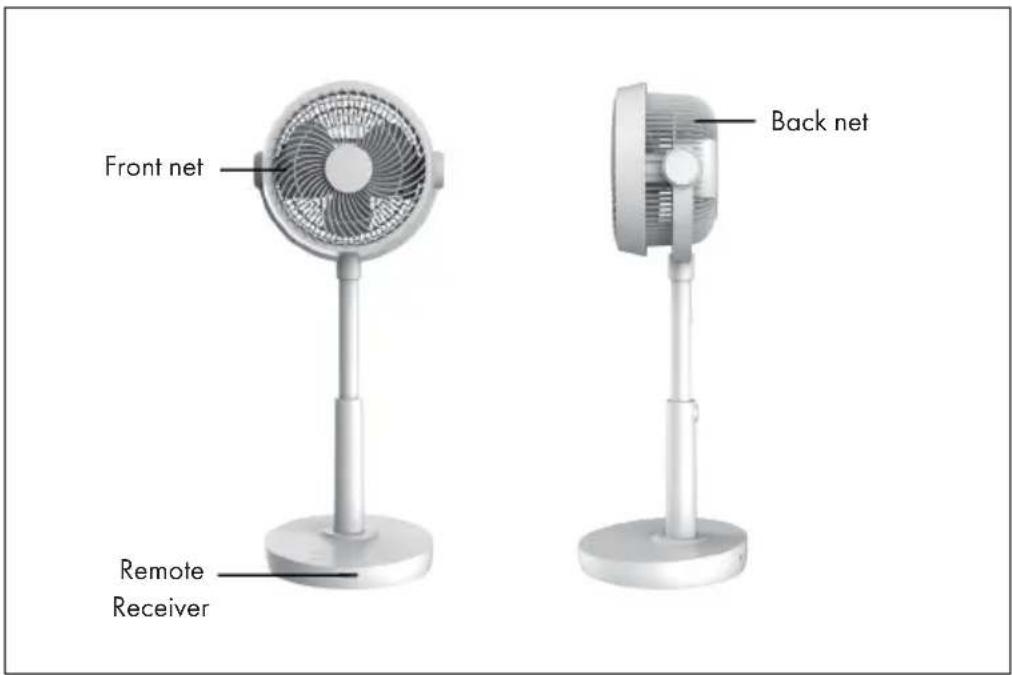
Control Panel
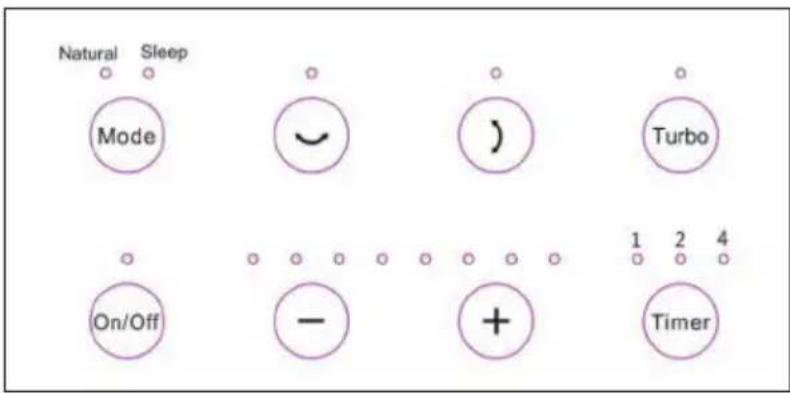
Note: All functions can be enabled using the control panel or remote control.
Remote Control and Functions
| Auto oscillation up and down. |
| Auto oscillation left and right |
| Choose Normal, Natural (Natural) or Sleep mode (Sleep). |
| Timer, up to 7 hours (1 hour per setting): 1h>2h>3h>4h>5h>6h>7h |
| The turbo button increases the speed to the maximum until it is pressed again. |
| Power On/Off |
| Choose speed, choose any speed of setting: 1>2>3...7>8 |
USE AND OPERATION
Take the unit from the package. Connect the unit to the power outlet. Press the buttons on the control panel as follows:
1 On/Off: Press the button to turn the unit on or off.
2 SPEED: Set the desirable fan speed: speed(1), Speed(2), Speed(3), Speed(4), Speed(5), Speed(6), Speed(7), Speed(8).
3 MODE: Press the button to choose Normal, Natural or Sleep mode.
4 TIMER: Press the button to activate the timer function (1h -2h-...7h).
5 OSC (left/right OR up/down): Press the button to activate or deactivate the auto oscillation of the fan.
6 Turbo: The turbo button increases the speed to the maximum until it is pressed again.
CARE AND CLEANING
- Before cleaning the unit turn the power off by pressing the POWER button, wait a few minutes and then unplug the power cord from the outlet.
- Clean the unit using a damp cloth, and then wipe it using a dry cloth.
- Do not use chemical solvents (such as gasoline, alcohol). The surface and the entire housing could be damaged.
We recommend cleaning the unit once a month. - If you don't use the unit for a longer time period, so please turn it off, unplug the power cord and take the unit to a dry, cool and safe place.
- Do not expose the unit to direct sunlight.
- Remove the batteries from the remote control and keep them safe.
HINTS ON DISPOSAL
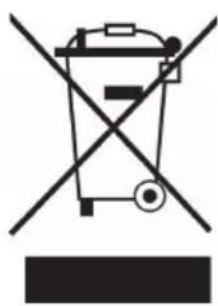
According to the European waste regulation 2012/19/EU this symbol on the product or on its packaging indicates that this product may not be treated as household waste. Instead it should be taken to the appropriate collection point for the recycling of electrical and electronic equipment. By ensuring this product is disposed of correctly, you will help prevent potential negative consequences for the environment and human health, which could otherwise be caused by inappropriate waste handling of this product. For more detailed information about recycling of this product, please contact your local council or your household waste disposal service.
Your product contains batteries covered by the European Directive. 2006/66/EC, which cannot be disposed of with normal household waste. Please check local rules on separate collection of batteries. The correct disposal of batteries helps prevent potentially negative consequences on the environment and human health.
Cher client,

Brand : Klarstein
Model : 10032335
Category : Fan