AeroDry 10 10033251 - Humidifier Klarstein - Free user manual and instructions
Find the device manual for free AeroDry 10 10033251 Klarstein in PDF.


| Product type | Compressor dehumidifier |
| Brand | Klarstein |
| Model | AeroDry 10 10033251 |
| Dimensions (approx.) | 30 x 30 x 50 cm |
| Net weight | 10.5 kg |
| Power supply | 220-240 V ~ 50 Hz |
| Maximum power consumption | 265 W |
| Rated input power | 165 W |
| Dehumidification efficiency | 10 L/day (30 °C, 80% RH) |
| Water tank capacity | 2.5 L |
| Air volume | 135 m³/h |
| Noise level | 37 dB(A) |
| Refrigerant | R290 / 50 g |
| Main functions | SMART mode, FAN mode, timer 1-24 h, hygrostat setting 35-80%, automatic defrost, continuous drainage, colored humidity indicator |
| Filters | Optional activated carbon filter; washable mesh filter |
| Maintenance and cleaning | Clean the filter every 2-3 weeks; clean the tank every few weeks; do not use solvents |
| Safety | Minimum distance of 20 cm from walls; automatic shut-off when tank full; 3 min compressor protection; automatic restart after power failure |
| Spare parts and repairability | Water tank, filters, drain hose; repairs by qualified personnel only |
| General information | Home and small office use; operating temperature 5-35 °C; relative humidity 30-80% |
Frequently Asked Questions - AeroDry 10 10033251 Klarstein
User questions about AeroDry 10 10033251 Klarstein
0 question about this device. Answer the ones you know or ask your own.
Ask a new question about this device
Download the instructions for your Humidifier in PDF format for free! Find your manual AeroDry 10 10033251 - Klarstein and take your electronic device back in hand. On this page are published all the documents necessary for the use of your device. AeroDry 10 10033251 by Klarstein.
USER MANUAL AeroDry 10 10033251 Klarstein
Congratulations on purchasing this equipment. Please read this manual carefully and take care of the following hints to avoid damages. Any failure caused by ignoring the items and cautions mentioned in the instruction manual is not covered by our warranty and any liability. Scan the QR code to get access to the latest user manual and other information about the product:

CONTENT
Declaration of Conformity 23
Technical Data 24
Safety Instructions 25
Product Overview 26
Installation 27
Initial Operation 28
Control Panel and Keys 29
Indicators and other Functions 34
Cleaning and Maintenance 37
Frequently Asked Questions (FAQ) 38
Troubleshooting 39
Hints on Disposal 42
DECLARATION OF CONFORMITY

Producer:
Chal-Tec GmbH, Wallstraße 16, 10179 Berlin, Germany.
This product is conform to the following European Directives:
2014/30/EU (EMC)
2014/35/EU (LVD)
2011/65/EU (RoHS)
206/2012/EU (ErP)
TECHNICAL DATA
| Item number 10033251 | |
| Power supply 220-240 V ~ 50 Hz |
| Dehumidify capacity 10 L/Day (30 °C, RH 80%) | |
| Max. power input 265 W | |
| Rated Input power 165 W | |
| Tank Capacity 2.5 L | |
| Air Volume 135 m | 3/h |
| Noise Level 37 dB(A) | |
| Refrigerant R290/50g | |
| Net weight 10.5 kg | |
| Suction pressure 0.7 MPa | |
| Discharge pressure 3.2 MPa | |
SAFETY INSTRUCTIONS
- Please read the operating instructions carefully before using your dehumidifier for the first time and keep it on a safe floor.
- Never immerse the appliance in water or other liquids.
- Place the unit on a stable flat surface to avoid loud noises and vibrations.
- Never operate the appliance if a cable or connector has been damaged, after appliance malfunction or if the appliance was dropped or otherwise damaged.
- The appliance may only be repaired by qualified personal, improper repair work can be a source of considerable danger for the users.
- Pull out the power plug before transporting it and/or before cleaning.
- Operate the appliance only at the voltage specified on the rating label.
- The device may not be connected to a power strip with other household appliances.
- Use the appliance only in the household, and only for the purpose it was developed for.
- Do not operate this unit near heating appliances and flammable or dangerous objects.
- If the dehumidifier is operated in a room with gas driven devices, so the room must be aired regularly and often.
- Please use the function of the internal drying, if the device is not used for a long time. This will prevent formation of mildew and unpleasant smell inside the unit.
- Do not place heavy objects on the appliance.
- Do not hang curtains or wet clothes in front of the air outlet, this will overload the device.
- The drainage hose may not be installed outdoors at low temperatures.
- To prevent spillage, empty the water tank before relocating the appliance.
- Do not tip the appliance to any side as escaping water could damage the appliance.
- If the supply cord is damaged, it must be replaced by a qualified person to avoid a hazard.
- If you smell the smoke during start-up or if you can see the smoke, immediately disconnect the power plug out and contact your dealer.
- The unit should be installed with a minimum distance of 20cm from the wall or other obstacles.
- This appliance can be used by children aged from 8 years and above and persons with reduced physical, sensory and mental capabilities or lack of experience and knowledge if they have been given supervision or instruction concerning use of the appliance in a safe way and understand the hazards involved. Cleaning and user maintenance shall not be made by children without supervision.
PRODUCT OVERVIEW
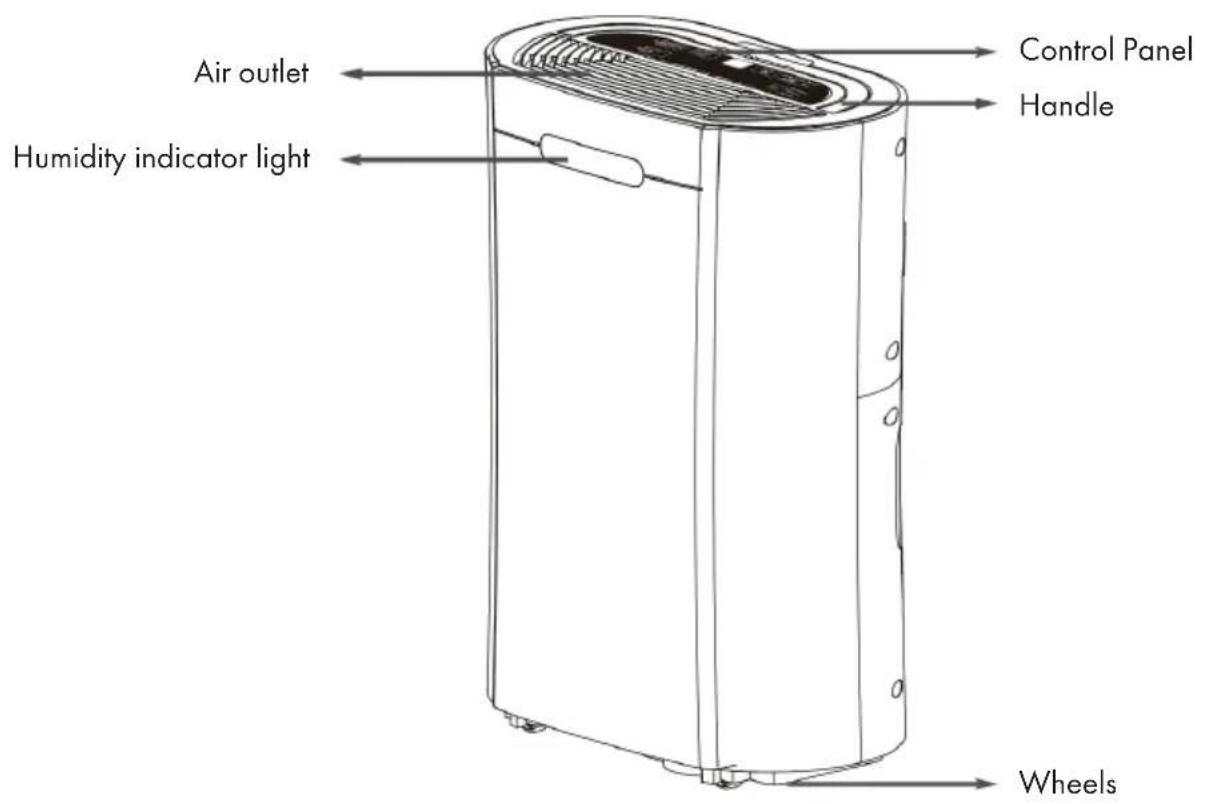
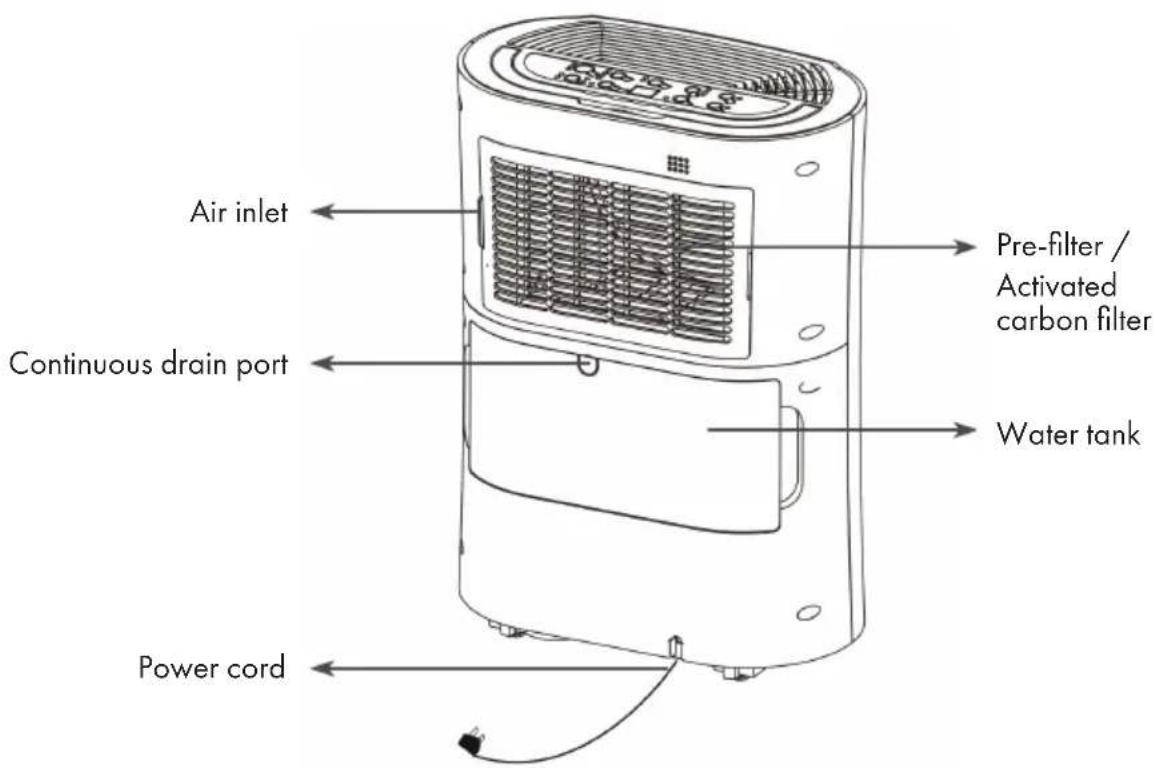
Optional accessories:
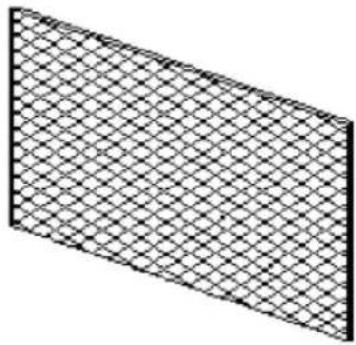
Activated carbon filter
INSTALLATION
Positioning the dehumidifier
- A badly positioned dehumidifier will have little effect. In positioning the dehumidifier please ensure circulation of air in not restricted around the unit.
- Allow at least 20~cm space around the unit.
This dehumidifier is designed only for indoor residential/small office applications and not for commercial or industrial use.
Use in an enclosed area for maximum efficiency. Close all doors, windows to create an effective operating environment. Do not use outdoors. - Your the dehumidifier will begin to protect your space from the harmful effects of excessive moisture as soon
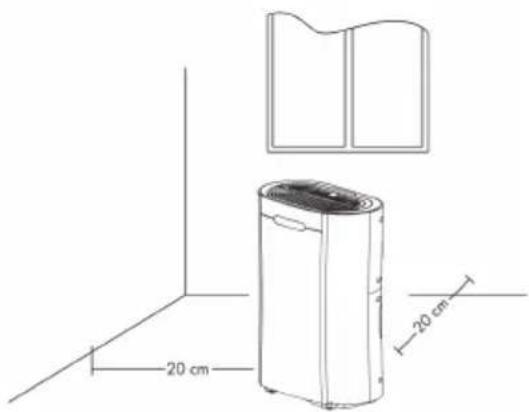
as it is turned on. Excess moisture is dispersed throughout your home. For this reason, the dehumidifier should be positioned in a central and clear location so that it can draw this moist air towards it from all over the home. A warm hallway or landing is an excellent position for your dehumidifier. If possible, leave interior doors ajar to allow aircirculation.
- Alternatively, if you have a serious problem in one area you can begin by positioning the dehumidifier there and moving it to a more central location at a later date. For the most effective use, run your dehumidifier with external doors and windows kept closed. Please note the unit should not be placed directly against a radiator or other heat source.
-
When positioning your the dehumidifier, ensure that it is placed clear of any obstacle that may limit the air movement. Place the dehumidifier on a flat dry surface.
-
The dehumidifier is built to be compact and lightweight. The castors on the bottom of the unit make it easy to move from room to room.
Note: Do not force castors to move over carpet or uneven surfaces, nor move the unit with water in the tank as it may tip over and spill water.
INITIAL OPERATION
- Remove any water from the water tank before starting the unit.
- In order to save energy, do not open windows or doors while the unit is running.
- Place the unit on a hard, flat surface.
- On first use run the unit continuously for 24 hours.
- The dehumidifier uses compressor technology to extract water from the environment and is ideal for normal domestic or office environment which are heated during the winter months with temperatures above. The appliance features an intelligent humidistat which is adjustable in increments of 5% from 40 - 80% RH insuring your room is not dried too much and power is not wasted.
To reduce the noise level:
- Place a piece of carpet or a rubber mat under the unit to reduce any vibrations while the unit is running.
CONTROL PANEL AND KEYS
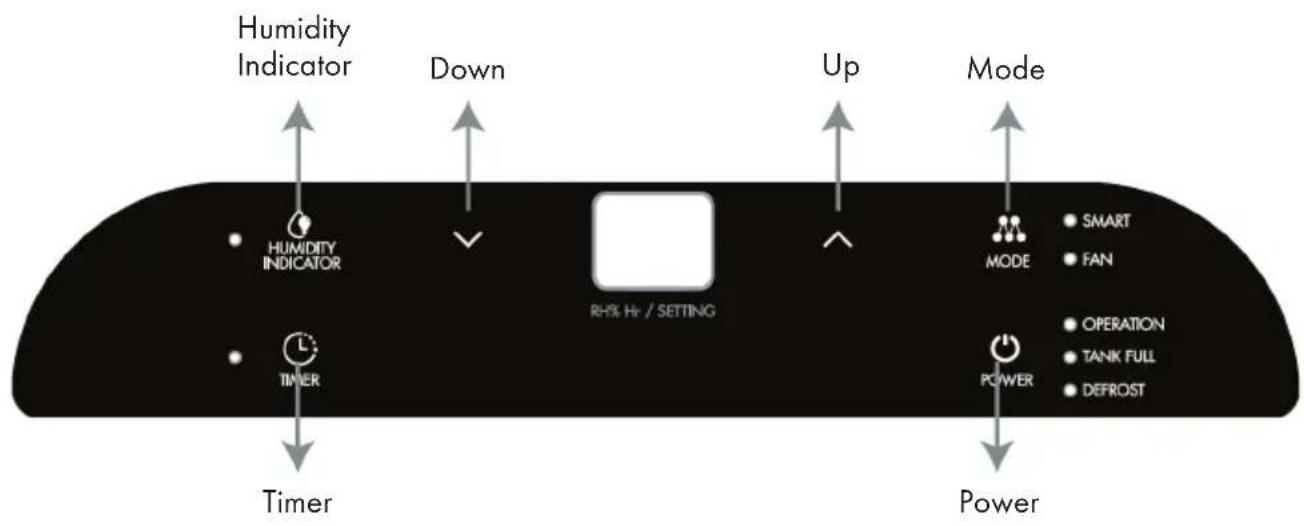
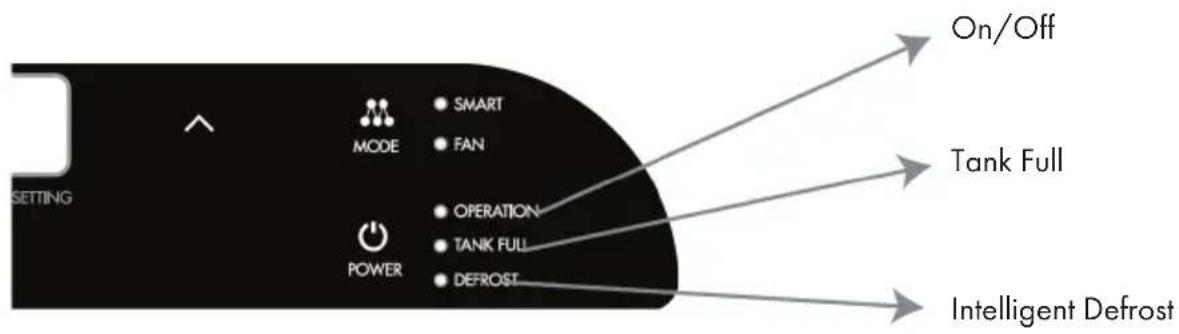
OPERATION UND FUNCTIONS
POWER
Turn on/off the appliance.
MODE Control
Select the functions of the unit for: SMART and FAN. The unit will default to SMART mode the first time it is switched on and remains in this mode until another program is chosen.
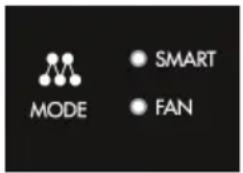
FAN Mode
Press the "MODE" key to select "FAN", and "FAN" indicator light comes on. Only the fan will run in this mode and not water is extracted.

HUMIDITY INDICATOR MODE
Start the appliance, the indicator light will turn on automatically. The indicator light color will change according to the humidity condition (RH = relative humidity):
Red color means high humidity, RH > 80%
Green color means comfortable, 80% ≥ RH ≥ 60%
- Blue (Orange) color means dry, RH < 60%
Press "Humidity Indicator light" key to turn on/off the light.
Note: It can take about 2 minutes after the humidity before the indicator will change the colour e.g. if humidity drops to 55% may take 2 minutes before the indicator changes to Blue (Orange).

HUMIDITY SETTING
Press the UP/DOWN keys to select the desired relative humidity level, default relative humidity is 55% . If relative humidity 35% is selected, the compressor will not stop until the water tank is full.

TIMER (timer function)
Press timer to program time. "TIMER" light comes on while timer is programmed. Before programming make sure that the timer function has not been activated (the light must be off). The following timer programs are available.:
a) Delayed power-on function (the appliance is in stand-by status) USE key "UP" and "DOWN" to set the time period (1~24 hours) The appliance will start once time reaches set value.
b) Delayed power-off function (whilst the appliance is running). The appliance will stop once time reaches set value.
DEFROST
INTELLIGENT DEFROST
The appliance will defrost automatically as programmed once the coil sensor detects temperature is too low, and the defrosting indicator will light up at the same time. Once defrosting has finishes, the appliance will recover to previous running mode.
TANKFULL
TANK FULL
If the water tank is full, the indicator light comes on and flashes.
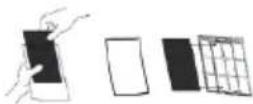
Optional carbon filter (air purification function)
Take out the carbon filter from bag and insert it on the filter. It is suggested to hoover the carbon filter every 2-3 weeks and change them every 3-6 months to always keep the room fresh and odor free.
Humidity Level and 2digit Timer Display
The led indicator performs the following functions:
1 When the unit is plugged in, it will indicate the room humidity level.
2 When the humidity level is selected, it will indicate the set humidity.
3 When the start/stop timer is programmed, it will show the set timer.

Note: When humidity level is outside the normal operational parameters will show "LO"/"HI". If ambient humidity is lower than 20% , it will show "LO". If ambient humidity is higher than 90% , it will show "HI".
QUICK START
| POWER | Press the POWER key to turn the dehumidifier on and off. |
| TIMER | Select the TIMER key, then use the UP and DOWN keys to adjust the timer (1-24 hours, start/stopping timer).In Power on mode the set number will represent the number of hours the unit will run for before turning off. This will remain unaffected if the unit goes in to defrost mode or the tank is emptied and than reinserted.In Standby mode the set number represents the period in hours after which the unit will start. To cancel start/stop mode press the TIMER key again. |
| MODE FAN | The SMART mode is designed for maximum convenience maintaining ideal domestic environment humidity setting of 50-55% RH while saving electricity. This is the default mode and is recommended for most users.Press UP or DOWN settings keys when the unit is displaying the current relative humidity to select the desired humidity level.Humidity level can be set within a range of 35% RH to 80% RH in 5% increments.When the humidity setting is finished, the appliance will be operate according to the target setting humidity. When reaches the target humidity (the selected humidity is 2% lower than the user selected humidistat setting), the compressor stops running, the fan continues running for five minutes and then is stopped. The swing will be shut down, but the display retains.Keep this statues for 30 minutes, the swing and the fan open, the fan is running to test the current humidity, when reaches the setting value, the compressor starts running. If the current humidity can not reach the setting value, fan will be stopped after 5 minutes, swing shut down, again to keep this status for 30 minutes, and in circulation. |
Laundry mode: For drier air/laundry mode press the MODE key and the UP and DOWN keys and set to a lower percent value (e.g. 35 - 45% ).
- For the dehumidifier to operate continuously with maximum water extraction until the tank is full set the humidity level to 35 - 50% RH. 35% is very dry and the unit will work until water tank is full as 35% RH is hardly achievable in UK domestic environment.
- Set the fan to high on laundry mode and the louvres either to swing mode or to 45 degrees directing the airflow onto clothes/ laundry dryer. Do not place clothes directly over any of the dehumidifier vents. Make sure that there is nothing blocking the hot air exhaust air flow and for best results place the laundry within 1.5 meters of the dehumidifier.
Note: In the smart mode, through, keys set humidity of 35% , the machine is running clothes drying modes, then the machine will have been working on dehumidification, even if the ambient humidity is less than 35% , the compressor will not go down. This model applies to drying clothes and other occasions that if permanent drainage pipe is fitted the unit will not stop operation. Humidity set to achieve room humidity of around 35% good for quick drying boost on initial run or emergencies, laundry mode. Not recommended for long normal operation in domestic/office environment. For allowing more moisture in the air, press the humidity control key and set to a higher percent value (e.g. 60-70%).
| Setting Humidity Application | |
| 50-55 % RH | Recommended setting, great for domestic operation and dry storage. |
| 60 % RH | Great for personal comfort and applications where 50 % RH is considered too dry. |
| 70 % RH | Ideal for unoccupied properties or where economical run is needed without the need to go drier than 70 % RH. |
INDICATORS AND OTHER FUNCTIONS
Tank Full Light
Red light will be on and the unit will beep when the tank is ready to be emptied, or when the tank is removed or not replaced in the proper position. The water level control switch shuts off the dehumidi er when the tank is full,or when the tank is removed or not replaced in the proper position. Empty and replace to resumeoperation.
Auto Defrost
The appliance will defrost automatically as programmed once the coil sensor detects temperature is too low, and the defrosting indicator will light up at the same time. Once defrosting has nishes, the appliance will recover to previous running mode.
Humidistat control and fan/compressor operation
When the selected humidity is 2% lower than the user selected humidistat setting; the dehumidier's compressor will be shut off automatically.
When the humidity is equal or higher than user selected humidity the compressor will restart once the 3 minutes delay compressor protection expires.
Auto Restart
If the unit stops off unexpectedly due to the power cut, it will restart with the previous function selected automatically when the power resumes.
Power
After the unit has stopped, it is not recommended to resume operation for at least 10 minutes. This is to protect the compressor. Operation can resume after this period lapses. When the unit is restarted there is a 3 minutes delay before compressor will start.
Self-diagnostic
The dehumidi er is an micro-CPU controlled device able of self-diagnostics. The LCD display may also show the error and protections codes.
Water Drainage
When the water tank is full, the unit will stop automatically. When this happens the TANK FULL red light will show on the control panel.
Note: Only empty the water tank when is full or before moving or storing the unit.
There are two ways to dispense collected water:
1 Use the tank:
- When the tank is full, the unit will automatically stop running, and the TANK FULL indicator light will flash.
- Slowly pull out the tank. Grip tank by its handle securely, and carefully pull out.
- Empty the water tank and reinsert it into the dehumidifier.
- The tank must be in place and securely seated for the dehumidifier to operate again.
The dehumidifier will re-start when the tank is restored in its correct position.
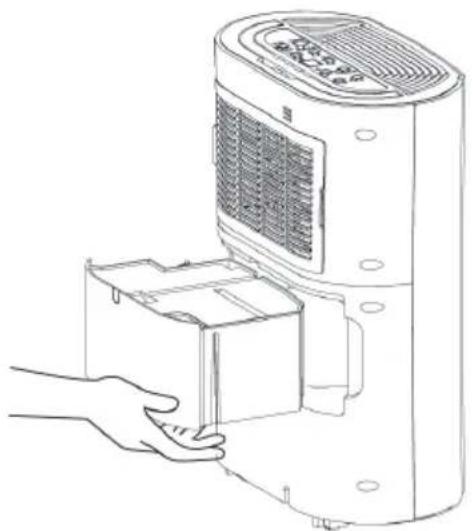
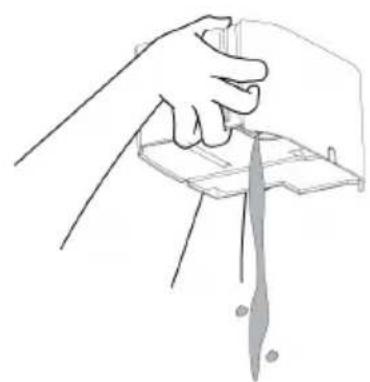
Note: When you remove the bucket, do not touch sensors or any parts which are situated behind tank. Doing so may damage the product. Be sure to push the tank gently all the way into the unit. Banging the bucket against anything or failing to push it in securely into place may cause the unit not to operate.
Do not remove any parts from the water tank or tank enclosure. The water full sensor will no longer be able to detect the water level correctly and water may leak from the water tank.
2 Continuous draining:
- Water can be automatically plumbed in or drained into a sink, a larger recipient or through the wall into an outside drain by attaching a pipe with 10mm internal diameter to the unit (not included).
- Insert the pipe into the drain outlet at the back of the unit as shown here.
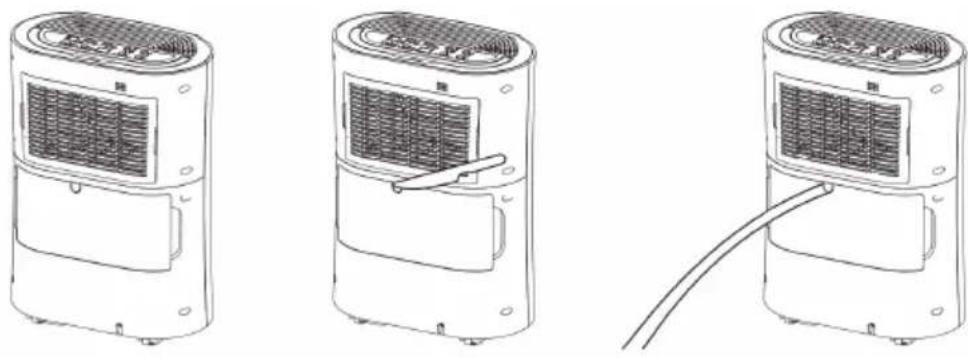
- Make sure the connection between pipe and the drain outlet is tight and does not leak. Then direct the pipe to a suitable drainage point.
- This unit uses gravity fall to dispose water hence the drain should be lower than the unit water outlet. Put the tank back. Be sure to run the water pipe downward and let the water to flow out smoothly. Do not kink or bend the pipe.
Note: When the continuous drain feature is not being used, remove the drain hose from the outlet.
- The permanent drain can be used in conjunction with water pump (e.g. when draining a cellar) to lift the water upwards.
CLEANING AND MAINTENANCE
- Always shut off the unit and unplug it from the mains supply before cleaning or performing any maintenance.
- When it is not in use for long periods it is advisable to remove the plug from the power socket.
- Do not use chemical solvents (such as benzene, alcohol or gasoline) as they may cause irreversible damage to the unit.
Clean the Grill and Case
Use water and a mild detergent to clean the washable mesh filters. Do not use bleach or abrasives.
- Do not splash water directly onto the main unit. Doing so may cause an electrical shock and can lead to the insulation to deteriorate, or cause the unit to rust.
- The air intake and outlet grilles get soiled easily, so use a vacuum attachment or soft brush to clean. Wipe the dehumidifier body with a soft damp cloth or kitchen towel.
- Remove the frame and pull out the filters from the frame. Hoover gently the optional carbon once every 2-3 weeks approximately.
If the mesh filter is dirty hoover it, if it is heavily soiled wash it with warm soapy water and dry thoroughly before reinserting it in the unit.
- When filter cleaning is finished and filters are dry placed them back into the filter frame and reassemble the unit.
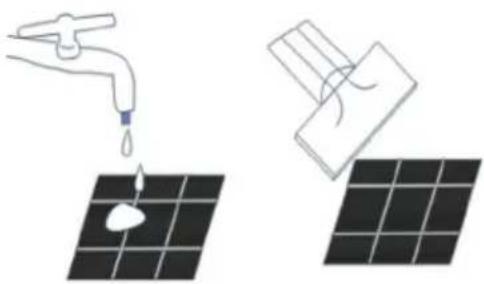
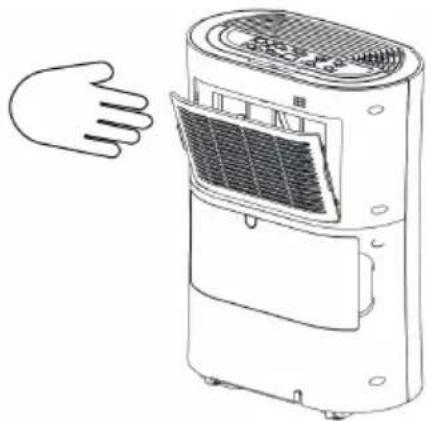
Note: While the carbon filter is optional never run the unit without the mesh filter frame being assembled back.
Clean the watertank
- Every few weeks, clean the tank to prevent growth of mould, mildew and bacteria. Partially fill the tank with clean water and add a little mild detergent. Swish it around and than empty the tank and rinse.
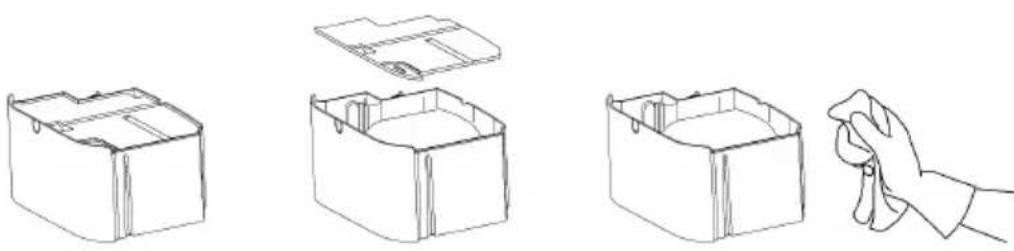
Note: Do not use a dishwasher to clean the tank. After cleaning and drying the tank must be reinserted securely into dehumidifier in order to restart operation.
End of Season Maintenance:
- Empty and clean the watertank.
- Clean the unit and the filters as per cleaning procedure above.
- Coil the power cord on the special cord storage rest at the back of the unit
Cover the unit and keep it in a dry place.
FREQUENTLY ASKED QUESTIONS (FAQ)
1 Why doesn't the dehumidifier seem to extract much water form the air if the temperature is low?
This is a compressor dehumidifier which works best in temperatures above 15^ . If the temperature is low and the air is dryer than the setting on the humidistat the unit will not extract water. If you want to use a dehumidifier for outside buildings, unbeated properties, boats or garages please check our desiccant range.
2 Why doesn't the unit work or stops suddenly?
The water tank may be full or displaced. To rectify: empty the tank and carefully place the tank back in the unit. Also the unit may be running in dehumidifying mode with a low room temperature. Please check if the room temperature is lower than 5^ . If so, the unit will stop working while in dehumidifying mode. (The unit may be defrosting.)
The ambient operating range is between 5^ and 35^ with a relative humidity ranging from 30% to 80% . For maximum efficiency use the unit between 15^ and 32^ .
3 Sometimes cold and/or hot air comes out from the air outlet grill, why?
When the unit is in dehumidifying mode it absorbs humid air from room and freezes it to reduce the humidity.
During the cold cycle there should be cold air coming out of the unit During the hot cycle hot dry air should be coming out of the outlet grill.
TROUBLESHOOTING
| Problem Possible Cause | Possible Solution | |
| Hot or cold air being produced | Normal operation When the | unit is in dehumidifying mode it absorbs humid air from room and freezes it to reduce the humidity. During the cold cycle there should be cold air coming out of the unit. During the defrost cycle hot dry air should be coming out of the outlet grill. |
| Unit does not operate. Is the | plug properly inserted in the socket? | Insert the plug into the socket and turn the switch on. |
| Does the tank full indicator is red? | Insert the plug into the socket and turn the switch on. Empty tank, check float and make sure tank is properly inserted in unit. | |
| Front louvres do not open Louvre motor is blocked Check if anything is blocking the louvre. Try to move gently the louvres up and down while the unit off. If the above fails contact the costumer service. | ||
| Dehumidifier does not extract water | Is the unit set to a humidity level lower than the one in the room? | Set the humidity level on the humidistat bellow current humidity reading. |
| Is the temperature too low for water extraction to be efficient? | Increase temperature in the room or reposition the unit. | |
| Is any intake grill or discharge blocked? Is the unit too close to walls? | Remove obstructions and restart the unit. Ensure a distance of at least 20 cm between the unit and walls. | |
| Airflow seems weak Is filter | dirty or clogged? Please service | The filters regularly as per user manual. |
| Unit is noisy during operation Is the unit on uneven surface? Please place on flat horizontal surface. | Is the unit on uneven surface? | Please place on flat horizontal surface. |
| Is filter clogged? Please service | ice the filters regularly as per user manual. | |
| E3 or E4 Humidity sensor error | Use the unit within the | prescribed humidity range. Unplug the unit, rest and plug it back in. If error repeats, call for costumer service. |
| E1 or E2 Temperature sensor error | Use the unit within the | prescribed temperature range. Unplug the unit, rest and plug it back in. If error repeats, call for costumer service. |
| E5 or E6 Abnormal Coil sensor temperature or current | Use the unit within the prescribed humidity and temperature range. Unplug the unit, rest and plug it back in. If error repeats, call for costumer service. | |
| The defrost light is on and the unit stops regularly. | Unit is defrosting Allow the unit to automatically defrost. The protection will clear after the unit self defrosts. Increase temperature in the room if this repeats too often. | |
| The red light of the TANK FULL indicator lights. | Water tank full notification Tank is full or is not in the right position. Empty the tank and replace in the right position. | |
Note: Any other malfunctions will need to be reported to the costumer service. Do not attempt unauthorised repairs.
HINTS ON DISPOSAL
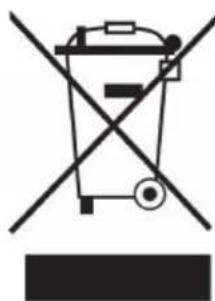
According to the European waste regulation 2012/19/EU this symbol on the product or on its packaging indicates that this product may not be treated as household waste. Instead it should be taken to the appropriate collection point for the recycling of electrical and electronic equipment. By ensuring this product is disposed of correctly, you will help prevent potential negative consequences for the environment and human health, which could otherwise be caused by inappropriate waste handling of this product. For more detailed information about recycling of this product, please contact your local council or your household waste disposal service.
Estimado cliente:
Chere cliente, cher client,
FAN (mode ventilation)

- CONTENT
- DECLARATION OF CONFORMITY
- SAFETY INSTRUCTIONS
- PRODUCT OVERVIEW
- Optional accessories:
- INSTALLATION
- Positioning the dehumidifier
- INITIAL OPERATION
- To reduce the noise level:
- CONTROL PANEL AND KEYS
- OPERATION UND FUNCTIONS
- POWER
- MODE Control
- FAN Mode
- HUMIDITY INDICATOR MODE
- HUMIDITY SETTING
- TIMER (timer function)
- DEFROST
- INTELLIGENT DEFROST
- TANKFULL
- TANK FULL
- Optional carbon filter (air purification function)
- Humidity Level and 2digit Timer Display
- QUICK START
- INDICATORS AND OTHER FUNCTIONS
- Tank Full Light
- Auto Defrost
- Humidistat control and fan/compressor operation
- Auto Restart
- Self-diagnostic
- Water Drainage
- Use the tank:
- Continuous draining:
- CLEANING AND MAINTENANCE
- Clean the Grill and Case
- Clean the watertank
- End of Season Maintenance:
- FREQUENTLY ASKED QUESTIONS (FAQ)
- Sometimes cold and/or hot air comes out from the air outlet grill, why?
- HINTS ON DISPOSAL
- Estimado cliente:
- Chere cliente, cher client,
- FAN (mode ventilation)
Brand : Klarstein
Model : AeroDry 10 10033251
Category : Humidifier