10031451 - Fan Klarstein - Free user manual and instructions
Find the device manual for free 10031451 Klarstein in PDF.


| Brand | Klarstein |
| Model | 10031451 |
| Product type | Floor fan |
| Power supply | 220-240 V ~ 50 Hz |
| Power | 50 W |
| Adjustable height | Yes, via telescopic tube |
| Number of speeds | 3 (low, medium, high) |
| Oscillation | Yes, lateral |
| Timer | Yes, from 0.5 to 7.5 hours |
| Remote control | Yes, with AAA batteries (2x) |
| Control panel | Integrated on the motor housing |
| Airflow orientation | Manual tilt up/down |
| Blade diameter | Approx. 45 cm |
| Blade material | Plastic |
| Protective grille | Metal, two parts |
| Base | Plastic, cross-shaped |
| Net weight | Approx. 4.5 kg |
| Dimensions (H x W x D) | Approx. 130 x 45 x 45 cm |
| Cleaning | Damp sponge, no harsh chemicals |
| Safety | Automatic shutdown in case of overheating (not specified but recommended) |
| Repairability | By specialized personnel only |
| Use | Domestic |
Frequently Asked Questions - 10031451 Klarstein
User questions about 10031451 Klarstein
0 question about this device. Answer the ones you know or ask your own.
Ask a new question about this device
Download the instructions for your Fan in PDF format for free! Find your manual 10031451 - Klarstein and take your electronic device back in hand. On this page are published all the documents necessary for the use of your device. 10031451 by Klarstein.
USER MANUAL 10031451 Klarstein
natural_image
Row of white icons representing kitchen appliances including blender, blender, keyboard, fan, washing machine, and air conditioner (no text or symbols)Zusammenbau
Basis zusammenbauen
natural_image
Symbol of a trash bin crossed with a diagonal line, no text or numbers presentCongratulations on purchasing this equipment. Please read this manual carefully and take care of the following hints to avoid damages. Any failure caused by ignoring the mentioned items and cautions mentioned in the instruction manual are not covered by our warranty and any liability.
Technical Data
| Item number 10031451, 10031452, 10031532 | |
| Power supply 220-240 V ~ 50 Hz | |
| Power consumption 50 W |
Safety Instructions
- Always operate the product from a power source of the same voltage, frequency and rating as indicated on the product identification plate.
- Do not use this fan with any solid state speed control device to reduce the risk of electric shock.
- The appliance is not intended for use by persons (including children) with reduced physical, sensory, mental capabilities or lack of experience and knowledge, unless they have been given supervision or instructions concerning use of the appliance by a person responsible by their safety.
• Children should be supervised to ensure that they do not play with the appliance. - Do not leave the fan running unattended.
- Do not operate the product if it is dropped, damaged or showing signs of product malfunction. Do not operate the product with a damaged plug or cord. Return the complete product to the place of purchase for inspection, refund or replacement.
- If it is not working properly, contact a qualified electrician or service centre for examination and repair, never try to dismantle it by yourself.
- Do not immerse or expose the product or flexible cord to rain, moisture or any other liquid.
- This product should not be used in the immediate vicinity of water, such as bathtubs, washbowls, swimming pools etc. where the likelihood of immersion or splashing could occur.
- Never install the unit where it could be subject to: heat sources such as radiators, heat registers, stoves or other products that produce Heat, direct sunlight, mechanical vibration or shock, lack of ventilation, such as a cabinet or bookcase, uneven surface.
- Switch off and unplug from outlet when the product is not in use, before assembling or disassembling parts and before cleaning. Fully assemble the fan before switching on.
- Avoid contact with moving parts. Do not insert any body parts (e.g. finger) or objects through the grill when the fan is operating.
- Do not cover the grille, or operate in close proximity to curtains, etc.
- This product is intended for normal domestic/household use only.
• Always disconnect the fan when moving it from one location to another. - The use of attachments or accessories not recommended or sold by the product distributor may cause personal or property hazards or injuries.
- Be sure fan is on a stable surface when operating to avoid overturning.
- If the supply cord is damaged, it must be replaced by the manufacturer or its service agent, or similarly qualified person, in order to avoid a hazard.
Product Description
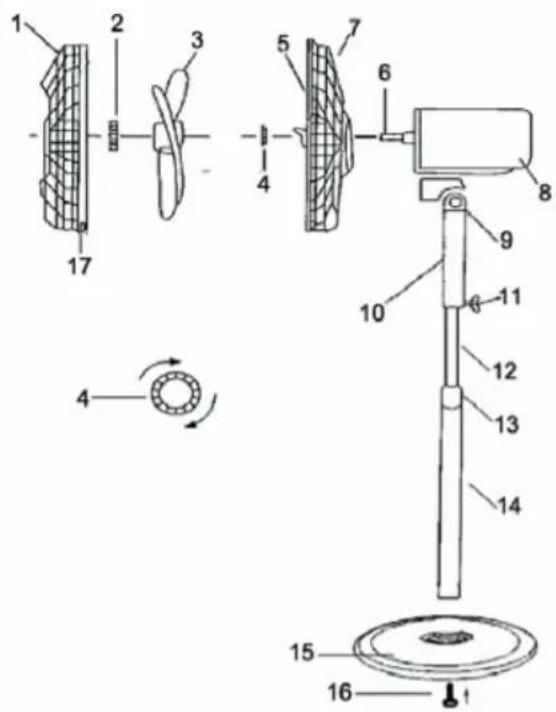
1 Front Grille
2 Blade Cap
3 Blade
4 Plastic Mounting Nut
5 Rear Grille
6 Motor Shaft
7 Handle
8 Motor Housing
9 Neck Screw
10 Switch Box
11 Set Screw
12 Inner Tube
13 Height Adjustment Collar
14 Outer Tube
15 Stand cover
16 Screw
Assembly
Assemble of Base
Loosen the screw from the bottom of outer Pipe (14). Place inner tube pipe(12) with pipe support on stand cover(15) and fix with the screw (16). Attach the motor with switch compartment onto the inner pipe.ensure the switch compartment is pushed fully onto the inner pipe and secured with the screw provided.
Assemble of Blade and Grille
- Unscrew the plastic mounting nut from the front of the motor housing by rotating it anticlockwise.
- Position the rear grille against the front of the motor housing with the handle uppermost, ensuing that the locating pegs on the motor housing are engaged correctly in the holes of the rear grille.
- Tighten the Rear Grille Mounting Nut clockwise. DO NOT OVERTIGHTEN IT.
- Push the fan blade onto the motor shaft, locating the slot at the back of the blade on the drive pin that passes through the motor shaft.
- Tighten the blade cap by turning it anticlockwise.
- Position the front grille against the rear grille so that the holes in the rims that accept the small nut and bolt are in line. Insert the bolt through the holes and screw on the nut. Do not fully tighten at the stage.
- Push the grille retaining clips into position ensuring that they engage correctly on the rim of the grille.
- Fully tighten the small nut and bolt that passes through the rim of the grille.
Use and Operation
Control Panel and Remote Control
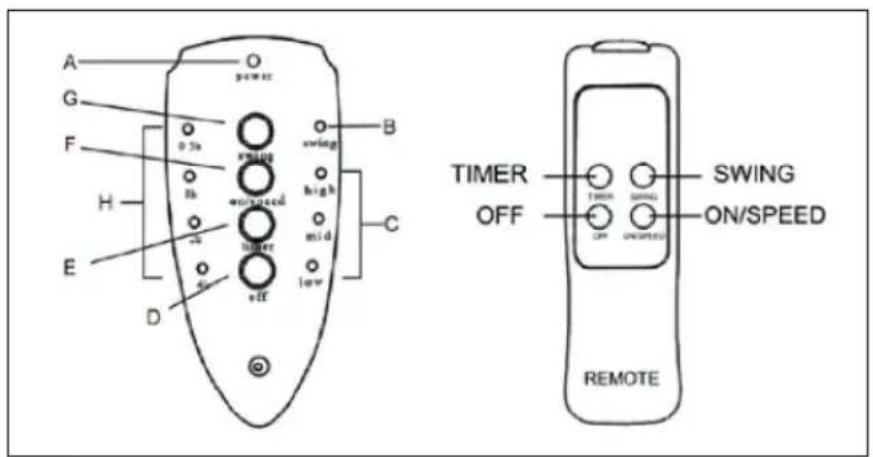
A Power indicator
B Swing indicator
C Speed indicators
High
mid
low
D OFF button
E TIMER button
F ON/SPEED button
G SWING button
H Time indicators 0.5-1-2-4 hrs
Use and Operation
- Connect the appliance to a properly installed wall socket. The power indicator (A) lights up.
- Switch on the appliance by pressing the ON/SPEED button (F) on the control panel. The fan starts to blow at low speed. The low speed indicator (C) lights up.
- To change speed, press button (F) several times. Speed will change with each button stroke. The respective indicator (C) will light up.
- For oscillation, press the SWING button (G). The swing indicator (B) light up and the fan starts oscillating. To stop oscillation, press button (G) once again.
- Your fan has a timer function. After having switched the unit on, press the TIMER button (E) and the fan will operate for as long as you choose: Press the timer button several times and the setting will change with every button stroke. The respective indicator lights (H) light up. When the set time has elapsed, the fan switches off automatically. The fan can set the timer function from 0.5-7.5 hours, as specified by the sum of the Time Indicators that are lit.
- The air flow can be adjusted by tilting the entire motor unit upward or downward. Loosen the neck screw (9) and adjust the motor until you have reached the desired vertical angle. Tighten the screw again.
- To switch the fan off, press the OFF button (D).
- Always unplug the appliance when it is not used.
Note on remote control
The buttons on the remote control have the same function as the buttons on the control panel. Make sure that the batteries are inserted correctly into the remote control. Do not mix battery packs and replace all batteries at the same time when changing batteries. Be sure to replace the batteries with batteries of the same type (2xAAA).
Cleaning and Care
- Switch off and unplug from the power supply before assembling or disassembling and cleaning.
- Keep the air vents at the rear of the main body free from dust or fluff– use a vacuum cleaner to remove these when necessary. Do not probe any opening to remove fluff.
- Fan component parts should be cleaned using mild soap and a damp cloth or sponge. Do not allow any water or other liquid to enter the motor housing.
• Thoroughly remove soap film with clean water. - Do not use harsh detergents, chemical cleaners or solvents as they may damage the surface finish of the fan components.
Hints on Disposal

natural_image
Symbol of a trash bin crossed with a diagonal line, no text or numbers presentAccording to the European waste regulation 2012/19/EU this symbol on the product or on its packaging indicates that this product may not be treated as household waste. Instead it should be taken to the appropriate collection point for the recycling of electrical and electronic equipment. By ensuring this product is disposed of correctly, you will help prevent potential negative consequences for the environment and human health, which could otherwise be caused by inappropriate waste handling of this product. For more detailed information about recycling of this product, please contact your local council or your household waste disposal service.
Your product contains batteries covered by the European Directive. 2006/66/EC, which cannot be disposed of with normal household waste. Please check local rules on separate collection of batteries. The correct disposal of batteries helps prevent potentially negative consequences on the environment and human health.
Declaration of Conformity
Producer: Chal-Tec GmbH, Wallstraße 16, 10179 Berlin, Germany.

This product is conform to the following European Directives:
2014/30/EU (EMC)
2014/35/EU (LVD)
2011/65/EU (RoHS)
206/2012/EU (ErP)
Estimado cliente:
Montaje
Montaje de la base
natural_image
Symbol of a trash bin crossed with a diagonal line, no text or numbers presentMontage
Montage de la base
natural_image
Symbol of a trash bin crossed out by two crossed lines, with no text or labels present.Assemblaggio
Assemblare la base
natural_image
Symbol of a trash bin crossed with a diagonal line, no text or numbers present
- Zusammenbau
- Basis zusammenbauen
- Technical Data
- Safety Instructions
- Product Description
- Assembly
- Assemble of Base
- Assemble of Blade and Grille
- Use and Operation
- Control Panel and Remote Control
- Note on remote control
- Cleaning and Care
- Hints on Disposal
- Declaration of Conformity
- Estimado cliente:
- Montaje
- Montaje de la base
- Montage
- Montage de la base
- Assemblaggio
- Assemblare la base
Brand : Klarstein
Model : 10031451
Category : Fan