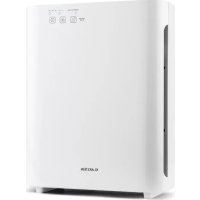
10028709 - Air purifier Klarstein - Free user manual and instructions
Find the device manual for free 10028709 Klarstein in PDF.


| Product Type | Air Purifier |
| Brand | Klarstein |
| Model | 10028709 |
| Power Supply | 230 V ~ 50 Hz |
| Power | 55 W |
| Dimensions (H x W x D) | 324 x 162 x 409 mm |
| Weight | 4.2 kg |
| Noise Level (low speed) | 30 dB |
| Noise Level (medium speed) | 40 dB |
| Noise Level (high speed) | 50 dB |
| Filter Type | Pre-filter, HEPA filter and activated carbon filter |
| HEPA Filter Efficiency | Up to 99.97% of particles |
| UV-C Lamp | Yes, wavelength 254 nm |
| Ionizer | Yes, negative ions ≥ 3.0 x 10⁶ ions/cm³ |
| Photocatalyst Filter | Yes (eliminates odors) |
| Timer | 2, 4 or 8 hours |
| Number of Speeds | 3 (low, medium, high) |
| Filter Maintenance | Monthly cleaning with vacuum |
| HEPA Filter Replacement | Every 6 months (flashing indicator light) |
| Certifications | CE (EMC, LVD, RoHS) |
Frequently Asked Questions - 10028709 Klarstein
User questions about 10028709 Klarstein
0 question about this device. Answer the ones you know or ask your own.
Ask a new question about this device
Download the instructions for your Air purifier in PDF format for free! Find your manual 10028709 - Klarstein and take your electronic device back in hand. On this page are published all the documents necessary for the use of your device. 10028709 by Klarstein.
USER MANUAL 10028709 Klarstein
natural_image
Row of white icons representing kitchen appliances including blender, blender, kettle, refrigerator, air conditioner, fan, and microwave (no text or symbols)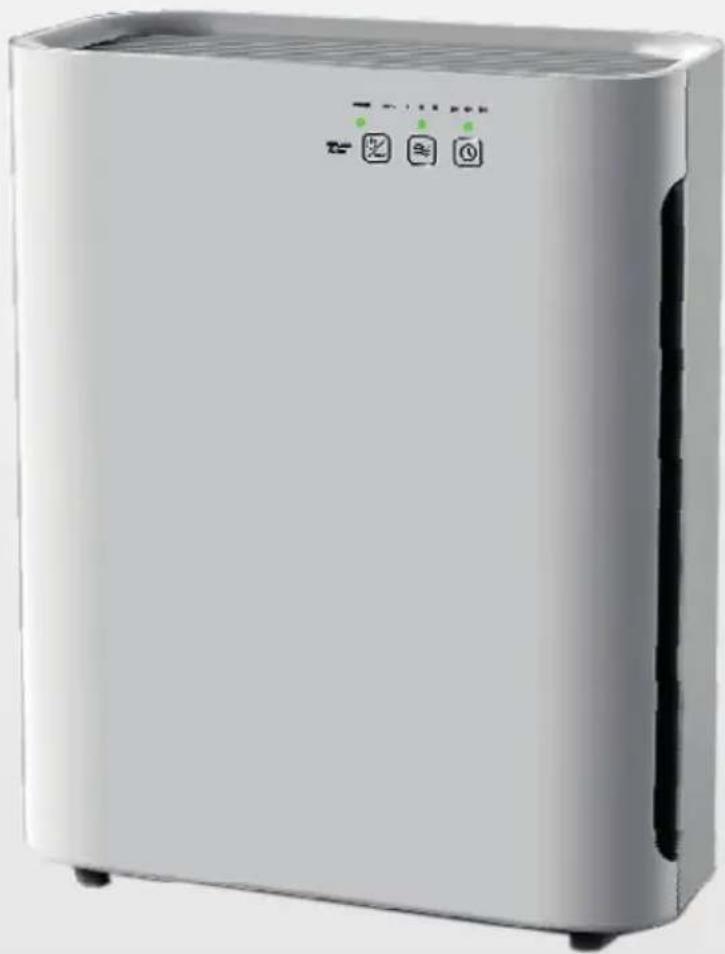
natural_image
Exterior view of a white industrial air purifier unit with three indicator lights (no visible text or symbols)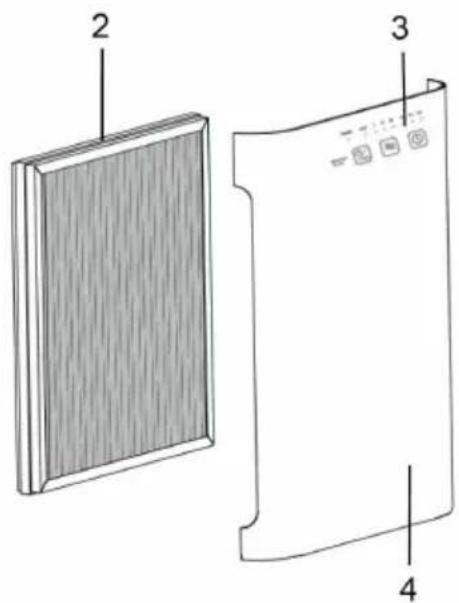
Filterübersicht
natural_image
Symbol of a trash bin crossed with a diagonal line, no text or numbers presentCongratulations on purchasing this equipment. Please read this manual carefully and take care of the following hints to avoid damages. Any failure caused by ignoring the mentioned items and cautions mentioned in the instruction manual are not covered by our warranty and any liability.
Contents
Technical Data 7
Safety Instructions 7
Product Description 8
Filter Overview 9
Use and Operations 9
Cleaning and Care 10
Troubleshooting 10
Disposal Considerations 11
Declaration of Conformity 11
Technical Data
| Item number 10028709, 10028710 | |
| Power supply 230 V ~ 50 Hz | |
| Power consumption 55 W | |
| Noise level 30 dB (low speed) | |
| 40 dB (medium speed) | |
| 50 dB (high speed) | |
| negative ion ≥ 3,0 x 10⁶ ions/cc | |
| UV wavellength 254 nanometers | |
| Dimensions (L x W x H) 324 x 162 x 409 mm | |
| Weight 4,2 kg |
Safety Instructions
- Read all the safety and operating instructions carefully and retain them for future reference.
- This appliance has a polarized plug (one blade is wider than the other). To reduce the risk of electric shock, this plug is intended to fit in a polarized outlet only one way. If the plug does not fit fully in the outlet, reverse the plug. If it still does not fit, contact a qualified electrician. Do not attempt to defeat this safety feature.
- To avoid fie or shock hazard, plug the appliance directly into a right AC electrical outlet.
- Keep the cord out of heavy traffic areas. To avoid fie hazard, NEVER put the cord under rugs, near heat registers, radiator, stoves or heaters.
• To protect against electrical hazards, DO NOT immerse in water or other liquids. Do not use near water. -
Children cannot recognize the hazards associated with the usage of electrical appliances. For this reason, always supervise children when they are near the unit.
-
Always unplug the air purifier before moving it, opening the grill, changing filters, cleaning or whenever the air purifier is not in use. Be sure to pull by the plug and not the cord.
- NEVER drop or insert any object into any openings.
• DO NOT run cord under carpeting.
• DO NOT cover cord with throw rugs, runners, or similar coverings. - DO NOT route cord under furniture or appliances. Arrange cord away from traffic area and where it will not be tripped over.
- DO NOT operate any appliance with a damaged cord or plug, if motor fan fails to rotate, after the appliance malfunctions, or if it has been dropped or damaged in any manner. Send to Customer Service for assistance.
- Use appliance only for intended household use as described in this manual. Any other use not recommended by the manufacturer may cause fie, electric shock or injury to persons.
• DO NOT use outdoors.
• DO NOT place anything on top of unit. - NEVER block the air openings, grills/outlets or place on a soft surface such as a bed or sofa, as this could cause the unit to tip over, blocking the air intake or outtake opening.
- DO NOT attempt to repair or adjust any electrical or mechanical functions on this unit. Doing so will void your warranty. The inside of the unit contains no user serviceable parts. All servicing should be performed by qualified personnel only.
• To reduce the risk of fie or electric shock, do not use this fan with any solid-state speed control device.
Product Description
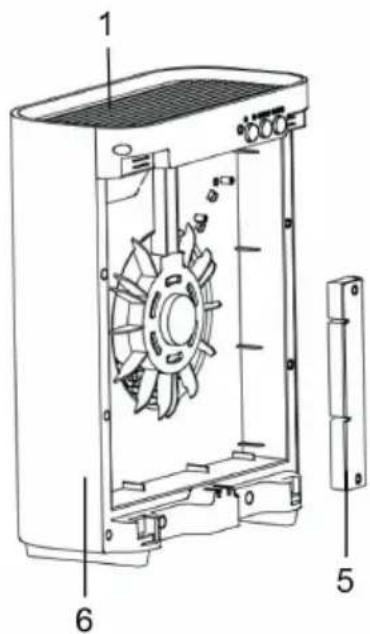
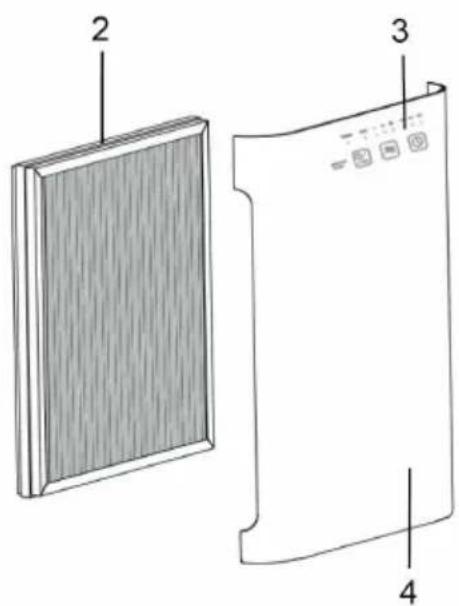
1 Air outlet
2 3 in 1 filter (incl. Pre-filter, HEPA filter, Activated Carbon filter)
3 Touch panel
4 Front cover
5 UV-C-device with PCO sprey inside the cover
6 Main unit
NOTE: The ionizer is located inside the unit near the air outlet.
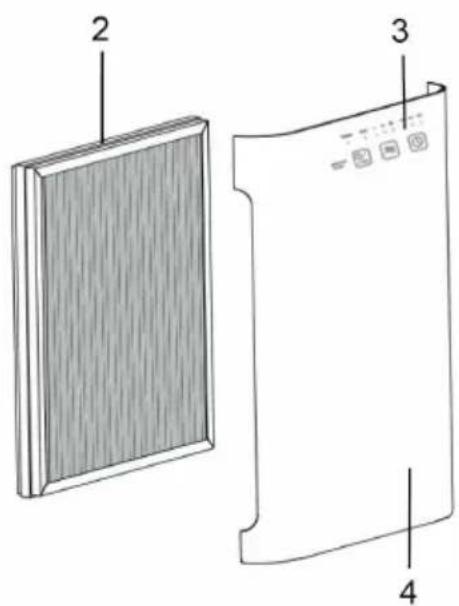
Filter Overview
- PRE-FILTER: Captures initial dust and allergen particles.
- HEPA FILTER: Captures 99.97% of dust, smoke, pollen and other allergens. Pre-Filter and Activated Carbon Filter are combined to the HEPA Filter.
• ACTIVATED CARBON FILTER: Absorb formaldehyde, benzene and other noxious gas.
• UV-C LIGHT: 254nm UV light eliminate germs and bacteria. - Photo Catalyst: PCO spray on the UV lamp cover to help eliminates odors etc.
Use and Operation
Before first Use
- Carefully remove your air purifier from box and bag.
- Select a firm, level and flt location for the air purifier. For proper air flow, locate the unit at least 1 foot from any wall or furniture. Make sure none of the grills are blocked.
- Plug the power cord into a right voltage AC outlet.
IMPORTANT:
When moving the air purifier, always lift unit by the carrying handle located on back. When the unit is not in use, switch it off and unplug it.
Control Panel and Buttons
POWER/UV-C: Press this button to turn on or switch off the unit. And UV light and Ion generator also control by this button. NOTE: Ion generator ON and OFF with UV lamp at the same time.
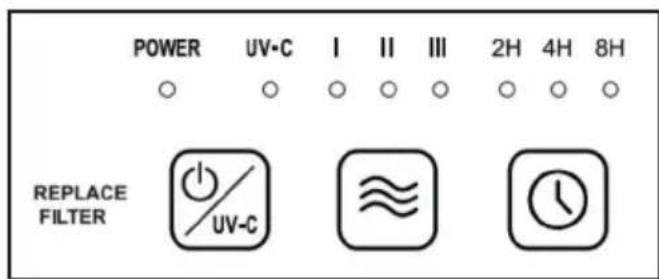

Speed: The fan speed of the unit can be adjusted when the unit is in operation (I = low, II = medium, III = high). Each time that you press on the (SPEED) button, the speed is adjusted from L (low) to M (medium) to H (high).

TIMER: By pressing this button, the purifier can be timed to operate for intervals of 2 hours, 4 hours and 8 hours, stopping automatically when the selected operating time has elapsed. Press this button (Timer) to select the required operating time. A warning light automatically indicates the remaining operating time. To select the continuous operating mode, press the button repeatedly until there are no more indicator lights lit up.
Cleaning and Care
Filter Replacement
The POWER light will flashing continuously in GREEN indicating that it is time to replace the filter. Replace the filter according to the directions then press the POWER/UV-C button and hold for 5 seconds to restart the system. The light will stop flashing. Filter will last approximately 6 months.
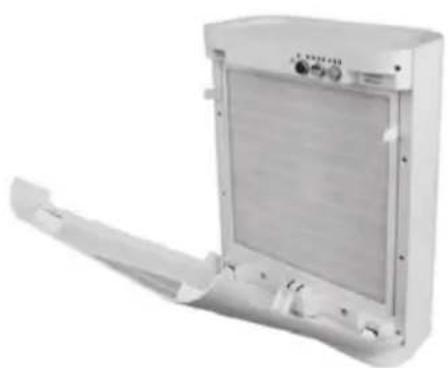
- Open the front cover from the top.
- Remove the combination filter by pull the two strips.
- Insert new Combination Filter into the unit. Consult the strips on the filter for correct installation direction.
- Reattach the Front Cover of the unit and securely latch into place.
- Press and hold POWER/UV-C Button for 5 seconds to reset Filter Change Indicator.
natural_image
Exterior view of a white industrial air conditioner unit with cooling fins and ventilation slots (no text or symbols visible)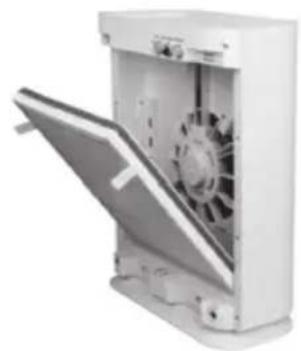
natural_image
Exterior view of a white industrial air purifier unit with fan blades and ventilation slots (no text or symbols visible)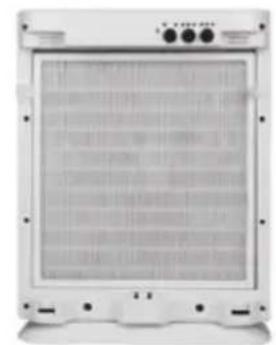
natural_image
Front view of a white industrial air conditioner unit with ventilation grilles and control buttons (no visible text or symbols)Cleaning
- The air purifier should be cleaned at least once every month and the outer Pre-/Activated Carbon Filter attached to the HEPA Filter should be cleaned every month. More frequent cleaning may be required depending on environmental conditions.
- Clean the Pre-filter and the Activated Carbon Filter with the brush attachment of your vacuum cleaner. This will remove lint and dirt. NOTE: The Combination Filter is one filter system. The multiple layers include: the Pre-filter, Activated Carbon Filter and HEPA Filter.
- Use a clean, dry, soft cloth to wipe the external surface of the unit. CAUTION: Do NOT use gasoline, benzine, thinner, harsh cleaners, etc. on and/or in the unit while cleaning as they will damage the product.
Troubleshooting
Before carrying out any of the following service checks, unplug the unit from the mains.
| Problem Possible Cause | |
| Insufficient air flow. Check that | the filters are clean. |
| Check for any obstructions in the air inlet and outlet. | |
| Unit will not start. Check the power supply and electric fuses. | |
| Excessive noise. Check for any foreign objects in contact with the fan. | |
Disposal Considerations
natural_image
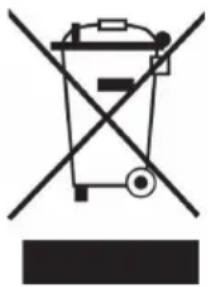
Symbol of a trash bin crossed with a diagonal line, no text or numbers presentAccording to the European waste regulation 2002/96/EC this symbol on the product or on its packaging indicates that this product may not be treated as household waste. Instead it should be taken to the appropriate collection point for the recycling of electrical and electronic equipment. By ensuring this product is disposed of correctly, you will help prevent potential negative consequences for the environment and human health, which could otherwise be caused by inappropriate waste handling of this product. For more detailed information about recycling of this product, please contact your local council or your household waste disposal service.
Declaration of Conformity
Producer: Chal-Tec GmbH, Wallstraße 16, 10179 Berlin, Germany.
CE
This product is conform to the following European Directives:
2014/30/EU (EMC)
2014/35/EU (LVD)
2011/65/EU (RoHS)
Gentile Cliente,
natural_image
Symbol of a trash bin crossed with a diagonal line, no text or numbers present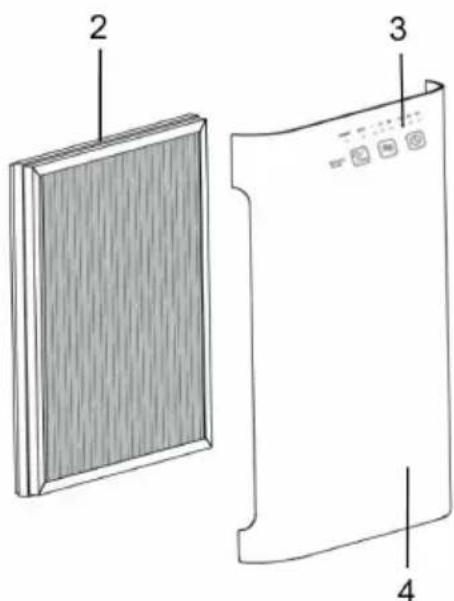
Aperçu des filtres
natural_image
Symbol of a trash bin crossed with a diagonal line, no text or numbers present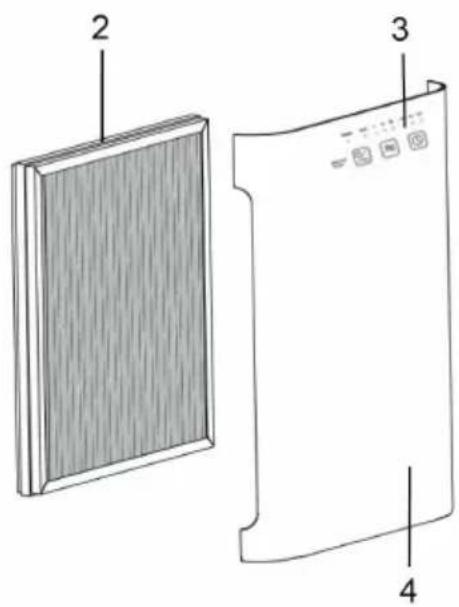
natural_image
Symbol of a trash bin crossed with a diagonal line, no text or numbers present
- Filterübersicht
- Contents
- Safety Instructions
- Product Description
- Filter Overview
- Use and Operation
- Before first Use
- IMPORTANT:
- Control Panel and Buttons
- Cleaning and Care
- Filter Replacement
- Cleaning
- Troubleshooting
- Disposal Considerations
- Declaration of Conformity
- Gentile Cliente,
- Aperçu des filtres
Brand : Klarstein
Model : 10028709
Category : Air purifier