
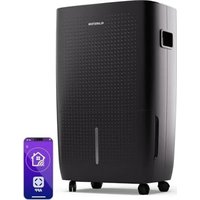
10031907 - Air purifier Klarstein - Free user manual and instructions
Find the device manual for free 10031907 Klarstein in PDF.


| Product Type | Air Purifier |
| Brand | Klarstein |
| Model | 10031907 |
| Article Numbers | 10031907, 10031908 |
| Power Supply | 220-240 V ~ 50-60 Hz |
| Dimensions (approx.) | 30 x 30 x 45 cm |
| Weight (approx.) | 4.5 kg |
| Operating Modes | Auto, Manual, Night |
| Fan Speed | Multiple speeds (at least 2) |
| Timer | 0.5 to 24 hours |
| UV Lamp | Yes, with indicator light |
| Ionizer | Yes (VITA-ION) |
| PM2.5 Sensor | Yes, displays concentration |
| Air Quality Indicator | Blue (good), Amber (average), Pink (poor), Red (bad) |
| Filter | Composite (replacement about 1 year) |
| Filter Indicator Reset | Long press 5 seconds |
| Sensor Cleaning | At least once a month with cotton swab |
| Surface Cleaning | Soft, dry cloth |
| Control Type | Touch panel |
| Available Spare Parts | Composite filter, power adapter |
Frequently Asked Questions - 10031907 Klarstein
User questions about 10031907 Klarstein
0 question about this device. Answer the ones you know or ask your own.
Ask a new question about this device
Download the instructions for your Air purifier in PDF format for free! Find your manual 10031907 - Klarstein and take your electronic device back in hand. On this page are published all the documents necessary for the use of your device. 10031907 by Klarstein.
USER MANUAL 10031907 Klarstein
Congratulations on purchasing this equipment. Please read this manual carefully and take care of the following hints to avoid damages. Any failure caused by ignoring the mentioned items and cautions mentioned in the instruction manual are not covered by our warranty and any liability.
CONTENT
Technical Data 11
Declaration of Conformity 11
Safety Instructions 12
Hints on Disposal 12
Product Description 13
Use and Operation 14
Care and Maintenance 16
Troubleshooting 18
TECHNICAL DATA
| Item number 10031907, 10031908 | |
| Power supply 220-240 V ~ 50-60 Hz |
DECLARATION OF CONFORMITY

Producer:
Chal-Tec GmbH, Wallstraße 16, 10179 Berlin, Germany.
This product is conform to the following European Directives:
2014/30/EU (EMC)
2014/35/EU (LVD)
2011/65/EU (RoHS)
SAFETY INSTRUCTIONS
- Use only Original power adapter, in case the adapter or wire is damaged, please contact customer care.
- Do not touch the electrical plug with wet hands
- Disconnect the power supply before replacing the filter, or if the product is not used for a long time.
- Make sure the power supply is as per the voltage indicated on the adaptor i.e. 220V / 50Hz .
- Do not put any object inside the air purifier either from inlet or outlet.
- Do not block the inlet or the outlet of the air purifier.
- Do not attempt to repair or dismental the air purifier, this needs to be done only by authorized service personnel
- Keep the air purifier away from the water, heat and fire
- Do not run the air purifier without filter, the suction of dust may cause problems in the equipment and its components
HINTS ON DISPOSAL

According to the European waste regulation 2012/19/EU this symbol on the product or on its packaging indicates that this product may not be treated as household waste. Instead it should be taken to the appropriate collection point for the recycling of electrical and electronic equipment. By ensuring this product is disposed of correctly, you will help prevent potential negative consequences for the environment and human health, which could otherwise be caused by inappropriate waste handling of this product. For more detailed information about recycling of this product, please contact your local council or your household waste disposal service.
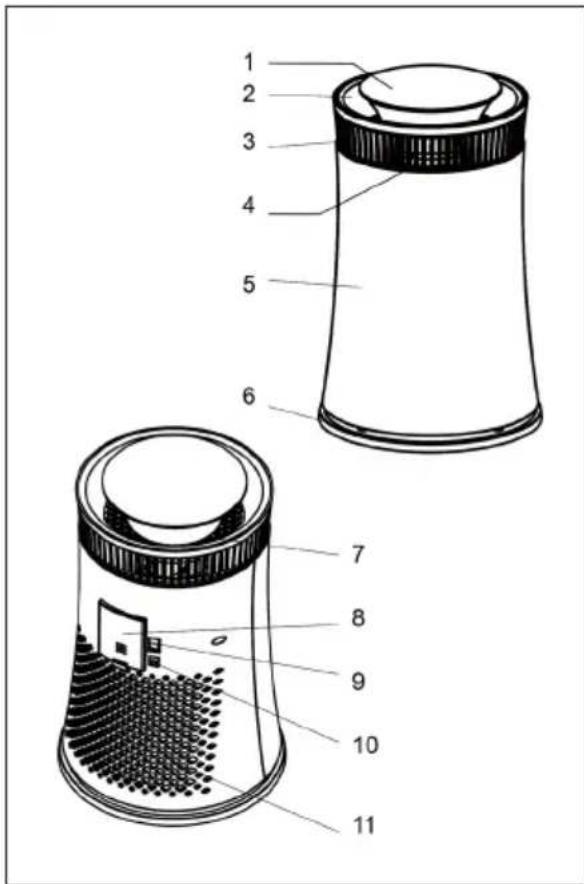
PRODUCT DESCRIPTION
Front
1 Control Panel
2 Upper Outlet
3 Side Outlet
4 Anion Generator
5 Shell
6 Base
Rear
7 Air Quality Indicator Lamp
8 PM 2.5 Sensor Cover
9 Power Switch
10 Power Input Connecting Port
11 Back Air Inlet Duct
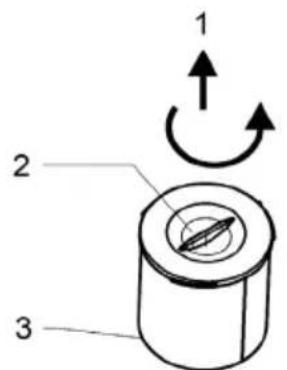
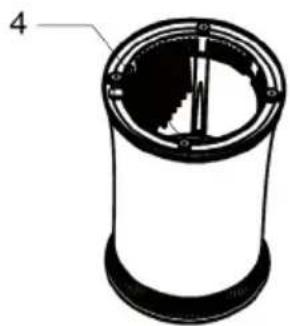
Filter System
1 Rotate to open
2 Base Cover
3 Composite Filter
4 UV Lamp
USE AND OPERATION
Getting Started
1 Turn upside down the equipment after unpacking it.
2 Rotate the base cover to take out the filter by the guide arrow.
3 Replace the filter after removing the packing. Take care to rotate the base cover in reverse direction.
4 Attach power adapter to the corresponding port.
5. Keep the unit on a dry, stable and firm surface in straight, original position.
6 Insert the power adapter of the air purifier to the main power supply.
7. Switch on with "BEE" sound.
Control Panel
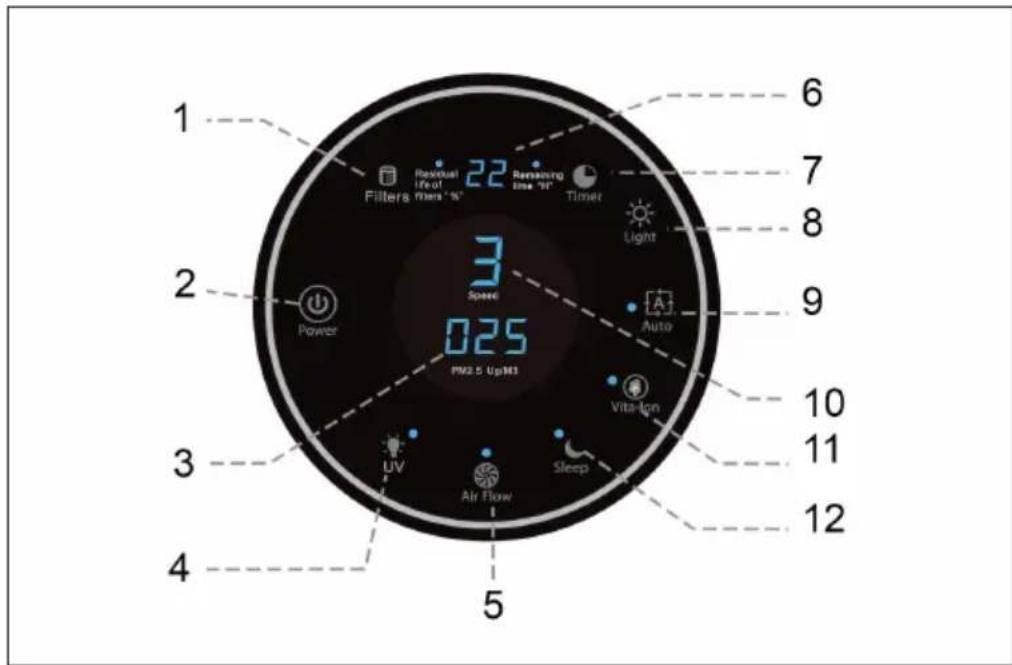
| 1 Filter reset button 7 Timer switch | |
| 2 Power button 8 Light On/Off | |
| 3 PM 2.5 indicator 9 Auto mode button | |
| 4 UV lamp On/Off button 10 Air flow indicator | |
| 5 Air flow selector 11 Ions On/Off button | |
| 6 Timer display / Residual life of filter 12 Sleep mode selection | |
Start
After main power is switched on, press the POWER button. The Air Quality indicator Lamp will light up. It will run in AUTO mode.
Auto run mode
Press the [AUTO] button when the unit in another modes, it will go into the auto run mode. In the [Auto] mode, the auto indicator will glow and the unit automatically adjust the air flow depending on the indoor air quality. The Air Quality indicator lamp will glow to the corresponding level of air quality:
| Ring Colour Blue Amber Purple Red | ||||
| Air Quality Good Moderate Polluted Bad | ||||
Sleep mode
Press the [SLEEP] button after the start or in the other mode, it will go into the sleep mode. In this mode the sleep indicator will light and the air purifier will run in speed 1 & 2.
Manual mode
Press the [AIR FLOW] button after the start or in the other mode, it will go into the manual mode. In this mode the corresponding speed indicator will light and the air purifier will run in selected speed. You can change the speed by pressing the air flow selector button.
Timer function
Press the [TIMER] button after the start or in the other mode, it will go into the timer mode. In this mode you can set the specific time between 0.5-24hrs to automatically switch off the air purifier. The set time will be indicated on the display.
Light control function
Press the [LIGHT] button to switch ON/OFF the air quality light and air flow indicator. This function can be used during night, when you do not want any light to disturb your sleep.
Ions function
Press the lons button after startup or in other modes, the indicator will light while anion generator releasing anions. Press the lons button again the indicator will light out and the anion generator stop releasing anions.
UV Lamp function
Press the UV button after startup or in other modes, the indicator will light while the UV LED light. Press the UV button again, stop this function.
Stop function
If you want to switch off the air purifier completely press the [Power] button, the unit will switch off and all light will be off.
PM2.5 Indicator function
After start up, the PM2.5 Indicator will glow twinkle, 30 seconds later, it will show the indication of PM2.5 detected by sensor. Notice: This function cannot be used as Professional instrument
Filters reset button function
Press this button when start up, the button lamp light, and the display will show the Residual life of filters ‰ . 3 seconds later, it will turn back. When the filters needed to changed, the button Lamp glow twinkle. After replace filters, Press this button for 5 seconds to reset.
CARE AND MAINTENANCE
Before attempting to perform any maintenance on the air purifier, disconnect the power adapter!
Filter
- Suggested time of changing filter: about once a year.
- It depends on different places and usages. For example, changing time of filter may be shorter in contaminated zones or smoking areas, etc.
- Please change the filter if the purification effect is not good.
Cleanup routines: biweekly
- Use soft brush or dry cotton cloth to clean the filter surface only.
- Do not use water to wash the filter.
- Do not force press or pull because, the filter can be broken or deformed easily. Please change a new one before using, if it is damaged.
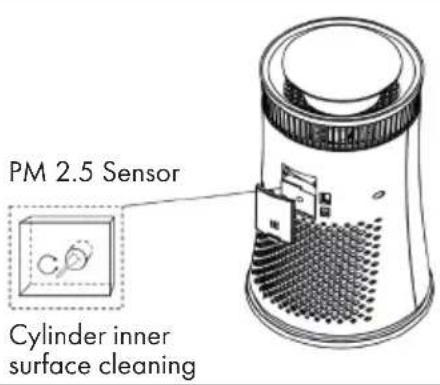
Sensor Cleaning
- Keep surface of the sensor clean, or sensitivity is affected and even fails to work.
Recommended cleaning cycle is less than 1 month for regularly used.
Clean the sensor with a cotton swab as shown in the picture below. Do not use detergent or any liquid in the cleaning process.
External surface
Please use dry soft fabric to wipe the surface, inlets and outlets. Do not use the chemical cleaning agent.
During long unuse
- Unplug the unit from socket.
Clean the surface and filter. - Store at a dry and cool place and cover with plastic bag.
TROUBLESHOOTING
| Problem Possible Cause | Suggested Solution |
| Smell. The filter is too dirty | because it's not replaced for a long time - Replace the filter. |
| Using the air purifier in moist conditions or water entered in the filter - Replace filter. | |
| Using unclean filter for a long time or completely chocked filter - Clean the filter. If problem is not resolved, replace the filter. | |
| Burning smell - Stop the air purifier immediately and cut off the power; contact to repair it. | |
| No Air flow. Air purifier | being operated in sleep mode - change the mode. |
| The air purifier is malfunctioning - check power supply, if still problem exists contact to repair it. | |
| Ineffectiveness. The filter | is chocked and no longer is effective - replace the filter. |
| Being Use at inappropriate places, such as oversize places. |
Estimado cliente:

- CONTENT
- TECHNICAL DATA
- DECLARATION OF CONFORMITY
- SAFETY INSTRUCTIONS
- HINTS ON DISPOSAL
- PRODUCT DESCRIPTION
- Front
- Rear
- Filter System
- USE AND OPERATION
- Getting Started
- Control Panel
- Start
- Auto run mode
- Sleep mode
- Manual mode
- Timer function
- Light control function
- Ions function
- UV Lamp function
- Stop function
- PM2.5 Indicator function
- Filters reset button function
- CARE AND MAINTENANCE
- Filter
- Cleanup routines: biweekly
- Sensor Cleaning
- External surface
- During long unuse
- Estimado cliente:
Brand : Klarstein
Model : 10031907
Category : Air purifier