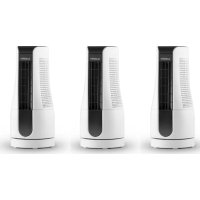
Skyscraper Office - Fan Klarstein - Free user manual and instructions
Find the device manual for free Skyscraper Office Klarstein in PDF.


| Brand | Klarstein |
| Model | Skyscraper Office |
| Product Type | Tower Fan |
| Power Supply | 220-240 V ~ 50/60 Hz |
| Power Consumption | 16 W |
| Dimensions (approx.) | Height 90 cm, Width 23 cm, Depth 23 cm |
| Net Weight (approx.) | 3.2 kg |
| Number of Speeds | 2 (fast and slow) |
| Oscillation Function | Yes, activation/deactivation via OSC button |
| Timer | 1 to 7 hours, automatic shut-off |
| Filter Type | Filter washable with clean water |
| Maintenance | Clean surfaces with damp sponge; wash filter regularly |
| Protection | Removable protective grill |
| Safety Instructions | Do not immerse, do not cover, unplug before cleaning |
| Intended Use | Domestic use and similar environments (offices, hotels, etc.) |
| Article Numbers | 10027948, 10027949 |
| Compliance | EU 2014/30 (EMC), 2014/35 (LVD), 2011/65 (RoHS) |
| Included Accessories | No additional accessories |
Frequently Asked Questions - Skyscraper Office Klarstein
User questions about Skyscraper Office Klarstein
0 question about this device. Answer the ones you know or ask your own.
Ask a new question about this device
Download the instructions for your Fan in PDF format for free! Find your manual Skyscraper Office - Klarstein and take your electronic device back in hand. On this page are published all the documents necessary for the use of your device. Skyscraper Office by Klarstein.
USER MANUAL Skyscraper Office Klarstein
INHALTSVERZEICHNIS
natural_image
Symbol of a trash bin crossed with a diagonal line, no text or numbers presentCongratulations on purchasing this equipment. Please read this manual carefully and take care of the following hints to avoid damages. Any failure caused by ignoring the items and cautions mentioned in the instruction manual is not covered by our warranty and any liability. Scan the QR code to get access to the latest user manual and other information about the product.
CONTENT
Safety Instructions 10
Product Overview 11
Use and Operation 12
Cleaning and Care 13
Hints on Disposal 14
TECHNICAL DATA
| Item number 10027948, 10027949 | |
| Power supply 220-240 V 50-60 Hz | |
| Power 16 W |
DECLARATION OF CONFORMITY

Producer:
Chal-Tec GmbH, Wallstraße 16, 10179 Berlin, Germany.
This product is conform to the following European
Directives:
2014/30/EU (EMC)
2014/35/EU (LVD)
2011/65/EU (RoHS)
206/2012/EU (ErP)
SAFETY INSTRUCTIONS
- Remove the packaging and make sure that the appliance is intact. If in doubt, do not use it and contact qualified personnel only.
- Packaging materials (plastic bags, polystyrene, staples etc.) Must be kept out of the reach of children as they could be hazardous.
- This appliance can be used by children aged from 8 years and above and people with reduced physical, sensory or mental capabilities or lack of experience and knowledge if they have been given supervision or instruction concerning use of the appliance in a safe way and understand the hazards involved. Children should be supervised to ensure that they do not play with the appliance. Cleaning and maintenance operations must not be performed by children without supervision
- Before connecting the appliance, check that the appliance rating corresponds to the mains rating.
- This appliance must only be used for the purpose for which it has been manufactured. As a stand fan. The manufacturer is not responsible for any damage caused by improper or incorrect use.
- The installation/assembly of the device will be made according to the indications of the manufacturer. A wrong procedure may cause damages to persons, animals or objects, for which the manufacturer cannot be considered responsible
- Before cleaning or carrying out maintenance on the appliance, disconnect it from the electrical mains by removing the plug from the electrical outlet or by switching off the system switch.
- If the appliance is faulty and/or operating incorrectly, switch it off without tampering with it. If the above is disregarded, the safety of the appliance may be compromised.
- If the supply cord is damaged, it must be replaced by the manufacturer, its service agent or similarly qualified persons in order to avoid a hazard.
- Do not power the device using multiple sockets.
- Do not use adapters and/or extension cable
- The device must not be switched on using external timers and/or other remote control devices which are not specified in this manual.
- Do not use or store the device near heat sources (heaters, stoves).
- Do not dip the device in water or other liquids; in case the accidental fall in the water do not try to take it out, but first of all unplug immediately the power cable from the socket.
- If you use the device for the first time, make sure to remove any label or protective sheet which blocks its proper functioning.
- Plug and unplug the power cable with dry hands and hold it firmly.
- Before plugging the plug into a wall outlet, make sure that the unit is switched off.
• Always unplug the power cable to avoid the overheating and avoid stretching it. - Make sure that all air intakes and outlets are free and not covered so that the unit does not overheat.
-
Avoid placing the power cable on abrasive or sharp surfaces or in positions where it can be damaged easily.
-
Do not hang the fan on the wall or ceiling unless this type of installation is provided and explained in this manual.
- Place the device at a proper distance from the objects or surrounding walls making sure that its functioning will not cause accidental damages.
- Do not use the device near gas stoves or open flames in general.
- Do not use the device near curtains or textiles.
- Do not cover the device during functioning.
- Do not expose yourself for a long period to the air flow generated by the device because it can cause damage to the health
- If the fan must be stored for a long period and is not used regularly, place the fan in its original packaging in a dry place.
- Always remember to unplug the power cable of the device if it is not used for a long period, before storing, cleaning or performing any maintenance operation.
- Do not use the appliance in the presence of potentially flammable or explosive liquids or gases.
- This product is intended for household use only and not for commercial / industrial or outdoor use.
PRODUCT OVERVIEW
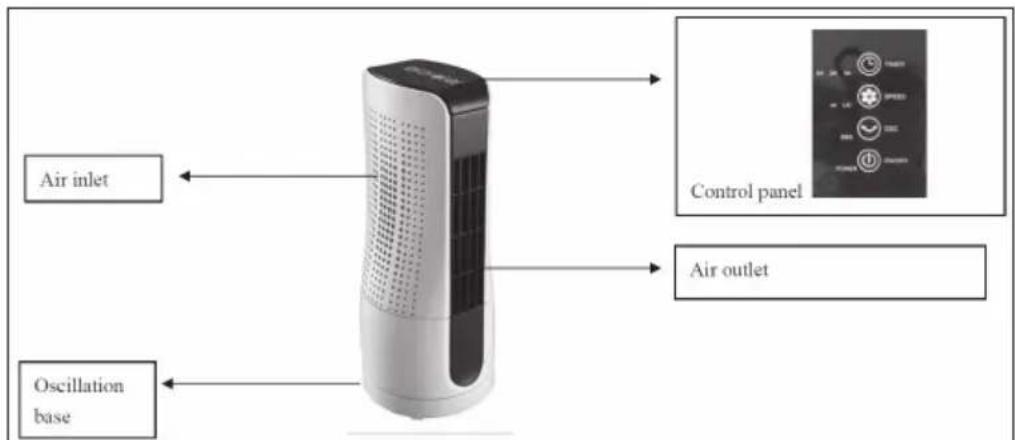
 | OSC | Smooth oscillation |
 | TIMER | Timer control, up to 7 hours |
 | SPEED | Speed control: HI, LOW |
 | POWER | On or off control |
USE AND OPERATION
- Unpacked all the packaging from the unit.
- Insert the plug into a 220-24V\~50/60Hz electrical power supply outlet.
- Press the buttons on the Touch Sense Control Panel as below:
POWER
Turn the fan on by pressing the Power button, to turn off the fan just press the button again.
SPEED
Adjust the fan speed to a desired level: HI, LOW. The default fan speed is HI.
TIMER
Press Timer button, to set up to 1 hour to 7 hours timer setting. The Blue Led indicator light will show the time being pressed. The fan will automatically shut off when the timer is over.
OSC
Press OSC button to turn on the oscillation function. Press again to turn off.
CLEANING AND CARE
Always unplug the unit before moving or servicing. Do not immerse the power cord, plug and the whole unit into water or rinse under the tap! Do not use detergent, gasoline, benzene, thinner, or other solvents to clean the unit to avoid damage of the appliance.
1 Unplug the unit and wait until the fan stop running before cleaning.
2 Use a damp cloth to clean the surface of the fan.
3 Take off the Cover carefully and take out the Mesh Filter. You could wash the filter under running water. Rinse and dry the filter before place back.
4 It is not recommended to take the fan apart, except the authorized agent or any agent qualified to undertake electrical repairs.
5 If the fan will not be used for a long time, store it in the cool, dry, safety place and far away from children. Do not store the appliance in hot place and under sunshine.
6 It is recommended to clean the fan every month.
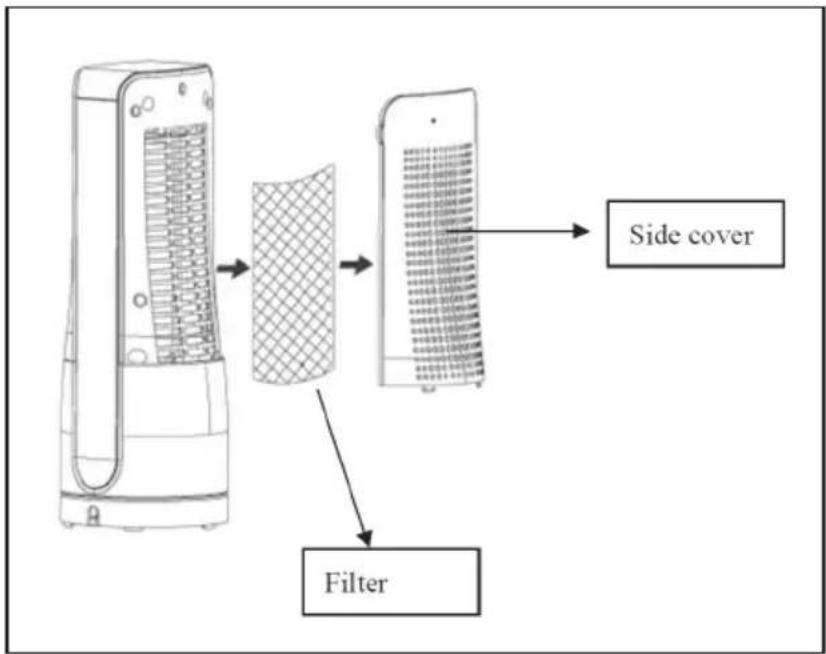
flowchart
graph TD
    A["Device with grid pattern"] --> B["Filter"]
    B --> C["Side cover"]
HINTS ON DISPOSAL
natural_image
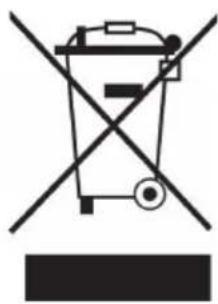
Symbol of a trash bin crossed with a diagonal line, no text or numbers presentAccording to the European waste regulation 2012/19/EU this symbol on the product or on its packaging indicates that this product may not be treated as household waste. Instead it should be taken to the appropriate collection point for the recycling of electrical and electronic equipment. By ensuring this product is disposed of correctly, you will help prevent potential negative consequences for the environment and human health, which could otherwise be caused by inappropriate waste handling of this product. For more detailed information about recycling of this product, please contact your local council or your household waste disposal service.
Estimado cliente:
ÍNDICE DE CONTENIDOS
natural_image
Symbol of a trash bin crossed with a diagonal line, no text or numbers presentSOMMAIRE
DÉCLARATION DE CONFORMITÉ

Fabricant :
Chal-Tec GmbH, Wallstraße 16, 10179 Berlin, Allemagne.
natural_image
Symbol of a trash bin crossed with a diagonal line, no text or numbers presentINDICE
natural_image
Symbol of a trash bin crossed with a diagonal line, no text or numbers present
Brand : Klarstein
Model : Skyscraper Office
Category : Fan