BF680W - Scale TANITA - Free user manual and instructions
Find the device manual for free BF680W TANITA in PDF.

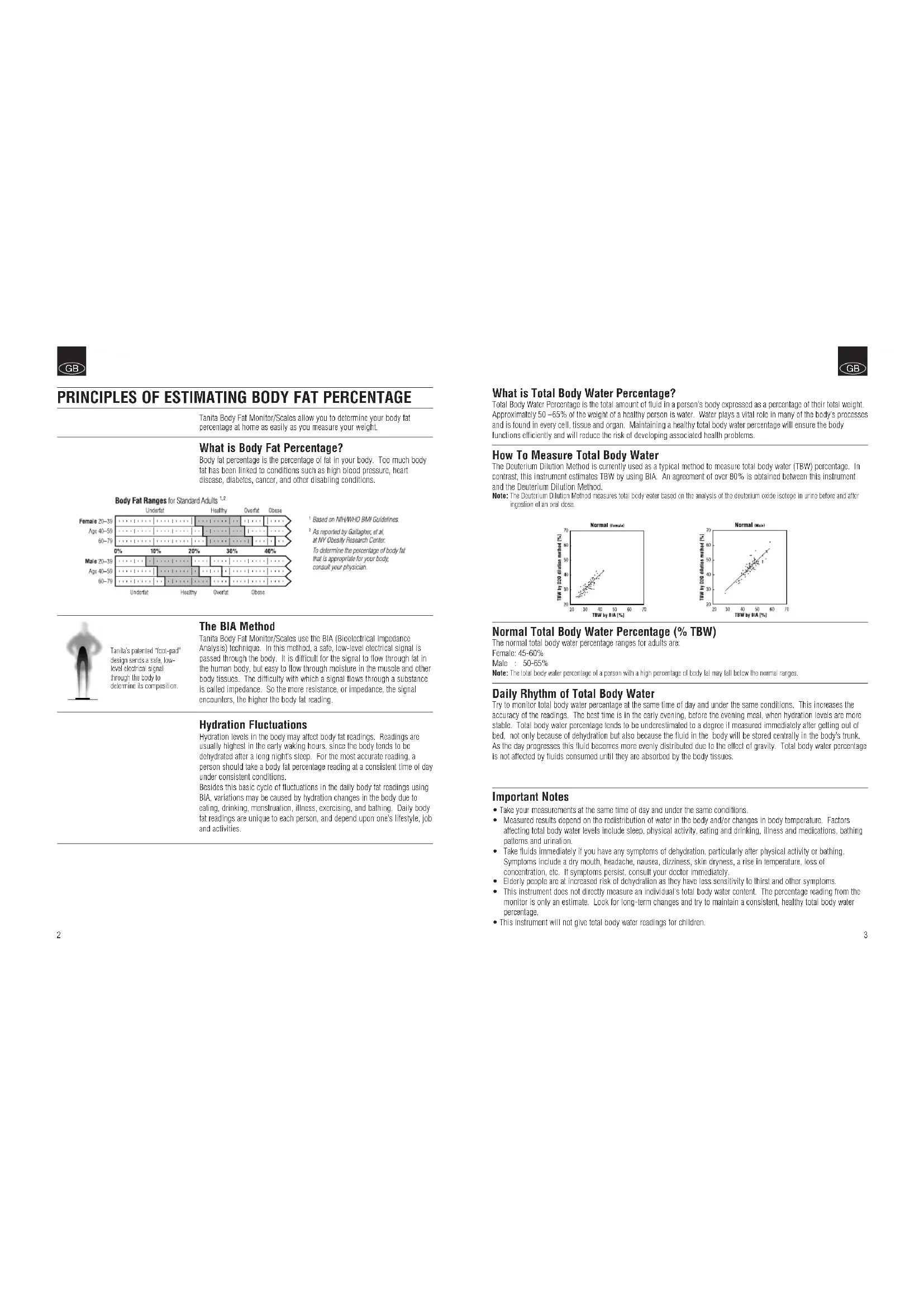


| Product type | Impedance meter scale |
| Brand | Tanita |
| Model | BF680W |
| Technology | Bioelectrical impedance analysis (BIA) |
| Measured functions | Weight, body fat percentage, total body water percentage |
| Weight units | kg, lb, st-lb (switchable) |
| Number of user profiles | 2 (memory buttons) |
| Guest mode | Yes |
| Athlete mode | Yes (on BF-680W) |
| Fat level indicator | Comparison bar with standards |
| Auto-off | Yes (after 60 s of inactivity or 10-20 s after measurement) |
| Power supply | Batteries (type not specified) |
| Cleaning | Soft cloth and alcohol for electrodes |
| Safety precautions | Do not use with pacemaker; avoid wet floor |
| Use surface | Hard and flat, without vibrations |
| Target audience | Adults and children (7-17 years), men and women, athletes |
| Manual included | Yes, 30 pages in multiple languages |
Frequently Asked Questions - BF680W TANITA
User questions about BF680W TANITA
0 question about this device. Answer the ones you know or ask your own.
Ask a new question about this device
Download the instructions for your Scale in PDF format for free! Find your manual BF680W - TANITA and take your electronic device back in hand. On this page are published all the documents necessary for the use of your device. BF680W by TANITA.
USER MANUAL BF680W TANITA
BF-679W/BF-680W Body Fat Monitor / Scale
Tanita UK Ltd.
The Barn. Philpots Close, Yimsley.
Middlesex,UB7 7FYUK
Tel:+4401895438577
Fax:+410118554351
www.janada.co.uk
Tanita Corporation
14-2,1-Chore.Maen-Cho
Ibashi Ku Tokyo, Japan 174 8630
Tel:+41(0-339682123
Fax:+81(01)3-3967-3768
www.lanla.com
ISO 9001 Certified
Tanita Europe GmbH
Dresdner Strasse 25
D-71065 Sindellingen
Germany
30-4910700161896
Fae+4901-7021-6189-71
www.janabe de
Tanita Corporation of America Inc.
2526 South Clearbrook Drive
Arlington Heights, IL 65002, USA
T+1 8476409241
+48+1-847-620-9261
www.landa.com
Tanita France S.A.
Villa Labrousse
68 Boulevard Bourdon
92200 Nsilyi Sur Saine France
Tol-3300155249999
Fae+83(0)-1-55-24-98-68
www.lamira.ir
Tanita Health Equipment H.K. Ltd.
Unit 301-203 SF Wing Cr Plaza
62 Mody Road, Tsirnshatsan East
Kowloon Hong Kong
Tel-45228387111
Fax+86229388667
©2005 Tanita Corporation
BF6797821(t)
GB Instruction Manual
Read this Instruction Manual carefully and keep it for future reference.
Bedienungsanleitung
| Introduction | 1 |
| Principles of Estimating Body Fat Percentage | 2 |
| Features and Functions | 4 |
| Preparations Before Use | 4 |
| Useful Features | 5 |
| Switching the Weight Mode | 1 |
| Automatic Shut-Down Function | 5 |
| How to Determine Body Fat Percentage | 5 |
| Getting Accurate Readings | 6 |
| Taking Weight and Body Fat Readings | 7 |
| Understanding Your Reading | 7 |
| Programming Guest Mode | 9 |
| Taking Weight Measurement Only | 9 |
| Troubleshooting | 20 |
Thank you for selecting a Tanita Body Fat Monitor/Scale. This model uses the BIA (Bioelectrical Impedance Analysis) technique, a state-of-the-art technology for body fat assessment.
Note: Road this Instruction Manual carefully and keep it friendly for future reference.
Safety Precautions
- Persons with implanted electronic medical equipment, such as a pacemaker, should not use the Body Fat Monitor feature on this Tanita Body Fat Monitor/Scale. This Body Fat Monitor/Scale passes a low-level electrical signal through the body, which may interfere with the operation of a pacemaker.
The Tanita Body Fat Monitor/ Scales are intended for home use only. This unit is not intended for professional use in hospitals or other medical facilities; it is not equipped with the quality standards required for heavy usage experienced under professional conditions.
D not use this unit on slippery surfaces such as wet floors.
Important Notes for Users
This Body fat monitor is intended for adults and children (ages 7-17) with inactive to moderately active lifestyles and adults with athletic body types. (Athlete Mode: Only for BF-680W)
Tanita defines "athlete" as a person involved in Intense physical activity of approximately 10 hours per week and who has a resting heart rate of approximately 60 beats per minute or less. Tanita's athlete definition includes "lifetime of fitness" individuals who have been fit for years but currently exercise less than 10 hours per week. The body fat monitor function is not intended for pregnant women, professional athletes or bodybuilders.
- Recorded data may be lost if the unit is used incorrectly or is exposed to electrical power surges. Tanita takes no responsibility for any kind of loss caused by the loss of recorded data.
- Tanita takes no responsibility for any kind of damage or loss caused by these units, or any kind of claim made by a third person.
Note: Body fat percentage estimates will vary with the amount of water in the body, and can be affected by dehydration or over-hydration due to such factors as alcohol consumption, menstruation, illness, intense exercise, etc.

PRINCIPLES OF ESTIMATING BODY FAT PERCENTAGE
Tanita Body Fail Monitor/ Scales allow you to determine your body fat percentage at home as easily as you measure your weight.
What is Body Fat Percentage?
Body fat percentage is the percentage of fat in your body. Too much body fat has been linked to conditions such as high blood pressure, heart disease, diabetes, cancer, and other disabling conditions.

Based on NIH/WHO BMJ Guidelines.
As reported by Galagher, et al., at NY Obesity Research Center. To determine the percentage of body fat that is appropriate for your body; consult your physician.

Tamil's palerized "foot-gait" design sends a safe, low-level electrical signal through the body to determine its compression
The BIA Method
Tanita Body Fat Monitor/ Scales use the BIA (Bioelectrical Impedance Analysis) technique. In this method, a safe, low-level electrical signal is passed through the body. It is difficult for the signal to flow through fat in the human body, but easy to flow through moisture in the muscle and other body tissues. The difficulty with which a signal flows through a substance is called impedance. So the more resistance, or impedance, the signal encounters, the higher the body fat reading.
Hydration Fluctuations
Hydration levels in the body may affect body fat readings. Readings are usually highest in the early waking hours, since the body tends to be dehydrated after a long night's sleep. For the most accurate reading, a person should take a body fat percentage reading at a consistent time of day under consistent conditions. Besides this basic cycle of fluctuations in the daily body fat readings using BIA, variations may be caused by hydration changes in the body due to bathing, drinking, menstruation, illness, exercising, and bathing. Daily body fat readings are unique to each person, and depend upon one's lifestyle, job and activities.

What is Total Body Water Percentage?
Total Body Water Percentage is the total amount of fluid in a person's body expressed as a percentage of their total weight. Approximately 50 - 65% of the weight of a healthy person is water. Water plays a vital role in many of the body's processes and is found in every cell, tissue and organ. Maintaining a healthy total body water percentage will ensure the body functions efficiently and will reduce the risk of developing associated health problems.
How To Measure Total Body Water
The Deuterium Dilution Method is currently used as a typical method to measure total body water (TBW) percentage. In contrast, this instrument estimates TBW by using BIA. An agreement of over 80% is obtained between this Instrument and the Deuterium Dilution Method.
Note: The Deuterium Dilution Method measures local body water based on the analysis of the deuterium oxide isotope in urine before and after ingestion of an oral dose.


Normal Total Body Water Percentage (% TBW)
The normal total body water percentage ranges for adults are: Female:45-60% Male:50-65%
Note: The total body weight percentage of a person with a high percentage of body fat may fall below the normal ranges.
Daily Rhythm of Total Body Water
Try to monitor total body water percentage at the same time of day and under the same conditions. This increases the accuracy of the readings. The best time is in the early evening, before the evening meal, when hydration levels are more stable. Total body water percentage tends to be underestimated to a degree if measured immediately after getting out of bed, not only because of dehydration but also because the fluid in the body will be stored centrally in the body's trunk. As the day progresses this fluid becomes more evenly distributed due to the effect of gravity. Total body water percentage is not affected by fluids consumed until they are absorbed by the body tissues.
Important Notes
Take your measurements at the same time of day and under the same conditions
- Measured results depend on the redistribution of water in the body and/or changes in body temperature. Factors affecting total body water levels include sleep, physical activity, eating and drinking, illness and medications, bathing patterns and urination.
- Take fluids immediately if you have any symptoms of dehydration, particularly after physical activity or bathing. Symptoms include a dry mouth, headache, nausea, dizziness, skin dryness, a rise in temperature, loss of concentration, etc. If symptoms persist, consult your doctor immediately.
- Elderly people are at increased risk of dehydration as they have less sensitivity to thirst and other symptoms.
This Instrument does not directly measure an individual's total body water content. The percentage reading from the monitor is only an estimate. Look for long-term changes and try to maintain a consistent, healthy total body water percentage.
This instrument will not give total body water readings for children
GB
FEATURES AND FUNCTIONS


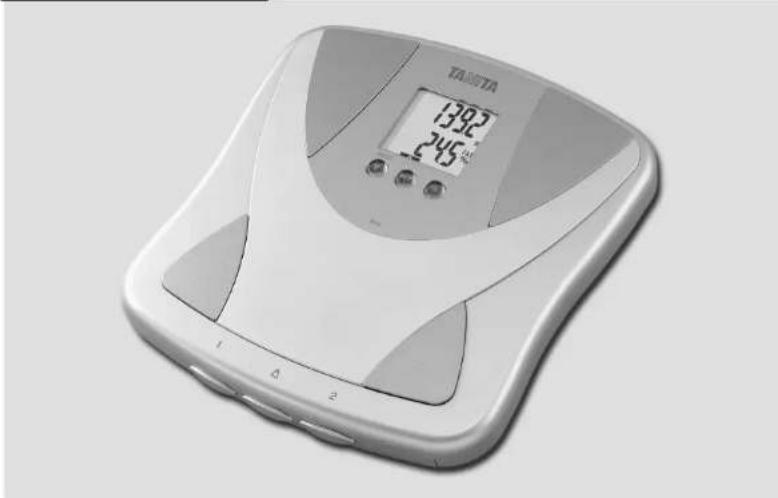
Measuring Platform
- Display Screen
2.Sel Button
3.Arrow (Select) Buttons - Ball-of-Foot Electrodes
- Heel Electrodes
- Personal Keys
- Weight-Only Key
Accessories
8 AA-Size Batteries (4)
PREPARATIONS BEFORE USE


Inserting the Batteries
Open the battery cover on the back of the measuring platform. Insert the supplied AA-batteries as indicated.
Note: Be sure that the polarity of the batteries is sel properly. If the batteries are
inpcnly pioianed the fuid may leak and damage floors. If you do not intend to use this
unil for a long period of time . It ' s advisable to remove the bacteria before storage
Please note that since the batteries were inserted at the factory, their energy levels may have decreased.
Positioning the Monitor
Place the measuring platform on a hard, flat surface where there is minimal vibration to ensure safe and accurate measurement.
Note: To avoid possible injury, do not step on the edge of the platform.
Handling Tips
This monitor is a precision instrument utilizing state-of-the-art technology
To keep the unit in the best condition, follow those instructions carefully:
- Do not attempt to disassemble the measuring platform.
- S. tore the unit horizontally, and place it so that the buttons will not be pressed accidentally.
- Avoid excessive impact or vibration to the unit.
- Place the unit in an area free from direct sunlight, heating equipment, high humidity, or extreme temperature change.
- Never submerge in water. Use alcohol to clean the electrodes and glass cleaner (applied to a cloth first) to keep them shining; avoid snaps.
- Do not step on the platform when wet.
- Do not drop any objects onto the platform.

GB
USEFUL FEATURES
Tanita Body Fat Monitor/Scales allow you to know your weight, body fat percentage, and body water percentage simultaneously and easily, simply by stepping on a scale.
- Your Body Fat Monitor/Scale can be set for Adult or Children (ages 7-17), Male or Female.
- In addition, the BF-680W can be set to Adult Athlete mode.
Personal data (Female/Male, Age, Height, etc.) can be pre-set and stored in memory for up to 2 people.
- Unique Healthy Range Indicator automatically displays where your body fat percentage falls within the Body Fat Ranges chart (p.2).
Guest feature allows you to take readings without reprogramming one of the Personal keys.
- Weight-only Key provides quick weight readings.
The unit emits a heliul "beep" when activated, and also at various stages in the programming and measuring process.
Listen for these sounds which will prompt you to step on the unit, look at your readings, or confirm a setting.
SWITCHING THE WEIGHT MODE Note: For use only with modes containing the weight mode switch
You can switch the unit indication by using the switch on the back of the scale as shown in the figure.
Note: If weight mode is set to pounds or stone-pounds, the height programming mode will be automatically set to feet and inches.
Similarly, if kilograms is selected, height will be automatically set to centimetres.


AUTOMATIC SHUT-DOWN FUNCTION
The automatic shut-down function shuts off the power automatically in the following cases:
- If you interrupt the measurement process, the power will shut down automatically within 10 to 20 seconds, depending upon the type of operation.
If an extraordinary weight is applied to the platform. - D uring programming, if you do not touch any of the keys or buttons within 60 seconds."
After you have completed the measuring process.
Note: If the power shuts off automatically, repeat the steps from 'Seling and Sloring Data in Memory' (p.6).

HOW TO DETERMINE BODY FAT PERCENTAGE
Setting and Storing Data in Memory
The unit can be operated only if data has been programmed into one of the personal data memories or the Guest mode.


1. Turn on the Power
Press the Sel button to turn on the unit (once programmed, tapping a Personal Key turns on the unit.) The unit will beep to confirm activation; the Personal Key numbers (1,2) will be displayed, and the display will flash. Note: If you don't designate the unit for any reason after the unit has been turned on, the unit will turn off automatically.
Note: If you make a mistake or want to turn the unit off before you have finished programming it, press the Weight-Only Key (E) force quit.
2. Select a Personal Key Number
Press the UoDown buttons to select a Personal Key. Once you reach the Personal Key number you wish to use, press the Set button. The unit will beep once to confirm.
3. Set Age
The display defaults to Age 30 (range of user age is between 7-99). An arrow icon appears on the lower left slide to Indicate Age setting. Use the Up/Down buttons to scroll through numbers. When you reach your age, press the Sel button. The unit will beep once to confirm.
4. Select Female or Male
Use the Up/Down buttons to scroll through Female (For Male ), Female/Athlete and Male/Athlete settings, then press the Set button. The unit will be gone once to confirm.
(Athlete Mode:Only for BF-680W)
5. Specify the Height
The display defaults to 5^7.0^ (170cm) (range of user is from 3^4.0^ - 7^3.0^ or 100cm - 220cm ). Use the Up/Down buttons to specify Height and then press the Set button. The unit will be twice and the display will flash all data (Male/Female, Age, Height, etc.) three times to confirm the programming. The power will then shut down automatically.
GETTING ACCURATE READINGS
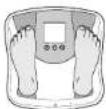
Hcels conted on electrclles

Toes may overhang measuring platform
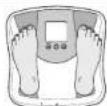
Note: An accurate reading will not be possible if the sales of your feet are not clear, or if your knees are beri, or you are in a sitting position.
To ensure accuracy, readings should be taken without clothing and under consistent conditions of hydration. If you do not undress, always remove your socks or stockings, and be sure the soles of your foot are clean before stepping on the measuring platform. Be sure that your heels are correctly aligned with the electrodes on the measuring platform. Don't worry if your feet appear too large for the unit - accurate readings can still be obtained if your toes overhang the platform. It is best to take readings at the same time of day. Try to wait about three hours after rising, eating, or hard exercise before taking measurements. While readings taken under other conditions may not have the same absolute values, they are accurate for determining the percentage of change as long as the readings are taken in a consistent manner. To monitor progress, compare weight and body fat percentage taken under the same conditions over a period of time.

TAKING WEIGHT AND BODY FAT READINGS
1. Select Personal Key and Step On
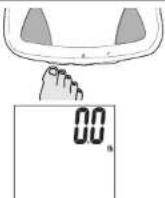
Using your toe, tap your pre-programmed Personal Key (Release the key within 3 seconds of the display will show "Em"). The unit will beep and the display will show the programmed date.
The unit will beep again and the display will show "0.0". Now step onto the platform.
Note: If you step onto the platform before "00" appears the display will show "F" and you will not obtain a reading. Furthermore, if you do not step onto the measuring platform within about 60 seconds after "00" appears, the power is shut-off automatically.
2. Get Your Readings
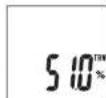
Your weight will be shown first. Continue to stand on the platform.
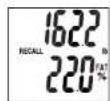
*54321" will appear on the display and disappear one by one from right to left. Your body fat percentage(%-FAT) and Body Fat Range will appear on the display screen.
Your total body water percentage (%TBW) will appear on the display screen. The display will then flash your %TBW, weight and %FAT alternately 3 times.
Note:Do not step off until Body Fat % is shown.
3. Recall Function
To obtain previous readings, step off scale and press Up arrow button. To view current reading, release arrow button.



UNDERSTANDING YOUR READING
Healthy Range Indicator (Standard Adults only\*
Your body fat monitor/scale automatically compares your body fat reading to the Healthy Body Fat Range chart.
Following your body fat percentage reading, a black bar will flash along the bottom of the display, identifying where you fall within the Body Fat Ranges for your age and gender. For example, if the squares appear above (0) area your range is within the Healthy Range – if they appear over (-) area, your reading is below the Healthy Range. For more about the Healthy Range, see page 2
(-): Underfall below the healthy body fat range. Increased risk for health problems.
(0): Healthy, within the healthy body fat percentage range for your age/gender.
(+) Overfat above the healthy range. Increased risk for health problems.
(++) : Obese, high above the healthy body fat range. Greatly increased risk of obesity-related health problems.

Under Healthy Dear Obesa
Note: if you select Altus mode, the unit will not display the Healthy Range Indicator. Atlantes may have a lower body fat range based on their particular sport or activity.
(Range of user age is between 20-79)


PROGRAMMING THE GUEST MODE
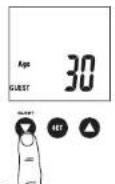
The Guest mode allows you to use the monitor without losing the Information already assigned to a Personal Key. To programme the Guest mode, use the Down button marked to turn on the power. Then follow steps 3 through 5 in "Setting and Storing Data" (p.6). The unit will beep twice and the display will show "0". Step onto the platform. Next follow the directions for "Get Your Reading" (p.7). Note: If you step onto the platform before "0" appears the display will show "Err" and you will not obtain a reading.
Select Weight-Only Key
Using your too tap the Weight-only key. After 2 or 3 seconds, "0." will appear in the display and the unit will beep. When "0" appears in the display, step onto the platform. The body weight value will appear. If you remain on the platform, the display will flash for about 30 seconds, and then the power will automatically turn off. If you step off the platform, the weight will continue to show for about 5 seconds, then "0." will appear and the unit will shut off automatically.
TROUBLESHOOTING
If the following problems occur ...then...
A wrong weight format appears followed by kg, lb, or st-lb Refer to "Switching the Weight Mode" on p.5.
- "Lo" appears on the display, or all the data appears and immediately disappears.
Batteries are low. When this message appears, be sure to replace the batteries immediately, since weak batteries will affect the accuracy of your measurements. Change all the batteries at the same time with new AA-size batteries. Note: Your settings will not be changed from the memory when you remove the batteries.
"Err" appears while measuring.
The Body Fat Percentage reading does not appear or "-----" appears after the weight is measured.
Please stand on the platform keeping movement to a minimum. The unit cannot accurately measure your weight if it detects movement.
Your personal data has not been programmed. Follow the steps on p.6.
Make sure socks or stockings are removed, and the soles of your feet are clean and properly aligned with the guides on the measuring platform.
"OL" appears while measuring.
Reading cannot be obtained if the weight capacity is exceeded.
"Err FAT% appears while measuring.
The Body Fat Percentage is more than 75% readings cannot be obtained from the unit.
EINLEITUNG
Signal through the Kpn

sl-lb (Stone Pounds)
FONCTION D'ARRÉT AUTOMATIQUE
(adults standard unquipment*)

st-lb (Stone-pounds)
AUTOMATISCHE UITSCHAKELFUNCTIE
Heisen up had
edistto garoccditva de
eclctrode.
M.B.: Entnerwirgige alluring is not magic.
warmer the cypress mink solid corn oil is low krouer
cypress oil is up the greengrowth shaft

METEN VAN HET LICHAAAMSVETPERCENTAGE
Abjx Saudavel Acira Obesq

- BF-679W/BF-680W Body Fat Monitor / Scale
- Tanita UK Ltd.
- Tanita Corporation
- Tanita Europe GmbH
- Tanita Corporation of America Inc.
- Tanita France S.A.
- Tanita Health Equipment H.K. Ltd.
- GB Instruction Manual
- Bedienungsanleitung
- Safety Precautions
- Important Notes for Users
- PRINCIPLES OF ESTIMATING BODY FAT PERCENTAGE
- What is Body Fat Percentage?
- The BIA Method
- Hydration Fluctuations
- What is Total Body Water Percentage?
- How To Measure Total Body Water
- Normal Total Body Water Percentage (% TBW)
- Daily Rhythm of Total Body Water
- Important Notes
- FEATURES AND FUNCTIONS
- Measuring Platform
- Accessories
- PREPARATIONS BEFORE USE
- Inserting the Batteries
- Positioning the Monitor
- Handling Tips
- USEFUL FEATURES
- SWITCHING THE WEIGHT MODE Note: For use only with modes containing the weight mode switch
- AUTOMATIC SHUT-DOWN FUNCTION
- HOW TO DETERMINE BODY FAT PERCENTAGE
- Turn on the Power
- Select a Personal Key Number
- Set Age
- Select Female or Male
- Specify the Height
- GETTING ACCURATE READINGS
- TAKING WEIGHT AND BODY FAT READINGS
- Select Personal Key and Step On
- The unit will beep again and the display will show "0.0". Now step onto the platform.
- Get Your Readings
- Recall Function
- UNDERSTANDING YOUR READING
- Healthy Range Indicator (Standard Adults only\*
- PROGRAMMING THE GUEST MODE
- Select Weight-Only Key
- TROUBLESHOOTING
- EINLEITUNG
- FONCTION D'ARRÉT AUTOMATIQUE
- AUTOMATISCHE UITSCHAKELFUNCTIE
- METEN VAN HET LICHAAAMSVETPERCENTAGE
Brand : TANITA
Model : BF680W
Category : Scale