Supernova CKSN3326 - Watch Christiaan van der Klaauw - Free user manual and instructions
Find the device manual for free Supernova CKSN3326 Christiaan van der Klaauw in PDF.



| Technical Features | Stainless steel case, 39 mm diameter, scratch-resistant sapphire crystal, mechanical self-winding movement. |
|---|---|
| Usage | Luxury watch for daily use or special occasions, time display and astronomical functions. |
| Maintenance and Repair | Recommended servicing every 3 to 5 years, regular cleaning with a soft cloth, avoid exposure to strong magnetic fields. |
| Safety | Water resistant up to 30 meters, do not use for diving, avoid strong shocks. |
| General Information | 2-year warranty, documentation provided at purchase, customization available on request. |
Frequently Asked Questions - Supernova CKSN3326 Christiaan van der Klaauw
User questions about Supernova CKSN3326 Christiaan van der Klaauw
0 question about this device. Answer the ones you know or ask your own.
Ask a new question about this device
Download the instructions for your Watch in PDF format for free! Find your manual Supernova CKSN3326 - Christiaan van der Klaauw and take your electronic device back in hand. On this page are published all the documents necessary for the use of your device. Supernova CKSN3326 by Christiaan van der Klaauw.
USER MANUAL Supernova CKSN3326 Christiaan van der Klaauw
ASTRONOMICAL WATCHES
text_image
A P C D B F E 0 1 2SUPER NOVA
INSTRUCTION MANUAL SUPER NOVA
WELCOME TO THE WORLD OF CHRISTIAAN VAN DER KLAAUW ASTRONOMICAL WATCHES
Congratulations with your purchase of a Christiaan van der Klaauw Astronomical Watch. Christiaan van der Klaauw has been making superb watches - unique, exclusive and innovative - for more than 40 years. All these watches are made by hand by passionate watchmakers, with a central theme that appeals strongly to the imagination: astronomy. This is a logical relationship for Christiaan van der Klaauw - after all, time has always been determined on the basis of astronomical values. So we can justifiably state in connection with our watches: Astronomy, time in its purest form.
Your wristwatch is fitted with an automatic movement. When you wear your watch, the movements of your wrist are automatically converted into the energy required to operate your watch. You can also wind the watch by hand. If you do not wear the watch, we advise you to place it in a watch winder.
Turn clockwise.
Exposing our watches to water is not recommended. Your watch may be damaged if you wear it while swimming or in the shower.
ENGLISH
Christiaan van der Klaauw Astronomical Watches are fitted with a strap made of alligator leather. This strap can be replaced. Contact an official dealer of Christiaan van der Klaauw Astronomical Watches if a replacement is required.
Specifications
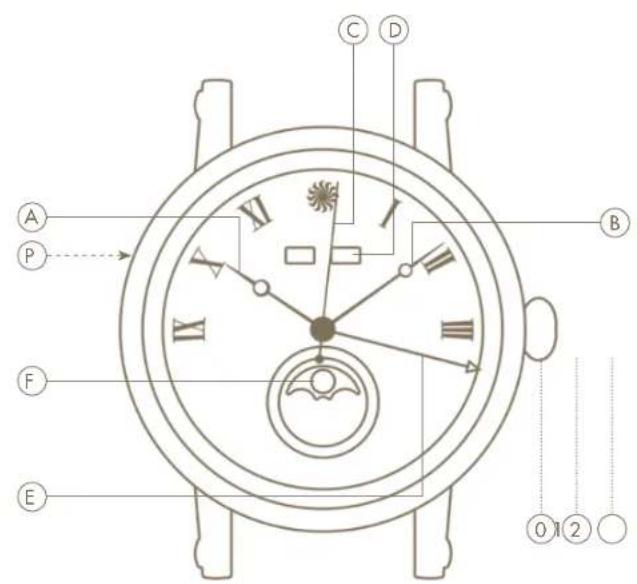
The following information is displayed on the Supernova:
Ⓐ hours with luminova;
⑧ minutes with luminova;
©seconds;
© date (day of the week + month);
© calendar day;
⑤ the moon phase.
Adjustment
The settings of your watch can be adjusted by using the different positions of the crown and the push button Ⓓ.
The crown has three positions:
⑨ this is the position of the crown when you are wearing the watch. In this position, you can wind the watch by hand.
① setting the date and the moon phase.
② setting the time.
To adjust the settings of the Supernova, pull out the crown to position ②. You can now set the time to 12:00. Caution: do not do
this at 24:00. Then push the crown in by one position ① to set the date and month by turning the crown counterclockwise. Set the moon phase by turning the crown clockwise.
ENGLISHENGLI
Important
Always set the moon phase to the previous day. Once this is the case, use the enclosed accessory to push in the push button ① located at the 10 o'clock position on the left-hand side of the watchcase to set the day. Set this to the previous day as well. When the correct month is shown in the window and the day, date and moon phase are set to the previous day, then pull out the crown to position ②, and then turn the hands clockwise until everything is set to today. When the hands also show the right time, then push the crown in again completely.
Functionalities
① The day and month are displayed at the 12 o'clock position.
⑤ The hand with the arrow at the end points to the calendarday of the month.
⑦ The moon phases are shown at the 6 o'clock position. When the moon picture is shown left of the centre, the Moon is in the first quarter. When the image is in the middle, it is full moon, and when it is on the right, the Moon is in the last quarter. If the image is not visible, then it is new moon.
ENGLISHENGLI
WILLKOMMEN IN DER WELT VON CHRISTIAAN VAN DER KLAAUW ASTRONOMICAL WATCHES
ASTRONOMICAL WATCHES

CHRISTIAAN VAN DER KLAAUW HORLOGE ATELIER B.V.
BUSINESSPARK FRIESLAND-WEST 47, 8447 SL HEERENVEEN, THE NETHERLANDS
T: +31 (0)513 62 49 06, INFO@KLAAUW.COM, WWW.KLAAUW.COM