
NNCT857W - Microwave PANASONIC - Free user manual and instructions
Find the device manual for free NNCT857W PANASONIC in PDF.



| Product type | Multifunction combination microwave oven |
| Brand | Panasonic |
| Model | NNCT857W |
| External dimensions (W x D x H) | 530 x 508 x 344 mm |
| Internal dimensions (W x D x H) | 350 x 360 x 250 mm |
| Capacity | 31 liters (estimated) |
| Weight (including accessories) | 21.0 kg |
| Power supply | 230 V, 50 Hz |
| Microwave power (output) | 1000 W (IEC-60705) |
| Grill power | 1500 W |
| Convection power | 1400 W |
| Operating frequency | 2450 MHz |
| Noise level | 52.7 dB |
| Cooking functions | Microwave (6 levels), Grill (3 levels), Hot air (40-250°C), Turbo grill, Combined (grill + MW, hot air + MW, turbogrill + MW) |
| Automatic programs | Auto defrost (3 categories), Sensor cooking (6 programs), Auto weight cooking (15 programs), Memories (3) |
| Included accessories | Glass turntable, roller ring, enameled black tray, metal tripod, square drip pan, square grid |
| Display | LED with multilingual scrolling instructions |
| Safety | Child safety lock, door lock system, overheat protection |
| Cleaning | Enamel walls, catalytic self-cleaning ceiling, dishwasher-safe accessories |
| Repairability | To be entrusted to a technician authorized by the manufacturer; lamp replaceable by the retailer |
| General information | For domestic use only; do not install near a stove; respect ventilation distances |
Frequently Asked Questions - NNCT857W PANASONIC
User questions about NNCT857W PANASONIC
0 question about this device. Answer the ones you know or ask your own.
Ask a new question about this device
Download the instructions for your Microwave in PDF format for free! Find your manual NNCT857W - PANASONIC and take your electronic device back in hand. On this page are published all the documents necessary for the use of your device. NNCT857W by PANASONIC.
USER MANUAL NNCT857W PANASONIC
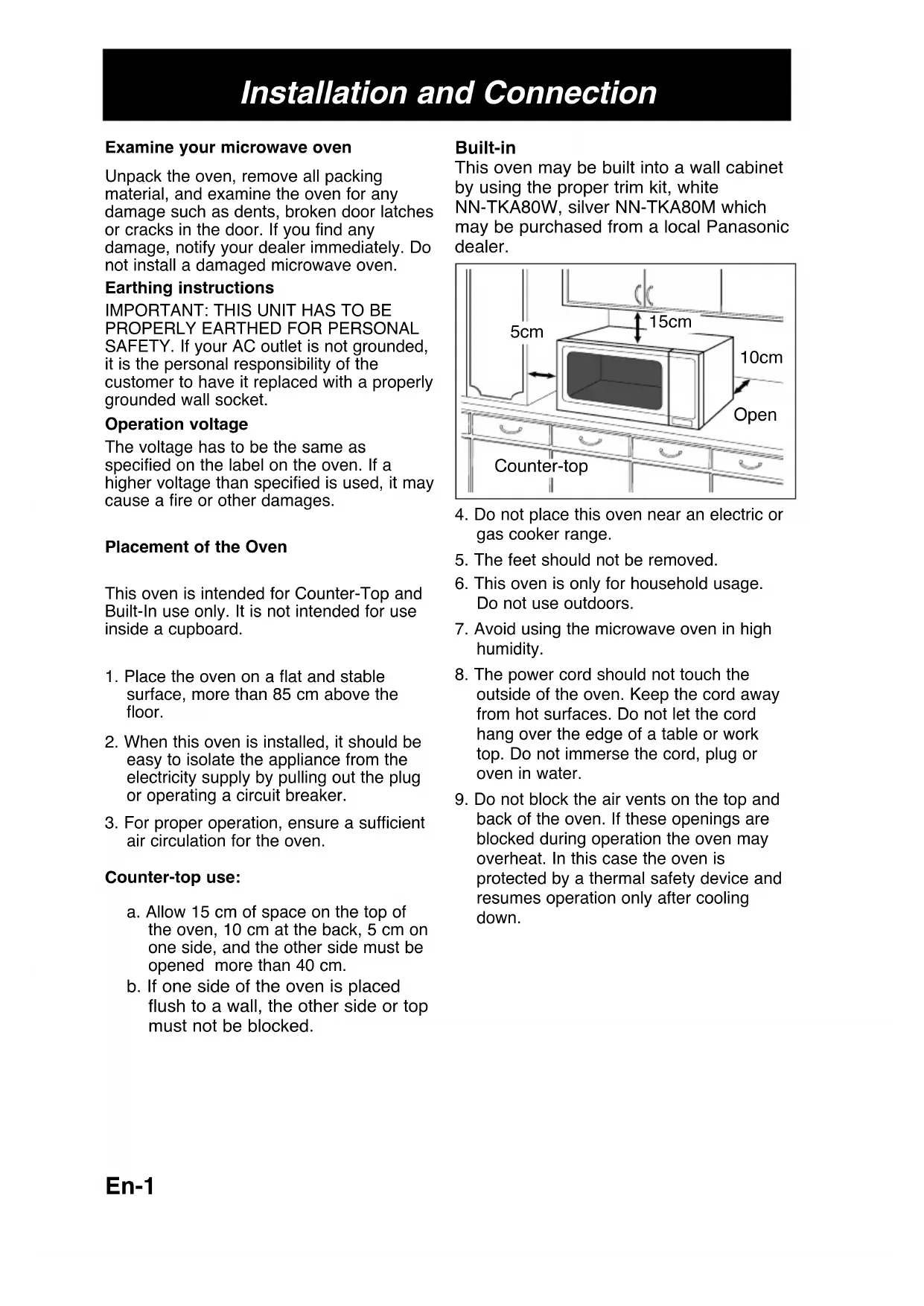
Operating Instructions
Operating Instructions
Operating Instructions
Operating Instructions
Microwave/Grill/Convection Oven
Before operating this oven, please read these instructions carefully and keep for future reference.
Installation and Connection
Examine your microwave oven
Unpack the oven, remove all packing material, and examine the oven for any damage such as dents, broken door latches or cracks in the door. If you find any damage, notify your dealer immediately. Do not install a damaged microwave oven.
Earthing instructions
IMPORTANT: THIS UNIT HAS TO BE PROPERLY EARTHED FOR PERSONAL SAFETY. If your AC outlet is not grounded, it is the personal responsibility of the customer to have it replaced with a properly grounded wall socket.
Operation voltage
The voltage has to be the same as specified on the label on the oven. If a higher voltage than specified is used, it may cause a fire or other damages.
Placement of the Oven
This oven is intended for Counter-Top and Built-In use only. It is not intended for use inside a cupboard.
- Place the oven on a flat and stable surface, more than 85 cm above the floor.
- When this oven is installed, it should be easy to isolate the appliance from the electricity supply by pulling out the plug or operating a circuit breaker.
- For proper operation, ensure sufficient air circulation for the oven.
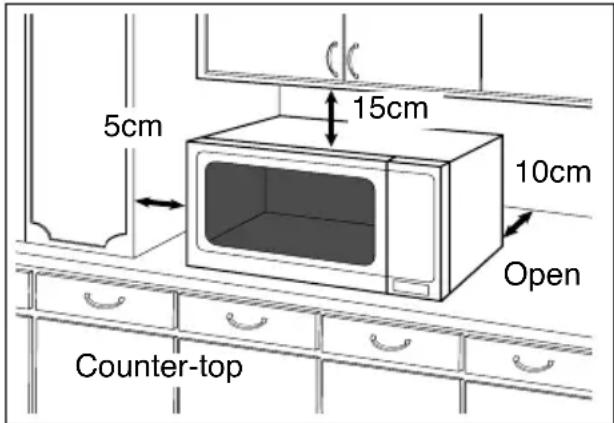
Counter-top use:
a. Allow 15 cm of space on the top of the oven, 10 cm at the back, 5 cm on one side, and the other side must be opened more than 40 cm. b. If one side of the oven is placed flush to a wall, the other side or top must not be blocked.
Built-in
This oven may be built into a wall cabinet by using the proper trim kit, white NN-TKA80W, silver NN-TKA80M which may be purchased from a local Panasonic dealer.
- Do not place this oven near an electric or gas cooker range.
- The feet should not be removed.
- This oven is only for household usage. Do not use outdoors.
- Avoid using the microwave oven in high humidity.
- The power cord should not touch the outside of the oven. Keep the cord away from hot surfaces. Do not let the cord hang over the edge of a table or work top. Do not immerse the cord, plug or oven in water.
- Do not block the air vents on the top and back of the oven. If these openings are blocked during operation the oven may overheat. In this case the oven is protected by a thermal safety device and resumes operation only after cooling down.
Installation and Connection
WARNING
- The door seals and door seal areas should be cleaned with a damp cloth. The appliance should be inspected for damage to the door seals and door seal areas, and if these areas are damaged, the appliance should not be operated until it has been repaired by a service technician trained by the manufacturer.
- Do not attempt to tamper with or make any adjustments or repairs to the door, control panel housing, safety interlock switches, or any other part of the oven. Do not remove the outer panel from the oven, which gives protection against exposure to microwave energy. Repairs should only be done by a qualified service person.
- Do not operate this appliance if it has a damaged cord or plug, if it is not working properly, or if it has been damaged or dropped. It is dangerous for anyone other than a service technician trained by the manufacturer to perform repair service.
- If the supply cord of this appliance is damaged, it must be replaced with the special cord available from the manufacturer.
- Only allow children to use the oven without supervision when adequate instructions have been given so that the child is able to use the oven in a safe way and understands the hazards of improper use.
- Liquids and other foods must not be heated in sealed containers since they are liable to explode.
- This oven is not intended for use by persons (including children) with reduced physical, sensory, or mental capabilities, or lack of experience and knowledge, unless they have been given supervision or instruction concerning the use of the oven by a person responsible for their safety. Children should be supervised to ensure they do not play with the oven.
Use of your oven
- Do not use the oven for any reason other than the preparation of food. This oven is specifically designed to heat or cook food. Do not use this oven to heat chemicals or other non-food products.
- Before use, check that utensils/containers are suitable for use in microwave ovens.
- Do not attempt to use this microwave oven to dry newspaper, clothing, or any other materials. They may catch on fire.
- When the oven is not being used, do not store any objects other than oven accessories inside the oven in case it is accidentally turned on.
- The appliance shall not be operated by microwave or combination without food in the oven. Operation in this manner may damage the appliance. Exception to this is point 1 under heater operation.
- If smoke or a fire occurs in the oven, press the Stop/Cancel pad and leave the door closed in order to stifle any flames. Disconnect the power cord, or shut off power at the fuse or the circuit breaker panel.
Safety Instructions
Heater Operation
- Before using the CONVECTION, COMBINATION, or GRILL function for the first time, wipe off any excessive oil inside the oven cavity and operate the oven empty, without food or accessories, on CONVECTION at 250°C for 10 minutes. This will burn off the oil used for rust protection. This is the only time the oven should be used empty.
- Exterior oven surfaces, including the air vents on the cabinet and the oven door, will become hot during CONVECTION, COMBINATION, and GRILLING. Take care when opening or closing the door and when inserting or removing food and accessories.
- The oven has two heaters located at the top and back of the oven. After using the CONVECTION, COMBINATION, and GRILL functions, these surfaces will be very hot. Note: After cooking with these modes, the oven accessories will also be very hot.
- The accessible parts may become hot during combination use. Young children should be kept away, and children should only use the oven under adult supervision due to the high temperatures generated.
Fan Motor Operation
While the oven is in Microwave/Heater operation, the cooling fan rotates continuously to cool the electrical components. After operation is complete, the fan may continue to rotate for a while.
Oven Light
When it becomes necessary to replace the oven light, please consult your dealer.
Accessories
The oven comes equipped with a variety of accessories. Always follow the directions given for use of the accessories.
Glass Tray
- Do not operate the oven without the roller ring and the glass tray in place.
- Never use a glass tray other than the one specifically designed for this oven.
- If the glass tray is hot, let it cool before cleaning or placing in water.
- The glass tray can turn in either direction.
- If the food or cooking vessel on the glass tray touches the oven walls and stops the tray rotating, the tray will automatically rotate in the opposite direction. This is normal.
- Do not cook foods directly on the glass tray.
Roller Ring
- The roller ring and the oven floor should be cleaned frequently to prevent noise and build-up of remaining food.
- The roller ring must always be used for cooking together with the glass tray.
Metal Tray
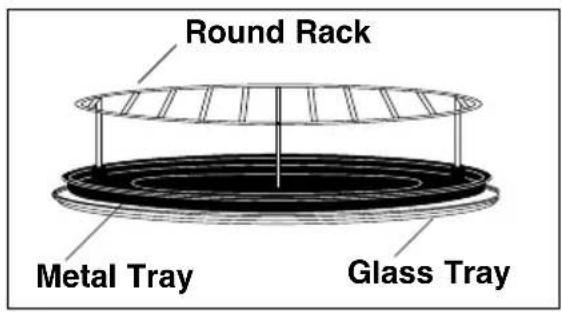
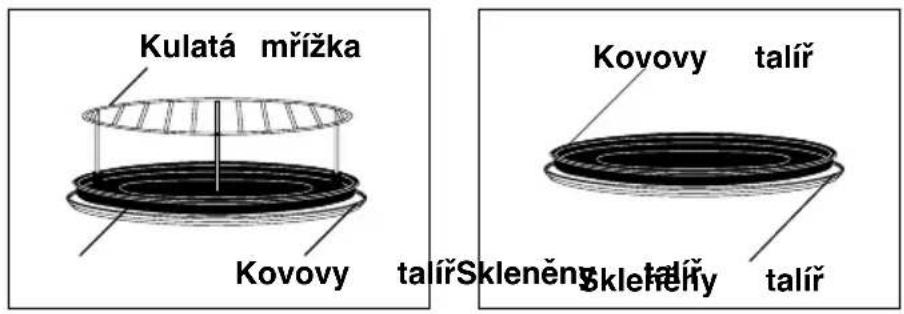
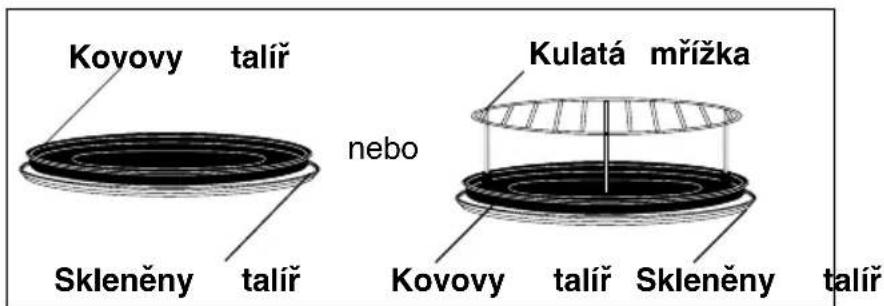
- Metal Tray is for cooking on Grill, Convection and Combination modes. Do not use the Metal Tray in Microwave mode only.
- Metal Tray should be placed on Glass Tray or Round Rack.
Round Rack
- The Round Rack is used to facilitate browning of small dishes and help with the good circulation of the heat.
- Do not use any metal container directly on the Round Rack in COMBINATION with MICROWAVE.
- Do not use the Round Rack in MICROWAVE mode only.
Enamel Shelf and Wire Shelf
- The shelves are for cooking on convection and grill modes. Do not use the shelves on microwave mode or combination mode.
- When cooking on convection mode, use just one or both of the shelves in position. When cooking on grill mode, use the shelf in the upper position.
Installation and Connection
1) Cooking Times
- Cooking times given in the cookbook are approximate. The cooking time depends on the condition, temperature, amount of food and on the type of cookware.
- Begin with the minimum cooking time to help prevent overcooking. If the food is not sufficiently cooked you can always cook it for a little longer.
N.B.: If the recommended cooking times are exceeded the food will be spoiled and in extreme circumstances could catch fire and possibly damage the interior of the oven.
2) Small Quantities of Foods
- Small quantities of food or foods with low moisture content can burn, dry out or catch on fire if cooked too long. If materials inside the oven should ignite, keep the oven door closed, turn the oven off and remove the plug from the socket.
3) Eggs
- Do not cook eggs in their shells and whole hard-boiled eggs by MICROWAVE. Pressure may build up and the eggs will explode even after microwave heating has ended.
4) Piercing Skin
- Food with non porous skins, such as potatoes, egg yolks and sausages must be pierced before cooking by MICROWAVE to prevent bursting.
5) Meat Thermometer
- Use a meat thermometer to check the degree of cooking of roasts and poultry only when the meat has been removed from the oven. Do not use a conventional meat thermometer when using MICROWAVE or COMBINATION because it may cause sparking.
6) Liquids
- When heating liquids, e.g. soup, sauces and beverages in your microwave oven, overheating the liquid beyond boiling point can occur without evidence of bubbling. This could result in a sudden boil over of the hot liquid. To prevent this possibility the following steps should be taken: a) Avoid using straight-sided containers with narrow necks. b) Do not overheat. c) Stir the liquid before placing the container in the oven and again halfway through the cooking time. d) After heating, allow it to stand in the oven for a short time, stir again before carefully removing the container.
7) Paper/Plastic
- When heating food in plastic or paper containers, check the oven frequently as these types of containers ignite if overheated.
- Do not use recycled paper products (e.g. Kitchen Roll) unless the paper product is labelled as safe for microwave oven use. Recycled paper products may contain impurities which may cause sparks and/or fires during use.
- Remove wire twist-ties from roasting bags before placing the bags in the oven.
8) Utensils/Foil
- Do not heat any closed cans or bottles because they might explode.
- Metal containers or dishes with metallic trim should not be used during Microwave cooking. Sparking will occur.
- If you use any aluminium foil, meat spikes or metalware the distance between them and the oven walls and door should be at least 2 cm to prevent sparking.
9) Feeding Bottles/Baby Food Jars
- The top and teat or lid must be removed from feeding bottles or baby food jars before placing in the oven.
- The contents of feeding bottles and baby food jars are to be stirred or shaken.
- The temperature has to be checked before consumption to avoid burns.
Outline Diagram
![[13], [2], [7], [3], [8], [6], [4], [5], [1], [9], [10], [11], [12]](/content/2026/03/468980/images/800c07b9415578cdf8b5d8a9813ea7cbc6316a7508f0ec2ada3fc6f60b9f02e6.jpg)
[1] Door Release Button
Press to open the door. When you open the oven door during cooking, the cooking is stopped temporarily without clearing earlier made settings. The cooking is resumed as soon as the door is closed and Start Pad pressed. The oven lamp lights as soon as the oven door is opened.
[2] Oven Window [3] Door Safety Lock System [4] Oven Air Vent [5] Control Panel [6] Glass Tray [7] Roller Ring [8] External Oven Air Vents [9] Metal Tray [10] Round Rack [11] Enamel Shelf [12] Wire Shelf [13] 2 Level Cooking Support guides
(1) Display Window (2) Time Pads (3) Microwave Power Pad (4) Grill Power Pad (5) Convection Pad (6) Grill Convection Pad (7) Combination Pad (8) Memory Pad (9) Auto Defrost Pad (10) Plus/Minus/Weight Selection Control Pads (11) Delay/Stand Pad (12) Auto Sensor microwave Program Pad (13) Auto Sensor Combination Program Pad (14) Auto Weight Combination Program Pads (15) Start Pad: Press to start operating the oven. If during cooking the door is opened or Stop/Cancel Pad is pressed once, Start Pad has to be pressed again to continue cooking. (16) Stop / Cancel Pad Before cooking: one press clears your instructions. During cooking: one press temporarily stops the cooking program. Another press cancels all your instructions and the time of day will appear in the display.
Beep Sound: A beep sounds when a button is pressed. If this beep does not sound, the setting is incorrect. When the oven changes from one function to another, two beeps sound. After completion of cooking, five beeps sound.
Choosing the right Cooking Mode
| Cooking modes | Uses | Accessories to use | Containers |
Microwave | - Defrosting- Reheating- Melting : butter, chocolate, cheese.- Cooking fish, vegetables, fruits, eggs.- Preparing : stewed fruits, jam, sauces, custards, choux, pastry, béchamel, caramel, meat, fish or vegetarian loaves.- Baking cakes with eggs and baking powder ingredients without colour. (Victoria sandwich, clafoutis etc.)No Preheating | Glass turntable only | Microwaveable, no metal. |
Grill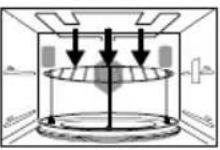 | - Grilling of meat or fish.- Toast grilling.- Colouring of gratin dishes or meringue pies.Preheating necessary | Glass turntable + metal tray + round rack | Heatproof, metal tin can be used. |
CONVECTION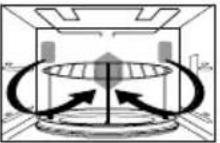 | - Baking of small pastry items with short cooking times : puff pastry, cookies, choux, short pastry cookies, roll cakes.- Special baking : souffles, meringues, vol-au-vent, small loaves of bread or brioches, sponge cake, meat pie, etc.- Baking of quiches, pizzas and tarts.Preheating advised | Glass turntable + metal tray + round rack or enamel shelf and/or wire shelf | Heatproof, metal tin can be used. |
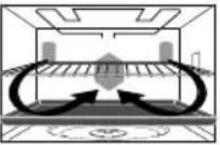 |
Choosing the right Cooking Mode
| Cooking modes | Uses | Accessories to use | Containers | |
Grill + Convection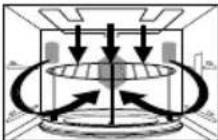 | - Roasting red meats, thick steak (rib or beef, Tbone steaks)- braising of fish.Preheating necessary | Glass turntable + metal tray + round rack or enamel shelf and/or wire shelf | Heatproof, metal tin can be used. | |
| COMBINATION• Grill + microwave• Convection + microwave• Grill + convection + microwave | - Roasting meat and poultry.- Defrosting and reheating crunchy foods (quiche, pizza, bread, viennoiserie, lasagne, gratin.)- Cooking lasagne, meat, potatoes or vegetable gratins.- Baking cakes and puddings with eggs or baking powder ingredients with browning, baking of quiches, pies and tarts.Preheating advised | Glass turntable + metal tray + round rack (depending on food size for the latter) | Microwaveable and heatproof. Metal cake tin to be used on metal tray only. DO NOT USE spring form tins. | |
Grill + microwave convection + microwave grill + convection + microwave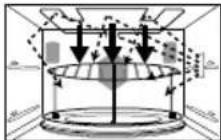 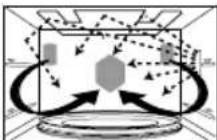 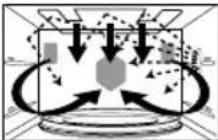 | ||||
Oven Accessories
The following chart shows correct use of the accessories in the oven.
| Glass Tray | Metal Tray | Round Rack | Enamel Shelf | Wire Shelf | |
| Microwave | YES | NO | NO | NO | NO |
| Grill | YES | YES | YES | YES | YES |
| Convection | YES | YES | YES | YES | YES |
| Grill Convection | YES | YES | YES | YES | YES |
| Combination | YES | YES | YES | NO | NO |
Controls and Operation Procedure
Word Prompting:
![graph TD A["Plug-in "88:88""] --> B["ENGLISH"] B --> C["DEUTSCH"] C --> D["FRANCAIS"] D --> E["NEDERLANDS"] E --> F["ITALIANO"] G["Word Prompting"] --> H["Press"] G --> I["Press"] G --> J["Press"] G --> K["Press"] G --> L["Press"] M["In English e.g. "SET TIME""] N["In German eg.…](/content/2026/03/468980/images/79dc2de0d03aa98339af6586151e7eae3889fdebc345b775db40cf06d68779f5.jpg)
These models have a unique function "Word Prompting" which guides you through the operation of your microwave. After plugging in the oven press the Start Button until you locate your language. As you press the buttons, the display will scroll the next instruction eliminating the opportunities for mistakes. If for any reason you wish to change the language displayed, unplug the oven and repeat this procedure.
En-9
Controls and operation Procedure
Clock Setting:
Example: To set 14:25
![graph LR A["Male"] --> B["14 times"] B --> C["twice"] B --> D["1 min"] D --> E["10 min"] B --> F["1 h"] F --> G["10 s"] H["Male"] --> I["14:25"] I --> J["->"] style A fill:#fff,stroke:#000 style J fill:#fff,stroke:#000 note right of B 5 times inoperable end](/content/2026/03/468980/images/0a51fc6beb5262e966765203920f1a5fd76b40df9f89dd5d1b6ff13f7f9e397a.jpg)
- Press Delay/Stand Pad twice.
The colon starts to blink.
- Enter the time by pressing the appropriate Time Pads.
The time appears in the display and the colon blinks.
- Press Delay/Stand Pad once.
The colon stops blinking and the time of day is entered.
NOTE:
- To reset the time of day repeat all the above steps.
- The time of day is displayed, unless the power supply is interrupted.
- This clock has a 24 hour display.
Child Safety Lock:
Using this system will make the oven controls inoperable; however, the door can be opened. Child Lock can be set when the display shows a colon or the time.
To Set:
To Cancel:
- Press Start Pad three times.
The time of day will disappear. Actual time will not be lost.
- Press Stop/Cancel Pad three times.
- The time of day will reappear in the display.
Microwave Cooking and Defrost
There are 6 different microwave power levels available (see the chart below).
Use of accessory:
Glass Tray
This chart shows approximate wattage for each power level.
| Press Power Level Wattage Max time available | ||
| once HIGH power 1000 W 30 minutes | ||
| twice DEFROST power 270 W 99 min. 90 sec. | ||
| 3 times MEDIUM power 600 W 99 min. 90 sec. | ||
| 4 times LOW power 440 W 99 min. 90 sec. | ||
| 5 times SIMMER power 250 W 99 min. 90 sec. | ||
| 6 times WARM power 100 W 99 min. 90 sec. | ||



- Select Microwave power level. - Set the cooking time. - Press Start Pad.
NOTE:
- For 2 or 3 stage cooking, before pressing Start Pad, repeat setting the Microwave power level and cooking time.
e.g., Casserole - High 10 minutes to bring the casserole to a boil. Simmer 60 minutes to cook.
Warm 10 minutes to allow flavors to develop.
- Stand time can be programmed after the Microwave power and time setting.
- You can add to the cooking time during cooking, if required. Press the 1 min pad to increase the cooking time. Time can be added in 1-minute increments up to the maximum time available.
CAUTION: The oven will automatically operate on 1000 W Microwave Power if a cooking time is entered without selecting the power level.
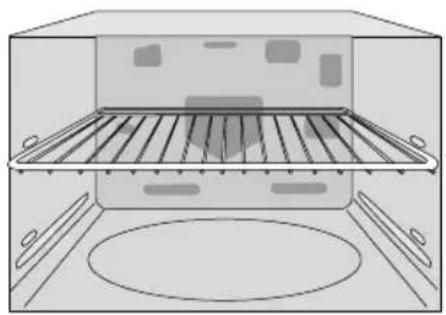
Grilling
The Grill Pad provides 3 Grill settings.
Use of accessory:
| Press Power Level Wattage | ||
| once 1 | HIGH 1500 W | |
| twice 2 | MEDIUM 1200 W | |
| 3 times 3 | LOW 950 W | |

After preheating, place the food in the oven.
- Press the Grill Power Pad for the desired Grill setting.
- Press the Start Pad to start preheating.
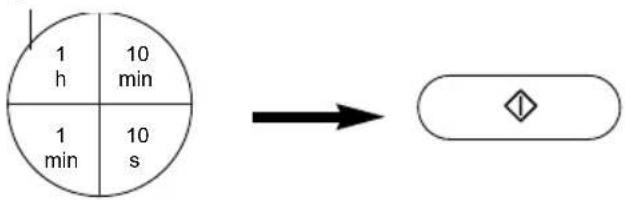
- Set the cooking time
- Press the Start Pad.
(up to 99 minutes 90 seconds).
NOTE ON PREHEATING:
- Do not open the door during preheating. After preheating, 3 beeps will be heard and the "P" will flash in the display window. If the oven door is not opened after preheating, the oven will maintain the selected temperature for 30 minutes. After 30 minutes, the oven will shut off automatically and revert to time of day.
- If you want to cook without preheating, after selecting the Grill power, set the cooking time then press Start Pad.
NOTE:
- The Grill will only operate with the oven door closed.
- You can add to the cooking time during cooking, if required. Press 1 min pad to increase the cooking time. Time can be added in 1 minute increments, up to 99 minutes.
Cooking by Convection / Grill Convection
These Pads offer a choice of convection temperatures 40°C (only for Convection mode) and 100 - 250°C in 10°C increments. For quick selection of the most commonly used cooking temperatures, the temperatures start at 150°C and count up to 250°C then 40°C (only for Convection mode) and 100°C. It is possible to cook on one or two levels when using convection cooking. See En-15 for shelf cooking.
Use of accessory: For one level cooking.
If using the turntable.
Convection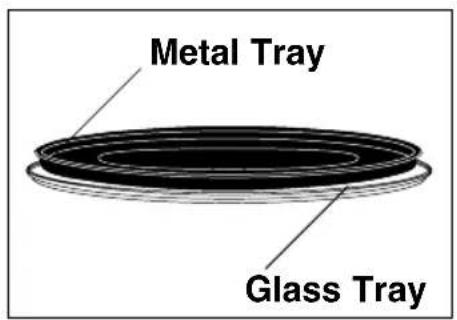
Grill Convection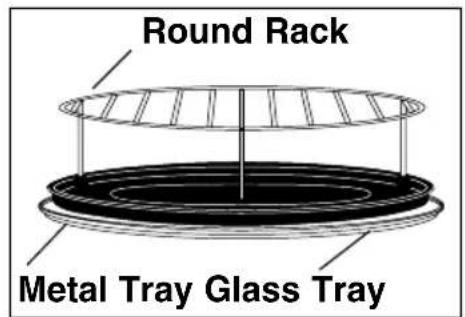
Cooking by Convection:


After preheating, place the food in the oven.
- Set the desired temperature.
- Press Start Pad to start preheating.
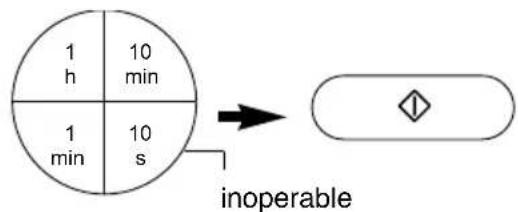
- Set the cooking time
- Press Start Pad.
(up to 9 hours 99 minutes).
Cooking by Grill Convection:
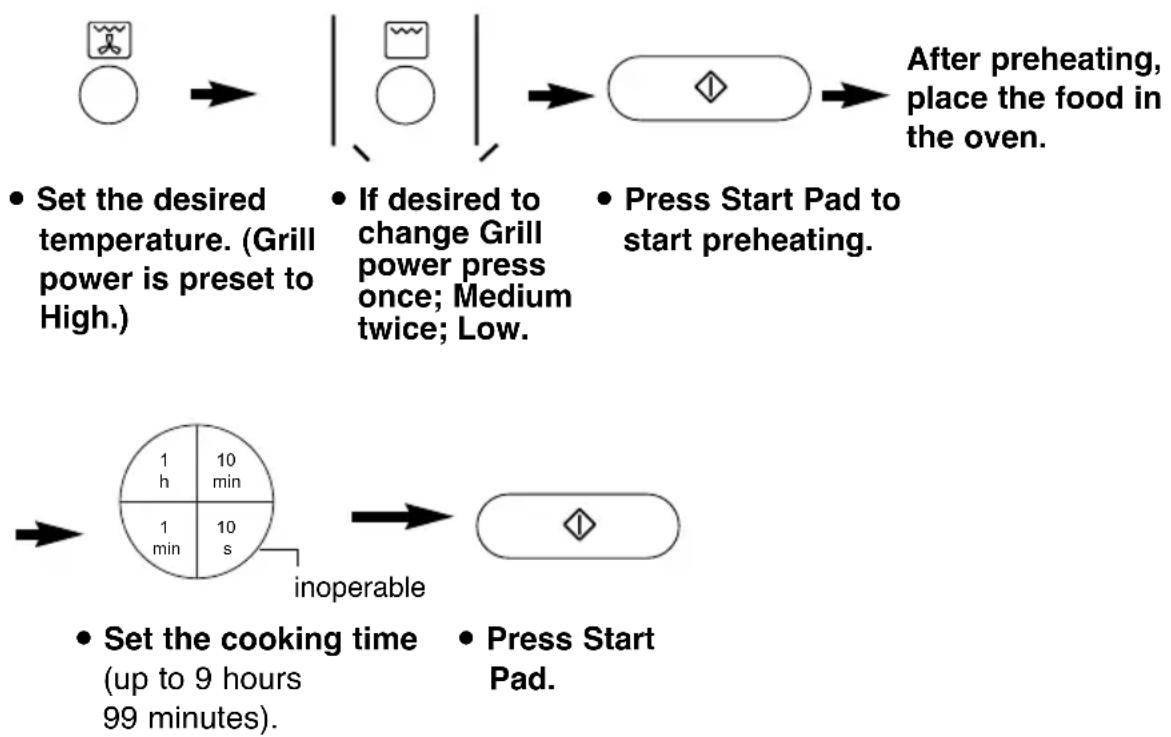
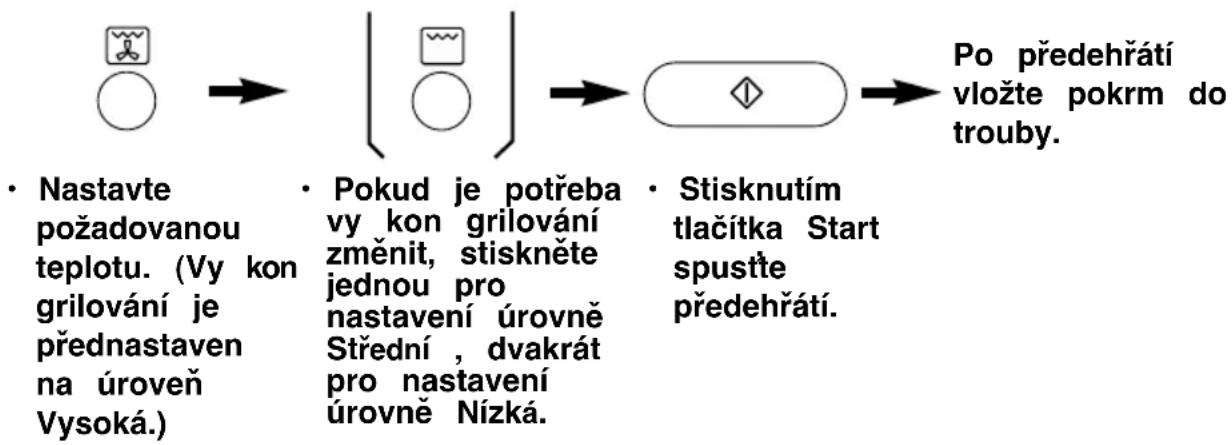
- Set the desired temperature. (Grill power is preset to High.)
- If desired to change Grill power press once; Medium twice; Low.
After preheating, place the food in the oven.
- Press Start Pad to start preheating.
- Set the cooking time (up to 9 hours 99 minutes).
- Press Start Pad.
NOTE ON PREHEATING:
- Do not open the door during preheating. After preheating 3 beeps will be heard and the "P" will flash in the display window. If the oven door is not opened after preheating, the oven will maintain the selected temperature. After 30 minutes, the oven will shut off automatically and revert to time of day.
- If you want to cook without preheating, after selecting the desired temperature, set the cooking time then press Start Pad.
NOTE:
- When the selected cooking time is less than one hour, the time counts down second by second.
- When the selected cooking time is over one hour, the time counts down minute by minute until only "1H 00" (1 hour) remains. The display then indicates minutes and seconds and counts down second by second.
- You can add to the cooking time during cooking, if required. Press 1 min pad to increase the cooking time. Time can be added in 1 minute increments.
- After pressing Start Pad, the selected temperature can be recalled and changed. Press Convection or Grill Convection Pad once to indicate the temperature in the display window. While the temperature is recalled in the display window, you can change the temperature by pressing Convection or Grill Convection Pad.
Cooking by Convection/Grill Convection
Shelf Cooking
One Level Cooking
If using a shelf for one level cooking, place on the lower level.
Enamel Shelf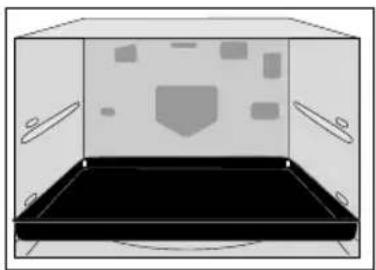
Wire Shelf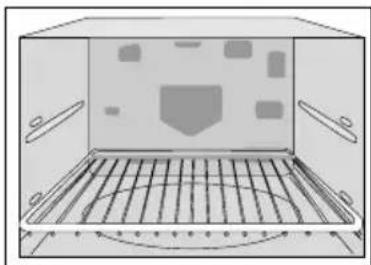
Two Level Cooking
When cooking on two levels use both the shelves supplied, with the enamel shelf on the lower level and the wire shelf on the upper level.
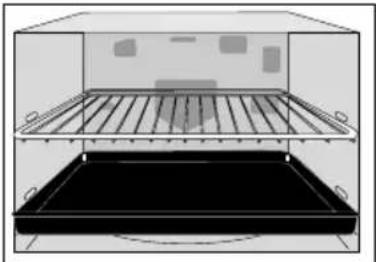
Depending on the recipe, you can preheat with or without the shelves in position. See individual recipes for details.
Batch Baking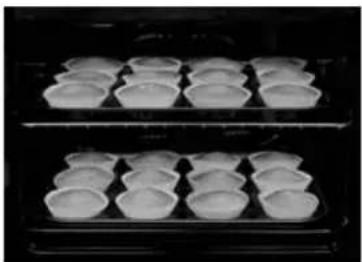
Cooking Large Dishes of Food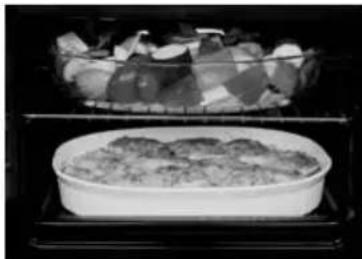
The shelves are ideal for batch baking and when cooking in a large dish that will not turn on the turntable.
NOTE:
- When cooking with one or both of the shelves, remove all other accessories (glass tray, roller ring and metal tray).
- Ensure that the shelves are inserted correctly, and are secure before use.
- Do not place a dish of food weighing more than 5Kg on each shelf.
- ALWAYS USE OVEN GLOVES WHEN REMOVING THE FOOD AND ACCESSORIES AFTER COOKING AS THE OVEN & ACCESSORIES WILL BE VERY HOT.
- When removing food, only pull the shelf out halfway and then remove the food. The wire shelf will lock in position.
- If baking longer than 20 minutes at a high temperature (more than 210°C), it is preferable to turn the shelves halfway during cooking time.
Combination Cooking
There are 3 combinations settings; 1) Grill + Microwave, 2) Convection + Microwave, 3) Grill Convection + Microwave. 1000 W Microwave power level is not available on Combination cooking. This would not be useful in normal use (the food would be cooked before browning is achieved).
Use of accessory:
Grill + Microwave Convection + Microwave
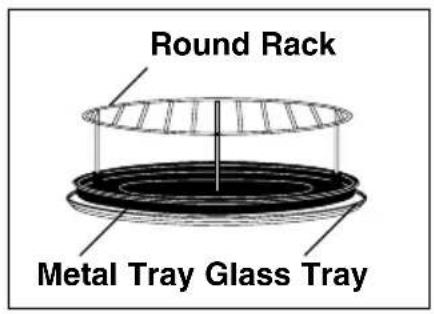
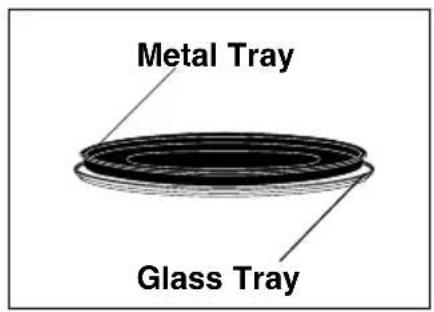
Grill Convection + Microwave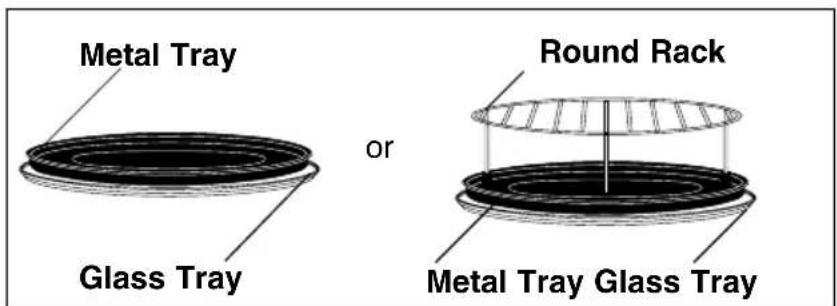
1) Grill + Microwave
![graph LR A["Combi"] --> B["combinant"] B --> C["combinant"] C --> D["combinant"] D --> E["combinant"] E --> F["inoperable"] F --> G["combinant"] style A fill:#fff,stroke:#333 style B fill:#fff,stroke:#333 style C fill:#fff,stroke:#333 style D fill:#fff,stroke:#333 style E fill:#fff,stroke:#333 style…](/content/2026/03/468980/images/aa6bf0009751074e5aff1fa8f424eaba0c1d6a6f8ff03edbd51b65eacef7356a.jpg)
- Press Combination Pad.
- Set the desired Grill setting.
- Set the desired microwave power level.
- Set the desired cooking time (up to 9 hours 99 minutes).
- Press Start Pad.
NOTE ON PREHEATING:
The oven can be preheated on Combination cooking. Press Start Pad before setting the cooking time and follow the NOTE ON PREHEATING on page En-14.
Combination Cooking
2) Convection + Microwave
![graph LR A["Combi"] --> B["Set the desired temperature."] B --> C["Set the desired Microwave power level."] C --> D["Set the desired cooking time (up to 9 hours 99 minutes)."] D --> E["Press Start Pad."] style A fill:#fff,stroke:#000 style B fill:#fff,stroke:#000 style C fill:#fff,stroke:#000 style…](/content/2026/03/468980/images/63e286199cf6e0a1f2abe6bfc77b1bf623425d99d2edf51bb221c67735ad79ca.jpg)
3) Grill Convection + Microwave
![graph LR A["Combi"] --> B["Water Icon"] B --> C["Water Icon"] C --> D["○"] D --> E["○"] E --> F["○"]](/content/2026/03/468980/images/e672c1f7e6aff8416d26ca34013a54a85bd2f0104ba85e2f6ae7cefe4bdae772.jpg)
- Press Combination Pad. - Set the desired temperature. (Grill power is preset to High.) - If desired to change Grill power press once; Medium twice; Low. - Set the desired Microwave power level.
![graph LR A["1 h 10 min"] --> B["1 min 10 s"] B --> C["inoperable"]](/content/2026/03/468980/images/4bd9781d52d9fcbebe04f33726047fdb172dcfae5071c7625e69a262b3866d58.jpg)
- Set the desired cooking time (up to 9 hours 99 minutes). - Press Start Pad.
NOTE ON PREHEATING:
The oven can be preheated on Combination cooking. Press Start Pad before setting the cooking time and follow the NOTE ON PREHEATING on page En-14.
Combination Cooking
NOTE ON PREHEATING:
The oven can be preheated on Combination cooking. Press Start Pad before setting the cooking time and follow the NOTE ON PREHEATING on page En-14.
NOTE:
- When the selected cooking time is less than one hour, the time counts down second by second.
- When the selected cooking time is over one hour, the time counts down minute by minute until only "1H 00" (1 hour) remains. The display then indicates minutes and seconds and counts down second by second.
- You can add to the cooking time during cooking, if required. Press 1 min pad to increase the cooking time. Time can be added in 1 minute increments, up to 99 minutes.
- After pressing Start Pad, the selected temperature can be recalled by pressing Combination Pad. The selected setting appears in the display for 2 seconds.
Auto Defrost
With this feature you can defrost frozen foods according to the weight. Select the category and set the weight of the food. The weight is programmed in grams. For quick selection, the weight starts from the most commonly used weight for each category.
![graph LR A["Water droplets"] --> B{Decision} B --> C["○"] B --> D["○"] B --> E["○"] B --> F["◇"]](/content/2026/03/468980/images/95a460e11a2615e610da6098cc9688e753d0e1f6e6fb4a6a9864fa8666ba0180.jpg)
- Select the desired Auto Defrost Program.
- Set the weight of the frozen food. weight counts up in 100 g increments ▲ weight counts up in 10 g increments ▼ weight counts down in 10 g increments
- Press Start Pad.
| Program | Weight | Accessories | Suitable Foods |
 Small Pieces Small Pieces | 100 - 1600 g | 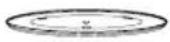 | Small pieces of meat, escallop, sausages, fish fillets, steaks, chops.(each 100 g to 400 g). Turn at beeps. |
 Big Pieces Big Pieces | 400 - 2000 g | 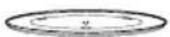 | Big pieces of meat, roast, whole chicken. Turn at beeps. |
  Bread Bread | 70 - 400 g | 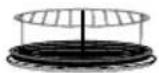 | For reheating frozen bread, rolls and croissants. Remove all packaging and place on Round Rack on Metal Tray on Glass Tray. Place large whole loaf directly on the metal tray. Turn at beeps. |
NOTE:
- When the defrosting time is longer than 60 minutes, the time will appear in hours and minutes.
- The shape and size of the food will determine the maximum weight the oven can accommodate.
NOTE on Program 3:
Take care when removing Bread and Rolls from the oven. The oven and accessories will get hot during/after defrosting.
En-19
Auto Sensor Programs
A variety of food may be cooked without having to enter the cooking time, weight or the power level.
e.g.
![graph LR A["Input Shape 1"] --> C["Output Symbol"] B["Input Shape 2"] --> C["Output Symbol"]](/content/2026/03/468980/images/1e6fc2ac4968f55fee521fdb0b99d64371f2b073ff8f0a0cf3f908314fcb42f4.jpg)
- Select the desired Auto Sensor Program.
- Press Start Pad.
Plus/Minus Control:
Preferences for degree of cooking vary for each individual. After having used Auto Sensor Programs a few times, you may decide you would prefer your food cooked to a different degree of cooking. By using Plus/Minus control, the programs can be adjusted to cook food for a longer or shorter time. Press ▲ or ▼ pad before pressing Start Pad. If you are satisfied with the result of the Auto Sensor Programs, you do not have to use this control.
NOTE:
- Auto Sensor Programs cannot work within 3 minutes after plug-in.
- The oven automatically calculates the cooking time or the remaining cooking time.
- The door should not be opened before the time appears in the display window.
- The temperature for frozen food is assumed to be -18°C to -20°C, for other types of food +5°C to +8°C (refrigerator temperature). The reheat pasta/rice and reheat soup programs are suitable for foods at refrigerator or room temperature.
- To prevent any mistakes during Auto Sensor Programs ensure that Glass Tray and the plate are dry.
- The room temperature should not be more than 35°C and not less than 0°C.
- Only cook foods within the recommended weight range described on page En-21.
- If the oven has previously been used on Convection, Grill Convection, Combination or Grill, and it is too hot to be used on an Auto Sensor Program, "HOT" will appear in the display window. After the "HOT" disappears, the Auto Sensor Programs may be used. If in a hurry, cook food manually by selecting the correct cooking mode and cooking time yourself.
Auto Sensor Programs
| Category | Weight | Accessories | Instructions | |
 | 1 Reheat Soup | 300 - 1200 g | For reheating tetra, canned or homemade soups. All foods should be at room or refrigerated temperatures. Stir before and after reheating. It is preferable to cover with a lid or plate or saucer. Final temperature of soup may vary depending on thickness of soup, starting temperature, sugar and fat content of soup. | |
| 2 Reheat Rice/Pasta | 200 - 1200 g |  | For reheating pre-cooked canned, vacuumed packed or homemade pasta, rice or potatoes. All foods should be at room or refrigerated temperatures. Stir before and after reheating. It is preferable to cover with a lid or plate. Final temperature may vary depending on the amount of sauce, fat content of sauce and starting temperature. | |
 | 3 Cook Fresh Vegetables | 200 - 1500 g |  | For cooking fresh vegetables. Place the prepared vegetables in a suitable sized container. Sprinkle with 6 tbsp (90 ml) of water. Cover them lightly with pierced cling film or a lid. Large quantities will require stirring at beep. |
| 4 Cook Fresh Fish | 200 - 1000 g |  | For cooking fresh fish (whole - no more than 300 g each, fillets, steaks). Place it in a suitable sized container. Add 2 tbsp (30 ml) liquid. Cover with pierced cling film or a lid. | |
 | 5 Reheat Frozen Gratin | 300 - 1000 g |  | For reheating and browning frozen gratin. Remove all packaging and place the gratin in a heat-proof dish on Round Rack on Metal Tray on Glass Tray. |
| 6 Reheat Fresh Gratin | 200 - 1000 g |  | For reheating and browning fresh gratin. Remove all packaging and place the gratin in a heat-proof dish on Round Rack on metal Tray on Glass tray. | |
Auto Weight Programs
This feature allows you to cook most of your favourite foods by setting the weight only. The oven determines Microwave power level, Grill setting, Convection temperature and cooking time automatically. Select the category and set the weight of the food. The weight is programmed in grams. For quick selection, the weight starts from the most commonly used weight for each category.
e.g.![graph LR A["Select the desired auto Weight program."] --> B["Set the weight of the frozen food."] B --> C["Press Start Pad."] style A fill:#f9f,stroke:#333 style B fill:#ccf,stroke:#333 style C fill:#cfc,stroke:#333](/content/2026/03/468980/images/5b27630c3ebe82bbb0d0ed1b772383e1851f5718888d424baacfdcafd486eaa4.jpg)
NOTE:
- When cooking time is over 60 minutes, the time will appear as Hours and Minutes.
- Follow the charts on the following pages for the recommended weight and accessories to be used.
| Category | Weight | Accessories | Instructions | |
 | 7 Reheat Fresh Pizza | 150 - 800 g |  | For reheating and browning the top of fresh purchased pizza. Remove all packaging and place the pizza on Round Rack on Metal Tray on Glass Tray. |
| 8 Reheat Frozen Pizza | 100 - 700 g |  | For reheating and browning the top of frozen (NOT fresh) purchased pizza. Remove all packaging and place the pizza on Round Rack on Metal Tray on Glass Tray. | |
| 9 Reheat Fresh Quiche | 150 - 900 g |  | For reheating pre-cooked, fresh quiche. Remove all packaging and place the quiche on Round Rack on Metal Tray on Glass Tray. | |
| 10 Small Pastry Items | 150 - 700 g |  | For reheating, crisping, and browning small pastry items such as sausage rolls, meat friands, vegetable or mushroom or ham and cheese friands or feuilletés. Place directly on Round Rack on Metal Tray on Glass Tray. | |
Auto Weight Programs
| Category | Weight | Accessories | Instructions | |
 | 14 Cook Chicken Pieces | 150 - 1500 g | 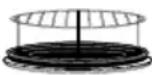 | For cooking chicken pieces e.g. chicken legs, thighs or drum-sticks. Place the chicken on Round Rack on Metal Tray on Glass Tray. For even cooking spread out the chicken and turn at beep. |
| 15 Cook Whole Chicken | 1000 - 2800 g |  | For cooking whole fresh unstuffed chicken. Cook the stuffing separately. Place the chicken on a heat-proof upturned saucer on Metal Tray on Glass Tray. Start cooking the breast side down and turn at beep. | |
| 16 Cook Pork or Veal | 800 - 2000 g |  | For cooking fresh roast pork or veal. Place the pork in a heat-proof shallow dish on Metal Tray on Glass Tray. Turn at beep. | |
| 17 Cook Beef | 700 - 1300 g |  | For cooking fresh roast beef. Place the beef in a heat-proof shallow dish on Metal Tray on Glass Tray. Turn at beep. | |
| 18 Cook Beef Rib | 750 - 1400 g | 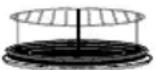 | For cooking fresh roast rib of beef with the bone. Place the beef rib in a heatproof dish on the High Wire Rack on a Metal Tray on Glass Tray. For larger joints (above 1000 g) place directly on the High Wire Rack. Turn at beep. After cooking, rest for 10 mins out of the oven. This program cooks the meat rare to medium. | |
| 19 Cook Lamb | 800 - 2200 g |  | For cooking fresh roast lamb. Place the lamb in a heat-proof shallow dish on Metal Tray on Glass Tray. Large legs of lamb can be placed directly on the Metal Tray. Turn at beep. This program is not suitable for boned roast lamb. | |
Auto Weight Programs
| Category | Weight | Accessories | Instructions | |
| 20 Tart | 4 - 6servings |  | For baking Tart from raw ingredients- see cook book for recipes.E.g. Savoury Quiche - QuicheLorraine, mushroom tart, onion tart,spinach tart.Sweet Tart - Bourdaloue tart,fromage frais tart, rubarb tart, apple tart.· Select Tart auto menupress 1servings 4-6diameter 25 cmpresses 2servings 6-8diameter 27 cmpresses 3servings 8-10diameter 30 cm· After baking, stand the Tart fora few minutes. Remove fromthe tin and cool on a rack. | |
| 21 Tart | 6 - 8servings |  | ||
| 22 Tart | 8 - 10servings | |||
It is necessary to preheat the oven for the tart programs. Use the following sequence:-
![graph LR A["Image with floral pattern"] --> B["Beep icon"] B --> C["After pre-heating beeps sound. Place the tart in the oven."] C --> D["Beep icon with diamond symbol"]](/content/2026/03/468980/images/6d51bcaa39c03837427487e9ec70ba8849dfe79029303c8067225516135f8f03.jpg)
- Select tart program 20, 21 or 22, depending on the size of the tart.
- Press the start button to preheat the oven.
- Press start.
NOTE FOR AUTO TART MENU:
- Only use metallic tins for baking the tart - aluminium, teflon coated or other light metal. The depth of the average tart tin is 30 mm. Do not use loose-bottomed tins, carton forms or light aluminium forms on this auto menu.
- The end colour of the pastry case may vary depending on the quality of the pastry.
- The top colour of the tart may vary depending on the type of filling. For this reason, you may wish to stop cooking a few minutes before the end of the program.
- Do not use this auto menu for baking pizza or double crust pies.
Memory
This feature allows you to pre-program your oven for regular reheating or cooking tasks. You are able to pre-program your oven for a specific power level and time that is convenient for you. You are able to pre-program three memory tasks.
To set a Memory Program
![graph LR A["Memory"] --> B["Program the desired cooking program."] B --> C["Memory"]](/content/2026/03/468980/images/7e560eccc0a3ff77202e7911f91fbcf104ea01f8f7d833ba923adf4d32023ae3.jpg)
- Press Memory Pad. The oven is automatically pre-set to memory 1. To select memory 2 press memory pad twice. To select memory 3 press memory pad three times.
- Press Memory Pad to store this task or press Start Pad to start cooking in this sequence.
This memory feature is pre-programmed to reheat 1 cup, 1 bowl, or 2 bowls of hot drink (e.g., tea, coffee, milk, or soup).
| No. of presses | Category | Recommended Weight | Power and Time | |
| Memory 1 | 1 Presses | 1 Cup | 150 ml | 1000 W 80 secs. |
| Memory 2 | 2 Presses | 1 Bowl | 300 ml | 1000 W 120 secs. |
| Memory 3 | 3 Presses | 2 Bowls | 2 x 300 ml | 1000 W 240 secs. |
To use a Memory Program
- Press the Memory Pad.

The oven is automatically pre-set to memory 1. To select memory 2, press the memory pad twice. To select memory 3, press the memory pad three times.
- Press the Start Pad to begin cooking.
NOTE:
- Auto programs cannot be programmed into memory.
- Convection pre-heat mode cannot be programmed into memory.
- Memory can only store 1-stage cooking. It is not possible to store 2- or 3-stage cooking.
- Setting a new cooking program into memory will cancel the cooking program previously stored.
- Memory program will be cancelled if the power supply is off or the plug gets disconnected.
- If you program into the memory the reheating of a baby bottle or a baby food jar, ensure you test the temperature before feeding the baby.
Delay Start Cooking
By using the Delay/Stand Pad, you are able to program Delay Start cooking.
e.g.
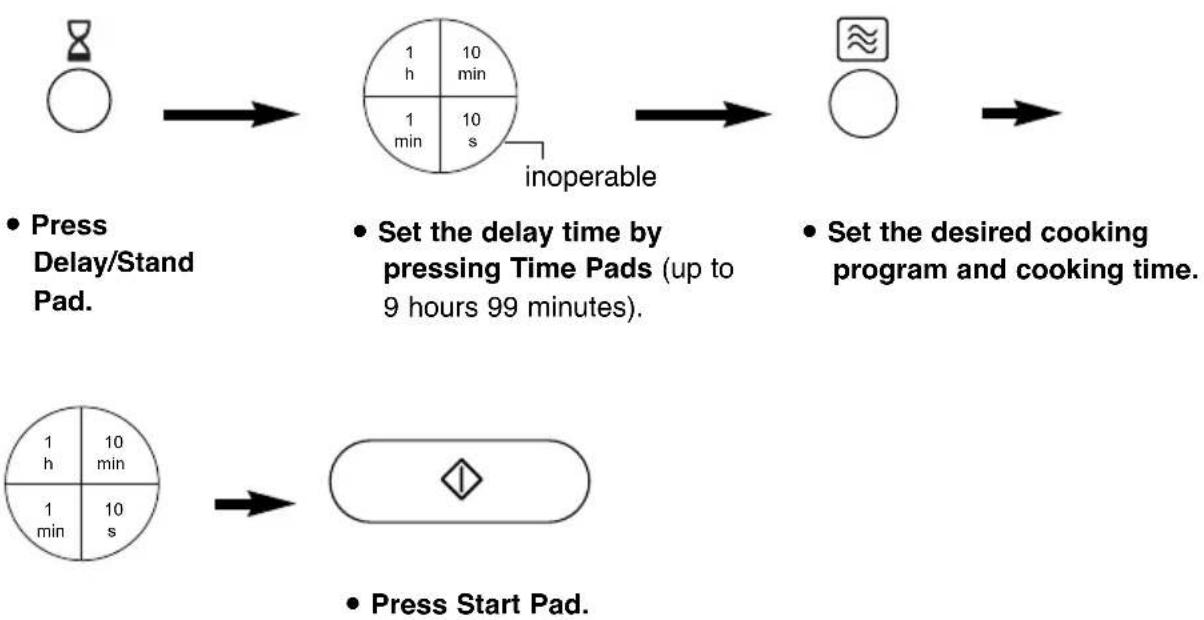
- Press Delay/Stand Pad.
- Set the delay time by pressing Time Pads (up to 9 hours 99 minutes).
- Set the desired cooking program and cooking time.
NOTE:
- Three stage cooking can be programmed including Delay Start cooking.
e.g.
Delay Start: 1 hour
High Power: 10 min.
![graph LR A["Single allele"] --> B{once} B --> C["1 h 10 min"] B --> D["1 min 10 s"] C --> E["inoperable"] D --> E E --> F["once"] F --> G["inoperable"] G --> H["1 h 10 min"] G --> I["1 min 10 s"] H --> J["once"] I --> J](/content/2026/03/468980/images/26ab4d18dc745c3395290f90a8d4681713c2de5752606906fcb3420ace0e1a63.jpg)
Simmer Power: 20 min.
![graph LR A["approx"] --> B["1 h, 10 min"] B --> C["1 min, 10 s"] C --> D[" "] style A fill:#fff,stroke:#000 style D fill:#fff,stroke:#000 note right of B "inoperable" note bottom of C "5 times twice"](/content/2026/03/468980/images/1cb560fdcfa8be9cc5198628cf046526e70cb3b360817f5922feb9e0c2f39113.jpg)
- If the programmed delay time exceeds one hour, the time will count down in units of minutes. If less than one hour, the time will count down in units of seconds.
- Delay Start cannot be programmed before any Auto Programs.
Stand Time
By using Delay/Stand Pad, you can program Stand Time after cooking is completed or use to program the oven as a minute timer.
e.g. To program stand time after cooking.
![graph LR A["Circle"] --> B["Half-circle"] B --> C["Whole"] style A fill:#fff,stroke:#000 style B fill:#fff,stroke:#000 style C fill:#fff,stroke:#000](/content/2026/03/468980/images/e08888a19dd1ca84ec62ea14c0368d7f7237182f7ff705676f3468b2ccf53809.jpg)
- Set the desired cooking program and cooking time.
- Press Delay/Stand Pad.
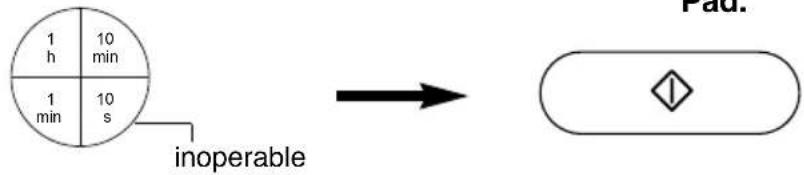
- Set desired amount of time by pressing Time Pads (up to 9 hours 99 minutes).
- Press Start Pad.
NOTE:
- Three stage cooking can be programmed including Stand Time. e.g.
High Power: 4 min. Stand Time: 5 min.
![graph LR A["once"] --> B["4 times"] B --> C["5 times"] style A fill:#fff,stroke:#000 style B fill:#f9f,stroke:#000 style C fill:#f9f,stroke:#000 note1["inoperable"] --> B note2["inoperable"] --> C note3["1 h 10 min"] --> B note4["1 min 10 s"] --> C note5["1 min 10 min"] --> B note6["1 min 10 s"] -->…](/content/2026/03/468980/images/5c03b3d67da67308e8017945949a0bad1cce4ab9fa22ea2652e6dba59910626f.jpg)
High Power: 2 min.
![graph LR A["approx"] --> B["inoperable"] B --> C["1 min, 10 min, 1 h"] B --> D["twice"] D --> E["10 s, 10 min"] F["once"] --> G H["unknown symbol"] --> I](/content/2026/03/468980/images/07eea24834085902831979234a7750514ebb2cda85d6628d9d6219ce8f12ff6d.jpg)
- If the oven door is opened during the Stand Time or Minute Timer, the time in the display window will continue to count down.
- This feature may also be used as a timer. In this case press Delay/Stand Pad, set time and press Start Pad.
En-27
Questions and Answers
Q: Why won't my oven turn on?
A: When the oven does not turn on, check the following:
- Is the oven plugged in securely? Remove the plug from the outlet, wait 10 seconds and reinsert.
- Check the circuit breaker and the fuse. Reset the circuit breaker or replace the fuse if it is tripped or blown.
- If the circuit breaker or fuse is all right, plug another appliance into the outlet. If the other appliance works, there probably is a problem with the oven. If the other appliance does not work, there probably is a problem with the outlet. If it seems that there is a problem with the oven, contact an authorized Service Center.
Q: My microwave oven causes interference with my TV. Is this normal?
A: Some radio and TV interference might occur when you cook with the microwave oven. This interference is similar to the interference caused by small appliances such as mixers, vacuums, blow dryers, etc. It does not indicate a problem with your oven.
Q: The oven won't accept my program. Why?
A: The oven is designed not to accept an incorrect program. For example, the oven will not accept a fourth stage, and will not accept Auto Weight Program after Delay Start.
Q: Why is there no word prompt in my display?
A: The power supply had been off at your home or the plug disconnected. Repeat the procedure described on page 9.
Q: Sometimes warm air comes from the oven vents. Why?
A: The heat given off from the cooking food warms the air in the oven cavity. This warmed air is carried out of the oven by the air flow pattern in the oven. There are no microwaves in the air. The oven vents should never be blocked during cooking.
Q: There are humming and clicking noises from my oven when I cook by COMBINATION. What is causing these noises?
A: The noises occur as the oven automatically switches from microwave power to CONVECTION/GRILL to create the combination setting. This is normal.
Q: Can I check the pre-set oven temperature while cooking or preheating by CONVECTION?
A: Yes. Press Convection Pad and the oven temperature will appear in the display window for 2 seconds.
Q: Can I easily cook my favourite recipes using CONVECTION/GRILL?
A: Yes. You can cook your favourite recipe just as you would in a conventional oven. Check instructions in the Panasonic Cookbook for suggested oven temperatures and cooking times.
Q: "D" appears in the display and the oven does not cook. Why?
A: The oven has programmed DEMO MODE. This mode is designed for retail store display. Deactivate this mode by pressing Clock Pad four times.
Q: Can I use a conventional oven thermometer in the oven?
A: Only when you are using CONVECTION/GRILL cooking mode. The metal in some thermometers may cause arcing in your oven and should not be used on MICROWAVE and COMBINATION cooking modes.
Q: My oven has an odour and generates smoke when using the CONVECTION, COMBINATION and GRILL function. Why?
A: After repeated use, it is recommended to clean the oven and then run the oven without food, glass tray, and roller ring on CONVECTION 250°C for 10 minutes. This will burn off any food, residue or oil which may cause an odour and/or smoking.
Care of Your Oven
Care & Cleaning of your Microwave Oven - IMPORTANT It is essential for the safe operation of the oven that it is kept clean, and wiped out after each use. Failure to maintain the oven in a clean condition could lead to deterioration of a surface that could adversely affect the life of the appliance and possibly result in a hazardous situation.
- Turn the oven off before cleaning.
- Keep the inside of the oven, door seals and door seal areas clean. When food spatters or spilled liquids adhere to the oven walls, door seals and door seal areas wipe off with a damp cloth. Mild detergent may be used if they get very dirty. The use of harsh detergent or abrasive is not recommended. DO NOT USE COMMERCIAL OVEN CLEANERS.
- The outside oven surface should be cleaned with a damp cloth. To prevent damage to the operating parts inside the oven, water should not be allowed to seep into the ventilation openings. Do not use harsh abrasive cleaners or sharp metal scrapers to clean the door glass since they can scratch the surface, which may result in shattering the glass.
- If the Control Panel becomes dirty, clean it with a soft, dry cloth. Do not use harsh detergents or abrasives on the Control Panel. When cleaning the Control Panel, leave the oven door open to prevent the oven from accidentally turning on. After cleaning touch STOP/CANCEL Pad to clear the display window.
- If steam accumulates inside or around the outside of the oven door, wipe with a soft cloth. This may occur when the microwave oven is operated under high humidity conditions and in no way indicates a malfunction of the unit.
- It is occasionally necessary to remove the glass tray for cleaning. Wash the tray in warm soapy water or in a dishwasher.
- The roller ring and oven cavity floor should be cleaned regularly to avoid excessive noise. Simply wipe the bottom surface of the oven with mild detergent and hot water then dry with a clean cloth. The roller ring may be washed in mild soapy water. Cooking vapours collect during repeated use but in no way affects the bottom surface or roller ring wheels. After removing the roller ring from the cavity floor for cleaning, be sure to replace it in the proper position.
- When using the GRILL, CONVECTION or COMBINATION mode, some foods may inevitably splatter grease on to the oven walls. If the oven is not cleaned occasionally, it may start to "smoke" during use.
- A steam cleaner is not to be used for cleaning.
- This oven should only be serviced by qualified personnel. For maintenance and repair of the oven contact the nearest authorized dealer.
- Keep air vents clean at all times. Check that no dust or other material is blocking any of the air vents on the top, bottom or rear of the oven. If air vents become blocked this could cause overheating which would affect the operation of the oven and possibly result in a hazardous situation.
Technical Specifications
Rated Voltage: 230 V, 50 Hz
Operating Frequency: 2,450 MHz
Input Power: Maximum; 2980 W
Microwave; 1275 W
Grill; 1560 W
Convection; 1500 W
Output Power: Microwave; 1000 W (IEC-60705)
Grill; 1500 W
Convection; 1400 W
Outer Dimensions: 530 (W) x 508 (D) x 344 (H) mm
Oven Cavity Dimensions: 350 (W) x 360 (D) x 250 (H) mm
Weight with internal accessories; 21.0 Kg
Noise: 52.7dB
This product is an equipment that fulfills the European standard for EMC disturbances (EMC = Electromagnetic Compatibility) EN 55011. According to this standard this product is an equipment of group 2, class B and is within required limits. Group 2 means that radio-frequency energy is intentionally generated in the form of electromagnetic radiation for warming up of foods. Class B means that this product may be used in normal household areas.
Information on Disposal for Users of Waste Electrical & Electronic Equipment (private households)
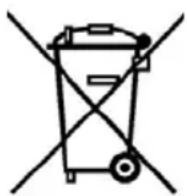

This symbol on the products and/or accompanying documents means that used electrical and electronic products should not be mixed with general household waste. For proper treatment, recovery and recycling, please take these products to designated collection points, where they will be accepted on a free of charge basis. Alternatively, in some countries you may be able to return your products to your local retailer upon the purchase of an equivalent new product. Disposing of this product correctly will help to save valuable resources and prevent any potential negative effects on human health and the environment which could otherwise arise from inappropriate waste handling. Please contact your local authority for further details of your nearest designated collection point. Penalties may be applicable for incorrect disposal of this waste, in accordance with national legislation.
For business users in the European Union
If you wish to discard electrical and electronic equipment, please contact your dealer or supplier for further information.
Information on Disposal in other Countries outside the European Union
This symbol is only valid in the European Union. If you wish to discard this product, please contact your local authorities or dealer and ask for the correct method of disposal.
To cancel:
Combination rack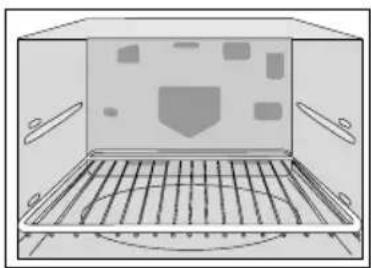
Operating frequency 2,450 MHz
To cancel:
| Indrukken | Vermogen Wattage | |
| 1 x 1 | HOOG 1500 W | |
| 2 x 2 | MIDDEN 1200 W | |
| 3 x 3 | LAAG 950 W |

Place the food
after preheating
in the oven.

Baking rack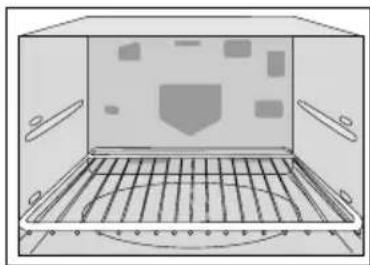
Square grill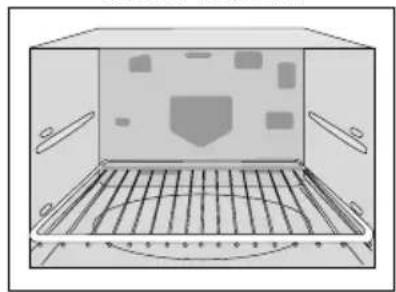
To cancel:
Grill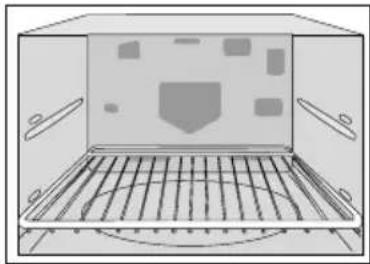
Controls and operating procedure
Controls and operating procedure
Setting the clock:
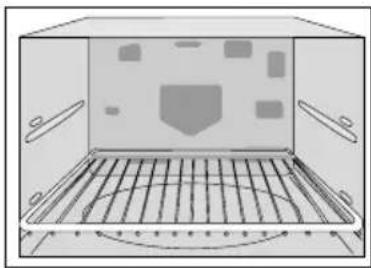
![graph LR A["Weather icon"] --> B["Circle with checkmark"] B --> C["Circle with arrow, down arrow"] C --> D["Decision with diamond"]](/content/2026/03/468980/images/3ebc7efa8fb485a93b4668941d600d101b9c9d9197c126af5ca400b2afa48a4f.jpg)
Cancellation:
Cooking by Grill Convection:
Wire shelf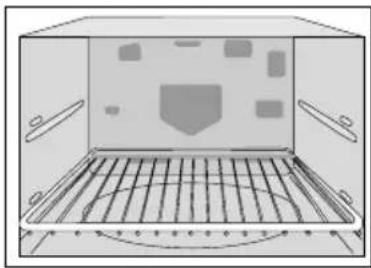
Two-level cooking
Grill + Microwave Convection + Microwave
Grill Convection + Microwave
1) Grill + Microwave
![graph LR A["Combi"] --> B["→"] B --> C["○"] C --> D["→"] D --> E["○"] E --> F["→"] F --> G["1 h 10 min"] F --> H["1 min 10 s"] G --> I["nečinné"] H --> I I --> J["◇"]](/content/2026/03/468980/images/e67bf06ae29aa98da9328bfa199ac7dd6cc5901620f287d47d743fa39cf03491.jpg)
2) Convection + Microwave
![graph LR A["Combi"] --> B["Time 1 h: 10 min"] B --> C["Time 1 min: 10 s"] C --> D["nečinné"]](/content/2026/03/468980/images/66c7757e269ebb6e7e413f68d9e56174f25cb5e41577cf08f57ff18cbd878636.jpg)
3) Grill Convection + Microwave
![graph LR A["Combi"] --> B["Crossed-out Symbol"] B --> C["Diagonal Cross"] C --> D["Circle with Inverted Triangle"]](/content/2026/03/468980/images/0d480d10de2298a8682d6c9f20f6f2a378d6f7849c662d8cd7198b0ee1327f24.jpg)
- Select the desired program automatically with the sensor.
Technical Specifications
To delete:
Rack shelf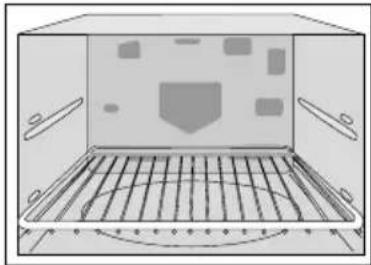
Two-level baking
Pentwyn Industrial Estate,
Cardiff, CF23 7XB, UK
E00037P01EP
M0807-1
Printed in the UK
- INSTALLATION AND CONNECTION
- EXAMINE YOUR MICROWAVE OVEN
- EARTHING INSTRUCTIONS
- OPERATION VOLTAGE
- PLACEMENT OF THE OVEN
- COUNTER-TOP USE
- BUILT-IN
- WARNING
- USE OF YOUR OVEN
- SAFETY INSTRUCTIONS
- HEATER OPERATION
- FAN MOTOR OPERATION
- OVEN LIGHT
- ACCESSORIES
- GLASS TRAY
- ROLLER RING
- METAL TRAY
- ROUND RACK
- ENAMEL SHELF AND WIRE SHELF
- COOKING TIMES
- SMALL QUANTITIES OF FOODS
- EGGS
- PIERCING SKIN
- MEAT THERMOMETER
- LIQUIDS
- PAPER/PLASTIC
- UTENSILS/FOIL
- FEEDING BOTTLES/BABY FOOD JARS
- OUTLINE DIAGRAM
- CHOOSING THE RIGHT COOKING MODE
- OVEN ACCESSORIES
- CONTROLS AND OPERATION PROCEDURE
- WORD PROMPTING
- EN
- CLOCK SETTING
- NOTE
- CHILD SAFETY LOCK
- MICROWAVE COOKING AND DEFROST
- USE OF ACCESSORY
- GRILLING
- NOTE ON PREHEATING
- COOKING BY CONVECTION / GRILL CONVECTION
- USE OF ACCESSORY: FOR ONE LEVEL COOKING
- COOKING BY CONVECTION
- COOKING BY GRILL CONVECTION
- COOKING BY CONVECTION/GRILL CONVECTION
- SHELF COOKING
- ONE LEVEL COOKING
- TWO LEVEL COOKING
- COMBINATION COOKING
- GRILL + MICROWAVE
- CONVECTION + MICROWAVE
- GRILL CONVECTION + MICROWAVE
- AUTO DEFROST
- NOTE ON PROGRAM
- AUTO SENSOR PROGRAMS
- PLUS/MINUS CONTROL
- AUTO WEIGHT PROGRAMS
- NOTE FOR AUTO TART MENU
- MEMORY
- TO SET A MEMORY PROGRAM
- TO USE A MEMORY PROGRAM
- DELAY START COOKING
- STAND TIME
- QUESTIONS AND ANSWERS
- Q: WHY WON'T MY OVEN TURN ON
- Q: MY MICROWAVE OVEN CAUSES INTERFERENCE WITH MY TV. IS THIS NORMAL
- Q: THE OVEN WON'T ACCEPT MY PROGRAM. WHY
- Q: WHY IS THERE NO WORD PROMPT IN MY DISPLAY
- Q: SOMETIMES WARM AIR COMES FROM THE OVEN VENTS. WHY
- CARE OF YOUR OVEN
- TECHNICAL SPECIFICATIONS
- INFORMATION ON DISPOSAL FOR USERS OF WASTE ELECTRICAL & ELECTRONIC EQUIPMENT (PRIVATE HOUSEHOLDS)
- FOR BUSINESS USERS IN THE EUROPEAN UNION
- INFORMATION ON DISPOSAL IN OTHER COUNTRIES OUTSIDE THE EUROPEAN UNION
- CONTROLS AND OPERATING PROCEDURE
- SETTING THE CLOCK
- TWO-LEVEL COOKING
- TO DELETE
- TWO-LEVEL BAKING
Brand : PANASONIC
Model : NNCT857W
Category : Microwave