
Syn Tech 2.100 - Audio Amplifier Macrom - Free user manual and instructions
Find the device manual for free Syn Tech 2.100 Macrom in PDF.



| Product type | 2-channel audio amplifier |
| Brand | Macrom |
| Model | Syn Tech 2.100 |
| Dimensions (W x H x D) | 212 x 67 x 405 mm |
| Weight | 4.7 kg |
| Power supply | 14.4 V DC (11 - 16 V allowed) |
| RMS power (4 Ohm, <0.08% THD) | 2 x 100 W |
| RMS power (2 Ohm, <0.5% THD) | 2 x 200 W |
| Mono RMS power (4 Ohm, <0.5% THD) | 1 x 400 W |
| Frequency response | 10 - 50 000 Hz (±1 dB) |
| Total harmonic distortion | 0.08% |
| Signal-to-noise ratio | > 100 dB (IHF A weighted) |
| Input sensitivity | 200 mV - 4 V / 22 kOhm |
| Speaker impedance (stereo min.) | 1 Ohm |
| Speaker impedance (mono min.) | 2 Ohm |
| High-pass / low-pass filter | 30 - 600 Hz, slope 12 dB/octave |
| Frequency control | Continuous adjustment of gain and frequency |
| Protections | Overheat, overload, output short circuit |
| Status indicator | Check Control LED (white/green/red) |
| Input connectors | Gold-plated RCA |
| Preamp outputs | Yes, with filter selector (Flat/LP/HP) |
| Fuse | Replace with one of the same rating |
| Installation | Recommended by an authorized MACROM dealer |
Frequently Asked Questions - Syn Tech 2.100 Macrom
User questions about Syn Tech 2.100 Macrom
0 question about this device. Answer the ones you know or ask your own.
Ask a new question about this device
Download the instructions for your Audio Amplifier in PDF format for free! Find your manual Syn Tech 2.100 - Macrom and take your electronic device back in hand. On this page are published all the documents necessary for the use of your device. Syn Tech 2.100 by Macrom.
USER MANUAL Syn Tech 2.100 Macrom
a 1 kHz < 0.08% THD+N a 4 ohms 2 x 100W
a 1 kHz<0.5% THD+N a 2 ohms 2 x 200W
a 1 kHz<0.5% THD+N Mono a 4 ohms 1 x 400W
Sensibilitad de salute Pre-Output 2V
Pasa alto (30-600) Hz
Macrom, who strive continually to achieve the ultimate in sound quality, have traditionally been a synonym for the very best in European sound and music reproduction. The fact that you have chosen this product means that you share our opinion. After reading this manual you will be in an even better position to appreciate all the advanced features in this new Amplifier. This Amplifier incorporates an exceptional set of technical features, and for this reason all signal sources, loudspeakers and interconnecting elements must also be of the very highest quality. We recommend the use of Macrom high quality main subassemblies, electronic crossovers, loudspeaker systems, connecting leads and accessories. Similarly, because integration of these products is an extremely complex task, we advise you to leave the installation of this amplifier to your authorised MACROM dealer.
This Amplifier has no commands or controls that can be adjusted by the user, so read this manual very carefully, to familiarise yourself with the special features and functions of your new MACROM product. If in any doubt, contact your authorised MACROM dealer.
PRECAUTIONS
- Just one faulty connection could damage the unit, so read the connection instructions provided in this manual very carefully.
- Connect the battery lead to the (+) battery terminal last of all, and only after having completed and checked all the other connections.
- Take care to install the amplifier in a position where both good air circulation and heat dissipation are guaranteed.
- The fuses must always be replaced with fuses of identical ampere rating in order to prevent serious damage to the components. You should also first have the voltage regulator of your car checked. Never attempt to repair the unit yourself. Entrust any necessary repairs to a MACROM distributor or your local MACROM service centre.
- To ensure the highest possible performance from this unit, try to obtain a temperature of between -10^ and +60^ inside your car before switching on the amplifier.
FEATURES
I nput mode selector
- Flat, low-pass or high-pass filter selector
- Pre-output with "Flat, High or Low-Pass Filter" selector
- Continuous external control of the low frequency gain
Peak noise detector
Continuous frequency control
Continuous sensitivity control
Current feed with Mos-Fet
Check Control" status indicator
R emote-controlled start and stop
Gold-plated RCA input terminals
Professional gold-plated screw-type terminals
CONTROLS AND INDICATORS
1 · RCA input connectors: To connect the Pre output leads of the main unit to the amplifier input. These inputs control the final stages.
2 · Adjustment of the gain of the Input: Adjusts input sensitivity of amplifier, which can vary between 200mV and 4V .
To adjust sensitivity, proceed as follows:
a)Set the volume control of your unit to 3/4 of its maximum output
b) Adjust the amplifier input gain controls until the maximum possible acoustic pressure has been obtained without any distortion.

4V 0,2V
3 - Stereo/Mono switch: changes the output mode of the amplifier between Stereo and Mono. If Mono is selected, the corresponding Left (mono) input is used to operate the amplifier.
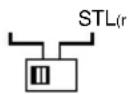
4 - Crossover switch: selects the output mode of the amplifier by activating the Low-pass or High-pass filter.
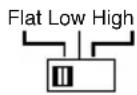
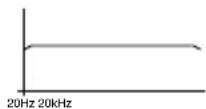
a) Flat: the amplifier will reproduce the complete audio range in relation to the signal applied to the input.
b)Low-pass: activation of the low-pass filter, i.e. determination of the finishing-point of the low frequencies present at the outputs.


c)High-pass: activation of the low-pass filter, i.e. determination of the starting-point of the high frequencies present at the outputs.


5 · Continuous adjustment/control of the Low-Pass or High-Pass frequencies: once the low-pass or high-pass filter is inserted, the crossover frequency can be
adjusted in continuous mode between 30Hz and 600Hz .
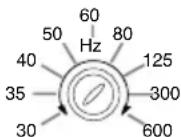
CONTROLS AND INDICATORS
- Continuous adjustment of the Pre-output Low-Pass or High-Pass frequencies: once
the high-pass or low-pass filter is inserted, the crossover frequency can be adjusted between 30Hz and 600Hz in continuous mode.
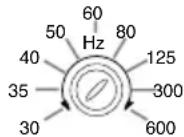
- Pre-output Crossover selector: selects the Pre-output mode, activating the Low-Pass or High-Pass filter.
a) Flat: a signal will be present on the Pre-output, in relation to the signal applied at the input of the amplifier.
b) Low-Pass: activation of the low-pass filter, i.e. determination of the finishing-point of the low frequencies present at the Pre-output Outputs.
c) High-pass: activation of the low-pass filter, i.e. determination of the starting-point of the high frequencies present at the Pre-output Outputs.
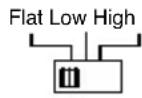
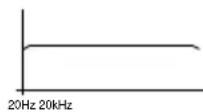

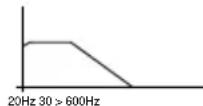

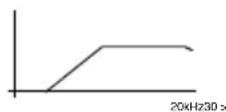
8 - Pre-output Output Connector: it is possible to connect a supplementary amplifier for use according to a previously selected mode.
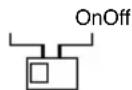
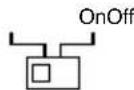
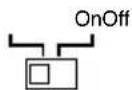
- Selector switch for the External Low Frequency Control: this switch activates or deactivates the external control of the low frequencies.
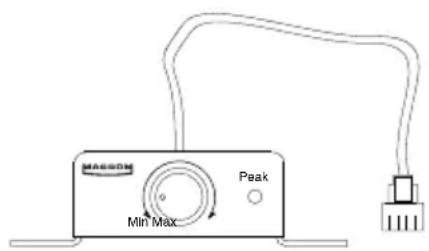
External Bass Control

16 - Port for EBC connection: By means of the appropriate EBC control

it is possible to act on the level of the low frequencies between 0dB and -40dB.
External Bass Control

CONTROLS AND INDICATORS
- Speaker connectors: Outputs for connecting the loudspeakers.
The amplifier allows the loudspeakers to be connected with a minimum impedance of 2 Ohm for a channel in stereo configuration, and with an impedance of 4 Ohm for a "bridged" mono connection.
If the 3 channel configuration is to be used, the total impedance should not exceed the minimum value of 2 Ohm.
Make sure that the polarity of the connection between the loudspeakers is correct. Do not allow inadequately insulated leads to come into contact with Ground, any metallic parts of the car, or with each other.
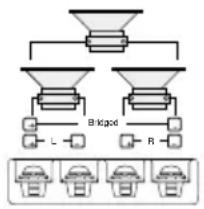
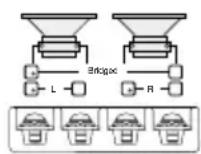

3-channel configuration 2-channel configuration 1-channel configuration
10 · Fuses: When replacing fuses, make sure that they are replaced with fuses of the same ampere rating. Use of the wrong type of fuse could seriously damage the components.
11 · + BATT connector: Connect the positive "+" of the battery directly, by means of a fuse located nearby, and use a lead having a sufficiently large cross-section to allow passage of the current. Do not connect this terminal to the car's own electrical circuit.
12 - REMOTE-ON connector: Connect this to the remote-on start-up output lead (remote starting switch) or to the automatic antenna wire running from the main unit. It will now be possible to turn the amplifier on and off from the main unit.
13 · GND connector: Attach this Ground connector, using a lead of adequate section, to a clean point on any metallic part of the car chassis, if possible to an already-installed screw.
Never attach this clamp directly to the negative point of the battery, which could give rise to an unpleasant buzzing noise while the car is being driven.
14 Check control indicator: This LED indicates the amplifier functioning status.
WHITE: The unit is switched off
GREEN: The amplifier is functioning perfectly
RED: the unit is in a state of protection.
The amplifier is equipped with three protection devices:
- Overheating: If errors have been made during installation, and the amplifier overheats, the unit will enter into a state of protection before any damage can occur. Once the temperature returns to normal and the errors have been rectified, the unit will automatically start to function normally once again.
- Overloading: If several loudspeakers have been connected to the amplifier and the total impedance drops below the 1 Ohm limit that it can handle, the amplifier goes into a state of protection. The main unit will have to be switched off and on again in order to restore the amplifier to normal functioning.
- Short circuit in an output: In the case of a short circuit in the loudspeaker outputs, the unit will go into a state of protection to avoid serious damage to the final transistors. Normal functioning will be restored when the short circuit has been dealt with and the main unit switched on again.
TECHNICAL DATA
Power IHF 202500W
RMS Power at (12.5 Volts DC)
at 1kHz < 0.08% THD+N at 4 Ohm 2 x 100W
at 1kHz < 0.5% THD+N at 2 Ohm 2 x 200W
at 1kHz < 0.5% THD+N Mono at 4 Ohm 1 x 400W
Pre-Out Sensitivity 2V
High pass control, (30-600) Hz
Low pass control, (30-600) Hz
Crossover slope 12 dB/Octave
Response in frequency +/- 1 dB 10 - 50.000 Hz
Total harmonic distortion 0.08%
Weighted IHF A Signal-Noise Ratio
Input sensitivity - Impedance
100 dB
200-4000 mV/22 kOhm
Loudspeaker impedances
Stereo
min. 2 Ohms
Mono
min. 4 Ohms
Power supply
14.4 V DC (11 - 16 V permissible)
Weight
4,7 kgrs
Dimensions
212(L) x 67(A) x 405(P) mm
Due to the continual incorporation of improvements in this product, the characteristics and design may be subject to variation without prior notice.
EINFUHRUNG
External Bass Control
External Bass Control
External Bass Control
External Bass Control

External Bass Control



Brand : Macrom
Model : Syn Tech 2.100
Category : Audio Amplifier