Bravia KD43XG8196 - TV SONY - Free user manual and instructions
Find the device manual for free Bravia KD43XG8196 SONY in PDF.


| Product Type | 4K LED TV |
| Screen Size | 43 inches (109 cm) |
| Resolution | 3840 x 2160 (4K Ultra HD) |
| Operating System | Android TV |
| Wall Mount Compatibility | VESA 200x200mm support (adapter included) |
| Dimensions with stand (WxHxD) | Approx. 970 x 570 x 200 mm |
| Weight with stand | Approx. 10.8 kg |
| Power Consumption (max) | Approx. 100 W |
| Power Supply | 220-240 V AC, 50/60 Hz |
| Main Features | Smart TV, HDR10, HLG, Motionflow XR 200 Hz, Wi-Fi, Ethernet, Bluetooth |
| Maintenance and Cleaning | Clean with a soft, dry cloth. Do not use chemicals. |
| Safety | Wall installation by a certified professional recommended. Use the provided anti-tip strap. |
| Spare Parts | Table stand, mounting screws, remote control |
| Repairability | Sony after-sales service. Repairability index not disclosed. |
Frequently Asked Questions - Bravia KD43XG8196 SONY
User questions about Bravia KD43XG8196 SONY
0 question about this device. Answer the ones you know or ask your own.
Ask a new question about this device
Download the instructions for your TV in PDF format for free! Find your manual Bravia KD43XG8196 - SONY and take your electronic device back in hand. On this page are published all the documents necessary for the use of your device. Bravia KD43XG8196 by SONY.
USER MANUAL Bravia KD43XG8196 SONY
* In the actual model names, the “☐☐” indicates numbers and/or characters specific to each model.
To Customers
For product protection and safety reasons, Sony strongly recommends that installation of your TV be performed by Sony dealers or licensed contractors. Do not attempt to install it yourself.
To Sony Dealers and Contractors
Provide full attention to safety during the installation, periodic maintenance and examination of this product.
Sufficient expertise is required for installing this product, especially to determine the strength of the wall for withstanding the TV's weight. Be sure to entrust the attachment of this product to the wall to Sony dealers or licensed contractors and pay adequate attention to safety during the installation. Sony is not liable for any damage or injury caused by mishandling or improper installation.
For Safety and proper installation, follow the Wall-mount Bracket Operation Instructions, TV Setup Guide and the directions in this manual.
On Safety
Thank you for purchasing this product.
To Customers
Sufficient expertise is required for installing this product. Be sure to subcontract the installation to Sony dealers or licensed contractors and pay special attention to safety during the installation. Sony is not liable for any damages or injury caused by mishandling or improper installation, or installing any other than the specified product. Your Statutory Rights (if any) are not affected.
To Sony dealers
Sufficient expertise is required for installing this product. Be sure to read this instruction manual thoroughly to do the installation work safely. Sony is not liable for any damages or injury caused by mishandling or improper installation. Please give this manual to the customer after installation.
This instruction manual shows the correct handling of the product and important precautions necessary to prevent accidents. Be sure to read this manual thoroughly and use the product correctly. Keep this manual available for future reference.
Products by Sony are designed with safety in mind. If the products are used incorrectly, however, it may result in a serious injury through fire, electric shock, the product toppling over, or the product dropping. Be sure to observe the precautions for safety to prevent such accidents.
CAUTION
Specified products
This Wall-Mount Bracket is designed for use with the products specified TVs. For TVs, refer to their Reference Guide to verify that the Wall-Mount Bracket can be used.
To Customers
WARNING
If the following precautions are not observed, serious injury or death through fire, electric shock, or the product dropping can result.
Be sure to subcontract the installation to licensed contractors and keep small children away during the installation.
If the Wall-Mount Bracket or the TV is not installed correctly, the following accidents may occur. Be sure licensed contractors carry out installation.
- The TV may fall and cause a serious injury such as a bruise or a fracture.
- If the wall on which the Wall-Mount Bracket is installed is unstable, uneven, or not perpendicular to the floor, the unit may fall and cause injury or property damage. The wall should be capable of supporting a weight of at least four times the TV weight.
(Refer to your TV's Reference Guide for its weight.) - If the installation of the Wall-Mount Bracket on the wall is not sufficiently sturdy, the unit may fall and cause injury or property damage.
Be sure to subcontract moving or dismounting of the TV to licensed contractors.
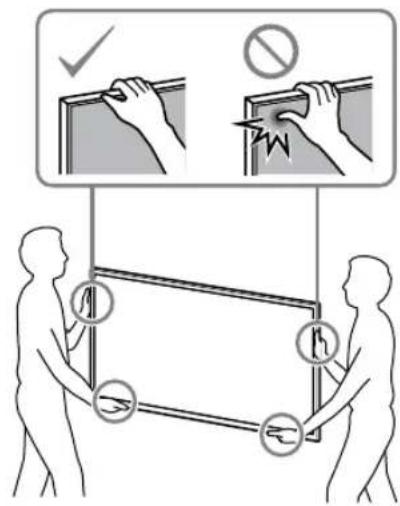
If persons other than licensed contractors transport or dismount the TV, it may fall and cause injury or property damage. Be sure that two or more persons (three or more persons for 75 inches and above TV set) carry or dismount the TV.
Do not remove screws, etc., after mounting the TV.
If you do so, the TV may fall and cause injury or property damage.
Do not make alterations to the parts of the Wall-Mount Bracket.
If you do so, the Wall-Mount Bracket may fall and cause injury or property damage.
Do not mount any equipment other than the specified product.
This Wall-Mount Bracket is designed for use with the specified product only. If you mount equipment other than specified, it may fall or break, and cause injury or property damage.
Do not apply any load other than the TV on the Wall-Mount Bracket. Do not shake the TV left/right, up/down.
If you do so, the TV may fall and cause injury or property damage.
Do not lean on or hang from the TV.
Do not lean on or hang from the TV as it may fall on you and cause serious injury.
CAUTION
If the following precautions are not observed, injury or property damage may occur.
Do not handle the product with excessive force during cleaning or maintenance.
Do not apply excessive force on the topside of the TV. If you do so, the TV may fall and cause injury or property damage.
Precautions
- If you use the TV installed on the Wall-Mount Bracket for a long time, the wall behind or above the TV may become discolored or the wallpaper may come unstuck, depending on the material of the wall.
- If the Wall-Mount Bracket is removed after installing it on the wall, the screw holes are left.
- Do not use the Wall-Mount Bracket in a place where it is subjected to mechanical vibrations.
Installing the Wall-Mount Bracket
To Sony Dealers
WARNING
The following instructions are for Sony dealers only. Be sure to read safety precautions described above and pay special attention to safety during the installation, maintenance and checking of this product.
Do not install the Wall-Mount Bracket on wall surfaces where the corners or the sides of the TV protrude away from the wall surface.
Do not install the Wall-Mount Bracket on wall surfaces such as a pillar, where the corners or the sides of the TV protrude away from the wall surface. If a person or object happens to hit the protruded corner or side of the TV, it may cause injury or property damage.
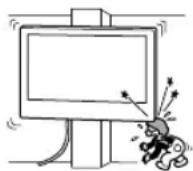
Do not install the TV over or under an air-conditioner.
If the TV is exposed to water leaks or air current from an air conditioner for a long time, it may cause a fire, an electric shock or a malfunction of the TV.
Be sure to install the Wall-Mount Bracket securely to the wall following the instructions in this instruction manual.
If any of the screws are loose or fall out, the Wall-Mount Bracket may fall and cause injury or property damage. Be sure to use the appropriate screws for the material of the wall and install the unit securely using four or more screws of 8 mm diameter (or equivalent).
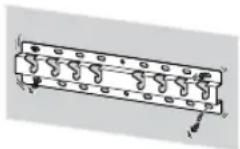
Be sure to use the supplied screws and attachment parts properly following the instructions given in this instruction manual. If you use substitute items, the TV may fall and cause bodily injury to someone or damage to the TV.
Be sure to assemble the bracket properly following the instructed procedure explained in this instruction manual.
If any of the screws are loose or fall out, the TV may fall and cause bodily injury to someone or damage to the TV.
Be sure to tighten the screws securely in the designated position.
If you fail to do so, the TV may fall and cause bodily injury to someone or damage to the TV.
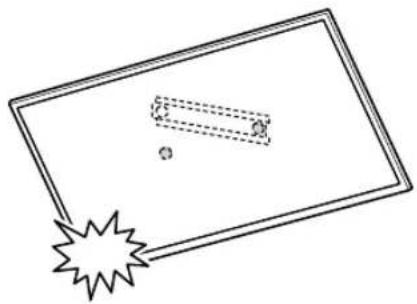
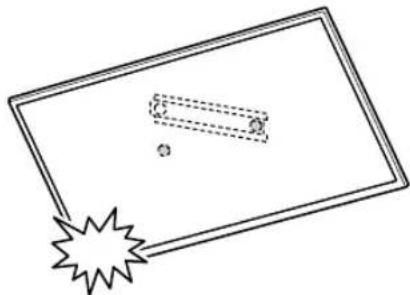
Be careful not to subject the TV to shock during installation.
If the TV is exposed to shock, it may fall or break apart. This may cause injury.
Be sure to install the TV on a wall that is both perpendicular and flat.
If you fail to do so, the TV may fall and cause injury.
After proper installation of the TV, secure the cables properly.
If people or objects get tangled with cables, this may result in injury or damage to the TV.
Do not allow the mains lead or the connecting cable to be pinched.
If the mains lead or the connecting cable is pinched between the unit and the wall or is bent or twisted by force, the internal conductors may become exposed and cause a short circuit or an electrical break. This may cause a fire or an electric shock.
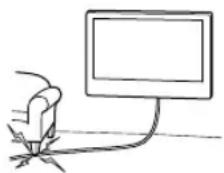
The screws needed to secure the Wall-Mount Bracket to the wall are not supplied.
Use the appropriate screws for the wall material and structure when mounting the Wall-Mount Bracket.
Table of Contents
Preparing for installation....5
Checking the parts....5
Deciding on the installation location 6
Installing the Base on the wall 8
Preparing for the installation of the TV......9
KD-75XG80□□ 9
KD-65XG81□□ / 65XG80□□.... 10
KD-55XG81□□ / 55XG80□□....11
KD-49XG81□□ / 49XG80□□ / 43XG81□□ / 43XG80□□....12
Installing the TV on the wall....14
KD-75XG80□□ 14
KD-65XG81□□ / 65XG80□□ / 55XG81□□ / 55XG80□□ / 49XG81□□ / 49XG80□□ / 43XG81□□ / 43XG80□□....16
Confirming the completion of the
installation ....19
Other information....19
Specifications....19
Installing the TV onto the wall
Installation procedure differs, depending on your TV.
Use the Wall-Mount Bracket SU-WL450 to install the TV to the wall.
Note
- If the Table-Top Stand is attached to the TV, detach the Table-Top Stand beforehand. See the Setup Guide and follow in reverse order the steps to detach the Table-Top Stand.
- Place the TV with its screen facing down on a level and stable surface covered with a thick and soft cloth, when securing the Attachment parts for Wall-Mount Bracket or when removing the Table-Top Stand from the TV to prevent damaging the surface of the LCD display.
- Be sure to store the removed screws in a safe place, keeping them away from children.
Preparing for installation
- Have the TV's Reference Guide and Setup Guide at hand before installation.
- Be sure to have a Phillips screwdriver that fits the screws prior to the assembly.
- Confirm the installing position of your TV.
- Prepare four or more screws of 8 mm diameter and one screw of 5 mm or equivalent (not supplied). Select screws suitable for the material of the wall.
Checking the parts
Supplied with SU-WL450
- Verify that all the parts are included.
A Base (20) (1) B Pulley (2)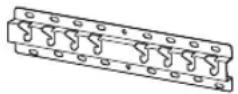 |  |
C PSW 6x20 (4) D PSW 4x20 with Bush (2) |  |
E Spacer (20) (2) F Belt (1) | 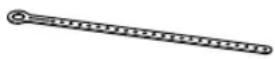 |
G Bush (20) (M4) (2) H PSW 4x20 (2) |  |
I Base Adaptor (2) J PSW 4x10 (8) |  |
K Spacer (60) (2) L PSW 6x50 (2)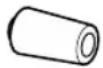 | 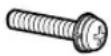 |
| M Bush (M4) (2) N PSW 4x50 (2)[CG5S] | 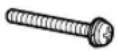 |
Deciding on the installation location
1 Decide on the installation location.
Make sure that the wall has enough space for the TV and is capable of supporting a weight of at least four times that of the TV.
Refer to the following table on installing the TV to the wall. Refer to your TV's Reference Guide for the TV's weight.
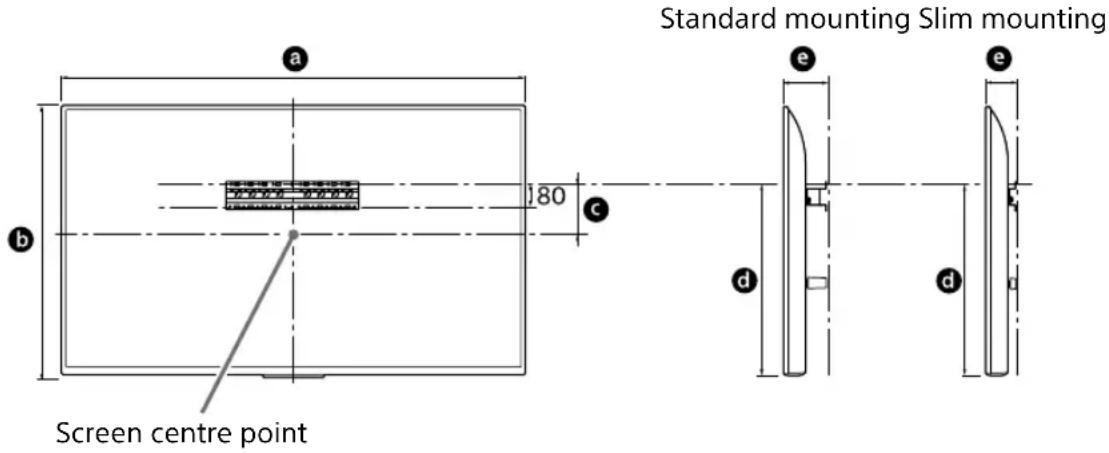
text_image
Standard mounting Slim mounting Screen centre point a b c 180 d e d eUnit: mm
| Model Name | Display dimensions | Screen centre dimension | Length for mounting | ||
| a | b | c | d | e | |
| Standard mounting Slim mounting | |||||
| KD-75XG80□□ | 1,686 | 970 202 | 690 142 100 | ||
| KD-65XG81□□ | 1,463 | 845 | 173 597 142 100 | ||
| KD-65XG80□□ | 1,463 | 845 | 173 597 142 100 | ||
| KD-55XG81□□ | 1,241 | 721 | 95 460 141 100 | ||
| KD-55XG80□□ | 1,241 | 721 | 95 460 141 100 | ||
| KD-49XG81□□ | 1,101 | 645 | -15* 314 | 119 | 78 |
| KD-49XG80□□ | 1,101 | 645 | -15* 314 | 119 | 78 |
| KD-43XG81□□ | 970 | 570 | 23 315 119 | 77 | |
| KD-43XG80□□ | 970 | 570 | 23 315 119 | 77 | |
* Bracket positioning is below the screen centre point.
Note
- Figures in the table may differ slightly depending on the installation.
- When your TV is installed on the wall, the upper side of the TV slightly leans forward.
Allow for suitable clearance between the TV and the ceiling and protruding parts of the wall as shown below.
Unit: mm
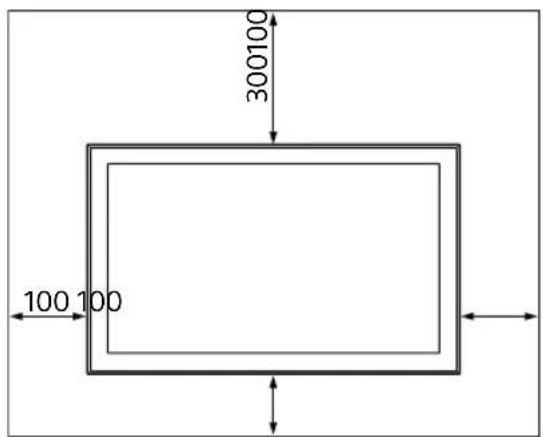
text_image
300100 100 100• To ensure proper ventilation and prevent the collection of dirt or dust:
— Do not lay the TV set flat, install upside down, backwards, or sideways.
— Do not place the TV set on a shelf, rug, bed or in a closet.
— Do not cover the TV set with a cloth, such as curtains, or items such as newspapers, etc.
— Do not install the TV set as shown below.
Air circulation is blocked.
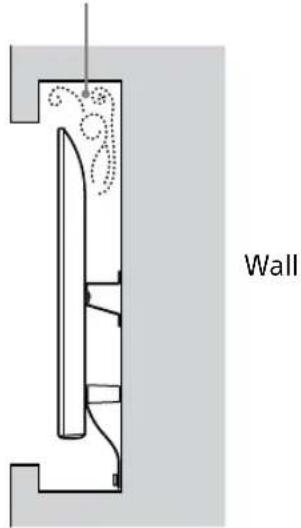
text_image
WallNote
- If you intend to route the cables in the wall, make a hole in the wall to insert the cables before beginning the installation.
To prevent pinching the cables, prepare a hole in the wall somewhere outside the perimeter of the Base (20) Ⓐ, Base Adaptor ① and Spacer (20) Ⓔ, Spacer (60) Ⓗ.
2 Select Wall mounting style. It is selectable as shown below.
2-a Standard mount 2-b Slim mount
Refer to the table of step 1.
WARNING
- When 2-b is selected, rear terminal access is limited.
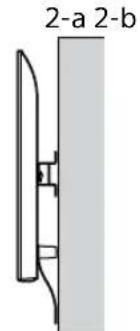
text_image
2-a 2-b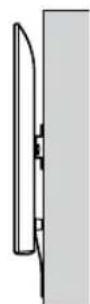
3 Refer to the below table about the Base Adaptor fitting location. In case of selecting 2-b, then skip this step.
| Model Name Hook location | |
| KD-75XG80□□ | |
| KD-65XG81□□ | b |
| KD-65XG80□□ | |
| KD-55XG81□□ | |
| KD-55XG80□□ | c |
| KD-49XG81□□ | |
| KD-49XG80□□ | |
| KD-43XG81□□ | d |
| KD-43XG80□□ | |
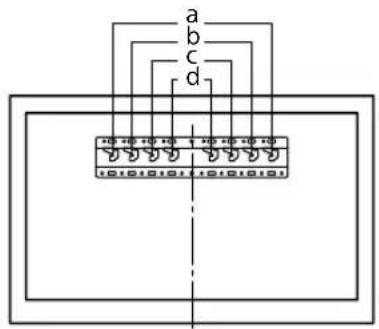
text_image
a b c d 10 40 40 40 1 40 40 40 40 10101011 10101010Fit Base Adaptor ① by using Screw (PSW 4x10) ② to Base (20) ③ when selecting 2-a.
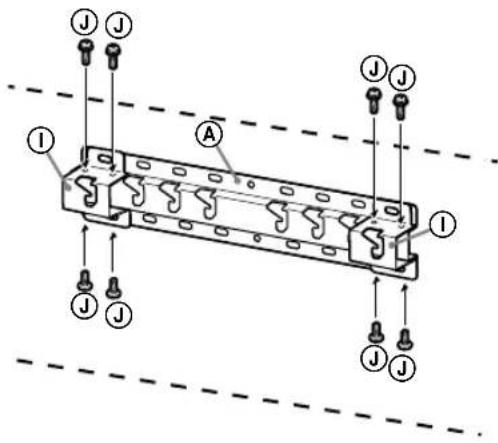
text_image
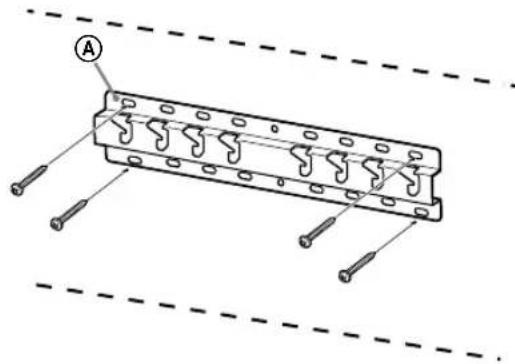
Technical diagram of a mechanical or electrical component with labeled parts and connectors4 Decide the positions of the screws for installing the Base (20) Ⓐ.
Refer to the specifications on page 19. When selecting 2-a, please use the hole positions of Base Adaptor ①.
WARNING
- The wall that the TV will be mounted on should be able to support a weight of at least four times that of the TV (Refer to your TV's Reference Guide for its weight.).
- Determine the strength of the wall the TV will be mounted on. Reinforce the wall sufficiently, if necessary.
Installing the Base on the wall
- Use four or more screws of 8 mm diameter or equivalent (not supplied).
- Fit four screws to the holes of Base Adaptor ① with Base (20) Ⓐ (2-a only).
• Install the Base (20) Ⓐ on the wall horizontally.
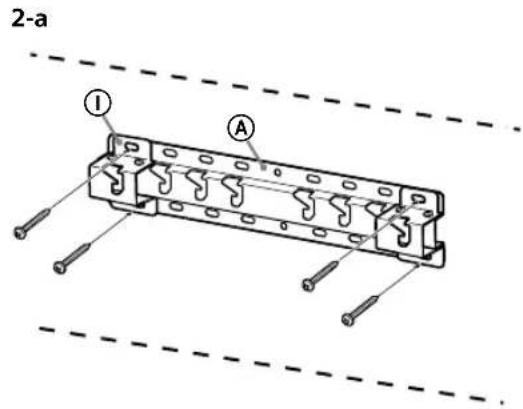
text_image
2-a ① A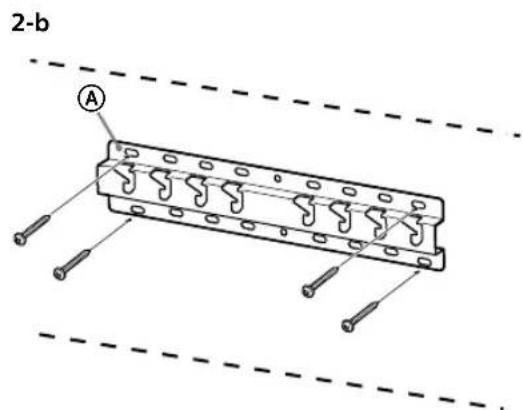
text_image
2-b APreparing for the installation of the TV
Refer to the Setup Guide for stand installation.
KD-75XG80
1 Mark the installation location on the wall.
Use masking tape, etc. (not supplied) to mark the location of the TV near the Base or Base Adaptor. Refer to the following table.
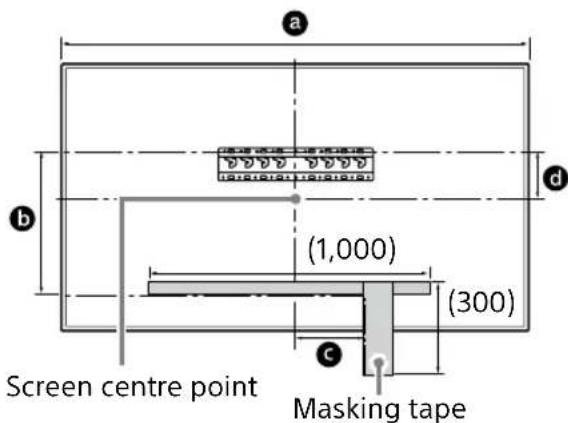
text_image
Screen centre point Masking tape (1,000) (300) a b d cUnit: mm
| Model Name | Length for marking | Screen centre dimension | ||
| a | b | c | d | |
| KD-75XG80 | 1,686 | 564 | 150 | 202 |
2 Attach the Attachment parts for Wall-Mount Bracket. Check the Attachment parts by referring to "Supplied with SU-WL450" in "Checking the parts" on page 5.
Note
Firmly secure the Attachment parts using screws. When using an electric screwdriver, set the torque setting to approximately 1.5 N·m {15 kgf·cm}. Be sure to store the used or unused parts in a safe place for future use. Retain this manual for future reference.
Standard mounting (2-a)
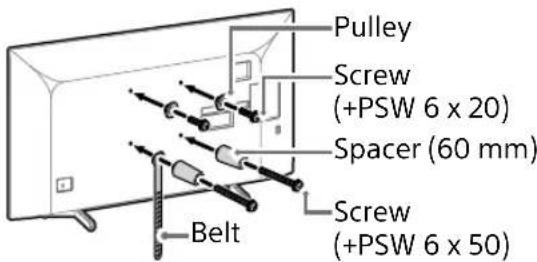
text_image
Pulley Screw (+PSW 6 x 20) Spacer (60 mm) Screw (+PSW 6 x 50) BeltSlim mounting (2-b)
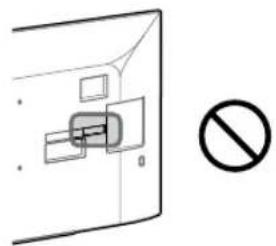
Note
You cannot use some of the terminals on the rear of the TV when using this mounting style.

natural_image
Simple line drawing of a door with a rectangular opening and a prohibition symbol (no text or labels)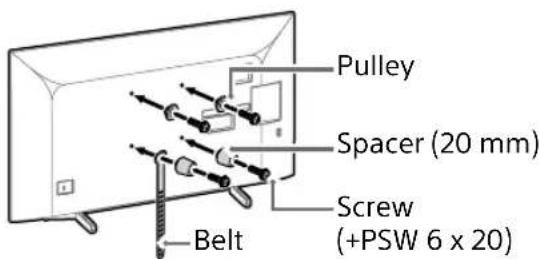
text_image
Pulley Spacer (20 mm) Screw (+PSW 6 x 20) Belt3 Connect the necessary cable(s) to the TV.
Make sure to connect the cables before installing the TV on the wall. You will be unable to connect the cables when the TV is installed.
Refer to the Reference Guide supplied with your TV.
Note
Subcontract the cable routing in the wall to a licensed contractor. Bundle the connecting cables to prevent stepping on them before wall mounting.
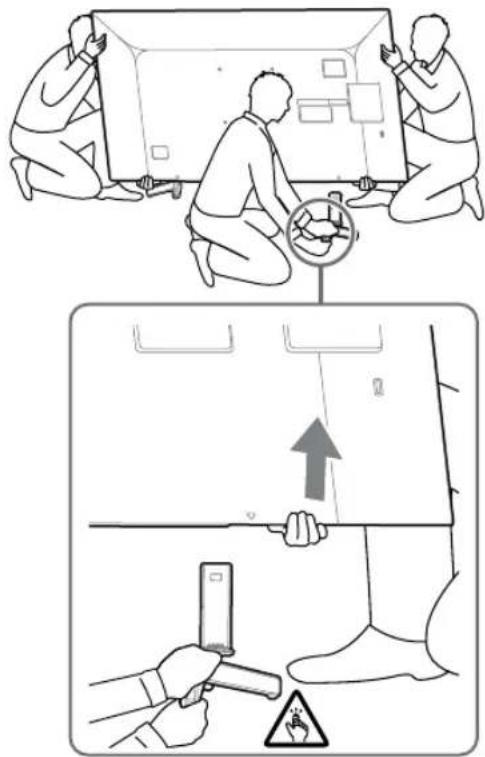
4 Detach the Table-Top Stand from the TV.
- Remove one side of the Table-Top Stand at a time. Firmly hold the Table-Top Stand securely with both hands while the other people lift up the TV.
text_image
Diagram illustrating two steps of installing a device, showing hand positioning and safety warning symbol.- Repeat the previous step and remove the other side of the Table-Top Stand.
Note
- Three or more people are required to detach the Table-Top Stand.
- Be careful not to use excessive force while detaching the Table-Top Stand from the TV as it may cause the TV set to fall resulting in personal injury or physical damage to the TV.
• Take care when handling the Table-Top Stand to prevent damage to the TV. - Be careful when lifting the TV as the Table-Top Stand is detached, the Table-Top Stand may topple over and cause personal injury.
• Take care when removing the Table-Top Stand from the TV to prevent it from falling over and damaging the surface that the TV is sitting on.
KD-65XG81□□ / 65XG80□□
1 Attach the Attachment parts for Wall-Mount Bracket. Check the Attachment parts by referring to "Supplied with SU-WL450" in "Checking the parts" on page 5.
Note
- Firmly secure the Attachment parts using screws.
- When using an electric screwdriver, set the torque setting to approximately 1.5 N·m {15 kgf·cm}.
- Be sure to store the used or unused parts in a safe place for future use. Retain this manual for future reference.
Standard mounting (2-a)

text_image
Pulley Ⓑ Screw (+PSW 6 x 20) ⓒ Spacer (60 mm) Ⓙ Screw (+PSW 6 x 50) Ⓘ Belt ⒻSlim mounting (2-b)
Note
- You cannot use some of the terminals on the rear of the TV when using this mounting style.
natural_image
Simple line drawing of a door with a switch and a prohibition symbol (no text or labels)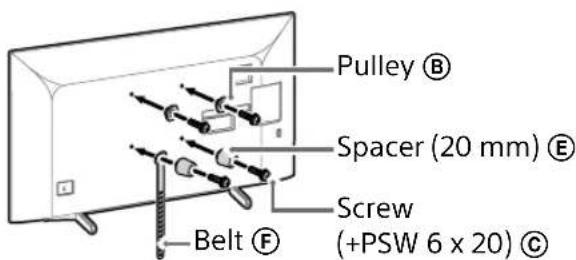
text_image
Pulley Ⓑ Spacer (20 mm) Ⓔ Screw (+PSW 6 x 20) Ⓒ Belt Ⓕ2 Connect the necessary cable(s) to the TV.
Make sure to connect the cables before installing the TV on the wall. You will be unable to connect the cables when the TV is installed.
Refer to the Reference Guide supplied with your TV.
Note
- Subcontract the cable routing in the wall to a licensed contractor.
- Bundle the connecting cables to prevent stepping on them before wall mounting.
3 Detach the Table-Top Stand from the TV.
- Remove one side of the Table-Top Stand at a time. Firmly hold the Table-Top Stand securely with both hands while the other people lift up the TV.
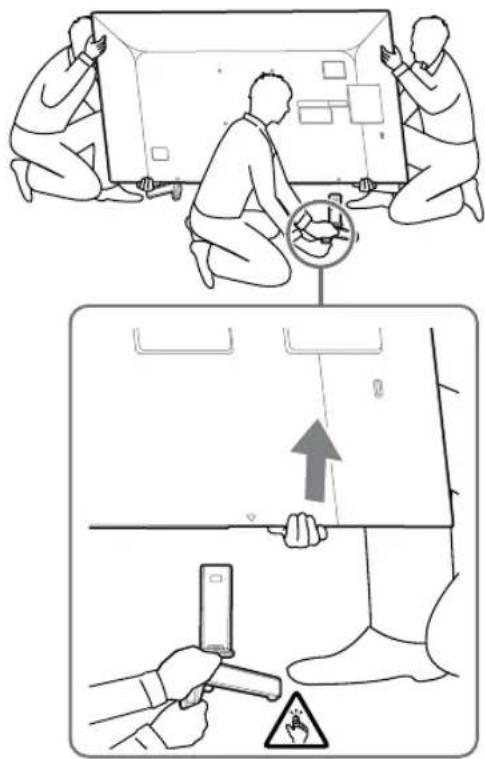
text_image
Diagram illustrating two steps of installing a device, showing hand positioning and safety warning symbol.- Repeat the previous step and remove the other side of the Table-Top Stand.
Note
- Three or more people are required to detach the Table-Top Stand.
-
Be careful not to use excessive force while detaching the Table-Top Stand from the TV as it may cause the TV set to fall resulting in personal injury or physical damage to the TV.
• Take care when handling the Table-Top Stand to prevent damage to the TV. -
Be careful when lifting the TV as the Table-Top Stand is detached, the Table-Top Stand may topple over and cause personal injury.
• Take care when removing the Table-Top Stand from the TV to prevent it from falling over and damaging the surface that the TV is sitting on.
KD-55XG81□□/
55XG80□□
1 Attach the Attachment parts for Wall-Mount Bracket. Check the Attachment parts by referring to "Supplied with SU-WL450" in "Checking the parts" on page 5.
Note
- Firmly secure the Attachment parts using screws.
- When using an electric screwdriver, set the torque setting to approximately 1.5 N·m {15 kgf·cm}.
- Be sure to store the used or unused parts in a safe place for future use. Retain this manual for future reference.
Standard mounting (2-a)
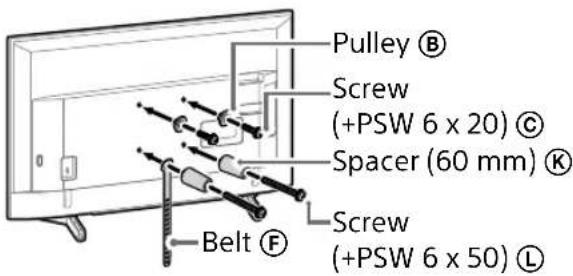
text_image
Pulley Ⓑ Screw (+PSW 6 x 20) ⓒ Spacer (60 mm) Ⓔ Screw (+PSW 6 x 50) ⒣ Belt ⒻSlim mounting (2-b)
Note
- You cannot use some of the terminals on the rear of the TV when using this mounting style.
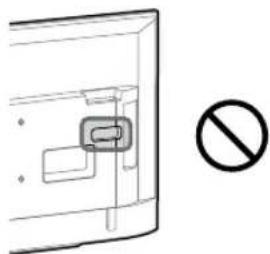
natural_image
Simple line drawing of a door with a stop sign symbol (no text or labels)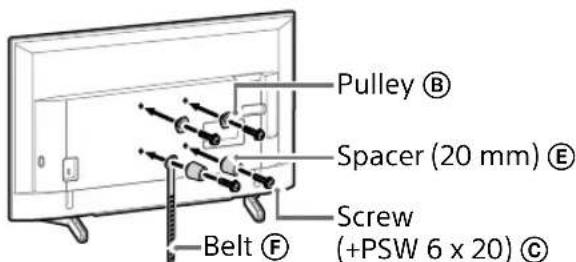
text_image
Pulley Ⓑ Spacer (20 mm) Ⓔ Screw (+PSW 6 x 20) Ⓒ Belt Ⓕ2 Connect the necessary cable(s) to the TV.
Make sure to connect the cables before installing the TV on the wall. You will be unable to connect the cables when the TV is installed.
Refer to the Reference Guide supplied with your TV.
Note
- Subcontract the cable routing in the wall to a licensed contractor.
- Bundle the connecting cables to prevent stepping on them before wall mounting.
3 Detach the Table-Top Stand from the TV.
natural_image
Line drawing of a rectangular TV with cable connectors and connectors, no text or symbols presentNote
- Be careful when lifting the TV as the Table-Top Stand is detached, the Table-Top Stand may topple over and cause personal injury.
• Take care when removing the Table-Top Stand from the TV to prevent it from falling over and damaging the surface that the TV is sitting on.
KD-49XG81□□/
49XG80□□ / 43XG81□□ /
43XG80□□
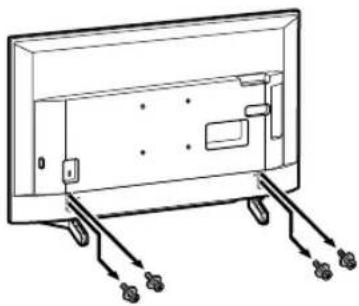
1 Detach the Table-Top Stand from the TV.
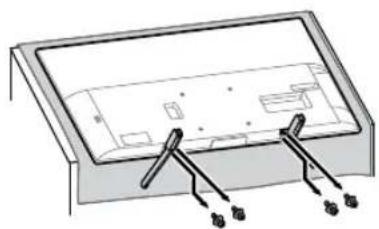
natural_image
Diagram of a device casing with connectors and internal components, no text or symbols presentNote
- Make sure to place TV on the place where you put a soft cloth on to prevent damaging display's surface.
- When installing the Wall-Mount Bracket, do not use the screws removed from the Table-Top Stand.
- Be sure to store the removed Table-top Stand and its screws in a safe place, keeping them away from children. You will need them if you want to use the TV on a table in the future. The Table-Top Stand cannot be purchased separately.
WARNING
- Be sure the TV is on the vertical position before switching on. TV set must not powered on with LCD panel face down to avoid uneven picture uniformity.
- If pressure or shock is applied to the surface of the TV, the TV may break or become damaged.
- Lay the TV face down on a stable and level surface with the Table-Top Stand hanging over the edge of the surface. Having the TV face and the base of the Table-Top Stand on the same level surface will create an unstable working condition and can damage the TV.
- When detaching the Table-Top Stand from the TV, hold the Table-Top Stand securely with both hands.
2 Attach the Attachment parts for Wall-Mount Bracket. Check the Attachment parts by referring to "Supplied with SU-WL450" in "Checking the parts" on page 5.
Note
- Firmly secure the Attachment parts using screws.
- When using an electric screwdriver, set the torque setting to approximately 1.5 N·m {15 kgf·cm}.
- Be sure to store the used or unused parts in a safe place for future use. Retain this manual for future reference.
Standard mounting (2-a)
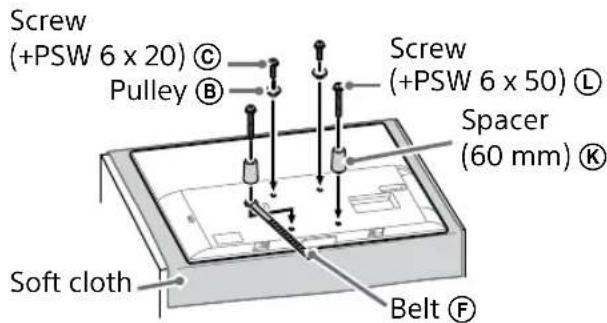
text_image
Screw (+PSW 6 x 20) © Pulley Ⓑ Screw (+PSW 6 x 50) Ⓛ Spacer (60 mm) ® Soft cloth Belt ⒻSlim mounting (2-b)
Note
- You cannot use some of the terminals on the rear of the TV when using this mounting style.
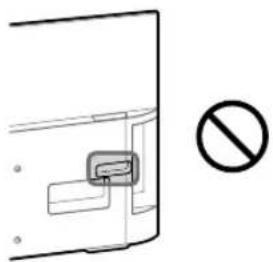
natural_image
Simple line drawing of a door with a handle and no text or symbols present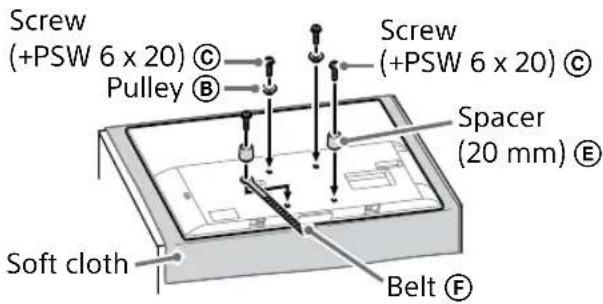
text_image
Screw (+PSW 6 x 20) © Pulley Ⓑ Screw (+PSW 6 x 20) © Spacer (20 mm) Ⓔ Soft cloth Belt ⒨3 Connect the necessary cable(s) to the TV.
Make sure to connect the cables before installing the TV on the wall. You will be unable to connect the cables when the TV is installed.
Refer to the Reference Guide supplied with your TV.
Note
- Subcontract the cable routing in the wall to a licensed contractor.
- Bundle the connecting cables to prevent stepping on them before wall mounting.
Installing the TV on the wall
KD-75XG80□□
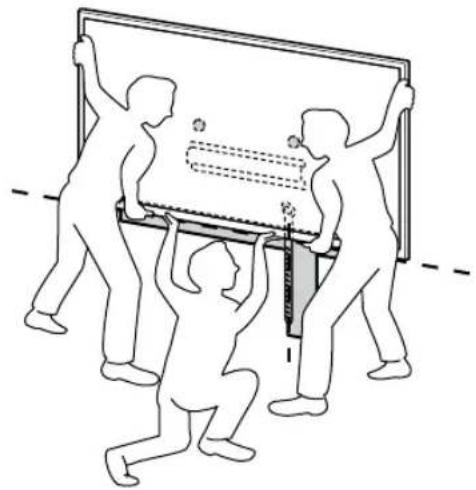
1 Lift the TV.
- For the location of the Pulleys Ⓑ to the hang on the Base or Base Adaptor, refer to the table of step 3 in "Deciding on the installation location" on page 7.
• Make sure that the rear of the TV touches the Base or Base Adaptor when holding the TV.
Note
- Hold the TV securely with both hands and make sure the Belt Ⓔ and the bottom of the TV align with the masking tape.
- Carry the TV with three people and the person who is in front of the TV leads the others to adjust the position.
natural_image
Illustration of three people lifting a large object with dashed lines indicating motion or alignment (no text or symbols)• Take great care when installing the TV to the wall especially for the person who is supporting the TV from below, the television set may fall, causing serious bodily injury or even death.
text_image
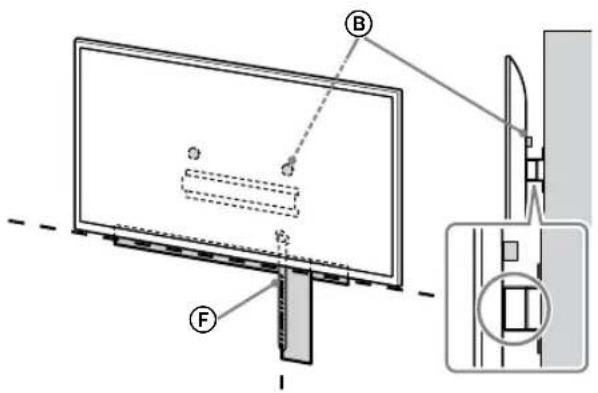
Technical diagram showing a monitor mounted on a stand with labeled components A, B, and C, including a close-up view of the front panel.2 Install the TV onto the Base or Base Adaptor.
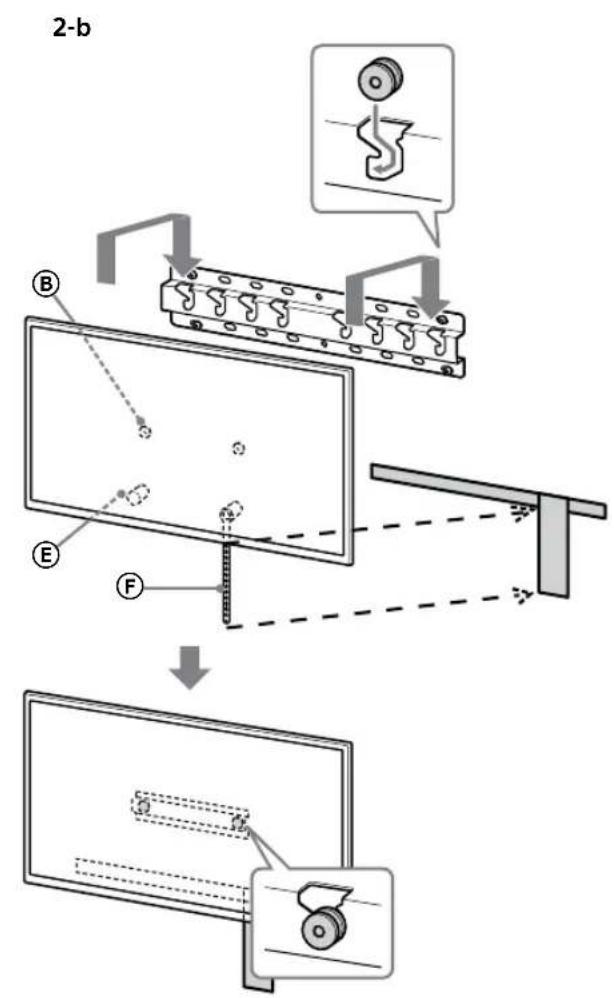
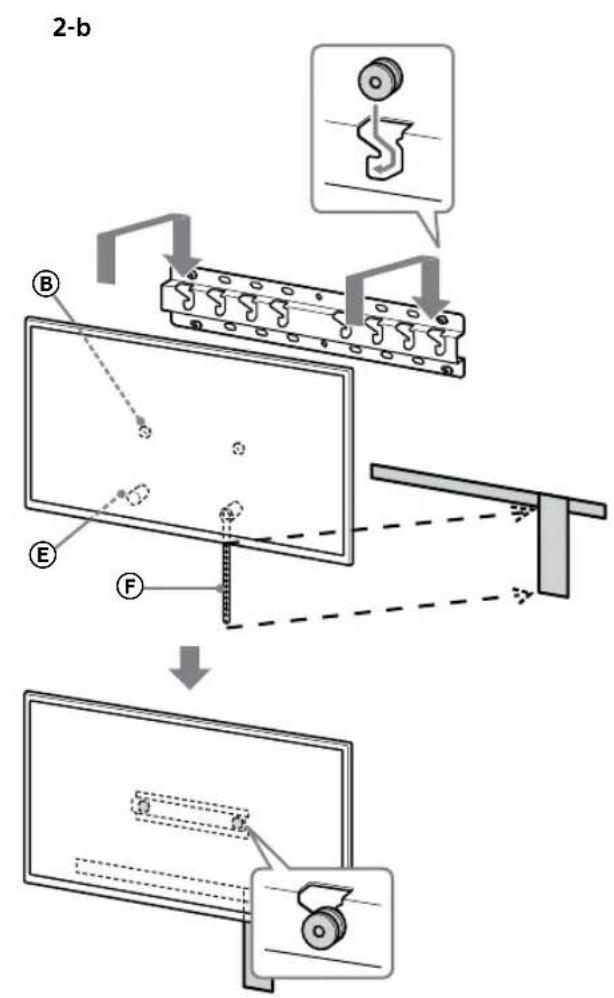
- Gently slide down the TV and hang the Pulleys ⑧ attached to the rear of the TV to the Base or Base Adaptor, making sure to confirm the shape of the holes.
- After installing the TV on the wall, confirm the Pulleys ® are firmly latched into the Base or Base Adaptor.
- Release both hands slowly to ensure that the TV does not fall.
natural_image
Simple line drawing of a rectangular frame with a dashed rectangle inside and a starburst shape at the bottom (no text or symbols)- After installing the TV on the wall, remove the masking tape, etc. from the wall.
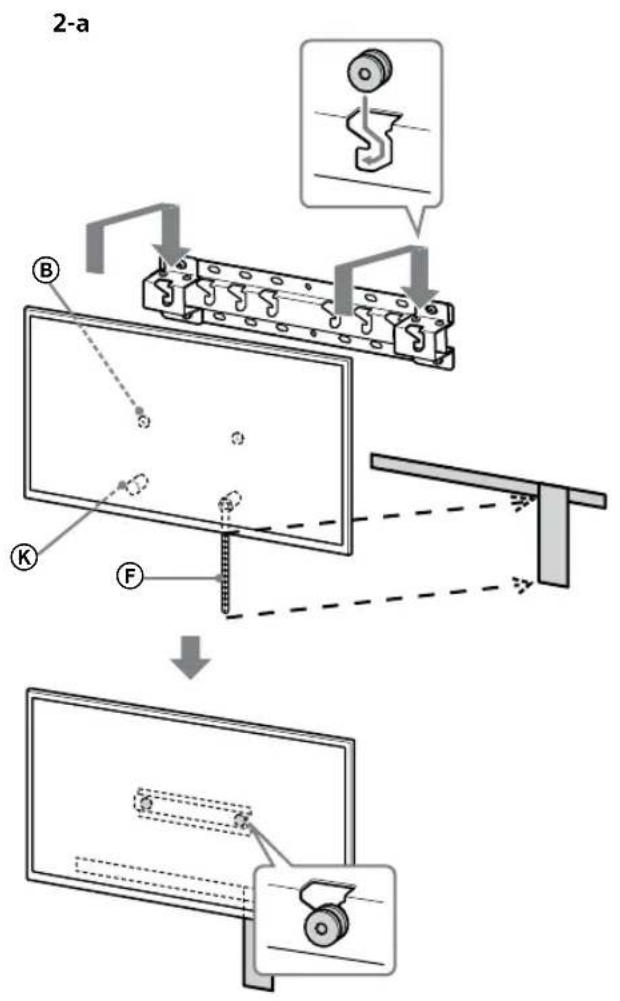
text_image
2-a B K F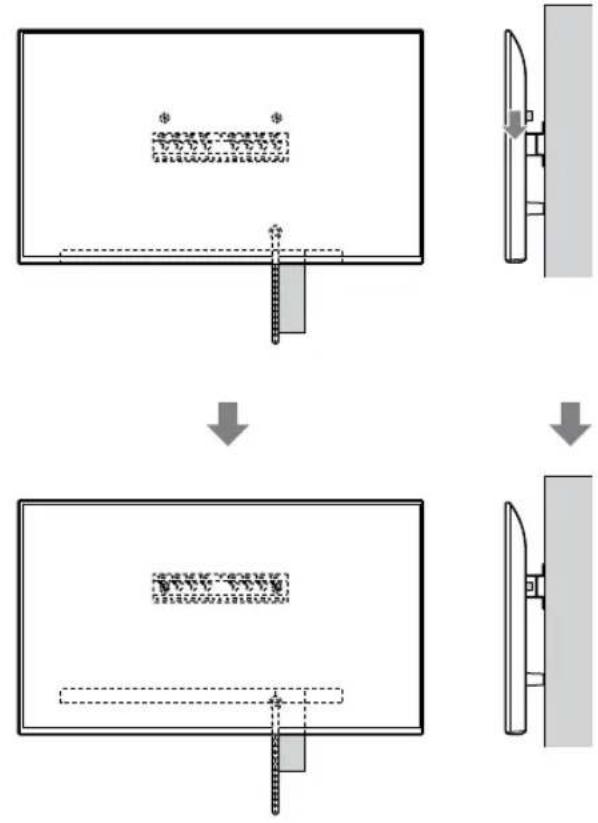
flowchart
graph TD
    A["Initial State"] --> B["Step 1: Initial State with a rectangular block and dimension annotation"]
    B --> C["Step 2: Step 1: Initial State with a dashed line and dimension annotation"]
    C --> D["Step 3: Step 2: Initial State with a dashed line and dimension annotation"]
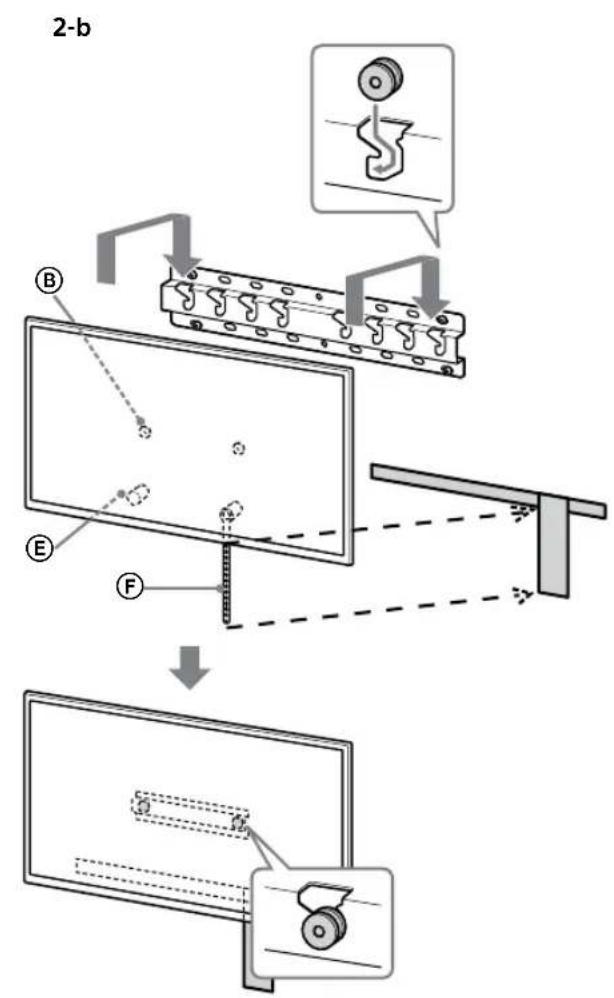
text_image
2-b B E F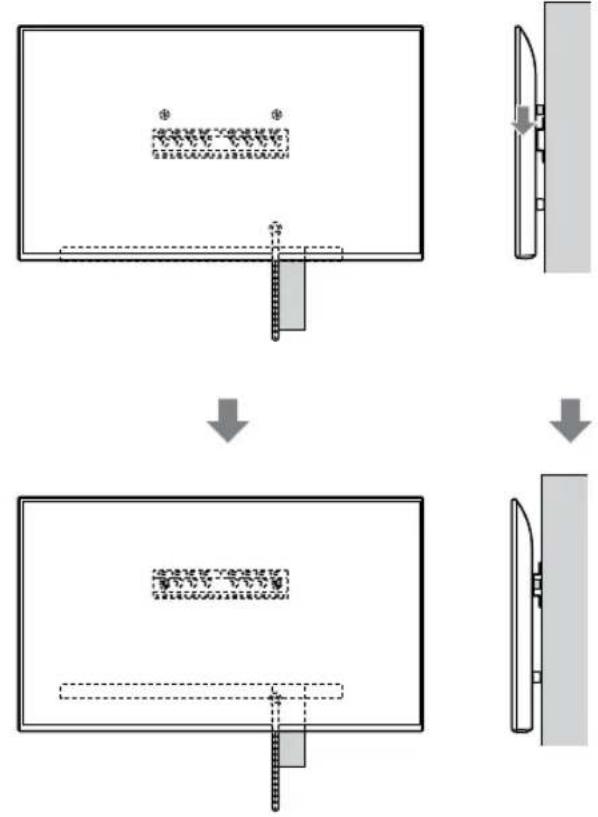
flowchart
graph TD
    A["Top View"] --> B["Step 1: Top View with a textured rectangular block and a small rectangular component"]
    B --> C["Step 2: Top View with a flat rectangular block and a small rectangular component"]
    C --> D["Step 3: Top View with a flat rectangular block and a small rectangular component"]
WARNING
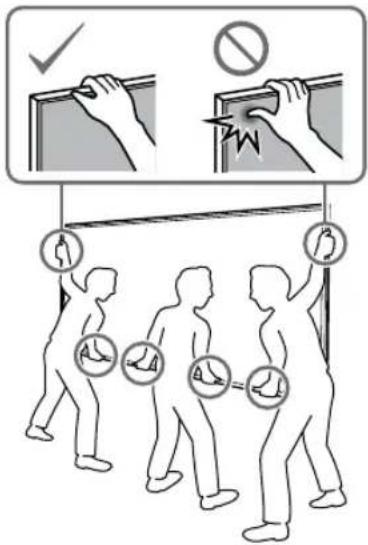
- Be sure that two or more persons (three or more persons for 75 inches and above TV set) hold the TV when carrying it.
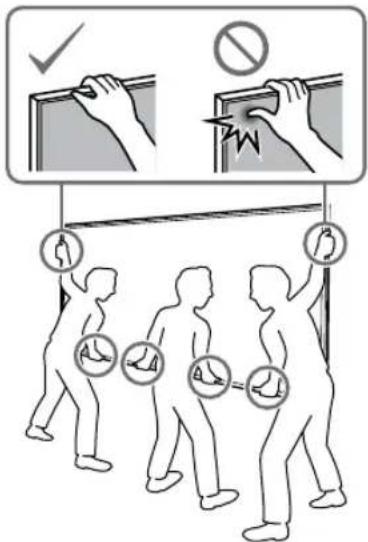
text_image
Safety instruction diagram showing hand protection with check and no sign, and three human silhouettes carrying safety symbols.3 Preventing the bottom of the TV from shifting.
- Take up the slack of Belt Ⓔ and attach it to the wall tightly.
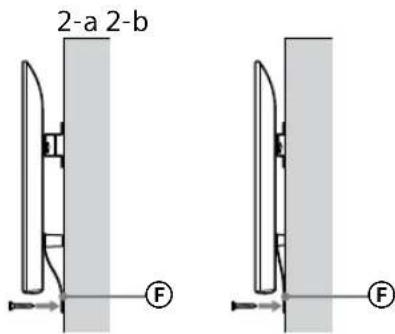
text_image
2-a 2-b F F- Use a 5 mm diameter screw or equivalent (not supplied).
Note
- Try to pull the bottom of the TV towards yourself slightly, to make sure that it does not move forward. If there is any movement, it is not fixed correctly, and the Belt ⑤ should be secured firmly again.
KD-65XG81□□ / 65XG80□□ / 55XG81□□ / 55XG80□□ / 49XG81□□ / 49XG80□□ / 43XG81□□ / 43XG80□□
1 Lift the TV.
- For the location of the Pulleys Ⓑ to the hang on the Base or Base Adaptor, refer to the table of step 3 in "Deciding on the installation location" on page 7. - Make sure that the rear of the TV touches the Base or Base Adaptor when holding the TV.
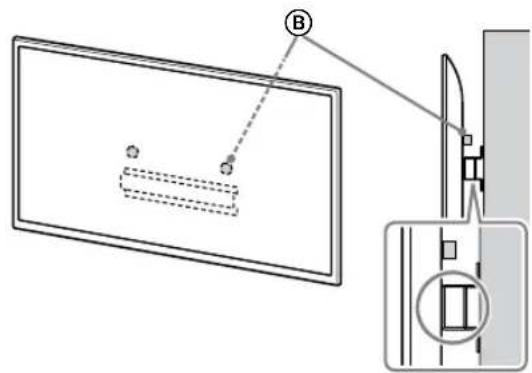
text_image
Technical diagram showing a device with labeled components and a magnified view of the internal structure.Note
- Hold the TV securely with both hands.
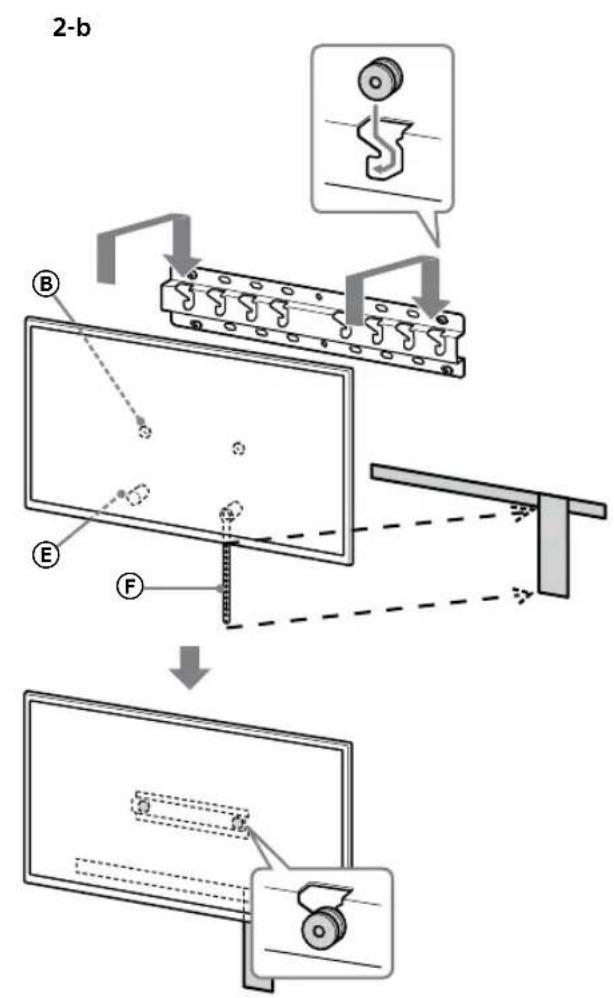
2 Install the TV onto the Base or Base Adaptor.
- Gently slide down the TV and hang the Pulleys ⑧ attached to the rear of the TV to the Base or Base Adaptor, making sure to confirm the shape of the holes. - After installing the TV on the wall, confirm the Pulleys ⑧ are firmly latched into the Base or Base Adaptor. - Release both hands slowly to ensure that the TV does not fall.
natural_image
Simple line drawing of a rectangular frame with a small rectangular cutout and a starburst shape at the bottom (no text or symbols)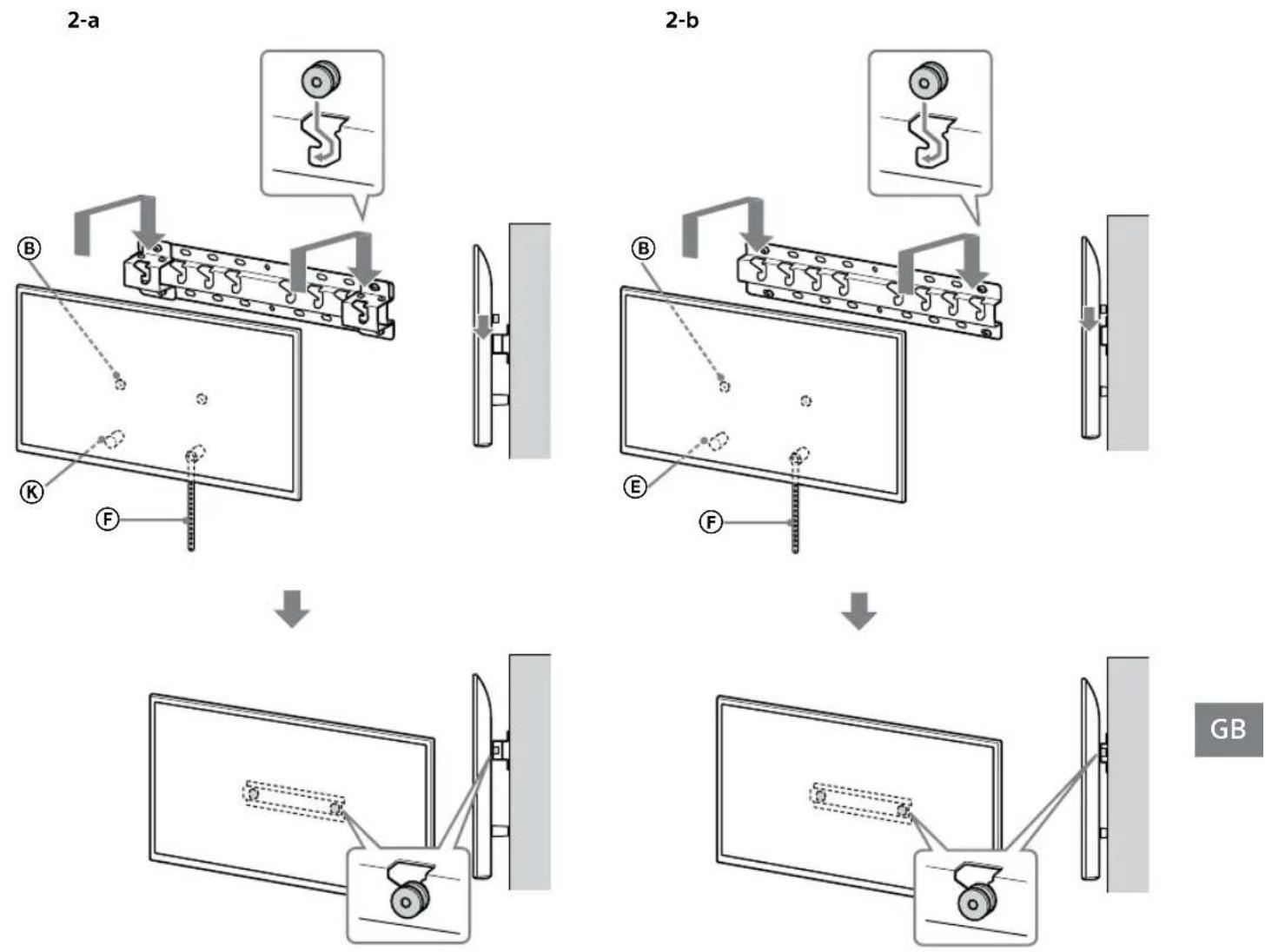
WARNING
- Be sure that two or more persons (three or more persons for 75 inches and above TV set) hold the TV when carrying it.
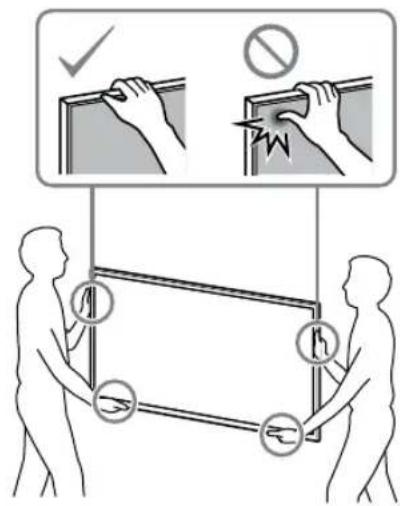
text_image
Safety instruction diagram showing hand protection and warning symbols for installing a panel, with two silhouettes representing different positions.3 Preventing the bottom of the TV from shifting.
- Take up the slack of Belt Ⓔ and attach it to the wall tightly.
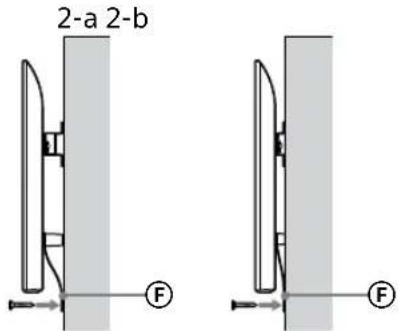
text_image
2-a 2-b F F- Use a 5 mm diameter screw or equivalent (not supplied).
Note
- Try to pull the bottom of the TV towards yourself slightly, to make sure that it does not move forward. If there is any movement, it is not fixed correctly, and the Belt Ⓔ should be secured firmly again.
Confirming the completion of the installation
Check the following points.
- The Pulleys Ⓑ are firmly hung onto the Base or Base Adaptor.
- The cord and the cable are not twisted or pinched.
- The Belt Ⓕ is tight with no slack.
WARNING
- Improper placement of the mains lead, etc. may cause fire or electric shock through a short circuit. Be sure to confirm the completion of the installation for safety.
Other information
When removing the TV, reverse the previous installation procedure.
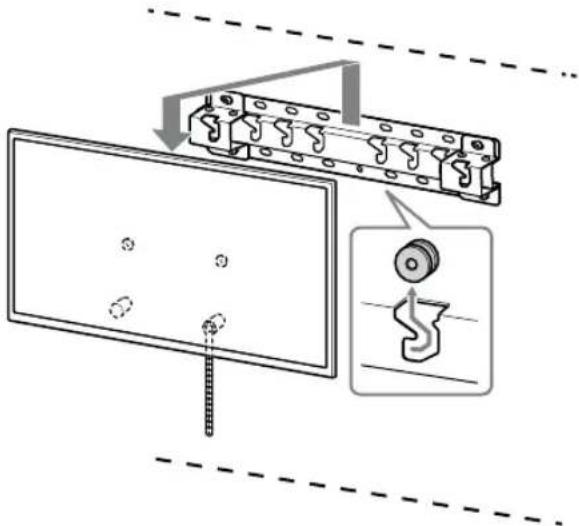
text_image
Technical diagram showing a mechanical assembly with labeled components and a magnified inset showing a gear mechanism.WARNING
- Be sure that two or more persons (three or more persons for 75 inches and above TV set) hold the TV when removing it.
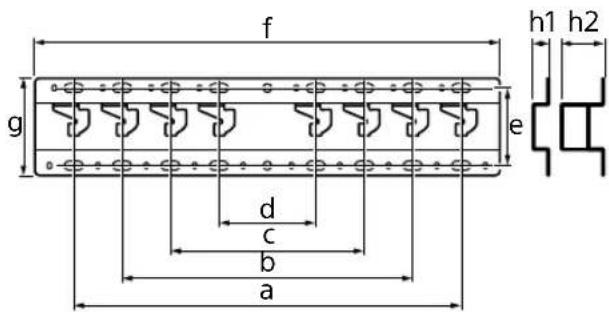
Specifications
text_image
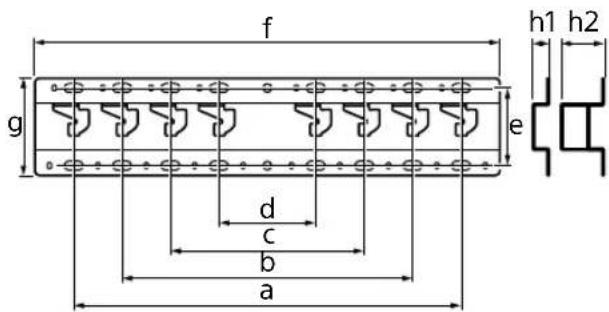
f h1 h2 g e d c b aDimensions: (Approx.) [mm]
a : 400
b : 300
c : 200
d : 100
e : 80
f : 480
g : 100
h1 : 20 (case 2-b)
h2 : 60 (case 2-a)
Weight (base only): (Approx.) [kg]
0.8
Design and specifications are subject to change without notice.
text_image
Technical diagram of an electrical connector with labeled terminals and mounting pointsnatural_image
Simple line drawing of a door with a switch and a prohibition symbol (no text or labels)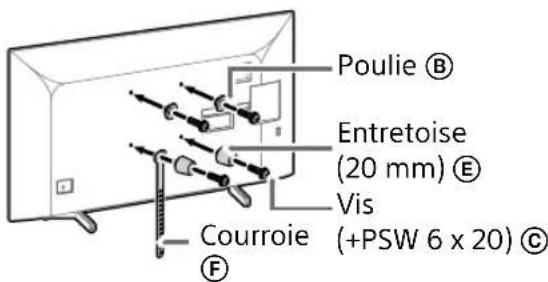
text_image
Poulie Ⓑ Entretoise (20 mm) Ⓔ Vis Courroie (+PSW 6 x 20) Ⓔtext_image
Diagram illustrating two steps of installing a device, showing hand positioning and safety warning symbol.natural_image
Diagram showing a door with a switch and a prohibition symbol (no text or labels)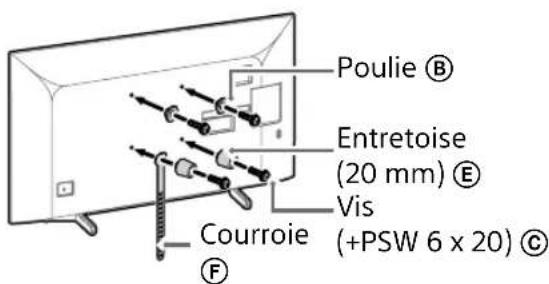
text_image
Poulie Ⓑ Entretoise (20 mm) Ⓔ Vis Courroie (+PSW 6 x 20) Ⓔtext_image
Diagram illustrating two steps of installing a device, showing hand positioning and safety warning symbol.natural_image
Simple line drawing of a door with a stop symbol (no text or labels)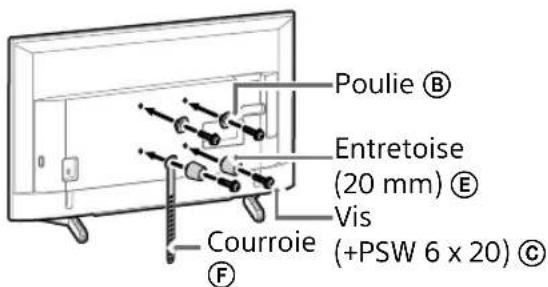
text_image
Poulie Ⓑ Entretoise (20 mm) Ⓔ Vis Courroie (+PSW 6 x 20) Ⓔnatural_image
Line drawing of a rectangular TV with cable connectors and connectors, no text or symbols presentRemarque
natural_image
Diagram of a device with labeled connectors and internal components (no text or symbols)Remarque
natural_image
Simple line drawing of a door with a switch and a prohibition symbol (no text or labels)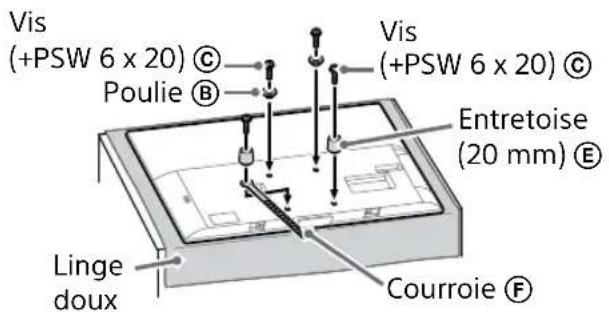
text_image
Vis (+PSW 6 x 20) © Poulie Ⓑ Vis (+PSW 6 x 20) © Entretoise (20 mm) Ⓔ Linge doux Courroie ⒨natural_image
Illustration of three people lifting a large object with a ruler, no text or symbols presenttext_image
Technical diagram showing a monitor with labeled components (A, B, C, D, E) and a close-up view of the front panel.natural_image
Simple line drawing of a rectangular frame with a dashed rectangle and a starburst shape at the bottom (no text or symbols)flowchart
graph TD
    A["Initial State: $"] --> B["Step 1: Dislocation"]
    B --> C["Step 2: Dislocation with $*"]
    C --> D["Final State: $"]
text_image
2-b B E F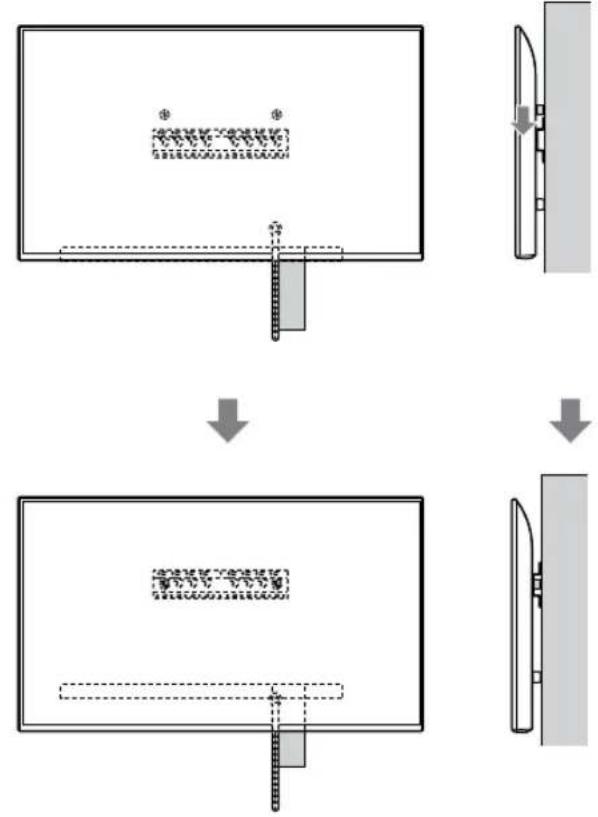
flowchart
graph TD
    A["Step 1: Object Tracking"] --> B["Step 2: Assembly"]
    B --> C["Step 3: Final Assembly"]
AVERTISSEMENT
text_image
Illustration showing three human figures with foot protection symbols and a warning sign, illustrating safety rules for holding objects.text_image
Technical diagram showing a device with labeled components and a magnified view of the internal structure.Remarque
natural_image
Simple line drawing of a rectangular frame with a dashed rectangle and a starburst shape at the bottom (no text or symbols)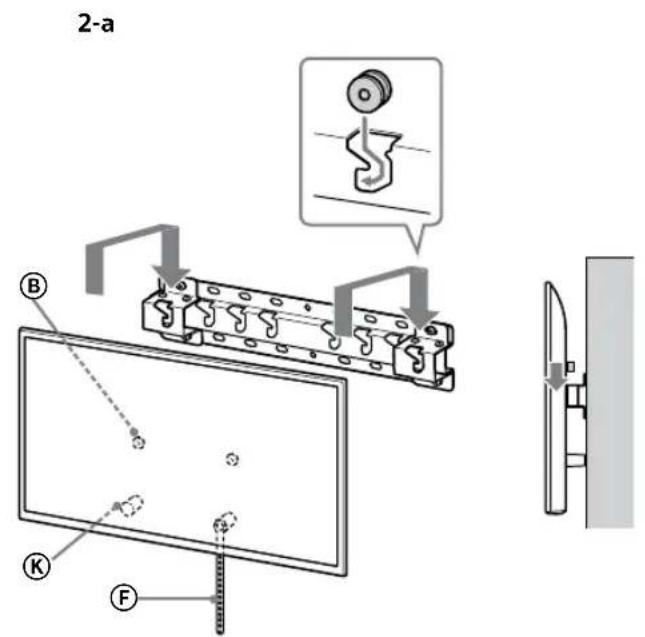
text_image
2-a B K F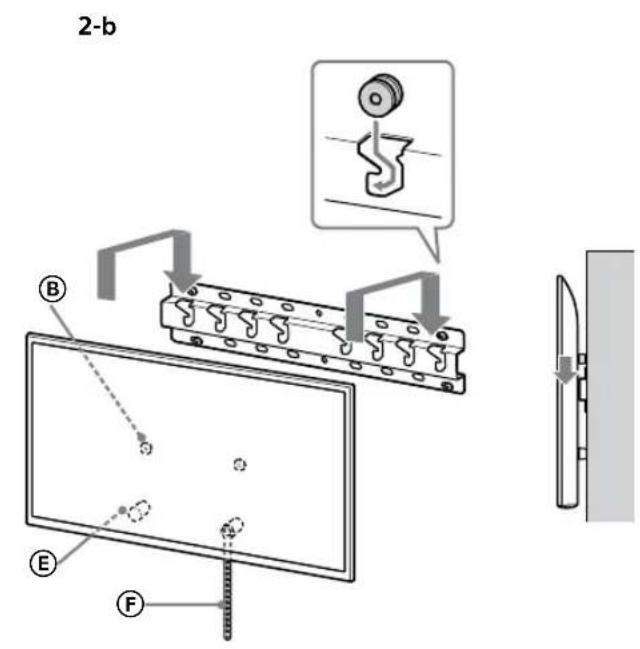
text_image
2-b B E F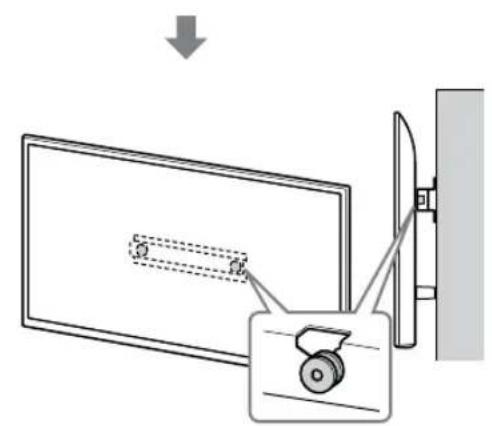
text_image
Diagram showing a device with a slide and a scroll, connected to a wall-mounted device with a magnified view.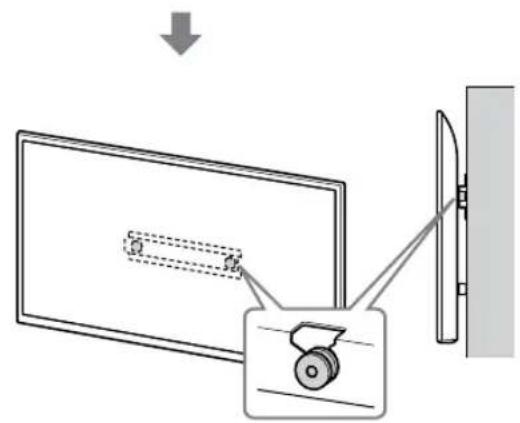
text_image
Diagram showing a monitor with a slide and a wheel, connected to a wall-mounted device, with an arrow indicating direction of motion.FR
AVERTISSEMENT
text_image
Safety instruction diagram showing hand protection and no violations for a device, with two human silhouettes and labeled symbols.text_image
Technical diagram showing installation of a mechanical component with a magnified inset view highlighting the internal structure.AVERTISSEMENT
Dimensions : (approx.) [mm]
a : 400
b : 300
c : 200
d : 100
e : 80
f : 480
g : 100
h1 : 20 (cas 2-b)
h2 : 60 (cas 2-a)
Poids (base seule) : (approx.) [kg]
0,8
text_image
Technical diagram of a mechanical or electrical component with labeled parts and mounting pointstext_image
Technical diagram of a mechanical component with labeled parts I and A, showing bolted connections and dashed reference lines.2-b
text_image
Technical diagram of a mechanical component with labeled parts and dashed reference linesnatural_image
Simple line drawing of a door with a rectangular opening and a prohibition symbol (no text or labels)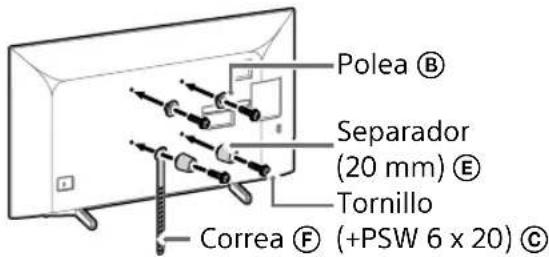
text_image
Polea Ⓑ Separador (20 mm) Ⓔ Tornillo Correa Ⓕ (+PSW 6 x 20) Ⓔtext_image
Diagram illustrating a procedure for installing or adjusting a device, with labeled steps and a warning symbol.natural_image
Diagram showing a door with a switch and a prohibition symbol (no text or labels present)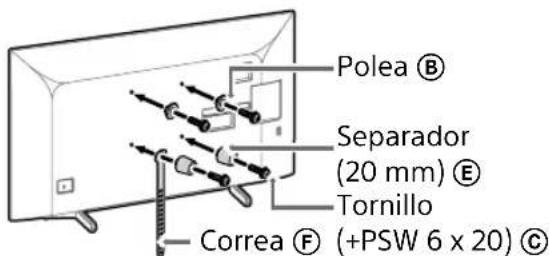
text_image
Polea Ⓑ Separator (20 mm) Ⓔ Tornillo Correa Ⓕ (+PSW 6 x 20) Ⓒtext_image
Diagram illustrating two steps of installing a device, showing installation and inspection with a warning sign.natural_image
Simple line drawing of a door with a stop symbol (no text or labels)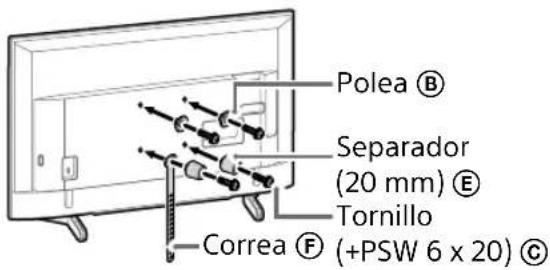
text_image
Polea Ⓑ Separador (20 mm) Ⓔ Tornillo Correa Ⓕ (+PSW 6 x 20) Ⓔnatural_image
Line drawing of a flat-screen TV with cable connectors and a wall-mounted door (no text or symbols)Nota
natural_image
Diagram of a device with connectors and internal components, no text or symbols presentNota
natural_image
Simple line drawing of a door with a switch and a prohibition symbol (no text or labels)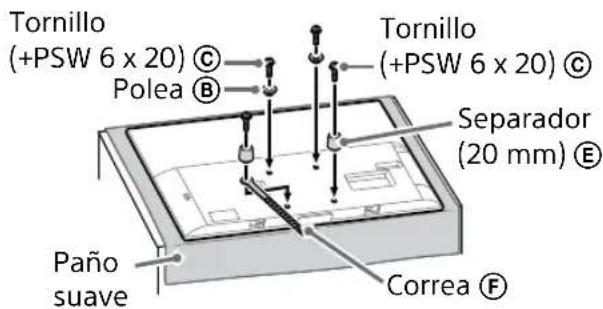
text_image
Tornillo (+PSW 6 x 20) © Polea Ⓑ Tornillo (+PSW 6 x 20) © Separador (20 mm) Ⓔ Paño suave Correa ⒨natural_image
Illustration of three human figures assembling a large whiteboard with a ruler, no text or symbols presenttext_image
Diagram showing a monitor with labeled parts (A, B, C, D, E) and an inset view of a door mechanism.natural_image
Simple line drawing of a rectangular frame with a starburst shape and two small circles inside (no text or symbols)text_image
Diagram illustrating a mechanical assembly or assembly process with labeled components and directional arrows indicating steps.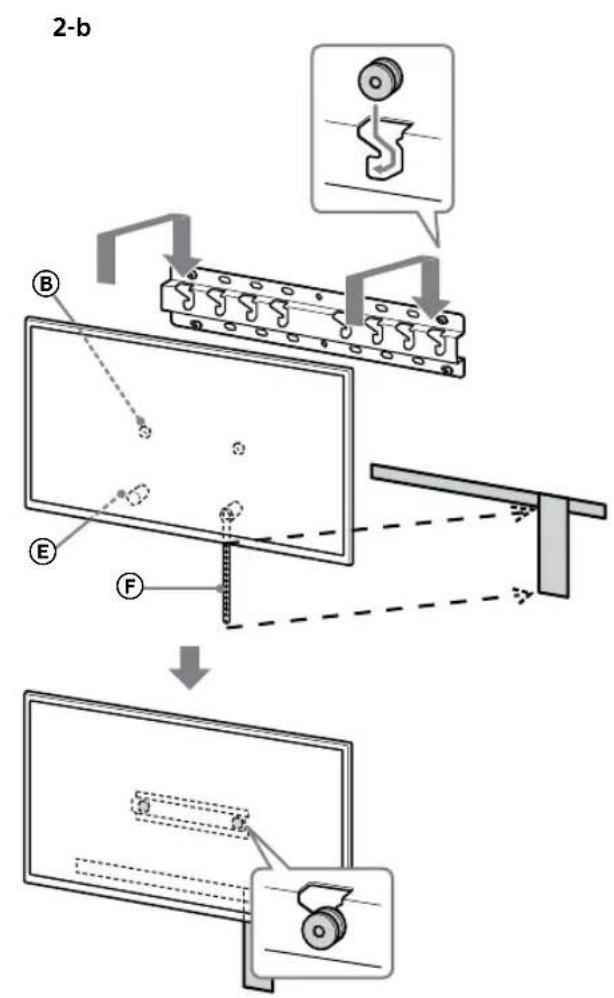
text_image
2-b B E F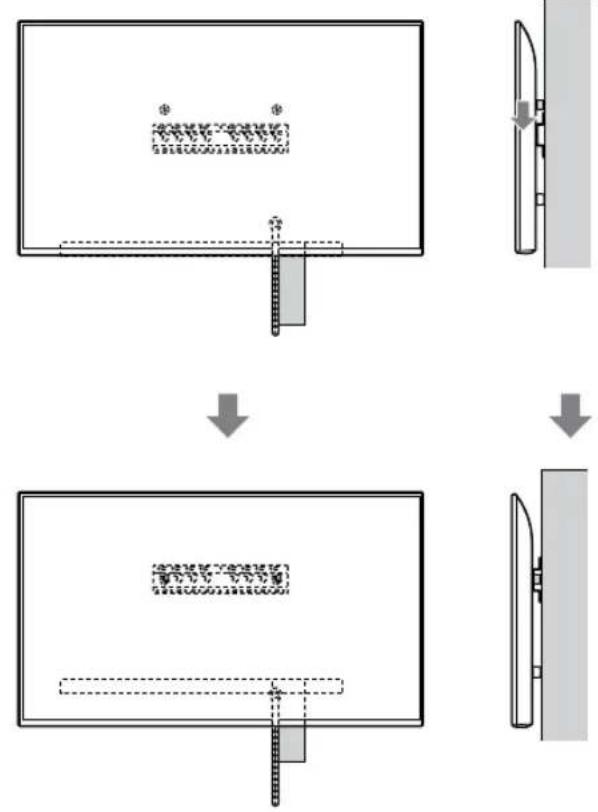
flowchart
graph TD
    A["Top View"] --> B["Step 1: Inserted Component"]
    B --> C["Step 2: Assembly/Adjustment"]
    C --> D["Step 3: Final Assembly"]
ADVERTENCIA
text_image
Safety warning illustration showing incorrect and correct hand actions for a person holding a device, with three silhouettes indicating different safety conditions.text_image
Technical diagram showing a device with labeled components and a magnified view of the internal structure.Nota
natural_image
Simple line drawing of a rectangular frame with a starburst shape and two internal geometric shapes (no text or symbols)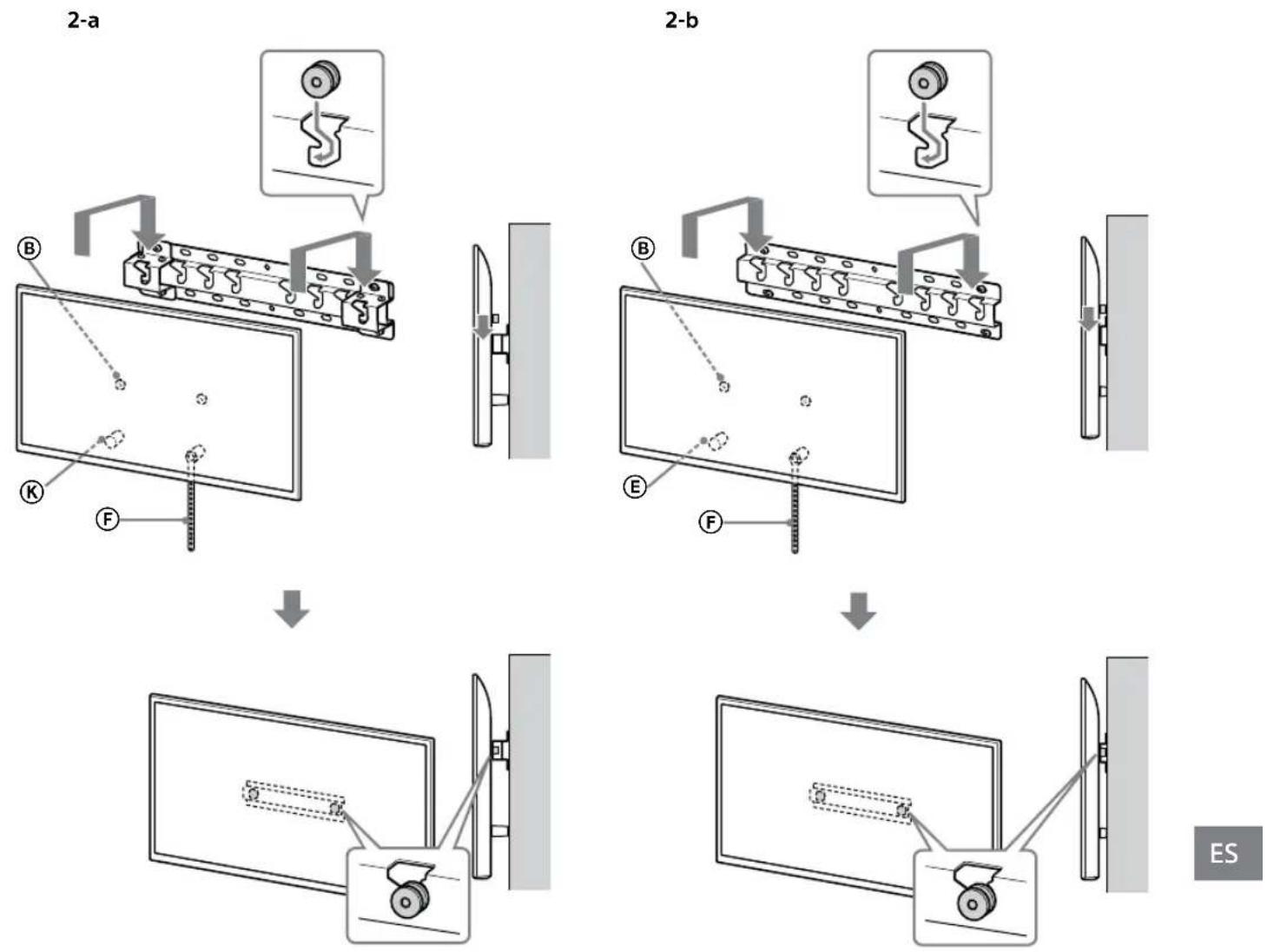
ES
ADVERTENCIA
text_image
Safety instruction diagram showing hand protection and warning symbols for installing a panel, with two silhouettes representing different positions.text_image
Technical diagram showing a mechanical assembly with labeled components and a close-up inset of a gear mechanism.ADVERTENCIA
text_image
Technical diagram of a mechanical or electrical component with labeled parts and connectorsnatural_image
Simple line drawing of a door with a switch and a prohibition symbol (no text or labels)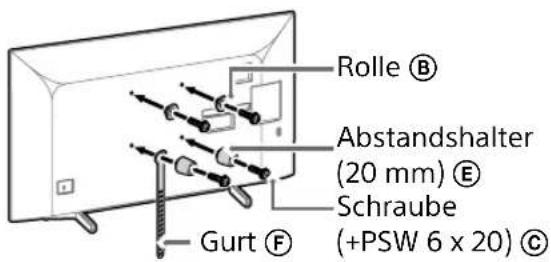
text_image
Rolle Ⓑ Abstandshalter (20 mm) Ⓔ Schraube (+PSW 6 x 20) Ⓔ Gurt Ⓕtext_image
Diagram illustrating two steps of installing a device: top shows workers installing a box, bottom shows hands holding a phone with warning symbol.natural_image
Simple line drawing of a door with a switch and a prohibition symbol (no text or labels)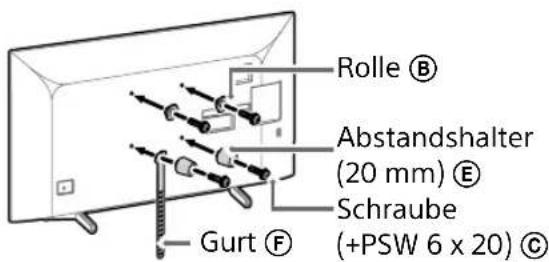
text_image
Rolle Ⓑ Abstandshalter (20 mm) Ⓔ Schraube (+PSW 6 x 20) Ⓒ Gurt Ⓕtext_image
Diagram illustrating a procedure for installing or adjusting a device, with labeled steps and directional arrows indicating movement.natural_image
Simple line drawing of a door with a handle and no text or symbols present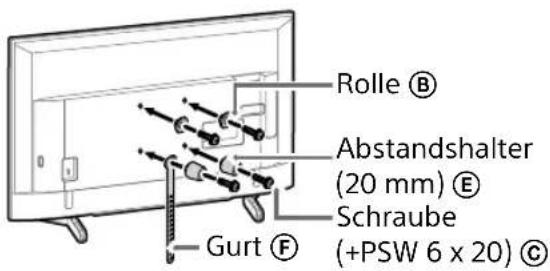
text_image
Rolle Ⓑ Abstandshalter (20 mm) Ⓔ Schraube (+PSW 6 x 20) Ⓔ Gurt Ⓕnatural_image
Line drawing of a rectangular TV with attached cables and connectors, no text or symbols presentHinweis
natural_image
Diagram of a device with labeled connectors and internal components (no text or symbols)Hinweis
natural_image
Simple line drawing of a door with a handle and a prohibition symbol (no text or labels)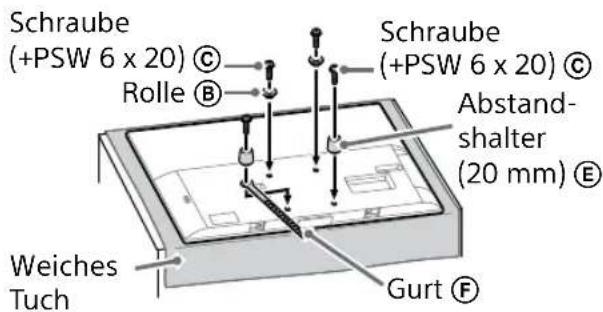
text_image
Schraube (+PSW 6 x 20) © Rolle ® Weiches Tuch Schraube (+PSW 6 x 20) © Abstand- shalter (20 mm) ® Gurt ®natural_image
Illustration of three people lifting a large object with dashed lines indicating motion or alignment (no text or symbols)text_image
Technical diagram showing a monitor with labeled components (A, B, C, D, E) and a close-up view of the device's internal structure.natural_image
Simple line drawing of a rectangular frame with a small rectangle inside and a starburst shape at the bottom (no text or symbols)flowchart
graph TD
    A["Initial State: $"] --> B["Step 1: Dislocation"]
    B --> C["Step 2: Dislocation with $*"]
    C --> D["Final State: $"]
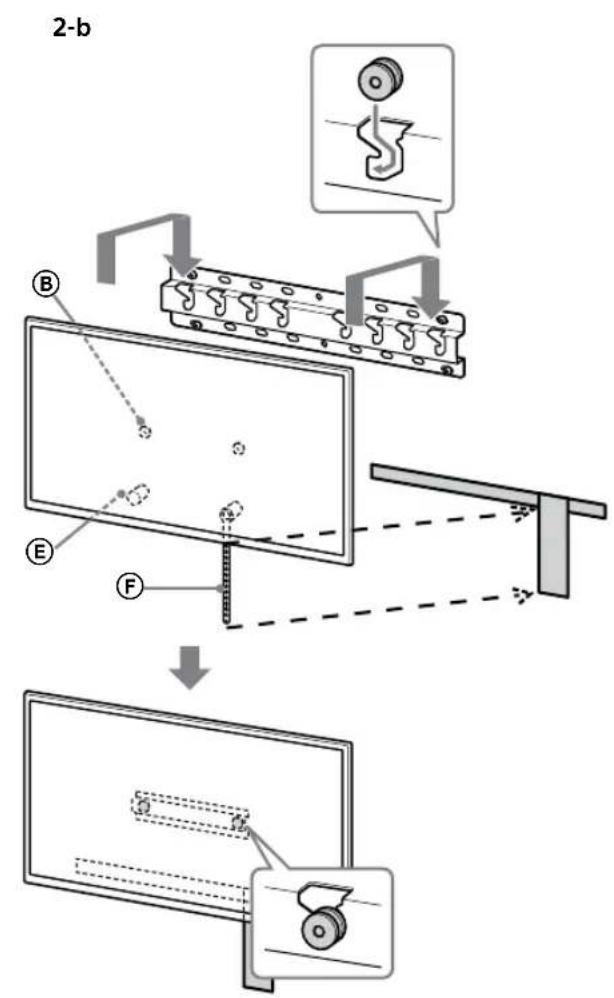
text_image
2-b B E F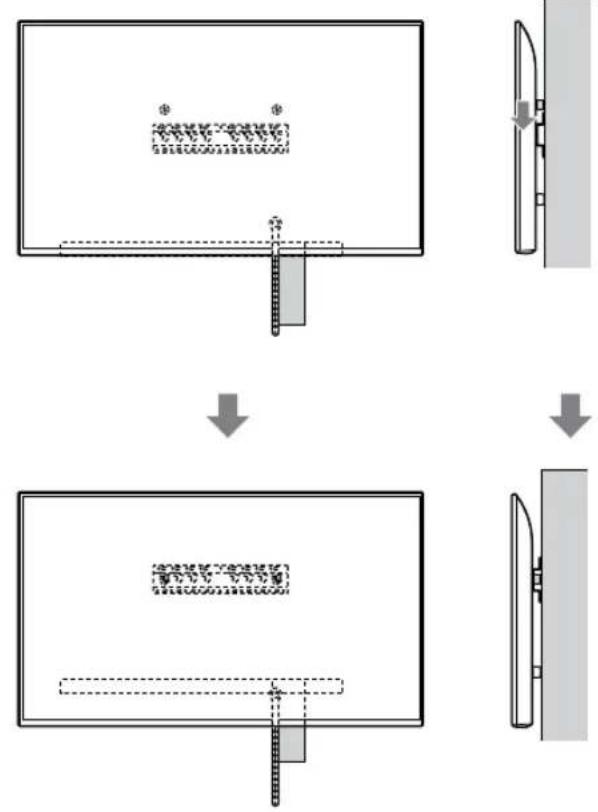
flowchart
graph TD
    A["Top View"] --> B["Step 1: Object Tracking & Assembly"]
    B --> C["Step 2: Breakdown and Reassembly"]
    C --> D["Final State: Top View with Material Structure"]
DE
WARNUNG
text_image
Illustration showing three human figures with foot protection symbols and a warning sign, illustrating safety rules for holding objects.text_image
Diagram showing a force vector labeled 'F' acting on a vertical object, with a curved arrow indicating direction.text_image
Technical diagram showing a component labeled B pointing to a rectangular panel with internal structure and a close-up view of the component.Hinweis
natural_image
Simple line drawing of a rectangular frame with a dashed rectangle and a starburst shape at the bottom (no text or symbols)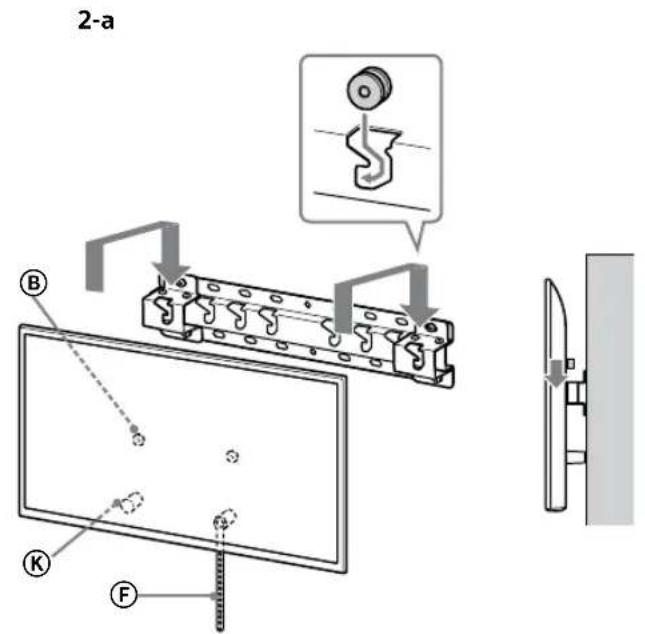
text_image
2-a B K F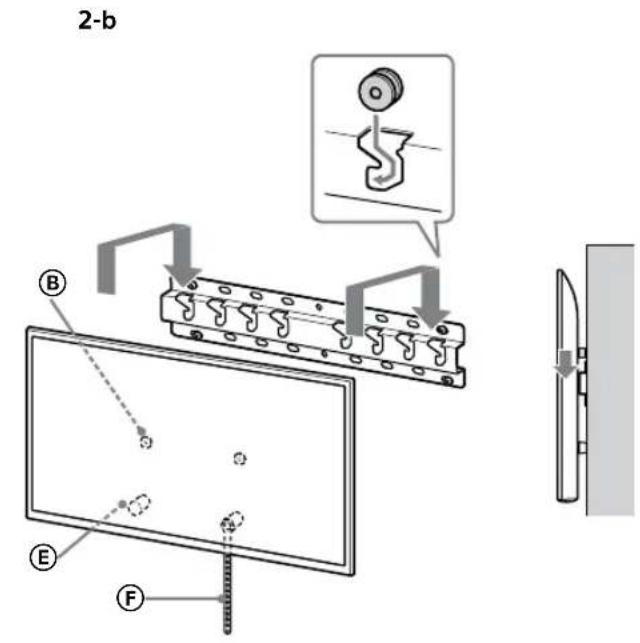
text_image
2-b B E F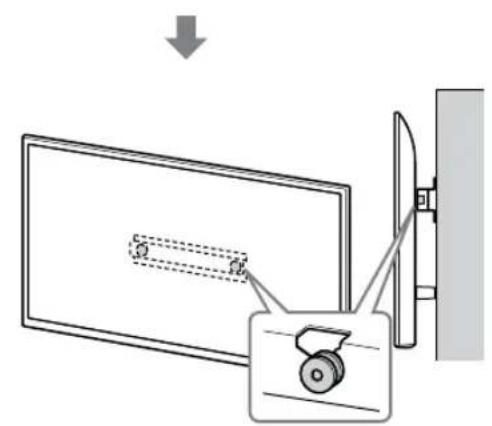
text_image
Diagram showing a monitor with a slide and a scroll wheel, connected by wires to a wall-mounted device.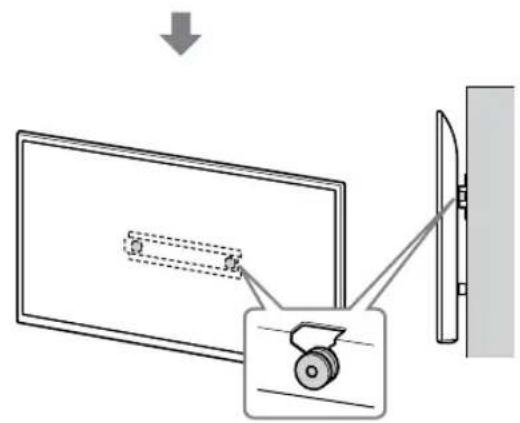
text_image
Diagram showing a monitor with a slide and a wheel, connected to a wall-mounted device, with an arrow indicating direction of motion.DE
WARNUNG
text_image
Safety instruction diagram showing hand protection and no violations for a device, with two human silhouettes and labeled symbols.text_image
Technical diagram showing a mechanical assembly with labeled components and directional arrows indicating assembly steps.WARNUNG
text_image
Technical diagram of a mechanical or electrical component with labeled parts and connectorsnatural_image
Simple line drawing of a door with a rectangular opening and a prohibition symbol (no text or labels)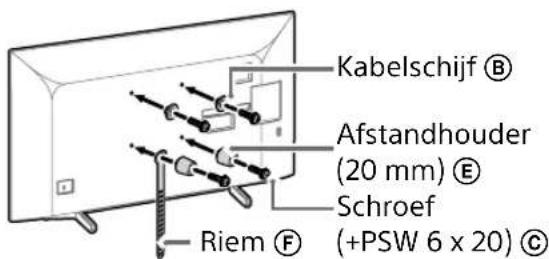
text_image
Diagram illustrating two steps of installing a device, showing hand positioning and safety warning symbol.natural_image
Simple line drawing of a door with a switch and a prohibition symbol (no text or labels)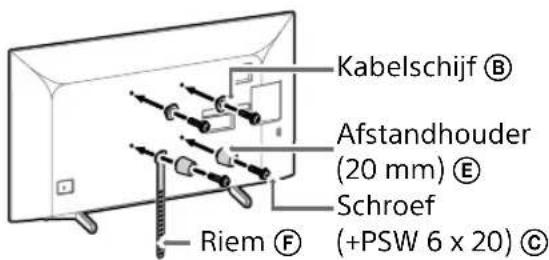
text_image
Diagram illustrating a procedure for installing or adjusting a vehicle's door panel, with instructions and safety symbols.natural_image
Simple line drawing of a door with a stop symbol (no text or labels)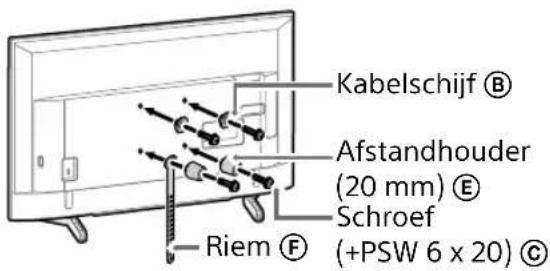
natural_image
Line drawing of a rectangular TV with cable connectors and connectors, no text or symbols presentOpmerking
natural_image
Diagram of a device with labeled connectors and internal components (no text or symbols)Opmerking
natural_image
Simple line drawing of a door with a switch and a prohibition symbol (no text or labels)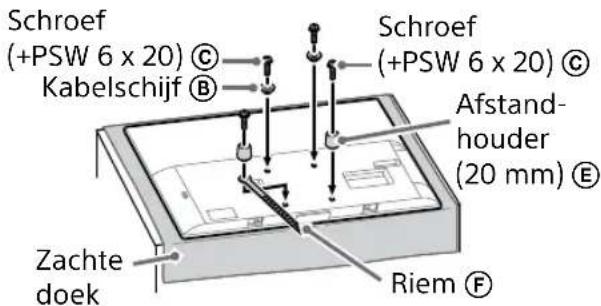
natural_image
Illustration of three people lifting a large object with dashed lines indicating motion or alignment (no text or symbols)text_image
Technical diagram showing a monitor with labeled components (A, B, C, D, E) and a close-up view of the device's internal structure.natural_image
Simple line drawing of a rectangular frame with a dashed rectangle and a starburst shape at the bottom (no text or symbols)flowchart
graph TD
    A["Initial State with symbols"] --> B["Step 1: Dislocation to symbols"]
    B --> C["Step 2: Dislocation to $ symbols"]
    C --> D["Final State with $ symbols"]
text_image
2-b B E F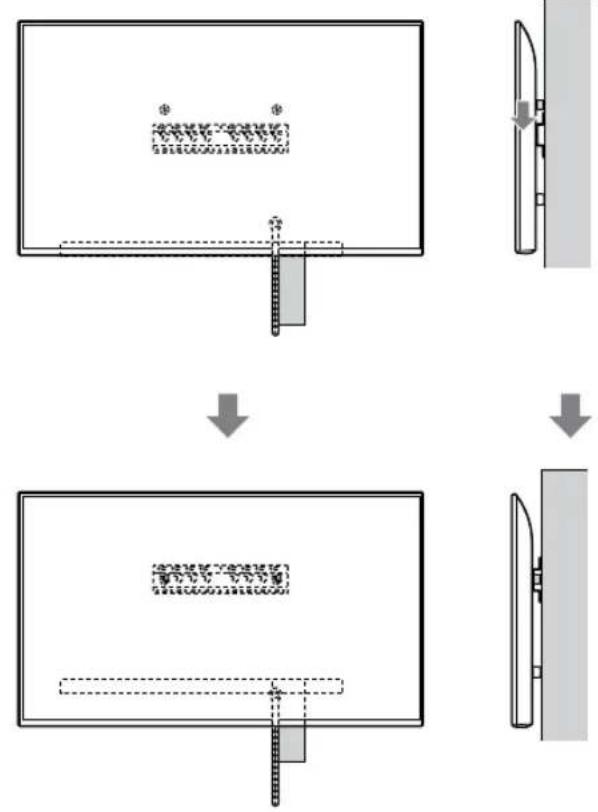
flowchart
graph TD
    A["Top View"] --> B["Step 1: Object Tracking & Assembly"]
    B --> C["Step 2: Breakdown and Reassembly"]
    C --> D["Final State: Top View with Material Structure"]
WAARSCHUWING
text_image
Safety instruction diagram showing hand protection and safety symbols for lifting a person's legstext_image
Technical diagram showing a device with labeled component B and internal structure, including dashed lines and a magnified view.Opmerking
natural_image
Simple line drawing of a rectangular frame with a small rectangular cutout and a starburst shape at the bottom (no text or symbols)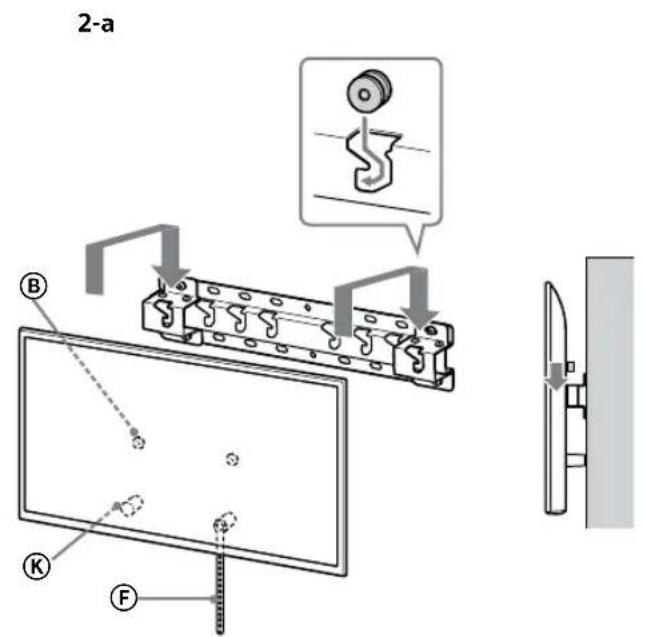
text_image
2-a B K F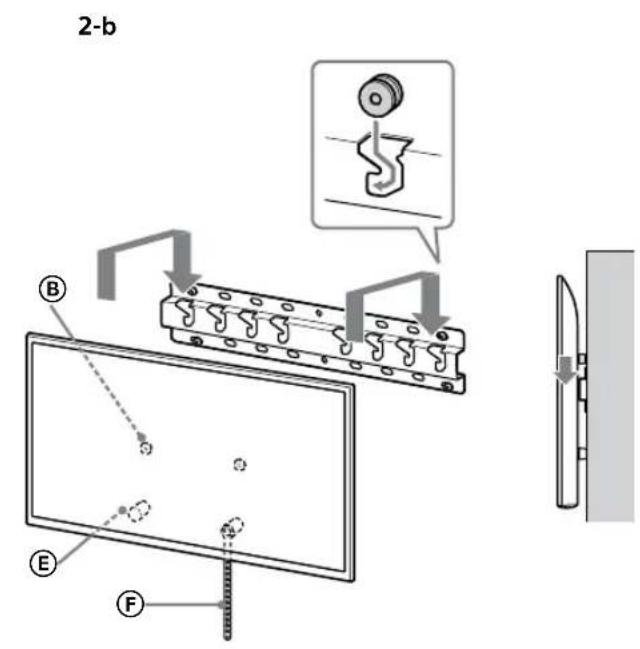
text_image
2-b B E F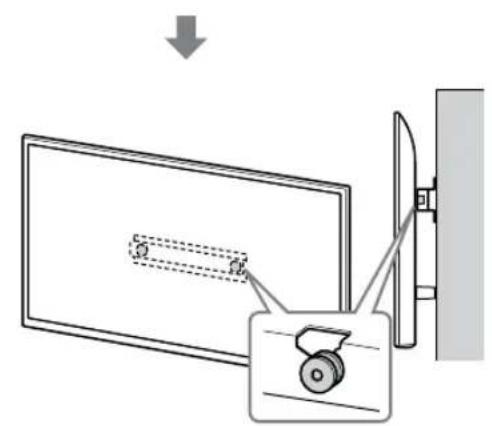
text_image
Diagram showing a monitor with a slide and a scroll wheel, connected by wires to a wall-mounted device.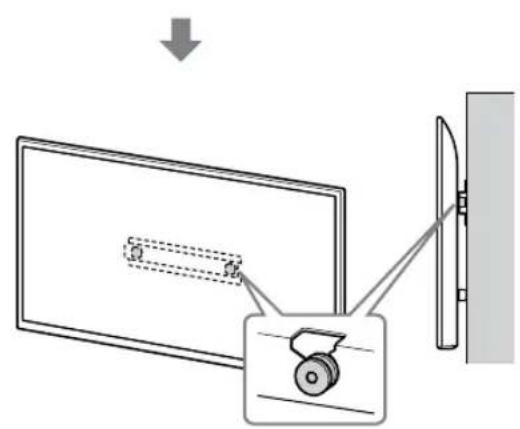
text_image
Diagram showing a monitor with a slide and a scroll wheel, connected to a wall-mounted device, with an arrow indicating direction of motion.NL
WAARSCHUWING
text_image
Safety instruction diagram showing hand protection and no violations for a device, with two human silhouettes below.text_image
Technical diagram showing installation of a mechanical component with a magnified inset illustrating the internal structure.WAARSCHUWING
text_image
Technical diagram of a mechanical or electrical component with labeled parts and mounting pointsnatural_image
Diagram showing a door with internal compartments and a prohibition symbol (no text or labels)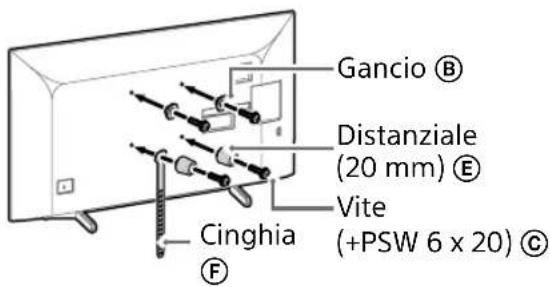
text_image
Gancio Ⓑ Distanziale (20 mm) Ⓔ Vite (+PSW 6 x 20) Ⓓ Cinghia F3 Collegare i(I) cavi(o) necessari(o) al televisore.
text_image
Diagram illustrating two steps of installing a device, showing hand positioning and safety warning with a warning sign.natural_image
Simple line drawing of a door with a switch and a prohibition symbol (no text or labels)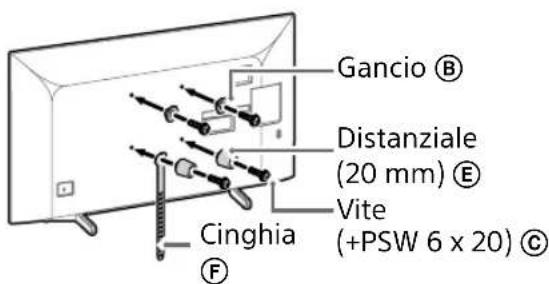
text_image
Gancio Ⓑ Distanziale (20 mm) Ⓔ Vite (+PSW 6 x 20) Ⓓ Cinghia F2 Collegare i(I) cavi(o) necessari(o) al televisore.
text_image
Diagram illustrating two steps of installing a device, showing installation and inspection with a warning sign.natural_image
Simple line drawing of a door with a stop symbol (no text or labels)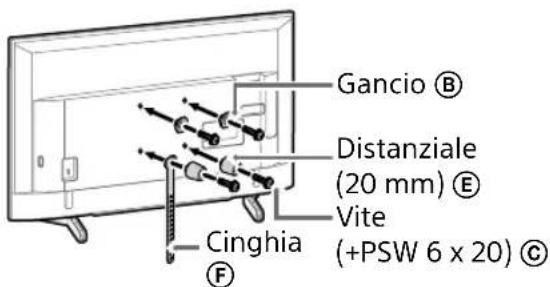
text_image
Gancio Ⓑ Distanziale (20 mm) Ⓔ Vite (+PSW 6 x 20) Ⓓ Cinghia F2 Collegare i(I) cavi(o) necessari(o) al televisore.
natural_image
Line drawing of a flat-screen TV with cable routing and connectors (no text or symbols)Nota
natural_image
Diagram of a device with connectors and labeled parts, no readable text or symbols presentNota
natural_image
Simple line drawing of a door with a switch and a no-smoking symbol (no text or labels)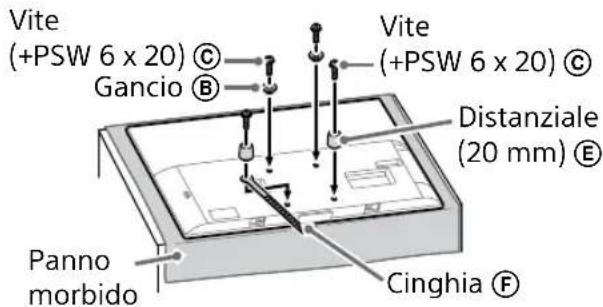
text_image
Vite (+PSW 6 x 20) © Gancio Ⓑ Panno morbido Cinghia ⒨ Vite (+PSW 6 x 20) © Distanziale (20 mm) Ⓔ3 Collegare i(I) cavi(o) necessari(o) al televisore.
natural_image
Illustration of three human figures assembling a large whiteboard with a ruler and ball, no text or symbols presenttext_image
Technical diagram showing a mounted monitor with labeled components A, B, and F, alongside an inset view of the front panel.natural_image
Simple line drawing of a rectangular frame with a dashed rectangle and a starburst shape at the bottom (no text or symbols)text_image
Safety warning illustration showing incorrect and correct hand actions for a person holding a device, with three silhouettes indicating different safety conditions.text_image
Technical diagram showing a component labeled B connected to a screen and a mechanical assembly with a circular inset detail.Nota
natural_image
Simple line drawing of a rectangular frame with a dashed rectangle and a starburst shape at the bottom (no text or symbols)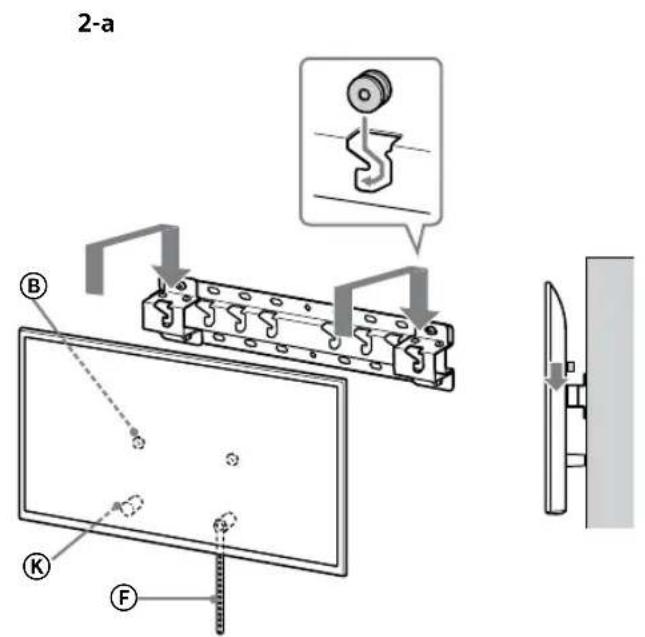
text_image
2-a B K F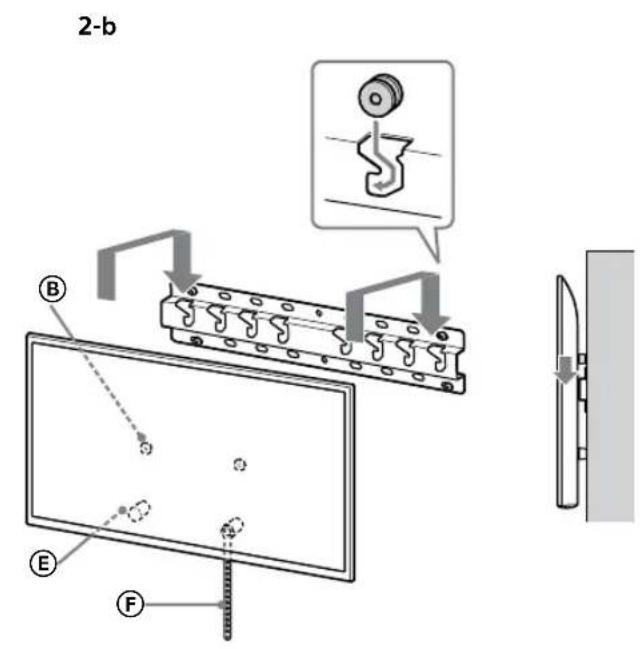
text_image
2-b B E F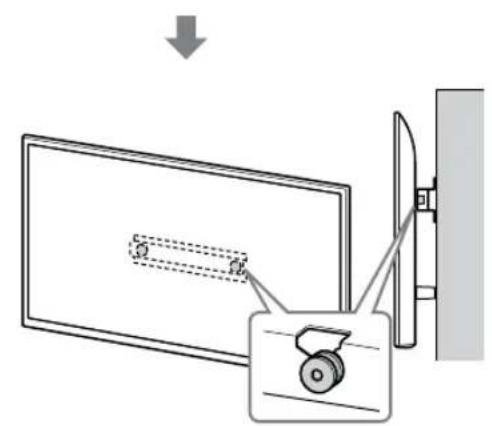
text_image
Diagram showing a monitor with a slide and a scroll wheel, connected by wires to a wall-mounted device.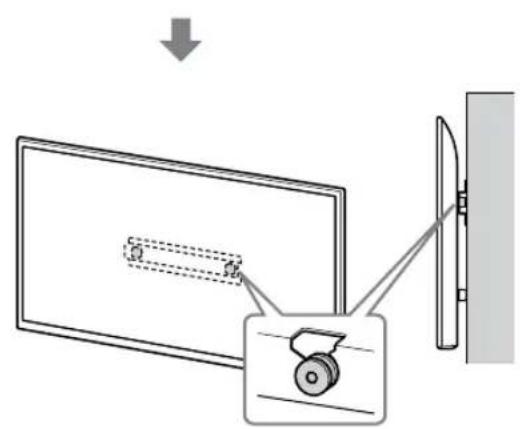
text_image
Diagram showing a monitor with a slide and a wheel, connected to a wall-mounted device, with an arrow indicating direction of motion.AVVERTENZA
text_image
Safety instruction diagram showing hand protection and warning symbols for installing a panel, with two silhouettes representing different positions.text_image
Technical diagram showing a mechanical assembly with labeled components and directional arrows indicating assembly steps.AVVERTENZA
text_image
Technical diagram of a mechanical or electrical component with labeled parts and mounting pointsnatural_image
Simple line drawing of a door with a switch and a prohibition symbol (no text or labels)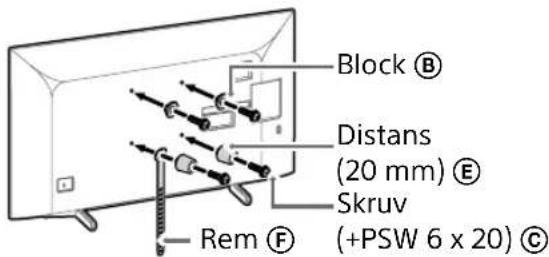
text_image
Block Ⓑ Distans (20 mm) Ⓔ Skruv Rem Ⓕ (+PSW 6 x 20) Ⓒtext_image
Diagram illustrating two steps of installing a vehicle door panel, showing hand positioning and safety warning.natural_image
Simple line drawing of a door with a switch and a prohibition symbol (no text or labels)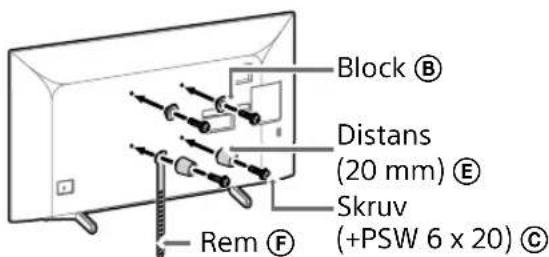
text_image
Block Ⓑ Distans (20 mm) Ⓔ Skruv (+PSW 6 x 20) Ⓒ Rem Ⓕtext_image
Diagram illustrating a procedure for installing or adjusting a vehicle's door frame, with instructions and safety symbols.natural_image
Diagram of a door with a stop symbol (no text or labels present)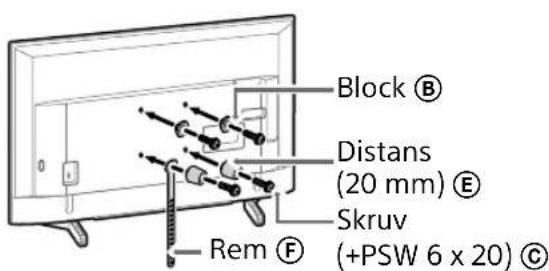
text_image
Block Ⓑ Distans (20 mm) Ⓔ Skruv Rem Ⓕ (+PSW 6 x 20) Ⓒnatural_image
Line drawing of a rectangular TV with attached cables and connectors, no text or symbols presentObs!
natural_image
Diagram of a device with labeled connectors and ports, no text or symbols presentObs!
natural_image
Simple line drawing of a door with a rectangular opening and a prohibition symbol (no text or labels)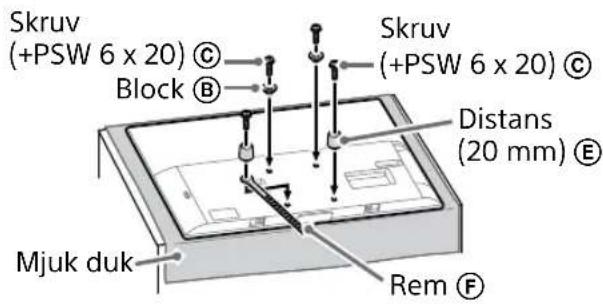
text_image
Skruv (+PSW 6 x 20) © Block Ⓑ Skruv (+PSW 6 x 20) © Distans (20 mm) Ⓔ Mjuk duk Rem ⒨natural_image
Illustration of three human figures lifting a large object with a ruler, no text or symbols presenttext_image
Technical diagram showing a monitor mounted on a stand with labeled components A, B, and C, including a magnified inset view.2 Montera TV:n på basen eller adaptern.
natural_image
Simple line drawing of a rectangular frame with a dashed rectangle inside and a starburst shape at the bottom (no text or symbols)text_image
Safety instruction diagram showing hand protection and safety symbols for a person holding shoestext_image
Technical diagram showing a device with labeled components and a magnified view of the internal structure.Obs!
natural_image
Simple line drawing of a rectangular frame with a small rectangular object and a starburst shape at the bottom (no text or symbols)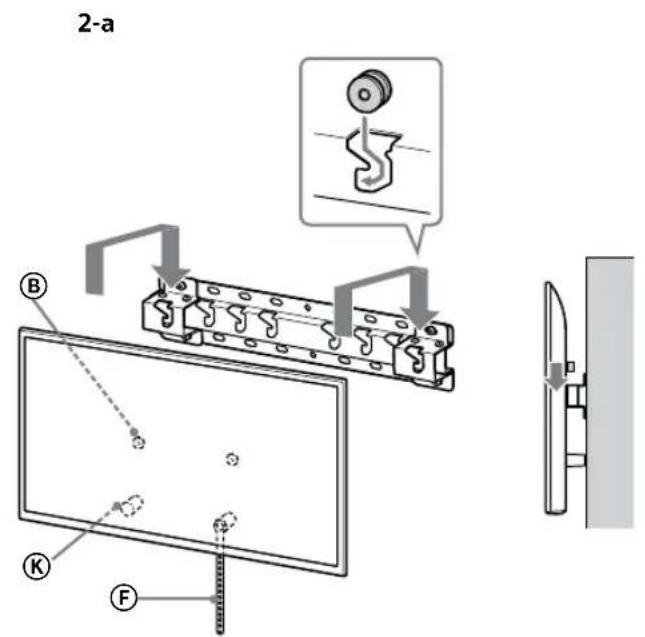
text_image
2-a B K F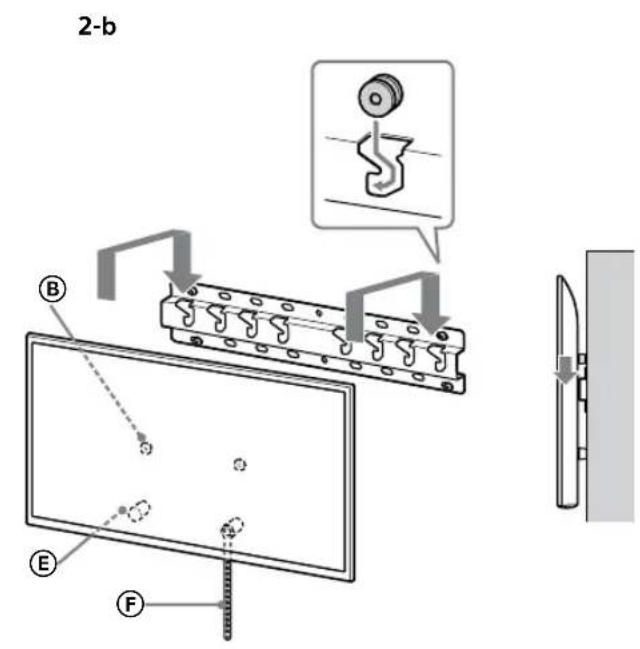
text_image
2-b B E F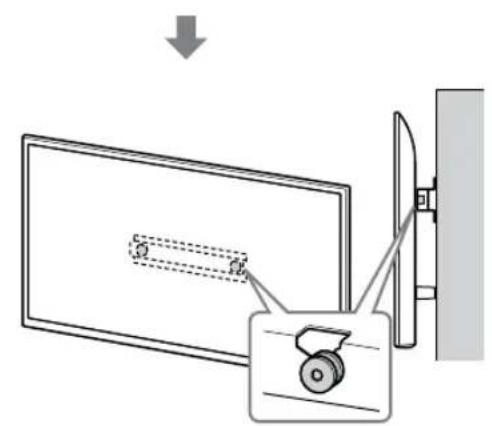
text_image
Diagram showing a monitor with a slide and a scroll wheel, connected by wires to a wall-mounted device.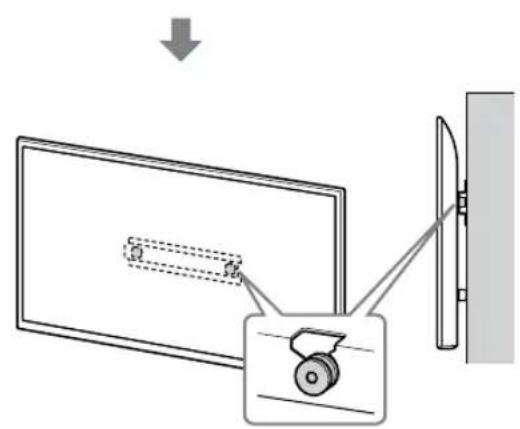
text_image
Diagram showing a monitor with a slide and a wheel, connected to a wall-mounted device, with an arrow indicating direction of motion.WARNING
text_image
Safety instruction diagram showing hand protection and no violations for a device, with two human silhouettes and labeled symbols.natural_image
Technical diagram showing a mechanical assembly with a bracket and a gear mechanism (no text or symbols)WARNING
text_image
Technical diagram of a mechanical or electrical component with labeled parts and connectorsnatural_image
Diagram showing a door with internal compartments and a prohibition symbol (no text or labels)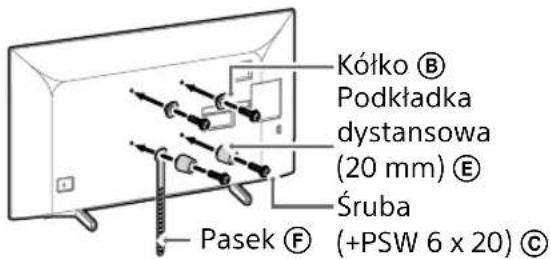
text_image
Diagram illustrating two steps of installing a car interior, showing hand positioning and safety warning.natural_image
Diagram showing a door with a switch and a prohibition symbol (no text or labels)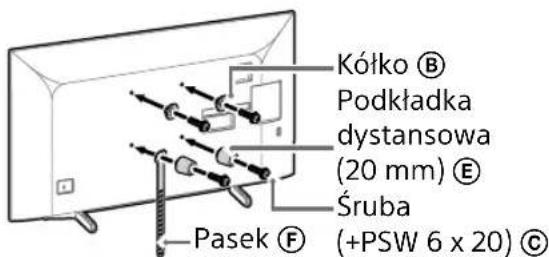
text_image
Diagram illustrating two steps of installing a device, showing installation and inspection with a warning sign.natural_image
Simple line drawing of a door with a stop symbol (no text or labels)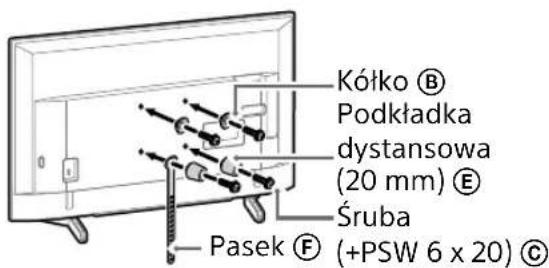
natural_image
Line drawing of a rectangular TV with attached cables and connectors (no text or symbols)Uwaga
natural_image
Diagram of a device with labeled ports and connectors, no readable text or symbols presentUwaga
natural_image
Simple line drawing of a door with a stopper and a no-smoking symbol (no text or labels)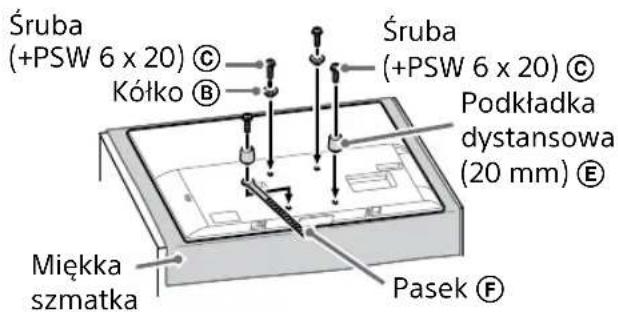
natural_image
Illustration of three people assembling a large board with a measuring tape, no text or symbols presenttext_image
Technical diagram showing a mounted device with labeled components A, B, and F, including dashed lines indicating internal structure.natural_image
Simple line drawing of a rectangular frame with a dashed rectangle inside and a starburst shape at the bottom (no text or symbols)text_image
Illustration showing three human figures with foot protection symbols and a warning sign, illustrating safety rules for holding objects.text_image
Technical diagram showing a device with labeled components and a magnified view of the internal structure.Uwaga
natural_image
Simple line drawing of a rectangular frame with a dashed rectangle and a starburst shape at the bottom (no text or symbols)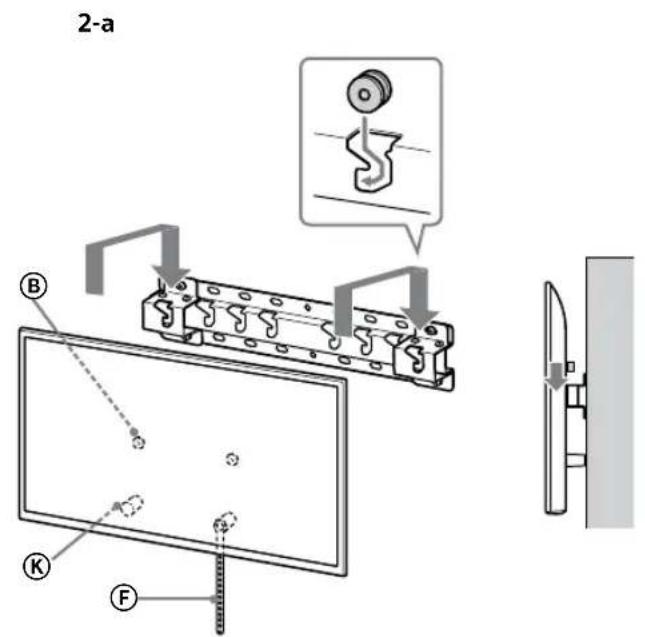
text_image
2-a B K F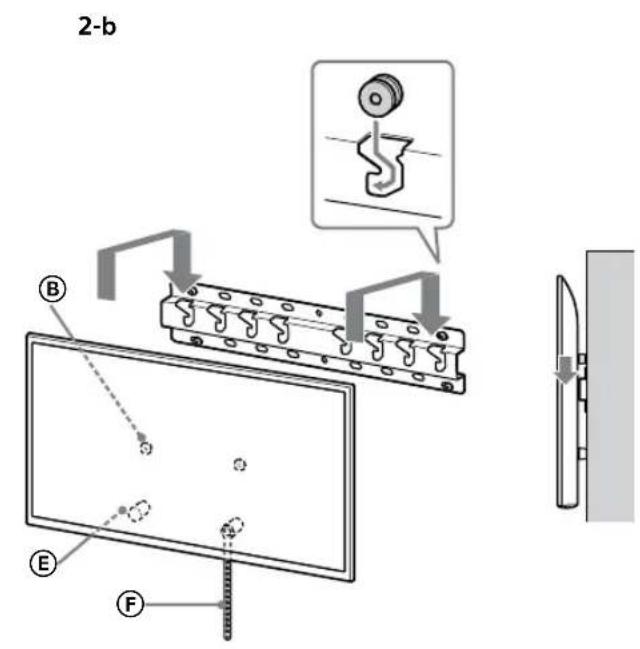
text_image
2-b B E F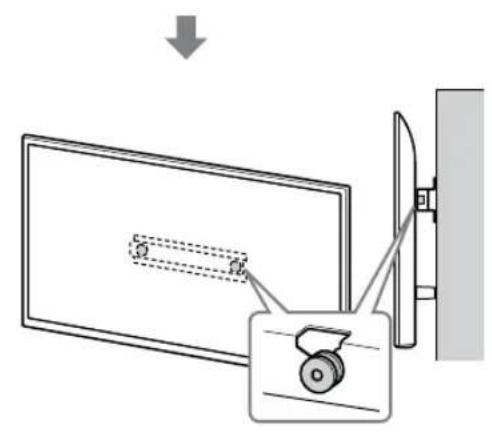
text_image
Diagram showing a device with a lock and a magnified view of its internal structure, likely illustrating a mechanical or electrical assembly.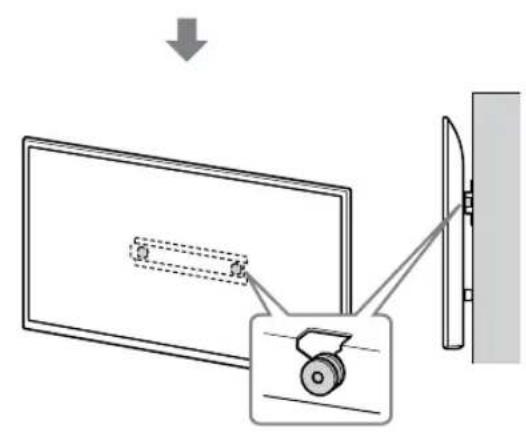
text_image
Diagram showing a monitor with a scroll wheel and a wall-mounted device, illustrating the process of viewing or projection.OSTRZEŻENIE
text_image
Safety instruction diagram showing hand protection and warning symbols for installing a panel, with two silhouettes representing different positions.text_image
Technical diagram showing a mechanical assembly with labeled components and a close-up view of a gear mechanism.OSTRZEŻENIE
text_image
Technical diagram of an electrical connector with labeled terminals and mounting pointsnatural_image
Simple line drawing of a door with a switch and a prohibition symbol (no text or labels)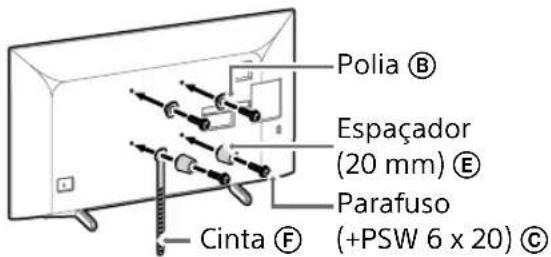
text_image
Polia Ⓑ Espaçador (20 mm) Ⓔ Parafuso (+PSW 6 x 20) Ⓓ Cinta Ⓕtext_image
Diagram illustrating a procedure for installing or adjusting a device, with labeled steps and a warning symbol.- Repita o passo anterior e remova o outro lado do Suporte de Mesa do Televisor.
Nota
natural_image
Diagram showing a door with a switch and a prohibition symbol (no text or labels)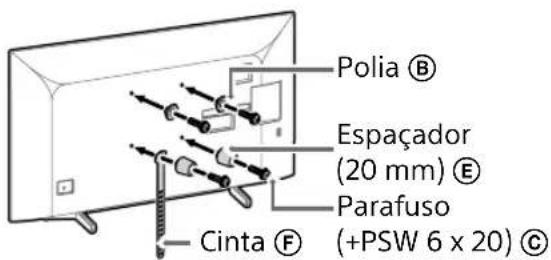
text_image
Polia Ⓑ Espaçador (20 mm) Ⓔ Parafuso (+PSW 6 x 20) Ⓔ Cinta Ⓕtext_image
Diagram illustrating a procedure for installing or adjusting a vehicle's door panel, with instructions and safety symbols.- Repita o passo anterior e remova o outro lado do Suporte de Mesa do Televisor.
Nota
natural_image
Simple line drawing of a door with a stop symbol (no text or labels)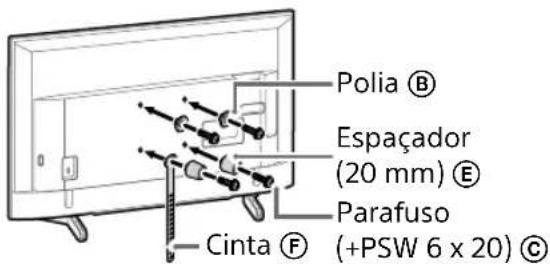
text_image
Polia Ⓑ Espaçador (20 mm) Ⓔ Parafuso (+PSW 6 x 20) Ⓓ Cinta Ⓕnatural_image
Line drawing of a flat-screen TV with cable connectors and a wall-mounted drive (no text or symbols)Nota
natural_image
Diagram of a device with connectors and internal components, no text or symbols presentNota
natural_image
Simple line drawing of a door with a switch and a prohibition symbol (no text or labels)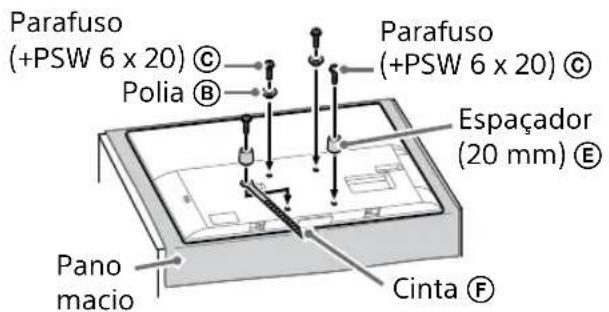
text_image
Parafuso (+PSW 6 x 20) © Polia Ⓑ Parafuso (+PSW 6 x 20) © Espaçador (20 mm) Ⓔ Pano macio Cinta ⒨natural_image
Illustration of three human figures assembling a large whiteboard with a ruler, no text or symbols presenttext_image
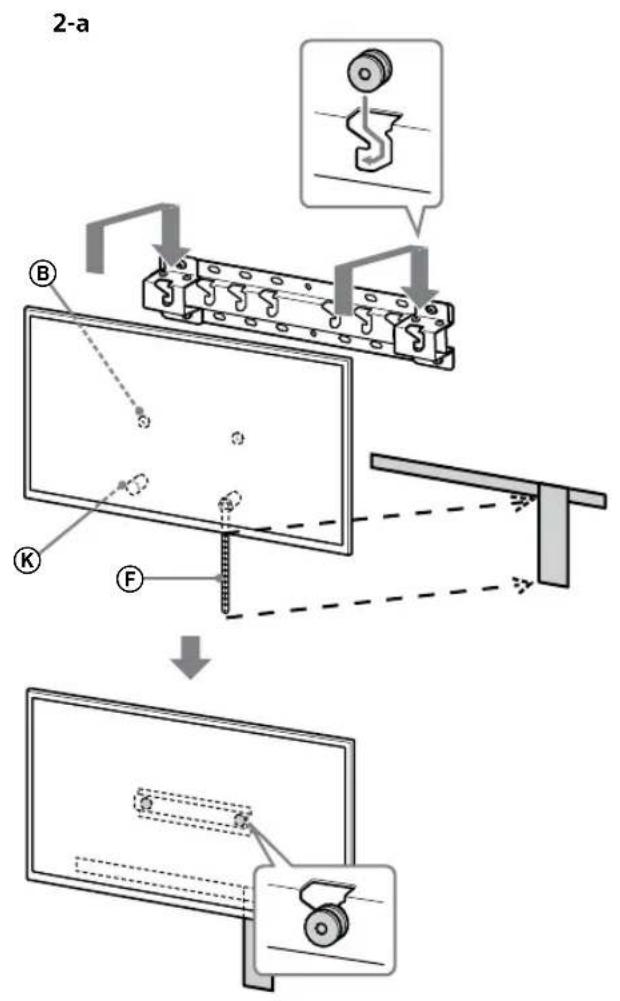
Technical diagram showing a monitor with labeled components (A, B, C, D, E) and a close-up view of the front panel.2 Instale o televisor na Base ou Adaptador de Base.
natural_image
Simple line drawing of a rectangular frame with a dashed rectangle and a starburst shape at the bottom (no text or symbols)- Após instalar o televisor na parde, remova a fita de pintura, etc. da parede.
text_image
2-a B K F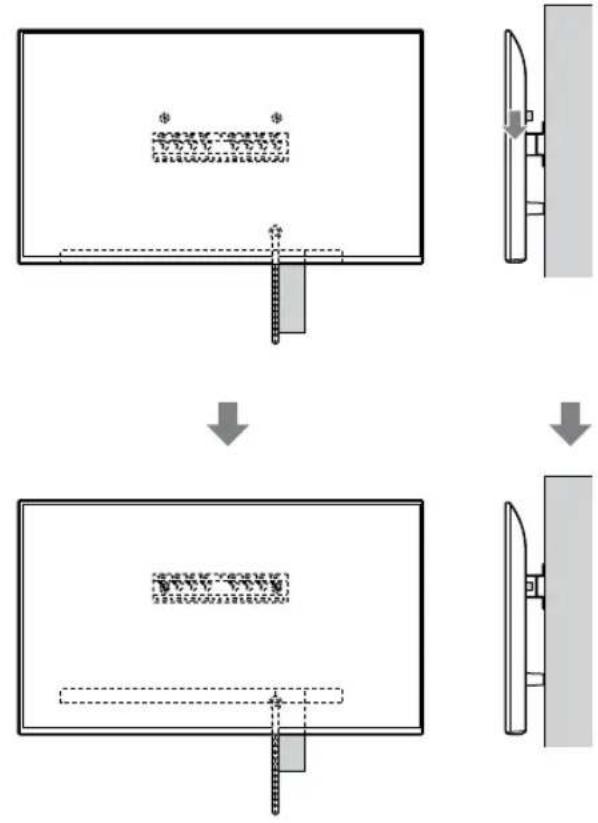
flowchart
graph TD
    A["Initial State: $"] --> B["Step 1: Dislocation"]
    B --> C["Step 2: Dislocation with $*"]
    C --> D["Final State: $"]
text_image
2-b B E F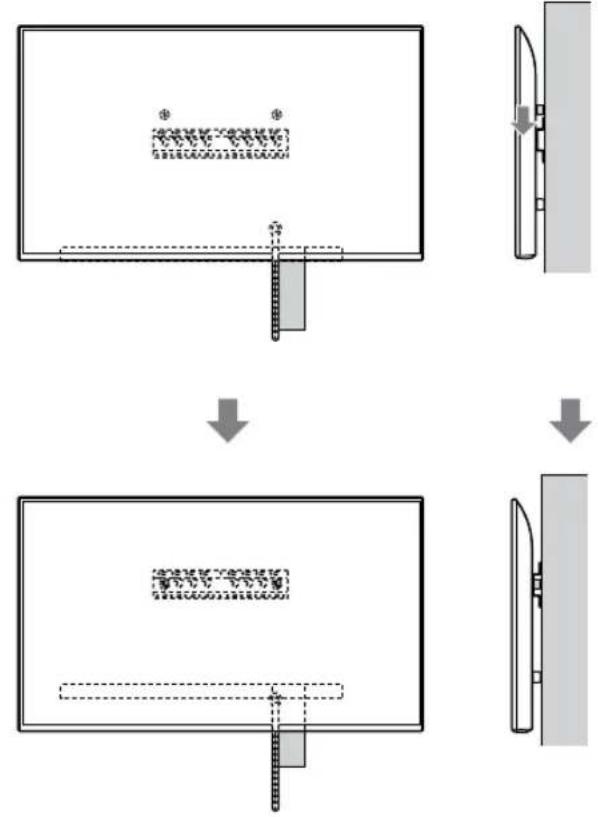
flowchart
graph TD
    A["Step 1: Object Tracking"] --> B["Step 2: Assembly"]
    B --> C["Step 3: Final Assembly"]
AVISO
text_image
Safety instruction diagram showing hand protection and safety symbols for a person holding a devicetext_image
Technical diagram showing a device with labeled components and a magnified view of the internal structure.Nota
natural_image
Simple line drawing of a rectangular frame with a dashed rectangle inside and a starburst shape at the bottom (no text or symbols)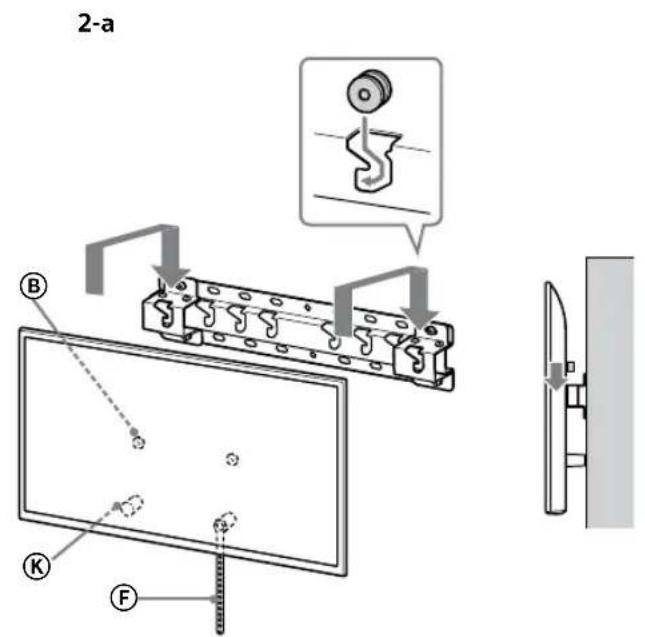
text_image
2-a B K F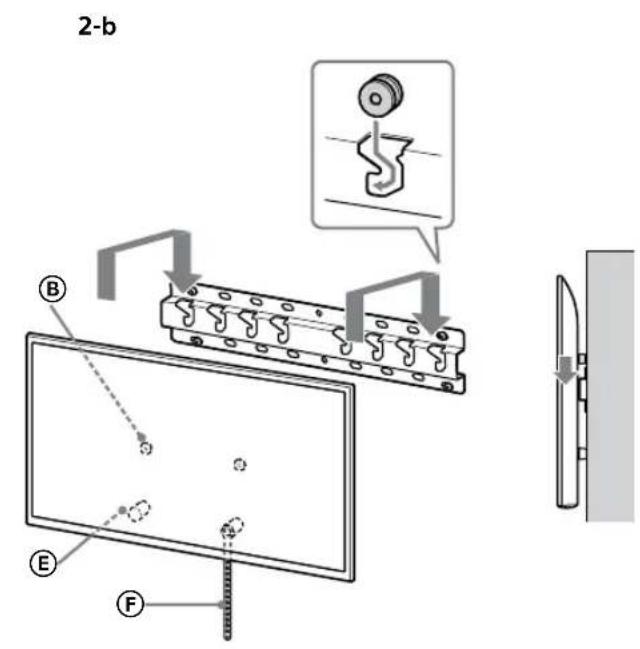
text_image
2-b B E F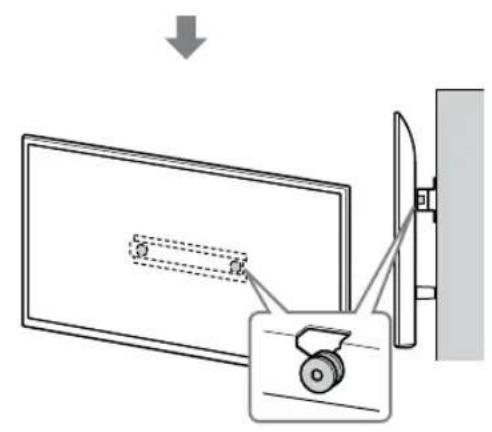
text_image
Diagram showing a device with a lock and a magnified view of its internal structure, likely illustrating a mechanical or electrical assembly.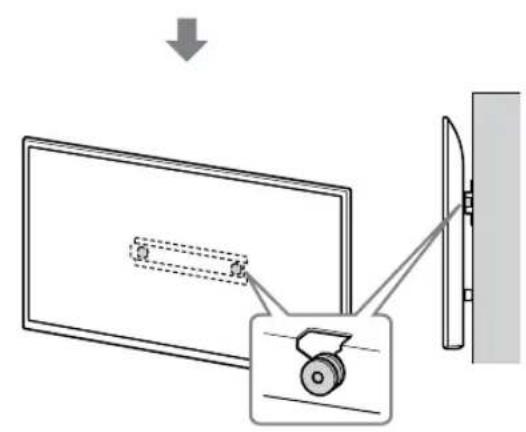
text_image
Diagram showing a monitor with a scroll wheel and a wall-mounted device, illustrating the process of viewing or projection.AVISO
text_image
Safety instruction diagram showing hand protection and warning symbols for installing a panel, with two human silhouettes below.text_image
Technical diagram showing a mechanical assembly with labeled components and a magnified inset showing a gear mechanism.AVISO
Peso (apenas base): (Aprox.) [kg]
0,8
Klargøring for installation....5
Kontrol af dele 5
Find en placering 6
Klargøring for installation
1 Find TV'ets placering.
text_image
Technical diagram of a mechanical or electrical component with labeled parts and mounting pointsnatural_image
Simple line drawing of a door with a switch and a prohibition symbol (no text or labels)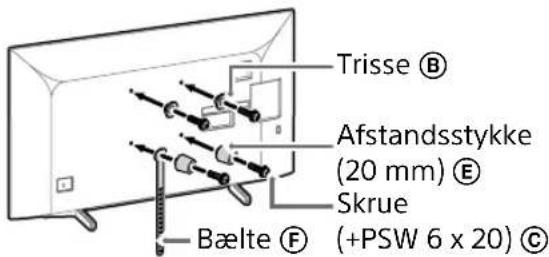
text_image
Trisse Ⓑ Afstandsstykke (20 mm) Ⓔ Skrue Bælte Ⓕ (+PSW 6 x 20) Ⓒtext_image
Diagram illustrating two steps of installing a device, showing hand positioning and safety warning symbol.natural_image
Simple line drawing of a door with a handle and a prohibition symbol (no text or labels)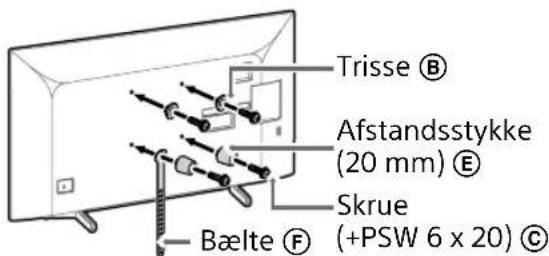
text_image
Trisse Ⓑ Afstandsstykke (20 mm) Ⓔ Skrue (+PSW 6 x 20) Ⓒ Bælte Ⓕtext_image
Diagram illustrating two steps of installing a car door panel, showing installation and inspection with a warning sign.natural_image
Simple line drawing of a door with a stop sign symbol (no text or labels)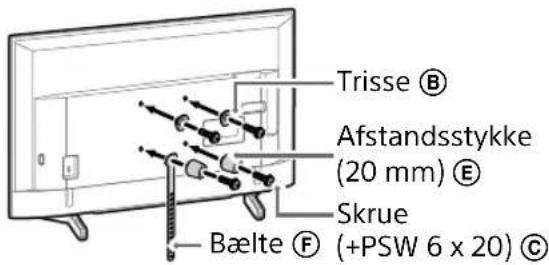
text_image
Trisse Ⓑ Afstandsstykke (20 mm) Ⓔ Skrue — Bælte Ⓕ (+PSW 6 x 20) Ⓔnatural_image
Line drawing of a rectangular TV with attached cables and connectors, no text or symbols presentBemærk
natural_image
Diagram of a device with labeled connectors and internal components (no text or symbols)Bemærk
natural_image
Simple line drawing of a door with a rectangular opening and a prohibition symbol (no text or labels)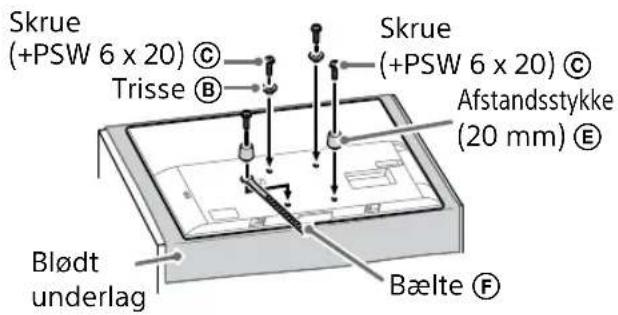
text_image
Skrue (+PSW 6 x 20) © Trisse Ⓑ Skrue (+PSW 6 x 20) © Afstandsstykke (20 mm) Ⓔ Blødt underlag Bælte Ⓕnatural_image
Illustration of three people lifting a large object with a ruler, no text or symbols presenttext_image
Technical diagram showing a monitor mounted on a stand with labeled components A, B, and C, including a close-up view of the right side of a device.natural_image
Simple line drawing of a rectangular frame with a small 3D object and a starburst shape at the bottom (no text or symbols)text_image
Safety instruction diagram showing hand protection and safety symbols for a person holding a device3 Sådan forhindres, at TV'et bund flytter sig.
text_image
Technical diagram showing a device with labeled components and a magnified view of the internal structure.Bemærk
natural_image
Simple line drawing of a rectangular frame with a dashed rectangle inside and a starburst shape at the bottom (no text or symbols)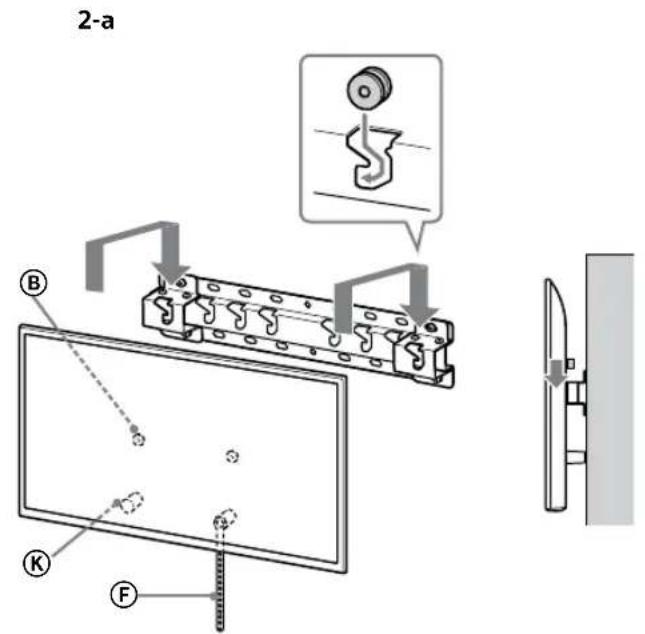
text_image
2-a B K F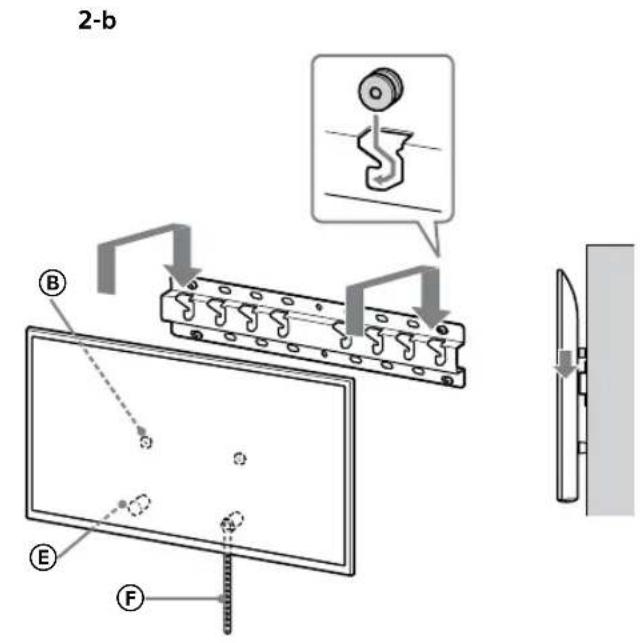
text_image
2-b B E F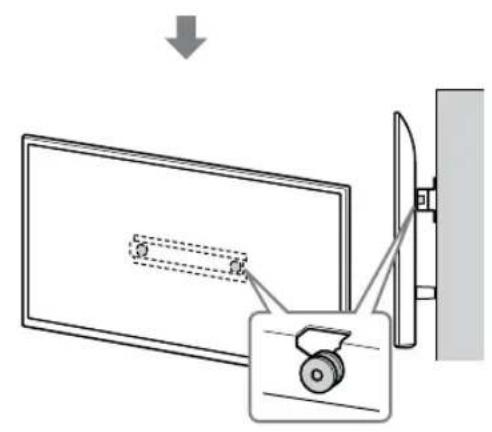
text_image
Diagram showing a device with a lock and a magnified view of its internal structure, likely illustrating a mechanical or electrical assembly.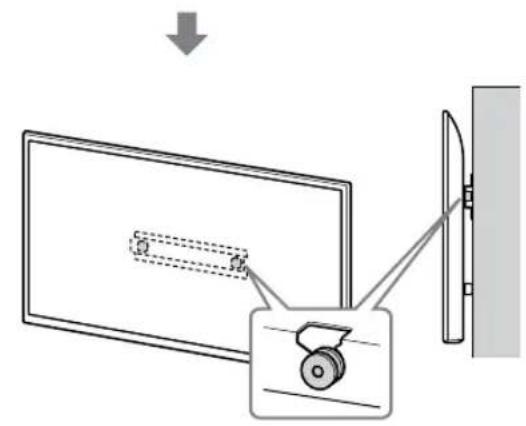
text_image
Diagram showing a monitor with a scroll wheel and a mirror, illustrating the concept of viewing or projection.ADVARSEL
text_image
Safety instruction diagram showing hand protection and warning symbols for installing a panel, with two silhouettes representing different positions.3 Sådan forhindres, at TV'et bund flytter sig.
text_image
Technical diagram showing installation of a mechanical component with a magnified inset detail view.ADVARSEL
text_image
Technical diagram of a mechanical or electrical component with labeled parts and mounting pointsnatural_image
Diagram showing a door with internal compartments and a prohibition symbol (no text or labels)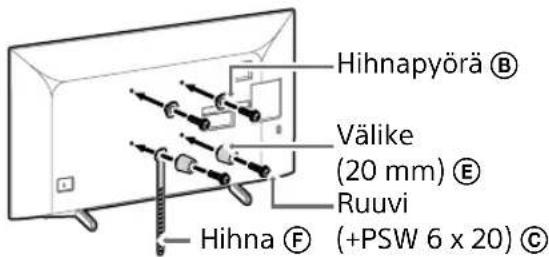
text_image
Diagram illustrating two steps of installing a vehicle door panel, showing installation and cleaning instructions with Chinese text labels.natural_image
Simple line drawing of a door with a switch and a prohibition symbol (no text or labels)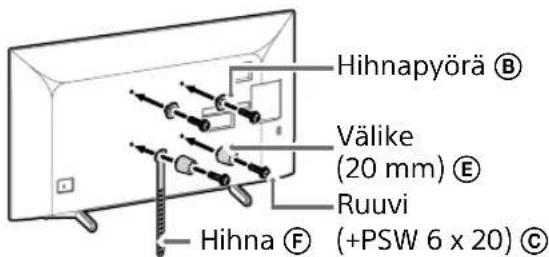
text_image
Diagram illustrating a procedure for installing or adjusting a vehicle's door panel, with instructions and safety symbols.natural_image
Simple line drawing of a door with a stop symbol (no text or labels)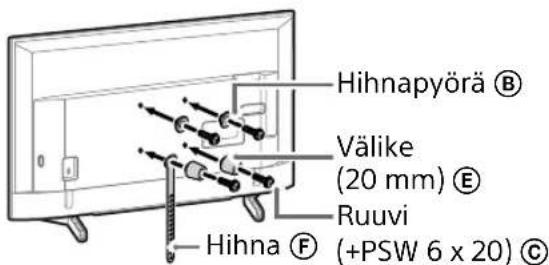
natural_image
Line drawing of a rectangular device with internal components and connecting wires, no text or symbols presentHuomautus
natural_image
Diagram of a device with labeled ports and connectors, no readable text or symbols presentHuomautus
natural_image
Simple line drawing of a door with a handle and no text or symbols present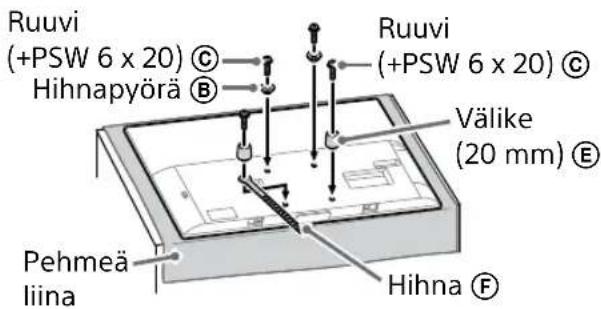
natural_image
Illustration of three people assembling a large board with a measuring tape (no text or symbols)text_image
Technical diagram showing a monitor with labeled components A, B, and F, including a close-up view of the internal structure.natural_image
Simple line drawing of a rectangular frame with a dashed rectangle and a starburst shape at the bottom (no text or symbols)flowchart
graph TD
    A["Top View"] --> B["Step 1: Top View with Component"]
    B --> C["Step 2: Top View with Component"]
    C --> D["Step 3: Front View with Component"]
VAROITUS
text_image
Safety warning illustration showing incorrect and correct hand actions for a person holding a device, with three silhouettes indicating different safety conditions.text_image
Technical diagram showing a device with labeled components and a magnified view of the internal structure.Huomautus
natural_image
Simple line drawing of a rectangular frame with a dashed rectangle inside and a starburst shape at the bottom (no text or symbols)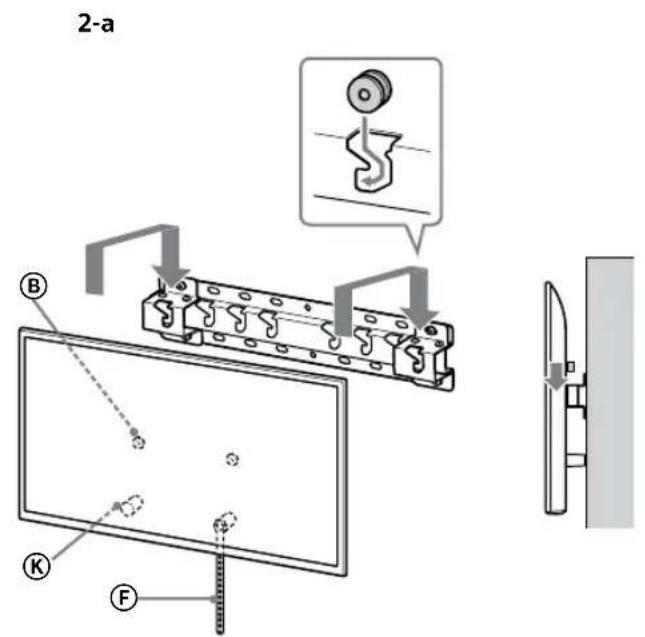
text_image
2-a B K F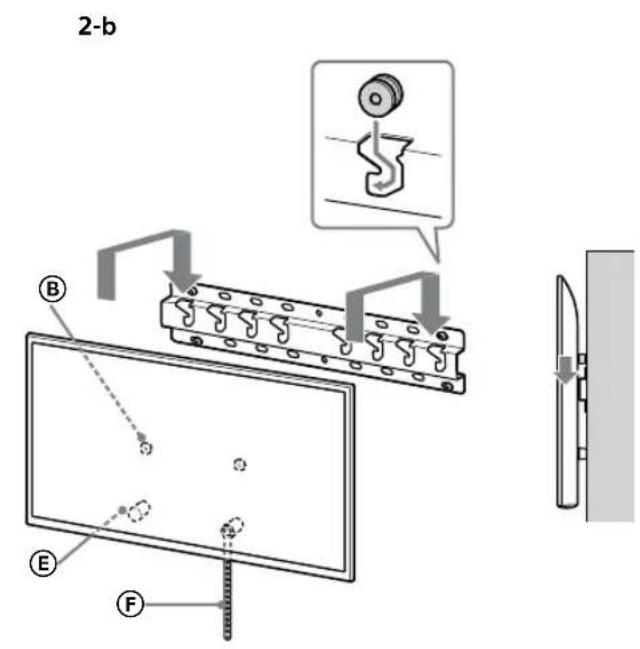
text_image
2-b B E F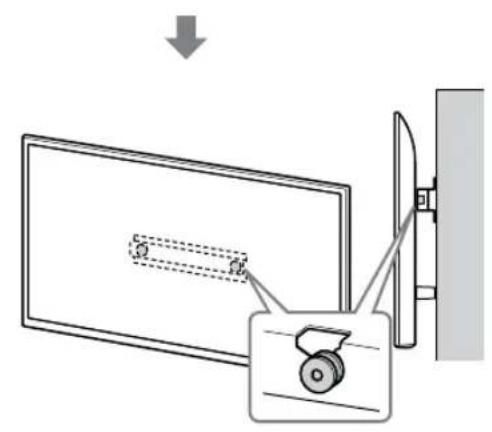
text_image
Diagram showing a device with a lock and a magnified view of its internal structure, likely illustrating a mechanical or electrical assembly.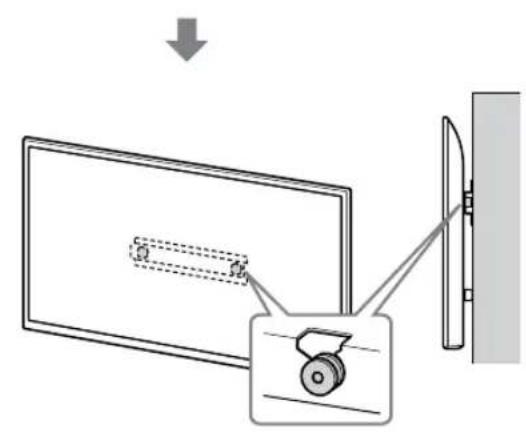
text_image
Diagram showing a monitor with a scroll wheel and a wall-mounted device, illustrating the process of viewing or projection.VAROITUS
text_image
Safety instruction diagram showing hand protection and no violations for a device, with two human silhouettes and labeled symbols.text_image
Technical diagram showing a mechanical assembly with labeled components and a close-up inset of a screw mechanism.VAROITUS
text_image
Technical diagram of a mechanical or electrical component with labeled parts and connectorsnatural_image
Simple line drawing of a door with a switch and a prohibition symbol (no text or labels)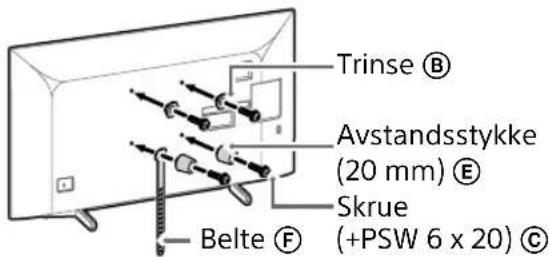
text_image
Trinse Ⓑ Avstandsstykke (20 mm) Ⓔ Skrue (+PSW 6 x 20) Ⓒ Belte Ⓕtext_image
Diagram illustrating two steps of installing a shipping container, showing hand positioning and safety warning symbol.natural_image
Simple line drawing of a door with a switch and a prohibition symbol (no text or labels)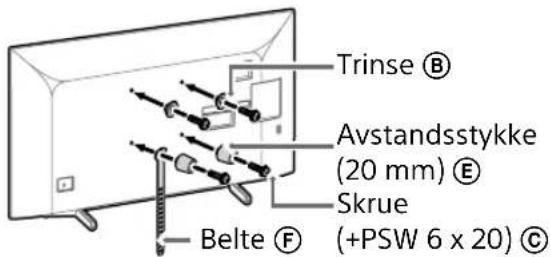
text_image
Trinse Ⓑ Avstandsstykke (20 mm) Ⓔ Skrue Belte Ⓕ (+PSW 6 x 20) Ⓔtext_image
Diagram illustrating two steps of installing a car door panel, showing hand positioning and safety warning.natural_image
Pure electrical circuit lines without any symbols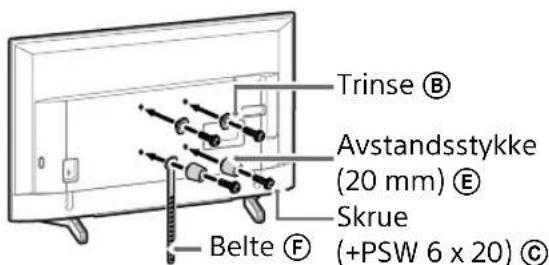
text_image
Trinse Ⓑ Avstandsstykke (20 mm) Ⓔ Skrue Belte ⒨ (+PSW 6 x 20) Ⓒnatural_image
Line drawing of a flat-screen TV with cable connectors and connectors, no text or symbols presentMerknad
natural_image
Diagram of a device with labeled ports and connectors, no readable text or symbols presentMerknad
natural_image
Simple line drawing of a door with a stop symbol (no text or labels)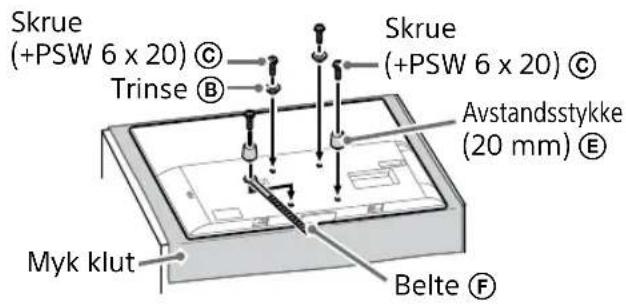
text_image
Skrue (+PSW 6 x 20) © Trinse Ⓑ Skrue (+PSW 6 x 20) © Avstandsstykke (20 mm) Ⓔ Myk klut Belte Ⓕnatural_image
Illustration of three human figures lifting a large rectangular object with dashed lines indicating motion or alignment (no text or symbols)text_image
Technical diagram showing a monitor mounted on a stand with labeled components A, B, and C, including a magnified inset view.2 Installer TV-en på sokkelen eller sokkeladapteren.
natural_image
Simple line drawing of a rectangular frame with a dashed rectangle inside and a starburst shape at the bottom (no text or symbols)flowchart
graph TD
    A["Initial State: $"] --> B["Step 1: Dislocation"]
    B --> C["Step 2: Dislocation with $*"]
    C --> D["Final State: $"]
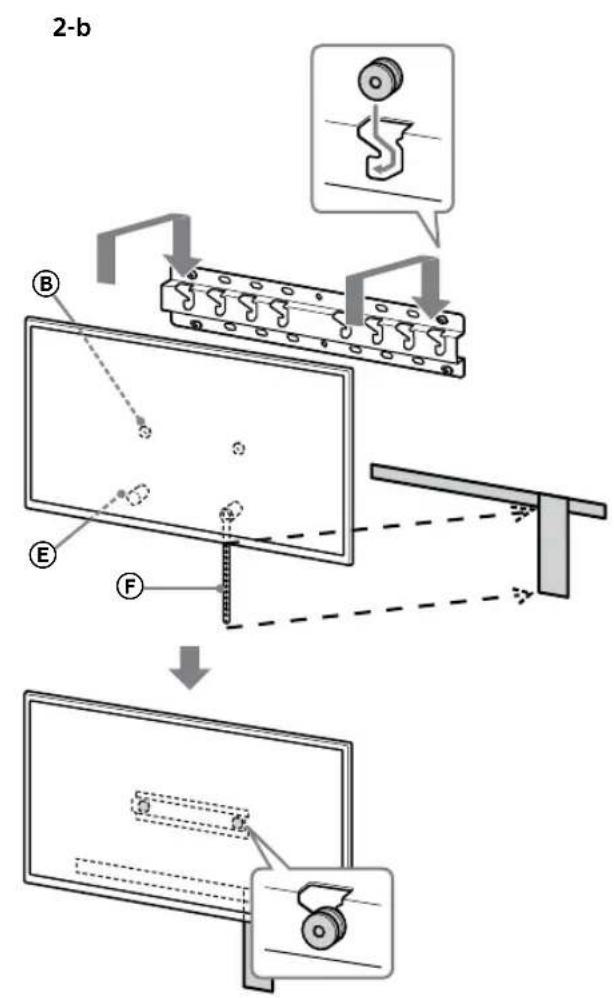
text_image
2-b B E F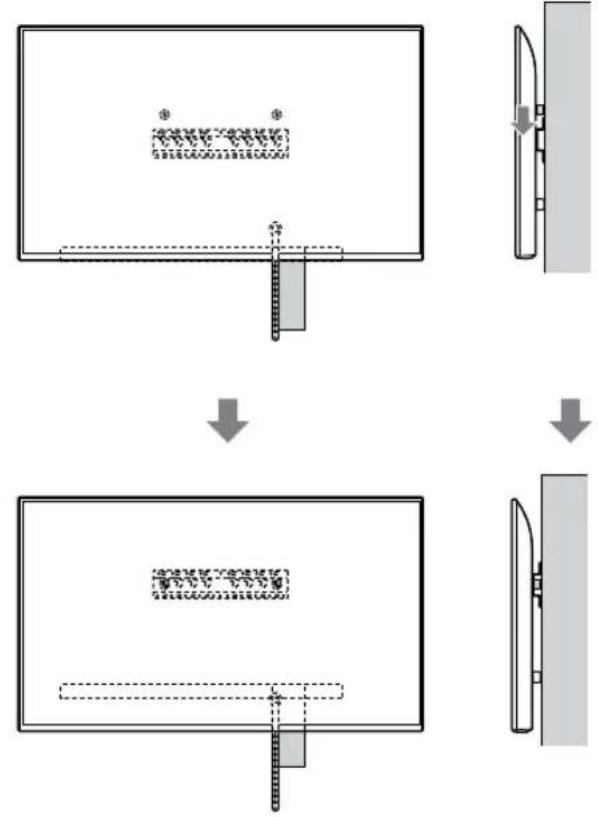
flowchart
graph TD
    A["Step 1: Object Tracking"] --> B["Step 2: Assembly"]
    B --> C["Step 3: Final Assembly"]
NO
ADVARSEL
- Sørg for at to eller flere personer (tre eller flere personer for TV-er på 75 tommer eller mer) holder TV-en när den bæres.
text_image
Safety instruction diagram showing hand protection and safety symbols for a person holding shoestext_image
Technical diagram showing a device with labeled components and a magnified view of the internal structure.Merknad
natural_image
Simple line drawing of a rectangular frame with a starburst shape at the bottom (no text or symbols)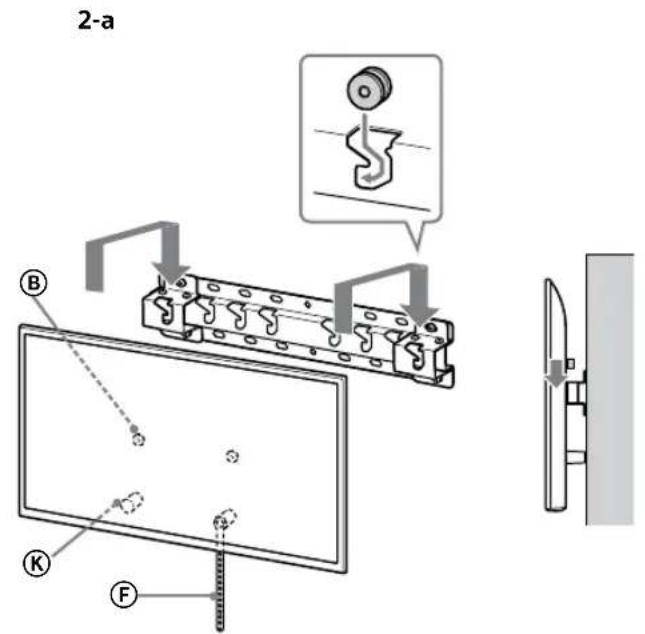
text_image
2-a B K F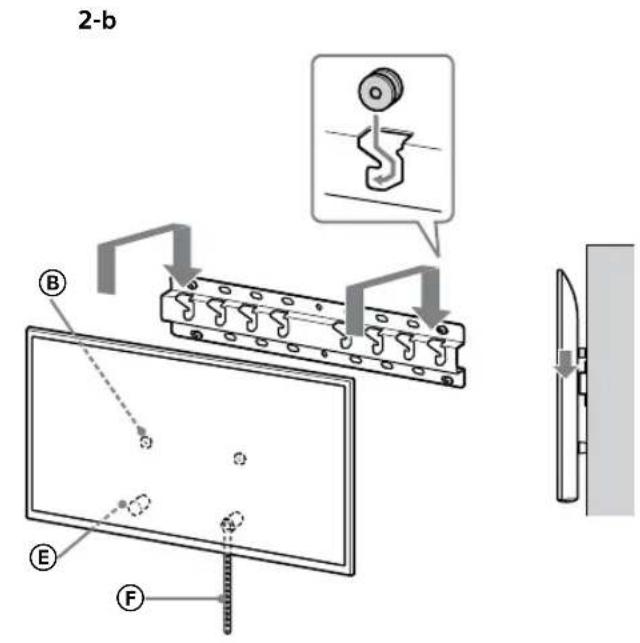
text_image
2-b B E F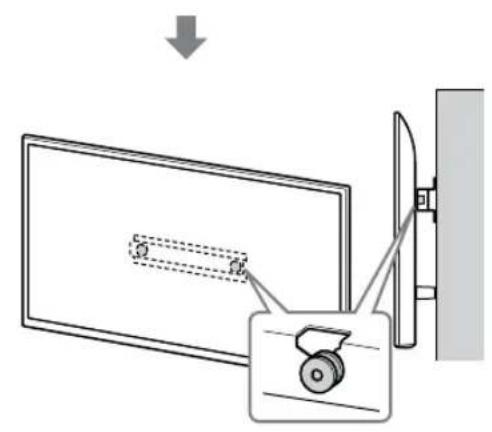
text_image
Diagram showing a device with a lock and a magnified view of its internal structure, likely illustrating a mechanical or electrical assembly.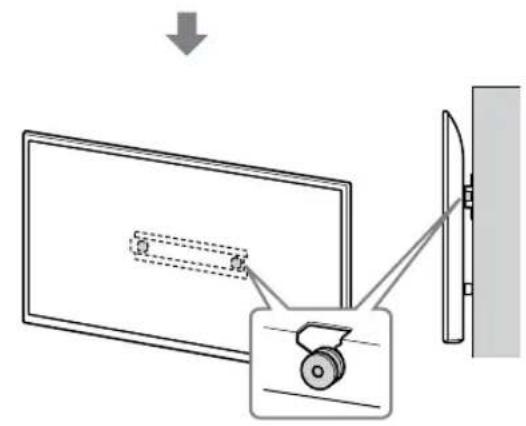
text_image
Diagram showing a monitor with a scroll wheel and a wall-mounted device, illustrating the process of viewing or dissection.ADVARSEL
- Sørg for at to eller flere personer (tre eller flere personer for TV-er på 75 tommer eller mer) holder TV-en när den bæres.
text_image
Safety instruction diagram showing hand protection and warning symbols for installing a panel, with two silhouettes representing different positions.text_image
Technical diagram showing a mechanical assembly with labeled components and a close-up inset of a gear mechanism.ADVARSEL
- Sørg for at to eller flere personer (tre eller flere personer for TV-er på 75 tommer eller mer) holder TV-en när den fjernes.
Spesifikasjoner
text_image
f h1 h2 g e d c b aMål: (Ca.) [mm]
a : 400
b : 300
c : 200
d : 100
e : 80
f : 480
g : 100
h1 : 20 (tilfelle 2-b)
h2 : 60 (tilfelle 2-a)
Vekt (kun sokkel): (Ca.) [kg]
0,8
text_image
Technical diagram of a mechanical or electrical component with labeled parts and connectorsnatural_image
Diagram showing a door with internal compartments and a prohibition symbol (no text or labels)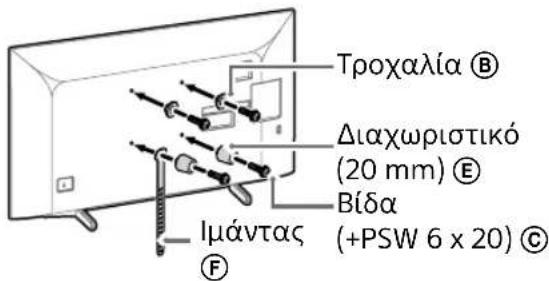
text_image
Diagram illustrating two steps of installing a device, showing hand positioning and safety warning symbol.natural_image
Diagram showing a door with a switch and a prohibition symbol (no text or labels)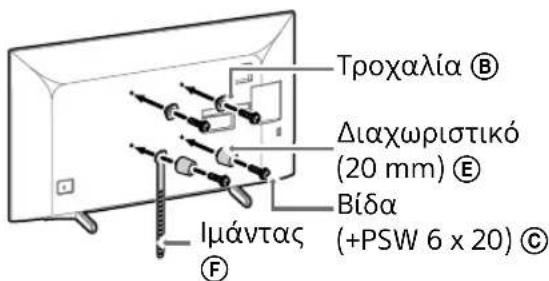
text_image
Diagram illustrating a procedure for installing a shipping container, showing steps from handling to cleaning and safety.natural_image
Simple line drawing of a door with a stop symbol (no text or labels)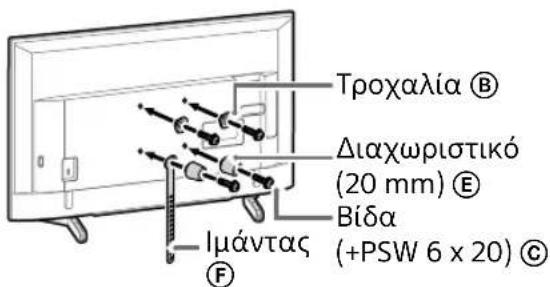
natural_image
Line drawing of a rectangular TV with cable connectors and connectors, no text or symbols presentΣημείωση
natural_image
Diagram of a device with labeled connectors and internal components (no text or symbols)Σημείωση
natural_image
Simple line drawing of a door with a handle and no text or symbols present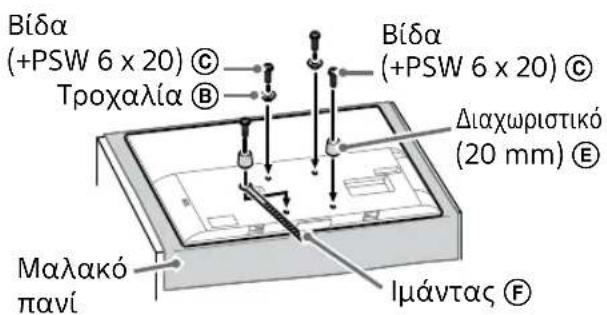
natural_image
Illustration of three people lifting a large object with dashed lines indicating motion or alignment (no text or symbols)text_image
Technical diagram showing a monitor with labeled components (A, B, C, D, E) and a close-up view of the interior panel.natural_image
Simple line drawing of a rectangular frame with a starburst shape and two small geometric shapes inside (no text or symbols)text_image
Diagram illustrating a mechanical assembly or assembly process with labeled components and directional arrows indicating steps.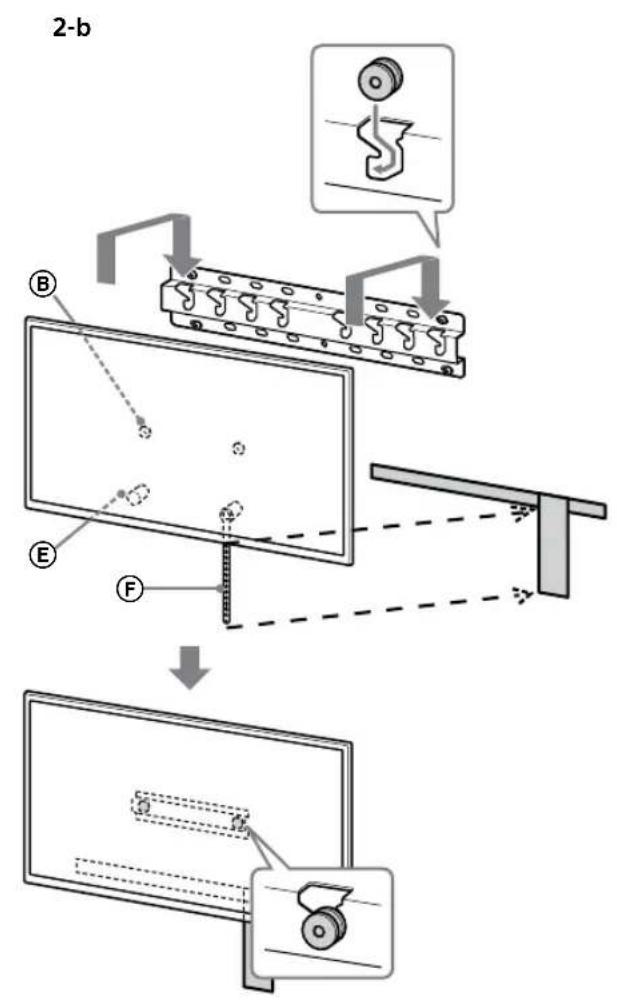
text_image
2-b B E F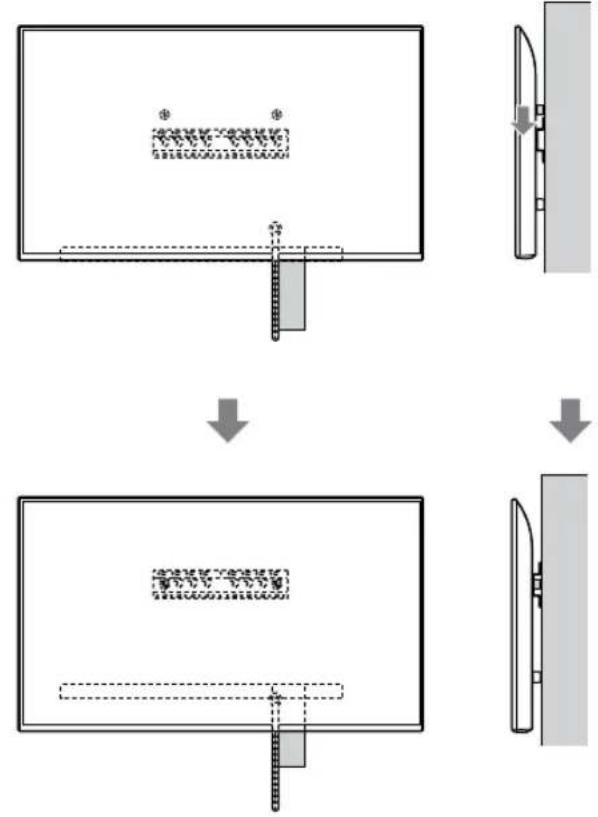
flowchart
graph TD
    A["Step 1: Object Tracking"] --> B["Step 2: Assembly"]
    B --> C["Step 3: Final Assembly"]
ΠΡΟΕΙΔΟΠΟΙΗΣΗ
text_image
Safety instruction diagram showing hand protection and safety symbols for a person holding a devicetext_image
Technical diagram showing a component labeled B connected to a screen and a mechanical assembly with a circular inset detail.Σημείωση
natural_image
Simple line drawing of a rectangular frame with a dashed rectangle and a starburst symbol at the bottom (no text or symbols)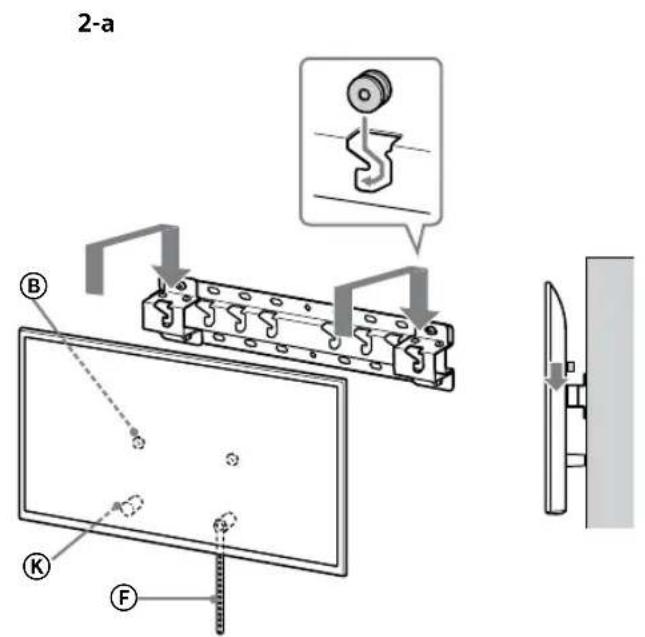
text_image
2-a B K F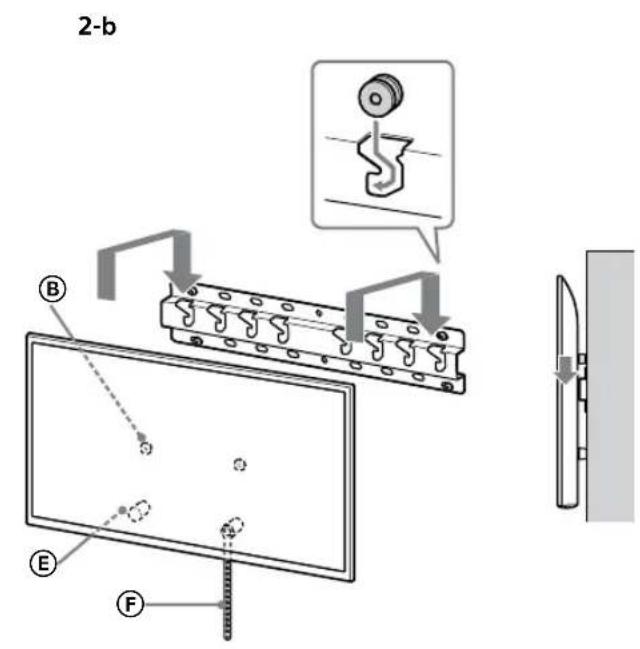
text_image
2-b B E F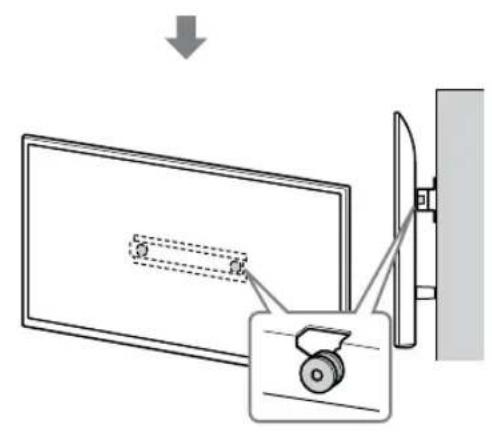
text_image
Diagram showing a device with a lock and a magnified view of its internal structure, likely illustrating a mechanical or electrical assembly.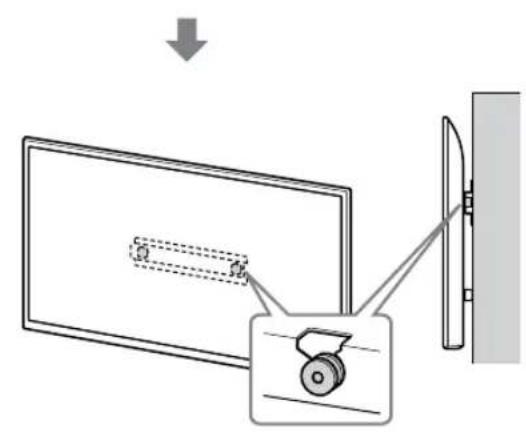
text_image
Diagram showing a monitor with a scroll wheel and a wall-mounted device, illustrating the process of viewing or projection.ΠΡΟΕΙΔΟΠΟΙΗΣΗ
text_image
Safety instruction diagram showing hand protection with check and no symbols for correct and incorrect handlingnatural_image
Technical diagram showing a mechanical assembly with a bracket and a close-up of a screw (no text or symbols present)ΠΡΟΕΙΔΟΠΟΙΗΣΗ
text_image
Technical diagram of a mechanical or electrical component with labeled parts and connectorsnatural_image
Diagram showing a door with internal compartments and a prohibition symbol (no text or labels)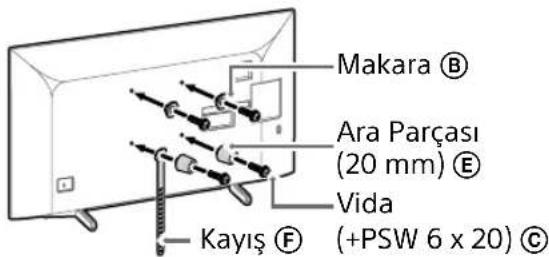
text_image
Makara Ⓑ Ara Parçası (20 mm) Ⓔ Vida Kayış Ⓕ (+PSW 6 x 20) Ⓓtext_image
Diagram illustrating a procedure for installing or adjusting a device, with labeled steps and a warning symbol.natural_image
Simple line drawing of a door with a rectangular opening and a prohibition symbol (no text or labels)
text_image
Makara Ⓑ Ara Parçası (20 mm) Ⓔ Vida Kayış Ⓕ (+PSW 6 x 20) Ⓓtext_image
Diagram illustrating two steps of installing a device, showing hand positioning and safety warning symbol.natural_image
Simple line drawing of a door with a stop symbol (no text or labels)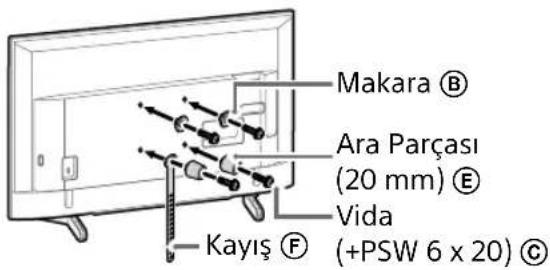
text_image
Makara ® Ara Parçası (20 mm) ® Vida Kayış ® (+PSW 6 x 20) ©natural_image
Line drawing of a flat-screen TV with cable connectors and indicator lights (no text or symbols)Not
natural_image
Diagram of a device with connectors and internal components, no text or symbols presentNot
natural_image
Simple line drawing of a door with a stopper and a no-smoking symbol (no text or labels)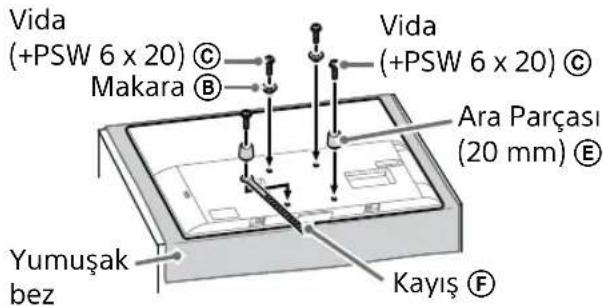
text_image
Vida (+PSW 6 x 20) © Makara Ⓑ Vida (+PSW 6 x 20) © Ara Parçası (20 mm) Ⓔ Yumuşak bez Kayış Ⓕnatural_image
Illustration of three human figures assembling a whiteboard with a ruler, no text or symbols presenttext_image
Diagram showing a device with labeled components A, B, and F, including a zoomed-in view of the component.natural_image
Simple line drawing of a rectangular frame with a starburst shape at the bottom (no text or symbols)text_image
Safety warning illustration showing incorrect and correct hand actions for lifting a shoe, with silhouettes of people carrying shoes.text_image
Technical diagram showing a device with labeled components and a magnified view of the internal structure.Not
natural_image
Simple line drawing of a rectangular frame with a dashed rectangle and a starburst shape at the bottom (no text or symbols)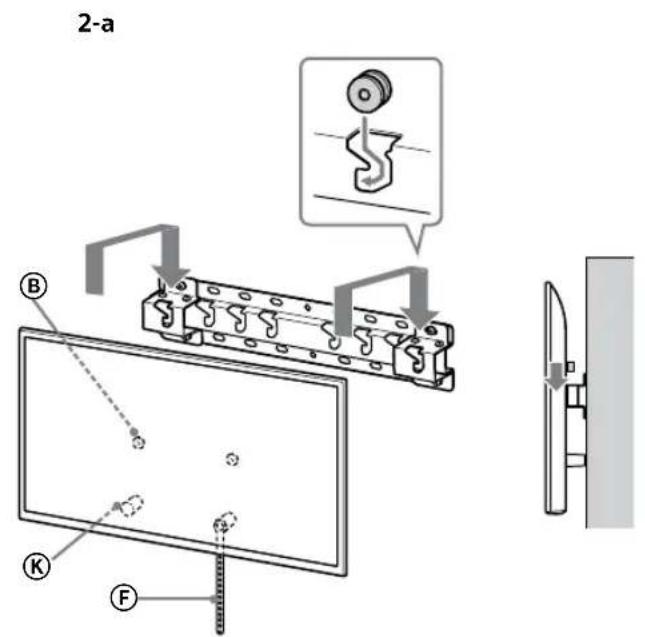
text_image
2-a B K F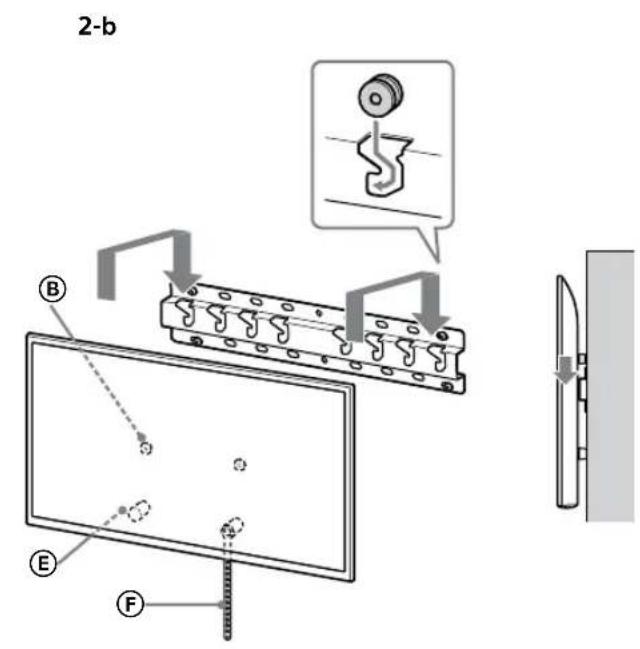
text_image
2-b B E F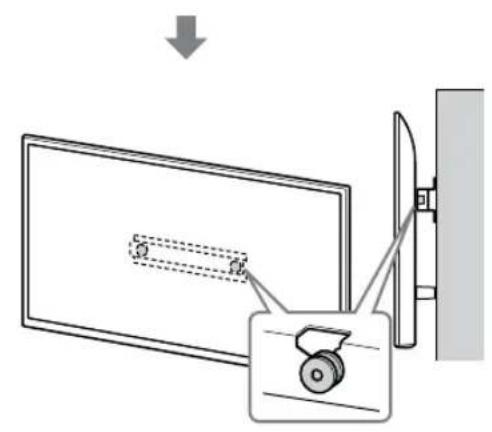
text_image
Diagram showing a device with a lock and a magnified view of its internal structure, likely illustrating a mechanical or electrical assembly.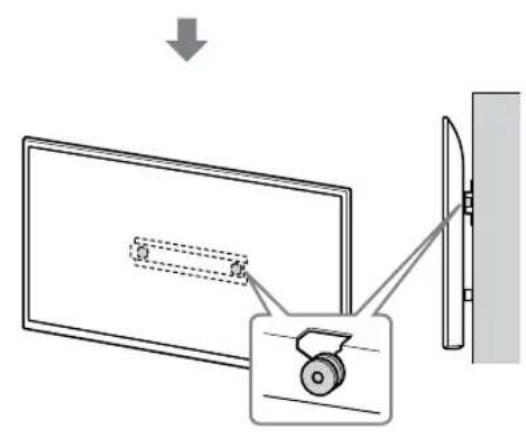
text_image
Diagram showing a monitor with a scroll wheel and a wall-mounted device, illustrating the process of viewing or projection.UYARI
text_image
Safety instruction diagram showing hand protection and no violations for a device, with two human silhouettes and labeled symbols.text_image
Technical diagram showing installation of a mechanical component with a gear and screw, including a close-up view of the gear assembly.UYARI
natural_image
Cross-sectional diagram of a mechanical or architectural component with dashed lines indicating internal features, labeled 'Fal' (no text or symbols within the diagram itself)Megjegyzés
text_image
Technical diagram of a mechanical or electrical component with labeled parts and connectorsnatural_image
Simple line drawing of a door with a rectangular opening and a prohibition symbol (no text or labels)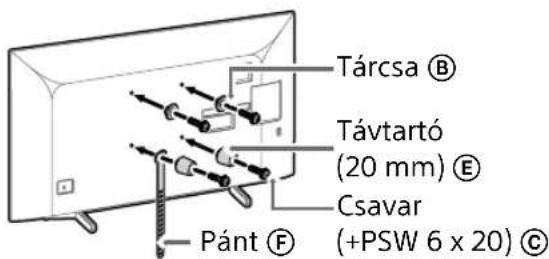
text_image
Diagram illustrating a procedure for installing or adjusting a device, with labeled steps and a warning symbol.natural_image
Simple line drawing of a door with a switch and a prohibition symbol (no text or labels)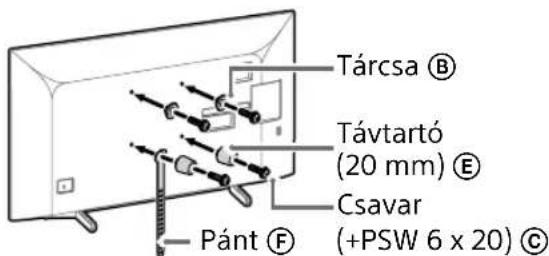
text_image
Diagram illustrating two steps of installing a device, showing installation and inspection with a warning sign.natural_image
Simple line drawing of a door with a handle and no text or symbols present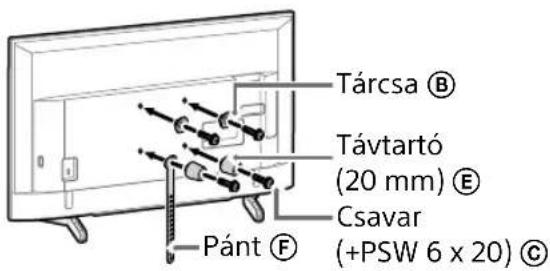
natural_image
Line drawing of a rectangular TV with attached cables and connectors, no text or symbols presentMegjegyzés
natural_image
Diagram of a device casing with connectors and internal components, no text or symbols presentMegjegyzés
natural_image
Simple line drawing of a door with a handle and no text or symbols present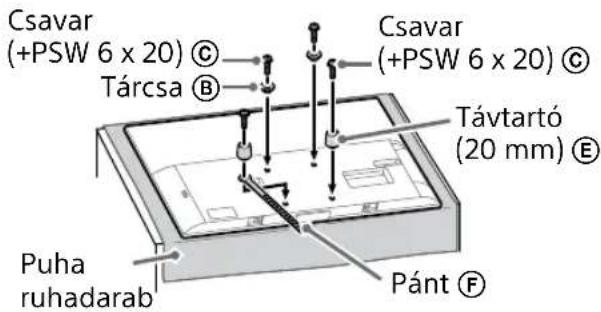
natural_image
Illustration of three people lifting a large object with a ruler, no text or symbols presenttext_image
Technical diagram showing a monitor mounted on a stand with labeled components A, B, and C, including a magnified inset view.natural_image
Simple line drawing of a rectangular frame with a starburst shape at the bottom (no text or symbols)text_image
Safety instruction diagram showing hand protection and safety symbols for a person holding a devicetext_image
Technical diagram showing a device with labeled component B and internal structure, including a magnified view of the component.Megjegyzés
natural_image
Simple line drawing of a rectangular frame with a small 3D object and a starburst shape at the bottom (no text or symbols)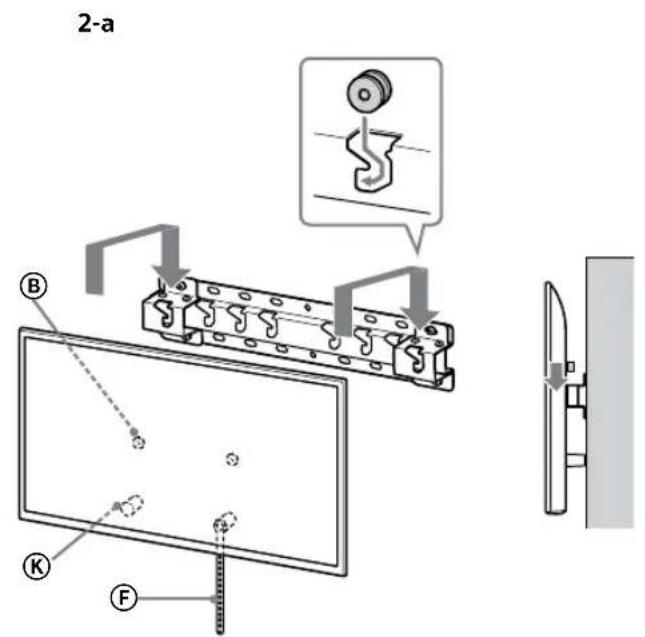
text_image
2-a B K F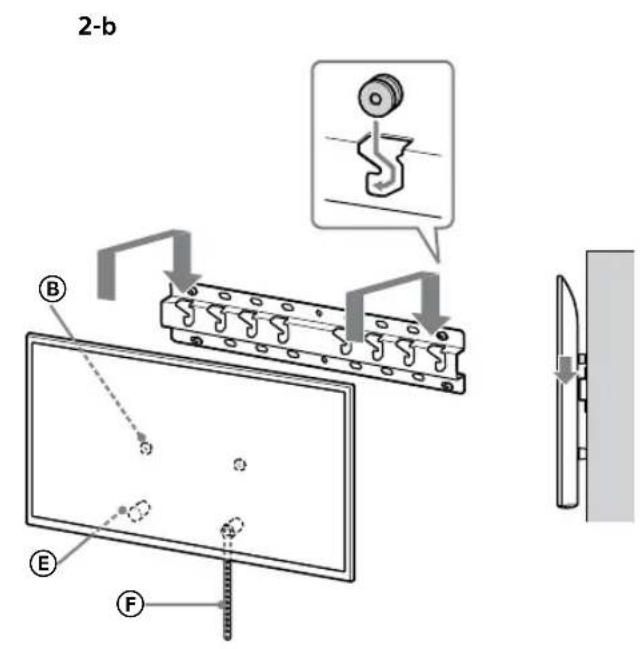
text_image
2-b B E F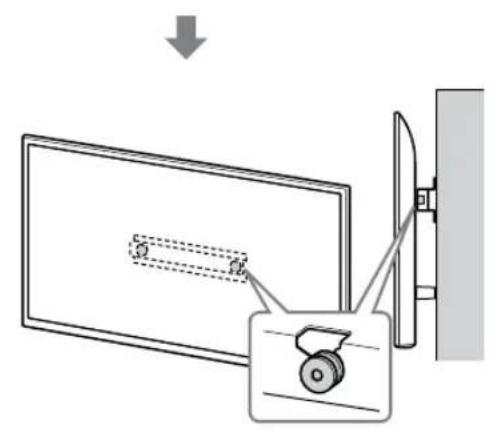
text_image
Diagram showing a device with a lock and a magnified view of its internal structure, likely illustrating a mechanical or electrical assembly.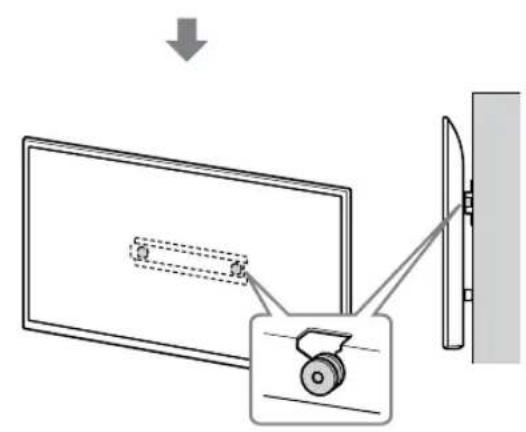
text_image
Diagram showing a monitor with a scroll wheel and a wall-mounted device, illustrating the process of viewing or projection.FIGYELMEZTETÉS
text_image
Safety instruction diagram showing hand protection with check and no symbols for correct/incorrect handlingnatural_image
Technical diagram showing a mechanical assembly with a component and a close-up view of a gear mechanism (no text or symbols present)FIGYELMEZTETÉS
text_image
Technical diagram of a mechanical or electrical component with labeled parts and connectorsnatural_image
Simple line drawing of a door with a switch and a prohibition symbol (no text or labels)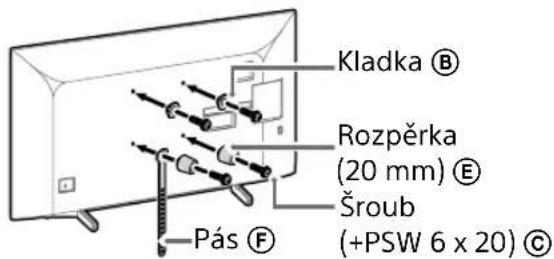
text_image
Kladka Ⓑ Rozpěrka (20 mm) Ⓔ Šroub (+PSW 6 x 20) Ⓓ Pás Ⓕtext_image
Diagram illustrating two steps of installing a device, showing hand positioning and safety warning symbol.natural_image
Simple line drawing of a door with a rectangular opening and a prohibition symbol (no text or labels)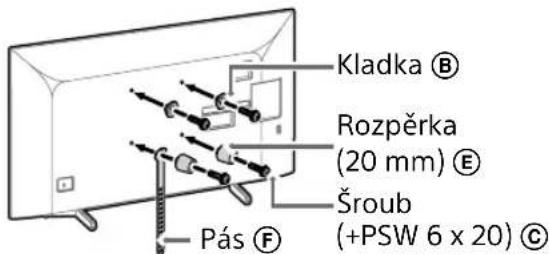
text_image
Kladka Ⓑ Rozpěrka (20 mm) Ⓔ Šroub (+PSW 6 x 20) Ⓒ Pás Ⓕtext_image
Diagram illustrating two steps of installing a device, showing hand positioning and safety warning symbol.natural_image
Simple line drawing of a door with a handle and no text or symbols present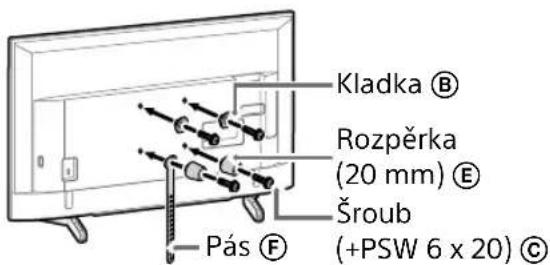
text_image
Kladka Ⓑ Rozpěrka (20 mm) Ⓔ Šroub (+PSW 6 x 20) Ⓓ Pás Ⓕnatural_image
Line drawing of a rectangular TV with attached cables and connectors, no text or symbols presentPoznámka
natural_image
Diagram of a device with labeled connectors and internal components (no text or symbols)Poznámka
natural_image
Simple line drawing of a door with a slot and a no-smoking symbol (no text or labels)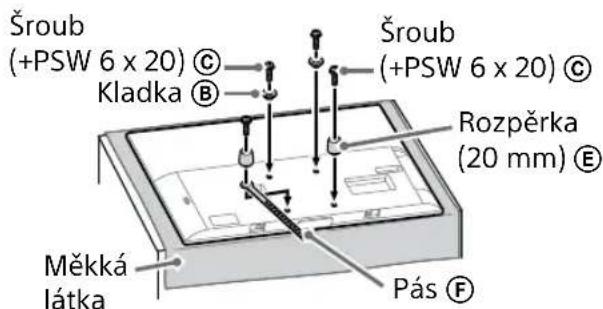
natural_image
Illustration of three people lifting a large object with dashed lines indicating motion or force (no text or symbols)text_image
Technical diagram showing a monitor with labeled components (A, B, C, D, E) and a close-up view of the front panel.natural_image
Simple line drawing of a rectangular frame with a dashed rectangle inside and a starburst shape at the bottom (no text or symbols)flowchart
graph TD
    A["Initial State: $"] --> B["Step 1: Dislocation"]
    B --> C["Step 2: Dislocation with $*"]
    C --> D["Final State: $"]
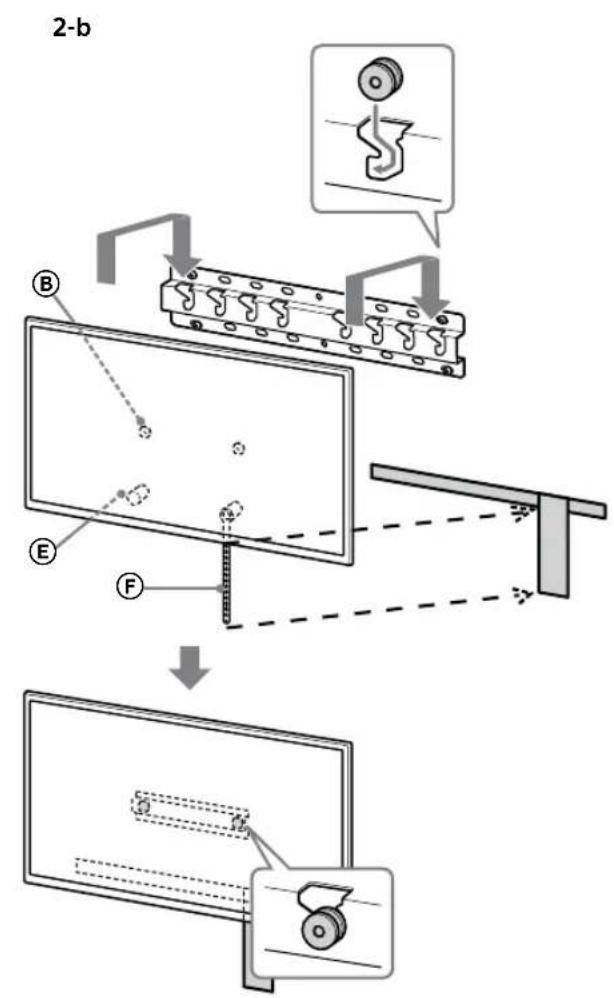
text_image
2-b B E F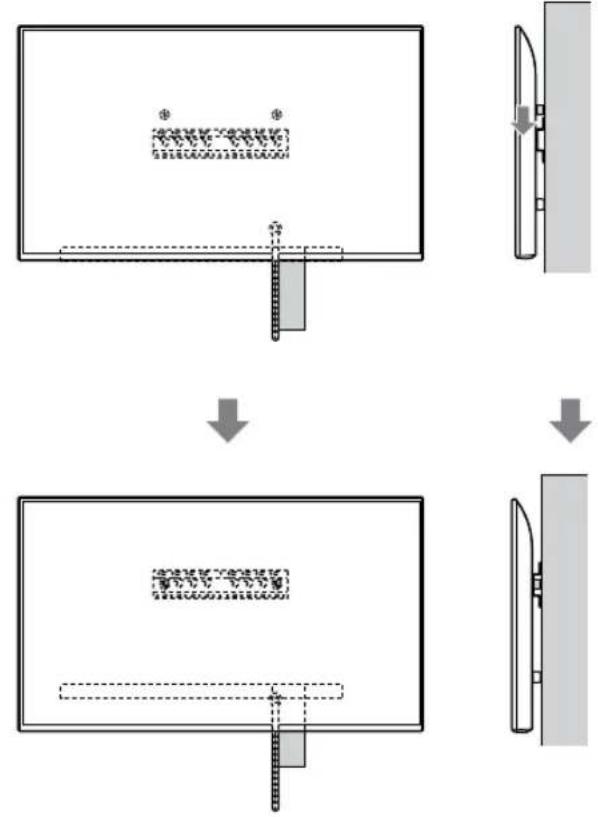
flowchart
graph TD
    A["Step 1: Object Tracking"] --> B["Step 2: Assembly"]
    B --> C["Step 3: Final Assembly"]
VAROVÁNÍ
text_image
Safety instruction diagram showing hand protection and safety symbols for lifting a person's legstext_image
Technical diagram showing a device with labeled components and a magnified view of the internal structure.Poznámka
natural_image
Simple line drawing of a rectangular frame with a small rectangular object and a starburst shape at the bottom (no text or symbols)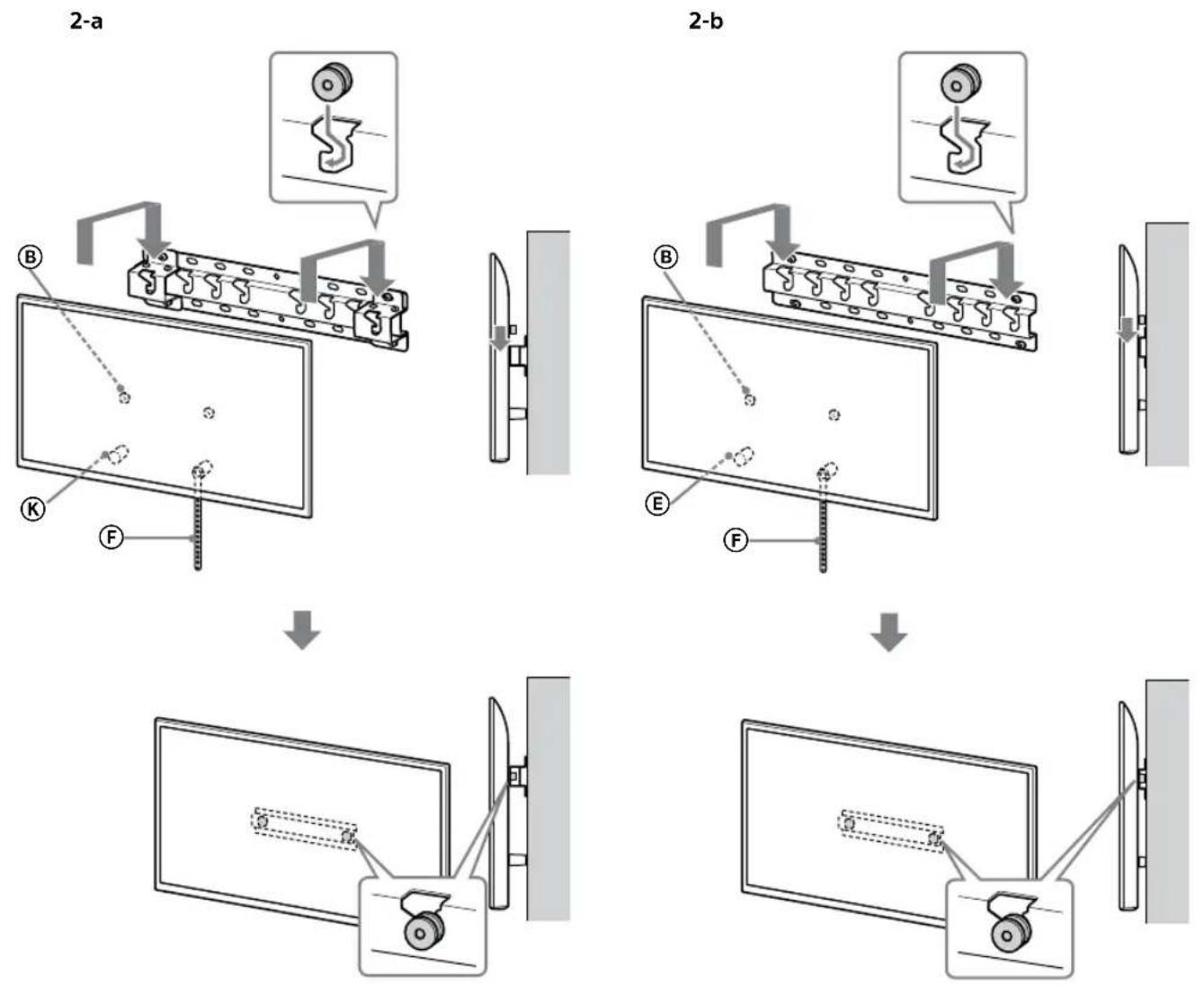
VAROVÁNÍ
text_image
Safety instruction diagram showing hand protection and no violations for a device, with two human silhouettes and labeled symbols.text_image
Technical diagram showing a mechanical assembly with labeled components and a close-up inset of a hook component.VAROVÁNÍ
text_image
Technical diagram of a mechanical or electrical component with labeled parts and connectors4 Určte pozíciu skrutiek na montáž podstavca (20) Ⓐ.
natural_image
Simple line drawing of a door with a handle and a prohibition symbol (no text or labels)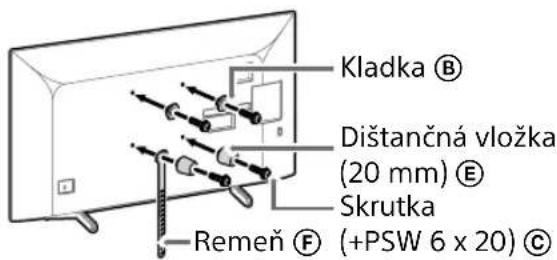
text_image
Diagram illustrating a procedure for installing or adjusting a device, with labeled steps and directional arrows indicating movement.natural_image
Simple line drawing of a door with a switch and a prohibition symbol (no text or labels)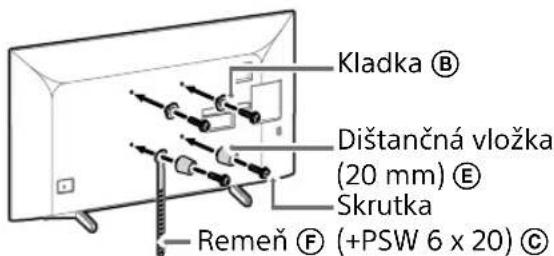
text_image
Diagram illustrating a procedure for installing a device, showing steps from lifting to adjusting the device and holding a phone.natural_image
Simple line drawing of a door with a stop symbol (no text or labels)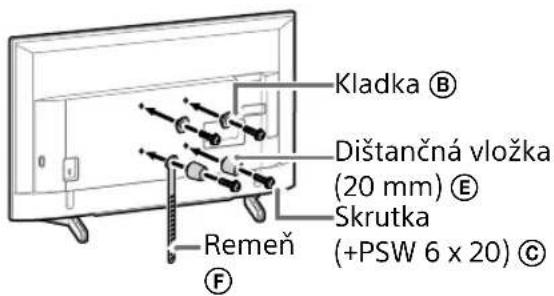
natural_image
Line drawing of a rectangular TV with cable connectors and connectors, no text or symbols presentPoznámka
natural_image
Diagram of a device with labeled connectors and internal components (no text or symbols)Poznámka
natural_image
Simple line drawing of a door with a stopper and a prohibition symbol (no text or labels)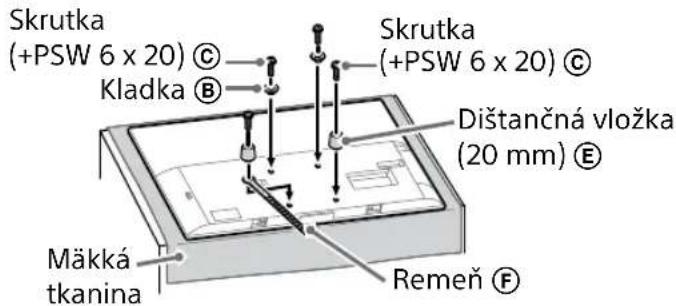
text_image
Skrutka (+PSW 6 x 20) © Kladka Ⓑ Skrutka (+PSW 6 x 20) © Dištančná vložka (20 mm) Ⓔ Mäkká tkanina Remeň ⒨3 Pripojte k TV prijímaču potrebné káble.
natural_image
Illustration of three stylized human figures lifting a large rectangular object with dashed lines indicating motion (no text or symbols)text_image
Technical diagram showing a monitor with labeled components A, B, and F, including a close-up view of the internal structure.natural_image
Simple line drawing of a rectangular frame with a small rectangular cutout and a starburst shape at the bottom (no text or symbols)flowchart
graph TD
    A["Initial Image"] --> B["Process Step"]
    B --> C["Final Output"]

    subgraph Initial
    D["Document Icon: $* *"]
    E["Arrow Down"]
    end

    subgraph Process
    F["Document Icon: $* *"]
    G["Arrow Up"]
    end

    subgraph Final
    H["Document Icon: $* *"]
    I["Arrow Down"]
    end
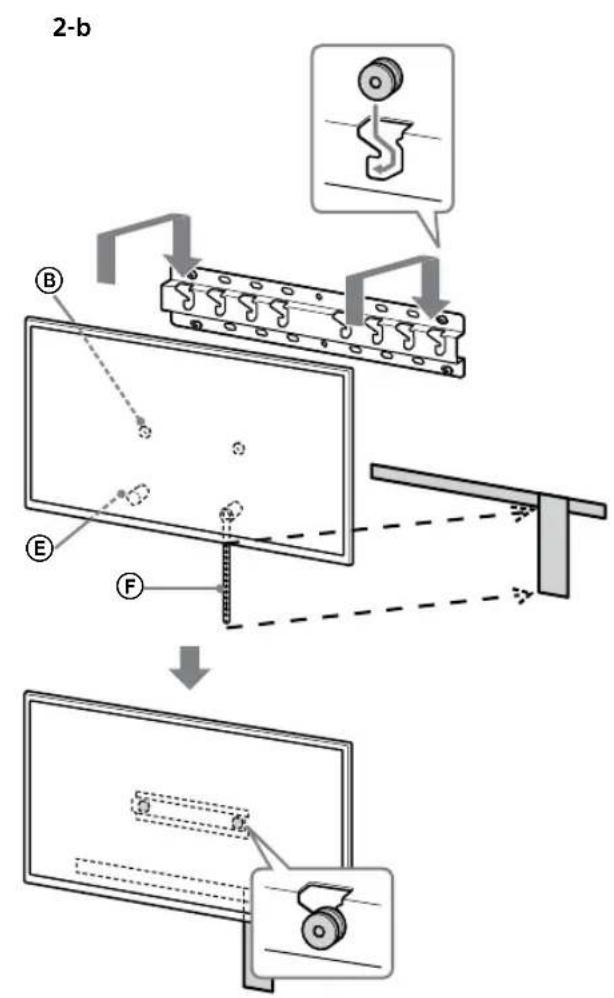
text_image
2-b B E F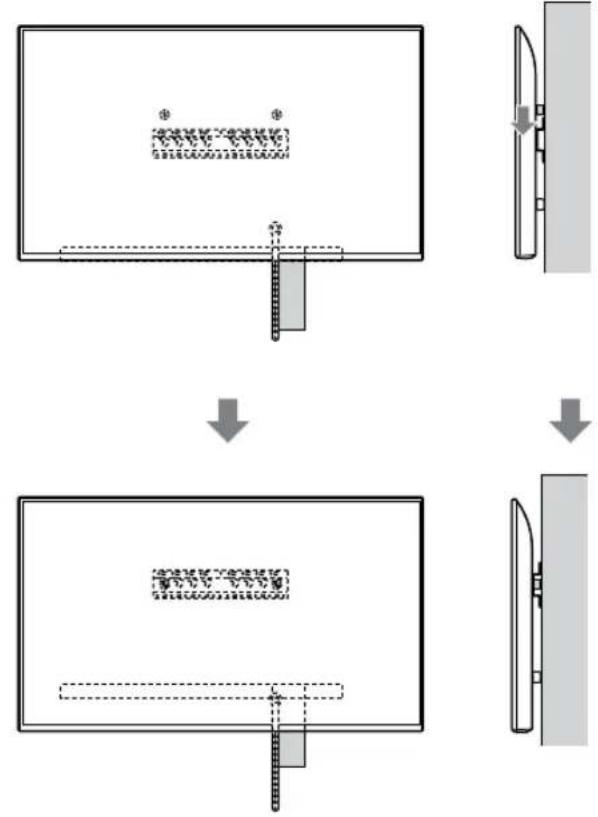
flowchart
graph TD
    A["Top View"] --> B["Step 1: Top View with a textured rectangular block and a small rectangular component"]
    B --> C["Step 2: Top View with a flat rectangular block and a small rectangular component"]
    C --> D["Step 3: Top View with a flat rectangular block and a small rectangular component"]
VÝSTRAHA
text_image
Safety instruction diagram showing hand protection and safety symbols for a person holding a devicetext_image
Technical diagram showing a device with labeled components and a magnified view of the internal structure.Poznámka
natural_image
Simple line drawing of a rectangular frame with a dashed rectangle and a starburst shape at the bottom (no text or symbols)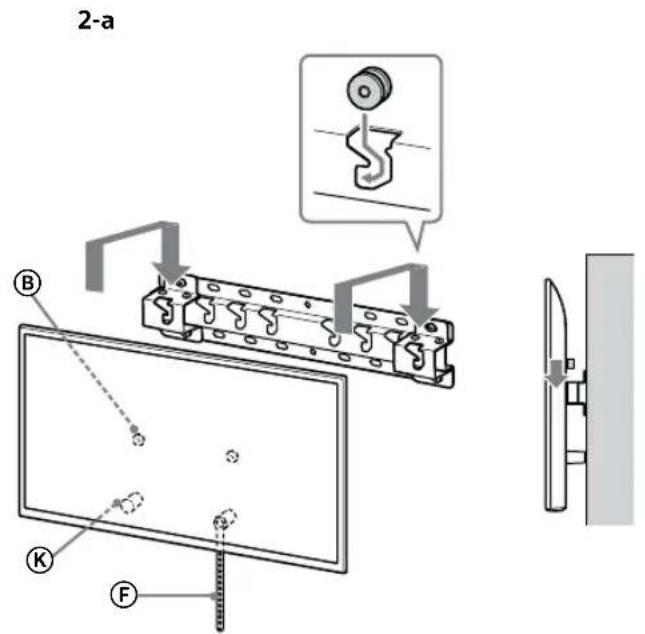
text_image
2-a B K F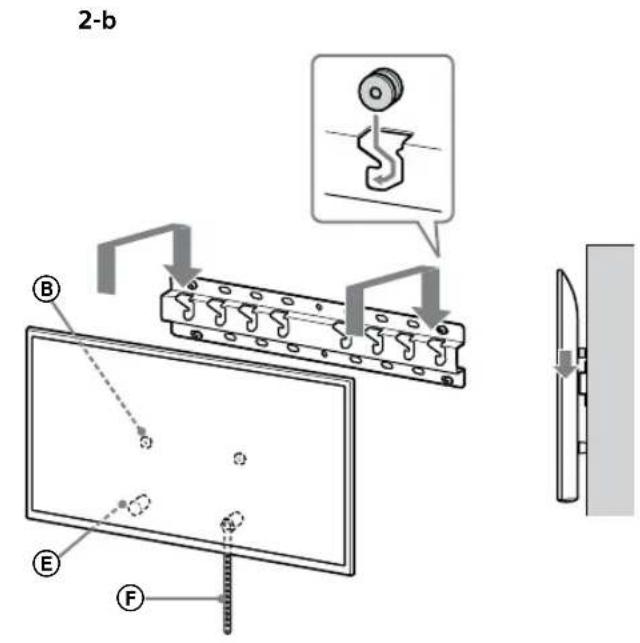
text_image
2-b B E F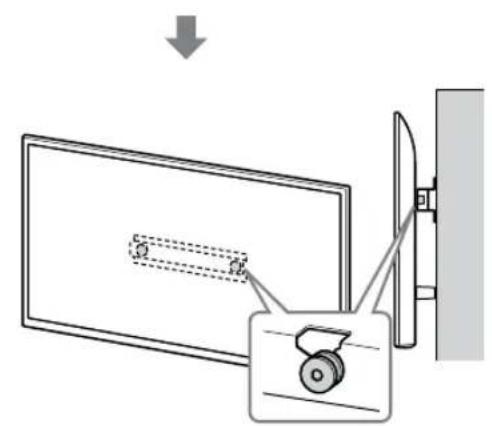
text_image
Diagram showing a monitor with a slide and a device, illustrating the concept of viewing or dissection.
text_image
Diagram showing a monitor with a slide and a wheel, connected to a wall-mounted device, with an arrow indicating direction of motion.SK
VÝSTRAHA
text_image
Safety instruction diagram showing hand protection and no violations for a device, with two human silhouettes below.text_image
Technical diagram showing installation of a mechanical component with a magnified inset highlighting the internal structure.VÝSTRAHA
Rozmery: (pribl.) [mm]
a : 400
b : 300
c : 200
d : 100
e : 80
f : 480
g : 100
text_image
Technical diagram of an electrical connector with labeled terminals and internal componentsnatural_image
Diagram showing a door with a switch and a prohibition symbol (no text or labels)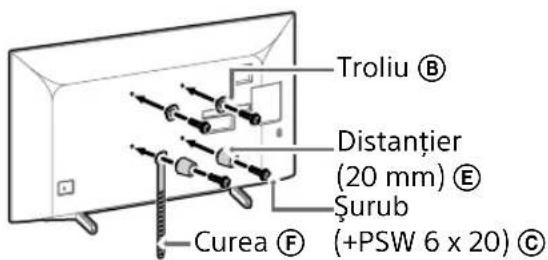
text_image
Diagram illustrating two steps of installing a device, showing hand positioning and safety warning symbol.natural_image
Simple line drawing of a door with a switch and a prohibition symbol (no text or labels)
text_image
Troliu ® Distanțier (20 mm) ® Şurub Curea ® (+PSW 6 x 20) ©text_image
Diagram illustrating two steps of installing a device, showing hand positioning and safety warning symbol.natural_image
Simple line drawing of a door with a stop symbol (no text or labels)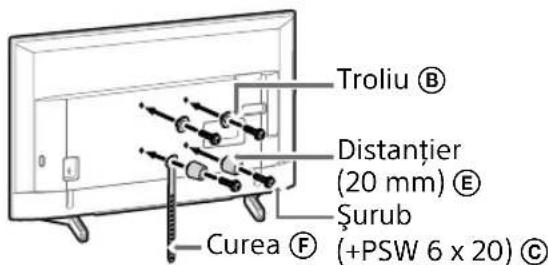
natural_image
Line drawing of a rectangular TV with attached cables and connectors, no text or symbols presentNotă
natural_image
Diagram of a device casing with connectors and internal components, no text or symbols presentNotă
natural_image
Simple line drawing of a door with a stopper and a no-smoking symbol (no text or labels)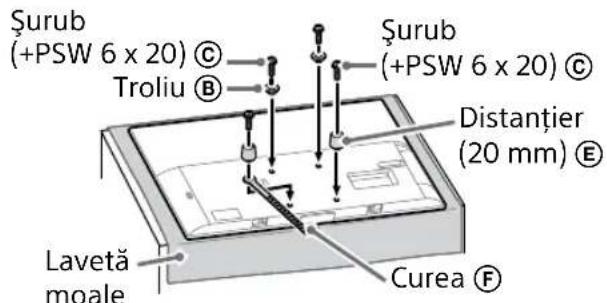
text_image
Surub (+PSW 6 x 20) © Troliu Ⓑ Surub (+PSW 6 x 20) © Distanțier (20 mm) Ⓔ Lavetă moale Curea Ⓕnatural_image
Illustration of three people lifting a large object with a ruler, no text or symbols presenttext_image
Technical diagram showing a monitor with labeled components (A, B, C, D, E) and a close-up view of the front panel.natural_image
Simple line drawing of a rectangular frame with a dashed rectangle and a starburst shape at the bottom (no text or symbols)flowchart
graph TD
    A["Initial Image"] --> B["Process Step"]
    B --> C["Final Output"]

    subgraph Initial
    D["Document Icon: $* *"]
    E["Arrow Down"]
    end

    subgraph Process
    F["Document Icon: $* *"]
    G["Arrow Up"]
    end

    subgraph Final
    H["Document Icon: $* *"]
    I["Arrow Down"]
    end
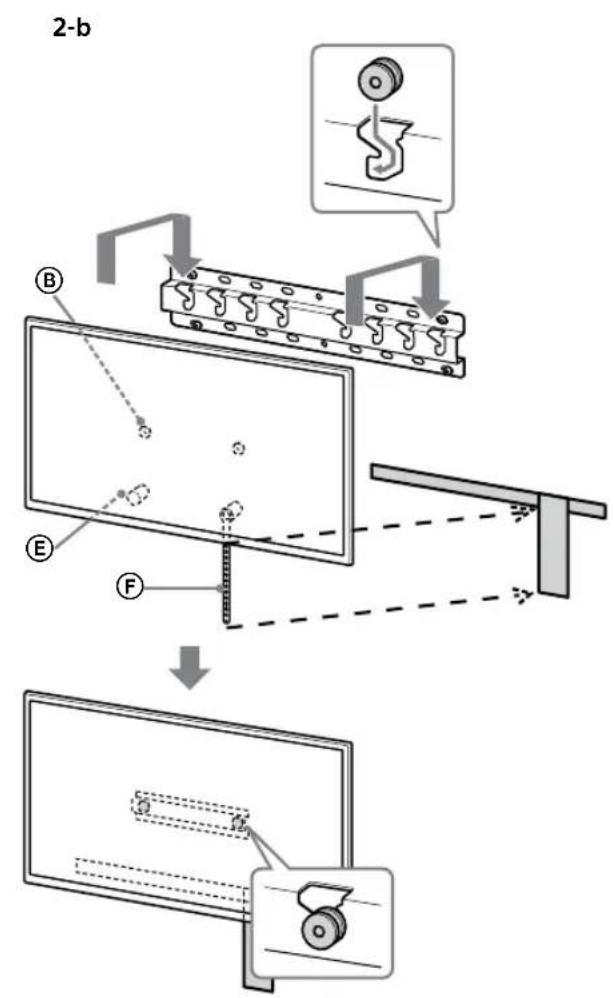
text_image
2-b B E F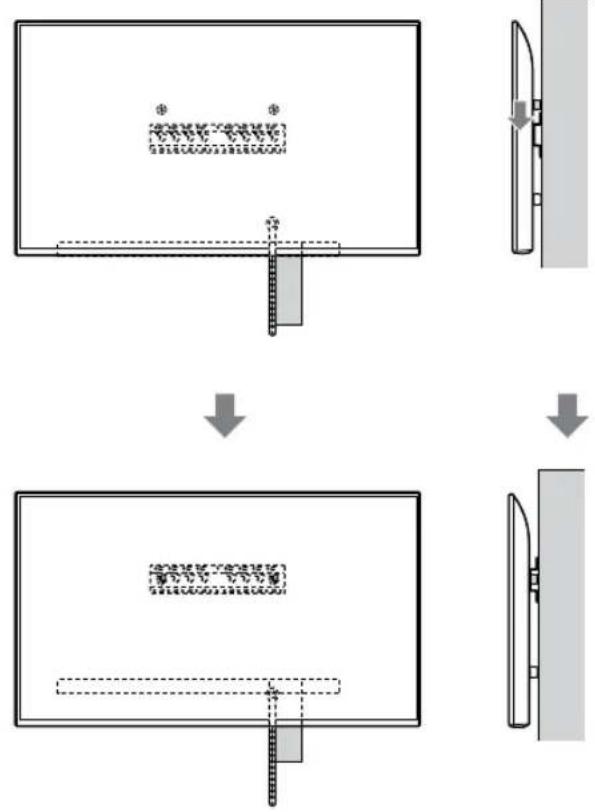
flowchart
graph TD
    A["Step 1: Initial material deformation"] --> B["Step 2: Disassembly of material"]
    B --> C["Step 3: Final assembly with structural break"]
AVERTISMENT
text_image
Safety instruction diagram showing hand protection and safety symbols for a person holding a devicetext_image
Technical diagram showing a device with labeled components and a magnified view of the internal structure.Notă
natural_image
Simple line drawing of a rectangular frame with a dashed rectangle inside and a starburst shape at the bottom (no text or symbols)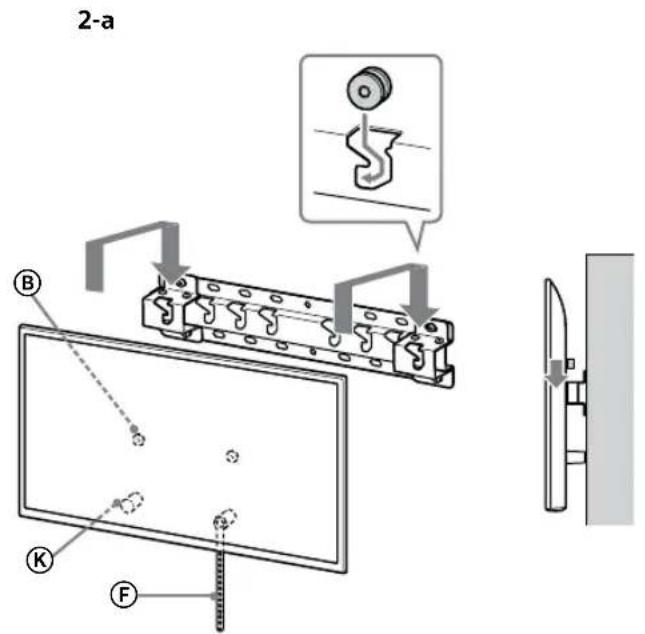
text_image
2-a B C F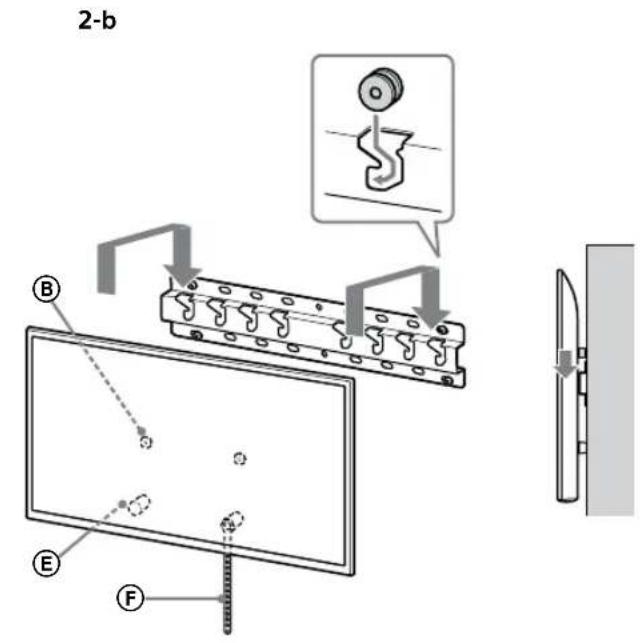
text_image
2-b B E F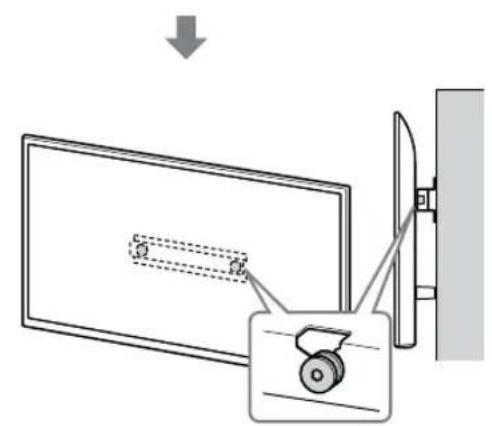
text_image
Diagram showing a monitor with a slide and a scroll wheel, connected to a wall-mounted device with an arrow indicating direction.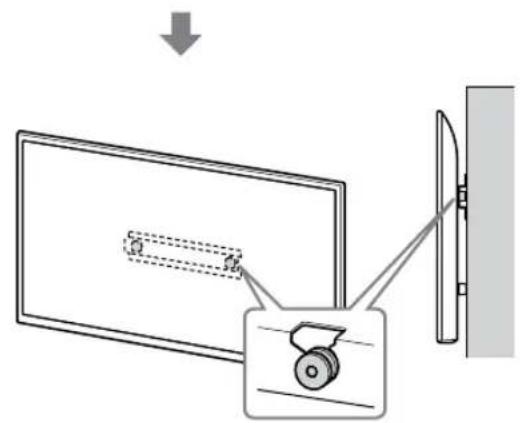
text_image
Diagram showing a monitor with a slide and a wheel, connected to a wall-mounted device, with an arrow indicating direction of motion.RO
AVERTISMENT
text_image
Safety instruction diagram showing hand protection and disassembly steps with check and no symbolstext_image
Technical diagram showing a mechanical assembly with labeled components and a magnified inset showing a gear mechanism.AVERTISMENT
text_image
Technical diagram of a mechanical or electrical component with labeled parts and connectorsnatural_image
Diagram showing a door with internal compartments and a prohibition symbol (no text or labels)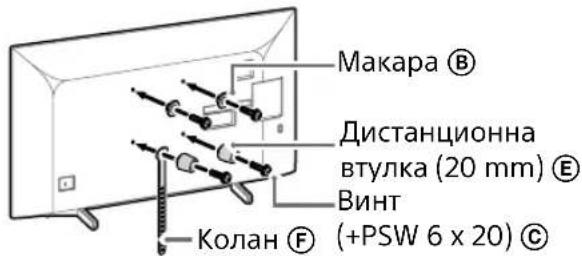
text_image
Diagram illustrating two steps of installing a cardboard box, showing hand positioning and safety warning symbol.natural_image
Simple line drawing of a door with a switch and a no-smoking symbol (no text or labels)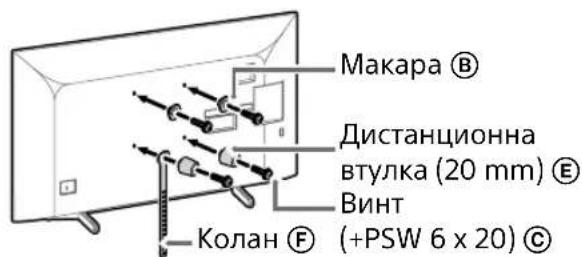
text_image
Diagram illustrating a procedure for installing or adjusting a device, with labeled steps and warning symbols.natural_image
Simple line drawing of a door with a handle and no text or symbols present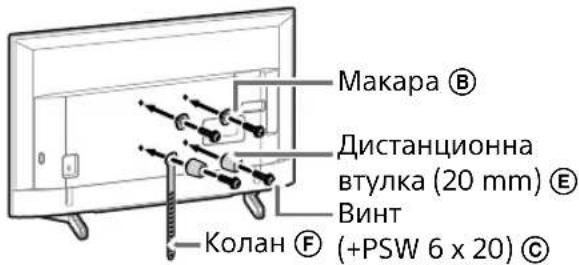
natural_image
Line drawing of a rectangular TV with attached cables and connectors, no text or symbols presentЗабележка
natural_image
Diagram of a device with labeled connectors and internal components (no text or symbols)Забележка
natural_image
Simple line drawing of a door with a switch and a no-smoking symbol (no text or labels)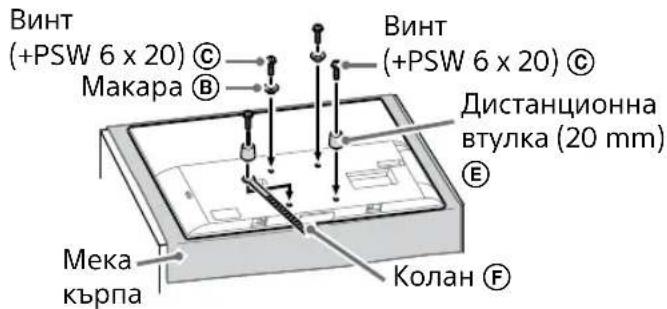
natural_image
Illustration of three people lifting a large object with dashed lines indicating motion or alignment (no text or symbols)text_image
Technical diagram showing a monitor with labeled components A, B, and F, and an inset view of a device with a magnified view.natural_image
Simple line drawing of a rectangular frame with a starburst shape and a dashed rectangle inside (no text or symbols)flowchart
graph TD
    A["Initial State"] --> B["Step 1: Initial State with a rectangular block and dimension annotation"]
    B --> C["Step 2: Transformation to a vertical panel with a curved arrow indicating the process"]
    C --> D["Step 3: Final State with a rectangular block and dimension annotation"]
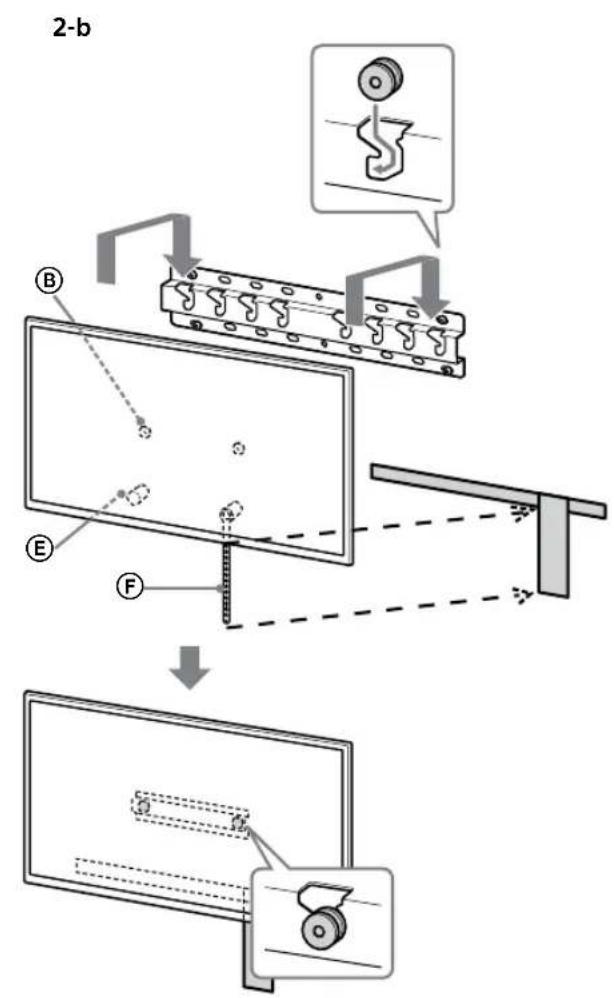
text_image
2-b B E F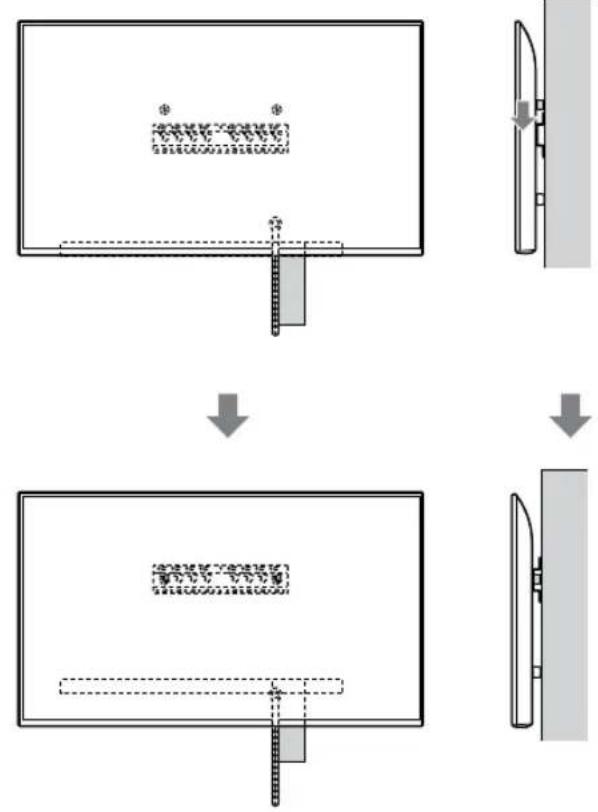
flowchart
graph TD
    A["Top View"] --> B["Step 1: Inserted Component"]
    B --> C["Step 2: Assembly/Adjustment"]
    C --> D["Step 3: Final Assembly"]
BG
ПРЕДУПРЕЖДЕНИЕ
text_image
Safety instruction diagram showing hand protection and safety symbols for a person holding shoestext_image
Technical diagram showing a device with labeled component B and internal structure, including dashed lines and a magnified view.Забележка
natural_image
Simple line drawing of a rectangular frame with a small 3D object and a starburst shape at the bottom (no text or symbols)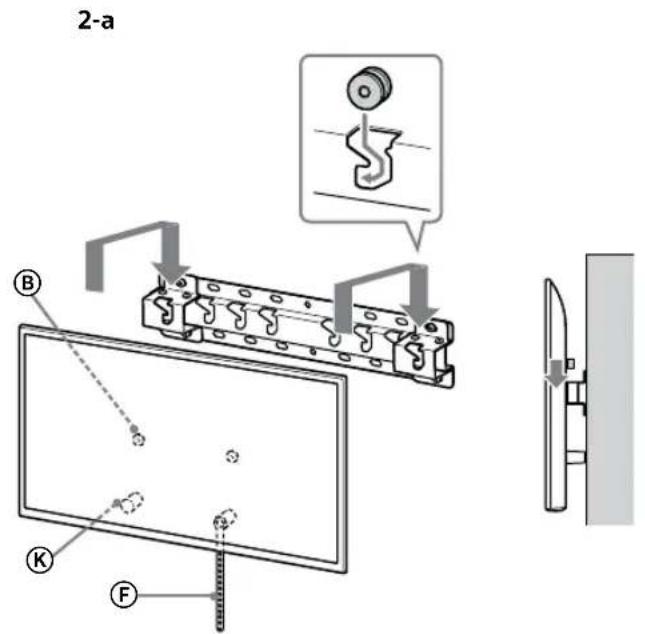
text_image
2-a B C F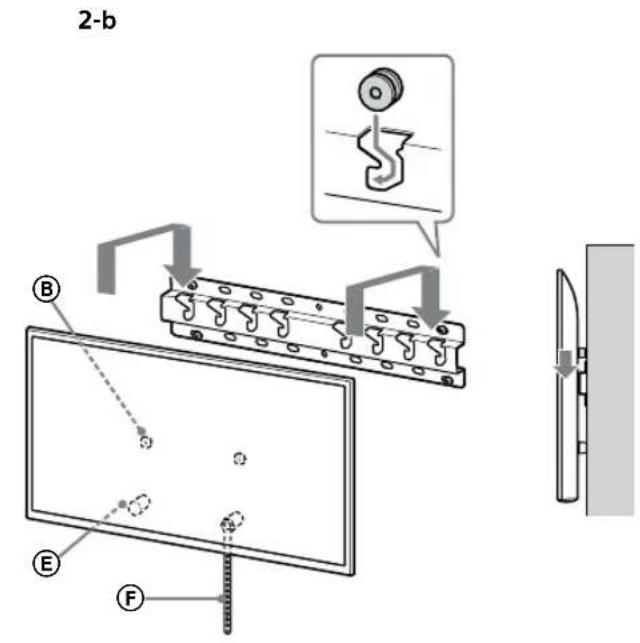
text_image
2-b B E F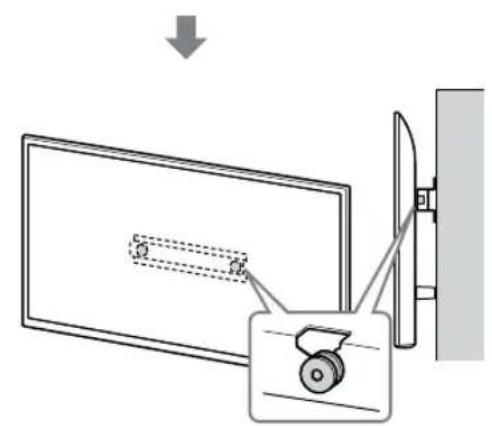
text_image
Diagram showing a monitor with a slide and a scroll wheel, connected to a wall-mounted device with an arrow indicating direction.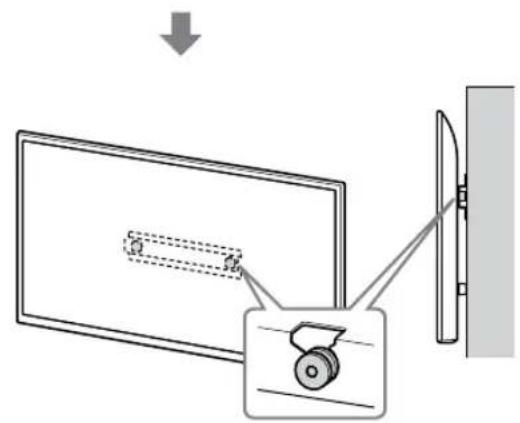
text_image
Diagram showing a monitor with a cable being pointed at its side, connected to a wall-mounted device with a wheel.BG
ПРЕДУПРЕЖДЕНИЕ
text_image
Safety instruction diagram showing hand protection and no violations for a device, with two human silhouettes below.3 Предотвратяване
text_image
Technical diagram showing a mechanical assembly with labeled components and a magnified inset illustrating the internal structure.ПРЕДУПРЕЖДЕНИЕ
text_image
Technical diagram of a mechanical or electrical component with labeled parts and connectorsnatural_image
Simple line drawing of a door with a rectangular opening and a prohibition symbol (no text or labels)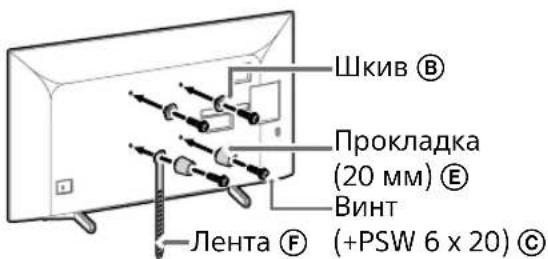
text_image
Diagram illustrating a procedure for installing or adjusting a device, with labeled steps and a warning symbol.natural_image
Simple line drawing of a door with a diagonal lock and a prohibition symbol (no text or labels)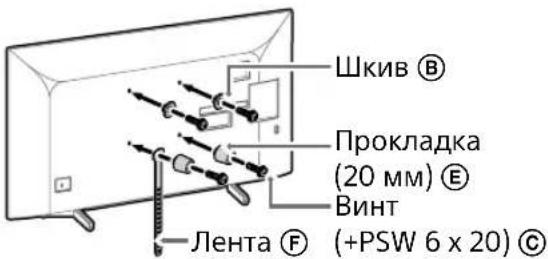
text_image
Technical diagram illustrating a procedure for installing or adjusting a device, with labeled components and directional arrows.natural_image
Simple line drawing of a door with a handle and no text or symbols present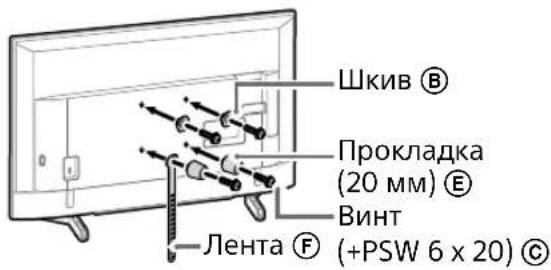
natural_image
Line drawing of a rectangular TV with attached cables and connectors, no text or symbols presentПримечание
natural_image
Diagram of a device with labeled connectors and internal components (no text or symbols)Примечание
natural_image
Simple line drawing of a door with a stopper and a prohibition symbol (no text or labels)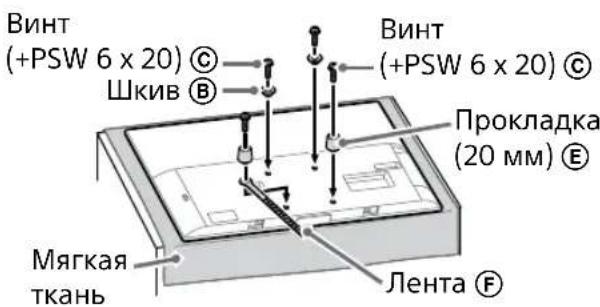
natural_image
Illustration of three people lifting a large whiteboard with dashed lines indicating motion or alignment (no text or symbols)text_image
Technical diagram showing a monitor mounted on a stand with labeled components A, B, and C, including a close-up view of the right side of a device.natural_image
Simple line drawing of a rectangular frame with a dashed rectangle and a starburst shape at the bottom (no text or symbols)flowchart
graph TD
    A["Initial Image"] --> B["Process Step"]
    B --> C["Final Output"]

    subgraph Initial
    D["Document Icon: $* *"]
    E["Arrow Down"]
    end

    subgraph Process
    F["Document Icon: $* *"]
    G["Arrow Up"]
    end

    subgraph Final
    H["Document Icon: $* *"]
    I["Arrow Down"]
    end
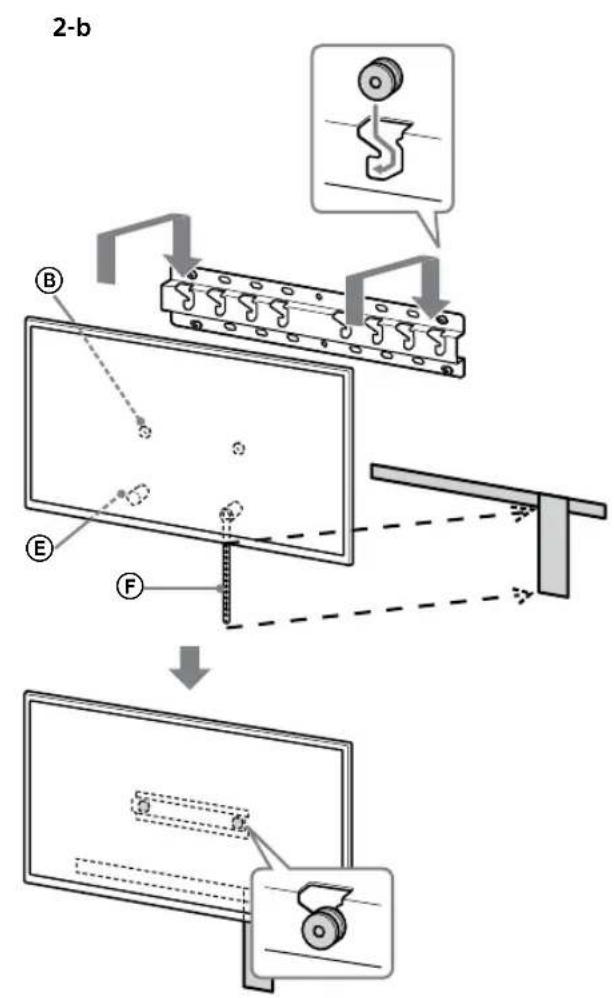
text_image
2-b B E F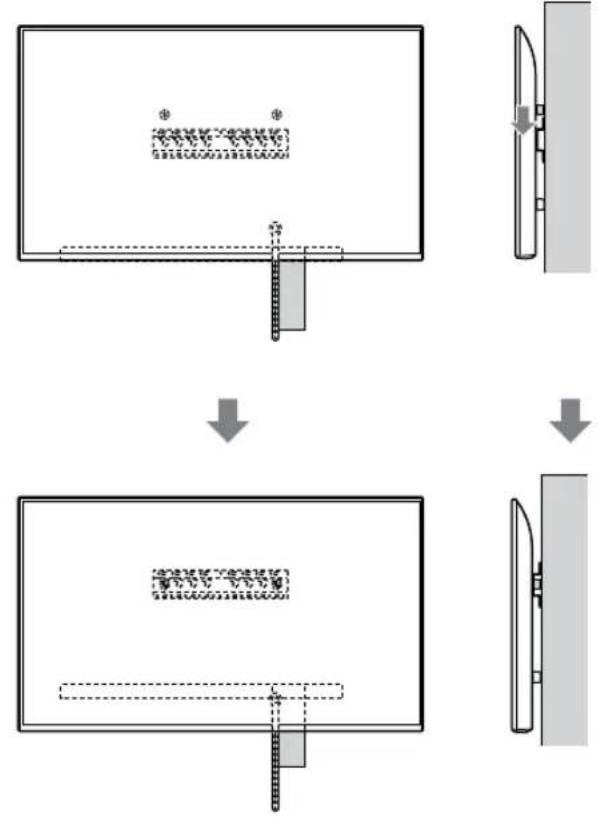
flowchart
graph TD
    A["Step 1: Object Tracking"] --> B["Step 2: Assembly"]
    B --> C["Step 3: Final Assembly"]
ПРЕДУПРЕЖДЕНИЕ
text_image
Safety instruction diagram showing hand protection and safety symbols for a person holding a devicetext_image
Technical diagram showing a monitor with labeled components and a close-up view of the front panel with a circular inset detail.Примечание
natural_image
Simple line drawing of a rectangular frame with a dashed rectangle inside and a starburst shape at the bottom (no text or symbols)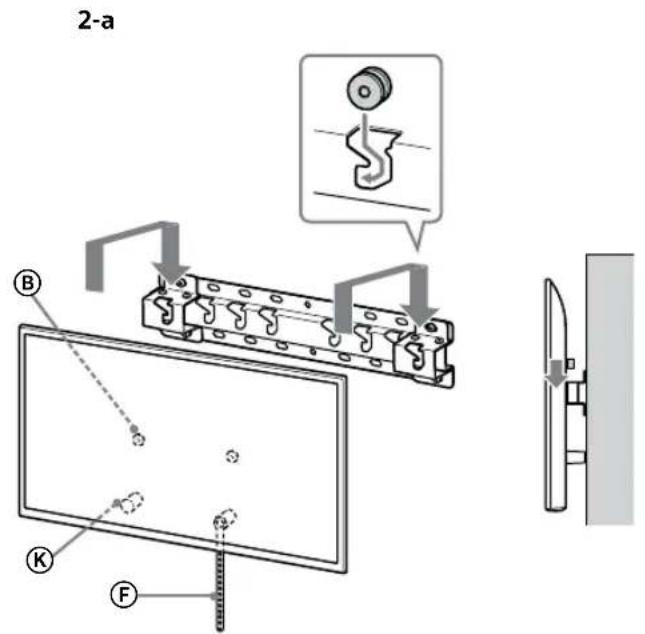
text_image
2-a B K F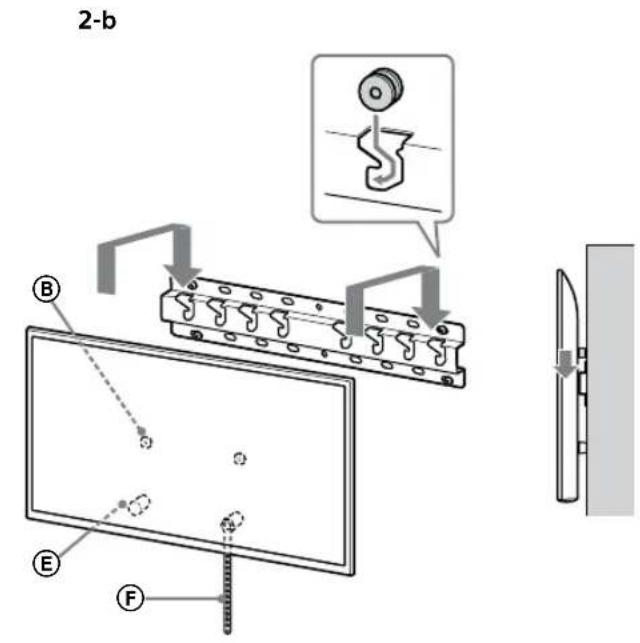
text_image
2-b B E F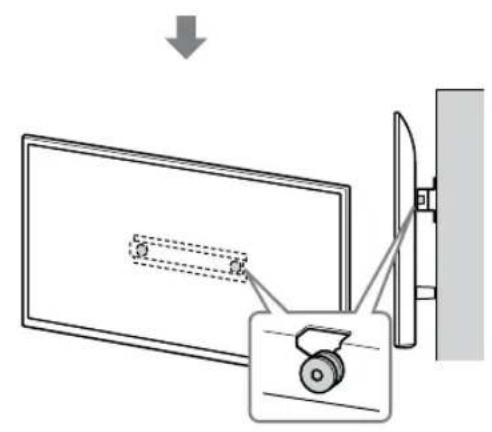
text_image
Diagram showing a device with a lock and a magnified view of its internal structure, likely illustrating a mechanical or electrical assembly.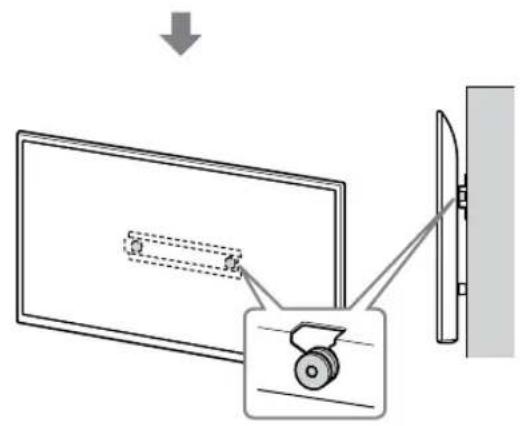
text_image
Diagram showing a monitor with a slide and a scroll wheel, connected to a wall-mounted device, with an arrow indicating direction of motion.ПРЕДУПРЕЖДЕНИЕ
text_image
Safety instruction diagram showing hand protection and disassembly with checkmark and no sign symbolstext_image
Technical diagram showing a mechanical assembly with labeled components and a magnified detail view of the component.ПРЕДУПРЕЖДЕНИЕ
text_image
Technical diagram of a mechanical or electrical component with labeled parts and connectorsnatural_image
Simple line drawing of a door with a handle and a prohibition symbol (no text or labels)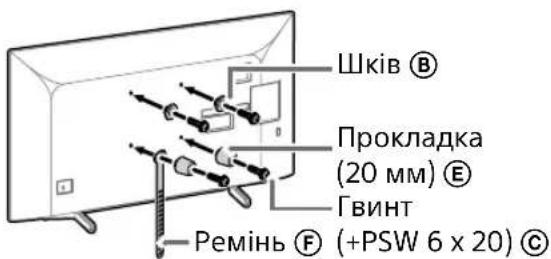
text_image
Diagram illustrating two steps of installing a device, showing hand positioning and safety warning with a warning sign.natural_image
Simple line drawing of a door with a rectangular opening and a prohibition symbol (no text or labels)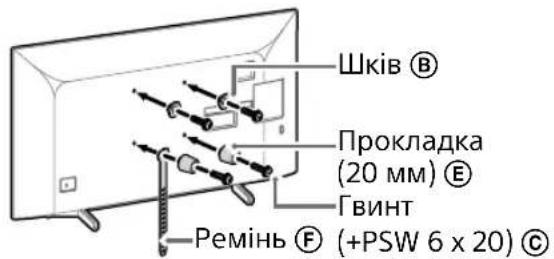
text_image
Diagram illustrating two steps of installing a shipping container, showing hand positioning and safety warning.natural_image
Simple line drawing of a door with a stop symbol (no text or labels)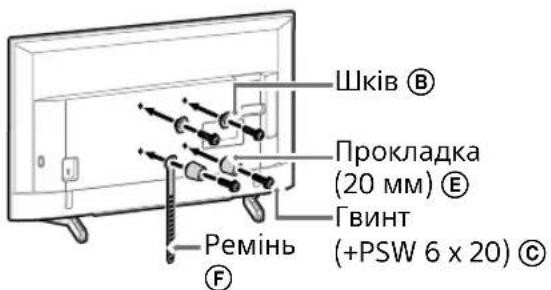
natural_image
Line drawing of a rectangular TV with cable connectors and connectors, no text or symbols presentПримітка
natural_image
Diagram of a device with labeled connectors and internal components (no text or symbols)Примітка
natural_image
Simple line drawing of a door with a switch and no text or symbols present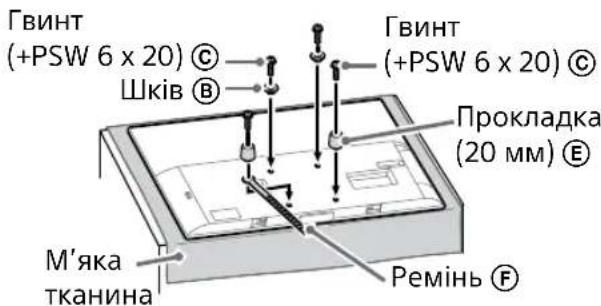
natural_image
Illustration of three people lifting a large object with dashed lines indicating motion or alignment (no text or symbols)text_image
Technical diagram showing a monitor with labeled components A, B, and F, including a close-up view of the internal structure.natural_image
Simple line drawing of a rectangular frame with a starburst shape at the bottom (no text or symbols)flowchart
graph TD
    A["Initial Image"] --> B["Process Step"]
    B --> C["Final Output"]

    subgraph Initial
    D["Document Icon: $* *"]
    E["Arrow Down"]
    end

    subgraph Process
    F["Document Icon: $* *"]
    G["Arrow Up"]
    end

    subgraph Final
    H["Document Icon: $* *"]
    I["Arrow Down"]
    end
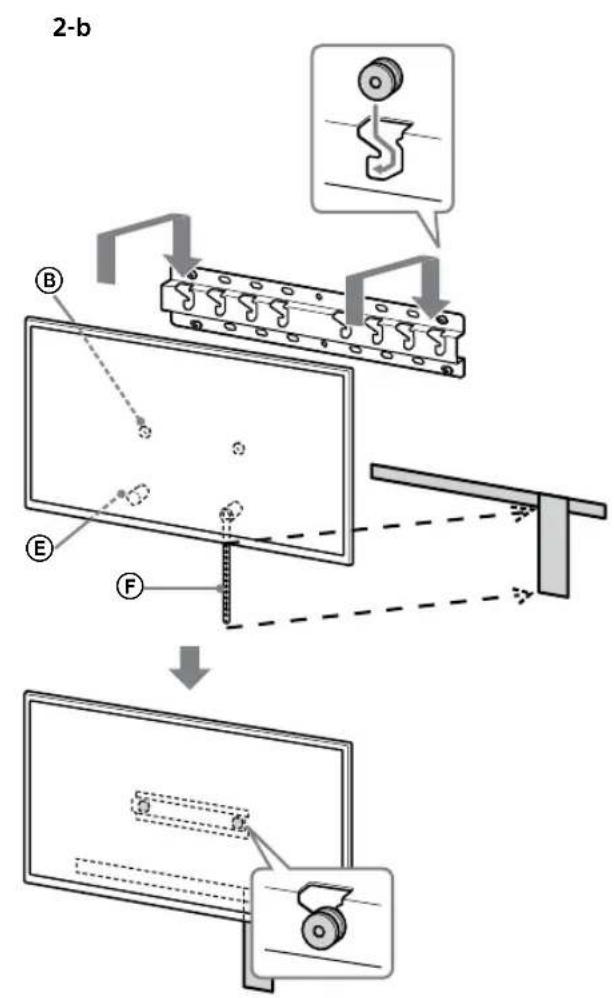
text_image
2-b B E F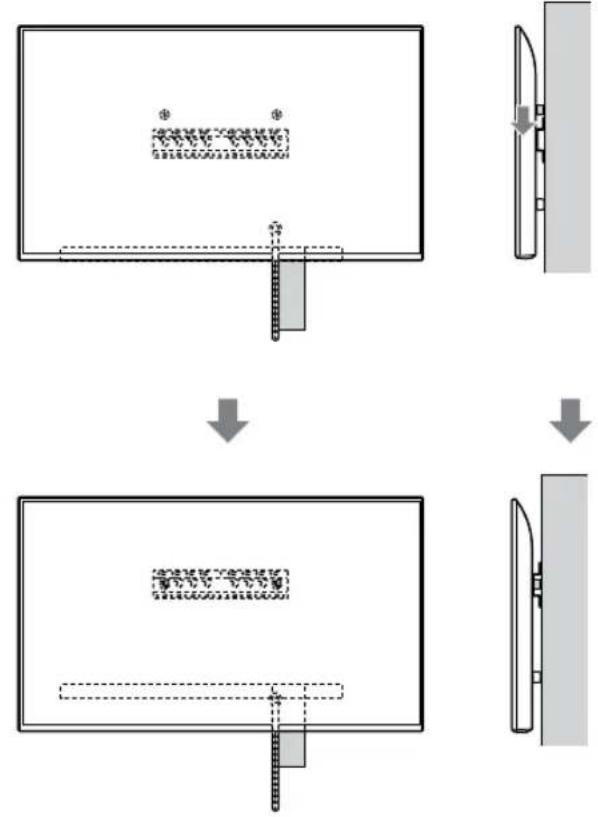
flowchart
graph TD
    A["Step 1: Object Tracking"] --> B["Step 2: Assembly"]
    B --> C["Step 3: Final Assembly"]
ЗАСТЕРЕЖЕННЯ
text_image
Illustration showing three human silhouettes with foot protection symbols and a warning sign, illustrating safety rules for using foot protection.text_image
Technical diagram showing a monitor with labeled components and a close-up view of the front panel detail.Примітка
natural_image
Simple line drawing of a rectangular frame with a small rectangular object and a starburst shape at the bottom (no text or symbols)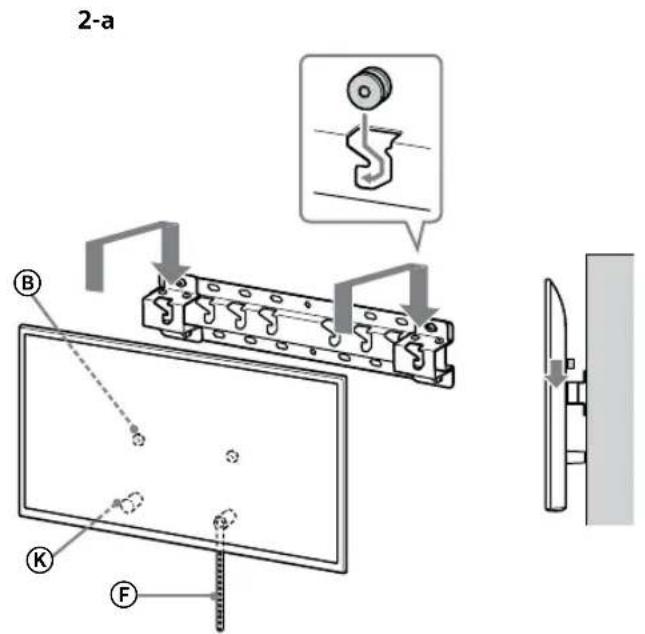
text_image
2-a B K F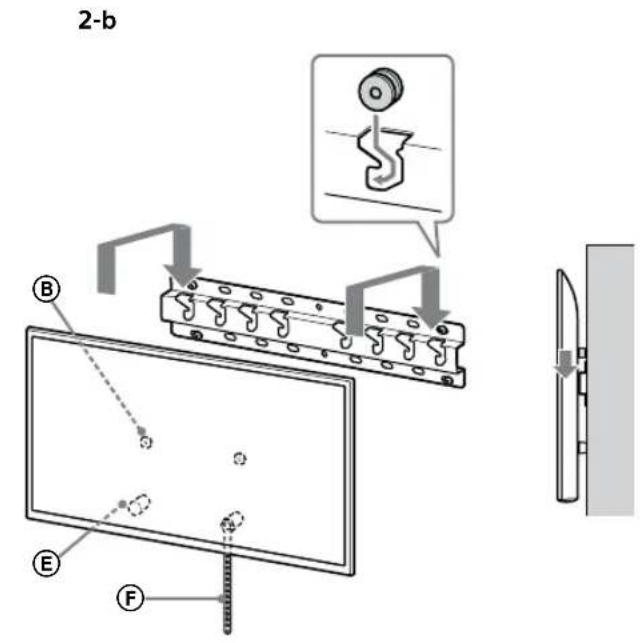
text_image
2-b B E F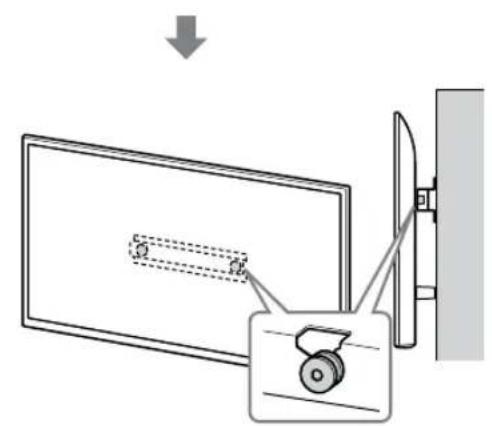
text_image
Diagram showing a monitor with a slide and a scroll wheel, connected to a wall-mounted device with an arrow indicating direction.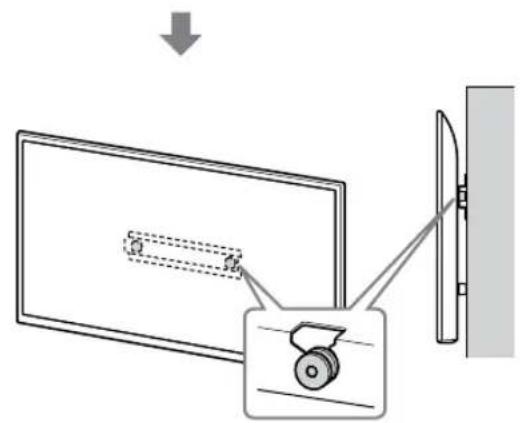
text_image
Diagram showing a monitor with a slide and a wheel, connected to a wall-mounted device, with an arrow indicating direction of motion.UA
ЗАСТЕРЕЖЕННЯ
text_image
Safety instruction diagram showing hand protection and disassembly steps with check and no symbolstext_image
Technical diagram showing a mechanical assembly with labeled components and a magnified view of the component.ЗАСТЕРЕЖЕННЯ
text_image
Technical diagram of a mechanical or electrical component with labeled parts and connectorsnatural_image
Diagram of a door with a switch and a prohibition symbol (no text or labels)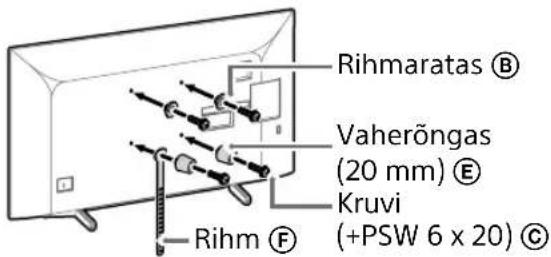
text_image
Rihmaratas Ⓑ Vaherõngas (20 mm) Ⓔ Kruvi (+PSW 6 x 20) Ⓒ Rihm Ⓕtext_image
Diagram illustrating two steps of installing a shipping container, showing hand positioning and safety warning symbol.natural_image
Simple line drawing of a door with a rectangular opening and a prohibition symbol (no text or labels)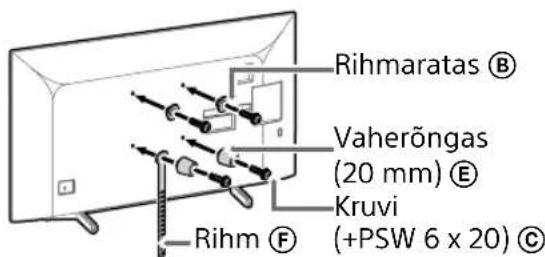
text_image
Rihmaratas Ⓑ Vaherõngas (20 mm) Ⓔ Kruvi (+PSW 6 x 20) Ⓒ Rihm Ⓕtext_image
Diagram illustrating two steps of installing a car door panel, showing hand positioning and safety warning.natural_image
Simple line drawing of a door with a handle and no text or symbols present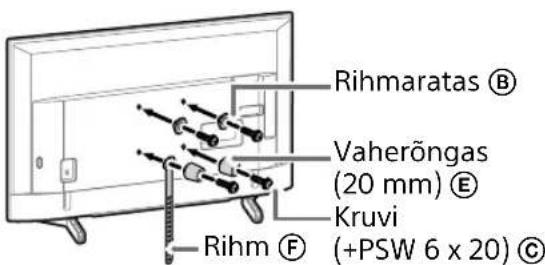
text_image
Rihmaratas ® Vaherõngas (20 mm) ® Kruvi (+PSW 6 x 20) © Rihm ®natural_image
Line drawing of a flat-screen TV with cable connectors and connectors, no text or symbols presentMärkus.
natural_image
Diagram of a device with labeled ports and connectors (no text or symbols present)Märkus.
natural_image
Simple line drawing of a door with a rectangular opening and a prohibition symbol (no text or labels)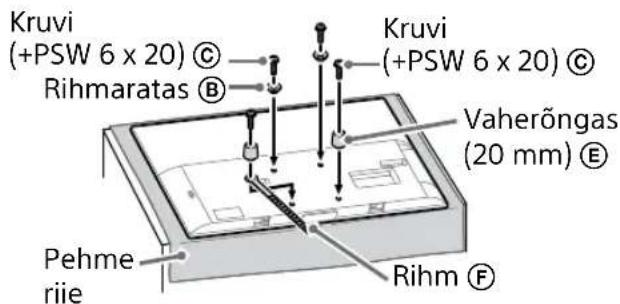
text_image
Kruvi (+PSW 6 x 20) © Rihmaratas ® Kruvi (+PSW 6 x 20) © Vaherõngas (20 mm) ® Pehme riie Rihm ®natural_image
Illustration of three people lifting a large object with a ruler, no text or symbols presenttext_image
Technical diagram showing a monitor with labeled components (A, B, C, D, E) and a close-up view of the front panel.natural_image
Simple line drawing of a rectangular frame with a small rectangular cutout and a starburst shape at the bottom (no text or symbols)- Pärast seinale teleri paigaldamist eemaldage seinalt teip vms.
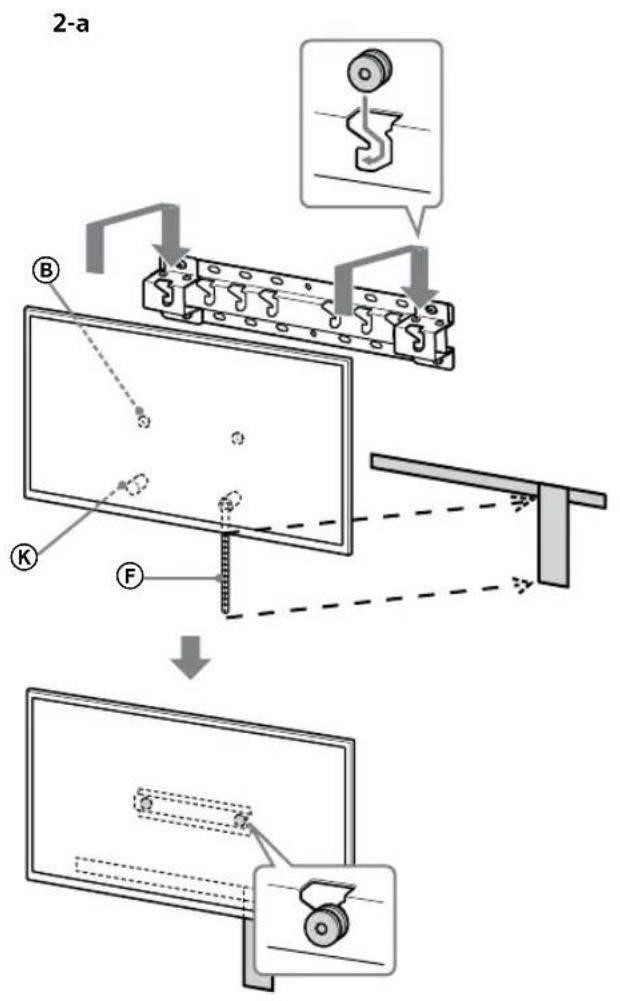
text_image
2-a B K F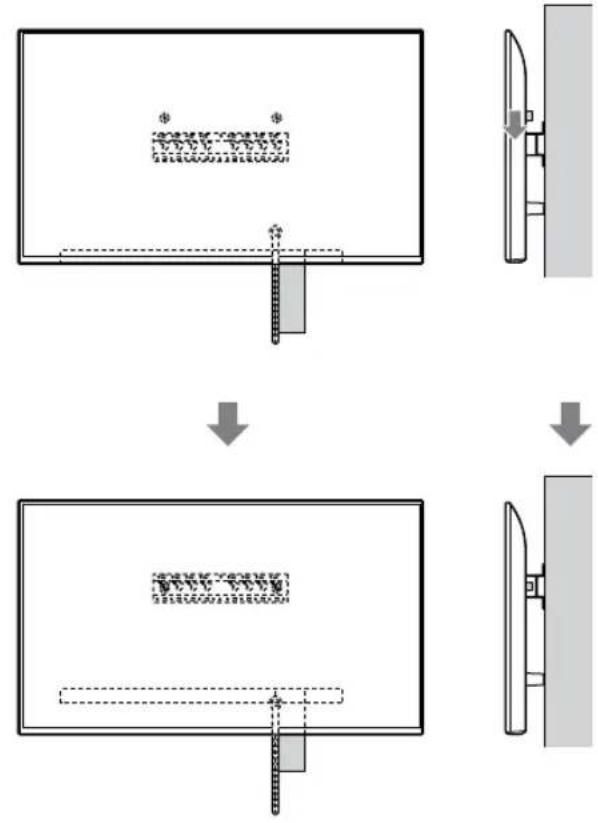
flowchart
graph TD
    A["Initial State"] --> B["Step 1: Initial State with a rectangular block and dimension annotation"]
    B --> C["Step 2: Step 1: Initial State with a dashed line and dimension annotation"]
    C --> D["Step 3: Step 2: Initial State with a dashed line and dimension annotation"]
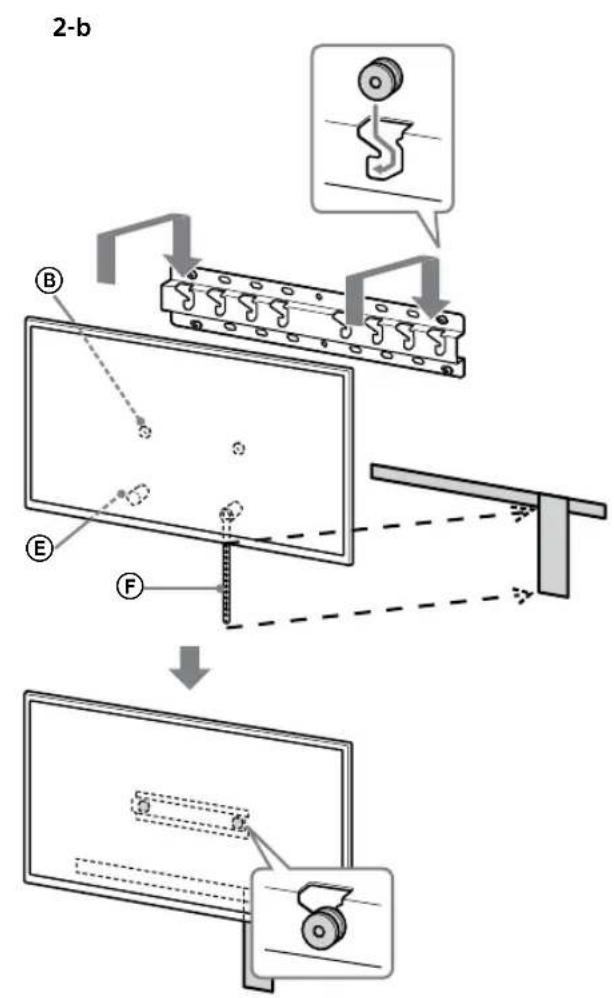
text_image
2-b B E F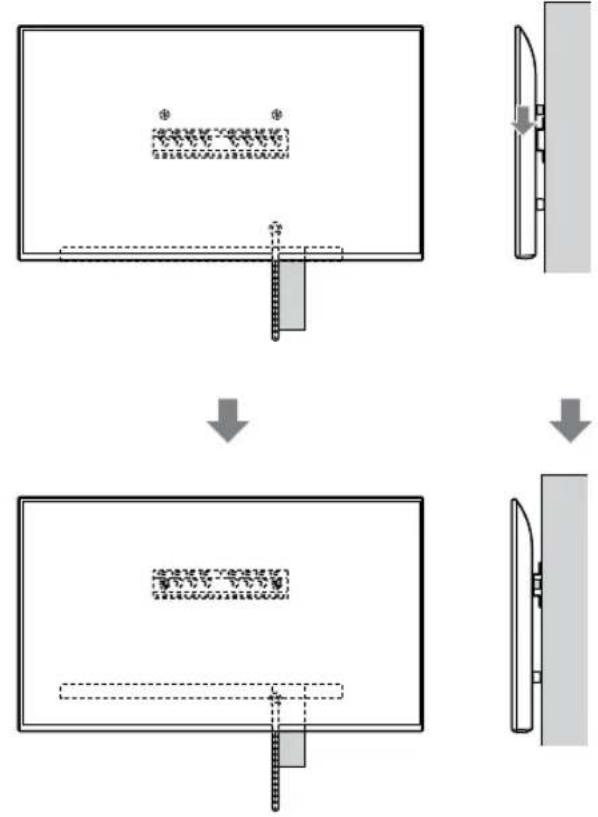
flowchart
graph TD
    A["Step 1: Object Tracking"] --> B["Step 2: Assembly"]
    B --> C["Step 3: Final Assembly"]
HOIATUS
text_image
Safety instruction diagram showing hand protection and safety symbols for a person holding a devicetext_image
Technical diagram showing a device with labeled components and a magnified view of the internal structure.Märkus.
- Hoidke telerit kindlalt mölema käega.
natural_image
Simple line drawing of a rectangular frame with a small rectangle and a starburst shape at the bottom (no text or symbols)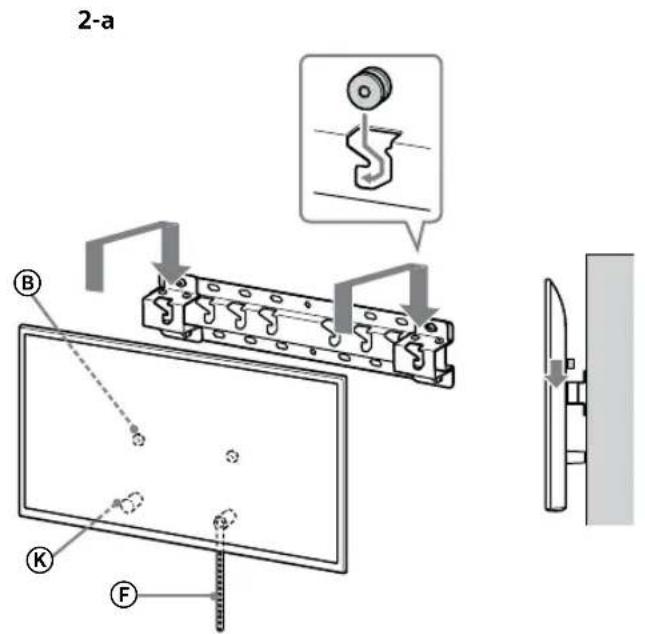
text_image
2-a B C F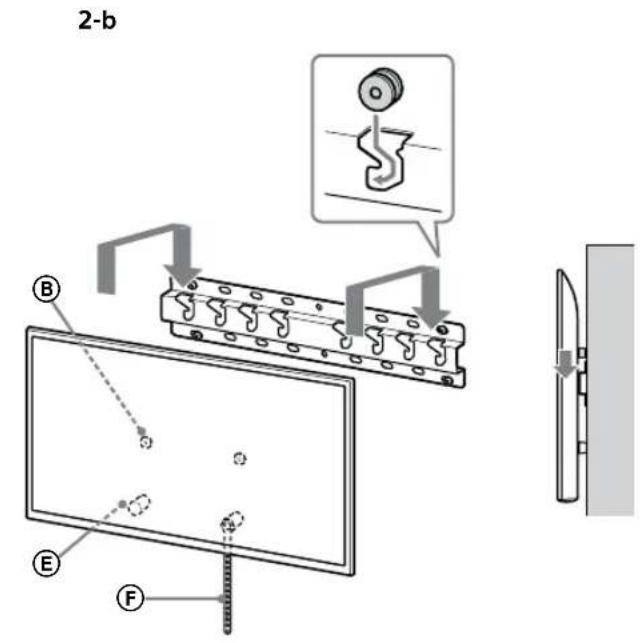
text_image
2-b B E F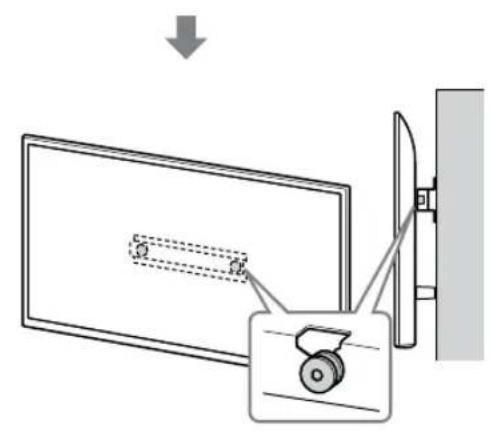
text_image
Diagram showing a device with a lock and a magnified view of its internal structure, likely illustrating a mechanical or electrical assembly.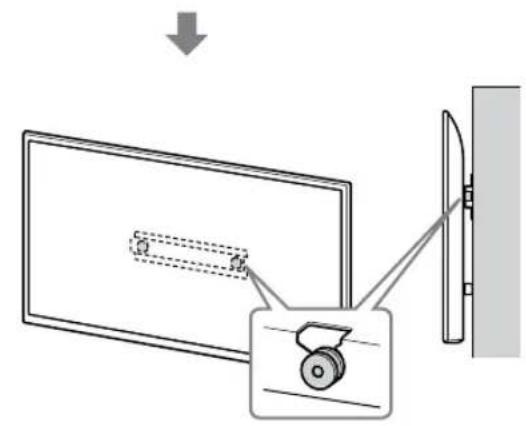
text_image
Diagram showing a monitor with a scroll wheel and a wall-mounted device, illustrating the process of viewing or projection.HOIATUS
text_image
Safety instruction diagram showing hand protection and no violations for a device, with two human silhouettes below.text_image
Technical diagram showing installation of a mechanical component with a magnified inset illustrating the assembly process.HOIATUS
Mass (ainult alus): (umbes) [kg]
0,8
text_image
Technical diagram of a mechanical or electrical component with labeled parts and connectorsnatural_image
Simple line drawing of a door with a rectangular opening and a prohibition symbol (no text or labels)![SONY Bravia KD43XG8196 - Mass (ainult alus): (umbes) [kg] - 1](/content/2026/03/465241/images/d025f00805349713d8558212acd2be71ca994dfe367162e273a7f2aa61425435.jpg)
text_image
Trīsis Ⓑ Starplika (20 mm) Ⓔ Skrūve (+PSW 6 x 20) Ⓓ Saite Ⓕtext_image
Diagram illustrating two steps of installing a device, showing hand positioning and safety warning symbol.natural_image
Simple line drawing of a door with a switch and a prohibition symbol (no text or labels)![SONY Bravia KD43XG8196 - Mass (ainult alus): (umbes) [kg] - 2](/content/2026/03/465241/images/29de5896a1e138d251ed2873a5a135e9eb3766e9106f6c2a99e998331440bbed.jpg)
text_image
Trīsis Ⓑ Starplika (20 mm) Ⓔ Skrūve (+PSW 6 x 20) Ⓒ Saite Ⓕ2 lespraudiet televizorā vajadzīgo(-os) kabeli(-ļus).
text_image
Diagram illustrating a procedure for installing or adjusting a device, with labeled steps and a warning symbol.natural_image
Simple line drawing of a door with a stop symbol (no text or labels)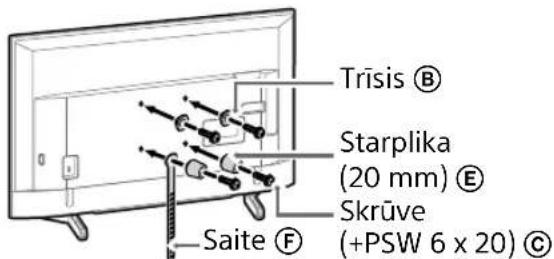
text_image
Trīsis Ⓑ Starplika (20 mm) Ⓔ Skrūve (+PSW 6 x 20) Ⓓ Saite Ⓕ2 lespraudiet televizorā vajadzīgo(-os) kabeli(-ļus).
natural_image
Line drawing of a rectangular TV with cable connectors and connectors, no text or symbols presentPiezime
natural_image
Diagram of a device with labeled connectors and internal components (no text or symbols)Piezime
natural_image
Simple line drawing of a door with a switch and a prohibition symbol (no text or labels)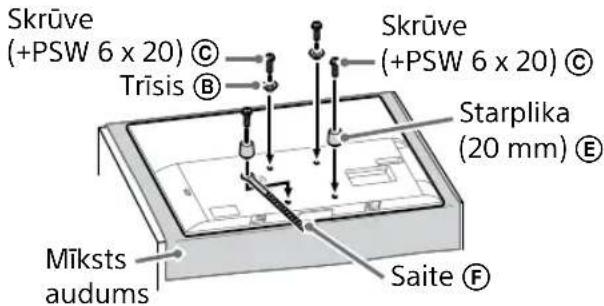
text_image
Skrūve (+PSW 6 x 20) © Trīsis Ⓑ Skrūve (+PSW 6 x 20) © Starplika (20 mm) Ⓔ Mīksts audums Saite ⒨natural_image
Illustration of three human figures assembling a large whiteboard with a ruler, no text or symbols presenttext_image
Technical diagram showing a monitor with labeled components A, B, and F, including a close-up view of the interior panel.2 Uzstādiet televizoru uz pamatnes vai pamatnes adaptera.
natural_image
Simple line drawing of a rectangular frame with a starburst shape at the bottom (no text or symbols)flowchart
graph TD
    A["Initial State"] --> B["Step 1: Initial State with a rectangular block and dimension annotation"]
    B --> C["Step 2: Step 1: Initial State with a dashed line and dimension annotation"]
    C --> D["Step 3: Step 2: Initial State with a dashed line and dimension annotation"]
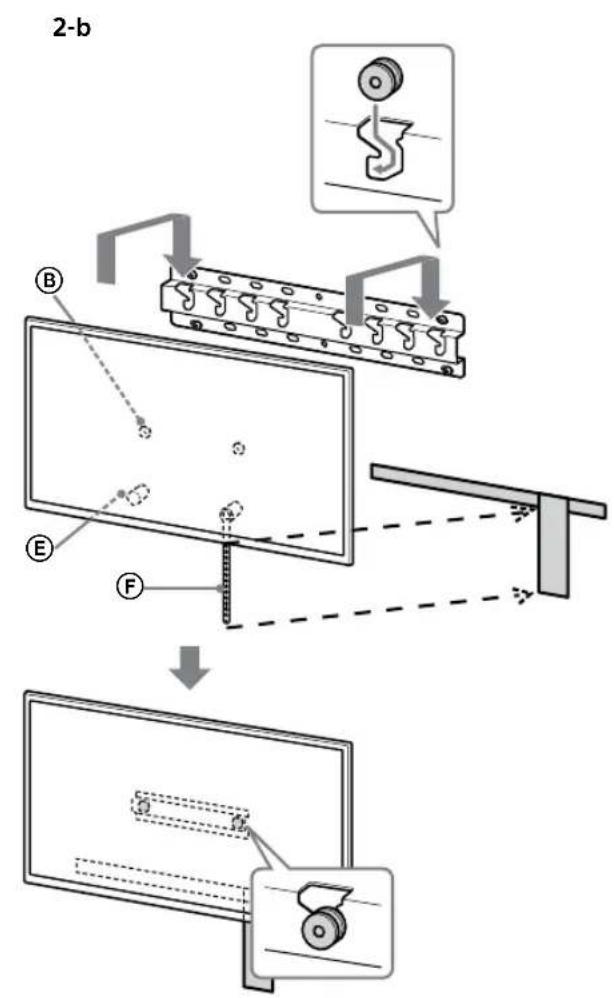
text_image
2-b B E F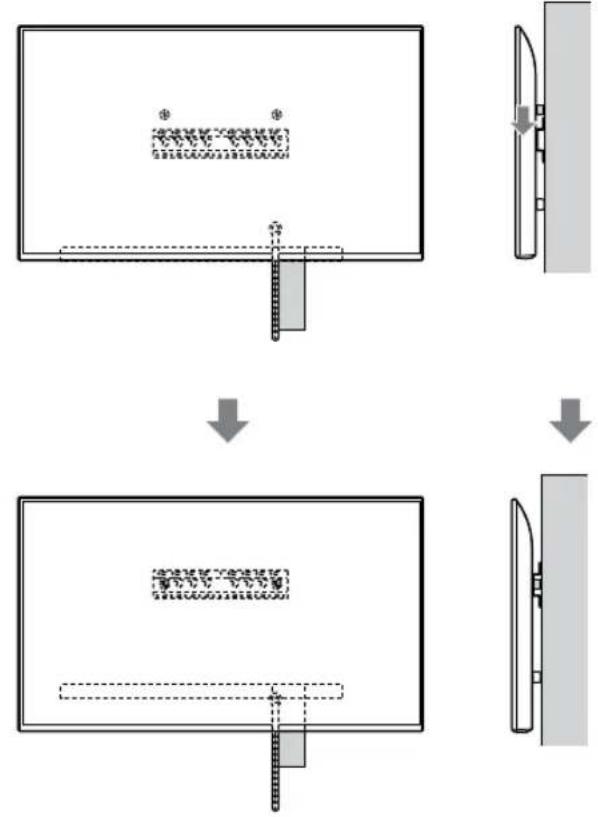
flowchart
graph TD
    A["Step 1: Object Tracking"] --> B["Step 2: Assembly"]
    B --> C["Step 3: Final Assembly"]
BRĪDINĀJUMS!
text_image
Safety instruction diagram showing three human silhouettes with different foot positions and symbols indicating correct vs. incorrect conditions.3 Nesasveriet televizora apakšpusi.
- Satveriet saites Ⓖ galu un cieši piestipriniet to pie sienas.
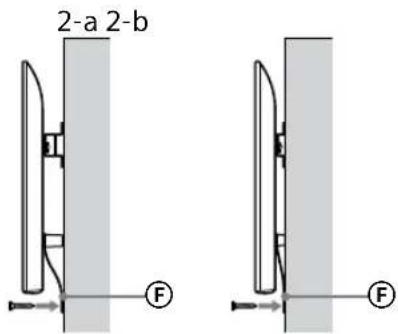
text_image
2-a 2-b F Ftext_image
Technical diagram showing a device with labeled components and a magnified view of the internal structure.Piezime
- Turiet televizoru stingri ar abām rokām.
2 Uzstādiet televizoru uz pamatnes vai pamatnes adaptera.
natural_image
Simple line drawing of a rectangular frame with a dashed rectangle and a starburst shape at the bottom (no text or symbols)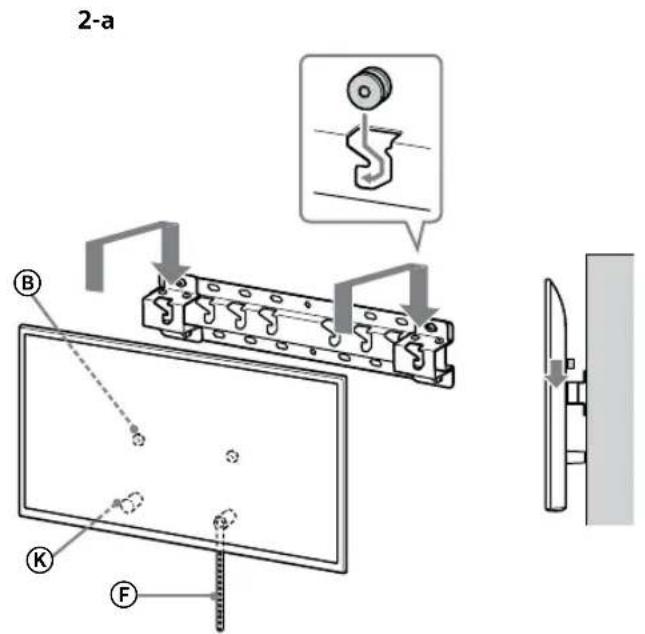
text_image
2-a B K F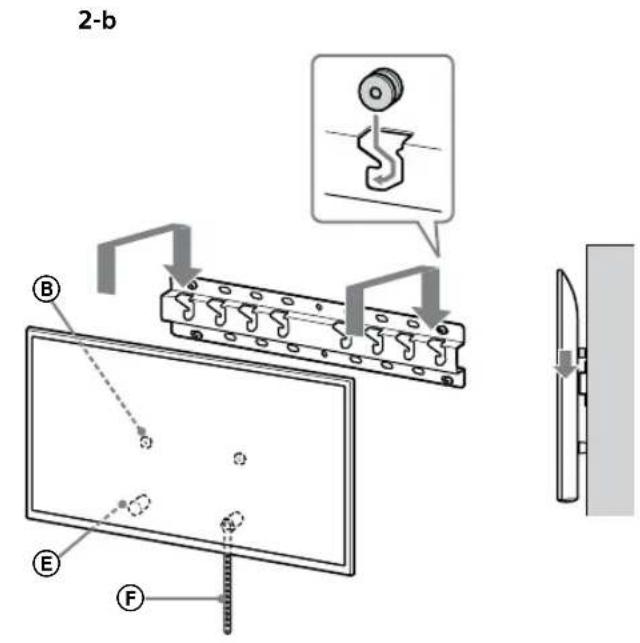
text_image
2-b B E F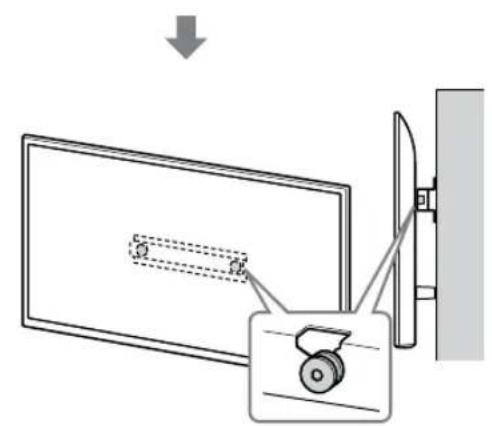
text_image
Diagram showing a monitor with a slide and a scroll wheel, connected to a wall-mounted device with an arrow indicating direction.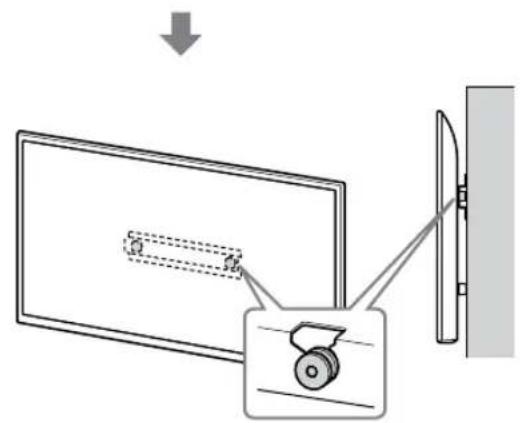
text_image
Diagram showing a monitor with a slide and a wheel, connected to a wall-mounted device, with an arrow indicating direction of motion.BRĪDINĀJUMS!
text_image
Safety instruction diagram showing hand protection and warning symbols for installing a panel, with two silhouettes representing different positions.3 Nesasveriet televizora apakšpusi.
- Satveriet saites Ⓖ galu un cieši piestipriniet to pie sienas.
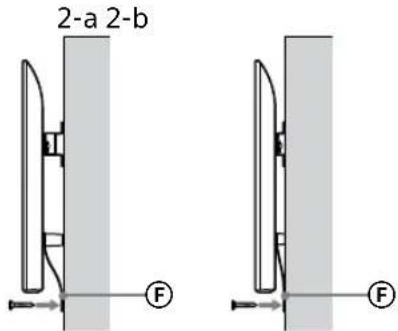
text_image
2-a 2-b F Ftext_image
Technical diagram showing assembly of a mechanical component with labeled parts and a close-up inset illustrating the internal structure.BRĪDINĀJUMS!
text_image
Technical diagram of a mechanical or electrical component with labeled parts and connectorsnatural_image
Diagram showing a door with a switch and a prohibition symbol (no text or labels)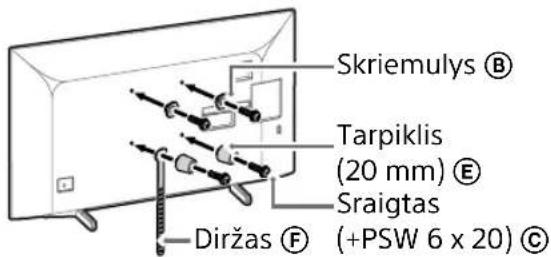
text_image
Skriemulys Ⓑ Tarpiklis (20 mm) Ⓔ Sraigtas Diržas ⒨ (+PSW 6 x 20) Ⓒtext_image
Diagram illustrating two steps of installing a shipping container, showing hand positioning and safety warning symbol.natural_image
Diagram showing a door with a switch and a prohibition symbol (no text or labels present)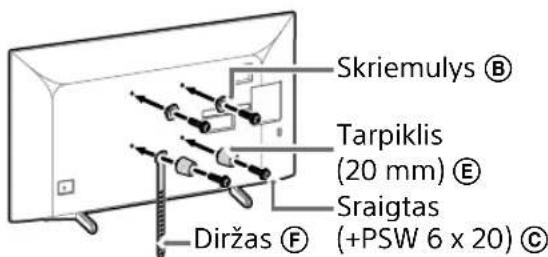
text_image
Skriemulys Ⓑ Tarpiklis (20 mm) Ⓔ Sraigtas (+PSW 6 x 20) Ⓒ Diržas Ⓕtext_image
Diagram illustrating a procedure for installing or adjusting a device, with labeled steps and a warning symbol.natural_image
Pure electrical circuit lines without any symbols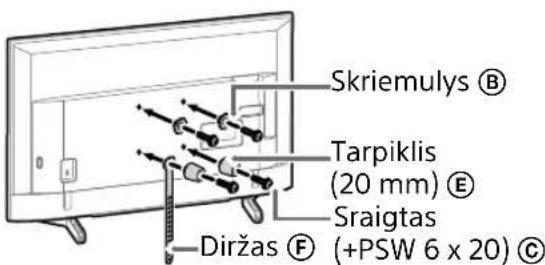
text_image
Skriemulys Ⓑ Tarpiklis (20 mm) Ⓔ Sraigtas Diržas Ⓕ (+PSW 6 x 20) Ⓒnatural_image
Line drawing of a rectangular TV with cable connectors and connectors, no text or symbols presentPastaba
natural_image
Diagram of a device with labeled ports and connectors, no readable text or symbols presentPastaba
natural_image
Simple line drawing of a door with a rectangular opening and a prohibition symbol (no text or labels)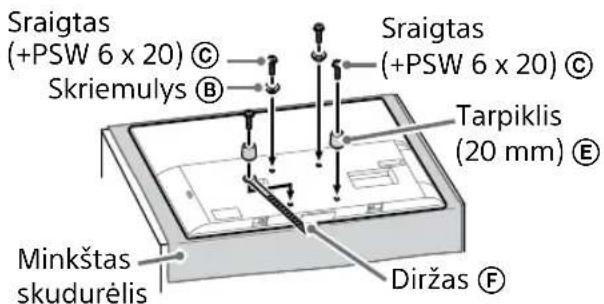
natural_image
Illustration of three people lifting a large object with a ruler, no text or symbols presenttext_image
Diagram showing a monitor with labeled parts (A, B, C, D, E) and a close-up view of the interior panel.natural_image
Simple line drawing of a rectangular frame with a dashed rectangle and a starburst shape at the bottom (no text or symbols)flowchart
graph TD
    A["Initial State"] --> B["Step 1: Initial State with a rectangular block and dimension annotation"]
    B --> C["Step 2: Step 1: Initial State with a dashed line and dimension annotation"]
    C --> D["Step 3: Step 2: Initial State with a dashed line and dimension annotation"]
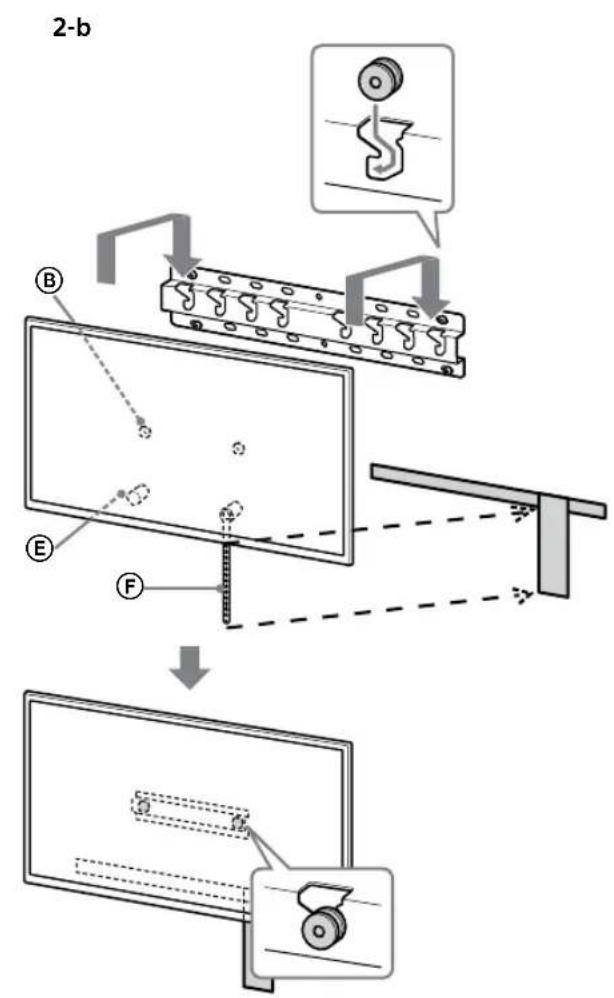
text_image
2-b B E F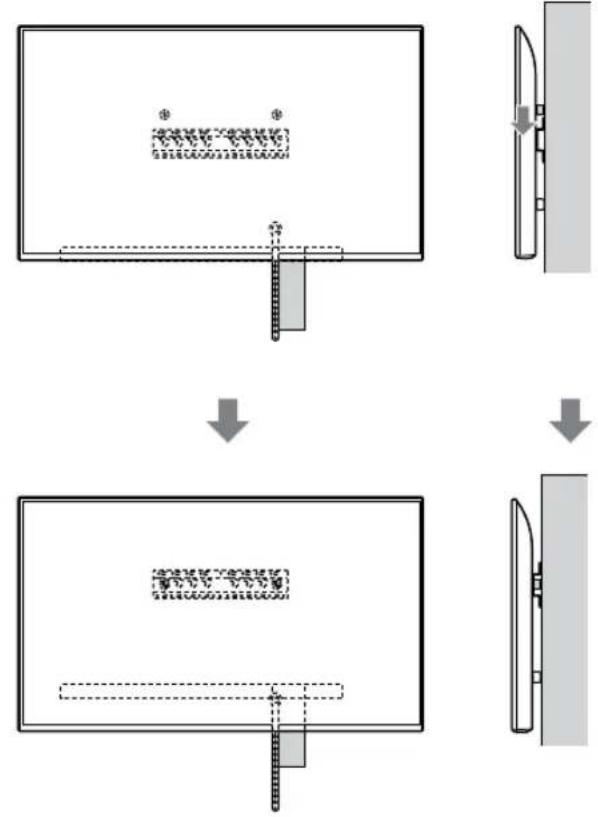
flowchart
graph TD
    A["Step 1: Object Tracking"] --> B["Step 2: Assembly"]
    B --> C["Step 3: Final Assembly"]
ISPÉJIMAS
text_image
Safety instruction diagram showing hand protection and safety symbols for a person holding shoestext_image
Technical diagram showing a device with labeled component B and internal structure, including dashed lines and a magnified view.Pastaba
natural_image
Simple line drawing of a rectangular frame with a dashed rectangle inside and a starburst shape at the bottom (no text or symbols)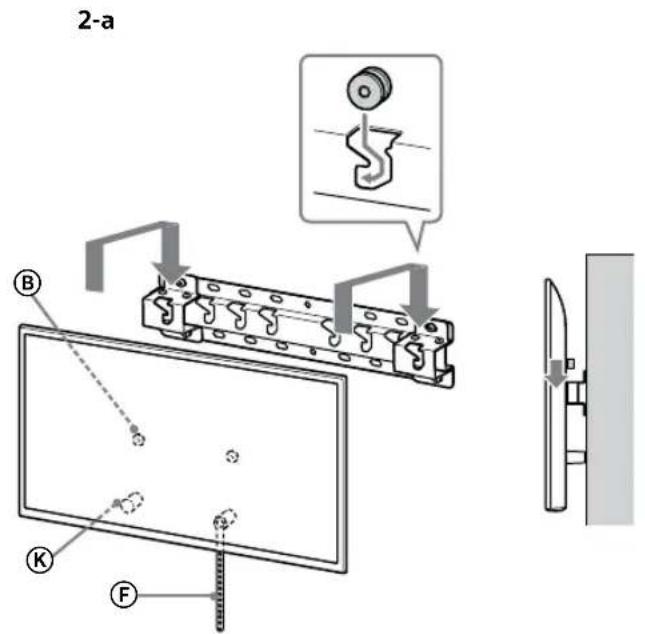
text_image
2-a B K F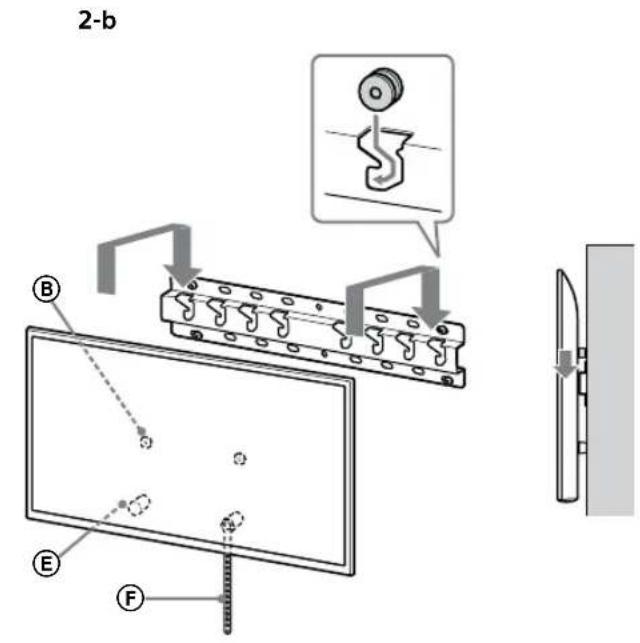
text_image
2-b B E F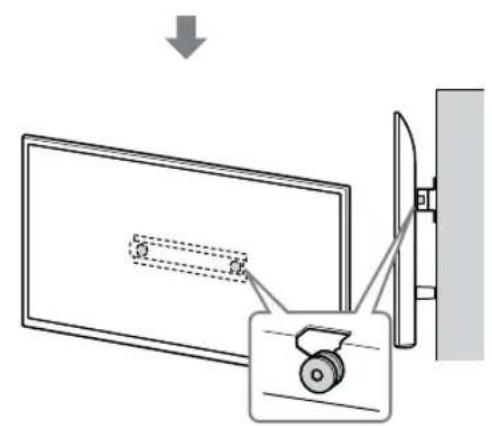
text_image
Diagram showing a monitor with a slide and a device, illustrating a folding or disassembly process.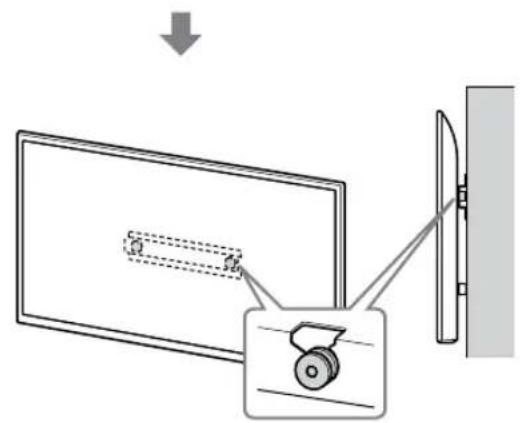
text_image
Diagram showing a monitor with a slide and a wheel, connected to a wall-mounted device, with an arrow indicating direction of motion.JSPÈJIMAS
text_image
Safety instruction diagram showing hand protection and no violations for a device, with two human silhouettes and labeled symbols.text_image
Technical diagram showing a mechanical assembly with labeled components and a close-up inset of a hook component.JSPÈJIMAS
text_image
Technical diagram of a mechanical or electrical component with labeled parts and connectors4 Določite položaje vijakov za vgradnjo podstavka (20) Ⓐ.
natural_image
Simple line drawing of a door with a switch and a prohibition symbol (no text or labels)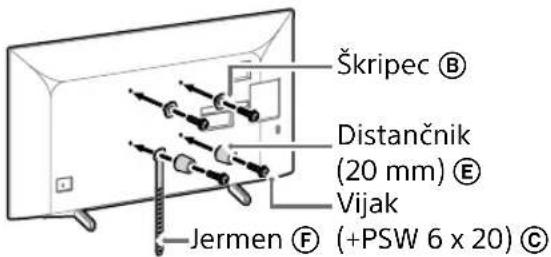
text_image
Škripec Ⓑ Distančnik (20 mm) Ⓔ Vijak Jermen Ⓕ (+PSW 6 x 20) Ⓔ3 Na televizor priključite potrebne kable.
text_image
Diagram illustrating two steps of installing a shipping container, showing hand positioning and safety warning.natural_image
Diagram showing a door with a switch and a prohibition symbol (no text or labels)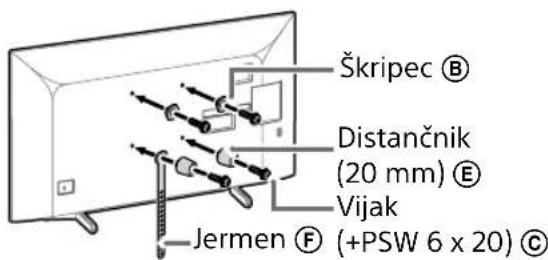
text_image
Škripec Ⓑ Distančnik (20 mm) Ⓔ Vijak Jermen Ⓕ (+PSW 6 x 20) Ⓒ2 Na televizor priključite potrebne kable.
Pred vgradnjo televizorja na steno obvezno priključite kable. Ko je televizor vgrajen, kablov ne boste mogli priključiti.
text_image
Diagram illustrating a procedure for installing or adjusting a device, with labeled steps and a warning symbol.natural_image
Diagram of a door with a stop symbol (no text or labels present)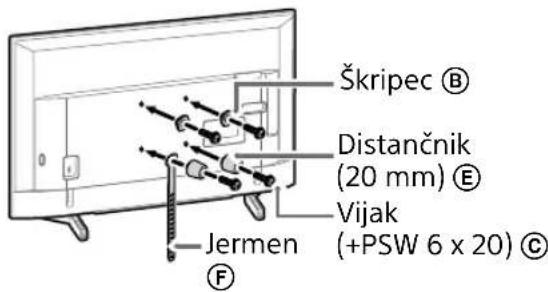
text_image
Škripec Ⓑ Distančnik (20 mm) Ⓔ Vijak (+PSW 6 x 20) Ⓒ Jermen F2 Na televizor priključite potrebne kable.
Pred vgradnjo televizorja na steno obvezno priključite kable. Ko je televizor vgrajen, kablov ne boste mogli priključiti.
natural_image
Line drawing of a rectangular TV with cable connectors and connectors, no text or symbols presentOpomba
natural_image
Diagram of a device with labeled ports and connectors, no readable text or symbols presentOpomba
natural_image
Simple line drawing of a door with a stopper and a prohibition symbol (no text or labels)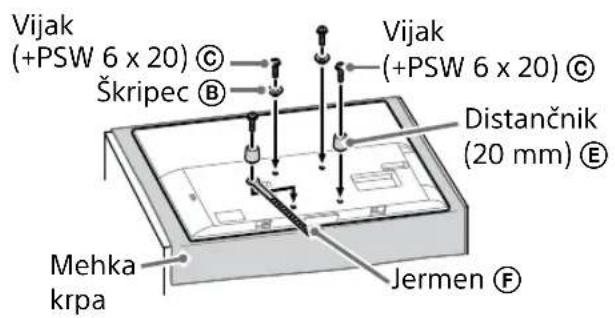
text_image
Vijak (+PSW 6 x 20) © Škripec B Vijak (+PSW 6 x 20) © Distančnik (20 mm) E Mehka krpa Jermen F3 Na televizor priključite potrebne kable.
natural_image
Illustration of three human figures assembling a large board with a measuring tool (no text or symbols)text_image
Technical diagram showing a monitor with labeled components (A, B, C, D, E) and a close-up view of the interior panel.2 Televizor vgradite na podstavek ali prilagodilnik podstavka.
natural_image
Simple line drawing of a rectangular frame with a dashed rectangle and a starburst shape at the bottom (no text or symbols)- Po vgradnji televizorja na steno s stene odstranite maskirni trak itd.
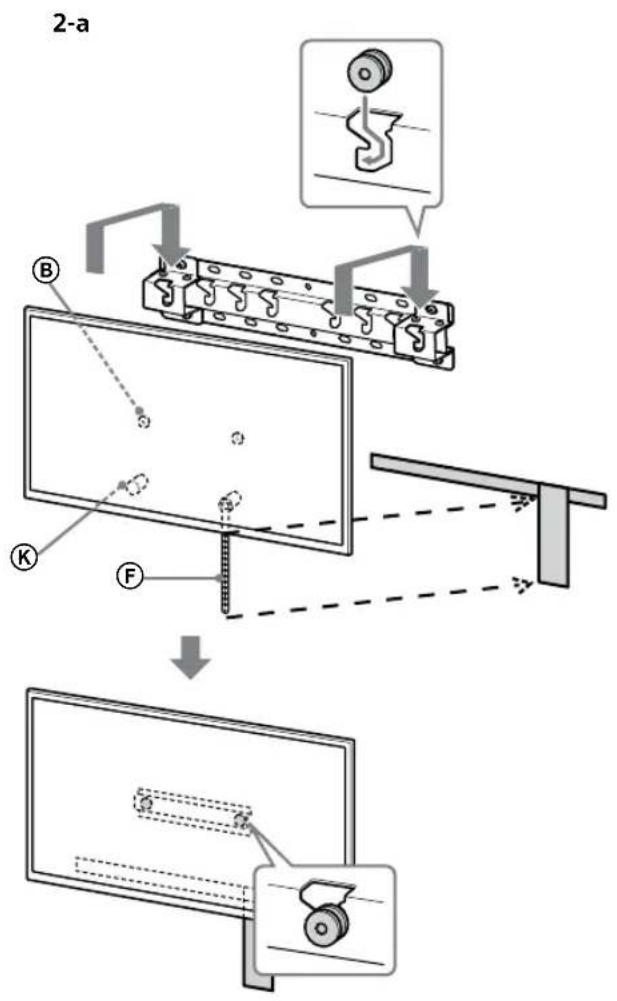
text_image
2-a B K F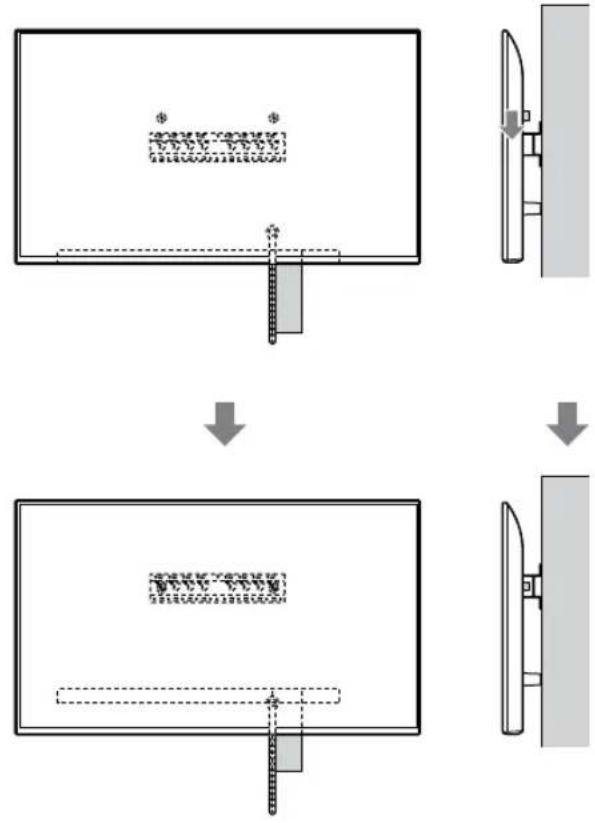
flowchart
graph TD
    A["Initial Image"] --> B["Process Step"]
    B --> C["Final Output"]

    subgraph Initial
    D["Document Icon: $* *"]
    E["Arrow Down"]
    end

    subgraph Process
    F["Document Icon: $* *"]
    G["Arrow Up"]
    end

    subgraph Final
    H["Document Icon: $* *"]
    I["Arrow Down"]
    end
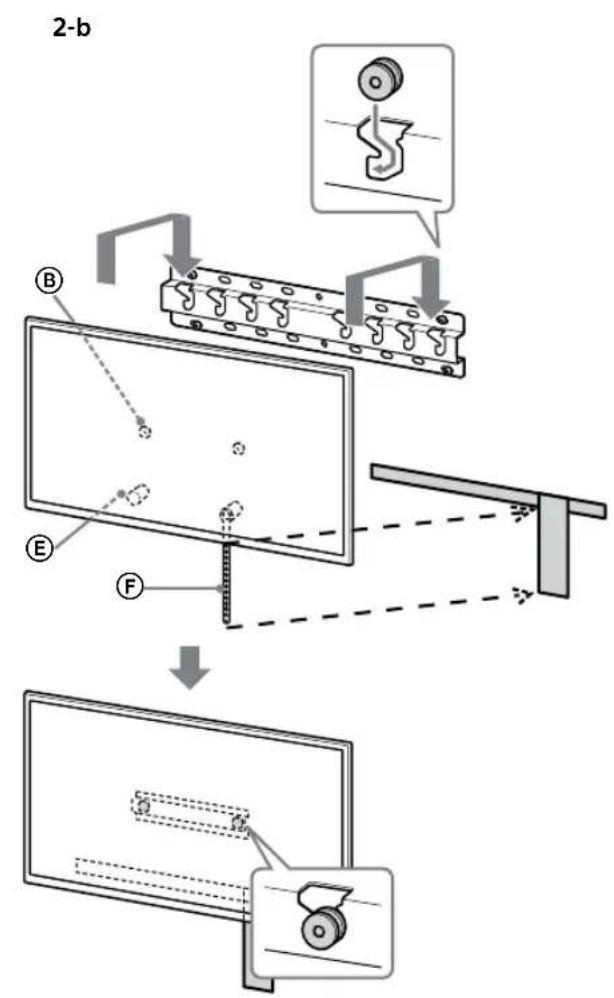
text_image
2-b B E F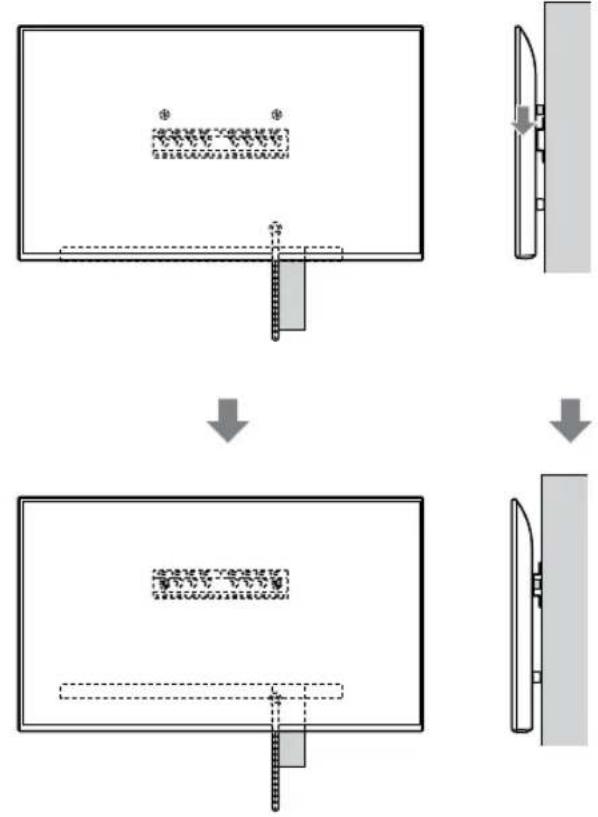
flowchart
graph TD
    A["Step 1: Object Tracking"] --> B["Step 2: Assembly"]
    B --> C["Step 3: Final Assembly"]
OPOZORILO
text_image
Safety instruction diagram showing hand protection and safety symbols for a person holding a devicetext_image
Technical diagram showing a device with labeled components and a magnified view of the internal structure.Opomba
- Televizor trdno držite z obema rokama.
2 Televizor vgradite na podstavek ali prilagodilnik podstavka.
- Televizor previdno spustite navzdol in škripce Ⓑ, ki so pritrjeni na zadnjo stran televizorja, obesite na podstavek ali prilagodilnik podstavka, pri tem pa obvezno preverite obliko lukenj. - Po vgradnji televizorja na steno potrdite, da so škripci Ⓑ trdno zatakjeni v podstavek ali prilagodilnik podstavka. - Počasi sprostite obe roki, da zagotovite, da televizor ne pade.
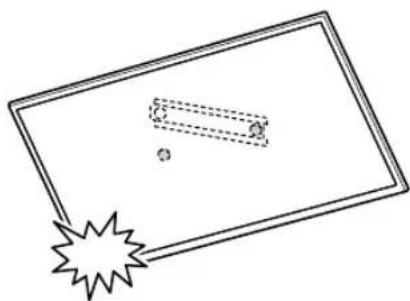
natural_image
Simple line drawing of a rectangular frame with a dashed rectangle inside and a starburst shape at the bottom (no text or symbols)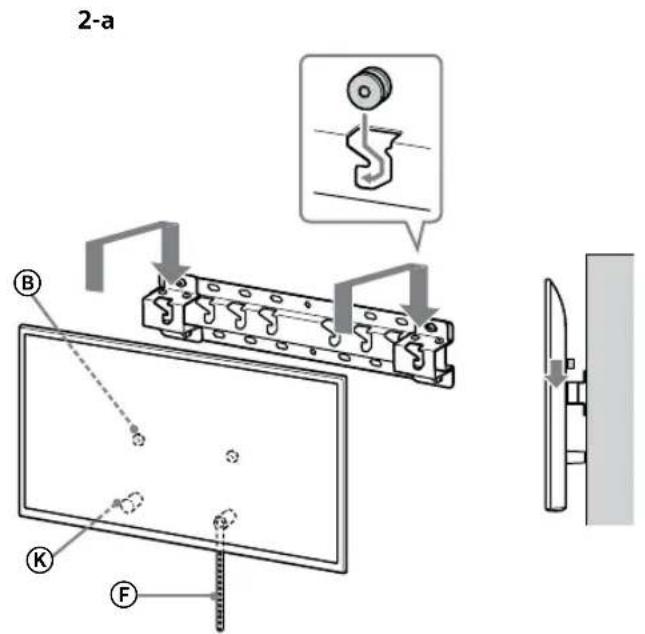
text_image
2-a B K F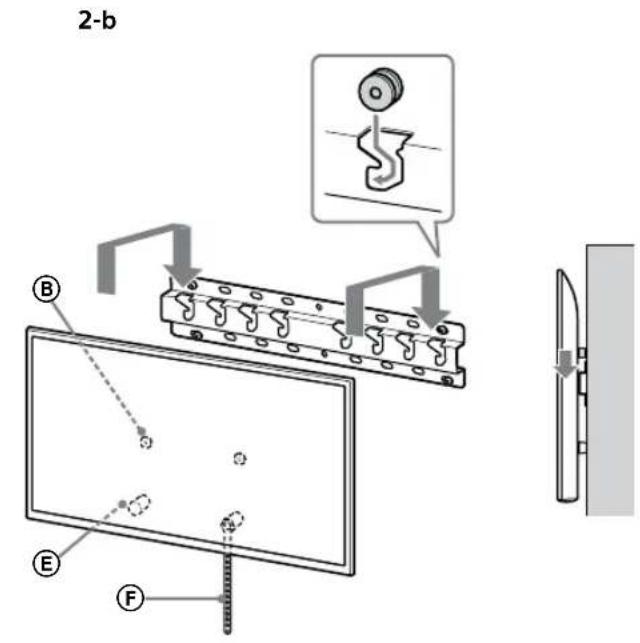
text_image
2-b B E F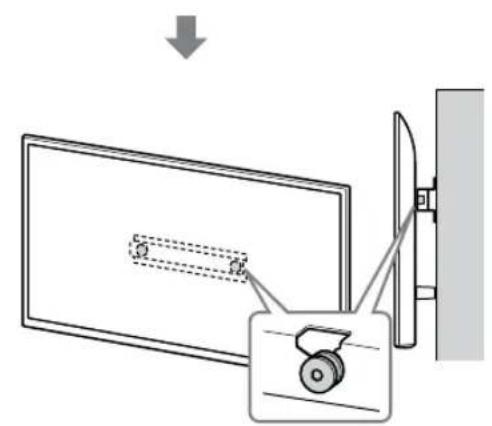
text_image
Diagram showing a monitor with a slide and a scroll, connected to a wall-mounted device with a magnified view.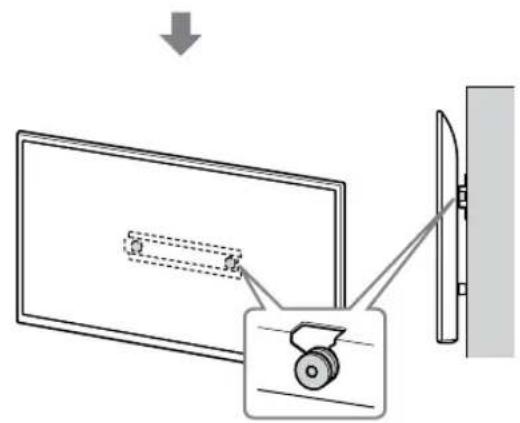
text_image
Diagram showing a monitor with a slide and a wheel, connected to a wall-mounted device, with an arrow indicating direction of motion.OPOZORILO
text_image
Safety instruction diagram showing hand protection and no violations for a device, with two human silhouettes below.text_image
Technical diagram showing installation of a mechanical component with a close-up view and detail viewOPOZORILO
text_image
Technical diagram of a mechanical or electrical component with labeled parts and connectors4 Odlučite o položaju vijaka za postavljanje baze (20) Ⓐ.
Pogledajte specifikaciju na stranici 19. Kada odaberete opciju 2-a, poslužite se položajima rupa za adapter baze ①.
UPOZORENJE
- Zid na koji postavljate televizor mora izdržati težinu barem četiri puta veću od težine televizora (Pogledajte Referentni vodič Vašeg televizora za podatak o njegovoj težini.).
- Provjerite čvrstoću zida na koji ćete postaviti televizor. Ako je potrebno, ojačajte zid.
Postavljanje baze na zid
- Pripremite četiri ili više vijaka promjera 8 mm ili slične vijke (nisu isporučeni).
- Pričvrstite četiri vijka u rupe za bazu adaptera ① U slučaju baze (20) ④ (samo 2-a).
• Postavite bazu (20) Ⓐ na zid vodoravno.
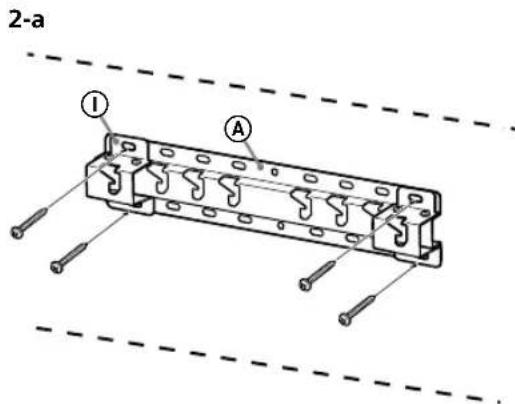
text_image
2-a I A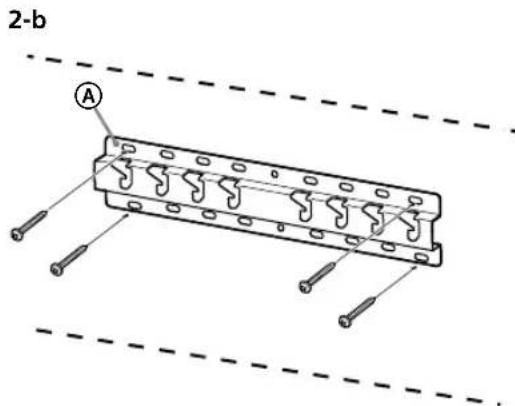
text_image
2-b APriprema za postavljanje televizora na zid
Za postavljanje postolja pogledajte Vodič za postavljanje.
KD-75XG80□□
natural_image
Diagram showing a door with a switch and a prohibition symbol (no text or labels)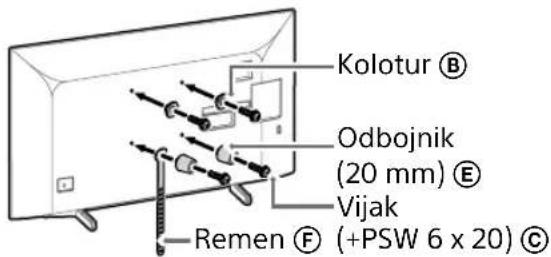
text_image
Kolotur Ⓑ Odbojnik (20 mm) Ⓔ Vijak Remen Ⓕ (+PSW 6 x 20) Ⓔ3 Priključite potrebne kabele u televizor.
Svakako spojite kabele prije postavljanja televizora na zid. Kabele nećete moći priključiti kada je televizor bude postavljen. Pogledajte Referentni vodič isporučen s Vašim TV-om.
Napomena
text_image
Diagram illustrating two steps of installing a vehicle door panel, with instructions for cleaning and safety.- Ponovite prethodni korak i uklonite drugu stranu postolja za stol.
Napomena
natural_image
Simple line drawing of a door with a switch and a prohibition symbol (no text or labels)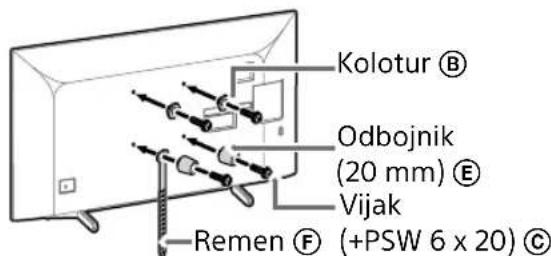
text_image
Kolotur Ⓑ Odbojnik (20 mm) Ⓔ Vijak Remen Ⓕ (+PSW 6 x 20) Ⓔ2 Priključite potrebne kabele u televizor.
Svakako spojite kabele prije postavljanja televizora na zid. Kabele nećete moći priključiti kada je televizor bude postavljen. Pogledajte Referentni vodič isporučen s Vašim TV-om.
Napomena
- Provodenje kabela u zid povjerite licenciranom izvodaču radova.
- Povežite spojne kabele kako ne biste stali na njih prije postavljanja uređaja na zid.
3 Skinite Postolje za stol s TV-a.
- Uklonite jednu po jednu stranu postolja za stol. Čvrsto držite postolje za stol objema rukama dok druge osobe podignu TV.
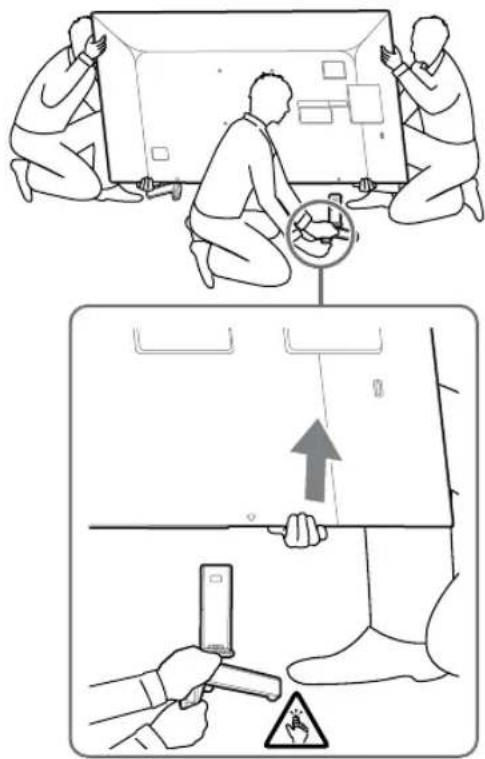
text_image
Diagram illustrating two steps of installing a device, showing installation and inspection with a warning sign.- Ponovite prethodni korak i uklonite drugu stranu postolja za stol.
Napomena
natural_image
Simple line drawing of a door with a handle and no text or symbols present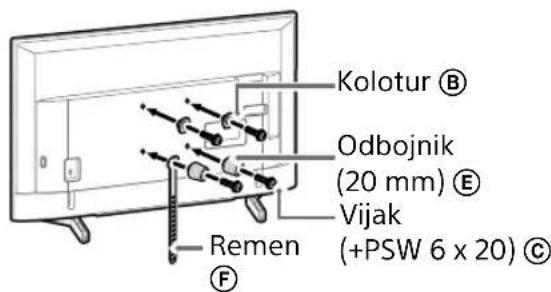
text_image
Kolotur Ⓑ Odbojnik (20 mm) Ⓔ Vijak (+PSW 6 x 20) Ⓒ Remen Ⓕ2 Priključite potrebne kabele u televizor.
Svakako spojite kabele prije postavljanja televizora na zid. Kabele nećete moći priključiti kada je televizor bude postavljen. Pogledajte Referentni vodič isporučen s Vašim TV-om.
Napomena
- Provodenje kabela u zid povjerite licenciranom izvodaču radova.
- Povežite spojne kabele kako ne biste stali na njih prije postavljanja uređaja na zid.
3 Skinite Postolje za stol s TV-a.
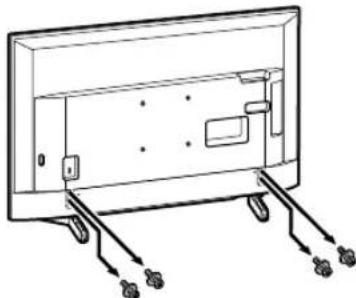
natural_image
Line drawing of a rectangular TV with attached cables and connectors, no text or symbols presentNapomena
natural_image
Diagram of a device with labeled ports and connectors, no readable text or symbols presentNapomena
- Pripazite da televizor postavite na mjesto gdje ste stavili mekanu tkaninu kako biste spriječili oštećenje površine zaslona.
- Kada postavljate Nosač za postavljanje na zid, nemojte koristiti vijke koje ste skinuli s Postolja za stol.
- Pazite da skinuto Postolje za stol i njegove vijke spremite na sigurno, držeći ih dalje od djece. Bit će Vam potrebni ako u budućnosti budete željeli televizor držati na stolu. Postolje za stol se ne može kupiti zasebno.
UPOZORENJE
natural_image
Simple line drawing of a door with a rectangular opening and a prohibition symbol (no text or labels)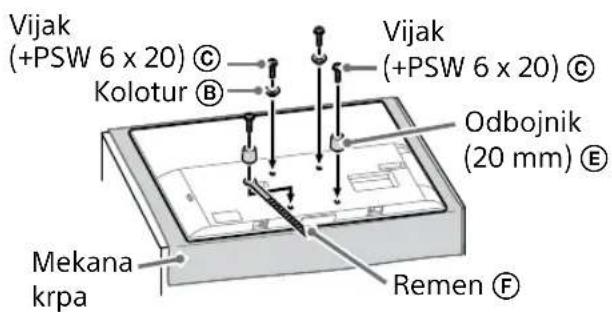
text_image
Vijak (+PSW 6 x 20) © Kolotur B Vijak (+PSW 6 x 20) © Odbojnik (20 mm) E Mekana krpa Remen F3 Priključite potrebne kabele u televizor.
Svakako spojite kabele prije postavljanja televizora na zid. Kabele nećete moći priključiti kada je televizor bude postavljen. Pogledajte Referentni vodič isporučen s Vašim TV-om.
Napomena
natural_image
Illustration of three people assembling a large board with a ruler, no text or symbols presenttext_image
Technical diagram showing a monitor with labeled components (A, B, C, D, E) and a close-up view of the interior panel.2 Postavite TV na bazu ili adapter za bazu.
natural_image
Simple line drawing of a rectangular frame with a dashed rectangle and a starburst shape at the bottom (no text or symbols)- Nakon instaliranja TV-a na zid, uklonite ljepljivu traku sa zida.
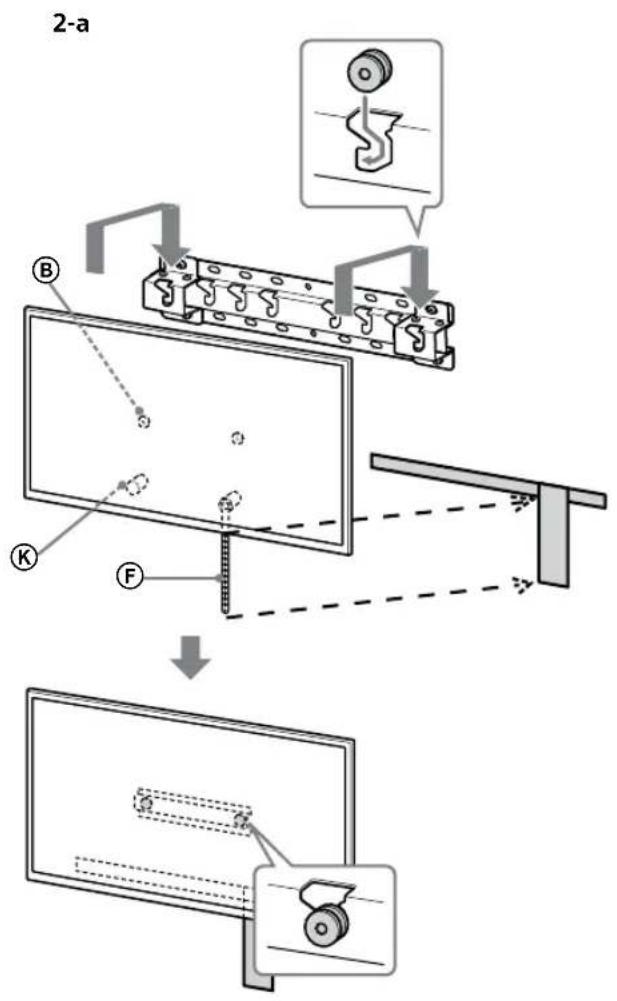
text_image
2-a B K F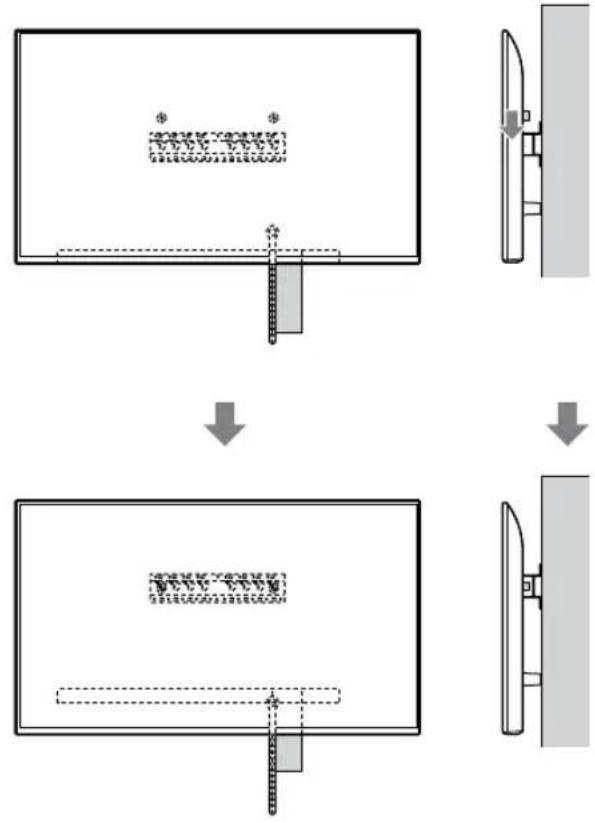
flowchart
graph TD
    A["Receipt"] --> B{Document Process}
    B -->|Proceed| C["Output"]
    B -->| UAE/US/IE/IE/IE/IE/IE/IE/IE/IE/IE/IE/IE/IE/IE/IE/IE/IE/IE/IE/IE/IE/IE/IE/IE/IE/IE/IE/IE/IE/IE/IE/IE/IE/IE/IE/IE/IE/IE/IE/IE/IE/IE/IE/IE/IE/IE/IE/IE/IE/IE/IE/II]
    style A fill:#f9f,stroke:#333
    style B fill:#ccf,stroke:#333
    style C fill:#cfc,stroke:#333
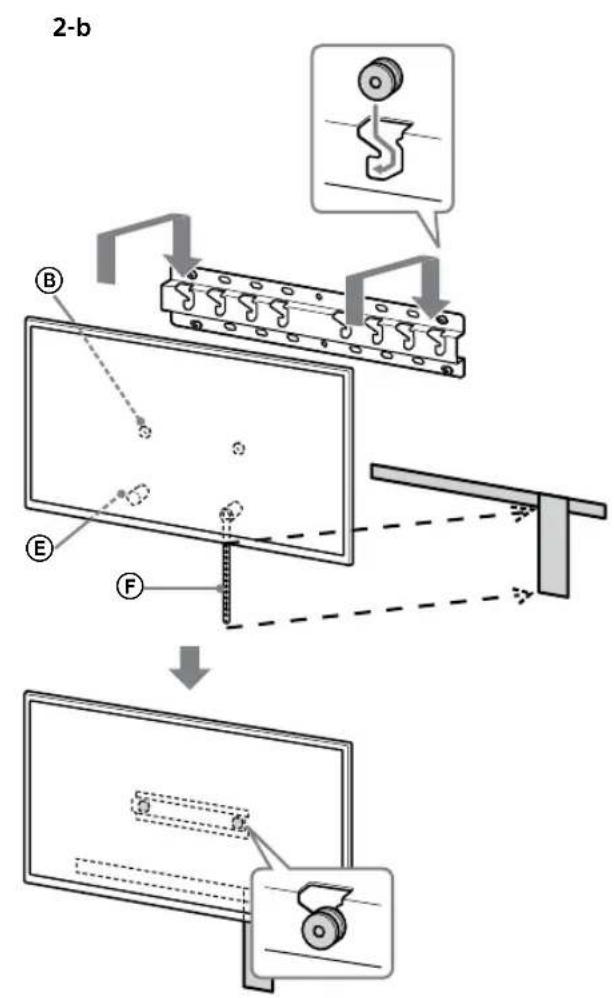
text_image
2-b B E F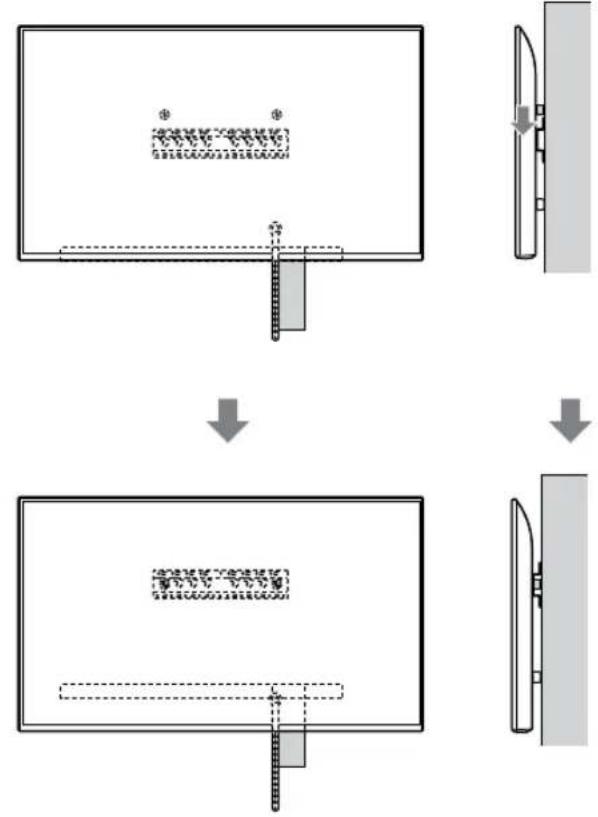
flowchart
graph TD
    A["Step 1: Object Tracking"] --> B["Step 2: Assembly"]
    B --> C["Step 3: Final Assembly"]
UPOZORENJE
text_image
Safety instruction diagram showing three human silhouettes with different foot positions and symbols indicating correct, incorrect, and no violations.3 Sprječavanje prevrtanja televizora.
- Uzmite komad remen Ⓔ i lagano je pričvrstite za zid.
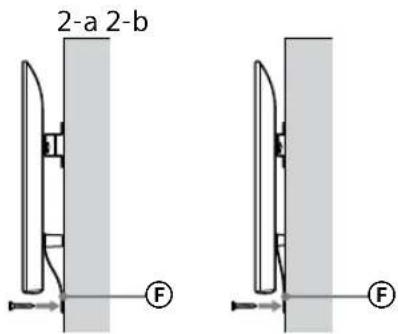
text_image
2-a 2-b F Ftext_image
Technical diagram showing a device with labeled components and a magnified view of the internal structure.Napomena
- Čvrsto držite TV objema rukama.
2 Postavite TV na bazu ili adapter za bazu.
natural_image
Simple line drawing of a rectangular frame with a starburst shape at the bottom (no text or symbols)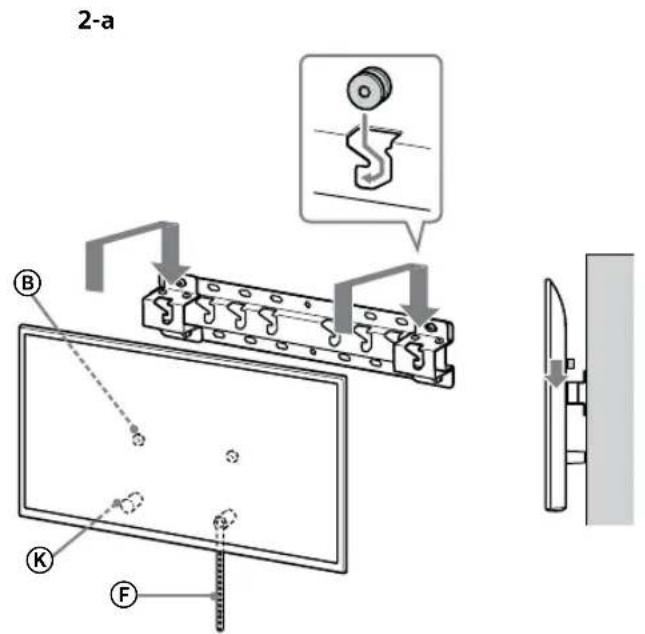
text_image
2-a B C F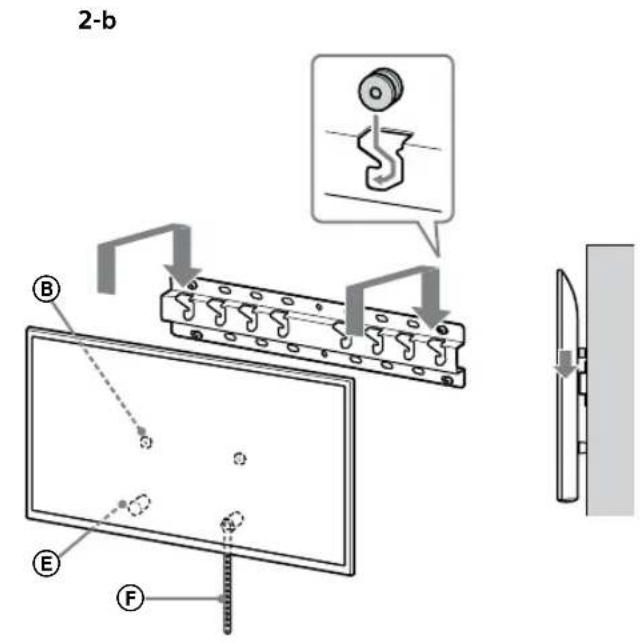
text_image
2-b B E F
text_image
Diagram showing a device with a lock and a magnified view of its internal structure, likely illustrating a mechanical or electrical assembly.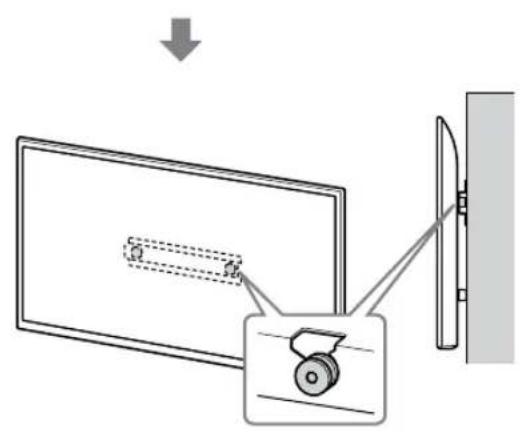
text_image
Diagram showing a monitor with a slide and a scroll wheel, connected to a wall-mounted device, with an arrow indicating direction of motion.UPOZORENJE
text_image
Safety instruction diagram showing hand protection and no violations for a device, with two human silhouettes below.3 Sprječavanje prevrtanja televizora.
- Uzmite komad remen Ⓔ i lagano je pričvrstite za zid.
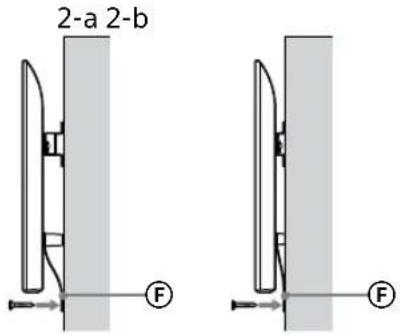
text_image
2-a 2-b F Ftext_image
Technical diagram showing a mechanical assembly with labeled components and a magnified inset showing a gear mechanism.UPOZORENJE
- Pobrinite se da dvije ili više osoba (tri ili više osoba za televizor veličine 75 inča ili veći) drži TV prilikom njegovog uklanjanja.
Specifikacije
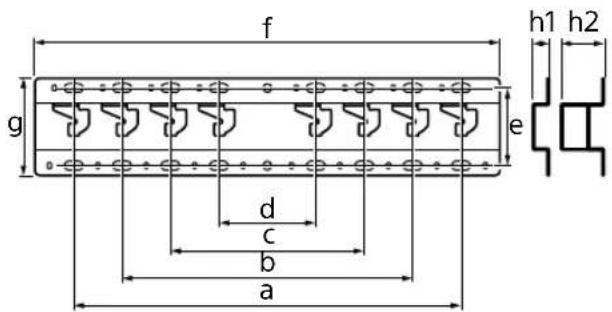
text_image
f g e h1 h2 d c b aDimenzije: (približno) [mm]
a : 400
b : 300
c : 200
d : 100
e : 80
f : 480
g : 100
text_image
Technical diagram of a mechanical or electrical component with labeled parts and connectors4 Herizdi (20) Ⓐ ornaty yshin бурандалардың orнын аныктаңыз.
natural_image
Simple line drawing of a door with a switch and a prohibition symbol (no text or labels)![SONY Bravia KD43XG8196 - Dimenzije: (približno) [mm] - 1](/content/2026/03/465241/images/e31c4c25a75add5f9ca53782d4813d4007fc4f750c5cf24f5885da7db07bea0b.jpg)
text_image
Diagram illustrating two steps of installing a device: top shows workers installing a box, bottom shows hands holding a phone with warning symbol.natural_image
Simple line drawing of a door with a rectangular opening and a prohibition symbol (no text or labels)![SONY Bravia KD43XG8196 - Dimenzije: (približno) [mm] - 2](/content/2026/03/465241/images/d9e80da37febf19f3846188be8e9d77af0d731acd9b1ff2f361dbc63d9ad0c36.jpg)
text_image
Diagram illustrating a procedure for installing or adjusting a device, with labeled steps and warning symbols.natural_image
Simple line drawing of a door with a stop symbol (no text or labels)![SONY Bravia KD43XG8196 - Dimenzije: (približno) [mm] - 3](/content/2026/03/465241/images/a7b180a31e156e6c5d83709c264275d7287ff58245a93d0807e30986e8e63a8c.jpg)
natural_image
Line drawing of a rectangular TV with cable connectors and connectors, no text or symbols presentНускау
natural_image
Diagram of a device with labeled connectors and internal components (no text or symbols)Нускау
natural_image
Simple line drawing of a door with a handle and no text or symbols present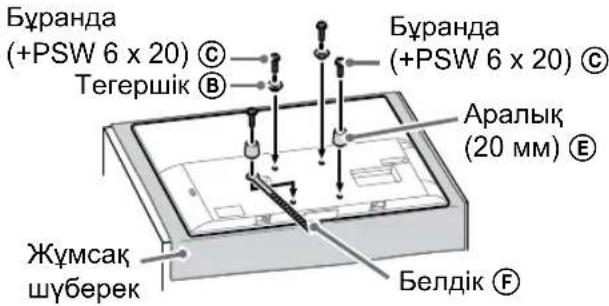
natural_image
Illustration of three people assembling a large board with a ruler, no text or symbols presenttext_image
Technical diagram showing a monitor with labeled components (A, B, C, D, E) and a close-up view of the internal structure.natural_image
Simple line drawing of a rectangular frame with a dashed rectangle and a starburst shape at the bottom (no text or symbols)flowchart
graph TD
    A["Top View"] --> B["Downward Arrow"]
    B --> C["Left View"]
    C --> D["Right View"]
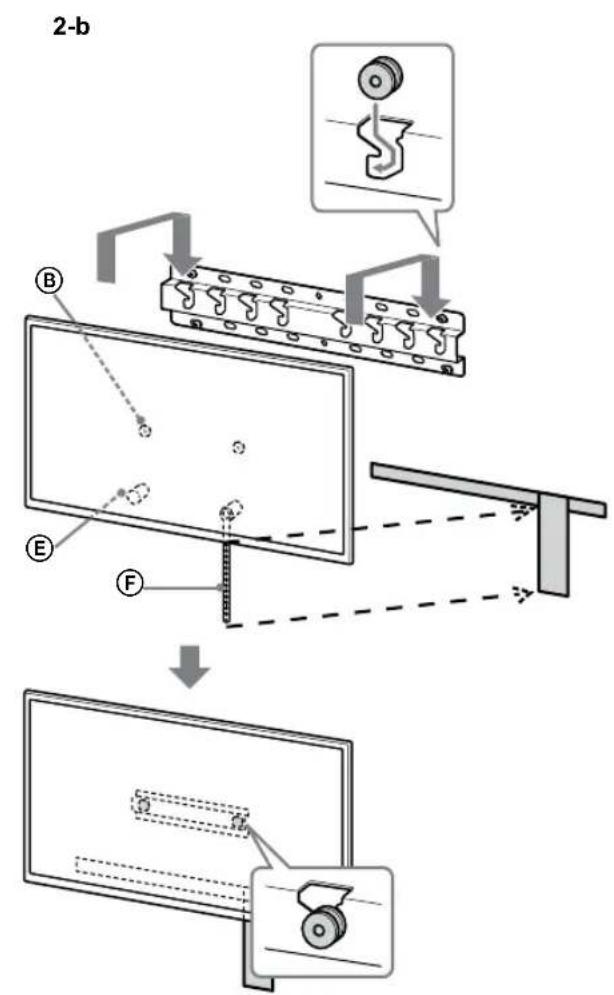
text_image
2-b B E F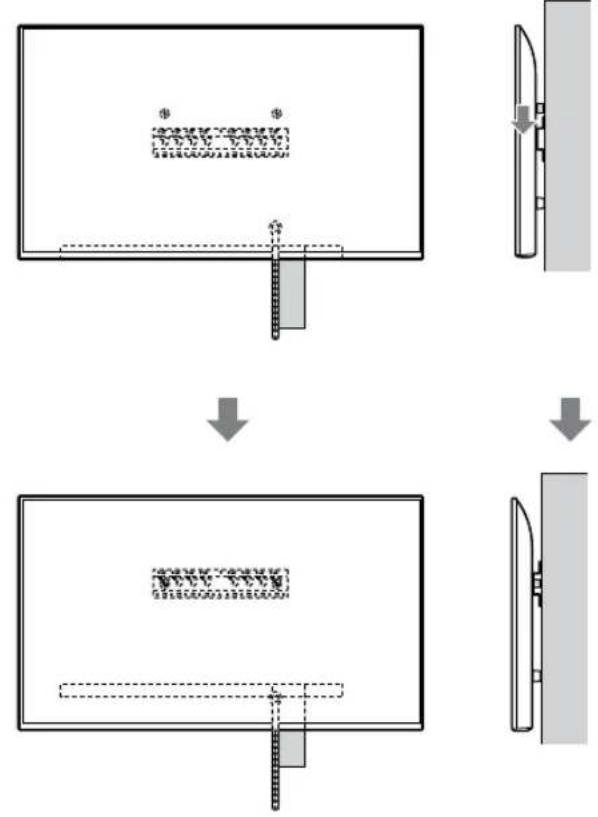
text_image
Diagram illustrating a mechanical assembly or assembly process with labeled components and directional arrows indicating steps.ECKEPTY
text_image
Safety warning illustration showing incorrect and correct hand actions for a person holding a device, with three silhouettes representing different safety conditions.text_image
Technical diagram showing a device with labeled component B and internal structure, including dashed lines and a magnified view.Нускау
natural_image
Simple line drawing of a rectangular frame with a dashed rectangle inside and a starburst shape at the bottom (no text or symbols)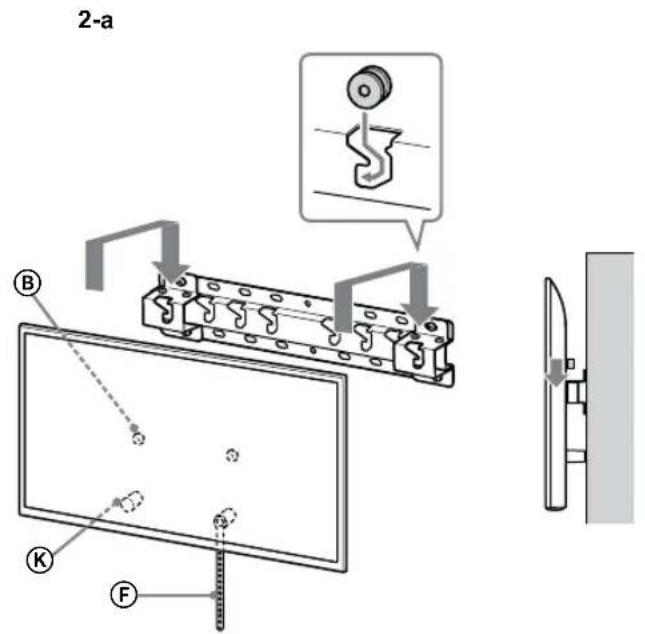
text_image
2-a B K F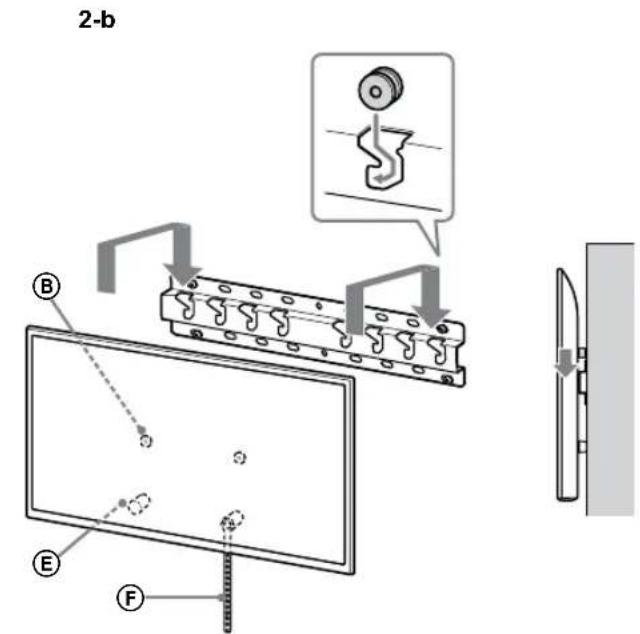
text_image
2-b B E F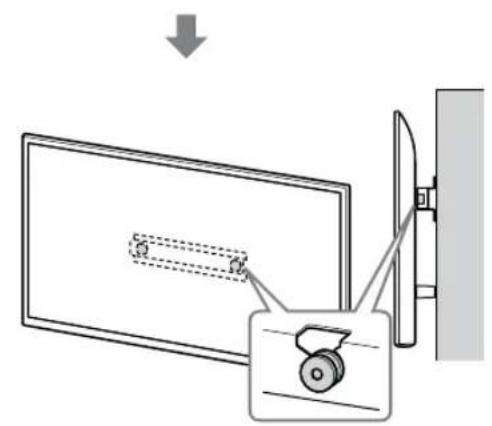
text_image
Diagram showing a monitor with a slide and a scroll, connected to a wall-mounted device with a magnified view.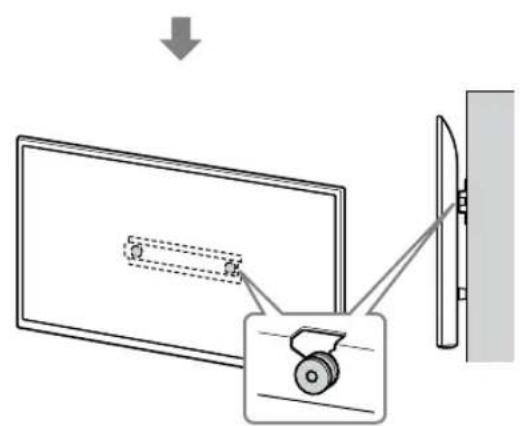
text_image
Diagram showing a monitor with a slide and a scroll wheel, connected to a wall-mounted device, with an arrow indicating direction of motion.ECKEPTY
text_image
Safety instruction diagram showing hand protection with check and no symbols for correct and incorrect handlingtext_image
Technical diagram showing installation of a mechanical component with a magnified inset view highlighting the internal structure.ECKEPTY
natural_image
Diagram showing two views of a mechanical component with labeled sections (2-a, 2-b), no readable text or symbols present.text_image
Technical diagram of a mechanical or electrical component with labeled parts and mounting points4 Odlučite o položajima vijaka za postavljanje osnove (20) Ⓐ.
Pogledajte specifikacije na strani 19. Prilikom izbora 2-a, izaberite položaje rupa spojnice adaptera ①.
UPOZORENJE
- Zid na koji će se montirati TV treba da bude u stanju da podnese težinu od najmanje četiri puta težine TV-a (Pogledajte Vodič za reference svog TV-a radi njegove težine.).
- Odredite jačinu zida na koji će TV biti montiran. Ojačajte dovoljno zid, ako je potrebno.
Postavljanje osnove na zid
- Upotrebite četiri ili više vijaka prečnika 8 mm ili ekvivalentne (nisu isporučeni).
- Postavite četiri vijka u rupe spojnice osnove ① sa osnovom (20) Ⓐ (samo 2-a).
- Postavite horizontalno osnovu (20) Ⓐ na zid.
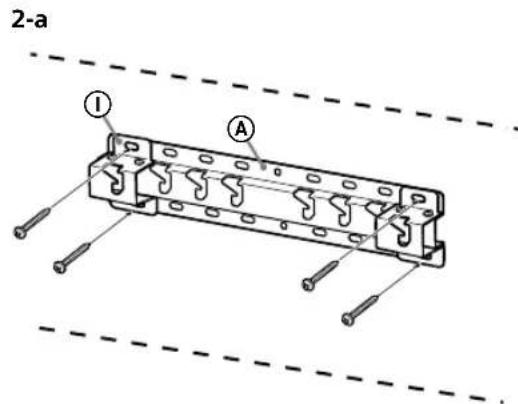
text_image
2-a I A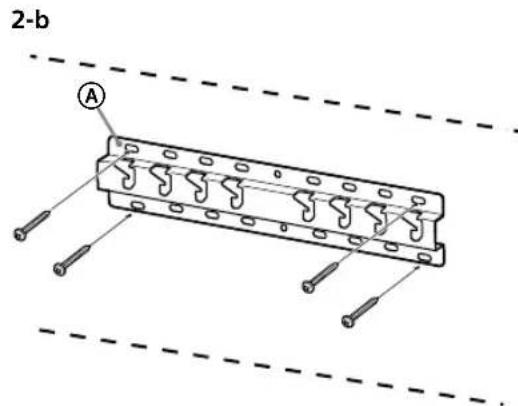
text_image
2-b APriprema za postavljanje TV-a
Pogledajte Vodič za podešavanje za postavljanje postolja.
KD-75XG80□□
1 Obeležite mesto postavljanja na zidu.
natural_image
Simple line drawing of a door with a rectangular opening and a prohibition symbol (no text or labels)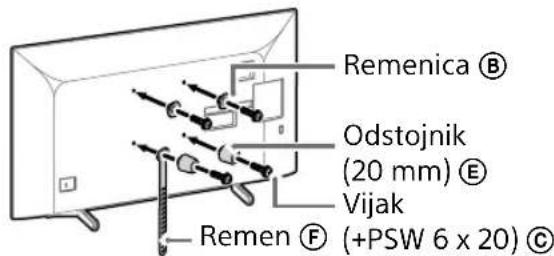
text_image
Remenica Ⓑ Odstojnik (20 mm) Ⓔ Vijak Remen Ⓕ (+PSW 6 x 20) Ⓒtext_image
Diagram illustrating two steps of installing a device, showing hand positioning and safety warning symbol.- Ponovite prethodni korak i uklonite drugu stranu postolja za sto.
Napomena
- Troje ili više ljudi je potrebno za odvajanje postolja za sto.
- Vodite računa da prilikom odvajanja postolja za sto od TV-a ne koristite prekomernu silu jer to može da dovede do pada TV aparata i izazove telesnu povredu ili fizičko oštećenje TV-a.
- Pažljivo rukujte sa postoljem za sto da ne biste oštetili TV.
- Pažljivo podižite TV dok odvajate postolje za sto da se ne bi prevrnulo i izazvalo povredu.
- Pažljivo odvojite postolje za sto od TV-a da ne bi palo i oštetilo površinu na kojoj se nalazi TV.
KD-65XG81□□ / 65XG80□□
1 Pričvrstite delove za pričvršćenje za nosač za postavljanje na zid. Proverite delove za pričvršćenje pozivajući se na „Isporučeno uz SU-WL450“ u „Provera delova“ na strani 5.
Napomena
natural_image
Simple line drawing of a door with a switch and a prohibition symbol (no text or labels)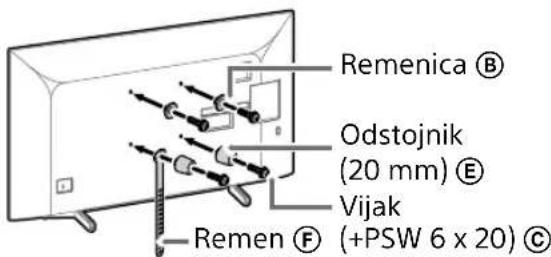
text_image
Remenica Ⓑ Odstojnik (20 mm) Ⓔ Vijak Remen Ⓕ (+PSW 6 x 20) Ⓒtext_image
Diagram illustrating a procedure for installing or adjusting a device, with labeled steps and a warning symbol.- Ponovite prethodni korak i uklonite drugu stranu postolja za sto.
Napomena
- Troje ili više ljudi je potrebno za odvajanje postolja za sto.
- Vodite računa da prilikom odvajanja postolja za sto od TV-a ne koristite prekomernu silu jer to može da dovede do pada TV aparata i izazove telesnu povredu ili fizičko oštećenje TV-a.
- Pažljivo rukujte sa postoljem za sto da ne biste oštetili TV.
- Pažljivo podižite TV dok odvajate postolje za sto da se ne bi prevrnulo i izazvalo povredu.
- Pažljivo odvojite postolje za sto od TV-a da ne bi palo i oštetilo površinu na kojoj se nalazi TV.
KD-55XG81□□ / 55XG80□□
1 Pričvrstite delove za pričvršćenje za nosač za postavljanje na zid. Proverite delove za pričvršćenje pozivajući se na „Isporučeno uz SU-WL450“ u „Provera delova“ na strani 5.
Napomena
natural_image
Simple line drawing of a door with a stop symbol (no text or labels)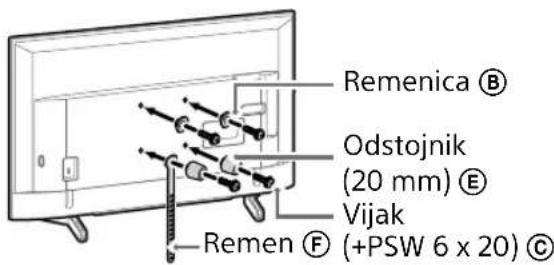
text_image
Remenica Ⓑ Odstojnik (20 mm) Ⓔ Vijak —Remen Ⓕ (+PSW 6 x 20) Ⓔnatural_image
Line drawing of a rectangular TV with attached cables and connectors, no text or symbols presentNapomena
- Pažljivo podižite TV dok odvajate postolje za sto da se ne bi prevrnulo i izazvalo povredu.
- Pažljivo odvojite postolje za sto od TV-a da ne bi palo i oštetilo površinu na kojoj se nalazi TV.
KD-49XG81□□ / 49XG80□□ / 43XG81□□ / 43XG80□□
1 Odvojite postolje za sto od TV-a.
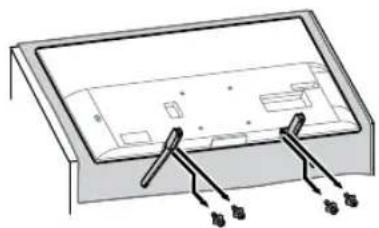
natural_image
Diagram of a device with labeled connectors and internal components (no text or symbols)Napomena
- Pobrinite se da postavite TV na mesto gde ste stavili meku krpu da biste sprečili oštećivanje površine ekrana.
- Prilikom montaže nosača za postavljanje na zid, ne upotrebljavajte vijke izvađene iz postolja za sto.
- Obavezno čuvajte skinuto postolje za sto i njegove vijke na bezbednom mestu, držeći ih dalje od dece. Biće vam potrebni, ako u budućnosti budete želeli da koristite TV na stolu. Postolje za sto ne može da se kupi odvojeno.
UPOZORENJE
- Obavezno proverite da li je TV u vertikalnom položaju pre uključenja. TV prijemnik ne sme da se uključuje sa LCD panelom okrenutim nadole da bi se izbegla neravnomerna ujednačenost slike.
- Ako se na površinu TV-a primene pritisak ili udarac, TV može da se razbije ili bude oštećen.
- Položite TV licem prema dole na stabilnu i ravnu površinu sa postoljem za sto koje visi preko ivice površine. Držanje lica TV-a i osnove postolja za sto na istoj ravnoj površini će stvoriti nestabilne radne uslove i može da ošteti TV.
- Prilikom odvajanja postolja za sto od TV-a, držite postolje za sto čvrsto sa obe ruke.
2 Pričvrstite delove za pričvršćenje za nosač za postavljanje na zid. Proverite delove za pričvršćenje pozivajući se na „Isporučeno uz SU-WL450“ u „Provera delova“ na strani 5.
Napomena
natural_image
Simple line drawing of a door with a switch and a prohibition symbol (no text or labels)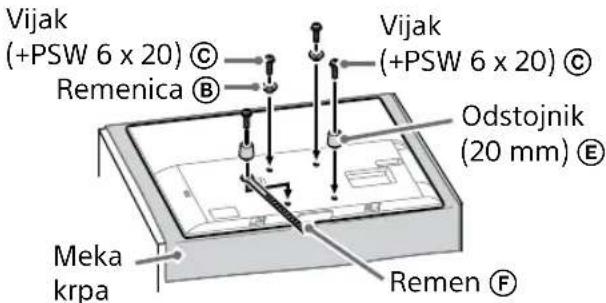
text_image
Vijak (+PSW 6 x 20) © Remenica ® Vijak (+PSW 6 x 20) © Odstojnik (20 mm) ® Meka krpa Remen ®natural_image
Illustration of three people lifting a large object with dashed lines indicating motion or alignment (no text or symbols)text_image
Technical diagram showing a monitor mounted on a stand with labeled components A, B, and C, including a magnified inset view.2 Postavite TV na osnovu ili spojnicu za osnovu.
- Pažljivo pomerite TV i okačite remenice ⑧ na zadnjoj strani TV-a na osnovu ili spojnicu za osnovu vodeći računa da odgovaraju obliku otvora.
- Nakon montaže TV-a na zid, proverite da li su remenice Ⓑ čvrsto pričvršćene u osnovu ili spojnicu za osnovu.
- Polako otpustite obe ruke da TV ne bio pao.
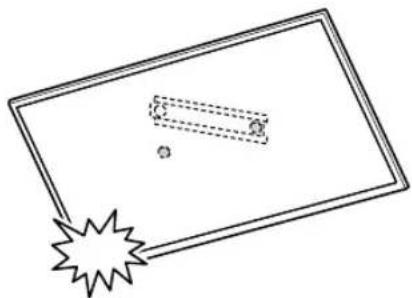
natural_image
Simple line drawing of a rectangular frame with a dashed rectangle and a starburst shape at the bottom (no text or symbols)- Kada postavite TV na zid, uklonite krep-traku sa zida.
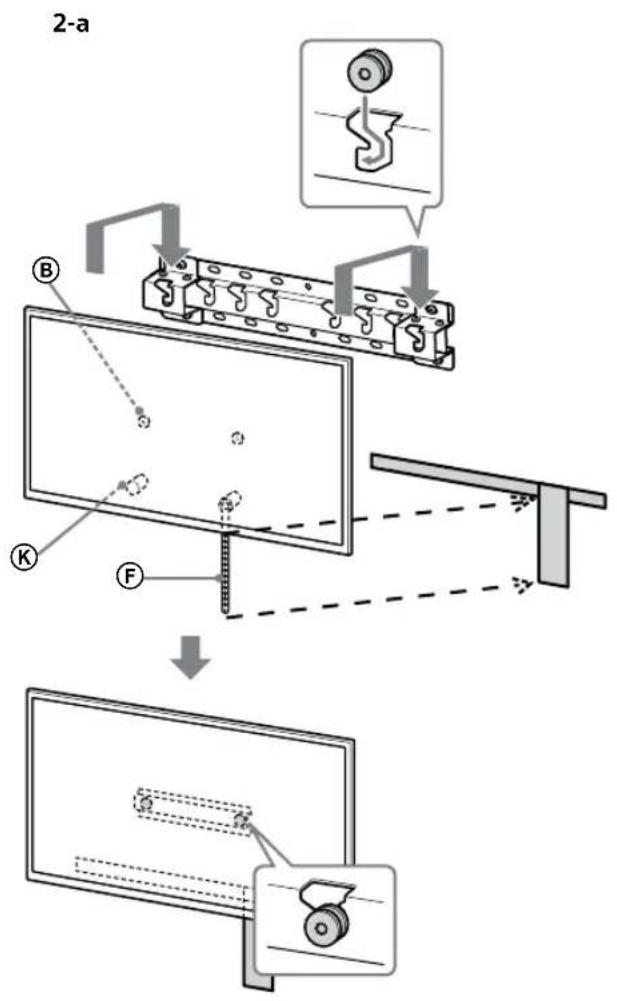
text_image
2-a B K F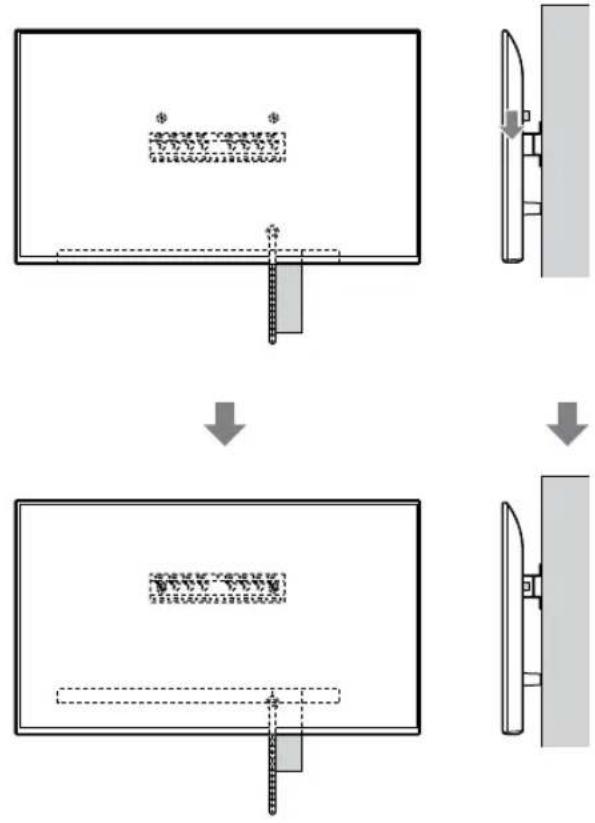
flowchart
graph TD
    A["Initial Image"] --> B["Process Step"]
    B --> C["Final Output"]

    subgraph Initial
    D["Document Icon: $* *"]
    E["Arrow Down"]
    end

    subgraph Final
    F["Document Icon: 100%"]
    G["Arrow Up"]
    end
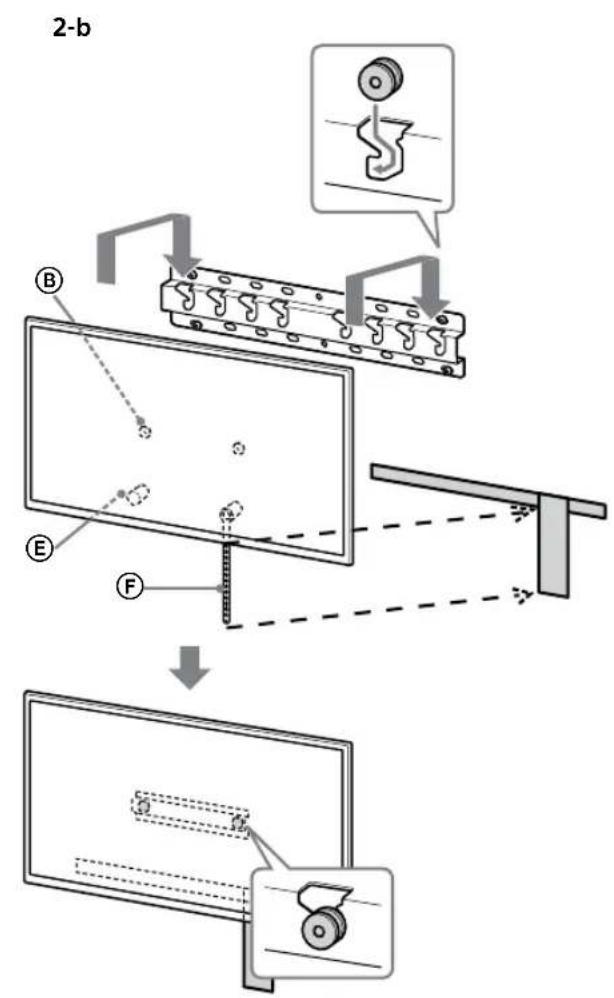
text_image
2-b B E F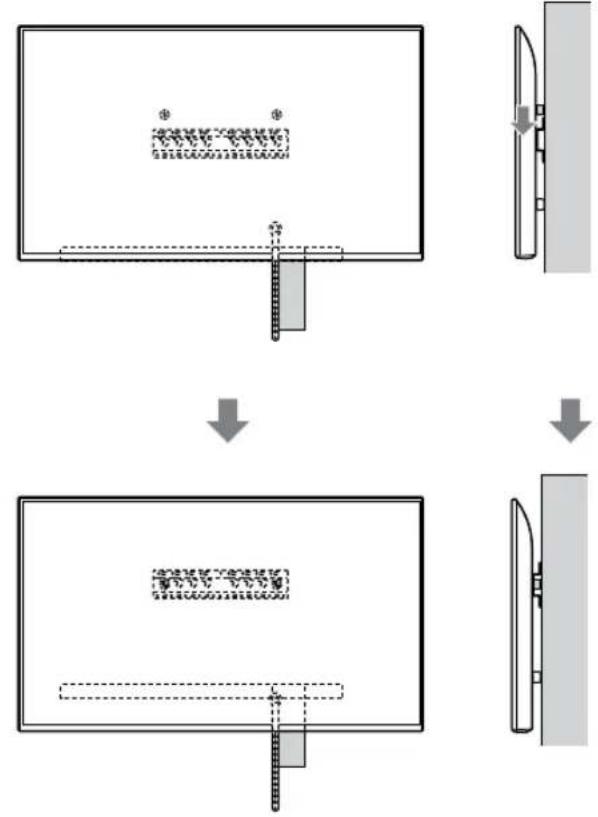
flowchart
graph TD
    A["Step 1: Object Tracking"] --> B["Step 2: Assembly"]
    B --> C["Step 3: Final Assembly"]
UPOZORENJE
text_image
Illustration showing three human silhouettes with foot protection symbols and a warning sign, indicating correct and incorrect actions.3 Sprečavanje pomeranja dna TV-a.
- Podignite labavi deo remena Ⓔ i pričvrstite ga čvrsto na zid.
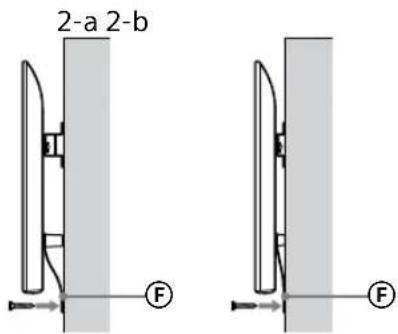
text_image
2-a 2-b F F- Upotrebite vijak prečnika 5 mm ili ekvivalentan (nije isporučen).
Napomena
text_image
Technical diagram showing a device with labeled components and a magnified view of the internal structure.Napomena
natural_image
Simple line drawing of a rectangular frame with a starburst shape at the bottom (no text or symbols)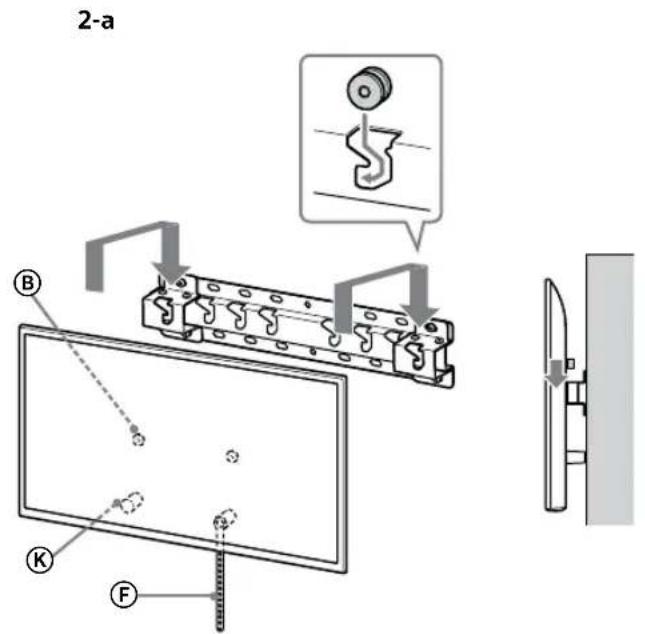
text_image
2-a B C F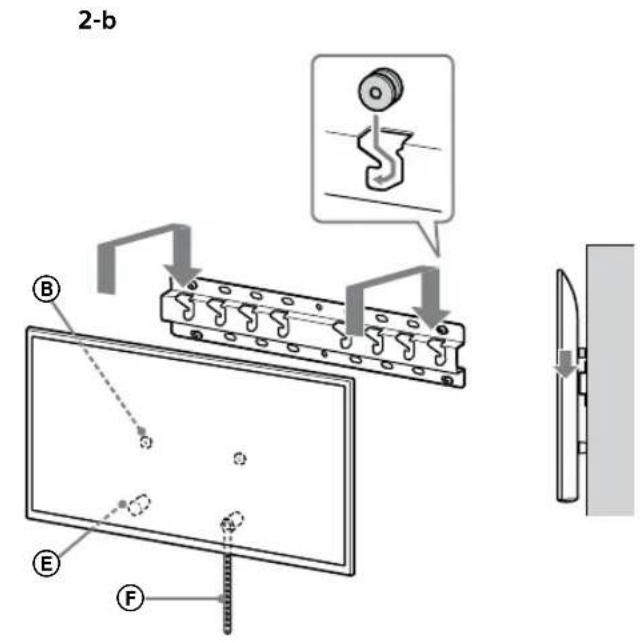
text_image
2-b B E F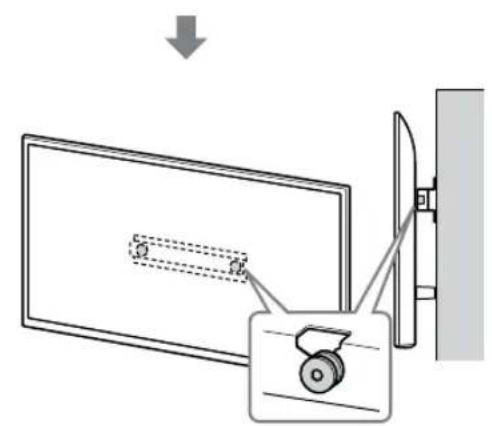
text_image
Diagram showing a monitor with a slide and a scroll, connected to a wall-mounted device with a magnified view.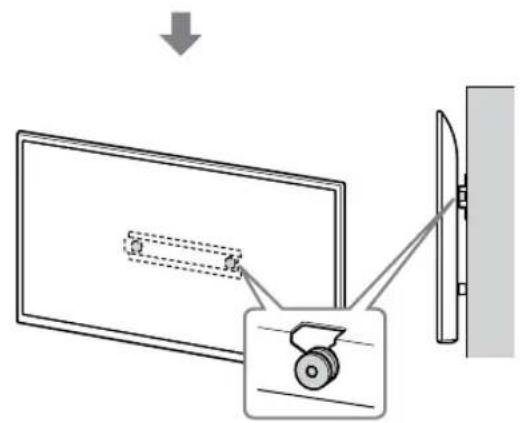
text_image
Diagram showing a monitor with a slide and a wheel, connected to a wall-mounted device, with an arrow indicating direction of motion.UPOZORENJE
text_image
Safety instruction diagram showing hand protection with check and no symbols for correct/incorrect handling3 Sprečavanje pomeranja dna TV-a.
- Podignite labavi deo remena Ⓔ i pričvrstite ga čvrsto na zid.
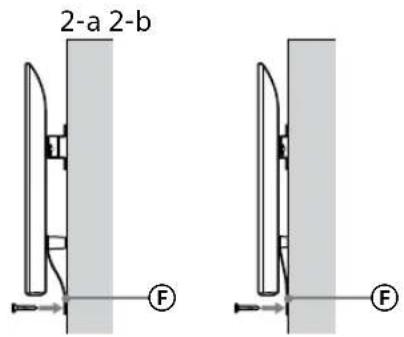
text_image
2-a 2-b F F- Upotrebite vijak prečnika 5 mm ili ekvivalentan (nije isporučen).
Napomena
text_image
Technical diagram showing a mechanical assembly with a component being inserted into a panel, including a close-up of the component.UPOZORENJE
text_image
Technical diagram showing a mechanical assembly with labeled components and a close-up view of a gear mechanism.תְרָה
תְקָרִי אַלְאָה
text_image
Diagram showing two hand positions: one with checkmark and another with no sign, indicating correct and incorrect states respectively.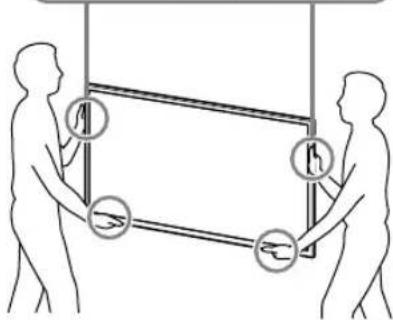
text_image
Diagram illustrating human and individual movement with labeled objects, likely depicting a physical or mechanical system.3
.תְקָרִיַעֹ
• אַרָאִי אַרְהָם (
.הכלה
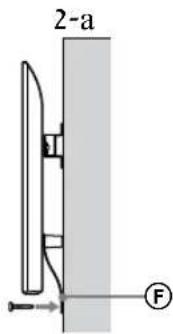
text_image
2-a F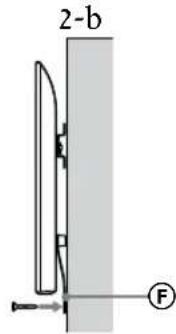
text_image
2-b Ftext_image
Technical diagram showing a monitor with labeled components and an inset view of a device with a circular component.. כְרָה אַרִים
natural_image
Simple line drawing of a rectangular frame with a dashed rectangle and a starburst symbol at the bottom (no text or symbols)תְרָה
text_image
Illustration showing a hand holding a document with Hebrew text and three human figures, some marked with circular symbols indicating specific actions.1. כְרָה בְּרָה
natural_image
Simple line drawing of a rectangular frame with a dashed rectangle and a starburst shape at the bottom (no text or symbols)text_image
Technical diagram showing a monitor mounted on a stand with labeled components A, B, and F, including a close-up view of the screen.natural_image
Simple line drawing of a door with a handle and no text or symbols present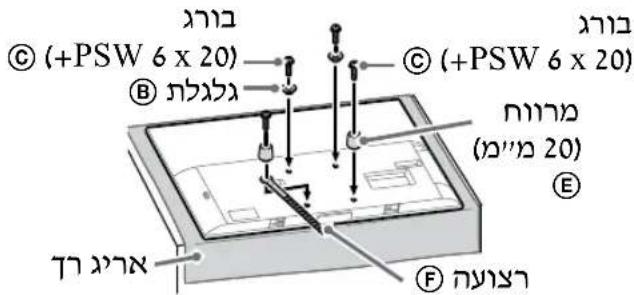
text_image
(+PSW 6 x 20) (+PSW 6 x 20) (### 20) E F3
.תְקּוֹרָה
natural_image
Diagram of a device with labeled connectors and internal components (no text or symbols)2
.תְקּוֹרָה
text_image
Diagram showing a device with labeled parts and directional arrow, likely illustrating a mechanical or electrical assembly.⑧
+PSW)
© (6 x 20
© (ב"י 60)
+PSW)
① (6 x 50
(2-b) כרַבְרָה
תַלְרָה
natural_image
Pure technical line drawing of a mechanical component without any text, numbers, or symbols
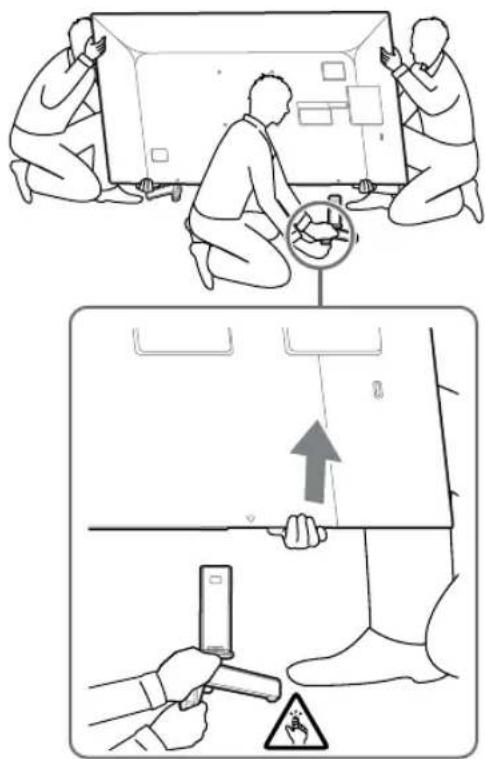
text_image
Diagram illustrating safety inspection steps with labeled components and warning symbolsnatural_image
Pure diagram of a door handle with no text, numbers, or symbols
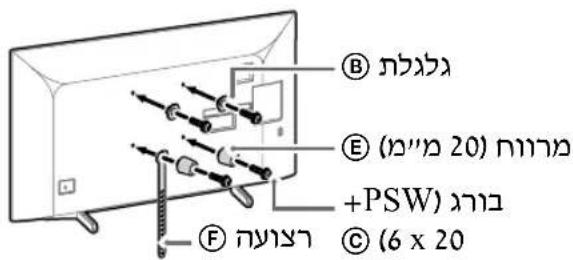
text_image
B E (ה"מ" 20) ב"ר"י +PSW) ב"ר" C (6 x 20)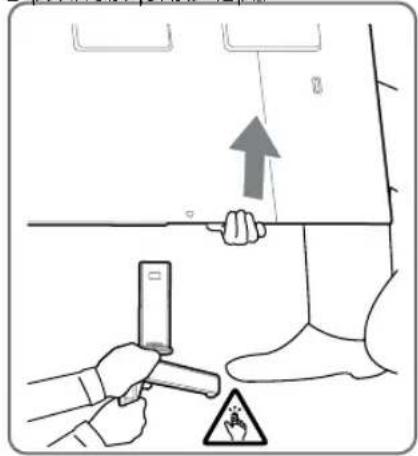
text_image
Diagram illustrating a safety inspection procedure with hand holding a tool and warning signnatural_image
Simple line drawing of a door with a switch symbol (no text or labels)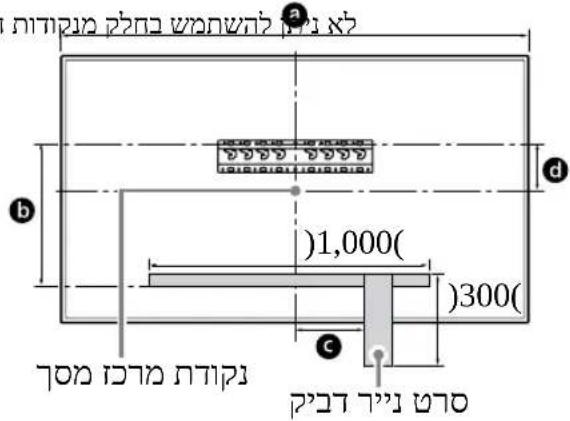
text_image
a b c d 1,000( )300( ) 700 (1000)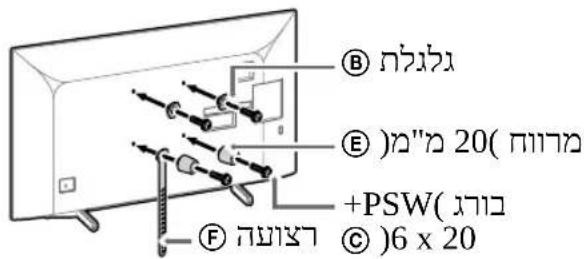
text_image
B E) 20(הכלה) +PSW(הכלה) C) 6 x 20 F)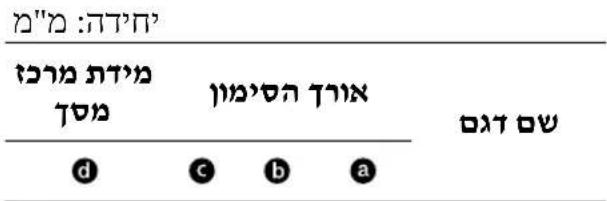
text_image
Technical diagram of a mechanical component with labeled parts I and A, showing bolted connections and mounting holes.2-b
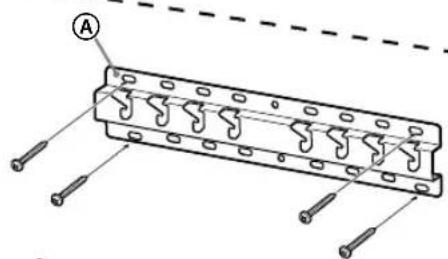
text_image
Technical diagram of a mechanical component with labeled parts and mounting holesהכלה, 2-a-הכלה
text_image
• Ⓟ (20) Ⓟ (20) Ⓟ (20)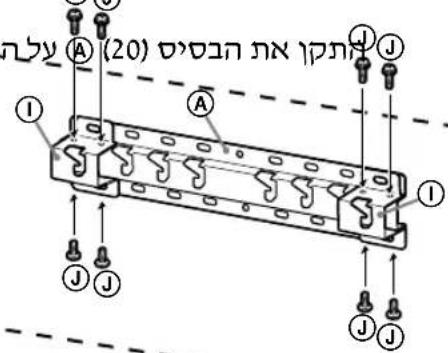
text_image
(20) (1) ① ② ③ ④ ⑤ ⑥ ⑦ ⑧ ⑨ ⑩ ⑪ ⑫ ⑬ ⑭ ⑮ ⑯ ⑰ ⑱ ⑲ ⑳ ㉑ ㉒ ㉓ ㉔ ㉕ ㉖ ㉗ ㉘ ㉙ ㉚ ㉛ ㉜ ㉝ ㉞ ㉟ ㉳ ㉟ ㉟ ㉟ ㉟ ㉟ ㉟ ㉟ ㉟ ㉟4
.⑨ (20)
natural_image
Technical line drawing of a mechanical component with internal structure and no visible text or symbolsתַלְרָה
• וְרָהִי, וְרָה