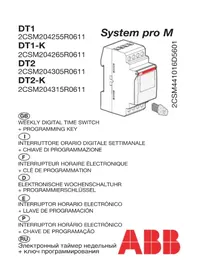
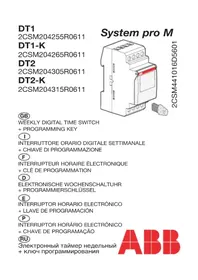
System Pro M DT1K - Electronic timer switch ABB - Free user manual and instructions
Find the device manual for free System Pro M DT1K ABB in PDF.



| Product Type | Electronic time switch |
| Brand | ABB |
| Model | System Pro M DT1K |
| Supply voltage | 230 V AC ±15% |
| Frequency | 50/60 Hz |
| Power consumption | max. 6 VA at 50 Hz |
| Output | 1 potential-free changeover contact |
| Max. switching capacity AC1 | 16 A 250 V~ |
| Max. switching capacity DC1 | 4 A 12 V= |
| Min. switching capacity AC1 | 100 mA 250 V~ |
| Min. switching capacity DC1 | 100 mA 12 V |
| Program capacity | 56 steps, min. time between steps: 1 minute |
| Running accuracy | ±1.5 sec/24h |
| Backup time | Lithium battery, cumulative 5 years of power failure |
| Protection rating | IP20 |
| Operating temperature | -5°C to +55°C |
| Storage temperature | -20°C to +70°C |
| Dimensions (approx.) | 17.5 mm x 90 mm x 66 mm |
| Weight (approx.) | 100 g |
| Automatic summer/winter change | Yes |
| Programming by day or group of days | Yes |
| Permanent overrides and temporary overrides | Yes |
| Keyboard lock | Yes |
| Programming key (model DT1-K) | Yes |
Frequently Asked Questions - System Pro M DT1K ABB
User questions about System Pro M DT1K ABB
0 question about this device. Answer the ones you know or ask your own.
Ask a new question about this device
Download the instructions for your Electronic timer switch in PDF format for free! Find your manual System Pro M DT1K - ABB and take your electronic device back in hand. On this page are published all the documents necessary for the use of your device. System Pro M DT1K by ABB.
USER MANUAL System Pro M DT1K ABB
GB Technical specifications
Product delivered with current time and date set.
Automatic change of winter/summer time

Programming key (Ref. DT1-K and

-
for permanent waivers,
-
or program copy or save.
Programming for day or group of days.
56 program steps On/Off.
Permanent overrides On or Off (permanent light on).
Temporary overrides On or Off (flashing).
Display bar graph of daily profile.
Keyboard locking possible

Programmable with power off.
Electrical characteristics
Supply voltage: 230VAC± 15%
Frequency: 50/60 Hz
Power consumption: max. 6 VA to 50 Hz
Output DT1, DT1-K: 1 changeover volt free contact.
Output DT2, DT2-K: 2 changeover volt free contacts.
Maximum load: AC1 μ16A 250 V~
DC1 (DT1, DT1-K) μ4A 12 V
= 0,6 10A250V
Minimum current: AC1 100 mA 250 V~
DC1 (DT1, DT1-K) 100 mA 12 V
Galvanic insulation between power supply and output: < 4kV
Functional characteristics
Programming capacity: 56 steps
Minimum time between 2 steps: 1 minute
Running accuracy: ± 1,5 Sec / 24 h
Operating reserve: lithium battery provides 5 years of backup.
The product is set in standby mode (display is off) if power goes off.
It is set back in auto mode when power is back on. With power off, the screen display is turned on when striking any key. After one minute, it is turned off.
Protection degree: IP 20
Operating temperature: -5 °C to +55 °C
Storage temperature: -20^ to +70^
| Lighting loads | |||||
| 230 V~ | 2300 W | 2300 W 500 W | compensated // (max. 45 μF) | non compensated, compensated in series | |
| 400 W | 1000 W | ||||
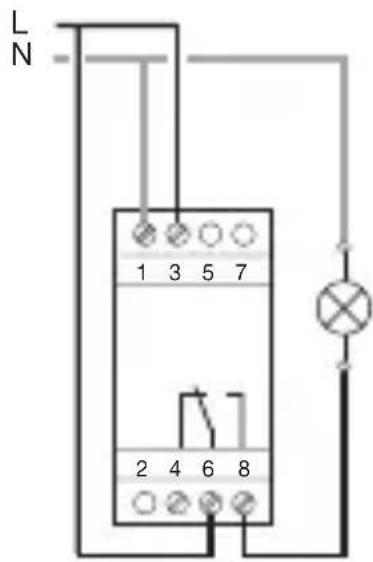
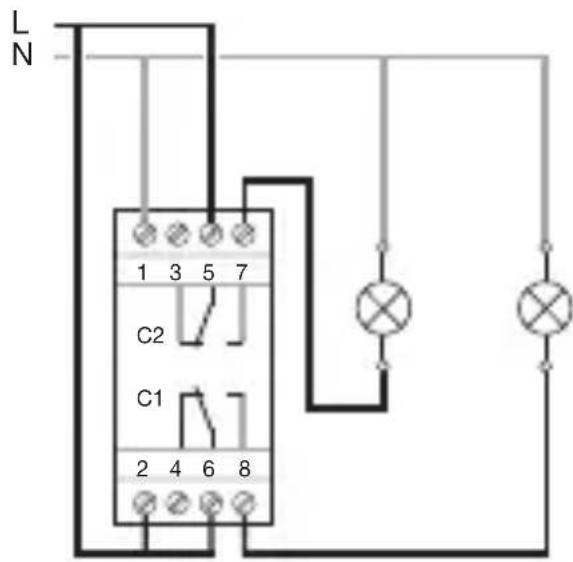
Cable connection

Connection diagram
DT1, DT1-K DT2, DT2-K
Program reset:
the program may be completely cleared by simultaneously pressing the 3 following keys: menu, enter,
The time and the date will be kept.
Total reset:
pressing simultaneously the -, +, enter, menu, keys lets you clear the entire contents of the product.
Following a total reset it is necessary to reset the time and day of the device.
DT1 K DT2-K
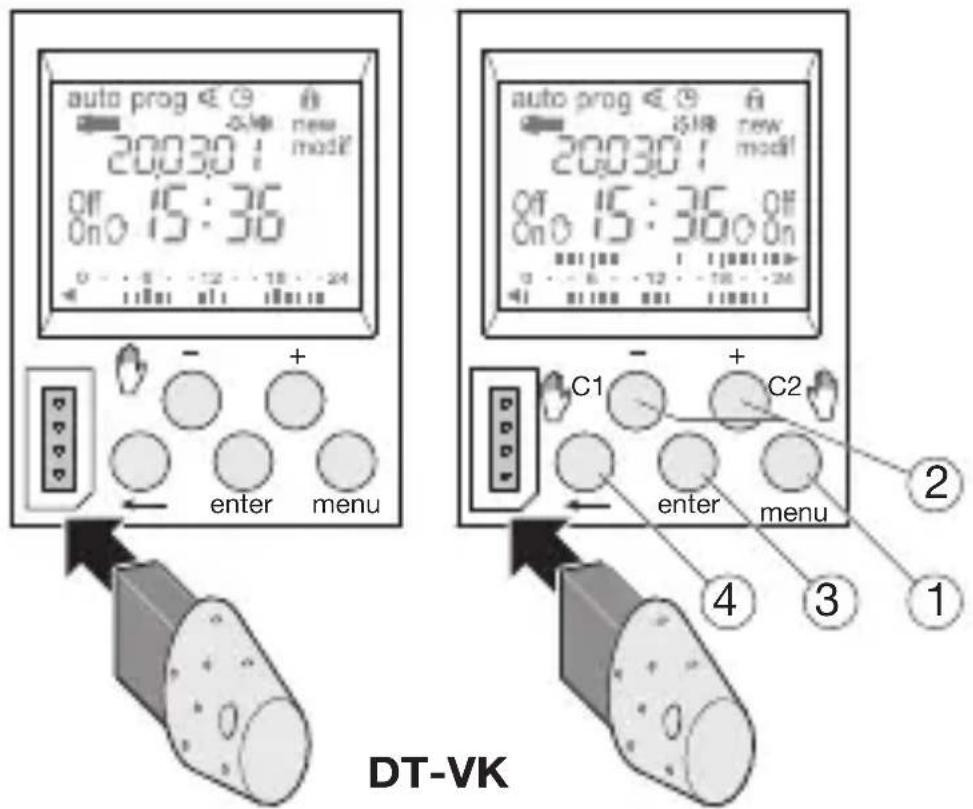
Keys:
① menu : selection of operating mode.
auto : mode of running according to the program selected.
prog : new for programming mode.
prog : modif to modify an existing program.

: checking of the program.

: modification of time, date and selection of
the winter/summer timechange mode
(2) + and - : navigation or setting of values.

- (DT1, DT1-K)


and C2

overrises, or waivers.
③ enter : to validate flashing information on display.
(4) : to return to the previous step.
You may return into auto mode at any moment using menu. If no action is taken for 1 min., the switch returns into auto mode.
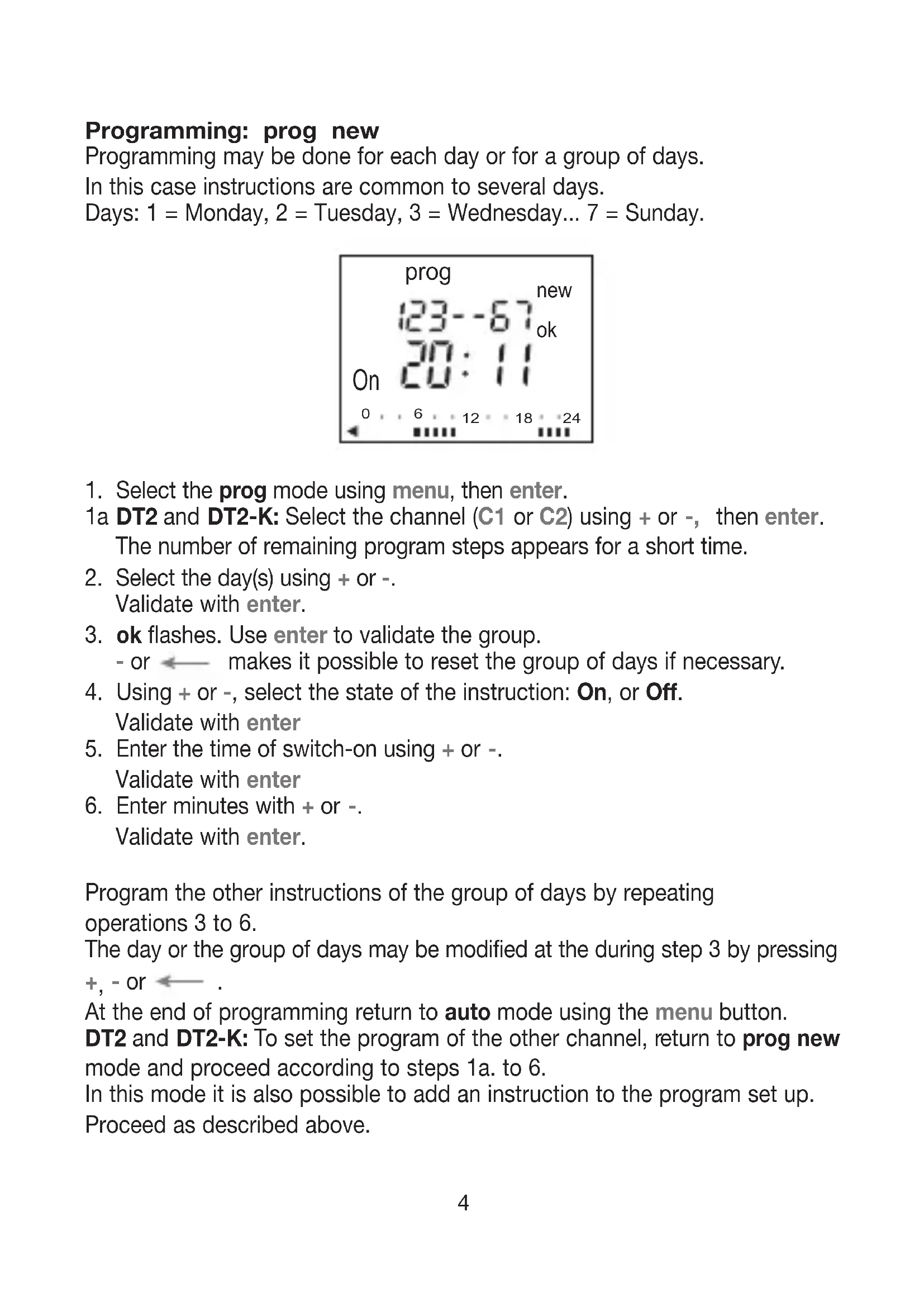
Programming: prog new
Programming may be done for each day or for a group of days.
In this case instructions are common to several days.
Days: 1 = Monday, 2 = Tuesday, 3 = Wednesday... 7 = Sunday.
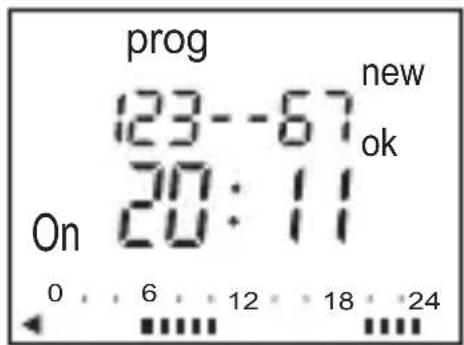
- Select the prog mode using menu, then enter.
1a DT2 and DT2-K: Select the channel (C1 or C2) using + or -, then enter. The number of remaining program steps appears for a short time. - Select the day(s) using + or - . Validate with enter.
- ok flashes. Use enter to validate the group.
- or makes it possible to reset the group of days if necessary.
- Using + or - , select the state of the instruction: On, or Off. Validate with enter
- Enter the time of switch-on using + or-. Validate with enter
- Enter minutes with + or -. Validate with enter.
Program the other instructions of the group of days by repeating operations 3 to 6.
The day or the group of days may be modified at the during step 3 by pressing + , - or .
At the end of programming return to auto mode using the menu button.
DT2 and DT2-K: To set the program of the other channel, return to prog new mode and proceed according to steps 1a. to 6.
In this mode it is also possible to add an instruction to the program set up. Proceed as described above.
Display:
To check the daily profile set up without the risk of modification or deletion:
Select the mode using menu and enter.
DT2 and DT2-K: Select the channel (C1 or C2) using + or - and enter.
The first step of Monday is displayed as well as the daily profile.
Two options available for display:
-
Pressing repeatedly + or -: lets you shift days. In this case only the first daily step is displayed as well as the daily profile.
-
Pressing enter: all steps of each day appear one after the other.
Modification or clearing of a program step: prog modif
Select the prog mode with menu and press enter.
DT2 and DT2-K: Select the channel (C1 or C2) using + or - and press enter. Select the modif mode with + or -.
Validate with enter.
The number of remaining program steps appears for a short time. The first step of the first day or group of days appears.
Repeatedly pressing the enter key displays all programmed steps one at a time.
Any flashing field (state, hour, minutes) may be modified using + or - , then validated with enter.
When the cursor is positioned on ok located behind the group of days, you may display successively the days or the groups of days and switch directly to the one that has to be modified using + or -.
To remove a program step: select the state of the channel (On or Off), press simultaneously + and -.
Clear.appears on the screen.
Validate with enter.
Key (only ref. DT1-K and DT2-K)
As soon as the key appears on the switch appear on the screen. Two types of operation:
A. Permanent override:
Insert the key into the switch.
After 10 seconds the program contained in the key will be executed without clearing the program contained in the time switch.
As soon as the key is removed the program of the time switch is again valid.
B. Copy (load) / Save (save):
The key makes it possible to save a program contained in the time switch. It is also possible to copy the contents of the key into the clock.
- Insert the key and wait for 2 sec.
- Using menu, select the mode:
save : to save a program contained in the time switch,
load : to load the program of the key into the time switch,
: to check the program contained in the key.
- Validate the selection with enter.
- For save and load reconfirm with enter.
The following error messages may appear on the screen:
no prog: the key is empty, it does not contain any program.
Error:
DT1-K: the key is that of a two-channels switch.
DT2-K: the key is that of a one-channel switch.
In these two cases:
Only the save mode is possible.
The error message remains on display as long as the key is present, but in this case the program of the time switch is executed.
Setting time and day
Select the mode with menu then enter.
Modify the day, month, year, the hour and the minutes using + or - and enter.
Winter/summer time change

The time switch next suggests the winter / summer time changes

Select the type of change desired using + or -
Validate with enter.
The type of change depends on the geographical zone.
Types available: (
= type according defect)
| Type Start of time Start of time Zone of change Summer change Winter application | |||
| Euro * | Last Sunday of March | Last Sunday of October | European Union |
| USER Date freely programmed | Date freely programmed | ||
| No | No change | No change | |
The change always takes place between 2:00 and 3:00 a.m.
Note:
For United Kingdom, use the geographical area EURO.
For USA, use the type USER and enter following dates:
Beginning of the summer-time 2nd Sunday of Mars, beginning of winter-time the 1st Sunday of November.
Example: for an installation in 2007 enter 11.03 and 04.11 by following the instructions below.
When the USER type is selected:
- Enter the day then the month of the date of change of the summer time (+ 1 hour) with + or - and enter.
- Enter the day then the month of the date of change of the winter time (- 1hour) with + or - and enter.
The time switch will check which days of which weeks correspond to these dates and will apply changes to the same periods for the following years independently of the date.
Override
DT1, DT1-K: Pressing repeatedly on
DT2, DT2-K: Pressing repeatedly on C1 or C2
If the state of the output is On:
1st pressure: temporary waiver. Off and flash. The next program step will let you return to the automatic mode.
2^nd pressure: permanent override. On and are permanent. This override must be cancelled manually.
3^rd pressure: permanent override. Off and are permanent. This override must be cancelled manually.
4th pressure: return to the automatic mode.
Locking
To prevent all undesirable actions, the keyboard of the time switch may be locked using a key DT-LK or pressing the enter and keys for 7 seconds.
Unlocking is done in the same way.
Full product reset remains feasible when the keyboard is locked.
Dimensions
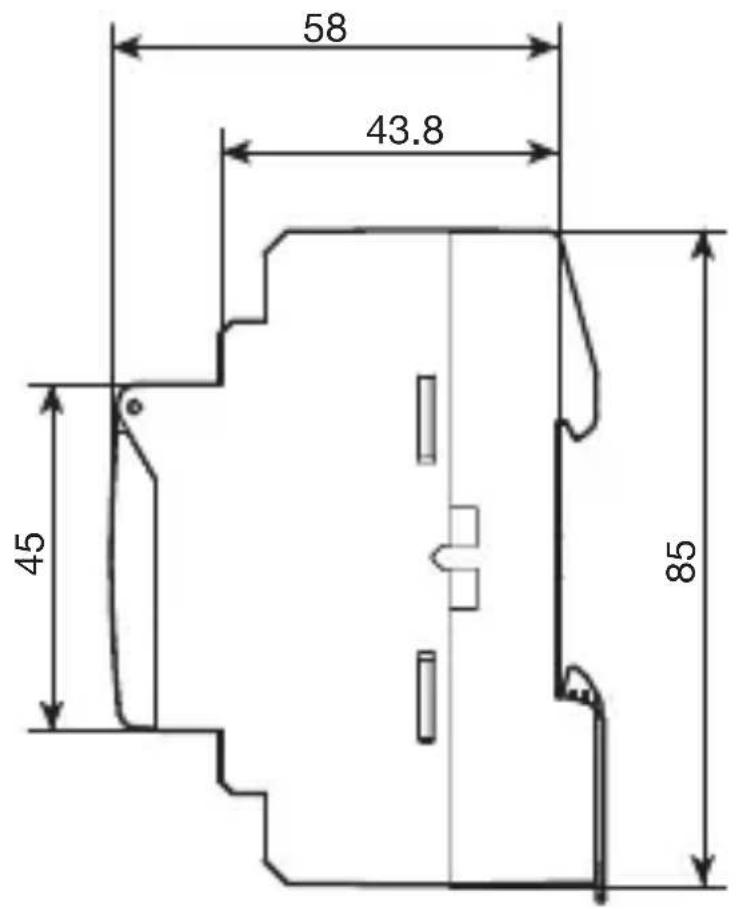
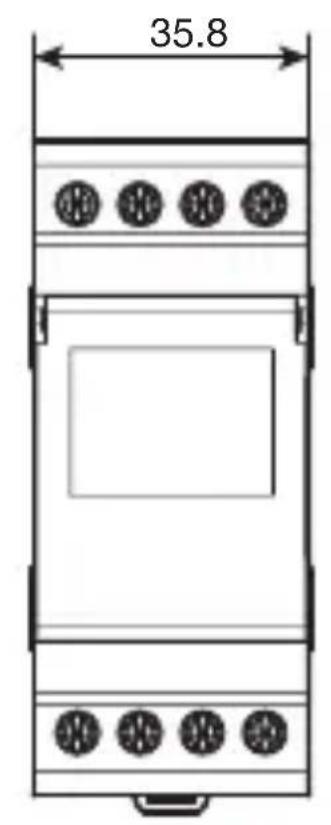
Caratteristiche tecniche
B. Copia (load) / back-up (save):
Programmation: prog new
Types dispensibles : (
Whenever you want to use the keyboard, press the Enter key and press the Esc key.
B. Copia (load) / Registro (save):
Clear appearece no visor. Validar com enter.
Chave (unicamente DT1-K e DT2-K)
Logo que a chave estiver presente no interruptor @parecerá no visor.
Existem征求意见:
B. Cópia (load) / Salvaguarda (save):
Validate deposits com enter.
BKNIOUeHHeM/BbIKIIOUeHHeM (INHdNKaTOP NOCTOARHHO CBETITcA).
BpeMeHHoe nCKIIOHTeJIbHOe ynpaBJeHne
BKNIOUeHnEM/BBIKIIOUeHnEM (INHdNKaTOP (Mraet).
UtpnxobaynHdkaun npoopnny cytok.
Bo3MOxHocTb 6JOKnPOBKn KJaBnaTypbl
3HeproHe3aBnCmOe nporpaMMnpOBaHne
3neKtpnueckne daHHbIe
HapraxeneпITAня:230BAC±15%
Uactota: 50/60T
Notpe6nemar moohoctb: MaKc. 6 VA do 50T
BbIXoI:DT1,DT1-K:1nepeKJIouaIOuINcKoHTaKT
BbIXoI:DT2,DT2-K:26ecnoTeHuaJIbHbIXKOMMyTnpyeMbIX KOHTaKTa
MaKc. napaMeTpbl KOMMyTaunn:
Pe3epBHOe nHTaHHe yacOB: nHTneBa8bTaapeiKa, He meHee 5 let 6e3 cTeBOrO nHTaHn.
B clyuae oTCyTCBnHa npjxHnI nTaHn, n3dJIne
peeknouaetcB dejxhpBipexnM (kpaH BbIKIOueH).OHO
B03BpaaetcBpeKIM "aBTo"Yepe3 cekyHny nocne nodaun
Hapjxehn. Pn OTCBn Hapjxehn, 3KpaH BKIOyaeTc
Pocne HaxaTna Ha IIO6yO KHOJky N BO3BpaUaTeCra B DeKypHbI peKm Ype3 MInHyTu Pocne PocJeDHeRo HaxaTna.
CTepeHb 3aunTbI: IP 20
PabouaTemepatypa:ot-5 ^ C 10+55 ^ C
Tempepatya xpaHn: ot -20 °C do +70 °C
- GB Technical specifications
- Electrical characteristics
- Functional characteristics
- Cable connection
- Connection diagram
- DT1, DT1-K DT2, DT2-K
- Program reset:
- Total reset:
- DT1 K DT2-K
- Keys:
- Programming: prog new
- Display:
- Modification or clearing of a program step: prog modif
- Key (only ref. DT1-K and DT2-K)
- Permanent override:
- Copy (load) / Save (save):
- Error:
- Setting time and day
- Winter/summer time change
- Note:
- Override
- Locking
- Dimensions
- Caratteristiche tecniche
- Copia (load) / back-up (save):
- Programmation: prog new
- Copia (load) / Registro (save):
- Chave (unicamente DT1-K e DT2-K)
- Cópia (load) / Salvaguarda (save):
- 3neKtpnueckne daHHbIe
Brand : ABB
Model : System Pro M DT1K
Category : Electronic timer switch