32S317BH - TV TESLA - Free user manual and instructions
Find the device manual for free 32S317BH TESLA in PDF.



| Product type | LED Television |
| Brand | Tesla |
| Model | 32S317BH |
| Screen size | 32 inches |
| Resolution | HD (1366 x 768 pixels) |
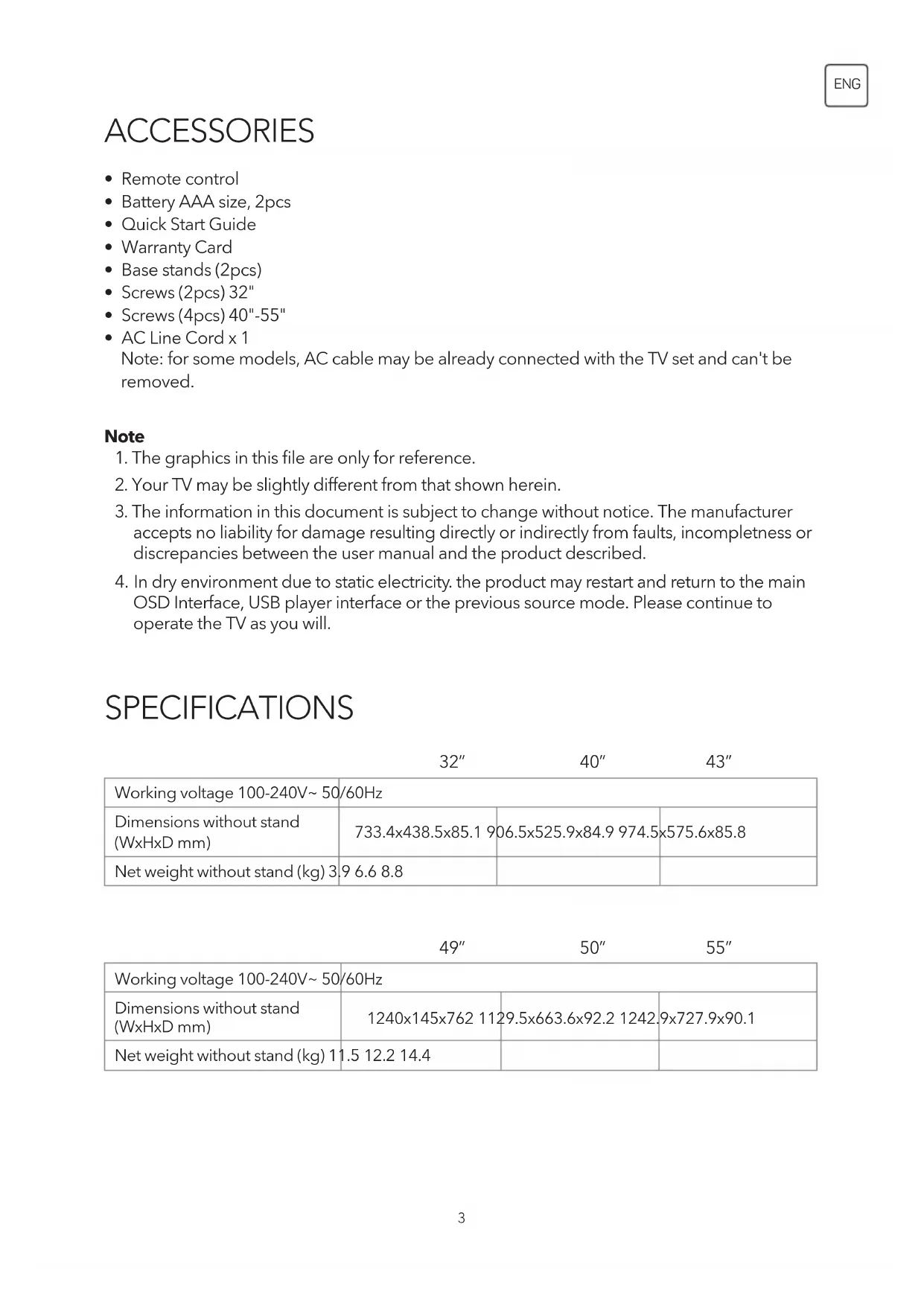
| Dimensions without stand (WxHxD) | 733.4 x 438.5 x 85.1 mm |
| Weight without stand | 3.9 kg |
| Power supply | 100-240 V~, 50/60 Hz |
| Power consumption | Approximately 40 W (estimated) |
| VESA standard | 100 x 100 mm |
| Connectors | 2x HDMI, 1x USB, 1x AV IN, 1x CI, 1x Digital audio output (S/PDIF), 1x Headphone, 1x Antenna/Cable/Satellite |
| Tuner | DVB-T2/C/S2 |
| Main features | OSD menu, Teletext, EPG, USB recording (PVR), Freeze frame, Audio description, Favorite channel list, Parental control |
| Audio | Dolby Audio |
| Supplied accessories | Remote control, 2 AAA batteries, Quick start guide, Warranty card, 2 foot supports, Screws |
| Maintenance and cleaning | Unplug before cleaning. Use a dry, soft cloth. Do not use abrasive products. |
| Safety | Double insulation (Class II). Do not expose to water. Wall mounting recommended to prevent falls. Do not place open flames. |
| Spare parts and repairability | Replacement batteries (AAA). For any repairs, contact a qualified technician. Local after-sales support. |
| General information | Manual available in multiple languages. Digital manual accessible via the menu. |
Frequently Asked Questions - 32S317BH TESLA
User questions about 32S317BH TESLA
0 question about this device. Answer the ones you know or ask your own.
Ask a new question about this device
Download the instructions for your TV in PDF format for free! Find your manual 32S317BH - TESLA and take your electronic device back in hand. On this page are published all the documents necessary for the use of your device. 32S317BH by TESLA.
USER MANUAL 32S317BH TESLA
- Remote control
- Battery AAA size, 2pcs
- Quick Start Guide
- Warranty Card
- Base stands (2pcs)
- Screws (2pcs) 32"
- Screws (4pcs) 40"-55"
- AC Line Cord x 1
Note: for some models, AC cable may be already connected with the TV set and can't be removed.
Note
- The graphics in this file are only for reference.
- Your TV may be slightly different from that shown herein.
- The information in this document is subject to change without notice. The manufacturer accepts no liability for damage resulting directly or indirectly from faults, incompleteness or discrepancies between the user manual and the product described.
- In dry environment due to static electricity, the product may restart and return to the main OSD Interface, USB player interface or the previous source mode. Please continue to operate the TV as you will.
SPECIFICATIONS
| 32" | 40" | 43" | |
| Working voltage 100-240V~50/60Hz | |||
| Dimensions without stand (WxHxD mm) | 733.4x438.5x85.19 | 06.5x525.9x84.9974.5 | x575.6x85.8 |
| Net weight without stand (kg) 3.96.68.8 | |||
| 49" | 50" | 55" | |
| Working voltage 100-240V~ 50/60Hz | |||
| Dimensions without stand (WxHxD mm) | 1240x145x762 112 | 29.5x663.6x92.2 1242 | 9x727.9x90.1 |
| Net weight without stand (kg) 11.5 12.2 14.4 | |||
POSITIONING THE TV SET
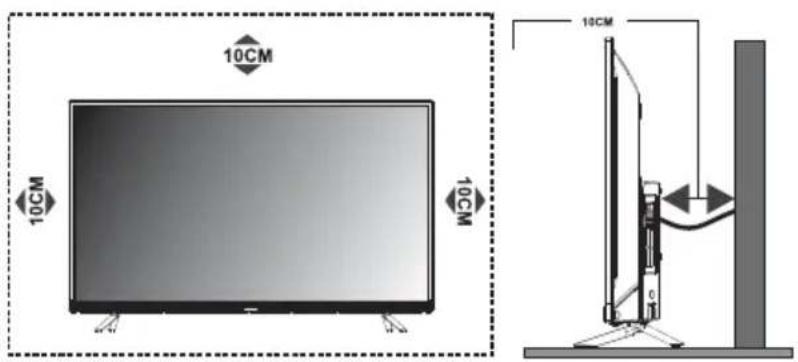
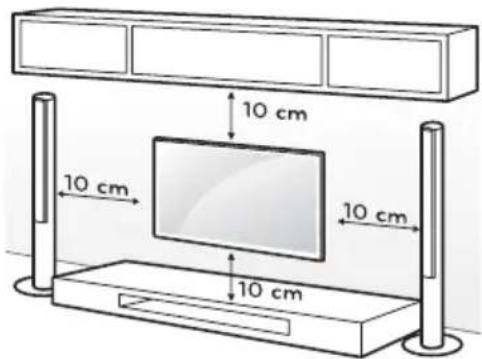
- Install Display on solid horizontal surface such as a table or desk. For ventilation, leave a space of at least 10 cm free all around the set. To prevent any fault and unsafe situations, please do not place any objects on top of the set. This apparatus can be used in tropical and/or moderate climates.
- Fixing the rear of enclosure to wall. (only for AU market)
- Environment (only for Tropical climates zone): Working temperature: 5'C-45'C Working humidity: 20%-80% Storage temperature: -15'C-50'C Storage humidity: 1 0%-90%
- Environment (only for Moderate climates zone): Working temperature: 5'C-35'C Working humidity: 20%-80% Storage temperature: -15'C-45'C Storage humidity: 10%-90%
Never place a television set in an unstable location. A television set may fall, causing serious personal injury or death. Many injuries, particularly to children, can be avoided by taking simple precautions such as:
• Using cabinets or stands recommended by the manufacture of the television.
- Only using furniture that can safely support the television.
- Ensuring the television is not overhanging the edge of the supporting furniture.
- Not placing the television on tall furniture (for example, cupboards or bookcases) without anchoring both the furniture and the television set to a suitable support.
- Not placing the television set on cloth or other materials that may be located between the television set and supporting furniture.
• Educating children about the dangers of climbing on furniture to reach the television or its controls.
If your existing television set is being retained and relocated, the same considerations as above should be applied (Only for the TV with mass exceed 7 kg).
- An optional wall mount can be used with your television. Consult with your local dealer for a wall mount that supports the VESA standard used by your TV model.
Carefully attach the wall mount bracket at the rear of the TV. Install the wall mount bracket on a solid wall perpendicular to the floor. If you are attaching the TV to other building materials, please contact qualified personnel to install the wall mount.
Detailed instructions will be included with the wall mount. Please use a wall mount bracket where the device is adequately secured to the wall with enough space to allow connectivity to external devices.
CAUTION
- Disconnect the power before moving or installing the TV. Otherwise electric shock may occur.
- Remove the stand before installing the TV on a wall mount by performing the stand attachment in reverse.
- If you install the TV on a ceiling or slanted wall, it may fall and result in severe injury. Use an authorized wall mount and contact the local dealer or qualified personnel. Otherwise it is not covered by the warranty.
- Do not over tighten the screws as this may cause damage to the TV and void your warranty
- To prevent injury, this apparatus must be securely attached to the floor/wall in accordance with the installation instructions.
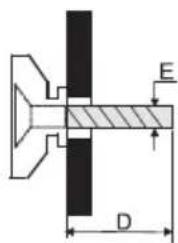
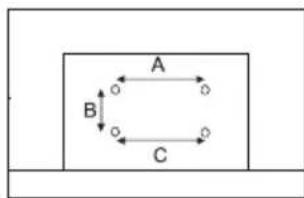
- Use the screws and wall mounts that meet the following specifications. Any damages or injuries by misuse or using an improper accessory are not covered by the warranty.
| Model Size: 32" Top Down | ||||
| Screw | Diameter (mm) "E" M4 | M4 | ||
| Depth (mm)"D" | Max 9 9 | |||
| Min 6 6 | ||||
| Quantity 2 2 | ||||
| VESA (AxBxC) 100x100x100 | ||||
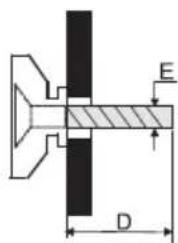
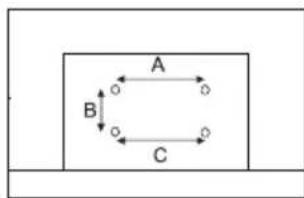
flowchart
graph TD
    A["A"] --> B["B"]
    B --> C["C"]
    C --> A
Note:
1) The pictures are for reference only.
2) For the TV sets with terminals towards the wall, in order to leave enough space to use the terminals, a rubber cushion is needed together with the screw to fix the wall mount. It is a small hollow pillar whose internal diameter is 8mm, external diameter is 18mm and height is 30mm.
TERMINALS
Note: The terminals may differ by model or region, and please select the terminals according to the actual TV you have.
| 1 CI | CI card port. | |
| 2 AV IN | Connect audio and/or video signal from signal source such as DVD. | |
| 3 HDMI1/2 | Connect HDMI input signal from signal source such as DVD. | |
| 4 DIGITAL AUDIO OUT | Use a SPDIF cable to connect your TV to a compatible audio receiver. | |
| 5 EARPHONE | Audio output, speakers will be muted when earphone is plugged. | |
| 6 USB USB port | ||
| 7 ANTENNA IN (ANT.) | Connect a coaxial cable to receive signal from the antenna, AIR/CABLE/LNB cable or satellite. | |
| 8 SERVICE | Debugging interface only for professional technician | |
BUTTON
Note: The graphics are for representation only.
Bottom view
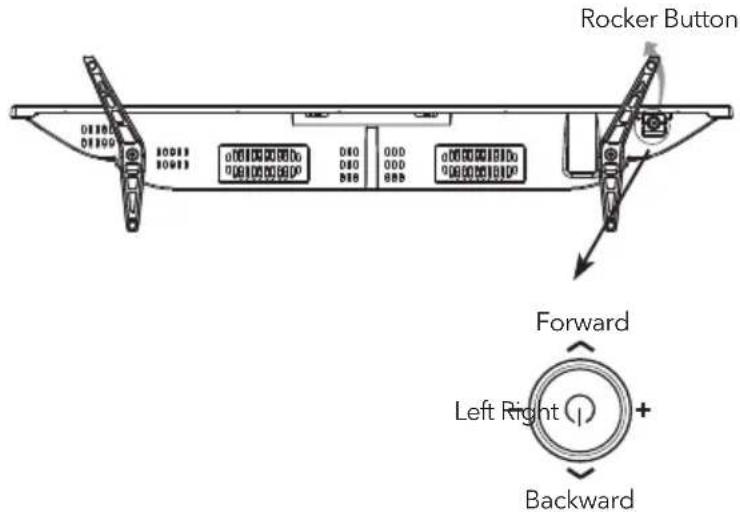
Press middle button:
- In standby mode, press it to turn on the TV;
- Without OSD, short press it to access source menu; long press to turn the TV to standby;
- With OSD, short press it to confirm a selection; long press it to return or exit.
Push left: decrease volume or go to left.
Push right: increase volume or go to right.
Push forward: channel up or go to above.
Push backward: channel down or go to below.
REMOTE CONTROL
Note: Some button may be invalid, when you press this kind of button, the TV screen will not respond or pop out a message to show that this function does not exist.
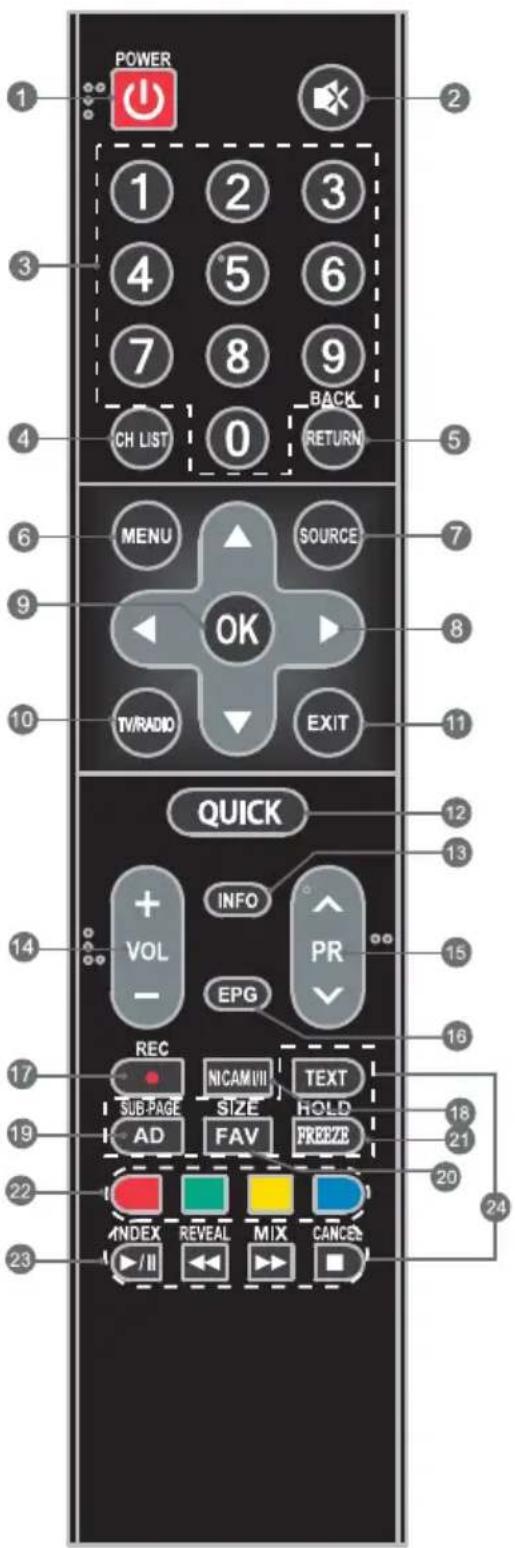
- POWER ( ⏻ ) Press to tum the TV on or standby.
-
MUTE (☒) Press to mute or restore the volume.
-
Number buttons Choose channel directly.
-
CHN LIST Press to access the channel list.
-
RETURN (BACK) Press to return to previous viewed channel.
-
MENU Open the menu options.
-
SOURCE Select the input source mod
-
Up/Down/Left/Right (▲ /▼/◄ /►) Navigate the menu.
-
OK Confirm the selection.
-
TV/RADIO Press to switch between TV and radio.
-
EXIT Exit the current menu.
-
QUICK Access the quick menu.
-
INFO Display information about current source.
-
Volume Up/Down (VOL+/VOL-) Adjust the volume up or down.
-
Program Up/Down (PR+/PR-) Change the programs up or down.
-
EPG Press to display the current EPG information in DTVmode.
-
REC (Record) Press to record the current program (Only worked in DTV mode).
-
NICAM (1/11) Press to select desired sound output depending on the broadcasting channel.
-
AD Press to turn on audio description, a narrator will describe what is happening on the screen for blind or visually impaired viewers. Press again will turn it off (Only available in DTV mode).
-
FAV Press to view your assigned favorite channels. Press Up/Down buttons to cycle through your assigned favorite channels, press OK to confirm.
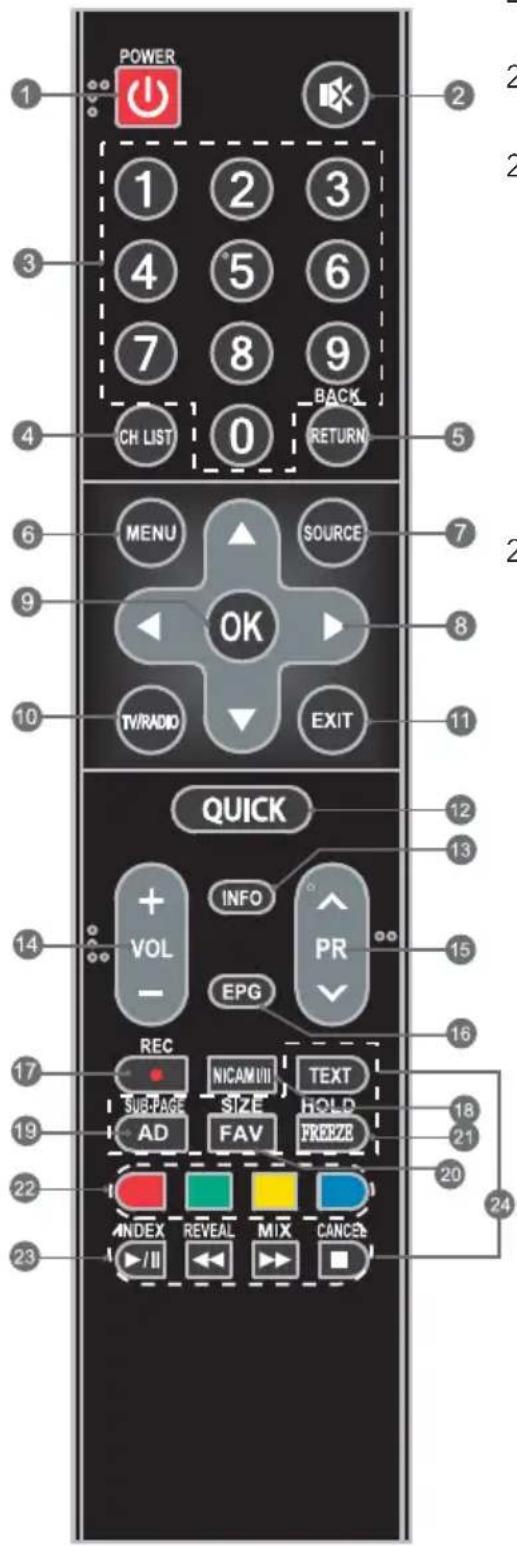
- FREEZE Freeze or unfreeze the image on the screen (Not available in USB mode).
- Colored buttons Press to execute the prompt function in TV or DTVmode.
- USB Play Control Buttons Play & Pause (▶/II)
Press to pause playback, press again to continue playback.
Stop (→)
Press to stop playback.
Fast Backward Button (◀)
Press to fast reverse.
Fast Forward (▶)
Press to fast forward.
- TELETEXT BUTTONS
TEXT
Press to enter or exit the teletext menu.
SIZE
Enlarge the teletext display: Press this button once to enlarge upper half of the screen. Press this button again to enlarge lower half of the screen. Press this button again to resume to normal screen size.
HOLD
Press to hold the teletext page on screen without update and changes. Press again to release the hold state.
SUB.PAGE
Press this button to enter or exit subpage mode (if subpage is available). Press Red I Green buttons to select the desired subpage.
INDEX
Display index page.
REVEAL
Display concealed information such as solutions to riddles or puzzles or remove the information from the display.
MIX
Superimpose the teletext over the TV program or return to normal teletext mode.
CANCEL
Return to TV program temporarily while searching for a Teletext page. When the search is done, the page number will be displayed on the upper left of the screen. Press again to return to the Teletext page.
HOW TO USE THE MANUAL
Operating instructions are built into your TV and can be displayed on the screen. To learn more about your TV features, access your E-Manual by referring to below information.
- Press MENU button to access the menu list. There is a display "E-Manual" at the bottom.
- Press Blue button to access the e-Manual interface.
- Remote control buttons in the e-Manual are described by words instead of icons, refer to below information to help you operate the TV.
| 0-9 Number Buttons Select Page | |
| OK | Go to page |
| ◀ Press to the previous page. | |
| ▶ Press to the next page. | |
| Blue button Enter or exit the E-manual interface. | |
TROUBLESHOOTING
Note: Below troubleshooting list is only for reference, some models may not have all functions and the actual problem may differ from it. If the problem persists after solutions, please contact your local support center.
| General Problem | |
| Issues Solutions and Explanations | |
| Remote control does not work. | 1. Check the remote sensor on the remote control.2. Change the batteries.3. Batteries are not installed correctly.4. Main power is not connected. |
| Poor signal | This is usually caused by interference from cell phones, walkie-talkie, automotive ignition system; neon, electric drill or other electronic equipment or radio interference sources. |
| Multimedia Player | |
| Issues Solutions and Explanations | |
| Audio is normal but video is abnormal. | 1. The media file maybe damaged, Check if the file can be played on the PC.2. Check if video and audio codec is supported. |
| Video is normal but audio is abnormal. | 1. The media file maybe damaged, Check if the file can be played on the PC.2. Check if video and audio codec is supported. |
| Picture and Sound | |
| Issues Solutions and Explanations | |
| No picture, no sound. | 1. Check the signal source.2. Plug another electrical device into the outlet to make sure it is working or turned on.3. Power plug is bad contact with the outlet.4. Check the signal. |
| Abnormal picture | 1. For no color or bad picture quality, you may:1) Adjust the color option in menu settings.2) Keep the TV at a sufficient distance from other electronic products.3) Try another channel, maybe exist broadcasting signal problem.2. Bad TV signal (Display mosaic or snowflakes)1) Check the signal cable and adjust the antenna.2) Fine tune the channel.3) Try another channel. |
| Normal picture, no sound | 1. If no sound, unmute or increase the sound volume.2. Open the sound menu and adjust "Balance".3. Check if a headphone has been inserted in, if so, pull out the headphone. |
SAFETY INFORMATION
Note: Read all of the instructions before operating the set. Keep these instructions well for later use.
- Read these instructions -All the safety and operating instructions should be read before this product is operated.
- Keep these instructions - The safety and operating instructions should be retained for future reference.
- Heed all warnings - All warnings on the appliance and in the operating instructions should be adhered to.
- Follow all instructions- All operating and use instructions should be followed.
- Do not use this apparatus near water - The appliance should not be used near water or moisture - for example, in a wet basement or near a swimming pool, and the like.
- Clean only with dry cloth.
- Do not block any ventilation openings. Install in accordance with the manufacturer's instructions.
- Do not install near any heat sources such as radiators, heat registers, stoves, or other apparatus (Including amplifiers) that produce heat.
- Do not defeat the safety purpose of the polarized or grounding plug. A polarized plug has two blades with one wider than the other. A grounding plug has two blades and a third grounding prong. The wide blade or the third prong is provided for your safety. If the provided plug does not fit into your outlet, consult an electrician for replacement of the obsolete outlet.
- Protect the power cord from being walked on or pinched particularly at the plugs, convenience receptacles, and at the point where they exit from the apparatus. Only use attachments/accessories specified by the manufacturer.
- Use only with the cart, stand, tripod, bracket, or table specified by the manufacturer, or sold with the apparatus. When a cart or rack is used, use caution when moving the cart/apparatus combination to avoid injury from tip-over.

- Unplug the apparatus during lightning storms or when unused for long periods of time.
- Refer all servicing to qualified personnel. Servicing is required when the apparatus has been damaged in any way, such as power supply cord or plug is damaged, liquid has been spilled or objects have fallen into the apparatus, the apparatus has been exposed to rain or moisture, does not operate normally, or has been dropped.
- CAUTION: These servicing instructions are for use by qualified service personnel only. To reduce the risk of electric shock, do not perform any servicing other than that contained in the operating instructions unless you are qualified to do so.
- Do not install this equipment in a confined or building-in space such as a book case or similar unit, and remain a well ventilation conditions at open site. The ventilation should not be impeded by covering the ventilation openings with items such as newspaper, tablecloths, curtains etc.
- Caution - To prevent electric shock hazard, replace grille.
- Please refer the information on rear enclosure for electrical and safety information before installing or operating the apparatus.
• To reduce the risk of fire or electric shock, do not expose this apparatus to rain or moisture.
- The apparatus shall not be exposed to dripping or splashing and that no objects filled with liquids, such as vases, shall be placed on the apparatus.
- For the terminals marked with symbol of "4" may be of sufficient magnitude to constitute a risk of electric shock. The external wiring connected to the terminals requires Installation by an instructed person or the used of ready-made leads or cords.
- To prevent injury, this apparatus must be securely attached to the floor/wall in accordance with the installation instructions.
- Danger of explosion if battery is incorrectly replaced. Replace only with the same or equivalent type.
- The battery (battery or batteries or battery pack) shall not be exposed to excessive heat such as sunshine, fire or the like.
- Excessive sound pressure from earphones and headphones can cause hearing loss. Listening to music at high volume levels and for extended durations can damage one's hearing. In order to reduce the risk of damage to hearing, one should lower the volume to a safe, comfortable level, and reduce the amount of time listening at high levels. (Only for German).
- The mains plug/appliance coupler/direct plug-in adapter is used as disconnect device, the disconnect device shall remain readily operable.
- When not in use and during movement, please take care of the power cordset, e.g. tie up the power cordset with cable tie or something like that. It shall be free from sharp edges and the like that can cause abrasion of the power cordset. When put into use again, please make sure the power cord set being not damaged, If any damages found, please look for the service person to replace the power cord set specified by the manufacturer or have the same characteristics as the original one.
- Attention should be drawn to environmental aspects of battery disposal.
- No naked flame sources, such as lighted candles, should be placed on the apparatus. To prevent the spread of fire, keep candles or other open flames away from the apparatus at all times.
- If the apparatus have the symbol ☐ in its rating label and the power cord has two pins, it means that the equipment is a Class II or double insulated electrical appliance. It has been designed in such a way that it does not require a safety connection to electrical earth.
- The following information are recommended to be included as far as applicable where applicable:
| ~ | Refers to alternating current (AC) |
| == | Refers to direct current (DC) |
| ☐ | Refers to ClassII equipment |
| ∅ | Refers to stand-by |
| | | Refers to power ON. |
| Refers to dangerous voltage |
- Warning for Apparatus containing COIN/BUTTON CELL BATTERIES (Below instruction only used for the apparatus containing a user-replaceable coin/button cell battery)
WARNING
Do not ingest the battery, Chemical Bum Hazard (The remote control supplied with) This product contains a coin/button cell battery. If the coin/button cell battery is swallowed, it can cause severe Internal burns in just 2 hours and can lead to death. Keep new and used batteries away from children. If the battery compartment does not close securely, stop using the product and keep it away from children. If you think batteries might have been swallowed or placed inside any part of the body, seek immediate medical attention.
WEEE Directive

Correct Disposal of this product. This marking indicates that this product should not be disposed with other household wastes throughout the EU. To prevent possible harm to the environment or human health from uncontrolled waste disposal, recycle it responsibly to promote the sustainable reuse of material resources. To return your used device, please use the return and collection systems or contact the retailer where the product was purchased. They can take this product for environmental safe recycling.

CAUTION
RISK OF ELECTRIC SHOCK DO NOT OPEN

This lightning flash with arrowhead symbol within an equilateral triangle is intended to alert the user to the presence of non-insulated "dangerous voltage" within the product's enclosure that may be of sufficient magnitude to constitute a risk of electric shock. To reduce the risk of electric shock. Do not remove cover (or back). No user serviceable parts inside. Refer to qualified service personnel. The exclamation point within an equilateral triangle is intended to alert the user to the presence of important operating and maintenance instructions in the literature accompanying the appliance.
Licences
HDMI®
HIGH-DEFINITION MULTIMEDIA INTERFACE
The terms HDMI and HDMI High-Definition Multimedia Interface, and the HDMI logo are trademarks or registered trademarks of HDMI Licensing LLC in the United States and other countries.
D
DOLBY AUDIO
Manufactured under license from Dolby Laboratories.
Dolby, Dolby Audio and the double-D symbol are DOLBY AUDIO trademarks of Dolby Laboratories.
EU DECLARATION OF CONFORMITY
For the following equipment:
LED-TV
(Product Name)
(Model name/Brand name)
is herewith confirmed to comply with the requirements set out in the Council Directive on the Approximation of the Laws of the Members states relating to Radio Equipment Directive(2014/53/EU), Erp Directive(2009/125/EC) and RoHS(2011/65/EU). For the evaluation regarding the Directive, the following standarda were applied:
| Type Standards | |
| Safety EN 60065:2014 | |
| EMC | EN55020:2007+A11:2011; EN55024:2010+A1:2015; EN55032:2012; EN61000-3-2:2014; EN61000-3-3:2013 |
| Radio Spectrum | ETSI EN 303 340 V1.1.2ETSI EN 303 372-2 V1.1.1 |
| Health EN 62479:2010 | |
| Erp | EN 50564:2011; EN 62087:2012; IEC 62087:2011; IEC 62301:2011 |
| RoHS EN 50581: 2012 | |
The following manufacturer is responsible for this declaration:
(Company Name)
(Company Adress)
(Contract Name)
(Position/Title)
Place of issue
Date of issue
Signature of Authorized Person
AKSESORË
| Model Size: 32" Top Down | ||||
| Screw | Diameter (mm) "E" M4 | M4 | ||
| Depth (mm)"D" | Max 9 9 | |||
| Min 6 6 | ||||
| Quantity 2 2 | ||||
| VESA (AxBxC) 100x100x100 | ||||
flowchart
graph TD
    A["A"] --> B["B"]
    B --> C["C"]
    C --> A
Shënim:
Push right: increase volume or go to right.
Push forward: channel up or go to above.
Push backward: channel down or go to below.
TELEKOMANDA
flowchart
graph TD
    A["A"] --> B["B"]
    B --> C["C"]
    C --> A
Napomena:
1) Slike služe samo kao ilustracija.
2) Za postavljanje TV uređaja s terminalima okrenutim ka zidu potreban je i gumeni jastuk uz šraf prilikom fiksiranja postolja na zidu kako bi se obezbedilo dovoljno prostora za upotrebu terminala. To je mali šupalj stub čiji je unutrašnji prečnik 8 mm, spoljašnji 18 mm, a visina 30 mm
PRIKLJUČCI
Pritisnite tipku u sredini:
- U stanju pripravnosti pritisak na tipku uključuje televizor;
- Ako nema OSD (On Screen Display) izbornika, kratkim pritiskom otvara se osnovni izbornik; duži pritisak će TV staviti u način pripravnosti;
- U slučaju postojanja OSD izbornika, kratkim pritiskom potvrđujete izbor; dužim pritiskom vraćate se ili izlazite iz izbornika / podizbornika.
Lijevi dio tipke: smanjenje zvuka ili pomicanje ulijevo.
Desni dio tipke: povećanje zvuka ili pomicanje udesno.
Gornji dio tipke: mijenjanje kanala ili pomicanje prema gore.
natural_image
Illustration of a flat-screen monitor with 10CM measurement indicators (no text or symbols on the screen itself)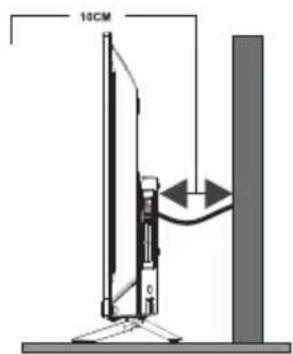
- Околна среда
flowchart
graph TD
    A["A"] --> B["B"]
    B --> C["C"]
    C --> A
Anmerkung:
(Modellname/Markenname)
flowchart
graph TD
    A["A"] --> B["B"]
    B --> C["C"]
    C --> A
Note:
COMMENT UTILISER LE MANUEL DIGITAL
| Veličina modela: 32" Gore Dolje | ||||
| Vijak | Promjer (mm) "E" M4 M4 | |||
| Dubina (mm)"D" | Max 9 9 | |||
| Min 6 6 | ||||
| Količina 2 2 | ||||
| VESA (AxBxC) 100x100x100 | ||||

Napomena:
flowchart
graph TD
    A["A"] --> B["B"]
    B --> C["C"]
    C --> A
Megjegyzés:
flowchart
graph TD
    A["A"] --> B["B"]
    B --> C["C"]
    C --> A
Nota:
EU DECLARATION OF CONFORMITY
natural_image
Illustration of a flat-screen monitor with 10CM measurement indicators (no text or symbols on screen)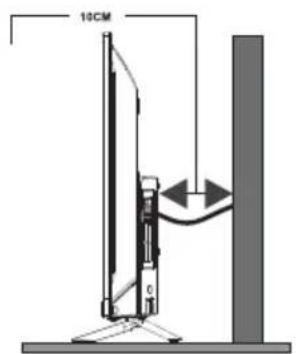
- Околина
flowchart
graph TD
    A["A"] --> B["B"]
    B --> C["C"]
    C --> A
Napomena:
1) Slike služe samo kao ilustracija.
2) Za postavljanje TV uređaja s terminalima okrenutim ka zidu potreban je i gumeni jastuk uz šraf prilikom fiksiranja postolja na zidu kako bi se obezbedilo dovoljno prostora za upotrebu terminala. To je mali šupalj stub čiji je unutrašnji prečnik 8 mm, spoljašnji 18 mm, a visina 30 mm
PRIKLJUČCI
Pritisnuti dugme u sredini:
- U režimu pripravnosti pritisak na dugme uključuje TV;
- Ako nema OSD menija, kratkim pritiskom otvara se osnovni meni, duži pritisak stavlja TV u režim pripravnosti;
- U slučaju postojanja OSD menija, kratkim pritiskom potvrđujete izbor; dužim pritiskom isključujete TV.
flowchart
graph TD
    A["A"] --> B["B"]
    B --> C["C"]
    C --> A
Mentiune
flowchart
graph TD
    A["A"] --> B["B"]
    B --> C["C"]
    C --> A
Opomba:
natural_image
Illustration of a flat-screen monitor with 10CM measurement indicators (no text or symbols on screen)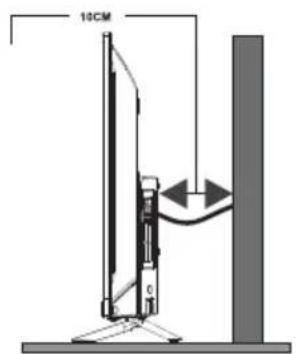
- Okolina (samozatropsku klimatskuzonu): Radna temperatura: 5°C\~45°C Vlažnostvazduhaprilikomrada:20%\~80% Temperatura skladištenja: -15°C\~50°C Vlažnost vazduha prilikom skladištenja: 10%\~90%
- Okolina (samo za umerene klimatske zone): Radna temperatura: 5 °C\~35 °C Vlažnost vazduha pri radu: 20%\~80% Temperatura skladištenja: -15°C\~45°C Vlažnost vazduha prilikom skladištenja: 10%\~90%
BEZBEDNOSNA UPUTSTVA
Napomena: Pročitajte sva uputstva pre korišćenja uređaja. Sačuvajte ova uputstva za kasniju upotrebu.

- Note
- SPECIFICATIONS
- POSITIONING THE TV SET
- CAUTION
- Note:
- TERMINALS
- BUTTON
- Bottom view
- Press middle button:
- REMOTE CONTROL
- Stop (→)
- Fast Backward Button (◀)
- Fast Forward (▶)
- TEXT
- SIZE
- HOLD
- SUB.PAGE
- INDEX
- REVEAL
- MIX
- CANCEL
- HOW TO USE THE MANUAL
- TROUBLESHOOTING
- SAFETY INFORMATION
- WARNING
- WEEE Directive
- Licences
- EU DECLARATION OF CONFORMITY
- LED-TV
- AKSESORË
- Shënim:
- TELEKOMANDA
- Napomena:
- PRIKLJUČCI
- Pritisnite tipku u sredini:
- Anmerkung:
- COMMENT UTILISER LE MANUEL DIGITAL
- Megjegyzés:
- Nota:
- Pritisnuti dugme u sredini:
- Mentiune
- Opomba:
- BEZBEDNOSNA UPUTSTVA
Brand : TESLA
Model : 32S317BH
Category : TV