USER MANUAL iMow MI 422 P VIKING
Interne Dockingstation:
External Dockingstation
Thank you for choosing a VIKING quality product.
This product has been produced using state-of-the-art production methods and extensive quality assurance procedures, because our goal is only achieved if you, the customer, are satisfied with your machine.
If you have any questions concerning your machine, please contact your dealer or our sales agency directly.
I hope that your VKING machine will give you great enjoyment.

Dr. Peter Pretzsch
Management
1. Table of contents
Notes on the instruction manual 80
General 80
Country-specific versions 80
Instructions for reading the instruction manual 80
Machine overview 82
Robotic mower 82
Docking station 83
Display 84
How the robotic mower works 85
Operating principle 85
Safety devices 86
STOP button 86
Disabling device 86
Protective covers 86
Impact sensor 86
Lifting protection 87
Tilt sensor 87
Display illumination 87
Anti-theft alarm 87
For your safety 87
General 87 Clothing and equipment 88
Warning - dangers caused by electrical current 88
Battery 89
Transporting the machine 89
Before initial operation 89
Programming 90
During operation 90
Maintenance and repairs 91
Storage for prolonged periods without operation 92
Disposal 92
Description of symbols 93
Standard equipment 94
Initial installation
Notes on initial installation 95
Adjusting the cutting height 95
Setting the language, date and time 95
Installing the docking station 96
Routing the perimeter wire 99
Connecting the perimeter wire 101
Linking the robotic mower and docking station 104
Checking installation 105
Programming the robotic mower 105
Completing initial installation 107
First mowing operation after initial installation 107
Operating instructions 107
Status screen 108
Information area 109
Main menu 110
Commands 110
Mowing plan 111
Active times 111
Mowing duration 112
Information 112
Settings 113
iMow - machine settings 113
Setting the rain sensor 114
Setting the status screen 114
Installation 114
Setting starting points 115
Safety 115
Service 117
Perimeter wire 117
Planning routing of the perimeter wire 117
Making a sketch of the mowing area 118
Routing the perimeter wire 118
Connecting the perimeter wire 118
Wire clearances - use iRuler 118
Confined areas 120
Installing linking sections 120
No-go areas 121
Secondary areas 122
Corridors 122
Accurate mowing along edges 123
Sloping terrain in the mowing area 123
Installing reserve wire 124
Using wire connectors 124
Docking station 125 LED on the docking station 125
Notes on mowing 125
General 125
Mulching 125
Active times 126
Mowing duration 126
Operating the machine 126
Preparation 126
Flap 126
Adapting the programming 127
Automatic mowing 127
Mowing independently of active times 127
Docking the robotic mower 128
Charging the battery 128
Maintenance 129
Maintenance schedule 129
Cleaning the machine 129
Checking the mowing blade wear limits 130
Removing and installing the mowing blade 130
Sharpening the mowing blade 131
Removing and installing carrier plate 131
Finding a wire break 132
Power supply unit plug 133
Storage and winter break 133
Standard spare parts 134
Accessories 134
Minimising wear and preventing damage 134
Environmental protection 135
Removing the battery 135
Transport 137
Lifting or carrying the machine 137
Securing the machine (lashing) 137
CE - manufacturer's declaration of conformity 137
Technical specifications 138
Messages 139
Troubleshooting 143
Service schedule 146
Handover confirmation 146
Service confirmation 146
Installation examples 147
2. Notes on the instruction manual
2.1 General
This instruction manual constitutes original manufacturer's instructions in the sense of EC Directive 2006/42/EC.
VIKING is continually striving to further develop its range of products; we therefore reserve the right to make alterations to the form, technical specifications and equipment level of our standard equipment.
For this reason, the information and illustrations in this manual are subject to alterations.
This instruction manual is protected by copyright. All rights reserved, especially the right of reproduction, translation and processing using electronic systems.
2.2 Country-specific versions
VIKING supplies machines with different plugs and switches, depending on the country of sale.
Machines with European plugs are shown in the illustrations. Machines with other types of plug are connected to the mains in a similar way.
2.3 Instructions for reading the instruction manual
Illustrations and texts describe specific operating steps.
All symbols which are affixed to the machine are explained in this instruction manual.
Viewing direction:
Viewing direction when "left" and "right" are used in the instruction manual: the user is standing behind the machine and is looking forwards in the direction of travel.
Section reference:
References to relevant sections and subsections for further descriptions are made using arrows. The following example shows a reference to a section: ( 2.1)
Designation of text passages:
The instructions described can be identified as in the following examples.
Operating steps which require intervention on the part of the user:
- Release bolt (1) using a screwdriver, operate lever (2)...
General lists:
- Use of the product for sporting or competitive events
Texts with added significance:
Text passages with added significance are identified using the symbols described below in order to especially emphasise them in the instruction manual:

Danger
Risk of accident and severe injury to persons. A certain type of behaviour is necessary or must be avoided.

Warning
Risk of injury to persons. A certain type of behaviour prevents possible or probable injuries.
Cau Mind
Minor injuries or material damage can be prevented by a certain type of behaviour.
i
Note
Information for better use of the machine and in order to avoid possible operating errors.
Texts relating to illustrations:
Some Illustrations which are necessary for use of the machine can be found at the front of this instruction manual.
The camera symbol serves to link the figures on the illustration pages with the corresponding text passages in the instruction manual.

Illustrations with text passages:
Operating steps relating directly to the illustration can be found immediately after the illustration, with a corresponding reference to the item numbers.
Example:
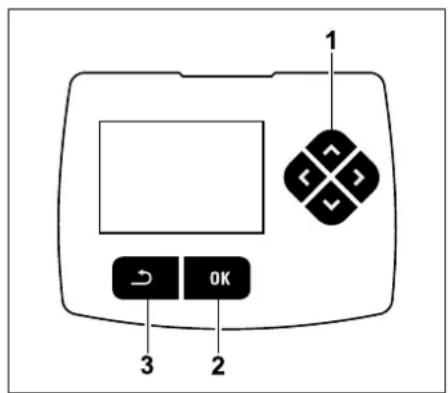
The control pad (1) serves for navigation in the menus. Settings are confirmed and menus opened using the OK button (2). Menus can be exited again using the Back button (3).
3. Machine overview
3.1 Robotic mower
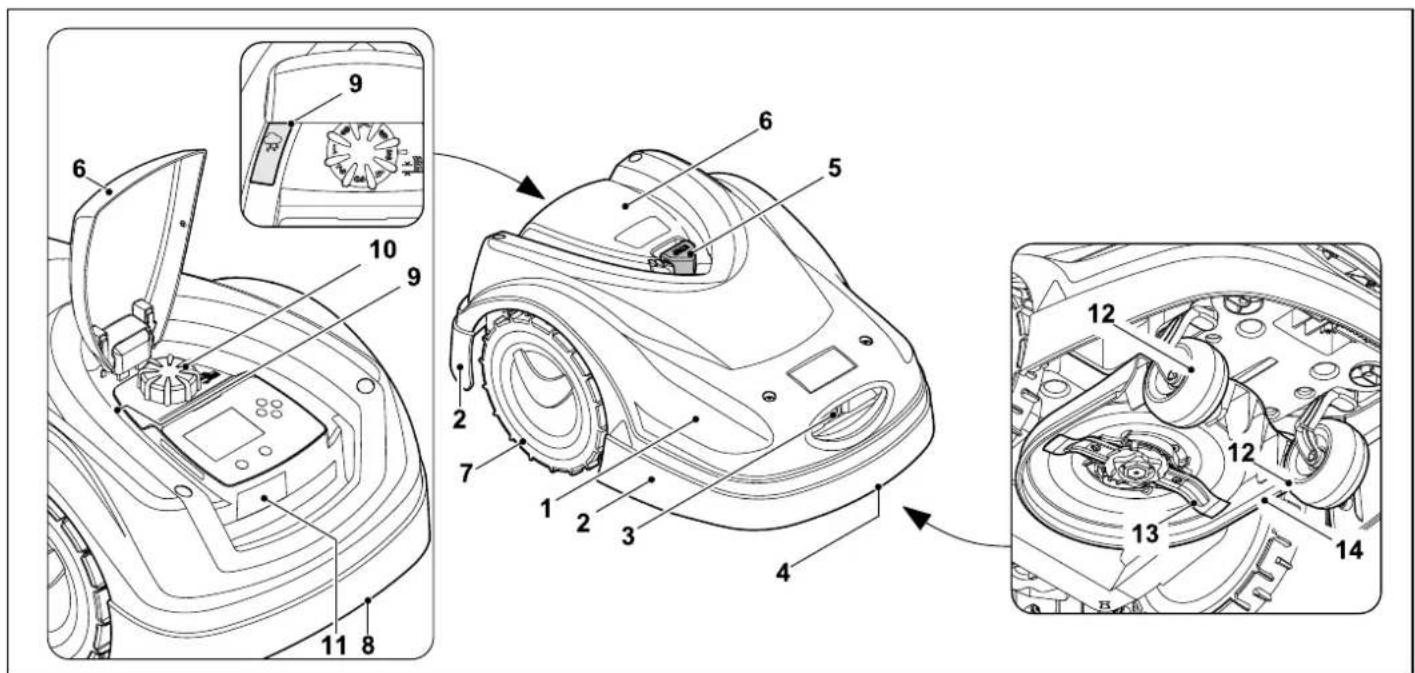
1 Movable mounted hood ( 5.4) ( 5.5)
2 Impact protector MI 422 P
3 Charging contacts: Connecting contacts to docking station
4 Front carrying handle (integrated in the movable hood) ( 20.1)
5 STOP button (⇒ 5.1)
6 Flap ( 14.2)
7 Drive wheel
8 Rear carrying handle (integrated in the movable hood) ( 20.1)
9 Rain sensor ( 10.12)
10 Rotary handle for cutting height adjustment ( 9.2)
11 Identification plate with machine number
12 Front wheel
13 Dual ground-mowing blade ( 15.4)
14 Mowing deck
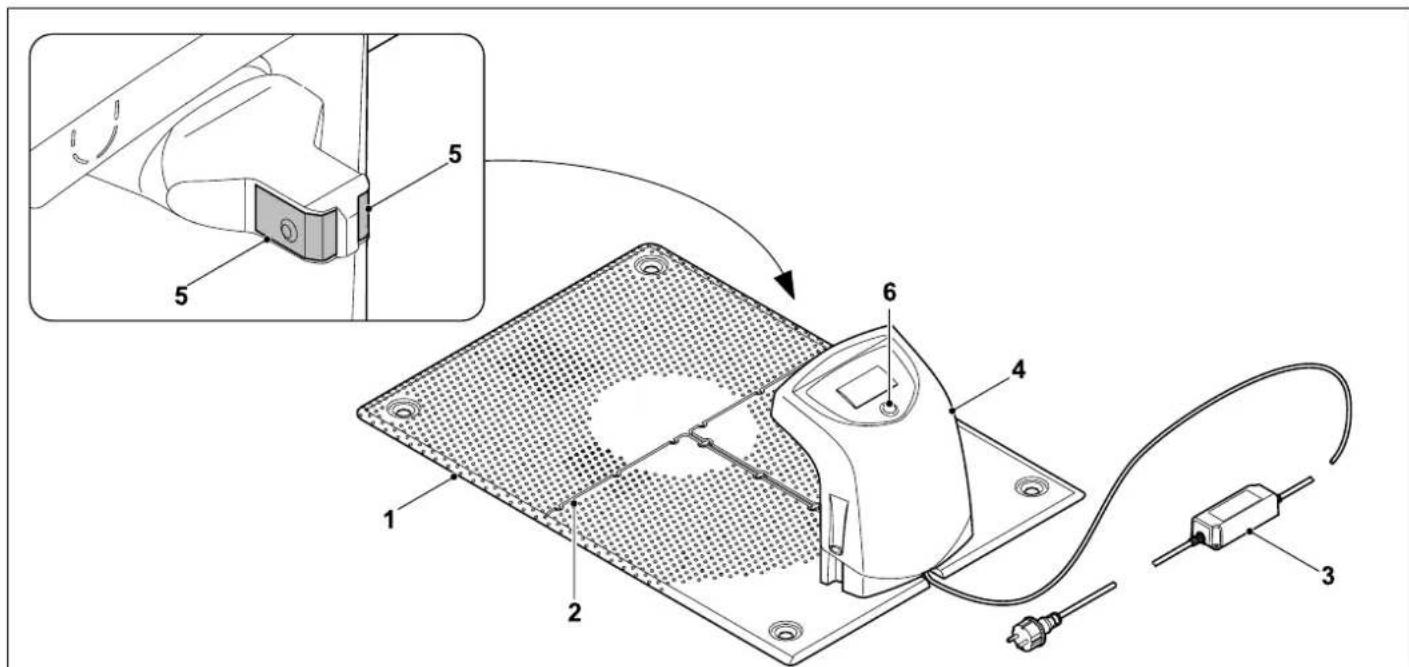
3.2 Docking station
1 Floor plate
2 Cable guides for retaining the perimeter wire ( 9.1)
3 Power supply unit
4 Removable cover (⇒ 9.4)
5 Charging contacts: Connecting contacts to robotic mower
6 Red LED (12.1)
3.3 Display
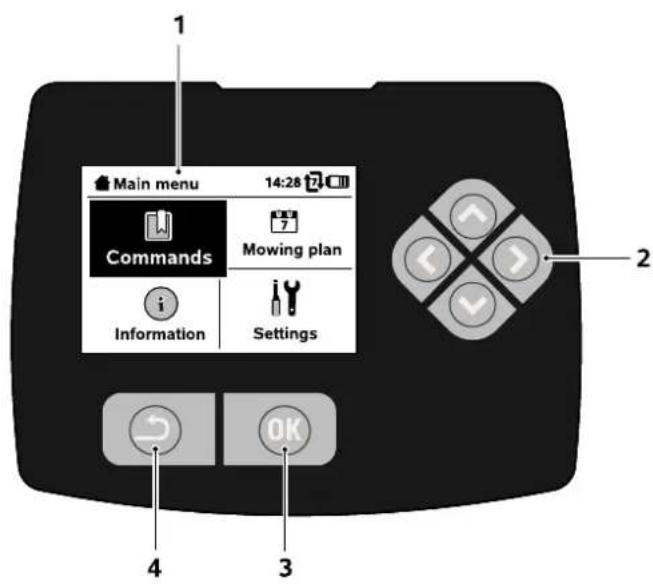
1 Graphical display
2 Control pad: Navigating in menus ( 10.1)
3 OK button: Navigating in menus ( 10.1)
4 Back button: Navigating in menus
4. How the robotic mower works
4.1 Operating principle
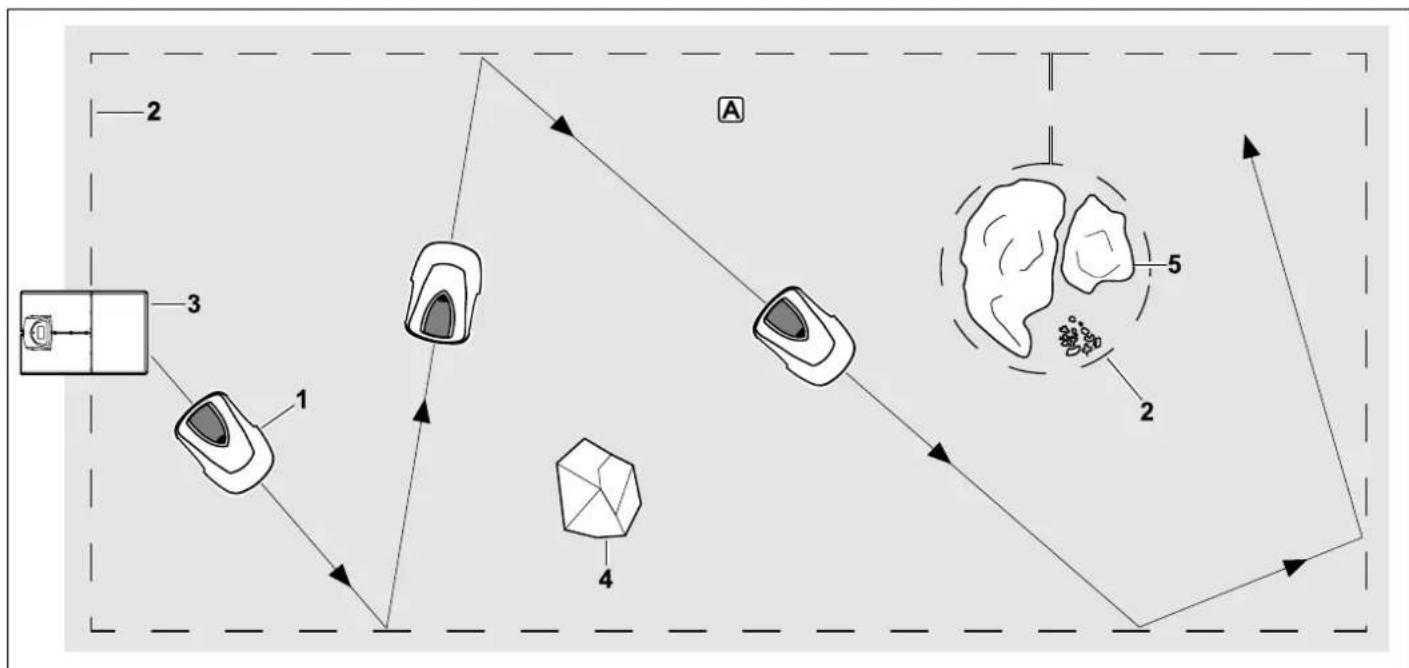
The robotic mower (1) is designed for the automatic mowing of lawns. It mows the lawn in randomly selected paths.
In order for the robotic mower to detect the borders of the mowing area A, a perimeter wire (2) must be routed around that area. A signal generated by the docking station (3) flows through this perimeter wire.
Solid obstacles (4) in the mowing area are reliably detected by the robotic mower by means of an impact sensor. Areas (5) that
the robotic mower is not to enter and obstacles that need to be avoided must be separated from the mowing area using the perimeter wire.
When automatic mowing is switched on, the robotic mower independently leaves the docking station and mows the lawn during the active times set ( 10.7) . The robotic mower automatically travels to the docking station to recharge the battery. The number and duration of the mowing and charging
operations within the active times are adapted automatically. This guarantees that the required weekly mowing duration is always achieved.
When automatic mowing is switched off and for mowing operations independent of the active times, a mowing operation can be activated using the command "Start mowing" or "Start time-delayed mowing". ( 10.5)

The robotic mower can be operated reliably and without interference in close vicinity to other robotic mowers. The wire signal meets the EGMF (European Garden
Machinery Federation) standard with regard to electromagnetic emissions.
5. Safety devices
The machine is equipped with several safety devices for safe operation and for the prevention of improper use.

Risk of injury!
If a safety device is found to be defective, the machine must not be operated. Consult a specialist dealer; VIKING recommends VIKING specialist dealers.
When the red STOP button on the top of the robotic mower is pressed, operation of the machine is stopped immediately. The mowing blade comes to a standstill within a few seconds and the message "STOP button pressed" appears in the display. The robotic mower cannot be operated and is safe while the message is active. ( 23.)
When automatic mowing is switched on, following
confirmation of the message with OK, the system enquires whether automatic operation is to be continued.
If the response is Yes, the robotic mower continues to mow the lawn in accordance with the mowing plan.

If the response is No, the robotic mower remains stationary in the mowing area and automatic mowing is switched off. ( 10.5)

Pressing and holding the STOP button also activates the disabling device. ( 5.2)
5.2 Disabling device
The robotic mower must be disabled prior to any maintenance or cleaning work, prior to transportation and prior to inspection.
The robotic mower cannot be operated when the disabling device is activated.
Activating the disabling device:
- Press and hold the STOP button
-in theCommands menu,
-in the Safety menu.
Activating the disabling device via the Commands menu:
- In the "Commands" menu, select the "Lock iMow" entry and confirm with the OK button. ( 10.5)
- Open the "Safety" submenu in the "Settings" menu. (⇒ 10.16)
- Select the "Disab. device" entry and confirm with the OK button.
Deactivating the disabling device:
-
When required, wake up the machine by pressing any button.
-
Unlock the robotic mower using the illustrated button combination. For this purpose, press the OK button and the Back button in the sequence shown on the display.

5.3 Protective covers
The robotic mower is equipped with protective covers that prevent inadvertent contact with the mowing blade and the clippings.
These include, in particular, the hood.
5.4 Impact sensor
The robotic mower is equipped with a movable hood which serves as an impact sensor. During automatic operation, it immediately comes to a standstill if it contacts a solid obstacle which has a specific minimum height (8 cm) and is firmly attached to the ground. It then turns to face another direction and continues mowing. If the impact sensor is triggered too frequently, the mowing blade is also stopped.

Impacts against obstacles occur with a certain force. Sensitive obstacles, e.g. light objects such as small flower pots, can therefore be knocked over or damaged.
VIKING recommends removing obstacles or blocking them off by means of no-go areas. ( 11.8)
5.5 Lifting protection
If the robotic mower is lifted by the hood, mowing is stopped immediately. The mowing blade comes to a standstill within a few seconds.
5.6 Tilt sensor
If the permissible slope inclination is exceeded during operation, the robotic mower immediately changes its direction of travel. In the event of a rollover, the wheel drive and mowing motors are switched off.
5.7 Display illumination
The display illumination is activated during operation. Thanks to this illumination, the robotic mower is easily recognisable, even in darkness.
5.8 Anti-theft alarm
When the anti-theft alarm is activated, an alarm signal sounds when the robotic mower is lifted unless the PIN code is entered within one minute. ( 10.16)
The robotic mower can only be operated in conjunction with the docking station supplied. A further docking station must be linked with the robotic mower. ( 9.7)
VIKING recommends that the "Low", "Medium" or "High" safety levels be set. This ensures that unauthorised persons cannot operate the robotic mower using other docking stations and are unable to change settings or the programming.
6. For your safety
6.1 General

These safety regulations must be observed when working with the machine.

Read the entire instruction manual before using the machine for the first time. Keep the instruction manual in a safe
place for future reference.
These safety precautions are essential for your safety, however the list is not exhaustive. Always use the machine in a reasonable and responsible manner and be aware that the user is responsible for accidents involving third parties or their property.
The term "use" covers all work on the robotic mower, the docking station and the perimeter wire.
A "User" is defined as:
-A person who reprograms the robotic mower or changes the existing programming.
A person who performs work on the robotic mower.
-A person who activates or operates the machine.
- A person who installs or removes the perimeter wire or docking station.
The machine must only be operated by persons who are well rested and in good physical and mental condition. If your health is impaired, you should consult your doctor to determine whether working with the machine is possible. The machine
should not be operated after the consumption of alcohol, drugs or medications which impair reactions.
Make sure that you are familiar with the controls and use of the machine.
The machine must only be used by persons who have read the instruction manual and are familiar with operation of the machine. The user should seek expert and practical instruction prior to initial operation. The user must receive instruction on safe use of the machine from the vendor or another expert.
During this instruction, the user should be made aware that the utmost care and concentration are required for working with the machine.

Risk of death from suffocation!
Packaging material is not a toy - danger of suffocation! Keep packaging material away from children.
Only give or lend the machine to persons who are familiar with this model and how to operate it. The instruction manual forms part of the machine and must always be provided to persons operating it.
Children, persons with impaired physical, sensory or mental faculties or those lacking the appropriate experience, or persons who are not familiar with the instructions, must never be allowed to use the machine.
Never allow children under the age of 16 to use the machine. Local regulations may specify a minimum age for users.
For safety reasons, any modification to the machine, except the proper installation of accessories or attachments approved by VKING is forbidden and results in voiding of the warranty cover. Information
regarding approved accessories and attachments can be obtained from your VKING specialist dealer.
In particular, any tampering with the machine which increases the power output or speed of the motors is forbidden.
It is not permissible to make any modifications to the machine that could lead to increased noise emissions.
For safety reasons, the machine software must never be modified or tampered with.
Particular care is required during use in public green spaces, parks, sports fields, along roads and in agricultural and forestry businesses.
It is not permitted to transport objects, animals or persons, particularly children, on the machine.
Never allow persons, particularly children, to ride or sit on the robotic mower.
Caution - risk of accident:
The robotic mower is intended for automatic lawn care. Its use for other purposes is not permitted and may be dangerous or result in damage to the machine.
Due to the physical danger to the user, the machine must not be used for the following applications (incomplete list):
- for trimming bushes, hedges and shrubs,
- for cutting creepers,
- for the care of lawn roofs and balcony boxes,
- for shredding or chipping tree or hedge cuttings,
for clearing paths (vacuuming, blowing),
for levelling earth mounds, e.g. mole hills.
6.2 Clothing and equipment

Wear sturdy footwear with high-grip soles and never work barefoot or when wearing e.g.
sandals,
- when approaching the robotic mower during operation.

Wear suitable work clothes during installation, maintenance operations and all other work on the machine and docking
station.
Never wear loose clothes which may become caught on moving parts - do not wear jewellery, ties or scarves.
In particular, wear long trousers
- when approaching the robotic mower during operation.

Always wear thick gloves during maintenance and cleaning operations, when laying and removing wires and when he docking station.
In particular, protect the hands when working on the mowing blade and when driving in the fixing pins or the docking station pegs.
Long hair must always be tied up and secured (headscarf, cap, etc.) when working on the machine.

Suitable safety glasses must be worn when driving in the fixing pins and the docking station pegs.
6.3 Warning - dangers caused by electrical current

Warning: Risk of electric shock!
Particularly important for electrical safety are an intact power cable and mains plug on the power supply unit. Damaged cables, connectors and plugs, or electric cables that do not conform to regulations must not be used, to prevent any risk of electric shocks.
Therefore, check the electric cable regularly for signs of damage or ageing (brittleness).
Only use an original power supply unit.
The power supply unit must not be used:
-if it is damaged or worn,
- if the cables are damaged or worn. Check the power cable in particular for damage and ageing.
Maintenance and repair work on power cables and power supply units must only be performed by specially qualified technicians.
Danger of electric shock!
Do not connect a damaged cable to the mains and only touch a damaged cable once it has been disconnected from the mains.
The electric cable on the power supply unit must not be modified (e.g. shortened). The cable between the power supply unit and docking station must not be extended.
Danger of electric shock!
Damaged cables, connectors and plugs, or electric cables which do not conform with regulations may not be used.
Always ensure that the power cables used are adequately protected by a fuse.
Detach electric cables at the plug and socket and not by pulling on the electric cable.
Only connect the machine to a power supply that is protected by means of a residual current-operated protective device with a release current of a maximum of 30mA . Your electrician can provide further information.
If the power supply unit is connected to the mains supply outside a building, the socket must be approved for outdoor use. Your electrician can provide further information about country-specific legislation.
It must be noted that current fluctuations can damage the machine when it is connected to a power generator.
6.4 Battery
Only use original batteries.
The battery is intended exclusively for fixed installation in a VIKING robotic mower. There, it is optimally protected and is charged when the robotic mower is in the docking station. No other charger must be used. The use of an unsuitable charger can result in danger due to electric shock, overheating or escaping corrosive battery fluid.
Never open the battery.
Do not drop the battery.
Never use a defective or deformed battery.
Store the battery out of the reach of children.

Explosive hazard! Protect the battery against direct sunlight, heat and fire - never throw it into a fire.

Only use or store the battery at temperatures from -10^ to max. +50^ .
Protect the battery against rain and moisture -do not immerse in liquids.

Do not subject the battery to microwaves or high pressure.

Never connect the battery terminals with metallic objects (short-circuit). The battery can be damaged through short circuits.
Keep the unused battery away from metallic objects (e.g. nails, coins, jewellery). Do not use metallic transport containers - Explosive and fire hazard!
Fluid may escape from the battery due to improper use - Avoid contact! In the case of inadvertent contact, rinse with water. Seek medical attention if the fluid contacts the eyes. Escaping battery fluid can cause skin irritation and burns.
Do not insert any objects in the ventilation slots of the battery.
For further safety instructions, see www.viking-garden.com/safety-datasheets
6.5 Transporting the machine
Before transporting, and especially before lifting the robotic mower, activate the disabling device. ( 5.2)
Allow the machine to cool down before transporting.
Avoid contact with the mowing blade when lifting and carrying the machine. The robotic mower must only be lifted at both carrying handles. Never reach under the machine.
Take the weight of the machine into account and use suitable loading aids (lifters) if required.
Secure the machine and other machine parts being transported (e.g. docking station) on the load floor using fastening materials (straps, ropes, etc.) of an adequate size at the fastening points described in this instruction manual. ( 20)
When transporting the machine, always observe regional legislation, especially regarding load security and the transport of objects on load floors.
Do not leave the battery inside a vehicle and never expose it to direct sunlight.
Lithium-ion batteries must be treated with special care during transport. In particular, short-circuit protection must be ensured. Only transport the battery in the robotic mower.
6.6 Before initial operation
It must be ensured that all persons who use the machine are familiar with the instruction manual.
Carefully follow the instructions for installing the docking station ( 12.1) and perimeter wire ( 11.)
The perimeter wire and the power cable must be securely fastened to the ground so that they do not present a tripping
hazard. Avoid routing the perimeter wire and power cable over edges (e.g. edges of pathways or paving stones). When routing the perimeter wire and power cable on ground into which the supplied fixing pins cannot be driven (e.g. paving stones, pathways), a cable duct must be used.
Correct routing of the perimeter wire and power cable must be regularly checked.
To prevent the risk of stumbling, always drive in the fixing pins all the way.
Do not install the docking station in a place where it is difficult to see and could become a tripping hazard (e.g. around the corner of a house).
If possible, install the docking station out of the reach of pests such as ants or slugs - in particular avoid the area around anthills and composting units.
Areas in which the robotic mower cannot operate safely (e.g. due to danger of falling), must be blocked off through appropriate routing of the perimeter wire. VIKING recommends that the robotic mower is only operated on lawns and surfaced paths (e.g. paved drives).
The robotic mower does not detect any sudden drops such as edges, steps, swimming pools or ponds. If the perimeter wire is routed along potential sudden drops, a clearance of at least 1m must be maintained between the perimeter wire and the danger area for safety reasons.
Regularly inspect the area on which the machine is to be used and remove any sticks, stones, wires, bones and all other foreign objects that could be thrown up by the machine.
After installing the perimeter wire, particularly remove all tools from the
mowing area. Broken or damaged fixing pins must be removed from the lawn and disposed of.
Regularly check the area to be mown for uneven areas and level them out.
Never use the machine with damaged safety devices or with safety devices removed.
The switch and safety devices installed in the machine must not be removed or bypassed.
All worn or damaged parts must be replaced before use of the machine. Replace any illegible or damaged danger signs and warnings on the machine. Your VIKING specialist has a supply of replacement stickers and all the other spare parts.
Before initial operation, it must be checked
that the machine is in a safe operating condition. This means that the covers, guards and the flap must be in place and in good condition.
that the docking station is in a safe operating condition. Here, all covers must be properly installed and be in good condition.
- that the power supply unit has been connected to a properly installed socket.
that the insulation of the electric cable and the mains plug on the power supply unit is in good condition.
that the entire machine (housing, hood, flap, fastening elements, mowing blade, blade shaft etc.) is neither worn nor damaged.
that the mowing blade and the blade fastening are in a proper condition (secure seating, damage, wear). ( 15.3)
that all screws, nuts and other fastening elements are in place and are properly tightened. Tighten any loose screws and nuts prior to initial operation (observe tightening torques).
Perform all necessary work or consult a specialist dealer. VKING recommends VKING specialist dealers.
6.7 Programming
Observe local regulations regarding permitted operating times for gardening power tools with motors and programme the active times accordingly. ( 13.3)
In particular, programming must also be adapted so that no children, spectators or animals are in the area to be mown during operation.
The robotic mower must not operate at the same time as a sprinkler system. Adapt the programming accordingly.
Ensure that the correct date and the correct time are set on the robotic mower. Correct the settings if necessary. Incorrect values may cause the robotic mower to start up unintentionally.
6.8 During operation
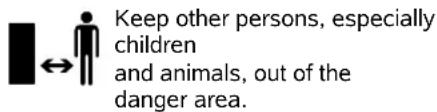
Never allow children to approach or play with the robotic mower during operation.
Never allow the robotic mower to operate unattended if you know that animals or persons, particularly children, are in the vicinity.

Caution - risk of injury! Never put hands or feet on or underneath rotating parts. Never touch the rotating blade.
Before thunderstorms, or if there is a danger of lightning strikes, disconnect the power supply unit from the mains. The robotic mower must not be operated.
The robotic mower must never be tilted or lifted when a motor is running.
Never attempt to change settings on the machine when one of the motors is running.
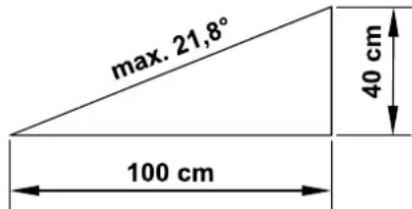
MI 422: For safety reasons, the machine (MI 422) must not be used on slopes with an inclination of more than 19.3^ (35%) .
Risk of injury! A slope inclination of 19,3^ corresponds to a vertical height increase of cm at a 100 cm horizontal distance.
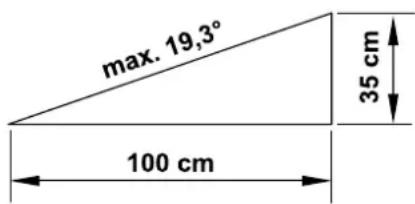
MI 422 P: For safety reasons, the machine (MI 422 P) must not be used on slopes with an inclination of more than 21.8^ (40%) . Risk of injury! A slope inclination of
21.8^ corresponds to a vertical height increase of 40~cm at a 100~cm horizontal distance.

Beware of the cutting tool running on for several seconds before coming to a standstill.
Press the STOP button ( 5.1) during running operation
before opening the flap.
Activate the disabling device ( 5.2)
before lifting or carrying the machine,
before transporting the machine,
before removing blockages,
before carrying out any work on the mowing blade,
- before checking or cleaning the machine,
- after hitting a foreign object or if the robotic mower begins to vibrate excessively. In these cases, check the machine, in particular the cutting unit (blade, blade shaft, blade fastening) for damage and carry out the necessary repairs before restarting and working with the machine.

Risk of injury!
Strong vibration is normally an indication of a fault.
In particular, the robotic mower must not be operated with a damaged or bent blade shaft or mowing blade.
If you do not have the appropriate expertise, have the necessary repairs carried out by a specialist dealer (VIKING recommends VKING specialist dealers).
Before leaving the machine unattended, the safety settings of the robotic mower must be adapted so that it cannot be operated by unauthorised persons. ( 10.16)
Do not lean forward and always ensure that you maintain your balance and a firm footing on inclines when operating the machine and its peripherals. Always walk, do not run.
6.9 Maintenance and repairs
Before starting cleaning, repair or maintenance operations, activate the disabling device and park the robotic mower on firm and level ground.
Disconnect the mains plug of the power supply unit before performing any work on the docking station and the perimeter wire.


Allow the robotic mower to cool down for approx. 5 minutes before performing any maintenance operations.
The power cable must only be repaired or replaced by authorised electricians.
Following any work on the machine, check and, if necessary, correct the programming of the robotic mower before putting it back into operation. In particular, the date and time must be set.
Cleaning:
The complete machine must be cleaned carefully at regular intervals. ( 15.2)
Never spray water (particularly high pressure cleaners) onto motor components, seals, electric components or bearing points. This may result in damage and expensive repairs.
Do not clean the machine under running water (e.g. using a garden hose).
Do not use aggressive cleaning agents. These can damage plastics and metals, impairing the safe operation of your VKING machine.
Maintenance operations:
Only maintenance operations described in this instruction manual may be carried out. Have all other work performed by a specialist dealer.
If you do not have the necessary expertise or auxiliary equipment, please always contact a specialist dealer.
VIKING recommends that you have maintenance operations and repairs performed exclusively by a VKING specialist dealer.
VIKING specialist dealers regularly attend training courses and are provided with technical information.
Only use tools, accessories or attachments approved for this machine by VKING or technically identical parts.
Otherwise, there may be a risk of accidents resulting in personal injury or
damage to the machine. If you have any questions, please consult a specialist dealer.
The characteristics of original VKING tools, accessories and spare parts are optimally adapted to the machine and the user's requirements. Genuine VKING spare parts can be recognised by the VKING spare parts number, by the VKING lettering and, if present, by the VKING spare parts symbol. On smaller parts, only the symbol may be present.
Always keep warning and information stickers clean and readable. Damaged or missing stickers must be replaced by new, original plates from your VIKING specialist dealer. If a component is replaced with a new component, ensure that the new component is provided with the same stickers.
Only perform work on the cutting unit when wearing thick work gloves and exercising extreme care.
Ensure that all screws and nuts, especially all screws and fastening elements of the cutting unit, are securely tightened, so that the machine is in a safe operating condition.
Check the entire machine for wear or damage on a regular basis, particularly before extended periods when the machine is not in use (e.g. over winter). For safety reasons, worn or damaged parts must be replaced immediately to ensure that the machine is always in a safe operating condition.
Components or guards that are removed for maintenance operations must be properly reinstalled immediately.
6.10 Storage for prolonged periods without operation
Set the highest safety level before putting into storage. ( 10.16)
In addition, activate the disabling device.
Ensure that the machine is protected from unauthorised use (e.g. by children).
Store the machine in good operational condition.
Thoroughly clean the machine before storage (e.g. winter break).
Allow the machine to cool for approx. 5 minutes before storing it in an enclosed space.
The storage room must be dry, frost-free and lockable.
Never store the machine close to naked flames or powerful heat sources (e.g. oven).
During prolonged periods without operation (e.g. winter break), remove the docking station and store safely together with the robotic mower. ( 15.9)
6.11 Disposal
Waste products can be harmful to people, animals and the environment. They must consequently be disposed of properly.
Consult your recycling centre or your specialist dealer for information on the proper disposal of waste products. VIKING recommends VIKING specialist dealers.
Ensure that old machines are properly disposed of. Render the machine unusable prior to disposal. In particular, remove the power cable of the power
supply unit, as well as the battery of the robotic mower in order to prevent accidents.
Risk of injury due to the mowing blade!
Always store an old lawn mower in a safe place prior to scrapping. Ensure that the machine and particularly the mowing blade are kept out of the reach of children.
The battery must be disposed of separately from the machine. Ensure that batteries are disposed of safely and in an environmentally friendly manner.
7.Description of symbols

Warning:
Read the instruction manual before initial use.
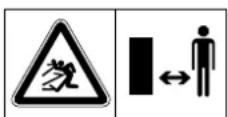
Warning:
Keep a safe distance from the machine during operation.
Keep other persons out of the danger area.
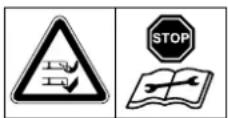
Warning:
Disable the machine before lifting it and before working on it.
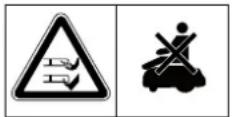
Warning:
Do not climb onto or sit on the machine.
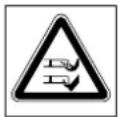
Warning:
Never touch the rotating blade.
8. Standard equipment
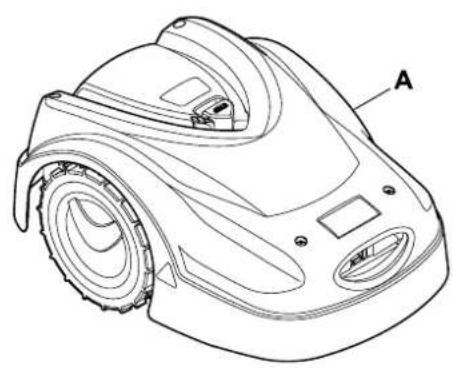
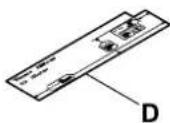
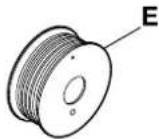
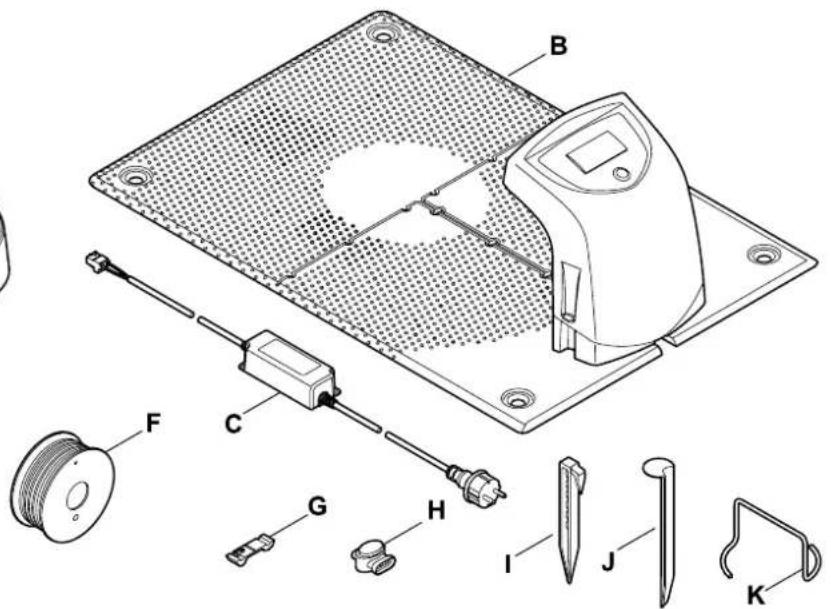
Item Designation Qty.
A Robotic mower 1
B Docking station 1
C Power supply unit 1
D iRuler 2
E Perimeter wire on Spool (150 m): MI 422 1 MI 422 P 0
F Perimeter wire on Spool (200 m): MI 422 0 MI 422 P 1
Item Designation Qty.
G Press-fit connector for perimeter wire 2
H Wire connector 3
I Fixing pin for perimeter wire: MI 422 150 MI 422 P 225
Peg for docking station 4
K Puller for carrier plate 1
- Instruction manual 1
9. Initial installation
9.1 Notes on initial installation
An installation assistant is available for installation of the robotic mower. This program guides you through the entire initial installation process:

- Setting the language, date and time
- Installing the docking station
- Routing the perimeter wire
- Connecting the perimeter wire
- Linking the robotic mower and docking station
- Checking installation
- Programming the robotic mower
- Completing initial installation
The installation assistant must be worked through in its entirety. Only then is the robotic mower ready for operation.
The installation assistant is re-activated following a reset (reset to factory defaults). ( 10.17)
Preparatory measures:
- Mow the lawn using a conventional lawn mower prior to initial installation (ideal grass height of 3 to 4 cm).
- In the case of a hard and dry surface, water the mowing area lightly in order to make it easier to drive in the fixing pins.
When navigating through the menus, follow the instructions in the section entitled "Operating instructions". ( 10.1)
You can select options, menu items and buttons using the control pad.
You can open submenus and confirm selections using the OK button.

Use the Back button to leave the active menu or jump one step back in the installation assistant.

If errors or faults occur during the initial installation, a corresponding message appears in the display. ( 23.)
9.2 Adjusting the cutting height
Lowest cutting height: Level 1 (20 mm)
Highest cutting height: Level 8 (60 mm)
-Openflap. ( 14.2)
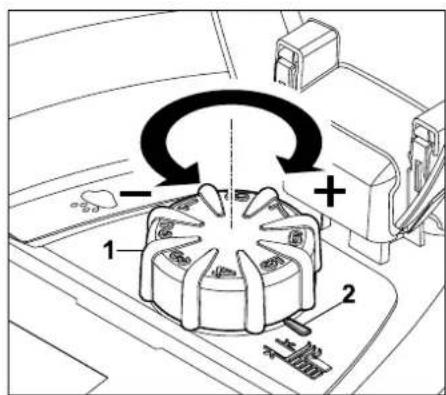
Turn the rotary knob (1). The marking (2) indicates the set cutting height.
The rotary knob can be removed upwards from the adjustment element. This design serves a safety function (it ensures that the machine cannot be lifted and carried by the rotary knob) and to prevent the cutting height from being modified by unauthorised persons.
9.3 Setting the language, date and time
- Pressing any button on the display activates the machine and thus the installation assistant.
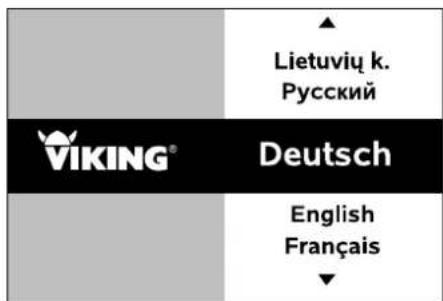
Select the required display language and confirm with the OK button.

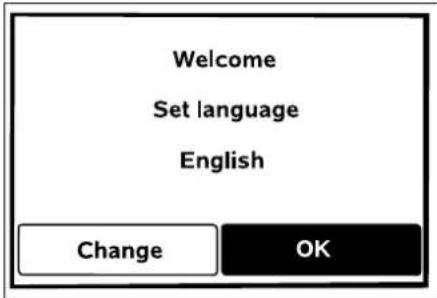
Confirm your language selection with the OK button or select "Change" and repeat the language selection.
If necessary, enter the 9-digit serial number of the robotic mower. This number is printed on the identification plate (see Machine overview). ( 3.1)

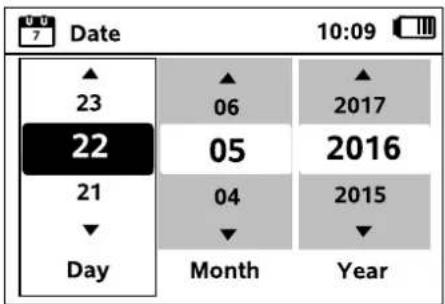
Set the current date using the control pad and confirm with the OK button.

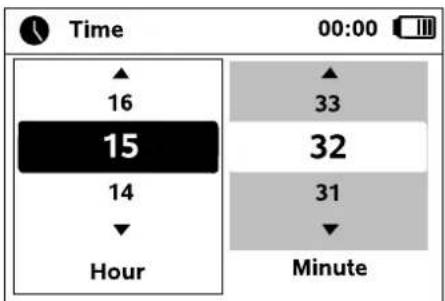
Set the current time using the control pad and confirm with the OK button.

9.4 Installing the docking station

Study the installation examples in this instruction manual. ( 26.)
A canopy top available as an accessory can be mounted on the docking station. This provides better protection for the robotic mower against the weather.
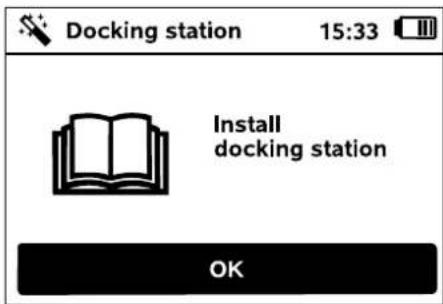
Install the docking station in a protected, shady location. Direct sunlight can lead to increased temperatures in the machine and longer battery charging times. The docking station should be easily visible in its chosen location to prevent the risk of tripping over it.
A mains connection is necessary for operation of the docking station. This must be close enough to the docking station that the respective power cables can be connected to both the docking station and the mains connection - do not change the power cable of the power supply unit.

There are two options for installing the docking station (internal and external). In the case of the internal docking station, the station is located within the mowing area. The docking station is not located directly in the mowing area with the external option.
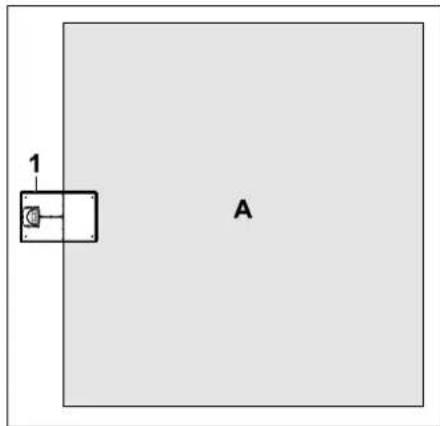
Internal docking station:
The docking station (1) is located within the mowing area (A) (grey area).
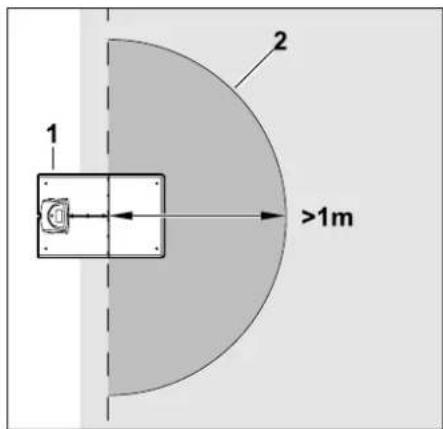
There must be a free, level area (2) with a radius of at least 1m in front of the docking station (1). Remove any bumps or depressions.
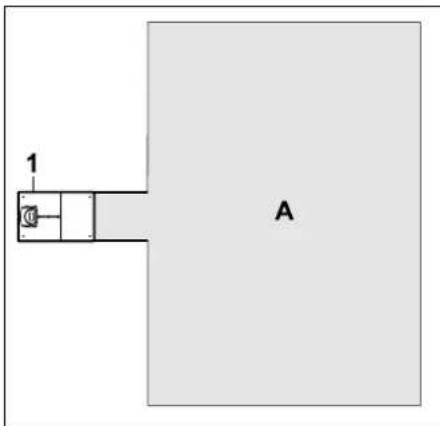
External docking station
In the case of an external docking station (1) the docking station is located outside the mowing area (A).
In conjunction with an external docking station, a separately available accessory is required for offset drive home (AED 600). More information can be obtained from your VKING dealer.
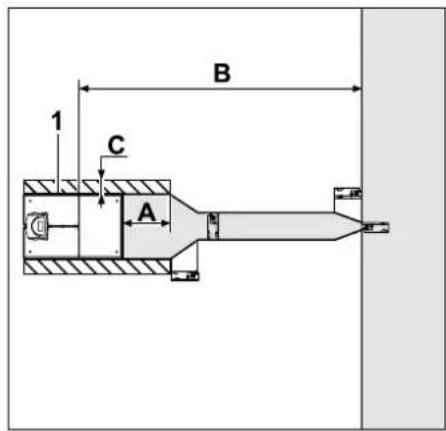
Minimum clearance to the mowing area:
A = 0, 5 m
Maximum clearance to the mowing area:
B = 12 m
There must be a free, level area beyond the perimeter wire and to the side of the docking station (1). Remove any bumps or depressions.
Width of the free area: C = 0,34m
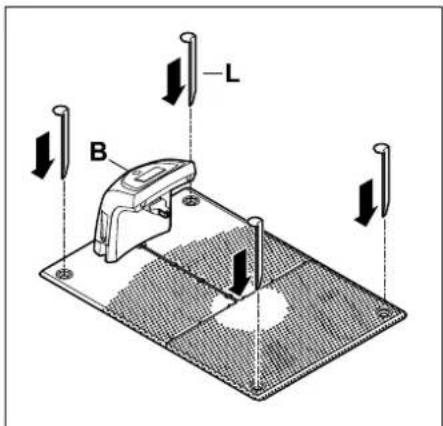
Fastening the docking station:
Fix the docking station (B) into position at the chosen location using four pegs (J).

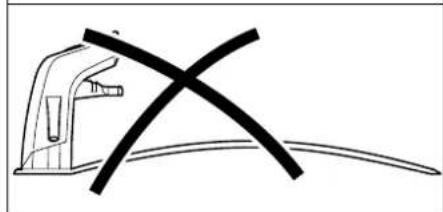
The ground at the chosen location should be horizontal. The docking station must not be inclined by more than 2 cm rearwards or 8 cm forwards. Never bend the floor plate. Any unevenness must be removed under the floor plate so that it fully contacts the ground.
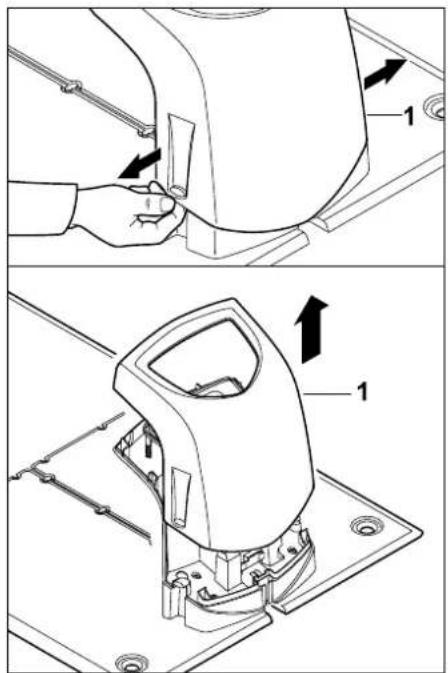
Pull the cover (1) apart slightly on the left and right as illustrated and remove upwards.
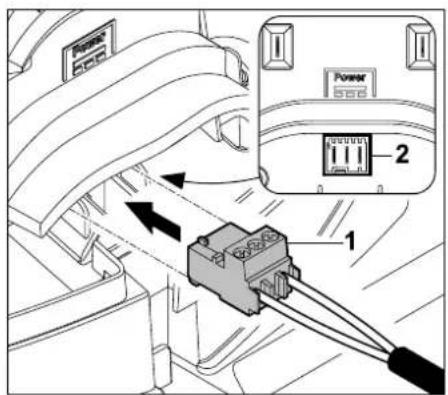
Connect the connector of the power supply unit (1) to plug connection (2) of the docking station circuit board.
If necessary, the connector can be removed (e.g. in order to route the power cable through a hole in a wall).
Make sure that the polarity is correct when attaching the connector to the power cable. ( 15.8)
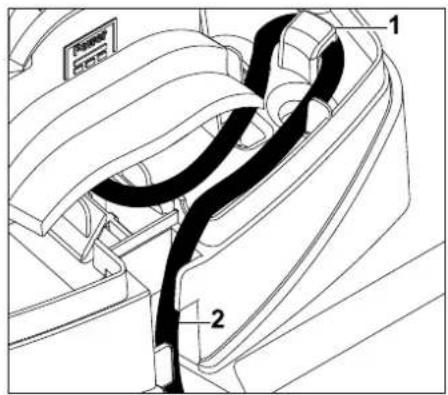
Guide the power cable as illustrated through the strain relief (1), through the cable duct (2) and to the power supply unit.
Install the power supply unit outside the mowing area, protected from direct sunlight, humidity and moisture - fasten to a wall if necessary.
-
Route all power cables outside the mowing area, in particular out of reach of the mowing blade, and fasten them to the ground or accommodate in a cable duct.
-
Unreel power cables in the vicinity of the docking station in order to avoid interference with the wire signal.
Correct operation of the power supply unit is only ensured at an operating temperature between 0^ and 60^ .
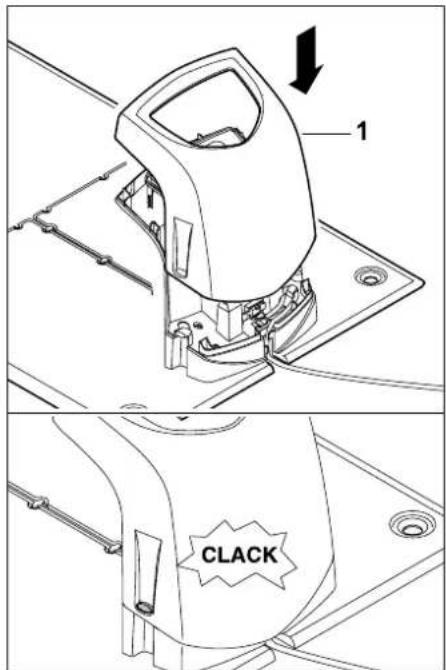

Fit the cover (1) onto the docking station and allow it to engage - do not pinch any cables. Then connect the mains plug.
The red LED on the docking station flashes rapidly as long as no perimeter wire is connected. ( 12.1)
After completing this installation work, press the OK button on the display.

If an external docking station has been installed, VIKING recommends defining at least one starting point outside the corridor to the docking station after initial installation is complete. The starting frequency should be defined so that 0 of 10 mowing operations (0/10) are started at the docking station (starting point 0). ( 10.15)
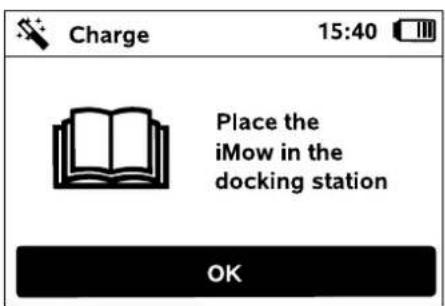
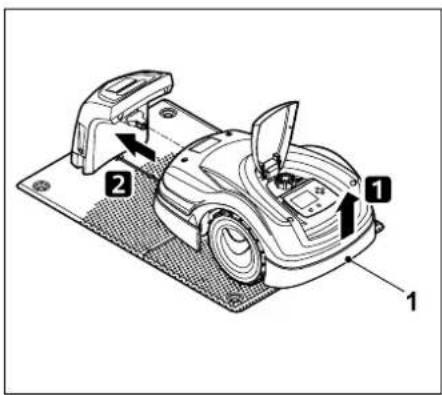
Lift the robotic mower slightly by the carrying handle (1) to relieve the weight on the drive wheels. Push the machine, resting on its front wheels, into the docking station.
Then press the OK button on the display.
If the battery is discharged, a plug symbol appears instead of the battery symbol at the top right corner of the display after docking and the battery is charged while the perimeter wire is being routed. ( 14.7)
9.5 Routing the perimeter wire
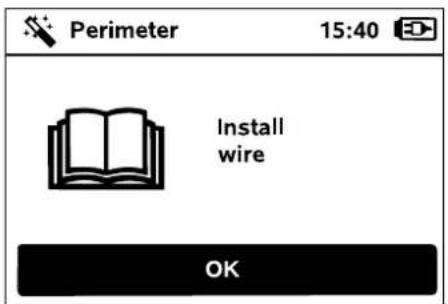
Please read and observe the entire "Perimeter wire" section before performing wire routing. ( 11) In particular, plan the routing, observe the wire clearances and install no-go areas, reserve wire, linking sections, secondary areas and corridors during wire routing.
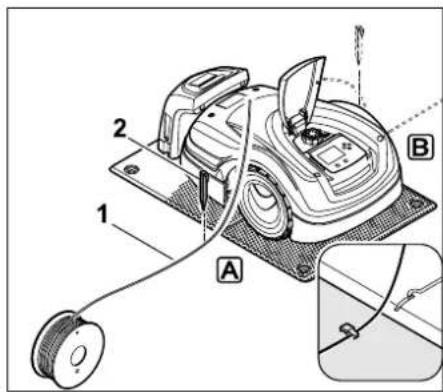
Fasten the perimeter wire (1) to the ground on the left A or right B as appropriate, next to the floor plate, directly next to a wire outlet, using a fixing pin (2).
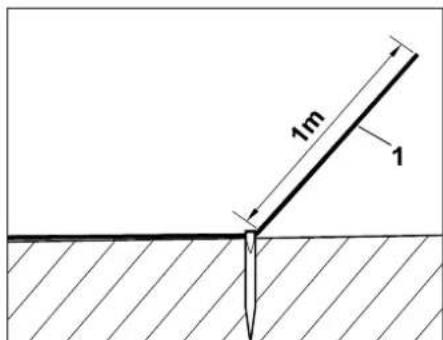
Provide a free wire end (1) with a length of approx. 1 m.
Internal docking station:
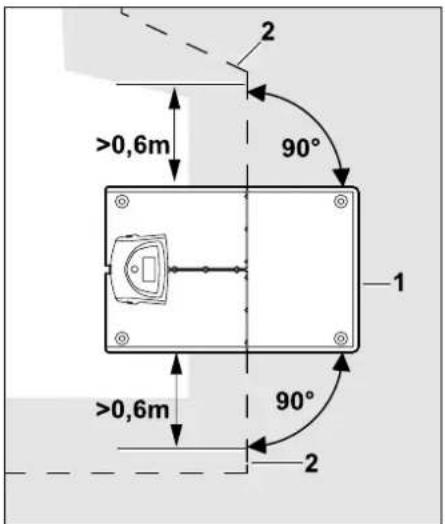
Route the perimeter wire (2) in front of and behind the docking station (1) for 0.6m in a straight line and at right angles to the floor plate. Then follow the edge of the mowing area with the perimeter wire.
If the staggered drive home (corridor) is used, the perimeter wire must be routed at least 1.5m in front of and behind the docking station in a straight line and at right angles to the floor plate. ( 10.14)
External docking station:
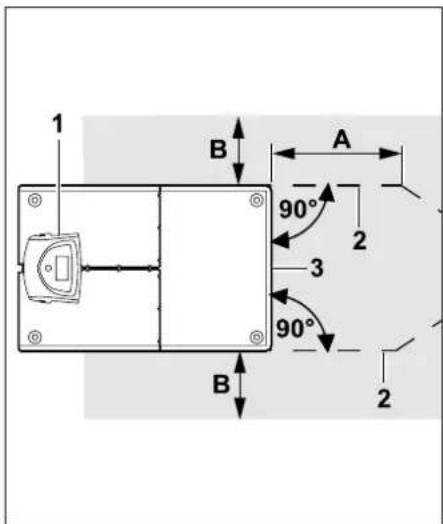
Route the perimeter wire (2) in front of and behind the docking station (1) with a clearance (A) and at right angles to the floor plate. Then install a corridor. ( 11.10)
A freely exercisable minimum clearance (B) must be available for the robotic mower to the side of the ground plate.
A=0,5m
B=0.34m

Further information on installation of the external docking station is contained in the Installation examples section. ( 9.4)
Then follow the edge of the mowing area with the perimeter wire.
Wire routing around the mowing area:
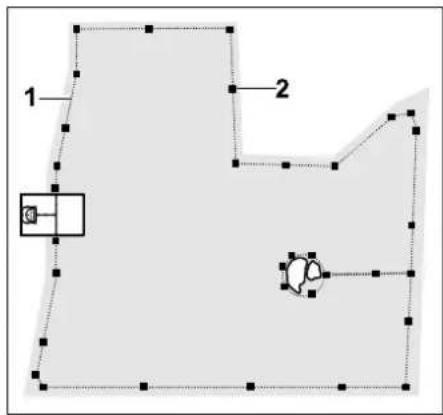
Route the perimeter wire (1) around the mowing area and around any obstacles ( 11.8) and fasten it to the ground using fixing pins (2). Check the clearances using the iRuler. ( 11.5)
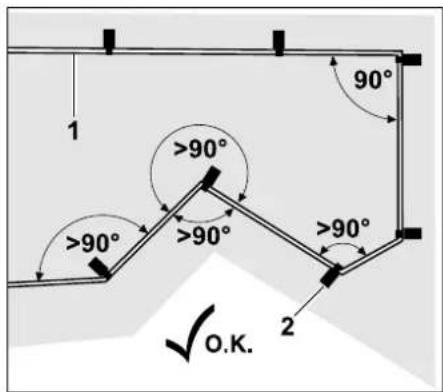
Avoid routing at acute angles (less than 90^ ). In acutely angled lawn corners, fasten the perimeter wire (1) to the ground with fixing pins (2) as illustrated.
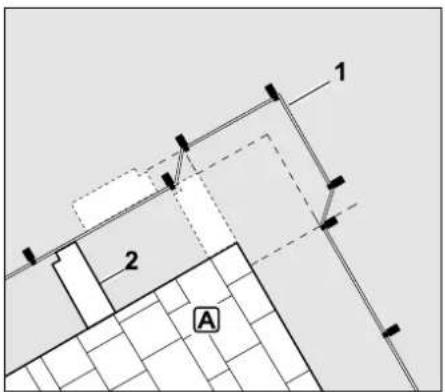
When routing around high obstacles such as wall corners or high flowerbeds A, a greater wire clearance must be maintained at the corners to prevent the robotic mower from scraping against the obstacle. Route the perimeter wire (1) with the aid of the iRuler (2) as shown.
If necessary, extend the perimeter wire using the wire connectors supplied. ( 11.14)
In the case of several adjacent mowing areas, install secondary areas ( 11.9) or join the mowing areas with corridors. ( 11.10)
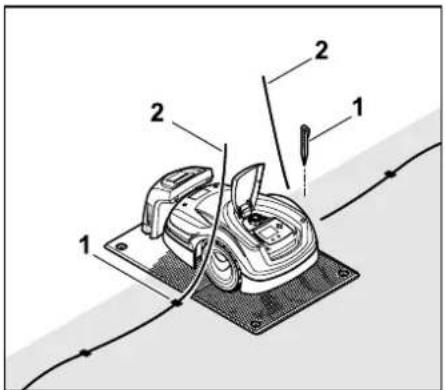
Drive in the last fixing pin (1) on the left or right next to the floor plate, directly next to the wire outlet. Cut off the perimeter wire (2). Provide free wire ends with a length of approx. 1m .
- Check the fastening of the perimeter wire to the ground. One fixing pin per meter is sufficient as a rough guide. The perimeter wire must always lie on the lawn. Drive the fixing pins fully into the ground.
After completing this installation work, press the OK button on the display.
If the battery is not sufficiently charged to work through the remaining steps of the installation assistant, an appropriate message is displayed. In this case, leave the robotic mower in the docking station to continue charging the battery.
Jumping to the next step of the installation assistant with the OK button is only possible once the necessary battery voltage is available.
9.6 Connecting the perimeter wire
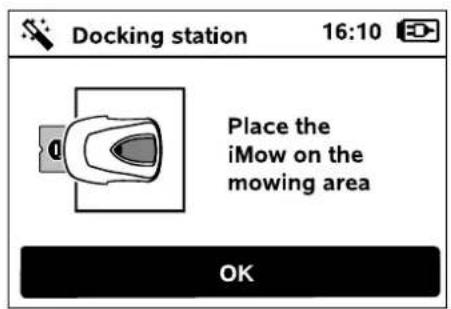
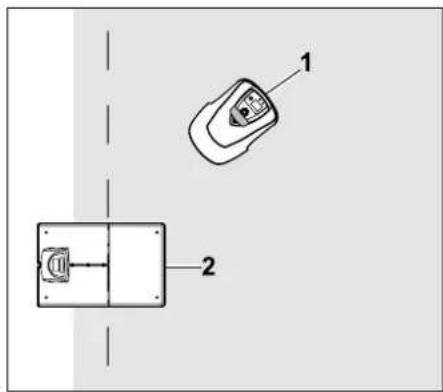
Place the robotic mower (1) within the mowing area, behind the docking station (2) as illustrated, then press the OK button.


Disconnect the power supply unit plug from the mains, then press the OK button.
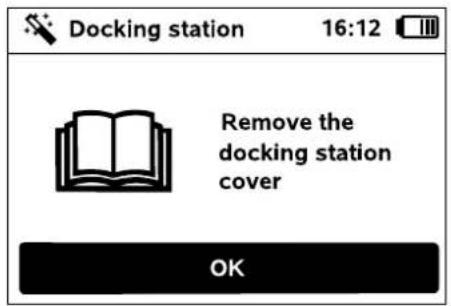
Remove the cover as described in the "Installing the docking station" section. ( 9.4)
Then press the OK button on the display.
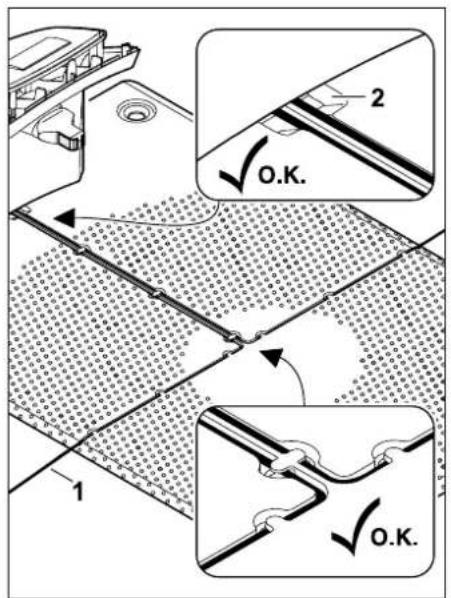
Insert the perimeter wire (1) into the cable guides in the floor plate and guide it through the socket (2).
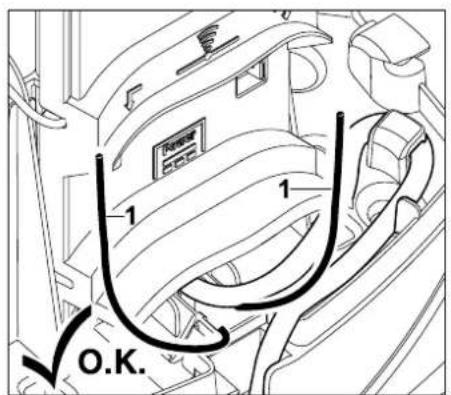
Cut the ends of the perimeter wire (1) to a free length of approx. 10cm .
Precisely observe the free length and do not roll up protruding wire ends. Excessively long free ends can interfere with correct operation of the robotic mower.
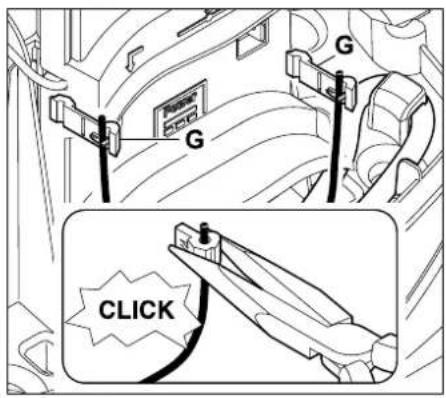
Fasten the press fit connectors (G) onto the cable ends using suitable pliers - ensure correct engagement.
The press-fit connectors can only be fitted once on the perimeter wire. They must not be reused following removal. Additional pressfit connectors are available from a VKING specialist dealer. ( 16.)
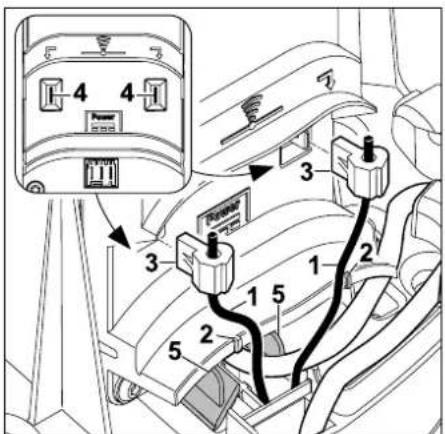
Position the perimeter wire (1) within the two markings (2). Attach the connector (3) to both pins (4) as shown. Ensure correct connection of the left and right perimeter wire ends - do not interchange the wire ends. Close the cover of the cable duct (5).
After completing this installation work, press the OK button on the display.
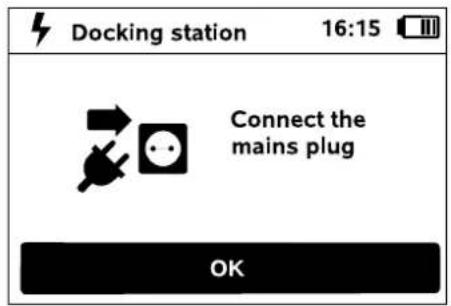
Connect the power supply unit plug to the mains, then press the OK button. OK
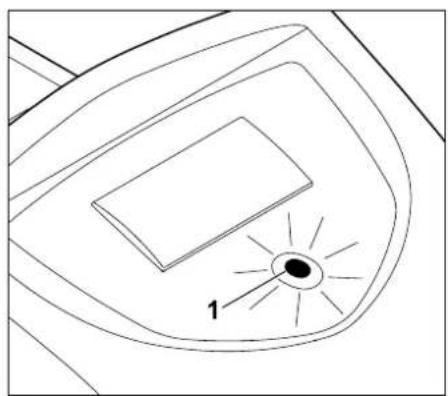
When the perimeter wire is correctly installed and the docking station is connected to the mains power supply, the red LED (1) illuminates.
Observe the "Docking station" section, particularly if the LED does not illuminate as described. ( 12.)
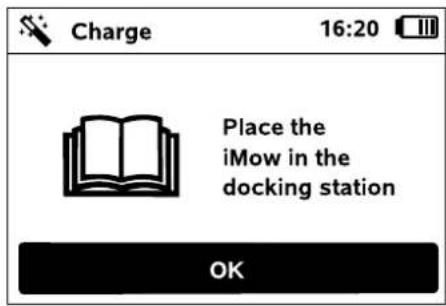
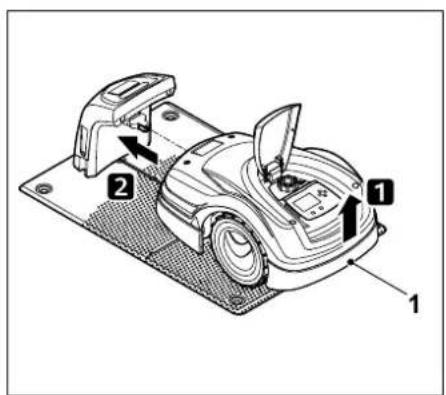
Lift the robotic mower slightly by the carrying handle (1) to relieve the weight on the drive wheels. Push the machine, resting on its front wheels, into the docking station.
The LED on the docking station flashes slowly after docking. ( 12.1)
Then press the OK button on the display.

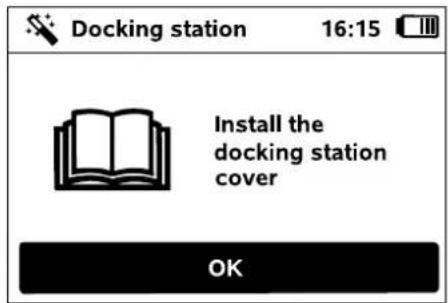
Fit the cover as described in the "Installing the docking station" section. ( 9.4)
Then press the OK button on the display.

9.7 Linking the robotic mower and docking station

The robotic mower can only be operated if it correctly receives the wire signal emitted by the docking station. ( 9.7)
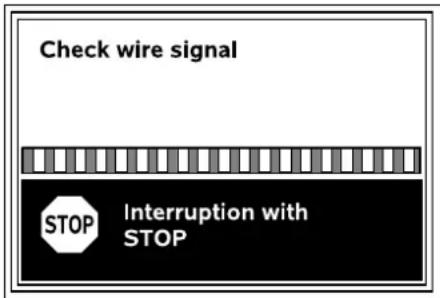
Checking the wire signal may take several minutes. The red STOP button on top of the machine terminates the link, the previous installation assistant step is called up.
Normal reception
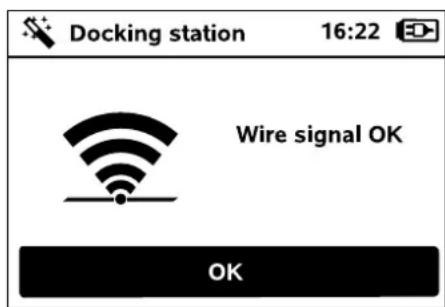
Wire signal OK:
The text "Wire signal OK" appears on the display. The robotic mower and the docking station are correctly linked.

Continue initial installation by pressing the OK button.
Interrupted reception
The robotic mower receives no wire signal:
The text "No wire signal" appears on the display.
The robotic mower receives a faulty wire signal:
The text "Check wire signal" appears on the display.
The robotic mower receives a reversed-polarity wire signal: The text "Connections swapped or iMow outside" appears on the display.
Possible cause:
- Temporary malfunction
- The robotic mower is not docked
- Perimeter wire has been connected incorrectly (reversed polarity).
- Docking station is switched off or not connected to mains supply.
-Faulty plug connections
- A coiled power cable in the vicinity of the docking station
- Excessively long perimeter wire ends
- Perimeter wire break
- Extraneous signals such as a mobile phone or the signal from another docking station
Live underground cables, reinforced concrete or disruptive metals in the ground under the docking station.
Maximum length of the perimeter wire exceeded ( 11.1)
Remedy:


- Repeat linking without other corrective action
- Docking the robotic mower ( 14.6)
- Connect the perimeter wire ends correctly ( 9.6)
- Check the docking station mains connection, roll out the power cable in the vicinity of the docking station, do not set down coiled
- Check the perimeter wire plug connections, cut off excessively long perimeter wire ends ( 9.6)
- Check the LED indicator on the docking station ( 12.1)
- Repair the wire break
- Switch off mobile phones or nearby docking stations
- Change position of the docking station or remove interference sources under the docking station
- Use perimeter wire with larger cross section (special accessory)
Following the appropriate corrective action, repeat linkage by pressing the OK button.


If the measures described above do not result in a correct wire signal then contact a VKING specialist dealer.
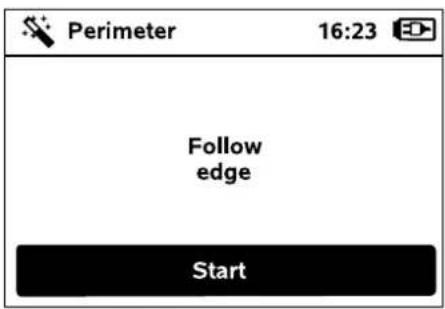
9.8 Checking installation
Start the test run by pressing the OK button - this does not activate the mowing blade.

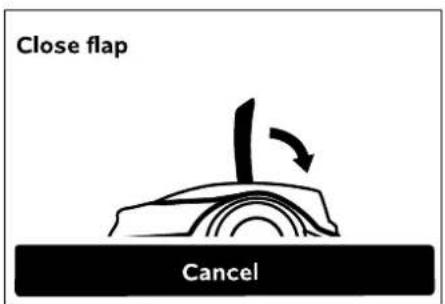
Close the flap of the robotic mower. ( 14.2) Only once the flap has been closed does the robotic mower start automatically and follow the edge along the perimeter wire.
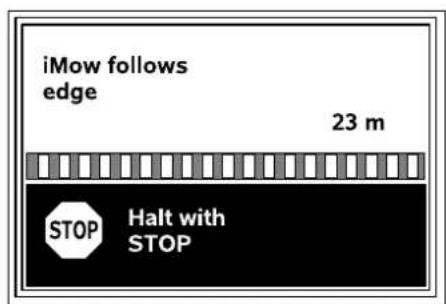
As the robotic mower follows the edge, walk behind it and ensure:
that the robotic mower follows the edge of the mowing area as planned,
that the clearances to obstacles and the borders of the mowing area are correct,
that docking in and out takes place correctly.
The distance covered is shown on the display - this metric specification is required for setting starting points at the edge of the mowing area. ( 10.15)
- Read off the displayed value at the required location and write it down. Manually set starting points after initial installation.
The following of edges is automatically interrupted by obstacles, during operation on excessively steep slopes or by pressing the STOP button.
-
If the test run has been interrupted automatically, correct the position of the perimeter wire and remove any obstacles.
-
Check the position of the robotic mower before continuing edge following. The machine must either be located on the perimeter wire or within the mowing area with the front facing the perimeter wire.
Continuation following interruption:
After an interruption, continue edge following with OK.
It is recommended by VIKING not to interrupt the test run. Possible problems when following the edge of the mowing area or when docking may not be recognised.
The test run can be repeated following initial installation if necessary. ( 10.14)
Completion of the test run:
The next step of the installation assistant is called up when the robotic mower docks following a complete circuit.
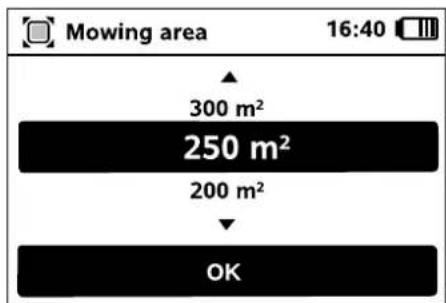
9.9 Programming the robotic mower
Enter the size of the lawn and confirm with OK.

i Installed no-go areas and secondary areas must not be included when calculating the size of the mowing area.
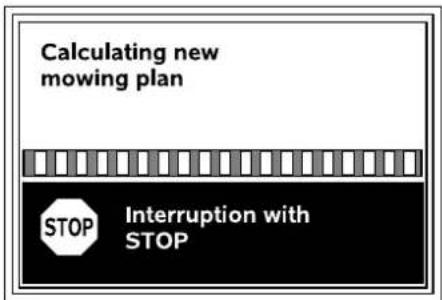
A new mowing plan is calculated. The procedure can be aborted using the red STOP button on the top of the machine.
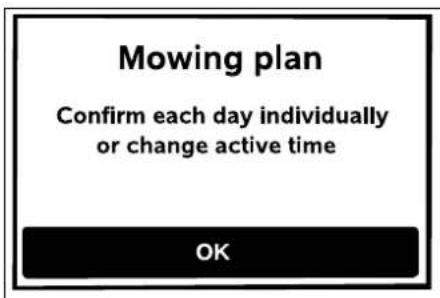
Confirm the message "Confirm each day individually or change active time" by pressing the OK button.
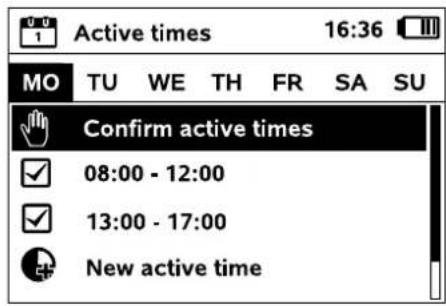
The active times for Monday are displayed and the menu item Confirm active times is enabled.
All the active times are confirmed with OK and the next day is displayed.
In the case of small mowing areas, not all the week days are used for mowing. In this case, no active times are displayed and the menu item "Delete all active times" is omitted. Days without active times must also be confirmed with OK.
The displayed active times can be changed. For this purpose, select the required time interval using the control pad and open with OK. ( 10.7)
If additional active times are required, select the menu item New active time and open with OK. Specify the start and end times of the new active time in the selection window and confirm with OK. Up to three active times per day are possible.
If all the displayed active times are to be deleted, select the menu item Delete all active times and confirm with OK.
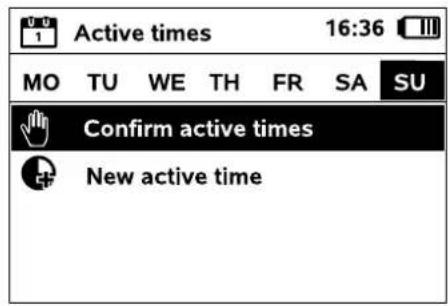
The mowing plan is displayed after the active times for Sunday have been confirmed.
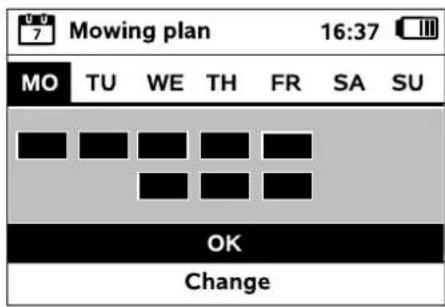
The displayed mowing plan is confirmed with OK and the final step of the installation assistant is called up.
If changes are necessary, select Change and individually adapt active times.

During the active times, third parties must keep out of the danger area. The active times should be adapted accordingly.
Moreover, the applicable local regulations on the use of robotic mowers as well as the information in the "For your safety" ( 6.)
section must be observed and the active times changed accordingly in the "Mowing plan" menu as required, either immediately or after completion of initial installation.
(⇒ 10.6)
In particular, you should check the times of the day and night at which it is permissible to use the machine with the responsible authorities.
9.10 Completing initial installation

Remove all foreign bodies (e.g. toys, tools) from the mowing area.
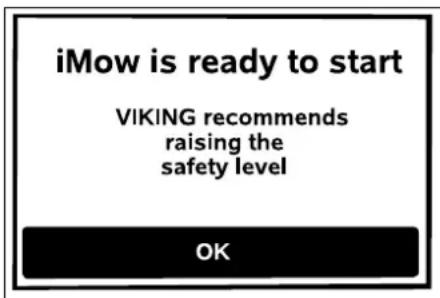
Complete initial installation by pressing the OK button.
After initial installation, the safety level "None" is activated. VKING recommends that the "Low", "Medium" or "High" safety levels are selected. This ensures that unauthorised persons cannot change any settings or operate the robotic mower using other docking stations. ( 10.16)
9.11 First mowing operation after initial installation
If completion of initial installation occurs during an active time, the robotic mower will begin to mow the mowing area immediately.
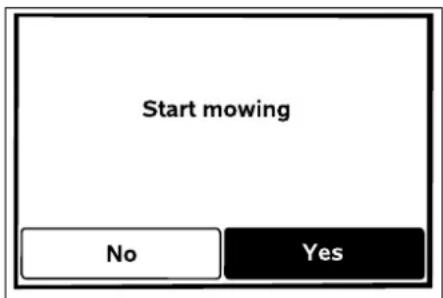
If completion of the initial installation occurs outside the active time, a mowing operation can be started by pressing the OK button. If you do not wish the robotic mower to mow, select "No".
10.1 Operating instructions
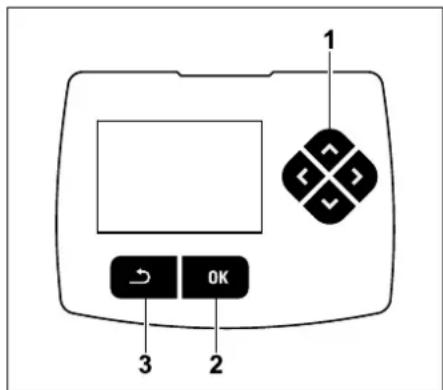
The control pad comprises four direction buttons (1). It serves for navigation in the menus. Settings are confirmed and menus opened using the OK button (2). Menu can be exited again using the Back button (3).
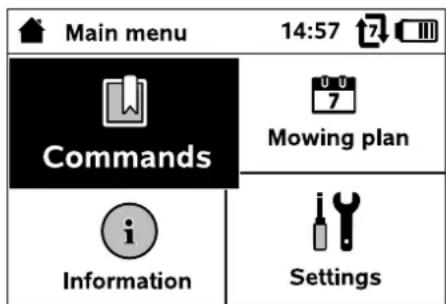
The main menu comprises 4 submenus, displayed as buttons. The selected submenu has a black background and is opened using the OK button.
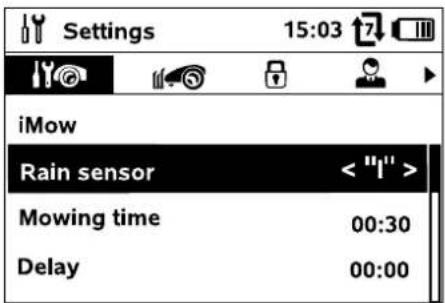
In the second menu level, the various submenus are shown as tabs.
The tabs can be selected by pressing the control pad to the left or right, submenus by pressing the control pad downwards or upwards.
Active tabs and menu entries have a black background.
The scroll bar at the right edge of the display indicates that further entries can be displayed by pressing the control pad downwards or upwards.
Submenus are opened by pressing the OK button.
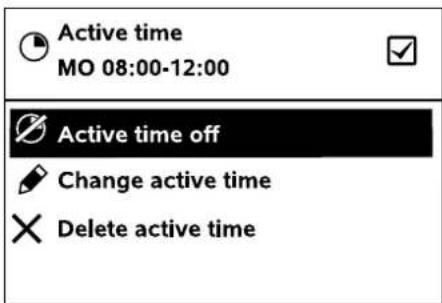
Options are listed in the submenus. Active list entries have a black background.
Pressing the OK button opens a selection or a dialog window.
Selection window:
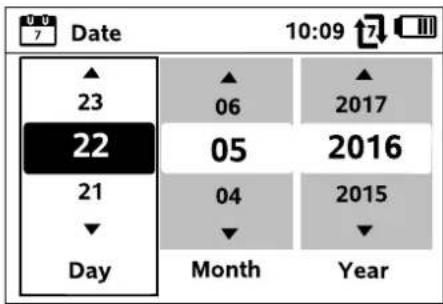
Settings can be changed by pressing the control pad. The current value is highlighted in black. The OK button confirms all the values.
Dialog window:
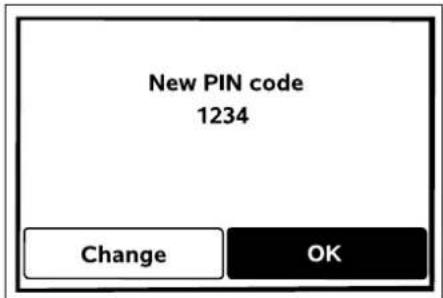
If changes have to be saved or messages confirmed, a dialog window appears in the display. The active button has a black background.
In the case of selection options, the relevant button can be activated by pressing the control pad to the left or right.
The selected option is confirmed and the subordinate menu called up using the OK button.
10.2 Status screen
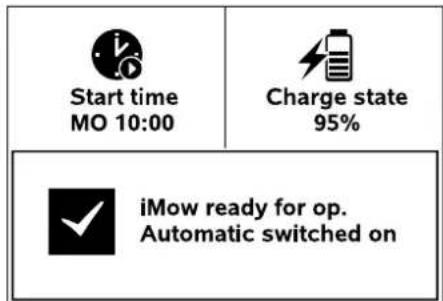
The status screen appears:
- when standby mode of the robotic mower is ended by pressing a button,
- when the Back button is pressed in the main menu,
- during running operation.
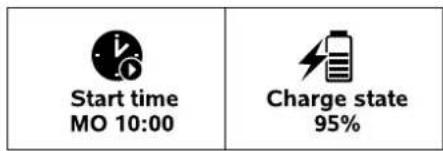
There are two configurable fields in the top display area. Various information regarding the robotic mower and the mowing operations can be displayed here. ( 10.13)
Status information with no running activity:
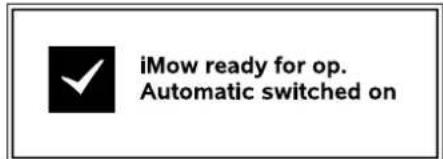
The text "iMow ready for op." is displayed in the bottom area of the screen together with the symbol shown and the automatic mowing status. ( 10.5)
Status information during running activities:
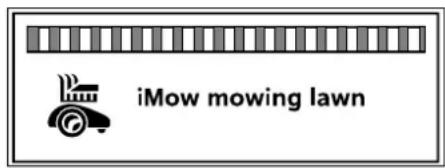
The text "iMow mowing lawn" and a corresponding symbol are shown on the display during a running mowing operation. The text and symbol are adapted to the respective active operation.
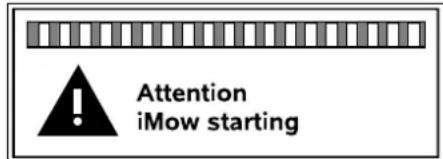
The text "Attention - iMow starting" and a warning symbol are displayed before the mowing operation.
i Flashing of the display illumination and a signal tone additionally indicate the impending start of the mowing motor. The mowing blade is only activated a few seconds after the robotic mower has been set into motion.
Edge mowing:
While the robotic mower mows the edges of the mowing area, the text "Mowing edge" is displayed.
Drive to docking station:
When the robotic mower returns to the docking station, the relevant reason is indicated in the display (e.g. Battery discharged, Mowing completed).
Battery charging:
The text "Charging battery" appears during charging of the battery.

Message screen:
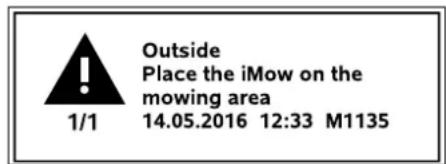
Errors, faults or recommendations are displayed together with warning symbol, date, time and message code. If several messages are active, they appear alternately. ( 23)
The message and status information appear alternatively if the robotic mower is ready for operation.
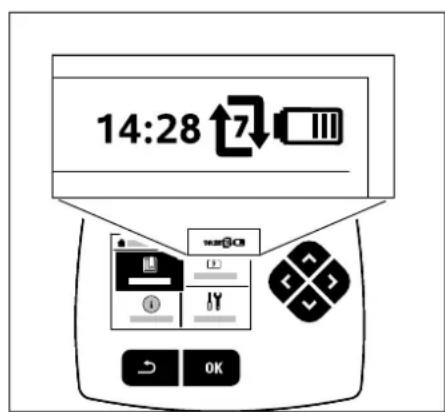
The following information is shown in the top right corner of the display:
- Charge state of the battery or charging in progress
- Automatic mowing status
- Time
1. Charge state:
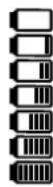
The battery symbol serves to indicate the charge state.
No bars - battery discharged
1 to 5 bars - battery partially discharged
6 bars - battery fully charged
During charging, the mains plug symbol is shown instead of the battery symbol.
2. Automatic mowing status:
When automatic mowing is switched on, the Automatic symbol appears.
3. Time:
The current time is indicated in 24 hour format.


The text "iMow mowing lawn" and a corresponding symbol are shown on the display during a running mowing operation. The text and symbol are adapted to the respective active operation.

Flashing of the display illumination and a signal tone additionally indicate the impending start of the mowing motor. The mowing blade is only activated a few seconds after the robotic mower has been set into motion.
10.4 Main menu
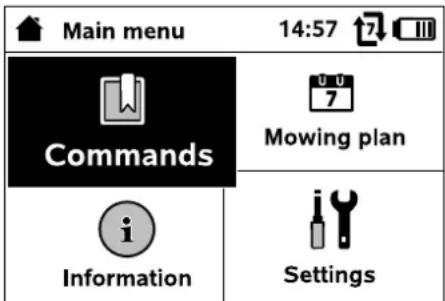
The main menu is displayed,

by pressing the OK button ( 10.2) the status screen is quit,
- when the Back button is pressed in the second menu level.
- Commands (⇒ 10.5)
Lock iMow
Switch automatic mowing on and off
Drive to docking station
Starting mowing
Start time-delayed mowing
Skip next active time
Edge mowing

- Mowing plan ( 10.6)
Active times Mowing duration

- Information ( 10.9)
Messages
Events iMow status Lawn status

- Settings ( 10.10)
iMow Installation Safety Service Dealer area

10.5 Commands
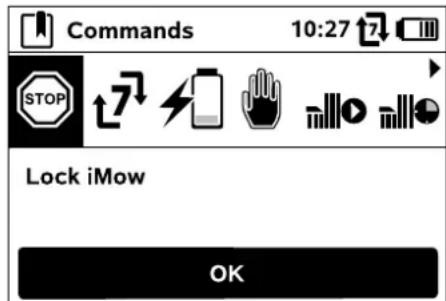
Select the required command using the control pad and execute by pressing OK.
1.Lock iMow
2. Switch on automatic mowing/Switch off automatic mowing
3. Drive to docking station
4. Start mowing
5. Start time-delayed mowing
6. Skip next active time
7. Edge mowing
- Lock iMow:
Activate disabling device. Press the illustrated button combination to unlock. ( 5.2)
- Switch automatic mowing
on/off:
When automatic mowing is switched on, the text "Automatic switched on" appears in the status screen and the automatic symbol is displayed next to the battery symbol in the menus. The robotic mower mows the mowing area fully automatically.
When automatic mowing is switched


off, the text "Automatic switched off" appears in the status screen and the active times are shown as inactive (greyed out) in the mowing plan. The mowing area is not mown automatically. Mowing operations can be initiated via the commands "Start mowing" or "Start time-delayed mowing".
3. Drive to docking station:
The robotic mower travels back to the docking station and charges the battery. If automatic mowing is switched on, the robotic mower will mow the mowing area again at the next possible active time.
4. Start mowing:
The robotic mower starts the mowing operation automatically following activation. The end of the mowing operation must be specified. If a secondary area was installed, after pressing the OK button it is necessary to define whether mowing is taking place on a secondary area or on the main area. ( 10.14) The standard setting for the duration of the mowing operation can be modified under "Mowing time" in the machine settings. ( 10.10)
If an external docking station with a corridor was installed, bring the robotic mower to the mowing area before activation of the command "Start mowing".
5. Start time-delayed mowing:
The robotic mower starts the mowing operation automatically, but with a time delay, following activation. The start and end times of the mowing operation must be specified. If a secondary area was installed, after pressing the OK button it is necessary to define whether mowing is taking place on a secondary area or on the main area.
(⇒ 10.14)
The standard settings for the duration of the mowing operation and for the delay can be changed in the machine settings under "Mowing time" and "Delay". ( 10.10)

If an external docking station with a corridor was installed, bring the robotic mower to the mowing area before activation of the command "Start time-delayed mowing".
6. Skip next active time:
This command can be used if the robotic mower is not to be operated during the next active time (e.g. in the case of a garden party). Following confirmation, no mowing will take place during the next active time. Active times which have been cancelled in this manner are greyed out in the mowing plan. They can be released for mowing again in the "Daily plan" menu. ( 10.7) If the command is performed several times in succession, the next active time is always skipped. If no active times remain for the current week, the message "No mowing will take place next week" appears.
7. Edge mowing:
Following activation, the robotic mower mows the edge of the mowing area. After completing one circuit, it travels back to the docking station and charges the battery.
10.6 Mowing plan
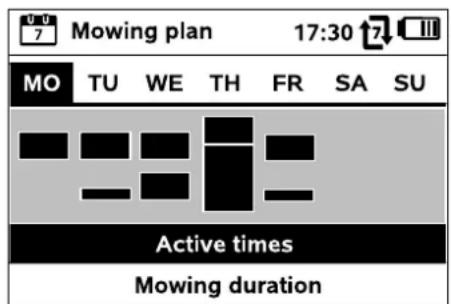
The stored mowing plan can be called up via the "Mowing plan" menu in the main menu. The rectangular blocks beneath the respective days represent the saved active times. Mowing is possible in active times marked in black. Grey blocks represent active times without mowing operations - e.g. in the case of a disabled active time or following the command "Skip active time". ( 10.5)
When automatic mowing is switched off, the entire mowing plan is disabled and all active times are shown in grey.
The Active times ( 10.7) or Mowing duration ( 10.8) submenus can be selected by pressing the control pad upwards or downwards and opened with the OK button.
If the active times for an individual day need to be edited, the day must be activated via the control pad (press to the left or right) and the Active times submenu must be opened.
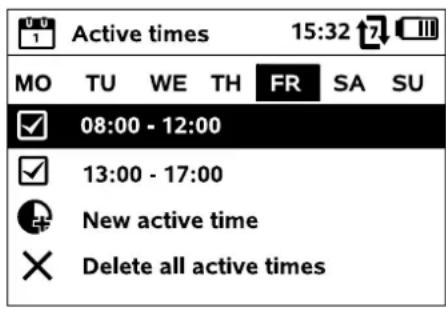
10.7 Active times
Mowing is permitted during ticked active times; these times are marked in black in the mowing plan.

Mowing is not permitted during unticked active times; these times are marked in grey in the mowing plan.

Follow the instructions in the "Active times" section. ( 13.3) In particular, third parties must keep out of the danger area during the active times.
The stored active times can be individually selected and edited.
The New active time menu item can be selected provided fewer than 3 active times per day have been saved. An additional active time must overlap with other active times.

If the robotic mower is not to mow on the selected day, the menu item Delete all active times should be selected.
Editing active times:
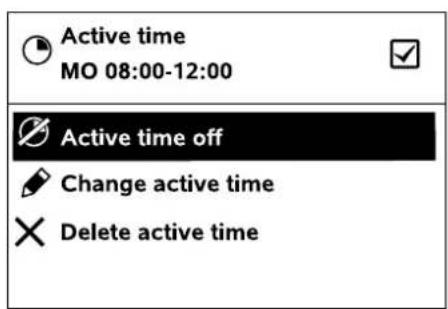
The selected active time for automatic mowing can be disabled or enabled using Active time off and Active time on respectively.
The time window can be changed with Change active time.
If the selected active time is no longer required, the menu item Delete active time should be selected.
If the time windows for the necessary mowing and charging operations are not sufficient, active times must be extended or added, or the mowing duration must be reduced. A corresponding display message appears.
10.8 Mowing duration
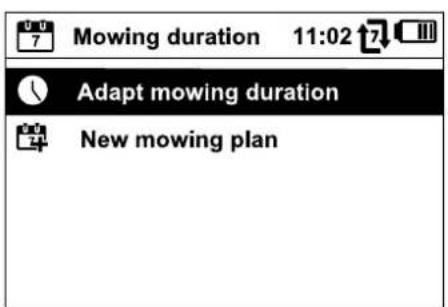
The weekly mowing time can be set under Adapt mowing duration. The set value is adapted to the size of the mowing area. ( 13.4) Follow the instructions in the "Adapting the programming" section. ( 14.3)
The command New mowing plan deletes all stored active times. The step "Program the robotic mower" of the installation assistant is called up. ( 9.9)
If completion of the reprogramming occurs during an active time, the robotic mower begins an automatic mowing operation after the individual daily plans have been confirmed.
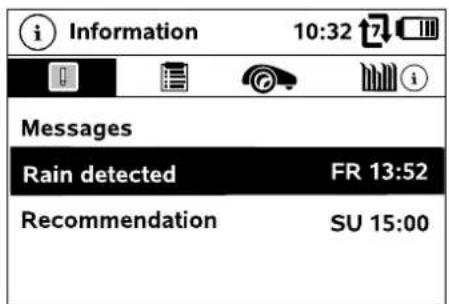
1. Messages:
List of all active errors, faults and recommendations; shown together with the times of occurrence. During trouble-free operation, the text "No messages" appears.
The message details are displayed by pressing the OK button. ( 23)
2. Events:
List of the last activities of the robotic mower.

Details of the events (additional text, time and code) can be displayed by pressing the OK button.

If certain activities occur too frequently, your VKING specialist dealer will have further details. Errors during normal operation are documented in the messages.
3. iMow status:
Information on the robotic mower

Battery charge in percent
The remaining mowing duration during the current week in hours and minutes
Time and date
- Start time:
Start of the next planned mowing operation
- Total number of completed mowing operations
- Mowing hours:
Duration of all completed mowing operations in hours
Total distance covered in metres
Serial number of the robotic mower. This can also be found on the identification plate (see Machine overview). ( 3.1)
Serial number of the battery
Installed machine software
- Lawn status:
Information on the lawn
- Mowing area in square metres:
This value is entered during initial installation or new installation ( 9.3)
- Round time:
Duration of one circuit around the mowing area in minutes and seconds
-Starting points 1-4:
Distance of the relevant starting point from the docking station in meters, measured in a clockwise direction ( 10.15)
Circumference:
Circumference of the mowing area in metres
- Edge mowing:
Frequency of edge mowing per week ( 10.14)
10.10 Settings
- iMow:
Adapt machine settings
(10.11)
- Installation:
Adapt and test the installation ( 10.14)
- Safety:
Adapt the safety settings ( 10.16)
- Service:
Maintenance and service (10.17)
- Dealer area:
This menu is protected by the dealer code. Your VKING specialist dealer performs a variety of maintenance and service operations with the aid of this menu.
10.11 iMow - machine settings
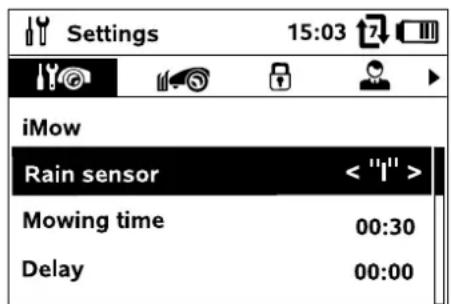
1. Rain sensor:
The rain sensor can be set so that mowing is interrupted or does not start when it is raining.
Set the standard for the duration of a mowing operation after activation of the command "Start mowing". (⇒ 10.5)
- Delay:
Set the standard for the delay following activation of the command "Start time-delayed mowing". ( 10.5)
- Status screen:
Select the information that is to appear in the status screen.
(⇒ 10.13)
Set the current time.
The set time must correspond to the actual time in order to prevent inadvertent mowing by the robotic mower.
- Date:
Set the current date.
The set date must correspond to the actual calendar date in order to prevent inadvertent operation of the robotic mower.
- Date format:
Set the required date format.
- Track offset:
The robotic mower travels along the perimeter wire at a 6 cm offset from the wire as standard. With this offset, optimum docking is ensured. The iRuler is also designed for a track offset of 6 cm.

VIKING recommends that the standard setting of 6cm not be changed.
- Only if necessary, open the selection window with OK and set the required value (3 cm to 9 cm).

9. Language:
Set the required display language. The language selected during initial installation is set as the default.
10. Contrast:
The display contrast can be adjusted as required.

10.12 Setting the rain sensor
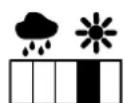
In order to set the 5-stage sensor, press the control pad to the left or right. The current value is displayed in the "Settings" menu by means of a line diagram.
The sensitivity of the rain sensor can be adapted to the local conditions and requirements. In particular, it is possible to adjust how long the robotic mower waits for the mowing area to dry following rain.
In the case of medium sensitivity, the robotic mower is ready for operation under normal ambient conditions.
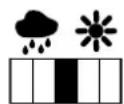
Move the bar further to the left for mowing at a higher humidity. If the bar is moved all the way to the left, the robotic mower will mow even in wet external conditions and will not interrupt the mowing operation if rain drops land on the sensor.
Move the bar further to the right for mowing at a lower humidity. If the bar is moved all the way to the right, the robotic mower will only mow if the rain sensor is completely dry.
10.13 Setting the status screen
In order to configure the status screen, select the left or right screen with the control pad and confirm with OK.
Charge state:
Shows the battery symbol with the charge state in percent
Rem. time:
The remaining mowing duration during the current week in hours and minutes
Time and date:
Current date and current time
Start time:
Start of the next planned mowing operation. During a running active time, the text "active" is displayed.
Mowing ops:
Total number of mowing operations performed
Mowing hours:
Total duration of all mowing operations performed
Distance:
Total distance covered


10.14 Installation
1. Corridor:
Switching offset drive home on and off. When the corridor is activated, the robotic mower travels back home to the docking station, offset at a distance, along the perimeter wire.
Corridor width: 30-70 cm
The distance to the perimeter wire within the corridor is selected randomly.

In conjunction with an external docking station, a separately available accessory is required for offset drive home (AED 600). More information can be obtained from your VKING dealer.
Offset drive home can only be activated when the perimeter wire has been routed with a clearance of at least 2m at the narrowest sections. No corridors may be installed within the mowing area.
2. New installation:
The installation assistant is started again, the existing mowing plan is deleted. ( 9.3)

3. Starting points:
The robotic mower either starts the mowing at the docking station (default setting) or at a starting point.

Starting points are to be defined
-
if partial areas are to be travelled to in a targeted manner because they are insufficiently mowed,
-
if areas can only be accessed via a corridor. At least one starting point must be defined in these partial areas.
-
Setting starting points ( 10.15)
4. Edge testing:
Start the test run for checking correct wire routing.
The step "Check installation" of the installation assistant is called up. ( 9.8)

To check correct wire routing around no-go areas, position the robotic mower in the mowing area with the front facing the no-go area and start a test run.
5. Edge mowing:
Define the mowing frequency.
Never - default setting
Once - the edges are mown once per week.
Twice - the edges are mown twice per week.
6. Secondary areas:
Enable secondary areas.
Inactive - default setting
Active - setting if secondary areas are to be mowed. With the commands "Mowing start" and "Start time-delayed mowing", the mowing area (main area/secondary area) must be selected. ( 14.5)
10.15 Setting starting points
To set, either
- teach in starting points
or
- select the required starting point and define it manually.
Teaching in starting points:
After pressing the OK button, the
robotic mower begins a new learning run along the perimeter wire. If it is not docked, it first travels to the docking station. All the existing starting points are deleted

If the starting points are taught in manually, the STOP button must not be pressed before opening the flap.
During travel, up to 4 starting points can be specified by opening the flap and pressing the OK button.
Interrupting the learning procedure:
Manually - by pressing the STOP button. Automatically - by obstacles at the edge of the mowing area.
If the learning run has been interrupted automatically, correct the position of the perimeter wire and remove any obstacles.
- Check the position of the robotic mower before continuing the learning run. The machine must either be located on the perimeter wire or within the mowing area with the front facing the perimeter wire.
Ending the learning procedure:
Manually - following an interruption.
Automatically - after docking.
After docking or after the interruption, the new starting points are saved by opening the flap and confirming with OK.
Starting frequency:
The starting frequency defines how often a mowing operation is to begin from a starting point. The default setting is 2 of 10 mowing operations (2/10) at each starting point.
- Change the starting frequency as required after learning.
If the learning procedure has been aborted prematurely, send the robotic mower back the to docking station via a command. ( 10.5)
Setting starting point 1 to 4 manually:
Determine the distance of the starting points from the docking station and define the starting frequency.
The distance corresponds to that covered from the docking station to the starting point in metres, measured in a clockwise direction.
The starting frequency can be between 0 of 10 mowing operations (0/10) and 10 of 10 mowing operations (10/10).

The docking station is defined as starting point 0; mowing operations are
started from here as standard. The starting frequency corresponds to the calculated residual value of 10 of 10 operations.

10.16 Safety
1.Disab device
2. Level
3. Change PIN code
4. Start signal
5. Alarm signal
6. Menu signal
7. Child lock
8. Switch off
9. Link iMow and dock
1. Disabling device:
The disabling device is activated with OK; the robotic mower can no longer be operated.
The robotic mower must be disabled prior to any maintenance or cleaning work, prior to transportation and prior to inspection. ( 5.1)
- To deactivate the disabling device, press the illustrated button combination.
2. Level:
Four safety levels can be set; various locks and safety devices are activated, depending on the level.
None:
The robotic mower is unprotected. Low:
PIN code entry for linking the robotic

mower and docking station, as well as for resetting the machine to the default settings; time lock is active.
Medium:
Same as for "Low", however, settings can also only be changed following entry of the PIN code.
High:
Same as for "Medium", but an anti-theft alarm is enabled as well as the PIN code query.

VIKING recommends that the "Low", "Medium" or "High" safety levels be set.
- Select the required level and confirm with OK; enter the 4-digit PIN code if necessary.
Reset lock:
PIN code query prior to resetting the machine to the factory defaults.
Connection lock:
PIN code query prior to linking of the robotic mower and docking station.
Time lock:
PIN code query for changing a setting if no PIN code has been entered for more than one month.
Setting prot.:
PIN code query when settings are changed.
Anti-th. alarm:
If the mower is lifted by the handle for longer than 10 seconds, the PIN query appears. If the PIN code is not entered within one minute, an alarm sounds and automatic operation is switched off.
3. Change PIN code:
The 4-digit PIN code can be changed if required.

The "Change PIN code" menu item is only displayed in the safety levels "Low", "Medium" or "High".
- First enter the old PIN code and confirm with OK.
- Then enter the new 4-digit PIN code and confirm with OK.
VIKING recommends making a note of the changed PIN code. If the PIN code is entered incorrectly 5 times, a 4-digit master code is required, otherwise automatic operation is switched off. For the creation of a master code, you must provide your VKING specialist dealer with the 9-digit serial number and the 4-digit date, which are displayed in the selection window.
4. Start signal:
For switching on and off the acoustic signal that sounds when the mowing blade is activated.
5. Alarm signal:
For switching on and off the acoustic signal that sounds when the robotic mower hits an obstacle.
For switching on and off the acoustic click that sounds when a menu is opened and a selection is confirmed with OK.
7. Child lock:
For switching on and off the device that prevents the mowing blade from being activated when the machine is being played with.
Function:
If the impact sensor is triggered several times in succession within a short time (for example when a child is playing with the robotic mower), the mowing blade is switched off and the robotic mower stops with an appropriate message.
If the impact sensor is not triggered again, the robotic mower continues automatic mowing after a few seconds.
8.Keylock:
When the keylock is switched on, the buttons on the display can only be operated if the Back button is pressed and held and the control pad is then pressed forwa
The keylock is activated 2 minutes after the last button has been pressed.

9. Link iMow and dock:
Following initial operation, the robotic mower can only be operated in conjunction with the installed docking station.
Following a replacement of the docking station or of electronic components in the robotic mower or for operation of the robotic mower on an additional mowing area using a different docking station, the robotic mower and docking station must be linked.
- Install the docking station and connect the perimeter wire. ( 9.4) , ( 9.6)
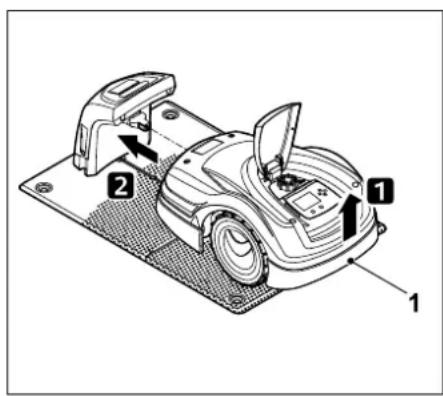
Lift the robotic mower slightly by the carrying handle (1) to relieve the weight on the drive wheels. Push the machine, resting on its front wheels, into the docking station.
After pressing the OK button, enter the PIN code. The robotic mower will then search for the wire signal and save it automatically. This process takes several minutes. ( 9.7)
No PIN code is required in the safety level "None".
10.17 Service
1. Blade change:
Installation of a new mowing blade is confirmed with OK.
If the blade has been in use for more than 200 hours, the message "Replace mowing blade" appears. ( 15.4)
2. Find wire break:
If the red LED on the docking station flashes rapidly, there is a break in the perimeter wire. ( 12.1)
The assistant to find the break is activated with OK.
- Finding wire break (⇒ 15.7)
3. Reset settings:
The robotic mower is reset to the factory defaults with OK, the installation assistant is restarted. ( 9.3)
- Enter the PIN code after pressing the OK button.
11. Perimeter wire

Before routing the perimeter wire,
particularly prior to initial installation, read the entire section and plan the wire routing in detail.
Perform initial installation using the installation assistant. ( 9.)
Should you require support, your VKING specialist dealer will be pleased to assist you with preparation of the mowing area and installation of the perimeter wire.
Check the installation of the perimeter wire before it is finally secured in place. ( 9.)
Adjustments to the wire routing are generally necessary in the vicinity of corridors, confined areas or no-go areas.
Deviations can occur if
- the technical limits of the robotic mower are reached, for example with very long corridors or when routing the perimeter wire in the vicinity of metal objects or above metal under the lawn,
-if the mowing area is structurally altered for using the robotic mower.

No PIN code is required in the safety level "None".

The wire clearances specified in this Instruction Manual are adapted to routing of the perimeter wire on the lawn area.
The perimeter wire can also be buried up to a depth of 10cm (e.g. using a cable-laying machine).
Burial in the ground generally influences signal reception, particularly if flagstones or paving stones are laid over the perimeter wire. The robotic mower may travel along at a greater offset to the perimeter wire, requiring more space in corridors, confined areas and when travelling along edges. Adapt wire routing if necessary.
11.1 Planning routing of the perimeter wire

Study the installation examples at the end of this Instruction Manual. ( 26.)
Include no-go areas, corridors, secondary areas and reserve wire during routing of the perimeter wire, in order to prevent subsequent corrections.
- Determine the location of the docking station. ( 9.4)
- Either remove obstacles from the mowing area, or include no-go areas. ( 11.8)
The perimeter wire must be routed in a continuous loop around the entire mowing area - maximum length: 500 m.
Corridors and secondary areas:
For automatic mowing, join all parts of the mowing area by means of corridors. ( 11.10)
If there is insufficient space to do so, secondary areas must be installed. ( 11.9)
- Observe the specified clearances ( 11.5) :
for obstacles that can be travelled on (e.g. paths) when routing the perimeter wire: 0 c m
for corridors: 22 cm
for high obstacles (e.g. walls, trees): 22 cm
minimum wire clearance in confined areas: 44 cm
or water features and potential sudden drops (edges, steps): 100 cm
- Corners:
Avoid routing at acute angles (less than 90^ ).
- Reserve wire:
Reserve wire should be installed at several points to make it easier to subsequently change the routing of the perimeter wire. ( 11.13)

Coiled up residual pieces of perimeter wire can cause
malfunctions and must be removed.
Content of the sketch:
Contour of the mowing area including important obstacles, borders and any no-go areas which the robotic mower must not grow. ( 26.)
Position of the docking station ( 9.4)
- Position of perimeter wire
After a short while, the perimeter wire is overgrown and is no longer visible. Make a note of the routing of the wire around obstacles in particular. ( 9.5)
- Position of the wire connectors
After a short while, the wire connectors used are no longer visible. Their position should be noted in order to replace them as required. ( 11.14)
11.3 Routing the perimeter wire

Only use original fixing pins and original perimeter wire.
The routing direction (clockwise or anti-clockwise) is freely selectable according to requirements.
Never pull out fixing pins using the perimeter wire - always use a suitable tool (e.g universal pliers).
Make a sketch of the perimeter wire routing. ( 11.2)
Install the docking station. ( 9.4)
- Starting at the docking station ( 11.8) , route the perimeter wire around the mowing area and any obstacles, fastening it to the ground using fixing pins. Check the clearances using the iRuler. ( 11.5)
Follow the instructions in the "Initial installation" section. ( 9.5)
- Connect the perimeter wire. ( 11.4)
11.4 Connecting the perimeter wire
- Disconnect the mains plug and then remove the docking station cover.

- Insert the perimeter wire into the cable guides of the floor plate, guide it through the socket, attach the connector and connect to the docking station.
Follow the instructions in the "Initial installation" section. ( 9.)
- Install the docking station cover and then connect the mains plug.

- Check the wire signal. ( 9.7)
- Check docking. ( 9.7) If necessary, correct the position of the perimeter wire in the area of the docking station.
11.5 Wire clearances - use iRuler
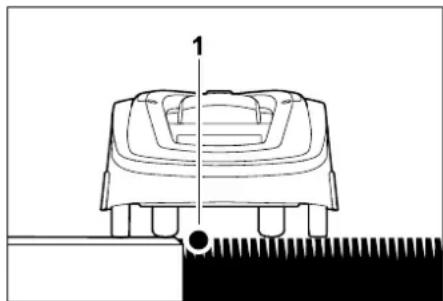
The perimeter wire (1) can be routed without clearance along obstacles that can be travelled on such as patios and paths. The robotic mower then travels with one rear wheel outside the mowing area. Maximum height difference between lawn area and obstacle: 2 cm
11.2 Making a sketch of the mowing area
During installation of the robotic mower and the docking station, it is recommendable to make a sketch of the mowing area. A page has been provided at the start of this Instruction Manual for this purpose.
The sketch should be modified in the event of subsequent changes.

Take care not to damage the perimeter wire when tending to the lawn edge. If necessary, install the perimeter wire at a slight distance (2-3 cm) from the lawn edge.
The spacing of the iRuler is defined such that the robotic mower can travel along the edge with a track offset of 6 cm without interruption (without bumping against obstacles). Reduce the track offset if necessary (too much unmown grass on edge). ( 10.11)
Measuring wire clearances with the iRuler:
To ensure the correct clearance from the perimeter wire to the edge of the lawn and to obstacles, the iRuler should be used for measuring the distances.
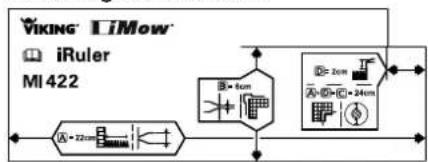
A-22cm
High obstacle: Clearance between a high obstacle and the perimeter wire.
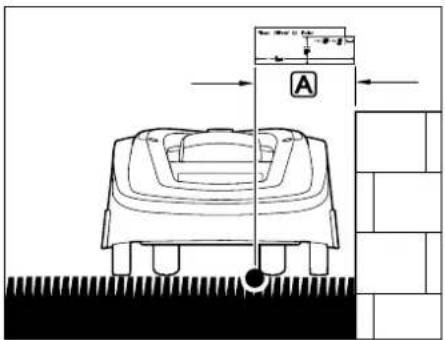
The robotic mower must run completely within the mowing area and must not touch the obstacle.
A-22cm
Corridors:
Wire clearance in corridors. ( 11.10) Corridors serve to connect several mowing areas or for bridging confined areas.
B-6cm Increased clearance for routing the perimeter wire around an external corner at a high obstacle.
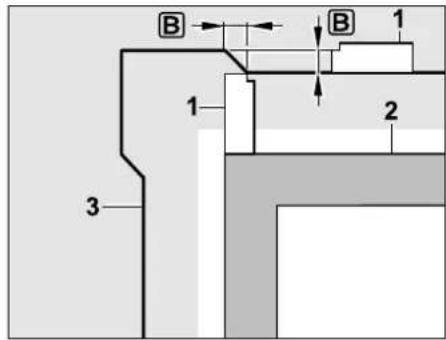
A+C=24cm
Through the additional routed clearance B with the iRuler (1) the robotic mower travels along the perimeter wire (3) without bumping into the obstacle (2) around the corner.
Internal corner: Clearance for routing the perimeter wire in an internal corner at a high obstacle.
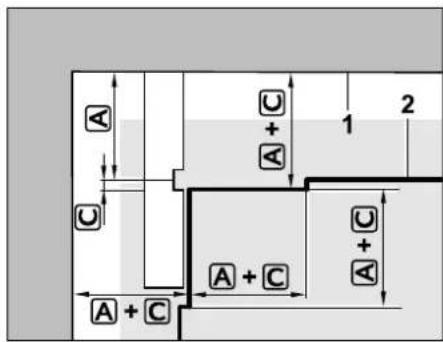
Through the greater clearance (24 cm) the robotic mower travels along the perimeter wire (2) without bumping into the obstacle (1) in the corner around a high obstacle.
No-go area: Clearance for routing the perimeter wire around a no-go area.
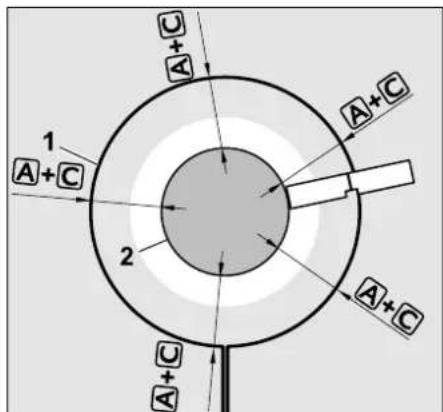
A+C=24cm
The robotic mower travels along the perimeter wire (1) around the obstacles (2) without bumping into it.
Measuring the height of obstacles:
The robotic mower can cross obstacles such as paths if the height of the stepped area is less than 2cm . The step in the iRuler corresponds precisely to this height.
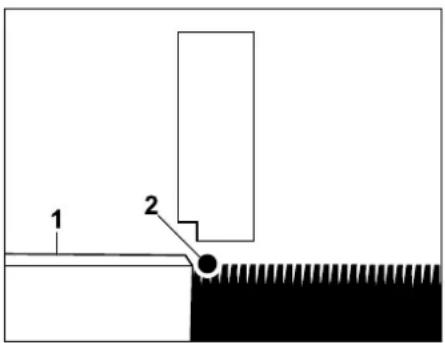
Obstacle (1) is lower than 2cm : Route the perimeter wire (2) without clearance to the obstacle.
If the perimeter wire is routed without clearance to the obstacle (flagstones etc.) it must be ensured that the flagstones can be travelled on freely (without obstacle) with a 22 cm clearance.
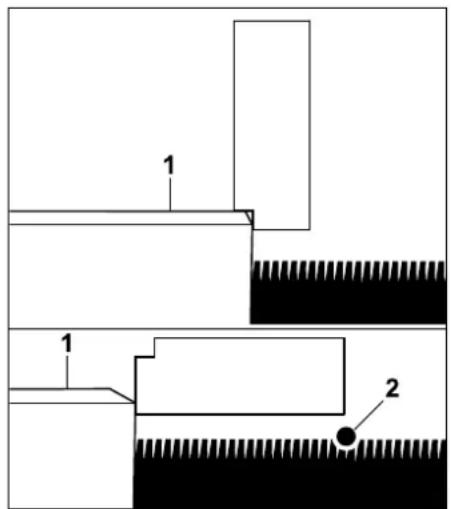
Obstacle (1) is higher than 2cm Route perimeter wire (2) with clearance A (22~cm) to the obstacle.
If necessary, set the cutting height so that the mowing deck of the robotic mower does not hit the obstacles.
If the lowest cutting height is set, the robotic mower can consequently clear less than 2cm
11.6 Confined areas
If a confined area is installed in the mowing area then offset drive home (corridor) must be deactivated. ( 10.14)
The robotic mower travels automatically in all confined areas, provided the minimum wire clearance is maintained. Narrower areas of the mowing area must be blocked off through appropriate routing of the perimeter wire.
If two mowing areas are linked via a narrow passage that can be travelled on, a corridor can be installed. ( 11.10)
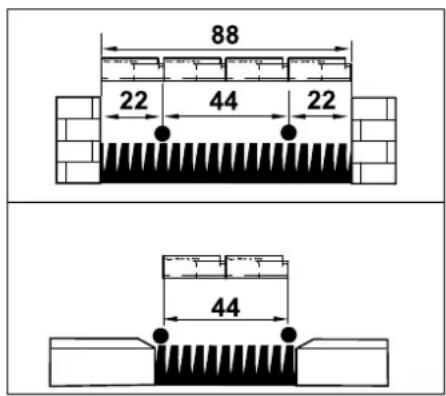
The minimum wire clearance is 44 cm, which corresponds to 2 iRuler lengths or the machine width.
This results in the following space requirements in confined areas:
- between high obstacles with a height exceeding 2 cm, such as walls, 88 cm,
- between obstacles that can be travelled on, with a height under 2cm such as paths 44 cm.
11.7 Installing linking sections
The robotic mower ignores the perimeter wire signal if the wires are routed parallel and close together. Linking sections must be installed
where secondary areas are to be installed. ( 11.9)
where no-go areas are necessary. ( 11.8)
VIKING recommends laying linking sections together with the relevant no-go areas or secondary areas during wire routing.
In the case of retrospective installation, the wire loop must be cut and linking sections must then be integrated using the wire connectors supplied. ( 11.14)
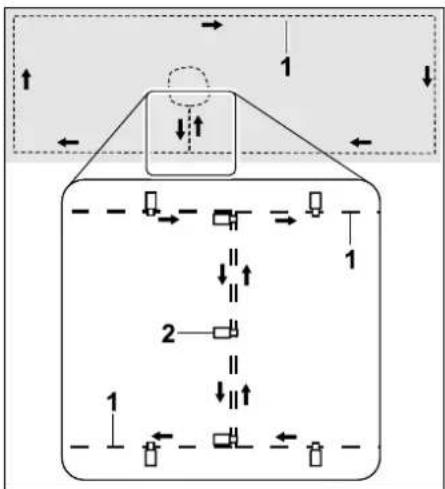
In linking sections, the perimeter wire (1) must be routed parallel, the wires must not cross and must be close to one another. Attach the linking section to the ground with a sufficient number of fixing pins (2).
11.8 No-go areas
No-go areas have to be installed
around obstacles that the robotic mower must not touch
around obstacles that are not sufficiently sturdy
around obstacles that are too low.
Minimum height: 8 cm
VIKING recommends
- blocking off obstacles by means of no-go areas or removing them,
- checking no-go areas after initial installation or after changes to the wire installation using the "Test edge" command. ( 10.14)
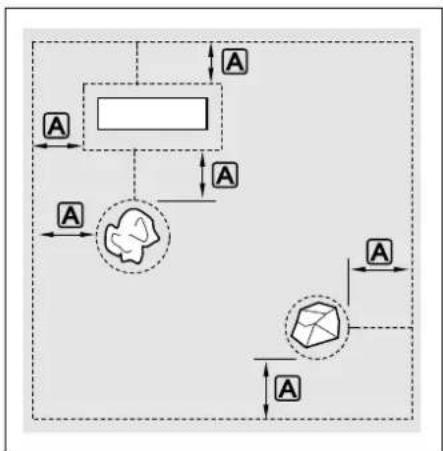
No-go areas must have a minimum diameter of 48~cm
The clearance between the edge
loop A must be greater than 44 cm.
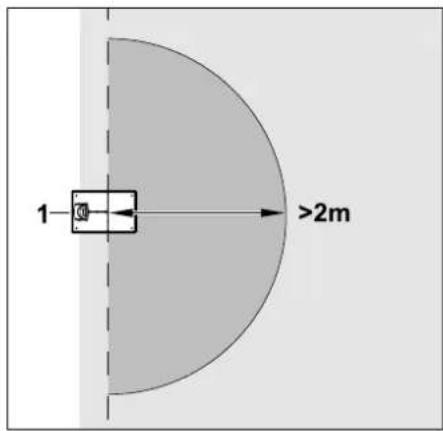
In order for docking to take place smoothly, no no-go area must be installed within a radius of at least 2m around the docking station (1).
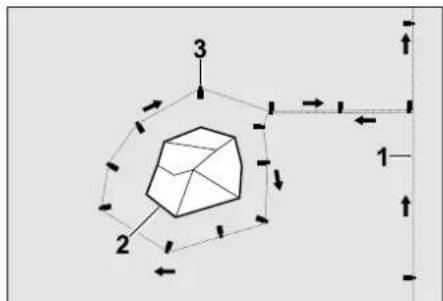
Route the perimeter wire (1) from the edge to the obstacle with the correct clearance (use iRuler) around the obstacle (2) and attach it to the ground with a sufficient number of fixing pins (3). Then route the perimeter wire back to the edge again.
The perimeter wire must be routed parallel and without crossover in the linking sections. ( 11.7)
11.9 Secondary areas
Secondary areas are parts of the mowing area that cannot be mown fully automatically by the robotic mower because access is not possible. In this manner, several separate mowing areas can be surrounded with a single perimeter wire. The robotic mower must be manually taken from one mowing area to another. The mowing operation can be initiated via the commands "Start mowing" ( 10.5) or "Start time-delayed mowing" ( 10.5) .
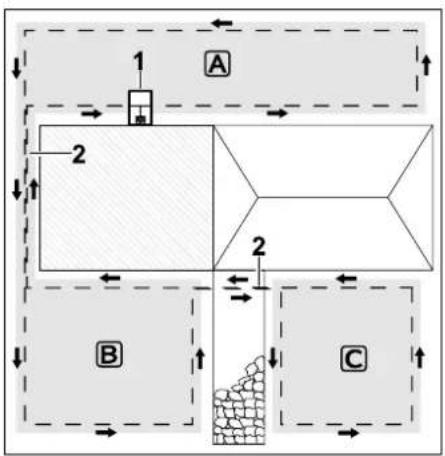
The docking station (1) is installed in the mowing area A, which is cut fully automatically in accordance with the mowing plan.
The secondary areas B and C are connected to the mowing area A via the linking sections (2). The perimeter wire must be routed in the same direction in all areas -do not cross perimeter wires in the linking areas.
Activate secondary areas in the "Settings-Installation" menu. (念) 10.14
11.10 Corridors
If several mowing areas have to be mown (e.g. mowing areas in front of and behind the house), these can be linked by installing a corridor. This allows all the mowing areas to be mown automatically.
In corridors, the lawn is only mown along the path of the perimeter wire. If necessary, activate automatic edge mowing or mow the corridor area manually on a regular basis. ( 10.14) ( 10.14)
The specified wire clearances are adapted to routing of the perimeter wire on the lawn area.
Requirements:
- Minimum width is 88 cm between solid obstacles in the corridor area and 22 cm between paths that can be travelled on.
In longer corridors, a slightly increased space requirement should be taken into account depending on the ground conditions. Longer corridors should always be installed as centrally as possible between obstacles.
-
Offset drive home (corridor) is deactivated. ( 10.14)
-
The corridor can be travelled on freely.
-
At least 1 starting point must be defined in the area of the second mowing area. (⇒ 10.15)
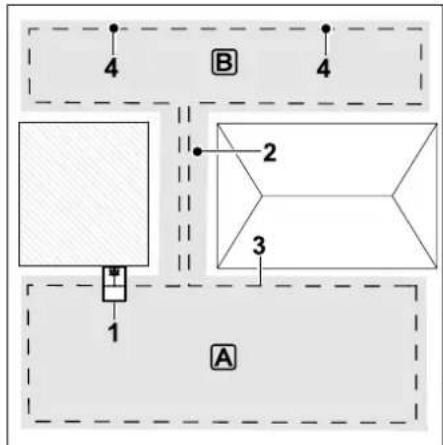
The docking station (1) is installed in mowing area A. Mowing area B is linked to mowing area A by means of a corridor (2). The perimeter wire (3) can be continuously followed by the robotic mower. In order to mow mowing area B, starting points (4) must be defined. ( 10.15)
Individual mowing operations can then be started at the starting points, depending on the setting (starting frequency).
Installing the start and end of the corridor:
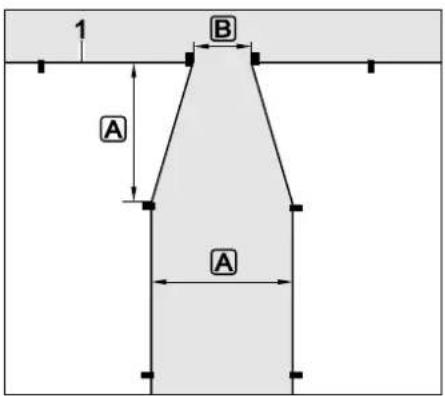
The perimeter wire (1) must be routed in a funnel shape as shown at the start and end of the corridor (clearances A and B).
This prevents the robotic mower from accidentally driving into the corridor during mowing.
A=22cm
B=6cm
Installing corridor:
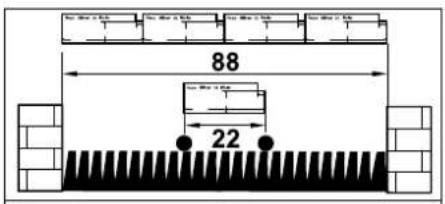
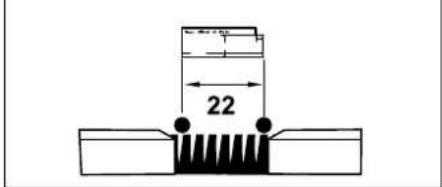
Wire clearance in corridors: 22 cm
This results in the following space requirements:
- between high obstacles (over 2 cm in height - e.g. walls): 88 cm,
- between paths / obstacles that can be travelled on (lower than 2 cm in height - e.g. paths): 22 cm.
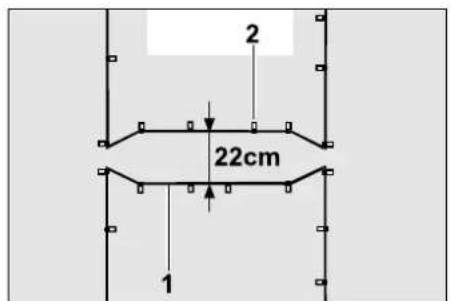
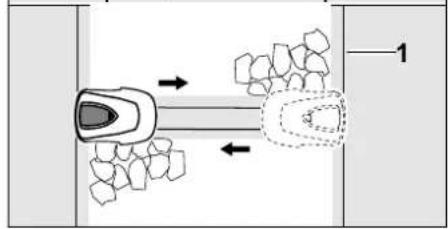
In corridors, the perimeter wire (1) must be routed parallel and attached to the ground with a sufficient number of fixing pins (2). At the start and end of the corridor, funnel-shaped entrance and exit areas must be installed.
11.11 Accurate mowing along edges
At a track offset of 6cm a strip with a width of up to 20~cm is left.
unnown along high obstacles. If
necessary, edging stones can be laid around high obstacles.
Minimum width of edging stones:
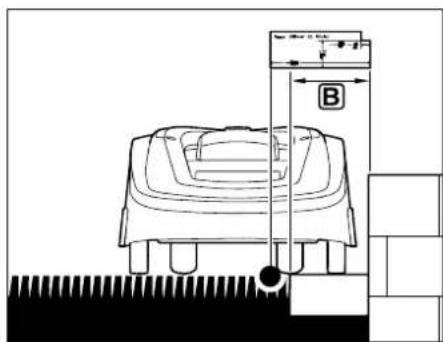
Route perimeter wire (1) at a clearance of 22cm to the obstacle. To ensure that the lawn edge is mown completely, the edging stones must have a width of at least 20cm (clearance B). If wider edging stones are laid, the lawn edge is cut even more precisely.

Route the perimeter wire with a greater clearance to the edging stones around exterior and interior corners. ( 9.1)
Use wider edging stones if necessary.
11.12 Sloping terrain in the mowing area
In order for the robotic mower to automatically mow a slope in the mowing area (incline up to 15^ ) trouble free, the perimeter wire must be installed in the slope with a minimum clearance to the edge of the incline.
Slopes with an incline of 5 - 15^
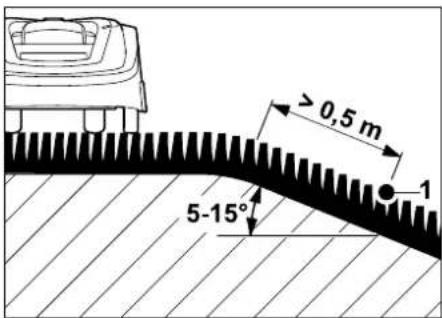
If there is a slope with an incline of 5 - 15^ in the mowing area, the perimeter wire can be routed below the top edge of the slope in the slope as illustrated. The minimum clearance (0,5m) from the top edge of the slope to the perimeter wire must be taken into account for trouble-free operation of the robotic mower.
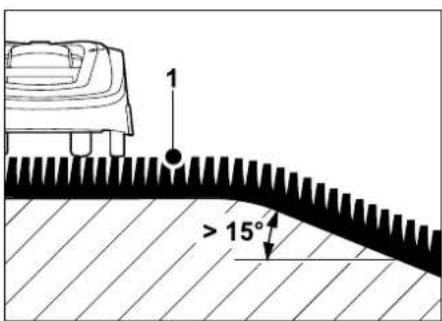
Top edge of the slope with an incline > 15°:
If there is a slope with an incline >15^ of in the mowing area, it is recommended that the perimeter wire (1) can be routed in the flat area before the top edge of the slope. The top edge and area of the slope are not mown.
11.13 Installing reserve wire
Reserve wire installed at regular intervals makes it easier to make any necessary corrections such as subsequently changing the position of the docking station or the routing of the perimeter wire. In particular, reserve wire should be installed near difficult passages.
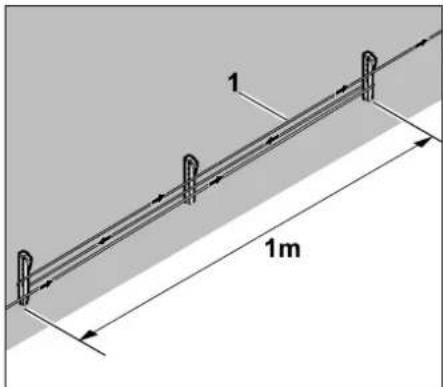
Route perimeter wire (1) as illustrated between 2 fixing pins spaced approx. 1m apart. Attach the reserve wire to the ground in the centre using a further fixing pin.
11.14 Using wire connectors
In order to extend the perimeter wire or to connect loose wire ends, only the gel-filled wire connectors supplied may be used. They prevent premature wear (e.g. corrosion of the wire ends) and ensure optimal connections.
Make a note of the positions of the wire connectors on the sketch of the mowing area. ( 11.2)
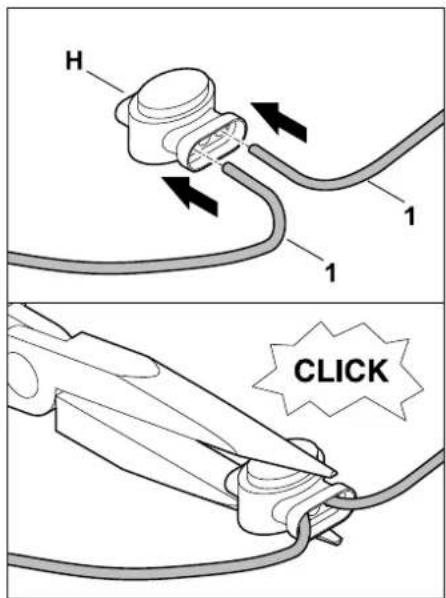
Insert loose, unstripped wire ends (1) to the stop in the wire connector (H). Press the wire connector together using suitable pliers - ensure correct engagement.
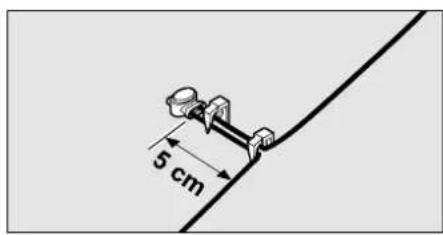
Attach the perimeter wire strain relief to the ground with two fixing pins as illustrated.
12. Docking station
12.1 LED on the docking station
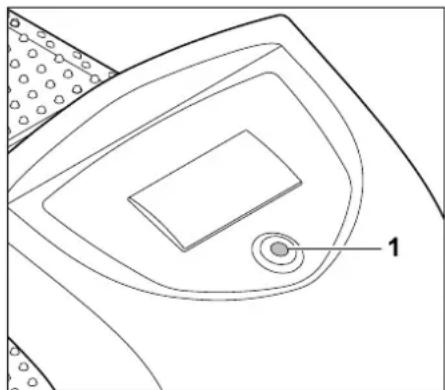
A red LED (1) provides information on the status of the docking station and the wire signal.

Red LED illuminates continuously

Red LED flashes slowly

Red LED flashes rapidly

Red LED flashes at intervals

LED does not illuminate
Red LED illuminates continuously:
The docking station is switched on and the robotic mower is not docked.
Red LED flashes slowly:
The docking station is switched on, the robotic mower has docked successfully or is being charged.
Red LED flashes rapidly (approx. 2x per second):
The perimeter wire is not correctly connected to the docking station or the wire signal is no longer present owing to a defective perimeter wire (wire break).
Red LED flashes rapidly at intervals:
The LED flashes alternately 3 times at a 1-second interval, 3 times at a 2-second interval, 3 times at a 1-second interval, 5 second pause. After the pause, the signal is repeated.
This flashing sequence indicates a fault in the docking station. ( 24.)
Red LED does not illuminate:
The docking station is switched off, the wire signal is not being transmitted.
Switching on the docking station
- During automatic operation, the docking station is switched on and off automatically.
- Switching on manually: Open the flap of the docked robotic mower and press the OK or the Back button. The robotic mower and the docking station are switched on.

The docking station is switched on exclusively via the docked robotic mower.
In order to activate the docking station, first place the robotic mower in the docking station and switch it on by pressing the button.
13. Notes on mowing
13.1 General
The robotic mower is designed for the automatic mowing of lawns. The grass is kept short through continuous mowing. The result is a perfect, thick lawn.
Lawns that have not previously been mown using a conventional lawn mower will only be mown neatly following several mowing operations. Especially in the case of high grass, a good cutting pattern is only achieved after a few mowing operations.
In hot, dry conditions, the lawn should not be kept too short as it will otherwise be burnt by the sun and become unsightly.
The cutting pattern will be better with a sharp blade than with a blunt one; the blade should therefore be replaced regularly.
13.2 Mulching
The robotic mower is a mulching mower.
During mulching, the grass clippings are further shredded in the mowing deck housing after cutting. They then fall back into the turf, where they remain and decompose.
The finely shredded clippings return organic nutrients to the lawn, serving as a natural fertiliser. Fertiliser requirements are thereby reduced significantly.
13.3 Active times
During the active times, the robotic mower is allowed to leave the docking station and mow the lawn. During these times, mowing operations, charging operations and rest periods take place. The robotic mower automatically distributes the mowing and charging operations between the available time windows.
During installation, active times are automatically distributed over the entire week. Time reserves are taken into account - this ensures perfect lawn care, even if individual mowing operations cannot take place, (e.g. due to rain).
During the active times, third parties must keep out of the danger area. The active times should be adapted accordingly. Moreover, the applicable local regulations on the use of robotic mowers as well as the information in the "For your safety" section ( 6.) must be observed and the active times changed accordingly in the "Mowing plan" menu as required. ( 10.7) In particular, you should check the times of the day and night at which it is permissible to use the machine with the responsible authorities.
13.4 Mowing duration
The mowing duration specifies how many hours per week the lawn is to be mown. It can be extended or reduced. ( 10.8)
The mowing duration corresponds to the time during which the robotic mower mows the lawn. Times during which the battery is charged are not part of the mowing duration.
During initial installation, the robotic mower automatically calculates the mowing duration based on the specified size of the mowing area. This reference value is based on a normal lawn under dry conditions.
For 100m^2 the robotic mower needs on average:
MI 422:120 minutes
MI 422 P: 100 minutes
14. Operating the machine
14.1 Preparation
An installation assistant is available for initial installation. ( 9)
Install the docking station ( 9.4)
- Route the perimeter wire ( 9.5) and connect ( 9.6)
- Remove foreign bodies (e.g. toys, tools) from the mowing area.
- Charge the battery (⇒ 14.7)
- Set the time and date ( 10.11)
- Check the mowing plan and adapt if necessary – in particular it must be ensured that third parties keep away from the danger area during active times. (⇒ 10.6)
Mow very high grass until it is short using a conventional lawn mower prior to use of the robotic mower (e.g following a lengthy break).
14.2 Flap
The robotic mower is equipped with a flap which protects the display from the weather and from inadvertent operation. If the flap is opened during use of the robotic mower, operation is stopped and the mowing blade and robotic mower come to a standstill.
Opening the flap:
For safety reasons, the Stop button must be pressed before opening the flap during operation of the robotic mower.
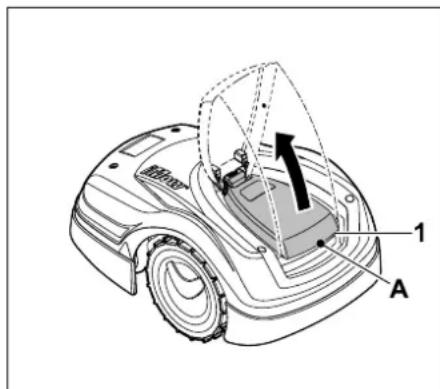
Grasp the flap (1) at the lifting point (A) and release upwards by pulling lightly. Open the flap as far as the stop.
The opened flap can be removed upwards from the machine. This design is implemented for safety reasons: This ensures that the machine cannot be lifted and carried by the flap.
Closing the flap:
Carefully fold the flap downwards and allow to engage.
The robotic mower can only be operated when the flap is fully engaged.
14.3 Adapting the programming
The current programming can be seen in the Mowing plan. ( 10.6)
The mowing plan is calculated based on the size of the mowing area during installation or during the creation of a new mowing plan.
The active times and the mowing duration can be changed individually, the required mowing operations themselves are automatically distributed over the possible active times. If required, several mowing or charging operations can run during an active time. If required, the edge of the mowing area can be cut automatically at regular intervals. ( 10.14)
Up to three different active times per day are possible. ( 10.6)
If the robotic mower has to travel to specific areas of the mowing area, starting points must be defined. ( 10.15)
Under certain circumstances (e.g. warm weather or generous time window), not all the active times may be necessary for optimal lawn care.
Changing the active times: ( 10.7)
- Additional active times for further mowing operations.
- Adapting the time window in order, for example, to prevent mowing during the morning or night.
- Omitting individual active times because the mowing area is e.g. being used for a party.
Extending the mowing duration: ( 10.8)
- There are areas which are not mown sufficiently, e.g because the mowing area has lots of corners.
- Intensive grass growth during the growing period.
- Particularly dense lawn.
Reduction of the mowing duration: ( 10.8)
- Reduced grass growth due to heat, cold or dryness.
Creation of a new mowing plan: ( 10.6)
- The size of the mowing area has been changed.
New installation: ( 10.14)
- New location of the docking station.
- Initial operation on a new mowing area.
14.4 Automatic mowing
- Switching on automatic mowing:
When automatic mowing is switched on, the Automatic symbol appears next to the battery symbol in the display. ( 10.5)
Starting mowing operation: The mowing operations are automatically distributed between the available active times. ( 10.7)
- Ending mowing operation: When the battery is discharged, the robotic mower automatically travels back to the docking station. (14.6) A running mowing operation can be ended manually at any time using the STOP button. (5.1)
Mowing areas that the robotic mower reaches via a corridor are only mown if starting points have been defined in the relevant area.
14.5 Mowing independently of active times
Mowing areas with docking station:
- Activate the robotic mower upright in the docking station. This also activates the docking station.
- In order to mow a part of the mowing area that can only be reached via a corridor, carry the robotic mower there.
-
Immediate mowing: Call up the command Start mowing ( 10.5) . The mowing operation starts immediately and continues until the selected time.
-
Time-delayed mowing: Call up the command Start time-delayed mowing. ( 10.5) The mowing operation starts at the selected start time and continues until the selected end time.
- Ending mowing manually: A running mowing operation can be ended at any time using the STOP button. ( 5.1)
If necessary, the robotic mower charges the battery in the interim and then continues the mowing operation until the selected end time.
Secondary areas:
- Activate the robotic mower upright in the docking station. This also activates the docking station.
- Carry the robotic mower to the secondary area.
- Activate the secondary area. (⇒ 10.5)
- Immediate mowing: Call up the command Start mowing ( 10.5) . The mowing operation starts immediately and continues until the selected time.
-
Time-delayed mowing: Call up the command Start time-delayed mowing. ( 10.5) The mowing operation starts at the selected start time and continues until the selected end time.
-
Ending mowing:
When the selected end time is reached, the robotic mower travels to the perimeter wire and comes to a standstill. Return the machine to the docking station to recharge the battery and confirm the displayed message. ( 23.) A running mowing operation can be ended manually at any time using the STOP button. ( 5.1)
If the battery runs flat before the selected end time, the mowing operation is shortened accordingly.
14.6 Docking the robotic mower
Docking during automatic operation:
The robotic mower automatically travels to the docking station when the active time ends or when the battery is discharged.
Forcing docking:
- Activate the command Drive to docking station. (⇒ 10.5)
The red LED flashes on the docking station after docking. ( 12.1)
After docking, no further mowing operation takes place in the current active time.
Manual docking:
- Push the robotic mower into the docking station by hand.
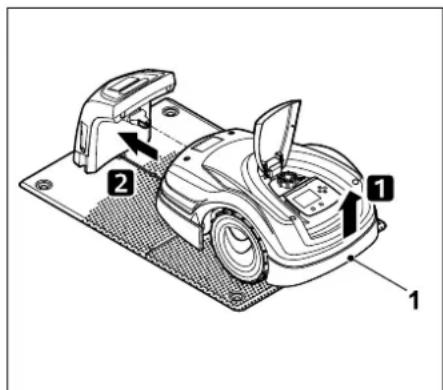
Lift the robotic mower slightly by the carrying handle (1) to relieve the weight on the drive wheels. Push the machine, resting on its front wheels, into the docking station.
The red LED flashes on the docking station after docking. ( 12.1)
14.7 Charging the battery
Only charge the battery via the docking station. Never remove the battery and charge it using an external cha
Automatic charging:
During mowing, charging occurs automatically when the robotic mower docks into the docking station at the end of the mowing operation.
The red LED flashes on the docking station after docking. ( 12.1)
Starting charging manually:
-
Following use in secondary areas, return the robotic mower to the mowing area and dock it. (⇒ 14.6)
-
Dock the robotic mower following interruption of a mowing operation. (→ 14.6)
If necessary, end standby mode of the robotic mower by pressing a button. Charging starts automatically.
Charging:
During charging, the text "Charging battery" is displayed in the status screen.

A plug symbol appears instead of the battery symbol in the information area of the display in all the other menus.

The charging time varies and is automatically adapted to the subsequent period of use.

In the event of charging problems, a corresponding message appears in the display. ( 23)
The battery is only charged when the voltage falls below a certain value.
Charge state:
The momentary charge state can be seen in the status screen when the relevant display is selected. ( 10.13)

In all other menus, the battery symbol in the information area of the display serves to indicate the charge state. ( 10.3)

15. Maintenance
Risk of injury!
Carefully read the section "For your safety" ( 6.) , particularly the subsection "Maintenance and repairs" ( 6.9) ,and follow all safety instructions exactly before performing any maintenance or cleaning operations on the machine.
Activate the disabling device prior to any maintenance or cleaning work. ( 5.2)
Disconnect the mains plug before performing any maintenance operations on the docking station.
Always wear gloves when carrying out any maintenance work, particularly when working on the mowing blade.


15.1 Maintenance schedule
The maintenance intervals are based on the operating hours among other factors. The relevant "Mowing hours" counter can be called up in the "Information" menu. ( 10.9)
The specified maintenance intervals must be strictly observed.
Maintenance operations on days with active times:
Weekly maintenance operations:
Clean the machine. ( 15.2)
- Visually inspect the mowing blade, blade fastening and mowing deck for damage (notches, cracks, fractures, etc.) and wear. ( 15.3)
Every 200 hours:
- Replace the mowing blade. A corresponding reminder appears in the display. ( 15.4)
Annual maintenance operations:
- VKING recommends an annual inspection by a VKING specialist dealer during the winter months. Here, maintenance of the battery, electronics and software in particular is performed.
In order for your specialist dealer to perform all the maintenance operations correctly, set the safety level to "None" or give your specialist dealer the appropriate PIN code.
15.2 Cleaning the machine
Care of the machine will protect it against damage and extend its service life.
Cleaning and maintenance position:

Only perform cleaning work on the mowing blades when wearing thick work gloves and exercising extreme care.
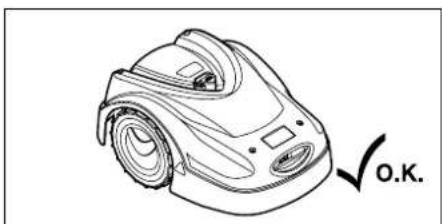
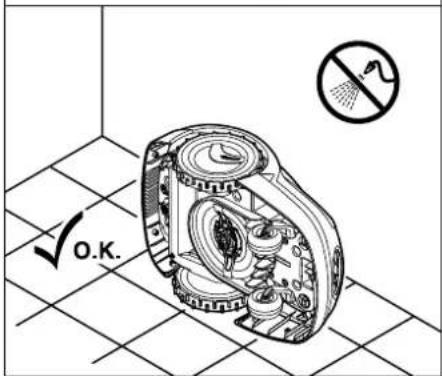
Place the machine on a firm, level and flat surface for cleaning the top of the machine (hood, flap). To clean the underside of the machine (mowing blade, mowing deck) tilt the robotic mower onto its left or right side as illustrated and lean it against a wall.
- Clean off dirt with a brush or a cloth. In particular, also clean the mowing blade and the docking station.
- Detach accumulated clipping deposits in the housing and in the mowing deck beforehand using a stick.
If necessary, use a special cleaner (e.g. STIHL special cleaner).
Regularly remove the carrier plate and remove grass residues. ( 15.6)

The carrier plate must be cleaned frequently in wet weather. Dirt deposits between the carrier plate and the mowing deck housing creates friction, leading to increased power consumption.
15.3 Checking the mowing blade wear limits

Risk of injury!
A worn mowing blade may break off and cause serious injuries. The instructions for blade maintenance must therefore always be observed. Mowing blades are subject to differing degrees of wear depending on the location and duration of use. If you use the machine on sandy ground or use it frequently under dry conditions, the mowing blade will be subjected to greater loads and will wear more quickly than normal.
The mowing blade must be replaced at least every 200 operating hours, resharpening must be carried out by a VKING specialist dealer. ( 15.5)
- Activate the disabling device. ( 5.2)
- Tilt the robotic mower onto its side and lean it securely against a stable wall. Carefully clean the mowing deck and mowing blade. (⇒ 15.2)
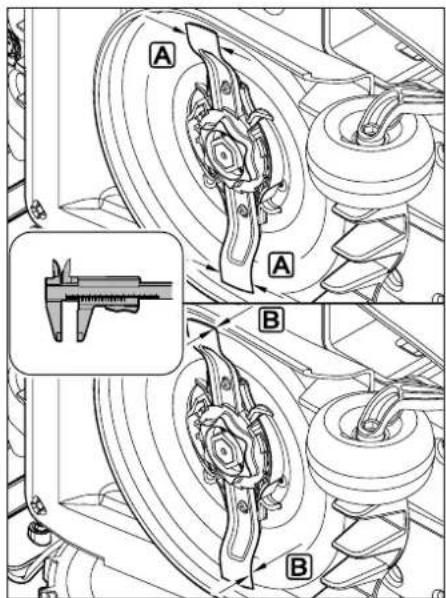
Check the blade width A and blade thickness B using a slide calliper.
If the blade width is less than 25mm or the blade thickness is less than 1,3 mm at any point, the mowing blade must be replaced.
15.4 Removing and installing the mowing blade

The mowing blade is designed for a service life of 200 hours. After this period, a corresponding message appears in the display.
Activate the disabling device ( 5.2) and wear gloves.

Tilt the robotic mower onto its side and lean it securely against a stable wall. Carefully clean the mowing deck and mowing blade. ( 15.2)
Removing the blade:
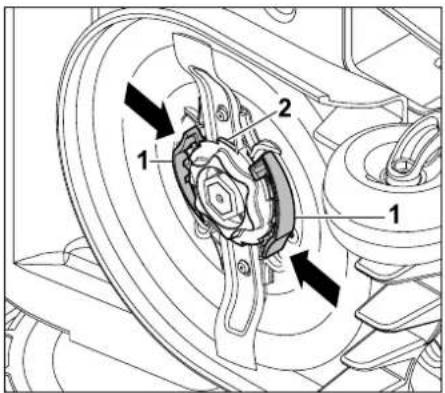
Push in both tabs (1) on the carrier plate with one hand and hold. Remove the fastening nut (2) with your other hand.

Remove the mowing blade together with the fastening nut.
Installing the mowing blade:

Risk of injury!
Check the blade for damage before installing. The blade must be replaced if notches or cracks are identified or if its width is less than 25mm or its thickness is less than 1,3mm at any point. ( 15.3)
The carrier plate and the fastening nut must also be replaced if damaged (e.g. broken, worn). The fastening nut in particular must engage cleanly in the carrier plate.
- Clean the blade, carrier plate and fastening nut prior to installation.
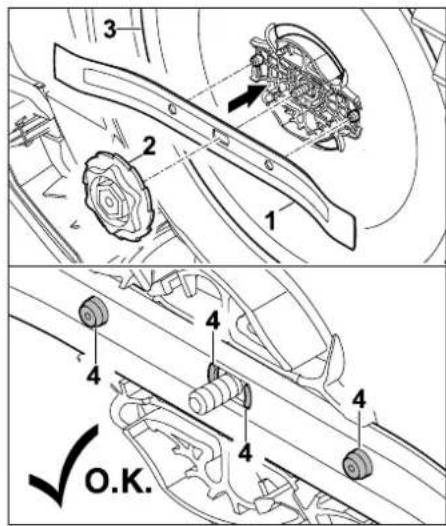
Fit the mowing blade (1) and fastening nut (2) on the carrier plate (3) as illustrated. Ensure correct position of the retainers (4) in the mowing blade.
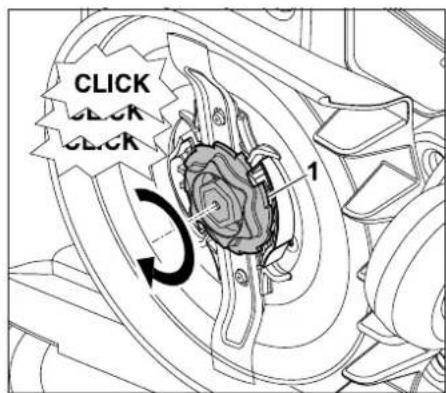
Screw on the fastening nut (1) as far as possible. Several clicks are audible during tightening. Ensure secure seating of the mowing blade by shaking carefully.
Following installation of a new mowing blade, confirm the blade replacement in the "Service" menu. (10.17)
15.5 Sharpening the mowing blade
VIKING recommends replacing a blunt blade with a new one. Resharpening a blunt mowing blade should only be carried out by a VKING specialist dealer as he has the necessary expertise and special tools.

Correct operation of the machine can only be ensured with a very precisely balanced mowing blade.
An incorrectly sharpened blade (e.g. imbalance, incorrect sharpening angle) increases noise emissions and can result in damage to the machine.
15.6 Removing and installing carrier plate

The carrier plate can be removed in order to clean the mowing deck.
Activate the disabling device ( 5.2) and wear gloves.

- Tilt the robotic mower onto its side and lean it securely against a stable wall. Carefully clean the mowing deck and mowing blade. (⇒ 15.2)
Removing the carrier plate:
- Remove the mowing blade. ( 15.4)
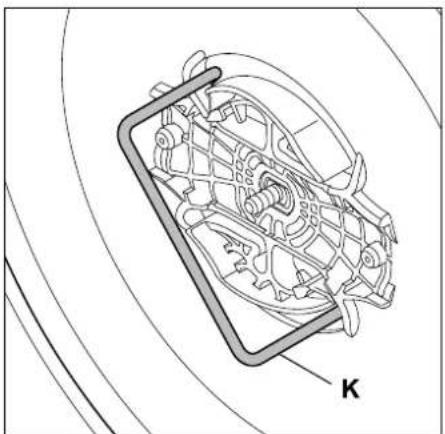
Insert the puller (K) and turn anti-clockwise to the stop.
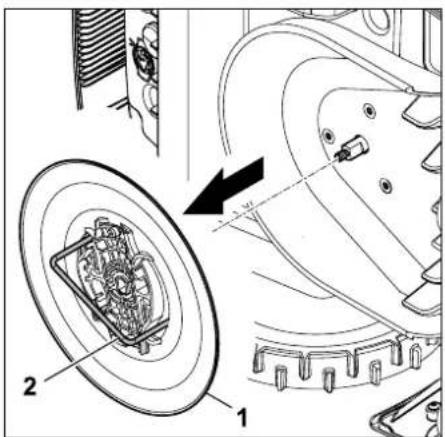
Support the machine with one hand. Remove the carrier plate (1) by pulling on the puller (2).
Installing the carrier plate:
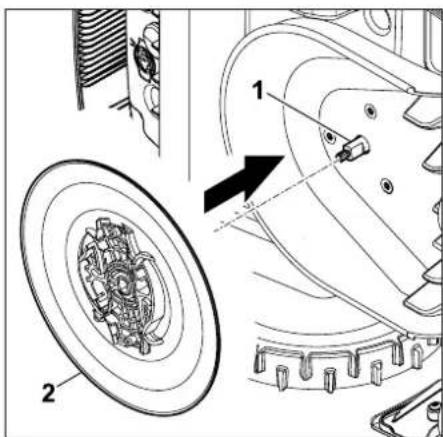
Thoroughly clean the blade shaft (1) and the mounting on the carrier plate (2). Push the carrier plate as far as possible onto the blade shaft.
Install the mowing blade. ( 15.4)
15.7 Finding a wire break
In the event of a wire break, the red LED on the docking station flashes rapidly. ( 12.1) A corresponding message appears in the display of the robotic mower.
If a wire break cannot be found as described, contact your VKING specialist dealer.
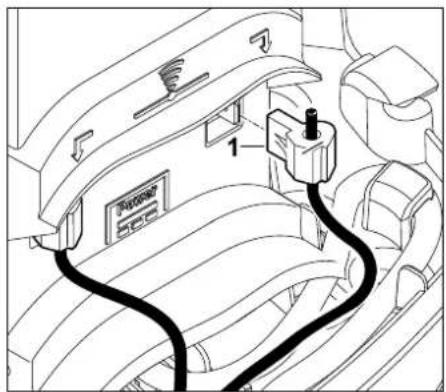
Remove the docking station cover and disconnect the right perimeter wire end (1).
The following instructions describe how to search for a wire break in a clockwise direction, i.e. the perimeter wire is followed in a clockwise direction starting at the docking station. The search can also be performed in an anti-clockwise direction if necessary, however the left perimeter wire end must then be disconnected.
- Remove the robotic mower from the docking station.
In the "Service" menu, select the "Find wire break" entry and confirm with OK. (10.17)
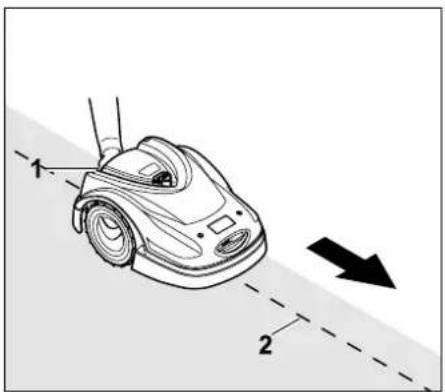
Starting at the docking station, follow the edge of the mowing area clockwise with the robotic mower. For this purpose, lift the machine slightly by the rear carrying handle (1) to relieve the weight on the drive wheels. Push the robotic mower, supported by its front wheels, and follow the perimeter wire (2). It must be ensured that the perimeter wire (2) runs under the wire sensors. The wire sensors are installed in a protected position on the left and right at the front of the robotic mower. During the wire break search, the signal strength is indicated in the display; the wire sensors are in the ideal position above the perimeter wire when this value is at its highest.
The Wire signal OK symbol appears in the display when the wire sensors are correctly receiving the wire signal.
In the area of the wire break, the signal strength drops and the Check wire signal symbol appears in the display.


- Bridge the break with the aid of a wire connector ( 11.14) . If necessary, reroute the perimeter wire in the area of the break.
If the wire break has been correctly rectified, the red LED on the docking station illuminates after the perimeter wire is connected. ( 12.1)
15.8 Power supply unit plug
The power supply unit is equipped with a removable plug.
This plug can be removed if the power supply unit is installed inside a building and therefore the power cable must be routed through a hole in the wall.
Risk of injury!
Disconnect the mains plug and unplug the power supply unit from the docking station before performing any work on the power supply unit.
Read the instructions in the section "Warning - dangers caused by electrical current". (→ 6.3)
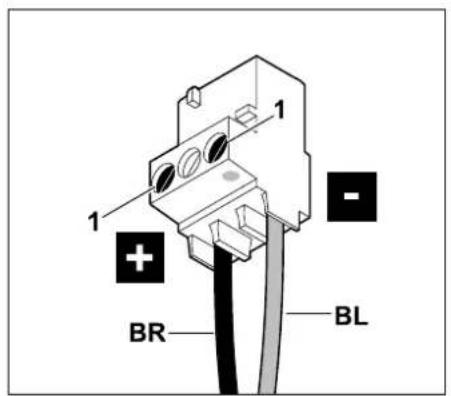
Install the blue cable (BL) and the brown cable (BR) in the plug as illustrated. Tighten screws (1).
15.9 Storage and winter break
Note the following points when storing the robotic mower for long periods (e.g. winter break):
Charge the battery ( 14.7)
- Switch off automatic mowing ( 10.5)
Activate the highest safety level (anti-theft alarm) ( 10.16)
- Activate the disabling device (⇒ 5.2)
- Disconnect the power supply unit plug from the mains
- Remove the docking station cover ( 9.4)
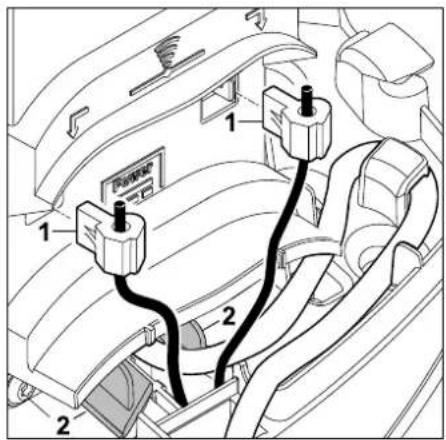
Disconnect the perimeter wire (1). Open the cover of the cable duct (2) and guide the perimeter wire together with the press-fit connectors out of the docking station socket.

Do not remove the press-fit connectors from the perimeter wire as they can only be installed once. Additional press-fit connectors are available from a VIKING specialist dealer. ( 16.)
Do not remove the perimeter wire from the mowing area.
- Disconnect the power cable from the docking station.
Install the docking station cover. ( 9.4)
- Remove the docking station.
- Protect the terminals (connectors) of the perimeter wire from environmental influences (e.g. wrap with suitable insulating tape).
- Carefully clean all external parts of the robotic mower and the docking station.
- Store the robotic mower together with the docking station and the power supply unit in the normal position and in a dry and locked place that is generally free of dust. Dock the robotic mower in the docking station. Make sure that the machine is kept out of the reach of children.
Always store the robotic mower in good operational condition.
- Keep all screws tightly fastened, replace danger signs and warnings on the machine that have become illegible, check the entire machine for wear and damage. Replace all worn or damaged parts.
- Any machine faults must be completely remedied prior to storage.

Never place or store objects on the robotic mower or on the docking station.
Resuming operation of the robotic mower following prolonged immobilisation:
- Prepare the mowing area: Remove foreign objects and cut high grass short using a conventional lawn mower.
- Install the docking station ( 9.4) and connect the perimeter wire. ( 9.6)
Charge the battery ( 14.7)
- Check the time and date and set if necessary (⇒ 9.3)
- Check the mowing plan and change as necessary. (⇒ 10.6)
- Switch on automatic mowing (⇒ 10.5)
16. Standard spare parts
Mowing blade: 63017020101
Fixing pins AFN 075: 6301 007 1010
Perimeter wire ARB 151:
Wire diameter: 2,3 mm
Wire length: 150 m
0000 400 8630
Perimeter wire ARB 200:
Wire diameter: 2,3 mm
Wire length: 200 m
0000 400 8635
Perimeter wire ARB 501:
Wire diameter: 3,4mm Wire length: 500m 0000 400 8625
Wire connector ADV 010: 6909 007 1090
Press-fit connector AKS 010: for wire diameter:2,3 mm 6909 007 1095
Press-fit connector AKS 011 for wire diameter 3,4 mm 6909 007 1096
17. Accessories
Additional accessories are available for the machine.
Further information is available from your VKING specialist dealer, on the internet (www.viking-garden.com) or in the VKING catalogue.

For safety reasons, only accessories approved by VKING may be used with the machine.
18. Minimising wear and preventing damage
Important information on maintenance and care of the product group
Robotic mower, battery powered
VIKING assumes no liability for material or personal damage caused by the non-observance of information contained in the operating instructions, in particular with regard to safety, operation and maintenance, or which arise through the use of unauthorised attachment or spare parts.
Please always observe the following important information for the prevention of damage or excessive wear to your VKING machine:
1. Wearing parts
Some parts of the VIKING machine are subject to normal wear even when used properly and must be replaced in due time depending on type and duration of use.
These include:
-Ba t t e r y
The VIKING machine must be used, maintained and stored with the care described in this instruction manual. Any damage caused by non-compliance with the safety, operating and maintenance instructions is the sole responsibility of the user.
This applies in particular to:
- incorrect handling of the battery (charging, storage),
- incorrect electrical connection (voltage),
- product modifications not approved by VKING,
- use of tools or accessories which are not approved or suitable for the machine, or are of inferior quality,
- improper use of the product,
-use of the product for sporting or competitive events,
resultant damage due to continued use of the product with defective components.
3. Maintenance operations
All operations listed in the section "Maintenance" must be performed regularly.
If these maintenance operations cannot be carried out by the user, a specialist dealer must be commissioned to perform them.
VIKING recommends that you have maintenance operations and repairs performed exclusively by a VKING specialist dealer.
VIKING specialist dealers regularly attend training courses and are provided with technical information.
If these operations are neglected, faults may arise which are the responsibility of the user.
These include:
damage to the machine as a result of inadequate or incorrect cleaning,
corrosive and other resultant damage caused by incorrect storage,
damage to the machine through the use of inferior-quality spare parts,
damage due to untimely or inadequate maintenance or damage due to maintenance or repair work not performed in the workshops of specialist dealers.
19. Environmental protection
The machine, its packaging and accessories are all produced from recyclable materials and must be disposed of accordingly.
By disposing of materials separately, and in an environmentally friendly manner, valuable resources can be re-used. For this reason, the machine should be disposed of for recycling at the end of its
useful life. Pay particular attention to the information in the "Disposal" section during disposal. ( 6.11)
Waste products such as batteries must always be disposed of properly. Observe local regulations.

Do not dispose of lithium-ion batteries with domestic waste. Please hand them in to a specialist dealer or at a hazardous waste collection
point.
19.1 Removing the battery
- Activate disabling device. ( 5.2)
- Open flap. (⇒ 14.2)
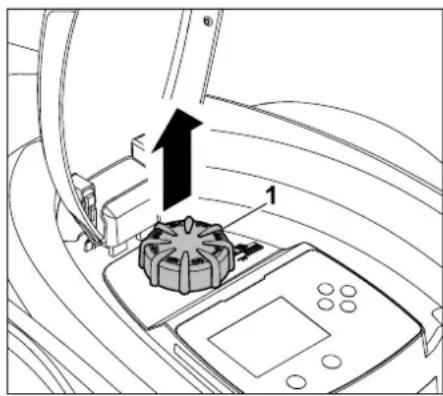
Remove the rotary knob (1) upwards.
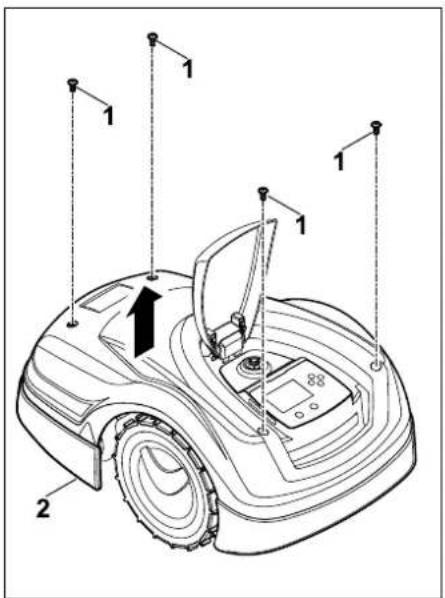
Remove the screws (1) from the cover (2). Remove the (2) cover upwards.
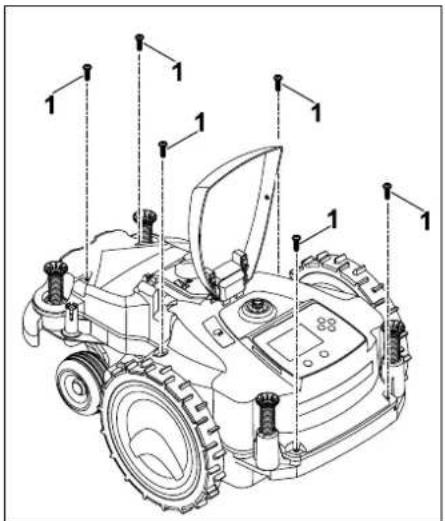
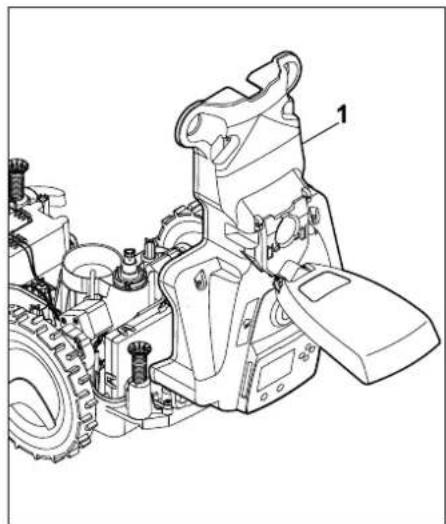
Unscrew screws (1) and remove.

Fold the upper housing (1) rearwards.
Risk of injury!
Do not cut cables at the battery. Risk of short circuit!
Always disconnect the cables and remove together with the battery.
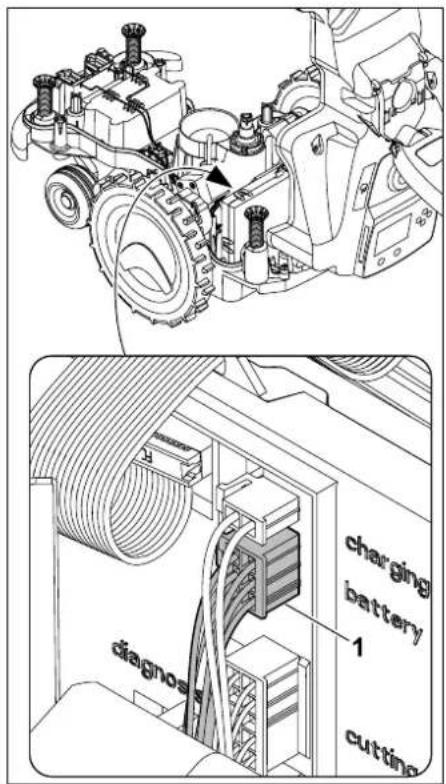
Detach the connector (1) (battery).
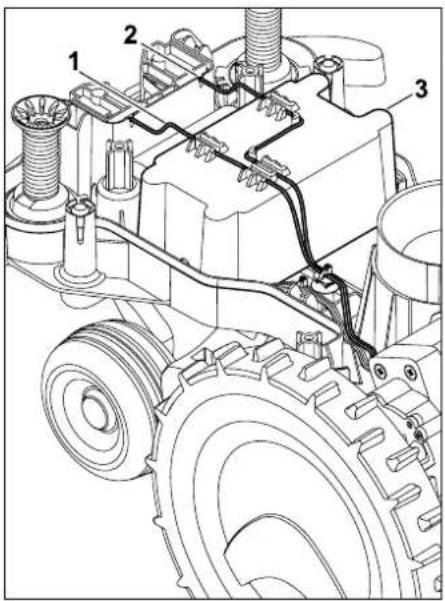

Remove cable (1) and cable (2) from the cable guides and remove the battery (3).
Risk of injury!
Prevent damage to the battery.
20. Transport

Risk of injury!
Before transporting, carefully read the section "For your safety" ( 6.) particularly the subsection
"Transporting the machine" ( 6.5) and follow all safety instructions - always activate the disabling device. ( 5.2)
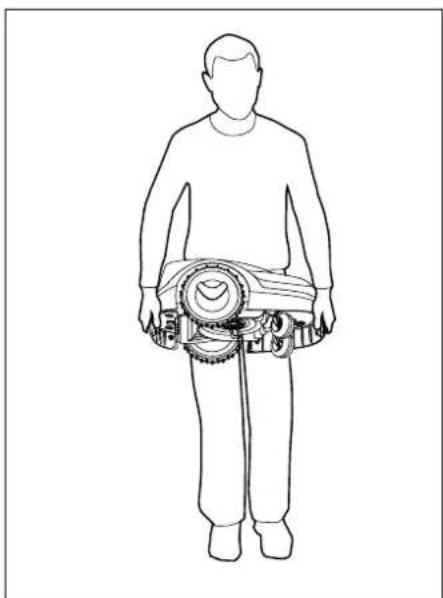
20.1 Lifting or carrying the machine
Lift and carry the robotic mower at the front carry handle (1) and at the rear carry handle (2). Ensure that the mowing blade always faces away from your body and that there is sufficient distance between the mowing blade, particularly your feet and legs.
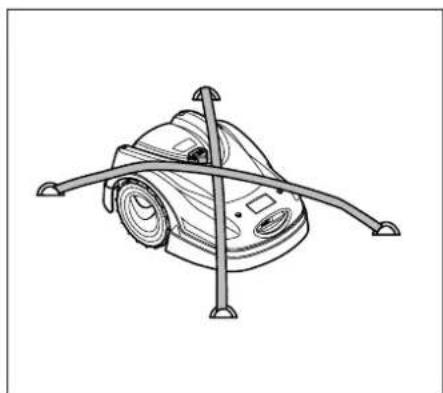
20.2 Securing the machine (lashing)
Secure the ride-on the mower on the load floor. Fasten the machine as illustrated using suitable fastening materials (straps, ropes) for this purpose.
Secure any other machine components being transported (e.g. docking station, small components) against slipping.
We,
VIKING GmbH
Hans Peter Stihl-Strasse 5
declare that the machine,
lawn mower, automatic and battery-powered (MI)
manufacturer's
brand:
type: MI 422.0
VIKING
MI 422.0 P
serial number 6301
with
docking station
manufacturer's brand:
VIKING
type: ADO 400
serial number 6301
conforms to the following EU directives: 2002/96/EC, 2014/30/EU, 2006/42/EC, 2006/66/EC, 2011/65/EU
The products have been developed in conformance with the following standards: EN 60335-1, EN 50636-2-107
Compilation and storage of technical documentation:
The year of manufacture and serial number appear on the identification plate of the machine.
Langkampfen,
2016-01-02 (YYYY-MM-DD)
VIKING GmbH
Sven Zimmermann
Head of Design
22. Technical specifications
MI 422.0, MI 422.0 P:
Serial number 6301
Mowing system Mulching mow-ing deck
Cutting utilities Cutter bar
Cutting width 20 cm
Speed of cutting
utilities 4450 rpm
Battery type Lithium-ion
Battery voltage V_DC 18,5 V
Cutting height 20 - 60 mm
Protection class III
Type of protection IPX1
In accordance with Directive 2006/42/EC
and the EN 50636-2-107 standard:
Measured sound
Sound pressure level
Uncertainty K_pA 2 dB (A)
Length 60 cm
Width 43 cm
Height 27 cm
MI 422.0:
Maximum mowing area size 500m^2
Power 60W
Battery designation AAI 40
Battery power 42 Wh
Battery capacity 2,25 Ah
Weight 9 kg
MI 422.0 P:
Maximum mowing area size 1000m^2
Power 60W
Battery designation AAI 80
Battery power 83 Wh
Battery capacity 4,50 Ah
Weight 9 kg
Docking station ADO 400:
Voltage VDC 27V
Protection class III
Type of protection IPX1
Weight 3 kg
Power supply unit:
Designation OWA-60E-27 2.23
Mains voltage V_AC 100-240 V
Frequency 50/60 Hz
Direct current voltage V_DC 27 V
Protection class II
Type of protection IP67
Transport of VKING batteries:
VIKING batteries meet the requirements specified in UN manual ST/SG/AC.10/11/Rev.5 Part III, subsection 38.3.
The user may carry VIKING batteries to the place of use of the machine without further restrictions during road transport.
Country-specific legislation must be observed in the case of air or sea transport.
For further transport instructions, see www.viking-garden.com/safety-datasheets
REACH:
REACH is an EC Directive for the registration, evaluation, authorisation and restriction of chemicals. For information on compliance with the REACH Directive (EC) No. 1907/2006, see www.stihl.com/reach
23. Messages
Messages provide information on active errors, faults and recommendations. They are displayed in a dialog window and can be called up after pressing the OK button in the "Messages" menu. ( 23.)
Recommendations and active messages also appear in the status screen. ( 10.13)
The message code, the time of occurrence, the priority and the frequency of occurrence can be called up in the message details.
- Recommendations are awarded the priority "Low" or "Info", they appear in the status screen alternately with the text "iMow ready for op." The robotic mower can still be operated, automatic operation continues.
-Faults are awarded the priority Medium" and require action on the part of the user. The robotic mower can only be operated again once the fault has been rectified.
In the cases of Errors awarded the priority "High" the text "Contact your specialist dealer" appears in the display. The robotic mower can only be operated again once the fault has been rectified by a VIKING specialist dealer.
If a message is still active despite the proposed remedial action, please contact your VKING specialist dealer.
Faults that can only be rectified by a VIKING specialist dealer are not listed in the following. Should a fault of this kind occur, please communicate the 4-digit fault code and the fault text to your specialist dealer.
Message:
0001 - Data loss
Press OK to release
Possible cause:
- The machine software has been updated
Voltage loss
- Software or hardware error
Remedy:
- After the OK button is pressed, the robotic mower operates with the default settings - check and correct the settings (date, time, mowing plan)
Message:
0100-Battery discharged
Charge battery
Possible cause:
Battery voltage too low
Remedy:
- Place the robotic mower in the docking station to recharge the battery (⇒ 14.7)
Message:
0180 - Temperature low
Temperature range not reached
Possible cause:
- Temperature inside the robotic mower too low
Remedy:
Warm up the robotic mower
Message:
0181 - Temperature high
Temperature range exceeded
Possible cause:
- Temperature inside the robotic mower too high
Remedy:
- Allow the robotic mower to cool down
Message:
0183 - Temperature high
see message 0181
Message:
0185 - Temperature high see message 0181
Message:
0186 - Temperature low see message 0180
Message:
0187 - Temperature high see message 0181
Message:
0302 - Drive motor fault
Temperature range exceeded
Possible cause:
- Temperature in left drive motor too high
Remedy:
- Allow the robotic mower to cool down
Message:
0305 - Drive motor fault
Left wheel is stuck
Possible cause:
Overload at left drive wheel
Remedy:
Clean the robotic mower ( 15.2)
Level out any uneven areas (holes, depressions) in the mowing area
Message:
0402 - Drive motor fault
Temperature range exceeded
Possible cause:
- Temperature in right drive motor too high
Remedy:
- Allow the robotic mower to cool down
Message:
0405 - Drive motor fault
Right wheel is stuck
Possible cause:
Overload at right drive wheel
Remedy:
Clean the robotic mower ( 15.2)
- Level out any uneven areas (holes, depressions) in the mowing area
Message:
0502 - Mowing motor fault
Temperature range exceeded
Possible cause:
- Temperature in mowing motor too high
Remedy:
- Allow the robotic mower to cool down
Message:
0505 - Mowing motor fault
Mowing blade blocked
Possible cause:
Remedy:
Clean mowing blade and mowing deck ( 15.2) Clean carrier plate ( 15.6)
- Set higher cutting height (⇒ 9.2)
Level out any uneven areas (holes, depressions) in the mowing area
Message:
0701 - Battery fault
Outside temperature range
Possible cause:
- Temperature in battery too low or too high
Remedy:
- Allow the robotic mower to warm up or cool down - observe permissible temperature range of battery (⇒ 6.4)
Message:
0703 - Battery discharged
see message 0100
Message:
0704 - Battery discharged
see message 0100
Message:
1000 - Rollover
Allowed inclination exceeded
Possible cause:
- Tilt sensor has detected a rollover
Remedy:
- Place the robotic mower on its wheels, check for damage and confirm the message with OK
Message:
1010 - iMow raised
Press OK to release
Possible cause:
- Robotic mower has been lifted by the hood
Remedy:
- Check movement of the hood and confirm the message with OK
Message:
1030-Hood fault
Check hood
Then press OK
Possible cause:
Remedy:
- Check hood (movement, firm seating) and confirm the message with OK
Message:
1105-Flap open
Operation aborted
Possible cause:
Remedy:
Message:
1120 - Hood blocked
Check hood
Then press OK
Possible cause:
- Permanent collision detected
Remedy:
Free the robotic mower, remove the obstacle or change routing of perimeter wire if necessary - then confirm the message with OK
- Check movement of the hood and confirm the message with OK
Message:
1125 - Remove obstacle
Check wire routing
Possible cause:
- Perimeter wire routed inaccurately
Remedy:
- Check the routing of the perimeter wire; check the clearances with the iRuler ( 11.5)
Message:
1130 - Stuck
Free iMow
Then press OK
Possible cause:
- Robotic mower has become stuck
- Drive wheels are spinning
Remedy:
Free the robotic mower, level out the mowing area or change routing of perimeter wire if necessary - then confirm the message with OK
Clean the drive wheels, if necessary prevent operation during rain - then confirm the message with OK ( 10.12)
Message:
1135-Outside
Place iMow in mowing area
Possible cause:
- The robotic mower is located outside the mowing area
Remedy:
- Return the robotic mower to the mowing area
Message:
1140 - Too steep
Check wire routing
Possible cause:
-M1422:
Tilt sensor has detected a slope inclination exceeding 35%
-M1422P:
Tilt sensor has detected a slope inclination exceeding 40%
Remedy:
-M1422:
Change routing of perimeter wire, block off lawns with slope inclinations exceeding 35%
-M1422P:
Change routing of perimeter wire, block off lawns with slope inclinations exceeding 40%
Message:
1170-No signal
Check wire signal
Possible cause:
- No reception of wire signal during operation
- The robotic mower is located outside the mowing area
Docking station or electronic components were replaced
Remedy:
- Check the power supply to the docking station
- Check the LED on the docking station - the red LED must be permanently illuminated during operation ( 12.1)
- Return the robotic mower to the mowing area
- Link the robotic mower and docking station ( 9.7)
Message:
1180 - Dock iMow
Automatic docking
not possible
Possible cause:
- The docking station was not found
Remedy:
Message:
1190 - Docking error
Docking station occupied
Possible cause:
Docking station occupied by a second robotic mower
Remedy:
Dock the robotic mower once the docking station is unoccupied again
Message:
1200 - Mowing motor fault see message 0505
Message:
1210 - Drive motor fault
Wheel stuck
Possible cause:
Overload at a drive wheel
Remedy:
Clean the robotic mower ( 15.2)
Level out any uneven areas (holes, depressions) in the mowing area
Message:
1220 - Rain detected
Mowing interrupted
Possible cause:
- Mowing operation has been interrupted or not started due to rain
Remedy:
- No action necessary; adjust rain sensor if required ( 10.12)
Message:
2000 - Signal problem
Dock iMow
Possible cause:
Wire signal faulty, fine tuning necessary
Remedy:
- Place the robotic mower in the docking station - then press OK
Message:
2010 - Replace mowing blade
Allowed operating time reached
Possible cause:
- Mowing blade has been in use for more than 200 hours, replacement is necessary
Remedy:
- Replace the mowing blade, then confirm the blade replacement in the "Service" menu (⇒ 15.4)
Message:
2020 - Recommendation
Annual service by spec. dealer required
Possible cause:
Machine service recommended
Remedy:
- Have the annual service carried out by a VKING specialist dealer
Message:
2030-Battery
Allowed operating time reached
Possible cause:
Battery replacement necessary
Remedy:
- Have the battery replaced by a VIKING specialist dealer
Message:
2032 - Battery fault during charging see message 0701
Message:
4001 - Internal fault
Outside temperature range
Possible cause:
Temperature in battery or inside the machine too low or too high
Remedy:
- Allow the robotic mower to warm up or cool down - observe permissible temperature range of battery (⇒ 6.4)
Message:
2040 - Battery fault when starting mowing see message 0701
Message:
2050 - Adapt mowing plan
Extend active times
Possible cause:
Active times have been shortened/deleted or the mowing duration has been extended - the stored active times are insufficient for the necessary mowing operations.
Remedy:
- Extend the active times ( 10.7) or shorten the mowing duration ( 10.8)
Message:
2060 - Mowing completed
Press OK to release
Possible cause:
- Mowing in secondary area successfully completed
Remedy:
- Return the robotic mower to the mowing area and dock to charge the battery ( 14.6)
Message:
2120 - Child lock
Child lock active
Possible cause:
- Impact sensor triggered several times consecutively
- Robotic mower has been lifted during travel
Remedy:
- Confirm message with OK
- Deactivate the child lock (⇒ 10.16)
Message:
4002 - Rollover
see message 1000
Message:
4003 - Hood lifted
Check hood
Then press OK
Possible cause:
Hood has been lifted
Remedy:
- Check the hood and confirm the message with OK
Message:
4004 - Internal fault
Press OK to release
Possible cause:
- Error in the programme sequence
- Power failure during automatic operation
- Robotic mower is located outside the mowing area
Remedy:
- Confirm message with OK
- Check power supply to the docking station - the red LED must be illuminated permanently during operation; then press the OK button ( 12.1)
- Return the robotic mower to the mowing area, then press the OK button
Message:
4005 - Internal fault
see message 4004
Message:
4006 - Internal fault
see message 4004
Message:
4027-STOP button pressed
Press OK to release
Possible cause:
- STOP button has been pressed
Remedy:
24. Troubleshooting
If necessary, contact a specialist dealer; VIKING recommends VIKING specialist dealers.
Fault:
The robotic mower operates at the wrong times.
Possible cause:
- Date and time incorrectly set
Active times incorrectly set
Machine has been operated by unauthorised persons
Remedy:
- Set the time and date ( 10.10)
- Set the active times ( 10.6)
- Set the safety level to "Medium" or "High" (⇒ 10.16)
Fault:
The robotic mower fails to operate during an active time
Possible cause:
Battery is charging
Automatic mowing switched off
Active time switched off
Rain detected
- Weekly mowing duration has been reached, no further mowing operations required that week
- Message is active
- Flap open or not present
Docking station not connected to power supply
- Power failure
Remedy:
- Allow the battery to finish charging ( 14.7)
- Switch on automatic mowing (⇒ 10.5)
- Release the active time ( 10.7)
- Set the rain sensor (⇒ 10.12)
- No further action necessary, mowing operations are automatically distributed over the week - if necessary, start the mowing operation with the "Mowing" command ( 10.5)
- Rectify displayed fault and confirm the message with OK ( 23)
- Close the flap ( 14.2)
- Check power supply to the docking station ( 9.4)
- Check power supply. When the robotic mower detects a wire signal again after a periodic check, it resumes the interrupted mowing operation. This means that it can take several minutes before mowing operation is automatically resumed following the power failure. The intervals between the individual periodic checks become larger, the longer the power failure lasts.
Fault:
The robotic mower fails to mow after the commands "Start mowing" or "Start timedelayed mowing" have been called up
Possible cause:
Insufficient battery charge
Rain detected
- Flap not closed or not present
- Message is active
Remedy:
Fault:
The robotic mower is not working and nothing is shown in the display
Possible cause:
Machine is in standby
Battery defective
Remedy:
- Press any button to wake up the robotic mower - the status screen appears ( 10.13)
-Replace the battery (x)
Fault:
The robotic mower is noisy and vibrates
Possible cause:
- Mowing blade is damaged
- Mowing deck is very dirty
Remedy:
-Replace the mowing blade -remove any obstacles from the lawn ( 15.4) (x)
Clean the mowing deck ( 15.2)
Fault:
Poor mulching or mowing result
Possible cause:
Remedy:
- Adjust the cutting height ( 9.2)
- Set the rain sensor (⇒ 10.12)
Change the active times (⇒
-Replace the mowing blade ( 15.4), (X)
- Extend or add active times ( 10.7) Extend the mowing duration ( 10.8)
-Create a new mowing plan ( 10.6)
- For neat mowing results, the robotic mower needs up to 2 weeks, depending on the size of the lawn.
- Allow mowing during rain (⇒ 10.12)
Extend the active times (⇒ 10.7)
Fault:
Display in a foreign language
Possible cause:
- Language setting has been changed
Remedy:
- Set the language (⇒ 10.13)
Fault:
Brown (earthy) patches appear in the mowing area
Possible cause:
- Mowing duration is too long in relation to the mowing area
- Perimeter wire has been routed with excessively tight radii
- Size of mowing area set incorrectly
Remedy:
- Reduce the mowing duration ( 10.8)
- Correct the routing of the perimeter wire ( 11.3)
-Create a new mowing plan ( 10.6)
Fault:
Mowing operations are significantly shorter than usual
Possible cause:
- Grass is very high or too wet
Machine (mowing deck, drive wheels) is very dirty
Battery has reached end of service life
Remedy:
- Adjust the cutting height ( 9.2) Set the rain sensor ( 10.12) Change the active times ( 10.7)
Clean the machine ( 15.2)
- Replace the battery - observe corresponding recommendation in the display (x) ( 23)
Fault:
The robotic mower is docked, the battery is not charging
Possible cause:
- The battery does not need to be charged
Docking station not connected to power supply
- Incorrect docking
- Charging contacts corroded
Machine is in standby
Remedy:
- No action necessary - battery charging occurs automatically below a certain voltage
- Check power supply to the docking station ( 9.4)
-
Place the robotic mower in the mowing area and send it back to the docking station ( 10.5) , check for correct docking - if necessary, correct the position of the docking station ( 9.4)
Replace the charging contacts (x)
-
Press any button to wake up the robotic mower - the status screen appears ( 10.13)
Fault:
Docking not working
Possible cause:
Uneven entry area to docking station
- Dirty drive wheels or dirty floor plate
- Perimeter wire incorrectly routed in area of docking station
- Ends of perimeter wire not cut
Remedy:
- Level out the entry area to the docking station ( 9.4)
- Clean the drive wheels and the floor plate of the docking station (⇒ 15.2)
- Re-route the perimeter wire - ensure correct routing in the area of the docking station ( 9.5)
Cut the perimeter wire as described and route it without excess length - do not roll up protruding ends ( 9.6)
Fault:
The robotic mower travels past the docking station or docks at an angle
Possible cause:
Wire signal affected by
- Perimeter wire incorrectly routed in area of docking station
Remedy:
- Link the robotic mower and docking station again - ensure that the robotic mower is in correct alignment to the docking station ( 9.7)
- Re-route the perimeter wire - ensure correct routing in the area of the docking station ( 11.3)
Check for correct connection of the perimeter wire ends in the docking station ( 11.4)
Fault:
The robotic mower has crossed the perimeter wire
Possible cause:
- Perimeter wire incorrectly routed, clearances are not correct
- Slope inclination of mowing area too steep
- Interference affecting the robotic mower
Remedy:
- Check the routing of the perimeter wire ( 10.14) ; check the clearances with the iRuler ( 11.5)
- Check the routing of the perimeter wire; block off areas with excessively steep slope inclinations (⇒ 10.14)
- Contact a VKING specialist dealer (x)
Fault:
The robotic mower frequently becomes stuck
Possible cause:
- Cutting height too low
- Drive wheels dirty
Depressions or obstacles in the mowing area
Remedy:
- Increase the cutting height ( 9.2)
Clean the drive wheels ( 15.2)
-Fill up holes in the mowing area, install no-go areas around obstacles such as exposed roots, remove obstacles ( 11.3)
Fault:
The impact sensor is not activated when the robotic mower hits an obstacle
Possible cause:
Remedy:
- Remove the obstacle or block it off with a no-go area ( 11.8)
- Remove the obstacle
Fault:
Driving tracks at edge of mowing area
Possible cause:
- Excessively frequent edge mowing
- Starting points in use
Battery is charged very frequently towards the end of its service life
Corridor not activated
Remedy:
- Switch off edge mowing or reduce it to once per week (⇒ 10.14)
- Start all mowing operations at the docking station in suitable mowing areas ( 10.15)
-Replace the battery - observe corresponding recommendation in the display (x) ( 23)
- Activate corridor (⇒ 10.14)
Fault:
Unmown grass at edge of mowing area
Possible cause:
- Edge mowing switched off
- Perimeter wire routed inaccurately
- Grass is out of reach of mowing blade
Remedy:
-Mow the edge once or twice per week ( 10.14)
- Check the routing of the perimeter wire ( 10.14) ; check the clearances with the iRuler ( 11.5)
Cut the unmown areas regularly using a suitable grass trimmer
Fault:
No wire signal
Possible cause:
- Docking station switched off - LED does not illuminate
- Docking station not connected to mains supply - LED does not illuminate
- Perimeter wire not connected to docking station - red LED flashes rapidly
- Break in perimeter wire - red LED flashes rapidly
- Robotic mower and docking station are not linked
- Electronics fault
Remedy:
- Switch on the docking station (⇒ 12.1)
- Check power supply to the docking station ( 9.4)
- Connect the perimeter wire to the docking station ( 9.6)
Find the wire break ( 10.17) then repair perimeter wire using wire connectors ( 11.14)
- Link robotic mower and docking station ( 9.7)
- Contact a VKING specialist dealer (x)
25. Service schedule
25.1 Handover confirmation
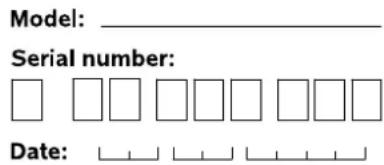

25.2 Service confirmation
Please hand this instruction manual to your VKING specialist dealer in the case of maintenance work. He will confirm the service operations performed in the pre-printed boxes.

Service performed on

Next service date

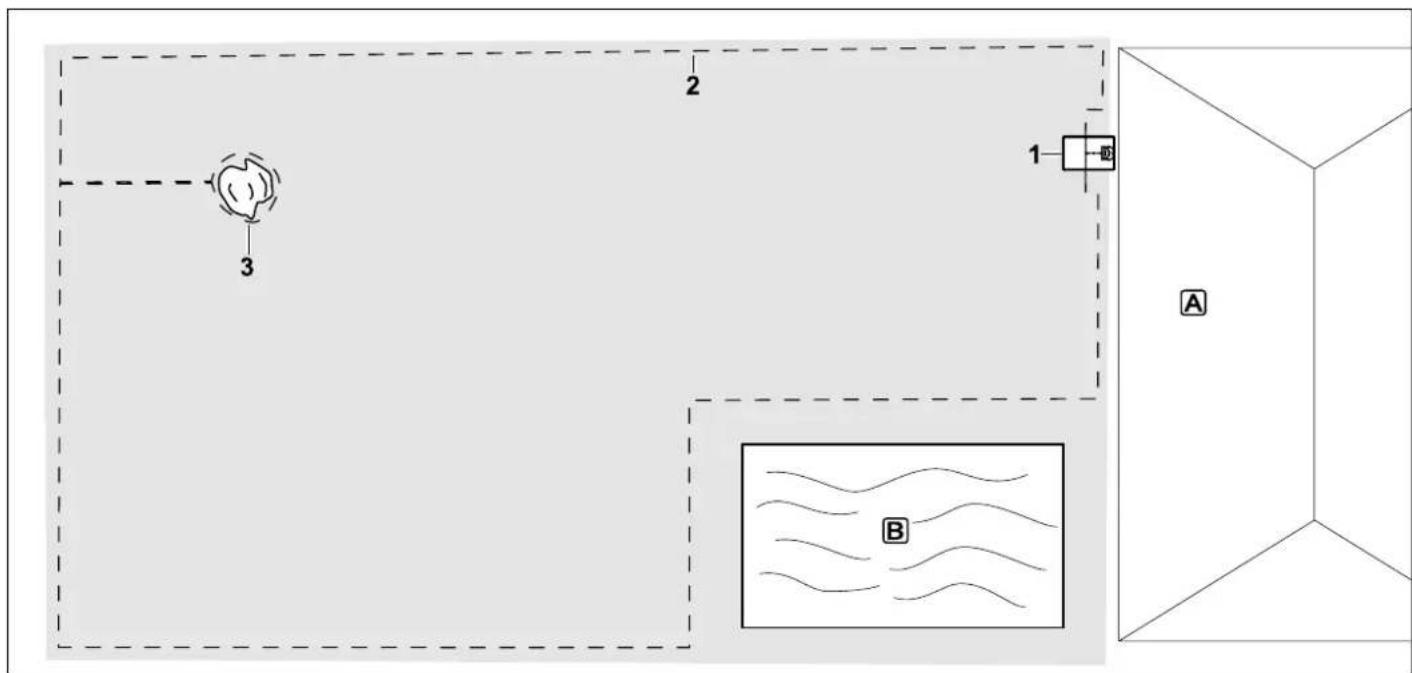
26. Installation examples
Rectangular mowing area with one tree and swimming pool
Docking station:
Location (1) directly next to the house A
No-go area:
Installation around the free-standing tree (3), based on a linking section installed at right angles to the edge.
Swimming pool:
For safety reasons (specified wire clearance) the perimeter wire (2) is routed around the pool [B].
Wire clearances: ( 11.5)
Clearance to edge: 22 cm
Clearance to the obstacle that can be travelled on: 0 c m
Clearance around the tree: 24 cm
Clearance to the pond: 100 cm
Programming:
No further adaptation is necessary following definition of the size of the mowing area.
Particularities:
Unmown areas around the swimming pool must be mown manually on a regular basis or cut using a suitable lawn trimmer.
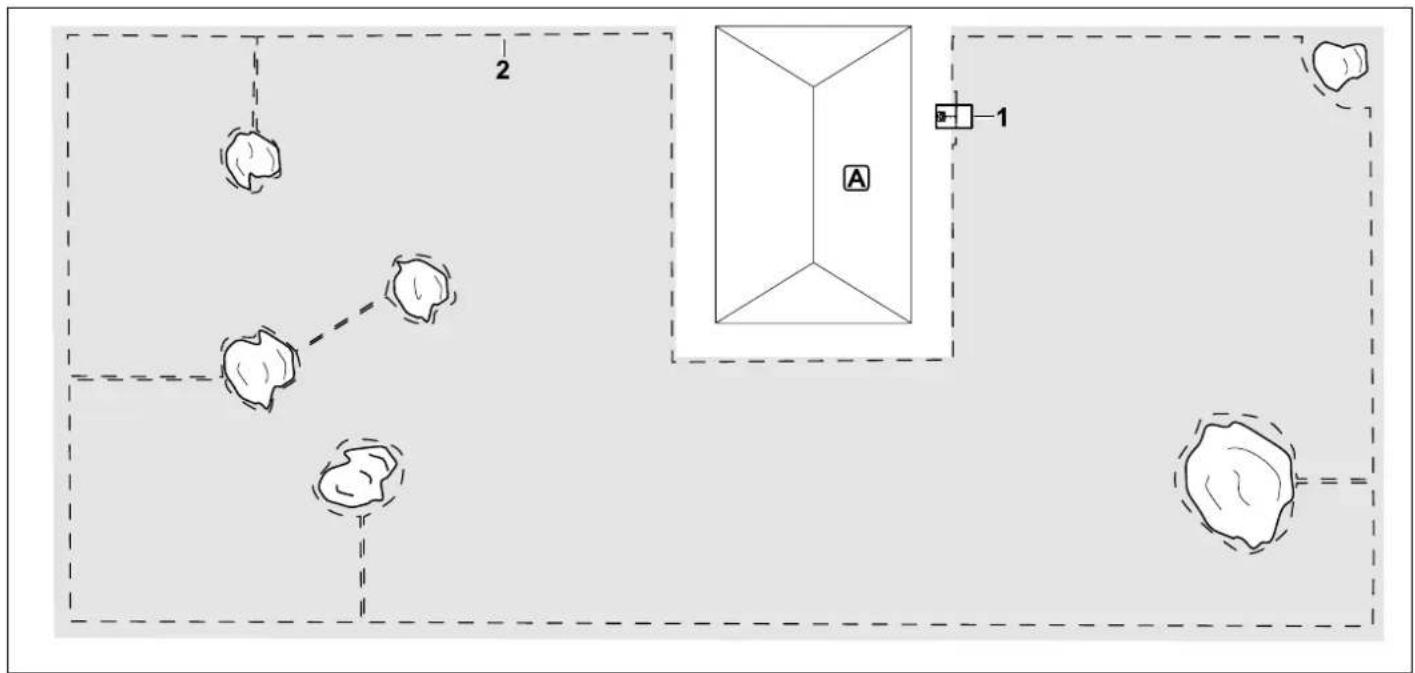
U-shaped mowing area with several freestanding trees
Docking station:
Location (1) directly next to the house A
No-go areas:
Installation around the free-standing trees, based on linking sections installed at right angles to the edge (2), two no-go areas are connected via a linking section.
Wire clearances: ( 11.5)
Clearance to the edge: 22 cm
Clearance to the obstacle that can be travelled on: 0 c m
Clearance around the trees: 24 cm
Programming:
No further adaptation is necessary following definition of the size of the mowing area.
Particularities:
Tree in the corner of the mowing area - mow the area behind the blocked-off tree regularly using a suitable lawn trimmer or leave as a patch of high-grass.
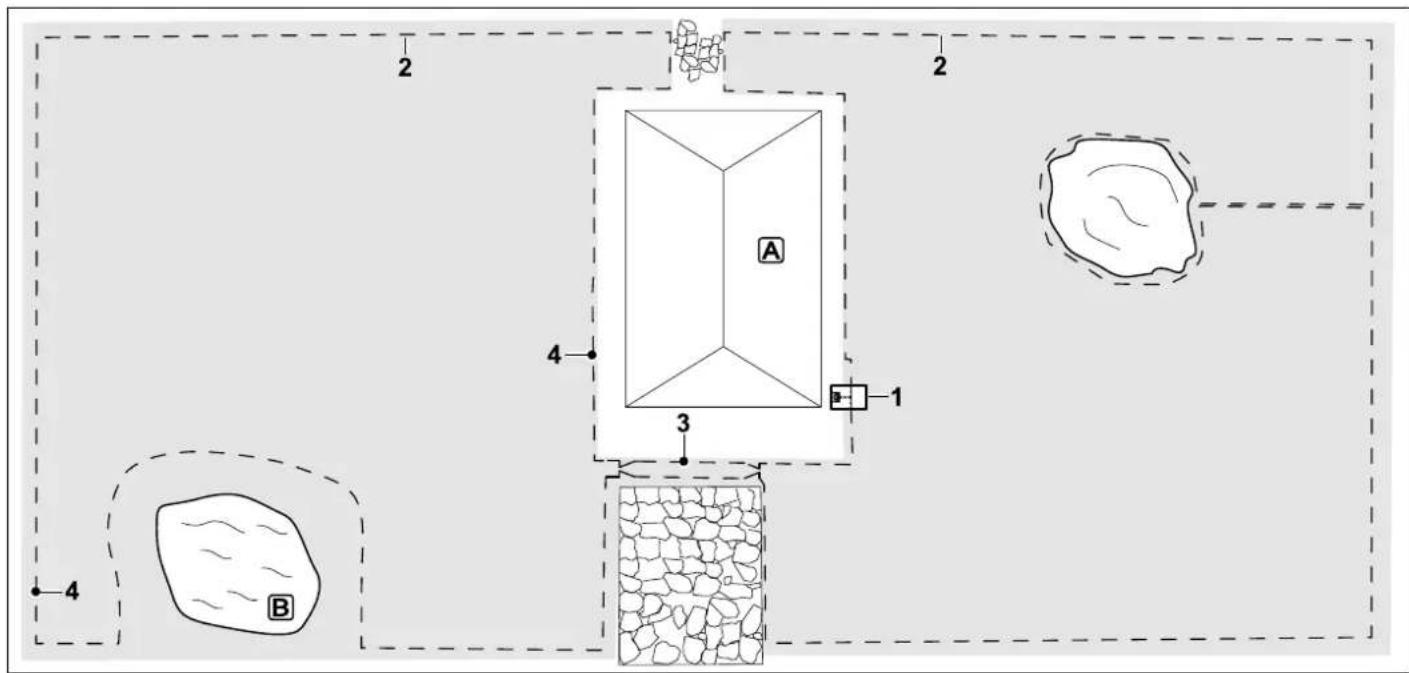
Divided mowing area with a pond and a free-standing tree
Docking station:
Location (1) directly next to the house A
No-go area:
Installation around the free-standing tree, based on a linking section installed at right angles to the edge.
Pond:
For safety reasons (specified wire clearance) the perimeter wire (2) is routed around the pond B.
Wire clearances: (1) 11.5
Clearance to edge: 22 cm
Clearance to the obstacle that can be
travelled on: 0 c m
Around the tree: 24 cm
Clearance to the pond: 100 cm
Confined area:
Installation of a corridor (3). Wire
clearance: 22cm( 11.10)
Programming:
Define the total size of the mowing area, program two starting points (4) close to the docking station and in the contorted corner near the pond ( 10.15)
Particularities:
Unmown areas, e.g. B around the pond must be mown manually on a regular basis or cut using a suitable lawn trimmer.
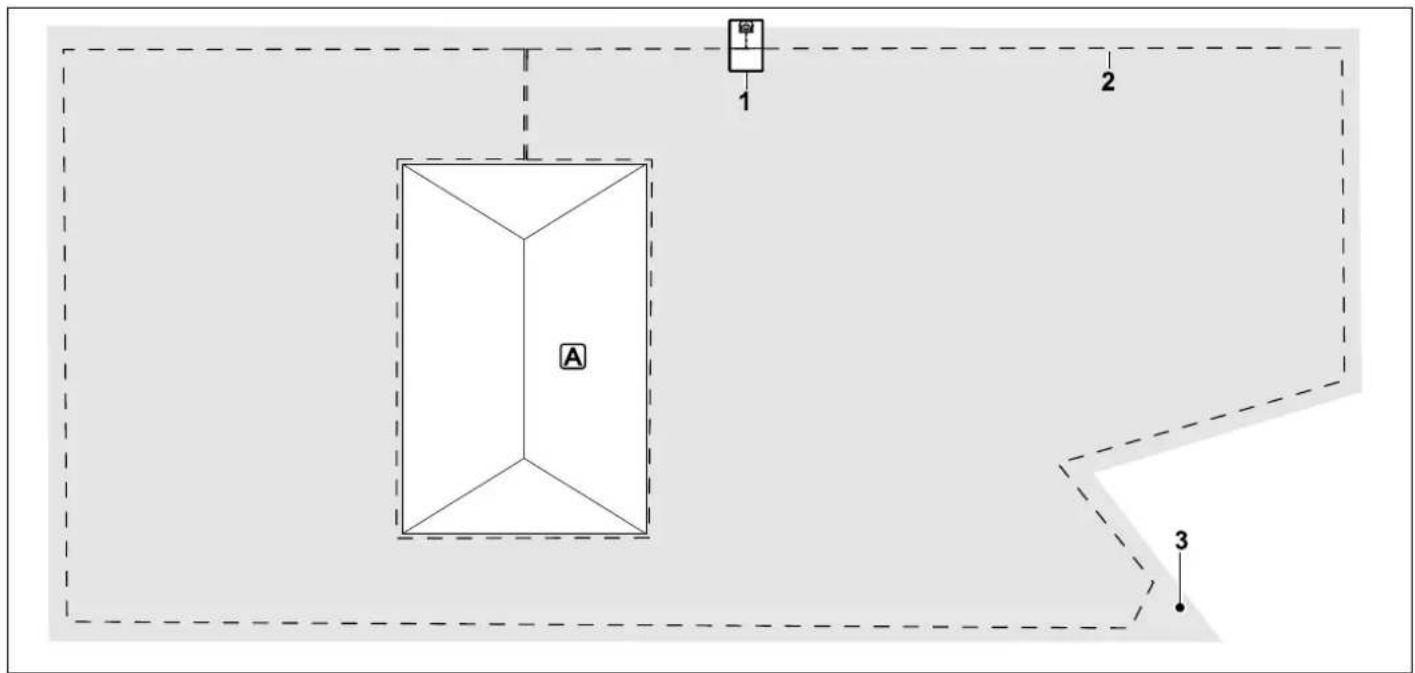
Mowing area around a free-standing building.
Docking station:
Location (1) at the edge of the mowing area.
The house A is blocked off with a no-go area. The docking station cannot therefore be set up in the immediate vicinity of the house.
Route the power cable from the house to the docking station in a suitable cable duct.
No-go area:
Installation around the house, based on a linking section installed at right angles to the edge.
Wire clearances: ( 11.5)
Clearance to edge (2): 22 cm
Clearance to the obstacle that can be travelled on: 0 c m
Programming:
No further adaptation is necessary following definition of the size of the mowing area.
Particularities:
In the area of the acutely angled lawn corner (3), route the perimeter wire as illustrated - avoid angles of less than 90^ . ( 9.5)
Cut the area in the lawn corner regularly using a suitable grass trimmer.
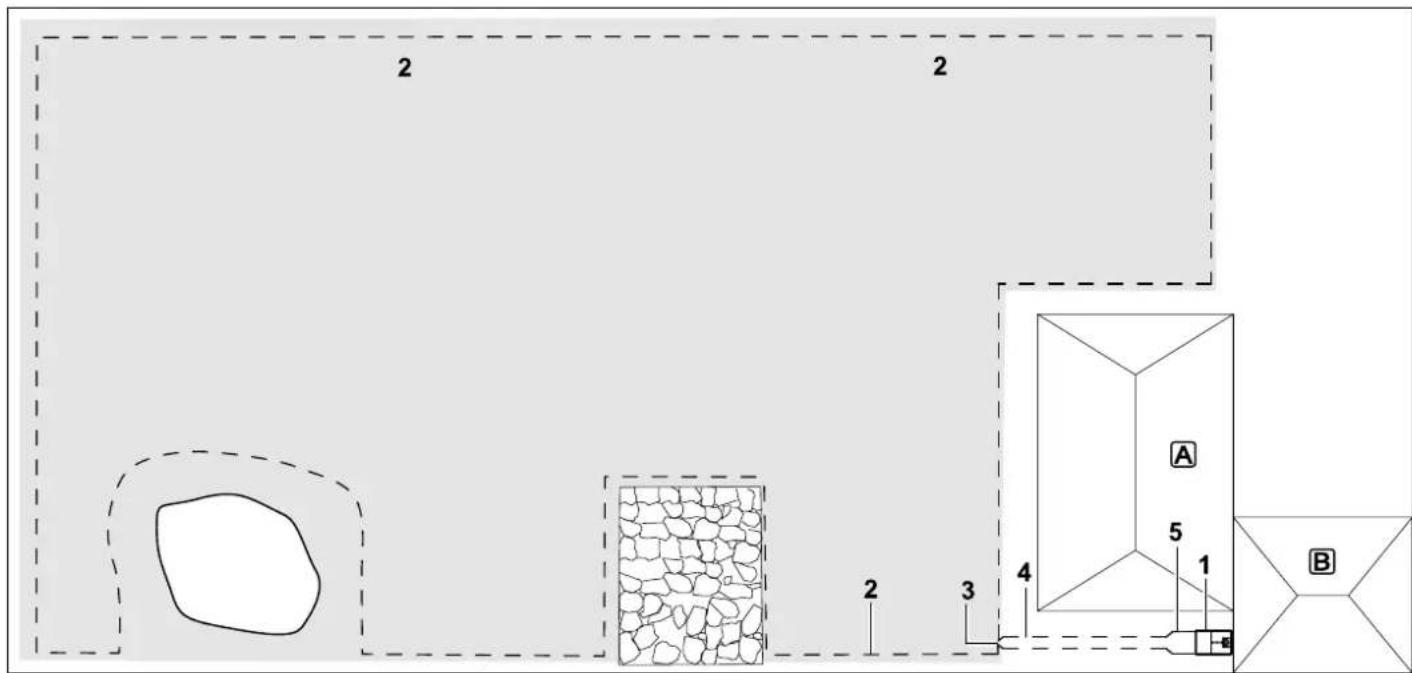
Rectangular mowing area
Docking station:
Location (1) immediately next to the garage B and behind the house A.
Wire clearances: ( 11.5)
Clearance to edge: 22 cm
Clearance to the obstacle that can be
travelled on: 0 c m
Clearance around the tree: 24 cm
Clearance to the pond: 100 cm
Programming:
No further adaptation is necessary following definition of the size of the mowing area.
Particularities:
The start (3) of a corridor (4) was installed. Then a corridor was installed. The width of
the corridor was increased to that of the ground plate (5) one metre in front of the docking station.
Chere cliente, cher client,
Premiere installation 170
Tension continue Ucc 27 V
Classe de protection II
Type de protection IP67
Transport des batteries VIKING :
External dockingstation:
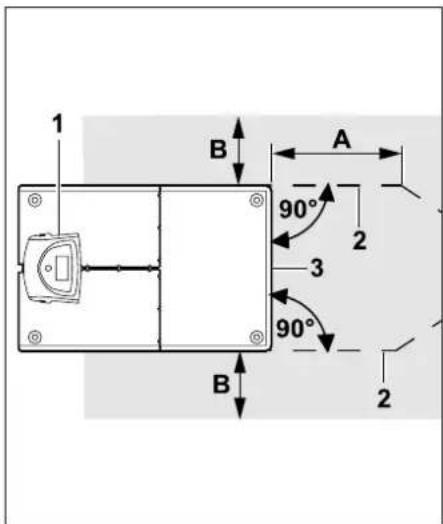
Rode led brandt continu
Rode led knippert langzaam
Rode led knippert snel
Rode led knippert onderbroken
Led brandt nicht
Rode led brandt continu:
Accutype Lithium-ion
Accuspanning U_DC 18,5 V
Transport van VIKING accu's:
storing in programmaverloop
LED sulla docking station 355
Docking station interna:
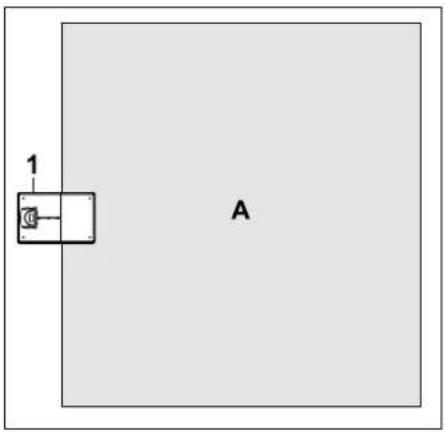
Docking station esterna
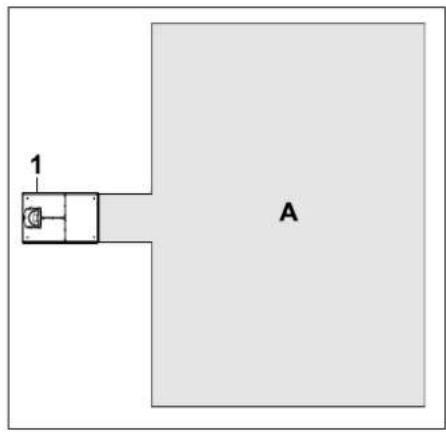
Docking station interna:
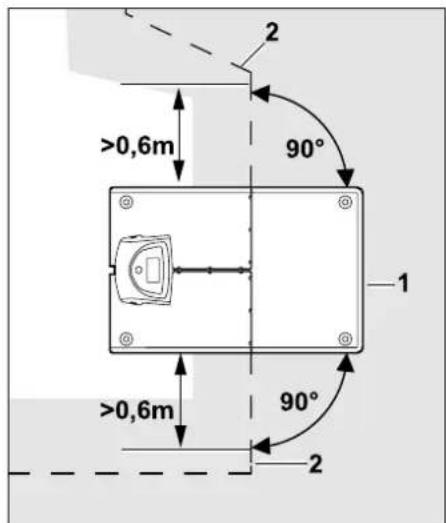
Docking station esterna:
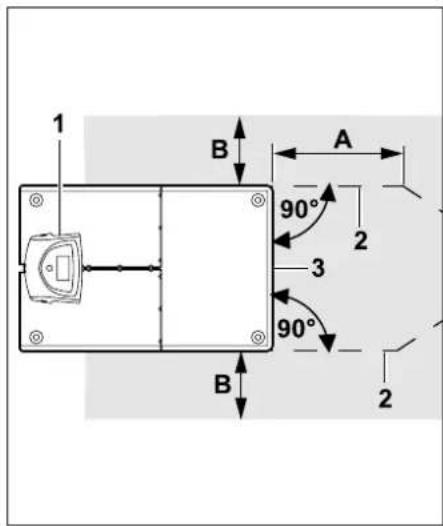
Docking station ADO 400:
Tensione U_DC
Docking station occupata
Possible causa: