Senior Z20 - Smartphone YEZZ - Free user manual and instructions
Find the device manual for free Senior Z20 YEZZ in PDF.



| Product Type | Basic smartphone for seniors |
| Brand | YEZZ |
| Model | Senior Z20 |
| Dimensions (approx.) | 130 x 60 x 15 mm |
| Weight (approx.) | 120 g with battery |
| Battery | Rechargeable lithium-ion battery (1000 mAh) |
| Display | Color display, non-touch |
| Network | GSM 900/1800 |
| SIM cards | Dual SIM (2 x mini-SIM) |
| Memory | microSD card support (up to 32 GB) |
| Main features | Calls, SMS, FM radio, audio player, flashlight, Bluetooth, phonebook |
| Connectivity | Bluetooth 2.1, 3.5 mm headphone jack, micro-USB |
| Care and cleaning | Use a soft, dry cloth. Do not use chemicals. |
| Safety | Do not disassemble, avoid moisture, respect exposure distances (max SAR 0.872 W/kg at body) |
| Spare parts and repairability | Removable battery, accessible SIM card. For repair, contact authorized after-sales service. |
| General information | Manual available in multiple languages. Compliant with European and FCC standards. |
Frequently Asked Questions - Senior Z20 YEZZ
User questions about Senior Z20 YEZZ
0 question about this device. Answer the ones you know or ask your own.
Ask a new question about this device
Download the instructions for your Smartphone in PDF format for free! Find your manual Senior Z20 - YEZZ and take your electronic device back in hand. On this page are published all the documents necessary for the use of your device. Senior Z20 by YEZZ.
USER MANUAL Senior Z20 YEZZ
Luis Sosa / President
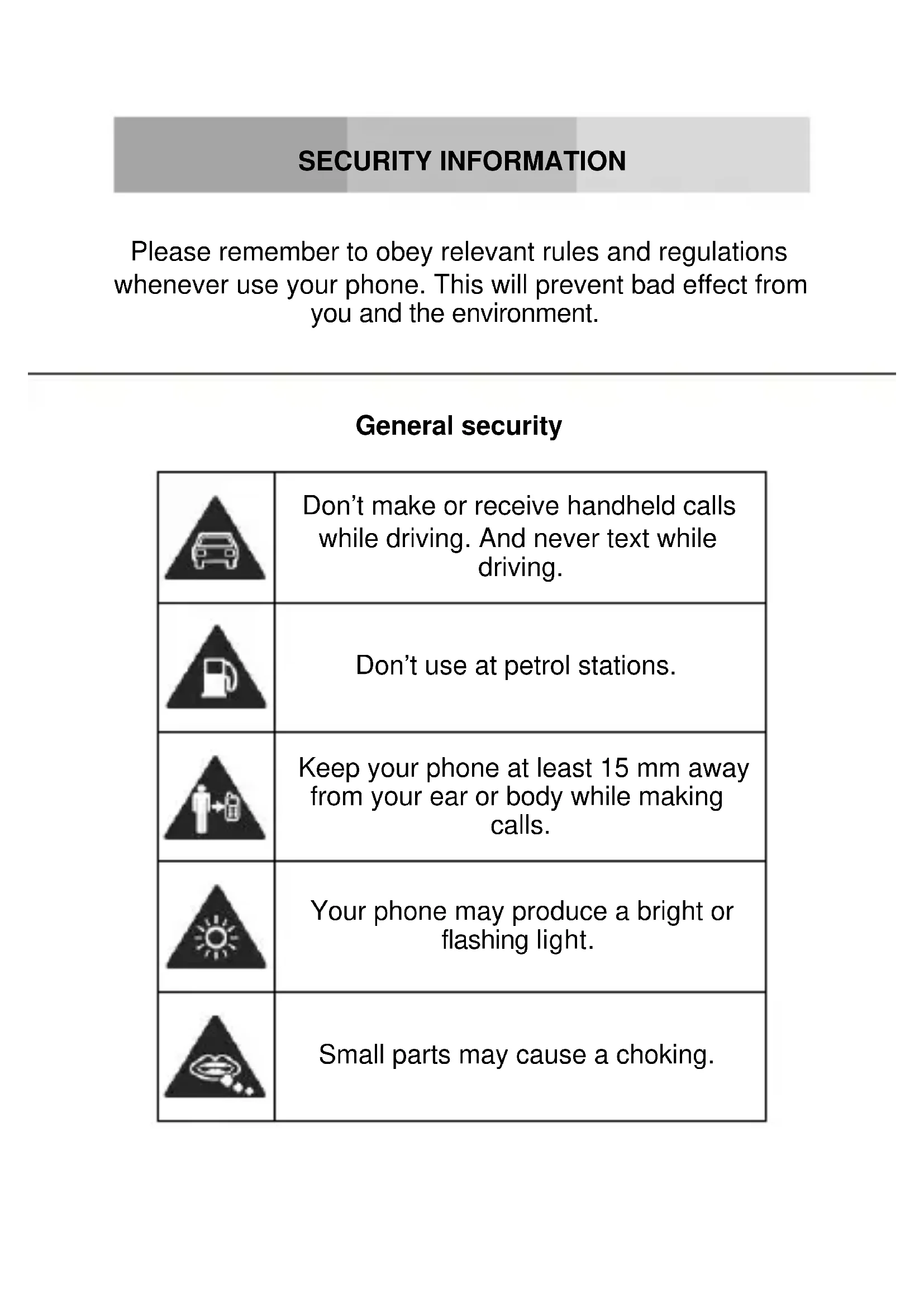
Please remember to obey relevant rules and regulations whenever use your phone. This will prevent bad effect from you and the environment.
General security
| Don't make or receive handheld calls while driving. And never text while driving. | |
| Don't use at petrol stations. | |
| Keep your phone at least 15 mm away from your ear or body while making calls. | |
| Your phone may produce a bright or flashing light. | |
| Small parts may cause a choking. | |
| Don't dispose of your phone in fire. | |
| Your phone can produce a loud sound. | |
| Avoid contact with anything magnetic. | |
| Keep away from pacemakers and other electronic medical devices. | |
| Avoid extreme temperatures. | |
| Switch off when asked to in hospitals and medical facilities. | |
| Avoid contact with liquids. Keep your phone dry. | |
| Switch off when told to in aircrafts and airports. | |
| Don't take your phone apart. | |
| Switch off when near explosive materials or liquids. | |
| Only use approved accessories. | |
| Don't rely on your phone for emergency communications. | |
| Warning electrical hazard! To avoid serious injury do not touch charger pins. Unplug the charger when not in use. To unplug a charger or an accessory, hold and pull the plug, not the cord. The power adaptor is the switch off device of the equipment. The wall power socket should be located near the equipment and easily accessible. |
Look at the adapter regularly, specifically at the plug and the layer to detect any damages. If the adapter is damaged, you can't use it until it's fixed.
Plug in the adapter to a power outlet which is easily accessible. Always unplug the adapter after using it.
Use only the adapter provided with the device.
Do not expose your device to direct sunlight, like on your car's dashboard, for example.
In case of overheating do not use the device.
Be careful when using the device while walking.
Do not subject the device to severe impact or drop it from high position, it could cause damages or malfunctions.
Do not disassemble, modify or fix the device by yourself.
To clean the device use a clean and soft rag. Do not use any chemical product or detergent.
INTRODUCING YOUR MOBILE PHONE
Learn about your mobile phone's layout, keys, display and icons.
Unpacking
Check the product box for the following items:
- Mobile phone
- Battery
- Travel adapter (charger)
USB cable - Headset
- User manual
- Quick start guide
The supplied accessories perform best for your phone.
Phone layout
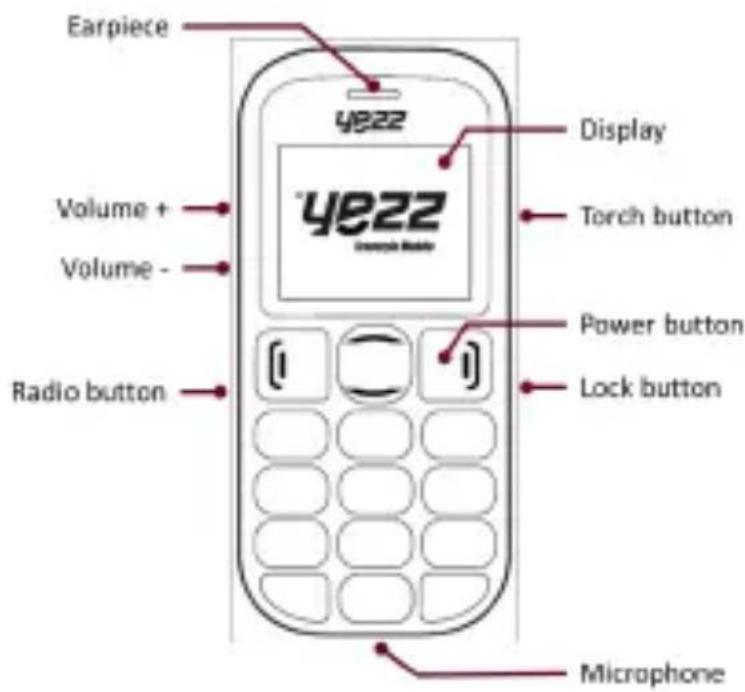
From the front view of your phone you will observe the following elements:
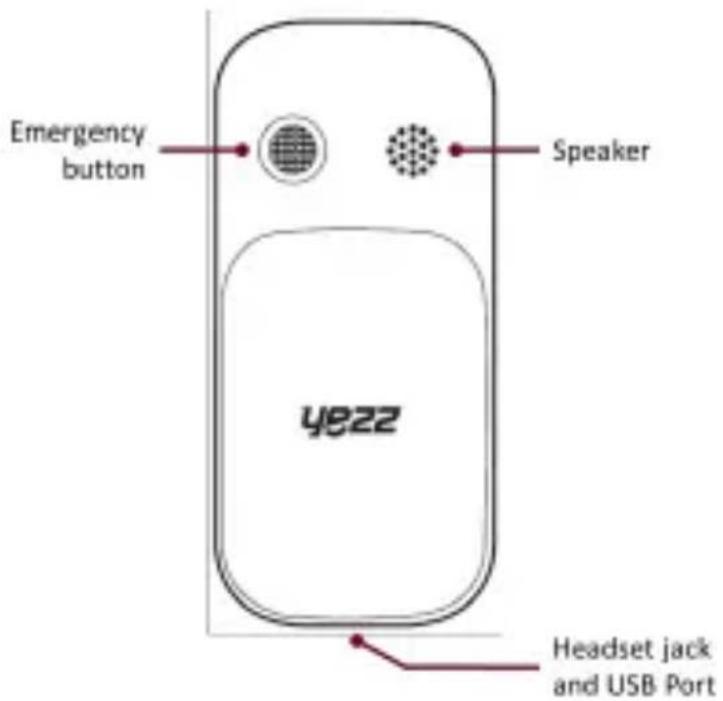
From the back view of your phone you will observe the following elements:
Keys
The following table offers you a quick description about the phone's keys:
| Key Function | |
| Navigation | In standby mode, you can access the functions menu, in menu mode, scroll through menu options. |
| Call | Open the list of recent calls or make a call to the displayed number. You can answer an incoming call. |
| Hang up | Ends a call or reject an incoming call.Hold down for 3 seconds to turn on / off the phone. |
| 1......0 | Enter numbers, text and / or special characters. |
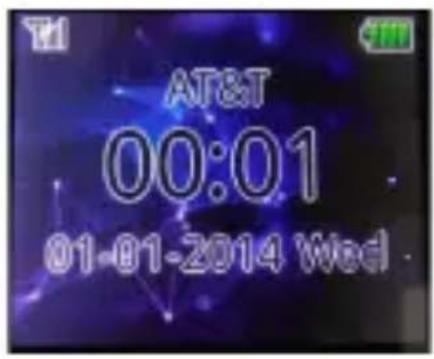
Screen
The screen of your mobile phone is designed as follows:
Icons
Learn about the icons that are displayed on the top of the screen, indicating the status of the phone:
| Icon | Function description |
| Represent current network signal. The more bars, stronger the signal. | |
| Flight mode. | |
| Battery status. More bars indicate more battery. | |
| Unread SMS | |
| Alarm set | |
| Bluetooth function activated | |
| Profile set to Silent Mode | |
| Profile set to Meeting Mode | |
| Profile set to Indoor Mode | |
| Profile set to Outdoor Mode |
PREPARED YOUR MOBILE PHONE
Get started setting up your mobile phone for its first use.
Install the SIM card and battery
When you subscribe to a cellular service, you will receive a Subscriber Identity Module (SIM) card, with subscription details, such as your personal identification number (PIN) and optional services.
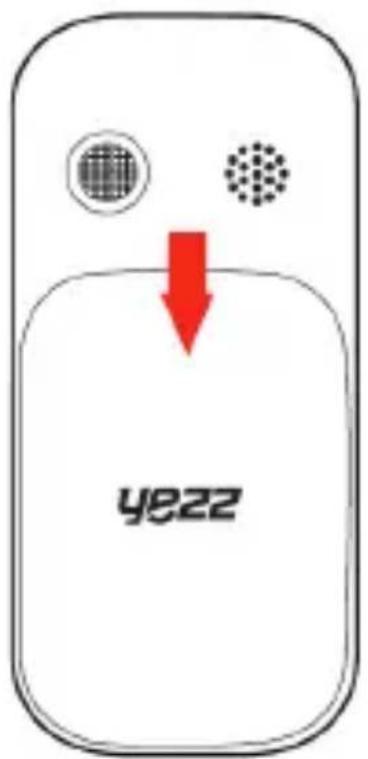
To install the SIM card and battery,
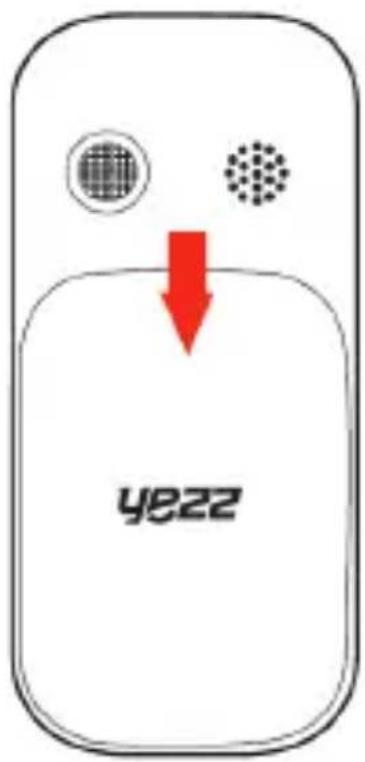
- Remove the battery cover.
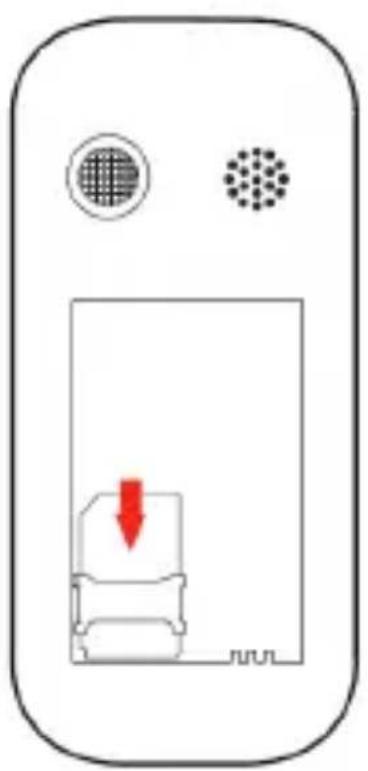
- Insert the SIM card.
-
Place the SIM card in the phone with the gold-colored contacts facing down.
-
Without inserting a SIM card, you can use your phone's non-network services and some menus.
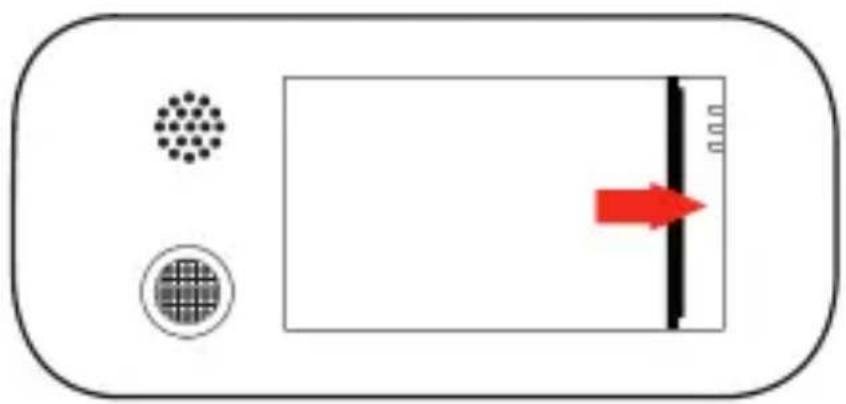
- Insert the battery.
- Replace the battery cover
Insert a memory card (optional)
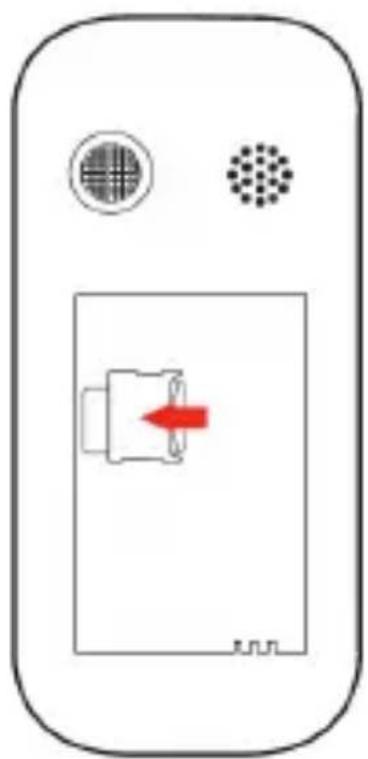
To store additional multimedia files, you must insert a memory card.
-
Formatting the memory card on a PC may cause incompatibility with your phone. Format the memory card only on the phone.
-
Remove the battery cover.
- Insert a memory holder with the label side facing up.
USING BASIC FUNCTIONS
Learn how to perform basic operations of your mobile phone.
Turn your phone on and off
To turn your phone on,
- Long press the power button [ ]
- Type in your PIN number and press OK (if it is needed).
To shut down your phone, go to step 1 above.
Access menus and applications
To get access to the Menu and Applications,
To access your phone's menus,
- In Idle mode, press the up key to access Menu mode.
- Use the Navigation key to scroll to a menu or option.
- Press the Call button to confirm the highlighted option.
- Press Hang up button to move up back one level.
Use basic call functions
Learn to make or answer calls in this section
Make a call:
- In Idle mode, enter an area code and a phone number.
- Press [ ] to dial the number.
- To end the call, press [ ]
Answer a call:
- When a call comes in, press [ ]
- To end the call, press [ ]
Send and view messages
In this section, learn to send and view text (SMS).
To send a text message:
- In Menu mode, select Messages Write message New SMS.
- Enter your message text then press <Options> Send to send the message.
- Enter a destination number.
- Press
→ Send to confirm and send the message.
Z
Add contacts
Learn the basics of using the phonebook feature.
Add a new contact:
- In Menu mode, select Contacts
- Press
→ Select New. - To enter the Contact name select
and press . Enter the name, when you finish press . - To enter the Phone Number select
and press . Enter the phone number, when you finish press . - To save the contact select < Save > then a memory location.
Find a contact
- In Menu mode, select Contacts.
- Enter the first few letters of the name you want to find.
- Select the contact's name from the search list.
Once you have found a contact, you can call the contact by pressing [ ]
Listen to music
Learn how to listen to music via the music player or FM radio.
Listen to the FM radio:
- In Menu mode, select FM radio.
- Press the Confirm key to start the radio.
- Control the FM radio using the navigation keys:
Also, to turn on the radio slide up the Radio button on the left side of the phone. To turn off the radio, slide down the Radio button on the left side of the phone.
Listen to music files:
After transferring music files to the "My Music" folder of your phone or memory card,
- In Menu mode, select Multimedia Audio.
- Select a music category a music file.
- Control playback using the navigation keys:
Using the flashlight
To turn on the flashlight, slide up the torch key on the right side of the phone. To turn off the flashlight, slide down the torch key on the right side of the phone.
USING THE BLUETOOTH
Learn about your phone's ability to connect to other wireless devices for exchanging data.
Turn on the Bluetooth wireless feature
- In Menu mode, select Tool Bluetooth.
- Select the option Bluetooth then press the Call button
to turn it On.
Find and pair with other Bluetooth enabled devices
- In Menu mode, select Tools Bluetooth Paired device Add new device.
- Scroll to a device and press < Pair>.
- Enter or check the PIN number for the Bluetooth wireless feature or the other device's Bluetooth PIN, if it has one, and press OK.
When the owner of the other device enters the same code or accepts the connection, pairing is complete.
Send data using the Bluetooth wireless feature
-
Select the file or item from one of your phone's applications that you want to send.
-
Press < Options > Send -> Bluetooth -> Select the device name then accept the file on the receiver.
Receive data using the Bluetooth wireless feature
- Enter or accept the PIN for the Bluetooth wireless feature and press < OK> (if necessary).
- Press < Yes> to confirm that you are willing to receive data from the device (if necessary).
Change the Bluetooth device name
- In Menu mode, select Tools Bluetooth Device name.
- Write the name you desire then press OK OK.
Z
EU WEEE
Information to consumers in application of EU WEEE.
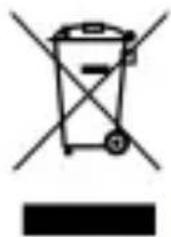
This product is subject to European Union regulations that promote the re-use and recycling of used electrical and electronic equipment. This product required the extraction and use of natural resources and may contain hazardous substances. The symbol above, on the product or its packaging, indicates that this product must not be disposed of with your other household waste. Instead, it is your responsibility to dispose of your waste equipment by handling it over to a designated collection point for the recycling of waste electrical and electronic equipment.
The separate collection and recycling of your waste equipment at the time of disposal will help to conserve natural resources and ensure that it is recycled in a manner that protects human health and the environment.
For more information about where you can drop of your waste equipment for recycling, please contact your local city office, your household waste disposal service, or the store from which you purchased the product.
Recommendations:
- Do not disassemble, open or tear up the device or the batteries.
- Do not expose the product or the battery to heat or fire. Avoid storage the device directly to the sunlight.
- Do not short-circuit a battery. Do not stock batteries in a drawer where it could short-circuit between each other or get in contact by any other metallic objects.
- Do not cause mechanical shocks to batteries.
- In case of the leak, do not let the liquid get in contact with your eyes or skin. If that happens wash with clear water the affected zone and seek medical advice.
- Follow the marks plus (+) and minus (-) on the battery and the device and ensure that the use is correct.
- Do not use any accessories or batteries that are not made to be used with the device.
Monitor the use of a batteries by children. - Consult a doctor immediately in case of ingestion of an element or a battery.
- Always buy the battery recommended by the manufacturer of the device.
-
Always maintain the product and the battery clean and dry.
-
Wipe the terminals of the product or the battery, if it became dirty, with a clean and dry rag.
- It is necessary to charge the battery before its use. Always use the charger and read the manufacturer instructions or the manual of the device for the instructions regarding charging.
- Do not leave a battery charged when it's not going to be used.
- After long periods of storage, it may be necessary to charge and discharge the battery several times in order to achieve maximum performance.
- Always keep the original documentation of the device, you might need it later for future reference.
- If it's possible, take out the battery of the device when it's not used.
- Do not store your device in extremely hot or cold places like inside of a car during the summer. It might damage the device and cause explosion of the battery. It's recommended to use the device in a range of temperatures between 5^ and 35^ .
RADIO WAVES
Proof of compliance whit international standards (ICNIRP) or with European Directive 1999/5/EC (R&TTE) is required of all mobile phone models before they can be put on the market. The protection of the health and safety for the user any other person is an essential requirement of these standards or this directive.
THIS DEVICE MEETS INTERNATIONAL GUIDELINES FOR EXPOSURE TO RADIO WAVES
Your mobile device is a radio transmitter and receiver. It is designed not to exceed the limits for exposure to radio waves (radio frequency electromagnetic fields) recommended by international guidelines. The guidelines were developed by an independent scientific organization (ICNIRP) and include a substantial safety margin designed to assure the safety of all persons, regardless of age and health.
The radio wave exposure guidelines use a unit of measurement known as the Specific Absorption Rate, or SAR. The SAR limit for mobile devices is 2W / kg .
Tests for SAR are conducted using standard operating positions with the device transmitting at its highest certified power level in all tested frequency bands.
Body-worn SAR testing has been carried out at a separation
distance of 1.0~cm . to meet RF exposure guidelines during body-worn operation, the device should be positioned at least this distance away from the body. If you are not using an approved accessory ensure that whatever product is used is free of any metal and that it positions the phone the indicated distance away from the body.
For more information you can go to www.sayyezz.com
Additional information about electromagnetic fields and public health are available on the following site. http://www.who.int/peh-emf.
Your telephone is equipped whit a built-in antenna. For optimal operation, you should avoid touching it or degrading it.
As mobile devices offer a range of functions, they can be used in positions other than your ear. In such circumstances the device will be compliant whit the guidelines when used with headset or usb data cable. If you are using another accessory ensure that whatever product is used is free of any metal and that it positions the phone at least 1.0cm away from the body.
LICENCES
The Bluetooth word mark and logos are owned by Bluetooth SIG, Inc. and any use of such marks by DDMBrands LLC and its affiliates is under license. Other trademarks and tradenames are those of their respective owners.
RADIO WAVES
Proof of compliance whit international standards (ICNIRP) or with European Directive 1999/5/EC (R&TTE) is required of all mobile phone models before they can be put on the market. The protection of the health and safety for the user any other person is an essential requirement of these standards or this directive.
THIS DEVICE MEETS INTERNATIONAL GUIDELINES FOR EXPOSURE TO RADIO WAVES
Your mobile device is a radio transmitter and receiver. It is designed not to exceed the limits for exposure to radio waves (radio frequency electromagnetic fields) recommended by international guidelines. The guidelines were developed by an independent scientific organization (ICNIRP) and include a substantial safety margin designed to assure the safety of all persons, regardless of age and health.
EU Regulatory Conformance
Hereby, this device is in compliance with the essential requirements and other relevant provisions of Directive 1999/5/EC.
For the declaration of conformity, visit the Web site www.sayyezz.com/certifications.
Notice: Observe the national local regulations in the location where the device is to be used. This device may be restricted for use in some or all member states of the European Union (EU)
Notes:
-
Due to the used enclosure material, the mobile phone shall only be connected to a USB Interface of version 2.0 or higher. The connection to so called power USB is prohibited.
-
The adapter shall be installed near the equipment and shall be easily accessible.
-
Do not use the mobile phone in the environment at too high or too low temperature, never expose the mobile phone under strong sunshine or too wet environment. The suitable temperature for the phone and accessories is -10°C-55°C.
-
When charging, please place the phone in an environment that has a normal room temperature and good ventilation. It is recommended to charge the phone in an environment with a temperature that ranges from 5^ 25^ . Please ensure to use only the charger offered by the manufacturer. Using unauthorized charger may cause danger and violate the authorization of the phone and the guarantee article.
-
CAUTION: RISK OF EXPLOSION IF BATTERY IS REPLACED WITH AN INCORRECT TYPE. DISPOSE USED BATTERIES ACCORDING TO THE INSTRUCTIONS
-
Excessive sound pressure from earphones and headphones can cause hearing loss.
For more information you can go to www.sayyezz.com
Additional information about electromagnetic fields and public health are available on the following site. http://www.who.int/peh-emf.
Your telephone is equipped whit a built-in antenna. For optimal operation, you should avoid touching it or degrading it.
As mobile devices offer a range of functions, they can be used in positions other than your ear. In such circumstances the device will be compliant whit the guidelines when used with headset or USB data cable. If you are using another accessory ensure that whatever product is used is free of any metal and that it positions the phone at least 1.5 cm away from the body.
LICENCES
Bluetooth SIG, Inc. owns the Bluetooth word mark and logos and any use of such marks by DDM Brands LLC and its affiliates is under license. Other trademarks and trade names are those of their respective owners.
We, DDM BRANDS LLC
(1616 NW, 84TH Ave. Miami, Florida U.S.A. 33126)
Hereby declares that:
YEZZ compiles with the standards and provisions of the directives. The certificate of conformity procedure defined in article IV of directive 1999/5/EC has been under the control of the following organization:
PHOENIX TESTLAB GmbH
Königswinkel 10 D-32825 Blomberg, Germany
www.phoenix-testlab.de
Phone: +49(0)5235-9500-24 Fax: +49(0)5235-9500-28
The full text of the certificate of conformity of the device is available upon request by mail at the following address: DDM BRANDS LLC - 1616 NW 84TH Ave. Miami, Florida U.S.A. 33126.
2014/11/24
(Date)
Luis Sosa / CEO
(Name and signature of authorized person)
| Maximum SAR for this model and conditions under which it was recorded: | |
| GSM 900 | 0.785 W/kg 10g Head SAR – 0.872 W/kg 10g Body SAR |
| GSM 1800 | 0.657 W/kg 10g Head SAR – 0.736 W/kg 10g Body SAR |
During use, the actual SAR values for this device are usually well below the values stated above. This is because, for purposes of system efficiency and to minimize interference on the network, the operating power of your mobile device is automatically decreased when full power is not needed for the call. The lower the power output of the device, the lower its SAR value.
FCC
Please take time to read this important section.
FCC Caution
Any Changes or modifications not expressly approved by the party responsible for compliance could void the user's authority to operate the equipment.
Before a new model phone is available for sale to the public, it must be tested and certified to the FCC that it does not exceed the exposure limit established by the FCC. Tests for each phone are performed in positions and locations (e.g. at the ear and worn on the body) as required by the FCC.
This device complies with part 15 of the FCC Rules. Operation is subject to the following two conditions: (1) This device may not cause harmful interference, and (2) this device must accept any interference received, including interference that may cause undesired operation.
Note: This equipment has been tested and found to comply with the limits for a Class B digital device, pursuant to part 15 of the FCC Rules. These limits are designed to provide reasonable protection against harmful interference in a residential installation.
This equipment generates, uses and can radiate radio frequency energy and, if not installed and used in accordance
with the instructions, may cause harmful interference to radio communications. However, there is no guarantee that interference will not occur in a particular installation. If this equipment does cause harmful interference to radio or television reception, which can be determined by turning the equipment off and on, the user is encouraged to try to correct the interference by one or more of the following measures:
- Reorient or relocate the receiving antenna.
- Increase the separation between the equipment and receiver.
- Connect the equipment into an outlet on a circuit different from that to which the receiver is connected.
- Consult the dealer or an experienced radio/TV technician for help.
| Maximum SAR for this model and conditions under which it was recorded: | |
| GSM 900 | 0.785 W/kg 10g Head SAR – 0.872 W/kg 10g Body SAR |
| GSM 1800 | 0.657 W/kg 10g Head SAR – 0.736 W/kg 10g Body SAR |
DocbI Do MeHToA npNoJxHnA
3a da noIyUHTe doCTbI Do MeHTo I npINOxEHaTa,
3a doctbno meHota Ha Baunr Tepeoh,
- B peşím Ha Heɪn3noJ3BaHe HaTinchTe rOpHЯ 6yToH, 3a Da BJIe3eTe B peşím MeHIO.
- Изполизваite сутона за Habигагац,在а дд превъртпддадено Meню Или Onця.
- HatncheTe 6yToHa O6aXdaHe, 3a da nOTBbPdnte
ПОДЧЕРТанота ONця.
- Hatnchete 6yToHa 3aTbaprHe, 3a da npemHete Ha CJIeDBAUTo HNBO.
I3noJI3BaHe Ha OCHOBHInTe ФyHKcIN 3a 06axJaHe
BTo3n pa3dien ige HayuHTe KaK da npaBnte nn da OTROBaprTe Ha obaxdaHna
Kak da HappaBITE o6aJdahe:
1.В ржим Ha Hei3noJ3BaHe BbBeJeTe KoI Ha o6JaCTTa I TeIeΦoHnIy Homep.
2. HatncheTe [ ] 3a da n36epete Homepa.
3. 3a Да пpeкразиTe obaxданeto,HaTnCHeTe [ ]].
Kak da OTROBOpTe Ha o6aJdaHe:
- Првховаято обждане натусане [ ]
- 3a Да пpeкразиTe обжданeTo, habnchete [ ]
I3npaune H npereHa cbo6eHna
B to3n pa3delen ue hayuHTe kaK da n3npaUaTe npa3IeJdaTe TeKCT (SMS).
3a da n3npaTnte TeKCTOBO cbo6eHne:
-
В ржим Мени зберете Сьобшени → Наниши сьобшени → Нов SMS.
-
BbBeTe BaSeTo cbo6eHne n cJeT OBa HATnCHeTe
N3npaTn, 3a da n3npaTnTe cbo6eHneTo. - BbBeTe Homepa Ha DeCTnHaunraTa.
- Hatachete
→ N3npaTn, 3a da notBbPdnte n u3npaTnte cbo6ueHneTo.
Добаяне на Конт
HayeTe OCHOBHTe Hea 3a n3noI3BaHe Ha yHKnraTa TelefoH en yka3aTeI.
Добаяне на HOВ KOHTaKT:
1.В ржим Мению n36epeTe KoHTaKTo
2. Hatachete
3. 3a Да ВьБeДeTe ИМe Ha KoHTaKT n36epeTe <Имe> И натунс悔Ту.
ВьБeДeTe ИМeTo И KOraTO cTe rOTOBn habtucHete OK>.
4. 3a Да вьveдete Tepeohen Homep n36epeTe
5. 3a Да зарази te koHTaKta n36epeTe < 3aAnu > n cIeTTOBa MЯCTO B пamETTa.
OTKpNbAHe Ha KOHTaKT
C NaCTOJIeTO, TOBa yCTpOiCTBO e B CbOTBcTCTBnE CbCSbIeCTBeHInTe N3NCKBaHnI n DpyrInTe IprNIOxIMn pa3IpopeD6n Ha DnpeKtInBa 1999/5/EO.
3a DeKnapaunTa 3a CbOTBeTCTBne, NocTeTe INHTepHeT CTpaHncaTa www.sayyezz.com/certifications.
3a6eJexka: Cna3BaIte HaunohnHTe n MeCTHInTe pa3nope6n Ha MxCTOTO, KbDeTo ce npedBnxJa yCTPOINCTBO MoKe da 6bJe n3PON3BaHO. TOBa yCTPOINCTBO moKe JBpKABN-ynEnKn Ha EBpOeNcKn cBIO3 (EC).
3a6eJekn:
-Поради n3ползваня MaTeрnaI 3a 3arpaJdeHne, MO6nHnIr TtepeOH Tp6Ba Da ce CBbp3Ba cMo c USB nHTeppeiC c Bercn 2.0 nII nO-BnCoka. CBbp3BaHeTo KbM T. Nap. 3axpaHbAso USB e 3a6paHeHo.
- AdaanTpBbT Tp8Ba Da 6bDe nHcTaInpaH B 6n3OCT Do o6opyDbaHeTo I da 6bDe Jeecho DoCTbPeh.
- He Изполизваite моблины телегов в среда с пекално Висoka Или пекално Нисka Тампета Кра, Нскога He Излагаite моблины телегон Ha силна сльнчева CBETПИHA Или пекално Влжна среда. Пожхорда Тампета за телегон и akcecoapinte e -10°C-55°C.
- ПО Вreme Ha 3apeжданeto, моля, постаытete Teleфona B cpeda, каято e c HopmaJHa cTaNHa Tempepatypa и добра BeHTnlaцnia. Прелорьчтелно eда 3apeждатe Teleфona B cpeda c Tempepatypa, каято варupa ot 5^ 25^. MoЯ, yBepete ce, Que n3noJ3BaTe camo 3apYdHOTO yCTPOIcTBO, PpeJIOXeHO OT npOn3BOdnteJIa. N3noJ3BaHeto Ha Hepa3peSeHo 3apYdHObUyCTpoIcTBO MOKe DA DoBeDe Do OnaCHOt И hapuShaBaHe pa3peSeHHeTo Ha TeleФOHa I qIeHa 3a rapaHczna.
-BHIMAHNE: PICK OT EKCPIIO3NIA, AKO BATEPNA TABbDE 3AMEHEA C HENODXODIa. N3XBbPJIyTE N3POJ3BAHNTE BATEPNB CbOTBETCTBNE CHHCTPYKUNITE
- Праз KMeHOTO 3ByKOBO HaJIraHe OT cIyuaJIknte MoKe dAdoBeTe Do 3aIy6a Na cIyxa.
3a NOBue He HOpMaun MoKeTe Da NocETnTe www.sayyezz.com
Доьлнтелна Иформаця 3a[eilektpomarHHTHnte noIeta n obsectbeHOTO 3dpaBe e haJIuHa Ha cIeHnЯ caIrT http://www.who.int/peh-emf.
Baшсят телегон pa3полага с вградени щichteна. 3a onтимална pa6ота Трябва за ИЗБВATE за я дOKOCBAte пи повраздатe.
TbI KaTO Mo6nHInTe yCTPOiC7Ba npedlaRaT shIpOKa rama OT
fYHKcN, Te MoTa Da 6bDaT n3NoJ3BaHN B dpyrN Po3nU
pa3JIuHn OT Te3n Cpeu yXOTO Bu. Ppi TaKnBa
O6CToRrTeJIcTBa yCTPOiC7BOTo ige 6bDe cBMeCTnMo C
n3nCKBaHnraTa, KOraTO ce n3NoJ3Ba Cbc CnyuAaKn nll USB
Ka6eI 3a daHH. Ako n3NoJ3BaTe dpyr akcecoap, yBepTe ce
Ye KaKbBTO I npOdyKT Da n3NoJ3BaTe, ToI He CbDbpJka
MetaII N Ye nO3nCnJaTa Ha TelefoHa e Hau-MaJko 1,5 cm ot
TJlOTO.
Hne oT DDM BRANDS LLC
(1616 NW, 84TH Ave., Maamy, Φόρηδa, CAU 33126)
C hactoTo 3aBbAme, ye:
YEZZ CbOTBETCTBa Ha cTaHdApTInTe n pa3nopeD6nTe Ha dIpeKTHBnTe.
IpoeDypata Ha ceptnphiKaTa 3a cbOTBeTCTBne, nocoueHa B qI. 10.5 Ha
DnpeKtNa 1999/5/EO ce pkoBOn OT cneHaTa opraHn3aun:
PHOENIX TESTLAB GmbH
Königswinkel 10 D-32825 Blomberg, Germany
www.phoenix-testlab.de
Phone: +49(0)5235-9500-24 Fax: +49(0)5235-9500-28
ПьлнитTekт Ha ceptнфикata 3a CBOTBETCTBVE Ha yctpoiCTBOTO e Hалично\ при поckвае по поцату Ha сдения adpec: DDM BRANDS LLC, 1616 NW, 84^th Ave, Маям, Флорда, CAU 33126
2014/11/24
(DaTa)
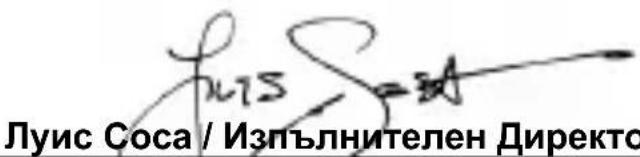
(Име и подпс на упьномошени)
| Мakсимална SAR стойост (спесифоча стойост на польшае) заTOЗ И мodyел и усань, пri КОТо e 3аписана. | |
| GSM 900 | 0.785 W/kg 10g SAR ot галвата - 0.872 W/kg 10g SAR OT HOSEну до ТялOTO |
| GSM 1800 | 0.657 W/kg 10g SAR ot галвата - 0.736 W/kg 10g SAR OT HOSEну до ТялOTO |
По пинци по Врeme на Използвае DeястВITEЛНITE SAR StOnHOCTN 3a TOBA yCTpoIcTBO ca DoCTа NOД CTOnHOCNTe, NOCOчEH NO-rope. TOba e TaKa, 3aIoTO 3a ZeINTE 3a eFPeKTHBHOCT Ha CNCTeMaTa I MInHMn3IpaHe Ha CMUSeHnRA TbPxy MpeXaTA, ONEpaTHBHaTа MOsHOC T Ha BaWeTo Mo6NJHO YCTPOIcTBO ABTOMaTNUHO Ce HAmJIЯBa, KOrato 3a ObaxJaHeTo He e HuxHa IIbJIHa MOuHOCr. KOJkoTO IO-HnCKa e INxODHaT a MOuHOCr Ha yCTpoIcTBOTO, TOJKOBA PO-HnCKa e SAR cToHocTTa.
Mol, otdeleTe BpeMe da npoyete To3n BaKeH pa3dJI.
IpeDynpexdEne FCC (FepaHa KOMncnno KOMyHkaunte Ha CAU)
Bcya npomra Hn moNΦkaZna, KOHTo He ca n3pnuHO oOobpeHr OT npOn3BOIDTeJIa, ige DoBeMaT do Obe3CnIBaHe Ha npabOTHa Notpe6nteJda pa6OTn C obOpyDbaHeTo.
In这对于 the people to be so happy, it is enough that they are not too tired to do so.
www.sayyezz.com/certifications.
(1616 NW, 84th Ave. Miami, Florida U.S.A 33126)
Conformità FCC (Federal Communications Commission)



- Luis Sosa / President
- General security
- INTRODUCING YOUR MOBILE PHONE
- Unpacking
- Phone layout
- Keys
- Screen
- Icons
- PREPARED YOUR MOBILE PHONE
- Install the SIM card and battery
- Insert a memory card (optional)
- USING BASIC FUNCTIONS
- Turn your phone on and off
- Access menus and applications
- Use basic call functions
- Make a call:
- Answer a call:
- Send and view messages
- To send a text message:
- Add contacts
- Add a new contact:
- Find a contact
- Listen to music
- Listen to the FM radio:
- Listen to music files:
- Using the flashlight
- USING THE BLUETOOTH
- Turn on the Bluetooth wireless feature
- Find and pair with other Bluetooth enabled devices
- Send data using the Bluetooth wireless feature
- Receive data using the Bluetooth wireless feature
- Change the Bluetooth device name
- EU WEEE
- Recommendations:
- RADIO WAVES
- THIS DEVICE MEETS INTERNATIONAL GUIDELINES FOR EXPOSURE TO RADIO WAVES
- LICENCES
- EU Regulatory Conformance
- Notes:
- PHOENIX TESTLAB GmbH
- FCC
- FCC Caution
- DocbI Do MeHToA npNoJxHnA
- I3noJI3BaHe Ha OCHOBHInTe ФyHKcIN 3a 06axJaHe
- Kak da HappaBITE o6aJdahe:
- Kak da OTROBOpTe Ha o6aJdaHe:
- I3npaune H npereHa cbo6eHna
- 3a da n3npaTnte TeKCTOBO cbo6eHne:
- Добаяне на Конт
- Добаяне на HOВ KOHTaKT:
- OTKpNbAHe Ha KOHTaKT
- IpeDynpexdEne FCC (FepaHa KOMncnno KOMyHkaunte Ha CAU)
- Conformità FCC (Federal Communications Commission)
Brand : YEZZ
Model : Senior Z20
Category : Smartphone