
Matrice 600 Pro - Drone DJI - Free user manual and instructions
Find the device manual for free Matrice 600 Pro DJI in PDF.
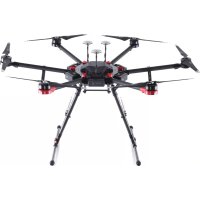



| Product type | Professional hexacopter drone |
| Brand | DJI |
| Model | Matrice 600 Pro |
| Dimensions (diagonal with propellers) | 1668 mm |
| Weight (with batteries and propellers) | Approximately 15 kg |
| Maximum payload | 6 kg |
| Power supply | Intelligent flight batteries TB47S/TB48S |
| Battery voltage | 22.8 V (full charge) |
| Flight time | Up to 16 min (with TB48S) |
| Maximum speed | 65 km/h (P mode) |
| Maximum distance (range) | Up to 5 km (with Lightbridge 2) |
| Transmission system | Lightbridge 2 |
| Main functions | Autonomous flight, return to home, GNSS position hold, obstacle avoidance (optional) |
| Maintenance and cleaning | Clean with a dry, clean cloth; check propellers and motors |
| Safety | Use only with approved batteries and chargers; observe temperature limits |
| Spare parts and repairability | Propellers, batteries, motors, flight controllers available |
| General information | Instruction manual available in PDF |
Frequently Asked Questions - Matrice 600 Pro DJI
User questions about Matrice 600 Pro DJI
0 question about this device. Answer the ones you know or ask your own.
Ask a new question about this device
Download the instructions for your Drone in PDF format for free! Find your manual Matrice 600 Pro - DJI and take your electronic device back in hand. On this page are published all the documents necessary for the use of your device. Matrice 600 Pro by DJI.
USER MANUAL Matrice 600 Pro DJI
User Guide
V1.2 2016.12
CONTENTS
EN User Guide 2 CHS 使用说明 5 CHT 使用說明 8 JP 11 KR 14 DE Bedienungsanleitung 17 ES Guia del usuario 20 FR Guide de l'utilisateur 23 IT Guida dell'utente 26 NL Gebruiksaanwijzing 29 PT Manual do utilizar 32 RU Руководство пользователя 35
Compliance Information 38
Disclaimer
Thank you for purchasing the DJI™ Hex Charger (hereinafter referred to as "Product"). Read this disclaimer carefully before using this Product. By using this Product, you hereby agree to this disclaimer and signify that you have read it fully. Please use this Product in strict accordance with the manual and be sure to pay attention to the Warnings. SZ DJI TECHNOLOGY CO., LTD. and its affiliated companies assume no liability for damage(s) or injuries incurred directly or indirectly from improper use of this Product. Misuse includes, but is not limited to, using unapproved chargers, charging unapproved batteries, short-circuiting, overheating, introducing foreign materials into the Product, or touching the terminals with skin or metal. Refer to the Safety Guidelines and Disclaimer, Intelligent Flight Battery Safety Guidelines, and User Manual for applicable information not herein contained.
DJI is a trademark of SZ DJI TECHNOLOGY CO., LTD. (abbreviated as "DJI") and its affiliated companies. Names of products, brands, etc., appearing in this manual are trademarks or registered trademarks of their respective owner companies. This Product and manual are copyrighted by DJI with all rights reserved. No part of this Product or manual shall be reproduced in any form without the prior written consent or authorization of DJI.
This disclaimer is produced in various languages. In the event of divergence among different versions, the Simplified Chinese version shall prevail when the Product in question is purchased in China, and English version shall prevail when the Product in question is purchased in any other region.
Warnings
- The Hex Charger is only compatible with dedicated Intelligent Flight Batteries and Remote Controllers. DO NOT attempt to use the Hex Charger with other devices.
- Place the Hex Charger on a flat and stable surface when in use. Ensure the device is properly insulated to prevent fire hazards.
- DO NOT block the heat vent when using the Hex Charger to ensure that heat can be properly dissipated.
- DO NOT attempt to touch or expose the metal terminals on the Hex Charger.
- Clean the metal terminals with a clean, dry cloth if there is any noticeable buildup.
Introduction
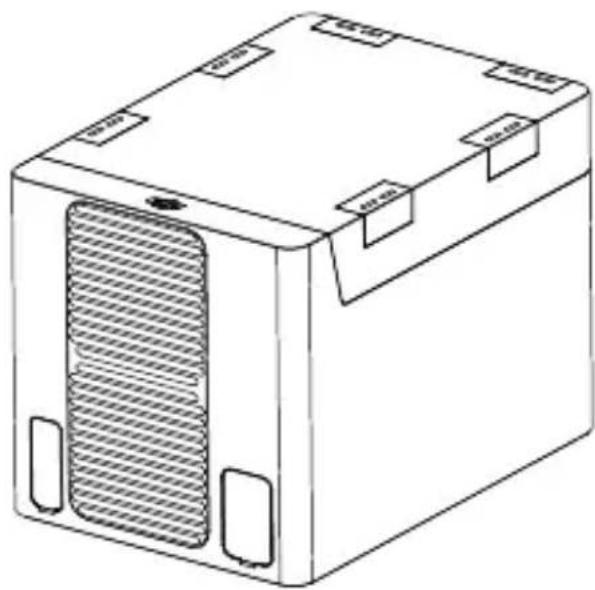
The DJI Hex Charger is designed for use with dedicated Intelligent Flight Batteries and Remote Controllers. It can charge up to six Intelligent Flight Batteries and two Remote Controllers simultaneously.
Overview
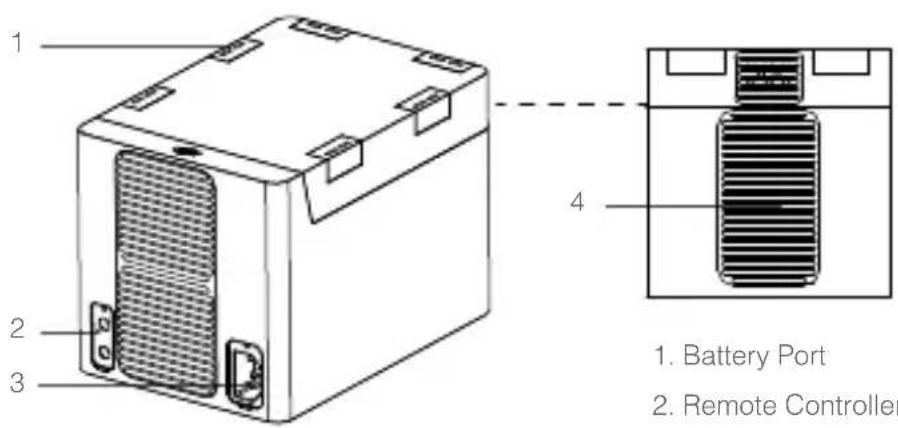
- Battery Port
- Remote Controller Port
- Power Port
- Heat Vent

Using the Hex Charger
- Connect the Hex Charger to a power outlet (100-240V, 50/60Hz) with the power cable.
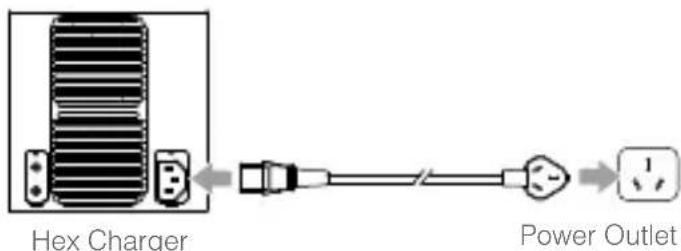
- Insert the Intelligent Flight Battery into the battery port, or connect the Remote Controller to the remote controller port to begin charging. When the LED lights on the Intelligent Flight Battery or the Remote Controller turn off, charging is complete and the device can be disconnected from the Hex Charger.
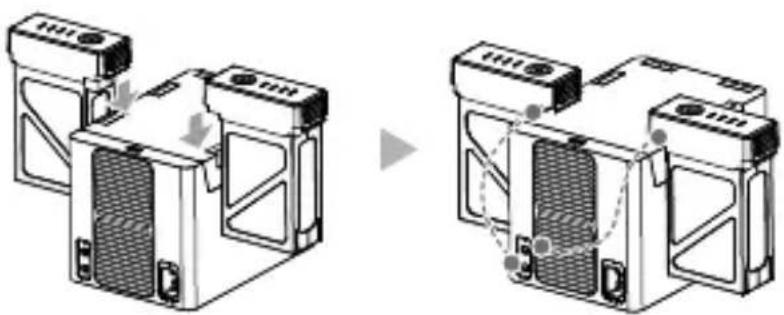
The TB47 series Intelligent Flight Battery and the TB48 series Intelligent Flight Battery take approximately 1 hour 30 minutes and 1 hour 50 minutes to fully charge respectively.

- The two remote controller ports are connected in parallel with the battery ports as shown in the figure above. As a result, charging a remote controller together with an Intelligent Flight Battery on the corresponding port will require longer charging time.
Specifications
| Model MC6S600 | |
| Compatible Battery | Inspire 1 Series Intelligent Flight Battery (TB47/TB48) |
| Matrice 100 Intelligent Flight Battery (TB47D/TB48D) | |
| Matrice 600 Intelligent Flight Battery (TB47S/TB48S) | |
| Compatible Remote Controller | Inspire 1 Series Remote Controller |
| Matrice 100 Remote Controller | |
| Matrice 600 Remote Controller | |
| Phantom 4 Remote Controller | |
| Phantom 3 Professional Remote Controller | |
| Operating Temperature 32° to 104° F (0° to 40° C) | |
| DC Output | 26.1 V |
| 0 to 3.83 A (Battery Port); 0 to 2 A (Remote Controller Port) | |
| Weight 2140 g | |
This content is subject to change.
Download the latest version from http://www.dji.com/product/matrice600
Copyright © 2016 DJI All Rights Reserved.
Disclaimer
Copyright © 2016 DJI Innovations. All rights reserved.
Disclaimer
This is a text.
This device complies with Part 15 of the FCC Rules. Operation is subject to the following two conditions:
(1) This device may not cause harmful interference, and (2) This device must accept any interference received, including interference that may cause undesired operation.
Any changes or modifications not expressly approved by the party responsible for compliance could void the user's authority to operate the equipment.
EU Compliance Statement
SZ DJI TECHNOLOGY CO., LTD. hereby declares that this device is in compliance with the essential requirements and other relevant provisions of the LVD Directive.
A copy of the EU Declaration of Conformity is available online at www.dji.com/euro-compliance
EU contact address: DJI GmbH, Industrie Strasse. 12, 97618, Niederlauer, Germany
DJI Support
DJI Technical Support
DJI Technical Support
DJI Support
If you have any questions about this document, please contact DJI by sending a message to
DocSupport@dji.com.
Brand : DJI
Model : Matrice 600 Pro
Category : Drone