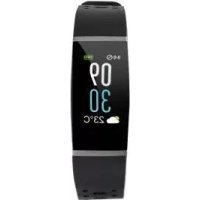
SAT 1500 B1 - Sports Watch SILVERCREST - Free user manual and instructions
Find the device manual for free SAT 1500 B1 SILVERCREST in PDF.



User questions about SAT 1500 B1 SILVERCREST
0 question about this device. Answer the ones you know or ask your own.
Ask a new question about this device
Download the instructions for your Sports Watch in PDF format for free! Find your manual SAT 1500 B1 - SILVERCREST and take your electronic device back in hand. On this page are published all the documents necessary for the use of your device. SAT 1500 B1 by SILVERCREST.
USER MANUAL SAT 1500 B1 SILVERCREST
ACTIVITY TRACKER SAT90
GB IE NI
ACTIVITY TRACKER
Quick start guide
DE AT CH
ACTIVITY-TRACKER
Kurzanleitung
FR BE
CAPTEUR D'ACTIVITE
GB IThis quick start guide is a fixed part of the operating instructions, which enables you to start up your product immediately. In order to fully understand all functions of the product, please select the link to the Device user manual in the app's Settings tab.
You may also download the full operating instructions from this website: http://www.lidl-service.com
Keep this quick start guide in a safe place. When passing this product on to third parties, please be sure to include all documentation. Read the operating instructions before use, and pay particular attention to the safety instructions included in the operating instructions.
Warnings and symbols used.. 6
Intended use
Safety instructions.. 7
Safety instructions for rechargeable batteries.. Page 9
Description of parts.. 11
Charging the battery.. 11
Installing the app 12
Pairing the product with a mobile device.. Page 12
ACTIVITY TRACKER
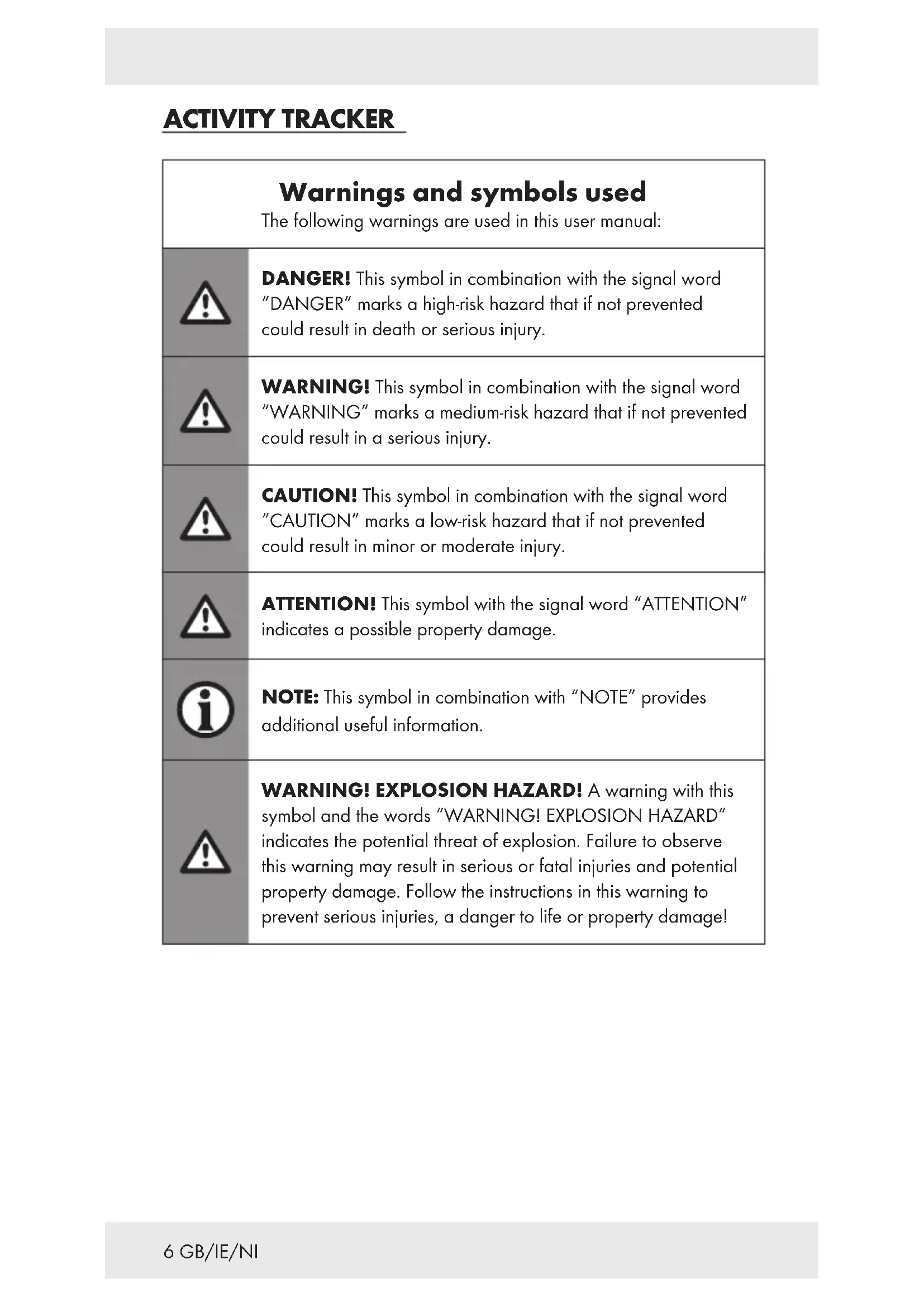
| Warnings and symbols used The following warnings are used in this user manual: | |
| ! | DANGER! This symbol in combination with the signal word "DANGER" marks a high-risk hazard that if not prevented could result in death or serious injury. |
| ! | WARNING! This symbol in combination with the signal word "WARNING" marks a medium-risk hazard that if not prevented could result in a serious injury. |
| ! | CAUTION! This symbol in combination with the signal word "CAUTION" marks a low-risk hazard that if not prevented could result in minor or moderate injury. |
| ! | ATTENTION! This symbol with the signal word "ATTENTION" indicates a possible property damage. |
| i | NOTE: This symbol in combination with "NOTE" provides additional useful information. |
| ! | WARNING! EXPLOSION HAZARD! A warning with this symbol and the words "WARNING! EXPLOSION HAZARD" indicates the potential threat of explosion. Failure to observe this warning may result in serious or fatal injuries and potential property damage. Follow the instructions in this warning to prevent serious injuries, a danger to life or property damage! |
This mandatory sign indicates to wear suitable protective gloves! Follow the instructions of this warning to avoid hand injuries caused by objects or contact with hot or chemical materials.

This symbol means that the operating instructions must be observed before using the product.
Intended use
The product is a product of information electronics. After you have connected the product with a mobile device, you can use its full scope of functions. The product records the steps, kilometres and calories consumed, and records the duration of activities and sleep.
The product is suitable for use with the following systems: iOS from version 8.0, Android™ version 6.0 or higher, Bluetooth V 4.2. The product is only intended for the private usage, the commercial usage is not permitted.
Safety instructions
BEFORE USING THE PRODUCT, PLEASE FAMILIARISE YOURSELF WITH ALL OF THE SAFETY INFORMATION AND INSTRUCTIONS FOR USE! WHEN PASSING THIS PRODUCT ON TO OTHERS, PLEASE ALSO INCLUDE ALL THE DOCUMENTS!
In the case of damage resulting from non-compliance with these operating instructions the warranty claim becomes invalid! No liability is accepted for consequential damage! In the case of material damage or personal injury caused by incorrect handling or non-compliance with the safety instructions, no liability is accepted!
Before each use: Check the product for damages. Do not use a damaged product.
This product can be used by children aged from 8 years and above and persons with reduced physical, sensory or mental capabilities or lack of experience and knowledge if they have been given supervision or instruction concerning use of the product in a safe way and understand the hazards involved.
Children shall not play with the product.
- Cleaning and user maintenance shall not be made by children without supervision.
DANGER! Risk of suffocation! Never leave children unsupervised with the packaging material. The packaging material represents a danger of suffocation. Children frequently underestimate the dangers. Always keep children away from the packaging material. Packaging material is not a toy.
- Never open the product! Improper repairs may result in considerable danger to the user. Always have repairs performed by an appropriate specialist.
Do not operate the product while driving a vehicle. It is dangerous to turn your gaze away from the road and to let yourself be distracted.
The product is not suitable for medical use. The product helps to calculate distances covered and calories burned during training. Consult a doctor before starting regular training.
- Protect the product from strong impacts, vibrations, direct sunlight, and dirt.
The guarantee does not cover damage caused by incorrect handling, non-compliance with the instructions for use or interference with the product by unauthorised individuals.
- Do not insert objects into the product and keep sharp objects away from the product.
If you have a heart pacemaker fitted or an implanted defibrillator, consult your doctor before wearing the product for the first time.
- Do not place heavy objects on the product. Do not exert pressure on the product.
- Avoid strong magnetic fields (e.g. loudspeakers). Failure to observe this may result in inaccurate measurements.
Salt and thermal water can lead to the corrosion of metal parts. Remove the product before using saunas, as the temperature difference can cause condensation to build. Risk of product damage.
Safety instructions for rechargeable batteries
ATTENTION! Keep the rechargeable batteries out of the reach of children. If swallowed, seek immediate medical attention!
DANGER OF EXPLOSION! The integrated rechargeable battery cannot be removed or exchanged by the user. Do not short-circuit rechargeable batteries and / or open them. Overheating, fire or bursting can be the result.
- Never throw this product with built-in rechargeable battery into fire or water.
- Do not exert mechanical loads to this product with built-in rechargeable battery.
Risk of leakage of rechargeable batteries
- Avoid extreme environmental conditions and temperatures, which could affect this product with built-in rechargeable battery, e.g. radiators / direct sunlight.
- Avoid contact of leaking chemicals with the skin, eyes and mucous membranes. In the event of contact with battery acid, thoroughly flush the affected area with plenty of clean water and seek immediate medical attention.
Wear PROTECTIVE GLOVES! Leaked or damaged rechargeable batteries can cause burns on contact with the skin. Wear suitable protective gloves at all times if such an event occurs.
This product has a built-in rechargeable battery which cannot be replaced by the user. The removal or replacement of the rechargeable battery may only be carried out by the manufacturer or their customer service or by a similarly qualified person in order to prevent hazards. When disposing of the product, it should be noted that this product contains a rechargeable battery.
Risk of property damage
This product does not contain any parts which can be serviced by the user. The rechargeable battery cannot be replaced.
- Do not place burning candles or other open fire on or next to the product.
If you notice smoke or unusual noise or odour, switch the product off immediately. If this happens during charging, disconnect the product immediately from the USB port.
-
Sudden temperature changes may cause condensation inside the product. In this case, allow the product to acclimate for some time before using it again to prevent short circuits!
-
Do not operate the product near heat sources, e.g. radiators or other devices emitting heat!
WARNING!
During operation or charging, do not cover the product. Otherwise the product might heat up.
WARNING! Radio interference
- Never wear the product on airplanes, in hospitals, service rooms, or near medical electronic systems. The wireless signals transmitted could impact the functionality of sensitive electronics.
- Keep the product at least 20~cm from pacemakers or implantable cardioverter defibrillators, as the electromagnetic radiation may impair the functionality of pacemakers.
The radio waves transmitted could cause interference in hearing aids. - Do not place the product near flammable gasses or potentially explosive areas (e.g. paint shops) with the wireless components on, as the radio waves emitted can cause explosions and fire.
The range of the radio waves varies by environmental conditions. In the event of wireless data transmission, unauthorised third parties receiving the data cannot be excluded.
The OWIM GmbH & Co KG is not responsible for interference with radios or televisions due to unauthorised modification of the product.
The OWIM GmbH & Co KG further assumes no liability for using or replacing components not distributed by OWIM. The user of the product is fully responsible for correcting interference caused by such unauthorised modification of the product, as well as replacement of such components.
ATTENTION! Ensure that:
- The product is not exposed to bright artificial light.
- No foreign objects penetrate the product.
- When using an optional USB power supply, its operating instructions are observed.
Description of parts
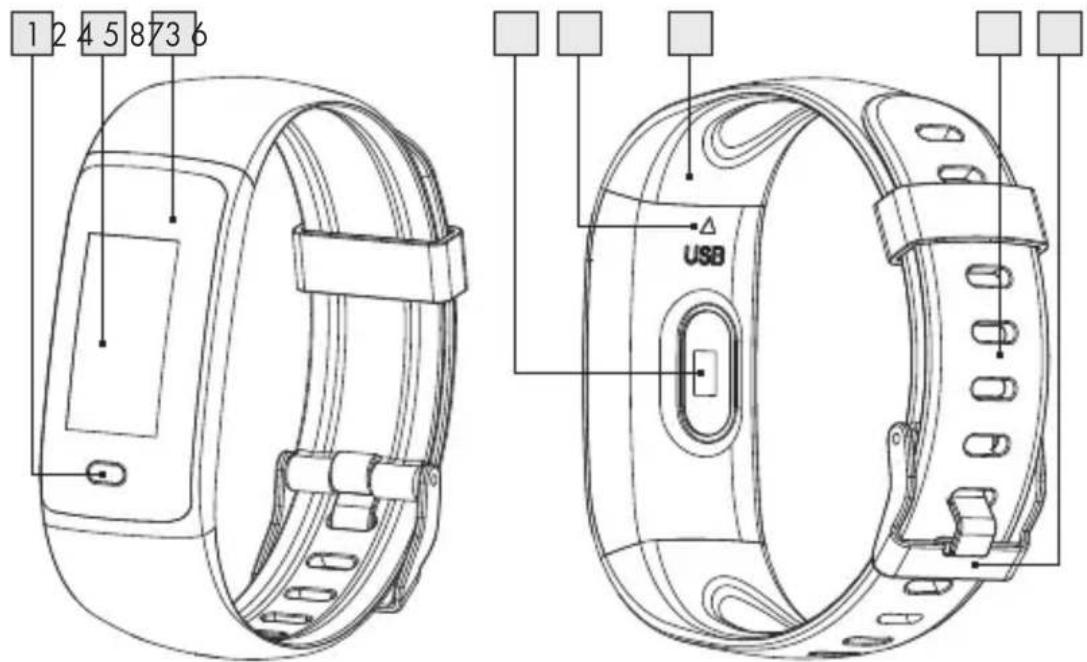
1 Touch button
5 USBmarkUSB
2 Display
USB plug (not visible)
3 Housing
Watch strap
4 Pulse sensors
8 Clasp
- Charging the battery
Disconnect the watch strap 7 from the housing 3 by pulling it at the USB mark ASB 5:
Hold the housing 3 in one hand. Hold the watch strap with the other hand.
Pull housing 3 and watch strap 7 apart.
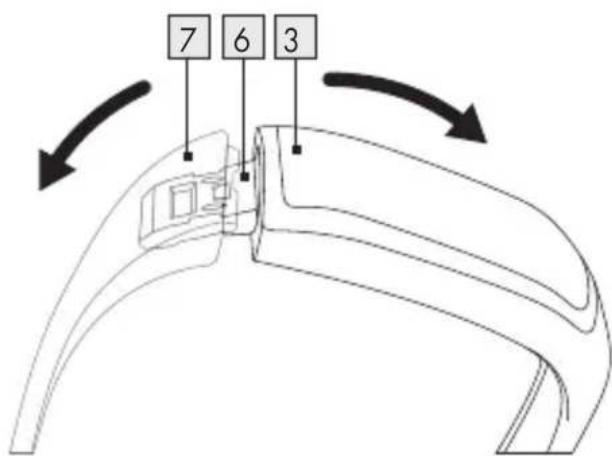
Plug in the revealed USB plug 6 to a USB port.
When the battery is fully charged: Disconnect the product from the USB port. Reattach the watch strap with the USB plug 6
① NOTES:
Make sure that the contacts of the USB plug 6 correctly engage with the contacts in the USB port. If the product does not charge, turn the USB plug 180^ and plug it into the USB port again.
The product turns on automatically as soon as it is connected with the USB port.
The product cannot be operated during charging.
The charging status is shown at the display's 2 top right.
A charging cycle on approx. 80mA charging current takes approx. 1.5 hours.
Installing the app
Download and install the SilverCrest Smart Watch app from the Apple App Store or Google Play Store. Scan the QR code to follow the direct link:
iOS Android
- Pairing the product with a mobile device
On your mobile device, turn on Bluetooth®.
Open the SilverCrest Smart Watch app.
Settings tab: Tap Connect device. Select the model SAT90. You will be prompted to pair the product.
NOTE: "English" is set as the standard product language on delivery. During pairing, the product will detect the language set on your mobile device and set to it.
Available languages: English, German, French, Spanish, Italian, Czech, Polish, Slovak.
If your mobile device is set to a different language, the product will continue to use English.
Pairing the product:
Intermittently tap the touch button 1 until More is displayed.
Tap and hold the touch button 1 for 2 seconds until About is displayed.
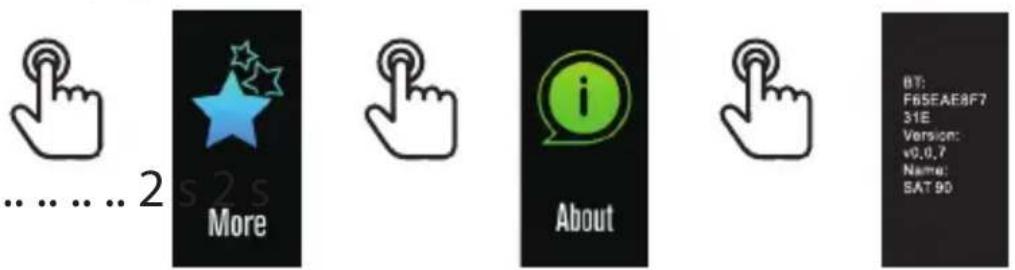
Tap and hold the touch button again for 2 seconds until the product information is displayed.
The product vibrates and awaits confirmation. Tap and hold the touch button 1 for 2 seconds. When successfully paired, the app will display Connected on your mobile device.
More settings:
In the app, the overview Today displays. Now tap on Settings and then on My Profile.
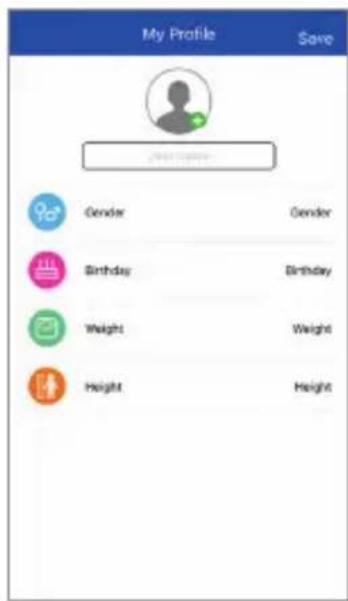
- You are now prompted to enter your personal data: Gender, Birthday, Weight, Height. Tap on the setting you wish to change. To confirm, tap Save at the top right.
You will then be prompted to permit notifications. Select the apps that you wish to receive notifications from in the product's display 2 Tap Save.
If your mobile device shows any further prompts (e.g. "Approve tracker" or "Forward messages") (depending on your mobile device): Confirm the prompts.
Depending on your mobile device, you may have to deactivate energy-saving mode to allow the SilverCrest Smart Watch app to run in the background.
Further information can be found in the FAQ section of the app. - More information: Go to the app's Settings page, and tap on Device user manual.
