
SAS 82 - Sports Watch SILVERCREST - Free user manual and instructions
Find the device manual for free SAS 82 SILVERCREST in PDF.


| Product Type | Sports watch / Activity tracker |
| Brand and model | SilverCrest SAS 82 |
| Weight | Approx. 34 g (with cable) |
| Compatible wrist size | 14.5 to 19.5 cm |
| Battery type | Lithium-ion polymer, 70 mAh |
| Battery life | Up to 15 days standby |
| Power supply | 5 V, 2 A (via USB cable) |
| Charging time | Approx. 3 hours |
| Protection rating | IP67 (dust-tight and immersion up to 1 m / 30 min) |
| Display | Touchscreen display |
| Sensors | 3D sensor for steps and movements |
| Main functions | Time/date, pedometer, distance, calories, activity time, daily goal, vibrating alarm, sleep mode, activity reminder, call/message notifications |
| Connectivity | Bluetooth 4.0 Low Energy |
| Memory | 15 days of recording |
| Smartphone compatibility | iOS 9.0+ and Android 5.0+ |
| App | HealthForYou (free) |
| Cleaning | Damp cloth |
| Precautions | Avoid sunscreen, do not swim, caution with electronic implants |
| Warranty | 3 years |
| Spare parts | USB charging cable (ref. 163.164) available at shop.sanitas-online.de |
Frequently Asked Questions - SAS 82 SILVERCREST
User questions about SAS 82 SILVERCREST
0 question about this device. Answer the ones you know or ask your own.
Ask a new question about this device
Download the instructions for your Sports Watch in PDF format for free! Find your manual SAS 82 - SILVERCREST and take your electronic device back in hand. On this page are published all the documents necessary for the use of your device. SAS 82 by SILVERCREST.
USER MANUAL SAS 82 SILVERCREST
natural_image
Black smartwatch with wrist strap and control buttons (no visible text or symbols)
natural_image
Black fitness tracker with '9842' branding and 'O' mark, no visible text or symbols on the device itself.ACTIVITY TRACKER SAS 82
GB IE NI
ACTIVITYTRACKER
Instructions for use and safety notes
FR BE
CAPTEURD'ACTIVITÉ
Before reading, unfold both pages containing illustrations and familiarise yourself with all functions of the device.
DK
GB / IE / NI Instructions for use and safety notes Page 5
List of pictograms used....Page 6
Introduction Page 7
Scope of delivery ...... Page 7
Intended use Page 8
Description of parts Page 10
Technical data Page 10
Important safety notes......Page 11
Initial use Page 12
Charging the battery....Page 13
Functions......Page 14
Overview of functions ...... Page 14
Time / date / battery status....Page 15
Steps/movements......Page 15
Calories burned....Page 15
Distance covered...... Page 16
Time active Page 16
Daily goal progress....Page 16
Daily goal status....Page 17
Alarm......Page 17
Messages......Page 17
Calls Page 18
Sleep mode....Page 18
Move reminder....Page 19
Transferring data to your smartphone....Page 20
Replacement and wear parts......Page 20
Frequently asked questions Page 20
Warranty / Service Page 27
| List of pictograms used | |
 WARNING! WARNING! | Warning of risks of injury or health hazards |
 | Safety note related to possible damage to the device/components |
 | Safety notes |
 | Instructions |
 | Observe instructions for use |
 | Direct current 5 V, 2 A |
 | Manufacturer |
 | This product fulfils the requirements of the applicable European and national directives. |
 | Improper disposal of batteries can harm the environment! |
 | Dust-proof and protected against the effects of temporary immersion in water |
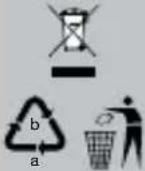 | Dispose of the packaging and the Activity Sensor in an environmentally friendly manner! |
Activity tracker SAS 82
●Introduction

Please make yourself familiar with the Activity Sensor before preparing it for use or using it for the first time. To do so, please carefully read the following operating instructions and the important safety information. Only use the Activity Sensor as described and only for the specified applications. Save these instructions for use. If you pass the Activity Sensor on to anyone else, please ensure that you also pass on all the documentation.
- Scope of delivery
Check that the delivery packaging has not been externally damaged and that the contents are complete. Before use, ensure that the device and accessories have no visible damage and that all packaging materials have been removed. If in doubt, do not use and contact your retailer or the listed customer service address.
1 x Activiy sensor wristband
1 x Set of instructions for use
1 x USB charging cable
1 x Quick start guide
- Intended use
Exercise is a prerequisite for a healthy lifestyle. Physical activity keeps you fit and reduces the risk of cardiovascular disease. Doing exercise helps you lose weight and you will notice that your wellbeing improves. Physical activity refers to any energetic movements. This includes daily activities such as walking, cycling, climbing stairs and housework. Use the Silvercrest Activity Sensor “SAS 82” to evaluate and record your daily exercise activities objectively. It can also motivate you to do more exercise in your daily life.
Using the free "HealthForYou" app, your exercise activities are transferred easily from your Activity Sensor to your smartphone. In this way, you can look at your records clearly and easily at any time on your smartphone.
Together with the "HealthForYou" App the Activity Sensor offers the following functions:
- Time and date display
- Daily steps, distance covered, calories burned, time active and progress towards daily goal (in %).
- Discription of individual sleep phases
- Vibration alarms
- Move reminder
- Notifications about calls and messages (e.g. SMS or WhatsApp).
System requirements for
"HealthForYou" web version - MS Internet Explorer
- MS Edge
- Mozilla Firefox
- Google Chrome
-AppleSafari
(in the relevantly current version)
System requirements for the "HealthForYou" app
iOS from Version 9.0, Android ^TM from Version 5.0, Bluetooth ^® 4.0.
Transferring data via Bluetooth®
wireless technology: The Activity Sensor uses Bluetooth ^® low energy technology, frequency band 2.402–2.480 GHz, maximum transmission power radiated in the frequency band < 20 dBm, compatible with Bluetooth ^® 4.0 smart phones / tablets

For a list of compatible smartphones, information about the "HealthForYou" app and software, as well as further details about the devices, please visit: www.healthforyou.lidl
Technical specifications subject to change without notice due to updates.
• Description of parts
1 Touch button
2 Magnetic USB port
- Technical data
Weight: approx. 34 g (incl. cable)
Suitable for
wrist circumference of: approx. 14.5 to approx. 19.5 cm
Battery: 70 mAh Li-ion Polymer
Battery life: max. 15 days standby operation
Permissible operation
conditions: 10-40 °C
Memory capacity: 15 days
Power supply: 5 V, 2 A
Protection class: IP67
Bluetooth ^® low energy technology, frequency band 2.4 GHz

Important safety notes
WARNING! Avoid contact with sun creams and similar, as these can damage plastic parts.
- Keep children away from the packaging material. Suffocation hazard!
The Activity Sensor is protected against spray water, rain, shower water and against temporary submersion in water of a depth of up to 1 meter for up to 30 minutes. Do not use the Activity Sensor when swimming!
The Activity Sensor contains magnets. If you wear a pacemaker, defibrillator or other electronic implant, consult a doctor before using the Activity Sensor.
Instructions on battery usage
If battery fluid comes into contact with skin or eyes, rinse the affected area with water and seek help from a doctor.
■ Protect batteries from excessive heat.
EXPLOSION HAZARD! Never throw batteries into fire.
■ Fully charge the battery before first use (see section "Charging the battery").
■ Never dismantle, open or shred batteries.
■ Only use the charging devices described in the instructions for use.
Batteries must be charged correctly before use. The manufacturer's instructions and the information provided in these instructions for use must be complied with for the correct charging of batteries.
- Charge the battery fully at least once every 6 months.
- Initial use
To start up the Activity Sensor, connect the Activity Sensor to the charging cable. Then, the Activity Sensor will activate itself. If the Activity Sensor does not turn on, the Activity Sensor's battery is flat. Charge the battery as is described in the section "Charging the battery".
☐ Ensure that your smartphone is connected to the internet.
□ActivateBluetooth ^® on your smartphone.
☐ Download the free "HealthForYou" app from the Apple App Store (iOS) or from Google Play (Android™).
■ Depending on the settings of your smartphone, the

internet connection and transfer of data may incur an additional cost.
☐ Start the "HealthForYou" app and follow the instructions. In the settings menu of the app select and connect to the "SAS 82". On the Activity Sensor a randomly generated six digit PIN code will be displayed. At the same time, an entry field will appear on your smartphone, where you should enter this code. Once you are successfully
connected, you can set your personal data. If you wish, you can also activate / set up alarms, call / text notifications or a move reminder.
- Charging the battery
As soon as the battery status display on the Activity Sensor shows a flat battery, you must charge the battery. To charge the battery, proceed as follows:
☐ Insert the USB plug on your USB charging cable 2 into the USB port of your switched-on computer.
☐ Connect the magnetic closure of the USB charging cable 2 with your Activity Sensor as pictured. Ensure that the charging cable is properly attached. The battery will only be charged if this is the case.
☐ You can see the current charge level in the battery status display. Normally the battery takes about 3 hours to fully charge. As soon as the device's battery is fully charged, the word "FULL" will appear in the display.
WARNING! Do NOT charge the Activity Sensor if the charging contacts on the back of the device are wet. If necessary, carefully pat the charging contacts dry with a cloth.
- Functions
Overview of functions
The Activity Sensor has the following functions: time with date and battery status, pedometer, calories burned, distance covered, move reminder, daily goal, alarm, activity alert sleep mode and message / call notifications. The values are reset to zero at midnight every 24 hours. Counting restarts from zero.
To change between the individual functions, press the touch button 1 on the Activity Sensor.

flowchart
graph TD
    A["19:45 Battery status"] --> B["13648 Steps / movement Calories burned Distance"]
    B --> C["1937"]
    C --> D["0.60"]
    E["Sleep mode"] --> F["09:45 Move reminder (if activated)"]
    F --> G["19:45 Alarm"]
    G --> H["80% Daily goal 0-49% = 50-79% ≥80% = in %"]
    H --> I["20% Daily goal"]
    I --> J["Time activeDaily goal"]
    J --> K["01:00 covered"]
● Time / date / battery status
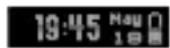
The Activity Sensor shows the current time, date and battery status. As soon as the Activity Sensor is synchronised with your smartphone, the current time and date are transferred from your smartphone to the Activity Sensor.
Steps/movements
13648
The Activity Sensor shows movements in steps. Steps are recorded by a 3D Sensor inside the Activity Sensor casing.
Calories burned
1931
The Activity Sensor calculates the calories you have burned using the details you entered in the app (height, age, sex, weight) and the number of steps you have taken. When you wake up in the morning, the Activity Sensor will already show a count of burned calories, as the body also burns calories while resting. The device automatically also includes calories burned while resting in the count.
• Distance covered

Using the height details you entered in the app, the Activity Sensor estimates the length of your steps. You can also individually change the length of your stride. The Activity Sensor calculates the distance you have covered using the length of your stride and number of steps you have taken. The displayed distance is a rough guide, and does not necessarily correspond to the actual distance.
Time active
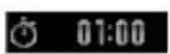
The time active shows how much time you have already spent actively moving. The time active only counts the amount of time you have been moving.
• Daily goal progress

You can specify a daily goal (e.g. 10,000 steps) in the "HealthForYou" app settings. Your current progress towards a set daily goal (in %) can be read from the Activity Sensor display.
• Daily goal status

When you have achieved 0–49% of the set daily goal, the display shows 😊. When you have achieved 50–79% of the set daily goal, the display shows 😊.
When you have achieved 80% or more of the set daily goal, the display shows 📁.
Alarm 19:45
You can set different alarm times via the "HealthForYou" app. When the alarm time is reached, the Activity Sensor will begin to vibrate.
Messages SMS WhatsApp John Smith John Smith
When you receive push notifications on your smartphone (e.g. SMS or WhatsApp), you can be notified via the Activity Sensor display. The prerequisites for this are that the Activity Sensor is connected to your smartphone via Bluetooth® and that the "HealthForYou" app has been set up. As soon as the message arrives, the sender will appear in the display. When you press the touch button 1, a part of the message appears on the display. By pressing the touch button 1 again, you can read more
of the message. In the case of longer messages, the complete content is not displayed.

flowchart
graph LR
    A["SMS\nJohn Smith"] --> B["Press touch button 1"]
    B --> C["Hello, this is a test mess"]
    C --> D["Press touch button 1"]
    D --> E["age. I like I his new Activ"]
Calls John Smith
In the "HealthForYou" app settings you can set whether you would like to be notified of calls via the Activity Sensor. The prerequisites for this are that the Activity Sensor is connected to your smartphone via Bluetooth® and that the "HealthForYou" app has been set up.
Sleep mode
To measure your movements in your sleep, put the device into sleep mode before you go to sleep. To do this, hold the touch button 1 down for 3 seconds in the sleep mode display. 🙏 appears briefly on the display. After one second, the Activity Sensor automatically switches into sleep mode. When you wake up in the morning, press the touch button 1 for approx. 3 seconds to wake the Activity Sensor up from sleep mode.

flowchart
graph TD
    A["Sleep mode announcement"] -->|Hold touch button 1 down for 3 seconds| B["Sleep mode activated"]
    B -->|Hold touch button 1 down for 3 seconds| C["Sleep mode deactivated"]
    C --> D["19:45 H=19"]
    D --> A
    B --> E["09:45"]
    E --> F["automatic"]
You also have the option of determining a time interval via the app so that the Activity Sensor automatically goes into sleep mode and then automatically returns to activity mode. In addition, you can set a sleep reminder.
Move reminder 09:45
You can set up a move reminder in the settings of the "HealthForYou" app. You can determine a start and end time within which the move reminder is active, for example between 9 am and 6 pm. In addition, you can determine the period of inactivity. If you are not moving during the prescribed time period, the Activity Sensor begins to vibrate and the display shows
● Transferring data to your smartphone
To transfer data from your Activity Sensor to the "HealthForYou" app, follow the following steps:
□ Activate Bluetooth on your smartphone.
□ Open the "HealthForYou" app.
☐ Connect your "SAS 82" Activity Sensor with the app. Your data will be automatically transferred to your smartphone.
● Replacement and wear parts
Accessory parts can be re-ordered from the online shop at: www.shop.sanitas-online.de
| Designation Article number or order number |
| USB charging cable 163.164 |
● Frequently asked questions
How do I wear the Activity Sensor correctly?
Wear the Activity Sensor on your left wrist if you are right handed and on your right wrist if you are left handed.
Pull the end of the wrist band through the opening at the other end. Now press the buckle into the openings of the wrist band and push the end of the wrist band through the loop until you feel it snap into place.
What can I use the Activity Sensor for?
Exercise is a prerequisite for a healthy lifestyle. Physical activity keeps you fit and reduces the risk of cardiovascular disease. Doing exercise helps you lose weight and you will notice that your wellbeing improves. Physical activity refers to any energetic movements. This includes daily activities such as walking, cycling, climbing stairs and housework. In order to estimate and record your daily exercise activities objectively, use the Activity Sensor. It can also motivate you to do more exercise in your daily life. A daily stint of at least 7,000 - 10,000 steps or 30 minutes of activity is optimal. (Source: according to WHO, Dr. Catrine Tudor-Locke, Dr. David R. Basset jr.)
How does the Activity Sensor record my steps?
The Activity Sensor records your physical activity constantly via a built in 3D sensor. All of your physical movements are interpreted as steps. For this reason, the indication of the distance covered can deviate from the actual distance.
How can I analyse my activity / sleep data?
Using your Activity Sensor's Bluetooth® interface, you can transfer your saved data to a smartphone (Android™ and iOS) and evaluate it there.
To do this, all you require is the free "HealthForYou" app on your smartphone.
How do I synchronise my data with the app?
To transfer data from your Activity Sensor to the "HealthForYou" app, follow the instructions in the section "Transferring data to your smartphone".
Data transfer to smartphone is not working.
This can have various different causes:
- Check that your smartphone / tablet is compatible with the "HealthForYou" app.
- The Activity Sensor is in "sleep mode". To exit "sleep mode", hold the touch button down for 3 seconds. On the Activity Sensor display will appear.
- Bluetooth® is not activated on your phone. Activate Bluetooth® in your smartphone settings.
- The Activity Sensor battery is flat. If the Activity Sensor will not turn on, charge it using the included USB charging cable.
- Check that you are using the correct app. It is only possible to transfer data using the "HealthForYou" app.
- The Activity Sensor is connected to another smartphone. Disconnect the Activity Sensor from one smartphone before you connect it with another.
iPhone:
If you are using an iPhone and the Bluetooth ^® connection is no longer built in, disconnect the Bluetooth ^® connection from within the "HealthForYou" app.
Then go to Bluetooth ^® in the settings folder of your phone and delete the "SAS 82" from the list of connected Bluetooth ^® devices.
Now reconnect the "SAS 82" via Bluetooth® using the "HealthForYou" app.
Android™
If you are using an Android ^TM smartphone and the Bluetooth ^® connection is no longer built in, disconnect the Bluetooth ^® connection from within the "HealthForYou" app and then reconnect the "SAS 82".
When should I charge the Activity Sensor's battery?
Charge the Activity Sensor's battery if 19:45 Mau is shown in the display when you press the button. As soon as 19:45 Mau is shown in the display, the battery will only last a maximum 24 hours. Never allow the battery to go completely flat; this is the only way to ensure continuous data collection.
How do I charge the Activity Sensor's battery correctly?
To charge the Activity Sensor correctly, follow the instructions as described in the section "Charging the battery".
Can I wear the Activity Sensor while I am cycling?
You can also wear the Activity Sensor while you are cycling. A precondition of this is that you wear the sensor in the correct place. You can wear the sensor attached to your leg or carry it in a trouser pocket that is narrow and at the side, but you cannot wear it attached to your belt. However, the information regarding the distance covered will deviate from the actual distance, because the Activity Sensor interprets all of your physical movements as steps.
How many days / nights can the Activity Sensor record?
The Activity Sensor can record up to 15 days and 15 nights. If the memory is full, the oldest records are automatically overwritten. For this reason we recommend that you transfer your data at least once a week.
How do I activate sleep mode?
Please refer to the directions in the section "Sleep mode".
How do I set the alarm function?
Enter your desired alarm time in the "HealthForYou" app. After entering / changing the alarm time, synchronise the Activity Sensor with the app.
Can I wear the Activity Sensor in the shower or when I go swimming?
The Activity Sensor is protected against spray water, rain, shower water and against temporary submersion in water of a depth of up to 1 meter
for up to 30 minutes (IP67). During showers or submersion of the Activity Sensor in water, in individual cases it is possible that the water pressure is too high and causes damage to the Activity Sensor. It is unadvisable to wear the Activity Sensor whilst swimming.
How do I dispose of the Activity Sensor correctly?
Please refer to the information in the section "Disposal".
How do I clean the Activity Sensor?
Periodically clean the device with a damp cloth.
Where can I order another USB charging cable?
See section "Replacement and wear parts".
What is included in delivery?
The delivery includes an Activity Sensor and a USB charging cable.
What do the symbols on the Acticity Sensor and packaging mean?
Please refer to the section "List of pictograms used".
●Disposal
The packaging is made entirely of recyclable materials, which you may dispose of at local recycling facilities.

Observe the marking of the packaging materials for waste separation, which are marked with abbreviations (a) and numbers (b) with following meaning: 1–7: plastics / 20–22: paper and fibreboard / 80–98: composite materials.

In accordance with European Directive (covering waste electrical and electronic equipment) and its transposition into national legislation, worn-out electrical devices must be collected separately and taken for environmentally compatible recycling.

Contact your local refuse disposal authority for more details of how to dispose of your worn-out product.
Per Directive 2006/66/EC and its amendments, defective or used batteries must be recycled. Return the batteries and/or the product to a collection site.
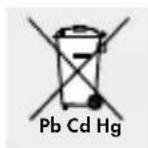
Improper disposal of batteries can harm the environment!
Never dispose of batteries in your household bin. They may contain toxic heavy metals and are subject to hazardous waste regulations. The chemical symbols of the heavy metals are: Cd = cadmium, Hg = mercury, Pb = lead. Therefore dispose of used batteries through your local collection facilities.
- Warranty / Service
We provide a 3-year warranty covering faults in materials or manufacture of the Activity Sensor from the purchase date.
The warranty does not cover:
- Damage due to improper use.
·Wearparts. - Damage caused by the customer.
- If the device has been opened by an unauthorised repair shop.
This warranty does not affect the customer's legal rights. The customer must provide proof of purchase in order for any warranty claims within the warranty period to be honoured. The warranty claim must be filed with Hans Dinslage GmbH, Uttenweiler, GERMANY, within 3 years from the date of purchase.
In the event of a complaint, please contact our Service Department listed below:
Service Hotline (toll-free):
GB
0800 93 10 319 (Mon-Fri: 8 am-6 pm)
service-uk@sanitas-online.de
IE NI
∅ 1800 93 92 35 (Mon-Fri: 8 am-6 pm)
service-ie@sanitas-online.de
If we ask you to return the defective product, please send it to the following address:
NU Service GmbH
Lessingstraße 10b
DE-89231 Neu-Ulm
GERMANY
IAN 297928
We hereby affirm this product complies with the European RED Directive 2014/53/EU.
The CE declaration of conformity for this product is available at:
cedeclarationofconformity.php
De anvendte piktogrammers legende .... Side 30
Indledning ...... Side 31
version 5.0 af, Bluetooth® 4.0.
Dataoverførsel per
Bluetooth ^® wireless
technology:AktivitetssensorenanvenderBluetooth
®
low energy technology, frekvensbånd
www.healthforyou.lidl
flowchart
graph LR
    A["SMS\nJohn Smith"] --> B["Tryk "touch"-tast 1"]
    B --> C["Hello, this is a test mess"]
    C --> D["Tryk "touch"-tast 1"]
    D --> E["age. I like t his new Activ"]
Opkald John Smith
Service-hotline (gratis):
DK
∅ 80 70 57 89 (man-fre: 8-18 Ur)
service-dk@sanitas-online.de
SILVERCREST®
Remarques relatives aux batteries
service-f@sanitas-online.de
BE
∅ 0800 70 611 (lu. - ve.: 8-18 horloge)
service-be@sanitas-online.de
www.shop.sanitas-online.de
| Aanduiding Artikel- resp. bestelnummer | |
| USB-laadkabel 163.164 |
Wat is inbegrepen in de levering?
Service hotline (gratis)
NL
∅ 0800 54 30 543 (ma. - fr.: 8-18 klok)
service-nl@sanitas-online.de
BE
∅ 0800 70 611 (ma. - fr.: 8-18 klok)
service-be@sanitas-online.de
service-de@sanitas-online.de
AT
The Bluetooth ^® word mark and logos are registered trademarks owned by Bluetooth SIG. Inc. and any use of such marks by Hans Dinslage GmbH is under license. Other trademarks and trade names are those of their respective owners.
Apple and the Apple logo are trademarks of Apple Inc., registered in the U.S. and other countries. App Store is a service mark of Apple Inc., registered in the U.S. and other countries.
Google Play and the Google Play logo are trademarks of Google LLC. Android ^TM is a trademark of Google LLC.

Hans Dinslage GmbH
Riedlinger Str. 28
DE-88524 Uttenweiler
GERMANY
Last Information Update · Tilstand af information · Version
des informations · Stand van de informatie · Stand

- ACTIVITY TRACKER SAS 82
- ACTIVITYTRACKER
- CAPTEURD'ACTIVITÉ
- DK
- List of pictograms used....Page 6
- Introduction Page 7
- Important safety notes......Page 11
- Initial use Page 12
- Functions......Page 14
- Transferring data to your smartphone....Page 20
- Replacement and wear parts......Page 20
- Frequently asked questions Page 20
- Warranty / Service Page 27
- ●Introduction
- - Scope of delivery
- - Intended use
- Together with the "HealthForYou" App the Activity Sensor offers the following functions:
- • Description of parts
- - Technical data
- Important safety notes
- Instructions on battery usage
- - Initial use
- - Charging the battery
- - Functions
- Overview of functions
- ● Time / date / battery status
- Steps/movements
- Calories burned
- • Distance covered
- Time active
- • Daily goal progress
- • Daily goal status
- Alarm 19:45
- Messages SMS WhatsApp John Smith John Smith
- Calls John Smith
- Sleep mode
- Move reminder 09:45
- ● Transferring data to your smartphone
- ● Replacement and wear parts
- ● Frequently asked questions
- How do I wear the Activity Sensor correctly?
- What can I use the Activity Sensor for?
- How does the Activity Sensor record my steps?
- How can I analyse my activity / sleep data?
- How do I synchronise my data with the app?
- Data transfer to smartphone is not working.
- iPhone:
- Android™
- When should I charge the Activity Sensor's battery?
- How do I charge the Activity Sensor's battery correctly?
- Can I wear the Activity Sensor while I am cycling?
- How many days / nights can the Activity Sensor record?
- How do I activate sleep mode?
- How do I set the alarm function?
- Can I wear the Activity Sensor in the shower or when I go swimming?
- How do I dispose of the Activity Sensor correctly?
- How do I clean the Activity Sensor?
- Where can I order another USB charging cable?
- What is included in delivery?
- What do the symbols on the Acticity Sensor and packaging mean?
- ●Disposal
- Improper disposal of batteries can harm the environment!
- - Warranty / Service
- In the event of a complaint, please contact our Service Department listed below:
- De anvendte piktogrammers legende .... Side 30
- Indledning ...... Side 31
- Opkald John Smith
- Remarques relatives aux batteries
- Wat is inbegrepen in de levering?
- Service hotline (gratis)
- Hans Dinslage GmbH
Brand : SILVERCREST
Model : SAS 82
Category : Sports Watch