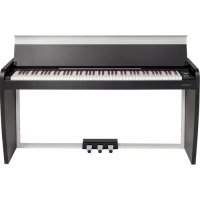
VIVO H1 - Piano Dexibell - Free user manual and instructions
Find the device manual for free VIVO H1 Dexibell in PDF.


| Product type | Digital Piano |
| Brand | Dexibell |
| Model | VIVO H1 |
| Dimensions (with lid closed) | 1420 x 360 x 793 mm |
| Dimensions (with lid open) | 1420 x 360 x 1009 mm |
| Weight | 45.1 kg |
| Power supply | AC adapter 24 VDC 2.5 A (DEXIBELL DYS602-240250W) |
| Power consumption (standby) | < 0.2 W |
| Power consumption (on) | 12 W (average 15 W, max 32 W) |
| Keyboard | 88 keys, hammer action, triple contact (TP-100 LR) |
| Sound generator | T2L (sampling and modeling) |
| Polyphony | Unlimited (320 oscillators) |
| Preset sounds | 80 + unlimited user (downloadable .DXS, .SF2) |
| Memories | 20 presets, unlimited user |
| Keyboard modes | Layer, Split, 4 Hands |
| Effects | Reverb (24 types), 6 independent DSPs, 3-band EQ |
| Recorder | Audio .wav (48 kHz, 32-bit float) on USB drive |
| Audio player | .wav, .aiff, .mp3 |
| Pedals | Damper (progressive), sostenuto, soft (programmable) |
| Speakers | 2 woofers 8.9 cm, power 30 W x 2 |
| Connectors | Audio In (3.5 mm mini-jack), outputs L/MONO and R (6.35 mm jack), 2 headphones, USB Computer (type B), USB Memory (type A), DIN pedals |
| Display | Graphic LCD 128 x 64 pixels, organic LED |
| Auto power off | Yes (adjustable, default 120 min) |
| Included accessories | Quick guide, AC adapter |
| Options | DX HF7 stereo headphones, DX Bench |
Frequently Asked Questions - VIVO H1 Dexibell
User questions about VIVO H1 Dexibell
0 question about this device. Answer the ones you know or ask your own.
Ask a new question about this device
Download the instructions for your Piano in PDF format for free! Find your manual VIVO H1 - Dexibell and take your electronic device back in hand. On this page are published all the documents necessary for the use of your device. VIVO H1 by Dexibell.
USER MANUAL VIVO H1 Dexibell
Regulatory and Safety Information
Users in U.S.A
This product has been tested and found to comply with the limits for a Class B digital devices, pursuant to Part 15 of the FCC Rules. These limits are designed to provide reasonable protection against harmful interference in a residential installation. This equipment generates, uses, and can radiate radio frequency energy and, if not installed and used in accordance with the instructions, may cause harmful interference to radio communications. However, there is no guarantee that interference will not occur in a particular installation. If this equipment does cause harmful interference to radio or television reception, which can be determined by turning the equipment off and on, the user is encouraged to try to correct the interference by one or more of the following measures:
- Reorient or relocate the receiving antenna.
- Increase the separation between the equipment and receiver.
- Connect the equipment into an outlet on a circuit different from that to which the receiver is connected.
- Consult the dealer or an experienced radio/TV technician for help.
This device complies with part 15 of the FCC Rules. Operation is subject to the following two conditions:
1) This device may not cause harmful interference.
2) This device must accept any interference received, including interference that may cause undesired operation.
FCC CAUTION: Any unauthorized changes or modifications not expressly approved by the party responsible for compliance could void the user's authority to operate the equipment.
Note: The manufacturer is not responsible for any radio or tv interference caused by unauthorized modifications to this equipment. Such modifications could void the user's authority to operate the equipment.
For Canada
NOTICE
This Class B digital apparatus meets all requirements of the Canadian Interference-Caising Equipment Regulations.
AVIS
IMPORTANT:THE WIRES IN THIS MAINS LEAD ARE COLOURED IN ACCORDANCE WITH THE FOLLOWING CODE.
BLUE: NEUTRAL
BROWN: LIVE
As the colours of the wires in the mains lead of this apparatus may not correspond with the coloured markings identifying the terminals in your plug, proceed as follows:
The wire which is coloured BLUE must be connected to the terminal which is marked with the letter N or coloured BLACK. The wire which is coloured BROWN must be connected to the terminal which is marked with the letter L or coloured RED.
Under no circumstances must either of the above wires be connected to the earth terminal of a three pin plug.
For European Countries
This Symbol indicates that in EU countries, this product must be collected separately from household waste, as defined in each region. Products bearing this Symbol must not be discarded together with household waste.

VIVO | H1 |
Quick Guide
Welcome to the quick guide of VIVO H1 and congratulations to purchasing this Digital Piano.
Before telling you technical information, let me tell you a little about me.
I am "VIVO" digital Piano. My designers used a completely new technology called T2L (True to Life), based on interaction between Sampling and Modelling methods.
They called me "VIVO" because I am the first digital instruments "ALIVE", I am reactive to your player articulation.
I have many features, such as sympathetic resonances, harmonics, noises, staccato sounds, timbre variances, real Sustain Pedal simulation etc. that build-up the total my sound using 320 Oscillators with an unlimited notes polyphony.
The quality standard has been raised-up to 24 bit - 48KHz with an average of 5 times longer ever recorded samples (15" on lower piano notes).
My sounds was recorded with holophonic method for an amazing 3D listening experience.
You can enjoy the best Grand Pianos, Upright Pianos, Vintage Electric Pianos and many more Sounds Categories with the best quality and playability ever heard.
To ensure that you obtain the maximum enjoyment and take full advantage of the piano functionality, please read all sections of this owner's manual carefully.
Keep this manual handy for future reference.

Start to take advantage of valuable benefits available simply registering your product on www.dexibell.com.
You can benefit of DEXIBELL's 3 years extended warranty (The extended warranty is subject to terms and conditions. Please refer to the related section).
- You can download the full version of the owner's manual.
- Keeps you updated on special offers.
- You can be updated on any new software release and new sounds.
1 Important Safety Instruction
PLEASE READ CAREFULLY BEFORE PROCEEDING
Always follow the following precaution listed below to avoid user to the risk of serious injury or even death from electrical shock, fire or other hazard .

WARNINGCAUTION

Only use non-tropical weather
This unit and its AC adaptor can only be safely used in non-tropical weather. The operating temperature range is 5°C - 40°C (41°C - 104°F) .

Only use at altitude 2000 meter or lower area
This unit and its AC adaptor can only be safely used lower than 2,000 meters altitude.

Do not repair, modify or replace parts by yourself
Do not attempt to repair the unit, modify or replace parts of the product. Please contact all the nearest Dixibell Service Center.

Do not disassemble or modify by yourself
Do not open the unit or its AC adaptor or attempt to disassemble or modify the internal component in any way.

Use only the supplied AC adaptor (DEXIBELL DYS602-240250W).
Use only the AC adaptor included with the unit. Connecting a different AC adaptor can cause serious damage to the internal circuitry and may even pose a shock hazard.

Use only the supplied power cord
Use only the AC power cord supplied with the AC adaptor included in the package.

Do not excessively bend the power cord
Do not excessively twist or bend the power cord otherwise you damage it. Damaged cords may cause fire and shock hazards!

Do not place the unit in an unstable location
Do not place the unit in a unstable position where it might accidentally fall over.

Take care not to allow liquid or foreign objects to enter unit; Do not place containers with liquid on unit
Do not place object filed with liquid (glass of water on this product. Never allow foreign objects (e.g., flammable objects, coins, wires) or liquids (e.g., water or juice) to enter this product. Doing so may cause short circuits, faulty operation, or other malfunctions.

Never place or store the product in the following types of locations
-
Exposed to extreme cold or heat (such as in direct sunlight, near a heater, or in a car during the day)
-
Subject to steam or smoke
Damp (such washroom, baths, on wet floors)
-
Subject to salt water exposure
-
Exposed to rain
Dusty or sandy
-
Subject to extreme changes of temperature or humidity (The condensation may occur and water may collect on the surface of the instrument. Wooden parts may absorb water and be damaged)
-
Subject to high levels of vibration and shakiness.


Do not drop the unit or subject it to strong impact
Do not drop the unit. Protect it from strong impact!

Do not connect the unit to an outlet with an unreasonable number of other devices
Do not connect the unit's power supply cord to an electrical outlet with an unreasonable number of other devices. This could cause the outlet to overheat and possibly cause a fire.

Adults must provide supervision in places where children are present
When using the unit in locations where children are present, never leave the unit unattended. Keep a special watch over any children so that they don't mishandling of the unit can take place.

Avoid extended use at high volume
This unit, either alone or in combination with an amplifier and headphones or speakers, may be capable of producing sound levels that could cause permanent hearing loss. DO NOT operate for a long period of time at a high volume level, or at a level that is uncomfortable. If you experience any hearing loss or ringing in the ears, you should immediately stop using the unit, and consult an audiologist.

If you notice any abnormality turn off the unit immediately
Turn off the unit and remove the AC adaptor from the outlet when:
- If the AC adaptor, the power-supply cord, or the plug has been damaged
If smoke or unusual smells occurs.
If the product has been exposed to rain.
- If objects have fallen into, or liquid has been spilled into the unit.
If the unit does not operate or exhibits a marked change in performance.
- If the unit has been dropped, or the enclosure of the product has been damaged.
Contact the nearest qualified Service Center.
Grasp the plug connecting or disconnecting the AC adaptor
When removing the electric plug from the instrument or an outlet, always hold the plug itself and not the cord. Pulling by the cord can damage it.

Do not use wet hands to connect or disconnect AC adaptor

Never handle the AC adaptor or its plugs with wet hands when plugging into, or unplugging from, an electrical outlet.

Keep clean the AC adaptor's plug
At regular intervals, unplug the AC adaptor and using a dry cloth clean the adaptor's plug.
If the unit will be unused for an extended period of time, unplug the AC power cord from the AC outlet.

Keep cables from getting entangled

Try to prevent cords and cables from becoming entangled. Place all cords and cables away from children.

Before cleaning the unit, unplug the AC adaptor from the outlet
To avoid electric shock or damage the unit, before cleaning the unit, turn it off and unplug the AC adaptor from the outlet (p. 9).

If there is a possibility of lightning strike in your area, disconnect the AC adaptor from the outlet
If you know a thunderstorm is predicted in your area, disconnect the AC adaptor from the outlet.

Take care so as not to get fingers pinched by lid
Be careful to avoid catching fingers (yours, or others, especially children's) when opening or closing the lid. Adult supervision is recommended whenever small children use the unit.

Do not rest your weight on or place heavy objects on the unit.
Avoid to climb on top of, nor place heavy objects on the unit.

Cautions when moving this unit
- When transporting or moving the unit always use two or more people. Attempting to lift the unit by yourself may damage your back, result in a loss of weight and/or an injury.
- The unit should be handled carefully, all the while keeping it level.
- Disconnect the power cord and all connected cables.
- Close the lid.
Place in a well ventilated location
The unit and the AC adaptor should be located so their location or position does not interfere with their proper ventilation.
Do not use in tropical climates
Use the unit and the AC adaptor only in a moderate climates (not in tropical climates).
Place near the socket outlet
This equipment should be installed near the socket outlet and disconnection of the device should be easily accessible.
Conventions Used in This Manual
The following symbols are used.
NOTE
It indicates an important note; be sure to read it.
MEMO
It indicates a memo regarding the setting or function; It's up to you read it.
TIPS
It indicates a useful hint for operation; read it as necessary.
In addition to the items listed under "Important Safety Instruction" on p. 4, please read and observe the following:

Power supply related
- Do not plug this unit into the same electrical outlet used same by an electrical appliance that is controlled by an inverter or a motor (such as a refrigerator, washing machine or air conditioner). Doing so, can result in audible noise.
- The power adaptor may become warm after long hours of consecutive use. It can be a normal dissipation of heat through the adaptor casing. To reduce the possibility of overheating place the power adaptor on the floor in a well-ventilated location.
- Before connecting the unit to other equipment, turn off the power to all equipment. Otherwise, electrical shock or damage to the equipment may occur.
- If the unit is not operative for 120 minutes, to prevent unnecessary power consumption, this unit features an "AUTO OFF" function that automatically turns the unit off. If you don't want the unit to turn off automatically, change the "AUTO OFF" setting to "OFF".
NOTE
The "AUTO OFF" setting is memorized when you switch off the unit.

Related to appropriate location
Do not place the unit near power amplifiers (or other equipment containing large power transformers) to avoid induced hum. In case of hum, to reduce the problem, change the orientation of your unit or place it away from the source of interference.
- Do not use this unit in the vicinity of a TV or radio. This unit may interfere with radio and television reception.
- When using this unit along with application on your iPhone/iPad, we recommend that you set "Airplane Mode" to "ON" on your iPhone/iPad in order to avoid noise caused by communication.
- Noise may be produced if cell phones are operated in the vicinity of this unit. In case of noise, you should relocate such wireless devices so they are at a greater distance from this unit, or switch them off.
- Do not expose the unit to extreme cold or heat, to direct sunlight or near devices that radiate heat. Do not leave the unit inside an vehicle during the day. Extreme temperature can damage the unit.
Take care when move the unit from one location to another with drastic changes in ambient temperature. Condensation can occur in the unit due to drastic change of temperature. Using the device while condensation is present can cause damage. If there is reason to believe that condensation might have occurred, leave the device for several hours until the condensation has completely dried out.
- Do not place, for long periods of time, vinyl, plastic or rubber objects on this unit. Such objects can discolor or otherwise harmfully affect the finish.
- Do not place objects for long period of time on top of the keyboard. This can be the cause of malfunction of the keys of the keyboard.
- Do not apply any stickers, decals or self-adhesive material to this unit. The glue is difficult to remove and solvents are damaging the exterior finish.
- Do not place object filled with liquid (glass of water on this unit. Avoid to use alcohol, perfume, hairspray, nail polish, etc., near the unit. In the event of liquid spill on the unit, swiftly wipe away the surface using a dry, soft cloth.

Related to external memories
- Insert the USB Memory (commercially available) into the slot with care and at the correct angle.
Take particular care when handling USB Memory:
Always ground yourself to something metal before handling an USB Memory
- Do not touch the pins of the USB Memory connector, or allow them to become dirty.
Do not subject the USB Memory to temperature extremes (e.g., direct sunlight in an
Do not allow the USB Memory to become wet.
Do not drop or subject it to excessive shock or vibration.
- Do not disconnect the USB Memory while writing and reading data (i.e., while the USB Memory indicator blinks).
- Never use USB hub to connect USB Memory to the unit.
- This unit allows you to use commercially available USB Memory. You can purchase such devices at a computer store, a digital camera dealer, etc
- The audio recording require a USB storage device to support high sustained transfer rates. Not all USB devices will guarantee flawless performance.

Related to repairs
- Always back up your data on a USB memories before you send this unit for repair to an authorized center. All data contained in the unit's memory my be lost. Important data should always be backed up, or written down on paper (when possible). Dexibell assumes no liability concerning such loss of data.

Other precautions
- The contents of memory could be lost due to malfunction or improper operation. To help prevent the loss of your data, we highly recommend that you periodically save a backup copy of important data you have stored in the unit's memory on another storage device (e.g., USB memories).
- Unfortunately, an error may occur during the data restore previously stored in the USB memories. Dexbill shall not be liable for loss of profits or any consequential loss, loss of data.
- Do not use excessive force when handling unit's buttons, switches, sliders and controls and when use connectors and jacks. Rough handling can cause damage o malfunctions.
- Do not apply strong pressure on the display.
- Always pull by the connector when disconnecting a cable, never pull the cable. Not doing so you will cause shorts, or damage to the cable's internal elements.
- Keep the unit's volume levels down. The instrument should be used at a reasonable volume, to avoid disturbing neighbours, especially at night and in the early morning. Use headphones if you want to play your music loud or late at night.
- When you need to transport the unit, put it in its original packaging with padding in the box. Otherwise, you will need to use equivalent packaging materials. When transporting or moving the unit always use two or more people.
To prevent possible damage, avoid applying excessive force to the music stand. - For connecting this unit use cable low impedance cables. The use of cables that contain resistor can cause the sound level to be extremely low, or impossible to hear.

Maintenance related
- To clean the unit, put a soft cloth in lukewarm water, squeeze it well, then wipe the entire surface using an equal amount of strength. Rubbing too hard in the same area can damage the finish.
- If your unit has a polished finish, it needs careful, periodic care. Dust should be removed using a soft feather or wool-type duster. Care should be taken not to apply pressure to the finish or to drag the dust across the finish, which can create fine scratches in the surface. Fingerprints or similar marks can be cleaned with a dampened soft cloth, followed by a dry cloth. In cases of stubborn greasy dirt, using a small amount of mild detergent (such as mild dishwashing liquid) on the damp cloth may help. Do not use any cleaners or detergents, since they might deteriorate the surface of the cabinet, and produce cracks. Do not use dusting cloths that contain chemicals.
- Do not wipe this unit with benzene, alcohol or solvent of any kind. Doing so may result in discoloration and/or deformation of the unit.

Related to copyright and trademarks
- Dexibell do not assume legal liability regarding any infringements of the user through the use of this unit.
-
Recording, copying, distribution of copyrighted material (songs, live performance, etc.) belonging to a third party in part or in whole without the permission of the copyright owner is forbidden by law.
Copyright © 2003 by Bitstream, Inc. All rights reserved. Bitstream Vera is a trademark of Bitstream, Inc. -
iPad and iPhone are registered trademarks of Apple Inc.
App Store is an Apple's Service Mark

#
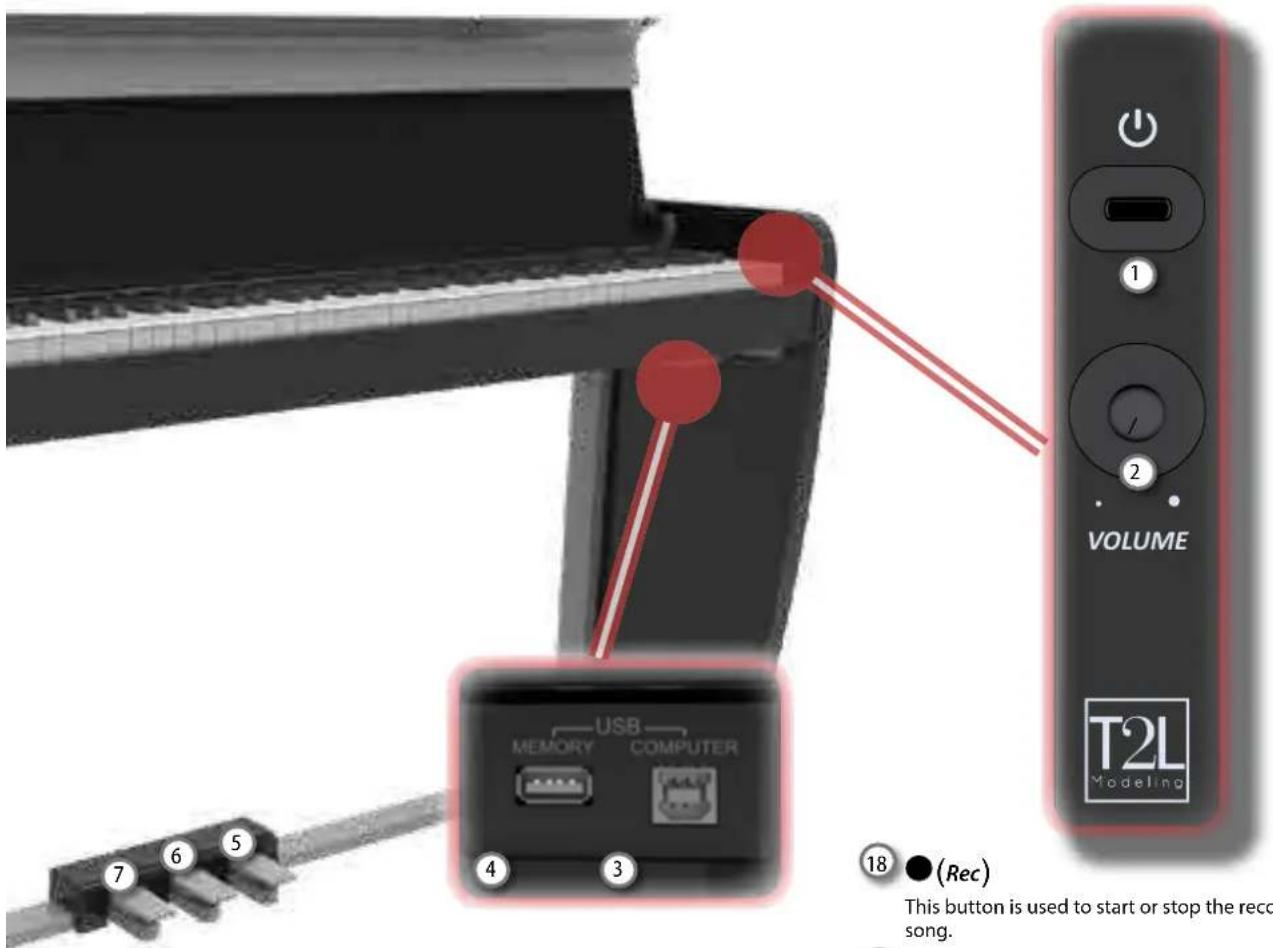
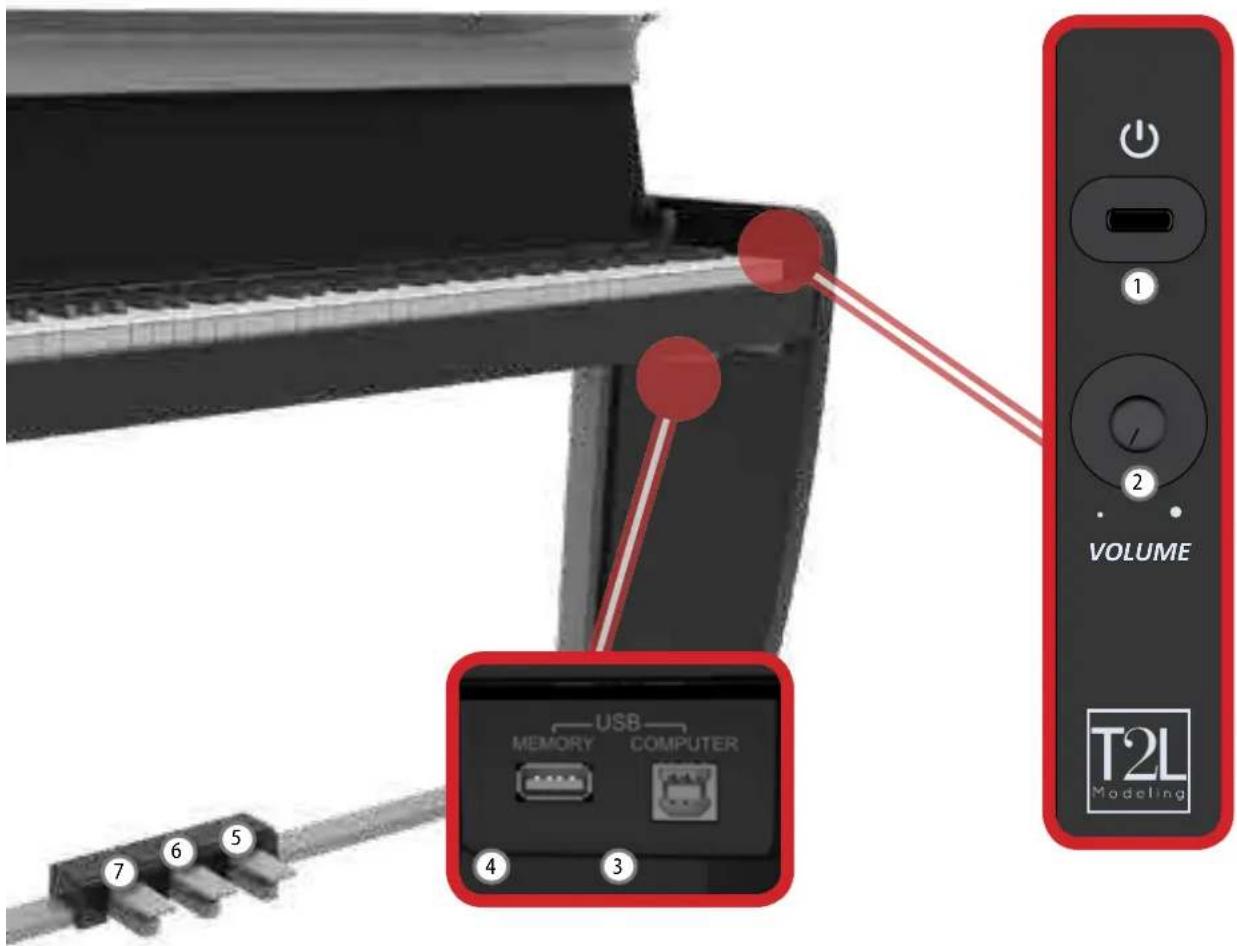
Turns the power on or off (p. 9).
With the factory settings VIVO H1's power will automatically be switched off 120 minutes after you stop playing or operating the VIVO H1.
If VIVO H1's power has been turned off automatically, you can use the [POWER] switch to turn the VIVO H1 back on. If you don't want the power to turn off automatically, set the "AUTO OFF" parameter to "OFF".
NOTE
To avoid malfunctions, never disconnect the AC/DC adaptor while the instrument is turned on.

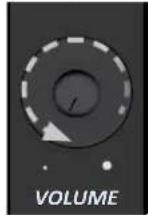
VOLUME
Use this knob to set VIVO H1's overall volume.

USB Computer Port
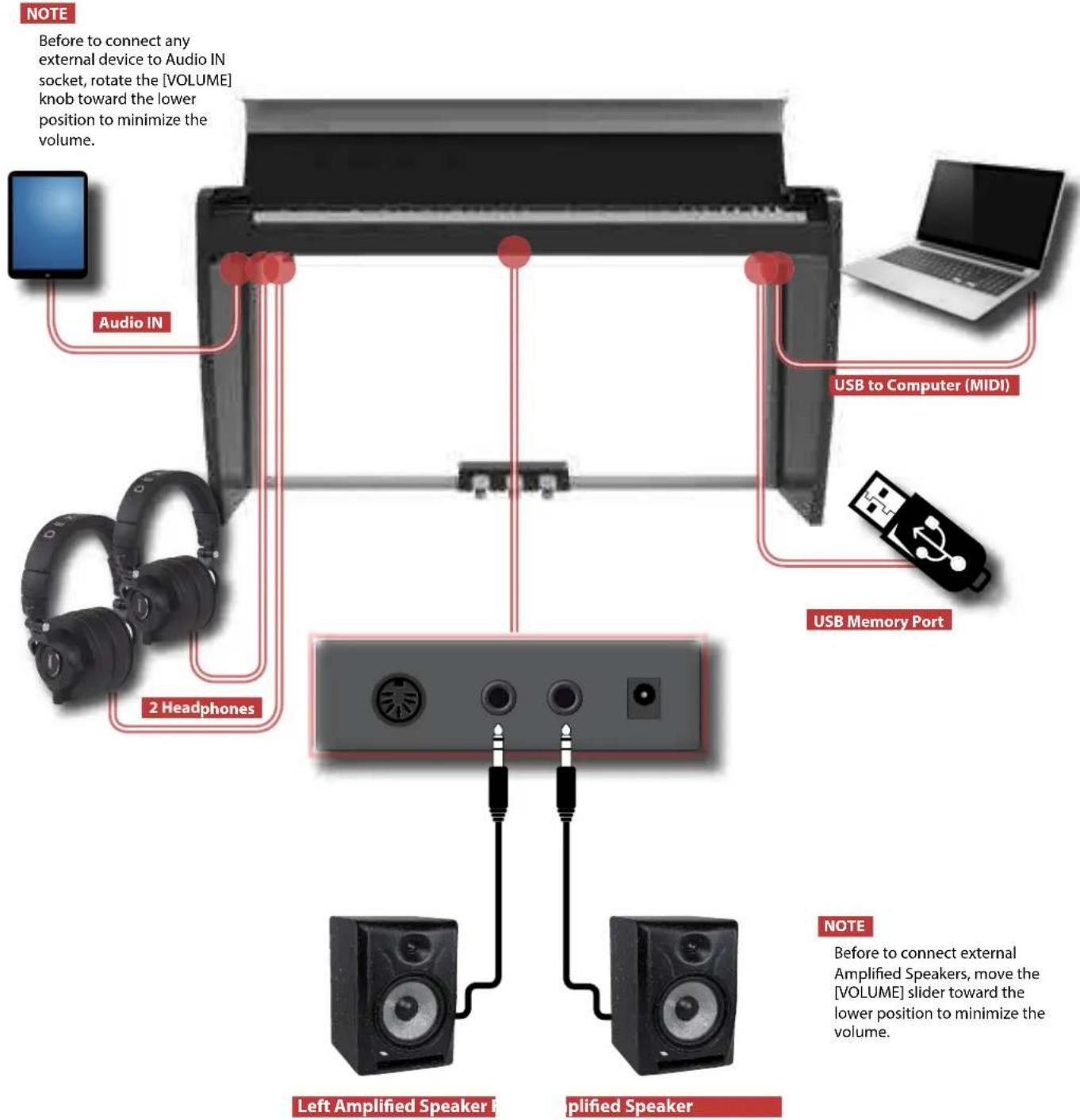
Use a USB cable to connect the VIVO H1 to your computer via this connector.
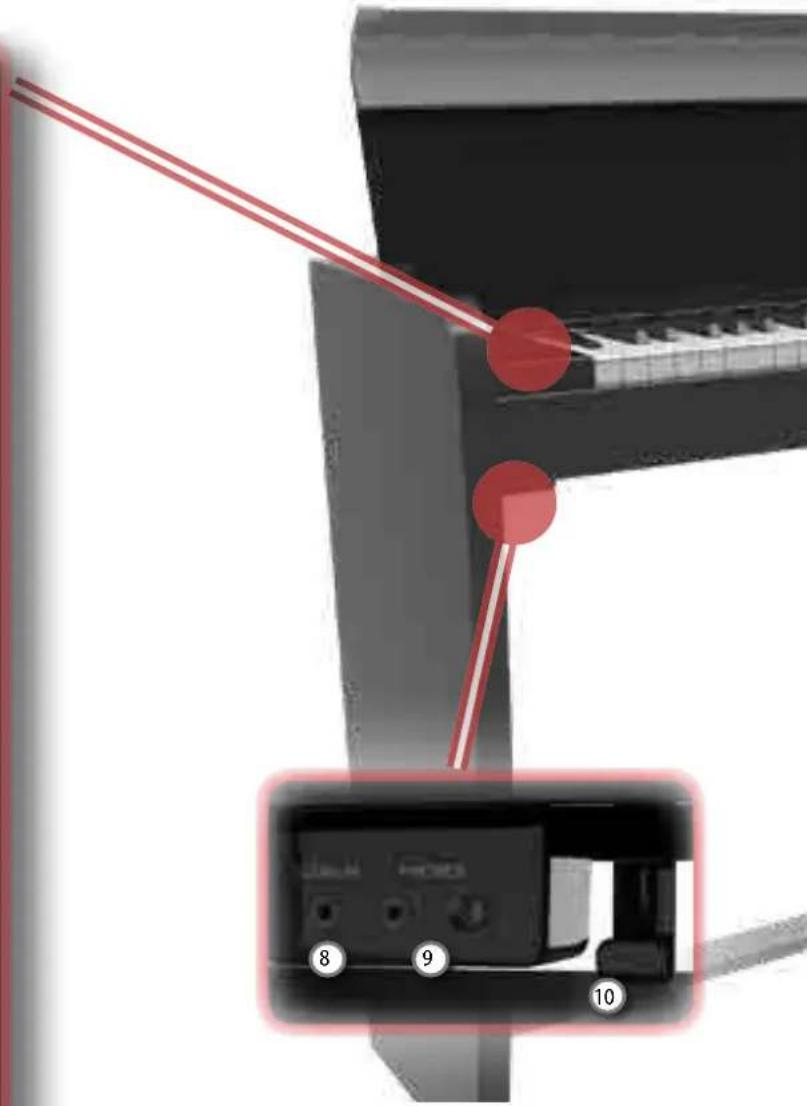

USB Memory Port
Connect an commercially available USB Memory here.
NOTE
- Carefully insert the USB Memory making sure that the connector on the device is appropriate and that it is connected in the proper direction.
- Dexibell does not recommend using USB hubs, irrespective of whether they are active or passive. Please connect only one USB Memory to this port

Damper Pedal
Use this pedal to sustain the sound.

Sostenuto Pedal
The notes you are pressing when this pedal is depressed will be sustained, allowing future notes played to be unaffected.

Soft Pedal
This pedal is used to reduce the volume and slightly changes the timbre.

AUDIO IN
This mini jack allow you to connect the audio outputs of an external signal source (CD/mp3 player, etc.).

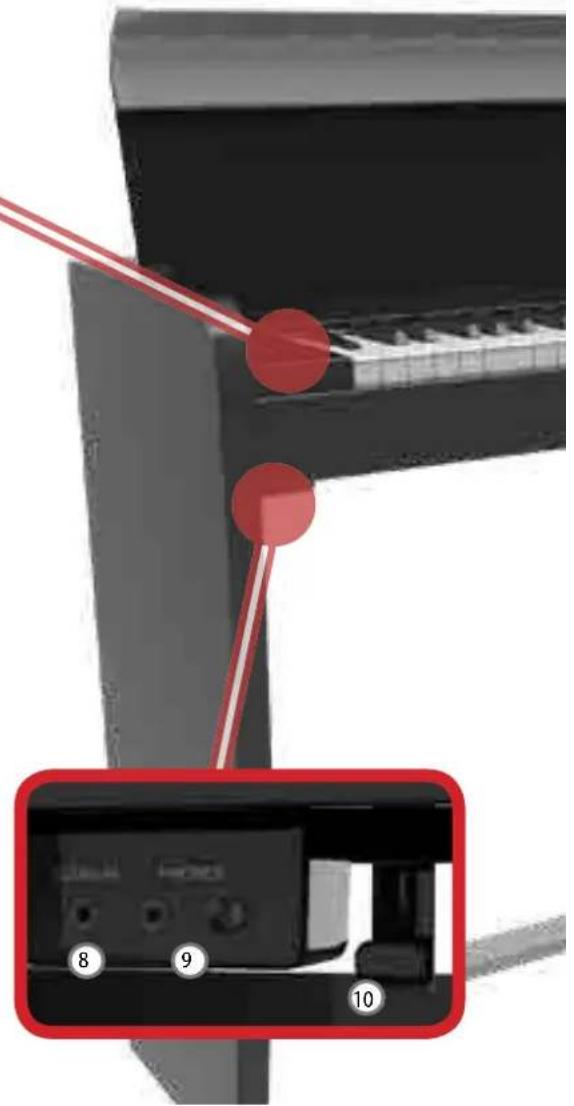
PHONES output
This is where you can connect one or two pairs of optional headphones.
Doing so switches off the internal speakers.
10 Headphones Hook
Here you can hang your headphones.
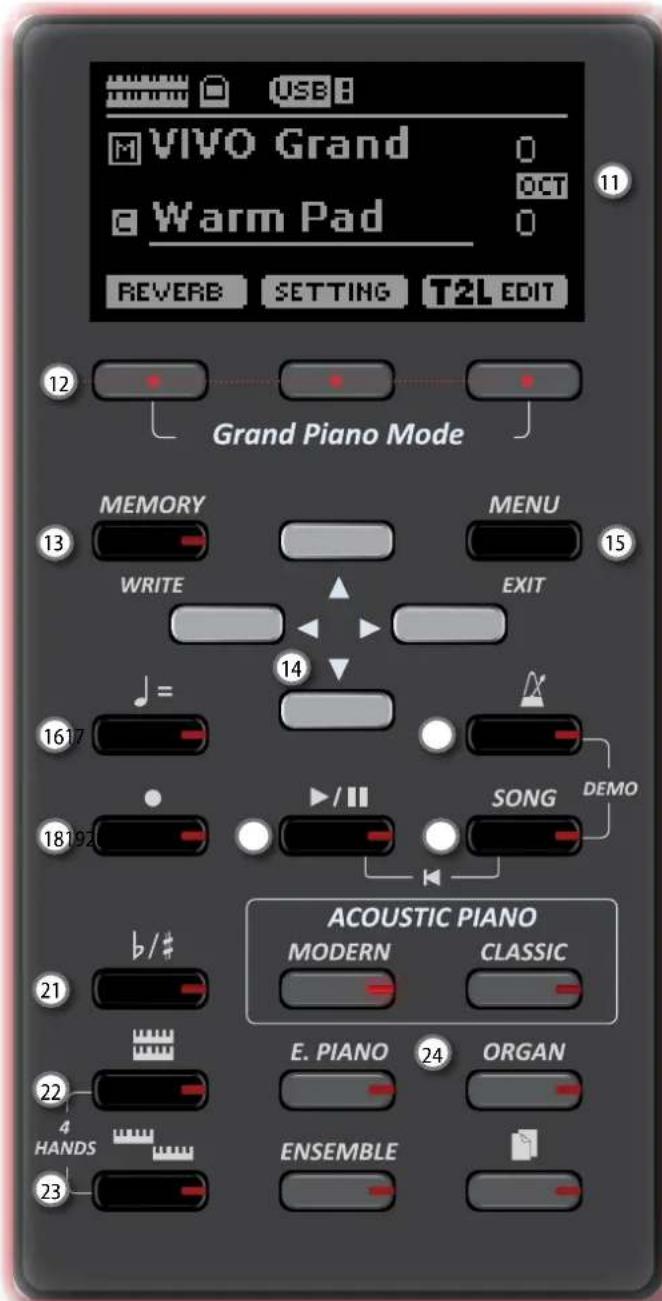
11 Display
This display shows information related to your operation.
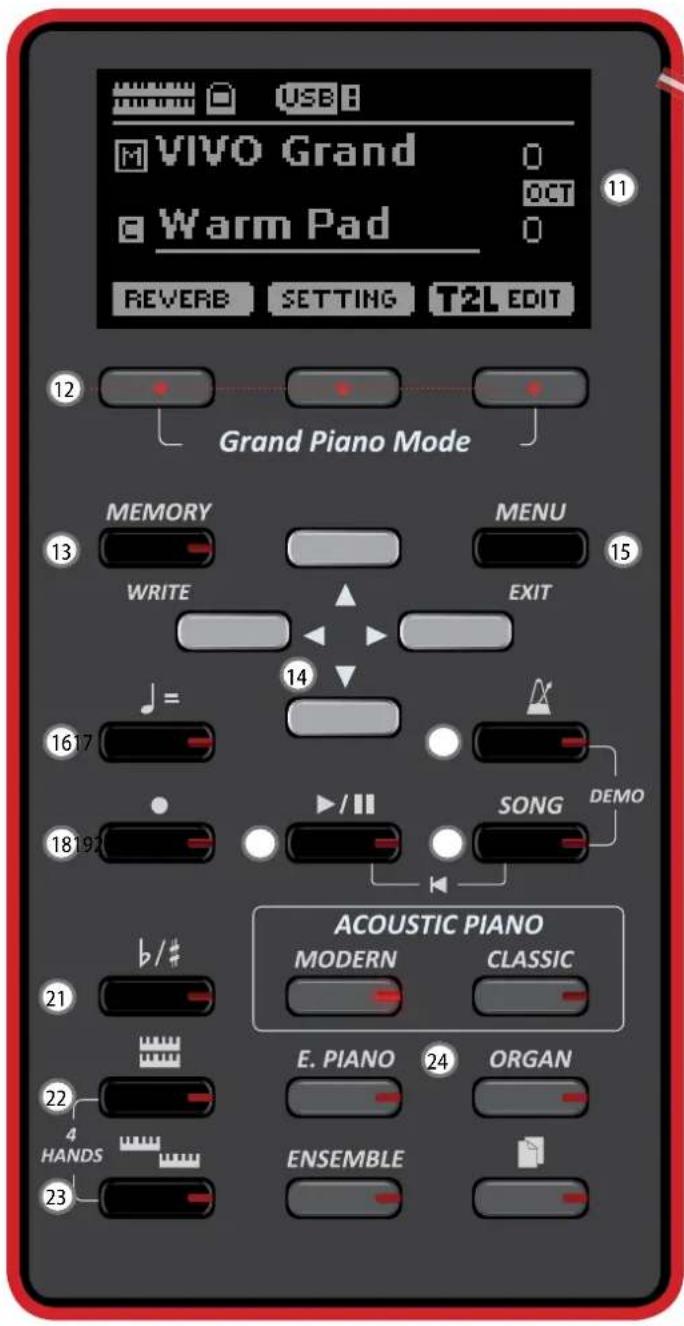
12 Function buttons
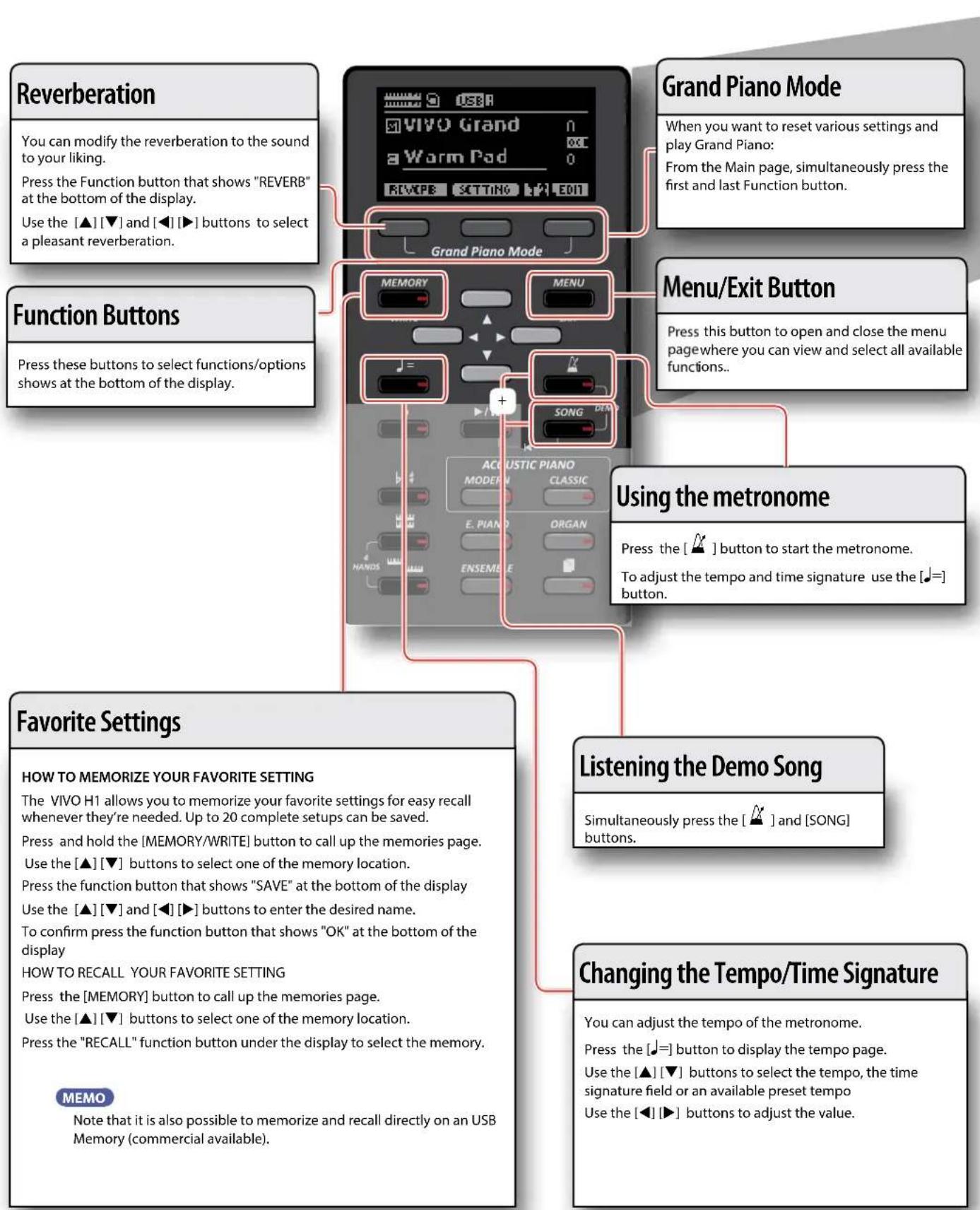
These buttons are used to select one of three functions/ options shows at the bottom of the display.
13 MEMORY/WRITE button
This button allows you shows the list of memories and then recall one of them.
Pressing and holding this button to write a memory.
14 Arrow buttons
These buttons are used to navigate around the various menus, adjust values.
15 MENU/EXIT
This button allows you to open and close the menu page where you can view and select all available functions.
16 1= (Tempo)
Use this button to change the tempo of metronome.
You can also enter tempos simply by tapping your finger on the button.
17 (Metronome)
This button allows you to turn the metronome on or off.
18 (Rec)
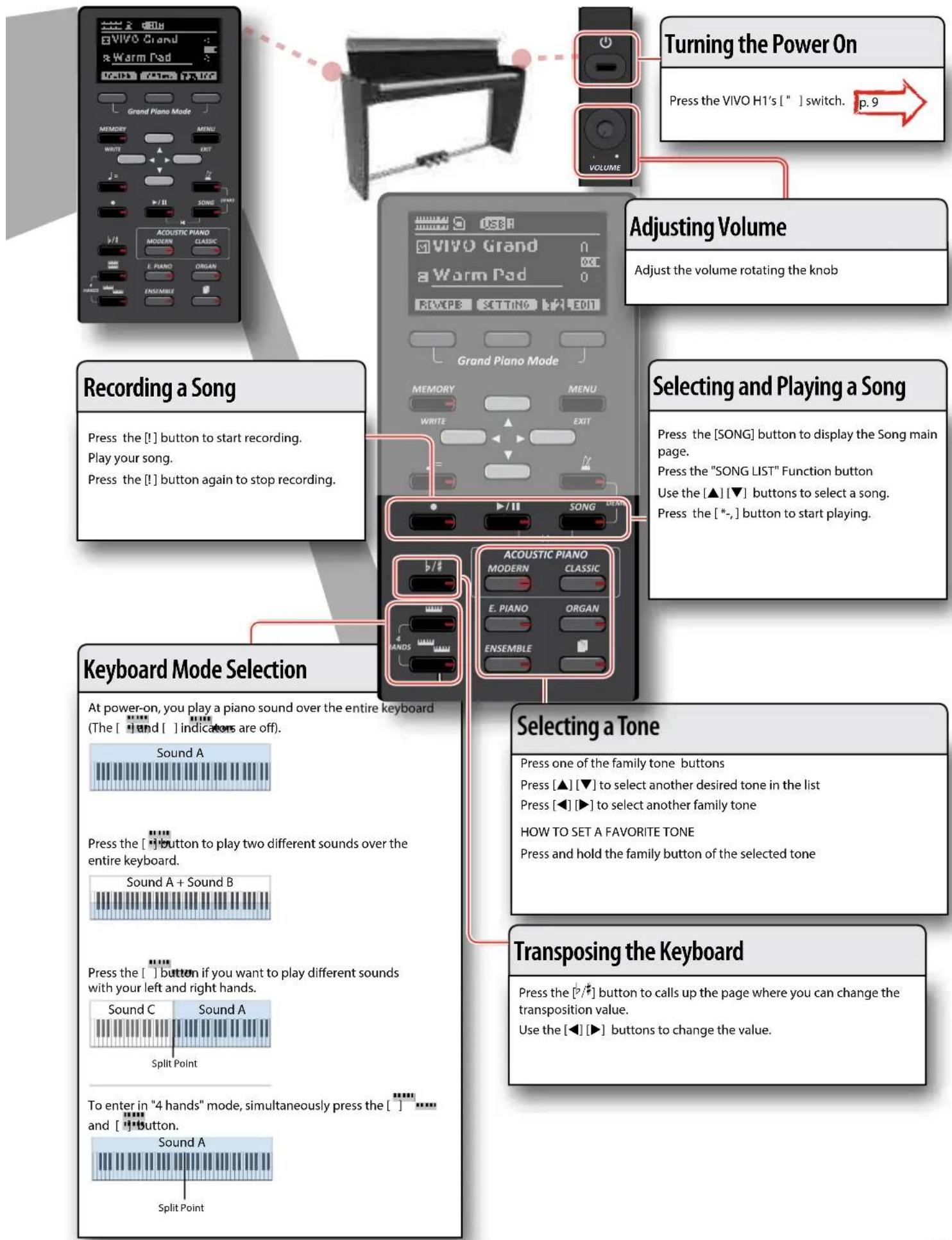
This button is used to start or stop the recording of your song.
19*
Press this button to start playing. Press it again to stop playing.
Press and hold it while pressing the [SONG] button to return to the beginning of the song.
20 SONG
This button allows you to switch in Song Mode.
Press it together with the button to listen the demo song.
21
b/
This button calls up the transposition function. Its settings can be applied to the keyboard.
If the button indicator doesn't light the instrument use its normal pitch.
22

This button enable or disable the layer keyboard mode.
Press it together with the button to enable or disable the "4 HANDS" keyboard mode.
23

This button enable or disable the split function.
1
Press it together with the button to enable or disable the "4 HANDS" keyboard mode.
24
These buttons allow you to select tones by category
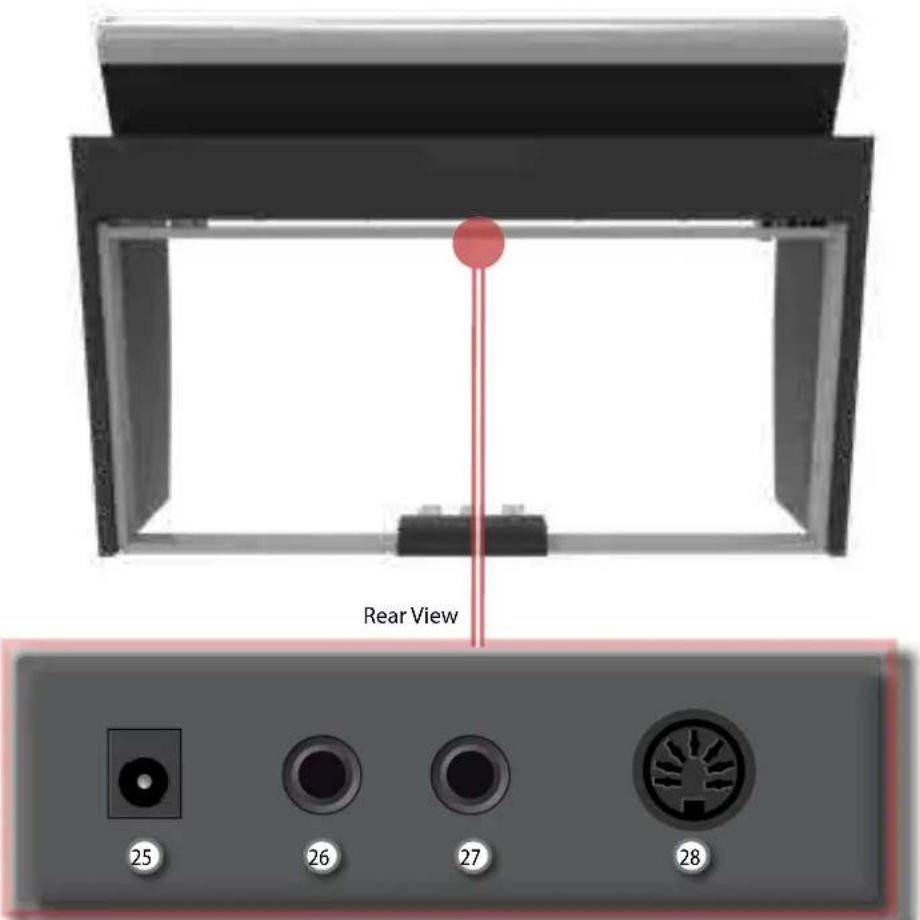
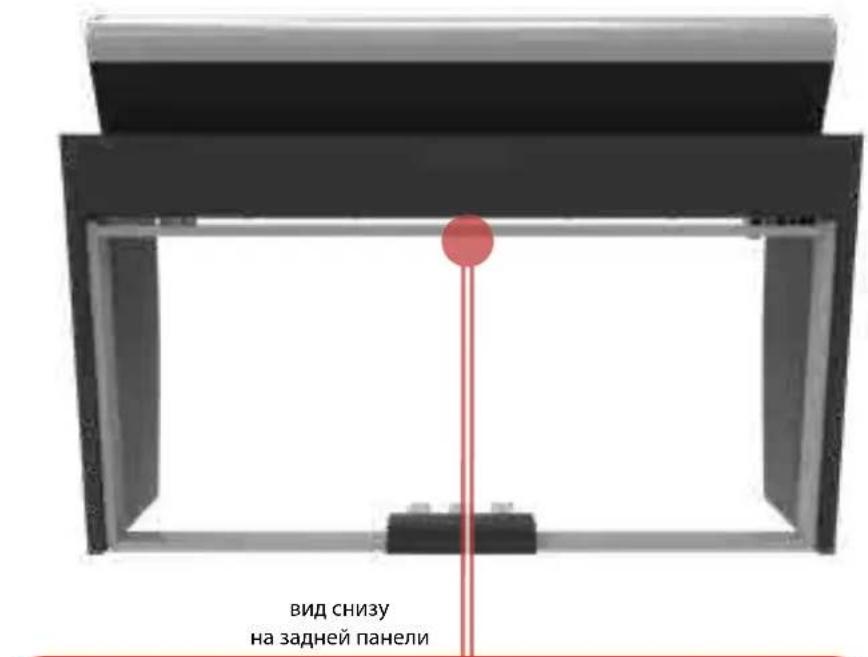
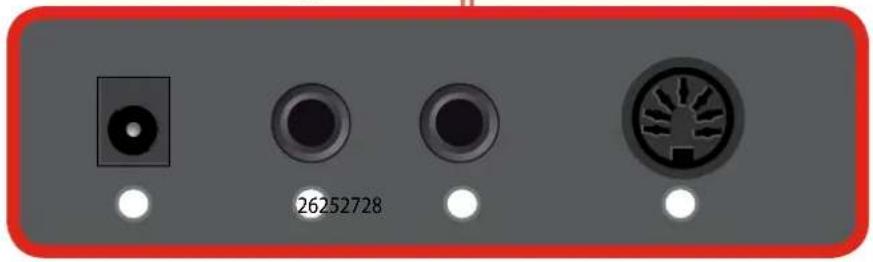
Rear Side
VIVO H1

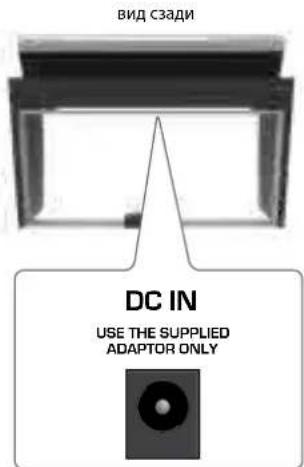
DC IN socket
Connect the supplied AC/DC adaptor here (p. 9).

AUDIO OUTPUT R jack
This socket allows you to connect an external amplified speakers.

AUDIO OUTPUT L/MONO jack
This socket allows you to connect an external amplified speakers.

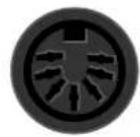
Pedals Socket
Here is were you connect the pedal cable.
Connecting the AC Adaptor
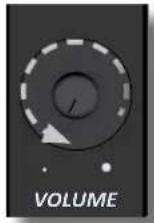
- Rotate the [VOLUME] knob toward the left position to minimize the volume.
- Connect the included power cord to the AC adaptor.
The indicator will light once you plug the AC adaptor into a wall outlet (Only for the VIVO H3 model).
To an AC outlet

NOTE
Depending on your area, the included power cord may differ from the one shown above.
NOTE
Be sure to use only the AC adaptor (DEXIBELL DYS602-240250W) supplied with the unit. Also, make sure the line voltage at the installation matches the input voltage specified on the AC adaptor body. Other AC adaptors may use a different polarity, or be designed for a different voltage, so their use could result in damage, malfunction, or electric shock.
NOTE
If you won't be using the VIVO H1 for an extended period of time, disconnect the power cord from the electrical outlet.
NOTE
To avoid malfunctions, never disconnect the AC/DC adaptor while the instrument is turned on.
- Connect the AC adaptor to VIVO H1's DC IN jack positioned to the rear bottom panel.
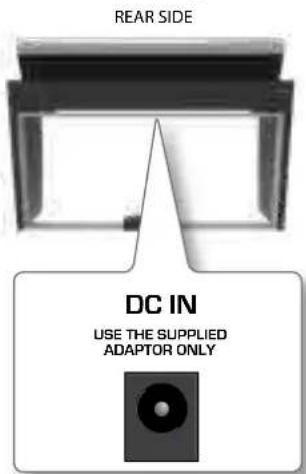
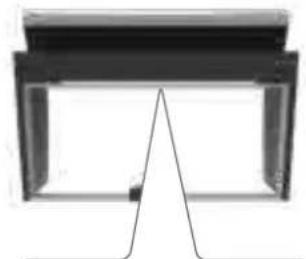
Connecting the Pedal Cord
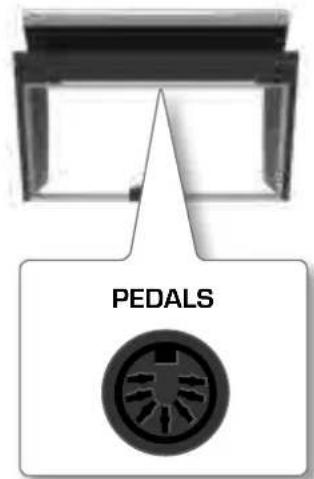
REAR SIDE
- Connect the pedal cord that come from the dedicated stand here.
For further information see the Assembling Manual.
Turning the Power On/Off
Once everything is properly connected, be sure to follow the procedure below to turn on their power.
- Rotate the [VOLUME] knob toward the left position to minimize the volume.
NOTE
Before turning the VIVO H1 on/off, always be sure to turn the volume down. Even with the volume turned down, you might hear some sound when switching the VIVO H1 on/off.
However, this is normal and does not indicate a malfunction.
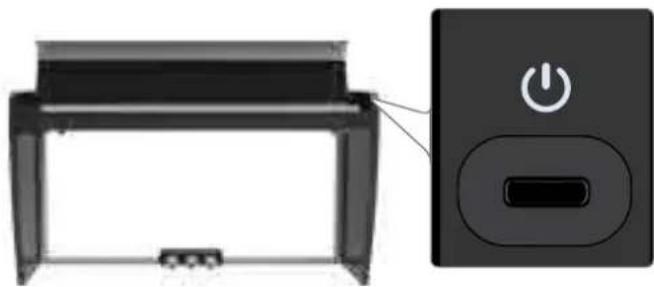
- Press the VIVO H1's [ ] button located on the right panel to switch it on.
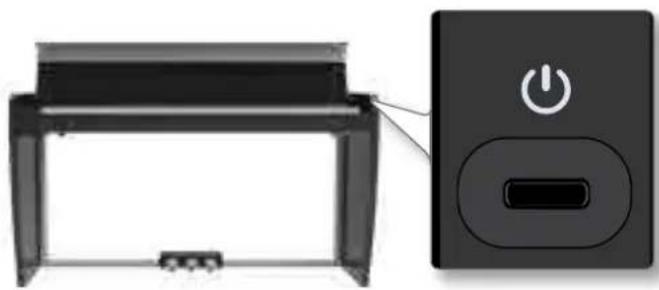
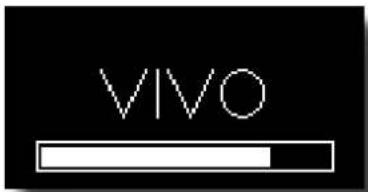
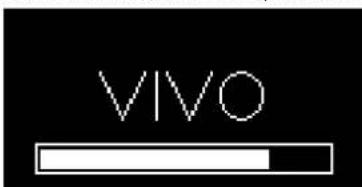
The power will turn on, a progress bar appear in the VIVO H1's display.
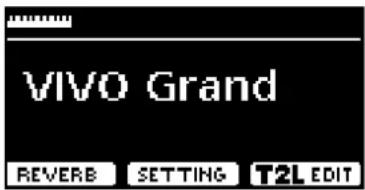
After a brief interval, the main page will appear. and VIVO H1 will be ready to produce sound.
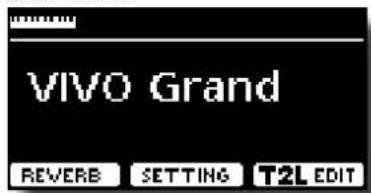
- Use the [VOLUME] knob to adjust the volume.
NOTE
This unit is equipped with a protection circuit. A brief interval (a few seconds) after power up is required before the unit will operate normally.
Turning the Power Off
- Rotate the [VOLUME] knob toward the left position to minimize the volume.
NOTE
To avoid malfunctions, never disconnect the AC/DC adaptor while the instrument is turned on.
- Press the VIVO H1's [ ] switch.
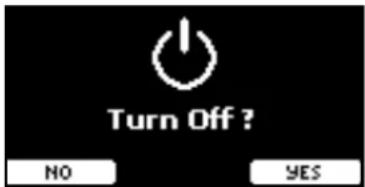
A power off confirmation message appears:
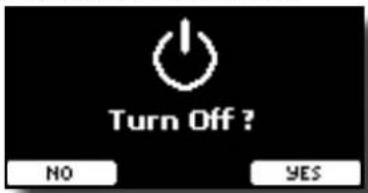
- Press the "YES" Function button to confirm.
The display shows the following message:

and the unit will turn off after few seconds.
If you do not want power off press the "NO" Function button.
NOTE
If you need to turn off the power completely, first turn off the [ ] button, then unplug the power cord from the power outlet. Refer to "Connecting the AC Adaptor" (p. 9).
If you do not operate the unit for a certain period of time while the power is on, this unit turns off automatically.
If you don't want the power to turn off automatically, turn the "AUTO OFF" setting off!
With the factory settings, the unit's power will automatically be switched off 120 minutes after you stop playing or operating the unit.
Shortly before the VIVO H1 shuts down automatically, the display starts counting down the seconds. If you want to keep using the VIVO H1 at this stage, press any button.
If you don't want the power to turn off automatically, change the "AUTO OFF" setting to "OFF".
Demo of the VIVO H1
Your VIVO H1 contains a demo that introduces all the best of its tones.
- Simultaneously press the [ ] and [SONG] buttons.

Playback starts automatically with the demo song.
- Press the [MAIN/EXIT] button to leave the demo function.
NOTE
All rights reserved. Unauthorized use of this material for purposes other than private, personal enjoyment is a violation of applicable laws.
Peripheral Devices
H1Tone List
| Num.NamePCCC00 | |||
| MODERN | |||
| 0001 VIO Grand 2 0 | |||
| 0002 Pop Grand 2 1 | |||
| 0003 VIO Live 2 2 | |||
| 0004 Elec.Grand 3 2 | |||
| 0005 E.Grand Trem 3 3 | |||
| 0006 Rock Piano 3 1 | |||
| 0007 Honky Tonk 4 1 | |||
| CLASSIC | |||
| 0008 Classic Grand 1 0 | |||
| 0009 Romantic 1 1 | |||
| 0010 VIO Upright 1 2 | |||
| 0011 Ragtime 4 0 | |||
| 0012 Harpsi 8' 7 0 | |||
| 0013 Harpsi 4' 7 ' | |||
| 0014 Coupled Hps. 7 2 | |||
| 0015 Pop Harpsi 7 3 | |||
| E.PIANO | |||
| 0016 Dyno Stage 5 0 | |||
| 0017 Suitcase 5 ' | |||
| 0018 Phaser EP 5 2 | |||
| 0019 Wurly 5 5 | |||
| 0020 Trem.Wurly 5 6 | |||
| 0021 Soft E.Piano 5 3 | |||
| 0022 Bright E.Piano 5 ' | |||
| 0023 FM Full Tines 6 0 | |||
| 0024 FM E.Piano 6 1 | |||
| ORGAN | |||
| 0025 Principal 20 0 | |||
| 0026 Princip & Flute 20 1 | |||
| 0027 Church 20 2 | |||
| 0028 Mixture 20 3 | |||
| 0029 Pop Organ 17 2 | |||
| 0030 Jazz Organ 18 0 | |||
| 0031 Blues Organ 18 1 | |||
| 0032 Reggae Organ 17 0 | |||
| 0033 R&B Organ 17 | |||
| 0034 Rock Organ 19 0 | |||
| 0035 Gospel Organ 19 1 | |||
| ENSEMBLE | |||
| 0036 Slow Strings 50 0 | |||
| 0037 Stings 50 1 | |||
| 0038 Fast Strings 49 0 | |||
| 0039 Stings Ens. 50 2 | |||
| 0040 Orchestra 49 1 | |||
| 0041 Dark Strings 50 3 | |||
| 0042 Stings Pad 51 0 | |||
| Num.NamePCCC00 | |||
| 0043 Sy. Strings 51 | 1 | ||
| 0044 80's Strings 52 | 0 | ||
| 0045 Classic Choir 53 | 1 | ||
| 0046 Space Vox | 55 | 1 | |
| 0047 Mnh Choir 53 | 0 | ||
| 0048 Choir Pad 54 1 | |||
| 0049 Synth Vox | 55 | 0 | |
| 0050 Warm Pad 90 | 0 | ||
| 0051 Dark Pad 54 | 0 | ||
| 0052 Soft Pad 90 | 1 | ||
| 0053 Square Pad 90 | |||
| 0054 Brass Ens. 62 | 1 | ||
| 0055 Brass Sect. 62 | 0 | ||
| 0056 Senth Brass 63 | 0 | ||
| 0057 Poly Brass 63 | 1 | ||
| 0058 Poly Synth 91 | |||
| 0059 Super Saw 91 | 1 | ||
| 0060 Fat Synth 91 | 2 | ||
| (MORE) | |||
| 0061 Vibraphone | 12 | 0 | |
| 0062 Xilphone | 14 | 0 | |
| 0063 Marimba | 13 | 0 | |
| 0064 Ceesta | 90 | ||
| 0065 Harp | 47 | 0 | |
| 0066 Cool Clav | 80 | ||
| 0067 Griovy Clav | 81 | ||
| 0068 Doctor Clav | 82 | ||
| 0069 Funky Clav 83 | |||
| 0070 Njon Guitar 25 | 0 | ||
| 0071 Steel Guitar | 26 | 0 | |
| 0072 Jazz Guitar 27 | 0 | ||
| 0073 Overdrive GT. | 30 | 0 | |
| 0074 Fantha Bell | 1010 | ||
| 0075 DEXI Heaven | 1011 | ||
| 0076 Acoustic Bs. | 33 | 0 | |
| 0077 Fingered Bs. | 34 | 0 | |
| 0078 Picked Bs. | 35 | 0 | |
| 0079 Ac Bass&Ride | 33 | 1 | |
| 0080 Synth Bass 39 | 0 | ||
| ITEMS | VIVO H1 | |
| KEYBOARD TYPE TP-100 LR: 88 - Keys Hammer action - Triple contact | ||
| TONE GENERATOR T2L: Sampling and Modelling Technology | ||
| MODELLING Reactive to player articulation | ||
| SAMPLING XXL wave size, holophonic recording up to 15 seconds on lower piano notes | ||
| SOUND WAVE FORMAT 24 bit linear - 48 KHz (Internal processing and DSP at 32 bit floating) | ||
| DIGITAL ANALOG CONVERSION (DAC) 24 bit linear - 48 KHz, Dynamic Range, S/N:106dB | ||
| MAXIMUM POLYPHONY Unlimited with 320 Oscillator | ||
| SOUNDS | 80 + Unlimited User (depending on the internal memory free), downloadable with file extensions .DXS and .SF2 | |
| MEMORY | Preset: 20 User: Unlimited loadable from USB Memory | |
| KEYBOARD MODE Layers, Split, 4 Hands | ||
| TOUCH SENSITIVITY 7 Types + Fixed | ||
| REVERB 24 Types | ||
| EFFECTS | 6 independent DSP Effects (2 x Main, 2 x Coupled, 2 x Lower) using "seamless changes" technology at effect recall | |
| MASTER EQUALIZER 3-band Digital Equalizer | ||
| PLAYER AUDIO | .wav, aiff, .mp3, in all format, frequency and bit rate | |
| RECORDER AUDIO | .wav (48 kHz, 32-bit floating) on USB Memory | |
| MASTERTUNING | YES: 415,4Hz to 466,1 Hz (adjustable increments of 0,1 Hz) + 2 Preset (440 Hz, 442 Hz) | |
| TEMPERAMENT | 9 Types | |
| USER TEMPERATURE | 3 User | |
| RHYTHM PATTERNS | X MURE APP for i-Phone and i-Pad (FREE) with multitracks audio patterns | |
| METRONOME | 13 Standard Tempo Preset | |
| PEDALS | Progressive Damper Action Pedal with sympathetic resonance simulation Progressive Soft Pedal / Function assignable Sostenuto Pedal / Function assignable | |
| Keyboard Lid | Soft Closing System | |
| DISPLAY | Graphic LCD 128 x 64 dots Organic LED, high contrast type | |
| CONNECTORS | DC IN socket | for supplied AC adaptor |
| AUDIO IN jack Stereo miniature phone type | ||
| Output (L/Mono, R) jacks | 1/4-inch phone type x 2 | |
| Phones jacks | 1 x Stereo miniature phone type 1 x Stereo 1/4-inch phone type | |
| USB COMPUTER port | Type B | |
| USB MEMORY port | Type A | |
| Pedals Connector | DIN connector: Left Pedal (Assignable), Center Pedal (Assignable), Right Pedal | |
| SPEAKERS | 2 woofer x 8.9 cm (3,5 inches) | |
| RATED POWER OUTPUT | 30 W x 2 max | |
| VOLUME LEVEL SPL | 108.1 dB max | |
| DSP on AMPLIFIER | Digital Bass Enhancer | Yes |
| Dynamic Eq | Yes | |
| 3 Band Compressor | Yes | |
| Power Supply | 24V DC 2.5A, supplied AC/DC adaptor | |
| POWER CONSUMPTION | Stand By: < 0,2 W Power On: 12 W Average: 15 W Maximum: 32 W "Erp" LEVEL VI for Echo efficiency on stand-by consumption | |
| DIMENSIONS | 1420 (W) x 360 (D) x 793 mm (H) (with lid close) 1420 (W) x 360 (D) x 1009 mm (H) (with lid open) 55-15/16 (W) x 14-3/16 (D) x 31-1/4 (H) inches (with lid close) 55-15/16 (W) x 14-3/16 (D) x 39-3/4 (H) inches (with lid open) | |
| WEIGHT | 45.1 kg (excluding AC adaptor) 10 lbs (excluding AC adaptor) | |
| SUPPLIED ACCESSORIES | Quick Guide | |
| AC adaptor (DEXIBELL DY5602-240250W) | ||
| OPTIONS (sold separately) | • DX HF7 Stereo headphones • DX Bench | |
VIVO | H1
Guía=rápida
Nonutilzzare in zone tropical
Tuttavia, Anything is normal and non-indicativo.
He HcnoB30BaTb B TpOnnuecknx yCIOBnAe
HINCTPMEHTN ERO OENK TINAHNA HAPCACCNTAH HA NCOHIOBZABAHNE H CYNOBHX TPOHNCK CEPDAI. TEMERPRTA kCNPKYTAQUA 5° - 40°C

HeHcnoIb3ObaTbHaBbcote CbIe 2000MnDypoBEm MOpA
INHCTPMEYNERO6BOKNTAHANMOKETNCHNBOBATCTOHBKOHA BICOTeDO2000 M HADYPOBHEM MOER.

HepeMOHTHPOBATb,HE BHOCTMbM3MeHEHBA KOHCTpyKTHB H He 3aMeHATb
3aHCACTn CaMOCTOATEbHO
He HnraTaeBcpeMoHApOBaBbNtMHT, BHOCTbAAMeHNARANMAOCToTeHo 3aMeHITb eO cAutaB. B Cyauey Heo6IOAnMOCTCBKIAKeTc b 6HnKaIIMAHU ATOPTOBaOHNNepBCuE-ENTpOM DeXibll.

Hepa3bupaTa camocToTebHo
E K BcHbA HIEHTCPTMNEI EROBIOK PNTAHNAE H NTHAITAEBC BHCNTKAIKA- IIAHO MIOHNOH O BYHINTPOKOMOHIOH

NCIOB30BaT TOBko BXOaun B KOMnIeK NTocTabKn 6IoK nMaTHA (VVOH7:
DEXIBELL DYS6150-2400500W, VIVO H3: DEXIBELL DYS602-240250W)
NIOIJIAYIeTOJIbKO 6BIOKITaHANH, BRIIOHNHBI KOMUJIENKTIOCTAOK.
NOIXIOJIOUeHNEy DTOPOB OO NOIHTAHM KOIEKOTOBNEy cEBSE3HNe NOBp
HCTNPMYTAH NJAKE B8Ba3b7y UAPN 3EKNPTUPECKEMTOKOM.

NcnoB3oBaTb TOnbKO BxOaAunB KOMnJIeK TocTabKn WHyp NHTaHn
MnnoB3yTE ToNko HHP DNTAHAR, BKNPOUHNNB KOMNNEKT NOCTABKK

36eratbype3MepHOro MExaHMnEeCKrO Bo3dJeCTBna Ha HHP NtAHm
He cfaaie He nepeepymbaierte ypeemepno uhp npnann. npeemepho
mEXAHNECKO BaepeCTBMOE KIOH NOPEAPDAtu HYP NPTANNA H BBAATbNOKAP
HIN IPOAOKHNI 3IOKTPKHNKOMTKOM

He CTABNTB HNCTPymEnH Ha HeYcTOMuBBIe NOBepXHOCTn
He CTABBLE HHTPYMHT HA HEYCTOHNHBE NOBCEXHOCT, C KOTOPBX OH MOKET YNACTB.

HeN03B0BbTOEeIaDyPTMnTOCTOPHMHnIpeMAMTOnHApAaTbB HINCTPYMENT; HE CTABNTb EEMKOTcXHJIKOCTbHO HA HHTCPYMET
He CTaBte HA NCTMPTHENT BMOCTH C KJNDKCTHO [HAPTMHP, TAKCAH B BOYIO] He DonyckAte nonaDANAH BYHTb NOCTOPOHHX ppeMeTob [HAPPMEP, BOCNA MNEHOUMXMA MATEpAHOB, MOHET, PNOBOEIOI HMI KJNDKCTOET [HAPPMEP, BOYI IN KOCA]. 2TO MOKET B3BaTB KOpOTKOZAMKHANE I HEPABOTOCNOCOHOCTb HNCTMPTHO.


HnKoIa He yctHaBnBaIte HxpaHITe MHCTpyMeHT B Cledyuux MeCTax:
TAM, Ie HNCTPYMHT MOKET NEPPERCTI KINI NPEOEXNAITBCn [HAPVIMep,Ha CONHJI A BAOMOBIEK INI BOANE OBOPERBcA]
B3abIMeHHbIXMeCTax;
BcbipocTN (HapnMep, B BaHHOH)
BMeCTax,1e B03MOXHO nonaHHe coJeHo BVb;
NOAOKM
TaM,TeMHOReNKeKaHn HbINr
Tam, Fae 6030KHeHn. NpE3eHHe npehnei TmeNematpyr (Ha noBepHOCHt H) 1000000000000000000000000000000000000000000000000000000000000000000000
TaM, TdE Bo3MOXHb Hpe3MePbHe BnBpaaM N TpCKa.


He6pocatb nnoBeprataB CunbHOMy MExAHueckOMy BO3dEHTBHO
He 6pocaihe HHTpymH.3aunHTE eTO CTbHORo MExAHueCKOro Bo3eJeCTnA

He noqKnIOu4b HnCTpyMeHT Kpo3ETKe, K KOtOpO nOKnIOHcHcNWMHOrO
dpynx yctpoiCTB

HeNIOJIHOHAIeIaHpyIITAHNI KNEKTPUcECKoP O3eTKe, KKTOPOYXe NIOJIHOHENO CHIKMO MIMO DpYTHy yCTPOCTA.3TO MOKET nPIBECTN KIEPEREBY ANKTPCCKOIN PBOAOKIN NbIBATBn NOxAP.
KeHToPbB3Bc0hBb3x 3aHnCTpyMeHTOM 065aTeAEH bTex MeCTax, rJe pNcYCTBYOT JETM
HINCHNAY HNCTPYMHTB TEX MECTAX,1E PNPCTCYBNTOT, HAIKOJDAHE octaHnIe erO be3 npNCMTPO.CnDITe 3A detbM,TObbl OHHe HCNIOB3OBAM HNCTPYMHTE NO HAHAHHEH

36erabdtmtenbHoro mnoB30BaHnHa nnoHnTpOMKcTH
3TOT HNTPYMHT, KAK CAM NO C6E, TAK IN BMECT CO 8BKYOCUNHIOHM OOBOPYBOHANIM NAYHAMKAM, MOKET BOCIPONBDOBt BYK HA POBYHIN, CTIOCBHIXP NPOBCTK KNOHOR NOTEP CYXNA. HE KNOHBYBE rO eoBPOE sPMAH NHOHOR PPOKOKTOI INH A HENKOOPTHOM YPOBHE PPOKCTH. ECN Bn UyCTBeyETe BEOB BYAAX NAACTNUHYO NOTEPO CYXNA. HEMEPENHO NPEKPATITE NCOHOBAHNE IOBAPATIEC K OTONAPINHOYOR.

BJIIO60 anOMaHbHO CHITyauHH HeMeJINHeHNOt OKNIOHTe HHTCPyMeHT
BbIKIOHTe VHCTDyMEHT NOTKIOUHTE ETO OT POETKN.ECN:
-6nKNTAHH,HypNtAHHNNBnKa Hpya NtAHN NOBpeXdeHa;
-BO3HNKdbIMHINHEO6bHb3a#x
HaHcIpyMeHr Hanr Hanr DOKA
- INHCTpyMeHT yTnB E KNDKOCTb MNN KNDKOCTb NONa B INHCTpyMeHT;
MHCTpyMeHT He paobotaet ann pabotaet HEKOPpeKTHO;
HcHpyMeHTyHn Hn erO KOpHyC hOBpeJnch.
Pocne 3TOO CBAKINTEC B6HKAANM ABTOHN0BAHBM CEPBNCBHUM UHTPOM.

Kpenko depknte Bmky ntaHn, noKnnoa nn otknoua 6nok
NTTaHn
OTc0eMnHb6nKnTnAaHbOHTNcTpymTaHbHaNtOPOBETKn,BCERda depHteCb3aTekep,aHe3aHyp.BnptnsHbOM cYyae uHyp Moket nopeDntiKa.

He npKnnoaTh Hn OTKNooatb 6nK nHTAnHm MOKpbMn pykann
HnOHaJa He depKtBe 6KnTnAHu INNkMkPbMnPyKAM, nOAnOHau NmIKoAra erO tEeKnPtueckou PoTea.

Copepknte wtekepb6noka nHTaHnB qHCTote
PnepmoaeknOIOKNAeIe 00k OTHANHcyx MoTePAEINPOPTA PAIE TNEKEPB K00kTNHAA.

EINHCTPMAHDTIOOE BPEMHE NCIIOB3YEETCKNIOHIE ETOOT CETMTNTAH.

PepoTbpaaTe nepekpyuBaHne npoBdoB
Catarapetra nepotratpaaatb nperekynuhaane kabieni nproaodn. Bce npoada n kaenb nnonka hneh bhectocnydnae nenet.

IpeyxOoM3aHHTpyMeHToM OTKIOuAaTe ero 0eTH NHTaHH
NnpeepoepaueeHnn yapa3neepnckcemKTOKmNpOePekHnHNCPTyMeHTAOTKNOBaeIero, npEkeIe pOtpaTbNnUcTtB (cpt.791.

Pnpro0eOTKnOaHTe6nOKNHTAHNAOTp03ETK
EINBBAUH MECTHOI OIBAIIHNO rpeynpkeJHnO R PO3E,OTKHOHTHE NCTHPMTN0OTPO3EKNI.

He npnneMeNTe naIbIky KpbIikK KnabHaTpybl
OTbKbAaBnKApKbKaRbKbUkKbKbNtBbU, bDyBbHBMAtmTeMbU, cTbOeBHe NpOeMMeTbNaBbUb (kAcCBOn, TaKcYKae, oocEhHODeTKeM). PekOMEHyDTaHd3Op B30CnLbCN, eON4 3a HHTCPyEmoTH M3aHMOIaTOCTa.

He oIbokauHbawBteCb HA NcTcPmEnTH Hc StabBe HA Hero TzKekJlepePnIdMeTb
He BCTaBAIte Ha HNCTpyMeHT HA CTaBBTe HA HERO TAKKEnbpeMetn.

Mepb npdoToPoXHOCTn npnpeMeueHHHHTpyMeHTa
- TPhaCnOPTNpO6OKI 3TOFO HCTMpyMeTA D0JIOKHO 3AOMMaTHbH MeHEeE JYBxQeWEN. PioNTkA B CDOHNOyNEPHEETXHCTpyMeTbMOKET 2AKOHUHTCB PAOBMO CTINHb, APNYIMPAOBMM NIIIO NOBpeKqDNEMH HCTMYDMeHTa.

NepemeljatbHTHNPMTNCHNYETAKKPAHO,BCERaCOXPAHRAeroB ROPSO3ANTAHOM NPOLOKEXHN.
-Ппгелемецниннчртума ace поразда доржь bbytocoeindehn.

Pa3MeaTaB B xopo0npo8TpMaEBOM nomeeHH
HNTyPmEHTn eero 60k nTnAeONKHH paonnonaTbCA TAK, YO8bHe 6bna 3aT syTHnHaX XECTeEHN BENTINAA.

He hnoB30BaTb TpOnHueCKHX KINMaTHueCKHX 30HaX
HrNCTPmEHTIero 6oKo NITaTHA PACCHTAHI TOJbKO HAypehenHHK KINMAT (He TPOVNECKM).

Pacnonaratb paoC p0eTko 3neKtpuecko cetm
NHTyDMENTJONKEN6BbTcYAHOTAOHNOPAIOOMCpO30EIKTHAKTQbOHJI pRnHOEOAIOMOCTHO EROKTOMOHO BINOIOKTOOKHOOTOTOTOTAIHAK
yCIOBHeIe 06O3HaueHnA
BpykoBoIDCTBe nCnONb3yIOCTc CnEduOuMe 06o3HaueHn
BHIMAHME
Baxhna 3ametka,6b3aTeNbHO npOptyte
CTIPABKA
CnpabKa no hAcToIKe nnNfynKUIN
COBET
Pone3hbl COBET
POMMIMOyHKTOB Bpa3dene «TexHnka 6e3oNaChocTN» Ha cTp.74 npouHTaTe cnedyUoee:

06 3neKtponTaHH
He IIOHNOA HATIOTNCTHPMNETK OAOHPO3EETKHE IMECTE C BHTOBBM NIEKTPONIPDPOPAMB, KBOTOPHX INCNbYcTcO6PAHTHn Pneo6PBO3aTeBn 3eKTPNECKCOKTOKA INIMOTOP (HAPIMEP, XOJIINBHINK, CTMPBHNBA MauHHa IN KOHNJIOHNEP).3To MOKET COQdA ToUOMTHmUyM.
BIOK PINTAHN MOJKT HAPRABTCH PIONC JIINTEHBOHO HINPEPBRHO HO ICHIOJIOBAHY. 3TO MOJE BHTb NOPMAHBMHN PACEBHANEM TENPe Yeepo KNOK PINTAHN. ToBof H3E6kpatte Npeprrpe, paoMaeuAahtne oKnO PINTAHN ha Noany oXPOIO POERPBNAOMM MECTe.
- Pepen noKIOuHHeM KpyrOmy oBOpOyOBaHnO BbIKoHTe NtHaHE BcEx noKIOHOMbMyDpyr Kpyr npOobop. VNaVe echt pukck AekTpuKecko rO npapa nnpaO bOpOyAOHmN.
BnAtoaDapyHINMTOAUTOFF, HNCTPMAHTOHTKIOHOATCRAOMOTGEFIBHO, cHcHNEHCNOY38T BTeHNHE 120 MNTHY (2 YACOB), YTOB6I3EKBATHEHHYXHOOR NOPTeNEHNAI ENKTOPAHEPNR, ECNBA XOTNIET OTOKNIOHHTb ATy FKHUNO, YCTAOHBEI NAPAMETR AUTO OFF) B hAHAHNEOFF.
BHIMAHME
HactpoKaФyHKmM«AUTO OFF coXpaHReTc NOCE OTKMOeHnHnCTpyMeHaTa.

OpemOHTe
IpeoditpBakovKHtPmTnEBAPOMHTCoxpAHIeBCBaBauDahNHeHbAUSHB-NAHOHNIETe BceNoBcBatoBcNaeDahNHBeMOnyBtBuNotepaHcy. CneyeTpBcTaDeaBaNatbPeBzHIOKoNIOBAXBHnDHNHbNtAcPoEK,FOO3An3bCBAbTbXb6MaMRe,ecnHBo3MOxHO. DexibIIeH HeHcet OTeBTrEtEHNOCTaNeToPOkNoBcBatoBcNooDahNHx.

O paonioJoxKeHH INHCTpyMeHTa
- He paoanaratahe HNCTPMEHTCNHIOKIMENKIOK YCUNNTENMAOCHTHINIHNYYDPOYTOOBOHDOHO, codepkaeauoouc BonHNOBn CnoNBBE TnAPCOPMATOpb), 0T60h136kXahtb HABOKDQ. Ecnbl BnCHNIITE yUM, nomenHtte paonAOKHeJIH NCTHPMeTAUINyEYpHETe OHTHEOTOHNUK BOAMOXHXH HABOKDQ.
He IIOIJIaJIyI INHCTPYMHTB6NIIN TIOKAN3OPOIIMI PAPIO. 10MOKET BHOOCITb HOMOXI 8PNOH PADIKOCHNIA. - ECN Bb Hcnohbaye IPhone MM IPad AmeCTe CnHCTpyMeHTOM,peKoMeHAdyEe NpeBecTt B PekVM NoNTa, T0b6u H36eKaTHbUyMOB, 8O3HVKAIOUX PPIN PepeDAe DAHHBx 3TNMM YCTPOHCTRMM.
EeNn pAOM cHNTpyMeHON mCOnblyOHTcRc cOTOBte TEnefoHou,MOKET Bo3NHKAt bUyM. B 30mTcYyae CNEyEt yOpabTcOTOBb TEnefoH danBte OHTcPmeHa Hm BkTHIOHb erto.
He noBaeprAte HnCTpyMeT B03peYCTBnK Upe3MePbHOrO XapKa Vnu XoLOna, PpMmIX CcmHcHxN Luey. He pMaJIeAeIe PpOM R C HApEeMBePbHrN MnpOpBam. He octa- nate B MaJInuH h zu cienl deh, KcTePpMaHbHt EtemepATyD MoRy ETOCNOPTNt.
BytteOctopochNc HcHTPcMnTOn pRpeKTHnpepanaTepeNapTepyI.13-3aTOrTOH HEM KEMOT KcONITbB KOHNDAcT. HcHTPcMnTOn MOKET bInyI 3rCPOr, cNecI eIOHIOBzOBAtB, He JoQDaBwBaW BcKsAHHKOHNBOCaHcTA. cNecI yBaC bOeI cNcHmH, YTO BHYrE TcHPTOPMnHa TRe OKnCHENPOBaRTB BnTa, OctabTe rHO He HAcoXnIOK cAcOs, HcTOpHbOg, HcTOpHbOg, HcTOpHbOg, HcTOpHbOg
He octaBHTA H HCTCPMHTE HADIOI BOHIMOBIE,IIACNTKOBMOI MEPO3HOBIOPEPmeiMe.1s-3a 304 MOKOT NOKPDBITbOtDeka
H octaBnIe NOCTOPONHAE pIeDMHT HA KIAHAType IVCTPIMHTA.OT 0TTO MORY TIPDREPTKCHKINAHMEXHAMK HAIYATND - He HANOCHTe HA NOBEXPOHCTb HAKNEKIN, NEPEROBNOI KAPTIKHIVN M DORYV KNEKIIKIM MATPENNI. KN BHYET CNOHKO OHUOTNTB, A PACTOPRTIEB NORPEEPOT ENOJKNK.
He CTABTe Ha HNCTPYMENT MIXKOTC JXIKOCTBO. HJSEBAI T NIOHOT3083N1CPIEe, IAKA DHAHTTE, NAPHOPEMEN IIN ANKORI PNDMA C HINTPYMTOM. PIRI NOPAJAHIM NIKKOTCHTA HA NIOBEPXHOCTB HINTPYMTA HEMEHNHO POPTPITcE cyxON MARKON MATTEDJI.

06yxoae
Iyoxla 3a HxctpyeHOM TcNOnb3yIte MAnkyo MAtepu, CMOeHyyo Bcnrka Tnnoi BoJe. XopoOJ E bKIMtae, 3aTeB aHOMpehMHa IaBKeHHaMn PnOHTbe BOO nOBepkXocht. PbIOJIaNDBaBH cINOWOM bONbue YCINN, MOHO NOBepdrt OITbENIKy.
HJNCTPMEYCNIOI NNOHNBOAHONO HUYKDAOTCHB OOCOBENOH DUTYPHON HXQYE. PnHbEHOKMOO YUADNTBH MAFOK NHEPBETMENKOH. XOyJ DNOJI KEN IPOBAAHTBCNA TAKIM OBAP3OM. OTUBS KINKHOVTB DAHNEH A NOHNBOKBYO B 1636KANBEO BAOHHKOBB EHNPAUPN. OTENKTAYN PAnBbE YUADHTCHCMOENH MOK MATEPEK, A 3AETM CXYOH MATPEYN. B CIAYAE CHNBOG TARAPHHNHO MOKET NIOHMBE HOBSLWIOE KOHNIECTBO MOIOJOE CEPCTDA (HAPHPMEP, PBNMTB NOCYD). HE KNOBSYITE HINTTUIE CEPDTA, OHXTMOX MEOT NOPCTAIBT OTDENZAI HA NEHOT MYT NONTBNTCN TPNLHNH. HE KNOBSYITE CANTEKTA I PONIKNIOI.
HeNCHONBAYe CHTNPOCOEDPQAKIINCECPD3A,PACTOBPKTENNNH6EHNN,TOMOKET PNBNTEKN KCMHEEMUNIUBETA INDEPOAMANIA

06 abTopcknx npabax
- Deixlich He NCET OBTBCTBEHONCTA 3IIOBIE CBRAHMBE C VIOITBOAHHEM 3OTOTN HINTDHYMTA HAPDHUYI NIOBIAOEBAMET ATOOPXK IVPAB.
3aNtnc, konipnoabane n paicnpocpaheene oobekto 3auuhtb ATOPTKIN npaB (TceH, BcHTyTNnV Tn), pnpnaeJkauxmpTeBmIiMaam, Ea3paeLHeHH bTAIDenBa TaHKW npaaepieJeYctO 10AOKhy. - Bitstream Vera aannetra toprooB mapkoi Bitstream, Inc. Bce npaba 3aunueneH.
iPad u iPhone RANKOTCH aperntpnpobaaHbIM Toprobbim MapkaA Apple Inc.
App Store 111111111111111111111111111111111111111

OBheuHnxHaKoNtTeJxNaMaTn
BCTaJIbITMUSH-NAKONITENI (NODAKOTCRAOTJENHO) BHTEEOUSBCNEUYETAKKYPAHO NOD PAPINBIHMN TMYON.
- 06pATEOOCOBEBHHMAMHeHcNeDyUouMe MeblpeoTOPOXHOCTH
Bcerda CHIMMAE C c6e CTaHTNCKOE HAPnRNEHn, PnPKOCHYBUHCB KcHcM-1b6yBaMETAHNCKOMY, PNPKDe Eem 6pA7B-1SBAH-KoHNrTbn.
HePiKACaTcBxKoHTAKTAMUSB-HaKoTtHnH HeIIOBepRteHXAqP3HEHnHO. HeIOBepRteXHBaKoHtHnBOe3bTMBOBcOXM BcOcMXTEMepatyp (HaPmpep, PPMHoeCOnHHNHeNpyBAkZKoTHoAABOMFok)
He noDBepratue USB-Hakonntenb BoaedCTBnO BnA.
He poHnTe Hn He noBepraTe ero nnnne Tpacke.
- He ToKHOHAIATHE USB-NaHKOHTeBb BO BpEMBaTHEN H3N2HANHHX (HAnPIMEep, KORDAHINKUATOP MAER)
He nonb3yIe USB-KoHcHTpaTOpbI dnn noKnouehn.
- 3OT INHCTPYMENT MOKET pa60Tb cNoctynHM b npOdaKe USB-HaOKNTenMa. KynHb TAKHE YCPTOKTB MAKOHO BOMBIOTEPbIX MaAIAHIX, MaIAIHXx JIKKTPOHHN A TAK DaeE.
Iannaninna ayana HsuNakohonnetoh,ohDongchen noedepnixbahtbAksocnoCIOpOCTB Ipcnepa daHainh. He ace hAnonenmte Moryeepnino paoobatc cTtMnHcpty

Dpyrne npedocpeken
CopepkHMoe MOeHTb6bIyTePBOH V3-3a HcNpPaHOCTeH IIN HepePAHbHorO
oBaouaHn. 10b6bEeKbYyTpaTHaDHNs, HACTOBTEPOKcHEyepHmepNOJ
Ceckn DaBHe p3eBpHBe KONIK BAHKpDAHbXH N BHeuHMe USB-HoKNTePe
Bcnyae ouh6ok npn Boc7aoheneHn panaee coxpanenbHex daHHnx Dexibell He hecet OBTRCTHEHOCTN 3a noperanHnne HnHHnpe, PAHO KAK V ayyuHnHy BboHy im DYrtne TPOEP, C83AHnHcCypratDANHHX.
He npnKnaBbAitre 3pe3MePbHx ycmnn, pabotra c KhoNtKm, npeKKnOaTeTMM, pykAmu, CnaIepAmu, a TAKeDPyMn 3EeHTAMM uynBaJIENu v PAnBbEMMa NINCTpyMeHTa. TybOe obae MeNEX BbBAtu NONOMY.
He daBHTe CnBHO Ha dncnnne.
NOMKOMYAJAHJHINCTPMEHYAIEC3EJI7THITE3A1IHTEKEP,AHE3AIUHP.ⅢAEBOAMKOHOPOBDEKIAHABKEBINKOTOPET2MBAHKHAE
WcnoIb3yIe IHnCTpyMeHT Ha pazMyHOH rPoMkOCTH, YTObIe H TePoBxOHTb COeEe, OOC6HeH NOHIO H aHO pAHO TPOm. Ecm BAM He XbaaTe rPoMkOCTH INN Bn IHPraTe No3HO HOHO, BOcNoIb3yITcEh HayUHKMAMA.
Ja TnAmpKTOAPOKoH NHTCPMHTA KNObIyBtOg PrrnHAnHbYIO yNkO8KO Yn60
NoXoJIuHIIeYnAynokOuHHe MATEpHnAI. He TnAPKOnTpyE HINCTPmeyB O BnOHyOc
Bo 36ekHHe nolomok He cJeDyTe npKnaDbibaT ype3MepyIO Cnly K mIHTpy.
PnKIOHcHHTyRyOcHbAeannapatye Cnyet Kaenm H3HbM c0pTtBHeH.

#
BkHueHHe/BbIKHueHHe nTaHn (CTp.79).
3aBODCKHe NaCTPOKn npeyCMatPNAOT ATOMaTNUeCKoe OTKNIOeHne NITAHN NOcNe 120 MNHT npocToA.
EcnHcTpymEt OTKIOUINrCA BATOMaTneCKN,BOCnONb3yTECb 3TOKNHOK, YTO6b CHOBARKIOUHTb. YTO6bOTKIOUHTb ABOTMAUeCKOE OTKIOUHeH, yCTAHOBITnpametp 念 AUTO OFFB 3HAeHHe 念 OFF
BHUMAHIE
Bo 36ekAHHe HcnpaBHOCTe, HNKoRD He OTOeHNrTe 6nOK nHTAHnPn BkIOUChHOM IVCHpMeHte.

VOLUME
3Ta pyka ynpabnreT o6eI rpmkoctbIO INCTpymEnTa.

USB Computer
KToMy pa3bemy NOkNIOUaETcKOMNbIOTep C NMOOuBIO USB-ka6ena.

USB Memory
K TOMy pa3bemy NOknoaOTc BHeHne USB-hakonnten narnTn.
BHIMAHHE
BCTaBnIe USB-HakOnITe bAkiKpaTHo, y6eDnBbIcMb TOM, 1TO OH mIEe NOxOJUH pa3bE M Bbl BCTaBnIeero npabHbON CTOPHOH.
Dexibell he pekOMeHdyet HcNb3OBaB Hn AKTiVBHbe, Hn naccNBHe USB-KOHUeHTpaTObI. NQKnIOaHTe K ATOMy pa3bemy ToIbKO HenocpeDeTHBe USB-HAKOnUTeB.

Ppabae neaJIb (dEmnIepeHa)
Hotb, B3TbE C 3ToN neaIbIO, 3Byat nocne OTnyckAHNA KnaBnH BNNOTb Do eCTeTBHeHHoro 3aTyXAHNA.

CpeHnna neaIb (coCTeHyTo)
Hotb, B3aTbe B MomeHt HaxaTHa HneAaB, 6ydy T3ByaTb nocTe OTnyCKaHn KJABuH, a HOb, B3aTbe NOcTe HaxaTHa, 6ydy 3arNyTaBCa NOcTe OTnyCKaHn KJABuH.

Jebar nea
3Ta neaIb deJaet 3Byk poarN nnaHnHO Tmwe mRrYe.

AUDIO IN
K TOMy pa3bemy MNHN-NeK MOKHO NOKIOHTB BHeHnaydnoctouHnK (HaNPmep, CD/mp3-nneep).

PHONES
K Tm paBemam MoKHO NOKIOHTb OHy UIN DBe napbl HayuHKOB. BCTpoEHbIe HAMIKN npH OTOM OTKIOUATcR.
10 Kpioqok dny HayuHnKOB
CIOdaMOXHO NOBecntb HayuHnKn.
11 DnCnnnei
OTo6paKaet HΦopMaζuO TeKuux DeICTBnX.
12 KhoNknФyHKn
TtMM Tpem KhoNkAMn Bbl6npaotc cyHKun, oTo6paKaemble BH3y kpaHa.
13 MEMORY/WRITE
3Ta KHONKA OKpbibaet CINCOK 6NOKOB NAMTNI, KOTOPBEMOXHO 3aRpyKaTb.
YepKbKaHKnKpy,MOxHO nepe3aNaCtB 6nok narnTn.
14 Khonkn co cTpeKamn
C NOMOUBHO 3TNX KONOK OCYUeCTBnRETCa HABIRaUN NO MEHIO, YCTaHABINBAIOTCA 3HaueHn.
15 MENU/EXIT
3Ta KONKa OTKpbBaet N 3aKpbBaet CTpaHnCbMeHIO, TcMoXHO INPOCMATPnBaTb N3MeHrTb HAcTPOKn.
16
KHOIIKaIIN3MeHHeHTeMnA MetPOHOMa.
Temn metpohoma TaKxMe MOxHO N3MeHNTb, Haxmna Ha 3Ty KONkY CacTOTOn HxKHOro TEMna.
17
BknquHHe/BbIKnQueHMe MeTpOHaMa.
18

Khonka 3anycka 3anncn
19
KhONka 3aNycka N OCTaHOBKn BOCnpon3BeDeHna.
HaaTne u yepKnBaHne 3Toi KHONBMeCTe C KhoNko [SONG] Bo3Bpaaet K Hauany neCHN.
20 SONG
KhoNka nepeKnIueHnBpeKm ayDnONnEepa.
PnOJHOBpeMeHHOM HaKaTmC KHOKoB Bocnp03BO-DNTc DEMO-NECH.
21

KhONka TpaHCNoHnpoBaHa.
Ecn HnHnKaTOp KhoNKe He rOpNT,3HaHT,KnAbNaTpya B 06bHOM CTpoe.
22
3Ka KONka BkIOuaeT/OTKIOUaETpeXMM HANOKeHn 3BYKOB.
PnHaxaTN OndOBpeMeHHO C KhoNkoI TETcpeKIM 4pyKn.
23
3a KHOJa BKIOHaET/OTKIOHaETpeXIM pa3deneHnRKnabNAtypbl.
PnHaxaTM OndHOBpeMeHHO C KHOJKOI [TIOHIOHaETcpeKIM «4pyKII
24
3TN KHONK N03BOJIAOT Bb13bIBaTb 3ByK NO KaTeOpnM.
BnD c3aAn
VIVO H1
25 Pa3bEmIg6noka nHTaHnA
K3TOMy pa3bemy noKnIOuOaETc8 6nOK nTuHaHn (CTp.79).
26 PpaBb ayDnOBbIXoA
K ToMy pa3bemy NoKnIouaetc BHeuHee 3BykoynBa
27 JeeBb/MoHO ayDnOBoXoJ
K TOMy pa3bemy noKnIOuAeTc BHeUHee 3ByKOUCINBA- kooee o6OpOboAHue.
28 Pa3bEmnpeanen
CIOa nOIOKIOUoAeTcra Ka6eB oT 6noka neaene.
Повлочене 6лoka петашия
- y6epnte rpoMkoctb, noBepHyB pyuKy [VOLUME] npotnb yacoboi cTpeKNI do KOHua.
- NpoknIOUHTe 6IOK nITAHN I3 KOMNKeTAt NOCTABK.
HnKaTOp Ha 6Ioke NITAHNA 3arOpNTc, KOrDa Bb I NOKIOHTe erO Ko3eTke.
Kp03Tke

BHIMAHME
B 3aBNCIMOCNT O T BaaeI CTpaHbI HHP NITAHNA MOKET OTNn- qatbcr O T N3O6pakKeHHORO Bblse.
BHIMAHME
Ncnonb3yute tonko 6nok nHTAHn H3 KOMnneKTA NOCTABKN (DEXIBELL DYS602-240250W).Takke y6eDntecb,TOHnaprXHeB 3JeNEKTPOCEtn COBNaDaET C HnAPRKeHNEM, YkazAHhBM HA Kopnyce 6nOKa NHTAHn. Y dpynx 6nOKOB NHTAHn MOxET 6bIb DpyraonpHOCTb INN OHN MOrYt 6bIb paccHTaBH Ha Dpyroe HnAPRKeHn. IVxCnONb3OBAHn MeoKET npNBecTN K NOBpeKdEHHIO O6OpOBAHn, HeNCnPabBOHCTM INN ydApY 3JeKTPnueckm TOKOM.
BHIMAHME
Ecnn Bbl He noJIb3yeTecb HNCTpyMeHToM npOdoJXnTeBHOe BpEm,OTKnIOHTe erO OT cEtN.
BHUMAHME
Bo n36exaHHe HeNCpNaBHOCTe, HNKoRa He OTKIOuAte pa60TaoUHnCTpyMeHT OT cTu.
- NpoknOHTe 6nOK nntaHnK rHe3dy DC IN, pacnoNoKeHHOMy Ha 3aDne NaHei.
Подкlioуене 6лoka падаел
BnD C3aDn
PEDALS
- Nooknoute coda uhyp ot 6loka nntaHna.
Boinnoipo6Hyu HhfoMaunio cmotpnte pykoBocBe no c6opke.
BkIoueHne nItaHn
Y6eINBnncb, TcBc npabInbHO nOKnIOueHo, Cneynt OINcaHHbIM HIXKe HHTpyKlUAM, YTO6bbl BKNIOuHTb HHTpyMeH.
- y6epnte rpmkoctb, noBepHyb pyuKy [VOLUME]do KOHca npOTnB YacOBoi CTpeJKN.
BHIMAHHE
Ipeep BkHIOeHmE BCERda y6npaTe rPOMKoCTb. Pn3TOM daxe Ha MNHMaNbHOr rPOMKoCTN Bbl MoKeTe ycBbIaTb ⅢeYOK pRn BkHIOeHm NITAHN. 3To HOpMaIbHo I He ABJI-ETcHHeCNpAIBHOCTbIO.
- HaKMITE KhoNky [O] cnpaba, YTo6bI BKnIOHTb HnCTpy-MeHT.
TINTAHNE BKNIOHTCnHa DcNnnee OTO6pa3ITc NOIoca 3arpy3kn.
Yepe3 HeKOTOpoe Bpemr NoBnTc rnaBnaCTpaHua. 3TO 3HaHT, yTO INCTpyMeT rTOB K pa6ote.
- Puyko [VOLUME] hactpoTe rpoMkoCTb.
BHIMAHME
HnCTpymEnT ChabxKc 3aunTHoC XemOi. Nocne BkIouenHn HnTaHn HyKeH He6oBxo INHePbaN (HeckoBko CekyH), npexJe Yem nHCTpymEnT 6ydt nonHoctbIO roTOB K paBoTe.
BbIKIOueHne pNTaHnA
- y6epnte rpoMkoctb, noBepHyb pyuKy [VOLUME]do KOHca npOTNB uacOBo CTpeIKN.
BHIMAHME
Bo n36exaHHe HnOJaOK, HnKOrHa He OTKIOuAte 6NtO KnTAHn npPaobTaIoUeM NHTCPymTe.
- Haxmute Khonky [O].
Ha 3kpahe noBtca 3anpoc Ha OTKIOUeHne nHTAHN:
- Haxmte KhoNky fynKunn «YES» nla noTBePxxdeHna.
DncnnnnoKakket:

I INHCTpyMeHT BbIKIOUHTcA Uepe3 HeCKoJIbKO cKeYHd.
EcnBbHe XOTnTe OTKIOuATb NITaHne, HaxMnTe KHOIky
fHKUNN NO
BHIMAHME
Ecn Heo6xOJIMO NOJIOCTbIO BVIKIQUHTb INCHPTyMeHT, cHaJala BIKIQUHTe IHCTpyMeHT C NOMOJIbIO KHOJIKN [O], 3aTeM OTKIOHTe 6JOK NITAHNA OT pO3ETKn. CM. «NpOKIQUHHe 6JOKa NITAHNA» (cTp.79).
EcnBkHoueHHbI INHCTpymEn He MCNoIb3yeTcOnpe- DeJehHoe Bpem, OH BbIKHQUHTcA BtOMaTlueckn.
YTO6bI OTKJIIOUHTb aBTOMaTHueCKoe OTKJIIOUeHne, HJXHO N3MeHHTb HaCTpoiKy fynKznn «AUTO OFF».
3aBODcKHe HAcTpoKn NpeDyCMatPnBaHOT OKIIOueHne HNCTpymeHTa Ype3 120 MNHyT (2 yaca) nocNe HaxKaTna Ha Kakyo-l6o KnaBnUy mIn KNkOnKy.
He3aOnIro do aBTOOTKIOUeHnHa Iucnnee noBNTc06paThbO TcTuE cekyHc. Ecn Bbl XOTNe npOdoJXntb nOb-3OBaTbCnHCTpyMeHTOM, HaxMNTe NIO6yIO KHOJky.
YTO6bI OTKIOHHTb ABTOOTKIOUeHne, yCTaHOBNTe napaMeTp «AUTO OFF» B 3HaueHne «OFF».
(Worldwide Headquarters)


- REGULATORY AND SAFETY INFORMATION
- USERS IN U.S.A
- NOTICE
- AVIS
- VIVO | H1
- QUICK GUIDE
- 1 IMPORTANT SAFETY INSTRUCTION
- PLEASE READ CAREFULLY BEFORE PROCEEDING
- WARNINGCAUTION
- CONVENTIONS USED IN THIS MANUAL
- POWER SUPPLY RELATED
- NOTE
- RELATED TO APPROPRIATE LOCATION
- RELATED TO EXTERNAL MEMORIES
- RELATED TO REPAIRS
- OTHER PRECAUTIONS
- MAINTENANCE RELATED
- RELATED TO COPYRIGHT AND TRADEMARKS
- VOLUME
- USB COMPUTER PORT
- USB MEMORY PORT
- DAMPER PEDAL
- SOSTENUTO PEDAL
- SOFT PEDAL
- AUDIO IN
- PHONES OUTPUT
- 10 HEADPHONES HOOK
- 11 DISPLAY
- 12 FUNCTION BUTTONS
- 13 MEMORY/WRITE BUTTON
- 14 ARROW BUTTONS
- 15 MENU/EXIT
- 16 1= (TEMPO)
- 17 (METRONOME)
- 18 (REC)
- 19
- 20 SONG
- 21
- 22
- 23
- 24
- REAR SIDE
- DC IN SOCKET
- AUDIO OUTPUT R JACK
- AUDIO OUTPUT L/MONO JACK
- PEDALS SOCKET
- CONNECTING THE AC ADAPTOR
- CONNECTING THE PEDAL CORD
- TURNING THE POWER ON/OFF
- TURNING THE POWER OFF
- DEMO OF THE VIVO H1
- PERIPHERAL DEVICES
- H1TONE LIST
- GUÍA=RÁPIDA
- HE HCNOB30BATB B TPONNUECKNX YCIOBNAE
- HEHCNOIB3OBATBHABBCOTE CBIE 2000MNDYPOBEM MOPA
- HEPEMOHTHPOBATB,HE BHOCTMBM3MEHEHBA KOHCTPYKTHB H HE 3AMEHATB
- 3AHCACTN CAMOCTOATEBHO
- HEPA3BUPATA CAMOCTOTEBHO
- NCIOB30BAT TOBKO BXOAUN B KOMNIEK NTOCTABKN 6IOK NMATHA (VVOH7
- DEXIBELL DYS6150-2400500W, VIVO H3: DEXIBELL DYS602-240250W)
- NCNOB3OBATB TONBKO BXOAAUNB KOMNJIEK TOCTABKN WHYP NHTAHN
- 36ERATBYPE3MEPHORO MEXAHMNEECKRO BO3DJECTBNA HA HHP NTAHM
- HE CTABNTB HNCTPYMENH HA HEYCTOMUBBIE NOBEPXHOCTN
- HEN03B0BBTOEEIADYPTMNTOCTOPHMHNIPEMAMTONHAPAATBB HINCTPYMENT; HE CTABNTB EEMKOTCXHJIKOCTBHO HA HHTCPYMET
- HNKOIA HE YCTHABNBAITE HXPAHITE MHCTPYMEHT B CLEDYUUX MECTAX
- HE6POCATB NNOBEPRATAB CUNBHOMY MEXAHUECKOMY BO3DEHTBHO
- HE NOQKNIOU4B HNCTPYMEHT KPO3ETKE, K KOTOPO NOKNIOHCHCNWMHORO
- DPYNX YCTPOICTB
- KEHTOPBB3BC0HBB3X 3AHNCTPYMEHTOM 065ATEAEH BTEX MECTAX, RJE PNCYCTBYOT JETM
- 36ERABDTMTENBHORO MNOB30BAHNHA NNOHNTPOMKCTH
- BJIIO60 ANOMAHBHO CHITYAUHH HEMEJINHEHNOT OKNIOHTE HHTCPYMEHT
- KPENKO DEPKNTE BMKY NTAHN, NOKNNOA NN OTKNOUA 6NOK
- NTTAHN
- HE NPKNNOATH HN OTKNOOATB 6NK NHTANHM MOKPBMN PYKANN
- COPEPKNTE WTEKEPB6NOKA NHTAHNB QHCTOTE
- PEPOTBPAATE NEPEKPYUBAHNE NPOBDOB
- IPEYXOOM3AHHTPYMEHTOM OTKIOUAATE ERO 0ETH NHTAHH
- PNPRO0EOTKNOAHTE6NOKNHTAHNAOTP03ETK
- HE NPNNEMENTE NAIBIKY KPBIIKK KNABHATPYBL
- HE OIBOKAUHBAWBTECB HA NCTCPMENTH HC STABBE HA HERO TZKEKJLEPEPNIDMETB
- MEPB NPDOTOPOXHOCTN NPNPEMEUEHHHHTPYMEHTA
- PA3MEATAB B XOPO0NPO8TPMAEBOM NOMEEHH
- HE HNOB30BATB TPONHUECKHX KINMATHUECKHX 30HAX
- PACNONARATB PAOC P0ETKO 3NEKTPUECKO CETM
- YCIOBHEIE 06O3HAUEHNA
- BPYKOBOIDCTBE NCNONB3YIOCTC CNEDUOUME 06O3HAUEHN
- BHIMAHME
- CTIPABKA
- COBET
- 06 3NEKTPONTAHH
- OPEMOHTE
- O PAONIOJOXKEHH INHCTPYMEHTA
- 06YXOAE
- 06 ABTOPCKNX NPABAX
- OBHEUHNXHAKONTTEJXNAMATN
- DPYRNE NPEDOCPEKEN
- BHUMAHIE
- USB COMPUTER
- USB MEMORY
- BHIMAHHE
- PPABAE NEAJIB (DEMNIEPEHA)
- CPEHNNA NEAIB (COCTEHYTO)
- JEBAR NEA
- PHONES
- BND C3AAN
- ПОВЛОЧЕНЕ 6ЛOKA ПЕТАШИЯ
- BHUMAHME
- ПОДКLIOУЕНЕ 6ЛOKA ПАДАЕЛ
- BKIOUEHNE NITAHN
- BBIKIOUEHNE PNTAHNA
Brand : Dexibell
Model : VIVO H1
Category : Piano