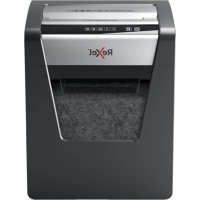
Momentum M510 - Shredder REXEL - Free user manual and instructions
Find the device manual for free Momentum M510 REXEL in PDF.



| Product type | Document shredder |
| Brand | Rexel |
| Model | Momentum M510 |
| Shredding capacity (A4 sheets 70 g/m²) | 10 sheets |
| Cut type | Not specified |
| Noise level | Silent shredding |
| Continuous operation time | 120 minutes |
| Cooling time | 60 minutes |
| Basket | Removable, with viewing window |
| Power supply | Mains 230 V, 50/60 Hz |
| Special functions | Forward/Reverse, safety lock, automatic jam stop, overheat protection, sleep mode after 15 min |
| Light indicators | On (blue), cooling (red), basket full (red), door open (red), reverse (flashing red) |
| Safety | Safety lock, stop if door open, stop if basket full, do not insert metal objects |
| Maintenance | Use Rexel lubricating sheets (ref. 2101949 or 2101948); do not use aerosols or liquid lubricants |
| Accessories | Lubricating sheets |
| Warranty | 2 years |
| Intended use | Paper, staples (26/6, 24/6), paperclips (petal/medium, ≤32 mm) |
| Recommended paper weight | 80-100 g/m²; cardboard <200 g/m² |
| Recycling | WEEE, separate shredded paper and bank card pieces |
Frequently Asked Questions - Momentum M510 REXEL
User questions about Momentum M510 REXEL
0 question about this device. Answer the ones you know or ask your own.
Ask a new question about this device
Download the instructions for your Shredder in PDF format for free! Find your manual Momentum M510 - REXEL and take your electronic device back in hand. On this page are published all the documents necessary for the use of your device. Momentum M510 by REXEL.
USER MANUAL Momentum M510 REXEL
To register and activate the warranty go to www.rexeleurope.com/register


C









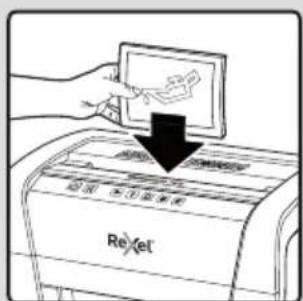
Reel
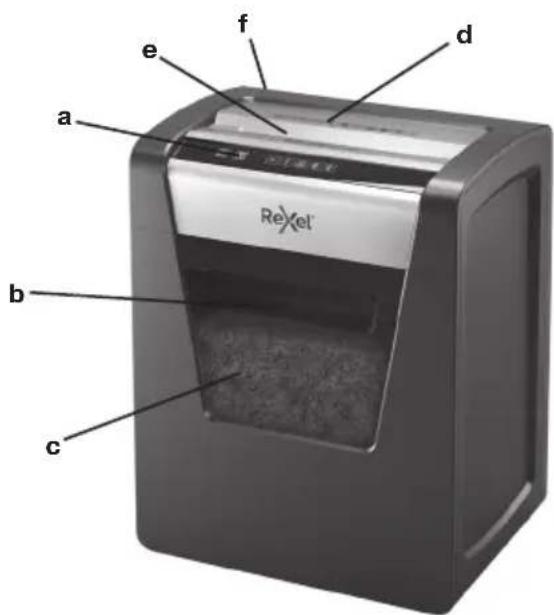
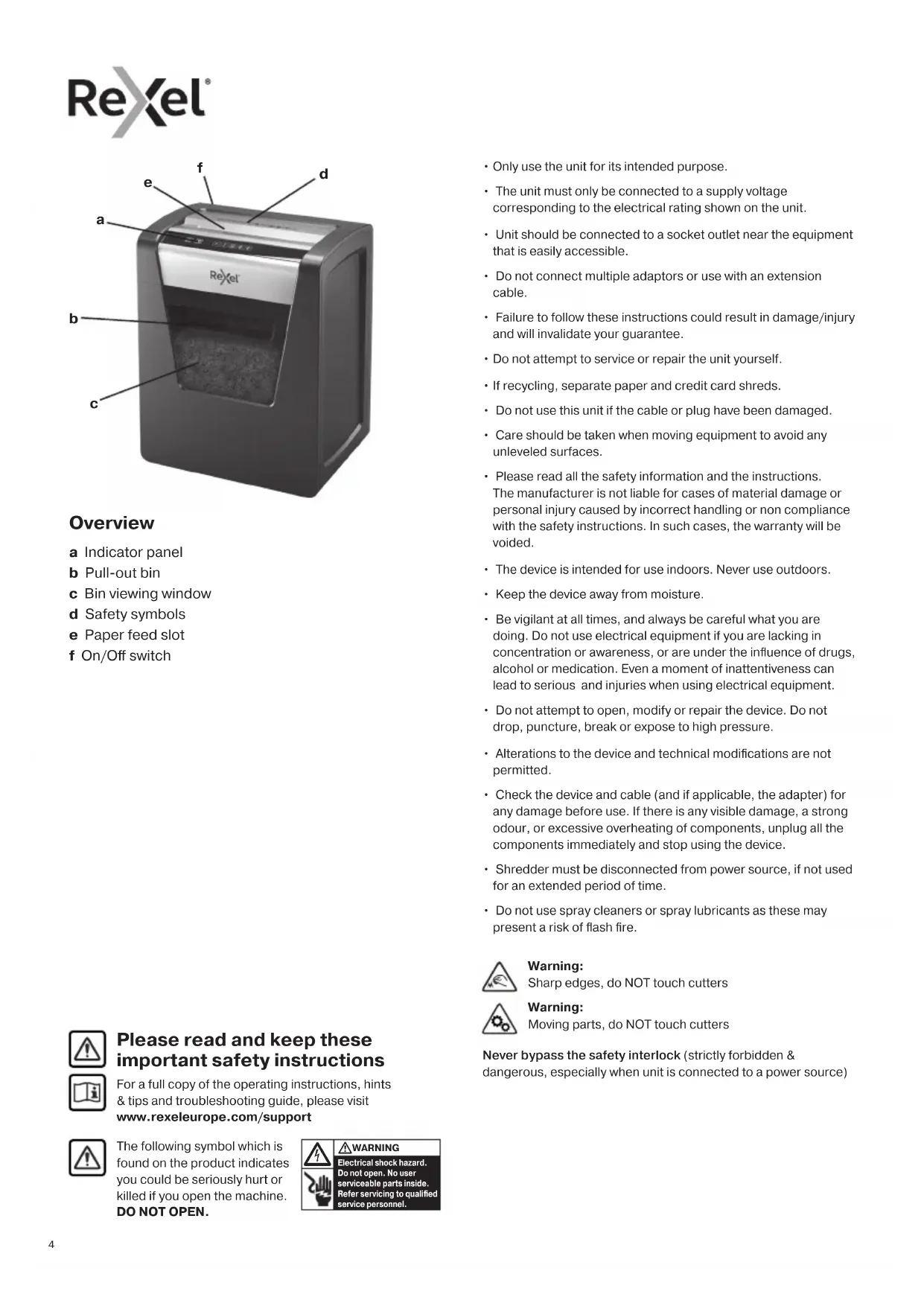
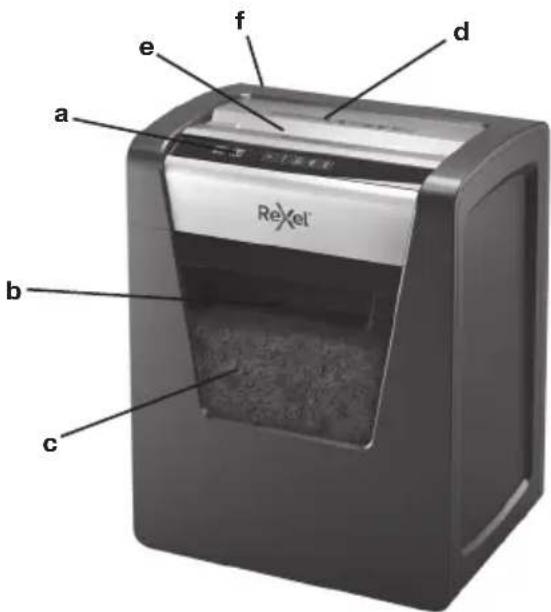
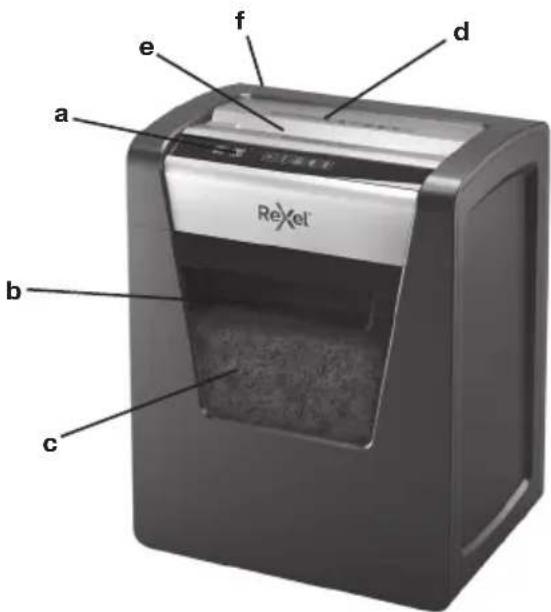
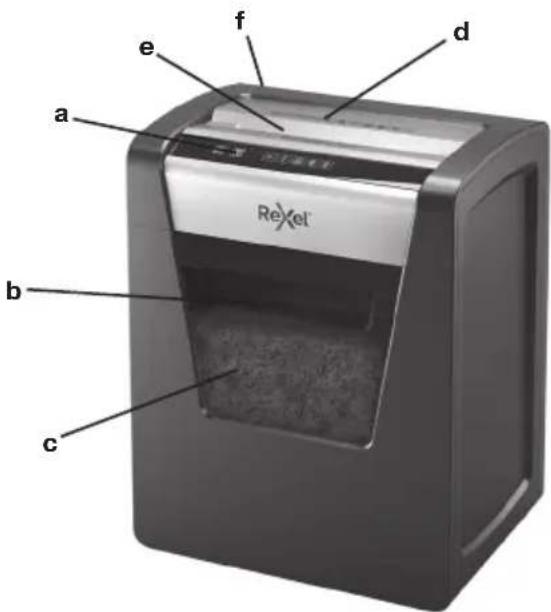
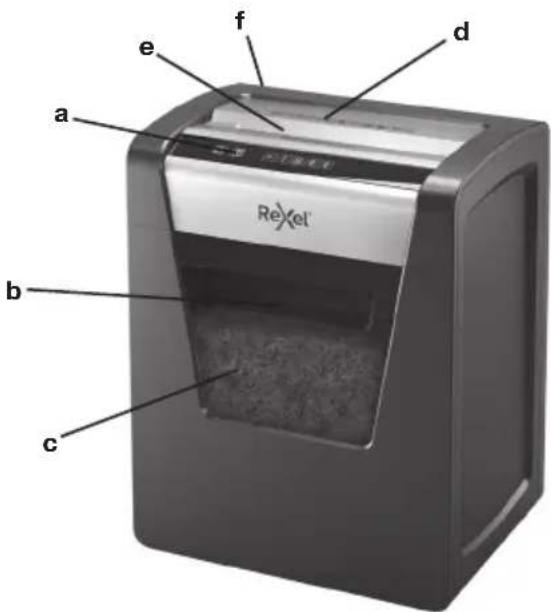
Overview
a Indicator panel
b Pull-out bin
c Bin viewing window
d Safety symbols
e Paper feed slot
f On/Off switch
- Only use the unit for its intended purpose.
- The unit must only be connected to a supply voltage corresponding to the electrical rating shown on the unit.
- Unit should be connected to a socket outlet near the equipment that is easily accessible.
- Do not connect multiple adaptors or use with an extension cable.
- Failure to follow these instructions could result in damage/injury and will invalidate your guarantee.
- Do not attempt to service or repair the unit yourself.
- If recycling, separate paper and credit card shreds.
- Do not use this unit if the cable or plug have been damaged.
- Care should be taken when moving equipment to avoid any unlevelled surfaces.
- Please read all the safety information and the instructions. The manufacturer is not liable for cases of material damage or personal injury caused by incorrect handling or non compliance with the safety instructions. In such cases, the warranty will be voided.
- The device is intended for use indoors. Never use outdoors.
- Keep the device away from moisture.
- Be vigilant at all times, and always be careful what you are doing. Do not use electrical equipment if you are lacking in concentration or awareness, or are under the influence of drugs, alcohol or medication. Even a moment of inattention can lead to serious and injuries when using electrical equipment.
- Do not attempt to open, modify or repair the device. Do not drop, puncture, break or expose to high pressure.
- Alterations to the device and technical modifications are not permitted.
- Check the device and cable (and if applicable, the adapter) for any damage before use. If there is any visible damage, a strong odour, or excessive overheating of components, unplug all the components immediately and stop using the device.
- Shredder must be disconnected from power source, if not used for an extended period of time.
- Do not use spray cleaners or spray lubricants as these may present a risk of flash fire.


Please read and keep these important safety instructions
For a full copy of the operating instructions, hints & tips and troubleshooting guide, please visit www.rexeleurope.com/support

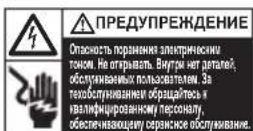
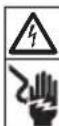
The following symbol which is found on the product indicates you could be seriously hurt or killed if you open the machine. DO NOT OPEN.

WARNING
Electrical shock hazard. Do not open. No user serviceable parts inside. Refer servicing to qualified service personnel.

Warning:
Sharp edges, do NOT touch cutters

Warning:
Moving parts, do NOT touch cutters
Never bypass the safety interlock (strictly forbidden & dangerous, especially when unit is connected to a power source)
| Indicator Panel Icon Colour | ||
| Power On BUTTON | White Press and release to turn on shredder. | |
| Reserve BUTTON | R | Press and hold to manually remove paper. |
| Shredding in operation INDICATOR | Blue Constantly illuminated – unless in Power Save mode. | |
| Cooling Down INDICATOR | Red Illuminates when shredder is cooling | |
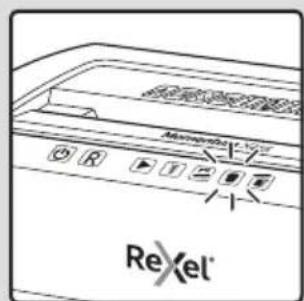
| Auto jam clearance INDICATOR | Red Flashes when motor is in reverse | |
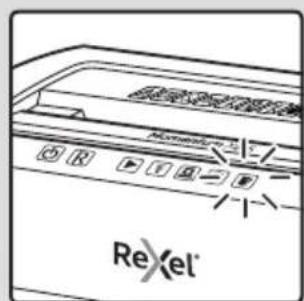
| Bin full INDICATOR | Red Illuminates when bin is full | |
| Door open INDICATOR | Red illuminates when door is open | |
Operation
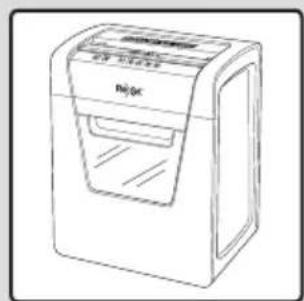
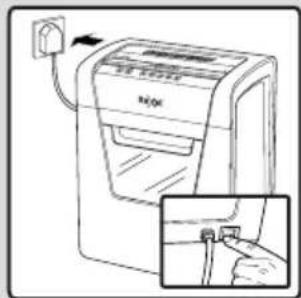
- Remove the shredder from the packaging and place the bin inside the shredder housing. Plug the power cord into the rear of the shredder.
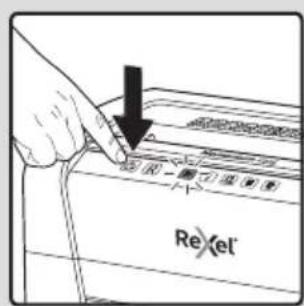
- Connect the shredder to an appropriate mains supply. Ensure the on/off switch is in the 'on' position. The blue shredder in operation icon will flash every 3 second
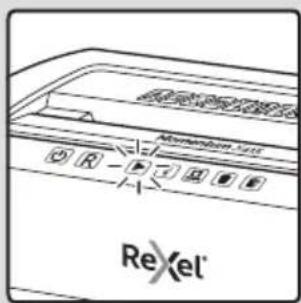
- To commence shredding press and release the button. The flashing icon changes to a solid blue light. You are now able to shred.
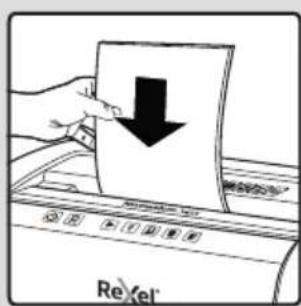
- Insert paper to be shredded into the feed slot 'e'.
While paper is being shredded the blue shredder in operation icon will remain illuminated.
Note: Make sure the paper to be inserted is neatly stacked.
If the paper thickness is within the shredder's capacity, the motor will start and your documents will be shredded. The cutters will stop once the shredding process is complete.
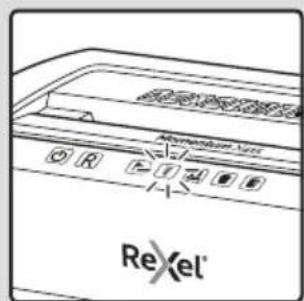
- If the paper thickness is greater than the shredder's capacity, the auto reverse icon will flash red and the motor will run in reverse.
- If this happens, remove some of the sheets from the paper stack and re-try. The shredder will automatically start and allow the paper to be shredded.
- If the shredder is left in shredder operational mode for more than 15 minutes without being used the shredder will automatically switch off in order to save power.

Warning: Do NOT under any circumstances use any metal objects (scissors, letter openers, etc.) in an attempt to clear the entry.
Warning symbols


No CDs

Keep loose jewellery clear

No credit cards

Ties and loose clothing hazard

Keep long hair clear

Do not reach into opening

This equipment is not intended for use by children

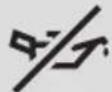
Do not use spray cleaners or spray lubricants as these may present a risk of flash fire

Manual feed slot capacity

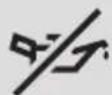
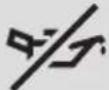
No aerosols
Rare occasions of jamming
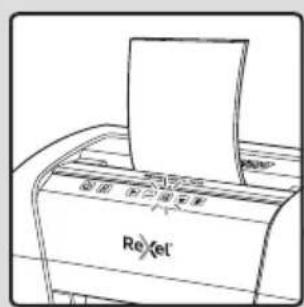
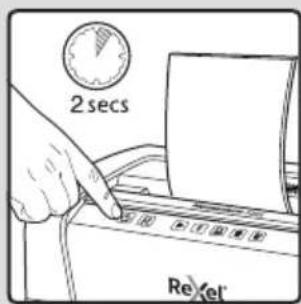
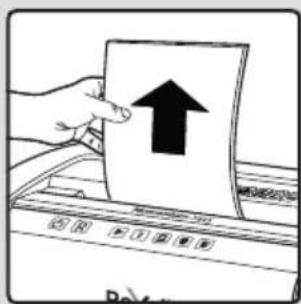
Should the paper jam not clear, press and hold the button for 2 seconds, then press and hold the button for 2 seconds. Repeat until the jam has cleared. Please do not alternate between the Reverse and Forward functions quickly as this may damage the motor.
Reverse function
- Should you wish to reverse the shredding direction whilst shredding a document a reverse function R has been fitted for your convenience.
- By pressing and holding the reverse button the cutters will change direction allowing the retrieval of the document being shredded.
- The reverse function will only run whilst R is being pressed. When the reverse button has been released the shredder will revert to ready mode.
Operation time
When the shredder is used continuously for 120 minutes or more the shredder may overheat. If this occurs the overheat icon will illuminate red.
When the shredder is ready to be used again the red overheat icon will go out. This will take approx. 60 minutes.
To resume shredding, press the On button and start feeding documents into the feed slot.
Safety lock activation
An additional safety feature on this shredder is the safety lock. To activate, press the On and Reverse R buttons together for 3 seconds. Both buttons light up and remain illuminated until the lock is deactivated or the shredder goes into standby.
To unlock, press the same buttons together for 3 seconds.
You are now able to shred.
Quiet shredding
This shredder has been designed with quiet shredding technology. This allows you to shred with peace of mind you will not disturb others.
Momentum M510 & X415 shredding capability
CAN shred the following:
- M510: 10 sheets X415: 15 sheets
- Stapled paper, 25mm within the corner
26/6 and 24/6 or smaller staples - Small sized paper

- M510: 10 sheets X415: 15 sheets
- Paperclipped paper, 25mm within the corner
- Capable of shredding small/medium paperclips (max. wire thickness = 0.9 mm)
80/100gsm paper

Thick paper or card < 200gsm

Glossy paper or a sheet covered with print on both sides.
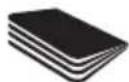
Multiple folded sheets (A3 sheets folded in half).
CANNOT shred the following:

Heavy duty staples. Check the staple leg length is not greater than 6mm.

Large clips. Check the length of the paperclip is not longer than 32mm

Plastic sheets, laminated documents, plastic folders.

Bulldog clips

Bound documents

Credit cards

Adhesive labels.

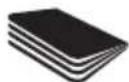
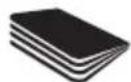
Magazines or other documents bound by multiple staples or clips.


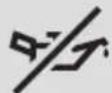
No aerosols No oil

CDs & DVDs
Bin full
When the bin is full the shredder will not function and the bin full symbol will illuminate and flash red.
When this happens you must empty the bin.
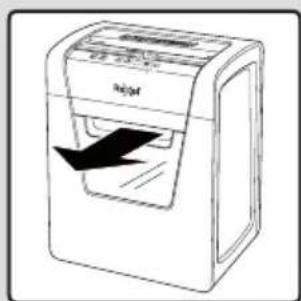
Pull out the bin to empty.
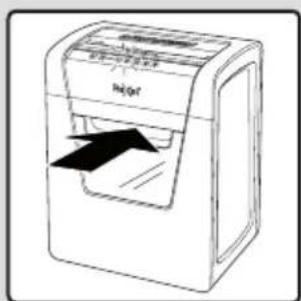
Once the bin is empty, push it back in and press the On button to resume shredding.

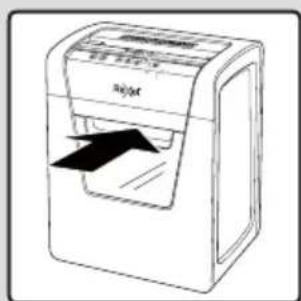
WARNING: The shredder bin must be fully pushed closed for the machine to operate.
- Empty the shredder bin when it is full otherwise the shredder's performance will be adversely affected. Operating the shredder with a full shredder bin can result in paper jamming in the cutters, which will increase the machine's noise level.
- Do not force down shredder paper in the bin using your feet.
Door open
If the door is opened during shredding as a safety precaution the shredder will instantly stop, and the door open symbol on the indicator panel will flash red.
To resume shredding, shut the door and press the button.

WARNING
- The shredder DOOR must be fully pushed closed for the machine to operate.
Accessories
Only use Rexel accessories:
Oil Sheets (20) - 2101949
Oil Sheets (12) - 2101948
Troubleshooting
If the paper shredder will not start, please check the following:
- Is the machine plugged in correctly?
- Is the switch pushed to the position?
- Is the machine jammed with paper?
- Has the motor overheated?
- Is the shredder bin fully pushed in?
- Is the shredder door closed?
Waste Electrical and Electronic Equipment (WEEE)
At the end of its useful life, your product is considered to be WEEE. As such it is important to note that WEEE is not to be disposed of as an unsorted municipal waste. It is to be collected separately such that it can be disassembled so its components and materials can be recycled, re-used, and recovered (burned for energy content in the production of electricity)
Public collection points have been set up by municipalities for the collection of WEEE, free of charge to you.
Please return your WEEE to the collection facility nearest your home or office.
If you have difficulty in locating a collection facility, the retailer that sold you the product should accept your WEEE.
If you are no longer in contact with the retailer, please contact ACCO for assistance with this matter
Recycling of WEEE is geared toward protecting the environment, protecting human health, preserving raw materials. Improving sustainable development, and ensuring a better supply of commodities within the European Union. This will be achieved by retrieving valuable secondary raw materials and reducing the disposal of waste. You can contribute to the success of these goals by returning your WEEE to a collection facility.
Your product is marked with the WEEE symbol (wheelie bin with an X through it). This symbol is to inform you that the WEEE is not to be disposed off as unsorted municipal waste.
Guarantee
Operation of this machine is guaranteed for two years within the date of purchase, subject to normal use. Within the guarantee period, ACCO Brands Europe will at its own discretion either repair or replace the defective machine free of charge. Defects due to misuse or use for inappropriate purposes are not covered under the guarantee.
Proof of date of purchase will be required. Repairs or alterations made by persons not authorised by ACCO Brands Europe will invalidate the guarantee. It is our aim to ensure that our products perform to the specifications stated. This guarantee does not affect the legal rights which consumers have under applicable national legislation governing sale of goods.
This guarantee does not apply to Australian customers - see warranty on page 100.
Uberblick
Pnmuitka: npw HIX BCTABTNI apkyui nanepy, nepekoHaTeca, 10 ix akypaTHO cKaJeHO.
KuToTOBUnHa CTOnKn Naepy BiNnObiae npOnyckH3aTHeOCTi noPi6HOBaHa naepy, DnRyH 3aNyCTtBcR, a BauiDokymeHTn 6yHe noPi6HeHo. PkxyI cactInn 3ynHrtbCn iicJia 3aBepWeHH noPi6HeHH.
- RaKIO TO ToBUNHa CTOnKN nanepy nepeBnUyepoNcyKHy 3aTHiCt b NoDi6HOBaHa nanepy, 3NaOH ABTOMaTHHOrO pyxynanepy y 3BOPOTHomY HApRMky 6JIIMHe eRboHM KOLbOpom a DBnryH NoHne npauOBaTu y 3BOPOTHomY HApRMky.
6.у bomy pa3i BnIMtB kIbKa apkyuib nanepy 3i CTOnKn Ta NOBTOPO HO BCTaBTe nanip y npnMaBnO TBIp. NpOpiHOBaH nanepy ABToMaTHUHO 3aNcyTNTbCra Ta 3diINCHITb NpOpiHeHHa nanepy. - 青IIO NOpi6HOBaNanepy nepe6yBaE B pexnMI EKcnIyataJI IOBue 15 XBUNIH, aJe φakTNHO He BNKOpNCTOByeTbC, BiH ABTomATNUHO BUMKHETCBJI Ie HEPRO36epexHeHH.

06epexno! yxoHOMy pa3i HE BnKOpncTObyTe 6yNb-ki MetaneBippeDMeTn (HOXNJI, HOKI dIaBIkPnTTKoHBepTb TOO) IINPOuHcHHe npnnMaIbHo rO TbOPy dIa napey.
PonepeJxByaJIbHi cIMBOJI


3aboponeho ytni3ybaTn CD-dnckn!

YnkaTe nOtnpanHnHIOBEnipHnx BpO6i Do npCtpoI

Hemae KpeuTHnx KapToK

YHnKaIeTe NotpanJHHKpaBaTkn Ta Ondy Do npncToIO!

YHnKaTe nOtpaJIHHN DOBfRO BOLOCCs Do npucTpoI!

He 3acOByIte pyKn IIO npMmaIbHoro OTBOpY!

Lc06naHaHHHe np3Haeyo DnBnKOpCTAHNdiTbMn

Kibkictb apkyuB, mo MoXHa BCTaBnTn Do OTbOpy

Hemae aepo30nib
NooHOKi BnnaKn 3aHaHH
Kuo He BdaIOc yCyHyTn 3aIaHnHn nanepy,HaTNCHtTa yTPMMyTe KHONKY npOTAROM 2 cekHyd,a nOTIM HATNCHTb Ta yTPMMyTe KhoNky npOTAROM 2 cekHyd, NobTopioTe 00 onepaio, NOKs 3aIaNHH He bye dcyHeHe. He nepeMnKaTeCb WbIKo mix FyHKmPyxny nanepy y 3bOpOTHMy T a pRMOy HAnpRMkax, OcklbKn Ue MoKe CnpMHnHTn NOwKOJXeHH DaBnYHa.
Pnctpi MOKE noepi6HOBaTH NaCTynHe:

X312: Apkywi nanepy 12
X410: Apkywi nanepy 10
3nTn npip (kOpoKo6a po3TaOByeTbcr He dani, hix 3a 25 MM BiD kyta)
Cko6n 26/6 Ta 24/6 a6o npi6nHie
- Manip MAnix φopMatib.

X312: Apkywi nanepy 12
X410: Apkywi nanepy 10
- Panip 3i ckpinkamn (яко ckpinkka po3taowbyIOb8cra He dani, hix 3a 25 MM BiD kyTa)
Ckpinkn Manoro/cepeHbOro po3mipy Ira nanepy (MaKc. TObuHa npOy 0,9 MM)
Panip 3i iinbHicTIO noHa,80/100 r/kB.M.

Lynkn napi np a6o kaptkn 3i 卅lbHicTIO do 200 r/KB.M.

TnHueBn nanip a6o apKyu3 npKOBaHM NOKpTTM 3 060x6okib.
Kibka 3irHytnx apkyuib nanepy (nanip fopMaTy A3, cnadaHn Habnin).
Pnucpii HE MOXE noopbi6HOBaTu NaCTynHe:

MacBHI cKoBu. IpekoHaItecA,
IO DOBxHnHa HIXKn cKoBu He
IpeBnUyE 6 MM.

Benvki ckpinKn IJnI nanepy.
IpekehoaItec,IO IOBXnHaCKPINKn IJnI nanepy He nepeBnUe 32 MM

Пл actNKOBI JINCTN, JAMHOBaHI DOKyMeHTN, ПлactNKOBI TEKN.

3atnckaui nna npny.

3wniDOKyMeHTN.

KpeiHTHa KapTa

Hakneukn.

KyphaIaT aIHsI DOKyMeHTn, kki 3uBaJInc3 BkOpNCtAHHM 6araTboxCKo6abOcKnok.


He po3nIIOJIte aepo30JI nO6JI3y UboI npIcTPOI!
3a6b0pOHeNo BnKOpNCtOByBaTN MaCTNIO 3 PJIauIOK

ДиСКС CD Ta DVD.
KoHTeHep 3aIOBHeNo Do KpaIO
KoHTeHep 3aOBHeHO Do KpaIO, NpOpi6HbAIBHn npCTPi He 6yde IpaQbATn, a CmB0J 3aOBHeHO Do KpaO KOHTeHepa 3acBITbCra Ta 6JIIMMaTIme epeBOHM KOJIbOpOM.
Ucbomypa3i Heo6xioHcnpoxHNKoHTeHep.
BttHtB KOHTeHep, kN CnIc CNOpOXHTN.
KoJI KONTeHep cnoPoXHeHO,poWTOBxHITb NOrO HaMICte Ta HATNCHTb KHONKY BBIMKHeHHaI BIDHOBJHHNIOpi6HeHHa.

OBEPEXHO!
MOnKMOJIIBOCtI EKCNIIyATAuii anapata KOHTeHep nopi6HIOBau naepy MaE 6ytN BCTaBHeO Do ynpoy.
CnpoxhItb KOHTeHep noDpi6HOBaHa nanepy, kUo
Ioro 3anOBHeHO do KpaIO, iHaKHe npOdyKTNBHicTb
noDpi6HOBaHa nanepy cTaHe 3NaHuHO HxNkOIO.
EkCnlyataiia noDpi6HOBaHa nanepy i3 3anOBHeHM
do KpaIO KOHTeHepOM MoKe npu3BeCTn Do 3aJaHHa
nanepy B pixyHx YactInHax, IIO niDBuNTb pBeHb
Wmy Ni dac po60t anapata.
He cnpecoByte noDpi6Hn nnip y KOHTeHepi HOrAMN.
BidunHei DBepuTa
KuO DBePcTa 6yDe BiUHeHNo NiJ cac NpDi6HeHHa, PnOpi6HOBaH nanepy HeaHIO 3ynHHTbcra, Ioo E 3anobixHM 3axoDM, a CmBbON BiUHeHEnX DBepuT Ha iINkAtopHi NaHeJI NOHr MNTITn YepBOHMM KOLbOpOM.
IooB BIDHOBNI NOOPI6HHeHHa,3aHHiTb DBePcraTa Ta HATNCHTb KHONKy

06EPEKHO!
ДлmaMOKJIINBOCTI ekCnIyataaII anapata DBePcTaNoDpi6HOBaça napepy MaE 6ytN NOBHCIO 3aunHeHO.
DonomixKHe o6naHaHHa
BukopncTobyIe BuknIOHNO donomixHe oBaHaHHaRexel.
Apkyi Jnla 3MaayBaHHa (20)-2101949
ApkyuiIy3MaayBaHHn(12)-2101948
Iouyk iucyHeHH HecnpaBHOCTeY
KJIO noDpi6HOBaH naepy He 3aynyckaetbcra, BnKOHaIte onncahi HNKe nepeBipKn.
- Yu npabunbHo niknloyeHo anapaT do eJeKtpomepeksi?
- Yu nepemiehe npemikau y noJoxeHHa?
- Yu 3actprn nanop B anapati?
4.ДИгунперрibся? - Yu do ynpy BCTaJIeHO KOHTeHep noDi6HOBaHa nanepy?
- Yu 3aHHeNo DBeepaTa noPi6HIOBaHa nanepy?
Ytni3aicia BiIxOdiB eJeKtpnHoro N eJeKtpoHoro o6JaHaHnra (WEEE)
IIO 3aBepuHHi TepMHy EKcNlyatauui Bpi6 RaBnE CO6OIO BiXoHNe EJekTPnHOrO IeJekTPoHHOrO ObnaHaHnR (WEEE). 3BepHtB yBaRy, 00 BiXoDn EJekTPnHOrO IeJekTPoHHOrO ObnaHaHnR (WEEE) 3a6OpHeNo YtNiI3yBaTn pa3om i3 HecOPTOBAHm NobytOBIM CmITrM. Taki BiXoDn MaIOb 3bnpTuCA OKpEmo, 06ix MoKHa 6yIo POzIbPaTn Ta NOBTOpHO nepepoBHTN, NOBTOpHO BkOpNCtATn Hi peKynepyBaTn IXHI KOMNOHEHTn Ta MaTePiaJIi (rk naIINBO DnI BnPO6HnCTBa EJekTPoeHeprii).
Micuebi opraHn BnaIcn CTbOpnnr IpomAdcbKi NyHKtn npniomy BTOPHHO CnpOBHHn DJIa 3bnpaHnB BiXoJIB eJeKtpnHoro Ta eJeKTPoHoro OblaHaHnR (WEEE).IJa Tnx, XTo 3dae BiXoHn, nocnyn TaKnx nyHKTIB 63KOwTOBHi.
Будьлackа,ДOCТавTe BiDxOДи eIeKtpuHOrTo Ta eIeKtpoHnHOrO 6bIaHaHHa(WEEE)do NyKtPy npNOMy BTOPNHoi CnPOBUNH, 10po3TaUOByeTbCnNoBn3y BaWOrO 6dyINHKy nOphiCy.
KsqoBAMCKlaDHO3'acyBaTnpo3TaUyBaHHnyHKTy npHOMy BTOPHHOICPOBHN,PO3pI6HNI pOpaBeu,yAKOROB KynnnIeepncptpi,MaEPnpHHTN BiXoOn eJekTpHoro Ta eJektpOHOrO 6nlaHaHHa (WEEE).
3a BiCyTHOCTI 3B'3Ky 3 p03dpi6HMM npoDaueM npocmo Bac 3B'3aTnC3 ACCO nIg OTpMaHHaONOMr B po3B'3aHHi iie I npo6IeMn.
BtopnHna nepepo6ka BiDxOjIB eNeKtpuHoro Ta eNeKtpoHHoro
oblaaHaHHa (WEEE) Mae Ha MeTi 3axNCT HABKOJUHbORO
cepeoBua, 36epexHnra 3dOpOB' JIOJe, OuaaJIINBE
CTabLeHHa DO 3anacB CnpOBHN Ta MaTePiaJiB, yDOCKoHaJIeHHA
CTaIoro po3BNTky Ta NOKpaueHe NOCTaayHHa CNOXNBuNX TObApIB
do KpaIH EbponeCbKO COHOy. Lc DoocRAeTbCra 3aBJaKN
BiHDOBJIeHHIO UHHOI BTOPINHOI CnpOBHN I CKOpOeHHIO
yTNIi3aui BiXoDiB. BN MoKeTe 3pO6nTu CBI BHECOK y
IOcRHeHHa ONICAHN ZJIeN, 3daOCH N BiDxOJn eNeKtpuHoro
Ta eNeKtpoHHoro OBlaaHaHHa (WEEE) Do NyHKTy npInomy
BTOPINHOI CnpOBHN.
BaW Bpi6 MicTb CmB0J «BiDxOJeEKeTpHOro Ta eKeKtpOHOro 06naHaHHra» (WEEE) (nepeCyBn KOHTeHep dIa cMTT, kNn nepeKpeCneHO).Ce n CmB0J O3Haac, 10o BiXODJeEKeTpHOro Ta eKeKtpOHOro 06naHaHHra (WEEE) He MaOTb yTNIi3yBaTNCpa3OM i3 HecOpTOBaHIM NObyTOBIM CMITTM.
TapaHTia
Bnpo6HnK rapaHTye HOpMaIbHy po6Otu 6b0rO anapata BnpoIOBx DBOX pOKIB BiD DaTn NOKyIKN (3a yMOBN HOpMaIbHOI eknnyataii). YnpoIOBx rapaHTiINHO nepioDy KOMNaHIA ACCO Brands Europe Ha BlaChn P0sCyd 6e3KOuTobHO 3a6pe Anapat, 10 Mae DeΦeKTN, Ha peMOHT abo Jx 3amIHt b Ioro Ha HOBNI. YHHa rapaHTi He NouPiOeTBcR Ha DeΦeKTU, 3ymOBNeHi HEnpaBnIbHM BkOPnCTaHHM 6b0rO npnCTpOu a6o JNoRO BkOPnCTaHHM He 3a npn3HaueHHM.
Ira rapaHTiHoro 06cnyROyBaHNr cbo rnpCTPOIO Heo6xIDne iTBepeJXeHH DaTn Ioro KyniBNI. PemOHr a6o 3MiHa KOHCTpyKuI npCTPOIO 3 bOky oci6, kIMM KomnaHIA ACCO Brands Europe He Hana TaKi NOBHOBaxEHNr, pni3BeJe Do npnnHeHHr dI rapaTII. Mn 3aBXdPiPo6mO BCE MoKInBE, uOb pealbHa po6oTa Haoi npOdyKUII BiNDoblaHa 3aYBLeHIM xapakTepcntkAM. Lra rapaTlHE BnINBaE Ha 3aKOHHI npaba CNOXBauIB, BN3NaueHi YHHHM DePxAhHM 3aKOHODABCTBOM, UO peryIIOe npodax TOBapIB.
0630p
a INHdkatopnha naHeIb
b BbIDBnKHa KOp3nHa
c CMOTPOBOE OKHO KOP3INHbI
d CmboJIbIOeCneueHn8630NaCHOCTN
e PnpemHoe OTBepCTne
f BbiknoyateIb 3neKtpoNaTAHN
- IcnoJb3yIte ycTpoCTBO TOnbKO nnpMOMy Ha3HaYeHnIO.
-Данhoe yctpoCTBO DOJXHO NOKIOUOaTbC8 TOIbKO K UCTOHNKY NITAHN C HAnpJxEHnEM, COOTBeTCTByIOuIM BENUYHAm, Yka3aHHbIM Ha yCTpoCTBE. - YCTPOINCTBO DOJIXHO HAXOINTbCBA6JIIN3N OT cTeBOI PO3eTKN C yD06HbIM D0CTyPOM.
He nooknouaTeYepe3TpoHnKnnyDnHnTeB.
HeBINOJIHHeHNE 3TINX NHCHTpyKUIM MOKET PnIBECTN KNBPOEJKeHIO YCTPOINCTBA,NOJYeHIO TpABMbI HAnHYNIOPOBAHNO rapaHTTN.
He npednpnHmMaTe NOnbITOK OBCnyxuBaTb HIN peMOHTnpoBaTyCTPOIcTO CaMOCTOReJIbHO.
Bcnyae nepeaHn HbTOpuHnyo nepepa60Ky cIeNyet OTJeJr8b6pe3Kn 6yMaHn OT OCTaTKOB KpeDHTbIX KapT.
He nCnoB3yIte yCTpoIcTBO,ecn noBpeXeH erO cTeBOU Hyp 1N BnKa. - Pn npemepemeHm yctpoCTBa co6IIOdaTe OCTOPOXHOCTb n36eraTe HPOBbIX NOBepxHOCTe NnnnpenTCTBn.
O3HaKoMBTeCb Co BCEMn npabNnAMn TexHKn 6e3OnaCHOCTn yka3aHnMn. N3rOToBnTeJIb He HecET OTBETCTBEHOCTn 3a Cnyan MaepnlaHoro yuepe6a nn TpaBMPOBaHHy, Bby3BaHHbIe HApuyehmnpabvU nOpaeeHHn HecobIoHeHem npabVn texHKn 6e3OnaCHOCTn. B tAKx CnyaXn rapaHTn anHyHpyetc.
O3HakombTebc Bo BcEMn npabunamn TexHNK 6e30nacHOCTn yka3aHnMn. N3rTOBnTeJb He HecET OTBETCTBEHHOCtN 3a Cnyan MaepnAblHO r Oyepba nI TpaBMnpoBaHn, Bbi3BaHHBe HapuweHem npabnO6paueHn nn Heco6nOdeHem npabn TexHNk - He donyckaite BO3deiCTBnB BlanHa yctpoiCTBO.
Bcerda npoBnIte 6DnteBbHOCTb nOcTOPOXHOCTb npn paBOTe. 3anpeaaetc8KcnNlyaTnpOBaT aNEkTPOOBOpdyobAHne,ecnn bH He npoBraTe IOCTaTOHyU KOHCHTPAuIO BHNMaHnI IIN 6DNTeBbHOCTb Hn HAXOnITcB NOJ BNIHNHe HApKOTuecknx CpeCDTB, aIKOROI INIleKapCTBeHHbIX npenapaTOB.Jaaxe CEkyHda NEBHmATEbHOCTn MOKeT pNBecTn K HeCuaCThBM Cnyaam N cepbe3HbIM TpaBMAM BpOceCE KcKnLyataunn 3NeKtPOOBOpdyOBAHn.
3anpeetaeTcnpnHmAtbnoBtKnOTKpbItb,ImMeHHTbnn OTpemOHnPoBaTb yCTpoIcTB.3anpeaaetc poHrtb, pOKaJIbTaB, IOMaTb NIOBepRaTb BO3dEChTBIO BICOKOFO daJIbHeN. - N3meHn yCTpOyCTBa n TexHnueckne MoNnKauu HpeaPeWauTc.
- Npeed nCnoIb3OBAHnem npoBepBe yCTpoNCTBO n KaebIb (n, ecnn pnpmeHIMO, aadTep) Ha npedmet nobpexdeHH. B cIyae haJIuHnKAKORO JIno BO BuIMIMO NOBpeXeHH, CNbHO 3aIaxa HIN Ype3MePHOrO NepePbea KOMIOHeHTOB HeMeJeHH OTKJIOHTE BCE pa3bEmbl OTcEtN 3NeKTPoNtAHnH n PpekPaTne IcNOB3OBAHHe yCTpoNCTBa.
He nCnoJb3yIte YIcTReIe CpeDCTBa IIN CMA3KN B a3pO30JIbHO ynaKOBKe, TAK KAK 3TO MOKeT pNIBECTN K NOxApY.

IprocIM npoHTaTb n COxpaHnTb DOKyMeHT C 3TUMN BaxHbIMN HHCTpyKUJAMN NO TexHnke 6e30NaCHOCTN
Дяплученя пнов Всрси Инструкши NO 3KcNlyaTauu, COBETOB NO ICNoJIb3OBAHnIO yCTpoIeCTBa, NOUcKa n yCTpaHEnHa HeNCnpaBHOCTe NocTe NTe Be6caT www.rexeleurope.com/support

DaHHb3HaK,HaxOJauncna HA 3dEeNN,03NaayaeT,YTO BmOxETe NOnyHnTB cepBe3HyIO TpaBMy INN nnoBHyTB,ecIN OTKpOEt YEcPOIcTBO. HEOTKPbIBATb.

Ppeoctepexhenie!
OctpbIe KpOMKn. He npKacaiTecb KpeKyUeMy MExaHn3My.

Ipeodoctepexene!
DnKyuuecKOMnoHeHbI.He npKaacaiTecKpeKyuemy MExaH3My.
HnKoIa He 06xOdnte 3aunTHyIO 6JoknpOBky (CTpOrO 3anpeueHO nOnaCHO,OCo6eHHO KOrda yCTpoNCTBO NOdkJIIOUeHO K cETn NITAHNA)
TJHueBa6ymara nnIINCTbICBvCTOpOHHe neaTabIO.
HeckoIbKO CIOKeHHbIX
JIcTOb 6ymaHn (HaPmep,
JIcTbI cOpMaTa A3,
CIOKeHHbIe NOnJaM).
HE DONYCKAETCByHnTuToXeHne CJeDyUoUsx MaTePnaIaOB:

OchB npoHbIe cKobbl.
y6eNTecb, yTO dINHa HOKKn
cKOBbl He npeBbIaet 6 MM.

Bolbwa cpkenka. Y6eintecb, 1TO dInHa cKpeKN dJa 6yMaHn He npebwaaet 32 MM.

JIncbIu3 nlaactnka,
JAMNHPOBaHHbIE
DOKyMeHTbI,
NOIN3TuJIeHOBBie NaKN.

CkpenKu Tuna Bulldog

Dokymentb IB nepenneTe

KpeiHTbIe KapTbI

Haklek

KyphaIbI INpyrIe DOKymeHTbI,CKpeJIeHHIbe HECKOJIbKIMNCKoBaMn IIN CKpeIKaMn


3anpeaaetcnaCnOJIb30BaTb a3pO30n
3anpeaaetcnaIOJIb3OBAHnEMacJaIIN CMA3KN

KOMnakT-IMCKN DVD-IMCKN
Kop3nHa 3anOpHeHa
Pn3aONHeHH KOp3HbI yHHTOKeTJIb 6yMar npeKpaNT pa60Ty, a Ha INDkaTOPHO NaHEIN BKNIOHTCn HAHTMgATb KpacHbI CBtOBoi HNDkaTOP «Kop3Ha 3aONHeHa».
B 3TOM Cnyuae Heo6xOJIMO OUHCTnTB KOp3HHy.
N3BNEKNTe IN ONUCTHTe KOP3INHy.
Iocne 3TOro BCTaBt e ee Ha MeCTOn Hn HaxMnte KHOKny BKIOUeHn, YTO6bI npOdoJnxNtB yHHTOxKeHHe 6yMaRn.

PPEIOCTEPEXEHNE
TTO,TO6bI yCTPOINCTBO yHKUOHNPOBANO HAnLExaUMM Opa3OM, HeoXoIMMO, TO6bIKOP3HnHa 6bIJa NIOHOCTbO BCTaJIeHa BYCTPOINCTBO.
Bcerda Ounuatae Kop3nHy dIa OTxOoB, KOrDa OHa 3aONHeHa, nHae 3TO He6laRopnTHO cKa3bIbaetcHa pa6ote yHnHToxKInTe8yMar.3KcNpyaTuaYnHToxKInTeC nepenOnHeHHoKop3nHOJOTXODMOXET npNBecTN K 3AcTpeBaHNIO yMaRn B pexKyUeMexAHn3Me INOBIIeHNIO yPobHn IyMa, npOn3BODMIMO yCTpOINCTBOM.
He ytpamboBbIbaIte HOrAmn Hape3aHHyIO bMyary B Kop3iHe.
Дерца OTKpbIta
Ecni DBepua yCtpoiCTBa OTKpbIbAeTcB O BpEm npoceca yHHTOKeHn,TO B KaueCTBE Mepbl PpeIOCTOPOXHOCTN yHHTOKeTIb ByMaR aBTOMaTNUeCKN OCTaHaBJIbAeTcR, a Ha erO INDkaTOPHO NaHeIN HauHnaet MmraTb KpaChbI 3HaQOK OTKpbITOn DBepbl.
Дя BO306HOBJIeHЯ pa6Otbl 3akpoIte DBepy HaxMITE KHOKNy

IPEDOCTEPEXEHNE
ДяTORO,TO6bIyCTPOnCTBOФYHKUHOHPOBANo HAnEkaMmOBpa3OM,HEo6XoIMO,TO6bIДBepaayHHTOKTeJI6bIIaNOJHOCTBIO3akpyTa.
DOnonHnTeIbHbIe npHaJnxHOCTN
IcnoJIb3yIte IOnoJIHITeJIbHbIe npHaIeXHOCTn ToJIbKO KOMNaHmRexel:
JnctblIg Cma3kn (20)-2101949 JnctblIg Cma3kn (12)-2101948
YcTpaHeHne HEnCnpaBHOCTeI
Ecni yHHTOKeTb 6yMaR He NaHaet paBoTaB noCne BkIIOUeHn, peKOMeHdyem npOBepuTb CNeDyUoee:
- PpaBnJIbHO JIN BKNIOUeHO yCTPOIcTBO CcTeB?
2.YcTaHOBJIeH JI nepeKIOUaTeJb B NOJOxHeHne R? - He 3aCTpIa IIN BvCTpoIcTBe 6ymara?
- He neperpeIJI nn MoTOp?
5.ПраиьнБИОЛВСТАБЛЕHAКОЗИН?
6.3akpbitaIINDbepa yHnHToKnteTae?
Ytln3aun OTxoob 3JeKtpnueckoro n 3JeKtpoHHoro o6OpydoBaHna (WEEE)
Iocne 3aBepseHnI cPoka 3KcNlyatauIN Bau npOdyKT pInHaJnxkT K OTXoDAM 3NeKTPnuCeCKOr O 3NeKTPoHHORO 0bOpydoBaHnI (WEEE). CoOTBeTCTBeHHO, Heo6xoIMo pInHrBo BVHMaHHe CJeDyIOUee.
OxOdbI 3eKtpueckoro I 3eKtpoHoro 6opdyobAHnA (WEEE) He dJIKbI yTINuN3npOBaTcKa KAc HecOpTpPOBaHHbIe 6bITOBbIe OTxOdbI. OHn DOLJXbI cO6paTbC rOTJeBHO, TTO6bl IN MOXHO 6bIIO pa3o6paTB n NOBtOPHO nepepa60TaB, NOBtOPHO INCNOJb3OBA Tb IN peKyNepuPoBA Tb IN KOMNoHEThb IN MaTePnaJIbI (B KaueCTBe TOINIBa IJIr pereHepaun 3HepRn IN PIn IPOUN3BOIDCTBE 3eKtpuectBa).
MecThbI opraHbI BnactuOc3dAnIO bcBHeHbIe NyKtbl npMa yTnIbCbIpbJr Ia C6opA OTxoOB 3JeKtpueckoro IN 3JeKtpoHHoro 6OpdyobAHnWEEE. YcIpy TaKIN nyHKTOB 6ecnlaTHbI dna Cdaioxnx.
IoxaIyncTa,doCTabTe OTXOdbI 3JIeKtpnueckcKO rN 3JIeKTPoHHOrO
6obopydOBaHnR (WEEE) B 6JIuKaIwI K BaWeMy DOMy IIN OΦCy
nyHKT npMeMa yTtJIbCbIpBj.
PnB03HKnHOBeHm TpyDIOCTe C BbIcHHeHem MeToHaxOXJDeHnI PnEma YTNlbcIpb, IPOdaBu, IPOdaBwB Bam ycTpoiCTBO, DOJIKeH IIpINHrTB OTXoDbI 3JIeKTpueCKOg N 3JIeKtpoHHOrO o6OpyIDoBaHnI (WEEE).
PnO TcYCTBm CBA3N C p03HnHbIM npoDabUOM npocm BAC CBA3aTbC ACCO IJI NOLyehn NMOUIN BpeuHn 3TOBOnpoca.
NobtopnHa nepepa6oTka oTxOIOB 3eKtpnueckoro n 3eKtpnoHoro obopydoBaHna (WEEE) HappaBHeHa Ha 3aunTy OkpyxaoUe Cpebl, COxpaHHe 3dOpOBb JIODei, COxpaHHe 3anaCob CbIpb N MATEpnaIOB, COBepSeHCTBoBAHne yToynBO rpo a3BHTn I OebcneHHe LyuWe NocTabKn B Ebponeckn Co03 ToapOB HapOHOr NOtpeBHeHH. 3TO DOCTnraETcnyTEM BOCCTaHOBNEHnue CHHOrO BTOPNHOrO CBIpN u COKpaueHHy tYNImaun OTXoOB. Bbl MoKeTe BHECTn CBOI BKnA, D IOCTHXeHHe 3TNX CEne, CdaBaR OTxObl 3eKtpnueckoro n 3eKtpnoHoro obopydoBaHHa (WEEE) B npHK TnpemaYtnlbcbipy.
BaI npOdyKT IMeET CmMB0J OToXoDbI 3JeKtpueckoro IN 3JeKtpoHHOrO o6OpUoBaHnra》(WEEE)(nepepeKHyTbI nepeBnXHOMyC6OpHbIK KOHTeINHeP).3OTOT CmMB0J O3HaayAET, yTO OTxOdbI 3JeKtpuueCKoro IN 3JeKtpoHHOrO o6OpUoBaHnra (WEEE) He dOnJxHbI yTnIn3NpOBaTbcRA KaK HecopTnpOBaHHbIE 6bITOBbIE OTxOdbI.
TapaHTy
Pa60Ta DaHHoro yCTpoiCTBa 06ecnepuHBAeTc8 DByxIeTHe I rapaHTnei OT DaTb npno6peTeHnri npy uCIOBn HOpMaJIbHOI 3Kcnnyataun. B pAMkax rapaHTnHoro nepoJa KOMNaHNA ACCO Brands Europe Ha cBOe ycMOtpeHnepoN3BeDeT N6o peMOHT, JNo 3ameHy HeNCnPabHOrO yCTpoiCTBa 6ecnlaTHo. DaHHa rapaHTnHe paCnpocTpaHNTcHa HeNCnPabHOCtN, Bbl3BaHHbHe HeCO6nIOdeHnem npaBnE 3KcnNyataun nn INCNOJb3OBaHMe IN3dEInn B HnpeDyCMToPeHHbIX CELJX.
Heo6xOIMMO NOITBepKJdeHne DaTb npno6peTeHHa. Pa60Tb Ipo pemOHry mOOnuNnauu, npOBeHNbIe NuaAMn, He yNOHOMOueHHbIM KOMnAHnei ACCO Brands Europe, npekpaAoiT DeHCTBne rapaHTm. Mbl CTpeMMc8 oBeCneHTb BbICOKNE 3KcNpyaTaUOnHbIe CBOINCTBa HauNX n3dJIin COrIacHO ppeOCTabLeHHo CneuNfKaun. DaHna rapaHTnI He 3aTpaINBAETOpDnueckne IpabaNoTpe6nteJeB paMKax COOTBETCTByIOUeRO HaUNHOHBORO 3aKHOdaTeJIbCTBa, peryInpuyIOero npodaxy TObApOB.
Wony
a INHdkatop TaKtacbl
b Cbiptka TaTbIaTbIc6eT
c Ce6eTti Kapay Tepe3eci
d Kayinci3ik TaH6aIapbI
e KaFaz3 bepy yacbl
f Kocy/ewipy Kockblblbl
KypbIbIbIbTEK OHbIH apHaJIFaH MaKcTApbl yuH naDaIaHbIbI3.
KypbIFbI TEK KypbIFbIa Da KepcTeIReH 3neKtpiK peTnHKe CaukeC KeJeTIH Kyat KepHeyiHe KocblNybi Kepek.
KypbIbfoHAn KOJxTeK3yRe 60JaTbH KypaHaXaKaH Xepderi po3eTKaFA KocBnyBepek.
BipHeWe po3eTkaIbI aanTepeRe KocnaHbI3 Hemece y3apTKbII Ka6JIbMeH naiDaIaHa6Ha6I3.
OcbyHyckaynapdbOpbHdAmay3aKbIMdb/JapaKaATbI Tydbipybc KHe KeniDiirHj3di JapamCb3 etyi MYMKIH.
Kypblfba e3iH3 Kbl3MET KepeTyRe HEmece OHbl XeHdeyre apeket etneH3.
- ΘHdeyKaFdaaBbHaTypaIFaH KaFa3 6eH Hecne KapTaCbHbH, TypaMdpabH 6eJIiH3.
KaBeJI Hemece aawacb3akbIMdaIFaH 6oIca,6yI KypblfBhl naDalaHaB13.
KypaIbI kblkbyKeiHde KaHdai da bip teric emec 6eTepden Hemece eJeHderi 3aTTapHaaynak bony yuH a6aB 6ony kepek.
Kayinc3ik typablaaknapattap MeH yckaynapbl Okbin 1bFybHb3db etiHem3. Hndipyui dypbc KOlan6bay Hemece Kayinc3ik HcckaynapbHOpBnamay caIapbHaH 60fAH Mylikoke 3aBm KeJy Hemece Jxekapakat KaFaanapbHa kayanTbI emec. OHdai KafdaInapda, Keninik KyuHxOrabl.
KypbIfblFumapat iHHe KOJaHyFa apHaIraH. DaIaDaKOJaHyFa 60MaJbI.
KypblbIfbHblbinFaDahKaWbIKYCTaHbI3.
- 3pkaaah abai 60bHbI, epeKeTTepi epkaaah a6aian opbHaHbI. Erep 3eHHKOIO DeHReHH3 TEmH 6oCa Hemece Ha7a, apak Hemece dapi Ka6bIaDacHbI, 3JeKtp KpyblfblapdbKoJdaHbI3. 3JeKtp KypblfblapbH 3eiH KOIMaIKoJIaHy cTTEpiH, ezi de yIkeH anATKa Hemece aybp JapaKaT anyFa ce6en bonyMymkH.
Kypblfblhlauyfa,03reptyRe HEmece XeHdeyerepekeTteH6eH3.Kylatbn, Tecin HEmece cblbipbn anMaHb3, KbcBIM TcyDeH caKaTaHb3.
KypblfblbIe3repyteHemeCTEXHnKaJIbIK e3repictep eHI3yre pyKcat erImeiDi.
KoIaHyFaJeHH,KypbIbIbMeH Kyat Ka6eJIiH (erep 60nca, aanTepin) KynIH TeKcepin anbHb3. Erep Ke3re Keipetih 6ylihy Beirinepi Baikalca, KyuTi nic uBfapca Hemece 6eWeKeTepi WamadaH Tbc Kb3bN KetCE, KOckBtTapbH cybpH, KypbIbHbI KoJaHaHyblb GipDeH TOKaTaBbH3.
Cnpe Ta3apTkbIbTapdbHemece Cnpe MaJNaFbIbTapdb naDanaHbAHy3,ce6e6I6yIap eTeHy KATEpiHTyDpybMymKiH.

A6aIIaHbI3:
ΘTkip kγ3. KeckiwTeprre Tmehi3.

AbaaJbH3:
Ko3fanaTbH 6eJikTepe.KeckiTepe TImeHj3.
Kayinci3dk cakTaHdbipfbiW KynnbIH ewkaah enemeyre 60mnaDb (KaTah Tblmbim CalhHaNb JxHe acipece, Kypblfb Kyat Ke3iHe KocBIFFaH Ke3e Kayinti).

OcbI MaHb3dbl Kayinci3diK HycKaynapbIH OKbIHb3 XaHe caKaTaN KObIHb3
PaindanaHy HcyaynapbHbH TOblk KewipMecin, naDankeHeCTepi XeHE aKayIbKTapbl KOIO HcKayIbFbH anyyuiH www.rexeleurope.com/support caTbHa KipiH3.

ΘHimTe Ta6bnaTbIn KeNeci
TaH6a KypbIINfblHbI aWKaH
KafdaiaCi3iH KaTbI
KapaKaTTaHybHb3 Hemece
enyiHj3 MymkiEeKHei6ijipeji.
AUYFA BOJIMAIbI.
ECKEPTY
Tox coxy kayni bap. Auyy3
OIMMANDII. UINDEI INDIANAHYUB
X
MEMBERS:XYTIRIN3.
OcbI TypaftbTuTaBkocbIMwKaayinci3ik MyMKiHdi—Kayinci3ik Kyllbl.
BencnDpy yuiH Kocy xHe Kepi kaTapy R Tymenepih 6ipre 3 ckyuHb 6oBb 6acbHb3. Eki Tyime de xHaDaI b Xe Hcbln axbpaTbHFaHua HeMece TypaBbK TYpeKMIHe eTKHeJx JxHbIN TpydaBl.
KyIbH ayu yuih 6ipdei tyMepepi 6ipre 3 cekyHd 6oBb 6acbHb3.
ENdiTypaiapanacbi3.
TbHbIu Typay
Byn TpyaFbIbTbHbIbTypay TexHOJIorNcBImeH XacakTaFaH.
Byi ci3re 6ackanapdb Ma3anaMaHTbIH KOJImeH TypaybIbI3Fa MymKiHdk 6epei.
Momentum X312/X410 kypaIbIbI, typay MymKiHdiri
Keileepdi typai AIAIbI:

X312: 12 napak X410: 10 napak
KancbipbIFaH KaFa3, KancbIpMa 6ypblbEh Ke6i 25 MM
26/6 XaHe 24/6 Hemece kiipek KaIcBpMaIap
KiwKeHTaIeHMeMdiKaFa3.

X312: 12 napak X410: 10 napak
KaFa3 KbICbIbIbIbap KaFa3, KaFa3 KbICbIbIbIHbIH 6ypblbIeH K6i25 MM
KiukHeTaN/opTaWaaKaFa3KbICbIITapbl (eHyIKeHcBIMKaJIbIHdbIFbl=0,9MM)
- >80/100 r/M² MeTp KaFa3.

KaJIbIH KaFa3 HEmeCe KapTa <200r/M².

Kbntbip kafaz Hemece eki KafbHda da bacnacb 6ap napak.
Biphewe pet 6yktenre napaKTap (XapTbnaia 6yktenre A3 npakTapbl).
Keileepdi typai AImAdbI:

YKeH KAncbipManap.KancbipMa aFbHbH y3bHbFb6 MM-De H YKeH eMeCTirH TeKcepH3.

YnKeH KaFa3 KbickbIITapbl. KaFa3 KbickbIbHbIH Y3bIHDbIFbl 32 MM-DeH acnaiTbIHbIH TeKcepiH3

PnaCTnnapaKTap,
JAMHaTTaJIFaH KxKaTtAP,
PnaCTnK KaTaNap.

BynbDorKbickblTapbl.

BaⅡaHfAH KxTaTap.

Kredi karti

Xabickak XantcbipmaJap.

KyphaIap Hemece KeTtereh KaNCbIpMaIapMeH Hemece KbICbIHTapMeH BaIIaHaFbBacKa KyKaTTap.


AaepnnaaHaFb60MaNbI
BTeKeIeMaIbI naIanaHyFa 60MaIbI

blkwaDnckinep MeH DVD Dnckinepi.
Ce6eTToJIbI
Cebet TOnbl Ke3de TypaFbllj XyMbic ICTEmei JxHe ce6eT ToBt TaHacbl XaHaDbj XKeHe Kb3bl TYCTe XblblbIKTaIbI.
Byopb anfah Ke3e ce6eTT 6ocatbyh3Kepek.
Eocaty yuHc6eTt cblptKa TaPbHb3.
Cebet6oc Ke3de OHbi iike KaTadaH nTePiH3 XaHe Tpydbi KaIFaCTbipyuH KocyTuMecinBacHBi3.

A6AJIAHbI3
KypbIJIbI Kymblc iCTeyi yuiH TypaFbiu Ce6eTIOJIbFBImEH nTeepin Xa6bIybl Tnic.
TypaftbIc6eTToTfAHKe3deOhbl6ocatbHb3, 60JIMaca,TypaftbITbIH,ehimdiirireKepiacepetyi MYMKIH. TypaftbITbTObIKTypaftbIc6eTimEnicke KOCy KecklTepeKaFa3dbH,KeNTenyiHeAeknyiMYMKIH, 6yI KpybIFbIHbHwDeHreHHapTTbipadbl.
TypaHaH KaFa3dbI ce6eTke aAfbHb36eH bacbn KUwTeMeHj3.
EcikawbIK
Typay Ke3iHne ecik aubinca, Kayinci3ik caKaTHdbipy wapacbl peTINHe TypaBbIbipdeH TokTaNbJxHE INHnKATOp TaKTacBbIHdAfbE cIK aubk TaHbAcbKb3bl Tytce XbInbblkTAaNbbl.
TpyaybI xaJIfactbIpy yuiH ecIKTI xabHb3 xHe TymecIH 6aCbHb3.

ABAHJIAHbI3
KypbInfblXyMbIC icTeyi yuIH TypaFbIe eciri TOnbIFbIMHe nTepiin xabnyi Tnic.
KocalkbI kypaIap
Tek Rexel KocanKbI KypalapbH naJaHaHbHb3.
Ma nnapakTap (20)-2101949
Ma npapakrap (12)-2101948
AkaIbIKTapdbIkoIO
KaFa3 TpyaBbI icke KocBIMaca, KeleceJIepi TeKcepH3:
- KypbIINfI dypbic KocblIHaH 6a?
- KockbIu R no3nuaCbHa nTepiReH 6e?
- KypbIIFbIa KaFaz KeNTeTINReH 6e?
- MoTOp KaTTbI KbI3FaH 6a?
- Typafblw ce6eti tonbfbmeh iwe nteipireh 6e?
- Typafbiw eciri xa6bik na?
3neKtpnik XaHe 3neKtpoHdbIK Ka6dbikTapdbIH KaIdbikTapbl (WEEE)
3iH Kb3MeT Mep3imHcObHda eHIMH3 WEEE 60bn Kapactbipnla. CoNbKTAH, WEEE 0himH cypbntaHaF H KOMMyHaBik KOkbc peTIHe TaTalMayb KepeKTIir H cKepty MaHbI3bl 60bn TabbIa. OI KOMnoHHTePi Me H MaTePnAaDapbH KaTaN HeDeyre, KaTa naIaIaNHyFa KaHe KaIIbHa KeTIpyre BoNaTbHdai etin 6eIWeKTeNy iYsiH 6eIek KInHaBytnic (3JeKTP TorbH bIfapya 3HeprnHaB KaNbHa KeTIpy ysiH kaHaapMa peTIHe).
Kofamdbik xinHay opbHdapbH MHNuNaIITeTep WEEE eHIMdepHxinay yuih xacaFaH, ci3 yuih TeriH.
WEEE eHimH3i yH3re Hemece KeHceH3re JaKbH opHaIackaH XnHay oPbHa anapbHb3.
XnHay opHbI Ta6yda KnbIHbIKTap TybIHdaCa, ci3re eHIMdi caTkaH catyuWEEE eHimHizdi Ka6bldayKepeK.
CatyuBImeH6aIIaHaBCTa60MaCaHb3,OcblMaCeIe6oBbHwa KEmekanyuWInACCOKOMnHaNcBHaXabapnAcBbH3.
WEEE eHIMepiH KaTt aEey KopwafH opTaHbI KOpFayra, aam DeHCayIbIbH KOpFayFa, uKl3aTTapDbI cakTayfa, TypaKTB1 DaMydbI JAKCapTyFa XHe EyponalbIK OJaKaTb Tayap YcblbICTapBn JAKCapTyDbI KaMTaMaCbI3 etYe 6aftTaNFAH. ByfAH KyNDbI ekHIwi pet WkKi3aTTapDbI any XHe KaJIbIKbTI TaCTayDbI a3aHTy apKbIbI KOJ XeTk3iJeDi. WEEE eHimih3di XnHay OPbHa anapy apKbIbI OCbI MaKcTTapFa XeTyre yne Coka aJIacbl3.
OHiMih3 WEEe TaHbAcBImeH 6eJIreHeHr (X TaHbAcB 6ap KOKbc ce6eti). ByI TaHbCi3re WEEe OHiMiHi, cypbINTaIMFaH KOMMyHaIbIK KOkbc peTInDe TactaImaybKepeKtirH xaabpnaYfa apHaIraH.
Kenildk
Ocb KypbIbHbIH XMbIcHbHa KaIbITbI naIaIaNbIFaH
XaFdaIaCaTbIN aIFaH KyyHHeB 6acte EKI XbIra KeniDik
6epinei. KeniDik Mep3imi Ke3IHde ACCO Brands Europe
KOMnAHnrcbE3 KapayBImeA kAYbIb KypbIbFBHbTeIRIXeHDei
HEmece aybCTbPaDb.IybpIC naIdaIaNbaydAn Hemece TnicTi
EMec MaKcaTTap YwIH naIaNalHydAn TybHDaH aKaynap
KeiJIdkTE KaMTbIMaNdbI.
CAtbIn any kyHHin danei tanan etinei, ACCO Brands Europe KOMnAHnHcbl pyKcat etneren aadamap tapanbHaH kacanFaH XeHdeynep Hemece 3reptynp Keinndtix Kapamcb3 etedi. Ehimdepim3dH Kepctiren TexnKaBik depekTrepre caib 6onyh KaMTamacbl3 ety bi3dnMakcatmb3. Bykeninik Tayapnapdb CaTydb backapaTbH KOJdaHbIcTaFb YTTbIK 3aHaMaIap aCbHda TyTbHybIapneHeTeIH 3aHbI KybkTapFa cepetneii.
Přehled
Sprey kullanmayin Yag kullamayin

CD ve DVD'ler
Copputusu do
Jaa Jaa aia jaa aaii aaiia aaiia aaiia aaiia aaiia
zjglzjzjjllzla jzjao
logialogjI jaii jaii jaii jaii jaii


a
aalal aalal alal alal alal alal alal alal alal alal alal alal alal alal alal alal alal alal alal alal alal alal alal alal alal alal alal alal alal alal alal alal alal alal alal alal alal alal alal alal alal alal alal
11 2 a b g
R 1
Juyy Jalal jy jll clabla aik Saa 1111111111111111111111111111
a 3
J 1
120 1
j 60 j
aaii 15j 15j 15j 15j 15j 15j 15j 15j
aolal jas biu
a 3 a 3 a 3 a 3 a 3 a 3 a 3 a 3 a 3 a 3 a 3 a 3 a 3 a 3 a 3 a 3 a 3 a 3 a 3 a 3 a 3 a 3 a 3 a 3 a 3 a 3 a 3 a 3 a 3 a 3 a 3 a 3 a 3 a 3 a
gll j
1 1 1 1 1 1 1 1 1 1 1 1 1 1 1 1 1 1 1 1 1 1 1
山
gaaagc 1
2
a11 200000000000000000000000000000000000000000000000000000000
3
e aaiiaai iai jaii aai jai 4
a 1
j 1 1 1 1 1 1 1 1 1 1 1 1 1 1 1 1 1 1 1 1 1
5
aIglaia,alglalagcglalagcagaae gao joljolpa 6
a a a a a a a a a a a a a a a a
Jauu Jauu Jauu Jauu Jauu Jauu Jauu
y jilal jjis oaiiui y jilal jjly pliuu u po jolllus
1 4 8
gduo 1000
a 111111111111111111111111111
aaiy gbaa jglaljui y aLlaqgai jglaln 1
1le baiu aai gai
jlll jzjj 100
J(3b11l.)jLg1g jIg1g jIg1g gge
Lac sialj agisw g, aasg asl g
piai j 1
1
jolglusy
aill
jks 300
1
:
alabll 5
:
aayy y aal yaae yaae yaaee
1
a a a a a a a a a a a a a a a a a a a a
S OQ = S QO + S_ QO
1 1
a aalll aai jyj yj yj yj yj
JUACCO 4R JUACOJIJIJIJIJIJIJIJIJIJIJIJIJIJIJIJIJIJIJIJIJIJIJIJIJIJIJIJIJIJIJIJIJIJIJIJIJIJIJIJIJIJIJIJIJIJIJIJIJIJIJIJIJIJIJIJIJIJIJIJIJIJIJIJIJIJIJIJIJIJIJIJIJIJIJIJIJIJIJIJIJIJIJIJIJIJIJIJI
Juslll12o 3 sL
aai aai aai gaaiaai aai aai jai jai
aaiy jayjaiy jay jay jay jay jay jay
aieae aee ae eae ee eae eae eae eae eae
J
a 154
JUJIaIbIaIaIaIaIaIaIaIaIaIaIaIaIaIaIaIaIaIaIaIaIaIaIaIaIaIaIaIaIaIaIaIaIaIaIaIaIaIaIaIaIaIaIaIaIaIaIaIaIaIaIaa
p1iisllg iislll g aeg aig y jalll lal 1, ilg aallll
a#do#
jolal jolal jolal jolal jolal jolal jolal jolal jolal jolal jolal jolal jolal jolal jolal jolal jolal jolal jolal jolal jolal jolal jolal jolal jolal jolal jolal jolal jolal jolal jolal jolal jolal jolal
AACCBO Brands Europe
ACCO Brands Australia Pty Ltd (ABN 16000265047)
This document details the terms and conditions of the warranty against defects provided with this product. Please disregard any other representation contained on this product's packaging or provided with this product which constitutes or appears to constitute a warranty against defects.
WARRANTY AGAINST DEFECTS
This product comes with ACCO Brands Australia Pty Ltd (ACCO Brands) warranty against defects, the details and conditions of which are set out below.
Subject to the terms and conditions set out in this warranty, ACCO Brands will (at ACCO Brands' option) repair or replace this product with a new or refurbished product if it contains defects which are a result of faulty manufacturer workmanship or materials.
PERIOD OF WARRANTY
You may claim on this warranty if you notify ACCO Brands within 2 years of the date of purchase in the manner set out below and if you comply with the other conditions of this warranty.
WHO CAN CLAIM UNDER THIS WARRANTY?
This warranty applies to and can be exercised by the original purchaser of the product only. This warranty is not transferrable to any other person or party under any circumstances.
WHAT THIS WARRANTY DOES NOT COVER
If we reasonably consider that any of the following situations are present, this warranty does not apply. The situations to which this warranty does not apply are:
- any cosmetic damage;
- any product where the product's serial number is no longer present or visible;
- loss or damage caused by factors beyond ACCO Brands' control including, but not limited to, damage or failure due to power fluctuations, overload, excessive heat or humidity;
- any product which has not been installed and/or maintained according to any care or operating instructions provided with the product;
- any alterations or repairs to the product not authorised in writing or performed by ACCO Brands;
- damage or defects caused to the product due to unusual, abnormal, non-recommended or negligent use of the product;
- any wearable component in any product, including but not limited to blades, slitters, cutting sticks, cutting light bulbs, drill bits, base boards, feed wheels, separators, fuses, cutters and carriers, manual punches and cutting disks, light bulbs and staple inserts; or
- liability based on any service agreement entered into with third parties.
PROCEDURE FOR MAKING A CLAIM
Any claim made under this warranty must be made by sending the faulty product to ACCO Brands at the address noted below, together with the following information in writing:
- Your name or company name (if applicable);
- Your address;
- Your telephone number;
- Contact name:
Machine type, model number and serial number;
Proof of your purchase of this product, such as your receipt; and
A detailed description of the defect you believe the product to have.
WHAT WE WILL DO TO HONOUR THIS WARRANTY
Upon delivery to us we will organise for the product to be assessed to determine if the fault or problem is covered by this warranty. We will advise you by telephone, email or in writing whether the fault is covered by this warranty.
STATUTORY GUARANTEES AND YOUR OTHER RIGHTS AND REMEDIES
This warranty against defects is provided in addition to other rights or remedies you, as a consumer, may have under a law in relation to this product.
Our goods come with guarantees that cannot be excluded under the Australian Consumer Law.
You are entitled to a replacement or refund for a major failure and for compensation for any reasonably foreseeable loss or damage. You are also entitled to have the goods repaired or replaced if the goods fail to be of acceptable quality and the failure does not amount to a major failure.
CONTACTING US
ACCO Brands Australia Pty Ltd (ABN 16000265047) Australia and New Zealand Distributor
Locked Bag 50
Blacktown BC NSW 2148
For product purchased in Australia call: 1300 278 546 Email: enquiry.nsw@acco.com
For product purchased in New Zealand call: 0800 800 526 Email: enquiry.nz@acco.com

- Reel
- Overview
- Please read and keep these important safety instructions
- WARNING
- Warning:
- Operation
- Warning symbols
- Rare occasions of jamming
- Reverse function
- Operation time
- Safety lock activation
- Quiet shredding
- Momentum M510 & X415 shredding capability
- CAN shred the following:
- CANNOT shred the following:
- Bin full
- Door open
- Accessories
- Troubleshooting
- Waste Electrical and Electronic Equipment (WEEE)
- Guarantee
- Uberblick
- PonepeJxByaJIbHi cIMBOJI
- NooHOKi BnnaKn 3aHaHH
- Pnctpi MOKE noepi6HOBaTH NaCTynHe:
- Pnucpii HE MOXE noopbi6HOBaTu NaCTynHe:
- KoHTeHep 3aIOBHeNo Do KpaIO
- OBEPEXHO!
- BidunHei DBepuTa
- 06EPEKHO!
- DonomixKHe o6naHaHHa
- Iouyk iucyHeHH HecnpaBHOCTeY
- Ytni3aicia BiIxOdiB eJeKtpnHoro N eJeKtpoHoro o6JaHaHnra (WEEE)
- TapaHTia
- 0630p
- IprocIM npoHTaTb n COxpaHnTb DOKyMeHT C 3TUMN BaxHbIMN HHCTpyKUJAMN NO TexHnke 6e30NaCHOCTN
- Ppeoctepexhenie!
- Ipeodoctepexene!
- HE DONYCKAETCByHnTuToXeHne CJeDyUoUsx MaTePnaIaOB:
- Kop3nHa 3anOpHeHa
- PPEIOCTEPEXEHNE
- Дерца OTKpbIta
- IPEDOCTEPEXEHNE
- DOnonHnTeIbHbIe npHaJnxHOCTN
- YcTpaHeHne HEnCnpaBHOCTeI
- Ytln3aun OTxoob 3JeKtpnueckoro n 3JeKtpoHHoro o6OpydoBaHna (WEEE)
- TapaHTy
- Wony
- A6aIIaHbI3:
- AbaaJbH3:
- OcbI MaHb3dbl Kayinci3diK HycKaynapbIH OKbIHb3 XaHe caKaTaN KObIHb3
- ECKEPTY
- TbHbIu Typay
- Momentum X312/X410 kypaIbIbI, typay MymKiHdiri
- Keileepdi typai AIAIbI:
- Keileepdi typai AImAdbI:
- Ce6eTToJIbI
- A6AJIAHbI3
- EcikawbIK
- ABAHJIAHbI3
- KocalkbI kypaIap
- AkaIbIKTapdbIkoIO
- 3neKtpnik XaHe 3neKtpoHdbIK Ka6dbikTapdbIH KaIdbikTapbl (WEEE)
- Kenildk
- Přehled
- Copputusu do
- a
- 2 a b g
- J 1
- aolal jas biu
- gll j
- J
- ACCO Brands Australia Pty Ltd (ABN 16000265047)
- WARRANTY AGAINST DEFECTS
- PERIOD OF WARRANTY
- WHO CAN CLAIM UNDER THIS WARRANTY?
- WHAT THIS WARRANTY DOES NOT COVER
- PROCEDURE FOR MAKING A CLAIM
- WHAT WE WILL DO TO HONOUR THIS WARRANTY
- STATUTORY GUARANTEES AND YOUR OTHER RIGHTS AND REMEDIES
- CONTACTING US
Brand : REXEL
Model : Momentum M510
Category : Shredder