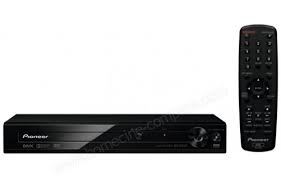
DV-2240 - DVD player PIONEER - Free user manual and instructions
Find the device manual for free DV-2240 PIONEER in PDF.



| Product type | DVD player |
| Brand | PIONEER |
| Model | DV-2240 |
| Dimensions (W x H x D) | 271 mm x 42 mm x 208 mm |
| Weight | 1.0 kg |
| Power supply | AC 110 V to 240 V, 50/60 Hz |
| Power consumption | 6 W (standby: 0.5 W) |
| Playable discs | DVD-Video, DVD-R/RW, DVD+R/RW, Video CD, Audio CD, CD-R/RW, JPEG, DivX, WMA, MP3 |
| Audio formats | MP3 (32-48 kHz, up to 192 kbps), WMA (32-48 kHz) |
| Video formats | DivX (.avi), MPEG-4 |
| Photo formats | JPEG Baseline (up to 3072 x 2048 pixels) |
| Playback functions | Program play, repeat, random, zoom, slow motion, fast forward/rewind |
| Outputs | 1 RCA video output (1 Vp-p), 1 RCA stereo audio output (200 mV), 1 coaxial digital audio output |
| Remote control | Yes, with AAA (R03) batteries x 2 supplied |
| Laser safety | Class 1 (IEC 60825-1:2007) |
| Operating temperature | +5 °C to +35 °C |
| Operating humidity | 5% to 85% (non-condensing) |
| Supplied accessories | Remote control, batteries, warranty card, instruction manual |
| Maintenance | Clean with a soft cloth; do not use solvents. Clean discs from the center outward. |
| Repairability | Contact Pioneer after-sales service or an authorized dealer for repairs. |
Frequently Asked Questions - DV-2240 PIONEER
User questions about DV-2240 PIONEER
0 question about this device. Answer the ones you know or ask your own.
Ask a new question about this device
Download the instructions for your DVD player in PDF format for free! Find your manual DV-2240 - PIONEER and take your electronic device back in hand. On this page are published all the documents necessary for the use of your device. DV-2240 by PIONEER.
USER MANUAL DV-2240 PIONEER
The STANDBY/ON switch on this unit will not completely shut off all power from the AC outlet. Since the power cord serves as the main disconnect device for the unit, you will need to unplug it from the AC outlet to shut down all power. Therefore, make sure the unit has been installed so that the power cord can be easily unplugged from the AC outlet in case of an accident. To avoid fire hazard, the power cord should also be unplugged from the AC outlet when left unused for a long period of time (for example, when on vacation).
D3-4-2-2-2a*A1_EN
WARNING
To prevent a fire hazard, do not place any naked flame sources (such as a lighted candle) on the equipment. D3-4-2-1-7a_A1_En
POWER-CORD CAUTION
Handle the power cord by the plug. Do not pull out the plug by tugging the cord and never touch the power cord when your hands are wet as this could cause a short circuit or electric shock. Do not place the unit, a piece of furniture, etc., on the power cord, or pinch the cord. Never make a knot in the cord or tie it with other cords. The power cords should be routed such that they are not likely to be stepped on. A damaged power cord can cause a fire or give you an electrical shock. Check the power cord once in a while. When you find it damaged, ask your nearest PIONEER authorized service center or your dealer for a replacement. S002* A1 En
Operating Environment
Operating environment temperature and humidity:
+5°C to +35°C (+41°F to +95°F); less than 85%RH (cooling vents not blocked)
Do not install this unit in a poorly ventilated area, or in locations exposed to high humidity or direct sunlight (or strong artificial light)
D3-4-2-1-7c*A1_EN
This product is for general household purposes. Any failure due to use for other than household purposes (such as long-term use for business purposes in a restaurant or use in a car or ship) and which requires repair will be charged for even during the warranty period.
K041_A1_En
Information for users on collection and disposal of old equipment and used batteries
These symbols on the products, packaging, and/or accompanying documents mean that used electrical and electronic products and batteries should not be mixed with general household waste.
For proper treatment, recovery and recycling of old products and used batteries, please take them to applicable collection points in accordance with your national legislation.
By disposing of these products and batteries correctly, you will help to save valuable resources and prevent any potential negative effects on human health and the environment which could otherwise arise from inappropriate waste handling.
For more information about collection and recycling of old products and batteries, please contact your local municipality, your waste disposal service or the point of sale where you purchased the items.
These symbols are only valid in the European Union.
For countries outside the European Union:
If you wish to discard these items, please contact your local authorities or dealer and ask for the correct method of disposal.

Symbol for equipment


Symbol examples for batteries
K058a_A1_En
Contents
Before you start 3
Part names and functions 3
Playable discs and files. 5
Convenient functions 6
Changing the settings 7
Troubleshooting 8
Additional information. 9
Specifications 11
What's in the box
Remote Control
AAA batteries (R03) x 2
Warranty card
- Operating instructions (This document)
VENTILATION CAUTION
When installing this unit, make sure to leave space around the unit for ventilation to improve heat radiation (at least 10cm at top, 10cm at rear, and 10cm at each side).
WARNING
Slots and openings in the cabinet are provided for ventilation to ensure reliable operation of the product, and to protect it from overheating. To prevent fire hazard, the openings should never be blocked or covered with items (such as newspapers, table-cloths, curtains) or by operating the equipment on thick carpet or a bed. D3-4-2-17b" A1_EN
WARNING
This equipment is not waterproof. To prevent a fire or shock hazard, do not place any container filled with liquid near this equipment (such as a vase or flower pot) or expose it to dripping, splashing, rain or moisture.
D3-4-2-1-3_A1_En
CAUTION
This product is a class 1 laser product classified under the Safety of laser products, IEC 60825-1:2007.
CLASS 1 LASER PRODUCT
D58-5-2-2a_A1_En
Loading the batteries in the remote control
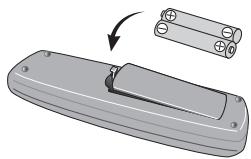
1 Open the battery compartment.
2 Insert 2 batteries (AAA/R03 size battery) with correct polarity ( I) as indicated.
3 Close the battery compartment.
WARNING
Do not use or store batteries in direct sunlight or other excessively hot place, such as inside a car or near a heater. This can cause batteries to leak, overheat, explode or catch fire. It can also reduce the life or performance of batteries.

NOTE
- When inserting the batteries, make sure not to damage the springs on the battery's (O) terminals.
- Do not use any batteries other than the ones specified. Also, do not use a new battery together with an old one.
- When loading the batteries into the remote control, set them in the proper direction, as indicated by the polarity marks (⊕ and ⊙).
- Do not heat batteries, disassemble them, or throw them into flames or water.
- Batteries may have different voltages, even if they are the same size and shape. Do not use different types of batteries together.
- To prevent leakage of battery fluid, remove the batteries if you do not plan to use the remote control for a long period of time (1 month or more). If the fluid should leak, wipe it carefully off the inside of the case, then insert new batteries. If a battery should leak and the fluid should get on your skin, flush it off with large quantities of water.
- When disposing of used batteries, please comply with governmental regulations or environmental public institution's rules that apply in your country/area.
Connections
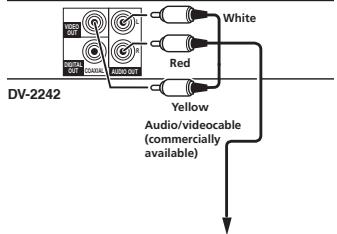
Player's rear panel
TV or AV receiver
- Be sure to turn off the power and unplug the power cord from the power outlet whenever making or changing connections.
- Connect the power cord after all the connections between devices have been completed.
Connecting using commercially available cables
- The player can be connected to an AV amplifier, etc., using commercially available digital audio cables and component video cables.
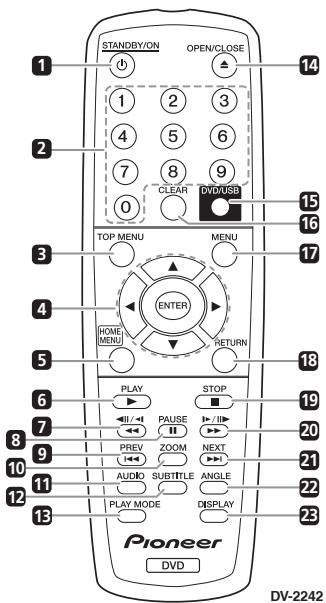
Remote Control

NOTE
The illustrations used in this operating instructions are DV-2242.
1 STANDBY/ON
Press to turn the power on and off.
2 Number buttons (0 to 9)
Use these to specify and play the title, chapter, track or file. Also use to select items on MENU screens, etc.
3 TOP MENU
Press to display the top menu of the DVD-Video.
4 △/▼/△/
Use these to select items, change settings and move the cursor.
ENTER
Use this to implement the selected item or enter a setting that you have changed.
5 HOME MENU
Press to display/hide HOME MENU

HOME MENU
DVD

Audio Settings

Video Adjust

Play Mode

Disc Navigator

Initial Settings
Audio Settings (page 7)
Video Adjust (page 7)
Play Mode
A-B Repeat
The specified section within a single title or track is played repeatedly.
Repeat
Plays titles, chapters, tracks or files repeatedly.
- Random
Plays titles, chapters or tracks in random order.
Program
See page 6 for details.
Search Mode
Plays the specified number or time within the title, chapter, track or file.
The Play Mode function may not work for some discs or files.
Disc Navigator (see MENU on page 4)
- Initial Settings (page 6)
6 PLAY
Press to start playback.
7
Press during playback to fast-reverse.
- Press in the pause mode to move backward frame-by-frame.
- Press and hold in the pause mode to play back slowly (reverse).
8 II PAUSE
Press to stop playback temporarily. Press again to resume.
9 PREV
Press to return to the beginning of the currently playing title, chapter, track or file. Press twice to move back to the beginning of the previous title, chapter, track or file.
10 ZOOM
Press to zoom on the image.
11 AUDIO
For discs or files including multiple audio streams/channels, the audio stream/channel can be changed during playback.
12 SUBTITLE
On DVD-Video or DivX discs containing subtitles in multiple languages, the subtitle can be changed during playback.
13 PLAY MODE
Press to switch the play mode.
14 △ OPEN/CLOSE
Press to open and close the disc tray and load the disc.
15 DVD/USB (DV-2242) (page 6)
Press to switch between DVD and USB modes.
ENTER (DV-2240)
Use this to implement the selected item or enter a setting that you have changed.
16 CLEAR
Press to cancel the selected item.
17 MENU
Press to display MENU screen or Disc Navigator.
- Select the title, chapter, track or file from the Disc Navigator to play back.
18 RETURN
Press to return to the previous screen.
19 STOP
To resume play, press STOP once during playback. If you press PLAY after that, playback starts from the point you last stopped. To cancel resume play, press STOP again while playback is stopped.
20 1
Press during playback to fast-forward.
- Press in the pause mode to move forward frame-by-frame.
- Press and hold in the pause mode to play back slowly (forward).
21 NEXT
Press during playback to skips ahead to the beginning of the next title, chapter, track or file.
22 ANGLE
- On DVD-Video discs containing multiple angles, the angle can be changed during playback.
- Press and hold during the audio CD playback to repeat the disc/track. Each time you press and hold, the repeat mode changes between the disc repeat and track repeat mode.
23 DISPLAY
The elapsed time, amount remaining, etc., is displayed.
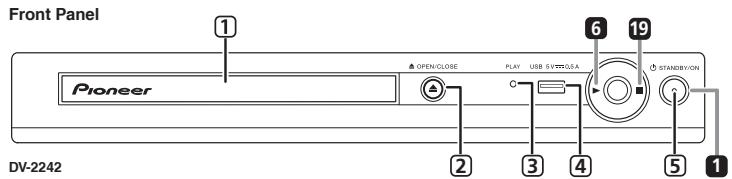
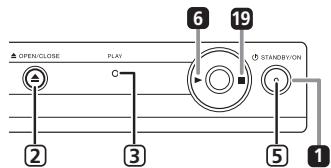
DV-2240
1 Disc tray
2 △OPEN/CLOSE
3 PLAY indicator
Will turn on during normal playback. Will flash when reading disc, for example.
4 USB port (type A) (DV-2242)
5 ON indicator
Will turn on when power is on.
Resume play from where stopped (resume play)
- When ■ STOP is pressed while playing, the location where it stopped will be memorized. If you press PLAY playback starts from the point you last stopped.
To cancel resume play, press STOP again while playback is stopped.
Some discs may not be able to resume play.
Playable discs
| DVD-Video | DVD-Video discsDVD-R/-RW/-R DL andDVD+R/+RW/+R DL discs recorded in the Video mode |
| DVD VR | DVD-R/-RW/-R DL discs recorded in the VR mode |
| Video CD | Video CDs (including Super VCDs) |
| CD(RI/RW) | Audio CDsCD-R/-RW/-ROM discs containingmusic recorded in the CD-DA format |
| JPEG | JPEG files recorded on DVD-R/-RW/- RDL discs, CD-R/-RW/-ROM discs |
| DivX® | DivX video files recorded onDVD-R/-RW/- R DL discs, CD-R/-RW/-ROM discs |
| WMA | WMA files recorded on DVD-R/-RW/- R DLDiscs, CD-R/-RW/-ROM discs |
| MP3 | MP3 files recorded on DVD-R/-RW/- R DLDiscs, CD-R/-RW/-ROM discs |
| FUJICOLOR-CD | |
| KODAK Picture CD | |
- Only the discs that have been finalized can be played.
DVD is a trademark of DVD Format/Logo Licensing Corporation.
is a trademark of FUJIFILM Corporation.

COMPATIBLE
This label indicates playback compatibility with DVD-RW discs recorded in VR format (Video Recording format).
However, for discs recorded with a record-only- once encrypted program, playback can only be achieved using a CPRM compatible device.
This unit does not support CPRM.

NOTE
- This player does not support multisession discs or multiborder recording.
- Multisession/multiborder recording is a method in which data is recorded on a single disc in two or more sessions/borders. A "session" or "border" is one recording unit, consisting of a complete set of data from lead-in to lead-out.
Discs that cannot be played
- Blu-ray discs
HD DVDs
AVCHD
AVCREC
DVD-Audio discs
DVD-RAM discs
SACDs
CD-G
Discs recorded with packet writing
Programs that can be recorded only once and that are (already) recorded on a DVD-R/RW/R DL
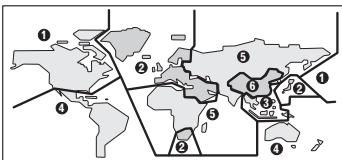
About region numbers
All DVD-Video discs carry a region mark (number) on the case. The mark (number) denotes the region(s) of the world in which the disc is compatible. Your DVD player also has a region mark (number), which you can find on the rear panel.
If you try to play a disc of an incompatible region,
"Incompatible disc region number Can't play disc" will be displayed on the screen and you will not be able to play the disc. Discs marked "ALL" can be played in any player.
The diagram below shows the various DVD regions of the world.
Regarding copy protected CDs
This player is designed to conform to the specifications of the audio CD format. This player does not support the playback or function of discs that do not conform to these specifications.
Playing discs created on computers or BD/DVD recorders
- The player may not be able to play discs recorded using a computer. Record discs in a format playable on this player. For details, contact the dealer.
- The player may not be able to play discs recorded using a computer or a BD/DVD recorder, if burn quality is not good due to characteristics of the disc, scratches, dirt on the disc, dirt on the recorder's lens, etc.
Playable files
Only discs recorded in ISO9660 Level 1, Level 2 and Joliet can be played.
- Files protected by DRM (Digital Rights Management) cannot be played.
- Files other than the ones below (WMV, MPEG4-AAC, etc.) are not guaranteed to play.
Supported video file formats
DivX
- ABOUT DIVX VIDEO: Divx® is a digital video format created by DivX, LLC, a subsidiary of Rovi Corporation. This is an official DivX Certified device that plays Divx video. Visit divx.com for more information and software tools to convert your files into DivX videos.
- ABOUT DIVX VIDEO-ON-DEMAND: This DivX Certified device must be registered in order to play purchased DivX Video-on-Demand (VOD) movies. To obtain your registration code, locate the DivX VOD section in Options settings. Go to vod. divx.com for more information on how to complete your registration.

- DivX®, DivX Certified® and associated logos are trademarks of Rovi Corporation or its subsidiaries and are used under license.
Displaying external subtitle files
- The font sets listed below are available for external subtitle files. You can see the proper font set on-screen by setting the Subtitle Language on page 10 to match the subtitle file.
- This player supports the following language groups:
| Group 1 | Afrikaans (af), Basque (eu), Catalan (ca), Danish (da), Dutch (nl), English (en), Faroese (fo), Finnish (fi), French (fr), German (de), Icelandic (is), Irish (ga), Italian (it), Norwegian (no), Portuguese (pt), Rhaco-to-Romantic (rm), Scottish (gd), Spanish (es), Swedish (sv) |
| Group 2 | Albanian (sq), Croatian (hr), Czech (cs), Hungarian (hu), Polish (pl), Romanian (ro), Slovak (sk), Slovenian (sl) |
| Group 3 | Bulgarian (bg), Byelorussian (be), Macedonian (mk), Russian (ru), Serbian (sr), Ukrainian (uk) |
| Group 4 | Hebrew (iw), Yiddish (ji) |
| Group 5 | Turkish (tr) |
- Some external subtitle files may be displayed incorrectly or not at all.
- For external subtitle files the following subtitle format filename extensions are supported (please note that these files are not shown within the disc navigation menu): .srt, .sub, .ssa, .smi
- The filename of the movie file has to be repeated at the beginning of the filename for the external subtitle file.
- The number of external subtitle files which can be switched for the same movie file is limited to a maximum of 10.
Supported image file formats
JPEG
Resolution: Up to 3072 x 2048 pixels
This player supports baseline JPEG.
This player supports Exif Ver.2.2.
This player does not support progressive JPEG.
Supported audio file formats
- This player does not support VBR (Variable Bit Rate) and lossless encoding.
Windows Media™ Audio (WMA)
Sampling frequencies: 32kHz 44.1 kHz and 48 kHz
Bit rate: Up to 192 kbps
- This player supports files encoded using Windows Media Player Ver. 7/7.1, Windows Media Player for Windows XP and Windows Media Player 9 Series.
- Windows Media is either a registered trademark or trademark of Microsoft Corporation in the United States and/or other countries.
This product includes technology owned by Microsoft Corporation and cannot be used or distributed without a license from Microsoft Licensing, Inc.
MPEG-1 Audio Layer 3 (MP3)
- Sampling frequencies: 32 kHz, 44.1 kHz and 48 kHz
Playable file extensions
Video files
<divx.avi
- Files not containing DivX video signals cannot be played, even if they have the extension ".avi".
Image files
.jpg.jpeg
Audio files
.wma.mp3
Playing in the desired order (Programmed Play)
DVD-Video Video CD CD(R/RW) DivX
WMA
MP3
1 Display the Play Mode screen.
Select Play Mode from HOME MENU screen.
2 Select Program.
Use / to select, then press ENTER or
3 Select Create/Edit.
Use / to select, then press ENTER.
- The Create/Edit screen differs according to the disc or file.
4 Select the title, chapter, track or file.
Use / / / to select, then press ENTER.
- To add to a program, first select the place in the program (the program step), next select the title, chapter, track or file then press ENTER (files are added at the end of program).
- Press RETURN to return to the previous screen. If you return to the previous screen when inputting it, the settings you have programmed are cleared.
- To delete a step, highlight it and press CLEAR.
5 Start playback.
Press PLAY.
To play the program, select Playback Start from the program screen, then press ENTER.
- To resume normal playback, select Playback Stop from the program screen, then press ENTER. The program remains in the memory.
- To cancel the entire program, select Program Delete from the program screen, then press ENTER.
NOTE
Programs can be played repeatedly. Select Program Repeat from Repeat on the Play Mode screen during programmed playback.
- Programs cannot be played in random order (random play is not possible during programmed play).
Playing files on USB devices (DV-2242)
JPEG DivX WMA MP3
- The player may not recognize the USB device, play files or supply power to the USB device. For details, see When a USB device is connected on page 9.
- Pioneer does not support that all files recorded on all USB devices will play or that power will be supplied to the USB device. Also note that Pioneer will accept no responsibility whatsoever for loss of files on USB devices caused by connection to this player.
1 Switch to USB mode.
Press DVD/USB
2 Connect the USB device.
Connect the USB device to the USB port on the front panel (page 4).
The Disc Navigator appears automatically.
3 Start playback.
Use / / / to select the file, then press
ENTER
- Turn the power off before removing the USB device.
To return to DVD mode, press DVD/USB or OPEN/CLOSE
Copying files on to USB devices (DV-2242)
JPEG DivX WMA MP3
Files stored on the discs can be copied on to the USB device through the player.
1 Display the Disc Navigator screen.
Press MENU
- Press STOP to stop playback if the file is being played.
2 Select the file.
Use / / to select, then press
3 Start copying.
Use / to select Yes, then press ENTER
The file copying process will appear on the screen.

NOTE
- Do not operate any buttons during the file copying process.
- A folder named "PIONEER" is automatically created on the USB device. The copied files are stored in this folder.
The factory default settings are indicated in italic.
Audio Settings parameters
Sound Retriever (High/Low/Off)
- The sound of a WMA or MP3 file is played with high sound quality. This is only valid for files with the extension ".wma" or ".mp3".
- The effect depends on the file. Try different settings, and choose the one providing the good effect.
Equalizer (Off/Rock/Pop/Live/Dance/Techno/Classic/Soft)
- Select according to the genre of music to be listened to.
Audio DRC (High/Medium/Low/Off)
This makes loud sounds weaker and weak sounds louder.
This setting only affects Dolby Digital sound.
- The effect depends on the volume of the connected units. Try different settings, and choose the one providing the strongest effect.
Dialog (High/Medium/Low/Off)
- Change this setting if the sound of the dialogs is too low.
About Sound Retriever function
When audio data is removed during the compression process, sound quality often degrades. The Sound Retriever function automatically enhances compressed audio and restores CD quality sound.
Video Adjust parameters
Sharpness (Fine/Standard/Soft)
- Adjusts the picture's sharpness.
Brightness (-20 to +20)
- Adjusts the picture's brightness.
Contrast (-16 to +16)
- Adjusts the ratio of the brightness of the brightest and darkest portions of the picture.
Gamma (-3 to +3)
- Adjusts the look of the dark portions of the picture.
Hue (green 9 to red 9)
- Adjusts the balance between green and red.
Chroma Level (-9 to +9)
- Adjusts the density of the colors. This setting is effective for sources with many colors, such as cartoons.
Brightness, Contrast, Gamma, Hue and Chroma
Level are set to 0 upon purchase.
Initial Settings parameters
The player's detailed settings can be changed here.
- Initial Settings cannot be selected during playback.
Digital Audio Out settings
Digital Out
- Select whether to output digital audio signals (On) from the COAXIAL DIGITAL AUDIO OUT terminals or not (Off).
Dolby Digital Out
- Select whether to output Dolby Digital audio signals (Dolby Digital) or to convert them into linear PCM signals (Dolby Digital > PCM), according to the connected unit.
DTS Out
- Select whether to output DTS audio signals (DTS) or not (Off), according to the connected unit.
96 kHz PCM Out
- Select whether to output 96 kHz audio signals (96kHz) or to convert them into linear PCM signals (96kHz > 48kHz), according to the connected unit.
MPEG Out
- Select whether to output MPEG audio signals (MPEG) or to convert them into linear PCM signals ( MPEG > PCM ), according to the connected unit.
Video Output settings
TV Screen
- Change the picture's display format (4:3 (Letter Box)/4:3 (Pan & Scan)/16:9 (Wide)), according to the connected TV.
The player's factory default setting is set as 4:3 (Letter Box).
Language settings
Audio Language
- Change the language when listening to the sound of DVD-Video discs (English/available languages/Other Language).
Subtitle Language
- Change the language of the subtitles displayed for DVD-Video discs (English/available languages/ Other Language).
DVD Menu Lang.
- Change the language used for the menu displays of DVD-Video discs (w/Subtitle Lang./available languages/Other Language).
Subtitle Display
- Select whether to display subtitles (On) or not (Off).
Display settings
OSD Language
- Change the language of the operation messages (Play, Stop, etc.) displayed on the TV screen (English/available languages).
Angle Indicator
- Select whether to display the angle mark on the TV screen (On) or not (Off).
On Screen Display
- Select whether to display operation messages (Play, Stop, etc.) on the TV screen (On) or not (Off).
Options settings
Parental Lock
- Restrict DVD-Video viewing (Password/Level Change/Country Code).
DivX VOD
Display the registration code required for playing DvX VOD files (Activate/Deactivate).
Auto Power Off
- Select whether to turn the power off automatically ( O_n or not (Off). When set to O_n , the power automatically turns off if no operation is performed for 30 minutes or more.
Restoring all the settings to the defaults
While the player is in the standby mode...
Press 口 STANDBY/ON while pressing.
Use the buttons on the front panel.
Incorrect operation is often mistaken for trouble or malfunction. If there is something wrong with this player, check the symptoms below.
- Sometimes the trouble lie in another component connected to this player. Inspect the component and electrical appliances being used. If the trouble cannot be rectified after checking the items below, ask your nearest Pioneer authorized service center or your dealer to carry out repair work.
- The player may not operate properly due to static electricity or other external influences. In such cases, normal operation may be restored by unplugging the power cord then plugging it back in.
| Problem | Possible causes and solutions |
| Difference in volume between DVD and CD. | The volume may sound different due to differences in how the signals are recorded on the disc. |
| Disc cannot be played or disc tray opens automatically. | If the disc is dirty, wipe the dirt off the disc (page 10). Set the disc with the printed side facing up. Check the disc's region number, and if the number is compatible for playback on the player (page 5). Only the discs with the appropriate region number or "ALL" can be played. |
| The power turns off automatically. | If Auto Power Off is set to On, the power turns off automatically if no operation has done for over 30 minutes (above). |
| Picture is stretched, or aspect ratio cannot be changed. | Refer to the TV's operating instructions and set the TV's aspect ratio properly. Set TV Screen properly (page 7). |
| Picture is disturbed or dark during playback. | When the player and the TV are connected via a video deck, "analog copy protect function" may cause the picture being played on the video deck not to display properly. Connect the player and TV directly. Set the TV system properly. The factory default setting is AUTO. If the picture is distorted, switch the TV system to the one used in your country or region (NTSC or PAL) (page 9). |
| 96 kHz/88.2 kHz digital audio signals are not output from the COAXIAL DIGITAL AUDIO OUT terminals. | Set 96 kHz PCM Out to 96kHz > 48kHz. The 96 kHz/88.2 kHz digital audio signals of copyrightprotected discs cannot be output. |
| Folder or file names are not recognized. | This player can recognize up to 299 folders on one disc and 648 files within one folder. Depending on the folder structure, however, the player may not be able to recognize certain folders or files. |
| Folder or file names are not displayed or properly displayed | Only 1-byte alphanumeric characters can be displayed. Folder and file names including characters other than 1-byte alphanumeric characters may be displayed for example as F_007 or FL_001, and the characters may be garbled. |
| Much time is required to play JPEG files. | The player may take longer to display large files. |
| Black bars are displayed when playing JPEG files. | Black bars may be displayed along the top and bottom or sides when JPEG files with different aspect ratios are played. |
When a USB device is connected
| Problem | Possible causes and solutions |
| USB device is not recognized. | Turn the power off, then disconnect and reconnect the USB device. This player does not support USB hubs. Connect the USB device directly. This player only supports USB mass storage class devices. This player supports portable flash memory and digital audio playback devices. Only the FAT16 and FAT32 file systems are supported. Other file systems (exFAT, NTFS, etc.) are not supported. If the USB device is equipped with an AC adapter, use the USB device with the AC adapter connected. Some USB devices may not be recognized properly. |
| File cannot be played. | Copyright-protected files cannot be played. Files stored on a computer cannot be played. It may not be able to play some files. |
| Folder or file names are not displayed or properly displayed. | The maximum displayable number of characters for the folder and file names on the Disc Navigator is 14. |
| Folder or file names are not displayed in alphabetical order. | The order of the folder and file names displayed on the Disc Navigator is dependant on the time and date when the folders or files were created on the USB device. |
| Much time is required to recognized the USB device. | It may take longer to load data when a large capacity USB device is connected (this could take several minutes). |
Setting the TV system
- If the picture of the disc being played is distorted, switch the TV system to the one used in your country or region.
- When the TV system is switched, the types of discs that can be played are limited.
The factory default setting is AUTO.
While the player is in the standby mode...
Press STANDBY/ON while pressing
Use the buttons on the front panel.
The power turns on and the TV system switches as shown below.
- AUTO→NTSC
- NTSC→PAL
- PAL→AUTO
| Types of discs/files | Format | Player setting | ||
| NTSC | PAL | AUTO | ||
| DVD-Video | NTSC | NTSC | PAL | NTSC |
| DVD VR | PAL | NTSC | PAL | PAL |
| Video CD | ||||
| DVD× | ||||
| CD(R/RW) | PAL | NTSC | PAL | NTSC or PAL |
| WMA | ||||
| MP3 | ||||
| JPEG no disc | ||||
Cautions on use
When moving the player
When moving the player, check first that there is no disc loaded and that the disc tray is closed. Then press STANDBY/ON on the player (or STANDBY/
ON on the remote control), wait for the OFF indicator on the front panel display to turn off, then unplug the power cord. Moving the player with a disc inside it could result in damage.
Place of installation
- Choose a stable place near the TV or stereo system being used with the player.
- Do not place the player on top of a TV or color monitor. Also install it away from cassette decks and other devices easily affected by magnetic forces.
Avoid the following types of places:
Places exposed to direct sunlight
- Humid or poorly ventilated places
Extremely hot places
Places exposed to vibrations
Places in which there is much dust or cigarette smoke
Places exposed to soot, steam or heat (kitchens, etc.)
Do not place objects on the player.
Do not place any objects on top of the player.
Do not obstruct the ventilation holes.
Do not use the player on shaggy rugs, beds, sofas, etc., or wrapped in cloth, etc. Doing so will prevent the heat from dispersing, leading to damage.
Do not expose to heat.
Do not place the player on top of an amplifier or other component that generates heat. When placing it in a rack, to avoid the heat given off by the amplifier or other audio component, place it on a shelf below the amplifier.
Turn off the player's power when not using it.
Depending on signal conditions, striped patterns may appear on a TV screen and noise may enter the sound of radio broadcasts when the player's power is on. If this happens, turn the player's power off.
About condensation
If the player is moved suddenly from a cold place into a warm room (in winter, for example) or if the temperature in the room in which the player is installed rises suddenly due to a heater, etc., water droplets (condensation) may form inside (on operating parts and the lens). When condensation is present, the player will not operate properly and playback is not possible. Let the player stand at room temperature for 1 or 2 hours with the power turned on (the time depends on the extent of condensation). The water droplets will dissipate and playback will become possible. Condensation can also occur in the summer if the player is exposed to the direct wind from an air-conditioner. If this happens, move the player to a different place.
Cleaning the product
- Unplug the power cord from the power outlet when cleaning the player.
- Clean the player using a soft cloth. For tough dirt, apply some neutral detergent diluted in 5 to 6 parts water to a soft cloth, wring out thoroughly, wipe off the dirt, then wipe again with a soft, dry cloth.
- Alcohol, thinner, benzene, insecticides, etc., could cause the print or paint to peel off. Also, leaving rubber or vinyl products in contact with the player for long periods of time could mar the cabinet.
- When using chemical-impregnated wipes, etc., read the cautions included with the wipes carefully.
Caution for when the unit is installed in a rack with a glass door
Do not press OPEN/CLOSE on the remote control to open the disc tray while the glass door is closed. The door will hamper the movement of the disc tray, and the unit could be damaged.
Cleaning the lens
The player's lens should not become dirty in normal use, but if for some reason it should malfunction due to dust or dirt, consult your nearest Pioneer authorized service center. Although lens cleaners for players are commercially available, we advise against using them since some may damage the lens.
About copyrights
This item incorporates copy protection technology that is protected by U.S. patents and other intellectual property rights of Rovi Corporation. Reverse engineering and disassembly are prohibited.
Handling discs
Storing
Always place discs in their cases and store them vertically, avoiding places hot, humid, exposed to direct sunlight and extremely cold.
- Be sure to read the cautions included with the disc.
Cleaning discs
- Discs may not play if there are fingerprints or dust on them. In this case, use a cleaning cloth, etc., to gently wipe the disc from the inside towards the outside. Do not use dirty cleaning clothes.
- Do not use benzene, thinner or other volatile chemicals. Also do not use record spray or antistatic agents.
- For tough dirt, apply some water to a soft cloth, wring out thoroughly, wipe off the dirt, then wipe off the moisture with a dry cloth.
- Do not use damaged (cracked or warped) discs.
- Do not let the signal surface of discs get scratched or dirty.
- Do not place two discs in the disc tray, one on top of the other.
- Do not attach pieces of paper or stickers to discs. Doing so could warp discs, making it impossible to play them. Also note that rental discs often have labels attached to them, and the label's glue may have oozed out. Check that there is no glue around the edges of such labels before using rented discs.
About specially shaped discs

Specially shaped discs (heartshaped, hexagonal, etc.) cannot be played on this player. Do not attempt to play such discs, as they could damage the player.
About condensation on discs
Water droplets (condensation) may form on the surface of discs if they are moved from a cold place (particularly in winter) into a warm room. Discs may not play normally if there is condensation on them. Carefully wipe the water droplets off the surface of the disc before loading it.
About trademarks

DOLBY DIGITAL
Manufactured under license from Dolby Laboratories. "Dolby" and the double-D symbol are trademarks of Dolby Laboratories.
Language Code Table
Language names (codes) an input codes
Japanese (ja), 1001
English (en), 0514
French (fr), 0618
German (de), 0405
Italian (it), 0920
Spanish (es), 0519
Chinese (zh), 2608 Fiji (fi), 0610
Dutch (nl), 1412
Portuguese (pt), 1620 Frisian (fy), 0625
Swedish (sv), 1922
Russian (ru), 1821
Korean (ko), 1115
Greek (el), 0512
Afar (aa), 0101
Abkhazian (ab
Hungarian (hu), 0821
Armenian (hy), 0825
Interlingua (ja), 0901
Interlingue (ie), 0905
Inupiak (ik), 0911
Indonesian (in), 0914
Icelandic (is), 0919
Hebrew (iw), 0923
Yiddish (ji), 1009
Javanese (jw), 1023
Georgian (ka), 1101
Kazakh (kk), 1111
Greenlandic (kl), 1112
Cambodian (km), 1113
Kannada (kn), 1114
Kashmiri (ks), 1119
Kurdish (ku), 1121
Kirghiz (ky), 1125
Latin (la), 1201
Lingala (In), 1214
Laothian (lo), 1215
Lithuanian (It), 1220
Latvian (lv), 1222
Malagasy (mg), 1307
Maori (mi), 1309
Macedonian (mk), 1311
Malayalam (ml), 1312
Mongolian (mn), 1314
Moldavian (mo), 1315
Marathi (mr), 1318
Malay (ms), 1319
Maltese (mt), 1320
Burmese (my), 1325
Nauru (na), 1401
Nepali (ne), 1405
Norwegian (no), 1415
Occitan (oc), 1503
Oromo (om), 1513
Oriya (or), 1518
Panjabi (pa), 1601
Polish (pl), 1612
Pashto, Pushto (ps), 1619
Quechua (qu), 1721
Rhaeto-Romance (rm), 1813
Kirundi (rn), 1814
Romanian (ro), 1815
Kinyarwanda (rw), 1823
Sanskrit (sa), 1901
Sindhi (sd), 1904
Sangho (sg), 1907
Serbo-Croatian (sh), 1908
Sinhalese (si), 1909
Slovak (sk), 1911
Slovenian (sl), 1912
Samoan (sm), 1913
Shona (sn), 1914
Somali (so), 1915
Albanian (sq), 1917
Serbian (sr), 1918
Siswati (ss), 1919
Sesotho (st), 1920
Vietnamese (vi), 2209
Volapuk (vo), 2215
Wolof (wo), 2315
Xhosa (xh), 2408
Yoruba (yo), 2515
Zulu (zu), 2621
Country/Area Code Table
Country/Area name, Input codes and Country/Area code
United States, 2119, us
Argentina, 0118, ar
United Kingdom, 0702,gb
Italy, 0920, it
India, 0914, in
Indonesia, 0904, id
Australia, 0121, au
Austria, 0120, at
Netherlands, 1412, nl
Canada, 0301, ca
Korea, Republic of, 1118, kr
Singapore, 1907, sg
Switzerland, 0308, ch
Sweden, 1905, se
Spain, 0519, es
Thailand, 2008, th
Taiwan, 2023, tw
China, 0314, cn
Chile, 0312, ch
Denmark, 0411, dk
Germany, 0405, de
Japan, 1016, jp
New Zealand, 1426, nz
Norway, 1415, no
Pakistan, 1611, pk
Philippines, 1608, ph
Finland, 0609, fi
Mexico, 1324, mx
Brazil, 0218, br
France, 0618, fr
Belgium, 0205, be
Portugal, 1620, pt
Hong Kong, 0811, hk
Malaysia, 1325, my
| Power requirements | AC 110 V to 240 V, 50 Hz/60 Hz |
| Power consumption | DV-2242.10 W DV-2240.6 W |
| Power consumption (standby) | 0.5 W |
| Weight | 1.0 kg |
| External dimensions | DV-2242.271 mm (W) x 42 mm (H) x 208 mm (D) DV-2240.271 mm (W) x 42 mm (H) x 208 mm (D) |
| Tolerable operating temperature | +5 °C to +35 °C |
| Tolerable operating humidity | 5 % to 85 % (no condensation) |
Video output
| Output level | 1 Vp-p (75 Ω) |
| Output terminal | RCA terminal |
Audio output (stereo L/R)
| Audio output level | 200 mVrms (1 kHz, -20 dB) |
| Output terminal | RCA terminal |
| Frequency response | 4 Hz to 44 kHz |
Digital audio output
| Coaxial digital output | RCA terminal |
USB (DV-2242)
| USB port | A type |

NOTE
The specifications and design of this product are subject to change without notice.
- This product includes FontAvenue® fonts licensed by NEC Corporation. FontAvenue is a registered trademark of NEC Corporation.
Sound Retriever (High/Low/Off)
Equalizer (Off/Rock/Pop/Live/Dance/Techno/Classic/Soft)
Audio DRC (High/Medium/Low/Off)
Dialog (High/Medium/Low/Off)
Sharpness (Fine/Standard/Soft)
United States, 2119, us Switzerland,0308,ch Norway,1415, no Argentina,0118, ar Sweden,1905,se Pakistan,1611,pk United Kingdom,0702,gb Spain,0519,es Philippines,1608,ph Italy,0920,it Thailand,2008,th Finland,0609, fi India,0914,in Taiwan,2023,tw Mexico,1324,mx Indonesia,0904,id China,0314,cn Brazil,0218,br Australia,0121,au Chile,0312,cl France,0618,fr Austria,0120.at Denmark,0411,dk Belgium,0205.be Netherlands,1412,nl Germany,0405.de Portugal,1620.pt Canada,0301.ca Japan,1016,jp Hong Kong,0811,hk Korea,Republic of,1118,kr New Zealand,1426,zn Malaysia,1325.my
Sound Retriever (High/Low/Off)
Equalizer (Off/Rock/Pop/Live/Dance/Techno/Classic/Soft)
Audio DRC (High/Medium/Low/Off)
Dialog (High/Medium/Low/Off)
Sharpness (Fine/Standard/Soft)
Country/Area name, Input codes and Country/Area code
United States, 2119, us Switzerland,0308,ch Argentina,0118, ar Sweden,1905,se United Kingdom,0702,gb Spain,0519,es Italy,0920,it Thailand,2008,th India,0914,in Taiwan,2023, tw Indonesia,0904, id China,0314,cn Australia,0121,au Chile,0312,cl Austria,0120,at Denmark,0411,dk Netherlands,1412,nl Germany,0405,de Canada,0301,ca Japan,1016, jp Korea,Republic of,1118,kr New Zealand,1426,zn Singapore,1907,sg
Norway, 1415, no
Pakistan, 1611, pk
Philippines, 1608, ph
Finland, 0609, fi
Mexico, 1324, mx
Brazil, 0218, br
France, 0618, fr
Belgium, 0205, be
Portugal, 1620, pt
Hong Kong, 0811, hk
Malaysia, 1325, my
1 Commutate in modalita USB.
Premere DVD/USB.
2 Connette la chiave USB.
Sound Retriever (High/Low/Off)
Equalizer (Off/Rock/Pop/Live/Dance/Techno/Classic/Soft)
Audio DRC (High/Medium/Low/Off)
Dialog (High/Medium/Low/Off)
Sharpness (Fine/Standard/Soft)
| United States, 2119, us | Switzerland, 0308, ch | Norway, 1415, no |
| Argentina, 0118, ar | Sweden, 1905, se | Pakistan, 1611, pk |
| United Kingdom, 0702, gb | Spain, 0519, es | Philippines, 1608, ph |
| Italy, 0920, it | Thailand, 2008, th | Finland, 0609, fi |
| India, 0914, in | Taiwan, 2023, tw | Mexico, 1324, mx |
| Indonesia, 0904, id | China, 0314, cn | Brazil, 0218, br |
| Australia, 0121, au | Chile, 0312, cl | France, 0618, fr |
| Austria, 0120, at | Denmark, 0411, dk | Belgium, 0205, be |
| Netherlands, 1412, nl | Germany, 0405, de | Portugal, 1620, pt |
| Canada, 0301, ca | Japan, 1016, jp | Hong Kong, 0811, hk |
| Korea, Republic of, 1118, kr | New Zealand, 1426, nz | Malaysia, 1325, my |
WAARSCHUWING NETSNOER
KLASSE 1 LASERPRODUCT
D58-5-2-2a_A1_NI
On DVD-Video or DivX discs containing subtitles in multiple languages, the subtitle can be changed during playback.
13 PLAY MODE
Supported video file formats
DivX
2 Selecteer Program.
Sound Retriever (High/Low/Off)
Equalizer (Off/Rock/Pop/Live/Dance/Techno/Classic/Soft)
Audio DRC (High/Medium/Low/Off)
Dialog (High/Medium/Low/Off)
Sharpness (Fine/Standard/Soft)
United States, 2119, us Switzerland, 0308, ch Argentina, 0118, ar Sweden, 1905, se United Kingdom, 0702, gb Spain, 0519, es Italy, 0920, it Thailand, 2008, th India, 0914, in Taiwan, 2023 tw Indonesia, 0904, id China, 0314, cn Australia, 0121, au Chile, 0312, cl Austria, 0120, at Denmark, 0411, dk Netherlands, 1412, nl Germany, 0405, de Canada, 0301, ca Japan, 1016, jp Korea, Republic of, 1118, kr New Zealand, 1426, n
Norway, 1415, no
Pakistan, 1611, pk
Philippines, 1608, ph
Finland, 0609, fi
Mexico, 1324, mx
Brazil, 0218, br
France, 0618, fr
Belgium, 0205, be
Portugal, 1620, pt
Hong Kong, 0811, hk
Malaysia, 1325, my
| Stroomvereisten | 110 V tot 240 V wisselstroom, 50 Hz/60 Hz |
| Stroomverbruik. | DV-2242. .10 WDV-2240. .6 W |
| Stroomverbruik (in stand-by) | 0,5 W |
| Gewicht | 1,0 kg |
| Buitenafmetingen | DV-2242. .271 mm (B) x 42 mm (H) x 208 mm (D)DV-2240. .271 mm (B) x 42 mm (H) x 208 mm (D) |
| Toegestane bedriifstemperatuar | +5 °C tot +35 °C |
| Toegestane luchtvochtigkeit | 5 % tot 85 % (zonder condensatie) |
Video-uitgang

m = 311
Symbol for equipment

Symbol examples for batteries
K058a_A1_Es
Índice
Antes de comenzar 3
Sound Retriever (High/Low/Off)
Equalizer (Off/Rock/Pop/Live/Dance/Techno/Classic/Soft)
Audio DRC (High/Medium/Low/Off)
Dialog (High/Medium/Low/Off)
Sharpness (Fine/Standard/Soft)
Brightness (-20 a +20)
Hue (green 9 a red 9)
Cambodian (km), 1113
Kannada (kn), 1114
Kashmiri (ks), 1119
Kurdish (ku), 1121
Kirghiz (ky), 1125
Latin (la), 1201
Lingala (In), 1214
Laothian (lo), 1215
Lithuanian (lt), 1220
Latvian (lv), 1222
Malagasy (mg), 1307
Maori (mi), 1309
Macedonian (mk), 1311
Malayalam (ml), 1312
Mongolian (mn), 1314
Moldavian (mo), 1315
Marathi (mr), 1318
Malay (ms), 1319
Maltese (mt), 1320
Burmese (my), 1325
Nauru (na), 1401
Nepali (ne), 1405
Norwegian (no), 1415
Occitan (oc), 1503
Oromo (om), 1513
Oriya (or), 1518
Panjabi (pa), 1601
Polish (pi), 1612
Pashto,Pushto (ps),1619
Quechua (qu), 1721
Rhaeto-Romance (rm), 1813
Kirundi (rn), 1814
Romanian (ro), 1815
Kinyarwanda (rw), 1823
Sanskrit (sa), 1901
Sindhi (sd), 1904
Sangho (sg), 1907
Serbo-Croatian (sh), 1908
Sinhalese (si), 1909
Slovak (sk), 1911
Slovenian (sl), 1912
Samoan (sm), 1913
Shona (sn), 1914
Somali (so), 1915
Albanian (sq), 1917
Serbian (sr), 1918
Siswati (ss), 1919
Sesotho (st), 1920
Vietnamese (vi), 2209
Volapuk (vo), 2215
Wolof (wo), 2315
Xhosa (xh), 2408
Yoruba (yo), 2515
Zulu (zu), 2621
Tabla de páíSES/códigos de和地区
United States, 2119, us
Argentina, 0118, ar
United Kingdom, 0702,gb
Italy, 0920, it
India, 0914, in
Indonesia, 0904, id
Australia, 0121, au
Austria, 0120, at
Netherlands, 1412, nI
Canada, 0301, ca
Korea, Republic of, 1118, kr
Singapore, 1907, sg
Switzerland, 0308, ch
Sweden, 1905, se
Spain, 0519, es
Thailand, 2008, th
Taiwan, 2023, tw
China, 0314, cn
Chile, 0312, cl
Denmark, 0411, dk
Germany, 0405, de
Japan, 1016, jp
New Zealand, 1426, nz
Norway, 1415, no
Pakistan, 1611, pk
Philippines, 1608, ph
Finland, 0609, fi
Mexico, 1324, mx
Brazil, 0218, br
France, 0618, fr
Belgium, 0205, be
Portugal, 1620, pt
Hong Kong, 0811,hk
Malaysia, 1325, my
| Requisitos de potencia | CA 110 V a 240 V, 50 Hz/60 Hz |
| Consumo de energia. | DV-2242............10 W DV-2240............6 W |
| Consumo de energia (modo de = espera) | 0,5 W |
| Peso | 1,0 kg |
| Dimensiones externas | DV-2242............271 mm (An) x 42 mm (Al) x 208 mm (Pr) DV-2240............271 mm (An) x 42 mm (Al) x 208 mm (Pr) |
| Temperatura de funciona tolerable | +5 °C a +35 °C |
| Humidad de funciona tolerable. | 5 % a 85 % (sin condensation) |
Salida de video
| Nivel de salute | 1 Vp-p (75 Ω) |
| Terminal de salute | Terminal RCA |
Salida de audio (estereo L/R)
© 2013 PIONEER CORPORATION.
All rights reserved.
© 2013 PIONEER CORPORATION.
PIONEER ELECTRONICS (USA) INC.
P.O. BOX 1540, Long Beach, California 90801-1540, U.S.A. TEL: (800) 421-1404
PIONEER ELECTRONICS OF CANADA, INC.
340 Ferrier Street, Unit 2, Markham, Ontario L3R 2Z5, Canada TEL: 1-877-283-5901, 905-479-4411
PIONEER EUROPE NV
Haven 1087, Keetberglaan 1, B-9120 Melsele, Belgium TEL: 03/570.05.11
PIONEER ELECTRONICS ASIACENTRE PTE. LTD.
253 Alexandra Road, #04-01, Singapore 159936 TEL: 65-6472-7555
PIONEER ELECTRONICS AUSTRALIA PTY. LTD.
5 Arco Lane, Heatherton, Victoria, 3202, Australia, TEL: (03) 9586-6300
PIONEER ELECTRONICS DE MEXICO S.A. DE C.V.
Blvd.Manuel Avila Camacho 138 10 piso Col.Lomas de Chapultepec, Mexico, D.F. 11000 TEL: 55-9178-4270
K002_B3_En

- WARNING
- POWER-CORD CAUTION
- Operating Environment
- Information for users on collection and disposal of old equipment and used batteries
- These symbols are only valid in the European Union.
- For countries outside the European Union:
- Contents
- What's in the box
- VENTILATION CAUTION
- CAUTION
- Loading the batteries in the remote control
- NOTE
- Connections
- Connecting using commercially available cables
- STANDBY/ON
- Number buttons (0 to 9)
- TOP MENU
- △/▼/△/
- ENTER
- HOME MENU
- PLAY
- 7
- II PAUSE
- PREV
- ZOOM
- AUDIO
- SUBTITLE
- PLAY MODE
- △ OPEN/CLOSE
- DVD/USB (DV-2242) (page 6)
- ENTER (DV-2240)
- CLEAR
- MENU
- RETURN
- STOP
- 1
- NEXT
- ANGLE
- DISPLAY
- Resume play from where stopped (resume play)
- Playable discs
- COMPATIBLE
- Discs that cannot be played
- About region numbers
- Regarding copy protected CDs
- Playing discs created on computers or BD/DVD recorders
- Playable files
- Supported video file formats
- DivX
- Displaying external subtitle files
- Supported image file formats
- JPEG
- Supported audio file formats
- Windows Media™ Audio (WMA)
- MPEG-1 Audio Layer 3 (MP3)
- Playable file extensions
- Video files
- Image files
- Audio files
- Playing in the desired order (Programmed Play)
- Display the Play Mode screen.
- Select Program.
- Select Create/Edit.
- Select the title, chapter, track or file.
- Start playback.
- Playing files on USB devices (DV-2242)
- Switch to USB mode.
- Connect the USB device.
- Start playback.
- Copying files on to USB devices (DV-2242)
- Display the Disc Navigator screen.
- Select the file.
- Start copying.
- Audio Settings parameters
- Sound Retriever (High/Low/Off)
- Equalizer (Off/Rock/Pop/Live/Dance/Techno/Classic/Soft)
- Audio DRC (High/Medium/Low/Off)
- Dialog (High/Medium/Low/Off)
- About Sound Retriever function
- Video Adjust parameters
- Sharpness (Fine/Standard/Soft)
- Brightness (-20 to +20)
- Contrast (-16 to +16)
- Gamma (-3 to +3)
- Hue (green 9 to red 9)
- Chroma Level (-9 to +9)
- Brightness, Contrast, Gamma, Hue and Chroma
- Initial Settings parameters
- Digital Audio Out settings
- Digital Out
- Dolby Digital Out
- DTS Out
- kHz PCM Out
- MPEG Out
- Video Output settings
- TV Screen
- Language settings
- Audio Language
- Subtitle Language
- DVD Menu Lang.
- Subtitle Display
- Display settings
- OSD Language
- Angle Indicator
- On Screen Display
- Options settings
- Parental Lock
- DivX VOD
- Auto Power Off
- Restoring all the settings to the defaults
- While the player is in the standby mode...
- Press 口 STANDBY/ON while pressing.
- Setting the TV system
- Press STANDBY/ON while pressing
- Cautions on use
- When moving the player
- Place of installation
- Avoid the following types of places:
- Do not place objects on the player.
- Do not obstruct the ventilation holes.
- Do not expose to heat.
- Turn off the player's power when not using it.
- About condensation
- Cleaning the product
- Caution for when the unit is installed in a rack with a glass door
- Cleaning the lens
- About copyrights
- Handling discs
- Storing
- Cleaning discs
- About specially shaped discs
- About condensation on discs
- About trademarks
- Language Code Table
- Country/Area Code Table
- Country/Area name, Input codes and Country/Area code
- WAARSCHUWING NETSNOER
- Selecteer Program.
- Índice
- Brightness (-20 a +20)
- Hue (green 9 a red 9)
- Tabla de páíSES/códigos de和地区
Brand : PIONEER
Model : DV-2240
Category : DVD player