 ManualGo.com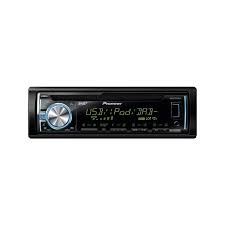
DEH-X6600DAB - Car stereo PIONEER - Free user manual and instructions
Find the device manual for free DEH-X6600DAB PIONEER in PDF.



Download the instructions for your Car stereo in PDF format for free! Find your manual DEH-X6600DAB - PIONEER and take your electronic device back in hand. On this page are published all the documents necessary for the use of your device. DEH-X6600DAB by PIONEER.
USER MANUAL DEH-X6600DAB PIONEER
REPRODUCTOR DE CD CON RECEPTOR RDS
CD RDS-EMPFÄNGER
CD RDS-ONTVANGER
CD RDS ПРИЕМнИK
DEH-X6600DAB
Made for

iPod iPhone
Owner's Manual
Mode d'emploi
PykoBOIDCTBO NOIb3OBaTeJIa
Before you start
Thank you for purchasing this PIONEER product
To ensure proper use, please read through this manual before using this product. It is especially important that you read and observe WARN INGs and CAUTIONs in this manual. Please keep the manual in a safe and accessible place for future reference.

If you want to dispose this product, do not mix it with general household waste. There is a separate collection system for used electronic products in accordance with legislation that requires proper treatment, recovery and recycling.
Private households in the member states of the EU, in Switzerland and Norway may return their used electronic products free of charge to designated collection facilities or to a retailer (if you purchase a similar new one).
For countries not mentioned above, please contact your local authorities for the correct method of disposal.
By doing so you will ensure that your disposed product undergoes the necessary treatment, recovery and recycling and thus prevent potential negative effects on the environment and human health.
About this unit
The tuned frequencies on this unit are allocated for use in Western Europe, Asia, the Middle East, Africa and Oceania. Use in other areas may result in poor reception. The RDS (radio data system) function only works in areas that broadcast RDS signals for FM stations.
WARNING
- Do not attempt to install or service this product by yourself. Installation or servicing of this product by persons without training and experience in electronic equipment and automotive accessories may be dangerous and could expose you to the risk of electric shock, injury or other hazards.
- Do not attempt to operate the unit while driving. Make sure to pull off the road and park your vehicle in a safe location before attempting to use the controls on the device.
CAUTION
- Do not allow this unit to come into contact with liquids. Electrical shock could result. Also, damage to this unit, smoke, and overheating could result from contact with liquids.
The Pioneer CarStereo-Pass is for use only in Germany.
Always keep the volume low enough to hear outside sounds. - Avoid exposure to moisture.
Before you start
CAUTION
This product is a class 1 laser product classified under the Safety of laser products, IEC 60825-1:2007.
CLASS 1 LASER PRODUCT
If you experience problems
Should this unit fail to work properly, please contact your dealer or nearest authorized PIONEER Service Station.
Using this unit
Head unit
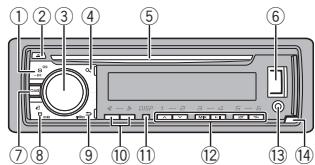
① SRC/OFF
Use an optional Pioneer USB cable (CD-U50E) to connect the USB storage device as any device connected directly to the unit will protrude out from the unit, which could be dangerous.
Display indication
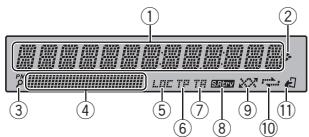
Main information section
Tuner: band and frequency
RDS: program service name, PTY infor
① mation and other literal information
- CD player, USB storage device and iPod: elapsed playback time and text information

② Appears when a lower tier of folder or menu exists.
③ P(list)
④ Sub information section
⑤ LOC(local seek tuning)
⑥ TP (traffic program identification)
TA (traffic announcements)
S.Rtrv (sound retriever)
(9) (random/shuffle)
10 (repeat)
(iPod control)
11) This unit's iPod function is operated from your iPod.
Set up menu
1 After installation of this unit, turn the ignition switch to ON.
SET UP appears.
Using this unit
2 Turn M.C. to switch to YES.
- If you do not use the unit for 30 seconds, the set up menu will not be displayed.
- If you prefer not to set up at this time, turn M.C. to switch to NO.
3 Press M.C. to select.
4 Follow these steps to set the menu.
To proceed to the next menu option, you need to confirm your selection.
LANGUAGE (multi-language)
This unit can display the text information from a compressed audio file even for information embedded in English, Russian or Turkish.
- If the embedded language and the selected language setting are not the same, text information may not display properly.
- Some characters may not be displayed properly.
Turn M.C. to select the desired setting.
ENG (English)—PYC (Russian)—TUR (Turkish)
2 Press M.C. to confirm the selection.
CLOCK SET (setting the clock)
Turn M.C. to adjust hour.
2 Press M.C. to select minute.
3 Turn M.C. to adjust minute.
4 Press M.C. to confirm the selection.
FM STEP (FM tuning step)
Use FM STEP to set FM tuning step options (seek step settings).
Turn M.C. to select the FM tuning step. 100 (100 kHz) -50 (50 kHz)
2 Press M.C. to confirm the selection.
The manual tuning step is fixed at 50kHz
- When AF and TA are turned off, the seek step is fixed at 50kHz even if set to 100.
DAB ANT PW (DAB antenna power supply setting)
Use DAB ANT PW to select whether to output power to a connected DAB antenna.
Turn M.C. to select the desired setting.
- ON - Use this option to enable the supply of power to a DAB antenna. Select when using the optional DAB antenna (AN-DAB1, sold separately) with the unit.
- OFF - Use this option to disable the supply of power. Select when using a passive antenna with no booster.
Press M.C. to confirm the selection. QUIT appears.
5 To finish your settings, turn M.C. to select YES.
- If you prefer to change your setting again, turn M.C. to switch to NO.
6 Press M.C. to select.
Notes
- You can set up the menu options from the system menu and initial menu. For details about the settings, refer to System menu on page 10 and Initial menu on page 12.
- You can cancel set up menu by pressing SRC/OFF.
Basic operations
Important
- Handle the front panel with care when removing or attaching it.
- Avoid subjecting the front panel to excessive shock.
- Keep the front panel out of direct sunlight and high temperatures.
- To avoid damaging the device or vehicle interior, remove any cables and devices attached to the front panel before detaching it.
Using this unit
Removing the front panel
Press the detach button to release the front panel.
Push the front panel upward (I) and then pull it toward (II) you.
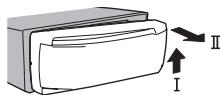
Always store the detached front panel in a protective case or bag.
Re-attaching the front panel
1 Slide the front panel to the left.
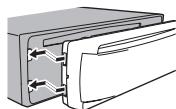
Press the right side of the front panel until it is firmly seated.
Forcing the front panel into place may result in damage to the front panel or head unit.
Turning the unit on
1 Press SRC/OFF to turn the unit on.
Turning the unit off
1 Press and hold SRC/OFF until the unit turns off.
Selecting a source
1 Press SRC/OFF to cycle between: DIGITAL RADIO (digital audio broadcasting) RADIODC-USBiPodAPPapplication) -AUX
- If a source other than DIGITAL RADIO is selected, you can switch to DIGITAL RADIO by pressing DAB.
- USB MTP displays while the MTP connection is in use.
Adjusting the volume
Turn M.C. to adjust the volume.
Note
When this unit's blue/white lead is connected to the vehicle's auto-antenna relay control terminal, the vehicle's antenna extends when this unit's source is turned on. To retract the antenna, turn the source off.
Frequently used menu operations
Returning to the previous display
Returning to the previous list (the folder one level higher)
Press DIMMER.
Returning to the ordinary display
Canceling the main menu
1 Press BAND/
Returning to the ordinary display from the list
Press BAND/
Digital Radio (Digital Audio Broadcasting)
To receive DAB signals, connect a DAB antenna (AN-DAB1) sold separately to the unit.
Using this unit
DAB stands for Digital Audio Broadcasting and has the following features:
- High sound quality (nearly as high as for CDs, although it may be reduced in some cases in order to allow more services to be broadcast)
- Interference-free reception
Note
Some stations perform broadcast testing.
Basic operations
Selecting a band
1 Press BAND/40 until the desired band (D1, D2 or D3) is displayed.
Manual tuning (step by step)
1 Pressor
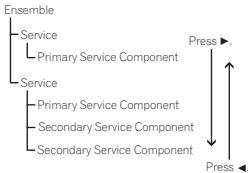
Some individual services in an ensemble may be further subdivided into Service Components. The main Service Component is called the Primary Service Component, and any auxiliary Service Components are called Secondary Service Components.
Seeking
1 Press and hold or, and then release.
Pausing
You can use the pause function to temporarily stop listening to a DAB.
- Press DAB to pause or resume.
- This unit stores recent broadcasts to memory automatically. The memory capacity of this unit will vary depending on the bit rate of the Service Component used. The approximate memory capacity is five minutes for 192 kbps.
- If the duration that a selection is paused exceeds the length of the memory capacity, playback will resume from the beginning of the selection in memory.
This function is disabled while time shift is on. For more details about time shift, refer to Listening to a recent broadcast (time shift) on page 5.
Storing and recalling stations for each band
Using preset tuning buttons
1 To store: Press and hold down one of the preset tuning buttons (1 / to 6 / r) until the number stops flashing.
2 To recall: Press one of the preset tuning buttons (1 / to 6 / ).
Switching the display
Selecting the desired text information
1 Press DISP to cycle between the following:
- SERVICE LABEL (service label or channel)
BRDCSTINFO (service label/PTY label/ensemble label/channel and frequency)
DYNAMIC LABEL (dynamic label)
CLOCK (source name and clock)
Notes
- If the service label cannot be acquired in SERVICE LABEL, the channel is displayed instead. If the service label is detected, the service label will be displayed.
- For more details about PTY list, refer to PTY list on page 6.
Using this unit
- This function is disabled while pausing. For more details about pausing, refer to Pausing on page 4.
Depending on the band, text information can be changed.
Text information items that can be changed depend on the area.
Listening to a recent broadcast (time shift)
You can navigate through recent broadcasts from the selected Service Component.
1 Press DIMMER to switch to time shift mode.
Press again to resume the live broadcast.
2 Press or to adjust the playback point.
Press to skip back one minute.
Press to skip forward one minute.
This unit stores recent broadcasts to memory automatically. The memory capacity of this unit will vary depending on the bit rate of the Service Component used. The approximate memory capacity is five minutes for 192 kbps.
Stored selections that are older than what can be stored in the memory will not be available.
Selecting a Service Component
You can select a Service Component from the following service list.
1 Press (list) to switch to the service list mode.
2 Turn M.C. to change the service list and press to select.
Once selected, the following Service Component functions can be adjusted.
SERVICE (service label)
You can select a Service Component from the list of all components.
1 Turn M.C. to select a Service Component.
Press M.C. to receive a broadcast from the selected Service Component.
Using alphabet search
Press Q(list).
2 Turn M.C. to select a letter.
3 Press M.C. to display the alphabetical list.
4 Turn M.C. to select a Service Component.
Press M.C. to receive a broadcast from the selected Service Component.
PROGRAM TYPE (PTY label)
You can select a Service Component from PTY information.
1 Turn M.C. to scroll to the desired PTY information and press it to select. NEWS/INFO—POPULAR—CLASSICS—OTHERS
2 Turn M.C. to select a Service Component.
Press M.C. to receive a broadcast from the selected Service Component.
ENSEMBLE (ensemble label)
You can select a Service Component from the relevant ensemble.
Turn M.C. to scroll to the desired ensemble and press it to select.
2 Turn M.C. to select a Service Component.
Press M.C. to receive a broadcast from the selected Service Component.
Updating service list information
You can receive updates to the service list.
- Press and hold down (list).
To cancel, press (list) again.
Using this unit
Function settings
1 Press M.C. to display the main menu.
2 Turn M.C. to change the menu option and press to select FUNCTION.
Once selected, the function below can be adjusted.
S.FOLLOW (alternative Service Component search)
If the tuner cannot get good reception, the unit will automatically search for another ensemble that supports the same Service Component. If no alternative Service Component can be found or reception remains poor, this function will automatically switch to an identical FM broadcast.
Press M.C. to turn alternative Service Component search on or off.
Radio
Basic operations
Selecting a band
1 Press BAND/ε until the desired band (FM1, FM2 FM3 for FM or MW/LW is displayed.
Switching preset stations
Pressor
- Select PCH (preset channel) under SEEK to use this function.
Manual tuning (step by step)
1 Pressor
- Select MAN (manual tuning) under SEEK to use this function.
Seeking
Press and hold or, and then release. You can cancel seek tuning by briefly pressing or.
While pressing and holding or , you can skip stations. Seek tuning starts as soon as you release or .
Notes
- For details about SEEK, refer to SEEK (left/right key setting) on page 6.
- This unit's AF (alternative frequencies search) function can be turned on and off. AF should be off for normal tuning operation (refer to AF (alternative frequencies search) on page 6).
Storing and recalling stations for each band
Using preset tuning buttons
1 To store: Press and hold down one of the preset tuning buttons (1 / to 6 / 一 ) until the number stops flashing.
2 To recall: Press one of the preset tuning buttons (1 / to 6 / ).
Switching the display
Selecting the desired text information
Press DISP to cycle between the following:
FREQUENCY (program service name or frequency)
BRDCST INFO (program service name/PTY information)
CLOCK (source name and clock)
Using this unit
Notes
- If the program service name cannot be acquired in FREQUENCY, the broadcast frequency is displayed instead. If the program service name is detected, the program service name will be displayed.
Depending on the band, text information can be changed.
Text information items that can be changed depend on the area.
Using PTY functions
You can tune in to a station using PTY (program type) information.
Searching for an RDS station by PTY information
Press (list).
2 Turn M.C. to select a program type. NEWS/INFO—POPULAR—CLASSICS—OTHERS
Press M.C. to begin the search. The unit searches for a station broadcasting that type of program. When a station is found, its program service name is displayed.
To cancel the search, press M.C. again.
The program of some stations may differ from that indicated by the transmitted PTY.
- If no station is broadcasting the type of program you searched for, NOT FOUND is displayed for about two seconds and then the tuner returns to the original station.
PTY list
For more details about PTY list, visit the following site:
http://www.pioneer.eu/eur/products/25/121/tech/ CarAudio/PTY.html
Function settings
1 Press M.C. to display the main menu.
2 Turn M.C. to change the menu option and press to select FUNCTION.
3 Turn M.C. to select the function.
Once selected, the following functions can be adjusted.
- If MW/LW band is selected, only BSM. LOCAL and SEEK are available.
FM SETTING (FM sound quality settings)
The sound quality level can be set to match the broadcast signal conditions of the FM band signal.
Press M.C. to display the setting mode.
Turn M.C. to select the desired setting.
STANDARD - This is the standard setting.
HI-FI - This is the setting to use to prioritize the high quality of stereo sound.
- STABLE - This is the setting to use to prioritize the low noise of monaural sound.
BSM (best stations memory)
BSM (best stations memory) automatically stores the six strongest stations in the order of their signal strength.
1 Press M.C. to turn BSM on.
To cancel, press M.C. again.
REGION (regional)
When AF is used, the regional function limits the selection of stations to those broadcasting regional programs.
Press M.C. to turn the regional function on or off.
LOCAL (local seek tuning)
Using this unit
Local seek tuning allows you to tune in to only those radio stations with sufficiently strong signals for good reception.
1 Press M.C. to select the desired setting. FM: OFF—LV1—LV2—LV3—LV4 MW/LW: OFF—LV1—LV2
The highest level setting allows reception of only the strongest stations, while lower levels allow the reception of weaker stations.
TA (traffic announcement standby)
1 Press M.C. to turn traffic announcement standby on or off.
AF (alternative frequencies search)
Press M.C. to turn AF on or off.
NEWS (news program interruption)
1 Press M.C. to turn the NEWS function on or off.
SEEK (left/right key setting)
You can assign a function to the left and right keys of the unit.
Select MAN (manual tuning) to tune up or down manually or select PCH (preset channel) to switch between preset channels.
1 Press M.C. to select MAN or PCH.
CD/CD-R/CD-RW and USB storage devices
MTP connection
MTP-compatible Android devices (running Android OS 4.0 or higher) can be connected by MTP connection using the USB source. To connect an Android device, use the cable that came with the device.
Notes
- This function is not compatible with MIXTRAX.
This function is not compatible with WAV.
Basic operations
Playing a CD/CD-R/CD-RW
Insert the disc into the disc loading slot with the label side up.
Ejecting a CD/CD-R/RD-RW
1 Press
Playing songs on a USB storage device
1 Open the USB port cover.
Plug in the USB storage device using a USB cable.
Stopping playback of files on a USB storage device
You may disconnect the USB storage device at any time.
Selecting a folder
1 Press 1/ or 2/V.
Selecting a track
1 Pressor
Fast forwarding or reversing
1 Press and hold or
- When playing compressed audio, there is no sound during fast forward or reverse.
Returning to root folder
1 Press and hold BAND/
Switching between compressed audio and CD-DA
1 Press BAND/
Switching between playback memory devices
You can switch between playback memory devices on USB storage devices with more than one Mass Storage Device-compatible memory device.
1 Press BAND/
- You can switch between up to 32 different memory devices.
Using this unit
Note
Disconnect USB storage devices from the unit when not in use.
Operations using the MIXTRAX button
Turning MIXTRAX on or off
You can use this function when USB is selected as the source.
You cannot use this function with USB MTP.
Press 3/MIX to turn MIXTRAX on or off.
- For more details about MIXTRAX, refer to About MIXTRAX on page 11.
- When MIXTRAX is in use, the sound retriever function is disabled.
Switching the display
Selecting the desired text information
1 Press DISP to cycle between the following: CD-DA
- ELAPSED TIME (track number and playback time)
CLOCK (source name and clock)
SPEANA (spectrum analyzer)
CD-TEXT
- TRACK INFO (track title/track artist/disc title)
- ELAPSED TIME (track number and playback time)
CLOCK (source name and clock)
SPEANA (spectrum analyzer)
MP3/WMA/WAV/AAC
- TRACK INFO (track title/artist name/album title)
FILE INFO (file name/folder name) - ELAPSED TIME (track number and playback time)
CLOCK (source name and clock)
SPEANA (spectrum analyzer)
Selecting and playing files/ tracks from the name list
1 Press to switch to the file/track name list mode.
2 Use M.C. to select the desired file name (or folder name).
Selecting a file or folder
1 Turn M.C.
Playing
When a file or track is selected, press M.C.
Viewing a list of the files (or folders) in the selected folder
1 When a folder is selected, press M.C.
Playing a song in the selected folder
When a folder is selected, press and hold M.C.
Using this unit
Operations using special buttons
Selecting a repeat play range
1 Press 6 / 一 to cycle between the following: CD/CD-R/CD-RW
ALL-Repeat all tracks
- ONE - Repeat the current track
FLD-Repeat the current folder
USB storage device
ALL-Repeat all files
- ONE - Repeat the current file
FLD-Repeat the current folder
Playing tracks in random order
1 Press 5/20xx to turn random play on or off. Tracks in a selected repeat range are played in random order.
To change songs during random play, press to switch to the next track. Pressing restarts playback of the current track from the beginning of the song.
Pausing playback
1 Press 4/PAUSE to pause or resume.
Function settings
1 Press M.C. to display the main menu.
2 Turn M.C. to change the menu option and press to select FUNCTION.
Once selected, the function below can be adjusted.
- S.RTRV is not available when MIXTRAX is turned on.
S.RTRV (sound retriever)
Automatically enhances compressed audio and restores rich sound.
1 Press M.C. to select the desired setting. 1-2-OFF (off)
1 is effective for low compression rates, and 2 is effective for high compression rates.
iPod
Basic operations
Playing songs on an iPod
1 Open the USB port cover.
2 Connect an iPod to USB input.
Playback is performed automatically.
Selecting a song (chapter)
Pressor
Selecting an album
1 Press 1/ or 2/V.
Fast forwarding or reversing
1 Press and hold or
Notes
- The iPod cannot be turned on or off when the control mode is set to CONTROL AUDIO.
- Disconnect headphones from the iPod before connecting it to this unit.
- The iPod will turn off about two minutes after the ignition is switched off.
Operations using the MIXTRAX button
Turning MIXTRAX on or off
1 Press 3/MIX to turn MIXTRAX on or off.
- For more details about MIXTRAX, refer to About MIXTRAX on page 11.
Switching the display
Selecting the desired text information
1 Press DISP to cycle between the following:
- TRACK INFO (track title/artist name/album title)
- ELAPSED TIME (track number and playback time)
CLOCK (source name and clock)
SPEANA (spectrum analyzer)
Using this unit
Browsing for a song
1 Press to switch to the top menu of list search.
2 Use M.C. to select a category/song.
Changing the name of the song or category
Turn M.C.
Playlists—artists—albums—songs—podcasts—genres—composers—audiobooks
Playing
1 When a song is selected, press M.C.
Viewing a list of songs in the selected category
When a category is selected, press M.C.
Playing a song in the selected category
When a category is selected, press and hold M.C.
Searching the list by alphabet
1 When a list for the selected category is displayed, press to switch to alphabet search mode.
- You also can switch to alphabet search mode by turning M.C. twice.
2 Turn M.C. to select a letter.
3 Press M.C. to display the alphabetical list.
To cancel searching, press DIMMER.
Notes
- You can play playlists created with the computer application (MusicSphere). The application will be available on our website.
- Playlists that you created with the computer application (MusicSphere) are displayed in abbreviated form.
Operations using special buttons
Selecting a repeat play range
Press 6 / 1 to cycle between the following:
- ONE - Repeat the current song
ALL-Repeat all songs in the selected list
- When the control mode is set to CONTROL
iPod, the repeat play range will be same as what is set for the connected iPod.
Selecting a random play range (shuffle)
Press 5/xx to cycle between the following:
- SNG - Play back songs in the selected list in random order.
- ALB - Play back songs from a randomly selected album in order.
- OFF - Not play back in random order.
Playing all songs in random order (shuffle all)
1 Press and hold 5 / 20 to turn shuffle all on.
To turn off shuffle all, select OFF in shuffle. For details, refer to Selecting a random play range (shuffle) on page 8.
Pausing playback
1 Press 4/PAUSE to pause or resume.
Playing songs related to the currently playing song
You can play songs from the following lists.
- Album list of the currently playing artist
Song list of the currently playing album - Album list of the currently playing genre
1 Press and hold to switch to link play mode.
2 Turn M.C. to change the mode; press to select.
- ARTIST - Plays an album by the artist currently playing.
- ALBUM - Plays a song from the album currently being played.
Using this unit
GENRE - Plays an album from the genre currently being played.
The selected song/album will be played after the currently playing song.
Notes
- The selected song/album may be canceled if you use functions other than link search (e.g. fast forward and reverse).
Depending on the song selected to play, the end of the currently playing song and the beginning of the selected song/album may be cut off.
Using this unit's iPod function from your iPod
This unit's iPod function can be controlled by using the connected iPod.
CONTROL iPod is not compatible with the following iPod models.
- iPod nano 1st generation
-
iPod with video
-
Press BAND/e to switch the control mode.
-
CONTROL iPod - This unit's iPod function can be operated from the connected iPod.
- CONTROL AUDIO - This unit's iPod function can be controlled by using this unit.
Notes
- Switching the control mode to CONTROL iPod pauses song playback. Use the iPod to resume playback.
- The following operations are still accessible from the unit even if the control mode is set to CONTROL iPod.
— Pausing
Fast forward/reverse
- Selecting a song (chapter)
- The volume can only be adjusted from this unit.
Function settings
1 Press M.C. to display the main menu.
2 Turn M.C. to change the menu option and press to select FUNCTION.
3 Turn M.C. to select the function.
Once selected, the following functions can be adjusted.
- AUDIO BOOK is not available when CONTROL iPod is selected in the control mode. For details, refer to Using this unit's iPod function from your iPod on page 8.
AUDIO BOOK (audiobook speed)
Press M.C. to display the setting mode.
2 Turn M.C. to select your favorite setting.
- FASTER - Playback at a speed faster than normal
NORMAL-Playback at normal speed - SLOWER - Playback at a speed slower than normal
S.RTRV (sound retriever)
Press M.C. to select the desired setting, 1-2-OFF (off)
1 is effective for low compression rates, and 2 is effective for high compression rates.
Using connected device applications
You can use this unit to perform streaming playback of and control tracks in iPhone applications or just for streaming playback.
Using this unit

Important
Use of third party apps may involve or require the provision of personally identifiable information, whether through the creation of a user account or otherwise, and for certain applications, the provision of geolocation data. ALL THIRD PARTY APPS ARE THE SOLE RESPONSIBILITY OF THE PROVIDERS, INCLUDING WITHOUT LIMITATION COLLECTION AND SECURITY OF USER DATA AND PRIVACY PRACTICES. BY ACCESSING THIRD PARTY APPS, YOU AGREE TO REVIEW THE TERMS OF SERVICE AND PRIVACY POLICIES OF THE PROVIDERS. IF YOU DO NOT AGREE WITH THE TERMS OR POLICIES OF ANY PROVIDER OR DO NOT CONSENT TO THE USE OF GEOLOCATION DATA WHERE APPLICABLE, DO NOT USE THAT THIRD PARTY APP
Information for compatibility of connected devices
The following is the detailed information regarding the terminals required to use the application for iPhone on this unit.
For iPhone users
- This function is compatible with iPhone and iPod touch.
The device has iOS 5.0 or higher.
Notes
- Please check our website for a list of supported iPhone applications for this unit.
- Pioneer is not liable for any issues that may arise from incorrect or flawed app-based content.
- The content and functionality of the supported applications are the responsibility of the App providers.
Starting procedure for iPhone users
1 Connect an iPhone to USB input.
2 Switch the source to APP.
3 Start up the application on the iPhone and initiate playback.
Basic operations
Selecting a track
1 Press or
Fast forwarding or reversing
1 Press and hold or
Pausing playback
1 Press BAND to pause or resume.
Switching the display
Selecting the desired text information
1 Press DISP to cycle between the following:
- TRACK INFO (track title/artist name/album title)
APP NAME (application name)
ELAPSED TIME (playback time)
CLOCK (source name and clock)
SPEANA (spectrum analyzer)
Function settings
1 Press M.C. to display the main menu.
2 Turn M.C. to change the menu option and press to select FUNCTION.
3 Turn M.C. to select the function.
Once selected, the following functions can be adjusted.
Using this unit
PAUSE (pause)
1 Press M.C. to pause or resume.
S.RTRV (sound retriever)
1 Press M.C. to select the desired setting. 1-2-OFF (off)
1 is effective for low compression rates, and 2 is effective for high compression rates.
Audio adjustments
1 Press M.C. to display the main menu.
2 Turn M.C. to change the menu option and press to select AUDIO.
3 Turn M.C. to select the audio function.
Once selected, the following audio functions can be adjusted.
- FADER is not available when SUB.W/SUB.W is selected in SP-P/O MODE. For details, refer to SP-P/O MODE (rear output and preout setting) on page 12.
- SUB.W and SUB.W CTRL are not available when REAR/REAR is selected in SP-P/O MODE. For details, refer to SP-P/O MODE (rear output and preout setting) on page 12.
- SUB.W CTRL is not available when SUB.W is selected in OFF. For details, refer to SUB.W (subwoofer on/off setting) on page 9.
- SLA is not available when FM is selected as the source.
FADER (fader adjustment)
Press M.C. to display the setting mode.
Turn M.C. to adjust the front/rear speaker balance.
BALANCE (balance adjustment)
Press M.C. to display the setting mode.
② Turn M.C. to adjust the left/right speaker balance.
EQ SETTING (equalizer recall)
Press M.C. to display the setting mode.
Turn M.C. to select the equalizer. POWERFUL-NATURAL-VOCAL-CUSTOM1-CUSTOM2-FLAT-SUPER BASS
The equalizer band and equalizer level can be customized when CUSTOM1 or CUSTOM2 is selected.
If selecting CUSTOM1 or CUSTOM2, complete the procedures outlined below. If selecting other options, press M.C. to return to the previous display.
- CUSTOM1 can be set separately for each source. However, USB, iPod and APP are all set to the same setting automatically.
- CUSTOM2 is a shared setting used in common for all sources.
3 Press M.C. to display the setting mode.
4 Press M.C. to cycle between the following: Equalizer band—Equalizer level
Turn M.C. to select the desired setting. Equalizer band: 80HZ—250HZ—800HZ—2.5KHZ—8KHZ
Equalizer level: +6 to -6
LOUDNESS (loudness)
Loudness compensates for deficiencies in the low-frequency and high-frequency ranges at low volume.
1 Press M.C. to select the desired setting. OFF (off)-LOW (low)-MID (mid)-HI (high)
SUB.W (subwoofer on/off setting)
This unit is equipped with a subwoofer output which can be turned on or off.
1 Press M.C. to select the desired setting.
NOR (normal phase)—REV (reverse phase)—OFF (subwoofer off)
Using this unit
SUB.W CTRL (subwoofer adjustment)
Only frequencies lower than those in the selected range are outputted from the subwoofer.
Press M.C. to display the setting mode.
2 Press M.C. to cycle between the following: Cut-off frequency—Output level—Slope level Rates that can be adjusted will flash.
3 Turn M.C. to select the desired setting. Cut-off frequency: 50HZ-63HZ-80HZ-100HZ-125HZ-160HZ-200HZ Output level: -24 to +6 Slope level: -12-24
BASS BOOST (bass boost)
Press M.C. to display the setting mode.
Turn M.C. to select a desired level. 0 to +6 is displayed as the level is increased or decreased.
HPF SETTING (high pass filter adjustment)
Use this function when wanting to listen only to high-frequency sounds. Only frequencies higher than the high-pass filter (HPF) cutoff are output from the speakers.
Press M.C. to display the setting mode.
Press M.C. to cycle between the following: Cut-off frequency—Slope level
3Turn M.C.to select the desired setting. Cut-off frequency:OFF-50HZ-63HZ-80HZ 100HZ-125HZ-160HZ-200HZ Slope level:-12--24
SLA (source level adjustment)
This function prevents the volume from changing too dramatically when the source switches.
- Settings are based on the FM volume level, which remains unchanged.
- The MW/LW volume level can also be adjusted with this function.
- USB, iPod and APP are all set to the same setting automatically.
Press M.C. to display the setting mode.
Turn M.C. to adjust the source volume. Adjustment range: +4 to -4
System menu
Important
PW SAVE (power saving) is canceled if the vehicle battery is disconnected and will need to be turned back on once the battery is reconnected. When PW SAVE (power saving) is off, depending on connection methods, the unit may continue to draw power from the battery if your vehicle's ignition doesn't have an ACC (accessory) position.
1 Press M.C. to display the main menu.
2 Turn M.C. to change the menu option and press to select SYSTEM.
3 Turn M.C. to select the system menu function.
Once selected, the following system menu functions can be adjusted.
Using this unit
LANGUAGE (multi-language)
This unit can display the text information from a compressed audio file even for information embedded in English, Russian or Turkish.
- If the embedded language and the selected language setting are not the same, text information may not display properly.
- Some characters may not be displayed properly.
1 Turn M.C. to select the desired setting.
ENG (English)—PYC (Russian)—TUR (Turkish)
CLOCK SET (setting the clock)
Press M.C. to display the setting mode.
Press M.C. to select the segment of the clock display you wish to set. Hour-Minute
3 Turn M.C. to adjust the clock.
12H/24H (time notation)
1 Press M.C. to select the desired setting. 12H (12-hour clock) -24H (24-hour clock)
The type of text information displayed in the sub information section can be toggled.
Press M.C. to display the setting mode.
2 Turn M.C. to select the desired setting. SPEANA-LEVEL METER-SOURCE-CLOCK OFF
- The signal bar indicator displays for SPEANA or LEVEL METER when the source is set to DIGITAL RADIO or RADIO.
AUTO PI (auto PI seek)
The unit can automatically search for a different station with the same programming, even during preset recall.
Press M.C. to turn Auto PI seek on or off.
AUX (auxiliary input)
Activate this setting when using an auxiliary device connected to this unit.
1 Press M.C. to turn AUX on or off.
DIMMER (dimmer)
1 Press M.C. to turn the dimmer on or off.
- You can also change the dimmer setting by pressing and holding DIMMER.
BRIGHTNESS (brightness adjustment)
You can use this setting to adjust the display brightness.
The range of settings available for BRIGHTNESS will vary depending on whether DIMMER is on or off. For details, refer to DIMMER (dimmer) on page 10.
Press M.C. to display the setting mode.
Turn M.C. to select the desired setting. DIMMER on: 1 to 4 DIMMER off: 1 to 5
MUTE MODE (mutemode)
Sound from this system is automatically muted or attenuated when a signal from equipment with a mute function is received.
Press M.C. to display the setting mode.
Turn M.C. to select the desired setting.
MUTE-Muting
- 20dB ATT - Attenuation (20dB ATT has a stronger effect than 10dB ATT)
10dB ATT - Attenuation
PW SAVE (power saving)
Switching this function on enables you to reduce the consumption of battery power.
- Turning on the source is the only operation allowed when this function is on.
1 Press M.C. to turn the power save on or off.
Using this unit
Selecting the illumination color Illumination function menu
1 Press M.C. to display the main menu.
2 Turn M.C. to display ILLUMI and press to select.
3 Turn M.C. to select the illumination function.
Once selected, the following audio functions can be adjusted.
KEY COLOUR (key section color setting)
You can select desired colors for the keys of this unit.
1 Press M.C. to display the setting mode.
2 Turn M.C. to select the illumination color.
- Preset colors (ranging from WHITE to BLUE)
- SCAN (cycle through a variety of colors automatically)
- CUSTOM (customized illumination color)
DISP COLOUR (display section color setting)
You can select the desired colors for the display of this unit.
Press M.C. to display the setting mode.
2 Turn M.C. to select the illumination color
- Preset colors (ranging from WHITE to BLUE)
- SCAN (cycle through a variety of colors automatically)
- CUSTOM (customized illumination color)
BOTH COLOUR (key and display color setting)
You can select the desired colors for the keys and display of this unit.
1 Press M.C. to display the setting mode.
2 Turn M.C. to select the illumination color.
- Preset colors (ranging from WHITE to BLUE)
- SCAN (cycle through a variety of colors automatically)
ILLUMI FX (illumination effect mode)
In this mode, an illumination effect can be seen on the display at certain times such as when the ACC power is turned on/off or a CD is inserted/ ejected.
Press M.C. to turn ILLUMI FX on or off.
The illumination effect will activate when the ACC power is turned on/off regardless of whether the ILLUMI FX setting is on or off.
Note
When CUSTOM is selected, the customized color saved is selected.
Customizing the illumination color
You can create custom illumination colors for both KEY COLOUR and DISP COLOUR.
1 Press M.C. to display the main menu.
2 Turn M.C. to display ILLUMI and press to select.
3 Turn M.C. to display KEY COLOUR or DISP COLOUR. Press to select.
4 Press M.C. and hold until the customizing illumination color setting appears in the display.
5 Press M.C. to select the primary color. R (red)—G (green)—B (blue)
6 Turn M.C. to adjust the brightness level. Adjustment range: 0 to 60
Using this unit
- You cannot select a level below 20 for all three of R (red), G (green), and B (blue) at the same time.
- You can also perform the same operation on other colors.
Note
You cannot create a custom illumination color while SCAN is selected.
About MIXTRAX
MIXTRAX technology is used to insert a variety of sound effects in between songs, allowing you to experience your music as a nonstop mix complete with visual effects.
Notes
Depending on the file/song, sound effects may not be available.
- Turn MIXTRAX off if the visual effects it produces have adverse effects on driving. Refer to Operations using the MIXTRAX button on page 7.
MIXTRAX menu
1 Press M.C. to display the main menu.
2 Turn M.C. to change the menu option and press to select MIXTRAX.
3 Turn M.C. to select the MIXTRAX function.
Once selected, the following MIXTRAX functions can be adjusted. The function is enabled when MIXTRAX is on.
SHORT PLAYBCK (short playback mode)
You can select the length of the playback time.
Press M.C. to display the setting mode.
Turn M.C. to select the desired setting. 1.0 MIN (1.0 minute)—1.5 MIN (1.5 minutes)—2.0 MIN (2.0 minutes)—2.5 MIN (2.5 minutes) —3.0 MIN (3.0 minutes)—OFF (off)
FLASH AREA (flash area)
You can select areas for flashing colors.
1 Press M.C. to display the setting mode.
2 Turn M.C. to select the desired setting. KEY/DISPLAY (key and display)—KEY (key) OFF (off)
- When OFF is selected, the color set under ILCUMI is used as the display color.
FLASH PATTERN (flash pattern)
The flashing color and MIXTRAX special effects display change with changes in the sound and bass levels.
Press M.C. to display the setting mode.
2 Turn M.C. to select the desired setting.
- SOUND LEVEL 1 to SOUND LEVEL 6 - The flash pattern changes according to the sound level. Select a desired mode.
- LOW PASS 1 to LOW PASS 6 - The flash pattern changes according to the bass level. Select a desired mode.
- RANDOM 1 - The flash pattern changes randomly according to the sound level mode and low pass mode.
- RANDOM 2 - The flash pattern changes randomly according to the sound level mode.
- RANDOM 3 - The flash pattern changes randomly according to the low pass mode.
DISPLAY FX (display effect)
The MIXTRAX special effects display can be turned on or off.
1 Press M.C. to select the desired setting. ON (MIXTRAX special effects display)—OFF (normal display)
CUT IN FX (manual cut-in effect)
You can turn on or off the MIXTRAX sound effects while manually changing tracks.
1 Press M.C. to select the desired setting, ON(on)—OFF (off)
Initial menu
1 Press and hold SRC/OFF until the unit turns off.
2 Press and hold SRC/OFF until the main menu appears in the display.
3 Turn M.C. to change the menu option and press to select INITIAL.
4 Turn M.C. to select the initial menu function.
Once selected, the following initial menu functions can be adjusted.
FM STEP (FM tuning step)
1 Press M.C. to select the FM tuning step. 100 (100 kHz) -50 (50 kHz)
SP-P/O MODE (rear output and preout setting)
The rear speaker leads output and the RCA output of this unit can be used to connect a full-range speaker or subwoofer. Select a suitable option for your connection.
1 Press M.C. to display the setting mode.
2 Turn M.C. to select the desired setting.
- REAR/SUB.W - Select when there is a full-range speaker connected to the rear speaker leads output and there is a subwoofer connected to the RCA output.
- SUB.W/SUB.W - Select when there is a subwoofer connected directly to the rear speaker leads output without any auxiliary amp and there is a subwoofer connected to the RCA output.
- REAR/REAR - Select when there is a full-range speaker connected to the rear speaker leads output and the RCA output. If there is a full-range speaker connected to the rear speaker leads output and the RCA output is not used, you may select either REAR/SUB.W or REAR/REAR.
DAB ANT PW (DAB antenna power supply setting)
Press M.C. to select the desired setting.
- ON - Use this option to enable the supply of power to a DAB antenna. Select when using the optional DAB antenna (AN-DAB1, sold separately) with the unit.
- OFF - Use this option to disable the supply of power. Select when using a passive antenna with no booster.
System menu
1 Press and hold SRC/OFF until the unit turns off.
2 Press and hold SRC/OFF until the main menu appears in the display.
3 Turn M.C. to change the menu option and press to select SYSTEM.
4 Turn M.C. to select the system menu function.
For details, refer to System menu on page 10.
Using an AUX source
1 Insert the stereo mini plug into the AUX input jack.
2 Press SRC/OFF to select AUX as the source.
Note
AUX cannot be selected unless the auxiliary setting is turned on. For more details, refer to AUX (auxiliary input) on page 10.
Using this unit
Switching the display
Selecting the desired text information
Press DISP to cycle between the following:
Source name
Source name and clock
If an unwanted display appears
Turn off the unwanted display using the procedures listed below.
1 Press M.C. to display the main menu.
2 Turn M.C. to change the menu option and press to select SYSTEM.
3 Turn M.C. to display DEMO OFF and press to select.
4 Turn M.C. to switch to YES.
5 Press M.C. to select.
Installation
Connections

Important
- When installing this unit in a vehicle without an ACC (accessory) position on the ignition switch, failure to connect the red cable to the terminal that detects operation of the ignition key may result in battery drain.

ACC position

No ACC position
- Use of this unit in conditions other than the following could result in fire or malfunction.
Vehicles with a 12-volt battery and negative grounding.
— Speakers with 50 W (output value) and 4 to 8 (impedance value). - To prevent a short-circuit, overheating or malfunction, be sure to follow the directions below.
- Disconnect the negative terminal of the battery before installation.
- Secure the wiring with cable clamps or adhesive tape. Wrap adhesive tape around wiring that comes into contact with metal parts to protect the wiring.
- Place all cables away from moving parts, such as the shift lever and seat rails.
- Place all cables away from hot places, such as near the heater outlet.
- Do not connect the yellow cable to the battery by passing it through the hole to the engine compartment.
Cover any disconnected cable connectors with insulating tape.
Do not shorten any cables. -
Never cut the insulation of the power cable of this unit in order to share the power with other devices. The current capacity of the cable is limited.
Use a fuse of the rating prescribed. -
Never wire the negative speaker cable directly to ground.
-
Never band together negative cables of multiple speakers.
-
When this unit is on, control signals are sent through the blue/white cable. Connect this cable to the system remote control of an external power amp or the vehicle's auto-antenna relay control terminal (max. 300 mA 12 V DC). If the vehicle is equipped with a glass antenna, connect it to the antenna booster power supply terminal.
- Never connect the blue/white cable to the power terminal of an external power amp. Also, never connect it to the power terminal of the auto antenna. Doing so may result in battery drain or a malfunction.
- The black cable is ground. Ground cables for this unit and other equipment (especially, high-current products such as power amps) must be wired separately. If they are not, an accidental detachment may result in a fire or malfunction.
This unit
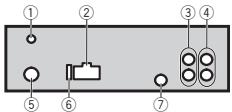
① DAB antenna input
To receive DAB signals, connect a DAB antenna (AN-DAB1) sold separately to the unit. For improved DAB reception, make sure a DAB antenna with phantom power input (active type) is used. Pioneer recommends using "AN-DAB1" (sold separately). Current consumption of DAB antenna should be 100 mA or less.
② Power cord input
③ Rear output or subwoofer output
④ Front output
Installation
⑤ Antenna input
⑥ Fuse(10A)
⑦ Wired remote input Hard-wired remote control adapter can be connected (sold separately).
Power cord
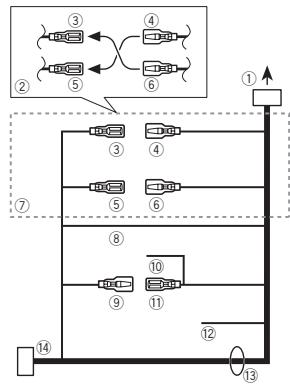
① To power cord input
② Depending on the kind of vehicle, the function of ③ and ⑤ may be different. In this case, be sure to connect ④ to ⑤ and ⑥ to ③
③ Yellow
Back-up (or accessory)
④ Yellow
Connect to the constant 12 V supply terminal.
⑤ Red
Accessory (or back-up)
⑥ Red
Connect to terminal controlled by ignition switch (12 V DC).
⑦ Connect leads of the same color to each other.
⑧ Black (chassis ground)
⑨ Blue/white
The pin position of the ISO connector will differ depending on the type of vehicle. Connect 9 and 11 when Pin 5 is an antenna control type. In another type of vehicle, never connect 9 and 11.
10 Blue/white
Connect to system control terminal of the power amp (max. 300mA12VDC
11 Blue/white
Connect to auto-antenna relay control terminal (max. 300mA12VDC
12 Yellow/black
If you use an equipment with Mute function, wire this lead to the Audio Mute lead on that equipment. If not, keep the Audio Mute lead free of any connections.
13 Speaker leads
White: Front left
White/black: Front left
Gray: Front right
Gray/black: Front right
Green: Rear left or subwoofer
Green/black: Rear left or subwoofer
Violet: Rear right or subwoofer
Violet/black: Rear right or subwoofer
ISO connector
In some vehicles, the ISO connector may be divided into two. In this case, be sure to connect to both connectors.
Notes
- Change the initial menu of this unit. Refer to SP-P/O MODE (rear output and preout setting) on page 12.
The subwoofer output of this unit is monaural.
- When using a subwoofer of 70W(2) , be sure to connect the subwoofer to the violet and violet/black leads of this unit. Do not connect anything to the green and green/black leads.
Installation
Power amp (sold separately)
Perform these connections when using the optional amplifier.
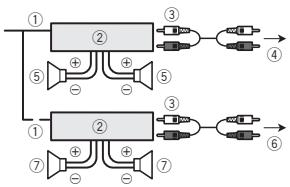
① System remote control
Connect to Blue/white cable.
② Power amp (sold separately)
③ Connect with RCA cables (sold separately)
④ To Front output
⑤ Front speaker
⑥ To Rear output or subwoofer output
⑦ Rear speaker or subwoofer
Installation

Important
- Check all connections and systems before final installation.
- Do not use unauthorized parts as this may cause malfunctions.
- Consult your dealer if installation requires drilling of holes or other modifications to the vehicle.
- Do not install this unit where:
- it may interfere with operation of the vehicle.
- it may cause injury to a passenger as a result of a sudden stop.
-
The semiconductor laser will be damaged if it overheats. Install this unit away from hot places such as near the heater outlet.
-
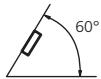
Optimum performance is obtained when the unit is installed at an angle of less than 60^ .
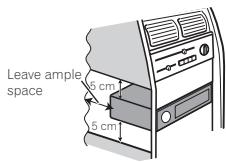
- When installing, to ensure proper heat dispersal when using this unit, make sure you leave ample space behind the rear panel and wrap any loose cables so they are not blocking the vents.
DIN front/rear mount
This unit can be properly installed using either front-mount or rear-mount installation. Use commercially available parts when installing.
DIN Front-mount
1 Insert the mounting sleeve into the dashboard.
For installation in shallow spaces, use the supplied mounting sleeve. If there is enough space, use the mounting sleeve that came with the vehicle.
Installation
2 Secure the mounting sleeve by using a screwdriver to bend the metal tabs (90^) into place.
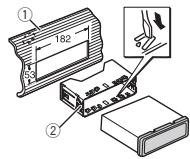
① Dashboard
② Mounting sleeve
- Make sure that the unit is installed securely in place. An unstable installation may cause skipping or other malfunctions.
DIN Rear-mount
1 Determine the appropriate position where the holes on the bracket and the side of the unit match.
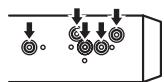
2 Tighten two screws on each side.
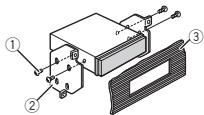
① Tapping screw (5mm× 8mm)
② Mounting bracket
③ Dashboard or console
Removing the unit
1 Remove the trim ring.
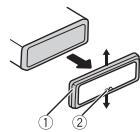
① Trim ring
② Notched tab
- Releasing the front panel allows easier access to the trim ring.
- When reattaching the trim ring, point the side with the notched tab down.
2 Insert the supplied extraction keys into both sides of the unit until they click into place.
3 Pull the unit out of the dashboard.
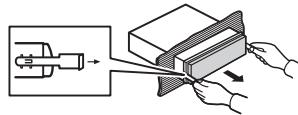
Removing and re-attaching the front panel
You can remove the front panel to protect your unit from theft.
For details, refer to Removing the front panel and Re-attaching the front panel on page 4.
Additional information
Troubleshooting
Symptoms are written in bold and causes in regular, non-indented text. Regular, indented text is used to indicate actions to be taken.
The display automatically returns to the ordinary display.
You did not perform any operation within about 30 seconds.
Perform operation again.
The repeat play range changes unexpectedly.
Depending on the repeat play range, the selected range may change when another folder or track is being selected or during fast forwarding/reversing.
Select the repeat play range again.
A subfolder is not played back.
Sub folders cannot be played when FLD (folder repeat) is selected.
Select another repeat play range.
NO XXXX appears when a display is changed (NO TITLE, for example).
There is no embedded text information.
Switch the display or play another track/file.
The unit is malfunctioning.
There is interference.
You are using a device, such as a cellular phone, that may cause audible interference.
Move electrical devices that may be causing the interference away from the unit.
Error messages
When you contact your dealer or your nearest Pioneer Service Center, be sure to note the error message.
Symptoms are written in bold and causes in regular, non-indented text. Regular, indented text is used to indicate actions to be taken.
Common
AMP ERROR
This unit fails to operate or the speaker connection is incorrect; the protective circuit is activated.
Check the speaker connection. If the message fails to disappear even after the engine is switched off/on, contact your dealer or an authorized Pioneer Service Station for assistance.
DABtuner
ANTENNA ERROR
The antenna connection is incorrect.
Check the antenna connection. If the message fails to disappear even after the engine is switched off/on, contact your dealer or an authorized Pioneer Service Station for assistance.
CD player
ERROR-07, 11, 12, 17, 30
The disc is dirty.
Clean the disc.
The disc is scratched.
Replace the disc.
ERROR-07, 10, 11, 12, 15, 17, 30, A0
There is an electrical or mechanical error.
Turn the ignition switch OFF and back ON, or switch to a different source, then back to the CD player.
Additional information
ERROR-15
The inserted disc is blank.
Replace the disc.
ERROR-23
Unsupported CD format.
Replace the disc.
FORMAT READ
Sometimes there is a delay between the start of playback and when you start to hear any sound.
Wait until the message disappears and you hear sound.
NO AUDIO
The inserted disc does not contain any playable files. Replace the disc.
SKIPPED
The inserted disc contains DRM protected files.
The protected files are skipped.
PROTECT
All the files on the inserted disc are embedded with DRM.
Replace the disc.
USB storage device/iPod
FORMAT READ
Sometimes there is a delay between the start of playback and when you start to hear any sound.
Wait until the message disappears and you hear sound.
NO AUDIO
There are no songs.
Transfer the audio files to the USB storage device and connect.
The connected USB storage device has security enabled.
Follow the USB storage device instructions to disable the security.
SKIPPED
The connected USB storage device contains DRM protected files.
The protected files are skipped.
PROTECT
All the files on the connected USB storage device are embedded with DRM.
Replace the USB storage device.
N/A USB
The connected USB device is not supported by this unit.
- Connect a USB Mass Storage Class compliant device.
- Disconnect your device and replace it with a compatible USB storage device.
CHECK USB
The USB connector or USB cable has short-circuited.
Check that the USB connector or USB cable is not caught in something or damaged.
CHECK USB
The connected USB storage device consumes more than maximum allowable current.
Disconnect the USB storage device and do not use it. Turn the ignition switch to OFF, then to ACC or ON and then connect only compliant USB storage devices.
Additional information
CHECK USB
The iPod operates correctly but does not charge. Make sure the connection cable for the iPod has not shorted out (e.g., not caught in metal objects). After checking, turn the ignition switch OFF and back ON, or disconnect the iPod and reconnect.
ERROR-19
Communication failed.
Perform one of the following operations.
-Turn the ignition switch OFF and back ON.
-Disconnect the USB storage device.
-Change to a different source.
Then, return to the USB source.
iPod failure.
Disconnect the cable from the iPod. Once the iPod's main menu is displayed, reconnect the iPod and reset it.
ERROR-23
USB storage device was not formatted with FAT12, FAT16 or FAT32.
USB storage device should be formatted with FAT12, FAT16 or FAT32.
ERROR-16
The iPod firmware version is old. Update the iPod version.
iPod failure.
Disconnect the cable from the iPod. Once the iPod's main menu is displayed, reconnect the iPod and reset it.
STOP
There are no songs in the current list. Select a list that contains songs.
NOT FOUND
No related songs
Transfer songs to the iPod.
Apps
STARTUPAPP
The application has not started running yet. Follow the instructions that appear on the screen.
Handling guidelines
Discs and player
Use only discs that feature either of the following two logos.


Use 12-cm discs.
Use only conventional, fully circular discs.
The following types of discs cannot be used with this unit:
DualDiscs
- 8-cm discs: Attempts to use such discs with an adaptor may cause the unit to malfunction.
- Oddly shaped discs


Discs other than CDs
- Damaged discs, including discs that are cracked, chipped or warped
CD-R/RW discs that have not been finalized
Do not touch the recorded surface of the discs.
Store discs in their cases when not in use.
Do not attach labels, write on or apply chemicals to the surface of the discs.
Additional information
To clean a CD, wipe the disc with a soft cloth outward from the center.
Condensation may temporarily impair the player's performance. Let it rest for about one hour to adjust just to a warmer temperature. Also, wipe any damp discs off with a soft cloth.
Playback of discs may not be possible because of disc characteristics, disc format, recorded application, playback environment, storage conditions, and so on.
Road shocks may interrupt disc playback.
When using discs that can be printed on label surfaces, check the instructions and the warnings of the discs. Depending on the discs, inserting and ejecting may not be possible. Using such discs may result in damage to this equipment.
Do not attach commercially available labels or other materials to the discs.
- The discs may warp making the disc unplayable.
- The labels may come off during playback and prevent ejection of the discs, which may result in damage to the equipment.
USB storage device
Connections via USB hub are not supported.
Do not connect anything other than a USB storage device.
Firmly secure the USB storage device when driving. Do not let the USB storage device fall onto the floor, where it may become jammed under the brake or accelerator pedal.
Depending on the USB storage device, the following problems may occur.
Operations may vary.
- The storage device may not be recognized.
- Files may not be played back properly.
- The device may cause audible interference when you are listening to the radio.
iPod
Do not leave the iPod in places with high temperatures.
Firmly secure the iPod when driving. Do not let the iPod fall onto the floor, where it may become jammed under the brake or accelerator pedal.
About iPod settings
- When an iPod is connected, this unit changes the EQ (equalizer) setting of the iPod to off in order to optimize the acoustics. When you disconnect the iPod, the EQ returns to the original setting.
- You cannot set Repeat to off on the iPod when using this unit. Repeat is automatically changed to All when the iPod is connected to this unit.
Incompatible text saved on the iPod will not be displayed by the unit.
Additional information
Compressed audio compatibility (disc, USB)
WMA
File extension: .wma
Bit rate: 48 kbps to 320 kbps (CBR), 48 kbps to 384 kbps (VBR)
Sampling frequency: 32kHz 44.1kHz 48kHz
Windows Media™ Audio Professional, Lossless, Voice/DRM Stream/Stream with video: Not compatible
MP3
File extension:.mp3
Bit rate: 8 kbps to 320 kbps (CBR), VBR
Sampling frequency: 8kHz to 48kHz (32 kHz, 44.1 kHz, 48 kHz for emphasis)
Compatible ID3 tag version: 1.0, 1.1, 2.2, 2.3, 2.4 (ID3 tag Version 2.x is given priority over Version 1.x.)
M3u playlist: Not compatible
MP3i (MP3 interactive), mp3 PRO: Not compatible
WAV
File extension: .wav
Quantization bits: 8 and 16 (LPCM), 4 (MS ADPCM)
Sampling frequency: 16kHz to 48kHz (LPCM), 22.05 kHz and 44.1kHz (MS ADPCM)
- You cannot use this function with USB MTP.
AAC
Compatible format: AAC encoded by iTunes
File extension:.m4a
Sampling frequency: 11.025 kHz to 48 kHz
Transmission rate: 16 kbps to 320 kbps, VBR
Apple Lossless: Not compatible
AAC file bought from the iTunes Store (.m4p file extension): Not compatible
Supplemental information
Only the first 32 characters can be displayed as a file name (including the file extension) or a folder name.
Russian text to be displayed on this unit should be encoded in one of the following character sets:
Unicode (UTF-8, UTF-16)
- A character set other than Unicode that is used in a Windows environment and is set to Russian in the multi-language setting
This unit may not work properly depending on the application used to encode WMA files.
There may be a slight delay at the start of playback of audio files embedded with image data or audio files stored on a USB storage device that has numerous folder hierarchies.
Disc
Playable folder hierarchy: up to eight tiers (A practical hierarchy is less than two tiers.)
Playable folders: up to 99
Playable files: up to 999
File system: ISO 9660 Level 1 and 2, Romeo, Joliet
Multi-session playback: Compatible
Additional information
Packet write data transfer: Not compatible
Regardless of the length of blank sections between the songs from the original recording, compressed audio discs play with a short pause between songs.
USB storage device
Payable folder hierarchy: up to eight tiers (A practical hierarchy is less than two tiers.)
Playable folders: up to 500
Playable files: up to 15000
Playback of copyright-protected files: Not compatible
Partitioned USB storage device: Only the first partition can be played.
There may be a slight delay when starting playback of audio files on a USB storage device with numerous folder hierarchies.
CAUTION
- Pioneer cannot guarantee compatibility with all USB mass storage devices and assumes no responsibility for any loss of data on media players, smart phones, or other devices while using this product.
- Do not leave discs or a USB storage device in any place that is subject to high temperatures.
iPod compatibility
This unit supports only the following iPod models. Supported iPod software versions are shown below. Older versions may not be supported. Made for
- iPod touch (5th generation)
-
iPod touch (4th generation)
-
iPod touch (3rd generation)
-
iPod touch (2nd generation)
-
iPod touch (1st generation)
-
iPod classic
-
iPod with video
-
iPod nano (7th generation)
-
iPod nano (6th generation)
-
iPod nano (5th generation)
-
iPod nano (4th generation)
-
iPod nano (3rd generation)
-
iPod nano (2nd generation)
-
iPod nano (1st generation)
iPhone5
iPhone 4S
iPhone 4
iPhone 3GS
iPhone 3G
iPhone
Pioneer accepts no responsibility for data lost on the iPod, even if that data is lost while this unit is used.
Depending on the generation or version of the iPod, some functions may not be available.
Operations may vary depending on the software version of iPod.
Users of iPod with the Lightning Connector should use the Lightning to USB Cable (supplied with iPod).
Users of iPod with the Dock Connector should use CD-IU51. For details, consult your dealer.
About the file/format compatibility, refer to the iPod manuals.
Audiobook, Podcast: Compatible

CAUTION
Additional information
Additional information
Sequence of audio files
The user cannot assign folder numbers and specify playback sequences with this unit.
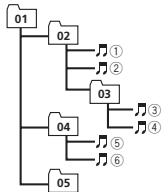
Example of a hierarchy
Level 1 Level 2 Level 3 Level 4
Folder
Compressed
audio file
01 to 05: Folder
number
① to ⑥: Playback
sequence
Disc
Folder selection sequence or other operation may differ depending on the encoding or writing software.
USB storage device
Playback sequence is the same as recorded sequence in the USB storage device.
To specify the playback sequence, the following method is recommended.
Create a file name that includes numbers that specify the playback sequence (e.g., 001xxx.mp3 and 099yyy.mp3).
Put those files into a folder.
Save the folder containing files on the USB storage device.
However, depending on the system environment, you may not be able to specify the playback sequence.
For USB portable audio players, the sequence is different and depends on the player.
Russian character chart
| D: C | D: C | D: C | D: C | D: C |
| A:A | B:B | B:B | F:F | F:D |
| E:E,E | F:M | F:3 | H:N, N | K:K |
| A:N | H:M | H:H | G:O | F:T |
| P:P | C:C | T:T | Y:Y | φ:Φ |
| X:X | U:L | Y:Y | M:M, M | ::b |
| H:bI | b:b | J:J | H:I | R:R |
D:Display C:Character
Copyright and trademark
iTunes
Apple and iTunes are trademarks of Apple Inc., registered in the U.S. and other countries.
MP3
Supply of this product only conveys a license for private, non-commercial use and does not convey a license nor imply any right to use this product in any commercial (i.e. revenue-generating) real time broadcasting (terrestrial, satellite, cable and/or any other media), broadcasting/ streaming via internet, intranets and/or other networks or in other electronic content distribution systems, such as pay-audio or audio-on-demand applications. An independent license for such use is required. For details, please visit http://www.mp3licensing.com.
WMA
Windows Media is either a registered trademark or trademark of Microsoft Corporation in the United States and/or other countries.
This product includes technology owned by Microsoft Corporation and cannot be used or distributed without a license from Microsoft Licensing, Inc.
iPod & iPhone
iPhone, iPod, iPod classic, iPod nano, and iPod touch are trademarks of Apple Inc., registered in the U.S. and other countries.
Lightning is a trademark of Apple Inc.
"Made for iPod" and "Made for iPhone" mean that an electronic accessory has been designed to connect specifically to iPod or iPhone, respectively, and has been certified by the developer to meet Apple performance standards. Apple is not responsible for the operation of this device or its compliance with safety and regulatory standards. Please note that the use of this accessory with iPod or iPhone may affect wireless performance.
AndroidTM
Android is a trademark of Google Inc.
MIXTRAX
MIXTRAX is a trademark of the PIONEER CORPORATION.
Additional information
Specifications
General
Power source 14.4 V DC (10.8 V to 15.1 V allowable)
Grounding system Negative type
Maximum current consumption 10.0A
Dimensions (W× H× D)
DIN
Chassis 178mm × 50mm × 165mm
Nose 188mm × 58mm × 15mm D
Chassis 178mm × 50mm × 165mm
Nose 170 mm × 46 mm × 15 mm
Weight 1 kg
Audio
Maximum power output ... 50 W × 4
70W× 1 / 2 (for subwoofer)
Continuous power output
22W×4(50Hzto15000Hz
5%THD, 4Qload, both channels driven)
Load impedance 4Ω (4Ω to 8Ω allowable)
Preout maximum output level
2.0V
Loudness contour +10 dB (100 Hz), +6.5 dB
(10 kHz) (volume: -30 dB)
Equalizer (5-Band Graphic Equalizer):
Frequency 80 Hz/250 Hz/800 Hz/2.5 kHz/8 kHz
Equalization range. ± 12 dB (2 dB step)
Subwoofer (mono):
Frequency 50 Hz/63 Hz/80 Hz/100 Hz 125 Hz/160 Hz/200 Hz
Slope -12 dB/occt, -24 dB/occt
Gain +6dB to -24dB
Phase Normal/Reverse
CD player
System Compact disc audio system
Usable discs Compact disc
Signal-to-noise ratio 94 dB (1 kHz) (IEC-A network)
Number of channels 2 (stereo)
MP3 decoding format ...... MPEG-1 & 2 Audio Layer 3
WMA decoding format .... Ver. 7, 7.1, 8, 9, 10, 11, 12 (2ch audio)
(Windows Media Player)
AAC decoding format ....... MPEG-4 AAC (iTunes encoded only)
(Ver. 10.6 and earlier)
WAV signal format ......... Linear PCM & MS ADPCM (Non-compressed)
USB
USB standard specification
USB2.0 full speed
Maximum current supply
1A
USB Class . MSC (Mass Storage Class)
File system .FAT12,FAT16,FAT32
MP3 decoding format ...... MPEG-1 & 2 Audio Layer 3
WMA decoding format .... Ver. 7, 7.1, 8, 9, 10, 11, 12 (2ch audio)
(Windows Media Player)
AAC decoding format ....... MPEG-4 AAC (iTunes encoded only)
(Ver. 10.6 and earlier)
WAV signal format ......... Linear PCM & MS ADPCM
(Non-compressed)
FM tuner
Frequency range 87.5 MHz to 108.0 MHz
Usable sensitivity 9 dBF (0.8μV/75Ω mono, S/N: 30 dB)
Signal-to-noise ratio 72 dB (IEC-A network)
MWtuner
Frequency range 531 kHz to 1602 kHz
Usable sensitivity 25 V (S/N: 20 dB)
Signal-to-noise ratio 62 dB (IEC-A network)
LWtuner
Frequency range 153 kHz to 281 kHz
Usable sensitivity 28 V (S/N: 20 dB)
Signal-to-noise ratio 62 dB (IEC-A network)
Additional information
DABtuner
Frequency range (Band III)
174.928MHz to 239.200MHz
(5A to 13F)
Frequency range (L Band)
1452.960MHz to
1490.624 MHz (LA to LW)
Useable sensitivity (Band III)
-96dBm
Usable sensitivity (L Band)
-94dBm
Signal-to-noise ratio 85 dB
Note
Specifications and the design are subject to
modifications without notice.
Avant de commencer
DIGITAL RADIO (radio(Numberé) - RADIO- CD—USBiPod—APP (application)—AUX
You could have joined the group's advisory board, but you would not be able to participate in the committee.
MW/LW (PO/GO): OFF—LV1—LV2
S.RTRV (sound retriever)
1-2-OFF (hors service)
S.RTRV (sound retriever)
1-2-OFF (hors service)
S.RTRV (sound retriever)
1-2-OFF (hors service)
BASS BOOST (accentuation des graves)
MUTE MODE (mode sourdine)
You could also use the following two options to select the colour of the image.
ERROR-07, 10, 11, 12, 15, 17, 30, A0
Apple Lossless: incompatible
| D:C | D:C | D:C | D:C | D:C |
| A:A | B:B | B:B | F:F | J:D |
| E:E,E | J:M | J:3 | H:N, N | K:K |
| A:N | H:M | H:H | B:O | F:I |
| P:P | C:C | T:T | Y:Y | Φ:Φ |
| X:X | U:U | Y:Y | M:M, M | '':'b |
| H:bI | b:b | J:Θ | H:IO | Ω:Ω |
Phase Normale/Inverse
Lecteur de CD
Systeme Compact Disc Digital Audio
Ver. 7, 7.1, 8, 9, 10, 11, 12 (2 ca
naux audio)
(Windows Media Player)
Format de decodage AAC
Format du signal WAV......PCM Lineaire & MS ADPCM (Non compressed)
USB
Specification standard USB
Ver. 7, 7.1, 8, 9, 10, 11, 12 (2 ca
naux audio)
(Windows Media Player)
Format de decodage AAC
SPEANA-LEVEL METER-SOURCE-CLOCK OFF
ERROR-07, 11, 12, 17, 30
ERROR-07, 10, 11, 12, 15, 17, 30, A0
Estensione file:.mp3
Velocita in bit: da 8 kbps a 320 kbps (CBR), VBR
Estensione file:.m4a
Apple Lossless: non compatible
file audio compressor
da 01 a 05: numero
della cartella
da ① a ⑥ :sequenza
di riproduzione
Disco
| D: C | D: C | D: C | D: C | D: C |
| A:A | B:B | B:B | F:F | F:D |
| E:E,E | F:M | F:3 | H:N, N | K:K |
| A:N | H:M | H:H | G:O | H:I |
| P:P | C:C | T:T | Y:Y | Φ:Φ |
| X:X | U:U | Y:Y | M:M, M | '':'b |
| H:bI | b:b | J:J | H:I | J:J |
Consumo massimo 10,0 A
Dimensioni (L× A× P) DIN
ERROR-07, 11, 12, 17, 30
ERROR-07, 10, 11, 12, 15, 17, 30, A0
| D: C | D: C | D: C | D: C | D: C |
| A:A | B:B | B:B | F:F | J:D |
| E:E,E | J:X | J:3 | H:N, N | K:K |
| A:N | H:M | H:H | J:O | J:N |
| P:P | C:C | T:T | Y:Y | Φ:Φ |
| X:X | U:U | Y:Y | U:U, U | J:B |
| H:bl | b:b | J:θ | H:IO | J:Я |
94 dB (1 kHz) (red IEC-A)
(Windows Media Player)
FormatodecodificacionAAC
Ver. 7, 7.1, 8, 9, 10, 11, 12
.audio 2 canales)
(Windows Media Player)
174,928MHz a 239,200 MHz
(5A a 13F)
UKW:OFF-LV1-LV2-LV3-LV4 MW/LW:OFF-LV1-LV2
SPEANA (Spektralanalysator)
CD-TEXT
SPEANA-LEVEL METER-SOURCE-CLOCK OFF
1.0 MIN (1,0 Minutes)—1.5 MIN (1.5 Minutes) —2.0 MIN (2,0 Minutes)—2.5 MIN (2,5 Minutes)—3.0 MIN (3,0 Minutes)—OFF (Aus)
ERROR-07, 10, 11, 12, 15, 17, 30, A0
| D: C | D: C | D: C | D: C | D: C |
| A:A | B:B | B:B | F:F | J:D |
| E:E,E | J:X | J:3 | H:N, N | K:K |
| A:N | H:M | H:H | G:O | H:I |
| P:P | C:C | T:T | Y:Y | Φ:Φ |
| X:X | U:U | Y:Y | U:U, U | I:B |
| H:bl | b:b | J:θ | H:IO | J:J |
D:Anzeige C:Zeichen
Equalizer (5-Band Graphic Equalizer):
Frequenz 80 Hz/250 Hz/800 Hz/2.5 kHz/8 kHz
KLASSE 1 LASERPRODUCT
Bij problemen
S.RTRV (sound retriever)
S.RTRV (sound retriever)
1 Druk op M.C. en selecteur de gewenste insteling.
1-2-OFF(uit)
S.RTRV (sound retriever)
BASS BOOST (bass boost)
HPF SETTING (high pass filter aanpassen)
Back-up (of accessoire)
④ Geel
Accessoire (of back-up)
⑥ Rood
ERROR-07, 11, 12, 17, 30
De disc is vuil.
Reinig de disc.
De disc is bekrast.
ERROR-07, 10, 11, 12, 15, 17, 30, A0
Geen verwante songs.
| S: T | S: T | S: T | S: T | S: T |
| A: A | B: B | J: B | F: F | J: D |
| E: E, E | I: J | J: 3 | H: N, H | K: K |
- PnI HECOBEMTBCTMHTA CHTpOeB BCTPOEHOHTO I BVbpaHHO Ro3BA BO3MOHbIK NcKaKeHJN PnI BVbOde TEKCTOBx COoBuHEni.
- Hexotopole BcIMBOBJIbMOT OTo6paKaTbCn HENPABNIbHO.
1ПоворачивайтМ.C.дяБьборанстрейки.ENG(aHrtniickm)—PYC(pycckm)—TUR(typeukn)
2 HaxmTe M.C., YTO6bI NOITBepdntB Bb6op.
CLOCK SET (yctahOBka yacob)
ПоворачиваятМ.C.,Чтобу установпчсь.
2 HAnKIMaTeM.C.,YTO6bI Bb5OpBaT yCTaHOBKy MmHTy.
3 [M]yHHTb.
4 HaxmTe M.C.,yTo6bI NoDTBepnTb Bb6Op.
FM STEP (waar hactropon B FM-dunaana30ne)
2 HANKMTE M.C.,MuT6oI NIOJTBEPRIDNtBbIb6Op. BINTCnHADNIICBUIT.
5 406b13aOKHHTb HAcTPOky, NOBEPHnTe M.C. n BbIepeRte YES.
EciNIOHAD0BTC HBOHBI3MENHHTB HACTPOKY, NOPEHPHTM.C.N.Hb5bEPHTNO.
6 HaxmTe M.C. nIy BbI6opa.
PpmeaHn
HaCTpoNTb npaMeTpbl MeHIO MoKHO B MeHIO CHTeMbI IN HauNtBOM MeHIO. Boene noPbo6Hyu HnΦopMaUcM cM. Ba3a- denax MeHIO CHTeMbI h CTpTobOe MeHIO h CTp. 138.
- Bы можete OTменить Нсторку napametpa, нажв Кон只是 SRC/OF.
Ochobhble onepaunn

BaxHo
ПгСоюсденин и усанове пеледни ранейно бразашистс с сень отосях.
- Obepaerénepeidnoio naHembot cnblbX yauDapox.
- Pnédoxpanhainte NpepeDIOHOp naheIb OT Bo3eJCTBnI PrpmoTO COJIneHOrO CBetaN BILCOKIX TMENPATEy.
- Ппекду Рсгьт Бередно пань,обялстень OTKПОчITE на СЕ В Кабели и усточа,Устове Новрedingу BCtpoiCTBOи BHTpyeHNOO OTOДКNY canoha.
ChyTne nepedne nane
TOb6bOeOEDOHINbpeNdeHOIOHANHeB, HAKMITE HaKONIKY OEOEDINEHNHANEHNI.
2 HauKMITE ha NaHEnb no HanpaIaENHIO BBePx (I) nOTaHTHe HA c6Ba (II).
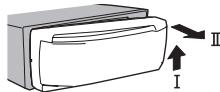
3BcTaMa xpaHntte OTOeMDENHHU yHaeneB yaaHTINOM CFyTnPBRE HN HxneIe.
UctaHOBka nepeDnei naHei
3aФankuHyIeNeBkI kPamnHnHa yCtpoIbE
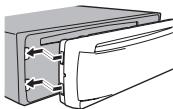
2 HacMKITE na pRaBb KpAe npEaHne paHaENn aNaFKnCpYte ee.
B Cnyaue npnnoeKeHn 3nHnHero yCnHn nepehdna naneh bnn ochoNBHO eYCTPOCTBO mOyT 6bIb nobPexDeHb.
BkIIOUeHHe yCTpoIcTBA
BbKJIIOHcHHe yCTPOIcTBA
1 HauKMITE uEpyKKBaIE KHOKNY SRC/OFF, NOKA yOCTOBTO HE bblKIOHHTC.
IcnoJb3OBAHne daHHoro yctpoiCTBa
BbI6op nctouHnka cHnana
1 HaxkmaTKeKOnkiy SRC/OFF IaIbBbOpaH3 cnJeDIOUxMxФyHKnIi: DIGITAL RADIO (UnpOBoe ayDIOBeuAnHe) RADI-CD-USB/iPod-APP (npInoKeHne)-AUX
- EcIIN Bb6paH NIO60I NCTOCHM CIGHnA, KpOME DIGITAL RADIO, MOKHO NPEKKnOHTb-Ca H DIGITAL RADIO C NOMOJIbIO KHONKIN DAB.
- Пи дожимου симу по trokopoly MTP на доспесу отображаетс USB MTP.
PeryInpobKa rPOMKoCTN
CoxpaHHeN N BbI3OB N3 NaMaTn padnoctaHcN dIg KaKdOro dnana3OHa
HcnoIb3OBAHne KHOJOK npedBaPHTeBHOH NaCTPOKn
1 CoxaHHeHne: HaxMnte HydpExnBaIte ONDH N3 KHOKNoPpeBapTeNbHO HaCTpOKn (c 1/An no 6/),noka Homep He npekpatNT MnrtBt.
2 BbI3OB: HaxMMTe Ondy n3 KhoNOK npedBapnteHbON HacTPOKN (c 1/∧ no 6/←).
IpeeknoueHne dncnner
Bb60 TeKCTOBoH INHOpMaUIM
1 Hachmaire DISP nA Bb6opa 3n cneJeouxH
fynKHH:
- SERVICE LABEL (Rpblk sepbica nii Ka-hana)
BRCDST INFO (apRbIc cepBmCA/apRbIK PYT/apRbIK naketA/kahanI nactOta)
DYNAMIC LABEL (Дианэдемпеского Дианэдona)
CLOCK(H3aBbAme HcToCHnKa CInrHa n YacBc)
Icnojb3ObaHne daHHoro yctpoiCTBa
PpmeaHn
- Ecn npbnb cepbnca b none SERVICE LABEL 0ctyCTbyET, BmecTo Hero oTo6paxaetcKaan. Ecn npbnb cepbnca 6bnapxhen, OH 6ydt ot6paxbaTcB.
- Пдогбиме с опсмке PTY с. в раздени Стиск PTY наст. 131.
- Pnirncnoh3oabHmN pay3bl 3aФyHKUaO tKIOHaETc. PoIpo6He oФyHKUm Nay3bl CM. BpaDene Pany3Ha nct. 129.
TEKTOBRA INHOPMauzNI MOKET MEHrBa B 3aBICMHCTO N dI MAJNA3OHa.
B3MOXHOCTbHECEHIN3MHEHENBTEKCTBOYIO INHFOOPMAIHO 3ABVCNTOTPERONA.
Послuyшване последнх прогамm (peTpocneKTnBhoe Вецанe)
MoxhoNpoIa3BdOHTb PONCK NO NocNEHMM IpoTgPamMaMBeUaHnI3 BbIbpaHnHO CepBvCHOROMKIOHOENTA.
1 Haxmite /DIMMER, YTObI nepeTn B peKHM petPocneKTHBHOB EeauHnA.
Haxmiteepea3,HTObbyBepHybcrK"KBOMy"BEuAnHO
2 HauKMte KhoNky NnI, TcObI otpeRyInpoBaT ToCkY hauHa BocnpOn3BedeHINr.
HAKMITE 4,TO6bbyBEPHybCa HA OyHu MHUYu H33Ad.
- HauMktte ,HTO6bI nepeITn HA ONDy MNUHY BnepeJ.
3To yCTPOIcTBO ABOTMATUeCKn COxPAHET B nAMTNI NOCJIeHNI PIOrPAMMBi, 6bBUNe B 3aJne. EMKoCTb nAMTNI 3TOI yCTPOIcTBA 3aBNCIT OT CKOPOIN PepeDAH YAHOHBIX Y NCIOJIb3yeMbIX CEPBNCbHbIX KOMNOHEHTOB.
ПгИБИNTENITBJHARAЕМКЕТьNAMRTN-ПЯТь MNYHTиHA1926KMT/C.
Bb6paHbIe IporpAmmI, KOTOpbIe 6blN B 3fIpne daBnO He MOrTy bItb CoxpaHEnbI B naMTn, 6bUTy HedeOCTynHbI.
Bb6op cepBnCHOROKOMHOENTA
Mochko Bb5Bpatc EBcepHbKOMOHEHT M3 cnCkA cEBPCOB, pRnBEdEHORO HIXke.
1 Haxmnte Q (CnHcO),TTO6bI nepeTN B peKHM CnHcSA cepBcOB.
2Длпаперемшени no cnncky cepвicob noportapuivbaiteM.C.,дгЯьбoga-nakmTe.
CnEduyue Hb6paHne yfHKuIN cepBNCHORO KOMIOHEM OMOHX HaCTPANBt.
SERVICE (apnbic cepbica)
MOKHO BvBpBtBcPBCHbKOMNIOHEHT 3CNICKA BCEX COKMNOHETOB.
10BoparvaIaTe M.C.,Tvo6bIb6pa8 cepBnCtHmCOHHTe
2 Haxkmite M.C., YOcBbI NauHb TpNEM npO-rgaMM BEEAHAHn I3 Bb6paHOrO cepBnCHOro KOMNOHHTA.
IcnoB3OBAHn nonka no anpaButy
HaxMMTeQ(CNMCOK)
2Дявьбopa6yKbblIOBOPaHBAIteM.C.
3 Haxmite M.C. d'ro 06paekhenia cncka no anpahty
4 [B]opoapa-HBaIaTe M.C.,Tvo6bI bIb6paT cepBnCtHKOmHTeOH.
5 Haxkmtte M.C., Yto6bI Hanatb npnem npo-rpamm BvzauHniz 3Bb6paHHOro cepBNCHOROMONHOHHTA.
PROGRAM TYPE (Ярпьк PTY)
IcnoJb3OBAHne daHHoro yctpoiCTBa
1 HakuMMTE M.C., YTO6bI OTKpbITr IaBHOE MEHO.
2 IIOBOPaHbAte M.C.ДЯI npOKpyTkn nyHKTOB MeHIO; NaKmTe, YTObI bIbOpaTb FUNCTION.
Bb6paHhHe yfHKIn, KOtOpBe MoKHO Ha-CTaPbABt, nepeWcNeHb HIXe.
S.FOLLOW (nonck anltepehntibHoro cepBnchoro KOMnoHeHTa)
Ecnn KaeeCTBa PnHema Hn3Koe, 3TO yctpoCTBO ABOMATHECKN HAHTEN NOMC ApyrTO RAKATA C NOdEPKKOH ANAOTGNHORO CepBCHNO KOMPOHENTHa EanbTePnatNBhBc BcpeCBNbX KomnoHETOB He NaHdeHO INI eCNn KaeeCTBO pnaMe OCTaTc Hn3KmPnON3oJed ABOMATHECKNepeKIOHHe Na anoTnHyu nporpammy FM.
1 HAKMITE M.C., YTO6bl BIKHIOHTB IIN BIKHIOHTB NOHC ANbTEpAHBHO CepBHCHORO KOMIOHOHTA.
PdnoonpneHnK
OchOBhble onepaunn
Bb6op dnaana30Ha
1 HaximamaTkeKnkyBAND/,nokaHaHcPiIe He OTo6pa3ntCte HnykblmIaIa3oHn (FM1, FM2, FM3 dans FM niv MW/LW).
PtepeKIOUeHMe cTAnuN pIeBapInTebHOHaCTPOIK
1 HaxmTe KhoNkU nnu
Tt6bIyNtOJIb3OBaTb3TyfHyNKIOB, B MEHO SEEK Bly6epnTE PCH (3anporpammopobAHnaCTaHnria).
IcnoJb3OBAHne daHHoro yctpoiCTBa
PуннаНастpoиka (nowaroba)
1 HaKMMTe KHOKNy 1Nn
YtboBbIcNpIbBbATyTpyHKHIO, B MEHOSEEeBb6PbETMe PA(yuHAACTPOHa).
Nonck
1 HαkMNTe I yedepKbMaIte KhONKy a 3aTeM OTIyCTNITE. BblMOKeTcOTMeHInb HAcTPOKy C nONCKOM KpATKHM HαkATNEM aII N PnHakatmN I yedepKbBaHmN KHONK a NMOKHO nponyckatpdaIOCTAHmN Ha-CTPOKa c nONCKOM HAChETc cpa3y oNcne O nyckahnIK hONK i N
PpmeaHn
- Pod6hUO IHΦoPMaIuO MeHIO SEEK cm. B pa3eNEE KHK (HaCToPka JbeoN npabO KHONk) Ha ctr. 137.
MOKHO BIKIOHTb IINI BIKIOHTb FyHKNIO AF (NONCK ABtpehATNBbIX YactOT) DAHHO rO yCTPOBCTBa. DnOBsBuHONA HcTPOB KfYHQNAR AF OJNkHA 6bITb BVKnIOHEHa (CMOTPte B AF (NONCK ABtpehATNBbIX YactOT) HA ctp.131).
CoxpaHHeN N BbI3OB H3 NaMaTn padnoctaHcN dIg KaKdOro dnana3OHa
NcnoIb3OBAHne KHOIOK npedBapnteJbHoi HaCTpoiKn
1 CoxpanenHe: haxmte n yapedxmbaTe OdHy n3 KhoNOK npedBaPntelbHO Ha cTpOKn (c 1/Ano 6/),noka Homep He npekpatn Mrtatb.
2 Bb3OB: HaxMMTe Ody n3 KhoNOK npedBapnteIbHOH NaCTPOKN (c 1/Ano 6/
IpeeknoueHne dncnner
BbIop TeKCTOBoH INHOpMaun
1 Haximmaire DSP对阵白毘bopa3nchényuixh xyhuikui:
FREQUENCY (Cnyk6b0e nablaba npo- rpaambln HnV cactota)
BRDCST INFO (cnyk66hoe nabaehne nporpammb/Inhcpommaa PTY)
CLOCK(H3a3BaHMeIcTOCHMka CnTHana n 1aCb)
PpmeaHn
Ecnn cnjyke6Hoe H3BaHHe npOrpammbl B none FREQUENCY OTCYCTBYET, BMEcTo hero OTOppaKaTeC kAHan. Ecnn cnjyke6Hoe H3BaHHe npOrpammbl o6hApYeHo, OHO 6yDet OTOppaKaTbC8.
TEKTOBAR INHOPMauzIN MOKET MEHytBa B 3ABiIMCOTN OI DnAHAOHa.
BOSTOByIO INHOPMauIO 3ABcNIT OT perHOIA.
NcnoB3OBAHneФyHKmI PTY
MOKHOH HACTOPITbEA hRa pAOCTOaTHCn C NO MOpIbIO HINOPMAPIN PTY (TINa NpORpaMMb).
IcnoIb3OBAHne daHHoro yctpoiCTBa
IcnojB3OBAHne daHHoro yctpOHTBa
POTK CTAHUNRDS C nOMOHTIO HNFOPMAUHN PTY
1 HaKMnTe (CNUCOK).
2 KhoNkO M.C. BbIeBpTe TIN NpOgrpAMMbI NEWS/INFO-POPULAR-CLASSICS-OTHERS
3 HacKMte M.C.,Tc6bMyHauhBtNoNc. UyctpoCTBO HauHMaet NoNcK padIoCTaHmI, nepedaoUoAaXdHnBu TmI npOrpAM. PmI o6bApuyKeHHaPdIoCTaHmI HaDcNpEe 6bETnOka3aHO H3aBaHme DaHNOI npOrpAMMbI.
ДЯ OTMнБИ NOICKA HAKMNTE M.C. eue pa3.
- PnorgpamMbI HekotopBx paIaIOCTaHcIy MOrT yOtUHcTaCBy O nporpamM, yka3aHbX B nepeDabaEMOM kOE PTY.
EcnHn HOna I3 cTaNCHNe He nepedae TnporpammbHyNcHOro Tnna,To Ha DCnPnneB TceHeNe pImeMPO DByck CxKhyBd 6yet POKa3AHO NOT FOUND, N 3aTeM ToHep EpeNd B peKIM pNemA cTaNCH, C KOtopo B6HJ Nauat PONCK.
Cnncok PTY
Bollee noDpo6HyIO HnFopMaIIO O cNtCKe
PTY MOxHNO NOnyUHTb Ha Be6-caIte:
http://www.pioneer.eu/eur/products/25/121/tech/
CarAudio/PTY.html
HactpoiKa fynKzni
1 HakuMITE M.C., YTO6bI OTKpbITr rnaBHOE MEHO.
2 NòBOPaMbaiTe M.C.ДЯ nρokpyTkn nyHKTOB MeHIO; NaKmTE, YTObI BbIbGaTb FUNCTION.
3ДиьБИбОраФункIMи nobopauHBAIte M.C.
CnEyduoHue BbIePAnHbIe FyHKUIN MOKHO HcTpaHbTa.
BДяпанэх Mw/LW мохно Вьбрат ТолъКВ BSM, LOCAL # SEEK.
FM SETTING (hactpoikKauecTba 3bYka FM)
YOpBHeH KAneCTBa 3ByKa MOxHO UcTaHOBuTb B COOTBETCTBn C yCObHBA Mm PnpMa CMrHaA B FM-dmA3Oze.
[1] Αnto OTo6paKe8HnA yCTaHOBOvHOrO MEHO HAxMATE M.C.
Повораччавей М.С. Дял bБбога насточи.
STANDARD - CTaHdapTHaHa HacTpoiKa.
HI-FI-HACPTOKA C PNPOTETOM BVCOKO-KA KACTBCTA CTEPEOBAYHANIA.
STABLE- HacrpoKa C npnoPHToM NHI3-KORO yPOBnI NOMEX MOHOOHueCKOrO 3ByaHIN.
BSM (3aONMOHAnHe JyUHXx CTaHnI)
OctanohokBa BCoPnoB3eDeneHФaIIOB Ha 3aONMnHOuOMe yCTOpOCTBE USB
3A0MnHOaIeueyUCyTOPOCTBOxUBMOHOTKIOQHTB BIOLOB MOENT.
Bb6op nankn
1 Haxmte KhoNkY 1/Ann 2/V.
BbIob dopokkN
1 HaxmTe KhoNkU 1nn
YckopeHHa nepeMoTKa BnepeiHa3ad
PpnoctaHOBKa Bocnpo3BedeHn
1 HAKMITE KHONY4/PAUSE,TOB6I KINBOVTHAYNAI NYU BO30HOBHTB BOCPONIMBEDEHINE.
HactpoiKa fynKuN
1 HakuMITE M.C., YTO6bI OTKpbITr IaBHOE MEHO.
IcnoIb3OBAHne daHHoro yctpoiCTBa
2 IIOBOPaHbAte M.C.ДЯ nPOKpyTkn nyHKTOB MeHIO; NaKmTe, YTObI bIb6paTb FUNCTION.
Bb6paHnHbe yfHKn, KOptBoe MoXHO haTcPbA8b, nepeUcnJIeHb HIXe.
ФУнчы S.RTRV HeDcOtYHb,ecNb KBrUHe- HФунчы MIXTRAX.
S.RTRV (sound retriever, texhONOIR pneo6ba3-OBAHRI 38yka)
ABOMATMUYECKN yUyuaaET KaueCTBO 3Byka CxataBix ayDnOaHIOB N BOCCTAHABINBaET NOINOTY 3BYYAHJ.
PnOCTaHOBKa BOCpON3BeDeHnA
1 Haxmite KhoNky 4/PAUSE, UTO6bl BKNVtBu7 naay Iun BO306HOBtB BOCPNOB3EDEHe.
Icnojb3OBAHne daHHoro yctpoiCTBa
Bocnpon3BedeHne KOMnO3nCmB XaHpe BOCpON3BODIMoB DaHHbI MOMENT KOMnO3nCmN
Moxho BOCPONBDOHTb KOMP03HmN 1s CNEduoHc nCNOK.
CnicocababomOBAPrHCTA, KOMONIIGKOTOPORBOPCNPOB3BDINTCBDAHNBBMOHNT
CINCHOKOMONI3N,OTHOZIMXCAKBCOPOPNB3DIMOYMBAHNNMHOMETAblb6MOY
CINICOKAJIb6OMOB,OTOHOSIIXXCRKBOCPON3- BODIMOMYB DAHNHBI MOMENT My3bIKaJIbHOMy KaHpy
1 HauKmte N ydepXnBaIe KhONky ,dny nepeKnIOUeHnB P eKIM BOCpON3BeHnno KATEROpIN.
2ДуИЗМЕнEHPEKIMBApaaJIteM.C.,ДьБIbOpa-HAKMNTE.
- ARTIST - BOCPON3BDEENHe Abl60Ma aptnCTa, KOMN03uINa KOTOPORO BOCPON3BOJNTCR B DAHNHIM MOMHT.
- ALBUM - Bocnpo3BedeHne KOMO3N1n 3aIb6bma, KOtopb I BOCnpo3B0DNTcB DAHNb MOMEt.
GENRE-BocnpoB3eDeneAInbOmaB XaHne,KOTOpBIOBCPOn3BDoNTCBA DaHn BMOMBT.
Bb6pHnHaN KOMP03NII INI aIb5OB 6yETB BOCPON3BDOHTCB NOCTE OKOHANHA BOCPON3BDEHNI TECUJIEN KOMPO3NII.
Приимechания
B03MoxHa OTMeHa BOcPOnBaBeHEny Bbl-6paHHOI KOmON3nIN/Anb6Oma,ecnBbICNpON3yTe IIObEe Dpyre FyHKuIN, KpOme NocKa NO katerOpri (hApnpMep,pePemOTKa Bnepei nn Haa3d).
B 3aBcHmOCTM OTOr, kKaar KOMnO3nIa Bb6pHa, KOHeT KeTyEeKOMnO3nIu N HaAHO Bb6paHNOKOMnO3nIu/Anb6oMa MOrYT 6b7b 06pe3aHb.
IcnoIb3OBAHneФyHKzni iPod dAnHOro yCTpOiCtBa Ha BaUem iPod
YnpAbaNHeHneyHKUIMMnIPOd daHHoro yCTpoiCTBa MOKET IPON3BODntBCr C NOKJIHOEHHNOIPOd.
Pekhim CONTROL iPod HeCOBMEcTMM C cNe- dyouHm MOneJIaMn iPod:
- iPod nano 1-ro nokojehnra
iPod c noDepkko BnuDeo
Ipeknelohyene Mekdy pekhimamyn ynpablenhny npns3bodntac hahnatem BAND/
- CONTROL I Pod - уразаленце Фуннійnam
I Podдану усточьma мозер пимбовдс с полкноевен Horo I Pod.
CONTROL AUDIO - ynpaBneHne fHykUmM iPod dAnHOro yCTPOIcTBa MOKET pNO3-BOHTbC r NOMIOBIO opTRAHOB ynpaBneHnDAHNHOr yCTPOIcTBa
PpmeaHn
PnI nepeKlnOHeHn Ha pekm ynpabEnHnA CONTROL iPod Bocnpo3BedeHne KOM03nU n npocTahBaNbaTeC. TOp6bI Bo3o6HoBnBtB bcnpo3BedeHne,ncIpOn3ytei iPod.
CnEpyuOuMmФyHKUmaMMOxHOynpaBnAByt c DaHnHO rCyToPoiCTBa,DaKe eCnN BbI6paH peXmU npBaJIeHnH CONTROL iPod.
—Paly3a
- YckopeHHa nepeMoTka BnepeI/Ha3aI
Bb60KOMnO3n(pa3de)
- TOMKOCbT MoXHO peYUIMPOBaT ToJIbKO C OCHBOHOr YCTPORCTBA.
Hacrpoika fynkui
1 HakuMITE M.C., YTO6bI OTKpbITr IaBHOE MEHO.
2 IIOBOPaHbAte M.C.ДЯI npOKpyTkn nyHKTOB MeHIO; NaKmTe, YTObI BbIbPaTb FUNCTION.
NcnojB3OBAHne daHHoro yctpoiCTBa
3ДЯьыбopaфункиюворачайTe M.C.
Cnedyuoume BbIbpaHbIe FyHKUIMoKHO Ha-ctpamBaT.
- ΦHKURA AUDIO BOOK JHeIoCTyHnHa, eCIN B KauCTBe VeKIMMA BCNOPIO3BEdENHb Bv6paHo CONTROL iPod. IOpNoPbHee CM. B paZaIe NcIopJIb3BaHHe NfHKuH iPod dAnHoro yCTPOrJtBa H aBaEM iPod Ha ctr. 134.
AUDIO BOOK (СКОРСТ ВССПОИЗБЕДЕНИЙ AY-ДИКОKNIVI)
Bb60 TeKCTOBoH INHOpMaUIM
1 Hachmaire DISP nA Bb6opa 3n cneJeouxH
fynKHH:
- TRACK INFO (Habahene dopokxw/IMM er nonhnten/nahabane iba506a)
APP NAME (ha3BaHne npInOKeHHa)
- ELAPSED TIME (Bpeme Bocnpn3BedeNn)
CLOCK(HA3BaHMeI NCTOHHa CmHnHa n YaCb)
SPEANA (aHaJIIM3aTOP cNeKTPa)
Hacrpoika fynkui
1 Haxmnte M.C., YTO6bI OTKpbITr IaBHOe MEHO.
2 NòBopαuBaIte M.C.ДЯ nροκρуTk nynkTob MeHó; HαKmTe, qTObblbOpatb FUNCTION.
3ДиьБИбОраФункIMи nobopauHBAIte M.C.
CnEyduoue BbIepaHbIbe FyHKUINMOKHO HcTaPbaHb.
PAUSE (nay3a)
H NaMMeT M.C., YTOb6 BTKIOHOHT NAYU INI BO3O6HOHTBBOPOIN3BDEHNIE.
S.RTRV (sound retriever, texhonoraria pheo6ba3-OBHNA 38yaK)
1 HauKMITE M.C.ДЯВБОРΥHxHON HACTPOJ KN.
1—2—OFF(BbIK.)
HactPnoIka 1aΦeKTeBnBa dpaaiNoB c H3KnO CTeNEbO CxATNa, a HactPnoIb 2 - dPaiaNob C bCtIOkCTeNEbO CxATNa.
Perylnipobkni npaMeTPOB 3Byka
1 HaxMMTE M.C., YTO6bI OTKpbITr rnaBHOe MEHO.
2 NtOBpaHbAte M.C.ДЯ nPOKpyTkn nyHKTOB MeHO; HaxMITE, YTObI Bb6paTb AUDIO.
3ДлгБИБОВАУДИОФУКПИ NOВОРЧИBAITE M.C.
CnEyduOuIe BbIbaHneIa yAuIOFOyHKUIMMOKHO HACTPANBaTb.
-ФаннкшAFADER HeDocTyHNA,ecnB pexHmMe SP-P/O MODE Bb6pAno SUB.W/SUB.W.Полрбпee CM.BpaZdene SP-P/O MODE(HaTcPOMa BbIXOda ZadHero KaHana NpepBaprntelbHorO yCmNtHn)Ha ctp.138.
ФИУКIMIM SUB.Wи SUB.W CTRL HEDOCTYны, ecг в рекиме SP-P/O MODE b6bapno REAR/REAR.Погорбем с.M.раздени SP-P/O MODE (нachtrayka Вьхда Задero KaHana и п徳варпенть HorO ychnteЯ)Ha ctrp.138.
-ФУнкURA SUB.WC CTRL HeDCOTYHNA,ECBIN B peKHMSE OFF Bb6pHaO SUB.W.ПоДрбhoe Cm.B pa3dene SUB.W(BKIIIOHHe/BykHIOHne hcbbypepa)Ha CTp.136.
ZHUYUNLIA HLNEOCTYUNHA,ecnIN BKAHCTBECTHOCTOHNIKA CHNHLA BuBbPAFOHMI
FADER (pergunpoBka 6aIaanca)
[1] ダリ ΩTOБРЖЕΝΗ YUCTAHOBQHORO MEHQ HA-KIMATE M.C.
2 NaHMMTE M.C., YTOb6 bTpepyNIOPOBAtb 6aNaHC nepeDnHx n 3aDnHx pOMKOROBOpTeNei.
BALANCE (perynipovka 6anaHca)
ДлготообразкегиУстановсΟтEOМнЮHA-
XMATE M.C.
2 [PobopaaBaeM C.T.0b6bOtepyrnoBapoe 6baHac neBBO/npABo rPoMKOBorOpTeTene.]
EQ SETTING (Bb3OB HAcTPOeK 3Kbaaia3epa)
SUB.W (BkIIOUeHHe/ByIKIOUeHHe ca6Bypepa)
30Tu cytropbTOBmE IMbOxKANHcabyFepea, KOptob MOXHO BKNHObN bIKbNOchBaT.
1 Haxmite M.C.Дяьбoga hyxhoи habtpoiK. NOR (HopmaNbHaЯ pha3a)—REV (o6paTnaJa pha3a)—OFF (caBbypep bkyIOuOH)
SUB.W CTRL (hactpoikca ca6bypep)
Ha BbXode ca6byfepe 6yDyt BocnpnBDOHbTc8 TOnbKO Te TaCtOToB, KOTOpHe NmKe Yka3aHHbx YaCTOT cP3ea.
JITAO OTO6PbAKeHnYcTahOBQHOrO MEHO HAXMITE M.C.
2 HaximmaTe M.C.ДЯ Bb6opa I3 cIeIyUOxHxФИKHyu 即Tota Cpe3a—YpOBeHb BbIXoHoro CmHa-na—Kpytn3Ha xapaKtePcIcTNKn NImehreMble 3haueHnE 5dyT MnRtB.
3 [NobopaunBaiTe M.C.ДяьБубopa NaCTPONKu.
YacToTa cpe3a:50HZ-63HZ-80HZ-100H-125HZ-160HZ-200HZ
YpOBeNb bIbXoDnHO CnHnA:OT-24do+6
KpyTn3Ha xapakTeprcTnKu:-12--24
BASS BOOST (yCINHNEH NHHKHX 38YKObIX YaCTO)
1.0 MIN(1,0MNH)—1.5 MIN(1,5MNH)
2.0MIN(2,0MNH)-2.5MIN(2,5MNH)
3.0 MIN (3,0 MmH)OFF(BbIKJ)
FLASH AREA (obnactb npbcnpuyoero zbeta)
Mokho Bb6paBtob6nactn PnybCnpyoioero zBETA.
1 Haxmte u depeKbAte KhoNky SRC/ OFF, noka yctpoCTBO He BblKnIOHtCra.
2 Haxmte KhoIky SRC/OFF u ydepKbain-Te ee, noka He oTKpoetcstapTObe MeHO.
3 NòBOPaHbAité M.C.ДЯ nPOKpyTkn nyHKTOB MeHIO; HAKMITE, YTObI BbIbGaTb INITIAL.
4ДЯ BBb6paФHyKmMuMeHO CnCTeMbI NOBOPaWBAITE M.C.
CnDyIOUe BvBpaHnBE yFHKuIcTcRAPOBTO MEHOKO HaCTPaNbATb.
FM STEP (laar hactpoikn B FM-dnaana3one)
1 HaxMMTE M.C.,TTO6bI Bb6paTb WJr HactpOiKn FM-DHana3Oe. 100 (100 KtU) -50 (50 KtU)
SP-P/O MODE (Hacstpokka bblxoda 3a2hEro Ka- hana n npedabapntbHoro cynTnener)
BbXoH na HpOboa 3aJHero rpoMKOrOBopnTeHn aBbXo 3aJHero KAana RCA MoKHO hCNOIb3oBabTh IPOKIOHcHnI WIpOKONOpONCHO rPOMKorOBopnTeHn mN Ca6BypeHa. Bb6BePitna NaCTpOHy, POxOxoRAUyO nDa Bawero coEduHHeHn.
I 參IOTO6PbAKeHnYcTahOB0HOrO MEHO HA- XMMATE M.C.
[2]Повачайе М.С. Дяпьбoga настори К.
- REAR/SUB.W - Bb6peHte, ecnK bXbXody 3aDHeRo KaHana NoCoEOdInHeu UINPOKOnoNoChb rPOMKOrObpHTeB, N TAKKe IMMeTcR Ca6ByFep, NoCoEOdInHeHbK bXbXody RCA.
- SUB.W/SUB.W-BbIbepnte,ecnn ca6by-ΦeP noKJIIOUeHnAPMyU K bIXOy 3a-Hero KAHAla 6E3doONHteneBHorO yCunInTeta,NtKaKe MeEeTc ca6byΦeP, noCoeEINHeHnK B bIXOy RCA.
- REAR/REAR - BbIepiTe, ecnI IuPokO-noNocHbI rpoMkOrOBopInTe bNoCoeHnEN K bIxOy3 aadHeRo KaHaJa N K bIxOyRCA.
EcnK BbIXOy 3aDHeRo KaHana nOdoCo- dHnIOPOKoIOncHb rPoMKOrOBIpTeB, a BixOd RCA He nCIOJIb3yETcA, MOxHO BbIbPaTb REAR/SUB.W mN IN REAR/ REAR.
DABANTPW(HACTPOKA\PITAHINAANTENHBI DAB)
1 HauKmITE M.C.ДЯ Вьбору НуЖног РаТСРй.KI.
ON-No3BONJETBbOIDNTbNITAHNEHa aHTENHUY DAB. Bb6epi37y hactPOky, eCmN k yCTpoIcTBy npKJIIOeHa aHTENHADAB (AN-DAB1,pnpdaTeCtOndEnhSO).
OFF- npiTAnHe ne npOaTe. BbEpTe 3Ty nactpOy,ecn nncIpb3yeTrnacnCBHAr aHTehHa 63 yCunTeTEnA.
IcnojB3OBAHne daHHoro yctpoiCTBa
MeHIO CNTeMbI
1 HaxkMTEuYdePcKbMaTe KONKy SRC/ OFF, Noka yCypToNCTBo He BILKnIOUHTCA.
2 HauKMITE KHONKY SRC/OFN U yhepkBwAe Te ne, oka HE ot KPOkeTc STAPTOBE MEHO.
3 ПоворачиВаite М.C.ДЯnpokутknnyнков мени;Нжмгш,Чтбь BiБбрathSYSTEM.
4ДЯБыбopaФункшMuMeHIO CnCTeMbI nobopauuBaIte M.C. ПлорбныинфорmaцHy CM.ВМeHIO CnCTe MbIHa CTp.136.
NcnoJb3OBAHne doNoJIHnTeJbHO NUCTOuHnKa CNrHaJa (AUX)
1 Bctabte MHH-nTKeKep cTepeokAbenB rhe3do AUX.
2 HakmTEK HONKY SRC/Off, Tc6bIbB-6pBATx AUB KCAECTBE CTMOHHCIA CIRHNA.
PpmeaHne
Hebo3MOxHO Bb6paB AUX,ecnHne BcKJUeHae HcONOMorATEbHAR hacTPOHa. IIOPObHyu HnΦOPMaUHcM.B pa3dene AUX (BCONOMaTeIbHbI BXoD) ha CTp.136.
IpekeKluoyenHe dncnJe
Bb60 TekTOBmHΦopMaun
1 Hachmaie TISP DnA Bb6opa n3 cneDyiouixx fynkui:
Ha3BaHne nCTOHTHnKa
Ha3BaHne nCTOHTNkCa CnHnA n Yacbl
EcIn OTKpbIINcHHeBepHbI 3kpan
OTKHOHHTE HeBepHy 3kpaH, KaOKIIMCAHO HIXKE.
1 HaKMMTE M.C., QT06bI OTKpbITr rnaBHOe MEHIO.
2 IIOBopauHbaiTe M.C.ДЯ npOKpyTkn nyHKTOB MeHIO; HAKMITE, YTO6bl BiIbpaTB SYSTEM.
3 Nobophrnite M.C., Tvo6b1 Oto6p3a3ntb DEMO OFF, zatme HAXKNTME.
4 NOBeRnTe M.C.ДЯ BbIbopa YES.
5 Haxmte M.C. nBb6opa.
YCTaHOBKa
Coeinnen
Baxho
PnycTahOBke daHHoro yctPoICTBa B aBTOMO6HBe, N BOKOTOM OTCYCTBYET NOJIOXEHNE KIOUca 3aIKINAHN ACC,KpacHbKab6Bb D0JIeHN 6bITb POKnIOHEN K KNEMME, KOtOPaR ONpeIeIeR pa6OoEe NNOJEXHNE KIOUca 3aIKINAHN; B nPOTHBOM CNYae MOKeT Bo3NHKNyTb yTeKA TOKa AKKymyIra-TopHOI Bataepu.

Пложене ACC

ПОНКЕНИС ACCOTCYCTBYET
3KcNpyataaHn DaHHoro yCTPOINCTBA B YCNOBHX,OTNIuHbIX OT NINCAHNbIX HNKe,MOKETnpBIECTN K NOkApy INN C6OIO B paObe TcPOINCTBA.
TAPCNOPTNBE CpeCTBa C 12-BOJbTOBbIM AKKyMnyTOpOM Ia3eMJIeHnEM OTPiuTaTeBNoHO NOJIOCA.
「TOMKOROBOPARTENI C5N TB(BvxOJDHAR MOUCTb)uOT 4Ωdo8ΩC(CONPOTBENEH)。
Bo n36eKaHIme KOPOTKORa3MbKAnHn, nepeRpeBaIIN HeuCnPabHObTei OBeaTetalbOcbIOJauTe CneDyUokyu Kya3AaHn.
- Nepet yctahabOKOB oroCoBDHInTE OTRIaTeBHyIO KNEMMY AKKYMYNTROPA.
3akpenite npoOda pnp NMOOni 3aKIMOB INI INOJIUMHOIN JENTb. Jnra 3aUHTb npOoKn 3aN3OInpYte npOoDa B MeCTax INCOPNKOCBOBENI C METANINECKMN DeTANMI.
—PazmectnTe BCE KaBeHb B ydaenHmOT noD-BKHHbX DetaneH, TAKHX KAK pUar nepeKJIoueHnnepeaH nHaPabIPOuOme CNDENH.
—PammeTte BCE Ka6Ebnu B yDaneHnO tHarpeBaouxxCra DetanE, TaKxN KAK PeWetKa oBorpeBaTeHN.
YCTaHOBKa
- UepHbI kAbenB rAIIeTc03a3emLHOUIM. 3a3eMnloUHe me KBeHN dHaOHO YCTPOINCTBa nDpynX uYctPOINCTB (OC6eHHo YCTPOINCTB, npDeNa3aHEnBHx DIn 4kCNpNlYATAuIM pRn 60JIbIXu TOKAX, TaKnx KaC yCunITEb MOUH HCTOn) DOJKNbI MOHTNPOBATCBa OTdEBHo. B I pOtnHBOM cnyae Hx cnyauHoe OTCoeDmHHeNe MoXET pNIBECTN K NOXApy NIn HeNCnpabHocNTn.
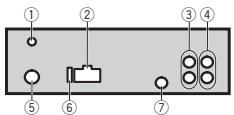
DaHHoe yCTpoIcTBO
① BxOJIaHENTHBIDAB
YTo6bI pINHMMaTb CINHaJIb DAB, NOKIOHO
HTe K yCTPOiCTBy aHTENHy DAB (ANDAB1)(nHO6pTaTeC TOnElNo).
ДлбБОЕУBEPEHORO pINeMa DAB Tpe
6yETcNcIPOB3oBaTb aHTENHy DAB cyc
TPOICTBOF qAnTOHMOrIO nITAHNA
(aKTHBHO rTNla.Pioneer peKOMEnyET Nc
NtOB3oBaTb "AN-DAB1" (npOJaTeC rOTdEh
HO. IOpTe6JIeMb ToK aHTENHBd
DOJKeH CoCTABJIb He 6OJee 100MA.
② έнэзdoшурапитаня
③ BbXo3 daaHero KaHana nnBbXo3 ca6bY- cepa
④ PerednBbIXoD
⑤ Θe3do aHTehHbI
⑥ Плавский п体现在ханнель (10 A)
⑦ BxO npOBoHOro npIbTa nCTaHcMoHOro CnypaBEnHn CyjNt dna nOdknIOeHn npOBoHOro aadantepa npIbTa nCTaHcMOHOro ynpaBHeHn (npIO6pTaTeCAOTdEhHo).
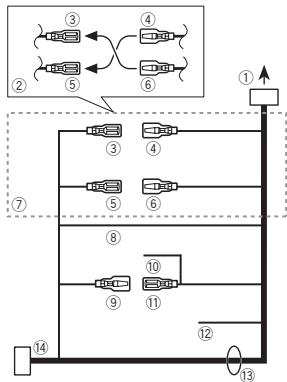
Uhyp nHTaHn
① K rhe3dy shhpya nHTAHn
2B 3aBcIMMoCTNOTTINAABOMoJIbYfHKuH N I S MOrYT OTMnAHTCB. B 3OTCM CUYae CNEJET NOkDIOHOTB4 K M S K3
③ KenTbI
PeRbHnB pRa3Bn (I mpa3Bm DOnOpHInTeBHOBO6OPyDobAHn)
④ KEnTbI
ПдкнчiteККLEММЕИСТОУНКИА NOCTOЯHRHORO TOKA 12 B.
⑤ KpacbIy
Pazbem DonopNHTeBHOro 60OpDobAHNA (Hn pe3ePBHyb p3aEB)
⑥ KpacbIy
ПовдкючITEККЕМп,НаКOTOPУЮДАETСИЗнэген(12ВиоctогногToka)рпBNKIOHENIЗAKITANIA.
⑦ PoiocoeMHInTe npOBoJa OOnHaKOBOrO UBeTa Dpyr K dpyru.
⑧ Yerhny (3a3eMneHne Ha Maccy)
YCTaHOBKa
⑨ CnHn/6eJbI
PacnonoXeHne UTeKepa pa3bema ISO ha pa3nHbIx ABtOMobInJx MOKeT OTNIHATcB. Ecn UTeKep 5peDHa3NaHeHEN JIy npAbeHHa AHTEHOH, NOCoEDHNHITE 9 K
11.Ha Dpynx ABtOMobInJx NOkKnHouTaB 9
K 11 aanePaetaCT.
10 CnHn/6eJIbI
ПлкнчiteК Кнselfe nanepnynpaBneHnry yCnHNTeMaOuHcToN (MaKc.300mA12B NOCTOHNOTOKA).
11 CnHn/6eIbI
Плдкнчite ККлмМре УрпавелпьаHTHbC 3eKTePOnpRnBOdOM (MaKc. 300 MA 12 B notoTHORNoTOKa).
② XeIyIyIeHbI
EcnicnnoB3yETcO6OpyDobAHme,MeIOeO OeFHyKUIO pIrrJyUeHNI 3bYka,DaHbN IpoBOD Heo6XDoMIOPOCoEDINHTK KNeEM Me Audio Mute DaHNOr YoCTpOCTBa. B npToTHOB Cnuaye Heo6XDoMIOpOcLEDNTB 3a TEm, YTOb6 DaHbN IpoBOEHOKTaTIOBOPAIC NIObIMn DpyTNMI PA3bEMAMi.
13 BbIObI rPOMKOrOBOpTeJIe
Bebi: PepednneBbI
BebIy/uepHbI:PepeHnJIeBbI Θ
CepbI: Ipeepn npabB
Cepb/cepHb:PepednnpaBb
3eHb: 3aHnI neBb nIi ca6Bypep
3eNbeH/epnbl:3aDnH neBb O nIa c6BaYbp eP
ΦoIeTobvB:3aDnH npabB ⊕ nIi cAb6-Bycep
IaanaohnoNtOBPHOBOCnPOH3BDEHINCAmOPOH3BOHIO NIMHERETc.
B 3abcIMMOCTO TbVbpaHNOHO mHaana30a HBOpON3BedeHn OH MOpET NmMeHnTbpcn BbIpeOp dpyrton npankn INIpDopOKnx, kAakte nprepeMeOTke bpeed/Hadaad. BbIepNtE dHaana3OH nobTOphORo BocnpOn3BedeHn Ee pe p3.
Bloxhenna nanka He Bocnpn3BoDntc.
BloxoenHbIe nAnKHe NEOCnPOn3BODrTcR,ecNbIb6paH dHaapan3oH FLD (noBTOpHOe BOCnPOn3BedeHne nAnKn). Bb6epnte npryo nnApan3oNnOBTOpHORO BOCNPOn3BedeHn.
ERROR-07, 11, 12, 17, 30
ERROR-07, 10, 11, 12, 15, 17, 30, A0
3NeKpUeCKaN INI MEXaHmEeCKa HcNpaB-HOCTb. YctaHObITE KIOU 3aXgTARHIN B NOLOXeHInE OFF,a 3aTeM-B NIOLOXeHnE ON INI pepeKIOUHTeCb Ha npTyO INCTOHIK CmTHana, a 3aTeM o6bPAHO HA pOnIrPbBaTeB KOMNaKT-DINCKOB.
ERROR-15
BCTABENIyTnEynDnK. 3aMEnITEynCK.
ERROR-23
iPod pa60taeT, Ho He no3ap8kaetc.
Y6bdIteB B OTCYCTBNN KOPOTKTOZ 3aMbKaHAna
B KaBepe I Pod (hApnMpE, ChTo KaBeB He zakat
MeKdy MeTAPNIUECKMIM pReDMeTA).POnce
I npOBepKar KaBepe YctahONITE KIOHJzAazmRanHHa
B NIoJoxeHNE OFF, a3atem - B NIoJoxeHNE ON,
NbO6O tKnIOHHTe M aHOBO nOgKnIOHTe I Pod.
ERROR-19
C60i C83n.
BbInonHnTe cneDyIOUne DeIcTBna.
- YCTAHOBITE KNHOTZAMIRAGHNA B NOIONKHEHNE OFF, A 3ATEM-B NOIONKHEHNE
-OTKIIHHTe 3aONMnHaIOUe yCTpoIcTBO USB.
- Bb6epire DpyroI nctOHnK cnHana. 3aTeM bHOBB bbl6epire USB B kaheCTBe nctOHnKmA cnHana.
C60iPod.
OTKnHHTeKa6bEsIoIPD.10ncIeNoBAnEHnHa nDaCnPHe rnaBHorO meHrOp IA3zoHoN oNDKnHOtEPOd I nepea3y3Te erO.
ERROR-23
3BOMHNAIueyCTPOCTBO USB HE TOFpOMATHPOBAHO BCHTEME FAT12,FAT16 nHN FAT32.
ZanomHaOaQeE yctroBCToB USD JONKHO bItbΦopmatropoBaH BO FAT12, FAT16 nH FAT32.
ERROR-16
UCTapeBuaB BepCn npOUIBnK iPod. O6OBHneB BepCNIO pOUIBnK iPod
C60i iPod.
OTKnHHTeKa6bEnToiPd.10ncIeNoBAnENHnHa nDaCnPiE rnaBHorO meHrO pAd3aHoBO nDkNIOHHTe iPOd nPepeaY3me erO.
STOP
B TEkyuem cncke OTCyTCTBYIOT KOMnO3n.
BbI6peTHe cIeKoC, cOeRjXauiN My3bIaJIbHbIe KOMIO3HnIe.
NOT FOUND
Komno3uHn He NaIdeHo.
3arpy3nte kcmno3nHHa iPod.
PpunoxeHna
STARTUPAPP
PnIpoKHeHne Hte e 3aYueHcE. CneJyTe 3kpaHHbM NoDckSAkM.
DononHTeIbHa nHΦopMaun
Pekomehdaunno 6oebaenncn3dennem
ДиСкИnpОнгрьВаTeЛь
INcNob3yIe ToTbKIO DaCKN, MHeOIOUne ODNH N3 CNeDyIOXN JOROTNOB.


Icnonb3yTe 12-cm dncn.
IcnoB3yTeToJIbKOobJIHbE KpyJIbIe DnCKI.
CnedyuOHe TNbI DnCKOB HnB3 HcNpOBaTb NaHdONUyCTPOKCTBe:
- Dnckn φopmata DualDisc
- 8-DM NDCK: NONBtHK INCNOb3OBaB TaKHe
- DCM C NOMOuBcH aADTepa MORYT PnIBeCTN
- K HENCPABHOCTN yCTPOBCTBA.
ДиСКН HeObIyHbIXФОМ


He pinkacaiTcB K3auncaHNOI NOBEXHOCTNI DOKOB.
Korda nckn He nncnbl3yotcr, xpaHte IN B cytnrIax.
He NpKIIeWBAIte 3STIKETOK, He NPIIWHTE I H E HAHOCHTE XMMUeCKN XBEIECTB HAIOBEXHOCTB DINCKOB.
ДиончNTКOMNAKT-ДИСКАПOTРNTЕДИСКМФΚΤΑΚΗΟΥО ΜΕΝΤΗΚΚΑΟ
KoHdEHCaZMa MOKET BVPeMeHHO yUxDUnTb pa60Ty npOnrpBbTaTeN. OCTabTe Ero dIa aIaTnauM K 60lee BbICOKI TEmpeAType IprIMepHO Ha cac.Takke ydaJInte Bnary C nDCIOB c nOMOtsuMo MRAKO TKAHi.
Bocpon3BedeHne DnCKOB MOKET bIbHeBO3-
MOKO H3-3a xapaKTeprCTN DnCKA, FOPMATA
DnCKA, pnpIOKENHn, pnI NOMOu KOTOPORo BIn-
PONIHnAbc 3aMnCB, yCNOB BoCPOB3BedeHne,
yCNOB XpAeHnE and PdyTnx FkAPTOB.
TOLCHNOTHEPOBHOCTOBOPONMYRtBuB3BtBnpbEBHBOBHCNOPTBDEENJHCAK.
MP3i (HHTePAKTHBnB MP3), mp3 PRO: He noD- dedPKBaAOTCR
DononHTeIbHaI HOpMaun
WAV
Pacunepne: .wav
PraayndIOHCTb KBAHTOBANH:8n16(LPCM),4 (MS ADPCM)
Yactotota dinckpetn3aizuno: 16 kF u do 48 kF (LPCM), 22.0 kF u n 44.1 kF u (MS ADPCM)
Yachota DmckpeTn3aun: ot 11,025 KfU do 48 KfU
Kocoptb nepedan dahnbIX: ot 16 Knt/c do 320 Knt/c, nepemehna
Apple Lossless: He noДерхиВаETС
Фальы Формата AAC, римберетен范围内 вонлайн-магаизин iTunes Store (pacшени . m4p): He noДдерхьаотса
DOnOHHTeJIbHa INHΦOpMaUa
B KahecebnaHbAHn DaiNaI NnNanKmMOTy oToBpaXbaTcBorToBko nepBbte 32 CMMBona (BKNUOaR paacUHpeHne)
MIXTRAX ABNEMTCA TROBOB MAPKOK PIONEER CORPORATION.
DOnONHrTeIbHaN HOpMaun
CepnHbI HOMeP
Ha 3TOM pncyHke noka3ana HnΦopMaun O mecae I rode I3rOToBnEY yCTpoiCTBa.

Aata n3rTOBJIeHnO6OpydoBaHn
P1-ToDn3rTOBJIeHnI
| Год | 2001 | 2002 | 2003 | 2004 | 2005 | 2006 | 2007 | 2008 | 2009 | 2010 |
| Симboл | A | B | C | D | E | F | G | H | I | J |
| Год | 2011 | 2012 | 2013 | 2014 | 2015 | 2016 | 2017 | 2018 | 2019 | 2020 |
| Симboл | К | L | M | N | O | P | Q | R | S | T |
P2-Mecu n3rTOBHeHn
| Месац | 1 | 2 | 3 | 4 | 5 | 6 | 7 | 8 | 9 | 10 | 11 | 12 |
| Симboл | A | B | C | D | E | F | G | H | I | J | K | L |
DOnolHnTeIbHa HOpMaun
TexHnueckne xapaKTepeNCTNKn
067ne
VICTOCHNIITAHNIA 14, B NOCTOHNHO TOKA (DnyctTmbl dnaanaooh ot 10,8 B Do 15,1 B)
MaKcImaJIbHaB BbIXoHnA MoUHOCTb
50BT×4
70B × 1 / 2 (dπa caebyepa)
HOMHaJIbHaB BbIXoDHaMoUHOCTb
22Br×4(ot50Γu,do 15000Γu,cymMaphoe3aheHNE K03ΦΦmUeHTA HeINHeHbX NCKaxheni 5%, Harpy3ka 4ΩДЯоoboxKa-HanOB)
ConpoTnBneHneHarpy3Kn
4Ω(DOnyCTMIMO-OT4Ωdo 8Ω)
MakcimabnaBbVbOxNbaMoUoHcBt 2.0B
KoHTy rPROMOCTN 10d5(100fU) +6,5 B (10kTf) (rPOMKOCTb-30
3KbaIaIaIep(5-nOIOChbI rpaΦnueckn 3KbaIaIaI3ep):
Uacrta. 80Γu/250Γu/800Γu/2,5kTg 8kTg
Дманэзг AmmнитиДун-хачтOTHbX xapakETPCHK 126d a(SOWaR 2.05)
Ca6Bypep (MOHO):
Yachora 50 Fu/63 Fu/80 Fu/100 Fu/ 125 Fu/160 Fu/200 Fu
Kpynt3xa hapakteprichnik 12b/okt-24b/okt
YcJIeHHe +6Dd0-24d6
Φa3a HopmaIbHa/06paTHa
PonrpBbATEb KOMnKT-DnCKOB
Cttema . AUYINOCHTemA C KOMNAKT-DKCM
IcnoB3yEmble ducck ... KomnakT-duck
OTHOUHEHNE CTHAN/uyM 94b(1kTu) (cetb IEC-A)
Yncno kaHaoB 2 (ctepeo)
Pone3naYycbTbntelbHOCTb 28MKB (OTHOWEHcE CMHnA/ uym:20d5)
OTHOUHEIN CINHAN/SHYM 62dB(cetb IEC-A)
DAB TIOHEP
Visit www.pioneer.co.uk (or www.pioneer.eu) to register your product.
Pioneer CarStereo-Pass
Please fill out immediately after purchase.
PIONEER ELECTRONICS (USA) INC.
P.O.Box 1540, Long Beach, California 90801-1540,U.S.A.
TEL: (800) 421-1404
PIONEER ELECTRONICS OF CANADA, INC.
340 Ferrier Street, Unit 2, Markham, Ontario L3R 2Z5, Canada
TEL: 1-877-283-5901
TEL: 905-479-4411
PIONEER ELECTRONICS ASIACENTRE PTE. LTD.
253 Alexandra Road, #04-01, Singapore 159936
TEL: 65-6472-7555
PIONEER ELECTRONICS AUSTRALIA PTY. LTD.
5 Arco Lane, Heatherton, Victoria, 3202 Australia
TEL: (03) 9586-6300
PIONEER ELECTRONICS DE MEXICO, S.A. de C.V.
Blvd. Manuel Avila Camacho 138 10 piso
Col.Lomas de Chapultepec, Mexico, D.F. 11000
TEL: 55-9178-4270
先锋股份有限公司
台北市内湖區瑞光路407號8樓
電話:886-(0)2-2657-3588
先鋒電子(香港)有限公司
香港九龍長沙灣道909號5樓
電話:852-2848-6488