WVCK2020 - Surveillance Camera PANASONIC - Free user manual and instructions
Find the device manual for free WVCK2020 PANASONIC in PDF.



User questions about WVCK2020 PANASONIC
0 question about this device. Answer the ones you know or ask your own.
Ask a new question about this device
Download the instructions for your Surveillance Camera in PDF format for free! Find your manual WVCK2020 - PANASONIC and take your electronic device back in hand. On this page are published all the documents necessary for the use of your device. WVCK2020 by PANASONIC.
USER MANUAL WVCK2020 PANASONIC
Operating Instructions
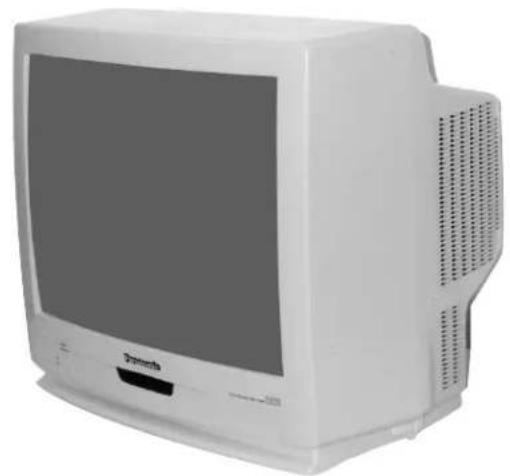
Colour Monitor
WV-CK2020
Panasonic
Before attempting to connect or operate this product, please read these instructions carefully.
ENGLISH VERSION
We declare under our sole responsibility that the product to which this declaration relates is in conformity with the standards or other normative documents following the provisions of Directives EEC/73/23 and EEC/89/336.
To ensure safe operation the three-pin plug supplied must be inserted only into a standard three-pin power point which is effectively earthed through the normal household wiring. Extension cords used with the equipment must be three-core and be correctly wired to provide connection to earth. Wrongly wired extension cords are a major cause of fatalities.
The fact that the equipment operates satisfactorily does not imply that the power point is earthed and that the installation is completely safe. For your safety, if in any doubt about the effective earthing of the power point, consult a qualified electrician.
CAUTION
RISK OF ELECTRIC SHOCK
DO NOT OPEN

CAUTION:
TO REDUCE THE RISK OF ELECTRIC SHOCK, DO NOT REMOVE COVER (OR BACK), NO USER SERVICEABLE PARTS INSIDE.
REFER SERVICING TO QUALIFIED SERVICE PERSONNEL.
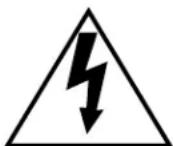
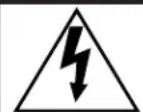
The lightning flash with arrowhead symbol, within an equilateral triangle, is informed to alert the user to the presence of uninsulated "dangerous voltage" within the product's enclosure that may be of sufficient magnitude to constitute a risk of electric shock to persons.

The exclamation point within an equilateral triangle is intended to alert the user to the presence of important operating and maintenance (servicing) instructions in the literature accompanying the appliance.
The serial number of this product may be found on the rear of the unit.
You should note the serial number of this unit in the space provided and retain this book as a permanent record of your purchase to aid identification in the event of theft.
Model No.
Serial No.
This appliance is supplied with a moulded three pin mains plug for your safety and convenience.
A 13 amp fuse is fitted in this plug.
Should the fuse need to be replaced please ensure that the replacement fuse has a rating of 13 amp and that it is approved by ASTA or BSI to BS1362.
Check for the ASTA mark or the BSI mark on the body of the fuse.
If the plug contains a removable fuse cover you must ensure that it is refitted when the fuse is replaced.
If you lose the fuse cover the plug must not be used until a replacement cover is obtained.
A replacement fuse cover can be purchased from your local Panasonic Dealer.
IF THE FITTED MOULDED PLUG IS UNSUITABLE FOR THE SOCKET OUTLET IN YOUR HOME THEN THE FUSE SHOULD BE REMOVED AND THE PLUG CUT OFF AND DISPOSED OF SAFELY. THERE IS A DANGER OF SEVERE ELECTRICAL SHOCK IF THE CUT OFF PLUG IS INSERTED INTO ANY 13 AMP SOCKET.
If a new plug is to be fitted please observe the wiring code as shown below.
If in any doubt please consult a qualified electrician.
WARNING: This apparatus must be earthed.
IMPORTANT
The wires in this mains lead are coloured in accordance with the following code.
Green-and-yellow: Earth
Blue: Neutral
Brown:Live
As the colours of the wire in the mains lead of this appliance may not correspond with the coloured markings identifying the terminals in your plug, proceed as follows.
The wire which is coloured green-and-yellow must be connected to the terminal in the plug which is marked with the letter E or by the earth symbol 12 or coloured green or green-and-yellow.
The wire which is coloured blue must be connected to the terminal in the plug which is marked with the let-
ter N or coloured black.
The wire which is coloured brown must be connected to the terminal in the plug which is marked with the letter L or coloured red.
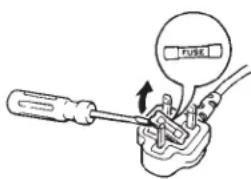
How to replace the fuse
Open the fuse compartment with
a screwdriver and replace the fuse
and fuse cover.
WARNING:
TO PREVENT FIRE OR ELECTRIC SHOCK HAZARD, DO NOT EXPOSE THIS APPLIANCE TO RAIN OR MOISTURE.
CONTENTS
PREFACE 1
FEATURES 1
PRECAUTIONS 1
MAJOR OPERATING CONTROLS AND THEIR FUNCTIONS 2
ADVANCED CONTROL OPERATION 3
CABLEINFORMATIONS 4
4 CONNECTION 4
SPECIFICATIONS 4
PREFACE
The Panasonic's Colour Monitor WV-CK2020 produces sharp colour pictures and audio output.
FEATURES
- Approx. 508.0mm (20 inches) diagonal actual visual size.
- Looping through BNC connectors for video input and output.
- Looping through RCA connectors for audio input and output.
Maximum 0.7W for speaker output.
PRECAUTIONS
- Do not block the ventilation slots.
- Do place the video monitor at least 5cm (2 inches) apart from the wall.
- Do not expose the monitor to water or moisture.
- Do not operate the monitor if it becomes wet.
- Do take immediate action if ever the monitor does become wet. Turn power off and refer servicing to qualified service personnel. Moisture can damage the monitor and also create the danger of electric shock.
- Do not drop metallic parts through slots. This action could permanently damage the monitor. Do turn power off immediately and refer servicing to qualified service personnel.
- Do not attempt to disassemble the monitor. To prevent electric shock, do not remove screws or cover. There are no user serviceable parts inside. Refer servicing to qualified service personnel.
- Do not use the monitor beyond its temperature, humidity or power source ratings.
a) Ambient temperature must not range beyond -10^ - +50^ (14^ - 122^)
b) Avoid using the monitor when humidity is above 90% .
c) The input power must be 220 - 240V AC
- Do not stack two or more sets.
If more than two monitors are used, place them less than 15cm apart. Otherwise, the monitors may produce noise on the display screen.
MAJOR OPERATING CONTROLS AND THEIR FUNCTIONS
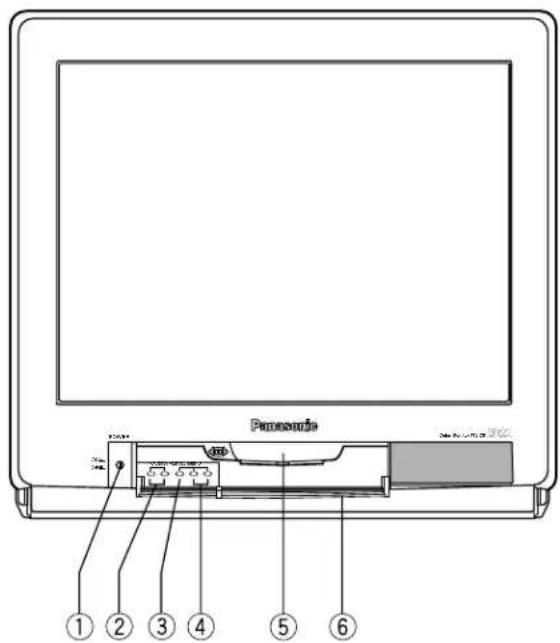
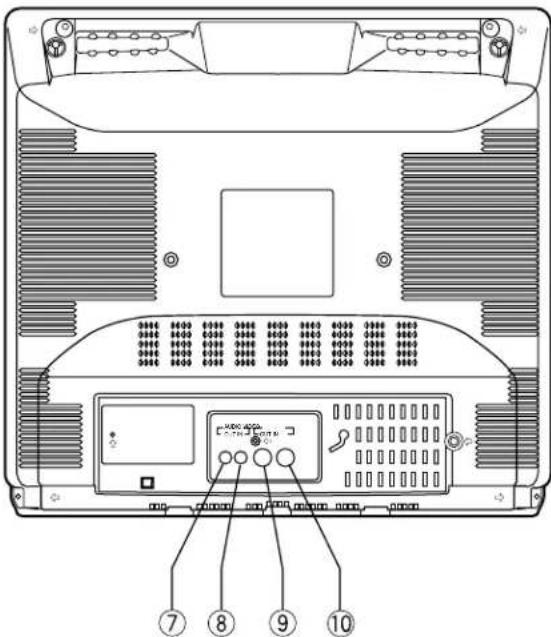
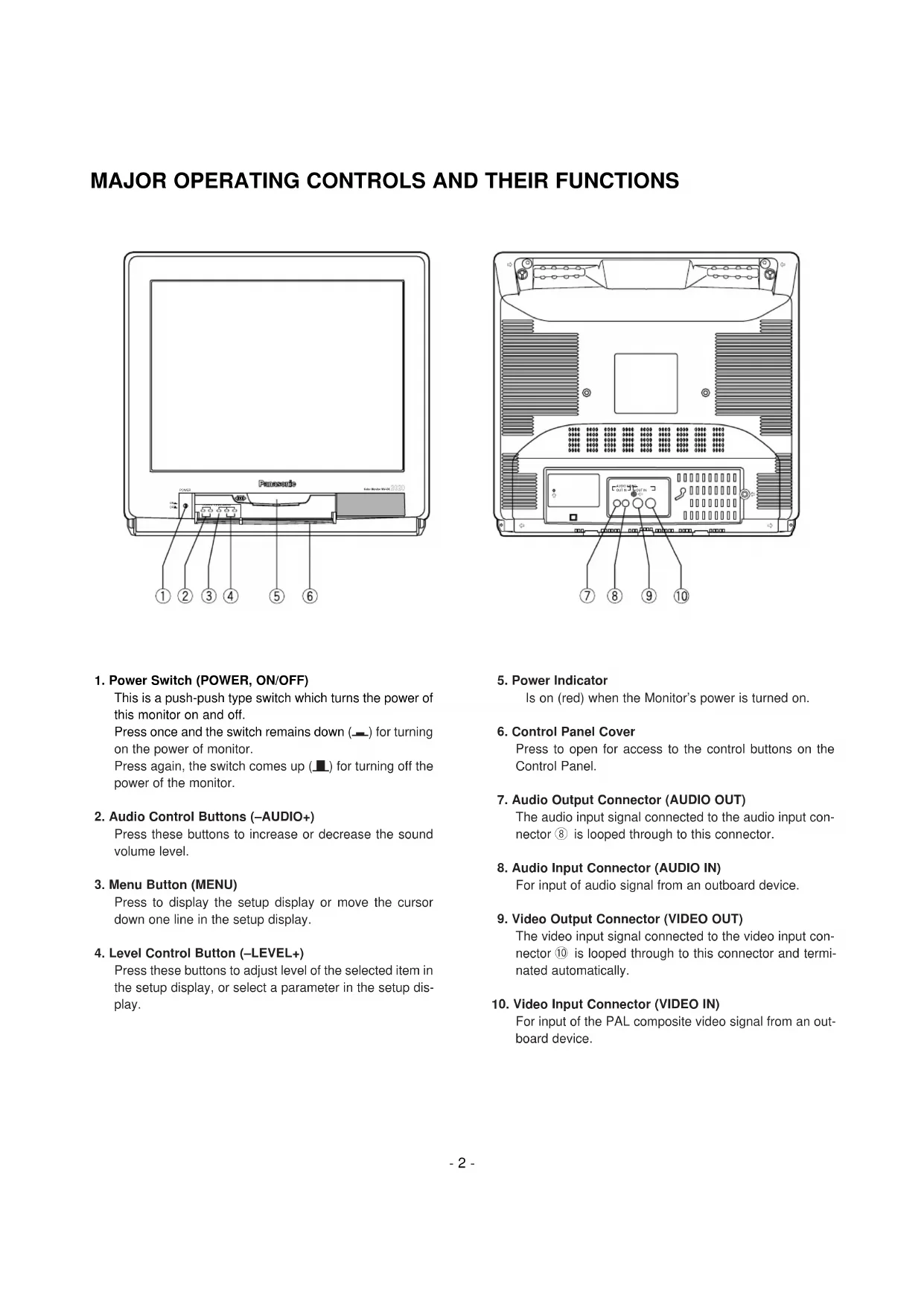
1. Power Switch (POWER, ON/OFF)
This is a push-push type switch which turns the power of this monitor on and off.
Press once and the switch remains down ( - ) for turning on the power of monitor.
Press again, the switch comes up (■) for turning off the power of the monitor.
2. Audio Control Buttons (-A U D I O + )
Press these buttons to increase or decrease the sound volume level.
3. Menu Button (MENU)
Press to display the setup display or move the cursor down one line in the setup display.
4. Level Control Button (-LEVEL+)
Press these buttons to adjust level of the selected item in the setup display, or select a parameter in the setup display.
5. Power Indicator
Is on (red) when the Monitor's power is turned on.
6. Control Panel Cover
Press to open for access to the control buttons on the Control Panel.
7. Audio Output Connector (AUDIO OUT)
The audio input signal connected to the audio input connector ⑧ is looped through to this connector.
8. Audio Input Connector (AUDIO IN)
For input of audio signal from an outboard device.
9. Video Output Connector (VIDEO OUT)
The video input signal connected to the video input connector 10 is looped through to this connector and terminated automatically.
10. Video Input Connector (VIDEO IN)
For input of the PAL composite video signal from an outboard device.
- Turn on the Power Switch of the Monitor.
- Press the Control Panel Cover to open for access to the control buttons on the Control Panel.
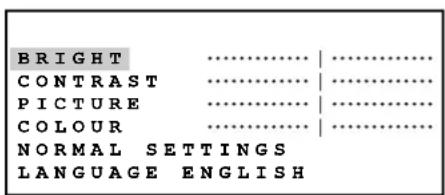
- Press the MENU button, the setup display shown below appears on the monitor screen. It will disappear automatically when no operation takes place for about 3 seconds.
- Adjustment
- Move the cursor to LANGUAGE by pressing the MENU button.
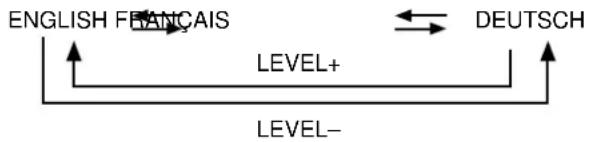
- Select the desired LANGUAGE parameter by pressing the LEVEL (-) or (+) buttons, Pressing the buttons will toggle the setup display in selected language as shown below.
- Move the cursor to BRIGHT, CONTRAST, PICTURE or COLOUR by pressing the MENU button, then adjust the level of the selected item by pressing the LEVEL (-) or (+) buttons. While adjusting the selected item level, the display changes to the indicator as shown below.
| Item Effect Indicator | ||
| BRIGHT | Darker Brighter | BRIGHT 32 |
| CONTRAST | Less More | CONTRAST 32 |
| PICTURE | Soft Sharp | PICTURE 32 |
| COLOUR | Less More | COLOUR 32 |
- To reset the monitor to the default settings, move the cursor to NORMAL SETTINGS by pressing the MENU button. Then press the LEVEL (+) button to return to the factory default settings.

- To exit the setup display, press the MENU button repeatedly until the cursor is passed over LANGUAGE or wait for about 3 seconds until it disappears.
CABLE INFORMATION
Power Cable
- Keep the Power Switch ① in the OFF position during installation.
- Connect the Power Cord to a grounded electrical outlet.
Video Cable
- Use the RG-59/U (3C-2V), RG-6/U (5C-2V), RG-11/U (7C-2V) or RG-15/U (10C-2V) coaxial cable.
-
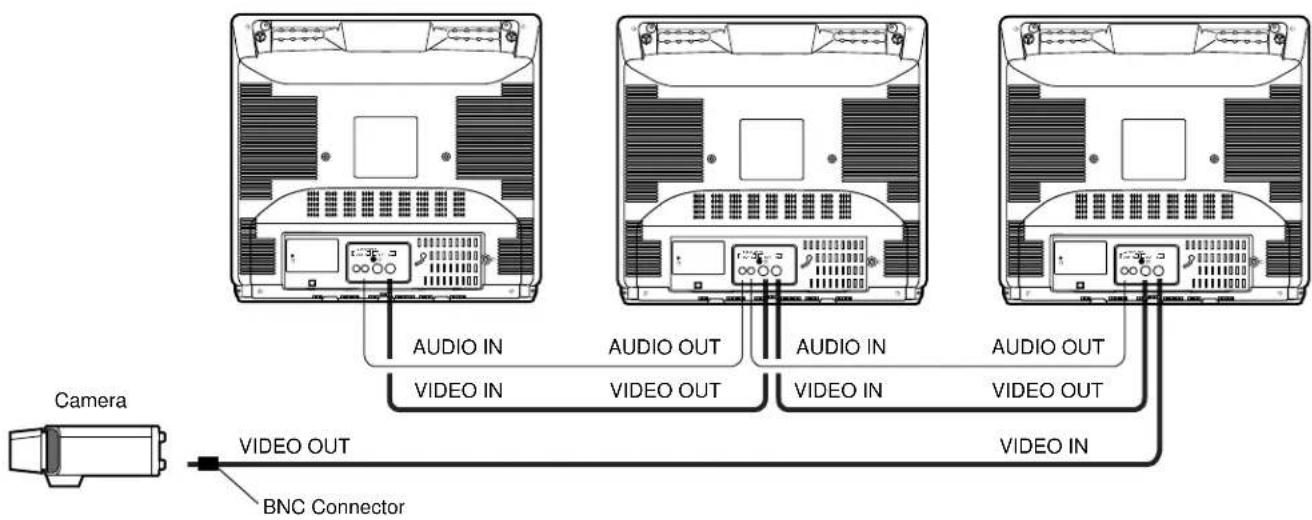
Up to 10 monitors can be hooked up in this configuration before signal loss occurs. Total cable length should not exceed 150m (500 feet).
-
Wiring Precautions:
-
Do not bend coaxial cable into a curve whose radius is smaller than 10 times of its diameter:
- Never crush or pinch the cable.
All these will change the impedance of the cable and cause poor picture quality.
Recommended maximum cable length
| Cable | RG-59/U(3C-2V) | RG-6/U(5C-2V) | RG-11/U(7C-2V) | RG-15/U(10C-2V) |
| Recommended maximum cable length | 250m(825ft) | 500m(1650ft) | 600m(1980ft) | 800m(2650ft) |
CONNECTION
SPECIFICATIONS
Power Source: 220 - 240V AC, 50Hz
Power Consumption: Approx. 80W
Screen Size: 548mm diagonal tube screen size, 90^ deflection
508mm diagonal actual visual size
Horizontal Resolution: 500TV lines at centre
Video Input: 1.0V[p-p] composite/75Ω, BNC with Auto Termination
Audio Input: -8dB/Hi-z, RCA standard jack
Speaker Output: 0.7W
Sweep Linearity: Horizontal: Less than 5%
Vertical: Less than 5%
Sweep Geometry: Less than 2%
Ambient Operating Humidity: Less than 90%
Ambient Operating Temperature: -10^ + 50^ (14°F - 122°F)
Dimensions: 509(W) x 467(H) x 480(D)mm (20-1/16"(W) x 18-6/16"(H) x 18-14/16"(D))
Weight: 21kg (46.3lbs.)
Weights and dimensions shown are approximate.
Specifications are subject to change without notice.
DEUTSCHE AUSGABE
(GERMAN VERSION)
CAUTION
RISK OF ELECTRIC SHOCK DO NOT OPEN

VORSICHT:
Dimensions: 509 (L) x 467 (H) x 480 (P) mm
Poids: 21kg
Matsushita Electric Industrial Co., Ltd.
Central P.O. Box 288, Osaka 530-91, Japan
N0499-0 TQB4C1A189 Printed in Taiwan
Gedruckt in Taiwan
Imprimé à Taiwan
Impreso en Taiwan